1
www.facebook.com/gizzmoelectronics
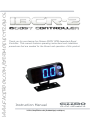
Thank you for purchasing the Gizzmo IBCR2 RPM dependent Boost
Controller. This manual contains operating instructions and installation
procedures that are needed for the fitment and operation of this product
Instruction Manual
gizzmo
ELECTRONICS
www.facebook.com/gizzmoelectronics
gizzmo
ELECTRONICS
gizzmo
IBCR2 Boost Controller
THE COMPETITION GRADE BOOST CONTROLLER WITH EVERYDAY FUNCTIONALITY.
TAKING WHAT WE KNOW FROM A DECADE OF DEVELOPMENT, AND FROM LISTENING TO
WHAT YOU END USERS WANT WE SET ABOUT PRODUCING THE IBCR2.
THE INGREDIENTS ARE SIMPLE. TAKE AN MS-IBC AND MAKE IT BETTER, FASTER AND EASIER
TO USE.
BETTER: WE HAVE ADDED THE ABILITY TO EASILY ADJUST BOOST DEPENDING ON RPM (RPM
DUTY OFFSET)
IF YOU WANT A HARD HIT OF BOOST, THEN FOR IT TO LEVEL OUT, THEN RISE AT THE TOP
END? NO PROBLEM
IF YOU HAVE BOOST CREEP THAT YOU WANT TO MINIMISE BY OPENING THE WASTEGATE AS
YOUR RPM’S RISE? NO PROBLEM
IF YOU HAVE BOOST DROP OFF THAT YOU WANT TO MINIMISE BY SHUTTING YOUR WASTEGATE
AT HIGH RPM? NO PROBLEM
FASTER: 32MHZ 16bit PROCESSOR. USING THE LATEST PROCESSOR TECHNOLOGY
MEANS THAT THIS UNIT WILL NEVER BE WANTING FOR MORE PROCESSING POWER!
THIS MEANS YOU WILL ALWAYS HAVE THE BEST, MOST ACCURATE BOOST CONTROL
EASE OF USE: SOMETIMES YOU JUST WANT TO KNOW WHAT THE UNIT IS DOING... NOW YOU
CAN! WE HAVE ENABLED THE DISPLAY TO SHOW NOT ONLY THECONVENTIONAL BOOST BUT
HAVE ALSO ADDED THE ABILITY TO SEE DUTY OR RPM DUTY OFFSET
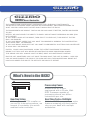
What's New in the IBCR2
Processing Power
Gizzmo’s IBCR2 is over
engineered with a 32mhz 16bit
RISC Processor capable of
processing almost one billion
instructions per min.
New Tiny Sizing
60% Lighter and 75% smaller so
you can fit it almost anywhere, we
suspect it's probably the worlds
smallest boost controller.
Real Time Tach & Shiftlight
With the IBCR2 you get these extra
features meaning you dont need to
clog up your dash with multiple
accessories.
gizzmo
ELECTRONICS
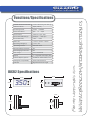
6 with individual gain settings
Maximum boost
50psi (3.5bar)
Processing Power
32mhz
Active Over Boost
5psi
Boost Control
Closed or Open loop
Boost Offset RPM Range
2000rpm ~ 9000 rpm
Boost Offset Duty
-50% ~ +50%
IBCR2 size
117mm * 57mm * 26mm
Operating Voltage (v)
11.8V - 21V
Operating Current
Less than 0.5A
Reverse Battery Protection
Yes
Overcharging Protection
Yes
Tach range
200 to 9999RPM
Display
3 * 7seg BLUE LED display KPA,
Pressure display options
PSI,BAR,DC,DUTY OFFSET,Tach
Wastegate Compatibility
Internal and External
Solenoid
High Performance Single
16bitRISC
to
50psi
IBCR2 Specifications
57mm
57mm
26mm
3.5 0
26mm
1 2 3 4 5
18mm
57mm
26mm
For the lastest news visit...
Number of boost memories
www.facebook.com/gizzmoelectronics
Functions/Specifications
gizzmo
ELECTRONICS
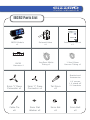
IBCR2 Parts List
Thank you for purchasing the Gizzmo
IBC-R RPM dependent Boost Controller
Boost Controller. This manual contains
operating instructions and installation
procedures that are needed for the fitting
and operation of this product
.
ELECTRONICS.LTD
IBCR2 Module
x1
1
2
3
4
Solenoid Valve
x1
Instruction Manual
x1
1mx5mm Nitrile
Tubing x1
1.2mx2.8mm
Vacuum Tubing x1
5
IBCR2
Harness x1
Bracket and
Accessories
5mm ‘Y’ Piece
Connector x1
3mm ‘Y’ Piece
Connector x1
Tail 5mm
x2
Cable Tie
x8
3mm Flat
Washer x2
3mm Nut
x2
4 X screws
1 X stand off
2 X brackets
3mm Bolt
x2
gizzmo
ELECTRONICS
Warning/Caution
Always connect the wiring exactly as described in the instruction manual.
Disconnect the negative terminal of the battery before proceeding with installation.
Do not drop or expose this unit to excessive shock.
Installation should only be performed by an experienced automotive electrician.
Keep this unit away from moisture.
Never disassemble, modify, or tamper with this unit.
Never operate this unit while driving.
Securely mount this unit away from any area that may effect driving.
This unit is only designed for 12V DC type vehicles with a negative ground supply.
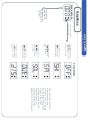
Operating Instructions
3. 4 5
Button 1
Button 2
Blue 7 Segment
LED Display Area
3. 4 5
3. 4 5
LED OFF
Notes:
By pressing both
buttons at the
same time you can
toggle between
bright and dim
display settings.
LED ON
LED Flashing
LED ON
Glossary of terms:
Hold: Push Button down for over 1 sec.
Activate: Push Button down for less than 0.5 sec.
gizzmo
ELECTRONICS
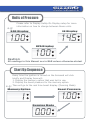
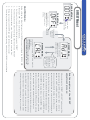
Units of Pressure
e.g:
Please refer to Display SetUp On Display setup for more
information on how to change between these units.
BAR Display
LB Display
1. 0 0
1 4.5
KPA Display
100
Caution:
All readings in this Manual are in BAR unless otherwise stated.
Start Up Sequence
e.g:
Every time the ignition is turned on the Solenoid will click
briefly and Display Area will:
1. Display the memory option that was last in use.
2. Display the boost pressure for the memory option.
Then will go to the real time boost display. (Running Mode)
Memory Option
Boost Pressure
1. 0 0
Running Mode
0. 0 0
gizzmo
ELECTRONICS
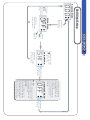
To Change Boost Memories
The screen will display ‘
’ which stands for Memory1 Option
and then it will display the boost pressure for that memory option
e.g: ‘ .
’.
0. 0 0
Running Mode on Memory 4
【Activate
Button2】
Memory 5
【Activate
Button2】
Memory 6
【Activate
Button2】
Memory 3
3
【Activate
Button2】
6
Memory 2
Memory 6
【Activate
Button2】
Memory 1
【Activate
Button2】
64
【Activate
Button2】
gizzmo
ELECTRONICS
Quick Setup Page I
1) Fit Unit as per instructions
2) Start car and allow engine to warm up thoroughly whilst doing the next few
steps
3) Press the bottom button on the IBCR2 until the no. "1" is shown on the display.
It will flash 3 things: "1(The boost level)", "Target Boost(whatever that is)",
"0.00(Real time boost level)".
4) Press and hold the top button, go through and select what units you want, what
maximum boost cut you want etc according to instructions and then exit to the
main screen
5) Press and hold the bottom button until it shows "Open" or "Closed". Put it on
closed, then press both buttons together.
6) It will now show a number (The "duty cycle") and "Duty" comes up on the
screen. Set this to 10 (the minimum).
7) You may now drive the car after/while adjusting the duty (starting at 10% e.g.
minimum to be safe) under full throttle to get an indication of what the boost will
be for the duty you have set. Keep increasing the duty in conservative steps until
the desired boost is reached. This should ideally be carried out in 3rd gear at
sufficient revs and it is recommended to try this several times times until you are
happy that the boost is consistent
NOTE: If you get duty cycle over 50 and the boost level is not increasing, then you
have either not plugged in the solenoid or you have not plumbed it in correctly!
8) Press and hold both buttons and it will show a number (The "gain") and "Gain
comes up on the screen. Set this to 0 (the minimum).
9) Press and hold both buttons and it will return to the "real time" boost level
10) Drive the car again at full throttle in 3rd or 4th gear so the IBCR2 can record
the new boost setting
11) Pull over to the side of the road in a safe place, then either turn off the ignition
then turn it back on again, OR, Press the top or bottom button change the memory
setting and then return back to setting 1. Either way you do this you will be
informed what the highest stable boost pressure achieved was by way of the
pressure flashing at you on the screen and doing this also locks in the new boost
target.
gizzmo
ELECTRONICS
Quick Setup Page II
12) Press and hold the bottom button and cycle through as before until you
enter the "Gain" setting menu. Gain is How hard/fast the boost is brought in. It
should NEVER be higher than duty cycle. In fact we have found the best setting is
below 10. If gain is too high the boost will either overshoot, or the maximum
stable (Target) boost will be unstable.If boost starts to creep of spikes too much,
drop the gain back.
13) You may need to drop the duty setting slightly if the stable boost level ends up
being a bit higher than you wanted.
14) Repeat steps 5-12 on boost levels 2 to 6 to achieve the boost levels you
require.
16) Try going flat out, quickly changing gear and stabbing the throttle again. If the
boost overswings more than you would like, press and hold the top button, scroll
through to "Spike Stop" and increase this by 10.
Repeat process until you are happy with lack of spiking.
Footnotes:
Please ensure you drive the car on boost after altering the duty.
If you turn off the ignition or switch to a different boost memory, the unit will not longer
"learn" the boost for the set memory.
If you do accidentally switch off or flick to a different memory, simply go back in, alter the
duty by 1%, then drive it straight away.
Do 2 or 3 flat out runs, then check what it has achieved.
If you get duty cycle over 50 and the boost level is not increasing, then you have either
not plugged in the solenoid, not plumbed it in correctly or have a mechanical setup not
able to achieve the desired pressure.
QUICK TIP
If you are utilising the IBCR2's Tach function, make sure you calibrate the RPM in the
OFFSET menu as you would do for the RPM dependency
【Activate Both
Button1 And
Button2】
【Activate Both
Button1 And
Button2】
Use Button1/Button2
to set the Duty Cycle
Percentage. The Setting
Range is from 10%~90%
in 1% increments.
Gain Menu
Use Button1/Button2 to
set the Gain Percentage.
The Setting Range is from
0%~100% in 1% increments.
【Activate Both
Button1 And
Button2】
The display will toggle
between scrolling “
”
and the present gain
setting.
e.g: “
”<> <>“
”
Duty Cycle Menu
The display will toggle
between scrolling “
”
which stand for duty cycle
and the present duty cycle
setting.
e.g: “
”<> <>“
”
Open/Closed
【Activate Both
Button1 And
Button2】
Hold down the bottom button2 until the screen displays ‘CLO’ and then release the button.
At this point the display will scroll ‘CLOSE’ which represents the option of closed loop boost
control; at this point you can push either button to toggle to open loop should you desire
(refer to the glossary for more information on these 2 functions). Upon the display showing
your desired setting, you must push both buttons to go through to the ‘Duty’ setting screen.
Adjusting the Duty Cycle Setting
gizzmo
ELECTRONICS
【Hold down Button2
for two seconds】
Control Menu
The display will scrolling
“
”which stand for
the Closed Loop Setting
Light Off
Adjusting the Duty Cycle Setting
Running Mode
0. 0 0
【Hold down
Button1 or Button2
for two seconds】
Use either
Button1/Button2
to select
between Closed
Loop and Open
Loop Settings.
【Hold down
Button1 or Button2
for two seconds】
ope
The display will scrolling
“
”which stand for
the Open Loop Setting
This refers to the type of control the IBCR2 will apply to your waste-gate.
If you select ‘open’ the IBCR2 will NOT attempt to correct any fluctuations or
boost creep/drop off. If you select ‘closed’ the IBCR2 will continually monitor
and make minor offsets to the duty cycle in an attempt to stabilise the boost.
(refer to the glossary for more information on these 2 functions).
Shi
Setup Menus
“Shift” which stands
for Shift light setting.
SpI
The display will scroll
SOL
The display will scroll
“
” which
stands for Spike
Stop.
The display will scroll
The display will scroll
“
” which stands
for Duty Cycle
Offset setting menu.
gizzmo
ELECTRONICS
【Hold down Button1
for two seconds】
Setup Menu
Running Mode
0. 0 0
If you want to
EXIT from the
setup menu, just
hold button 1 OR
2 for 2sec
“sol test” which
stands for solenoid
test setting .
The display will scroll
“
” which stands
for Over boost setting.
The display will scroll
“
” which stands
for Display setting
menu.
Upon entering the setup
menu you may use
buttons 1 and 2 to toggle
up and down through the
menus in the order
outlined on the left. All
these functions are
outlined on their own
pages later in this manual
Light Off
Use either
Button1/Button2
to select
between Adjust
Offset Duty and
IBCR2 Calibration Settings.
” which stands for
The Screen will display “
Calibration.
IMPORTANT!!!
The IBCR2 MUST be calibrated for the
Tach or RPM Dependency to operate
OFFSET Mode
The Screen will display
“
” which stands for
Adjust Offset Duty
OFFSET Mode
gizzmo
ELECTRONICS
【Activate Both
Button1 And
Button2】
【Hold down
Button1 for
two seconds】
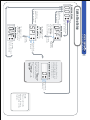
OFFSET Menu I
Running Mode
0. 0 0
Setup Menu
The display will scrol
“
” which stand
for Duty Cycle Offset
Setting.
CAUTIONS A:
Before utilizing the offset features of the IBCR2 you must calibrate the IBCR2’s RPM
4.
3.
2.
1.
The display should now return to normal running mode and you IBCR2 is now calibrated
Bring your engine to 2000RPM and push both buttons to enter
Push the bottom button once. The display should now read ‘CAL’
Push both buttons to enter. The display should now read ‘ADJUST’
Hold down the top button until the display reads ‘OFFSET’
to the engine RPM. This is a simple procedure…
5.
Brief description of the OFFEST
adjustment process:
When entering the ‘OFFSET > ADJUST’ mode you will be
presented with your RPM zones from ‘2000 – 9000’ in
addition to a ‘SET’ and ‘ESC’ option. At any of the RPM
zones you can push both buttons to enter these to
adjust the offset. When you enter a zone the display will
show the offset for that zone and may be adjusted from
-50 to +50. The IBCR2 will interpolate (average out)
from between zones e.g. if you set +5 at 6500RPM and
0 at 6000RPM the duty will be +2 at 6200RPM. Upon
having set your offset duty you must again press both
buttons to exit out back to the RPM zones. This process
can be repeated to make whatever adjustment you
need to do prior to saving. Having finished making your
adjustments you must press the top button to scroll up
to either ‘SAVE’ (should you wish to make your adjust-
ments permanent) or ‘ESC’ (should you wish to abort
without saving the adjustments you have just made).
OFFSET Menu II
Running Mode
0. 0 0
Light Off
【Hold down
Button1 for
two seconds】
Setup Menu
【Activate Both
Button1 And
Button2】
OFFSET Mode
【Activate
Button2】
【Activate
Button1】
【Activate Both
Button1 And
Button2】
【Activate
Button2】
【Activate
Button1】
【Activate
Button1】
900
Use Button1
or Button2
to select the
Engine RPM.
The Setting
Range is from
2000~ 9000
in 500 Steps.
200
RPM Menu
gizzmo
ELECTRONICS
【Activate Both
Button1 And
Button2】
【Activate
Button2】
【Activates Both Button1 And Button2】
SET = To Return to Running Mode
& Save the new Changes.
ESC = To Return to Running
Mode and Abort Changes.
【Activate Both Button1 And Button2】
Note:
Please refer to the glossary for more
information on this function.
CAUTIONS B:
Please note that offset will not be active until a memory
has been set. This means that until a memory has been
locked (refer to Memory Lock in glossary) the offsets will be
inactive. They can still be set and will still display on the
‘OFFSET’ display screen but will NOT be added/subtracted
from the final duty.
【Activate Both
Button1 And
Button2】
Use Button1 or
Button2 to select
the RPM/DUTY
Offset. The
Setting Range is
from -50 ~ +50
in 1% steps.
If holding down
button1 or
button2 the
display will
increment or
decrement
automatically.
Activate both
Button1 and
Button2 to go
back to the RPM
Menu after
making
altesations.
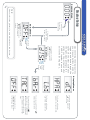
Shift light Setup
【Hold down
Button1 for
two seconds】
Setup Menu
Running Mode
0.0 0
The display
will scroll
which stands
for Duty Cycle
Off Set.
【Hold down
Button1 or Button2
for two seconds】
gizzmo
ELECTRONICS
Activate
Button2
once
Light Off
The display will scroll
“SHi” which stands for
Shift light setting.
Setup Menu
shi
【Hold down
Button1 or Button2
for two seconds】
【Activate Both
Button1 And
Button2】
Use Button1 or Button2 to
set the shiftlight RPM. The
Setting Range is from 200
to 9990 RPM.
To return the shift light to
an OFF state simply adjust
it to under 200 or over
9990rpm
Shift light Menu
off
NOTE:
The RPM is displayed in 3 digits
meaning it drops the one's. So,
as an example, 4572rpm will
be displayed as 457.
CAUTION:
When the shiftlight it set to
anything other than OFF, the
display will give preference to
the shift light over whatever
else is on the display at the
time of reaching the shift rpm.
【Activate Both
Button1 And
Button2】
gizzmo
ELECTRONICS
【Hold down Button1
for two seconds】
Spike Stop Setup
Running Mode
0. 0 0
Setup Menu
Setup Menu
The display will scroll
“
” which
stands for Spike Stop.
【Activate Both
Button1 And
Button2】
The display will
Light Off
scroll “
”
which stands for
【Activate
Duty Cycle Off Set.
Button2】
【Hold down
Button1 or Button2
for two seconds】
【Hold down
Button1 or Button2
for two seconds】
SpI
【Activate
Button2】
Setup Menu
The display will scrol
“
” which stand
for Over boost Setting.
【Hold down
Button1 or Button2
for two seconds】
Use Button1 or Button2 to
select the Spike Stop Level.
The Setting Range is from
0~100 in increments of 1.
Spike Stop Menu
0
The display will toggle
between scrolling “
”
which stands for Spike Stop.
and the Spike Stop Value
setting.
e.g: “
”<> <>
“
”
【Activate Both
Button1 And
Button2】
Note:
Please refer to the
glossary for more
information on this
function.
3 times
【Activate Both
Button1 And
Button2】
Activate
Button2
Light Off
gizzmo
ELECTRONICS
【Hold down Button1
for two seconds】
Solenoid setting on/off
Running Mode
0.0 0
Setup Menu
sol
Setup Menu
The display will
scroll “
”
which stands for
Duty Cycle Off Set.
【Hold down
Button1 or Button2
for two seconds】
The display will scroll
“Sol test” which
stands for Solenoid
test setting.
Activate button 2 (or 1)
for 2+ seconds if you
wish to exit back to
running mode
Use Button1 or Button2 to
switch the setting between
ON and OFF.
Solenoid Setting
off
Solenoid Setting
on
【Activate Both
Button1 And
Button2】
Note:
Please refer to the
glossary for more
information on this
function.
Setup Menu
The display will scroll
“
” which stands
for Over boost Setting.
Light Off
【Activate
Button1】
gizzmo
ELECTRONICS
Light Off
【Activate
Button1】
Over Boost Warning Setup
Running Mode
0. 0 0
【Hold down
Button1 for
two seconds】
The display will
scroll “
”
which stands for
Duty Cycle Off Set.
Setup Menu
【Hold down
Button1 or Button2
for two seconds】
Setup Menu
The display will scroll
“
” which stands
for Display Setting.
【Hold down
Button1 or Button2
for two seconds】
【Activate Both
Button1 And
Button2】
Light Off
Note:
Use Button1 or Button2 to
select the over Boost Level.
The Setting Range is from
0~3.5 Bar .
Warning Menu
off
Caution:
The over boost pressure will be
display in the same format as
the display pressure, and if the
overboost limit is exceeded the
IBCR2 will attempt to reduce
the boost level.
【Activate Both
Button1 And
Button2】
Please refer to the glossary for more
information on the functions on this page.
Light Off
The display will scrolling
“
” which stand for
Display Setting.
Setup Menu
Activate
Button1
AND
Button2
Upon entering the Display menu
you may use buttons 1 and 2 to
toggle up and down through the
options in the order outlined on
the right. Upon getting to the
option you like, activate button
1 AND 2 together to save and
exit to the running menu.
gizzmo
ELECTRONICS
Setup Menu
The display will scrol
“
” which stand
for Duty Cycle Offset
Setting.
【Activate
Button1】
ONCE
【Hold down
Button1 OR Button2
for two seconds】
【Hold down
Button1 for
two seconds】
Display Setup
Running Mode
0. 0 0
Note:
Please refer to the glossary for more information on this function.
Display Menus
h.p a
tac
The Screen will display
“ ” which stands for
DUTY CYCLE
The Screen will display
“H PA ” which stands for KPA.
The Screen will display
“ LB ” which stands for LB
The Screen will display “
which stands for BAR.
”
The screen will display" TAC "
which stands for TACHOMETER.
NOTE:The Tach will not display
correctly until the IBCR2 has
been calibrated in the OFFSET
menu.
The display will scroll
“
” which stands
for Duty Cycle Offset
gizzmo
ELECTRONICS
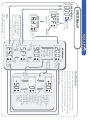
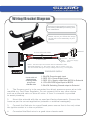
Wiring/Bracket Diagram
Disconnect the negative terminal of
the battery BEFORE proceeding with
the installation.
Please ensure you follow the image
on the left re the assembly of your
bracket
Solenoid
2 Core Solenoid Cable
3 Core Cable
YELLOW:
RED:
RPM Input
12V Power Supply
BLACK: Earth
Notes: The RPM input wire MUST GO TO A DIGITAL LOW
VOLTAGE SOURCE e.g. ECU tach output, ECU to Igniter wire etc.
This wire MUST NOT go to a high voltage source e.g. coil negative
IBCR
1
2
3
4
PRESSURE SUPPLY
5
Loom side of
IBCR2 Plug
looking INTO
plug from
IBCR2 side
1: BLACK Ground supply input
2: RED 12V+ Power Supply input
3: RED 12V+ Supply output from IBCR2 to Solenoid
4: YELLOW RPM signal input to IBCR2
5: BLACK Switching Ground output to Solenoid
1.
The Pressure port is to be connected to a direct pressure source at an inlet
manifold e.g. Fuel Press Regulator. Do not connect this to any other device
such as a solenoid valve or blow off valve. A 3mm Y connector is provided
to assist plumbing.
2.
Mount the solenoid with the un-used port facing downwards. Connect the
hoses as per the correct application (actuator or external wastegate).
3.
Connect the Red wire to a good fused power source that is live only when
the ignition switch is in the on position.
4.
Connected the Black wire to a good clean chassis earth.
gizzmo
ELECTRONICS
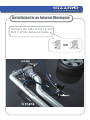
Installation for an Internal Wastegate
Connect the tails to Port 2 and
Port 3 of the Solenoid Valve.
2
3
gizzmo
ELECTRONICS
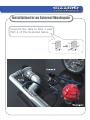
Installation for an External Wastegate
Connect the tails to Port 1 and
Port 2 of the Solenoid Valve.
1
2
gizzmo
ELECTRONICS
Glossary
Display Settings
The IBCR2 can display real time boost in Pounds, Bar, Kpa or can
display the real time Offset Duty, Tachometer OR Solenoid Duty
Cycle. All this can be set in the display menu. Example: 1bar equals
14.5lb which equals 100kpa.
Duty
This duty cycle, also referred to as the ‘Base duty’ can be adjusted
from 10% to 90% to adjust the boost level. Every vehicle has a different response to duty cycle and essentially the only way to work out
your duty cycle vs boost relationship is via trial and error starting from
a low duty cycle. A lower duty cycle equals lower boost and
typically your boost won’t start to rise till at least 20%.
Duty Offset
Offsets are expressed as a percentage and are offset from the final
duty. As an example let’s assume your duty is set to 20% and you are
achieving 16lb and at 25% you have 18lb. If you have ‘+5’ as an offset
at the 6500 RPM zone you should have 18lb at 6500RPM. It is also
worth noting that at 6250RPM and 6750RPM you should have 17lb as
the IBCR2 will interpolate (average out) from 6000RPM to 7000RPM.
Gain
Gain effects how quickly the turbo comes on boost. Ideally this would
be set as high as possible; however, if this is set too high overshooting
and boost instability can occur so there will be an ideal setting for this
that will be different from vehicle to vehicle.
gizzmo
ELECTRONICS
Glossary II
Memories
The IBCR2 has 6 memories in total and can fast switch between
these. This means that when you select the next memory the
boost will change immediately which is an advantage when
changing memories whilst racing. Each memory has its own gain
setting (refer to ‘gain’ in this glossary) and control strategy
setting (refer to Open/Closed in this glossary).
Memory Lock
This is a new and important feature for the IBCR2. Once you
have adjusted a memory setting be it duty or gain and have then
driven the car under load for the IBCR2 to record the boost to
associate to that duty, the memory will not be locked until you
either change the memory or turn off and restart the vehicle. The
memory lock is important as until it is locked the duty offset will
not become active. The reasoning behind this is that if the duty
offset was set to ‘+10’ for example, the boost will be higher and
as such we do not want the IBCR2 to associate this higher boost
setting to the lower duty that the +10 offset was added to.
Closed Loop
This refers to the type of control strategy that the IBCR2 will
have on your waste-gate.
Closed loop means that the IBCR2 will continually monitor and
make minor offsets to the duty cycle in an attempt to stabilise the
boost.
gizzmo
ELECTRONICS
Glossary III
Over Boost warning
Via the menus, you can set an over boost pressure to flash the display
and attempt to drop the boost should your vehicle exceed this set
pressure limit.
Spike Stop
A unique feature of the IBCR2 is ‘Spike stop’.
As with everything, wastegates take time to open and in a
situation where they are required to react quickly (flat shifting gears at
high revs, off/on throttle quickly whilst on boost at high rpm) this
sometimes results in a boost spike. Spike stop largely eliminates this
and can be adjusted from 0 to 100 with 100 being suitable for vehicles
with a large amount of boost spiking and 0 suiting cars with no spiking
issues. Ideally you want to keep this setting as low as possible because
the higher this is, the longer it will take to return to your desired boost
setting.
Solenoid Supervisor
The IBCR2 constantly monitors the boost controller solenoid output
channel to ensure that there are no malfunctions and should anything
go wrong the IBCR2 IMMEDIATELY displays ‘SOL’ to warn you of a
fault with your solenoid, solenoid loom or output driver. The IBCR2
will also briefly pulse the solenoid whenever the key is turned on in
order to ensure it is fully operational. If for any reason the 'SOL'
displays without having a solenoid/loom fault it can be switched off
via the SOL TEST in the setup menu
gizzmo
ELECTRONICS
About The Warranty
Gizzmo Electronics Limited
Limited Warranties Statement
Effective 1 January 2003
All Products manufactured or distributed by Gizzmo
Electronics are subject to the following Limited Express
Warranties, and no others:
For a period of one year from and after the date of
purchase of a new Gizzmo Electronics product, Gizzmo
Electronics warranties and guarantees only to the original
purchase/user that such a product will be free from defects
of material and workmanship in the manufacturing process.
Gizzmo Electronics, at its sole option, shall replace the
defective product. This express warranty shall be
inapplicable to any product not properly installed and
properly used by the purchaser/user or to any product
damaged or impaired be external forces. This is the extent
of Warranties available on this product. Gizzmo Electronics
shall have no liability whatsoever for consequential
damages following from the use of any defective product or
by reason the failure of any product. Gizzmo Electronics
specifically disclaims and disavows all other warranties,
express or implied including, without limitation, all
Warranties of fitness for a particular propose, Warranties of
Description, Warranties of Merchantability, Trade Usage or
Warranties of Trade Usage, The above warranty is valid in
New Zealand, Australia,UK and the America’s only as
Gizzmo Electronics does not offer an international warranty
outside of these regions.