1
Caring for the TV
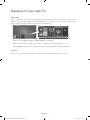
-- If a sticker was attached to the TV screen, some debris can remain after you remove the
sticker. Please clean the debris off before watching TV.
-- The exterior and screen of the product can get scratched during cleaning. Be sure to wipe
the exterior and screen carefully using a soft cloth to prevent scratches.
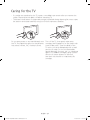
Do not spray water or any liquid directly onto Turn off the TV, then gently wipe away
the TV. Any liquid that goes into the product smudges and fingerprints on the screen with
may cause a failure, fire, or electric shock.
a micro-fiber cloth. Clean the body of the
TV with a soft cloth dampened with a small
amount of water. Do not use flammable
liquids (benzene, thinners, etc.) or a cleaning
agent. For stubborn smudges, spray a small
amount of screen cleaner on the cloth,
and then use the cloth to wipe away the
smudges.
English - 26
[UJ5500-XU]BN68-07047S-00ENG.indb 26
2015-03-27 오후 2:27:35