1
1-255
Auto Run
www.lc-group.ca
LCG-WF-5C
PAR
5 IN 1
BATTERY
www.lc-group.ca
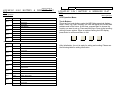
CH1
CH2
CH3
CH4
CH5
VALUE
0
FUNCTION
No Function
1-255
Red Dimmer
0
No Function
1-255
Green Dimmer
0
No Function
1-255
Blue Dimmer
0
No Function
1-255
0
Amber Dimmer
No Function
1-255
White Dimmer
VALUE
FUNCTION
0
No Function
1-255
Red Dimmer
0
No Function
1-255
Green Dimmer
9CH Mode
CH
CH1
CH2
CH3
0
No Function
1-255
Blue Dimmer
0
No Function
1-255
Amber Dimmer
0
1-255
No Function
White Dimmer
0
No Function
1-255
RGBAW Dimmer
0
No Function
CH4
CH5
CH6
CH7
CH8
CH9
WIRELESS
FLAT
4
LCG-WF-5C
PAR
5 IN 1
BATTERY
&
WIRELESS
FLAT
www.lc-group.ca
5CH Mode
CH
&
1-255
Strobe, Slow to Fast
0
No Function
1-255
Auto, Slow to Fast
0
No Function
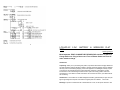
LED Operation Menu:
Touch Buttons
There are four touch buttons under the LED Alpha-numerical display:
Menu, Down, Up, Enter. Normally, the LED will display the current DMX
address code of the fixture. At this time, presses Menu to choose the
function you want to set up. Press and hold Up or Down to fast scrolling
within the menu options. When an options flashing the LED display,
press Enter to confirm and Menu to exit.
Menu
down
up
Enter
After initialization, the unit is ready for setting and working. Please see
the following table for setting information