1
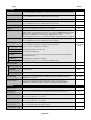
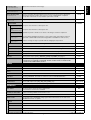
Setting
Default
PICTURE
BRIGHTNESS
Adjusts the overall image and background brightness. Press + or - to adjust.
Note: When AMBIENT1 or AMBIENT2 is selected in picture mode, this function cannot changed.
70
CONTRAST
Adjusts the image brightness in relationship to the background. Press + or - to adjust.
Note: The sRGB picture mode is standard and cannot be changed.
50
SHARPNESS
Adjusts the crispness of the image. Press + or - to adjust.
BLACK LEVEL
Adjusts the image brightness in relationship to the background. Press + or - to adjust.
Note: The sRGB picture mode is standard and cannot be changed.
50
TINT
Adjusts the tint of the screen. Press + or - to adjust.
50
COLOR
Adjusts the color depth of the screen. Press + or - to adjust.
COLOR TEMPERATURE
Adjusts the color temperature of the entire screen. A low color temperature will make the screen
reddish. A high color temperature will make the screen bluish. If TEMPERATURE needs further
adjustment, the individual R/ G/ B/ levels of the white point can be adjusted. To adjust the
R/G/B levels, CUSTOM must be showing as the COLOR TEMP selection.
Note: The sRGB picture mode is set to a predefined 6500 K standard and cannot be changed.
COLOR CONTROL
Adjusts the levels of the Red, Yellow, Green, Cyan, Blue, Magenta and Saturation.
Note: The sRGB picture mode is standard and cannot be changed.
GAMMA SELECTION
Select a display gamma for best picture quality.
Note: The sRGB picture mode is standard and cannot be changed.
50*2
50*2
10000K
0
NATIVE*2
(except sRGB
setting)
NATIVE
Gamma correction is handled by the LCD panel.
2.2
Typical display gamma for use with a PC.
2.4
Good for video (TV, DVD, etc.)
S GAMMA
Special gamma for certain types of movies. Raises the dark parts and lowers the light parts
of the image (S-Curve).
DICOM SIM.
DICOM GSDF curve simulated for LCD type.
PROGRAMMABLE
A programmable gamma curve can be loaded using NEC software.
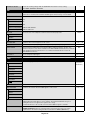
MOVIE SETTINGS
NOISE REDUCTION
6*2
Adjusts the amount of noise reduction. Press + or - to adjust.
TV, VIDEO1, VIDEO2, S-VIDEO inputs only
FILM MODE
AUTO*2
Selects Film mode.
HDMI, DVD/HD1, DVD/HD2, SCART, VIDEO1, VIDEO2, S-VIDEO, TV* inputs only
ADAPTIVE CONTRAST Sets the level of adjustment for dynamic contrast.
OFF
HDMI, DVD/HD1, DVD/HD2, SCART, VIDEO1, VIDEO2, S-VIDEO, TV* inputs only
PICTURE MODE
Selects picture mode, [HIGHBRIGHT], [STANDARD], [sRGB], [CINEMA], [AMBIENT1] or
[AMBIENT2]. See page 18.
STANDARD
PICTURE RESET
Resets the following settings within the PICTURE menu back to factory setting:
BRIGHTNESS, CONTRAST, SHARPNESS, BLACK LEVEL, TINT, COLOR, COLOR
TEMPERATURE, COLOR CONTROL , GAMMA SELECTION, MOVIE SETTINGS.
-
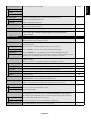
Automatically adjusts Screen Size, H position, V position, Clock, Clock Phase and White Level.
-
ADJUST
AUTO SETUP
VGA, RGB/HV inputs only
AUTO ADJUST
H Position, V Position and Clock Phase are adjusted automatically upon power on.
OFF
VGA, RGB/HV inputs only
H POSITION
Controls the horizontal position of the image within the Display area of the LCD.
Press + to move right. Press - to move left.
-
V POSITION
Controls the vertical position of the image within the Display area of the LCD.
Press + to move up. Press - to move down.
-
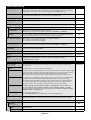
CLOCK
Press + to expand the width of the image on the right of the screen.
Press - to narrow the width of the image on the left.
-
VGA, RGB/HV inputs only
CLOCK PHASE
Adjusts the visual “noise” on the image.
-
VGA, RGB/HV, DVD/HD1, DVD/HD2, SCART inputs only
*: The product you purchased may not have this feature.
*2: depend on signal input
English-20