1
DIGIspy
4
USER MANUAL
Menus
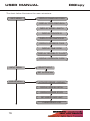
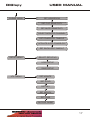
Menus serve for setting parameters and displaying advanced information.
Menus are displayed in the menu area.
To access a menu, press the NEXT key until the menu area displays Enter
<name> menu? Then, press the UP key. Now, press the NEXT key until the
name of the parameter you wish to change is displayed.
Pressing the UP key cycles through the available parameter values, and pressing the DOWN key cycles in the opposite direction. The change takes place immediately.
To leave the menu, either cycle through the parameters using NEXT until Leave
<name> menu? is displayed and press YES or escape directly from the menu using the POWER/ESC key.
If you decide not to change a parameter, set it back to the value that was current before you entered the menu.
The unit remembers the menu that was used last. If you press the NEXT key to
enter the menu, the most recently used menu is displayed.
15