1
F E AT U R E S - O P E R AT I O N S
Fan Only Setting
Press the Fan Only Button to run the heater without heat
output. The Stay On icon will appear on the LCD Display.
– HIGH Heat Setting
Press the Max Heat Button to run the heater continuously
at 1500W. The Stay On icon will appear on the LCD Display.
– LOW Heat Setting (if applicable)
Press the Low Heat Button to run the heater continuously
at 750W. The Stay On icon will appear on the LCD Display.
Heat & $ave™ Setting (if applicable)
Press the Heat & $ave™ Button to activate the energy
Figure 7
efficient Heat & $ave™ Mode. The heater will now cycle
between high (at 1500W) and low (at 750W) heat settings to
provide heat. The Stay On icon will appear on the LCD Display.
Thermostat Control
Your heater is equipped with a digital thermostat that allows
you to set your heater to a precise comfort level by turning
the Dial Wheel on the control panel or pressing the arrow
buttons on the remote control (if applicable):
NOTE: If your heater comes with a Thermostat Button ( )
on the control panel or remote control (if applicable), you
may either press the button or turn the Dial Wheel to
activate. The Thermostat icon ( ) will appear on the LCD
Display.
To preset a precise comfort level, turn the Dial Wheel to
adjust the temperature from 30°C to 18°C (Default:
“30”). The LCD Display will show the selected temperature
reading. When the preset temperature is reached, the heater
will shut off and cool down for 15 seconds. When the room
temperature drops below the preset temperature, the heater
will automatically turn on again to maintain the preset
temperature level.
FrostProtect™ Setting
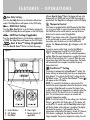
E
D
A Control Buttons
B LCD Display
C Dial Wheel
C
B
A
D Power Light
E Remote Control (if
applicable)
Your heater is equipped with a FrostProtect™ setting. The
heater will turn on automatically when the room temperature
drops below 5°C. To activate FrostProtect™ setting, turn the
Dial Wheel to show “5” and the FrostProtect™ icon ( )
will appear on the LCD Display.
NOTE: It is normal for the heater to cycle on and off to
maintain the preset temperature. Raise the thermostat setting
or operate in Stay On mode to prevent the heater from
cycling. When the preset temperature is reached or when the
heater is shut off, the fan will run for 15 seconds without
heat. This cool down process ensures an accurate and
consistent temperature reading.
NOTE: To shut the heater off at any setting, press the Power
Button ( ) until the LCD Display goes off. The heater will
cool down for 15 seconds, and the Fan Only indicator light
will blink in Amber until cool down is completed. The digital
thermostat has memory; it will remember the last
temperature setting before the heater is turned off. However,
if the heater is unplugged, the digital thermostat will no
longer remember the previous temperature setting. You will