1
O pe r a tio n - T he Fro nt Panel Di spl ay Int er face
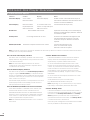
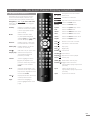
7. 1 0 Handset F unc tio ns
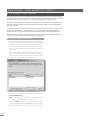
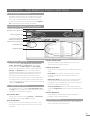
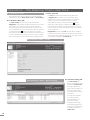
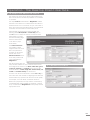
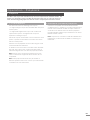
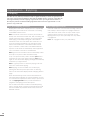
Navigating around and selecting options
in the Front Panel Display Interface can
be done with seven primary handset keys:
Navigation (3456), ok, back and home.
These keys are highlighted in the diagram
annotations.
Standby:
Mode:
Numeric:
Switches to standby or wakes
hardware. Ensure the handset
is in the appropriate mode
(hdd for HDX).
Switches handset mode
to preamplifier/integrated
amplifier (pre), CD player (cd),
or hard disk player (hdd).
Enable numeric or text entry
for track selection or search.
Delete (del):Enables deletion of the last
numeric or text entry.
Shift ( ):
Shifts text entry to upper case.
Output (out):Selects local outputs on
appropriately equipped
products (not HDX).
Volume:
Volume up (5) and down
(6) for preamplifier or AV
processor. These keys function
regardless of the handset
mode.
Mute:
Mutes the preamplifier or AV
processor audio output. These
keys function regardless of the
the handset mode.
Info ( ):
isplays information about the
D
currently selected item.
Page: Selects the next (6) or
Navigation: Navigates around and selects
(3456) menu icons.
ok:
Confirms icon selection.
Back:
Steps back one interface menu.
Home:
Selects the Home menu.
Browse:
Selects the Browse menu.
System:
Selects the System Setup menu.
Find:
Selects the Find menu.
Album:
Selects the Album browse menu.
Artist:
Selects the Artist browse menu.
Genre:
Selects the Genre browse menu.
Playlist:
Selects the Playlist menu.
Start ( ):
Returns to the start of a track.
End ( ):
Advances to the next track.
Stop ( ):
Stops play.
Play ( ):
Begins play.
Rewind ( ): Fast reverse.
Forward ( ): Fast forward.
Repeat (
): Repeats the current playlist.
Pause ( ): Pauses play.
Shuffle (
): Randomises order of play.
Red Dot ( ):Triggers audio record on
appropriately equipped products
(not HDX).
Input:
Selects audio inputs on
appropriately equipped products
(not HDX).
Open:
Opens the CD drawer.
previous (5) interface menu
page.
E15