1
A Smart Manufacturing Execution System
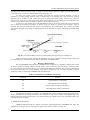
Fig. 19. NIRMAN FIS Companion
VI.
ADDITIONAL FEATURES
Android Application of NIRMAN FIS incorporates many other features like SMS Notifications, Voice
Recognition, Adding a user account, etc.
A. Configure Device Address
NIRMAN FIS Android application is connected with hardware using Bluetooth module. In order to
establish a connection, Media Access Control (MAC) address of the bluetooth device needs to be configured by
the application. The MAC address of the targeted device after encrypting in a QR code will be scanned by the
application to establish a connection.
Using this feature, an old bluetooth device can be easily replaced with new one without any major
alterations in the existing system. Configure Device Address is available on the login screen of android
application as shown in Fig. 19.
B. Adding a User Account
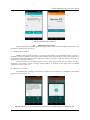
The administrator or manager of the factory can add a user account for his subordinate in the android
application as shown in Fig. 20.
Fig. 20. Adding a User Account and Voice Recognition in Android Application of NIRMAN FIS.
DOI: 10.9790/1676-10331428
www.iosrjournals.org
26 | Page