1
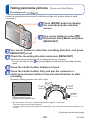
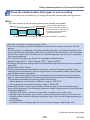
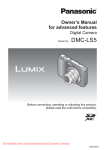
Owner’s Manual
for advanced features
Digital Camera
Model No.
DMC-F5
Please read these instructions carefully before using
this product, and save this manual for future use.
Register online at
www.panasonic.com/register
(U.S. customers only)
VQT4W38
M1212KZ0
Contents
Before use
Before use ......................................................................................................................... 5
Standard Accessories ...................................................................................................... 7
Names and Functions of Main Parts............................................................................... 8
Cursor button ....................................................................................................................................10
Preparations
Charging battery ..............................................................................................................11
Inserting the battery ..........................................................................................................................12
Charging the battery..........................................................................................................................13
Remaining battery .............................................................................................................................15
Guidelines for number of recordable pictures and operating time ....................................................15
Inserting and removing the card (optional) ................................................................. 16
About built-in memory/cards......................................................................................... 17
Saving your pictures (cards and built-in memory) .............................................................................17
Recording capacity guidelines (pictures/recording time)...................................................................18
Setting the clock ............................................................................................................. 19
Changing time setting .......................................................................................................................20
Basics
Sequence of operations ................................................................................................. 21
Taking pictures with automatic settings [Auto Scene Mode].................................... 24
Using flash ........................................................................................................................................25
Automatic Scene Detection ...............................................................................................................25
[Auto Scene Mode] restrictions .........................................................................................................26
Taking pictures with your own settings [Normal Picture] Mode ............................... 27
Adjusting focus .............................................................................................................. 28
Recording motion pictures ............................................................................................ 29
Viewing your pictures [Normal Play] ........................................................................... 31
Zooming in and viewing “Playback Zoom” ........................................................................................32
Viewing a list of pictures “Multi Playback” .........................................................................................32
Searching pictures by their recording date “Calendar”......................................................................33
Viewing motion pictures ....................................................................................................................34
Deleting pictures ............................................................................................................ 35
To delete multiple (up to 50)/To delete all pictures ............................................................................36
Setting the menu ............................................................................................................ 37
Menu type .........................................................................................................................................38
-2-
VQT4W38
Contents
Using the [Setup] menu ................................................................................................. 39
[Clock Set] .........................................................................................................................................39
[Beep] ................................................................................................................................................39
[Volume] ............................................................................................................................................39
[Video Rec Area] ...............................................................................................................................39
[Auto Power Off] ................................................................................................................................39
[Light Freq.] .......................................................................................................................................40
[Auto Review] ....................................................................................................................................40
[Reset] ...............................................................................................................................................40
[Version Disp.] ...................................................................................................................................40
[Format] .............................................................................................................................................41
[Language] ........................................................................................................................................41
Application (Record)
Changing recording information display ..................................................................... 42
Using Zoom ..................................................................................................................... 43
Zoom types and use..........................................................................................................................44
Taking pictures with flash.............................................................................................. 45
Taking pictures with self-timer ...................................................................................... 47
Taking pictures with Exposure Compensation............................................................ 48
Taking panorama pictures [Panorama Shot] Mode .................................................... 49
Taking pictures according to the scene [Scene Mode].............................................. 52
[Portrait].............................................................................................................................................53
[Scenery] ...........................................................................................................................................53
[Sports] ..............................................................................................................................................53
[Night Portrait] ...................................................................................................................................54
[Night Scenery]..................................................................................................................................54
[Food] ................................................................................................................................................54
[Baby] ................................................................................................................................................55
[Sunset] .............................................................................................................................................55
[High Sens.].......................................................................................................................................55
Using the [Rec] menu..................................................................................................... 56
[Picture Size] .....................................................................................................................................56
[Sensitivity] ........................................................................................................................................57
[White Balance] .................................................................................................................................58
[AF Mode]..........................................................................................................................................59
[Digital Zoom] ....................................................................................................................................60
[Burst] ................................................................................................................................................60
[Color Mode]......................................................................................................................................61
[Red-Eye Removal] ...........................................................................................................................61
[Date Stamp] .....................................................................................................................................62
[Clock Set] .........................................................................................................................................62
Using the [Motion Picture] menu .................................................................................. 63
[Rec Quality] .....................................................................................................................................63
-3-
VQT4W38
Contents
Application (View)
Different playback methods [Playback Mode] ............................................................ 64
[Slide Show] ......................................................................................................................................65
[Category Selection] ..........................................................................................................................66
[Calendar]..........................................................................................................................................66
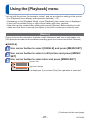
Using the [Playback] menu............................................................................................ 67
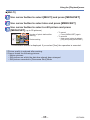
[Resize] .............................................................................................................................................67
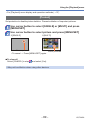
[Protect] .............................................................................................................................................69
[Copy] ................................................................................................................................................70
Connecting with other devices
Using with your PC......................................................................................................... 71
Using the supplied software ..............................................................................................................72
Installing supplied software (PHOTOfunSTUDIO) ............................................................................73
Copying still pictures and motion pictures .........................................................................................74
Printing ............................................................................................................................ 76
Printing multiple pictures ...................................................................................................................77
Making print settings on the camera .................................................................................................78
Printing with date and text .................................................................................................................79
Others
List of LCD monitor displays......................................................................................... 80
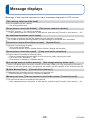
Message displays ........................................................................................................... 82
Q&A Troubleshooting ................................................................................................... 84
Usage cautions and notes ............................................................................................. 90
■How to read this document
●Recording mode icons
Recording mode:
Available recording modes
Unavailable recording modes
-4-
VQT4W38
Before use
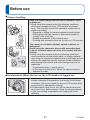
■Camera handling
Keep the camera away from excessive vibration, force,
or pressure.
●Avoid using the camera under the following conditions,
which may damage the lens, LCD monitor, or camera
body. This may also cause the camera to malfunction or
prevent recording.
• Dropping or hitting the camera against a hard surface
• Sitting down with the camera in your pants pocket or
forcing it into a full bag
• Adding accessories to the camera strap
• Pushing with excessive force on the lens or LCD monitor
The camera is not dust resistant, splash resistant, or
waterproof.
Avoid using the camera in places with excessive dust
or sand, or where water can come into contact with the
camera.
●Avoid using the camera under the following conditions,
which present a risk that sand, water, or foreign material
may enter the camera through the lens or openings around
buttons. Be especially careful, because these conditions
may damage the camera and such damage may not be
repairable.
• In extremely dusty or sandy places
• In the rain or by the shore, where the camera may be
exposed to water
■Condensation (When the lens or the LCD monitor is fogged up)
●Condensation may occur when the camera is exposed to
sudden changes of temperature or humidity. Avoid these
conditions, which may make the lens or LCD monitor dirty,
cause mold, or damage the camera.
●If condensation does occur, turn off the camera and wait
about two hours before using it. Once the camera adjusts
to the surrounding temperature, the fogging will clear
naturally.
-5-
VQT4W38
Before use
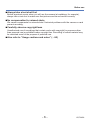
■Always take a test shot first
Before important events when you will use the camera (at weddings, for example),
always take a test shot to make sure that pictures and sound record correctly.
■No compensation for missed shots
We cannot compensate for missed shots if technical problems with the camera or card
prevent recording.
■Carefully observe copyright laws
Unauthorized use of recordings that contain works with copyright for purposes other
than personal use is prohibited under copyright law. Recording of certain material may
be restricted even for the purpose of personal use.
■Also refer to “Usage cautions and notes” (→90)
-6-
VQT4W38
Standard Accessories
Check that all the accessories are supplied before using the camera.
●The accessories and their shape may differ depending on the country or area where
the camera was purchased.
For details on the accessories, refer to Basic Owner’s Manual.
●Battery Pack is indicated as battery pack or battery in the text.
●SD Memory Card, SDHC Memory Card and SDXC Memory Card are indicated as
card in the text.
●Please dispose of all packaging appropriately.
●Keep small parts in a safe place out of the reach of children.
■ Optional accessories
• Cards are optional. You can record or play back pictures on the built-in memory
when you are not using a card.
• If any accessories are lost, customers in the USA and Puerto Rico should contact
Panasonic’s parts department at 1-800-833-9626 and customers in Canada should
contact 1-800-99-LUMIX (1-800-995-8649) for further information about obtaining
replacement parts.
-7-
VQT4W38
Names and Functions of Main Parts
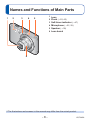
1
2
3
4
1 Lens
2 Flash (→22, 45)
3 Self-timer indicator (→47)
4 Microphone (→22, 29)
5
5 Speaker (→39)
6 Lens barrel
6
●The illustrations and screens in this manual may differ from the actual product.
-8-
VQT4W38
Names and Functions of Main Parts
7
8
9
7 LCD monitor (→42, 80, 81)
8 Camera [ON/OFF] button (→19, 21)
Use this to turn the camera on and
off.
9 Shutter button (→22, 24)
Use this to focus and record still
pictures.
10 [DIGITAL] socket (→ 74, 76)
This socket is also used when
charging the battery. (→11)
• When connecting the USB
connection cable (supplied)
Insert the plug until the terminal
part can no longer be seen. The
plug will go in easier if you open
the terminal cover wide.
11 Hand strap eyelet
We recommend using the supplied
hand strap to avoid dropping the
camera.
10
11
12
13
12 Tripod Mount (→92)
Do not attach to a tripod with a
5.5 mm (0.22”) or longer screw.
Doing so may damage this unit.
13 Card/Battery door (→12, 16)
●Some methods of holding the camera may block the speaker, making it difficult to
hear the beep, etc.
-9-
VQT4W38
Names and Functions of Main Parts
14
17
15
16
18 19 20
14 [MODE] button (→21)
15 Zoom button (→43)
Operate this when zooming in on a
distant subject to record it larger.
16 Motion picture button (→22, 29)
Record motion pictures.
17 Cursor button (→below)
18 Playback button (→23, 31, 64)
Use this to switch to playback mode.
19 [ ] / [ ] button
In the playback mode:
Pictures are deleted. (→35)
During menu operations:
Previous screen is restored. (→37)
20 Charging lamp
Cursor button
[MENU/SET]
Up cursor button ( )
Use this to display the menus, enter
the settings, etc. (→37)
• Exposure Compensation. (→48)
Left cursor button ( )
Right cursor button ( )
• Self-timer (→47)
• Flash (→45)
Down cursor button ( )
• Changing information display (→42)
●In this manual, the button that is used is indicated by
- 10 -
.
VQT4W38
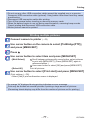
Charging battery
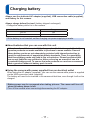
Always use the dedicated AC adaptor (supplied), USB connection cable (supplied),
and battery for this camera.
Always charge before first use! (battery shipped uncharged)
• Charge the battery while it is in the camera.
Camera status
Turn off
Charge
Yes
Turn on
No
●If the battery is not inserted, neither charging nor power supplying is made.
■About batteries that you can use with this unit
It has been found that counterfeit battery packs which look very similar to the
genuine products are made available to purchase in some markets. Some of
these battery packs are not adequately protected with internal protection to
meet the requirements of appropriate safety standards. There is a possibility
that these battery packs may lead to fire or explosion. Please be advised that
we are not liable for any accident or failure occurring as a result of use of a
counterfeit battery pack. To ensure that safe products are used we recommend
that a genuine Panasonic battery pack is used.
■Using the camera with power supplied from an electrical outlet
When using the AC adaptor (supplied), you can use the camera while power is supplied
via the USB connection cable (supplied).
The battery will need to be inserted in the camera at that time, even though it will not be
charged.
●Battery power may be consumed when taking pictures. The camera will turn off
when no battery power is left.
●Turn off the camera when connecting/disconnecting the AC adaptor.
- 11 -
VQT4W38
Charging battery
Inserting the battery
To charge the battery, insert it into the camera.
Turn off the camera and slide
the card/battery door out ( )
before opening the door ( ) as
illustrated
Insert the battery all the way
• Make sure to insert the battery in the correct
orientation.
• Insert all the way firmly until a locking sound is
heard, and check that the lever is hooked over
the battery.
Close the card/battery door and
slide the door in until you hear
a locking sound
■To remove battery
Move the lever in the card/battery
compartment in the direction of the arrow.
● Always use genuine Panasonic batteries.
● If you use other batteries, we cannot guarantee the quality of this product.
● Remove battery from camera after use.
• Keep the battery in a plastic bag, making sure that it is kept away from metallic objects (such as
clips) when carrying or storing the battery.
● To remove the battery, turn the camera off and wait until the LUMIX indicator on the LCD monitor
goes off. (Failure to wait may cause the camera to malfunction and may damage the card or
recorded data.)
● The unusable battery should be discarded in accordance with battery recycling laws. Call the
RBRC hotline at 1-800-822-8837 for information.
- 12 -
VQT4W38
Charging battery
Charging the battery
We recommend charging in a location where the ambient temperature is between 10 °C
and 30 °C (50 °F to 86 °F) (same for the battery temperature).
Turn off the camera
Charging lamp
AC adaptor
(supplied)
Align the marks ( to ) and
insert the plug.
USB connection cable (supplied)
• Always check the direction of the pins and
hold the plug straight to insert or remove it.
(If the cable is inserted in the wrong
direction, the pins could become deformed
and cause faulty operation.)
Computer
Getting ready:
Turn on the computer.
■Charging the battery by connecting the camera to the electrical outlet
Connect the AC adaptor (supplied) and the camera using the USB connection cable
(supplied), and plug the AC adaptor (supplied) into the electrical outlet.
• Be sure to only use the AC adaptor (supplied) indoors.
■Charging the battery through the computer
Connect a computer to the camera using the USB connection cable (supplied).
●It may not be possible to charge the battery from some computers depending on the
computer specifications.
●If the computer enters sleep mode during charging, charging may be stopped.
●If a notebook computer that is not connected to an electrical outlet is connected to
the camera, the battery of the notebook computer will be depleted. Do not leave the
camera and notebook connected for a long period of time.
●Always connect the USB connection cable to the USB connector on your computer.
Do not connect the USB connection cable to the USB connector of the monitor,
keyboard, printer, or USB hub.
- 13 -
VQT4W38
Charging battery
■Charging lamp indications
On: Charging in progress
Off: Charging stops (After charging stops, disconnect the camera from the electrical
outlet or your computer.)
■Notes on charging time
When using the AC adaptor (supplied)
Charging time
Approx. 120 min
• The charging time indicated above is the time required for charging in the case when
the battery is completely used up. The time required for charging differs depending on
conditions of battery usage. Charging takes longer in cases when temperatures are
either high or low and when the battery has not been used for a long period of time.
• The time required for charging through the computer varies depending on the
specifications of the computer.
●Do not use any other USB connection cables except the supplied one or a genuine
Panasonic USB connection cable (optional). Using cables other than them may cause
a malfunction.
●Do not use a USB extension cable.
●Do not use any other AC adaptors except the supplied one.
●The AC adaptor (supplied) and the USB connection cable (supplied) are dedicated
accessories of this camera. Do not use them for other devices.
●If there is any trouble related to the electrical outlet (i.e. power failure), charging may
not complete properly. Disconnect the USB connection cable (supplied) and reconnect
it to the camera.
●If the charging lamp does not light or flashes even when the camera is properly
connected to the AC adaptor (supplied) or your computer, charging has been put in
pause status because the temperature is not in the appropriate range for charging.
This is not a malfunction. Reconnect the USB connection cable (supplied) and retry
charging in a place where ambient temperature is 10 °C to 30 °C (50 °F to 86 °F)
(temperature conditions also apply to the battery itself).
- 14 -
VQT4W38
Charging battery
Remaining battery
Remaining battery
(flashes red)
If the battery mark flashes red, recharge or replace battery.
Guidelines for number of recordable pictures and operating time
The number of recordable pictures or available operating time may vary according to
surrounding environment and usage conditions. Figures may be reduced if flash, zoom,
or other functions are used frequently, or in colder climates.
■ Recording still pictures
Number of recordable pictures
Approx. 250 pictures
Recording time
Approx. 125 min
By CIPA standard
●Recording conditions by CIPA standard
CIPA is an abbreviation of [Camera & Imaging Products Association].
• Recording once every 30 seconds with full
flash every second recording.
• Perform a zoom operation every recording (W
end → T end, or T end → W end).
• Turning the camera off every 10 recordings
and leaving it until the temperature of the
battery decreases.
• [Normal Picture] Mode
• Temperature: 23 °C (73.4 °F)/Humidity:
50%RH when LCD monitor is on.
• Using a Panasonic SD Memory Card
(32 MB).
• Using the supplied battery.
• Starting recording 30 seconds after the
camera is turned on.
Number reduced if intervals are longer (e.g. to approx. one quarter for 2-minute
intervals under the above conditions).
■ Recording motion pictures∗1
[Rec Quality]
[HD]
Available recording time
Approx. 90 min
Actual available recording time∗2
Approx. 45 min
●Recording conditions
• Temperature 23 °C (73.4 °F), humidity 50%RH
∗1 Motion pictures can be recorded continuously up to 2 GB.
The maximum available recording time for up to 2 GB only is displayed on the screen.
∗2 The time you can actually record when repeatedly turning the camera on and off, starting and
stopping recording and using zoom.
■ Viewing pictures
Playback time
Approx. 300 min
- 15 -
VQT4W38
Inserting and removing the card
(optional)
Turn off the camera and slide
the card/battery door out ( )
before opening the door ( ) as
illustrated
Insert the card all the way
• Check orientation: terminals face LCD
• Push in until it clicks.
Do not
touch
terminal
Close the card/battery door and
slide the door in until you hear
a locking sound
■To remove card
Press the center of the card
●Keep the Memory Card out of reach of children to prevent swallowing.
●To remove the card, turn the camera off and wait until the LUMIX indicator on the
LCD monitor goes off. (Failure to wait may cause the camera to malfunction and may
damage the card or recorded data.)
- 16 -
VQT4W38
About built-in memory/cards
Saving your pictures (cards and built-in memory)
Pictures will be saved to a card if one is inserted, or to the built-in memory
if not.
■ Built-in memory (approx. 10 MB)
●Pictures may be copied between cards and the built-in memory. (→70)
●The access time for the built-in memory may be longer than the access time for a
card.
■ Compatible memory cards (optional)
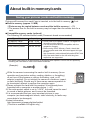
The following SD standard-based cards (Panasonic brand recommended)
Type of Card
Capacity
SD Memory Cards
8 MB – 2 GB
SDHC Memory Cards
4 GB – 32 GB
SDXC Memory Cards
48 GB, 64 GB
Notes
• Use a card of SD Speed “Class 6”∗ or higher for
recording motion pictures.
• Can be used with devices compatible with the
respective formats.
• Before using SDXC Memory Cards, check that
your computer and other devices support this type
of card.
http://panasonic.net/avc/sdcard/information/SDXC.html
• Only the cards listed on the left with the given
capacities are supported.
∗ SD speed class refers to a specification for sustained write speeds. Confirm the SD speed by
checking the card label or other card related materials.
(Example)
●While the camera is accessing the card or built-in memory (for an
operation such as picture writing, reading, deletion, or formatting),
do not turn off the camera or remove the battery, card, or AC
adaptor (supplied). Do not subject the camera to vibrations, impact,
or static electricity. Should any of these cause camera operation to
be terminated, attempt to perform the operation again.
●Please reformat the card with this camera if it has already been
formatted with a computer or another device. (→41)
●If the write-protect switch is set to “LOCK”, the card cannot be used
to record or delete pictures, and it cannot be formatted.
●It is recommended that you copy important pictures to your
computer (as electromagnetic waves, static electricity, or faults may
cause data to be damaged).
●Latest information:
http://panasonic.jp/support/global/cs/dsc/
(This site is available in English only.)
- 17 -
Switch
VQT4W38
About built-in memory/cards
Recording capacity guidelines (pictures/recording time)
The number of pictures you can take and the recording time vary in proportion to card
capacity (and depending on recording conditions and type of card).
Estimated remaining pictures or recording time capacity
(press to switch display)
Displayed when no card is inserted
(pictures will be saved to built-in memory)
■ Recording picture capacity (still pictures)
[Picture Size]
Built-in memory
2 GB
32 GB
64 GB
14M
1
280
4650
9280
5M
6
1050
17130
32910
0.3M
85
15000
247890
430430
• When the number of recordable pictures exceeds 99,999, “+99999” is displayed.
■ Recording time capacity (motion pictures)
[Rec Quality]
Built-in memory
HD
–
2 GB
10m40s
32 GB
3h03m
64 GB
6h06m
VGA
–
23m20s
6h19m
12h36m
QVGA
19s
1h02m
16h44m
33h23m
([h], [m] and [s] indicate “hour”, “minute” and “second”.)
• Motion pictures can be recorded continuously up to 2 GB.
The maximum available recording time for up to 2 GB only is displayed on the screen.
- 18 -
VQT4W38
Setting the clock
The clock is not set when the camera is shipped.
Press the Camera [ON/OFF]
button
The camera is turned on.
If the language select screen is not displayed,
proceed to step .
Press [MENU/SET] while the
message is displayed
Press
to select the language,
and press [MENU/SET]
Press [MENU/SET]
Press
to select the items
(year, month, day, hour, minute,
display order or time display
format), and press
to set
• To cancel → Press [
] button.
Press [MENU/SET] to set
Press [MENU/SET]
• To return to the previous screen,
press [ ] button.
- 19 -
VQT4W38
Setting the clock
Changing time setting
When resetting date and time, select [Clock Set] from the [Setup] menu or [Rec] menu.
• Clock settings will be saved for approx. 24 hours even after the battery is removed,
provided a fully charged battery was installed in the camera for 5 hours beforehand.
Select [Clock Set] from the [Setup] menu or [Rec] menu (→37)
Press
to select the items (year, month, day, hour, minute,
display order or time display format), and press
to set
• To cancel → Press [
] button.
Press [MENU/SET] to set
●If the clock is not set, the correct date cannot be printed.
●If the clock is set, the correct date can be printed even if the date is not displayed on
the screen of the camera.
- 20 -
VQT4W38
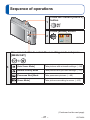
Sequence of operations
1
Press the Camera [ON/OFF]
button
Press [MODE] button
2
Use cursor button to select the recording mode and press
[MENU/SET]
3
[Auto Scene Mode]
Take pictures with automatic settings. (→24)
[Normal Picture] Mode
Take pictures with your own settings. (→27)
[Panorama Shot] Mode
Take panorama pictures. (→49)
[Scene Mode]
Take pictures according to scene. (→52)
(Continued on the next page)
- 21 -
VQT4W38
Sequence of operations
Aim the camera and shoot
Shutter button
Microphone
■Taking still pictures
Press the shutter button halfway to focus
Press and hold the shutter button to take
the picture
■Recording motion pictures (→29)
Press the motion picture button to start
recording
Press the motion picture button again to
finish recording
Motion picture
button
4
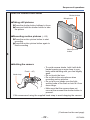
■Holding the camera
Flash (→45)
Hand strap
• To avoid camera shake, hold it with both
hands keeping your arms close to your
body while standing with your feet slightly
apart.
• Do not touch the lens.
• Do not block the microphone when
recording motion pictures.
• Do not put your hands over the lightemitting area of the flash or look at it from
close range.
• Make sure that the camera does not
move at the moment the shutter button is
pressed.
●We recommend using the supplied hand strap to avoid dropping the camera.
(Continued on the next page)
- 22 -
VQT4W38
Sequence of operations
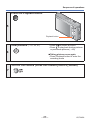
Press the Playback button
5
Playback button
• Press
to select a picture
• Press to play back motion pictures
or panorama pictures (→49)
View pictures (→31, 34, 51)
6
■ Taking pictures once again
• Press Playback button to enter the
recording mode
Turn off the camera (Press the Camera [ON/OFF] button)
7
- 23 -
VQT4W38
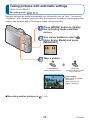
Taking pictures with automatic settings
[Auto Scene Mode]
Recording mode:
Optimum settings are made automatically from information such as “face”, “movement”,
“brightness”, and “distance” just by pointing the camera at the subject, meaning that clear
pictures can be taken without the need to make settings manually.
Press [MODE] button to display
the recording mode selection
screen
Use cursor button to select
[Auto Scene Mode] and press
[MENU/SET]
Take a picture
Press halfway
(press lightly to focus)
Press fully
(press the button all the
way to record)
Focus display
(When focus is aligned:
illuminated
When focus is not
aligned: flashing)
■Recording motion pictures in
(→29)
- 24 -
VQT4W38
Taking pictures with automatic settings [Auto Scene Mode]
Using flash
Press
to select
or
.
●When is selected, the optimum flash ( , , , ) is selected automatically
depending on conditions. (→46)
●When or is selected, the red-eye reduction function is activated.
●When or is selected, the shutter speed is reduced.
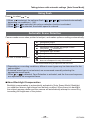
Automatic Scene Detection
Camera reads scene when pointed at subject, and makes optimum settings automatically.
Recognizes people
Recognizes landscapes
Recognizes night scenes and people in them
(Only when
is selected)∗
Recognizes night scenes∗
Recognizes close-ups
The icon of scene detected
Recognizes sunsets
Reads subject movement to avoid blurring when scene
does not correspond to any of the above.
∗ We recommend using a tripod and the self-timer.
●Depending on recording conditions, different scene types may be determined for the
same subject.
●If desired scene type is not selected, we recommend manually selecting the
appropriate scene mode.
or
is detected, Face Detection is activated, and the focus and exposure
are adjusted to the recognized faces.
●When
■About Backlight Compensation
Backlight compensation is automatically activated in [Auto Scene Mode]. Backlight
is a condition where a light shines from behind a subject. When there is a backlight,
the subject appears darker and the camera will automatically attempt to correct it by
increasing the brightness of the picture.
- 25 -
VQT4W38
Taking pictures with automatic settings [Auto Scene Mode]
[Auto Scene Mode] restrictions
Only the menu items that are displayed in the [Auto Scene Mode] can be set.
The settings selected in the [Normal Picture] or other modes will reflect on the menu
items in the [Setup] menu that are not displayed.
●The settings for the following items are different from other recording modes:
[Picture Size] on the [Rec] menu
●The settings for the following functions are fixed:
[Setup] menu
• [Auto Review]: [ON]
• [Auto Power Off]: [5MIN.]
[Rec] menu
• [Sensitivity]: [
]
• [AF Mode]:
[Face Detection]∗
• [Red-Eye Removal]: [ON]
• [White Balance]: [AWB]
∗
(9-area-focusing) when face cannot be recognized
●The following functions cannot be used:
[Exposure], [Digital Zoom]
- 26 -
VQT4W38
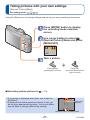
Taking pictures with your own settings
[Normal Picture] Mode
Recording mode:
Using the [Rec] menu to change settings and set up your own recording environment.
Press [MODE] button to display
the recording mode selection
screen
Use cursor button to select
[Normal Picture] Mode and press
[MENU/SET]
Take a picture
Press halfway
(press lightly to focus)
■Recording motion pictures in
Press fully
(press the button all the
way to record)
(→29)
●If a warning is displayed about jitter, use a tripod or
[Selftimer].
●If aperture and shutter speed are shown in red, you
Jitter alert
display
do not have appropriate exposure. You should either
use the flash or change [Sensitivity] settings.
Aperture value Shutter speed
- 27 -
VQT4W38
Adjusting focus
When [AF Mode] is set to
(1-area-focusing), focus on the AF area in the center of the
picture. If a subject you want to record is not in the center, follow the steps below.
Adjust focus according to subject
Align the AF area
with the subject
Focus display
(When focus is aligned: illuminated
When focus is not aligned: flashing)
AF area
(When focus is aligned: green
When focus is not aligned: red)
Hold down halfway
Return to desired composition
Press fully
AF area
■ Shortest recording distance
Zoom position
The shortest focusing distance
from the surface of the lens
W end
10 cm (0.33 feet)
T end
1 m (3.3 feet)
When the zoom is operated from
the W (wide-angle) end to the T
(telephoto) end, the shortest focusing
distance changes in stages.
●Subjects/environments which may make focusing difficult:
• Fast-moving or extremely bright objects, or objects with no color contrast.
• Taking pictures through glass or near objects emitting light. In dark, or with
significant jitter.
• When too close to object or when taking pictures of both distant and close objects
together in the same picture.
●The focus display flashes and beep sounds when focus is not aligned.
Use the focus range displayed in red as a reference. (→43)
Even if the focus display is lit, the camera may be unable to bring the subject into
focus if it is out of range.
●The AF area display may be larger depending on recording conditions such as dark
locations or zoom ratio.
- 28 -
VQT4W38
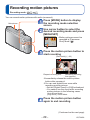
Recording motion pictures
Recording mode:
You can record motion pictures with audio (monaural).
Microphone
Press [MODE] button to display
the recording mode selection
screen
Use cursor button to select the
desired recording mode and press
[MENU/SET]
• Motion pictures cannot be
recorded in [Panorama
Shot] Mode ( ).
Press the motion picture button to
start recording
[Rec Quality] (→63)
Elapsed recording time
Remaining recording
time (approx.)
●Immediately release the motion picture
button after pressing it.
●You can use digital zoom even while
recording motion pictures.
• Set the [Digital Zoom] to [ON] beforehand.
• You cannot use the zoom while recording
motion pictures in the following cases:
-[Auto Scene Mode]
-[High Sens.] Scene Mode
Press the motion picture button
again to end recording
(Continued on the next page)
- 29 -
VQT4W38
Recording motion pictures
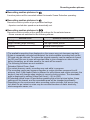
■Recording motion pictures in
A motion picture will be recorded without Automatic Scene Detection operating.
■Recording motion pictures in
Records a motion picture at your preferred settings.
• Aperture and shutter speed are automatically set.
■Recording motion pictures in
Records a motion picture at the optimum settings for the selected scene.
• Some scenes are switched to the following scenes:
Selected scene
[Baby]
[Night Portrait] [Night Scenery]
[Sports]
Scenes for motion picture
Portrait motion picture
Low light motion picture
Normal motion picture
●The available recording time displayed on the screen may not decrease regularly.
●If data is repeatedly recorded and deleted, the total available recording time on the
SD card may be reduced. To restore the original capacity, use the camera to format
the SD card. Be sure to save all important data to your computer or other media
before formatting, as all data saved to the card will be erased.
●The following functions are not available:
Extended Optical Zoom, flash.
●For certain memory cards, recording may end while in progress.
●The recording range may become narrower in motion pictures compared to still
pictures. Also, if the Aspect Ratio is different for still pictures and motion pictures, the
angle of view will change when starting to record a motion picture. The recordable
area is displayed by setting [Video Rec Area] (→39) to [ON].
●If Extended optical zoom is used before pressing the motion picture button, these
settings will be cleared, and the recordable area will be changed significantly.
●Depending on the environment when recording motion pictures, the screen may
turn black for an instant or noise may be recorded because of static electricity,
electromagnetic waves, etc.
- 30 -
VQT4W38
Viewing your pictures
[Normal Play]
When a card is in the camera, pictures are played back from the card. Without a card,
pictures are played back from the built-in memory.
Press the Playback button
• Press again to enter the
recording mode.
Use the
cursor button to
select a picture that you want to
play back
• Hold down to quickly scroll forwards/
backwards.
Folder/File number
Picture number/Total pictures
●It may not be possible to view pictures on this camera that were previously edited on
a computer.
●After pressing the Playback button and switching it into the playback mode, the lens
barrel will be retracted after approx. 15 seconds.
●This camera is compliant with the unified DCF (Design rule for Camera File system)
standard formulated by the Japan Electronics and Information Technology Industries
Association (JEITA), and with Exif (Exchangeable image file format). Files that are not
DCF-compliant cannot be played back.
- 31 -
VQT4W38
Viewing your pictures [Normal Play]
Zooming in and viewing “Playback Zoom”
Press the T side of the zoom
button
Current zoom position (displayed for 1 sec.)
1x
2x
4x
8x
16x
Press the T side of the zoom button
Press the W side of the zoom button
• Move zoom position →
●Playback zoom cannot be used during motion picture playback.
Viewing a list of pictures “Multi Playback”
Picture number/Total pictures
Press the W side of the zoom
button
1-picture
screen
12-picture
screen
30-picture
screen
Calendar
screen
Press the W side of the zoom button
Press the T side of the zoom button
• When you select a picture using the cursor button and press [MENU/SET] on the
12-picture or 30-picture screen, the selected picture is displayed on the 1-picture
screen (full-screen).
●Pictures displayed with [!] cannot be played back.
- 32 -
VQT4W38
Viewing your pictures [Normal Play]
Searching pictures by their recording date “Calendar”
Press the W side of the zoom
button several times
Selected date
1-picture
screen
12-picture
screen
30-picture
screen
Calendar
screen
Press the W side of the zoom button
Press the T side of the zoom button
• When you select a recording date using the cursor button and press [MENU/SET],
the display method changes to the 30-picture screen.
●Only months when pictures were taken are shown on the calendar screen. If the clock
was not set, pictures will be displayed as January 1st, 2013. If the date / time was set
incorrectly, pictures will be displayed with the incorrect settings.
- 33 -
VQT4W38
Viewing your pictures [Normal Play]
Viewing motion pictures
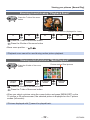
Select a picture with the motion picture icon, and press
Playback now starts.
Motion picture recording time
When playback starts, the elapsed playback time is displayed in
the top right of the screen.
Example: After 10 minutes and 30 seconds: [10m30s]
Motion picture icon
■Operations during motion picture playback
Pause/play
Fast forward (2 steps)
Single-frame forward (while paused)
Fast rewind (2 steps)
Single-frame rewind (while paused)
Stop
• If is pressed during fast forward or rewind, it will return to normal playback speed.
• The volume can be adjusted with the zoom button.
●It may not be possible to properly play back the motion pictures recorded using other
cameras.
●Motion pictures can be viewed on your computer using “PHOTOfunSTUDIO” on the
supplied CD-ROM.
- 34 -
VQT4W38
Deleting pictures
Pictures will be deleted from the card if the card is inserted, or from the built-in memory if
the card is not inserted. (Deleted pictures cannot be recovered.)
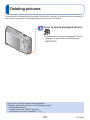
Press to delete displayed picture
• A confirmation screen is displayed. Select
[Yes] with cursor button and then press
[MENU/SET].
●Do not turn off the camera during deletion.
●Pictures cannot be deleted in the following cases:
• Protected pictures
• Card switch is in “LOCK” position.
• Pictures not of DCF standard (→31)
- 35 -
VQT4W38
Deleting pictures
To delete multiple (up to 50)/To delete all pictures
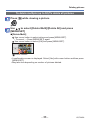
Press [ ] while viewing a picture
Use
to select [Delete Multi]/[Delete All] and press
[MENU/SET]
■[Delete Multi]
Use cursor button to select picture and press [MENU/SET].
• To cancel → Press [MENU/SET] again.
Use cursor button to select [OK] and press [MENU/SET].
Picture selected
• A confirmation screen is displayed. Select [Yes] with cursor button and then press
[MENU/SET].
• May take time depending on number of pictures deleted.
- 36 -
VQT4W38
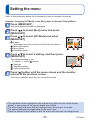
Setting the menu
Refer to the procedure below for an example on how to operate the menus.
Example: Changing [AF Mode] in the [Rec] menu in [Normal Picture] Mode
Press [MENU/SET]
The menu selection screen is displayed.
Press
to select [Rec] menu and press
[MENU/SET]
Press
to select [AF Mode] and press
[MENU/SET]
: Pages
The pages can also be selected with the zoom button.
: Menu description
: Menu items
: Operation guide
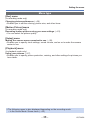
Press
to select a setting, and then press
[MENU/SET]
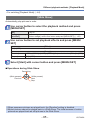
The selected setting is set.
• To cancel → Press [ ] button.
: Settings
: Selected setting
: Setting description
Press [ ] button until the menu closes and the monitor
returns to the previous screen
The screen changes each time you press the button.
●The operation screen examples in this manual may differ from the actual screen
display or some parts of the screen display are omitted.
●The menu types and items that are displayed vary according to the mode.
●The setting methods vary depending on the menu item.
●Press the shutter button halfway to exit the menu and enter the recording screen.
- 37 -
VQT4W38
Setting the menu
Menu type
[Rec] menu
(In recording mode only)
Changing picture preferences (→56)
• Enables you to set the coloring, picture size, and other items.
[Motion Picture] menu
(In recording mode only)
Recording motion pictures using your own settings (→63)
• You can select the picture quality.
[Setup] menu
Making the camera more convenient to use (→39)
• Enables you to specify clock settings, sound volume, and so on to make the camera
easier to use.
[Playback] menu
(In playback mode only)
Using your pictures (→67)
• Enables you to specify picture protection, resizing, and other settings for pictures you
have taken.
●The following menu is also displayed depending on the recording mode.
• In the Scene Mode: Scene menu (→52)
- 38 -
VQT4W38
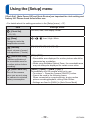
Using the [Setup] menu
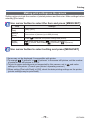
[Clock Set], [Auto Power Off] and [Auto Review] are important for clock setting and
battery life. Please check these before use.
• For details about the setting procedure in the [Setup] menu (→37)
Item
[Clock Set]
Settings, notes
Set time, date, and display format.
(→19, 20)
[Beep]
/
/
: Low / High / Mute
Change or mute the
beep/shutter sounds.
[Volume]
[0] / [1] / [2] / [3] / [4] / [5] / [6]
Adjust volume of sound
from speakers (7 levels).
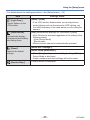
[Video Rec Area]
Enables verification of
the recordable area for
a motion picture before
recording.
[Auto Power Off]
Turn off the camera
when you are not using
the camera to minimize
battery consumption.
[ON] / [OFF]
• Recordable area displayed for motion pictures should be
interpreted as a guideline.
• When using Extended Optical Zoom, the recordable area
may not always be displayed for certain zoom ratios.
[2MIN.] / [5MIN.] / [10MIN.] / [OFF]:
Automatically shut off camera while not in use.
• To restore → Press the Camera [ON/OFF] button.
• Cannot be used in the following cases:
When connected to computer/printer, during motion
picture recording/playback, during Slide Shows
• Settings are fixed to [5MIN.] in [Auto Scene Mode]
- 39 -
VQT4W38
Using the [Setup] menu
• For details about the setting procedure in the [Setup] menu (→37)
Item
[Light Freq.]
Correct flickers on the
LCD monitor.
[Auto Review]
Automatically display
still pictures immediately
after taking them.
[Reset]
Reset to the default
settings.
[Version Disp.]
Settings, notes
[50Hz] / [60Hz]
• If the LCD monitor flickers when you record pictures
under lighting such as fluorescent or LED lighting, set
the utility frequency of the area where you are using the
camera.
[ON] (Automatically displays for 2 seconds.) / [OFF]
• [Auto Review] is activated regardless of its setting in the
following cases.
- [Auto Scene Mode]
- [Burst] mode
• Motion pictures cannot be automatically reviewed.
[Reset Rec. settings?]
[Reset setup parameters?]
• When [Setup] settings are reset, [Age] setting in [Baby]
Scene Mode is also reset.
• Folder numbers and clock settings will not be reset.
Current version is displayed.
- 40 -
VQT4W38
Using the [Setup] menu
• For details about the setting procedure in the [Setup] menu (→37)
Item
[Format]
Use when [Built-In
Memory Error] or
[Memory Card Error]
appears, or when
formatting the built-in
memory or card.
When a card/built-in
memory is formatted,
the data cannot be
restored. Check the
content of the card/
built-in memory
carefully before
formatting.
[Language]
Settings, notes
• When formatting the built-in memory, remove the cards.
(Only inserted card will be formatted if present; built-in
memory will be formatted if no card is inserted.)
• Always format cards with this camera.
• All protected pictures and other picture data will be
deleted.
• Do not turn off the camera or perform other operations
during formatting.
• Formatting the built-in memory may take several
minutes.
• If the card cannot be formatted, please try another card
before contacting your nearest Service Center.
For USA and Puerto Rico assistance, please call:
1-800-211-PANA(7262) or, contact us via the web at:
http://www.panasonic.com/contactinfo
For Canadian assistance, please call:
1-800-99-LUMIX (1-800-995-8649)
Set the language displayed on the screen.
Change display
language.
- 41 -
VQT4W38
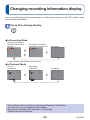
Changing recording information display
You can switch between the various types of information shown on the LCD monitor, such
as recording information.
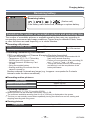
Press
to change display
■In Recording Mode
Recording information,
Number of recordable
pictures
Recording information,
Available recording time
No display
∗
∗ When pressing the shutter button halfway.
■In Playback Mode
Picture
information
Recording
information
No display
●During Motion Picture Playback, Panorama Playback, Slide Show:
You can only turn on and turn off the display.
●During menu display, Multi Playback or [Calendar]:
Display cannot be changed.
- 42 -
VQT4W38
Using Zoom
Recording mode:
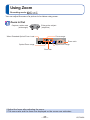
You can adjust the area of a picture to be taken using zoom.
Zoom In/Out
Capture a wider area
(wide-angle)
Enlarge the subject
(telephoto)
When Extended Optical Zoom is set
Focus range
Zoom ratio
Digital Zoom range
Optical Zoom range
Zoom bar
●Adjust the focus after adjusting the zoom.
●The zoom ratio and the zoom bar displayed on the screen are estimates.
- 43 -
VQT4W38
Using Zoom
Zoom types and use
The zoom ratio changes when the picture size is changed. (→56)
■Optical Zoom
Zooming in up to 5x is possible if pictures without
Size] on the [Rec] menu.
have been selected by [Picture
■Extended Optical Zoom
Zooming in up to 10.5x is possible when pictures with
[Picture Size] on the [Rec] menu.
EZ is short for “Extended Optical Zoom”.
have been selected by
●Extended Optical Zoom cannot be used in the following cases:
• Motion picture
• Scene Mode ([High Sens.])
To increase the zoom ratio further, the following zoom can be used in combination.
■[Digital Zoom]
Zoom 4x further than Optical/Extended Optical Zoom. Note that, with Digital Zoom,
enlarging will decrease picture quality. Set the [Digital Zoom] in the [Rec] menu to [ON].
(→60)
●Digital Zoom cannot be used in the following cases:
• [Auto Scene Mode]
• Scene Mode ([High Sens.])
- 44 -
VQT4W38
Taking pictures with flash
Recording mode:
Press
to display [Flash]
Use cursor button to select the desired type and press [MENU/
SET]
Type, operations
∗1
Uses
[Auto]
• Automatically judges when to use flash
[Auto/Red-Eye]∗2
• Automatically judges when to use flash
(reduce red-eye)
[Forced Flash On]
• Always flash
[Slow Sync./Red-Eye]∗2
• Automatically judges when to use flash
(reduce red-eye; slow shutter speed to take
brighter pictures)
[Forced Flash Off]
• Never flash
Normal use
Taking pictures of subjects in dark
places
Taking pictures with backlight or
under bright lighting (e.g. fluorescent)
Taking pictures of subjects against a
nightscape (tripod recommended)
Places where flash use is prohibited
∗ Only in the
mode
∗ Two flashes will be emitted. Do not move until after the second flash.
1
2
If [Red-Eye Removal] on the [Rec] menu is [ON], the
appears with the flash icon, red-eye
is automatically detected and still picture data is corrected. (Only when [AF Mode] is
(Face
Detection))
■The available flash range when [Sensitivity] setting is [
Max. Wide
Approx. 60 cm - 5.7 m (2.0 feet - 19 feet)
Max. Tele
Approx. 1.0 m - 2.8 m (3.3 feet - 9.2 feet)
]
●Do not put your hands over the light-emitting area of the flash (→8) or look at it from
close range.
Do not use the flash at close distances to other subjects (heat/light may damage
subject).
- 45 -
VQT4W38
Taking pictures with flash
■Available types in each mode (○: Available, –: Not available,
: Default setting)
[Scene Mode]
○∗1
○
○
○
–
–
–
○
○
–
○
○
–
–
○
○
○
○
○
○
–
○
–
○
–
–
–
○
○
○
–
○
–
–
–
○
○
○
○
○
∗1 Set to
,
,
or
depending on the subject and brightness.
●The flash cannot be used in the following cases:
• Recording motion pictures
•
,
and
Scene Modes
• [Panorama Shot] Mode
■Shutter speeds for each flash mode
1/60∗2 - 1/2000th
1∗2 - 1/2000th
∗2 Differs for each mode other than
mode.
●The effect of red-eye reduction varies depending on the subject and is affected by
factors such as distance to the subject, whether the subject is looking at the camera
during preliminary flash, and so on. In some cases, the effect of red-eye reduction
may be negligible.
●Flash settings may be changed when changing recording mode.
●Scene Mode flash settings are restored to default when Scene Mode is changed.
●No pictures may be taken if these marks (e.g. ) are flashing (flash is charging).
●If light from the flash on a subject is insufficient, neither the proper exposure nor White
Balance is achieved.
●Flash charging may take time if battery is low or if using flash repeatedly.
●The flash effect may not be sufficient when [Flash Burst] is set.
- 46 -
VQT4W38
Taking pictures with self-timer
Recording mode:
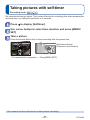
We recommend using a tripod. This is also effective for correcting jitter when pressing the
shutter button, by setting the self-timer to 2 seconds.
Press
to display [Selftimer]
Use cursor button to select time duration and press [MENU/
SET]
Take a picture
Press the shutter button fully to start recording after the preset time.
Self-timer indicator
(Flashes for set duration)
• To cancel while in operation → Press [MENU/SET]
●You cannot use the self-timer for motion picture recording.
- 47 -
VQT4W38
Taking pictures with Exposure Compensation
Recording mode:
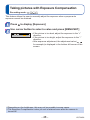
This feature allows the user to manually adjust the exposure when a proper auto
exposure cannot be obtained.
Press
to display [Exposure]
Use cursor button to select a value and press [MENU/SET]
EV
• If the picture is too dark, adjust the exposure to the “+”
direction.
• If the picture is too bright, adjust the exposure to the “-”
direction.
• After exposure adjustment, the adjustment value (
for example) is displayed in the bottom-left corner of the
screen.
●Depending on the brightness, this may not be possible in some cases.
●The Exposure Compensation value you set is retained even after the camera is
turned off.
- 48 -
VQT4W38
Taking panorama pictures
[Panorama Shot] Mode
Recording mode:
Creates a single panorama picture by stitching multiple still pictures taken in rapid
succession.
Press [MODE] button to display
the recording mode selection
screen
Use cursor button to select
[Panorama Shot] Mode and press
[MENU/SET]
Use cursor button to select the recording direction, and press
[MENU/SET] to set
Check the recording direction and press [MENU/SET]
Special panorama guidelines will be displayed during recording.
• You can go back to step
by pressing and selecting the recording direction
again.
Press the shutter button halfway to focus
Press the shutter button fully and pan the camera in a
small semi-circular motion in the selected direction to start
recording
(Example) Taking pictures from left to right
2 sec.
1 sec.
3 sec.
4 sec.
Recording direction and
progress status (approximate)
• Pan the camera so that you make a semicircle in approx. 4 seconds.
- Pan the camera at a constant speed.
- You may not be able to take pictures successfully if you move the camera too quickly or too
slowly.
(Continued on the next page)
- 49 -
VQT4W38
Taking panorama pictures [Panorama Shot] Mode
Press the shutter button fully again to end recording
You can also end recording if you stop panning the camera while taking pictures.
■Tips
• Pan the camera in the recording direction as steadily as possible.
If the camera shakes too
much, it may not be able to
take pictures or may end up
creating a narrow (small)
panorama picture.
The subjects that are displayed in this range are recorded. (guideline)
●The zoom position is fixed to the max. Wide.
●The focus, exposure and White Balance are all fixed to optimal values for the first
picture.
If the focusing or brightness of pictures recorded as part of a Panorama picture after
the first picture are significantly different from those of the first picture, the Panorama
picture as a whole (when all pictures are stitched together) may not have consistent
focus and brightness.
●The following functions are fixed to the settings indicated below.
[Digital Zoom]: [OFF] [Date Stamp]: [OFF] [Burst]: [OFF]
●Following [Rec] menu settings will be automatically adjusted and cannot be selected
manually.
[Sensitivity], [Color Mode]
●Since several pictures are stitched together to create a Panorama picture, some
subjects may be distorted or the joining portions of successively taken pictures that
are stitched may be noticeable.
●The number of recording pixels per horizontal line and vertical line of a Panorama
picture varies depending on the recording direction and number of stitched pictures.
The maximum number of recording pixels is as follows:
• Taking pictures in landscape orientation: Approx. 3200x720
• Taking pictures in portrait orientation: Approx. 960x3200
●Panorama pictures may not be created or pictures may not be recorded properly
when taking pictures of the following subjects or when taking pictures in the following
recording conditions:
• Subjects that have a continuous monotone or pattern (sky, beach, etc.)
• Moving subjects (person, pet, vehicle, waves, or flowers swaying in the wind, etc.)
• Subjects whose colors or patterns change quickly (such as an image appearing on
a display)
• Dark locations
• Locations with a flickering light source (fluorescent lamp, candle light, etc.)
(Continued on the next page)
- 50 -
VQT4W38
Taking panorama pictures [Panorama Shot] Mode
■About panorama playback
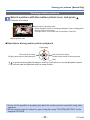
You can operate the zoom button to enlarge still pictures taken in [Panorama Shot]
mode in the same way as with other still pictures (Playback Zoom →32). You can also
press to automatically scroll pictures in the same way as when playing back a motion
picture (Motion Picture Playback →34).
• Unlike motion picture playback, you cannot perform fast forward or rewind by
pressing or while the pictures are scrolling automatically. (You can perform
single-frame forward or rewind while the automatic scrolling operation is paused.)
- 51 -
VQT4W38
Taking pictures according to the scene
[Scene Mode]
Recording mode:
Using [Scene Mode] enables you to take pictures with optimum settings (exposure,
coloring, etc.) for given scenes.
Press [MODE] button to display
the recording mode selection
screen
Use cursor button to select
[Scene Mode] and press [MENU/
SET]
Use cursor button to select the
scene and press [MENU/SET]
■Changing the selected scene mode ([Scene Mode] menu)
Press [MENU/SET]
Use cursor button to select [Scene Mode] menu and press [MENU/SET]
Use cursor button to select the scene and press [MENU/SET]
■Recording motion pictures in
(→29)
Records a motion picture at the optimum settings for the selected scene.
●Selecting a Scene Mode inappropriate for the actual scene may affect the coloring of
your picture.
●Following [Rec] menu settings will be automatically adjusted and cannot be selected
manually.
[Sensitivity], [Color Mode]
●Using flash in Scene Modes (→46)
- 52 -
VQT4W38
Taking pictures according to the scene [Scene Mode]
• How to select a scene (→52)
• Using flash in Scene Modes (→46)
[Portrait]
Improves the skin tone of subjects for a healthier appearance in bright daylight conditions.
■Tips
• The closer the zoom is positioned to the T (telephoto) edge and the closer the camera
is brought to the subject, the greater the effect will be.
[Scenery]
Takes clear pictures of wide, distant subjects.
[Sports]
Takes pictures of scenes with fast movement, e.g. sports.
■Tips
• Stand at least 5 m (16 feet) away.
- 53 -
VQT4W38
Taking pictures according to the scene [Scene Mode]
• How to select a scene (→52)
• Using flash in Scene Modes (→46)
[Night Portrait]
Takes pictures of people and nightscapes with close to actual brightness.
■Tips
• Use flash.
• Subject should not move.
• Tripod, self-timer recommended.
[Night Scenery]
Takes clear pictures of night scenes.
■Tips
• Tripod, self-timer recommended.
●Shutter speed may slow down up to 8 seconds.
●After recording, the shutter may stay closed (up to 8 seconds) to process the signal.
This is not a malfunction.
[Food]
Takes natural-looking pictures of food.
- 54 -
VQT4W38
Taking pictures according to the scene [Scene Mode]
• How to select a scene (→52)
• Using flash in Scene Modes (→46)
[Baby]
Taking pictures of a baby with a healthy complexion.
Use cursor button to select [Age] and press [MENU/SET]
Use cursor button to select [SET] and press [MENU/SET]
Set birthday with cursor button, and press [MENU/SET]
Use cursor button to select [Exit] and press [MENU/SET]
■Tips
• Make sure [Age] is [ON] before taking a picture.
●[Age] print setting can be made on your computer using “PHOTOfunSTUDIO” on the
supplied CD-ROM.
[Sunset]
Takes clear pictures of scenes such as sunsets.
[High Sens.]
Prevents blurring of subject in dark, indoor conditions.
Select the aspect ratio and the picture size with cursor button
and press [MENU/SET]
- 55 -
VQT4W38
Using the [Rec] menu
• For [Rec] menu setting procedures (→37)
[Picture Size]
Set the size (number of pixels) of still pictures. Number of pictures which can be recorded
depends on this setting.
■ Recording mode:
■ Settings:
Recording pixel level type
14M
4320x3240
∗
10M
3M
3648x2736
2560x1920
5M
∗
0.3M
2048x1536
640x480
12.5M
4320x2880
10.5M
4320x2432
10.5M
3232x3232
∗ This setting is not available in
([Auto Scene Mode]).
represent the aspect ratios of the still pictures.
●
●Mosaic effect may appear depending on subject and recording conditions.
Setting guide
Larger picture size
Smaller picture size
Sharper
Less detailed
Lower recording
capacity
Higher recording
capacity
- 56 -
VQT4W38
Using the [Rec] menu
• For [Rec] menu setting procedures (→37)
[Sensitivity]
Set ISO Sensitivity (sensitivity to lighting) manually.
We recommend higher settings to take clear pictures in darker locations.
■ Recording mode:
■ Settings:
[Intelligent ISO] / [100] / [200] / [400] / [800] / [1600]
Setting guide
[Sensitivity]
Location
(recommended)
Shutter speed
[100]
Bright
(outdoors)
Slow
[1600]
Interference
Low
High
Subject blur
High
Low
Dark
Fast
●
[Intelligent ISO] is automatically set in a range up to 1600 based on subject
movement and brightness.
●The [Sensitivity] is automatically set in the following case:
• When recording motion pictures
- 57 -
VQT4W38
Using the [Rec] menu
• For [Rec] menu setting procedures (→37)
[White Balance]
Adjust the color depending on the light source to ensure natural color.
■ Recording mode:
■ Settings: [AWB] (automatic) /
(outdoor, shade) /
(uses value set in
(outdoor, clear sky) /
(outdoor, cloudy sky) /
(Incandescent lighting) /
)/
(set manually)
●When [AWB] (Automatic White Balance) is set, the coloring is adjusted in accordance
with the light source. However, if the scene is too bright or too dark or if other extreme
conditions apply, the pictures may appear reddish or bluish. The White Balance may
not operate correctly if there is a multiple number of light sources.
●Under fluorescent lighting, LED lighting fixture etc., the appropriate White Balance will
vary depending on the lighting type, so use [AWB] or
.
●White Balance setting is fixed to [AWB] in the following cases:
• Scene Modes ([Scenery], [Night Portrait], [Night Scenery], [Food], [Sunset])
●Even if the camera is turned off, the set White Balance is remembered. (If the Scene
Mode is changed, the white balance setting returns automatically to [AWB].)
■ Setting White Balance manually (
)
Select
and press [MENU/SET].
Point the camera towards a white object (e.g. paper) and press [MENU/SET].
• White Balance is set to
.
• It may not be possible to set the correct White Balance if subjects are too bright or
too dark. In this case, adjust the brightness and try to set the White Balance again.
(Continued on the next page)
- 58 -
VQT4W38
Using the [Rec] menu
■ [AWB] operational range:
10000K
Blue sky
9000K
8000K
Cloudy sky (rain)
Shade
7000K
6000K
Sunlight
White fluorescent lighting
5000K
4000K
3000K
Incandescent lighting
Sunset/sunrise
Candlelight
2000K
K=Kelvin color Temperature
[AF Mode]
Method of aligning focus can be changed according to position and number of subjects.
■ Recording mode:
■ Settings:
/
/
Taking front-on
pictures of people
(Face Detection)
Subject not centered
in picture
Recognizes faces (up to 11 people) and adjusts exposure and focus
accordingly.
AF area
Yellow : When the shutter button is pressed halfway, the frame turns
green when the camera is focused.
White : Displayed when more than one face is detected. Other faces
that are the same distance away as faces within the yellow
AF area are also focused.
Focuses on up to 9 points.
(9-area-focusing)
Determined position
for focus
Focuses on AF area in center of picture. (Recommended when
focus is difficult to align)
(1-area-focusing)
(Continued on the next page)
- 59 -
VQT4W38
Using the [Rec] menu
●Cannot set to
(Face Detection) in the following case:
• Scene Modes ([Night Scenery] [Food])
• [Panorama Shot] Mode
●If the camera misinterprets a non-human subject as a face in (Face Detection)
setting, switch to another setting.
●If conditions prevent the face from being recognized, such as when the movement of
the subject is too rapid, the [AF Mode] setting switches to
(9-area-focusing).
[Digital Zoom]
Zoom 4x further than Optical/Extended Optical Zoom. (Note that enlarging will decrease
picture quality with Digital Zoom.)
■ Recording mode:
■ Settings: [ON] / [OFF]
●The setting is fixed to [OFF] in the following case:
Scene Mode ([High Sens.])
[Burst]
A burst of still pictures can be recorded while the shutter button is pressed fully.
■ Recording mode:
■ Settings:
Setting
[Burst]
Description
Speed: Approx. 0.5 picture/sec.
• You can record a series of still pictures successively until the card
or built-in memory is full, but at some point the burst speed drops.
(The timing at which the burst speed drops varies depending on
the type of card and the number of recording pixels.)
• When [Selftimer] is set, 3 pictures are taken.
• When burst is selected, the flash is unavailable.
(Continued on the next page)
- 60 -
VQT4W38
Using the [Rec] menu
[Flash Burst]
[OFF]
• Number of pictures taken using burst∗: maximum of 5 pictures
∗ The number of pictures that can be taken using burst varies
depending on the recording conditions and the type of card.
• Setting is possible only in [Normal Picture] Mode.
• The picture size is fixed to 3M (4:3), 2.5M (3:2), 2M (16:9), or
2.5M (1:1).
• The camera fixes its focus along with both exposure and the
amount of light to be emitted from a flash, based on the first
picture taken.
• [Sensitivity] is automatically adjusted.
• [Digital Zoom] is fixed to [OFF].
• When [Selftimer] is set, 3 pictures are taken.
The burst function is released.
●Burst speed may be reduced if ISO Sensitivity is set to high, or if shutter speed is
reduced in darker locations.
●When you record subjects in motion where there is a significant difference between
light and dark areas, it may not be possible to achieve the optimal exposure.
[Color Mode]
Set color effects.
■ Recording mode:
■ Settings: [STANDARD] / [B&W] / [SEPIA]
[Red-Eye Removal]
Automatically detects red-eye and corrects still picture data when recording with flash
red-eye reduction (
).
■ Recording mode:
■ Settings: [ON] / [OFF]
●This setting will work only when [AF Mode] is (Face Detection).
●The function will turn [OFF] in the following cases:
• Scene Modes ([Scenery] [Sports] [Night Scenery] [Food] [Sunset] [High Sens.])
●Depending on the circumstance, it may not be possible to correct red-eye.
●When the function setting is [ON], a appears with the flash icon.
- 61 -
VQT4W38
Using the [Rec] menu
• For [Rec] menu setting procedures (→37)
[Date Stamp]
Still pictures can be taken with the recording date and time stamped on the still picture.
■ Recording mode:
■ Settings: [W/O TIME] / [WITH TIME] / [OFF]
●Date stamps on still pictures cannot be erased.
●The date cannot be stamped in the following cases:
• [Burst]
• Motion pictures
• [Panorama Shot] Mode
●Do not request date printing in store or make date printing on printer for still pictures
with date stamps. (Date printing may be overlapped.)
●You cannot change the setting in [Auto Scene Mode]. The setting in other Recording
Mode is applied.
[Clock Set]
Set the clock. Same function as that in [Setup] menu. (→20)
- 62 -
VQT4W38
Using the [Motion Picture] menu
• For [Motion Picture] menu setting procedures (→37)
[Rec Quality]
Set the picture size of motion pictures.
■ Recording mode:
■ Settings:
Picture Quality
Picture Size
[HD]
1280x720 pixels
No. of Frames
[VGA]
640x480 pixels
[QVGA]∗
320x240 pixels
Picture Aspect Ratio
16:9
30 fps
4:3
∗ [QVGA] is fixed when recording to the built-in memory.
●Depending on the motion picture recording environment, static electricity or
electromagnetic waves may cause the screen to go black momentarily or noise to be
recorded.
●If you attempt to play motion pictures recorded with the camera on other devices,
playback may not be possible, or the picture or sound quality may be poor.
Additionally, incorrect recording information may be indicated.
- 63 -
VQT4W38
Different playback methods
[Playback Mode]
Recorded pictures can be played back in a variety of ways.
Press the Playback button
Press [MODE]
Use cursor button to select the playback method and press
[MENU/SET]
• [Normal Play] (→31)
• [Slide Show] (→65)
• [Category Selection] (→66)
• [Calendar] (→33)
●When no card is inserted, pictures are played back from the built-in memory.
●The [Playback Mode] automatically becomes [Normal Play] when switching from
recording mode to playback mode.
- 64 -
VQT4W38
Different playback methods [Playback Mode]
• For switching [Playback Mode] (→64)
[Slide Show]
Automatically play pictures in order.
Use cursor button to select the playback method and press
[MENU/SET]
[All]
Play all.
[Category
Selection]
Select category and play back motion or still pictures.
(Select category with cursor button and press [MENU/SET].) (→66)
Use cursor button to set playback effects and press [MENU/
SET]
[Effect]
[ON] / [OFF]
[Setup]
[Duration]
[1SEC.] / [2SEC.] / [3SEC.] / [5SEC.] (Only available when [Effect] is [OFF])
[Repeat]
[ON] / [OFF]
Select [Start] with cursor button and press [MENU/SET]
■Operations during Slide Show
Pause/play
(While paused)
Previous
(While paused)
Next
Stop
●When panorama pictures are played back, the [Duration] setting is disabled.
●Motion pictures cannot be played back in a Slide Show. The initial screens of motion
pictures are played back as still pictures in the Slide Show.
- 65 -
VQT4W38
Different playback methods [Playback Mode]
• For switching [Playback Mode] (→64)
[Category Selection]
You can narrow down the pictures displayed to view only a selected category.
Select category with cursor button and press [MENU/SET]
Recording information such as Scene Modes
[Portrait] /
[Scenery] /
/ [Night Portrait] /
/ [Baby]
/ [Sunset] / [Panorama Shot] /
[Night Portrait] /
/ [Night Scenery] /
[Sports]
[Baby]
[Food]
[Motion Picture]
[Calendar]
You can specify the recording date to search pictures. (→33)
- 66 -
VQT4W38
Using the [Playback] menu
You can edit the picture (for example, resize), and set a protection setting in the picture.
• For [Playback] menu display and operation methods (→37)
• Depending on the [Playback Mode], some [Playback] menu items are not displayed.
• It may not be possible to set or edit pictures taken with other cameras.
• New pictures are created after editing pictures with [Resize]. Before starting to edit,
make sure that there is enough free space in the built-in memory or memory card.
[Resize]
Picture size can be reduced to facilitate e-mail attachment and use in web pages, etc.
(Still pictures recorded at the smallest recording pixel level cannot be further reduced.)
■[SINGLE]
Use cursor button to select [SINGLE] and press [MENU/SET]
Use cursor button to select a still picture and press [MENU/
SET]
Use cursor button to select size and press [MENU/SET]
Current size
Size after change
• Confirmation screen is displayed. If you select [Yes], the operation is executed.
(Continued on the next page)
- 67 -
VQT4W38
Using the [Playback] menu
■[MULTI]
Use cursor button to select [MULTI] and press [MENU/SET]
Use cursor button to select size and press [MENU/SET]
Use cursor button to select a still picture and press
[MENU/SET] (up to 50 pictures)
Number of pixels before/after
resizing
Resize setting
• To cancel
→ Press [MENU/SET] again.
• To execute
→ Use cursor button to select
[OK] and press [MENU/SET].
• Confirmation screen is displayed. If you select [Yes], the operation is executed.
●Picture quality is reduced after resizing.
●Cannot resize the following pictures.
• Motion pictures
• Still pictures on which the date has already been stamped
• Still pictures recorded in [Panorama Shot] Mode
- 68 -
VQT4W38
Using the [Playback] menu
• For [Playback] menu display and operation methods (→37)
[Protect]
Set protection to disable picture deletion. Prevents deletion of important pictures.
Use cursor button to select [SINGLE] or [MULTI] and press
[MENU/SET]
Use cursor button to select picture and press [MENU/SET]
●[SINGLE]
●[MULTI]
Picture protected
Picture protected
• To cancel → Press [MENU/SET] again.
■ To clear all
Select [CANCEL] in step
and select [Yes].
●May not be effective when using other devices.
- 69 -
VQT4W38
Using the [Playback] menu
• For [Playback] menu display and operation methods (→37)
[Copy]
You can copy pictures between built-in memory and memory card.
Use cursor button to select the copy method (direction) and
press [MENU/SET]
: Copy all pictures from built-in memory to card (go to step
: Copy 1 picture at a time from card to built-in memory.
).
Select picture with cursor button and press [MENU/SET]
Use cursor button to select [Yes] and press [MENU/SET]
• To cancel → Press [MENU/SET].
• After all the pictures are copied from the built-in memory to the memory card, the
display returns automatically to the playback screen.
●Copying pictures may take several minutes. Do not turn off the camera or perform
other operations during copying.
●If identical names (folder/file numbers) are present in the copy destination, a new
folder for copying will be created when copying from built-in memory to card (
Identically-named files will not be copied from card to built-in memory (
).
●The following setting is not copied. Set it again after copying:
- [Protect]
●Only pictures from Panasonic digital cameras (LUMIX) may be copied.
- 70 -
).
VQT4W38
Using with your PC
Still/motion pictures can be copied from the camera to your computer by connecting the
two together.
• Some computers can read directly from the camera’s memory card.
For details, see the manual for your computer.
• If your computer does not support SDXC Memory Cards a message will be displayed
requesting you to format the card. (Do not format the card. This will erase recorded
pictures.) If the card is not recognized, refer to the following support website.
http://panasonic.net/avc/sdcard/information/SDXC.html
• You can use pictures copied to your computer for printing, attaching them to e-mail, or
other operation. The “PHOTOfunSTUDIO” software on the CD-ROM (supplied) enables
you to perform these functions easily.
■Computer specifications
You can connect the camera to a computer that can detect a mass storage device
(device that stores a large volume of data).
• Windows: Windows 8 / Windows 7 / Windows Vista / Windows XP
• Mac: OS X10.1 - 10.8
- 71 -
VQT4W38
Using with your PC
Using the supplied software
The supplied CD-ROM contains the following software.
Install the software on your computer before using.
■PHOTOfunSTUDIO 9.0 LE (Windows XP / Vista / 7 / 8)
This software allows you to import still pictures and motion pictures to a PC as well as
organize by categorizing them based on their recording date or the model name of the
camera used. You can also write pictures to a DVD, retouch and adjust the pictures and
edit the motion pictures.
■LoiLoScope 30 day full trial version (Windows XP / Vista / 7 / 8)
LoiLoScope is a video editing software that draws out the full power of your PC.
Creating videos is as easy as organizing cards on top of a desk. Use your music,
picture and video files to create videos to share with your friends and family by burning
it to a DVD, uploading it to websites, or simply share your videos with your friends via
e-mail.
• This will only install a shortcut to the trial version download site.
For more information on how to use LoiLoScope, read the LoiLoScope
manual available for download at the link below.
Manual URL: http://loilo.tv/product/20
- 72 -
VQT4W38
Using with your PC
Installing supplied software (PHOTOfunSTUDIO)
Before inserting the CD-ROM, close all running applications.
Check the environment of your PC
Operating environment of PHOTOfunSTUDIO 9.0 LE
Windows XP (32 bit) SP3
Windows Vista (32 bit) SP2
Windows 7 (32 bit/64 bit) and SP1
Windows 8 (32 bit/64 bit)
Windows XP
Pentium III 500 MHz or higher
Windows Vista
Pentium III 800 MHz or higher
CPU
Windows 7
Pentium III 1 GHz or higher
Windows 8
1024x768 pixels or more
Display
(1920x1080 pixels or more recommended)
Windows XP
512 MB or more
Windows Vista
RAM
Windows 7
1 GB or more (32 bit)
2 GB or more (64 bit)
Windows 8
Free hard disk space 450 MB or more for installing software
OS
• Refer to the Operating Instructions of “PHOTOfunSTUDIO” (PDF) for further
information about the operating environment.
Insert the CD-ROM with the supplied software
• When you insert the supplied CD-ROM, the install menu will start.
Click on the [Applications] on the install menu
Click on the [Recommended Installation]
• Proceed with installation according to messages appearing on the screen.
●The software compatible with your PC will be installed.
●PHOTOfunSTUDIO is not compatible with Mac.
●For details on how to use “PHOTOfunSTUDIO”, see the “PHOTOfunSTUDIO” manual
(PDF).
- 73 -
VQT4W38
Using with your PC
Copying still pictures and motion pictures
Getting Ready:
• When importing pictures from the built-in memory, remove any memory cards.
• Turn on the camera and computer.
Connect camera to computer
Check the plug direction and insert it straight in.
(Damage to plug can lead to faulty operation.)
[Access] (sending data)
• Do not disconnect
the USB connection
cable while [Access] is
displayed.
USB connection cable
(supplied)
Use cursor button on the camera to select [PC], and press
[MENU/SET]
Operate with your computer
• You can save pictures to use on your computer by dragging and dropping folders
and files into separate folders on your computer.
●Do not use any other USB connection cables except the supplied one or a genuine
Panasonic USB connection cable (optional). Using cables other than them may cause
a malfunction.
●Turn off the camera before inserting or removing memory cards.
●When the battery begins to run out during communication, a warning beep sounds.
Cancel communication via your computer immediately.
●For more details, consult your computer operating manual.
- 74 -
VQT4W38
Using with your PC
■Folder and file names on computer
●Windows
Drives are displayed
in “My Computer” or
“Computer” folder.
●Mac
DCIM (Still/motion pictures)
100_PANA (Up to 999 pictures/folder)
P1000001.JPG
:
JPG: Still pictures
P1000999.JPG
MOV: Motion Pictures
101_PANA
∗
:
999_PANA
MISC
Drives are displayed on
the desktop.
(Displayed as “LUMIX”,
“NO_NAME”, or
“Untitled”.)
∗ New folders are created in the following cases:
• When pictures are taken to folders containing files numbered 999.
• When using cards already containing the same folder number (for example, pictures taken with
other cameras, etc.).
■To cancel connection
• Windows: Execute “Safely Remove Hardware” on the taskbar
• Mac: Open the Finder and click the eject icon that appears on the sidebar
■When using Windows XP, Windows Vista, Windows 7, Windows 8, or
Mac OS X
The camera can be connected to your computer even if you select [PictBridge(PTP)] in
the step
on the previous page.
• Only picture output can be performed.
• It may not be possible to import if there are 1000 or more pictures on the card.
- 75 -
VQT4W38
Printing
You can connect directly to a PictBridge-compatible printer for printing.
• Some printers can print directly from the camera’s memory card.
For details, see the manual for your printer.
Getting Ready:
• When printing pictures from the built-in memory, remove any memory cards.
• Adjust the print quality or other settings on your printer, as needed.
• Turn on the camera and printer.
Connect camera to printer
Check the plug direction and insert it straight in.
(Damage to plug can lead to faulty operation.)
Do not disconnect the USB connection
cable when the cable disconnection icon
is displayed (may not be displayed
with some printers).
USB connection cable
(supplied)
Use cursor button on the camera to select [PictBridge(PTP)],
and press [MENU/SET]
Use cursor button to select a picture to print and press
[MENU/SET]
Use cursor button to select [Print start] and press [MENU/SET]
(Print settings (→78))
■To cancel print
Press [MENU/SET].
(Continued on the next page)
- 76 -
VQT4W38
Printing
●Do not use any other USB connection cables except the supplied one or a genuine
Panasonic USB connection cable (optional). Using cables other than them may cause
a malfunction.
●Disconnect USB connection cable after printing.
●Turn off the camera before inserting or removing memory cards.
●When the battery begins to run out during communication, a warning beep sounds.
Cancel printing and disconnect USB connection cable.
●Motion pictures cannot be printed.
Printing multiple pictures
Connect camera to printer (→76)
Use cursor button on the camera to select [PictBridge(PTP)],
and press [MENU/SET]
Press
Use cursor button to select item and press [MENU/SET]
• [Multi Select]:
• [Select All]:
Scroll between pictures with cursor button, select pictures
to print with [MENU/SET]. (Press [MENU/SET] again to
release selection.)
Use cursor button to select [OK] and press [MENU/SET].
Print all pictures.
Use cursor button to select [Print start] and press [MENU/SET]
(Print settings (→78))
• Select [Yes] if print confirmation screen is displayed.
●An orange “●” displayed during printing indicates an error message.
●Print may be divided into several pictures if printing a large amount of pictures.
(Remaining sheets display may differ from the number of pictures set for printing.)
- 77 -
VQT4W38
Printing
Making print settings on the camera
Setting options include the number of printed pictures and their size. Make settings before
selecting [Print start].
Use cursor button to select the item and press [MENU/SET]
Item
Settings
[Print with
Date]
[ON] / [OFF]
[Num.of
prints]
Set number of pictures (up to 999 pictures)
[Paper Size]
When
[Page
Layout]
is selected, the printer settings take priority.
(printer takes priority) /
(1 picture, with border) /
(1 picture, no border) /
(2 pictures) /
(4 pictures)
Use cursor button to select setting and press [MENU/SET]
●Items may not be displayed if incompatible with printer.
●To arrange “2 pictures” or “4 pictures” in the same still picture, set the number
of prints for the still picture to 2 or 4.
●To print to paper sizes/layouts not supported by this camera, set to
and make
settings on the printer. (Consult your printer’s operating manual.)
●When setting [Print with Date] to [ON], check the date printing settings on the printer
(printer settings may be prioritized).
- 78 -
VQT4W38
Printing
Printing with date and text
■ Printing in store
Only recording date can be printed. Request date printing in store.
• When printing still pictures of 16:9 Aspect Ratio, check in advance that the store can
accept this size.
■ Using computer
Print settings for recording date and text information can be made using
“PHOTOfunSTUDIO” on the supplied CD-ROM.
■ Using printer
Recording date can be printed by setting [Print with Date] (→78) to [ON] when connecting
to a printer compatible with date printing.
- 79 -
VQT4W38
List of LCD monitor displays
Screens shown here are only examples. The actual display may vary.
• Press to change display.
■In recording
1
2
3
13
12
4
5
6
11
10
7
9
8
1 Recording Mode (→21)
2 Recording quality (→63)
3
4
5
6
7
Picture Size (→56)
Flash (→45)
Jitter alert (→27)
White Balance (→58)
Color Mode (→61)
Battery capacity (→15)
Burst Mode (→60)
Focus (→24, 28)
AF area (→28)
Self-timer Mode (→47)
8
9
10
11
12
13
Focus range
Zoom (→43)
ISO Sensitivity (→57)
Aperture value/Shutter speed (→27)
Current date/time
Exposure Compensation (→48)
Age in years/months (→55)
Elapsed recording time (→29)
XXhXXmXXs∗
Date Stamp (→62)
Save destination (→17)
Recording state
Number of recordable pictures (→18)
Available recording time (→18, 29)
RXXhXXmXXs∗
∗ [h], [m] and [s] indicate “hour”, “minute” and “second”.
- 80 -
VQT4W38
List of LCD monitor displays
Screens shown here are only examples. The actual display may vary.
• Press to change display.
■In playback
1
2
3
4
8
7
6
5
1 Playback Mode (→64)
2 Protected picture (→69)
5 Recording date/time
Date stamped display (→62)
Color Mode (→61)
Picture Size (→56)
3 Battery capacity (→15)
4 Picture number/Total pictures (→31)
Elapsed playback time (→34)
XXhXXmXXs∗
Age in years/months (→55)
ISO Sensitivity (→57)
Aperture value/Shutter speed (→27)
6 Recording Mode (→21)
Flash (→45)
White Balance (→58)
Exposure Compensation (→48)
7 Recording quality (→63)
Motion picture recording time (→34)
XXhXXmXXs∗
8 Folder/File number (→31, 75)
Save destination (→17)
Cable disconnection warning icon
(→76)
∗ [h], [m] and [s] indicate “hour”, “minute” and “second”.
- 81 -
VQT4W38
Message displays
Meanings of and required responses to major messages displayed on LCD monitor.
[This memory card cannot be used]
● Not compatible with the camera.
→ Use a compatible card.
[Some pictures cannot be deleted]
[This picture cannot be deleted]
● Non-DCF pictures (→31) cannot be deleted.
→ Save needed data on a computer or other device, and then use [Format] on the camera. (→41)
[No additional selections can be made]
● The number of pictures that can be deleted at once has been exceeded.
● The number of pictures allowing [Resize] (multiple settings) at once has been exceeded.
[Please turn camera off and then on again]
● The lens is not working correctly.
[System Error]
→ Turn on the camera again.
(Consult the dealer or your nearest Service Center if display still remains.)
[Some pictures cannot be copied]
[Copy could not be completed]
● Pictures cannot be copied in following cases.
→ Picture of same name already exists in built-in memory when copying from card.
→ File is not of DCF standard. (→31)
→ Picture taken or edited on a different device.
[Not enough space on built-in memory]
[Not enough memory on the card]
● There is no space left on the built-in memory or the card. When you copy pictures from the built-in
memory to the card (batch copy), the pictures are copied until the capacity of the card becomes full.
[Built-In Memory Error]
[Format built-in memory?]
● Displayed when formatting built-in memory via computer, etc.
→ Reformat directly using camera. Data will be deleted.
[Memory card error. This card cannot be used in this camera. Format this card?]
● The card format cannot be used with this camera.
→ Save needed data on a computer or other device, and then use [Format] on the camera. (→41)
- 82 -
VQT4W38
Message displays
[Insert SD card again]
[Try another card]
● Access to card has failed.
→ Turn off the camera and remove the card. Reinsert the card and turn the camera on again.
● Try with a different card.
[Memory card parameter error]
● Card is not of SD standard.
● When cards in capacities of 4 GB or more are used, only SDHC or SDXC Memory Cards are
supported.
[Read Error] / [Write Error]
[Please check the card]
● Data read has failed.
→ Check whether card has been inserted correctly. (→16)
● Data write has failed.
→ Turn off the camera and remove the card. Reinsert the card and turn the camera on again.
● Card may possibly be damaged.
● Try with a different card.
[Motion recording was cancelled due to the limitation of the writing speed of the card]
● If recording stops even when using a card of the recommended speed class (→17), the data writing
speed has dropped. If this happens, we recommend backing up the data on the memory card and
formatting it (→41).
● Motion picture recording may be automatically terminated with certain cards.
[A folder cannot be created]
● Folder numbers in use have reached 999.
→ Save needed data on a computer or other device, and then use [Format] on the camera. (→41)
- 83 -
VQT4W38
Q&A
Troubleshooting
Try checking these items (→84 - 89) first.
If the problem persists, performing [Reset] in the [Setup] menu may resolve the issue.
(Note that except for some items such as [Clock Set], all settings are returned to their
values at the time of purchase.)
Battery, power
The charging lamp turns off before the battery is fully charged.
● Charging is being performed in a place with extremely high or low temperature.
→ Reconnect the USB connection cable (supplied) and retry charging in a place where ambient
temperature is 10 °C to 30 °C (50 °F to 86 °F) (temperature conditions also apply to the battery
itself). (When the USB connection cable is reconnected after the battery is fully charged, the
charging lamp will light for approximately 1 minute.)
Camera does not work even if the camera is turned on.
● Battery is not inserted correctly (→12), or needs recharging.
LCD monitor shuts off even if the camera is turned on.
Camera switches off as soon as the camera is turned on.
● Battery needs recharging.
● [Auto Power Off] is activated (→39).
→ Press the Camera [ON/OFF] button.
Recording
Cannot record pictures.
● Built-in memory/card is full.
→ Free space by deleting unwanted pictures (→35).
Recorded pictures look white.
● Lens is dirty (fingerprints, etc.).
→ Clean lens surface with a soft, dry cloth.
● Lens is foggy (→5).
Recorded pictures are too bright/too dark.
● Adjust the exposure (→48).
Some pictures are taken when I press the shutter button just once.
● Camera is set to [Burst].
Focus not aligned correctly.
● Not set to mode appropriate for distance to subject. (Focus range varies according to recording
mode.)
● Subject outside of focus range.
● Caused by jitter or subject movement.
- 84 -
VQT4W38
Q&A Troubleshooting
Recording (continued)
Recorded pictures are blurred.
● Shutter speed is slower in dark locations and a picture is prone to blurring.
→ Hold camera firmly with both hands, keeping arms close to body.
→ Set [Sensitivity] to [
] and [Digital Zoom] to [OFF]. (→57, 60)
Recorded pictures appear coarse, or there is interference.
● ISO Sensitivity is high, or shutter speed is low.
(Default [Sensitivity] setting is [
] – interference may appear with indoor pictures.)
→ Lower [Sensitivity] (→57).
→ Take pictures in brighter locations.
● Camera set to [High Sens.] Scene mode.
(Picture becomes slightly coarser in response to high sensitivity)
Brightness or coloring of recorded picture different from real life.
● When recording under fluorescent or LED lighting fixture etc., increasing the shutter speed may
introduce slight changes to brightness and color. These are a result of the characteristics of the light
source and do not indicate a malfunction.
Red banding may appear on the LCD monitor or part or the entire
screen may have a reddish tint, when recording or pressing the shutter
button halfway.
● This is a characteristic of CCD and may appear if subject contains brighter
areas. Some blurring may occur around these areas, but this is not a fault. This
will be recorded in panorama pictures or motion pictures but not in still pictures.
● We recommend keeping the screen away from strong light sources such as
sunlight when taking pictures.
Motion picture recording stops midway.
● With some cards, access display may appear briefly after recording, and recording may end midway.
● If recording stops even when using a card of the recommended speed class (→17), the data writing
speed has dropped. If this happens, we recommend backing up the data on the memory card and
formatting it (→41).
Panorama picture recording stops before finishing.
● If the pan motion of the camera is too slow, the camera assumes that the operation has been
aborted and stops recording.
● If the pan motion of the camera is too shaky when it is moved toward the recording direction, the
camera stops recording.
→ To record panorama pictures, pan the camera in a small semi-circular motion parallel to the
recording direction at a speed of approx. 4 seconds per stroke (suggested).
The beep volume is low.
● The speaker is blocked.
- 85 -
VQT4W38
Q&A Troubleshooting
LCD monitor
Brightness is unstable.
● Aperture value is set while shutter button is pressed halfway. (Does not affect recorded picture.)
This symptom may also occur when the brightness changes because the zoom is operated or the
camera is moved. This is the automatic aperture operation of the camera and is not a malfunction.
Monitor flickers indoors.
● If the LCD monitor flickers when you record pictures under lighting such as fluorescent or LED
lighting, use [Light Freq.] in the [Setup] menu to set the utility frequency of the area where you are
using the camera. (→40)
Black/blue/red/green dots or interference appears. Monitor looks distorted when
touched.
● This is not a fault, and will not be recorded on the actual pictures.
Flash
No flash emitted.
● Flash set to [Forced Flash Off] (→45).
● The flash becomes unavailable in the following cases :
• [Burst] (Other than when using [Flash Burst])
• Scene Modes ([Scenery] [Night Scenery] [Sunset])
• [Panorama Shot] Mode
Multiple flashes are emitted.
● Red-eye reduction is active (→45). (Flashes twice to prevent eyes appearing red.)
● [Flash Burst] is used (→61).
Playback
Cannot view pictures. There are no recorded pictures.
● Press the Playback button.
● No pictures in built-in memory or card (pictures played from card if inserted, from built-in memory if
not).
● Has the file name of the picture been changed on a computer? If so, it cannot be played back on the
camera.
● The [Playback Mode] has been changed.
→ Set [Playback Mode] to [Normal Play] (→64).
Folder/file number displayed as [-]. Picture is black.
● Picture edited on computer or taken with different device.
● Battery removed immediately after picture taken, or picture taken with low battery.
→ Use [Format] to delete (→41).
- 86 -
VQT4W38
Q&A Troubleshooting
Playback (continued)
Incorrect date displayed in [Calendar].
● Picture edited on computer or taken on different device.
● [Clock Set] is incorrect (→19).
(Incorrect date may be displayed in [Calendar] on pictures copied to a computer and then back to
the camera, if computer and camera dates differ.)
The Playback volume and beep volume are low.
● The speaker is blocked.
White round spots like soap bubbles appear on the recorded picture.
● If you take a picture with the flash in a dark place or indoors, white round spots may
appear on the picture caused by the flash reflecting particles of dust in the air. This is
not a fault. A characteristic of this is that the number of round spots and their position
differ in every picture.
[Thumbnail is displayed] is shown on the screen.
● The pictures may have been recorded on another device. If so, they may be displayed with poor
picture quality.
Red areas in pictures appear blackened.
● When digital red-eye correction (
,
) is operating, if a subject is recorded that has skincolored areas with red areas inside, the digital red-eye correction function may blacken the red
areas.
→ We recommend setting the flash to
,
or , or [Red-Eye Removal] to [OFF] before
recording. (→45)
The sound of the recorded motion pictures sometimes breaks up.
● This unit automatically adjusts the aperture during motion picture recording. At such times, the
sound may break up. This is not a malfunction.
Motion pictures recorded on this camera cannot be played on other devices.
● Motion pictures (Motion JPEG) recorded with this camera may not be played on digital cameras of
other manufacturers. Additionally, motion pictures recorded with this camera cannot be played on
Panasonic LUMIX digital cameras sold before July 2008. (However, motion pictures recorded with
LUMIX digital cameras sold before this date can be played on this camera.)
- 87 -
VQT4W38
Q&A Troubleshooting
Computer, printer
Cannot communicate with the computer.
● Not connected correctly (→74).
● Check whether computer has recognized camera.
● Select [PC] when connecting the camera to your computer (→74).
● Turn the camera off and then on again.
Computer does not recognize card (only reads built-in memory).
● Disconnect USB connection cable (supplied) and reconnect with card in place.
Computer does not recognize card. (When using an SDXC Memory Cards)
→ Check whether your computer is compatible with SDXC Memory Cards.
http://panasonic.net/avc/sdcard/information/SDXC.html
→ A message prompting you to format the card may appear when you connect it. Do not format the
card.
→ If the [Access] indicator on the LCD monitor does not go off, turn off the camera before
disconnecting the USB connection cable.
Cannot print when connecting to printer.
● Printer not compatible with PictBridge.
● Select [PictBridge(PTP)] when connecting the camera to your printer (→76).
Cannot print the date.
● Make date printing settings before printing.
→ With the “PHOTOfunSTUDIO” software on the CD-ROM (supplied): Select “with dates” within
print settings.
● Use [Date Stamp] function when taking a picture (→62).
The edges of pictures are cut off when printing.
● Release any trimming or edgeless printing settings on printer before printing.
(Consult printer operating manual.)
aspect ratio.
● The pictures were recorded in
→ If printing in shop, check if 16:9 sizes can be printed.
Cannot print panorama pictures properly.
● The aspect ratio of panorama pictures is different from that of regular still pictures, and some
panorama pictures may not be printed correctly.
→ Use a printer with support for panorama pictures. (Refer to the instruction manual for the printer.)
→ We recommend adjusting the size of a picture in accordance with print paper using the
“PHOTOfunSTUDIO” software on the CD-ROM (supplied).
- 88 -
VQT4W38
Q&A Troubleshooting
Others
Menu not displayed in desired language.
● Change [Language] setting (→41).
Camera rattles if shaken.
● This sound is made by the lens movement and is not a fault.
Camera is hot.
● Camera may become a little warm during use, but this does not affect performance or quality.
Lens makes a clicking noise.
● When brightness changes, the lens may make a clicking noise and the monitor brightness may also
change, but this is due to aperture settings being made. (Does not affect recording.)
Clock is incorrect.
● Camera has been left for a long period.
→ Reset the clock (→20).
● A long time was taken to set the clock (clock will be behind by the same lapse of time).
When using zoom, picture becomes slightly warped and the edges of the subject
become colored.
● Pictures may be slightly warped or colored around the edges, depending on the zoom ratio, but this
is not a fault.
Zoom movement stops momentarily.
● The zoom movement stops momentarily during Extended Optical Zoom operation, but this is not a
malfunction.
File numbers are not recorded in sequence.
● File numbers are reset when new folders are created (→75).
File numbers have jumped backwards.
● Battery was removed/inserted with the camera turned on.
(Numbers may jump backwards if folder/file numbers are not correctly recorded.)
- 89 -
VQT4W38
Usage cautions and notes
When in use
●Camera may become warm if used for long periods of time, but this is not a fault.
●Keep this unit as far away as possible from electromagnetic equipment (such as
microwave ovens, TVs, video games etc.).
• If you use this unit on top of or near a TV, the pictures and/or sound on this unit may
be disrupted by electromagnetic wave radiation.
• Do not use this unit near cell phones because doing so may result in noise adversely
affecting the pictures and/or sound.
• Recorded data may be damaged, or pictures may be distorted, by strong magnetic
fields created by speakers or large motors.
• Electromagnetic wave radiation generated by microprocessors may adversely affect
this unit, disturbing the pictures and/or sound.
• If this unit is adversely affected by electromagnetic equipment and stops functioning
properly, turn this unit off and remove the battery or disconnect AC adaptor (supplied).
Then reinsert the battery or reconnect AC adaptor and turn this unit on.
Do not use this unit near radio transmitters or high-voltage lines.
• If you record near radio transmitters or high-voltage lines, the recorded pictures and/
or sound may be adversely affected.
●Do not extend the supplied cord or cable.
●Do not allow camera to come into contact with pesticides or volatile substances (can
cause surface damage or coating to peel).
●Never leave the camera and the battery in a car or on a car hood in the summer.
It may cause leakage of the battery electrolyte, a generation of heat, and may cause a
fire and the battery to burst due to the high temperature.
Caring for your camera
To clean your camera, remove the battery or disconnect the power plug from the outlet,
and wipe with a soft, dry cloth.
●Use a damp cloth to remove stubborn stains, before wiping again with a dry cloth.
●Do not use benzine, thinners, alcohol, or kitchen detergent, as these may damage the
outer casing and finish of the camera.
●If using a chemically-treated cloth, read the supplied instructions carefully.
When not using for a while
●Turn off the camera before removing battery and card (ensure that battery is removed
to prevent damage through over-discharge).
●Do not leave in contact with rubber or plastic bags.
●Store together with a drying agent (silica gel) if leaving in drawer, etc. Store batteries in
cool (15 °C to 25 °C (59 °F to 77 °F)) places with low humidity (40%RH to 60%RH) and
no major temperature changes.
●Charge battery once per year and use completely before storing again.
- 90 -
VQT4W38
Usage cautions and notes
Memory cards
●To prevent damage to cards and data
• Avoid high temperatures, direct sunlight, electromagnetic waves, and static electricity.
• Do not bend, drop, or expose to strong impacts.
• Do not touch terminals on reverse of card or allow them to become dirty or wet.
●When disposing of/transferring memory cards
• If using the “format” or “delete” functions on your camera or computer, this only
changes the file management information, and does not completely delete the data
from within the memory card. When disposing of or transferring your memory cards,
we recommend physically destroying them or using commercially available computer
data erasing software to completely delete the data from the card. Data within
memory cards should be managed responsibly.
LCD Monitor
●Do not press hard on the LCD monitor. This may cause uneven display and damage
the monitor.
●In cold climates or other situations when the camera becomes cold, the LCD monitor
may appear slightly darker than normal immediately after the camera is turned on.
Normal brightness will return once the internal components have warmed up.
Extremely high precision technology is employed to produce the LCD monitor screen.
However there may be some dark or bright spots (red, blue or green) on the screen.
This is not a malfunction. The LCD monitor screen has more than 99.99% effective
pixels with a mere 0.01% of the pixels inactive or always lit. The spots will not be
recorded on pictures on the built-in memory or a card.
About charging the battery
●The time required for charging varies depending on conditions of battery usage.
Charging takes longer at high or low temperatures and when the battery has not been
used in some time.
●Battery will be warm during charging and for some time thereafter.
●Battery will run out if not used for long periods of time, even after being charged.
●Do not leave any metal items (such as clips) near the contact areas of the power plug.
Otherwise, a fire and/or electric shocks may be caused by short-circuiting or the
resulting heat generated.
●Frequently charging up battery is not recommended.
(Frequently charging battery reduces maximum usage time and can cause battery to
expand.)
●If available battery power is significantly reduced, battery is reaching end of lifespan.
Please purchase a new battery.
●When charging:
• Wipe dirt from the battery terminal with a dry cloth.
• Keep at least 1 m (3.3 feet) away from AM radio (may cause radio interference).
●Do not use a damaged or dented battery (especially connectors), e.g. by dropping (can
cause faults).
●Do not peel off or scratch the covering on the battery. Using a battery with a part of or
all of its covering removed or broken may cause malfunction.
- 91 -
VQT4W38
Usage cautions and notes
About AC adaptor (supplied)
●Keep at least 1 m (3.3 feet) away from AM radio (may cause radio interference).
●The AC adaptor (supplied) may generate whirring sounds when it is being used. This is
not a malfunction.
●After use, be sure to disconnect the power supply device from the electrical outlet. (A
very small amount of current is consumed if it is left connected.)
Lens
●If lens is dirty:
Images may appear slightly white if lens is dirty (fingerprints, etc.). Lightly wipe the
surface of the lens with a soft, dry cloth before and after taking pictures.
●Do not leave the lens exposed to direct sunlight.
●Do not press the lens with excessive force.
When using a tripod or unipod
●Do not apply excessive force or tighten screws when they are crooked. (This may
damage the camera, screw hole, or label.)
●Ensure that the tripod is stable. (Refer to the tripod instructions.)
●You may not be able to remove the card or the battery when using a tripod or unipod.
- 92 -
VQT4W38
Usage cautions and notes
Personal Information
If birthdays are set in [Baby] Mode, keep in mind that the camera and recorded pictures
will contain personal information.
Disclaimer
• Data containing personal information can be altered or lost due to malfunction, static
electricity, accidents, breakdowns, repairs, or other operations.
Panasonic will not be liable for any damage that occurs, direct or indirect, as a result of
the alteration or loss of data containing personal information.
When ordering repairs or transferring/disposing of the camera
• To protect your personal information, please reset the settings (→40).
• If any pictures are contained in the built-in memory, copy (→70) them to a memory card if
necessary, and then format (→41) the built-in memory.
• Remove the memory card from the camera.
• When ordering repairs, the built-in memory and other settings may be returned to the
initial purchase state.
• If the above operations cannot be performed because of a camera malfunction, consult
with the dealer or nearest Service Center.
When transferring or disposing of your memory card, see “When disposing of/
transferring memory cards” in the previous section (→91).
When uploading pictures to online services
• Pictures may contain information that can be used for identifying individuals, such as
titles, recording dates, and location information. When uploading pictures to online
services, check carefully before uploading.
- 93 -
VQT4W38
• SDXC Logo is a trademark of SD-3C, LLC.
• QuickTime and the QuickTime logo are trademarks or
registered trademarks of Apple Inc., used under license
therefrom.
• Windows and Windows Vista are either registered trademarks
or trademarks of Microsoft Corporation in the United States
and/or other countries.
• Mac and Mac OS are trademarks of Apple Inc., registered in
the U.S. and other countries.
• Other names, company names, and product names mentioned
in these instructions are trademarks or registered trademarks of
the companies concerned.