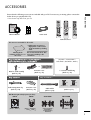
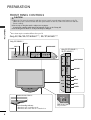
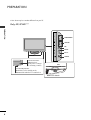
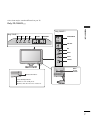
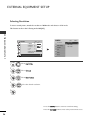
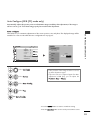
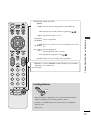
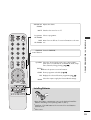
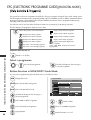
1
ENGLISH LCD TV OWNER’S MANUAL DVB is a registered trademark of the DVB Project ID Number(s): 6548 : 22LU50FD 6550 : 26LU50FD 6530 : 22LH20D 6531 : 26LH20D 6532 : 32LH20D 6533 : 37LH20D 6534 : 42LH20D 6535 : 32LH35FD 6536 : 37LH35FD 6537 : 42LH35FD 6538 : 32LH50YD 6539 : 37LH50YD 6540 : 42LH50YD 6541 : 47LH50YD 6542 : 55LH50YD 6543 : 47LH80YD 6544 : 55LH80YD 6545 : 42LH90QD 6546 : 47LH90QD LCD TV MODELS 22LU5*** 26LU5*** 22LH2*** 26LH2*** 32LH2*** 37LH2*** 42LH2*** 32LH3*** 37LH3*** 42LH3*** 32LH5*** 37LH5*** 42LH5*** 47LH5*** 55LH5*** 47LH8*** 55LH8*** 42LH9*** 47LH9*** Please read this manual carefully before operating your TV. Retain it for future reference. Record model number and serial number of the TV. Refer to the label on the back cover and quote this information. To your dealer when requiring service. (Except for Singapore) This product qualifies for ENERGY STAR in the “factory default (Home Use mode)” setting and this is the setting in which power savings will be achieved. Changing the factory default picture setting or enabling other features will increase power consumption that could exceed the limits necessary to qualify for Energy Star rating. ACCESSORIES ■ Here shown may differ from your TV. POWER ON/OFF POWER TV/RAD AV V MODE ENERGY SA SAVING VING LIST MARK or FAV Q.VIEW MENU Owner’s Manual Power Cord Batteries or MUTE Q.MENU INFO ACCESSORIES Ensure that the following accessories are included with your TV. If an accessory is missing, please contact the dealer where you purchased the TV. RETURN / EXIT i GUIDE MARK FAV AVV MODE RATIO Remote Control This item is not included for all models. * Lightly wipe any stains or fingerprints on the surface of the TV with the polishing cloth. Polishing Cloth Polishing cloth for use on the screen. Do not use excessive force. This may cause scratching or discolouration. Only 26/32/37/42LH2***, 32/37/42LH3***, 32/37/42/47/55LH5***, 42/47LH9*** (Only 26LU5***, 26/32/37/42LH2***, 32/37/42LH3***, 32/37/42LH5***, 42LH9***) (Except for 55LH5***) or x4 Bolts for stand assembly (Refer to p.11) Only 22/26LU5*** Only 22LH2*** Cable management clip (Refer to p.14) Protection cover (Refer to p.12) Wall Mounting Bracket(Separate purchase) RW120 RW230 (22LU5***, 22LH2***) 1-screw for stand fixing (Refer to p.13) Protection cover (Refer to p.12) (26LU5***, 26/32LH2***, 32LH3***, 32LH5***) Cable Holder (Refer to p.15) AW-47LG30M (Only 32/37/42LH2***, 32/37/42LH3***, 32/37/42/47LH5***, 42/47LH9***) x2 x3 (Only 22LU5***) (Only 26LU5***) Bolts for stand assembly (Refer to p.11) AW-55LH40M (55LH5***) 1 CONTENTS ACCESSORIES ............................................ 1 PREPARATION CONTENTS Front Panel Controls..................................................... 4 Back Panel Information ................................................ 8 Stand Installation ......................................................... 11 Not Using the Desk-type Stand ...............................12 Attaching the TV to a Desk .....................................13 Detaching Stand ........................................................13 Back Cover for Wire Arrangement .......................... 14 Positioning your display .........................................15 Swivel Stand ..................................................................15 Careful installation advice ..................................... 15 Desktop Pedestal Installation ............................... 16 Wall Mount: Horizontal Installation ........................ 16 Antenna Connection................................................... 17 EXTERNAL EQUIPMENT SETUP HD Receiver Setup ...................................................... 18 DVD Setup..................................................................... 21 VCR Setup..................................................................... 23 Digital Audio Out Setup ........................................... 25 Other A/V Source Setup .......................................... 26 Usb Setup...................................................................... 27 PC Setup........................................................................ 28 - Screen Setup for PC Mode................................32 WATCHING TV / PROGRAMME CONTROL Remote Control Key Functions ............................... 36 Turning on the TV ........................................................42 Programme Selection ................................................ 42 Volume Adjustment ................................................... 42 Quick Menu ................................................................. 43 On-Screen Menus Selection and Adjustment..... 44 Auto Programme Tuning............................................ 45 Manual Programme Tuning (In Digital Mode)..... 46 Manual Programme Tuning (In Analogue Mode)... 47 Programme Edit ........................................................... 49 Software Update ...........................................................51 2 Diagnostics ................................................................... 52 Selecting the Programme List .................................. 53 Favourite Programme Setup...................................... 54 Input List........................................................................ 55 Input Label .................................................................... 56 Simple manual .............................................................. 57 ................................................................. 58 AV Mode........................................................................ 60 Initializing (Reset to original factory settings) .....61 TO USE A BLUETOOTH Precautions when using the Bluetooth ................. 62 Setting the Bluetooth................................................. 63 Set TV PIN......................................................................64 Bluetooth headset - Connecting a new Bluetooth headset .............65 - Connecting to Bluetooth headset already registered ................................................................. 65 - Disconnecting the Bluetooth headset during use....66 - When requesting to connect to TV from the Bluetooth headset....................................................66 Managing Registered Bluetooth device ................ 67 My Bluetooth Information. ........................................68 Receiving Photos from external Bluetooth device.........69 Listening to the Musics from external Bluetooth device .....69 TO USE A USB DEVICE When connecting a USB device.............................. 70 Photo List ...................................................................... 71 Music List........................................................................75 Movie List........................................................................78 DivX Registration Code..............................................82 Deactivation...................................................................83 EPG (ELECTRONIC PROGRAMME GUIDE) (IN DIGITAL MODE) MHEG (MULTIMEDIA AND HYPERMEDIA INFORMATION CODING EXPERT GROUP) (IN DIGITAL MODE) Switch on MHEG......................................................... 87 Select a Programme.................................................... 87 Button Function in Guide Mode...............................88 Button Function in NOW/NEXT Guide Mode ....... 88 PICTURE CONTROL Picture Size (Aspect Ratio) Control ...................... 89 Picture Wizard................................................................91 Energy Saving ................................................................92 Preset Picture Settings - Picture Mode-Preset............................................ 93 Manual Picture Adjustment - Picture Mode-User option................................. 94 Picture Improvement Technology........................... 95 Expert Picture Control............................................... 96 Picture Reset ................................................................ 99 LED Local Dimming..................................................... 99 Power Indicator...........................................................100 Demo Mode................................................................ 101 Mode Setting...............................................................102 SOUND & LANGUAGE CONTROL Auto Volume Leveler................................................. 103 Clear Voice II ...............................................................104 Preset Sound Settings - Sound Mode................. 105 Sound Setting Adjustment -User Mode ..............106 CONTENTS Switch on/off EPG ...................................................... 84 Select a Programme.................................................... 84 Button Function in NOW/NEXT Guide Mode....... 84 Button Function in 8 Day Guide Mode..................85 Button Function in Date Change Mode................ 85 Button Function in Extended Description Box......... 86 Button Function in Remind Setting Mode......................... 86 Button Function in Schedule List Mode................ 86 SRS TruSurround XT .................................................106 Balance......................................................................... 107 TV Speakers On/ Off Setup....................................108 Selecting Digital Audio Out ....................................109 Audio Reset...................................................................110 Stereo Reception (In Analogue Mode Only).......... 111 Speaker Sound Output Selection.......................... 111 Country Selection............................................................. 112 Language Selection (In Digital Mode only)........ 113 TIME SETTING Clock Setup ................................................................. 114 Auto On/ Off Time Setting ..................................... 115 Sleep Timer Setting ................................................... 116 PARENTAL CONTROL / RATINGS Set Password & Lock System.................................. 117 Block Programme ....................................................... 118 Parental Control (In Digital Mode only) ............. 119 External Input Blocking.............................................120 Key Lock....................................................................... 121 TELETEXT Switch on/off.............................................................. 122 SIMPLE Text ................................................................ 122 TOP Text...................................................................... 122 FASTEXT ...................................................................... 123 Special Teletext Functions....................................... 123 APPENDIX Troubleshooting......................................................... 124 Maintenance .............................................................. 126 Product Specifications............................................. 127 IR Codes ...................................................................... 130 External Control Device Setup .............................. 132 Open Source Software Notice............................... 139 Open Source License ............................................... 140 3 PREPARATION FRONT PANEL CONTROLS CAUTION When the TV cannot be turned on with the remote control, press the main power button on the TV. (When the power is turned off with the main power button on the TV, it will not be turned on with the remote control). G Do not step on the glass stand or subject it to any impact. It may break, causing possible injury from fragments of glass, or the TV may fall. G Do not drag the TV. The floor or the product may be damaged. G PREPARATION ■ Here shown may be somewhat different from your TV. Only 22/26/32/37/42LH2***, 32/37/42LH3*** Only 22/26LH2*** MENU INPUT OK VOLUME PROGRAMME POWER Only 32/37/42LH2***, 32/37/42LH3*** INPUT MENU OK P PROGRAMME P VOLUME OK OK MENU MENU INPUT INPUT POWER Remote Control Sensor ON Power/Standby Indicator • Illuminates red in standby mode. • Illuminates blue when the TV is switched on. 4 OFF Main Power Switch Except for 22LH2*** P PREPARATION ■ Here shown may be somewhat different from your TV. Only 32/37/42/47/55LH5*** PROGRAMME P VOLUME OK OK MENU MENU INPUT INPUT POWER Remote Control Sensor Intelligent Sensor Adjusts picture according to the surrounding conditions. OFF Power/Standby Indicator • Illuminates red in standby mode. • Illuminates blue when the TV is switched on. ON Main Power Switch 5 PREPARATION ■ Here shown may be somewhat different from your TV. Only 42/47LH9*** PREPARATION P PROGRAMME VOLUME OK OK MENU MENU INPUT SPEAKER POWER Remote Control Sensor Intelligent Sensor Adjusts picture according to the surrounding conditions. Power/Standby Indicator • Illuminates red in standby mode. • Illuminates blue when the TV is switched on. OFF ON Main Power Switch 6 INPUT ■ Here shown may be somewhat different from your TV. Only 22/26LU5*** P Only 22LU5*** POWER INPUT MENU OK VOLUME PROGRAMME PROGRAMME P INPUT MENU OK PREPARATION Only 26LU5*** P VOLUME P P OK OK MENU MENU INPUT INPUT POWER ON OFF Main Power Switch Remote Control Sensor Power/Standby Indicator Illuminates red in standby mode. Illuminates white when the TV is switched on. 7 PREPARATION BACK PANEL INFORMATION ■ Here shown may be somewhat different from your TV. IN 3 10 2 ANTENNA IN ANTENNA IN 1 USB SERVICE ONLY VIDEO L/MONO AUDIO R USB SERVICE ONLY PREPARATION Only 22/26/32/37/42LH2*** VIDEO L/MONO AUDIO R USB SERVICE ONLY USB SERVICE ONLY Only 22/26/32/37/42LH2***, 32/37/42LH3*** USB SERVICE ONLY USB SERVICE ONLY Only 32/37/42LH3*** 10 VIDEO L/MONO AUDIO R 7 Only 22/26/32/37/42LH2*** ANTENNA IN AV IN2 ANTENNA IN VIDEO L(MONO) AUDIO R Only 32/37/42LH3*** VARIABLE AUDIO OUT 4 3 2 5 6 4 3 2 7 6 RS-232C IN (CONTROL&SERVICE) OPTICAL AUDIO IN DIGITAL (RGB/DVI) VIDEO L/ L/MONO MONO AUDIO R OPTICAL AUDIO IN DIGITAL (RGB/DVI) VIDEO L/ L/MONO MONO AUDIO R /DVI IN AUDIO OUT 2 VIDEO L(MONO) AUDIO VARIABLE AUDIO OUT 1 (DVI) /DVI IN R ANTENNA IN ANTENNA IN AUDIO OUT 2 1 (DVI) ANTENNA IN AUDIO VIDEO ANTENNA COMPONENT IN IN 8 7 AV IN1 RGB IN (PC) AV IN RGB IN (PC) VIDEO L/MONO AUDIO R 8 5 RS-232C IN (CONTROL&SERVICE) VIDEO AUDIO COMPONENT IN 9 1 Power Cord Socket This TV operates on an AC power. The voltage is indicated on the Specifications page. Never VIDEO L/MONO to R AUDIO attempt operate the TV on DC power. 2 HDMI/DVI IN Input ANTENNA IN Connect a HDMI signal to HDMI IN. Or DVI (VIDEO) signal to HDMI/DVI port with DVI to HDMI cable. 3 RGB/DVI Audio Input Connect the audio from a PC or DTV. 9 8 6 RS-232C IN (CONTROL & SERVICE) PORT Connect to the RS-232C port on a PC. This port is used for Service or Hotel mode. 7 Audio/Video Input Connect audio/video output from an external device to these jacks. 8 Component Input Connect a component video/audio device to VIDEO L/MONO these jacks. AUDIO R 4 RGB Input Connect the output from a PC. 9 Antenna Input Connect RF antenna to this jack. 5 OPTICAL DIGITAL AUDIO OUT Connect digital audio to various types of equipment. Connect to a Digital Audio Component. Use an Optical audio cable. 10 SERVICE ONLY PORT ANTENNA IN ■ Here shown may be somewhat different from your TV. Only 32/37/42/47/55LH5***, 42/47LH9*** 2 IN 4 1 4 3 2 5 RGB IN (PC) /DVI IN AUDIO IN 6 7 RS-232C IN (CONTROL&SERVICE) ANTENNA IN OPTICAL DIGITAL VIDEO L(MONO) AUDIO R VARIABLE AUDIO OUT (RGB/DVI) AUDIO OUT 7 AV IN1 VIDEO L/ L/MONO MONO AUDIO R 3 PREPARATION 10 2 2 1(DVI) AV IN2 1 VIDEO VIDEO L(MONO) AUDIO R AUDIO COMPONENT IN VARIABLE AUDIO OUT ANTENNA IN 9 8 1 Power Cord Socket This TV operates on an AC power. The voltage is indicated on the Specifications page. Never attempt to operate the TV on DC power. 2 HDMI/DVI IN Input Connect a HDMI signal to HDMI IN. Or DVI (VIDEO) signal to HDMI/DVI port with DVI to HDMI cable. 3 RGB/DVI Audio Input Connect the audio from a PC or DTV. 4 RGB IN Input Connect the output from a PC. 5 OPTICAL DIGITAL AUDIO OUT Connect digital audio to various types of equipment. Connect to a Digital Audio Component. Use an Optical audio cable. ANTENNA IN 6 RS-232C IN (CONTROL & SERVICE) PORT Connect to the RS-232C port on a PC. This port is used for Service or Hotel mode. 7 Audio/Video Input Connect audio/video output from an external device to these jacks. 8 Component Input Connect a component video/audio device to these jacks. 9 Antenna Input Connect RF antenna to this jack. 10 USB IN Input Connect USB storage device to this jack. 9 PREPARATION VIDEO Only 26LU5*** R Here shown may be somewhat different from your TV. VIDEO Only 22/26LU5*** 2 IN 3 ■ L(MONO) AUDIO L(MONO) AUDIO R ANTENNA IN PREPARATION ANTENNA IN ON 1 OFF 7 AV IN2 Only 26LU5*** 2 3 4 5 RGB IN (PC) VIDEO 3 R AUDIO VIDEO USB IN SERVICE ONLY L(MONO) L( MONO) AUDIO VIDEO ANTENNA IN 9 1 Power Cord Socket This TV operates on an AC power. The voltage is indicated on the Specifications page. Never attempt to operate the TV on DC power. 2 HDMI Input Connect an HDMI signal to HDMI IN. Or DVI (VIDEO) signal to HDMI/DVI port with DVI to HDMI cable. RGB/DVI Audio Input Connect the audio from VIDEO a PCL(MONO) or DTV. 9 R ANTENNA IN OPTICAL DIGITAL AUDIO OUT Connect digital audio from various types of equipment. Note: In standby mode, these ports do not work. ANTENNA IN 10 6 RS-232C IN (CONTROL & SERVICE) PORT Connect to the RS-232C port on a PC. This port is used for Service or Hotel mode. 7 Audio/Video Input Connect audio/video output from an external device to these jacks. 8 SERVICE ONLY PORT 9 Component Input Connect a component video/audio device to these jacks. 10 Antenna Input Connect RF antenna to this jack. R RGB IN Input Connect the output from a PC. AUDIO COMPONENT IN 10 AUDIO 10 8 7 RS-232C IN (CONTROL&SERVICE) AUDIO OUT 1(DVI) COMPONENT IN 5 6 /DVI IN VIDEO 4 5 AUDIO IN OPTICAL (RGB/DVI) DIGITAL 2 /DVI IN 3 4 RGB IN (PC) USB IN SERVICE ONLY L(MONO) L( MONO) AUDIO AUDIO OUT 1(DVI) 2 RS-232C IN (CONTROL&SERVICE) AV IN 2 8 7 AV IN1 AUDIO IN OPTICAL (RGB/DVI) DIGITAL 6 STAND INSTALLATION ■ Image shown may differ from your TV When assembling the desk type stand, check whether the bolt is fully tightened. (If not tightened fully, the product can tilt forward after the product installation.) If you tighten the bolt with excessive force, the bolt can deviate from abrasion of the tightening part of the bolt. 1 2 Carefully place the TV screen side down on a cushioned surface to protect the screen from damage. Only 26/32/37/42LH2***, 32/37/42LH3***, 32/37/42/47LH5***, 42/47LH9*** 1 Carefully place the TV screen side down on a cushioned surface to protect the screen from damage. 2 Assemble the TV as shown. 3 Fix the 4 bolts securely using the holes in the back of the TV. PREPARATION Only 22LH2*** Assemble the TV as shown. Cover Base Only 22/26LU5*** 1 Carefully place the TV screen side down on a cushioned surface to protect the screen from damage. 2 Fix the 2 or 3 bolts securely using the holes as shown. (Only 26LU5***) 11 PREPARATION NOT USING THE DESK-TYPE STAND ■ Here shown may be somewhat different from your TV. When installing the wall-mounted unit, use the protection cover. Only 22LH2*** PREPARATION 1 2 Carefully place the TV screen side down on a cushioned surface to protect the screen from damage. Only 26/32/37/42LH2***, 32/37/42LH3***, 32/37/42/47/55LH5***, 42/47LH9*** Loose the bolts from TV. Insert the P R O T E C T I O N C O V E R into the TV until clicking sound. 3 Detach the S t a n d B o d y from T V. 4 Insert the P r o t e c t i o n C o v e r into the TV. Protection Cover 5 12 Fix the 4 bolts securely using the holes in the back of the TV. ATTACHING THE TV TO A DESK (Only 26/32/37/42LH2***, 32/37/42LH3***, 26LU5***, 32/37/42LH5***, 42LH9***) ■ ■ Here shown may be somewhat different from your TV. Only 22/26LU5*** 1 Carefully place the TV screen side down on a cushioned surface to protect the screen from damage. 2 Loose the bolts and then detach the stand from TV. 1-Screw (provided as parts of the product) PREPARATION Here shown may differ from your TV. The TV must be attached to desk so it cannot be pulled in a forward/backward direction, potentially causing injury or damaging the product. Use only an attached screw. DETACHING STAND Stand (Only 26LU5***) 3 Loose the bolts and then detach the C o v e r B a s e from T V. Desk ! WARNING G To prevent TV from falling over, the TV should be securely attached to the floor/wall per installation instructions. Tipping, shaking, or rocking the machine may cause injury. Cover Base 4 (Only 26LU5***) Detach the S t a n d B o d y from T V. Stand Body 13 PREPARATION BACK COVER FOR WIRE ARRANGEMENT ■ Here shown may be somewhat different from your TV. Only 22LH2*** PREPARATION 1 2 Connect the cables as necessary. To connect additional equipment, see the EXTERNAL EQUIPMENT SETUP section. Only 26/32/37/42LH2***, 32/37/42LH3***, 32/37/42/47/55LH5***, 42/47LH9*** 1 Connect the cables as necessary. To connect additional equipment, see the External Equipment Setup section of the manual. 2 Open the C A B L E M A N A G E M E N T C L I P as shown and manage the cables. Install the CABLE MANAGEMENT CLIP as shown. CABLE MANAGEMENT CLIP 3 CABLE MANAGEMENT CLIP Fit the CABLE MANAGEMENT CLIP as shown. 3 Fit the C A B L E M A N A G E M E N T C L I P as shown. How to remove the CABLE MANAGEMENT CLIP(Only 22LH2***) G 14 Hold the CABLE MANAGEMENT CLIP with both hands and pull it backward. ! NOTE G Do not use the CABLE MANAGEMENT CLIP to lift the TV. - If the TV is dropped, you may be injured or the TV may be damaged. Only 22/26LU5*** CAREFUL INSTALLATION ADVICE After Connecting the cables as necessary, install CABLE HOLDER as shown and bundle the cables. A POSITIONING YOUR DISPLAY 1 1 (Only 22LH2***) PREPARATION You should purchase necessary components to fix the TV safety and secure to the wall on the market. A Position the TV close to the wall to avoid the possibility of it falling when pushed. A The instructions shown below are a safer way to set up the TV, by fixing it to the wall, avoiding the possibility of it falling forwards if pulled. This will prevent the TV from falling forward and causing injury. This will also prevent the TV from damage. Ensure that children do not climb or hang from the TV. 2 2 ■ Here shown may be somewhat different from your TV. Adjust the position of the panel in various ways for maximum comfort. ■ • Tilt range 12 0 0 1 Use the eye-bolts or TV brackets/bolts to fix the product to the wall as shown in the picture. (If your TV has bolts in the eyebolts, loosen then bolts.) * Insert the eye-bolts or TV brackets/bolts and tighten them securely in the upper holes. 2 Secure the wall brackets with the bolts on the wall. Match the height of the bracket that is mounted on the wall. 3 ! NOTE G The following model is a fixed stand type model without the Tilt and Swivel features so excessive pressure may damage the set. - 22/26LU5*** SWIVEL STAND 3 3 Use a sturdy rope to tie the product for alignmen. It is safer to tie the rope so it becomes horizontal between the wall and the product. (Except for 22/26LU5***, 22LH2***) After installing the TV, you can adjust the TV set manually to the left or right direction by 20 degrees to suit your viewing position. ! NOTE G G G When moving the TV undo the cords first. Use a platform or cabinet strong and large enough to support the size and weight of the TV. To use the TV safely make sure that the height of the bracket on the wall and on the TV is the same. 15 PREPARATION DESKTOP PEDESTALINSTALLATION For adequate ventilation allow a clearance of 4” (10cm) all around the TV. 4 inches PREPARATION 4 inches 4 inches 4 inches The TV can be installed in various ways such as on a wall, or on a desktop etc. A The TV is designed to be mounted horizontally. A ! NOTE Should Install wall mount on a solid wall perpendicular to the floor. G Should use a special wall mount, if you want to install it to ceiling or slanted wall. G The surface that wall mount is to be mounted on should be of sufficient strength to support the weight of TV set; e.g. concrete, natural rock, brick and hollow block. G Installing screw type and length depends on the wall mount used. Further information, refer to the instructions included with the mount. G LG is not liable for any accidents or damage to property or TV due to incorrect installation: - Where a non-compliant VESA wall mount is used. - Incorrect fastening of screws to surface which may cause TV to fall and cause personal injury. - Not following the recommended Installation method. G EARTHING Ensure that you connect the earth wire to prevent possible electric shock. If grounding methods are not possible, have a qualified electrician install a separate circuit breaker. Do not try to earth the TV by connecting it to telephone wires, lightening rods or gas pipes. A B Power Supply WALL MOUNT: HORIZONTAL INSTALLATION We recommend the use of a LG Brand wall mounting bracket when mounting the TV to a wall. A We recommend that you purchase a wall mounting bracket which supports VESA standard. A LG recommends that wall mounting be performed by a qualified professional installer. A 4 inches 4 inches 4 inches 4 inches 4 inches 16 22LU5*** 26LU5*** VESA Standard (A * B) Screw Quantity 100 * 100 M4 4 200 * 100 M4 4 22LH2*** 26LH2*** 32LH2*** 37LH2*** 42LH2*** 100 * 100 200 * 100 200 * 100 200 * 200 200 * 200 M4 M4 M4 M6 M6 4 4 4 4 4 32LH3*** 37LH3*** 42LH3*** 200 * 100 200 * 200 200 * 200 M4 M6 M6 4 4 4 32LH5*** 37LH5*** 42LH5*** 47LH5*** 55LH5*** 200 * 100 200 * 200 200 * 200 200 * 200 400 * 400 M4 M6 M6 M6 M6 4 4 4 4 4 42LH9*** 47LH9*** 200 * 200 200 * 200 M6 M6 4 4 Model Circuit breaker ■ To prevent damage do not connect to the mains outlet until all connections are made between the devices. ANTENNA CONNECTION For optimum picture quality, adjust antenna direction. ■ An antenna cable and converter are not supplied. ■ PREPARATION ON OFF VIDEO L/MONO AUDIO R Wall Antenna Socket Multi-family Dwellings/Apartments (Connect to wall antenna socket) ANTENNA IN VIDEO L(MONO) AUDIO R ANTENNA IN VARIABLE AUDIO OUT RF Coaxial Wire (75 ohm) Outdoor Antenna (VHF, UHF) Single-family Dwellings /Houses (Connect to wall jack for outdoor antenna) VIDEO L(MONO) AUDIO R VARIABLE AUDIO OUT ANTENNA IN VIDEO L/MONO AUDIO R UHF Antenna Signal Amplifier ANTENNA IN VHF ■ ■ In poor signal areas, to achieve better picture quality it may be necessary to install a signal amplifier to the antenna as shown above. If signal needs to be split for two TVs, use an antenna signal splitter for connection. 17 EXTERNAL EQUIPMENT SETUP To avoid damaging any equipment, never plug in any power cords until you have finished connecting all equipment. This section on EXTERNAL EQUIPMENT SETUP mainly uses diagrams for the 32/37/42/47/55LH5*** models. ■ ■ Here shown may differ from your TV. ■ HD RECEIVER SETUP ■ This TV can receive Digital RF/Cable signals without an external digital set-top box. However, if you do receive Digital signals from a digital set-top box or other digital external device, refer to the diagram as shown below. Connecting with a component cable 2 EXTERNAL EQUIPMENT SETUP 1 Connect the video outputs (Y, PB, PR) of the digital set top box to the C O M P O N E N T I N V I D E O jacks on the TV. AUDIO VIDEO COMPONENT IN 2 Connect the audio output of the digital set-top box to the C O M P O N E N T I N A U D I O jacks on the TV. 3 Turn on the digital set-top box. (Refer to the owner’s manual for the digital set-top box.) 1 4 Select C o m p o n e n t 1 input source using the I N P U T button on the remote control. If connected to C O M P O N E N T I N 2, select C o m p o n e n t 2 input source. G HDMI Audio Supported format : Dolby Digital, PCM Signal Component HDMI 480i/576i O X 480p/576p O O 720p/1080i O O O O 1080p 18 1 (50Hz/60Hz) (24Hz/30Hz/50Hz/60Hz) 2 Connecting a set-top box with an HDMI cable AUDIO IN Connect the digital set-top box to H D M I / D V I I N 1, H D M I I N 2 , H D M I I N 3 (Except for 22/26/32/37/42LH2***, 22LU5***) or H D M I I N 4 (Only 32/37/42/47/55LH5***, 42/47LH9***) jack on the TV. 3 (RGB/DVI) AUDIO 2 2 1(DVI) Y PB PR 1 2 Turn on the digital set-top box. (Refer to the owner’s manual for the digital set-top box.) 3 Select H D M I 1, H D M I 2, H D M I 3(Except for 22/26/32/37/42LH2***, 22LU5***) or H D M I 4(Only 32/37/42/47/55LH5***, 42/47LH9***) input source using the I N P U T button on the remote control. VIDEO COMPON 1 EXTERNAL EQUIPMENT SETUP 1 OPTICA /DVI IN ! NOTE G Check that your HDMI cable is version 1.3 or higher. If the HDMI cables don’t support HDMI version 1.3, flickering or no screen display can result. Please use the latest cables that support at least HDMI version 1.3. 19 EXTERNAL EQUIPMENT SETUP Connecting with an HDMI to DVI cable /DVI IN 1 EXTERNAL EQUIPMENT SETUP 20 Connect the digital set-top box to H D M I / D V I I N 1 jack on the TV. AUDIO IN OPTICAL DIG (RGB/DVI) AUDIO OU 3 2 2 Y 2 Connect the audio output of the digital set-top box to the A U D I O I N ( R G B / D V I ) jack on the TV. PB PR 1(DVI) 1 VIDEO COMPONEN 3 Turn on the digital set-top box. (Refer to the owner’s manual for the digital set-top box.) 4 Select H D M I 1 input source using the I N P U T button on the remote control. 1 2 DVD SETUP Connecting with a component cable 1 Connect the video outputs (Y, PB, PR) of the DVD to the C O M P O N E N T I N V I D E O jacks on the TV. 2 Connect the audio outputs of the DVD to the C O M P O N E N T I N A U D I O jacks on the TV. 3 Turn on the DVD player, insert a DVD. 4 Select C o m p o n e n t 1 input source using the I N P U T button on the remote control. If connected to C O M P O N E N T I N 2, select C o m p o n e n t 2 input source. 2 1 AUDIO COMPONENT IN Refer to the DVD player's manual for operating instructions. 1 2 EXTERNAL EQUIPMENT SETUP 5 VIDEO Component Input ports To achieve better picture quality, connect a DVD player to the component input ports as shown below. Component ports on the TV Video output ports on DVD player Y PB PR Y PB PR Y B-Y R-Y Y Cb Cr Y Pb Pr 21 EXTERNAL EQUIPMENT SETUP Connecting the HDMI cable 1 EXTERNAL EQUIPMENT SETUP Connect the HDMI output of the DVD to the H D M I / D V I I N 1, H D M I I N 2 , H D M I I N 3 (Except for 22/26/32/37/42LH2***, 22LU5***) or H D M I I N 4 (Only 32/37/42/47/55LH5***, 42/47LH9***) jack on the TV. OPTICAL D 3 (RGB/DVI) AUDIO O 2 2 1(DVI) Y PB PR 1 2 Select H D M I 1, H D M I 2, H D M I 3(Except for 22/26/32/37/42LH2***, 22LU5***) or H D M I 4(Only 32/37/42/47/55LH5***, 42/47LH9***) input source using the I N P U T button on the remote control. 3 Refer to the DVD player's manual for operating instructions. ! NOTE G The TV can receive video and audio signals simultaneously when using an HDMI cable. G If the DVD does not support Auto HDMI, you must set the output resolution appropriately. G The TV set can process audio format of PCM or AC3, when connect the external equipment using an HDMI cable. G Check that your HDMI cable is version 1.3 or higher. If the HDMI cables don’t support HDMI version 1.3, flickering or no screen display can result. Please use the latest cables that support at least HDMI version 1.3. 22 AUDIO IN /DVI IN VIDEO COMPONE 1 VCR SETUP ■ To avoid picture noise (interference), allow adequate distance between the VCR and TV. Connecting with a RF Cable R L ANT OUT S-VIDEO ANT IN OUTPUT SWITCH VIDEO L R 1 EO MPONENT IN AUDIO ANTENNA IN 2 Wall Jack EXTERNAL EQUIPMENT SETUP PR Antenna VIDEO 1 Connect the A N T O U T socket of the VCR to the A N T E N N A I N socket on the TV. 2 Connect the antenna cable to the A N T I N socket of the VCR. 3 Press the P L A Y button on the VCR and match the appropriate channel between the TV and VCR for viewing. L/MONO AUDIO R 23 EXTERNAL EQUIPMENT SETUP Connecting with a RCA cable EXTERNAL EQUIPMENT SETUP 1 V I D E O jacks between TV and Connect the A U D I O/V VCR. Match the jack colours (Video = yellow, Audio Left = white, and Audio Right = red) 2 Insert a video tape into the VCR and press PLAY on the VCR. (Refer to the VCR owner’s manual.) 3 Select A V 1 input source using the I N P U T button on the remote control. If connected to A V 2 input, select A V 2 input source. ! NOTE G If you have a mono VCR, connect the audio cable from the VCR to the A U D I O L / M O N O jack of the TV. AUDIO IN OPTICAL DIGITAL L/MONO AUDIO R (RGB/DVI) VIDEO L/MONO L/ MONO AUDIO AUDIO OUT R AV IN1 VIDEO 2 Y PB PR or R L 1 1 ANTENNA IN AUDIO VIDEO COMPONENT IN 1 AV V IN 2 AV IN 2 S-VIDEO VIDEO L R ANT IN S-VIDEO VIDEO OUTPUT SWITCH OUTPUT SWITCH 24 ANT OUT L R ANT IN ANT OUT DIGITAL AUDIO OUT SETUP Sending the TV’s audio signal to external audio equipment via the Digital Audio Output (Optical) port. If you want to enjoy digital broadcasting through 5.1-channel speakers, connect the OPTICAL DIGITAL AUDIO OUT terminal on the back of TV to a Home Theater (or amp). Connect one end of an optical cable to the TV Digital Audio (Optical) Output port. AUDIO IN OPTICAL DIGITAL VIDEO (RGB/DVI) AUDIO OUT Connect the other end of the optical cable to the digital audio (Optical) input on the audio equipment. 2 Y 3 Set the “TV Speaker option - Off ” in the AUDIO menu.(Gp .108) Refer to the external audio equipment instruction manual for operation. PB 1 PR G Do not look into the optical output port. Looking at the laser beam may damage your vision. R L 1 AUDIO VIDEO COMPONENT IN 2 CAUTION AUDIO ANTE EXTERNAL EQUIPMENT SETUP 2 /MONO AV IN 1 1 ! NOTE G When connecting with external audio equipments, such as amplifiers or speakers, please turn the TV speakers off. 25 EXTERNAL EQUIPMENT SETUP OTHER A/V SOURCE SETUP Camcorder Video Game Set RS-232C IN (CONTROL & SERVICE) AUDIO IN OPTICAL DIGITAL L/MONO AUDIO R AV IN1 VIDEO (RGB/DVI) AUDIO OUT VIDEO L R EXTERNAL EQUIPMENT SETUP 2 Y PB PR L R 1 VIDEO AUDIO ANTENNA IN COMPONENT IN 1 or Camcorder Video Game Set L R IN 4 VIDEO 1 AV IN2 1 V I D E O jacks between TV and external equipment. Match the jack colours . Connect the A U D I O/V (Video = yellow, Audio Left = white, and Audio Right = red) 2 Select A V 1 input source with using the I N P U T button on the remote control. If connected to A V 2 input, select A V 2 input source. VIDEO 3 26 L/MONO AUDIO Operate the corresponding external equipment. Refer to external equipment operating guide. R USB SETUP (Except for 22/26/32/37/42LH2***, 32/37/42LH3***, 22/26LU5***) IN 4 1 Connect the USB device to the U S B I N jacks on the TV. 2 After connecting the U S B I N jacks, you use the U S B function. (G p .70) EXTERNAL EQUIPMENT SETUP 1 27 EXTERNAL EQUIPMENT SETUP PC SETUP This TV provides Plug and Play capability, meaning that the PC adjusts automatically to the TV's settings. Connecting with a D-sub 15 pin cable AUDIO IN OPTICAL DIGITAL 2 Connect the PC audio output to the A U D I O I N ( R G B / D V I ) jack on the TV. DVI IN (RGB/DVI) AUDIO OUT VIDEO /MONO AUDIO 2 Y 3 Turn on the PC and the TV. PR PB VIDEO COMPONENT IN 4 Select R G B input source using the INPUT button on the remote control. R L 1 2 1 AUDIO RGB OUTPUT 28 RS-232C IN (CONTROL & SERVICE) AV IN 1 EXTERNAL EQUIPMENT SETUP 1 RGB IN (PC) Connect the RGB output of the PC to the R G B I N ( P C ) jack on the TV. AUDIO A Connecting with a HDMI to DVI cable Connect the DVI output of the PC to the H D M I / D V I I N 1 jack on the TV. AUDIO IN /DVI IN (RGB/DVI) OPTICAL DIGITAL VID AUDIO OUT 3 2 Connect the PC audio output to the A U D I O I N ( R G B / D V I ) jack on the TV. 2 2 Y 1(DVI) PB PR 1 VIDEO COMPONEN 3 Turn on the PC and the TV. 4 Select H D M I 1 input source using the INPUT button on the remote control. 1 DVI-PC OUTPUT 2 EXTERNAL EQUIPMENT SETUP 1 AUDIO 29 EXTERNAL EQUIPMENT SETUP Supported Display Resolution HDMI/DVI-DTV mode RGB-PC, HDMI/DVI-PC mode EXTERNAL EQUIPMENT SETUP Resolution Horizontal Frequency(kHz) Vertical Frequency(Hz) Resolution Horizontal Frequency(kHz) Vertical Frequency(Hz) 720x400 31.468 70.08 720x480 31.469/31.5 59.94/60 640x480 31.469 59.94 720x576 31.25 50 1280x720 50 59.94/60 33.72/33.75 59.94/60 28.125 50 37.879 60.31 48.363 60.00 1280x768 47.78 59.87 1360x768 47.72 59.80 1280x1024 63.595 60.00 26.97/27 23.97/24 1920x1080 66.587 59.93 33.716/33.75 29.976/30.00 56.25 50 67.43/67.5 59.94/60 (RGB-PC) 1920x1080 67.5 60.00 (HDMI-PC) Except for 22/26/32/37/42LH2*** 30 37.5 44.96/45 800x600 1024x768 1920x1080 ! NOTE G Avoid G If required, adjust the settings for Plug and Play functionality G If the graphic card on the PC does not output analogue and digital RGB simultaneously, connect only one of either RGB or HDMI IN (or HDMI/DVI IN) to display the PC output on the TV. G If graphic card on the PC does output analogue and digital RGB simultaneously, set the TV to either RGB or HDMI; (the other mode is set to Plug and Play automatically by the TV.) G DOS mode may not work depending on the video card if you use a HDMI to DVI cable. G If you use too long an RGB-PC cable, there may be interference on the screen. We recommend using under 5m of cable. This provides the best picture quality. G When an unsupported resolution or graphic card is used on the PC, it may cause some errors. G We recommend using 1920x1080, 60Hz(only 22/26/32/37/42LH2*** : 1360x768, 60Hz) for the PC mode, this should provide the best picture quality. EXTERNAL EQUIPMENT SETUP keeping a fixed image on the set’s screen for prolonged periods of time. The fixed image may become permanently imprinted on the screen; use a screen saver when possible. G There may be interference relating to resolution, vertical pattern, contrast or brightness in PC mode. Change the PC mode to another resolution or change the refresh rate to another rate or adjust the brightness and contrast on the menu until the picture is clear. If the refresh rate of the PC graphic card can not be changed, change the PC graphic card or consult the manufacturer of the PC graphic card. G The synchronization input waveform for Horizontal and Vertical frequencies are separate. G Connect the signal cable from the monitor output port of the PC to the RGB (PC) port of the TV or the signal cable from the HDMI output port of the PC to the HDMI IN (or HDMI/DVI IN) port on the TV. G Connect the audio cable from the PC to the Audio input on the TV. (Audio cables are not included with the TV). G If using a sound card, adjust PC sound as required. G This TV uses a VESA Plug and Play Solution. The TV provides EDID data to the PC system with a DDC protocol. The PC adjusts automatically when using this TV. G DDC protocol is preset for RGB (Analogue RGB), HDMI (Digital RGB) mode. 31 EXTERNAL EQUIPMENT SETUP Screen Setup for PC mode Screen Reset Returns Position, Size and Phase to the factory default settings. This function works in the following mode : RGB[PC]. EXTERNAL EQUIPMENT SETUP PICTURE Move SCREEN OK E • Contrast 90 • Brightness 50 • Sharpness 70 • Colour 60 • Tint 0 Prev. Resolution Auto Config. Position R G Size • Advanced Control • Picture Reset Move To Set Yes No Phase Screen Screen Reset 1 MENU 2 Select P I C T U R E. OK Select S c r e e n. OK Select R e s e t. OK Select Y e s. 3 4 5 OK Run R e s e t. • Press the M E N U button to return to normal TV viewing. • Press the R E T U R N button to move to the previous menu screen. 32 Adjustment for screen Position, Size, Phase If the picture is not clear after auto adjustment and especially if characters are still trembling, adjust the picture phase manually. This function works in the following mode : RGB[PC]. Move SCREEN OK Move Prev. E • Contrast 90 • Brightness 50 • Sharpness 70 • Colour 60 • Tint 0 Resolution Auto Config. Position R G Size • Advanced Control • Picture Reset Phase Screen Screen Reset 1 MENU EXTERNAL EQUIPMENT SETUP PICTURE Select P I C T U R E. 2 OK 3 OK 4 5 OK Select S c r e e n. Select P o s i t i o n, S i z e or P h a s e. Make appropriate adjustments. OK • Press the M E N U button to return to normal TV viewing. • Press the R E T U R N button to move to the previous menu screen. 33 EXTERNAL EQUIPMENT SETUP Selecting Resolution To view a normal picture, match the resolution of RGB mode and selection of PC mode. This function works in the following mode: RGB[PC] EXTERNAL EQUIPMENT SETUP SCREEN PICTURE Move Resolution E • Contrast 90 • Brightness 50 • Sharpness 70 • Colour 60 • Tint 0 Move Prev. OK Auto Config. 1024 x 768 1280 x 768 1360 x 768 Position R G Size • Advanced Control • Picture Reset Screen Screen 1 MENU 2 Phase Reset Select P I C T U R E. OK Select S c r e e n. OK Select R e s o l u t i o n. 3 4 OK Select the desired resolution. 5 OK • Press the M E N U button to return to normal TV viewing. • Press the R E T U R N button to move to the previous menu screen. 34 Auto Configure (RGB [PC] mode only) Automatically adjusts the picture position and minimizes image instability. After adjustment, if the image is still not correct, your TV is functioning properly but needs further adjustment. PICTURE Move SCREEN OK E • Contrast 90 • Brightness 50 • Sharpness 70 • Colour 60 • Tint 0 Move Prev. Resolution Auto Config. Position R G Size To Set Yes No • Advanced Control • Picture Reset Phase EXTERNAL EQUIPMENT SETUP Auto configure This function is for automatic adjustment of the screen position, size, and phase The displayed image will be unstable for a few seconds while the auto configuration is in progress. Screen Screen Reset 1 MENU Select P I C T U R E. • If the position of the image is still not correct, try Auto adjustment again. 2 • If picture needs to be adjusted again after Auto OK Select S c r e e n. OK Select A u t o C o n f i g .. OK Select Y e s. adjustment in RGB (PC), you can adjust the P o s i t i o n, S i z e or P h a s e. 3 4 5 OK Run A u t o C o n f i g .. • Press the M E N U button to return to normal TV viewing. • Press the R E T U R N button to move to the previous menu screen. 35 WATCHING TV / PROGRAMME CONTROL REMOTE CONTROL KEY FUNCTIONS (Only 32/37/42/47/55LH5***) When using the remote control, aim it at the remote control sensor on the TV. ENERGY SAVING Adjust the Energy Saving mode of the TV. RATIO Selects your desired Aspect Ratio of picture.(G p . 8 9) POWER Switches the TV on from standby or off to standby. INPUT External input mode rotate in regular sequence.(G p . 5 5) WATCHING TV / PROGRAMME CONTROL TV/RAD Selects Radio, TV and DTV channel. Q. MENU Select the desired quick menu source. (Aspect Ratio, Clear Voice II , Picture Mode, Sound Mode, Audio, Sleep Timer, Favourite, USB Device).(G p . 4 3) MENU Selects a menu. Clears all on-screen displays and returns to TV viewing from any menu. GUIDE Shows programme schedule.(G p . 8 4) THUMBSTICK Allows you to navigate the on-screen menus and adjust (Up/Down/Left/ the system settings to your preference. Right) OK Accepts your selection or displays the current mode. RETURN(EXIT) Allows the user to move return one step in an interactive application, EPG or other user interaction function. INFO i Shows the present screen information. AV MODE It helps you select and set images and sounds when connecting AV devices.(G p . 6 0) Coloured These buttons are used for teletext (on T E L E T E X T buttons models only) , P r o g r a m m e e d i t. 1 1 TELETEXT These buttons are used for teletext. BUTTONS For further details, see the ‘Teletext’ section.(G p . 1 2 2) SUBTITLE Recalls your preferred subtitle in digital mode. See a list of AV devices connected to TV. When you toggle this button, the Simplink menu appears at the screen.(G p . 5 8) 36 VOLUME UP Adjusts the volume. /DOWN MARK Check and un-check programmes in the USB menu. FAV Displays the selected favourite programme.(G p . 5 4) MUTE Switches the sound on or off. PAGE Move from one full set of screen information to the next UP/DOWN one. 0~9 number Selects a programme. button Selects numbered items in a menu. LIST Displays the programme List.(G p . 5 3) Q.VIEW Returns to the previously viewed programme. SIMPLINK / Controls SIMPLINK or USB menu(Photo List and Music USB Menu List or Movie List. control buttons WATCHING TV / PROGRAMME CONTROL Programme Selects a programme. UP/DOWN Installing Batteries ■ Open the battery compartment cover on the back and install the batteries matching correct polarity (+with +,-with -). ■ Install two 1.5V AAA batteries. Do not mix old or used batteries with new ones. ■ Close cover. 37 WATCHING TV / PROGRAMME CONTROL REMOTE CONTROL KEY FUNCTIONS (Only 22/26/32/37/42LH2***, 32/37/42LH3***, 22/26LU5***) When using the remote control, aim it at the remote control sensor on the TV. TV/RAD Selects Radio, TV and DTV channel. AV MODE It helps you select and set images and sounds when connecting AV devices.(G p . 6 0) POWER Switches the TV on from standby or off to standby. POWER AV V MODE ENERGY SAVING WATCHING TV / PROGRAMME CONTROL INPUT External input mode rotate in regular sequence.(G p . 5 5) ENERGY SAVING Adjust the Energy Saving mode of the TV. 0~9 number Selects a programme. button Selects numbered items in a menu. Q.VIEW Returns to the previously viewed programme. LIST Q.VIEW LIST Displays the programme List.(G p . 5 3) MUTE THUMBSTICK Allows you to navigate the on-screen menus and adjust (Up/Down/Left/Right) the system settings to your preference. OK Accepts your selection or displays the current mode. MENU Selects a menu. Clears all on-screen displays and returns to TV viewing from any menu. RETURN(EXIT) Allows the user to move return one step in an interactive application, EPG or other user interaction function. MENU RETURN / EXIT Coloured These buttons are used for teletext (on T E L E T E X T buttons models only) , P r o g r a m m e e d i t. 1 Q.MENU INFO i GUIDE MARK FAV 1 TELETEXT These buttons are used for teletext. BUTTONS For further details, see the ‘Teletext’ section.(G p . 1 2 2) SUBTITLE Recalls your preferred subtitle in digital mode. See a list of AV devices connected to TV. When you toggle this button, the Simplink menu appears at the screen.(G p . 5 8) 38 VOLUME UP Adjusts the volume. /DOWN MUTE Switches the sound on or off. POWER AV V MODE ENERGY SAVING Programme Selects a programme. UP/DOWN SIMPLINK Controls SIMPLINK. control buttons LIST Q.VIEW MUTE Q. MENU Select the desired quick menu source. (Aspect Ratio, Clear Voice II , Picture Mode, Sound Mode, Audio, Sleep Timer, Favourite, Energy Saving.)(G p . 4 3) INFO i Shows the present screen information. GUIDE Shows programme schedule.(G p . 8 4) WATCHING TV / PROGRAMME CONTROL PAGE Move from one full set of screen information to the next UP/DOWN one. FAV Displays the selected favourite programme.(G p . 5 4) MARK Select the input to apply the Picture Wizard settings. MENU RETURN / EXIT Installing Batteries Q.MENU INFO i GUIDE MARK FAV ■ ■ ■ Open the battery compartment cover on the back and install the batteries matching correct polarity (+with +,-with -). Install two 1.5V AAA batteries. Do not mix old or used batteries with new ones. Close cover. 39 WATCHING TV / PROGRAMME CONTROL REMOTE CONTROL KEY FUNCTIONS (Only 42/47LH9***) When using the remote control, aim it at the remote control sensor on the TV. POWER Switches the TV on from standby or off to standby. POWER ON/OFF ON/OFF Key lighting on or off. TV/RAD TV/RAD Selects Radio, TV and DTV channel. ENERGY SAVING Adjust the Energy Saving mode of the TV. INFO i Shows the present screen information. WATCHING TV / PROGRAMME CONTROL INPUT External input mode rotate in regular sequence.(G p . 5 5) 0~9 number Selects a programme. button Selects numbered items in a menu. LIST Displays the programme List.(G p . 5 3) Q.VIEW Returns to the previously viewed programme. MARK MENU Selects a menu. Clears all on-screen displays and returns to TV viewing from any menu. FAV Q. MENU Select the desired quick menu source. (Aspect Ratio, Clear Voice II , Picture Mode, Sound Mode, Audio, Sleep Timer, Favourite, USB Device).(G p . 4 3) THUMBSTICK Allows you to navigate the on-screen menus and adjust (Up/Down/Left/Right) the system settings to your preference. OK Accepts your selection or displays the current mode. GUIDE Shows programme schedule.(G p . 8 4) RETURN(EXIT) Allows the user to move return one step in an interactive application, EPG or other user interaction function. Coloured These buttons are used for teletext (on T E L E T E X T buttons models only) , P r o g r a m m e e d i t. 1 1 AV MODE TELETEXT These buttons are used for teletext. BUTTONS For further details, see the ‘Teletext’ section.(G p . 1 2 2) RATIO RATIO SUBTITLE Recalls your preferred subtitle in digital mode. 40 POWER VOLUME UP Adjusts the volume. /DOWN ON/OFF TV/RAD FAV Displays the selected favourite programme.(G p . 5 4) MARK Select the input to apply the Picture Wizard settings. MUTE Switches the sound on or off. PAGE Move from one full set of screen information to the next UP/DOWN one. SIMPLINK / Controls SIMPLINK or USB menu(Photo List and Music USB Menu List or Movie List. control buttons MARK FAV See a list of AV devices connected to TV. When you toggle this button, the Simplink menu appears at the screen.(G p . 5 8) RATIO Selects your desired Aspect Ratio of picture.(G p . 8 9) WATCHING TV / PROGRAMME CONTROL Programme Selects a programme. UP/DOWN AV MODE It helps you select and set images and sounds when connecting AV devices.(G p . 6 0) Installing Batteries AV MODE RATIO RATIO ■ ■ ■ Open the battery compartment cover on the back and install the batteries matching correct polarity (+with +,-with -). Install two 1.5V AAA batteries. Do not mix old or used batteries with new ones. Close cover. 41 WATCHING TV / PROGRAMME CONTROL TURNING ON THE TV - When your TV is turned on, you will be able to use its features. 1 Firstly, connect the power cord correctly and check the main power on the TV. At this stage, the TV switches to standby mode. 2 In standby mode to turn TV on, press the r / I, INPUT or P D E (or P ) button on the TV or press the POWER, INPUT, P or NUMBER button on the remote control and the TV will switch on. WATCHING TV / PROGRAMME CONTROL Initializing setup If the OSD (On Screen Display) is displayed on the screen after turning on the TV, you can adjust the M o d e S e t t i n g, C o u n t r y(Only Australia & New Zealand), T i m e Z o n e(Only Australia), A u t o T u n i n g. Note: a. If you close without completing the initial setting, the Initial Setting menu can be displayed again. b. For those countries without confirmed DTV broadcasting standards, some DTV features might not work, depending on the DTV broadcasting environment. c. "Home Use” mode is the optimal setting for home environments, and is the TV's default mode. d. "Store Demo" mode is the optimal setting for store environments. If a user modifies image quality data, “Store Demo” mode initializes the product to the image quality set by us after a certain period of time. e. The mode (Home Use, Store Demo) can be changed by executing Mode Setting in the OPTION menu. PROGRAMME SELECTION 1 Press the P number. or NUMBER buttons to select a programme VOLUME ADJUSTMENT 1 Press the + or - button to adjust the volume. If you wish to switch the sound off, press the MUTE button. You can cancel this function by pressing the MUTE, + , - or AV Mode button. 42 QUICK MENU Your TV's OSD (On Screen Display) may differ slightly from that shown in this manual. Q.Menu (Quick Menu) is a menu of features which users might use frequently. F Aspect Ratio G 16:9 Except for 22/26/32/37/42LH2***, 32/37/42LH3***, 22/26LU5*** 1Q. MENU 2 A u d i o : Selects the sound output. S l e e p T i m e r : Sets the sleep timer. F a v o u r i t e : Selects the favourite programme. U S B D e v i c e : Selects “Eject” in order to eject USB device.(Except for 22/26/32/37/42LH2***, 32/37/42LH3***, 22/26LU5***) E n e r g y S a v i n g : Selects your desired Energy Saving mode. (Only22/26/32/37/42LH2***, 32/37/42LH3***, 22/26LU5***) F Aspect Ratio G 16:9 WATCHING TV / PROGRAMME CONTROL A s p e c t R a t i o: Selects your desired picture format. For Zoom Setting, select 14:9, Zoom and Cinema Zoom in Ratio Menu. After completing Zoom Setting, the display goes back to Q.Menu. C l e a r V o i c e I I : By differentiating the human sound range from others, it helps users listen to human voices better. P i c t u r e M o d e : Selects your desired Picture Mode. S o u n d M o d e : It is a feature to automatically set the sound combination which it deems the best for the images being watched. Selects your desired Sound Mode. Only 22/26/32/37/42LH2***, 32/37/42LH3***, 22/26LU5*** Display each menu. Select your desired Source. 3 OK • Press the Q . M E N U button to return to normal TV viewing. • Press the R E T U R N button to move to the previous menu screen. 43 WATCHING TV / PROGRAMME CONTROL ON SCREEN MENUS SELECTION AND ADJUSTMENT Your TV's OSD (On Screen Display) may differ slightly from that shown in this manual. A Here shown may differ from your TV. SETUP Move PICTURE OK Move Auto Tuning Aspect Ratio Manual Tuning Picture Wizard Programme Edit : 16:9 : On Auto Volume Clear Voice II Energy Saving Software Update AUDIO OK : Off Picture Mode Balance Sound Mode WATCHING TV / PROGRAMME CONTROL Move : English Subtitle Language : English Hard of Hearing( Country - + L R 70 • Contrast 90 • SRS TruSurround XT : Off • Brightness 50 • Treble 50 • Sharpness 70 • Bass 50 : Standard E TIME OK Audio Language 3 0 • Backlight E OPTION OK : Off • Level : Standard Diagnostics Move : Off Move OK Clock SETUP ) : Off PICTURE AUDIO TIME : Australia Off Time : Off On Time : Off Sleep Timer : Off Input Label SIMPLINK : On Key Lock Simple Manual : Off or OPTION BLUETOOTH LOCK USB INPUT E LOCK Move Lock System OK : Off BLUETOOTH Move INPUT OK Move OK USB Bluetooth : Off Antenna Photo List Set Password TV PIN : 0000 AV1 Music List Block Programme Bluetooth Headset : Disconnected AV2 Movie List Registered Bluetooth Device Component1 DivX Reg. Code My Bluetooth Info. Component2 Deactivation Parental Guidance Input Block : Blocking Off Move RGB HDMI1 HDMI2 E (Only 42/47LH9***) 1 MENU Select a menu item. OK 3 Move to the pop up menu. • Press the I N F O button, you can check the S i m p l e M a n u a l Menu. • Press the M E N U button to return to normal TV viewing. • Press the R E T U R N button to move to the previous menu screen. ! NOTE G 44 (Only 32/37/42/47/55LH5***, 42/47LH9***) Display each menu. 2 OK (Only 32/37/42/47/55LH5***) It is possible to use Country in Australia and New Zealand only. OK AUTO PROGRAMME TUNING Use this to automatically find and store all available programmes. When you start auto programming, all previously stored service information will be deleted. The maximum number of programmes that can be stored is 500. But the number may differ slightly depending on broadcasting signals. SETUP Move OK SETUP Auto Tuning Manual Tuning Manual Tuning Programme Edit Software Update Move OK Programme Edit : On Diagnostics Software Update Diagnostics : On Check your antenna connection. The previous channel information will be updated during Auto Tuning. Automatic Numbering Start Close 1 MENU Select S E T U P. • Use NUMBER buttons to input a 4-digit pass- O n’. word in L o c k S y s t e m ‘O 2 • If you wish to keep on auto tuning select S t a r t OK Select A u t o T u n i n g. OK Select S t a r t. 3 WATCHING TV / PROGRAMME CONTROL Auto Tuning using the button. Then, press the OK button. Otherwise select C l o s e. • A u t o m a t i c N u m b e r i n g: Decide whether to use the programme numbers as sent by broadcasting stations for tuning. 4 OK Run A u t o t u n i n g. • Press the M E N U button to return to normal TV viewing. • Press the R E T U R N button to move to the previous menu screen. 45 WATCHING TV / PROGRAMME CONTROL MANUAL PROGRAMME TUNING (IN DIGITAL MODE) Manual Tuning lets you manually add a programme to your programme list. SETUP Move SETUP OK Move F Auto Tuning Auto Tuning Manual Tuning Tuning Manual Manual Tuning Programme Edit Software Update : On Diagnostics OK DTV G Your receiver will add this channel to your channel list. Programme Edit UHF CH. Software Update : On 30 Diagnostics WATCHING TV / PROGRAMME CONTROL Bad Normal Good Add Close 1 MENU Select S E T U P. • Use NUMBER buttons to input a 4-digit pass- O n’. word in L o c k S y s t e m ‘O 2 Select M a n u a l T u n i n g. OK 3 Select D T V. OK 4 Select the desired channel number. 5 OK Update. • Press the M E N U button to return to normal TV viewing. • Press the R E T U R N button to move to the previous menu screen. 46 MANUAL PROGRAMME TUNING (IN ANALOGUE MODE) Manual Tuning lets you manually tune and arrange the stations in whatever order you desire. SETUP Move SETUP OK Move Auto Tuning Auto Tuning Manual Tuning Manual Tuning Programme Edit System : On Band Software Update Diagnostics G 3 Diagnostics BG V/UHF Channel 0 Search F G Name C 02 Store Close 1 MENU 6 Select S E T U P. Select V / U H F or C a b l e. 7 2 OK or Select M a n u a l T u n i n g. 1 2 3 4 5 6 7 8 9 Select the desired channel number. 0 8 3 OK Select T V. Commence searching. 9 4 or 1 2 3 4 5 6 7 8 9 OK Select the desired programme number on. WATCHING TV / PROGRAMME CONTROL : On TV F Storage Programme Edit Software Update OK Select S t o r e. 0 5 Select a TV system. • Press the M E N U button to return to normal TV viewing. • Press the R E T U R N button to move to the previous menu screen. O n’. • Use NUMBER buttons to input a 4-digit password in L o c k S y s t e m ‘O • B G : PAL B/G (Europe / East Europe / Asia / New Zealand / M.East / Africa / Singapore) I : PAL I/II (U.K. / Ireland / Hong Kong / South Africa) D K : PAL D/K (East Europe / China / Africa / CIS) B / B : Australia • To store another channel, repeat steps 4 to 9. 47 WATCHING TV / PROGRAMME CONTROL SETUP Move OK SETUP Auto Tuning Auto Tuning Manual Tuning Manual Tuning Programme Edit Programme Edit Software Update : On Diagnostics Move OK F TV Storage Software Update G 3 : OnSystem BG Band V/UHF Diagnostics Channel 0 Search F G Name C 02 Store Close WATCHING TV / PROGRAMME CONTROL 48 A Assigning a station name You can assign a station name with five characters to each programme number. 1 MENU Select S E T U P. 2 5 OK Select M a n u a l T u n i n g. OK 6 3 OK Select the position and make your choice of the second character, and so on. You can use an the alphabet A to Z , the number 0 to 9 , +/ -, and blank. Select C l o s e. Select T V. OK 7 OK 4 OK Select N a m e. Select S t o r e. PROGRAMME EDIT When a programme number is skipped, it means that you will be unable to select it using P viewing. button during TV If you wish to select the skipped programme, directly enter the programme number with the NUMBER buttons or select it in the Programme edit menu. This function enables you to skip the stored programmes. You can change the programme number using “Move”function, if “Automatic Numbering” is unchecked when you start Auto Tuning. SETUP Move TEN Digital RADIO 1 TEN Digital OK Manual Tuning Programme Edit Edit Programme : On Diagnostics TV 2 ABC TV Sydney 7 7 Digital Auto Tuning Software Update DTV 9 Nine Digital 10 TEN Digital 11 TEN Guide 12 TEN HD 20 ABC HDTV 21 ABC2 22 ABC TV 70 7 HD Digital 71 7 Digital 1 72 7 Digital 2 73 7 Digital 3 77 7 Guide 90 Nine Digital HD E Pr. Change Navigation P Page Change Previous Skip 1 MENU Select S E T U P. • Use NUMBER buttons to input a 4-digit pass- WATCHING TV / PROGRAMME CONTROL 1 O n’. word in L o c k S y s t e m ‘O 2 OK Select P r o g r a m m e E d i t. 3 OK 4 Enter the P r o g r a m m e E d i t. Select a programme to be stored or skipped. • Press the M E N U button to return to normal TV viewing. • Press the R E T U R N button to move to the previous menu screen. 49 WATCHING TV / PROGRAMME CONTROL IN DTV/RADIO MODE A Skipping a programme number 1 • When programmes are to be skipped, the skipped programme shows in blue and these programmes will not be selected by the P buttons during TV viewing. Select a programme number to be skipped. 2 BLUE Turn the programme number to blue. 3 • If you wish to select a skipped programme, directly enter the programme number with the NUMBER buttons or select it in the programme edit or EPG. BLUE Release. WATCHING TV / PROGRAMME CONTROL IN TV MODE This function enables you to delete or skip the stored programmes. You can also move some channels and use other programme numbers. A Deleting a programme 1 Select a programme number to be deleted. 2 RED Turn the programme number to red. RED Delete. BLUE Cancel. • The selected programme is deleted, all the fol- lowing programmes are shifted up one. Moving a programme A 3 1 Select a programme number to be moved. 2 GREEN A GREEN Release. BLUE Cancel. Turn the programme number to green. Skipping a programme number 1 Select a programme number to be skipped. 2 BLUE Turn the programme number to blue. 3 BLUE Release. 50 3 • When a programme number is skipped it means that you will be unable to select it using the P button during normal TV viewing. • If you wish to select a skipped programme, directly enter the programme number with the NUMBER buttons or select it in the programme edit or EPG. SOFTWARE UPDATE Software Update means software can be downloaded through the digital terrestrial broadcasting system. SETUP Move SETUP OK Auto Tuning Manual Tuning Manual Tuning Software Update On :: On Software Update Diagnostics Diagnostics 4 OK Save. * When setting “Software Update” Occasionally, a transmission of updated digital software information will result in the following menu on the TV screen. Software update is available. Would you like to download now? (approximately 30 Min ~ 2 hours) Your TV software is updated when you turn off the TV using the remote control or local key. Do not unplug! Yes No Simple Update :for current update stream The new software is updated at the time below. 00/00/0 00:00 Would you like to download now? Yes Select the Y e s using the button and you will see the following picture. After the Software Update is complete, the System restarts. Software downloading progress. Ver. 0.2.01.00 Ver. 2.00.00 i WATCHING TV / PROGRAMME CONTROL OK Select S o f t w a r e U p d a t e. OK Off On :: On On On Select O n or O f f. • If you select O n, a user confirm message box will be displayed to notify that new software is found. 3 Select S E T U P. 2 OK Programme Edit Programme Edit 1 MENU Move Auto Tuning New Software is successfully installed. 65% Hide Stop When the power is turned off, downloading starts. When the power is turned on while updating, the progress status is displayed. No Schedule Update : for scheduled update stream When the Software Update O f f", the message to menu is "O O n" appears. change it to "O - During Progress of a Software Update, please note the following: • Power to the TV must not be interrupted. • The TV must not be switched off. • The antenna must not be disconnected. • After Software Update, you can confirm the updated software version in Diagnostics menu. • It may take hours to download the software, so make sure that the power stays on during the download. 51 WATCHING TV / PROGRAMME CONTROL DIAGNOSTICS This function enables you to view information on the Manufacturer, Model/Type and Software Version. This displays the information and signal strength of the tuned *MUX. This displays the signal information and service name of the selected MUX. (*MUX: A higher directory of channels in digital broadcasting (a single MUX contains multiple channels.)) Engineering Diagnostics SETUP Move Manufacturer : LG Electronics Inc. Model/Type : 42LH50YD Software Version : V3.00.00 OK Auto Tuning WATCHING TV / PROGRAMME CONTROL Manual Tuning D CH 30 CH 34 Programme Edit Software Update : On Diagnostics CH 36 CH 38 CH 54 CH 60 E Prev. 1 MENU Exit Select D i a g n o s t i c s. OK OK MENU Select S E T U P. 2 3 Popup Display Manufacturer, Model/Type and Software Version. 4 OK Display the information of Channel. • Press the M E N U button to return to normal TV viewing. • Press the R E T U R N button to move to the previous menu screen. 52 SELECTING THE PROGRAMME LIST You can check which programmes are stored in the memory by displaying the programme list. Mini Glossary Programme List Displayed when the Locked Programme. 1 TEN Digital 2 ABC TV Sydney 7 7 Digital 1Displaying programme LIST A Display the Programme List. LIST A have been set up to be skipped in the programme edit mode. • Some programmes with the channel number shown in the programme LIST indicate there is no station name assigned. Selecting a programme in the programme list 1 2 A • You may find some blue programmes. These WATCHING TV / PROGRAMME CONTROL Exit Select a programme. OK TV/RAD The mode will be switched between TV, DTV, and Radio from the programme you are currently watching. Switch to the chosen programme number. Paging through a programme list 1 P P A G E Turn the pages. 2 LIST Return to normal TV viewing. 53 WATCHING TV / PROGRAMME CONTROL FAVOURITE PROGRAMME SETUP A Selecting favourite programme Favorite programmes is a convenient feature that lets you quickly scan up to programmes of your choice without having to wait for the TV to scan through all the in-between programmes. F G Favourite F WATCHING TV / PROGRAMME CONTROL Favourite Favourite G Favourite Except for 22/26/32/37/42LH2***, 32/37/42LH3***, 22/26LU5*** Only 22/26/32/37/42LH2***, 32/37/42LH3***, 22/26LU5*** 1 3 P or 1 2 3 4 5 6 7 8 9 0 2Q. MENU Select your desired programme. 4Q. MENU Select F a v o u r i t e. Select F a v o u r i t e . Return to TV viewing. • This will automatically include the selected programme into your favourite programme list. A Displaying the favourite programme list Favourite List 1 MARK 1 TEN Digital FAV 2 ABC TV Sydney 7 7 Digital Exit 54 Display the Favourite Programme List. INPUT LIST HDMI and AV can be recognized by a detect pin and thus enabled only when an external device approves voltage. By using T V / R A D button, you can move from External Input to RF Input and to the last watched programme in DTV/RADIO/TV mode. 1 INPUT OK Select the input source. (Except for 22/26/32/37/42LH2***, 32/37/42LH3***, 22/26LU5***) Antenna AV1 AV2 Component1 Component2 HDMI4 HDMI3 HDMI2 HDMI1 RGB (Except for 22/26/32/37/42LH2***, 22LU5***) (Only 32/37/42/47/55LH5***, 42/47LH9***) WATCHING TV / PROGRAMME CONTROL (Except for 22/26/32/37/42LH2***, 22LU5***) • A n t e n n a : Select it when watching the TV. • A V : Select it when watching the VCR or external equipment. • C o m p o n e n t : Select it when using DVD or Digital set-top box depends on connector. • R G B :Select it when using PC depends on connector. • H D M I : Select it when using DVD or Digital set-top box depend on connector. 55 WATCHING TV / PROGRAMME CONTROL INPUT LABEL Selects a label for each input source. OPTION Move Audio Language : English Subtitle Language : English Hard of Hearing( OK ) : Off WATCHING TV / PROGRAMME CONTROL Country Input Label : Austalia SIMPLINK : On Key Lock Simple Manual : Off OPTION OK F : English : English G (Except for 22/26/32/37/42LH2***, 22LU5***) Component1 Hard of Hearing( ) : Off Country Input Label E Move AV1 Audio Language AV2 Subtitle Language : Austalia Component2 RGB : On HDMI1 : Off Key Lock Simple ManualHDMI2 (Except for 22/26/32/37/42LH2***, 32/37/42LH3***, 22/26LU5***) SIMPLINK (Except for 22/26/32/37/42LH2***, 22LU5***) E HDMI3 (Only 32/37/42/47/55LH5***, 42/47LH9***) HDMI4 Close 1 MENU Select OPTION. 2 OK Select Input Label. OK Select the source. 3 4 Select the label. • Press the M E N U button to return to normal TV viewing. • Press the R E T U R N button to move to the previous menu screen. 56 SIMPLE MANUAL You can easily and effectively access the TV information by viewing a simple manual on the TV. During the Simple Manual operation, audio will be muted. ■ OPTION Move Audio Language Subtitle Language Country OK : English : English WATCHING TV / PROGRAMME CONTROL Hard of Hearing( Image shown may differ from your TV. ) : Off : Austalia Input Label SIMPLINK : On Key Lock Simple Simple Manual Manual : Off E 1 MENU Select OPTION. 2 OK Select Simple Manual. OK Select the part of the manual you want to see. 3 • Press the R E T U R N button to return to normal TV viewing. 57 WATCHING TV / PROGRAMME CONTROL This function operates only with devices with the SIMPLINK logo. Please check the SIMPLINK logo. This TV might not function properly when using it with other products with HDMI-CEC function. This allows you to control and play other AV devices connected to the display through HDMI cable without additional cables and settings. O f f”. If you do not want SIMPLINK menu,select “O OPTION Move WATCHING TV / PROGRAMME CONTROL Audio Language Subtitle Language Hard of Hearing( Country OPTION OK Audio Language : English Subtitle Language ) : Off Hard of Hearing( : Australia Country Input Label OK : English : English ) : Off : Australia Input Label SIMPLINK : On SIMPLINK Key Lock Simple Manual : Off Key Lock Simple Manual E 1 MENU Move : English : On Off : Off On On E 3 Select O n or O f f. OK Select O P T I O N. 4 2 OK Select S I M P L I N K. OK Save. • Press the M E N U button to return to normal TV viewing. • Press the R E T U R N button to move to the previous menu screen. SIMPLINK Functions Disc playback Control connected AV devices by pressing the , OK, G, A, l l, FF and GG buttons. Direct Play After connecting AV devices to the TV, you can directly control the devices and play media without additional settings. Select AV device Enables you to select one of the AV devices connected to the TV and operate it. Power off all devices When you switch off the TV, all connected devices are turned off. Switch audio-out Offers an easy way to switch audio-out. Sync Power on When the equipment with Simplink function connected HDMI terminal starts to play, The TV will change automatically to turn on mode. * A device, which is connected to the TV through an HDMI cable but does not support SIMPLINK, does not provide this function. Note: To operate SIMPLINK, an HDMI cable over Version 1.3 with *CEC function should be used. (*CEC: Consumer Electronics Control). 58 Connecting to Home Theater with the SIMPLINK logo. 1 Connect the H D M I / D V I I N 1, H D M I I N 2 , H D M I I N 3 (Except for 22/26/32/37/42LH2***, 22LU5***) or H D M I I N 4 (Only 32/37/42/47/55LH5***, 42/47LH9***) terminal on the back of the TV and the HDMI output terminal of the Home Theater using HDMI cables. RS-232C IN (CONTROL & SERVICE) OPTICAL DIGITAL (RGB/DVI) VIDEO AUDIO OUT /MONO AUDIO AV IN 1 AUDIO IN /DVI IN 3 2 G Y 1(DVI) PB PR R L 1 AUDIO VIDEO ANTENNA IN COMPONENT IN Select Home Theater in the Speaker menu by pushing the S I M P L I N K button. 2 1 When you select or operate a media device with home theater function, the speaker automatically switches to home theater speaker (HT speaker). Home Theater ! NOTE Connect the HDMI/DVI IN or HDMI IN terminal of the TV to the terminal (HDMI terminal) of the SIMPLINK device with the HDMI cable. G When you switch the Input source using the INPUT button on the remote control, you can stop the operation of a device controlled by SIMPLINK. G WATCHING TV / PROGRAMME CONTROL 3 2 2 Connect the Digital Audio output terminal on the back of the TV and the Digital Audio input terminal of the Home Theater using optical cables. SIMPLINK Menu button and then OK button to select the desired SIMPLINK source. D I S C p l a y b a c k : Select and play connected discs. When multiple discs are available, the titles of discs are conveniently displayed at the bottom of the screen. 1 2 3 4 V C R p l a y b a c k : Play and control the connected VCR. H D D R e c o r d i n g s p l a y b a c k : Play and control recordings stored in HDD. When device is not connected (displayed in gray) 4 E E Audio Out to Home theater/Audio Out to TV: Select Home theater or TV speaker for Audio Out. Selected Device 3 5 5 E 2 When a device is connected (displayed in bright colour) E T V v i e w i n g : Switch to the previous TV programme regardless of the current mode. E 1 E Press the Change Device OK 59 WATCHING TV / PROGRAMME CONTROL AV MODE You can select the optimal images and sounds when connecting AV devices to external input. Off Cinema Sport Game WATCHING TV / PROGRAMME CONTROL 1AV MODE Disables the AV MODE. Optimizes video and audio for watching movies. Optimizes video and audio for watching sports events. Optimizes video and audio for playing games. Off Cinema Game Sport Press the AV MODE button repeatedly to select the desired source. 2 OK • If you select C i n e m a in AV mode, C i n e m a will be selected both for P i c t u r e M o d e and S o u n d M o d e in P I C T U R E menu and A U D I O menu respectively. O f f” in AV mode, the picture and image which you ini• If you select “O tially set will be selected. 60 INITIALIZING (RESET TO ORIGINAL FACTORY SETTINGS) This function initializes all settings. D a y and N i g h t of the P i c t u r e M o d e cannot be initialized. But the settings of It is useful to initialize the product or when you move to other city or country. When the Factory Reset is completed, you must restart the Initializing setup. O n", the message to enter the password appears. When the L o c k S y s t e m menu is "O Move OK OPTION E : On SIMPLINK : On Key Lock : Off Key Lock : Off Set ID Simple Manual :1 Power Indicator Demo Mode : On Mode Setting : Store Demo Factory Reset Factory Reset 2 OK OK E SIMPLINK Simple Manual 1 MENU Move Select O P T I O N. Set ID : 1 settings and channel All user Power Indicatorsettings will be reset. Still Demo Mode Continue? : On Mode Setting Factory FactoryReset Reset : Store Demo Yes No WATCHING TV / PROGRAMME CONTROL OPTION O n", if you forget your password, • In L o c k S y s t e m "O press '7', '7', '7', '7' on the remote control handset. Select F a c t o r y R e s e t. 3 OK Select Y e s. OK Start Factory Reset. 4 • Press the M E N U button to return to normal TV viewing. • Press the R E T U R N button to move to the previous menu screen. 61 TO USE THE BLUETOOTH (Only 42/47LH9***) Bluetooth? Bluetooth is a short distance networking technology using 2.4 GHz frequency to connect various types of information devices such as computers, cell phones and PDAs, as well as digital appliances through wireless connection, without having to connect any cable, to enable data exchange. With the Bluetooth communication function, you can connect the Bluetooth enabled wireless headset or receive images(only JPEG), listen to music from the Bluetooth enabled cell phone using this TV. TO USE THE BLUETOOTH • Communication Spec.: Bluetooth Specification Version 2.0 + EDR (Enhanced Data Rate) • Output: Bluetooth Specification Power Class 2 • Maximum Communication Range: Line of open sight approx. 10m (30ft) • Frequency Band: 2.4 GHz band (2.4 GHz ~ 2.4835GHz) • Bluetooth Module: EAX57538201 (LG Electronics) • Compatible Bluetooth Profile: A2DP (Advanced Audio Distribution Profile) OPP (Object Push Profile) GAVDP (Generic Audio/Video Distribution Profile) HSP (Headset Profile) BIP (Basic Imaging Profile) FTP (File Transfer Profile) FCC ID: BEJEAX57538201 Precautions when using the Bluetooth Use within 10m(-45°~ 45°) range. G If you use the device out of the range or within the range with obstacles, it can result in communication error. G Communication error can occur depending on the surrounding devices. G Products using the same frequency of 2.4 GHz (Wireless LAN, microwave oven etc.), can cause communication error by using the same frequency bandwidth. G The device search time differs depending on the number of Bluetooth devices and the operating situation. G The probability of search increases with less number of devices. G Electromagnetic wave can be interfered with applicable wireless devices. G Because applicable wireless devices have the possibility of electromagnetic wave interference, they cannot provide services related to human life. G You can only connect one Bluetooth device at a time. G You cannot receive photos(only JPEG) or listen to music from other Bluetooth devices while using the Bluetooth headset. G For details of Bluetooth, refer to the user manual of the Bluetooth device. G USB (Photo List, Music List, Movie List) and Bluetooth will not be supported at the same time. G Operation is subject to the following two conditions : (1) This device may not cause (harmful) interference, and (2) this device must accept any interference received, including interference that may cause undesired operation (of the device). G QDID(Qualified Design Identity) : B014836 62 0678 SETTING THE BLUETOOTH If you want to listen to the broadcasted sound using the Bluetooth headset or receive the jpeg images from an external device and view them on the TV, listen to music from cell phone(Bluetooth device), you can use the wireless communication without having to connect any cables. O n”. You can use the BLUETOOTH menu by selecting “O O f f”. If you do not want to use the Bluetooth function, select “O If it is connected to the external Bluetooth device, you can select “Off” after disconnecting the device. When the Bluetooth is set “On” along with any other devices connected, even if other input mode is broadcasted, it can be changed to Bluetooth automatically. In this case, set the bluetooth “Off”. Move Bluetooth : Off TV PIN : 0000 OK BLUETOOTH Bluetooth Bluetooth TV PIN Move OK Off ::Off Off On :On 0000 Bluetooth Headset : Disconnected Bluetooth Headset : Disconnected Registered Bluetooth Device Registered Bluetooth Device My Bluetooth Info. My Bluetooth Info. TO USE THE BLUETOOTH BLUETOOTH 1 MENU Select B L U E T O O T H. 2 OK Select B l u e t o o t h. OK Select O n or O f f. 3 4 OK Save. • Press the M E N U button to return to normal TV viewing. • Press the R E T U R N button to move to the previous menu screen. 63 TO USE THE BLUETOOTH SET TV PIN To accept connection from an external Bluetooth device or to connect to an external Bluetooth device, the PIN needs to be entered. For details on how to set the PIN of the external Bluetooth device, refer to the user manual of the applicable device. The TV PIN is composed of numbers of up to 10 digits. The TV PIN must have more than 1 digit. BLUETOOTH Move OK BLUETOOTH Move Bluetooth : Off Bluetooth : Off TV PIN : 0000 TV PIN PIN TV 0000 :: 0000 OK Set TV PIN Bluetooth Headset : Disconnected Registered Bluetooth Device Registered Bluetooth Device My Bluetooth Info. My Bluetooth Info. E TO USE THE BLUETOOTH Bluetooth Headset : Disconnected 0 0 0 0_ Delete OK 1 MENU Select B L U E T O O T H. 2 OK 3 OK • Press the button to delete digits one by one. Select T V P I N. 1 2 3 4 5 6 7 8 9 Select the desired PIN number. 0 4 OK • Press the M E N U button to return to normal TV viewing. • Press the R E T U R N button to move to the previous menu screen. 64 BLUETOOTH HEADSET When you select the Bluetooth headset, you can listen to the TV sound in the Bluetooth headset through wireless communication. You must pair it with any new Bluetooth device before the first use. For details, refer to the user manual of the applicable device. A maximum of 12 devices can be paired. When the unit is searching for the Bluetooth headset, other buttons except for the “Stop” (OK button) do not work. Connecting a new Bluetooth headset You can only search for the new Bluetooth headset only in the D i s c o n n e c t e d condition. When you run the search, it will show you the list of all Bluetooth headsets responding. After new Bluetooth device is searched, the PIN number is validated to connect the device. For details, refer to the user manual of the applicable device. 4 Select B L U E T O O T H. OK 1 2 3 4 5 6 7 8 9 0 2 OK Select Bluetooth headset PIN number. Refer to the user manual of the applicable device for the PIN number. 5 OK Select B l u e t o o t h H e a d s e t. Connect the Bluetooth headset. 3 OK GREEN Search the Bluetooth headset. TO USE THE BLUETOOTH 1 MENU Connecting to Bluetooth headset already registered Bluetooth headsets are listed in the order most recently used with the headset currently in use listed at the top. When connecting to the Bluetooth device already registered, you can select and connect directly without any PIN validation. 1 MENU Select B L U E T O O T H. 2 OK Select B l u e t o o t h H e a d s e t. 4 OK Message asking to connect the selected Bluetooth headset will be displayed. Select Y e s or N o. 5 OK Connect the Bluetooth headset. 3 OK Select the desired Bluetooth headset. • After connecting/using the Bluetooth headset, the headset setting will be the D i s c o n n e c t e d condition automatically when you turn off the power of the TV and then turn on. • After connecting the Bluetooth headset, the TV speaker is switched to Mute condition and the sound will only be generated from the headset. 65 TO USE THE BLUETOOTH Disconnecting the Bluetooth headset during use 1 MENU 3 Select B L U E T O O T H. OK Disconnect the Bluetooth headset. 2 OK OK Select B l u e t o o t h H e a d s e t. When requesting to connect to TV from the Bluetooth headset TO USE THE BLUETOOTH 66 When the Bluetooth menu is "On" and there is a connection request from the headset, this message is dispalyed. Not all headsets support the this feature.(Refer to the user manual of the applicable Bluetooth headset.) Some headset types may make an attempt at connection when they are turned on/off even though are not included in the Registered Device list. 1 OK Do you want to use your headset? Yes No Select Y e s or N o. ! NOTE LG recommends the following headset models. -Mono/Stereo : Nokia : BH501 / Jabra : BT620s / Sony : DR-BT30Q/ Philips : SHB7100 / Plantronics : Pulsar590 / Motorola : HT820 / Motorola : S9 / LG : HBS200 -Only Stereo : Logitech : Freepulse-wireless -Only Mono : Motorola : H800 / Jabra : BT250v / Jabra : BT2040 / Plantronics : Discovery665 / Nokia : BH-900 / Sony Ericsson : HBH-GV435 / Samsung : WEP500 / LG: Prada HBM-510 There might be an audio delay, depending on the buffer memory size of the headset. G The stereo/mono headset officially certified to be Bluetooth compatible can be searched and connected. G The stereo/mono headset that supports the A2DP or HSP function among the Bluetooth devices can be connected. G If the surrounding environment of the TV is as follows, the device may not be searched or connected properly. -If there is strong electromagnetic wave. -If there are many Bluetooth devices. -If the headset is turned off, not in place or has an error. -Because products such as microwave oven, wireless LAN, G plasma light, gas range etc., use the same frequency range, it can cause communication error. G Only one Bluetooth headset can be connected at once. G Connection that is lost due to the TV being turned off etc. will not be automatically recovered. Try connecting the applicable device again. G Some operations can be slower while operating the headset. G Even if you choose simplink Home Theater after using the headset during Simplink operation, the unit will not automatically switch to Home Theater speakers. G When the headset connection continuously fails, pair the device one more time. G The audio quality of mono headsets will not be as good as that for stereo headsets. G Mono headsets may suffer from noise as the distance from the TV increases, because they use a different transmission method compared with stereo headsets. G When a Bluetooth headset is in use, the Volume +/- and Mute keys do not work, and the Audio menu returns to the default value and is disabled. MANAGING REGISTERED BLUETOOTH DEVICE If there are no devices registered, Registered Bluetooth Device menu will be deactivated and cannot be used. When 12 devices are registered, you cannot register any more devices, and the external device will no longer be able to pair up with the TV. In this case, you should delete one (disconnect first if a device is connected to the TV) and then you can register another device. BLUETOOTH Move Bluetooth : Off TV PIN : 0000 OK Bluetooth Headset : Disconnected Bluetooth Device Device Registered Bluetooth My Bluetooth Info. BLUETOOTH Move OK Bluetooth : Off Registered Bluetooth Device TV PIN : 0000 00:0d:44:84:14:62 Bluetooth Headset : Disconnected Registered Bluetooth Bluetooth Device Device Registered FreePulse_Wireless My Bluetooth Info. LG L600V Connect Delete 1 MENU Select B L U E T O O T H. OK Select R e g i s t e r e d B l u e t o o t h D e v i c e. 3 OK A Check the registered Bluetooth device. Connecting the registered Bluetooth headset 1 Select the registered Bluetooth headset you want to connect. TO USE THE BLUETOOTH 2 2 BLUE Message asking to connect the selected Bluetooth headset will be displayed. 3 OK A Select Y e s or N o. Deleting registered Bluetooth device "Delete" will be available when selecting the device that is not connected to the TV. 1 Select the Bluetooth device you want to remove. 2 RED Message asking to delete the selected Bluetooth device will be displayed. 3 OK A Select Y e s or N o. Disconnecting registered Bluetooth device "Disconnect" will be available when selecting the device that is connected to the TV. 1 Select the Bluetooth device that is currently connected to the TV. 2 BLUE Disconnect the Bluetooth device. 67 TO USE THE BLUETOOTH MY BLUETOOTH INFORMATION This function provides the My Bluetooth Information to the user. "Edit" will be available when TV is not connected with any device. You can edit the My Device Name. You can check the My Device Address. BLUETOOTH Move OK BLUETOOTH Move Bluetooth : Off Bluetooth : Off TV PIN : 0000 TV PIN : 0000 OK Bluetooth Headset : Disconnected Bluetooth Headset : Disconnected Registered Bluetooth Device Registered BluetoothMy Device Device Name My Bluetooth Info. My My Bluetooth Bluetooth Info. Info. 4 7 L H 9 0 Q D TO USE THE BLUETOOTH My Device Address 0 0 : 0 5 : c 9 : f f : 0 0 f : 0 7 Edit 1 MENU OK Select B L U E T O O T H. 2 Select M y B l u e t o o t h I n f o .. OK 3 OK BLUE You can use an the alphabet A to Z , the number 0 to 9 , +/ -, and blank. 4 OK Save. • Press the M E N U button to return to normal TV viewing. • Press the R E T U R N button to move to the previous menu screen. 68 RECEIVING PHOTOS FROM EXTERNAL BLUETOOTH DEVICE For details on how to send photos(only JPEG) from the external Bluetooth device to TV, refer to the user manual of the applicable device. Receiving file(s) F 1/3 G E Close • When you select C l o s e with the button, the OSD will disappear. And when you press the OK button again, it will appear again. ■ (Rotate) : Rotate photos. Rotates the photo 90° clockwise upon O K button on (Rotate). • The maximum accumulated size of the image(s) that can be received is 10MBytes. • You cannot receive the image(s) while using the Bluetooth headset. • You cannot receive the image(s) while listening to music from Bluetooth device. • When the external Bluetooth device is currently sending the photo, press the R E T U R N button to stop TO USE THE BLUETOOTH Select the desired photos. receiving the photo. All photos already received will be deleted as a result. • With some Bluetooth devices, you may not be able to transmit an image (JPEG) file to the TV set. LISTENING TO THE MUSICS FROM EXTERNAL BLUETOOTH DEVICE For details on how to listen to the musics from the external Bluetooth device to TV, refer to the user manual of the applicable device. You should use the Bluetooth device supporting A2DP(as external device) • With some Bluetooth devices, you may not be able to listen to music via the TV speaker system. Back to TV + or - button to adjust the volume. • Press the • If you wish to switch the sound off, press the MUTE button. • Press the R E T U R N button to return to normal TV viewing. ! NOTE G G You cannot listen to music while using the Bluetooth headset. You cannot listen to music while receiving image(s). 69 TO USE A USB DEVICE It is not possible to use USB function in 2 2 / 2 6 / 3 2 / 3 7 / 4 2 L H 2 * * * , 3 2 / 3 7 / 4 2 L H 3 * * * , 2 2 / 2 6 L U 5 * * * models. G When connecting a USB device When you connect a USB device, this pop up menu is displayed, automatically. “POP UP MENU” will not be displayed while the OSD including Menu, EPG or Schedule list is activated or while the Bluetooth Headset is connected. When the Pop Up menu does not appear, you can select Music List, Photo List or Movie List in the USB menu. In USB device, you can not add a new folder or delete the existing folder. 1 Connect the USB device to the U S B I N jack on the TV. • Only photo(JPEG), music (MP3) and movie(DAT, MPG, MPEG, VOB, AVI, DIVX, MP4, MKV, TS, TRP, TP) are supported. When removing the USB device Select the USB Device menu before removing the USB device. N4 USB memory stick 2 Select P H O T O L I S T, M U S I C L I S T or M O V I E L I S T. 1Q. MENU Select Eject. 2 TO USE A USB DEVICE 70 OK PHOTO LIST 3 MUSIC LIST MOVIE LIST OK Precautions when using the USB device Only a USB storage device is recognizable. If the USB storage device is connected through a USB hub, the device is not recognizable. G A USB storage device using an automatic recognition programme may not be recognized. G A USB storage device which uses its own driver may not be recognized. G The recognition speed of a USB storage device may depend on each device. G Please do not turn off the TV or unplug the USB device when the connected USB storage device is working. When such device is suddenly separated or unplugged, the stored files or the USB storage device may be damaged. G Please do not connect the USB storage device which was artificially maneuvered on the PC. The device may cause the product to malfunction or fail to be played. Never forget to use only a USB storage device which has normal music files, image files or movie files. G Please use only a USB storage device which was formatted as a FAT32 file system, NTFS file system provided with the Windows operating system. In case of a storage device formatted as a different utility programme which is not supported by Windows, it may not be recognized. G Please connect power to a USB storage device(over 0.5A) which requires an external power supply. If not, the device may not be recognized. G Please connect a USB storage device with the cable offered by the device maker. G Some USB storage devices may not be supported or operated smoothly. G File alignment method of USB storage device is similar to Window XP and filename can recognize up to 100 English characters. G Be sure to back up important files since data stored in a USB memory device may be damaged. We will not be responsible for any data loss. G If the USB HDD does not have an external power source, the USB device may not be detected. So be sure to connect the external power source. G Data in a USB storage device cannot be deleted in the NTFS file system. G If your USB memory device has multiple partitions, or if you use a USB multi-card reader, you can use up to 4 partitions or USB memory devices. G Only the FAT32 file system supports the delete function. G If a USB memory device is connected to a USB multi-card reader, its volume data may not be detected. G If the USB memory device does not work properly, disconnect and reconnect it. G How fast a USB memory device is detected differs from device to device. G If the USB is connected in Standby Mode, specific hard disk will automatically be loaded when the TV is turned on. G The recommended capacity is 1TB or less for a USB external hard disk and 32GB or less for USB memory. G Any device with more than the recommended capacity may not work properly. G If a USB external hard disk with a "Energy Saving" function does not work, turn the hard disk off and on again to make it work properly. G G PHOTO LIST You can view photo files on USB storage device. The On Screen Display may be different from your TV. Images are an example to assist with the TV operation. PHOTO(*.JPEG) supporting file Baseline : 64 x 64 ~ 15360 x 8640 Progressive : 64 x 64 ~ 1920 x 1440 • You can play JPEG files only. • Non-supported files are displayed in the form of predefined icon. Screen Components 1 MENU 2 Select Photo List. OK 2 1 Moves to upper level folder 2 Current page/Total pages 3 Total number of marked photos 4 Photo List Corresponding buttons on the remote control Up Folder Navigation No Marked Up Folder 1366x768, 125KB 1 3 Page 2/3 Drive1 JMJ001 Popup Menu TO USE A USB DEVICE OK Select U S B. KY103 09/10/2008 KY101 09/10/2008 KY104 09/10/2008 KY102 09/10/2008 KY105 09/10/2008 JMJ001 09/10/2008 JMJ005 09/10/2008 JMJ002 09/10/2008 JMJ006 09/10/2008 JMJ003 09/10/2008 JMJ007 09/10/2008 JMJ004 09/10/2008 JMJ008 09/10/2008 Page Change MARK Mark Exit 4 71 TO USE A USB DEVICE Photo Selection and PopUp Menu Photo List Page 2/3 Drive1 No Marked Up Folder KR103 09/10/2008 KR101 09/10/2008 KR104 09/10/2008 KR102 09/10/2008 KR105 09/10/2008 JMJ001 09/10/2008 JMJ005 09/10/2008 JMJ002 09/10/2008 JMJ006 09/10/2008 JMJ003 09/10/2008 JMJ007 09/10/2008 JMJ004 09/10/2008 JMJ008 09/10/2008 JMJ001 1366x768, 125KB Up Folder Navigation Popup Menu TO USE A USB DEVICE Photo List Page 2/3 Drive1 Page Change MARK KR101 Up Folder Navigation 1 Popup Menu Exit No Marked Up Folder JMJ001 1366x768, 125KB Mark 09/10/2008 KR103 09/10/2008 KR104 09/10/2008 1366x768, 125KB KR102 09/10/2008 KR105 09/10/2008 JMJ001 View 09/10/2008 JMJ005 09/10/2008 Mark All JMJ002 09/10/2008 JMJ006 09/10/2008 JMJ003 09/10/2008 JMJ007 09/10/2008 JMJ004 09/10/2008 JMJ008 09/10/2008 Delete Close Page Change MARK Mark Exit G View : Display the selected item. Mark All : Mark all photos on the screen. Unmark All : Deselect all marked photos. G D e l e t e or Delete Marked(FAT32 file system only) : Delete the selected photo item. G C l o s e : Close the pop-up menu. G G Select the target folder or drive. • Use the P 2 3 4 Select the desired photos. OK OK Show the PopUp menu. OK Select the desired PopUp menu. button to navigation in the photo page. • Use the M A R K button to mark or unmark a photo. When one or more photos are marked, you can view each marked photo or a slide show of the marked photos. If no photos are marked, you can view every individual photo in the folder or a slide show of all photos in the folder. • Press the R E T U R N button to return to normal TV viewing. 72 How to view photo Detailed operations are available on full-sized photo view screen. Photo List Page 2/3 Drive1 No Marked Up Folder KR103 09/10/2008 KR101 09/10/2008 KR104 09/10/2008 KR102 09/10/2008 KR105 09/10/2008 JMJ001 09/10/2008 JMJ005 09/10/2008 JMJ002 09/10/2008 JMJ006 09/10/2008 JMJ003 09/10/2008 JMJ007 09/10/2008 JMJ004 09/10/2008 JMJ008 09/10/2008 JMJ001 1366x768, 125KB Up Folder Navigation Popup Menu Page 2/3 Drive1 MARK JMJ001 KR101 Up Folder Navigation 1 Popup Menu Exit No Marked Up Folder 1366x768, 125KB Mark 09/10/2008 KR103 09/10/2008 KR104 09/10/2008 1366x768, 125KB KR102 09/10/2008 KR105 09/10/2008 JMJ001 View 09/10/2008 JMJ005 09/10/2008 JMJ002 09/10/2008 JMJ006 09/10/2008 JMJ003 09/10/2008 JMJ007 09/10/2008 JMJ004 09/10/2008 JMJ008 09/10/2008 Mark All Delete Close Page Change MARK Mark Select the target folder or drive. Exit 1/17 Slideshow BGM Delete Option Hide The aspect ratio of a photo may change the size of the photo displayed on the screen in full size. Press the R E T U R N button to move to the previous menu screen. • Use the P TO USE A USB DEVICE Photo List Page Change button to navigation in the photo page. 2 3 OK OK 4 5 Select the desired photos. Show the PopUp menu. Select V i e w. OK The selected photo is displayed in full size. 73 TO USE A USB DEVICE 6 OK Select the Slideshow , B G M, D e l e t e , Option or H i d e. • Use (Rotate), button to select the previous or next photo. 1/17 Slideshow BGM Delete Option Hide • Use button to select and control the menu on the full-sized screen. TO USE A USB DEVICE G S l i d e s h o w : When no picture is selected, all photos in the current folder are displayed during slide show. If some photos are selected, those photos are displayed in a slide show. ■ Set the time interval of the slide show in O p t i o n. G B G M (Background Music) : Listen to music while viewing photos in full size. ■ Set the Music Folder for BGM in Options before using this function. G ( R o t a t e ) : Rotate photos. Rotates the photo 90°, 180°, 270°, 360° clockwise. ■ It can not be rotate when the width of a picture is bigger than supported height. ■ G D e l e t e (FAT32 file system only) : Delete photos. G O p t i o n : Set values for S l i d e S p e e d and M u s i c F o l d e r for B G M. ■ Use button and O K button to set values. Then go to OK and press O K to save the settings. ■ You cannot change M u s i c F o l d e r while BGM is playing. Press F G to set the time interval between slides. Slide Speed Fast Music Folder Music OK G 74 H i d e : Hide the menu on the full-sized screen. ■ To see the menu again on the full-sized screen, press O K button to display. Cancel MUSIC LIST You can play music files on USB storage device. Purchased music files(*.MP3) may contain copyright restrictions. Playback of these files may not be supported by this model. Music file on your USB device can be played by this unit. The On Screen Display may be different from your TV. Images are an example to assist with the TV operation. MUSIC (*.MP3) supporting file Bit rate 32 ~ 320 • Sampling rate MPEG1 Layer3 : 32kHz, 44.1kHz, 48kHz • Sampling rate MPEG2 Layer3 : 16kHz, 22.05kHz, 24kHz • Sampling rate MPEG2.5 Layer3 : 8kHz, 11.025kHz, 12kHz TO USE A USB DEVICE Screen Components 1 MENU 2 OK Select U S B. Select Music List. OK 3 1 2 Preview: If any album jacket for the file(Album Art Image) exists, this jacket is displayed. Moves to upper level folder Music List 1 4 Page 2/3 No Marked Music Title Duration Up Folder 3 Current page/Total pages 4 Total number of marked music title 01:34 00:00/01:34 5 Corresponding buttons on the remote control 2 03:23 Up Folder Navigation 04:28 Popup Menu Page Change MARK Mark Exit 5 75 TO USE A USB DEVICE Music Selection and PopUp Menu As shown, up to 6 music titles are listed per page. P l a y (During stop) : Play the selected music titles. One playback of a piece of music finishes, the next selected one will be played. When there are no selected music titles to play, the next one in the current folder will be played. If you go to a different folder and press the O K button, the current music in playback will stop. G P l a y M a r k e d : Play the selected music titles. Once a music finishes playing, the next selected one will be played automatically. G S t o p P l a y (During playback) : Stop the playing music titles. G P l a y w i t h P h o t o : Start playing the selected music titles and then move to the Photo List. G M a r k A l l : Mark all music titles in the folder. G U n m a r k A l l : Deselect all marked music titles. G D e l e t e or Delete Marked(FAT32 file system only) : Delete the selected music titles. G C l o s e : Close the pop-up menu. G Music List No Marked Page 2/3 Music Duration Title Up Folder 01:34 00:00/01:34 03:23 Up Folder Navigation 04:28 Popup Menu TO USE A USB DEVICE Music List Page Change MARK Mark Exit No Marked Page 2/3 Music Title 4395KB 1Kbps Up Folder Play Play with Photo Mark All Delete Close 00:00/01:34 04:28 Up Folder Navigation 1 2 3 4 Popup Menu Page Change MARK Mark Select the target folder or drive. Select the desired music title OK OK Show the PopUp menu. OK Exit • Use the P button to navigate up/down in the music page. • Use M A R K button to mark or unmark a music. When one or more music files are marked, the marked music title will be played in sequence. For example, if you want to listen to only one music repeatedly, just mark the music only and play it. If no music is marked, all the music in the folder will be played in sequence. Select the desired PopUp menu. • Press the R E T U R N button to return to normal TV viewing. 76 ■ If you don't press any button for a while during the playing, the play information box (as shown in the below) will float as a screen saver. ■ The ‘Screen Saver’? Screen saver is to prevent screen pixel damage due to an fixed image remaining on the screen for a extended period of time. ! NOTE TO USE A USB DEVICE When a music file is played, is displayed behind the title. G A damaged or corrupted music does not play but displays 00:00 in playtime. G A music downloaded from a paid service with copyright protection does not start but displays inappropriate information in playtime. G If you press O K, A buttons, screen saver is stopped. G The P L A Y ( G) , P a u s e ( I I ) , A, GG, FF buttons on the remote control are also available in this mode. G You can use the GG button to select the next music and the FF button to select the previous music. G 77 TO USE A USB DEVICE MOVIE LIST You can play movie files on a USB storage device. The movie list is activated once USB is detected. It is used when playing movie files on TV. Displays the movies in the USB folder and supports Play. Allows playback of all movies in the folder and user desired files. It is a movie list that displays folder information and movie file. The On Screen Display may be different from your TV. Images are an example to assist with the TV operation. TO USE A USB DEVICE 78 Movie(*.dat/*.mpg/*.mpeg/*.ts/*.trp/*.tp/*.vob/*.mp4/*.mkv/*.avi/*.divx) supporting file Video format :DivX3.11, DivX4.12, DivX5.x, DivX6, Xvid1.00, Xvide1.01, Xvid1.02, Xvid1.03, Xvid 1.10beta-1/beta-2, Mpeg-1, Mpeg-2, Mpeg-4, H.264, AVC Audio format : AC3(Dolby Digital), AAC, Mpeg, MP3, PCM, HEAAC, CDDA Bit rate : within 32 ~ 320kbps(MP3) Subtitle format : *.smi/*.srt/*.sub(MicroDVD, SubViewer1.0/2.0)/*.ass/*.ssa/*.txt(TMPlayer)/*.psb(PowerDivx) • Some user-created subtitles may not work properly. • Some special characters are not supported in subtitles. • HTML tags are not supported in subtitles. • Subtitles in languages other than the supported languages are not available. • Time information in an external subtitle file should be arranged in ascending order to be played. • The screen may suffer temporary interruptions (image stoppage, faster playback, etc.) when the audio language is changed. • A damaged movie file may not be played correctly, or some player functions may not be usable. • Movie files produced with some encoders may not be played correctly. • If the video and audio structure of recorded file is not interleaved, either video or audio is outputted. • HD videos with a maximum of 1920x1080@25/30P or 1280x720@50/60P are supported, depending on the frame. • Videos with resolutions higher than 1920X1080@25/30P or 1280x720@50/60P may not work properly depending on the frame. • Movie files other than the specified types and formats may not work properly. • Max bitrate of playable movie file is 20Mbps. • We do not guarantee smooth playback of profiles encoded level 4.1 or higher in H.264. • DTS Audio codec is not supported. • A movie file more than 30GB in file size is not supported for playback. • A video file name and its subtitle file name must be identical for it to be displayed. • A DivX movie file and its subtitle file must be located in the same folder. • Playing a video via a USB connection that does not support high speed may not work properly. • USB storage devices below USB 2.0 are supported as well. But they may not work properly in the movie list. • Files encoded with GMC(Global Motion Compensation) may not be played. File Extension name mpg, mpeg, vob Video Decoder Audio Codec MPEG1, MPEG2 AC3,MPEG,MP3,PCM dat MPEG1 AC3,MPEG,MP3,PCM ts,trp,tp MPEG2, H,264 AC3,AAC,MPEG mp4 MPEG4 SP,MPEG4 ASP,Divx 3,11,Dvix 4,12,Dvix 5,x AC3,HEAAC, AAC,MPEG,MP3,PCM Dvix 6, Xvid 1,00, Xvid 1,01, Xvid 1,02, Xvid 1,03 Resolution (Max) Xvid 1,10 –beta , Xvid 1,10-beta 2, H,264 avi MPEG 2, MPEG 4 SP,MPEG4 ASP,Divx 3,11,Divx 4,Divx 5,Divx 6 AC3,HEAAC,AAC,MPEG, Xvid 1,00, Xvid 1,01,Xvid 1,02, Xvid 1,03,Xvid 1,10 – beta 1 1920x1080@30p MP3,PCM Xvid 1,10 – beta 2,H,264 mkv H,264, MPEG 1,MPEG 2,MPEG 4 SP ,MPEG4 ASP, AVC divx MPEG 2, MPEG 4 SP,MPEG4 ASP,Divx 3,11,Divx 4,Divx 5,Divx 6 AC3,HEAAC,AAC,MPEG,MP3,PCM AC3,HEAAC,AAC,MPEG, Xvid 1,00, Xvid 1,01,Xvid 1,02, Xvid 1,03,Xvid 1,10 – beta 1 TO USE A USB DEVICE MP3,PCM Xvid 1,10 – beta 2,H,264 Screen Components 1 MENU 2 Select U S B. OK OK 2 1 Moves to upper level folder 2 Current page/Total pages 3 Total number of marked movie title 4 Movie List Select Movie List. 3 Page 2/3 No Marked movie Title Duration Up Folder Corresponding buttons on the remote control 640x480, 720KB 1 Up Folder Navigation Popup Menu Page Change MARK Mark Exit 4 79 TO USE A USB DEVICE Movie Selection and PopUp Menu Movie List No Marked Page 2/3 movie Duration Title Up Folder 1:340, 120KB Up Folder Navigation Popup Menu Movie List Page Change MARK Mark Exit No Marked Page 2/3 movie 1366x768, 125KB Play Mark All Delete TO USE A USB DEVICE 1:340, 120KB Close Up Folder Navigation 1 2 Popup Menu Page Change MARK Mark Select the target folder or drive. Select the desired movie title OK 3 OK Play : Play the selected movie. Divx Play is executed while screen changes. G M a r k A l l : Mark all Movie in the folder. G U n m a r k A l l : Deselect all marked movies. G D e l e t e or Delete Marked(FAT32 file system only) : Delete the selected Movie item. G C l o s e : Close the pop-up menu. G Duration Title Up Folder Exit • Use the P button to navigation in the movie page. • Use M A R K button to mark or unmark a movie. When one or more movie files are marked, the marked movies will be played in sequence. Show the PopUp menu. 4 OK Select the desired PopUp menu. • Press the R E T U R N button to return to normal TV viewing. ! NOTE G 80 In the case of files not supported, a message regarding non-supported file is displayed. Using the Movie List function, play Picture Size F Full G 1 Audio Language Subtitle Language Off . Sync 0 . Position 0 Close P i c t u r e S i z e : Selects your desired picture format during movie play. G Audio Language & Subtitle Language : Changes the Language Group of the audio/subtitle during movie play. G S y n c : Adjusts the time synchronisation of the subtitle from -10 secs ~ +10 secs by steps of 0.5 secs during movie play. G P o s i t i o n : Changes the position of the subtitle either up or down during movie play. G Option ! NOTE G In Australia, Singapore and New Zealand, the only language supported for subtitles is English. When playing, FF / GG repeatedly, press the R E W( FF) button to speed up FF(x2) -> FFF(x4) -> FFFF(x8) -> FFFFF(x16) ->FFFFFF(x32) . repeatedly, press the F F( GG) button to speed up GG(x2)-> GGG(x4) -> GGGG(x8) -> GGGGG(x16) -> GGGGGG(x32). ■ II Pressing these buttons repeatedly increases the fast forward/reverse speed. During playback, press the P a u s e ( I I) button. ■ Still screen is displayed. ■If no buttons are pressed on the remote control for 10 minutes after pausing, the TV returns to the playback state. ■ Press the P a u s e ( I I ) button and then use the F F ( GG ) button for slow motion. ■ P L A Y ( G) TO USE A USB DEVICE Using the remote control When using the or button during playback a cursor indicating the position can be viewed on the screen. Press the P L A Y( G) button to return to normal playback. Press the E N E R G Y S A V I N G button repeatedly to increase the brightness of your screen.(Refer to p. 92) AV MODE Press the A V M O D E button repeatedly to select the desired source.(Refer to p. 60) 81 TO USE A USB DEVICE DIVX REGISTRATION CODE Confirm the DivX registration code number of the TV. Using the registration number, movies can be rented or purchased at www.divx.com/vod. With a DivX registration code from other TV, playback of rented or purchased DivX file is not allowed. (Only DivX files matched with the registration code of the purchased TV are playable.) USB Move OK USB Photo List Photo List Music List Music List Movie List Movie List DivX DivXReg. Reg.Code Code DivX DivX Reg. Reg. Code Code Deactivation Deactivation Move OK DivX(R) Video On Demand Your registration Code is: xxxxxxxxxx To learn more visit www.divx.com/vod. Close TO USE A USB DEVICE 1 MENU Select U S B. 2 Select D i v X R e g . C o d e. OK 3 OK Display D i v X R e g . C o d e. • Press the M E N U button to return to normal TV viewing. • Press the R E T U R N button to move to the previous menu screen. “DivX Certified to play DivX video up to HD 1080p, including premium content” ABOUT DIVX VIDEO : DivX® is a digital video format created by DixX,Inc. This is an official DivX Certified device that plays DivX video. Visit www.divx.com for more information and software tools to convert your files into DivX video. ABOUT DIVX VIDEO-ON-DEMAND : This DivX Certified® device must be registered in order to play DivX Video-on-Demand[VOD] content. To generate the registration code, locate the DivX VOD section in the device setup menu. Go to vod.divx.com with this code to complete the registration process and learn more about DivX VOD. ! NOTE Movie files are supported as follows Resolution : under 1920x1080 WxH pixels Frame rate : under 30 frames/sec(1920x1080), under 60 frames/sec(under 1280x720) G Video Codec : MPEG 1, MPEG 2, MPEG 4, H,264, Divx 3,11, Divx 4,12, Divx 5,x, Divx 6, Xvid 1,00, Xvid 1,01, Xvid 1,02, Xvid 1,03, Xvid 1,10-beta1, Xvid 1,01-beta2, AVC G 82 DEACTIVATION The purpose of deactivation is to allow deactivation of devices for users who have activated all the available devices through the web_server and are blocked from activating more devices. DivX VOD allowed the consumer to activate up to 6 devices under one account, but to replace or deactivate any of those devices, the consumer had to contact DivX Support and request deletion. Now with this added feature, consumers will be able to deactivate the device themselves and hence better manage their DivX VOD devices. USB Move OK USB Move Photo List Photo List Music List Music List Movie List Movie List DivX Reg. Code DivX Reg. Code Deactivation Deactivation OK DivX(R) Video On Demand Do you want to deactivate your device? Yes 2 Select U S B. OK Select D e a c t i v a t i o n. OK Select Y e s. 3 4 OK Close TO USE A USB DEVICE 1 MENU No DivX(R) Video On Demand This device is deactivated. Your deactivation code is: xxxxxxxx To learn more visit www.divx.com/vod. Display D e a c t i v a t i o n. • Press the M E N U button to return to normal TV viewing. • Press the R E T U R N button to move to the previous menu screen. 83 EPG (ELECTRONIC PROGRAMME GUIDE)(IN DIGITAL MODE) (Only Australia & Singapore) This system has an Electronic Programme Guide (EPG) to help your navigation through all the possible viewing options. The EPG supplies information such as programme listings, start for all available services. In addition, detailed information about the programme is often available in the EPG (the availability and amount of these programme details will vary, depending on the particular broadcaster). This function can be used only when the EPG information is broadcast by broadcasting companies The EPG displays the programme details for next 8 days. Shows the present screen information. Displayed with a Teletext Programme. Displayed with a DTV Programme. Displayed with a Subtitle Programme. Displayed with a Radio Programme. Displayed with a Scramble Programme. Displayed with a MHEG Programme. Displayed with a Dolby Programme. Displayed with a AAC Programme. Displayed with a Dolby Digital PLUS Programme. ❉❚ Aspect ratio of broadcasting programme. Aspect ratio of broadcasting programme. 576i/p, 720p, 1080i : Resolution of broadcasting programme Switch on/off EPG 1GUIDE 1 or P Select desired programme. 2 OK The EPG will disappear after moving to a selected programme. Button Function in NOW/NEXT Guide Mode You can view a programme being broadcasted and one scheduled to follow. RED Change EPG mode. Programme Guide 1 YLE TV1 ❉❚ YELLO YELLOW Enter Timer Remind setting mode. ❉❚ ❉❚ ❉❚ ❉❚ ❉❚ ❉❚ ❉❚ BLUE Enter Timer Remind list mode. ALL ❉❚ ❉❚ ❉❚ ❉❚ ❉❚ ❉❚ ❉❚ ❉❚ NOW 1 YLE TV1 Your World Today 4 TV.. Legenen om Den.... Naturtimmen Lyssna Glamour 8 YLE24 ❉❚ ❉❚ FAV Favourite The EPG will disappear after moving to a selected programme. Mode Select NOW or NEXT Programme. GUIDE Select the Broadcast Programme. TV/RAD Page Up/Down. Keno World Business Fantomen Kritiskt ABC Tänään otsikoissa E ❉❚ OK NEXT That ’70s show 2 YLE TV2 5 YLE FST 6 CNN 6 Apr. 2007 15:09 E EPG (ELECTRONIC PROGRAMME GUIDE)(IN DIGITAL MODE) Select a programme P 84 Switch on or off EPG. INFO i Information Pr. Change TV/RAD RADIO Schedule or Switch off EPG. Select TV or RADIO Programme. Detail information on or off Schedule List Button Function in 8 Day Guide Mode Programme Guide 1 YLE TV1 ❉❚ ALL ❉❚ ❉❚ ❉❚ GREEN Enter Date setting mode. 14:00 15:00 Kungskonsumente Antigues Roadshow Mint Extra TV2: Farmen The Drum The Drum You Call The Hits Fashion Essentials ... ... ... Tänään otsikoissa 2 YLE TV2 ❉❚ ❉❚ 4 TV.. ❉❚ ❉❚ ❉❚ 5 YLE FST 6 CNN ❉❚ ❉❚ ❉❚ YELLO YELLOW Enter Timer Remind setting mode. Fri. 6. Apr. 1 YLE TV1 ❉❚ ❉❚ ❉❚ ❉❚ 8 YLE24 ❉❚ ❉❚ 6 Apr. 2007 15:09 E RED Change EPG mode. ... E FAV❉❚ Favourite INFO i Information Pr. Change Date Mode TV/RAD RADIO Schedule Schedule List BLUE Enter Timer Remind list mode. Page Up/Down. P OK The EPG will disappear after moving to a selected programme. GUIDE Switch off EPG. or Select Programme. TV/RAD Select TV or RADIO Programme. Select the Broadcast Programme. Button Function in Date Change Mode Programme Guide 1 YLE TV1 ALL E ❉❚ 6 Apr. 2007 15:09 Fri. 6. Apr. 14:00 E ❉❚ E GREEN Switch off Date setting mode. 15:00 E OK Change to the selected date. ❉❚ ❉❚ ❉❚ ❉❚ ❉❚ ❉❚ ❉❚ ❉❚ Select a date. ❉❚ ❉❚ ❉❚ ❉❚ ❉❚ ❉❚ ❉❚ ❉❚ ❉❚ Switch off Date setting mode. GUIDE or Switch off EPG. 1 YLE TV1 2 YLE TV2 4 TV.. 5 YLE FST 6 CNN 8 YLE24 ... Kungskonsumente Antigues Roadshow Mint Extra TV2: Farmen The Drum The Drum You Call The Hits Fashion Essentials ... ... ... Tänään otsikoissa E Date. Change Date Exit EPG (ELECTRONIC PROGRAMME GUIDE)(IN DIGITAL MODE) Detail information on or off 85 EPG (ELECTRONIC PROGRAMME GUIDE)(IN DIGITAL MODE) Button Function in Extended Description Box ❉❚ Information Text Up/Down. ❉❚ 6 Apr. 2007 15:09 ❉❚ 6 Apr. 2007 YELLO YELLOW Enter Timer Remind setting mode. The detail information on or off. or GUIDE E Switch off EPG. INFO i Info. Exit Schedule Button Function in Remind Setting Mode Change to Guide or Schedule mode. Select the date to remind Select Remain. Function setting. Date Start Time Programme 15:09 That ’70s sh E 6 Mar. E EPG (ELECTRONIC PROGRAMME GUIDE)(IN DIGITAL MODE) Select Date, Start time or Programme. OK Save Timer Remind. Button Function in Schedule List Mode If you’ve created a schedule list, a scheduled programme is displayed at the scheduled time even when you are watching a different programme at the time. Only the Up/Down/OK/Return keys will work when a popup window is open. Schedule List Page1/1 Start Date GREEN Add New Remind setting mode. Fri. 6 Apr. 2007 15:09 Start Time Title 6 May 16:00 Friend1 6 May 18:00 Friend2 Friend2 16:00 Modify Delete BLUE or GUIDE Delete All Change to Guide mode. Switch off EPG. Remind DTV 19 Dave (Fri.)06/05/2007 16:00 D E Move Close Modify/Delete New Remind OK Select your desired Option(Modify/Delete/Delete All). Select S c h e d u l e L i s t. P 86 Prev. OK Page Up/Down. P Page Change Exit Programme Guide MHEG (MULTIMEDIA AND HYPERMEDIA INFORMATION CODING EXPERT GROUP)(IN DIGITAL MODE) (Only New Zealand) This feature is enabled only in New Zealand. - In New Zealand, pressing the Guide key will display MHEG EPG provided by New Zealand on the screen. This system has an MHEG(Multimedia and hypermedia information coding expert group) to help your navigation through all the possible viewing options. Shows the present screen information. Displayed with a Teletext Programme. Displayed with a DTV Programme. Displayed with a Subtitle Programme. Displayed with a Radio Programme. Displayed with a Scramble Programme. Displayed with a MHEG Programme. Displayed with a Dolby Programme. ❉❚ Displayed with a AAC Programme. Aspect ratio of broadcasting programme. 576i, 720p, 1080i : Resolution of broadcasting programme Aspect ratio of broadcasting programme. 1GUIDE Switch on the MHEG. Select a programme 1 Preview the Broadcast Programme Information. 2 3 change to desired channel. OK The MHEG will disappear after moving to a selected channel. MHEG (MULTIMEDIA AND HYPERMEDIA INFORMATION CODING EXPERT GROUP) Switch on MHEG 87 MHEG (MULTIMEDIA AND HYPERMEDIA INFORMATION CODING EXPERT GROUP)(IN DIGITAL MODE) Button Function in Listing Mode Select the Broadcast Programme Information. Select Channel. YELLO YELLOW Change to Next Week or Prev Day. BLUE Change to Next Day or Today. Next Week EPG/Guide OK GUIDE The MHEG will disappear after moving to a selected channel. 19 Change to Now/Next mode. Switch off MHEG. MHEG (MULTIMEDIA AND HYPERMEDIA INFORMATION CODING EXPERT GROUP) 88 Detail information on or off. Today EPG/Guide Button Function in NOW/NEXT Mode You can view a channel being broadcasted and one scheduled to follow. Select desired channel. OK GUIDE The MHEG will disappear after moving to a selected channel. Change to Listing mode. 1 TV ONE Now 2.30pm Next 3.00pm Neighbours Jojo’s Circus 2 TV2 Now 2.30pm Next 3.00pm Neighbours Jojo’s Circus 3 TV3 Now 2.00pm Next 3.00pm Oprah Rugrats 4 C4 Now 2.00pm Next 4.00pm The Officaial NZ Top 40 Vodafone Select Live Now 12.00am Next 3.00pm News : Te Kaea Advice: Ask Your Auntie 5 Switch off MHEG. Detail information on or off. 2.33pm Tue 12 Feb What’s on now/next. PICTURE CONTROL PICTURE SIZE (ASPECT RATIO) CONTROL You can watch the screen in various picture formats; 16:9, Just Scan, Original, 4:3, 14:9, Zoom and Cinema Zoom. If a fixed image is displayed on the screen for a long time, that fixed image may become imprinted on the screen and remain visible. You can adjust the enlarge proportion using button. This function works in the following signal. 1Q. MENU Select A s p e c t R a t i o. 2 • You can also adjust Aspect Ratio in the P I C- T U R E menu. • For Zoom Setting, select 1 4 : 9, Z o o m and Select the desired picture format. • Original When your TV receives a wide screen signal it will automatically change to the picture format broadcast. Original PICTURE CONTROL • 16:9 The following selection will allow you to adjust the picture horizontally, in linear proportion, to fill the entire screen(useful for viewing 4:3 formatted DVDs). C i n e m a Z o o m in Ratio Menu. After completing Zoom Setting, the display goes back to Q.Menu. • Just Scan Following Selection will lead to you view the picture of best quality without loss of original picture in high resolution image. Note : If there is noise in original Picture, You can see the noise at the edge. Just Scan 89 PICTURE CONTROL • 4:3 The following selection will allow you to view a picture with an original 4:3 aspect ratio, black bars will appear on both the left and right of the screen. • Zoom The following selection will allow you to view the picture without any alteration, while filling the entire screen. However, the top and bottom of the picture will be cropped. • 14:9 You can view a picture format of 14:9 or a general TV programme in the 14:9 mode. The 14:9 screen is viewed in the same way as in 4:3, but is magnified to the left and right. • Cinema Zoom Choose Cinema Zoom when you want to enlarge the picture in correct proportion. Note:When enlarging or reducing the picture, the image may become distorted. PICTURE CONTROL F or G button: Adjust enlarge proportion of Cinema Zoom. The adjustment range is 1~16. E or D button: Move the screen. ! NOTE G G G G 90 You can only select 4 : 3, 1 6 : 9 (Wide), 1 4 : 9, Z o o m / C i n e m a Z o o m in Component mode. You can only select 4 : 3, Original, 1 6 : 9 (Wide), 1 4 : 9, Z o o m / C i n e m a Z o o m in HDMI mode. You can only select 4 : 3, 1 6 : 9 (Wide) in RGB/HDMI-PC mode only. In DTV/HDMI/Component (over 720p) mode, J u s t S c a n is available. PICTURE WIZARD This feature lets you adjust the picture quality of the original image. Use this to calibrate the screen quality by adjusting the Black and White Level etc. General users can calibrate the screen quality by easily following each stage. When you adjust the image to Low, Recommended or High, you can see the changed result as an example. In RGB input, the changed Colour, Tint, H Sharpness and V Sharpness values are not applied. Picture Wizard PICTURE Move Aspect Ratio OK With Picture Wizard, you can adjust the picture quality of the original image. : 16:9 Picture Wizard Energy Saving Picture Mode : Off : Standard • Backlight 70 • Contrast 90 • Brightness 50 • Sharpness 70 Previous E Select P I C T U R E. 2 OK 3 OK 4 OK OK Select P i c t u r e W i z a r d. • If you stop the setting before the final stage, the changes will not be applied. • The adjustment value is saved to Expert1. • Once the Picture Wizard sets the image quality, the Energy Saving is changed into Off. PICTURE CONTROL 1 MENU Next Adjust B l a c k l e v e l , W h i t e l e v e l , C o l o u r , T i n t , H S h a r p n e s s , V S h a r p n e s s and B a c k l i g h t. MARK FAV Select input source to apply the settings. 5 OK • Press the M E N U button to return to normal TV viewing. • Press the R E T U R N button to move to the previous menu screen. 91 PICTURE CONTROL ENERGY SAVING It reduces the TV’s power consumption. The default factory setting complies with the E n e r g y S t a r requirements and is adjusted to the comfortable level to be viewed at home. You can increase the brightness of your screen by adjusting the E n e r g y S a v i n g l e v e l or by setting the P i c t u r e M o d e. When adjusting Energy Saving in MHEG mode, the Energy Saving remains even after closing MHEG. PICTURE Aspect Ratio Move OK : 16:9 Aspect Ratio Picture Wizard EnergySaving Saving : :Off Off Energy : Standard Picture Mode OK Auto Off : Standard Off • Backlight Minimum 70 • Backlight 70 • Contrast 90 • Brightness 50 • Contrast Medium 90 • BrightnessMaximum 50 • Sharpness 70 • Sharpness Screen 70 Off E 1 MENU Move : 16:9 Picture Wizard Energy Energy Saving Saving :: Off Off Picture Mode PICTURE E Select P I C T U R E. PICTURE CONTROL 2 OK 3 OK Select E n e r g y S a v i n g. Select A u t o(Except for 22/26/32/37/42LH2***, 32/37/42LH3***, 22/26LU5***),, O f f , M i n i m u m , M e d i u m , M a x i m u m or S c r e e n O f f. • Press the M E N U button to return to normal TV viewing. • Press the R E T U R N button to move to the previous menu screen. • When selecting Screen off, TV turned off after 3 seconds. E n e r g y S a v i n g - A u t o(Except for 22/26/32/37/42LH2***, 32/37/42LH3***, • If you adjust “E 22/26LU5***), M i n i m u m, M e d i u m, M a x i m u m”, B a c k l i g h t feature will not work. • You can also adjust this feature by selecting E n e r g y S a v i n g button on the remote control. • When selecting Auto, Backlight is automatically adjusted through intelligent sensor according to the surrounding condition when intelligent sensor is in the TV. 92 PRESET PICTURE SETTINGS Picture Mode-Preset Vivid Standard Natural Cinema Sport Game Strengthen the contrast, brightness, colour and sharpness for vivid picture. The most general screen display status. The most natural screen display status. Optimizes video for watching movies. Optimizes video for watching sports events. Optimizes video for playing games. PICTURE Move Aspect Ratio OK : 16:9 Aspect Ratio Picture Wizard Energy Saving Picture PictureMode Mode PICTURE Move Picture Wizard : Off Energy Saving : :Standard Standard Picture PictureMode Mode Intelligent Sensor : Off Vivid : :Standard StandardStandard Standard • Backlight 80 • BacklightNatural 80 • Contrast 90 • ContrastCinema 90 • Brightness 50 • Brightness 50 Sport • Sharpness 60 • Sharpness 60 Game E OK : 16:9 E Expert1 Expert2 MENU 2 OK 3 OK Select P I C T U R E. Select P i c t u r e M o d e. Select I n t e l l i g e n t S e n s o r (Except for 22/26/32/37/42LH2***, 32/37/42LH3***, 22/26LU5***), V i v i d, S t a n d a r d, N a t u r a l, C i n e m a, S p o r t or G a m e. PICTURE CONTROL 1 • P i c t u r e M o d e adjusts the TV for the best picture appearance. Select the preset value in the P i c t u r e M o d e menu based on the programme category. • When the Intelligent sensor function is on, the most suitable picture is automatically adjusted according to the surrounding conditions. (Except for 22/26/32/37/42LH2***, 32/37/42LH3***, 22/26LU5***) • You can also adjust P i c t u r e M o d e in the Q . M e n u. • I n t e l l i g e n t S e n s o r : Adjusts picture according to the surrounding conditions. (Except for 22/26/32/37/42LH2***, 32/37/42LH3***, 22/26LU5***) 93 PICTURE CONTROL MANUAL PICTURE ADJUSTMENT Picture Mode-User option Backlight To control the brightness of the screen, adjust the brightness of LCD panel. Adjusting the backlight when setting the brightness of the set is recommended. Contrast Adjusts the signal level between black and white in the picture. You may use Contrast when the bright part of the picture is saturated. Brightness Adjusts the base level of the signal in the picture. Sharpness Adjusts the level of crispness in the edges between the light and dark areas of the picture. The lower the level, the softer the image. Colour Adjusts intensity of all colours. Tint Adjusts the balance between red and green levels. It is not available to use this function in “II n t e l l i g e n t S e n s o r”(Except for 22/26/32/37/42LH2***, 32/37/42LH3***, 22/26LU5***). PICTURE Aspect Ratio Move PICTURE OK : 16:9 Aspect Ratio Picture Wizard Energy Saving PictureMode Mode Picture Energy Saving Standard : :Standard Picture PictureMode Mode : :Standard Standard PICTURE CONTROL • Backlight • Contrast 90 • Contrast 50 • Sharpness 70 Standard Standard Natural Cinema 80 Sport 90 Game • Brightness 50 Expert1 • Sharpness 60 E Expert2 70 1 MENU • Benefits of using Backlight - The electricity consumption is reduced by up to 60%. - The black brightness is reduced. (As the black has greater depth, you can enjoy a better quality definition.) - You can adjust brightness with maintaining original signal resolution. Select P I C T U R E. 2 Select P i c t u r e M o d e. 3 : Off • Backlight • Brightness OK Intelligent Sensor Vivid Picture Wizard : Off E OK Move : 16:9 Select V i v i d, S t a n d a r d, N a t u r a l, C i n e m a, S p o r t or G a m e. OK 4 OK Select B a c k l i g h t, C o n t r a s t, B r i g h t n e s s, S h a r p n e s s, C o l o u r or T i n t. OK Make appropriate adjustments. 5 • Press the M E N U button to return to normal TV viewing. • Press the R E T U R N button to move to the previous menu screen. ! NOTE G G 94 You cannot adjust colour, sharpness and tint in the RGB/HDMI-PC mode. When the E x p e r t 1 / 2 is selected, you can select B a c k l i g h t , C o n t r a s t, B r i g h t n e s s, H S h a r p n e s s , V S h a r p n e s s, C o l o u r or T i n t . PICTURE IMPROVEMENT TECHNOLOGY You can calibrate the screen for each Picture Mode or set the video value according to the special video screen. You can set the video value differently for each input. To reset to the factory default screen after making adjustments to each video mode, execute the “Picture Reset” function for each Picture Mode. ■ Image shown may differ from your TV. PICTURE Move Colour Temperature Move OK PICTURE OK E 90 • Contrast Dynamic 90 Contrast • Brightness 50 • Brightness Dynamic 50 Colour • Sharpness 70 • Sharpness Noise Reduction 60R • Colour 60 • Colour • Contrast • Tint 0 R AdvancedControl Control ••Advanced • Picture Reset Screen E Medium G Medium Low G Medium G Medium • Tint G Screen R 60 Gamma 0 R Black Level AdvancedControl Control ••Advanced Eye Care • Picture Reset Real Cinema F G Auto Off On TruMotion 200HZ Low E Close Select P I C T U R E. 2 OK 3 OK Select A d v a n c e d C o n t r o l. Select your desired Source.: C o l o u r T e m p e r a t u r e, D y n a m i c C o n t r a s t, D y n a m i c C o l o u r, N o i s e R e d u c t i o n, G a m m a, B l a c k L e v e l, E y e C a r e, R e a l C i n e m a, T r u M o t i o n 1 0 0 H z(Only 32LH5***), T r u M o t i o n 2 0 0 H z(Only 37/42/47/55LH5***, 42/47LH9***), C o l o u r G a m u t, E d g e E n h a n c e r, x v Y C C(Except for 22/26/32/37/42LH2***, 22/26LU5***) or O P C(Except for 98) 22LH2***, 42/47LH9***).. ( R e f e r t o p . 9 7~9 PICTURE CONTROL 1 MENU 4 Make appropriate adjustments. • Press the M E N U button to return to normal TV viewing. • Press the R E T U R N button to move to the previous menu screen. 95 PICTURE CONTROL EXPERT PICTURE CONTROL By segmenting categories, E x p e r t 1 and E x p e r t 2 provide more categories which users can set as they see fit, offering the optimal picture quality for users. This may also be used to help a professional optimize the TV performance using specific videos. ■ Image shown may differ from your TV. PICTURE Move Aspect Ratio : 16:9 PICTURE Energy Saving : Off Standard Natural Expert1 : :Standard Cinema • Backlight 80 Sport • Contrast 90 Game • Brightness 50 Expert1 Expert1 • Sharpness 60 E Expert2 Dynamic Contrast Noise Reduction • Contrast Gamma R • Brightness R Black Level • Sharpness Real Cinema • Colour Vivid Picture Wizard PictureMode Mode Picture OK Intelligent Sensor F Move 90 G G 60 60 • Tint 200HZ TruMotion Screen 50 0 ••Expert Expert Control Colour Standard • Picture Reset Colour Gamut E Edge Enhancer Off G OK Off Medium Auto On R Low G SD Standard High E Close PICTURE CONTROL 1 MENU Select P I C T U R E. 2 OK Select P i c t u r e M o d e. 3 OK Select OK Select E x p e r t C o n t r o l. OK Select your desired Source. E x p e r t 1 or E x p e r t 2. 4 5 6 Make appropriate adjustments. • Press the M E N U button to return to normal TV viewing. • Press the R E T U R N button to move to the previous menu screen. 96 *This feature is not available for all models. Colour Temperature (Warm/Medium/Cool) ■ Choose one of three automatic colour adjustments. Set to warm to enhance hotter colours such as red, or set to cool to make picture bluish. ■ Adjusts the contrast to keep it at the best level according to the brightness of the screen. The picture is improved by making bright parts brighter and dark parts darker. ■ Adjusts screen colours so that they look livelier, richer and clearer. This feature enhances hue, saturation and luminance so that red, blue, green and white look more vivid. Noise Reduction (Off/Low/Medium/High) ■ Reduces screen noise without compromising video quality. Gamma (Low/Medium/High) ■ You can adjust brightness of dark area and middle gray level area of the picture. • L o w : Make dark and middle gray level area of the picture brighter. • M e d i u m: Express original picture levels. • H i g h: Make dark and middle gray level area of the picture darker. Dynamic Contrast (Off/Low/Medium/High) Dynamic Colour (Off/Low/High ) Black Level (Low/High) • L o w : The picture of the screen gets darker. • H i g h : The picture of the screen gets brighter. • A u t o : Realizing the black level of the screen and set it to High or Low automatically. ■ ■ Real Cinema (On/Off) *This feature is not available for all models. ■ Adjust the brightness of the screen to prevent the screen from being too bright. Dims extremely bright pictures. ■ This feature is disable in “P P i c t u r e M o d e-V V i v i d, C i n e m a, I n t e l l i g e n t S e n s o r ”. ■ ■ ■ TruMotion 100Hz/200Hz (Off/Low/High ) You can watch a cinema-like video by eliminating judder effect. Use this function when you watch movies. This function can work when TruMotion is off. PICTURE CONTROL Eye Care (On/Off) Set black level of the screen to proper level. This function enables to select 'Low' or 'High' in the following mode: AV(NTSC-M), HDMI or Component. Otherwise, 'Black level' is set to 'Auto'. *This feature is not available for all models. • H i g h : Provides smoother picture movement. • L o w : Provides smooth picture movement. Use this setting for standard use. • O f f : Use this setting when "High" and "Low" setting result in noise. ■ TruMotion 100Hz can reduce perception of blur on fast moving scenes by displaying one hundred images per second. ■ TruMotion 200Hz displays 200 scenes per second by combining advanced 100Hz technology with scanning backlight. This technology is verified from intertek & TüV Rheinland. ■ It is used for the best picture quality without any motion blur or judder when you enter a quick image or Film Source. ■ This feature is disable in RGB-PC, HDMI-PC mode. ■ If you enable "TruMotion 100Hz or TruMotion 200Hz", noise may appear on the screen. ■ If this occurs, set "TruMotion 100Hz or TruMotion 200Hz" to "Off". 97 PICTURE CONTROL • S t a n d a r d : Mode to reproduce original colour according to the standard of Colour Gamut (Wide/Standard) input signal independent of the display characteristics. • W i d e : Mode to use and set the rich colour area of the display. ■ Maximize the utilization for colour area that can be expressed. Edge Enhancer (Off/Low/High) *This feature is not available for all models. ■ Shows clearer and distinctive yet natural corners of the video. xvYCC (Auto/off/on) ■ ■ *This feature is not available for all models. ■ As the technology to reduce the power consumption while keeping the same brightness, this has the effect of reducing power consumption, improvement in contrast. OPC (On/Off) PICTURE CONTROL Colour Standard (SD/HD) ■ Expert Pattern (Off/Expert1/Expert2) ■ Colour Filter (Off/Red/Green/Blue) ■ Converts the colour of a different video to HD colour. This function is set for SD video (BT-601) and HD video (BT-709) colour format. This is the pattern necessary for expert adjustment. This function is enabled in "Picture Mode - Expert" when you watch DTV. This is the function to filter the specific colours of the video. You can use the RGB filter to set colour saturation and hue accurately. This is the function to adjust the overall colour of the screen to the feeling you want. a. • Method : 2 Points • Pattern: Inner, Outer • Red/Green/Blue Contrast, Red/Green/Blue Brightness: The adjustment range is -50 ~ +50. b. • Method : 10 point IRE • Pattern: Inner / Outer • IRE (Institute of Radio Engineers) is the unit to display the size of the video signal and can be set among 10, 20, 30 - 100. You can adjust Red, Green or Blue according to each setting. • Luminance: This function displays calculated luminance value for 2.2 gamma. You can input luminance value you want at 100 IRE, than the target luminance value for 2.2 gamma is displayed at every 10 steps from 10 IRE to 90 IRE. • Red/Green/Blue: The adjustment range is -50 ~ +50. Colour Management System 98 ■ ■ White Balance (Medium/Warm/Cool) This is the function to express richer colour. This function is enabled in "Picture mode - Cinema, Expert" when xvYCC signal is inputted through HDMI As the tool used by the experts to make adjustments by using the test patterns, this does not affect other colours but can be used to selectively adjust the 6 colour areas (Red/Green/Blue/Cyan/Magenta/Yellow). Colour difference may not be distinctive even when you make the adjustments for the general video. ■ Adjusts Red/Green/Blue/Yellow/Cyan/Magenta. • Red/Green/Blue/Yellow/Cyan, Magenta Colour : The adjustment range is -30 ~ +30. • Red/Green/Blue/Yellow/Cyan/Magenta Tint : The adjustment range is -30 ~ +30. ■ This feature is disable in RGB-PC and HDMI (PC) mode. ■ PICTURE RESET Settings of the selected picture modes return to the default factory settings. PICTURE Move PICTURE OK Move E E 90 • Contrast 90 • Brightness 50 • Brightness 50 • Sharpness 70 • Colour 60 • Sharpness 60 ? All picture setting will be resetted. • Colour 60 continue? G • Tint 0 R • Tint 0 R G • Advanced Control • Advanced Control Yes PictureReset Reset ••Picture PictureReset Reset ••Picture Screen 1 MENU OK • Contrast No Screen 3 Select P I C T U R E. Select Y e s or N o. OK 2 4 OK Select P i c t u r e R e s e t. Initialize the adjusted value. OK • Press the M E N U button to return to normal TV viewing. • Press the R E T U R N button to move to the previous menu screen. PICTURE CONTROL LED LOCAL DIMMING (Only 42/47LH9***) Use this feature to see the difference LED Local Dimming makes. PICTURE Move PICTURE OK E • Brightness 50 • Sharpness 70 • Sharpness 70 • Colour 60 • Colour 60 0 R G • Tint • Advanced Control 0 R G • Advanced Control • Picture Reset • Picture Reset Screen Screen LED Local Local Dimming Dimming LED OK E 50 • Tint 1 MENU Move • Brightness : :Off Off LED LED Local Local Dimming Dimming Off Off : :Off On On Select P I C T U R E. 2 OK Select L E D L o c a l D i m m i n g. 3 • Press the M E N U button to return to normal TV viewing. OK Select O n or O f f. • Press the R E T U R N button to move to the previous menu screen. 99 PICTURE CONTROL POWER INDICATOR It helps you adjust the brightness of moving LED and sound when power is turned on. Standby Light Determines whether to set the indicator light on the front of the TV to O n or O f f in standby mode. Power Light Determines whether to set the indicator light on the front of the TV to O n or O f f when the power turns on. OPTION Move OPTION OK Move E : On SIMPLINK : On Key Lock : Off Key Lock : Off Simple Manual Set ID Power Indicator OK E SIMPLINK Simple Manual :1 Set ID :1 Power Indicator Demo Mode : On Demo Mode Mode Setting : Store Demo Mode Setting Factory Reset Factory Reset : On Light Standby : Store Demo Power Light F On G On Close PICTURE CONTROL 1 MENU Select O P T I O N. 2 OK Select P o w e r I n d i c a t o r. 3 OK Select S t a n d b y L i g h t or P o w e r L i g h t. 4 Select your desired Source. • Press the M E N U button to return to normal TV viewing. • Press the R E T U R N button to move to the previous menu screen. 100 DEMO MODE Display the slide show to explain the various logo of this TV. It is not possible to use D e m o M o d e in H o m e U s e mode. In S t o r e D e m o, D e m o M o d e is automatically set to O n. Once D e m o M o d e is set to O f f in S t o r e D e m o, D e m o M o d e does not run and only the screen is reset. The screen is reset automatically after 5 minutes in D e m o M o d e. OPTION Move OK OPTION E : On SIMPLINK : On Key Lock : Off Key Lock : Off Set ID OK E SIMPLINK Simple Manual Simple Manual :1 Set ID Demo DemoMode Mode : On On Power Indicator Demo DemoMode Mode : On On Off Mode Setting : Store Demo Mode Setting : Store Demo On On Power Indicator Factory Reset :1 Factory Reset PICTURE CONTROL 1 MENU Move Select OPTION. 2 OK Select Demo Mode. OK Select O n to show the various logo of TV. OK Return to TV viewing. If you want to stop the demo, press any button. (except for + , - button) MUTE, 3 4 • Press the M E N U button to return to normal TV viewing. • Press the R E T U R N button to move to the previous menu screen. 101 PICTURE CONTROL MODE SETTING H o m e U s e ” mode for the best picture in your home environment. We recommend setting the TV to “H S t o r e D e m o ” mode is an optimal setting for displaying at stores.. “S ■ Image shown may differ from your TV. OPTION Move OK OPTION Move OK E SIMPLINK : On SIMPLINK Key Lock : Off Key Lock :1 Demo Mode Set ID Power Indicator Power Indicator ModeSetting Setting Mode : On Demo Mode StoreDemo Demo ::Store Mode ModeSetting Setting Factory Reset Selecting the environment. :1 Choose the setting mode you want. : On StoreDemo Demo :: Store Store Demo Factory Reset E PICTURE CONTROL 1 MENU : Off Simple Manual Simple Manual Set ID : On Home Use Select [Home Use] to use this TV at home. To use this TV at store, select [Store Demo]. Select OPTION. 2 OK Select Mode Setting. 3 Select Store Demo or Home Use. OK 4 OK Save. • Press the M E N U button to return to normal TV viewing. • Press the R E T U R N button to move to the previous menu screen. 102 SOUND & LANGUAGE CONTROL AUTO VOLUME LEVELER AVL automatically remains on the same level of volume if you change programmes. Because each broadcasting station has its own signal conditions, volume adjustment may be needed every time the channel is changed. This feature allows users to enjoy stable volume levels by making automatic adjustments for each programme. If sound quality or volume is not at the level you want, it is recommended to use a separate home theater system or amp to cope with different user environments. AUDIO Auto Volume Clear Voice II Move Auto Volume Clear Voice II : Off • Level Balance Sound Mode 3 - + 0 L R OK OK : Off On • Level 3 - + 0 L R : Standard • SRS TruSurround XT : Off • SRS TruSurround XT : Off • Treble 50 • Treble 50 • Bass 50 • Bass 50 E Select A U D I O. SOUND & LANGUAGE CONTROL 2 Move Off Off : :Off Off Balance Sound Mode : Standard E 1 MENU AUDIO OK ::Off Off Select A u t o V o l u m e. 3 OK Select O n or O f f. • Press the M E N U button to return to normal TV viewing. • Press the R E T U R N button to move to the previous menu screen. 103 SOUND & LANGUAGE CONTROL CLEAR VOICE II By differentiating the human sound range from others, it helps users listen to human voices better. AUDIO Auto Volume ClearVoice VoiceIIII Clear Move Auto Volume : Off Clear Voice II Off : :Off • Level Balance Sound Mode AUDIO OK 3 - + 0 L R Sound Mode : Standard : Off Off Off On 3 - + 0 L R : Standard • SRS TruSurround XT : Off • SRS TruSurround XT : Off • Treble 50 • Treble 50 • Bass 50 • Bass 50 Select A U D I O. OK • Level Balance E E 1 MENU Move : Off O n” for C l e a r V o i c e I I, S R S • If you select “O T r u S u r r o u n d X T feature will not work. SOUND & LANGUAGE CONTROL 2 • Select levels from ‘-6’ to ’+6’. OK Select C l e a r V o i c e I I. OK Select O n or O f f. 3 Adjustment for Clear Voice Level With selecting On 4 OK Select L e v e l. OK Make desired adjustment. 5 • Press the M E N U button to return to normal TV viewing. • Press the R E T U R N button to move to the previous menu screen. 104 PRESET SOUND SETTINGS-SOUND MODE You can select your preferred sound setting; Standard, Music, Cinema, Sport or Game and you can also adjust the Treble, Bass. Sound Mode lets you enjoy the best sound without any Special adjustment as the TV sets the appropriate sound options based on the programme content. Standard, Music, Cinema, Sport and Game are preset for optimum sound quality at the factory. Standard Music Cinema Sport Game Offers standard-quality sound. Optimizes sound for listening to music. Optimizes sound for watching movies. Optimizes sound for watching sports events. Optimizes sound for playing games. AUDIO Move Auto Volume Clear Voice II Auto Volume : Off Clear Voice II • Level Balance Sound Mode Mode Sound AUDIO OK : Off 3 - + 0 L R : Standard Balance • SRS TruSurround XT : Off 50 • Bass 50 E Select A U D I O. :: Standard Standard 3 - 0 L + R Standard Standard Music • SRS TruSurround XT - : Off Cinema • Treble 50 Sport • Bass 50 Game E + + + • You can also adjust S o u n d M o d e in the Q . M e n u. 2 OK Select S o u n d M o d e. 3 OK Select S t a n d a r d , M u s i c , C i n e m a , S p o r t or G a m e. SOUND & LANGUAGE CONTROL 1 MENU OK : Off • Level Sound Mode • Treble Move : Off • Press the M E N U button to return to normal TV viewing. • Press the R E T U R N button to move to the previous menu screen. 105 SOUND & LANGUAGE CONTROL SOUND SETTING ADJUSTMENT -USER MODE AUDIO Move Auto Volume Clear Voice II Auto Volume Clear Voice II : Off • Level Balance Sound Sound Mode Mode AUDIO OK : Off 3 - + 0 L R : :Standard Standard (User) Balance Sound Mode 2 OK : Off • Level 3 - 0 L + R Standard Standard (User) ::Standard Standard (User) • SRS TruSurround XT : Off Music • SRS TruSurround XT :Cinema Off • Treble 50 • Treble 50 Sport • Bass 50 • Bass 50 Game E E 1 MENU Move : Off Select A U D I O. OK Select S o u n d M o d e. OK Select S t a n d a r d , M u s i c , C i n e m a , S p o r t or G a m e. OK Select T r e b l e or B a s s. OK Set the desired sound level. 3 4 5 • Press the M E N U button to return to normal TV viewing. SOUND & LANGUAGE CONTROL • Press the R E T U R N button to move to the previous menu screen. SRS TRUSURROUND XT Select this option to sound realistic. 1 MENU 2 Select A U D I O. OK Select S R S T r u S u r r o u n d X T. OK Select O n or O f f. S R S T r u S u r r o u n d X T : TruSurround XT is a patented SRS technology that solves the problem of playing 5.1 multicannel content over two speakers. 3 • Press the M E N U button to return to normal TV viewing. • Press the R E T U R N button to move to the previous menu screen. G G 106 is a trademark of SRS Labs, Inc. TruSurround XT technology is incorporated under license from SRS Labs, Inc. BALANCE You can adjust the sound balance of the speakers to preferred levels. AUDIO Move AUDIO OK Auto Volume : Off Auto Volume Clear Voice II : Off Clear Voice II • Level Balance Balance Sound Mode 3 - + 0 LL RR : Standard : Off • Level 3 L- Balance 00L L Balance Sound Mode OK : Off : Standard • SRS TruSurround XT : Off • SRS TruSurround XT : Off • Treble 50 • Treble 50 • Bass 50 • Bass 50 E 1 MENU Move R+ 0 R F R L R G Close E Select A U D I O. OK SOUND & LANGUAGE CONTROL 2 Select B a l a n c e. 3 OK Make desired adjustment. • Press the M E N U button to return to normal TV viewing. • Press the R E T U R N button to move to the previous menu screen. 107 SOUND & LANGUAGE CONTROL TV SPEAKERS ON/ OFF SETUP You can adjust the TV internal speaker status. In A V, C O M P O N E N T, R G B and H D M I 1 with HDMI to DVI cable, the TV speaker can be operational even when there is no video signal. If you wish to use an external Hi-Fi system, turn off the TV’s internal speakers. AUDIO Move AUDIO OK E Sound Mode 0 L : Standard SOUND & LANGUAGE CONTROL 2 OK Balance 0 L • SRS TruSurround XT : Off • Treble 50 • Treble 50 • Bass 50 • Bass 50 Off : On R : Standard • SRS TruSurround XT : Off • Reset 1 MENU R Sound Mode Digital Audio Out : PCM TV Speaker Speaker TV OK E Balance Move • Reset Digital Audio Out : PCM TVSpeaker Speaker Off TV :: On Off Off On Select A U D I O. Select T V S p e a k e r. 3 OK Select O n or O f f. ! NOTE When the TV speaker is turned off while the Simplink home theater is operating, the sound output automatically switches to the Home theater speaker, but when the TV speaker is turned on, the sound output the TV speaker. G In TV Speaker menu, if you select Off, some audio menu may not work. G • Press the M E N U button to return to normal TV viewing. • Press the R E T U R N button to move to the previous menu screen. 108 SELECTING DIGITAL AUDIO OUT This function allows you to select your preferred Digital Audio Output. The TV can only output Dolby Digital if a channel is broadcast with Dolby Digital audio. When Dolby Digital is available, selecting Auto in the Digital Audio Out menu will set SPDIF(Sony Philips Digital InterFace) output to Dolby Digital. When Dolby Digital is not available, although Auto is selected in the Digital Audio Out menu, SPDIF output will be PCM(Pulse-code modulation). Even if both Dolby Digital and Audio language have been set in a channel which broadcast Dolby Digital Audio, only Dolby Digital will be played. AUDIO Move AUDIO OK Move E 0 Sound Mode 1 MENU 2 OK L R Balance : Standard 0 Sound Mode L • SRS TruSurround XT : Off • Treble 50 • Treble 50 • Bass 50 • Bass 50 • Reset • Reset DigitalAudio AudioOut Out : :PCM PCM Digital DigitalAudio AudioOut Out : :PCM PCM Digital TV Speaker TV Speaker : On Auto PCM PCM • There is a possibility that when HDMI mode, some DVD players do not make SPDIF sound. At that time, set the output of the digital audio of the DVD player to PCM. (In HDMI, Dolby Digital Plus is not supported). Item Auto(Speaker On) Auto(Speaker Off) PCM Audio Input MPEG DD DD+ HE-AAC MPEG DD DD+ HE-AAC PCM Digital Audio output PCM DD DD PCM PCM DD DD DD PCM SOUND & LANGUAGE CONTROL Select A u t o or P C M. : On Manufactured under license from Dolby Laboratories. “Dolby “and the double-D symbol are trademarks of Dolby Laboratories. Select A U D I O. Select D i g i t a l A u d i o O u t. R : Standard • SRS TruSurround XT : Off 3 OK OK E Balance • Press the M E N U button to return to normal TV viewing. • Press the R E T U R N button to move to the previous menu screen. 109 SOUND & LANGUAGE CONTROL AUDIO RESET Settings of the selected Sound Mode return to the default factory settings. AUDIO Move AUDIO OK Move E 0 Sound Mode 1 MENU 2 OK E Balance OK L : Standard R Balance Sound Mode 0 L R : Standard • SRS TruSurround XT : Off • SRS TruSurround XT : Off • Treble 50 • Treble • Bass •• Reset Reset 50 50 Digital Audio Out : PCM • Bass 50 •• Reset Reset i Resetting sound mode configuration... Digital Audio Out : PCM TV Speaker TV Speaker : On : On Select A U D I O. Select R e s e t. SOUND & LANGUAGE CONTROL 3 OK Initialize the adjusted value. • Press the M E N U button to return to normal TV viewing. • Press the R E T U R N button to move to the previous menu screen. 110 STEREO RECEPTION (IN ANALOGUE MODE ONLY) When a programme is selected, the sound information for the station appears with the programme number and station name. 1Q. MENU Select A u d i o. 2 Select the sound output. OK A Broadcast On Screen Display Mono MONO Stereo STEREO NICAM (Only Singapore & New Zealand) NICAM (Only Singapore & New Zealand) Mono sound selection If the stereo signal is weak in stereo reception, you can switch to mono. In mono reception, the clarity of sound is improved. In AV, Component, RGB and HDMI mode, you can select output sound for the left and right loudspeakers. Select the sound output. L + R : Audio signal from audio L input is sent to the left loudspeaker and audio signal from audio R input is sent to the right loudspeaker. L + L : Audio signal from audio L input is sent to left and right loudspeakers. R + R : Audio signal from audio R input is sent to left and right loudspeakers. SOUND & LANGUAGE CONTROL SPEAKER SOUND OUTPUT SELECTION 111 SOUND & LANGUAGE CONTROL COUNTRY SELECTION (ONLY AUSTRALIA & NEW ZEALAND) The installation guide menu appears on the TV screen when it is switched on for the first time. 1 OK Select your country. * If you want to change Country selection 1 MENU Select O P T I O N. 2 OK Select C o u n t r y. OK Select your desired country. 3 4 SOUND & LANGUAGE CONTROL OK • Press the M E N U button to return to normal TV viewing. • Press the R E T U R N button to move to the previous menu screen. ! NOTE G G G G 112 Save. If you do not finish the set-up I n s t a l l a t i o n G u i d e by pressing R E T U R N or if you time out on the OSD (On Screen Display) the installation menu will continuously appear until the set up is completed whenever the TV is switched on. If you select the wrong local country, teletext may not appear correctly on the screen and some problems may occur during teletext operation. DTV mode control buttons may not function based on country broadcasting circumstances. In country that Digital broadcasting regulation isn’t fixed, some DTV function may not work depending on digital broadcasting circumstances. LANGUAGE SELECTION (IN DIGITAL MODE ONLY) The Audio function allows selection of a preferred language. If audio data in a selected language is not broadcast, the default language audio will be played. Use the Subtitle function when two or more subtitle languages are broadcast. If subtitle data in a selected language is not broadcast, the default language subtitle will be displayed. When the languages you selected as the primary for Audio Language and Subtitle Language are not supported, you can select language in secondary category. 1 MENU 1 MENU Select O P T I O N. 2 2 Select A u d i o L a n g u a g e or S u b t i t l e L a n g u a g e. OK Select O P T I O N. OK 3 Select Hard of Hearing( ). 3 Select your desired language. OK OK 4 OK Select O n or O f f. ! NOTE Save. G It is only available to use Hard of Hearing on some TV stations in New Zealand. < Audio Language Selection > G When two or more audio languages are broadcast, you can select the audio language. 1Q. MENU 2 Audio Language OSD Information Display N.A Select A u d i o Select an audio language. 3 < Subtitle Language Selection > G When two or more subtitle languages are broadcast, you can select the subtitle language with the SUBTITLE button on the remote control. button to select a subtitle language. G Press the Status Not Available MPEG Audio Dolby Digital Audio Audio for “Visual Impaired” Audio for “Hearing Impaired” Dolby Digital Plus Audio AAC Audio SOUND & LANGUAGE CONTROL • Press the R E T U R N button to move to the previous menu screen. Select L+R, L+L or R+R. Subtitle Language OSD Information Display N.A Status Not Available Teletext Subtitle Subtitle for “Hard of Hearing” - The audio/subtitles can be displayed in a simpler form with 1 to 3 characters broadcast by the service provider. - When you select supplementary Audio (Audio for “Visual/Hearing Impaired”) the TV may output a part of the Main audio. 113 TIME SETTING CLOCK SETUP The clock is set automatically when receiving a digital signal. (You can set the clock manually only if the TV has no DTV signal.) You must set the time correctly before using on/off timer function. < Only Australia > When you select a Time Zone city, the TV time is set by the time offset information based on Time Zone and GMT (Greenwich Mean Time) which is received with the broadcast signal and the time is set automatically by a digital signal. Once Clock is set in DTV mode, you cannot change time, but if the city name in Time Zone is changed into offset, you can change time by 1 hour. TIME Move OK Clock TIME Move Clock Clock Off Time : Off Off Time : Off On Time : Off On Time : Off Sleep Timer : Off Sleep Timer : Off OK Date 01 Month Mar Year 2008 Hour 16 Minute 09 Time Zone WA GMT+9.0 Close (Only Australia) 1 MENU TIME SETTING 2 Select T I M E. OK Select C l o c k. OK Select either the year, month, date, time or Time Zone(Only Australia). 3 4 Set the year, month, date, time or Time Zone(Only Australia) option. • Press the M E N U button to return to normal TV viewing. • Press the R E T U R N button to move to the previous menu screen. 114 AUTO ON/OFF TIME SETTING The Off time function automatically switches the TV to standby at a preset time. Two hours after the TV is switched on by the on time function it will automatically switch back to standby mode unless a button has been pressed. The Off time function overrides the On time function if both are set to the same time. The TV must be in standby mode for the On time to work. TIME Move TIME OK Clock Move Clock Off Time : Off On Time : Off Off Time On Time Off Sleep Timer : Off On Time Sleep Timer OK 1 Mar. 2007 16:09 : Repeat F Off : Off Hour 00 : Off 00 : OffMinute Input G Antenna Programme TV1 Volume 30 Close 1 MENU • To cancel O n / O f f T i m e function, select O f f. • For On Time function only 1 2 OK Select R e p e a t. 3 Select O f f, O n c e, D a i l y, M o n ~ F r i, M o n ~ S a t, S a t ~ S u n or S u n. 4 5 Set the hour. Select A n t e n n a , A V, C o m p o n e n t, R G B or H D M I. Set the programme. TIME SETTING OK Select I n p u t. Select O f f T i m e or O n T i m e. 2 3 4 Select T I M E. Adjust volume level at switch-on. 6 Set the minutes. • Press the M E N U button to return to normal TV viewing. • Press the R E T U R N button to move to the previous menu screen. 115 TIME SETTING SLEEP TIMER SETTING You do not have to remember to switch the TV off before you go to sleep. The sleep timer automatically switches the TV to standby after the preset time has elapsed. 1Q. MENU 2 Select S l e e p T i m e r. Select O f f, 1 0, 2 0, 3 0, 6 0, 9 0, 1 2 0, 1 8 0 or 2 4 0 m i n.. • When you switch the TV off, the preset sleep timer is cancelled. • You can also adjust S l e e p T i m e r in the T I M E menu. TIME SETTING 116 PARENTAL CONTROL / RATINGS SET PASSWORD & LOCK SYSTEM Enter the password, press ‘0’, ‘0’, ‘0’, ‘0’ on the remote control handset. If a channel is locked, enter the password to unlock it temporarily. LOCK Move Lock LockSystem System OK :: Off Off Move Lock System Off ::Off Off Off Set Password Set Password On Block Programme Block Programme Parental Guidance : Blocking Off Input Block 1 MENU LOCK Select L O C K. Parental Guidance OK : Blocking Off Input Block • If you forget your password, press ‘7’, ‘7’, ‘7’, ‘7’ on the remote control handset. 2 Select L o c k S y s t e m. OK Select O n. 3 4 OK OK 5 1 2 3 4 5 6 7 8 9 0 Set the password. Input a 4-digit password. Be sure to remember this number! Re-enter new password for confirm. • Press the M E N U button to return to normal TV viewing. PARENTAL CONTROL / RATINGS OK • Press the R E T U R N button to move to the previous menu screen. 117 PARENTAL CONTROL / RATINGS BLOCK PROGRAMME Blocks any programme that you do not want to watch or that you do not want your children to watch. O n”. It is available to use this function in L o c k S y s t e m ”O Enter a password to watch a blocked programme. 1 TEN Digital DTV RADIO 1 TEN Digital LOCK Lock System Move 7 7 Digital OK : Off Set Password Block Programme Parental Guidance : Blocking Off Input Block TV 2 ABC TV Sydney 9 Nine Digital 10 TEN Digital 11 TEN Guide 12 TEN HD 20 ABC HDTV 21 ABC2 22 ABC TV 70 7 HD Digital 71 7 Digital 1 72 7 Digital 2 73 7 Digital 3 77 7 Guide 90 Nine Digital HD E Pr. Change Navigation P Page Change Previous Block/Unblock 1 MENU Select L O C K. 2 OK Select B l o c k P r o g r a m m e. 3 OK Enter the B l o c k P r o g r a m m e. PARENTAL CONTROL / RATINGS 4 GREEN Select a programme to be locked. • Press the M E N U button to return to normal TV viewing. • Press the R E T U R N button to move to the previous menu screen. 118 PARENTAL CONTROL (IN DIGITAL MODE ONLY) This function operates according to information from the broadcasting station. Therefore if the signal has incorrect information, this function does not operate. A password is required to gain access to this menu. This set is programmed to remember which option it was last set to even if you switch the set off. Prevents children from watching certain adult’s TV programmes, according to the ratings limit set. Enter a password to watch a blocked programme. OK : Off Move Lock System Set Password Set Password Block Programme Parental Guidance Guidance Parental LOCK Blocking Off Off :: Blocking Input Block OK Blocking : OffOff : Permits all programmes Block Programme Block All Blocking Off Off Parental GuidanceG :: Blocking GP Input Block M MA AV R Blocking Off (Only Australia & New Zealand) 1 MENU Blocking Off : Permits all programmes E Lock System Move E LOCK 10 and above 11 and above 12 and above 13 and above 14 and above 15 and above 16 and above 17 and above 18 and above Blocking Off (Only Singapore) Select L O C K. 2 Select P a r e n t a l G u i d a n c e. OK Make appropriate adjustments. 3 4 OK Save. • Press the M E N U button to return to normal TV viewing. PARENTAL CONTROL / RATINGS OK • Press the R E T U R N button to move to the previous menu screen. 119 PARENTAL CONTROL / RATINGS EXTERNAL INPUT BLOCKING Enables you to block an input. LOCK Move Lock System OK : Off Set Password Block Programme Parental Guidance : Blocking Off LOCK Move Lock System AV1 Set Password AV2 Block Programme F Off Off G (Except for 22/26/32/37/42LH2***, 22LU5***) Component1 Parental Guidance : Blocking OffOff Input Block Component2 Input Input Block Block OK : Off Off RGB Off HDMI1 Off HDMI2 Off HDMI3 Off HDMI4 Off (Except for 22/26/32/37/42LH2***, 32/37/42LH3***, 22/26LU5***) (Except for 22/26/32/37/42LH2***, 22LU5***) (Only 32/37/42/47/55LH5***, 42/47LH9***) Close 1 MENU Select L O C K. 2 OK Select I n p u t B l o c k. OK Select input source. OK Select O n or O f f. 3 PARENTAL CONTROL / RATINGS 4 5 OK Save. • Press the M E N U button to return to normal TV viewing. • Press the R E T U R N button to move to the previous menu screen. 120 KEY LOCK The TV can be set so that the remote control is required to control it. This feature can be used to prevent unauthorized viewing. OPTION Move Audio Language Subtitle Language Hard of Hearing( Country OPTION Move Audio Language : English Subtitle Language ) : Off : Australia Input Label Hard of Hearing( Country OK : English : English ) : Off : Australia Input Label SIMPLINK : On SIMPLINK Key Lock : Off Key Lock Lock Key Simple Manual E 1 MENU OK : English Simple Manual : On Off : Off : Off On On E Select O P T I O N. O n’, if the TV is turned off, press the r / I, • In K e y L o c k ‘O OK Select K e y L o c k. ) button on the TV or POWER INPUT, P D or E(or P INPUT, P or NUMBER buttons on the remote control then the set will be turned on. Key Lock On ’ • With the K e y L o c k O n, the display ‘ appears on the screen if any button on the front panel is pressed while viewing the TV. OK Select O n or O f f. 2 3 OK Save. • Press the M E N U button to return to normal TV viewing. PARENTAL CONTROL / RATINGS 4 • Press the R E T U R N button to move to the previous menu screen. 121 TELETEXT This feature is not available in all countries. POWER AV V MODE ENERGY SAVING SAVING LIST Q.VIEW Teletext is a free service broadcast by most TV stations which gives up-to-the-minute information on news, weather, television programmes, share prices and many other topics. The teletext decoder of this TV can support the SIMPLE, TOP and FASTEXT systems. SIMPLE (standard teletext) consists of a number of pages which are selected by directly entering the corresponding page number. TOP and FASTEXT are more modern methods allowing quick and easy selection of teletext information. SWITCH ON/OFF Press the T E X T button to switch to teletext. The initial page or last page viewed appears on the screen. Two page numbers, TV station name, date and time are displayed on the screen headline. The first page number indicates your selection, while the second shows the current page displayed. Press the T E X T button to switch off teletext. The previous mode reappears. MUTE MENU Q.MENU INFO RETURN / EXIT i GUIDE FAV MARK SIMPLE TEXT A Page selection 1 Enter the desired page number as a three digit number with the NUMBER buttons. If during selection you press a wrong number, you must complete the three digit number and then re-enter the correct page number. The P button can be used to select the preceding or following page. 2 TOP TEXT The user guide displays four fields-red, green, yellow and blue at the bottom of the screen. The yellow field denotes the next group and the blue field indicates the next block. TELETEXT A Block / group / page selection 1 4 With the blue button you can progress from block to block. Use the yellow button to proceed to the next group with automatic overflow to the next block. With the green button you can proceed to the next existing page with automatic overflow to the next group. Alternatively the P button can be used. The red button returns to the previous selection. Alternatively the P button can be used. A Direct page selection 2 3 122 As with SIMPLE teletext mode, you can select a page by entering it as a three digit number using the NUMBER buttons in TOP mode. FASTEXT The teletext pages are colour coded along the bottom of the screen and are selected by pressing the corresponding coloured button. A Page selection 1 2 3 4 Press the T . O P T button and then use button to select i menu. Display the index page. You can select the pages which are colour coded along the bottom line with corresponding coloured buttons. AS with SIMPLE teletext mode, you can select a page by entering its three digit page number with the NUMBER buttons in FASTEXT mode. The P button can be used to select the preceding or following page. SPECIAL TELETEXT FUNCTIONS ■ Press the T . O P T button and then use button to select the Text Option menu. i A Index Select the each index page. Text Option Index Time A Time When viewing a TV programme, select this menu to display the time at the top right hand corner of the screen. In the teletext mode, press this button to select a sub page number. The sub page number is displayed at the bottom of the screen. To hold or change the sub page, press the RED/GREEN, or NUMBER buttons. Hold Reveal Update Close A Hold Stops the automatic page change which will occur if a teletext page consists of 2 or more sub pages. The number of sub pages and the sub page displayed is, usually, shown on the screen below the time. When this menu is selected the stop symbol is displayed at the top left-hand corner of the screen and the automatic page change is inactive. A Reveal Select this menu to display concealed information, such as solutions to riddles or puzzles. TELETEXT ? A Update Displays the TV picture on the screen while waiting for a new teletext page. The display will appear at the top left hand corner of the screen. When the updated page is available then display will change to the page number. Select this menu again to view the updated teletext page. 123 APPENDIX TROUBLESHOOTING The TV does not operate properly. Check to see if there is any object between the TV and the remote control causing an obstruction. Ensure you are pointing the remote control directly at the TV. A Ensure that the batteries are installed with correct polarity (+ to +, - to -). A Install new batteries. A The remote control does not work Power is suddenly turned off Is the sleep timer set? A Check the power control settings. Has the Power supply been interrupted. A If the TV is switched on and there is no input signal, it will switch off automatically after 15 minutes. A The video function does not work. Check whether the TV is switched on. A Try another channel. The problem may be with the broadcast. A Is the power cord inserted correctly into the mains? A Check your antenna direction and/or location. A Test the mains outlet by plugging another TV into the same outlet. A No picture & No sound Picture appears slowly after switching on A This is normal, the image is muted during the TV startup process. Please contact your service centre, if the picture has not appeared after five minutes. Adjust Colour in menu option. A Allow a sufficient distance between the TV and the VCR. A Try another channel. The problem may be with the broadcast. A Are the video cables installed properly? A Activate any function to restore the brightness of the picture. A No or poor colour or poor picture Horizontal/vertical bars or picture shaking APPENDIX Poor reception on some channels Lines or streaks in pictures No picture when connecting HDMI 124 A Check for local interference such as an electrical appliance or power tool. Station or cable channel experiencing problems, tune to another station. Station signal is weak, reposition the antenna to receive weaker stations. A Check for sources of possible interference. A A A Check antenna (Change the position of the antenna). A Check that your HDMI cable is version 1.3 or higher. If the HDMI cables don’t support HDMI version 1.3, flickering or no screen display can result. Please use the latest cables that support at least HDMI version 1.3. The audio function does not work. A Picture OK & No sound A A A No output from one of the speakers + or - button. Press the Sound muted? Press MUTE button. Try another channel. The problem may be with the broadcast. Are the audio cables installed properly? A Adjust B a l a n c e in menu option. Unusual sound from inside the TV A A change in ambient humidity or temperature may result in an unusual noise when the TV is switched on or off and does not indicate a fault with the TV. No sound when connecting HDMI or USB A Check HDMI cable over version 1.3. Check USB cable over version 2.0. A *This feature is not available for all models. There is a problem in PC mode. (Only PC mode applied) The signal is out of range (Invalid format) Vertical bar or stripe on background & Horizontal Noise & Incorrect position Screen colour is unstable or single colour A Adjust resolution, horizontal frequency, or vertical frequency. A Check the input source. A Use Auto configure or adjust clock, phase, or H/V position. (Option) A Check the signal cable. Reinstall the PC video card. A There is a problem with PICTURE settings. A It means that the TV is currently set to S t o r e D e m o mode. To switch to H o m e u s e mode you should do the followings: From the TV Menu, choose O P T I O N -> Choose M o d e S e t t i n g -> Choose H o m e u s e. Now, you have completed switching to the H o m e u s e mode. APPENDIX When the user changes the picture settings, the TV automatically converts back to the initial settings after a certain period of time. 125 APPENDIX MAINTENANCE Early malfunctions can be prevented. Careful and regular cleaning can prolong the life of your new TV. Caution: Be sure to switch the power off and unplug the power cord before you begin any cleaning. Cleaning the Screen 1 A good way to keep the dust off your screen for a while is to wet a soft cloth in a mixture of lukewarm water and a little fabric softener or dish washing detergent, Wring the cloth until it is almost dry, and then use it to wipe the screen, 2 Ensure there is no excess water on the screen, Allow any water or dampness to evaporate before switching on, Cleaning the Cabinet To remove dirt or dust, wipe the cabinet with a soft, dry, lint-free cloth, A Do not to use a wet cloth, A Extended Absence CAUTION G APPENDIX 126 If you expect to leave your TV dormant for prolonged periods (such as a holiday), unplug the power cord to protect against possible damage from lightning or power surges, PRODUCT SPECIFICATIONS 22LH2*** 26LH2*** 32LH2*** 37LH2*** 22LH20D-AA 26LH20D-AA 32LH20D-AA 37LH20D-AA MODELS Dimensions (Width x Height x Depth) with stand 533.4 x 397.0 x 171.0 mm 21.0 x 15.7 x 6.8 inches 667.0 x 504.0 x 224.0 mm 26.3 x 19.9 x 8.8 inches 805.0 x 583.0 x 224.0 mm 31.7 x 23.0 x 8.8 inches 922.0 x 659.0x 297.0mm 36.3x 26.0 x 11.7 inches without stand 533.4 x 351.7 x 65.0 mm 21.0 x 13.9 x 2.6 inches 667.0 x 446.2 x 80.0 mm 26.3 x 17.6 x 3.2 inches 805.0 x 528.0 x 79.9mm 31.7 x 20.8 x 3.2 inches 922.0 x 595.0x 88.0mm 36.3x 23.4 x 3.5 inches 4.8 kg / 10.6 lbs 4.6 kg / 10.2 lbs 8.9 kg / 19.7 lbs 7.8 kg / 17.2 lbs 11.5 kg / 25.3 lbs 10.3 kg / 22.7 lbs 14.8 kg / 32.6 lbs 13.0 kg / 28.7 lbs AC100-240V~ 50/60Hz AC100-240V~ 50/60Hz AC100-240V~ 50/60Hz AC100-240V~ 50/60Hz with stand Weight without stand Power requirement MODELS Dimensions with stand (Width x Height x Depth) without stand Weight with stand without stand Power requirement Operating Temperature Environment condition Operating Humidity Storage Temperature Storage Humidity Supported movie files ■ 42LH2*** 32LH3*** 37LH3*** 42LH3*** 42LH20D-AA 32LH35FD-AA 37LH35FD-AA 42LH35FD-AA 922.0 x 660.0x 270.6mm 36.3x 26.0 x 10.7 inches 1028.0 x 716.4 x 270.6mm 40.5x 28.2 x 10.7 inches 1028.0 x 715.4 x 297.0mm 805.0 x 586.0 x 211.0 mm 40.5x 28.2 x 11.7 inches 31.7 x 23.0 x 8.3 inches 1028.0 x 655.0x 88.7mm 40.5 x 25.8 x 3.5 inches 805.0x 531.0x 79.9mm 31.7 x 20.9 x 3.2 inches 922.0 x 595x 88.0mm 36.3x 23.4 x 3.5 inches 1028.0x 658.6x 88.7mm 40.5 x 25.9 x 3.5 inches 18.0 kg / 39.7 lbs 16.2 kg / 35.7 lbs 12.1 kg / 26.6 lbs 11.0 kg / 24.2 lbs 14.9 kg / 32.8 lbs 13.1 kg / 28.9 lbs 18 kg / 39.7 lbs 16.2 kg / 35.7 lbs AC100-240V~ 50/60Hz AC100-240V~ 50/60Hz AC100-240V~ 50/60Hz AC100-240V~ 50/60Hz 32 ~ 104°F (0 ~ 40°C) Less than 80% -4 ~ 140°F (-20 ~ 60°C) Less than 85% Refer to p. 78 ~ 79 The specifications shown above may be changed without prior notice for quality improvement. APPENDIX 127 APPENDIX 32LH5*** 37LH5*** 42LH5*** 47LH5*** 32LH50YD-AA 37LH50YD-AA 42LH50YD-AA 47LH50YD-AA MODELS Dimensions (Width x Height x Depth) with stand 815x 583.8x 223.8mm 32.1 x 23.0 x 8.8 inches 940.8 x 665.2x 296.2mm 1052.2 x 719.1 x 296.2mm 37.1x 26.2 x 11.7 inches 41.5x 28.3 x 11.7 inches 1173.4 x 789.7x 337.4mm 46.2x 31.1 x 13.3 inches without stand 815.0 x 529.6 x 82.0 mm 32.1 x 20.9 x 3.2 inches 940.8 x 603.5x 90.6mm 37.1x 23.8 x 3.6 inches 1052.2 x 657.3 x 90.8mm 41.5 x 25.9 x 3.6 inches 1173.4x 723.4x 100.8mm 46.2x 28.5 x 4.0 inches 12.6 kg / 27.8 lbs 11.4 kg / 25.2 lbs 16.3 kg / 35.9 lbs 14.5 kg / 32.0lbs 19.0 kg / 41.9 lbs 17.2 kg / 37.9 lbs 23.4 kg / 51.6 lbs 20.8 kg / 45.9 lbs AC100-240V~ 50/60Hz AC100-240V~ 50/60Hz AC100-240V~ 50/60Hz AC100-240V~ 50/60Hz with stand Weight without stand Power requirement 55LH5*** 47LH8*** 55LH8*** 55LH50YD-AA 47LH80YD-AB 55LH80YD-AB with stand 1357.0 x 901.0 x 423.0 mm 53.4 x 35.5 x 16.7 inches 1179.0 x 851.4 x 398.8 mm 46.4 x 33.5 x 15.7 inches 1373.0 x 964.3 x 454.2 mm 54.0 x 37.9 x 17.8 inches without stand 1357.0 x 835.4 x 109.6 mm 53.4 x 32.9 x 4.3 inches 1179.0 x 780.6 x 105.9 mm 46.4 x 30.7 x 4.1 inches 1373.0 x 888.5 x 106.9 mm 54.0 x 34.9 x 4.2 inches 36.4 kg / 80.2 lbs 32.9 kg / 72.5 lbs 25.4 kg / 55.9 lbs 21.6 kg / 47.6 lbs 39.2 kg / 86.4 lbs 33.8 kg / 74.5 lbs AC100-240V~ 50/60Hz AC100-240V~ 50/60Hz AC100-240V~ 50/60Hz MODELS Dimensions (Width x Height x Depth) Weight with stand without stand Power requirement Operating Temperature Environment condition Operating Humidity Storage Temperature Storage Humidity Supported movie files ■ APPENDIX 128 32 ~ 104°F (0 ~ 40°C) Less than 80% -4 ~ 140°F (-20 ~ 60°C) Less than 85% Refer to p. 78 ~ 79 The specifications shown above may be changed without prior notice for quality improvement. MODELS Dimensions with stand (Width x Height x Depth) without stand Weight with stand without stand Power requirement 42LH9*** 47LH9*** 42LH90QD-AA 47LH90QD-AA 1065.9 x 776 x 361.7 mm 42 x 30.5 x 14.2 inches 1179 x 851.4 x 398.8 mm 46.4x 33.5 x 15.7 inches 529.1 x 416.6 x 196.0 mm 668.0 x 538.3 x 236 mm 20.9 x 16.4 x 7.7 inches 26.2 x 21.1 x 9.3 inches 1065.9 x 716.4 x 94.4 mm 42 x 28.2 x 3.7 inches 1179 x 780.6 x 105.9 mm 46.4 x 30.7 x 4.2 inches 529.1 x 342.3 x 65.0 mm 20.9 x 13.5 x 2.6 inches 668.0 x 456 x 81.0 mm 26.3 x 17.9 x 3.1 inches 23.2 kg / 51.1 lbs 19.5 kg / 42.9 lbs 27.3 kg / 60.1 lbs 23.5 kg / 51.8 lbs 5.4 kg / 11.9 lbs 4.6 kg / 10.2 lbs 8.9 kg / 19.6 lbs 7.7 kg / 17 lbs AC100-240V~ 50/60Hz AC100-240V~ 50/60Hz AC100-240V~ 50/60Hz AC100-240V~ 50/60Hz Operating Temperature 22LU5*** 22LU50FD-AC 26LU5*** 26LU50FD-AC 32 ~ 104°F (0 ~ 40°C) Less than 80% Environment condition Operating Humidity Storage Temperature -4 ~ 140°F (-20 ~ 60°C) Less than 85% Storage Humidity Refer to p. 78 ~ 79 Supported movie files For New Zealand & Singapore Digital Television System Programme Coverage External Antenna Impedance Analogue DVB-T PAL B/G, DK, I UHF 21-69 BG: VHF/UHF 1-69, CATV 01-47 I: VHF/UHF 1-69, CATV 01-47 DK: VHF/UHF 1-69, CATV 01-47 75 ohm 75 ohm For Australia Digital Television System Programme Coverage ■ DVB-T PAL B/B VHF 06-12, UHF 27-69 B/B: VHF/UHF 0-75, CATV: 2-44 75 ohm 75 ohm The specifications shown above may be changed without prior notice for quality improvement. APPENDIX External Antenna Impedance Analogue 129 APPENDIX IR CODES 1, How to Connect A Connect your wired remote control to the Remote Control port on the TV, 2, Remote Control IR Codes A Output waveform Single pulse, modulated with 37,917KHz signal at 455KHz Carrier frequency Tc FCAR = 1/Tc = fOSC/12 Duty ratio = T1/Tc = 1/3 T1 A Configuration of frame 1st frame Lead code Low custom code High custom code Data code Data code C0 C1 C2 C3 C4 C5 C6 C7 C0 C1 C2 C3 C4 C5 C6 C7 D0 D1 D2 D3 D4 D5 D6 D7 D0 D1 D2 D3 D4 D5 D6 D7 Repeat frame Repeat code A Tf Lead code 9 ms 4.5 ms A Repeat code 0.55 ms 9 ms A 2.25 ms Bit description Bit ”0” Bit ”1” 0.56 ms APPENDIX 0.56 ms 2.24 ms 1.12 ms A Frame interval: Tf The waveform is transmitted as long as a key is depressed, Tf Tf Tf=108ms @455KHz 130 ■ Image shown may differ from your TV. Code (Hexa) 95 08 0B 79 F0 45 43 AB 40 41 07 06 44 28 AA 30 02 03 1E 09 00 01 10~19 53 1A 72 71 63 61 20 21 39 7E Function Energy Saving POWER INPUT RATIO TV/RAD Q.MENU MENU GUIDE Up ( ) Down ( ) Left ( ) Right ( ) OK( ) RETURN/EXIT INFO i AV MODE + FAV ( MARK ) MUTE P P Number Key 0~9 LIST Q.VIEW RED Key GREEN Key YELLOW Key BLUE Key TEXT T.OPT(T.Option) SUBTITLE SIMPLINK Note R/C BUTTON R/C BUTTON(POWER ON/OFF) R/C BUTTON R/C BUTTON R/C BUTTON R/C BUTTON R/C BUTTON R/C BUTTON R/C BUTTON R/C BUTTON R/C BUTTON R/C BUTTON R/C BUTTON R/C BUTTON R/C BUTTON R/C BUTTON R/C BUTTON R/C BUTTON R/C BUTTON R/C BUTTON R/C BUTTON R/C BUTTON R/C BUTTON R/C BUTTON R/C BUTTON R/C BUTTON R/C BUTTON R/C BUTTON R/C BUTTON R/C BUTTON R/C BUTTON R/C BUTTON R/C BUTTON APPENDIX 131 APPENDIX EXTERNAL CONTROL DEVICE SETUP RS-232C Setup RS-232C IN (CONTROL & SERVICE) RGB IN (PC) AUDIO IN OPTICAL DIGITAL (RGB/DVI) AUDIO OUT VIDEO /MONO AUDIO AV IN 1 Connect the RS-232C (serial port) input jack to an external control device (such as a computer or an A/V control system) to control the product’s functions externally. Connect the serial port of the control device to the RS-232C jack on the product back panel. Note: RS-232C connection cables are not supplied with the product. 2 Y PB PR R L 1 AUDIO VIDEO ANTENNA IN COMPONENT IN Type of Connector; D-Sub 9-Pin Male No. Pin Name 1 2 3 4 5 6 7 8 9 No connection RXD (Receive data) TXD (Transmit data) DTR (DTE side ready) GND DSR (DCE side ready) RTS (Ready to send) CTS (Clear to send) 1 5 6 9 No Connection RS-232C Configurations 7-Wire Configurations (Standard RS-232C cable) APPENDIX 132 RXD TXD GND DTR DSR RTS CTS PC TV 2 3 5 4 6 7 8 3 2 5 6 4 8 7 D-Sub 9 D-Sub 9 TXD RXD GND DSR DTR CTS RTS 3-Wire Configurations(Not standard) RXD TXD GND DTR DSR RTS CTS PC TV 2 3 5 4 6 7 8 3 2 5 6 4 7 8 D-Sub 9 D-Sub 9 TXD RXD GND DTR DSR RTS CTS APPENDIX Set ID Use this function to specify a set ID number. Refer to ‘Real Data Mapping’. G p .137 OPTION Move OK OPTION E SIMPLINK : On Key Lock : Off Key Lock : Off ::11 Simple Manual Set ID ID Set ::11 Set ID ID Set OK E : On Simple Manual F 1 G Power Indicator Power Indicator Demo Mode : On Demo Mode : On Mode Setting : Store Demo Mode Setting : Store Demo Close Factory Reset Factory Reset 1 MENU Move SIMPLINK Select O P T I O N. 2 OK 3 OK Select S e t I D. Adjust Set ID to choose the desired TV ID number. The adjustment range of SET ID is 1~99. APPENDIX • Press R E T U R N to move to the previous menu screen. 133 APPENDIX Communication Parameters Baud rate : 9600 bps (UART) A Data length : 8 bits A Parity : None Stop bit : 1 bit A Communication code : ASCII code A Use a crossed (reverse) cable. A A Transmission / Receiving Protocol Transmission [Command1][Command2][ ][Set ID][ ][Data][Cr] Command Reference List COMMAND COMMAND DATA 1 2 (Hexadecimal) 01. Power 02. Aspect Ratio 03. Screen Mute 04. Volume Mute 05. Volume Control 06. Contrast 07. Brightness 08. Colour 09. Tint 10. Sharpness 11. OSD Select 12. Remote control lock mode 13. Treble 14. Bass 15. Balance 16. Colour Temperature 17. Energy Saving 18. Auto Configuration 19. Tune Command 20. Programme Add/Skip 21. Key 22. Control Back Light 23. Input select (Main) APPENDIX 134 k k k k k k k k k k k k k k k k j j m m m m x a c d e f g h i j k l m r s t u q u a b c g b 00 ~ 01 Refer to p. 135 00 ~ 01 00 ~ 01 00 ~ 64 00 ~ 64 00 ~ 64 00 ~ 64 00 ~ 64 00 ~ 64 00 ~ 01 00 ~ 01 00 ~ 64 00 ~ 64 00 ~ 64 00 ~ 02 00 ~ 04 01 Refer to p. 137 00 ~ 01 Key Code 00 ~ 64 Refer to p. 138 * [Command 1] : First command to control the TV. (j, k, m or x) [Command 2] : Second command to control the TV. * : You can adjust the set ID to choose * [Set ID] desired monitor ID number in option menu. Adjustment range is 1 ~ 99. When selecting Set ID ‘0’, every connected set is controlled. Set ID is indicated as decimal (1~99) on menu and as Hexa decimal (0x0~0x63) on transmission/receiving protocol. : To transmit command data. * [DATA] Transmit ‘FF’ data to read status of command. [Cr] : Carriage Return * ASCII code ‘0x0D’ : ASCII code ‘space (0x20)’ * [ ] OK Acknowledgement [Command2][ ][Set ID][ ][OK][Data][x] * The set transmits ACK (acknowledgement) based on this format when receiving normal data. At this time, if the data is data read mode, it indicates present status data. If the data is data write mode, it returns the data of the PC computer. Error Acknowledgement [Command2][ ][Set ID][ ][NG][Data][x] * The set transmits ACK (acknowledgement) based on * When setting the 17 ~ 23, a menu does not appear on screen. this format when receiving abnormal data from * Note : During USB operations such as Dvix or EMF, all comnon-viable functions or communication errors. mands except Power(ka) and Key(mc) are not executed and treated as NG. Data 00: Illegal Code 01. Power (Command: k a) 0 4 . V o l u m e M u t e (C o m m a n d : k e ) G To control Power On/Off of the set. G To control volume mute on/off. Transmission [k][a][ ][Set ID][ ][Data][Cr] You can also adjust mute using the MUTE button on remote control. Transmission Data 00 : Power Off Ack [k][e][ ][Set ID][ ][Data][Cr] 01 : Power On G To show Power On/Off. Data 00 : Volume mute on (Volume off) 01 : Volume mute off (Volume on) Ack Transmission [e][ ][Set ID][ ][OK/NG][Data][x] [a][ ][Set ID][ ][OK/NG][Data][x] [k][a][ ][Set ID][ ][FF][Cr] 0 5 . V o l u m e C o n t r o l (C o m m a n d : k f ) Ack G To adjust volume. [a][ ][Set ID][ ][OK/NG][Data][x] * Similarly, if other functions transmit ‘0xFF’ data based on this format, Acknowledgement data feed back presents status about each function. * OK Ack., Error Ack. and other message may display on the screen when TV is power On. 0 2 . A s p e c t R a t i o (C o m m a n d : k c ) ( M a i n P i c t u r e S i z e ) G To adjust the screen format. (Main picture format) You can also adjust the screen format using the A s p e c t R a t i o in the Q.MENU. or PICTURE menu. Transmission [k][c][ ][Set ID][ ][Data][Cr] Data 01 : Normal screen (4:3) 02 : Wide screen (16:9) 04 : Zoom 06 : Original Ack You can also adjust volume with the VOLUME buttons on remote control. Transmission [k][f][ ][Set ID][ ][Data][Cr] Data Min : 00 ~ Max : 64 * Refer to ‘Real data mapping 1’. See page 137. Ack [f][ ][Set ID][ ][OK/NG][Data][x] 0 6 . C o n t r a s t (C o m m a n d : k g ) G To adjust screen contrast. You can also adjust contrast in the PICTURE menu. Transmission [k][g][ ][Set ID][ ][Data][Cr] 07 : 14:9 09 : Just Scan Data Min : 00 ~ Max : 64 10~1F : Cinema Zoom 1~16 * Refer to ‘Real data mapping 1’. See page 137. Ack [g][ ][Set ID][ ][OK/NG][Data][x] [c][ ][Set ID][ ][OK/NG][Data][x] * Using the PC input, you select either 16:9 or 4:3 screen aspect ratio. * In DTV/HDMI (1080i 50Hz/60Hz, 720p 50Hz/60Hz, 1080p 24Hz/30Hz/50Hz/60Hz), Component( 720p, 1080i, 1080p 50Hz/60Hz) mode, Just Scan is available. 0 7 . B r i g h t n e s s (C o m m a n d : k h ) G To adjust screen brightness. You can also adjust brightness in the PICTURE menu. Transmission [k][h][ ][Set ID][ ][Data][Cr] 0 3 . S c r e e n M u t e (C o m m a n d : k d ) Data Min : 00 ~ Max : 64 * Refer to ‘Real data mapping 1’ See page 137. Ack G To select screen mute on/off. [h][ ][Set ID][ ][OK/NG][Data][x] 0 8 . C o l o u r (C o m m a n d : k i ) [k][d][ ][Set ID][ ][Data][Cr] Data 00 : Screen mute off (Picture on) Video mute off 01 : Screen mute on (Picture off) 10 : Video mute on G To adjust the screen colour. Ack [d][ ][Set ID][ ][OK/NG][Data][x] * In case of video mute on only, TV will display On Screen Display(OSD). But, in case of Screen mute on, TV will not display OSD. You can also adjust colour in the PICTURE menu. Transmission [k][i][ ][Set ID][ ][Data][Cr] Data Min : 00 ~ Max : 64 * Refer to ‘Real data mapping 1’. See page 137. Ack APPENDIX Transmission [i][ ][Set ID][ ][OK/NG][Data][x] 135 APPENDIX 0 9 . T i n t (C o m m a n d : k j ) G To adjust the screen tint. You can also adjust tint in the PICTURE menu. 13. Treble (Command: k r) G To adjust treble. Transmission You can also adjust treble in the AUDIO menu. Transmission [k][j][ ][Set ID][ ][Data][Cr] [k][r][ ][Set ID][ ][Data][Cr] Data Red : 00 ~ Green : 64 * Refer to ‘Real data mapping 1’. See page 137. Ack Data Min : 00 ~ Max : 64 * Refer to ‘Real data mapping 1’ See page 137. [j][ ][Set ID][ ][OK/NG][Data][x] Ack [r][ ][Set ID][ ][OK/NG][Data][x] 1 4 . Bass (Command: k s) 1 0 . S h a r p n e s s (C o m m a n d : k k ) G To adjust the screen sharpness. You can also adjust sharpness in the PICTURE menu. Transmission [k][k][ ][Set ID][ ][Data][Cr] Data Min : 00 ~ Max : 64 * Refer to ‘Real data mapping 1’ See page 137. Ack [k][ ][Set ID][ ][OK/NG][Data][x] G To adjust bass. You can also adjust bass in the AUDIO menu. Transmission [k][s][ ][Set ID][ ][Data][Cr] Data Min : 00 ~ Max : 64 * Refer to ‘Real data mapping 1’ See page 137. Ack [s][ ][Set ID][ ][OK/NG][Data][x] 1 5 . B a l a n c e (C o m m a n d : k t ) G To adjust balance. 1 1 . O S D S e l e c t (C o m m a n d : k l ) G To select OSD (On Screen Display) on/off when controlling remotely. You can also adjust balance in the AUDIO menu. Transmission Transmission Data Min : 00 ~ Max : 64 * Refer to ‘Real data mapping 1’. See page 137. Ack [k][l][ ][Set ID][ ][Data][Cr] Data 00 : OSD off Ack 01 : OSD on [k][t][ ][Set ID][ ][Data][Cr] [t][ ][Set ID][ ][OK/NG][Data][x] [l][ ][Set ID][ ][OK/NG][Data][x] 1 6 . C o l o u r T e m p e r a t u r e (C o m m a n d : k u ) 1 2 . Remote control lock mode ( C o m m a n d : k m ) G To lock the front panel controls on the monitor and remote control. Transmission APPENDIX 136 Temperature in the PICTURE menu. Transmission [k][u][ ][Set ID][ ][Data][Cr] [k][m][ ][Set ID][ ][Data][Cr] Data 00 : Lock off Ack G To adjust colour temperature. You can also adjust Colour 01 : Lock on [m][ ][Set ID][ ][OK/NG][Data][x] * If you are not using the remote control, use this mode. When main power is on/off, external control lock is released. * Local Power Key will work properly. Data 00: Medium 01:Cool Ack 02: Warm [u][ ][Set ID][ ][OK/NG][Data][x] 17. Energy Saving (Command: j q) 19.Tune Command (Command: m a) G To reduce the power consumption of the TV. You can also G Select channel to following physical number. adjust Energy Saving in OPTION menu. Transmission Transmission [j][q][ ][Set ID][ ][Data][Cr] Power Saving Function [m][a][ ][Set ID][ ][Data0][ ][Data1][ ][Data2][Cr] Level Description 7 6 5 4 3 2 1 0 0 0 0 0 Low Power 0 0 0 0 Off 0 0 0 0 Low Power 0 0 0 1 Minimum 0 0 0 0 Low Power 0 0 1 0 Medium 0 0 0 0 Low Power 0 0 1 1 Maximum 0 0 0 0 Low Power 0 1 0 0 Auto 0 0 0 0 Low Power 0 1 0 1 Screen Off Data00 : High channel data Data01 : Low channel data ex. No. 47 -> 00 2F (2FH) No. 394 -> 01 8A (18AH), DTV No. 0 -> Don’t care Data020x00 : Analogue Main 0x10 : DTV Main 0x20 : Radio Channel data range Analogue - Min: 00 ~ Max: 63 (0~99) Digital - Min: 00 ~ Max: 3E7 (0~999) Ack [a][ ][Set ID][ ][OK/NG][Data][x] Ack [q][ ][Set ID][ ][OK/NG][Data][x] Data Min: 00 ~ Max: 7DH (Except for 22/26/32/37/42LH2***, 32/37/42LH3***, 22/26LU5***) 20. Programme Add/Skip(Command: m b) G To set skip status for the current Programme. Transmission [m][b][ ][Set ID][ ][Data][Cr] 18. Auto Configure(Command: j u) G To adjust picture position and minimize image shaking automatically. It works only in RGB (PC) mode. Transmission Data 00 : Skip 01 : Add Ack [b][ ][Set ID][ ][OK/NG][Data][x] [j][u][ ][Set ID][ ][Data][Cr] Data 01: To set Ack [u][ ][Set ID][ ][OK/NG][Data][x] * Real data mapping 1 00 : Step 0 A : Step 10 (Set ID 10) F : Step 15 (Set ID 15) 10 : Step 16 (Set ID 16) 64 : Step 100 73 : Step 115 74 : Step 116 C7: Step 199 28 :0 4E : +38 4F : +39 50 : +40 APPENDIX 6E : Step 110 * Real data mapping 2 00 :-40 01 :-39 02 :-38 FE : Step 254 FF : Step 255 137 APPENDIX 21. Key(Command: m c) G To send IR remote key code. Transmission [m][c][ ][Set ID][ ][Data][Cr] Data Key code - Refer to page 131. Ack [c][ ][Set ID][ ][OK/NG][Data][x] 2 3 . I n p u t s e l e c t (C o m m a n d : x b ) (Main Picture Input) G To select input source for main picture. Transmission [x][b][ ][Set ID][ ][Data][Cr] Data Structure MSB 0 22. Control Back Light (Command: m g) G To Control the back light. Transmission [m][g][ ][Set ID][ ][Data][Cr] Data : data Min: 00 ~ Max: 64 Ack LSB 0 0 0 0 0 0 External Input Input Number External Input Data 0 0 0 0 DTV 0 0 0 1 Analogue 0 0 1 0 AV 0 1 0 0 Component 0 1 1 0 RGB 1 0 0 1 HDMI [g][ ][Set ID][ ][OK/NG][Data][x] Input Number Data 0 0 0 0 Input1 0 0 0 1 Input2 0 0 1 0 Input3 0 0 1 1 Input4 Ack [b][ ][Set ID][ ][OK/NG][Data][x] APPENDIX 138 0 Open source software notice The following GPL executables and LGPL/MPL libraries used in this product are subject to the GPL2.0/LGPL2.1/MPL1.1 License Agreements: GPL EXECUTABLES: • Linux kernel 2.6 • busybox • lzo LGPL LIBRARIES: • uClibc MPL LIBRARIES: • Nanox LG Electronics offers to provide source code to you on CD-ROM for a charge covering the cost of performing such distribution, such as the cost of media, shipping and handling upon e-mail request to LG Electronics at: [email protected] This offer is valid for a period of three(3) years from the date of the distribution of this product by LG Electronics. You can obtain a copy of the GPL, LGPL, MPL licenses from http://www.gnu.org/licenses/old-licenses/gpl2.0.html, http://www.gnu.org/licenses/old-licenses/lgpl-2.1.html, http://www.mozilla.org/MPL/MPL-1.1.html. Also you can obtain the translation of GPL, LGPL licenses from http://www.gnu.org/licenses/old-licenses/gpl2.0-translations.html, http://www.gnu.org/licenses/old-licenses/lgpl-2.1-translations.html. This software is based in part on the work of the Independent JPEG Group copyright © 1991 – 1998, Thomas G. Lane. This product includes • libpng library : copyright © 2004 Glenn Randers-Pehrson • Zlib compression library: Copyright © 1995-2002 Jean-loup Gailly and Mark Adler. • Tinyxml library : copyright (c) 2000-2006 Lee Thomason APPENDIX 139 APPENDIX OPEN SOURCE LICENSE GNU GENERAL PUBLIC LICENSE Version 2, June 1991 Copyright (C) 1989, 1991 Free Software Foundation, Inc., 51 Franklin Street, Fifth Floor, Boston, MA 02110-1301 USA Everyone is permitted to copy and distribute verbatim copies of this license document, but changing it is not allowed. Preamble The licenses for most software are designed to take away your freedom to share and change it. By contrast, the GNU General Public License is intended to guarantee your freedom to share and change free software--to make sure the software is free for all its users. This General Public License applies to most of the Free Software Foundation's software and to any other program whose authors commit to using it. (Some other Free Software Foundation software is covered by the GNU Lesser General Public License instead.) You can apply it to your programs, too. When we speak of free software, we are referring to freedom, not price. Our General Public Licenses are designed to make sure that you have the freedom to distribute copies of free software (and charge for this service if you wish), that you receive source code or can get it if you want it, that you can change the software or use pieces of it in new free programs; and that you know you can do these things. To protect your rights, we need to make restrictions that forbid anyone to deny you these rights or to ask you to surrender the rights. These restrictions translate to certain responsibilities for you if you distribute copies of the software, or if you modify it. For example, if you distribute copies of such a program, whether gratis or for a fee, you must give the recipients all the rights that you have. You must make sure that they, too, receive or can get the source code. And you must show them these terms so they know their rights. We protect your rights with two steps: (1) copyright the software, and (2) offer you this license which gives you legal permission to copy, distribute and/or modify the software. Also, for each author's protection and ours, we want to make certain that everyone understands that there is no warranty for this free software. If the software is modified by someone else and passed on, we want its recipients to know that what they have is not the original, so that any problems introduced by others will not reflect on the original authors' reputations. Finally, any free program is threatened constantly by software patents. We wish to avoid the danger that redistributors of a free program will individually obtain patent licenses, in effect making the program proprietary. To prevent this, we have made it clear that any patent must be licensed for everyone's free use or not licensed at all. The precise terms and conditions for copying, distribution and modification follow. GNU GENERAL PUBLIC LICENSE TERMS AND CONDITIONS FOR COPYING, DISTRIBUTION AND MODIFICATION APPENDIX 140 0. This License applies to any program or other work which contains a notice placed by the copyright holder saying it may be distributed under the terms of this General Public License. The "Program", below, refers to any such program or work, and a "work based on the Program" means either the Program or any derivative work under copyright law: that is to say, a work containing the Program or a portion of it, either verbatim or with modifications and/or translated into another language. (Hereinafter, translation is included without limitation in the term "modification".) Each licensee is addressed as "you". Activities other than copying, distribution and modification are not covered by this License; they are outside its scope. The act of running the Program is not restricted, and the output from the Program is covered only if its contents constitute a work based on the Program (independent of having been made by running the Program). Whether that is true depends on what the Program does. 1. You may copy and distribute verbatim copies of the Program's source code as you receive it, in any medium, provided that you conspicuously and appropriately publish on each copy an appropriate copyright notice and disclaimer of warranty; keep intact all the notices that refer to this License and to the absence of any warranty; and give any other recipients of the Program a copy of this License along with the Program. You may charge a fee for the physical act of transferring a copy, and you may at your option offer warranty protection in exchange for a fee. 2. You may modify your copy or copies of the Program or any portion of it, thus forming a work based on the Program, and copy and distribute such modifications or work under the terms of Section 1 above, provided that you also meet all of these conditions: a) You must cause the modified files to carry prominent notices stating that you changed the files and the date of any change. b) You must cause any work that you distribute or publish, that in whole or in part contains or is derived from the Program or any part thereof, to be licensed as a whole at no charge to all third parties under the terms of this License. c) If the modified program normally reads commands interactively when run, you must cause it, when started running for such interactive use in the most ordinary way, to print or display an announcement including an appropriate copyright notice and a notice that there is no warranty (or else, saying that you provide a warranty) and that users may redistribute the program under these conditions, and telling the user how to view a copy of this License. (Exception: if the Program itself is interactive but does not normally print such an announcement, your work based on the Program is not required to print an announcement.) These requirements apply to the modified work as a whole. If identifiable sections of that work are not derived from the Program, and can be reasonably considered independent and separate works in themselves, then this License, and its terms, do not apply to those sections when you distribute them as separate works. But when you distribute the same sections as part of a whole which is a work based on the Program, the distribution of the whole must be on the terms of this License, whose permissions for other licensees extend to the entire whole, and thus to each and every part regardless of who wrote it. Thus, it is not the intent of this section to claim rights or contest your rights to work written entirely by you; rather, the intent is to exercise the right to control the distribution of derivative or collective works based on the Program. In addition, mere aggregation of another work not based on the Program with the Program (or with a work based on the Program) on a volume of a storage or distribution medium does not bring the other work under the scope of this License. 3. You may copy and distribute the Program (or a work based on it, under Section 2) in object code or executable form under the terms of Sections 1 and 2 above provided that you also do one of the following: a) Accompany it with the complete corresponding machine-readable source code, which must be distributed under the terms of Sections 1 and 2 above on a medium customarily used for software interchange; or, b) Accompany it with a written offer, valid for at least three years, to give any third party, for a charge no more than your cost of physically performing source distribution, a complete machine-readable copy of the corresponding source code, to be distributed under the terms of Sections 1 and 2 above on a medium customarily used for software interchange; or, c) Accompany it with the information you received as to the offer to distribute corresponding source code. (This alternative is allowed only for noncommercial distribution and only if you received the program in object code or executable form with such an offer, in accord with Subsection b above.) APPENDIX The source code for a work means the preferred form of the work for making modifications to it. For an executable work, complete source code means all the source code for all modules it contains, plus any associated interface definition files, plus the scripts used to control compilation and installation of the executable. However, as a special exception, the source code distributed need not include anything that is normally distributed (in either source or binary form) with the major components (compiler, kernel, and so on) of the operating system on which the executable runs, unless that component itself accompanies the executable. 141 APPENDIX If distribution of executable or object code is made by offering access to copy from a designated place, then offering equivalent access to copy the source code from the same place counts as distribution of the source code, even though third parties are not compelled to copy the source along with the object code. 4. You may not copy, modify, sublicense, or distribute the Program except as expressly provided under this License. Any attempt otherwise to copy, modify, sublicense or distribute the Program is void, and will automatically terminate your rights under this License. However, parties who have received copies, or rights, from you under this License will not have their licenses terminated so long as such parties remain in full compliance. 5. You are not required to accept this License, since you have not signed it. However, nothing else grants you permission to modify or distribute the Program or its derivative works. These actions are prohibited by law if you do not ccept this License. Therefore, by modifying or distributing the Program (or any work based on the Program), you indicate your acceptance of this License to do so, and all its terms and conditions for copying, distributing or modifying the Program or works based on it. 6. Each time you redistribute the Program (or any work based on the Program), the recipient automatically receives a license from the original licensor to copy, distribute or modify the Program subject to these terms and conditions. You may not impose any further restrictions on the recipients' exercise of the rights granted herein. You are not responsible for enforcing compliance by third parties to this License. 7. If, as a consequence of a court judgment or allegation of patent infringement or for any other reason (not limited to patent issues), conditions are imposed on you (whether by court order, agreement or otherwise) that contradict the conditions of this License, they do not excuse you from the conditions of this License. If you cannot distribute so as to satisfy simultaneously your obligations under this License and any other pertinent obligations, then as a consequence you may not distribute the Program at all. For example, if a patent license would not permit royalty-free redistribution of the Program by all those who receive copies directly or indirectly through you, then the only way you could satisfy both it and this License would be to refrain entirely from distribution of the Program. If any portion of this section is held invalid or unenforceable under any particular circumstance, the balance of the section is intended to apply and the section as a whole is intended to apply in other circumstances. It is not the purpose of this section to induce you to infringe any patents or other property right claims or to contest validity of any such claims; this section has the sole purpose of protecting the integrity of the free software distribution system, which is implemented by public license practices. Many people have made generous contributions to the wide range of software distributed through that system in reliance on consistent application of that system; it is up to the author/donor to decide if he or she is willing to distribute software through any other system and a licensee cannot impose that choice. This section is intended to make thoroughly clear what is believed to be a consequence of the rest of this License. 8. If the distribution and/or use of the Program is restricted in certain countries either by patents or by copyrighted interfaces, the original copyright holder who places the Program under this License may add an explicit geographical distribution limitation excluding those countries, so that distribution is permitted only in or among countries not thus excluded. In such case, this License incorporates the limitation as if written in the body of this License. 9. The Free Software Foundation may publish revised and/or new versions of the General Public License from time to time. Such new versions will be similar in spirit to the present version, but may differ in detail to address new problems or concerns. Each version is given a distinguishing version number. If the Program specifies a version number of this License which applies to it and "any later version", you have the option of following the terms and conditions either of that version or of any later version published by the Free Software Foundation. If the Program does not specify a version number of this License, you may choose any version ever published by the Free Software Foundation. APPENDIX 142 10. If you wish to incorporate parts of the Program into other free programs whose distribution conditions are different, write to the author to ask for permission. For software which is copyrighted by the Free Software Foundation, write to the Free Software Foundation; we sometimes make exceptions for this. Our decision will be guided by the two goals of preserving the free status of all derivatives of our free software and of promoting the sharing and reuse of software generally. NO WARRANTY 11. BECAUSE THE PROGRAM IS LICENSED FREE OF CHARGE, THERE IS NO WARRANTY FOR THE PROGRAM, TO THE EXTENT PERMITTED BY APPLICABLE LAW. EXCEPT WHEN OTHERWISE STATED IN WRITING THE COPYRIGHT HOLDERS AND/OR OTHER PARTIES PROVIDE THE PROGRAM "AS IS" WITHOUT WARRANTY OF ANY KIND, EITHER EXPRESSED OR IMPLIED, INCLUDING, BUT NOT LIMITED TO, THE IMPLIED WARRANTIES OF MERCHANTABILITY AND FITNESS FOR A PARTICULAR PURPOSE. THE ENTIRE RISK AS TO THE QUALITY AND PERFORMANCE OF THE PROGRAM IS WITH YOU. SHOULD THE PROGRAM PROVE DEFECTIVE, YOU ASSUME THE COST OF ALL NECESSARY SERVICING, REPAIR OR CORRECTION. 12. IN NO EVENT UNLESS REQUIRED BY APPLICABLE LAW OR AGREED TO IN WRITING WILL ANY COPYRIGHT HOLDER, OR ANY OTHER PARTY WHO MAY MODIFY AND/OR REDISTRIBUTE THE PROGRAM AS PERMITTED ABOVE, BE LIABLE TO YOU FOR DAMAGES, INCLUDING ANY GENERAL, SPECIAL, INCIDENTAL OR CONSEQUENTIAL DAMAGES ARISING OUT OF THE USE OR INABILITY TO USE THE PROGRAM (INCLUDING BUT NOT LIMITED TO LOSS OF DATA OR DATA BEING RENDERED INACCURATE OR LOSSES SUSTAINED BY YOU OR THIRD PARTIES OR A FAILURE OF THE PROGRAM TO OPERATE WITH ANY OTHER PROGRAMS), EVEN IF SUCH HOLDER OR OTHER PARTY HAS BEEN ADVISED OF THE POSSIBILITY OF SUCH DAMAGES. END OF TERMS AND CONDITIONS How to Apply These Terms to Your New Programs If you develop a new program, and you want it to be of the greatest possible use to the public, the best way to achieve this is to make it free software which everyone can redistribute and change under these terms. To do so, attach the following notices to the program. It is safest to attach them to the start of each source file to most effectively convey the exclusion of warranty; and each file should have at least the "copyright" line and a pointer to where the full notice is found. <one line to give the program's name and a brief idea of what it does.> Copyright (C) <year> <name of author> This program is free software; you can redistribute it and/or modify it under the terms of the GNU General Public License as published by the Free Software Foundation; either version 2 of the License, or (at your option) any later version. This program is distributed in the hope that it will be useful, but WITHOUT ANY WARRANTY; without even the implied warranty of MERCHANTABILITY or FITNESS FOR A PARTICULAR PURPOSE. See the GNU General Public License for more details. You should have received a copy of the GNU General Public License along with this program; if not, write to the Free Software Foundation, Inc., 51 Franklin Street, Fifth Floor, Boston, MA 02110-1301 USA. Also add information on how to contact you by electronic and paper mail. If the program is interactive, make it output a short notice like this when it starts in an interactive mode: Gnomovision version 69, Copyright (C) year name of author Gnomovision comes with ABSOLUTELY NO WARRANTY; for details type `show w'. This is free software, and you are welcome to redistribute it under certain conditions; type `show c' for details. The hypothetical commands `show w' and `show c' should show the appropriate parts of the General Public License. Of course, the commands you use may be called something other than `show w' and `show c'; they could even be mouse-clicks or menu items--whatever suits your program. You should also get your employer (if you work as a programmer) or your school, if any, to sign a "copyright disclaimer" for the program, if necessary. Here is a sample; alter the names: <signature of Ty Coon>, 1 April 1989 Ty Coon, President of Vice This General Public License does not permit incorporating your program into proprietary programs. If your program is a subroutine library, you may consider it more useful to permit linking proprietary applications with the library. If this is what you want to do, use the GNU Lesser General Public License instead of this License. APPENDIX Yoyodyne, Inc., hereby disclaims all copyright interest in the program `Gnomovision' (which makes passes at compilers) written by James Hacker. 143 APPENDIX GNU LESSER GENERAL PUBLIC LICENSE Version 2.1, February 1999 Copyright (C) 1991, 1999 Free Software Foundation, Inc. 51 Franklin Street, Fifth Floor, Boston, MA 02110-1301 USA Everyone is permitted to copy and distribute verbatim copies of this license document, but changing it is not allowed. [This is the first released version of the Lesser GPL. It also counts as the successor of the GNU Library Public License, version 2, hence the version number 2.1.] Preamble The licenses for most software are designed to take away your freedom to share and change it. By contrast, the GNU General Public Licenses are intended to guarantee your freedom to share and change free software--to make sure the software is free for all its users. This license, the Lesser General Public License, applies to some specially designated software packages--typically libraries--of the Free Software Foundation and other authors who decide to use it. You can use it too, but we suggest you first think carefully about whether this license or the ordinary General Public License is the better strategy to use in any particular case, based on the explanations below. When we speak of free software, we are referring to freedom of use, not price. Our General Public Licenses are designed to make sure that you have the freedom to distribute copies of free software (and charge for this service if you wish); that you receive source code or can get it if you want it; that you can change the software and use pieces of it in new free programs; and that you are informed that you can do these things. To protect your rights, we need to make restrictions that forbid distributors to deny you these rights or to ask you to surrender these rights. These restrictions translate to certain responsibilities for you if you distribute copies of the library or if you modify it. For example, if you distribute copies of the library, whether gratis or for a fee, you must give the recipients all the rights that we gave you. You must make sure that they, too, receive or can get the source code. If you link other code with the library, you must provide complete object files to the recipients, so that they can relink them with the library after making changes to the library and recompiling it. And you must show them these terms so they know their rights. We protect your rights with a two-step method: (1) we copyright the library, and (2) we offer you this license, which gives you legal permission to copy, distribute and/or modify the library. To protect each distributor, we want to make it very clear that there is no warranty for the free library. Also, if the library is modified by someone else and passed on, the recipients should know that what they have is not the original version, so that the original author's reputation will not be affected by problems that might be introduced by others. Finally, software patents pose a constant threat to the existence of any free program. We wish to make sure that a company cannot effectively restrict the users of a free program by obtaining a restrictive license from a patent holder. Therefore, we insist that any patent license obtained for a version of the library must be consistent with the full freedom of use specified in this license. Most GNU software, including some libraries, is covered by the ordinary GNU General Public License. This license, the GNU Lesser General Public License, applies to certain designated libraries, and is quite different from the ordinary General Public License. We use this license for certain libraries in order to permit linking those libraries into non-free programs. When a program is linked with a library, whether statically or using a shared library, the combination of the two is legally speaking a combined work, a derivative of the original library. The ordinary General Public License therefore permits such linking only if the entire combination fits its criteria of freedom. The Lesser General Public License permits more lax criteria for linking other code with the library. APPENDIX We call this license the "Lesser" General Public License because it does Less to protect the user's freedom than the ordinary General Public License. It also provides other free software developers Less of an advantage over competing non-free programs. These disadvantages are the reason we use the ordinary General Public License for many libraries. However, the Lesser license provides advantages in certain special circumstances. For example, on rare occasions, there may be a special need to encourage the widest possible use of a certain library, so that it becomes a de-facto standard. To achieve this, non-free programs must be allowed to use the library. A more frequent case is that a free library does the same job as widely used non-free libraries. In this case, there is little to gain by limiting the free library to free software only, so we use the Lesser General Public License. In other cases, permission to use a particular library in non-free programs enables a greater number of people to use a large body of free software. For example, permission to use the GNU C Library in non-free programs enables many more people to use the whole GNU operating system, as well as its variant, the GNU/Linux operating system. 144 Although the Lesser General Public License is Less protective of the users' freedom, it does ensure that the user of a program that is linked with the Library has the freedom and the wherewithal to run that program using a modified version of the Library. The precise terms and conditions for copying, distribution and modification follow. Pay close attention to the difference between a "work based on the library" and a "work that uses the library". The former contains code derived from the library, whereas the latter must be combined with the library in order to run. GNU LESSER GENERAL PUBLIC LICENSE TERMS AND CONDITIONS FOR COPYING, DISTRIBUTION AND MODIFICATION 0. This License Agreement applies to any software library or other program which contains a notice placed by the copyright holder or other authorized party saying it may be distributed under the terms of this Lesser General Public License (also called "this License"). Each licensee is addressed as "you". A "library" means a collection of software functions and/or data prepared so as to be conveniently linked with application programs (which use some of those functions and data) to form executables. The "Library", below, refers to any such software library or work which has been distributed under these terms. A "work based on the Library" means either the Library or any derivative work under copyright law: that is to say, a work containing the Library or a portion of it, either verbatim or with modifications and/or translated straightforwardly into another language. (Hereinafter, translation is included without limitation in the term "modification".) "Source code" for a work means the preferred form of the work for making modifications to it. For a library, complete source code means all the source code for all modules it contains, plus any associated interface definition files, plus the scripts used to control compilation and installation of the library. Activities other than copying, distribution and modification are not covered by this License; they are outside its scope. The act of running a program using the Library is not restricted, and output from such a program is covered only if its contents constitute a work based on the Library (independent of the use of the Library in a tool for writing it). Whether that is true depends on what the Library does and what the program that uses the Library does. 1. You may copy and distribute verbatim copies of the Library's complete source code as you receive it, in any medium, provided that you conspicuously and appropriately publish on each copy an appropriate copyright notice and disclaimer of warranty; keep intact all the notices that refer to this License and to the absence of any warranty; and distribute a copy of this License along with the Library. You may charge a fee for the physical act of transferring a copy, and you may at your option offer warranty protection in exchange for a fee. 2. You may modify your copy or copies of the Library or any portion of it, thus forming a work based on the Library, and copy and distribute such modifications or work under the terms of Section 1 above, provided that you also meet all of these conditions: a) The modified work must itself be a software library. b) You must cause the files modified to carry prominent notices stating that you changed the files and the date of any change. c) You must cause the whole of the work to be licensed at no charge to all third parties under the terms of this License. d) If a facility in the modified Library refers to a function or a table of data to be supplied by an application program that uses the facility, other than as an argument passed when the facility is invoked, then you must make a good faith effort to ensure that, in the event an application does not supply such function or table, the facility still operates, and performs whatever part of its purpose remains meaningful. These requirements apply to the modified work as a whole. If identifiable sections of that work are not derived from the Library, and can be reasonably considered independent and separate works in themselves, then this License, and its terms, do not apply to those sections when you distribute them as separate works. But when you distribute the same sections as part of a whole which is a work based on the Library, the distribution of the whole must be on the terms of this License, whose permissions for other licensees extend to the entire whole, and thus to each and every part regardless of who wrote it. APPENDIX (For example, a function in a library to compute square roots has a purpose that is entirely well-defined independent of the application. Therefore, Subsection 2d requires that any application-supplied function or table used by this function must be optional: if the application does not supply it, the square root function must still compute square roots.) 145 APPENDIX Thus, it is not the intent of this section to claim rights or contest your rights to work written entirely by you; rather, the intent is to exercise the right to control the distribution of derivative or collective works based on the Library. In addition, mere aggregation of another work not based on the Library with the Library (or with a work based on the Library) on a volume of a storage or distribution medium does not bring the other work under the scope of this License. 3. You may opt to apply the terms of the ordinary GNU General Public License instead of this License to a given copy of the Library. To do this, you must alter all the notices that refer to this License, so that they refer to the ordinary GNU General Public License, version 2, instead of to this License. (If a newer version than version 2 of the ordinary GNU General Public License has appeared, then you can specify that version instead if you wish.) Do not make any other change in these notices. Once this change is made in a given copy, it is irreversible for that copy, so the ordinary GNU General Public License applies to all subsequent copies and derivative works made from that copy. This option is useful when you wish to copy part of the code of the Library into a program that is not a library. 4. You may copy and distribute the Library (or a portion or derivative of it, under Section 2) in object code or executable form under the terms of Sections 1 and 2 above provided that you accompany it with the complete corresponding machine-readable source code, which must be distributed under the terms of Sections 1 and 2 above on a medium customarily used for software interchange. If distribution of object code is made by offering access to copy from a designated place, then offering equivalent access to copy the source code from the same place satisfies the requirement to distribute the source code, even though third parties are not compelled to copy the source along with the object code. 5. A program that contains no derivative of any portion of the Library, but is designed to work with the Library by being compiled or linked with it, is called a "work that uses the Library". Such a work, in isolation, is not a derivative work of the Library, and therefore falls outside the scope of this License. However, linking a "work that uses the Library" with the Library creates an executable that is a derivative of the Library (because it contains portions of the Library), rather than a "work that uses the library". The executable is therefore covered by this License. Section 6 states terms for distribution of such executables. When a "work that uses the Library" uses material from a header file that is part of the Library, the object code for the work may be a derivative work of the Library even though the source code is not. Whether this is true is especially significant if the work can be linked without the Library, or if the work is itself a library. The threshold for this to be true is not precisely defined by law. If such an object file uses only numerical parameters, data structure layouts and accessors, and small macros and small inline functions (ten lines or less in length), then the use of the object file is unrestricted, regardless of whether it is legally a derivative work. (Executables containing this object code plus portions of the Library will still fall under Section 6.) Otherwise, if the work is a derivative of the Library, you may distribute the object code for the work under the terms of Section 6. Any executables containing that work also fall under Section 6, whether or not they are linked directly with the Library itself. 6. As an exception to the Sections above, you may also combine or link a "work that uses the Library" with the Library to produce a work containing portions of the Library, and distribute that work under terms of your choice, provided that the terms permit modification of the work for the customer's own use and reverse engineering for debugging such modifications. You must give prominent notice with each copy of the work that the Library is used in it and that the Library and its use are covered by this License. You must supply a copy of this License. If the work during execution displays copyright notices, you must include the copyright notice for the Library among them, as well as a reference directing the user to the copy of this License. Also, you must do one of these things: APPENDIX 146 a) Accompany the work with the complete corresponding machine-readable source code for the Library including whatever changes were used in the work (which must be distributed under Sections 1 and 2 above); and, if the work is an executable linked with the Library, with the complete machine-readable "work that uses the Library", as object code and/or source code, so that the user can modify the Library and then relink to produce a modified executable containing the modified Library. (It is understood that the user who changes the contents of definitions files in the Library will not necessarily be able to recompile the application to use the modified definitions.) b) Use a suitable shared library mechanism for linking with the Library. A suitable mechanism is one that (1) uses at run time a copy of the library already present on the user's computer system, rather than copying library functions into the executable, and (2) will operate properly with a modified version of the library, if the user installs one, as long as the modified version is interface-compatible with the version that the work was made with. c) Accompany the work with a written offer, valid for at least three years, to give the same user the materials specified in Subsection 6a, above, for a charge no more than the cost of performing this distribution. d) If distribution of the work is made by offering access to copy from a designated place, offer equivalent access to copy the above specified materials from the same place. e) Verify that the user has already received a copy of these materials or that you have already sent this user a copy. For an executable, the required form of the "work that uses the Library" must include any data and utility programs needed for reproducing the executable from it. However, as a special exception, the materials to be distributed need not include anything that is normally distributed (in either source or binary form) with the major components (compiler, kernel, and so on) of the operating system on which the executable runs, unless that component itself accompanies the executable. It may happen that this requirement contradicts the license restrictions of other proprietary libraries that do not normally accompany the operating system. Such a contradiction means you cannot use both them and the Library together in an executable that you distribute. 7. You may place library facilities that are a work based on the Library side-by-side in a single library together with other library facilities not covered by this License, and distribute such a combined library, provided that the separate distribution of the work based on the Library and of the other library facilities is otherwise permitted, and provided that you do these two things: a) Accompany the combined library with a copy of the same work based on the Library, uncombined with any other library facilities. This must be distributed under the terms of the Sections above. b) Give prominent notice with the combined library of the fact that part of it is a work based on the Library, and explaining where to find the accompanying uncombined form of the same work. 8. You may not copy, modify, sublicense, link with, or distribute the Library except as expressly provided under this License. Any attempt otherwise to copy, modify, sublicense, link with, or distribute the Library is void, and will automatically terminate your rights under this License. However, parties who have received copies, or rights, from you under this License will not have their licenses terminated so long as such parties remain in full compliance. 9. You are not required to accept this License, since you have not signed it. However, nothing else grants you permission to modify or distribute the Library or its derivative works. These actions are prohibited by law if you do not accept this License. Therefore, by modifying or distributing the Library (or any work based on the Library), you indicate your acceptance of this License to do so, and all its terms and conditions for copying, distributing or modifying the Library or works based on it. 10. Each time you redistribute the Library (or any work based on the Library), the recipient automatically receives a license from the original licensor to copy, distribute, link with or modify the Library subject to these terms and conditions. You may not impose any further restrictions on the recipients' exercise of the rights granted herein. You are not responsible for enforcing compliance by third parties with this License. 11. If, as a consequence of a court judgment or allegation of patent infringement or for any other reason (not limited to patent issues), conditions are imposed on you (whether by court order, agreement or otherwise) that contradict the conditions of this License, they do not excuse you from the conditions of this License. If you cannot distribute so as to satisfy simultaneously your obligations under this License and any other pertinent obligations, then as a consequence you may not distribute the Library at all. For example, if a patent license would not permit royalty-free redistribution of the Library by all those who receive copies directly or indirectly through you, then the only way you could satisfy both it and this License would be to refrain entirely from distribution of the Library. If any portion of this section is held invalid or unenforceable under any particular circumstance, the balance of the section is intended to apply, and the section as a whole is intended to apply in other circumstances. This section is intended to make thoroughly clear what is believed to be a consequence of the rest of this License. 12. If the distribution and/or use of the Library is restricted in certain countries either by patents or by copyrighted interfaces, the original copyright holder who places the Library under this License may add an explicit geographical distribution limitation excluding those countries, so that distribution is permitted only in or among countries not thus excluded. In such case, this License incorporates the limitation as if written in the body of this License. APPENDIX It is not the purpose of this section to induce you to infringe any patents or other property right claims or to contest validity of any such claims; this section has the sole purpose of protecting the integrity of the free software distribution system which is implemented by public license practices. Many people have made generous contributions to the wide range of software distributed through that system in reliance on consistent application of that system; it is up to the author/donor to decide if he or she is willing to distribute software through any other system and a licensee cannot impose that choice. 147 APPENDIX 13. The Free Software Foundation may publish revised and/or new versions of the Lesser General Public License from time to time. Such new versions will be similar in spirit to the present version, but may differ in detail to address new problems or concerns. Each version is given a distinguishing version number. If the Library specifies a version number of this License which applies to it and "any later version", you have the option of following the terms and conditions either of that version or of any later version published by the Free Software Foundation. If the Library does not specify a license version number, you may choose any version ever published by the Free Software Foundation. 14. If you wish to incorporate parts of the Library into other free programs whose distribution conditions are incompatible with these, write to the author to ask for permission. For software which is copyrighted by the Free Software Foundation, write to the Free Software Foundation; we sometimes make exceptions for this. Our decision will be guided by the two goals of preserving the free status of all derivatives of our free software and of promoting the sharing and reuse of software generally. NO WARRANTY 15. BECAUSE THE LIBRARY IS LICENSED FREE OF CHARGE, THERE IS NO WARRANTY FOR THE LIBRARY, TO THE EXTENT PERMITTED BY APPLICABLE LAW. EXCEPT WHEN OTHERWISE STATED IN WRITING THE COPYRIGHT HOLDERS AND/OR OTHER PARTIES PROVIDE THE LIBRARY "AS IS" WITHOUT WARRANTY OF ANY KIND, EITHER EXPRESSED OR IMPLIED, INCLUDING, BUT NOT LIMITED TO, THE IMPLIED WARRANTIES OF MERCHANTABILITY AND FITNESS FOR A PARTICULAR PURPOSE. THE ENTIRE RISK AS TO THE QUALITY AND PERFORMANCE OF THE LIBRARY IS WITH YOU. SHOULD THE LIBRARY PROVE DEFECTIVE, YOU ASSUME THE COST OF ALL NECESSARY SERVICING, REPAIR OR CORRECTION. 16. IN NO EVENT UNLESS REQUIRED BY APPLICABLE LAW OR AGREED TO IN WRITING WILL ANY COPYRIGHT HOLDER, OR ANY OTHER PARTY WHO MAY MODIFY AND/OR REDISTRIBUTE THE LIBRARY AS PERMITTED ABOVE, BE LIABLE TO YOU FOR DAMAGES, INCLUDING ANY GENERAL, SPECIAL, INCIDENTAL OR CONSEQUENTIAL DAMAGES ARISING OUT OF THE USE OR INABILITY TO USE THE LIBRARY (INCLUDING BUT NOT LIMITED TO LOSS OF DATA OR DATA BEING RENDERED INACCURATE OR LOSSES SUSTAINED BY YOU OR THIRD PARTIES OR A FAILURE OF THE LIBRARY TO OPERATE WITH ANY OTHER SOFTWARE), EVEN IF SUCH HOLDER OR OTHER PARTY HAS BEEN ADVISED OF THE POSSIBILITY OF SUCH DAMAGES. END OF TERMS AND CONDITIONS How to Apply These Terms to Your New Libraries If you develop a new library, and you want it to be of the greatest possible use to the public, we recommend making it free software that everyone can redistribute and change. You can do so by permitting redistribution under these terms (or, alternatively, under the terms of the ordinary General Public License). To apply these terms, attach the following notices to the library. It is safest to attach them to the start of each source file to most effectively convey the exclusion of warranty; and each file should have at least the "copyright" line and a pointer to where the full notice is found. <one line to give the library's name and a brief idea of what it does.> Copyright (C) <year> <name of author> This library is free software; you can redistribute it and/or modify it under the terms of the GNU Lesser General Public License as published by the Free Software Foundation; either version 2.1 of the License, or (at your option) any later version. This library is distributed in the hope that it will be useful, but WITHOUT ANY WARRANTY; without even the implied warranty of MERCHANTABILITY or FITNESS FOR A PARTICULAR PURPOSE. See the GNU Lesser General Public License for more details. You should have received a copy of the GNU Lesser General Public License along with this library; if not, write to the Free Software Foundation, Inc., 51 Franklin Street, Fifth Floor, Boston, MA 02110-1301 USA APPENDIX Also add information on how to contact you by electronic and paper mail. You should also get your employer (if you work as a programmer) or your school, if any, to sign a "copyright disclaimer" for the library, if necessary. Here is a sample; alter the names: Yoyodyne, Inc., hereby disclaims all copyright interest in the library `Frob' (a library for tweaking knobs) written by James Random Hacker. <signature of Ty Coon>, 1 April 1990 Ty Coon, President of Vice 148 MOZILLA PUBLIC LICENSE Version 1.1 --------------1. Definitions. 1.0.1. "Commercial Use" means distribution or otherwise making the Covered Code available to a third party. 1.1. "Contributor" means each entity that creates or contributes to the creation of Modifications. 1.2. "Contributor Version" means the combination of the Original Code, prior Modifications used by a Contributor, and the Modifications made by that particular Contributor. 1.3. "Covered Code" means the Original Code or Modifications or the combination of the Original Code and Modifications, in each case including portions thereof. 1.4. "Electronic Distribution Mechanism" means a mechanism generally accepted in the software development community for the electronic transfer of data. 1.5. "Executable" means Covered Code in any form other than Source Code. 1.6. "Initial Developer" means the individual or entity identified as the Initial Developer in the Source Code notice required by Exhibit A. 1.7. "Larger Work" means a work which combines Covered Code or portions thereof with code not governed by the terms of this License. 1.8. "License" means this document. 1.8.1. "Licensable" means having the right to grant, to the maximum extent possible, whether at the time of the initial grant or subsequently acquired, any and all of the rights conveyed herein. 1.9. "Modifications" means any addition to or deletion from the substance or structure of either the Original Code or any previous Modifications. When Covered Code is released as a series of files, a Modification is: A. Any addition to or deletion from the contents of a file containing Original Code or previous Modifications. B. Any new file that contains any part of the Original Code or previous Modifications. 1.10. "Original Code" means Source Code of computer software code which is described in the Source Code notice required by Exhibit A as Original Code, and which, at the time of its release under this License is not already Covered Code governed by this License. 1.10.1. "Patent Claims" means any patent claim(s), now owned or hereafter acquired, including without limitation, method, process, and apparatus claims, in any patent Licensable by grantor. 1.11. "Source Code" means the preferred form of the Covered Code for making modifications to it, including all modules it contains, plus any associated interface definition files, scripts used to control compilation and installation of an Executable, or source code differential comparisons against either the Original Code or another well known, available Covered Code of the Contributor's choice. The Source Code can be in a compressed or archival form, provided the appropriate decompression or de-archiving software is widely available for no charge. 1.12. "You" (or "Your") means an individual or a legal entity exercising rights under, and complying with all of the terms of, this License or a future version of this License issued under Section 6.1. For legal entities, "You" includes any entity which controls, is controlled by, or is under common control with You. For purposes of this definition, "control" means (a) the power, direct or indirect, to cause the direction or management of such entity, whether by contract or otherwise, or (b) ownership of more than fifty percent (50%) of the outstanding shares or beneficial ownership of such entity. 2.1. The Initial Developer Grant. The Initial Developer hereby grants You a world-wide, royalty-free, non-exclusive license, subject to third party intellectual property claims: (a) under intellectual property rights (other than patent or trademark) Licensable by Initial Developer to use, reproduce, modify, display, perform, sublicense and distribute the Original Code (or portions thereof) with or without Modifications, and/or as part of a Larger Work; and APPENDIX 2. Source Code License. 149 APPENDIX (b) under Patents Claims infringed by the making, using or selling of Original Code, to make, have made, use, practice, sell, and offer for sale, and/or otherwise dispose of the Original Code (or portions thereof). (c) the licenses granted in this Section 2.1(a) and (b) are effective on the date Initial Developer first distributes Original Code under the terms of this License. (d) Notwithstanding Section 2.1(b) above, no patent license is granted: 1) for code that You delete from the Original Code; 2) separate from the Original Code; or 3) for infringements caused by: i) the modification of the Original Code or ii) the combination of the Original Code with other software or devices. 2.2. Contributor Grant. Subject to third party intellectual property claims, each Contributor hereby grants You a world-wide, royalty-free, non-exclusive license (a) under intellectual property rights (other than patent or trademark) Licensable by Contributor, to use, reproduce, modify, display, perform, sublicense and distribute the Modifications created by such Contributor (or portions thereof) either on an unmodified basis, with other Modifications, as Covered Code and/or as part of a Larger Work; and (b) under Patent Claims infringed by the making, using, or selling of Modifications made by that Contributor either alone and/or in combination with its Contributor Version (or portions of such combination), to make, use, sell, offer for sale, have made, and/or otherwise dispose of: 1) Modifications made by that Contributor (or portions thereof); and 2) the combination of Modifications made by that Contributor with its Contributor Version (or portions of such combination). (c) the licenses granted in Sections 2.2(a) and 2.2(b) are effective on the date Contributor first makes Commercial Use of the Covered Code. (d) Notwithstanding Section 2.2(b) above, no patent license is granted: 1) for any code that Contributor has deleted from the Contributor Version; 2) separate from the Contributor Version; 3) for infringements caused by: i) third party modifications of Contributor Version or ii) the combination of Modifications made by that Contributor with other software (except as part of the Contributor Version) or other devices; or 4) under Patent Claims infringed by Covered Code in the absence of Modifications made by that Contributor. 3. Distribution Obligations. 3.1. Application of License. The Modifications which You create or to which You contribute are governed by the terms of this License, including without limitation Section 2.2. The Source Code version of Covered Code may be distributed only under the terms of this License or a future version of this License released under Section 6.1, and You must include a copy of this License with every copy of the Source Code You distribute. You may not offer or impose any terms on any Source Code version that alters or restricts the applicable version of this License or the recipients' rights hereunder. However, You may include an additional document offering the additional rights described in Section 3.5. 3.2. Availability of Source Code. Any Modification which You create or to which You contribute must be made available in Source Code form under the terms of this License either on the same media as an Executable version or via an accepted Electronic Distribution Mechanism to anyone to whom you made an Executable version available; and if made available via Electronic Distribution Mechanism, must remain available for at least twelve (12) months after the date it initially became available, or at least six (6) months after a subsequent version of that particular Modification has been made available to such recipients. You are responsible for ensuring that the Source Code version remains available even if the Electronic Distribution Mechanism is maintained by a third party. 3.3. Description of Modifications. You must cause all Covered Code to which You contribute to contain a file documenting the changes You made to create that Covered Code and the date of any change. You must include a prominent statement that the Modification is derived, directly or indirectly, from Original Code provided by the Initial Developer and including the name of the Initial Developer in (a) the Source Code, and (b) in any notice in an Executable version or related documentation in which You describe the origin or ownership of the Covered Code. APPENDIX 150 3.4. Intellectual Property Matters (a) Third Party Claims. If Contributor has knowledge that a license under a third party's intellectual property rights is required to exercise the rights granted by such Contributor under Sections 2.1 or 2.2, Contributor must include a text file with the Source Code distribution titled "LEGAL" which describes the claim and the party making the claim in sufficient detail that a recipient will know whom to contact. If Contributor obtains such knowledge after the Modification is made available as described in Section 3.2, Contributor shall promptly modify the LEGAL file in all copies Contributor makes available thereafter and shall take other steps (such as notifying appropriate mailing lists or newsgroups) reasonably calculated to inform those who received the Covered Code that new knowledge has been obtained. (b) Contributor APIs. If Contributor's Modifications include an application programming interface and Contributor has knowledge of patent licenses which are reasonably necessary to implement that API, Contributor must also include this information in the LEGAL file. (c) Representations. Contributor represents that, except as disclosed pursuant to Section 3.4(a) above, Contributor believes that Contributor's Modifications are Contributor's original creation(s) and/or Contributor has sufficient rights to grant the rights conveyed by this License. 3.5. Required Notices. You must duplicate the notice in Exhibit A in each file of the Source Code. If it is not possible to put such notice in a particular Source Code file due to its structure, then You must include such notice in a location (such as a relevant directory) where a user would be likely to look for such a notice. If You created one or more Modification(s) You may add your name as a Contributor to the notice described in Exhibit A. You must also duplicate this License in any documentation for the Source Code where You describe recipients' rights or ownership rights relating to Covered Code. You may choose to offer, and to charge a fee for, warranty, support, indemnity or liability obligations to one or more recipients of Covered Code. However, You may do so only on Your own behalf, and not on behalf of the Initial Developer or any Contributor. You must make it absolutely clear than any such warranty, support, indemnity or liability obligation is offered by You alone, and You hereby agree to indemnify the Initial Developer and every Contributor for any liability incurred by the Initial Developer or such Contributor as a result of warranty, support, indemnity or liability terms You offer. 3.6. Distribution of Executable Versions. You may distribute Covered Code in Executable form only if the requirements of Section 3.1-3.5 have been met for that Covered Code, and if You include a notice stating that the Source Code version of the Covered Code is available under the terms of this License, including a description of how and where You have fulfilled the obligations of Section 3.2. The notice must be conspicuously included in any notice in an Executable version, related documentation or collateral in which You describe recipients' rights relating to the Covered Code. You may distribute the Executable version of Covered Code or ownership rights under a license of Your choice, which may contain terms different from this License, provided that You are in compliance with the terms of this License and that the license for the Executable version does not attempt to limit or alter the recipient's rights in the Source Code version from the rights set forth in this License. If You distribute the Executable version under a different license You must make it absolutely clear that any terms which differ from this License are offered by You alone, not by the Initial Developer or any Contributor. You hereby agree to indemnify the Initial Developer and every Contributor for any liability incurred by the Initial Developer or such Contributor as a result of any such terms You offer. 3.7. Larger Works. You may create a Larger Work by combining Covered Code with other code not governed by the terms of this License and distribute the Larger Work as a single product. In such a case, You must make sure the requirements of this License are fulfilled for the Covered Code. 4. Inability to Comply Due to Statute or Regulation. If it is impossible for You to comply with any of the terms of this License with respect to some or all of the Covered Code due to statute, judicial order, or regulation then You must: (a) comply with the terms of this License to the maximum extent possible; and (b) describe the limitations and the code they affect. Such description must be included in the LEGAL file described in Section 3.4 and must be included with all distributions of the Source Code. Except to the extent prohibited by statute or regulation, such description must be sufficiently detailed for a recipient of ordinary skill to be able to understand it. 5. Application of this License. This License applies to code to which the Initial Developer has attached the notice in Exhibit A and to related Covered Code. 6. Versions of the License. 6.2. Effect of New Versions. Once Covered Code has been published under a particular version of the License, You may always continue to use it under the terms of that version. You may also choose to use such Covered Code under the terms of any subsequent version of the License published by Netscape. No one other than Netscape has the right to modify the terms applicable to Covered Code created under this License. APPENDIX 6.1. New Versions. Netscape Communications Corporation ("Netscape") may publish revised and/or new versions of the License from time to time. Each version will be given a distinguishing version number. 151 APPENDIX 6.3. Derivative Works. If You create or use a modified version of this License (which you may only do in order to apply it to code which is not already Covered Code governed by this License), You must (a) rename Your license so that the phrases "Mozilla", "MOZILLAPL", "MOZPL", "Netscape", "MPL", "NPL" or any confusingly similar phrase do not appear in your license (except to note that your license differs from this License) and (b) otherwise make it clear that Your version of the license contains terms which differ from the Mozilla Public License and Netscape Public License. (Filling in the name of the Initial Developer, Original Code or Contributor in the notice described in Exhibit A shall not of themselves be deemed to be modifications of this License.) 7. DISCLAIMER OF WARRANTY. COVERED CODE IS PROVIDED UNDER THIS LICENSE ON AN "AS IS" BASIS, WITHOUT WARRANTY OF ANY KIND, EITHER EXPRESSED OR IMPLIED, INCLUDING, WITHOUT LIMITATION, WARRANTIES THAT THE COVERED CODE IS FREE OF DEFECTS, MERCHANTABLE, FIT FOR A PARTICULAR PURPOSE OR NON-INFRINGING. THE ENTIRE RISK AS TO THE QUALITY AND PERFORMANCE OF THE COVERED CODE IS WITH YOU. SHOULD ANY COVERED CODE PROVE DEFECTIVE IN ANY RESPECT, YOU (NOT THE INITIAL DEVELOPER OR ANY OTHER CONTRIBUTOR) ASSUME THE COST OF ANY NECESSARY SERVICING, REPAIR OR CORRECTION. THIS DISCLAIMER OF WARRANTY CONSTITUTES AN ESSENTIAL PART OF THIS LICENSE. NO USE OF ANY COVERED CODE IS AUTHORIZED HEREUNDER EXCEPT UNDER THIS DISCLAIMER. 8. TERMINATION. 8.1. This License and the rights granted hereunder will terminate automatically if You fail to comply with terms herein and fail to cure such breach within 30 days of becoming aware of the breach. All sublicenses to the Covered Code which are properly granted shall survive any termination of this License. Provisions which, by their nature, must remain in effect beyond the termination of this License shall survive. 8.2. If You initiate litigation by asserting a patent infringement claim (excluding declatory judgment actions) against Initial Developer or a Contributor (the Initial Developer or Contributor against whom You file such action is referred to as "Participant") alleging that: (a) such Participant's Contributor Version directly or indirectly infringes any patent, then any and all rights granted by such Participant to You under Sections 2.1 and/or 2.2 of this License shall, upon 60 days notice from Participant terminate prospectively, unless if within 60 days after receipt of notice You either: (i) agree in writing to pay Participant a mutually agreeable reasonable royalty for Your past and future use of Modifications made by such Participant, or (ii) withdraw Your litigation claim with respect to the Contributor Version against such Participant. If within 60 days of notice, a reasonable royalty and payment arrangement are not mutually agreed upon in writing by the parties or the litigation claim is not withdrawn, the rights granted by Participant to You under Sections 2.1 and/or 2.2 automatically terminate at the expiration of the 60 day notice period specified above. (b) any software, hardware, or device, other than such Participant's Contributor Version, directly or indirectly infringes any patent, then any rights granted to You by such Participant under Sections 2.1(b) and 2.2(b) are revoked effective as of the date You first made, used, sold, distributed, or had made, Modifications made by that Participant. 8.3. If You assert a patent infringement claim against Participant alleging that such Participant's Contributor Version directly or indirectly infringes any patent where such claim is resolved (such as by license or settlement) prior to the initiation of patent infringement litigation, then the reasonable value of the licenses granted by such Participant under Sections 2.1 or 2.2 shall be taken into account in determining the amount or value of any payment or license. 8.4. In the event of termination under Sections 8.1 or 8.2 above, all end user license agreements (excluding distributors and resellers) which have been validly granted by You or any distributor hereunder prior to termination shall survive termination. 9. LIMITATION OF LIABILITY. APPENDIX 152 UNDER NO CIRCUMSTANCES AND UNDER NO LEGAL THEORY, WHETHER TORT (INCLUDING NEGLIGENCE), CONTRACT, OR OTHERWISE, SHALL YOU, THE INITIAL DEVELOPER, ANY OTHER CONTRIBUTOR, OR ANY DISTRIBUTOR OF COVERED CODE,OR ANY SUPPLIER OF ANY OF SUCH PARTIES, BE LIABLE TO ANY PERSON FOR ANY INDIRECT, SPECIAL, INCIDENTAL, OR CONSEQUENTIAL DAMAGES OF ANY CHARACTER INCLUDING, WITHOUT LIMITATION, DAMAGES FOR LOSS OF GOODWILL, WORK STOPPAGE, COMPUTER FAILURE OR MALFUNCTION, OR ANY AND ALL OTHER COMMERCIAL DAMAGES OR LOSSES, EVEN IF SUCH PARTY SHALL HAVE BEEN INFORMED OF THE POSSIBILITY OF SUCH DAMAGES. THIS LIMITATION OF LIABILITY SHALL NOT APPLY TO LIABILITY FOR DEATH OR PERSONAL INJURY RESULTING FROM SUCH PARTY'S NEGLIGENCE TO THE EXTENT APPLICABLE LAW PROHIBITS SUCH LIMITATION. SOME JURISDICTIONS DO NOT ALLOW THE EXCLUSION OR LIMITATION OF INCIDENTAL OR CONSEQUENTIAL DAMAGES, SO THIS EXCLUSION AND LIMITATION MAY NOT APPLY TO YOU. 10. U.S. GOVERNMENT END USERS. The Covered Code is a "commercial item," as that term is defined in 48 C.F.R. 2.101 (Oct. 1995), consisting of "commercial computer software" and "commercial computer software documentation," as such terms are used in 48 C.F.R. 12.212 (Sept. 1995). Consistent with 48 C.F.R. 12.212 and 48 C.F.R. 227.7202-1 through 227.7202-4 (June 1995), all U.S. Government End Users acquire Covered Code with only those rights set forth herein. 11. MISCELLANEOUS. This License represents the complete agreement concerning subject matter hereof. If any provision of this License is held to be unenforceable, such provision shall be reformed only to the extent necessary to make it enforceable. This License shall be governed by California law provisions (except to the extent applicable law, if any, provides otherwise), excluding its conflict-of-law provisions. With respect to disputes in which at least one party is a citizen of, or an entity chartered or registered to do business in the United States of America, any litigation relating to this License shall be subject to the jurisdiction of the Federal Courts of the Northern District of California, with venue lying in Santa Clara County, California, with the losing party responsible for costs, including without limitation, court costs and reasonable attorneys' fees and expenses. The application of the United Nations Convention on Contracts for the International Sale of Goods is expressly excluded. Any law or regulation which provides that the language of a contract shall be construed against the drafter shall not apply to this License. 12. RESPONSIBILITY FOR CLAIMS. As between Initial Developer and the Contributors, each party is responsible for claims and damages arising, directly or indirectly, out of its utilization of rights under this License and You agree to work with Initial Developer and Contributors to distribute such responsibility on an equitable basis. Nothing herein is intended or shall be deemed to constitute any admission of liability. 13. MULTIPLE-LICENSED CODE. Initial Developer may designate portions of the Covered Code as "Multiple-Licensed". "Multiple-Licensed" means that the Initial Developer permits you to utilize portions of the Covered Code under Your choice of the NPL or the alternative licenses, if any, specified by the Initial Developer in the file described in Exhibit A. EXHIBIT A -Mozilla Public License. ``The contents of this file are subject to the Mozilla Public License Version 1.1 (the "License"); you may not use this file except in compliance with the License. You may obtain a copy of the License at http://www.mozilla.org/MPL/ Software distributed under the License is distributed on an "AS IS" basis, WITHOUT WARRANTY OF ANY KIND, either express or implied. See the License for the specific language governing rights and limitations under the License. The Original Code is ______________________________________. The Initial Developer of the Original Code is ________________________. Portions created by ______________________ are Copyright (C) ______ _______________________. All Rights Reserved. Contributor(s): ______________________________________. [NOTE: The text of this Exhibit A may differ slightly from the text of the notices in the Source Code files of the Original Code. You should use the text of this Exhibit A rather than the text found in the Original Code Source Code for Your Modifications.] APPENDIX Alternatively, the contents of this file may be used under the terms of the _____ license (the "[___] License"), in which case the provisions of [______] License are applicable instead of those above. If you wish to allow use of your version of this file only under the terms of the [____] License and not to allow others to use your version of this file under the MPL, indicate your decision by deleting the provisions above and replace them with the notice and other provisions required by the [___] License. If you do not delete the provisions above, a recipient may use your version of this file under either the MPL or the [___] License." 153