1
Chapter 2 – Installation/Configuration
2.2.2
Magtrol Micro Dyne System
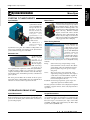
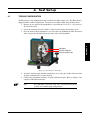
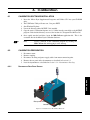
Speed Pickup Connection
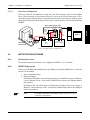
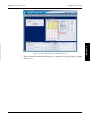
Plastic cover
Organize
speed pickup
cables here
(Partial) side view of electronics unit
(shown in “up”/unlocked position)
Insert fiber optic
cable ends here
Earth ground
connection
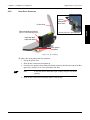
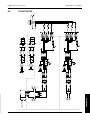
Figure 2–3 Speed Pickup
To connect the speed pickup to the dynamometer:
1.Lift up the plastic cover.
2. Slide the fiber connection mechanism up.
3.Locate the two openings in the sliding mechanism and insert the bifurcated ends of the fiber
optic cable, inserting as far as the mechanism will allow.
Note:
It does not matter which fiber optic sensing end goes into which
opening.
4. Slide the fiber connection mechanism down in order to lock.
10
SETUP
Fiber connection mechanism