1
Installation
Positioning and connection
Unpacking
1 Unpack the device immediately and make sure it
has not been damaged during transport. Should it
be damaged, do not connect, and get in touch with
the Dealer.
2 Carefully remove the protections and the adhesives,
open the door and make sure all the components
are present.
3 Take out the power supply cable.
EN
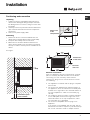
Dimensions
of the
compartment
Positioning
1 Position the device in a well ventilated area, not
damp and free (avoid cabinets with closed walls).
2 Keep the device away from heat sources.
3 Make sure the minimum distances between the
device and the walls of the room where it is placed
are kept, in order to ensure perfect ventilation of the
device.
See figure.
Dimensions
of the cellar
0
55
Furniture
side area
Electrical connections
After the appliance has been transported, carefully
place it vertically and wait at least 3 hours before
connecting it to the electricity mains. Before
inserting the plug into the electrical socket ensure
the following:
Ventilation space:
at least 50 mm
• The appliance is earthed and the plug is compliant
with the law.
• The socket can withstand the maximum power of
the appliance, which is indicated on the data plate
located on the right side of the horizontal surface in
the top compartment, under the thermostat (e.g.
150 W).
• The voltage is within the range of values indicated
on the data plate located on the right side of the
horizontal surface in the top compartment, under
the thermostat (e.g. 220-240V).
• The socket is compatible with the plug of the
appliance.
If the socket is incompatible with the plug, ask an
authorised technician to replace it (see Assistance).
Do not use extension cords or multiple sockets.
3