Transcript
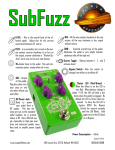
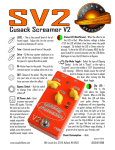
LEVEL - This is the overall level of the
affected signal. The range is from no
boost, to over 25dB of clean boost.
IN - This is the input to the pedal. This
jack is on the right side of the pedal.
OUT - This is the output of the pedal.
Plug this either into your amp or into
any other effects you want after this effect.
This jack is on the Left side of the pedal.
Bypass Switch - Kick the switch
to change from effect
on to effect off.
DC Power Jack Used to power your
pedal from a DC supply.
This has the same pin-out
as the standard pedal supplies, tip is ground, sleeve is
9V. Use a filtered supply, especially on high gain overdrive and
distortion pedals, since they tend to
amplify power supply noise.
Bypass Mode Toggle - This toggle switch
lets you select between either buffered or
true bypass. To the left is buffered, to the right
is true bypass. This switch is functional only in
bypass mode. When the pedal is engaged, it is
automatically buffered.
Status LED (Red/Green) - When the effect is on the LED is Red. By default the
LED is Green when bypassed. To have the LED
off in bypass HOLD the Bypass Switch for several seconds until the LED Blinks. Hold again
for several seconds to turn the LED back on
in Bypass.
Power Consumption - ~8mA.
Updated 7/16/10
www.cusackeffects.com
494 Lincoln Ave, STE 10, Holland, MI 49423
(616)546-8888