1
SR Research Experiment Builder
User Manual
Version 1.10.165B
Please report all functionality comments and bugs to:
[email protected]
An HTML version of this document, which contains extra sections
on example projects and frequently asked questions, can be
accessed by pressing F1 or clicking “Help -> Content” from the
Experiment Builder application or be downloaded from
https://www.sr-support.com/forums/showthread.php?t=99.
Copyright ©2004-2011 SR Research Ltd.
EyeLink is a registered trademark of SR Research Ltd., Mississauga, Canada
Table of Contents
1 Introduction ................................................................................................................. 1 1.1 Features ............................................................................................................... 1 1.2 How to Use This Manual .................................................................................... 2 2 Experiment Builder Experiment Life Cycle ............................................................... 4 2.1 Experiment Design.............................................................................................. 4 2.2 Building and Test-running Experiment .............................................................. 5 2.3 Experiment Deployment ..................................................................................... 5 2.4 Participant Data Set Randomization ................................................................... 6 2.5 Data Collection ................................................................................................... 6 2.6 Data Analysis ...................................................................................................... 6 3 Installation................................................................................................................... 7 3.1 Windows PC System Requirements ................................................................... 7 3.1.1 Computer Configuration ................................................................................. 7 3.1.2 Maximizing the Real-time Performance of the Deployment PC .................. 11 3.1.3 Host Computer and Display Computer Software Requirements .................. 11 3.2 Software Installation and Licensing on Windows ............................................ 12 3.2.1 For Standard Installation (applicable to most users)..................................... 12 3.2.2 For Installation using Network Licensing..................................................... 12 3.2.3 HASP Driver Installation and Licensing ...................................................... 13 3.3 Software Installation and Licensing on Mac OS X .......................................... 14 3.3.1 Software Installation ..................................................................................... 14 3.3.2 HASP Driver Installation and Licensing ...................................................... 16 4 Working with Files ................................................................................................... 18 4.1 Creating a New Session .................................................................................... 18 4.2 Saving a Session ............................................................................................... 20 4.3 Saving an Existing Session to a Different Directory ........................................ 21 4.4 Opening a Session ............................................................................................. 21 4.5 Reopening a Recent Experiment Session ......................................................... 22 4.6 Packaging an Experiment ................................................................................. 23 4.7 Unpacking an Experiment................................................................................. 23 4.8 Building an Experiment .................................................................................... 24 4.9 Cleaning an Experiment .................................................................................... 24 4.10 Test-running an Experiment from EB Application ........................................... 24 4.11 Deploying an Experiment ................................................................................. 25 4.12 Running an Experiment for Data Collection .................................................... 25 4.13 Conver ting Projects between Windows and Mac OS X .................................. 27 5 Experiment Builder Graphical User Interface .......................................................... 28 5.1 Project Explorer Window ................................................................................. 28 5.2 Graph Editor Window ....................................................................................... 31 5.3 Application Menu Bar and Toolbar .................................................................. 32 5.3.1 File Menu and Tool Buttons ......................................................................... 32 5.3.2 Edit Menu and Tool Buttons ......................................................................... 33 5.3.3 View Menu.................................................................................................... 34 5.3.4 Experiment Menu and Tool Buttons ............................................................. 34 5.3.5 Help Menu .................................................................................................... 34 SR Research Experiment Builder User Manual
©2004-2011 SR Research Ltd.
i
6 Designing an Experiment in Experiment Builder ..................................................... 35 6.1 Hierarchical Organization of Experiments ....................................................... 35 6.2 Experiment Graph: Flow Diagram.................................................................... 36 6.2.1 Adding Components to an Experiment ......................................................... 37 6.2.2 Linking Experiment Components ................................................................. 38 6.2.3 Linking Rules ................................................................................................ 38 6.3 Actions .............................................................................................................. 39 6.4 Triggers ............................................................................................................. 40 6.5 Other Node Types ............................................................................................. 41 6.6 Sequence/Sub-graph ......................................................................................... 42 6.7 References and Equations ................................................................................. 43 7 Experiment Graph and Components ......................................................................... 45 7.1 Graph Editing Operations ................................................................................. 45 7.2 Node Connection .............................................................................................. 46 7.2.1 Connection: Create, Cancel, and Delete ....................................................... 46 7.2.2 Connection Order .......................................................................................... 47 7.3 Experiment Node Exporting and Importing ..................................................... 47 7.3.1 Exporting....................................................................................................... 47 7.3.2 Importing....................................................................................................... 49 7.4 Layout of Nodes in Work Space ....................................................................... 50 7.5 Editing Properties of a Node ............................................................................. 51 7.6 Experiment Node .............................................................................................. 52 7.7 Sequence/Subgraph ........................................................................................... 54 7.8 Start Node ......................................................................................................... 58 7.9 Actions .............................................................................................................. 59 7.9.1 Display Screen .............................................................................................. 59 7.9.2 Performing Drift Correction ......................................................................... 63 7.9.3 Performing Camera Setup and Calibration ................................................... 68 7.9.4 Sending EyeLink© Message......................................................................... 75 7.9.5 Sending EyeLink© Command ...................................................................... 76 7.9.6 Sending TTL Signal ...................................................................................... 79 7.9.7 Adding to Experiment Log ........................................................................... 81 7.9.8 Updating Attribute ........................................................................................ 83 7.9.9 Adding to Accumulator................................................................................. 85 7.9.10 Adding to Result File ................................................................................ 86 7.9.11 Preparing Sequence ................................................................................... 87 7.9.12 Reset Node ................................................................................................ 90 7.9.13 Playing Sound ........................................................................................... 90 7.9.14 Play Sound Control ................................................................................... 98 7.9.15 Record Sound .......................................................................................... 100 7.9.16 Record Sound Control............................................................................. 103 7.9.17 Terminating an Experiment .................................................................... 104 7.9.18 Recycle Data Line ................................................................................... 106 7.9.19 Execute Action ........................................................................................ 108 7.9.20 Null Action.............................................................................................. 109 7.9.21 ResponsePixx LED Control .................................................................... 111 SR Research Experiment Builder User Manual
©2004-2011 SR Research Ltd.
ii
7.10 Triggers ........................................................................................................... 113 7.10.1 Timer Trigger .......................................................................................... 113 7.10.2 Invisible Boundary Trigger ..................................................................... 116 7.10.2.1 The location type of the invisble boundary trigger ......................... 121 7.10.2.2 How to show the triggering region on the host PC? ....................... 123 7.10.3 Conditional Trigger ................................................................................. 123 7.10.4 EyeLink Button Trigger .......................................................................... 127 7.10.4.1 Calculating response time of a button press ................................... 129 7.10.4.2 Collecting inputs from the EyeLink button box without ending the
trial
130 7.10.4.3 Knowing the ID of a specific button on the EyeLink button box ... 131 7.10.5 Cedrus Button Trigger ............................................................................ 132 7.10.5.1 Calculating response time of a button press ................................... 135 7.10.5.2 Collecting inputs from the Cedrus button box without ending the trial
137 7.10.6 Keyboard Trigger .................................................................................... 137 7.10.6.1 Calculating response time from an keyboard input ........................ 141 7.10.6.2 Collecting inputs from the keyboard without ending the trial ........ 142 7.10.6.3 Enabling multiple keyboards .......................................................... 143 7.10.6.4 Disabling / Re-enabling the Windows Logo Keys ......................... 145 7.10.7 Mouse Trigger ......................................................................................... 146 7.10.7.1 Mouse press, mouse release, and mouse over................................. 149 7.10.7.2 Center location type vs. top-left location type. ............................... 151 7.10.7.3 Calculating response time of a mouse click .................................... 153 7.10.7.4 Collecting inputs from the mouse without ending the trial............. 154 7.10.7.5 Resetting the initial position of the mouse device .......................... 155 7.10.7.6 Enabling multiple Mice................................................................... 155 7.10.7.7 Recording mouse traces in a data file ............................................. 157 7.10.8 TTL Trigger ............................................................................................ 158 7.10.8.1 Setting the pin values ...................................................................... 161 7.10.8.2 TTL trigger and the type of cable used ........................................... 162 7.10.9 Fixation Trigger ...................................................................................... 162 7.10.9.1 Optimal triggering duration ............................................................ 166 7.10.9.2 Top-left vs. center triggering location type..................................... 167 7.10.9.3 How to show the triggering region on the host PC? ....................... 168 7.10.10 Saccade Trigger ...................................................................................... 169 7.10.10.1 Top-left vs. center triggering location type..................................... 173 7.10.10.2 Online RT calculation ..................................................................... 174 7.10.10.3 How to show the triggering region on the host PC? ....................... 174 7.10.11 Sample Velocity Trigger ......................................................................... 175 7.10.11.1 Top-left vs. center triggering location type..................................... 179 7.10.11.2 How to show the triggering region on the host PC? ....................... 181 7.10.12 ASIO Voicekey Trigger .......................................................................... 182 7.10.12.1 How to calculate the voice key RT online ...................................... 183 7.10.12.2 How to align the recordings in the audio file and eye tracker event
time
184 SR Research Experiment Builder User Manual
©2004-2011 SR Research Ltd.
iii
7.11 Other Building Components ........................................................................... 186 7.11.1 Variable ................................................................................................... 186 7.11.2 Result File ............................................................................................... 189 7.11.3 Accumulator ............................................................................................ 191 7.11.4 Custom Class Instance ............................................................................ 194 8 Screen Builder ......................................................................................................... 196 8.1 Resources ........................................................................................................ 197 8.1.1 Image Resource ........................................................................................... 197 8.1.1.1 Image Displaying Modes .................................................................... 200 8.1.1.2 Gaze-Contingent Window Manipulations .......................................... 201 8.1.2 Video Resource ........................................................................................... 202 8.1.2.1 Reading Frame Time........................................................................... 207 8.1.2.2 Video Frame Timing ........................................................................... 207 8.1.2.3 Video Frame Rate and Display Retrace Rate ..................................... 208 8.1.2.4 Dropping Frames ................................................................................ 209 8.1.2.5 Frame Caching .................................................................................... 209 8.1.2.6 Video Codec........................................................................................ 210 8.1.2.7 Playing Video Clips with Audio ......................................................... 211 8.1.3 Text Resource ............................................................................................. 211 8.1.3.1 Non-ASCII characters ......................................................................... 213 8.1.3.2 Anti-aliasing and Transparency .......................................................... 213 8.1.4 Multiline Text Resource ............................................................................. 215 8.1.5 Line Resource ............................................................................................. 218 8.1.6 Rectangle Resource ..................................................................................... 219 8.1.7 Ellipse Resource.......................................................................................... 220 8.1.8 Triangle Resource ....................................................................................... 222 8.1.9 Freeform Resource ...................................................................................... 224 8.2 Movement Patterns ......................................................................................... 225 8.2.1 Sinusoidal Movement Pattern ..................................................................... 226 8.2.2 Custom Movement Pattern ......................................................................... 228 8.3 Interest Areas .................................................................................................. 232 8.3.1 Manually Creating an Interest Area ............................................................ 233 8.3.1.1 Rectangular/Elliptic Interest Area....................................................... 233 8.3.1.2 Freeform Interest Area ........................................................................ 234 8.3.2 Automatic Segmentation ............................................................................. 234 8.3.3 Using Interest Area File .............................................................................. 236 8.4 Resource Operations ....................................................................................... 237 8.4.1 Resource Editing ......................................................................................... 237 8.4.2 Resource Alignments .................................................................................. 237 8.4.3 Resource Locking ....................................................................................... 238 8.4.4 Resource Grouping ..................................................................................... 239 8.4.5 Resource Order ........................................................................................... 240 8.4.6 Composite Resource ................................................................................... 241 8.4.7 Others .......................................................................................................... 242 9 Data Source ............................................................................................................. 244 9.1 Creating Data Source ...................................................................................... 245 SR Research Experiment Builder User Manual
©2004-2011 SR Research Ltd.
iv
9.2 Editing Data Source ........................................................................................ 245 9.3 Importing Existing Files as Data Source ........................................................ 247 9.4 Using Data Source File ................................................................................... 248 9.5 Datasource Splitby .......................................................................................... 249 9.6 Datasource Randomization ............................................................................. 249 9.6.1 Internal Randomization ............................................................................... 250 9.6.1.1 Randomization Seed ........................................................................... 250 9.6.1.2 Blocking .............................................................................................. 251 9.6.1.3 Trial randomization and run length control ........................................ 251 9.6.1.4 Randomize on Roll-Over .................................................................... 252 9.6.1.5 Splitting Column ................................................................................. 252 9.6.1.6 Running Experiment with Internal Randomizer. ................................ 252 9.6.2 External Randomization.............................................................................. 252 10 References ............................................................................................................... 255 10.1 Using References ............................................................................................ 255 10.2 Entering in Values........................................................................................... 256 10.3 Entering in References .................................................................................... 257 10.4 Entering in Equations...................................................................................... 257 10.5 Reference Manager ......................................................................................... 259 11 EyeLink© Data Viewer Integration ........................................................................ 261 11.1 TRIALID Message.......................................................................................... 262 11.2 Recording Status ............................................................................................. 262 11.3 Image and Interest Areas ................................................................................ 263 12 Custom Class .......................................................................................................... 265 12.1 Enabling Custom Class Option ....................................................................... 265 12.2 Creating a New Custom Class ........................................................................ 265 12.3 Syntax of Custom Class .................................................................................. 266 12.3.1 Example .................................................................................................. 266 12.3.2 Class Definition ...................................................................................... 268 12.3.3 Class Initialization .................................................................................. 268 12.3.4 Class Attributes ....................................................................................... 269 12.3.5 Class Methods ......................................................................................... 270 12.3.6 'setX' and 'getX' Methods ........................................................................ 271 12.4 Instantiating Custom Class ............................................................................. 272 12.5 Using Custom Class ........................................................................................ 273 12.6 Using Custom Class Editor ............................................................................. 275 13 Creating Experiments: Overview ............................................................................ 277 14 Creating EyeLink Experiments: The First Example ............................................... 278 14.1 Creating the Experiment ................................................................................. 278 14.1.1 Creating a New Experiment Session....................................................... 278 14.1.2 Configuring Experiment Preference Settings ......................................... 279 14.1.3 Creating Experiment Block Sequence .................................................... 281 14.1.4 Editing Block Sequence .......................................................................... 282 14.1.5 Creating Instruction Screen..................................................................... 284 14.1.6 Editing Trial Sequence: Data Source ...................................................... 286 14.1.7 Editing Trial Sequence: Preparing Sequence and Drift Correction ........ 287 SR Research Experiment Builder User Manual
©2004-2011 SR Research Ltd.
v
14.1.8 Editing Recording Sequence ................................................................... 289 14.1.9 Modifying Properties of Display Screen................................................. 290 14.1.10 Creating Display Screen ......................................................................... 291 14.1.11 Writing Trial ID to EDF file ................................................................... 293 14.1.12 Showing Experiment Progress Message on Tracker Screen................... 293 14.2 Building the Experiment ................................................................................. 294 14.3 Deploying the Experiment .............................................................................. 295 14.4 Running the Experiment ................................................................................. 295 14.4.1 Error in Initializing Graphics .................................................................. 296 14.4.2 Error in Tracker Version ......................................................................... 296 15 Creating Non-EyeLink Experiments: Stroop Effect .............................................. 297 15.1 Creating a New Experiment Session............................................................... 297 15.2 Configuring Experiment Preference Settings ................................................. 298 15.3 Creating Experiment Block Sequence ............................................................ 299 15.4 Editing Block Sequence .................................................................................. 300 15.5 Creating Instruction Screen............................................................................. 302 15.6 Editing Trial Sequence: Data Source .............................................................. 303 15.7 Editing Trial Sequence: Setting Initial Values and Preparing Sequence ........ 306 15.8 Editing Trial Event Sequence – Part 1 ............................................................ 310 15.8.1 Creating the Fixation Screen. .................................................................. 312 15.8.2 Creating the Stroop Display Screen. ....................................................... 313 15.9 Editing Trial Event Sequence – Part 2 ............................................................ 314 15.10 Outputting Data to the Result File .............................................................. 319 15.11 Running the Experiment ............................................................................. 320 16 Experiment Builder Project Check List (version 1.10.1) ........................................ 321 17 Preference Settings.................................................................................................. 325 17.1 Experiment ...................................................................................................... 325 17.1.1 EyeLink© ................................................................................................ 327 17.1.2 Display .................................................................................................... 333 17.1.3 Audio....................................................................................................... 335 17.1.4 Cedrus ..................................................................................................... 336 17.1.5 Keyboard ................................................................................................. 336 17.1.6 Mouse...................................................................................................... 338 17.1.7 EyeLink Button Box Device ................................................................... 340 17.1.8 Parallel Port ............................................................................................. 340 17.1.9 USB-1208HS Box................................................................................... 342 17.1.10 Timer ....................................................................................................... 344 17.1.11 Invisible Boundary .................................................................................. 344 17.1.12 Conditional .............................................................................................. 344 17.1.13 EyeLink© Button .................................................................................... 344 17.1.14 Cedrus Input ............................................................................................ 344 17.1.15 Keyboard ................................................................................................. 344 17.1.16 Mouse...................................................................................................... 344 17.1.17 TTL Trigger ............................................................................................ 344 17.1.18 Fixation ................................................................................................... 344 17.1.19 Saccade ................................................................................................... 344 SR Research Experiment Builder User Manual
©2004-2011 SR Research Ltd.
vi
17.1.20 Sample Velocity ...................................................................................... 344 17.1.21 Voice Key ............................................................................................... 344 17.1.22 Display Screen ........................................................................................ 344 17.1.23 Drift Correct ............................................................................................ 344 17.1.24 Camera Setup .......................................................................................... 344 17.1.25 Send EyeLink© Message ........................................................................ 345 17.1.26 Send Command ....................................................................................... 345 17.1.27 Set TTL ................................................................................................... 345 17.1.28 Add to Experiment Log .......................................................................... 345 17.1.29 Update Attribute...................................................................................... 345 17.1.30 Add to Accumulator ................................................................................ 345 17.1.31 Add to Result File ................................................................................... 345 17.1.32 Prepare Sequence .................................................................................... 345 17.1.33 Sequence ................................................................................................. 345 17.1.34 Reset Node .............................................................................................. 345 17.1.35 Play Sound .............................................................................................. 345 17.1.36 Play Sound Control ................................................................................. 345 17.1.37 Record Sound .......................................................................................... 345 17.1.38 Record Sound Control............................................................................. 345 17.1.39 Terminate Experiment ............................................................................ 345 17.1.40 Recycle Data Line ................................................................................... 346 17.1.41 Execute .................................................................................................... 346 17.1.42 Null Action.............................................................................................. 346 17.1.43 ResponsePixx LED Control .................................................................... 346 17.1.44 Accumulator ............................................................................................ 346 17.1.45 Result File ............................................................................................... 346 17.2 Screen .............................................................................................................. 346 17.2.1 Screen ...................................................................................................... 346 17.2.2 Image Resource ....................................................................................... 347 17.2.3 Video Resource ....................................................................................... 347 17.2.4 Text Resource ......................................................................................... 347 17.2.5 Multiline Text Resource ......................................................................... 347 17.2.6 Line Resource ......................................................................................... 347 17.2.7 Rectangle Resource ................................................................................. 347 17.2.8 Ellipse Resource...................................................................................... 347 17.2.9 Triangle Resource ................................................................................... 347 17.2.10 Freeform Resource .................................................................................. 347 17.2.11 Sine Pattern ............................................................................................. 347 17.2.12 Grid Segmentation .................................................................................. 348 17.2.13 Auto Segmentation.................................................................................. 348 17.2.14 Word Segmentation ................................................................................ 349 17.3 Build/Deploy ................................................................................................... 350 17.4 GUI ................................................................................................................. 351 17.4.1 Graph_Layout ......................................................................................... 352 17.4.2 CustomClass_Editor ............................................................................... 353 18 Revision History ..................................................................................................... 354 SR Research Experiment Builder User Manual
©2004-2011 SR Research Ltd. vii
List of Figures
Figure 4-1. File Menu ...................................................................................................... 18 Figure 4-2. Dialog for Creating a New Project ................................................................ 19 Figure 4-3. Warning Messages after Experiment Creation .............................................. 20 Figure 4-4. Open an Experiment Builder Session ............................................................ 21 Figure 4-5. Save Confirmation When Opening a New Session....................................... 22 Figure 4-6. Reopening Recent Experiment Sessions ........................................................ 22 Figure 4-7. Experiment Menu ........................................................................................... 24 Figure 5-1. Sample Experiment Builder Interface ........................................................... 28 Figure 5-2. The View Menu............................................................................................. 29 Figure 5-3. Components of the Project Explorer Window .............................................. 30 Figure 5-4. Different Tabs of the Structure Panel............................................................ 30 Figure 5-5. Components of the Graph Editor Window..................................................... 32 Figure 6-1. Hierarchical Organization of Events in an Experiment ................................ 36 Figure 6-2. Sample Experiment Sequence ....................................................................... 37 Figure 6-3. Connecting between Source and Target Components ................................... 38 Figure 6-4. Nested Sequences in an Experiment. ............................................................. 43 Figure 6-5. Using a Reference to Update Text to Be Displayed. .................................... 44 Figure 7-1. Connectin Order ............................................................................................ 47 Figure 7-2. Exporting Node ............................................................................................. 48 Figure 7-3. Reference Maintanence .................................................................................. 48 Figure 7-4. Export Library Files ....................................................................................... 49 Figure 7-5. Importing Node .............................................................................................. 50 Figure 7-6. Choosing Layout of Components in Work Space .......................................... 51 Figure 7-7. Property Field Editable with Attribute Reference Editor .............................. 52 Figure 7-8. Properties of the Experiment Node ................................................................ 54 Figure 7-9. Using Sequence in an Experiment ................................................................. 58 Figure 7-10. Action Tab of the Component Toolbox ....................................................... 59 Figure 7-11. Using Display Screen. .................................................................................. 63 Figure 7-12. Using Drift Correction Action ..................................................................... 68 Figure 7-13. Using Camera Setup Action ......................................................................... 74 Figure 7-14. Using Sending Message Action. .................................................................. 76 Figure 7-15. Using Sending EyeLink© Command Action. .............................................. 79 Figure 7-16. Using Add to Experiment Log Action ......................................................... 83 Figure 7-17. Using Update Attribute Action. ................................................................... 85 Figure 7-18. Using Prepare Sequence Action. .................................................................. 90 Figure 7-19. Adding Sound Clips to the Library .............................................................. 91 Figure 7-20. Choose Audio driver. .................................................................................. 92 Figure 7-21. Setting ASIO Buffer Latency ....................................................................... 95 Figure 7-22. Using Play Sound Action. ............................................................................ 98 Figure 7-23. Using Play Sound Control Action .............................................................. 100 Figure 7-24. Using Record Sound Action....................................................................... 103 Figure 7-25. Using Terminate_Experiment Action ........................................................ 106 Figure 7-26. Using Recycle Dataline Action. ................................................................. 108 Figure 7-27. Using a NULL_ACTION node ................................................................. 111 Figure 7-28. Using a ResponsePixx LED Control Action .............................................. 113 SR Research Experiment Builder User Manual
©2004-2011 SR Research Ltd. viii
Figure 7-29. Triggers Implemented in Experiment Builder ........................................... 113 Figure 7-30. Using Timer Trigger ................................................................................. 116 Figure 7-31. Using an Invisible_boundary trigger .......................................................... 121 Figure 7-32. Using invisible_boundary trigger with top-left and center location types . 123 Figure 7-33. Using Conditional Trigger ......................................................................... 125 Figure 7-34. Displaying different instruction screens at the beginning of each block .. 126 Figure 7-35. Using EyeLink button trigger..................................................................... 129 Figure 7-36. Collecting EyeLink button response data ................................................. 130 Figure 7-37. Checking EyeLink button response accuracy ........................................... 130 Figure 7-38. Using EyeLink button trigger without ending a trial ................................. 131 Figure 7-39. Using Cedrus Button trigger ...................................................................... 135 Figure 7-40. Collecting Cedrus button response data ..................................................... 136 Figure 7-41. Checking Cedrus button response accuracy .............................................. 136 Figure 7-42. Using Cedrus button trigger without ending a trial................................... 137 Figure 7-43. Using Keyboard Trigger ............................................................................ 140 Figure 7-44. Collecting keyboard response data............................................................. 141 Figure 7-45. Checking keyboard response accuracy. ..................................................... 142 Figure 7-46. Using keyboard without ending a trial ....................................................... 143 Figure 7-47. Installing SREB keyboard driver ............................................................... 144 Figure 7-48. Click Continue Anyway on logo testing warning ...................................... 145 Figure 7-49. Using themouse trigger .............................................................................. 150 Figure 7-50. Setting the mouse triggering region .......................................................... 151 Figure 7-51. Using mouse trigger with top-left and center location types ..................... 152 Figure 7-52. Collecting mouse response data ................................................................. 153 Figure 7-53. Checking mouse response accuracy ........................................................... 154 Figure 7-54. Using mouse trigger without ending a trial ................................................ 155 Figure 7-55. Installing SREB mouse driver.................................................................... 156 Figure 7-56. Click Continue Anyway on logo testing warning ..................................... 157 Figure 7-57. Viewing mouse traces in the Data Viewer temporal graph view ............... 158 Figure 7-58. Using TTL trigger ...................................................................................... 162 Figure 7-59. Using fixation trigger ................................................................................ 166 Figure 7-60. Using fixation trigger with top-left and center location types ................... 168 Figure 7-61. Using the saccade trigger ........................................................................... 172 Figure 7-62. Using saccade trigger with top-left and center location types ................... 174 Figure 7-63. Using sample velocity trigger .................................................................... 179 Figure 7-64. Using sample velocity trigger with top-left and center location types....... 181 Figure 7-65. Collecting voicekey response data ............................................................ 184 Figure 7-66. Aligning audio recording times .................................................................. 185 Figure 7-67. Other Components Implemented in Experiment Builder........................... 186 Figure 7-68. Using a Variable ........................................................................................ 187 Figure 7-69. Property Settings for Variables .................................................................. 188 Figure 7-70. Dynamic Data Type Casting ...................................................................... 189 Figure 7-71. Using Result File ........................................................................................ 190 Figure 7-72. Setting Properties of the Result File Node ................................................. 191 Figure 7-73. Using Accumulator .................................................................................... 192 Figure 7-74. Setting the Properties of Accumulator ....................................................... 193 SR Research Experiment Builder User Manual
©2004-2011 SR Research Ltd.
ix
Figure 7-75. Adding Data to and Retrieving Data from the Accumulator .................... 194 Figure 8-1. Sample View of the Screen Builder Interface ............................................. 196 Figure 8-2. Resources Implemented in Screen Builder .................................................. 197 Figure 8-3. Loading Images into Image Library ............................................................ 198 Figure 8-4. Setting Different Location Types for Images Used in a Gaze-Contingent
Window Application. .............................................................................................. 202 Figure 8-5. Loading Video Clips into Video Library .................................................... 204 Figure 8-6. Setting UTF-8 Encoding. ............................................................................ 213 Figure 8-7. Aliased and Anti-aliased Texts ................................................................... 214 Figure 8-8. Antialiasing Drawing Preference Setting. ................................................... 214 Figure 8-9. Setting the Transparency Color for the Experiment ................................... 215 Figure 8-10. Multiline Text Editor................................................................................. 216 Figure 8-11. Creating a Movement Pattern..................................................................... 226 Figure 8-12. Adding Resource Positions to a Custom Movement Pattern ..................... 229 Figure 8-13. Creating a Custom Movement Pattern ...................................................... 230 Figure 8-14. Creating a File-based Custom Movement Pattern .................................... 231 Figure 8-15. Toggling Interest Area Visibility ............................................................... 233 Figure 8-16 Creating an Interest Area ............................................................................ 233 Figure 8-17. Creating Interest Area with Grid Segmentation ........................................ 236 Figure 8-18. Resource Alignment (Left) and Toggling Grid Visibility......................... 238 Figure 8-19. Snap to Grid .............................................................................................. 238 Figure 8-20. Error When Trying to Modified a Locked Resource ................................ 239 Figure 8-21. Resource Grouping.................................................................................... 239 Figure 8-22. Creating a Composite Resource ................................................................. 240 Figure 8-23. Two Resources with Different Resource Order ......................................... 240 Figure 8-24. Changing the Order of Resources ............................................................. 241 Figure 8-25. Choosing "Fit to Screen" Option................................................................ 242 Figure 8-26. Save Screen as Image ................................................................................. 243 Figure 9-1. Using Data Source in Experiment Builder ................................................... 244 Figure 9-2. Change the Type of Variables ...................................................................... 245 Figure 9-3. Data Types Used in Experiment Builder ..................................................... 246 Figure 9-4. Editing Operations for Data Source Columns and Rows ............................ 246 Figure 9-5. Editing Datasource Cells. ............................................................................. 247 Figure 9-6. Append or Overwrite Confirmation ............................................................ 248 Figure 10-1. Using Attribute References ........................................................................ 256 Figure 10-2. Creating Equations in Attribute Editor. .................................................... 258 Figure 10-3. Using the Reference Manager. .................................................................. 260 Figure 11-1. Sending the Recording Status Message to the Tracker ............................ 261 Figure 11-2. Editing Trial ID Message .......................................................................... 262 Figure 11-3. Creating Recording Status Message........................................................... 263 Figure 12-1. Creating a New Custom Class................................................................... 265 Figure 12-2. Attributes and Properties of a Custom Class Instance .............................. 273 Figure 12-3. Assigning Attribute Values through Custom Class Instance .................... 274 Figure 12-4. Data Exchange through Execute Action ................................................... 274 Figure 12-5. Custom Class Code Editor ........................................................................ 275 Figure 14-1. Creating a New Experiment Builder Session ............................................. 278 SR Research Experiment Builder User Manual
©2004-2011 SR Research Ltd.
x
Figure 14-2. Configuring Preference Settings ............................................................... 280 Figure 14-3. Setting the Tracker Version for the Experiment ....................................... 281 Figure 14-4. Creating Experiment Block Sequence ...................................................... 282 Figure 14-5. Editing Block Sequence ............................................................................ 283 Figure 14-6. Adding Instruction to Block Sequence ..................................................... 284 Figure 14-7. Adding Multiline Text Resource onto a Display Screen .......................... 285 Figure 14-8. Create Instruction Screen ........................................................................... 286 Figure 14-9. Creating Data Set ...................................................................................... 287 Figure 14-10. Editing Trial Sequence ............................................................................ 288 Figure 14-11. Editing Recording Sequence .................................................................... 289 Figure 14-12. Modifying the Properties of DISPLAY_SCREEN Action ...................... 290 Figure 14-13. Adding Text to Display Screen ................................................................ 291 Figure 14-14. Referring Text to Be Shown to Data Source ........................................... 292 Figure 14-15. Creating Trial ID Message ...................................................................... 293 Figure 14-16. Creating Trial Recording Status Message ................................................ 294 Figure 14-17. Error in Initializing Graphics .................................................................. 296 Figure 14-18. Error in Tracker Version ......................................................................... 296 Figure 15-1. Creating a New Experiment Builder Session ............................................. 297 Figure 15-2. Editing Project Preferences. ....................................................................... 298 Figure 15-3. Creating Experiment Block Sequence ...................................................... 299 Figure 15-4. Editing Block Sequence ............................................................................ 300 Figure 15-5. Adding Instruction to Block Sequence ..................................................... 301 Figure 15-6. Adding Multiline Text Resource onto a Display Screen .......................... 302 Figure 15-7. Create Instruction Screen ........................................................................... 303 Figure 15-8. Datasource Randomization. ....................................................................... 305 Figure 15-9. Creating Data Set ...................................................................................... 306 Figure 15-10. Editing Trial Sequence ............................................................................ 307 Figure 15-11. Updating Trial Index. .............................................................................. 308 Figure 15-12. Update Trial Iteration. ............................................................................. 309 Figure 15-13. Updating the Attribute of RT ................................................................. 309 Figure 15-14. Editing Recording Sequence .................................................................... 310 Figure 15-15. Setting Response Keys. ........................................................................... 311 Figure 15-16. Loading Resources to Image Library ....................................................... 312 Figure 15-17. Adding Text to Display Screen ................................................................ 313 Figure 15-18. Referring Text to Be Shown to Data Source .......................................... 314 Figure 15-19. Editing Recording Sequence .................................................................... 315 Figure 15-20. Accessing the Subattribute of the TriggeredData Attrbiute. ................... 316 Figure 15-21. Loading Feedback Audio Clips. ............................................................... 317 Figure 15-22. Send Results to a Result File. .................................................................. 318 Figure 15-23. Adding Variables to Results File ............................................................ 319 Figure 17-1. Accessing the Experiment Builder Preference Settings. ........................... 325 SR Research Experiment Builder User Manual
©2004-2011 SR Research Ltd.
xi
1 Introduction
The SR Research Experiment Builder (SREB) is a visual experiment creation tool for use
by Psychologists and Neuroscientists on Windows and Mac OS X. The SREB is designed
to be easy to use while maintaining a high degree of flexibility. This unique design
combination allows for a wide range of experimental paradigms to be created by
someone with little or no programming or scripting expertise. When used in combination
with the SR Research EyeLink® eye tracking system, the SREB provides seamless
integration into the EyeLink hardware and software platform.
1.1 Features
The SR Research Experiment Builder provides a comprehensive graphical experiment
creation environment for Psychologists. The features in the Experiment Builder have
been designed to address many of the research needs SR Research has encountered when
working with EyeLink users on their applications. This ranges from simple experiments
in which each trial shows a static screen of text or picture and then waits for a response
from the participant; to more sophisticated experiments in which complex event sequence
can be scheduled with good timing precision.
Experiments are created in the Experiment Builder by dragging and dropping experiment
components into a workspace and configuring the properties of the added components.
There are two main classes of experiment components in the Experiment Builder:
Actions and Triggers. Actions tell the computer to do something, like displaying a set of
graphics on the screen or playing a sound. Triggers define the conditions that must be met
before an action can be performed. Examples of Triggers are keyboard events and eye
(Fixation, Saccade, and Invisible Boundary) events.
The flow of the experiment is achieved by connecting sequentially related components in
the workspace in a flow diagram like fashion. For example, a Display Screen Action may
be connected to a button press Trigger, which is in turn connected to another Display
Screen Action. This simple Action -> Trigger -> Action sequence would result in a given
set of graphics being displayed until the user pressed a button, at which time a second set
of graphics would be displayed. Detailed discussion on the experiment component
connection or linking process, including a set of "rules" for linking experiment
components together, can be found in Section 6.2 “Experiment Graph: Flow Diagram”.
As a convenient tool for creating eye-tracking experiments, the Experiment Builder is
fully integrated with the EyeLink eye tracker. Performing camera set-up, calibration,
validation, and drift correction can be achieved by simply inserting the appropriate action
in the experiment. A single check box setting can be enabled to record eye movements
for a period of time. Online eye data can be used as triggers to drive display changes
(e.g., displays can be made contingent on fixation, saccade, or instantaneous sample data
so that gaze-contingent or gaze-control applications can be developed). In addition, users
can set eye-tracker preferences and send commands and messages to the EyeLink tracker.
SR Research Experiment Builder User Manual
©2004-2011 SR Research Ltd.
1
With these capabilities, the Experiment Builder allows the users to focus on stimulus
presentation and data analysis. Recording data collected from experiments created by
Experiment Builder is fully integrated with EyeLink Data Viewer. For example,
Experiment Builder automatically sends messages to the EDF file when a screen is
displayed so that images and/or simple drawings can be used as overlay background in
Data Viewer. Experiment Builder also allows the users to specify condition variables for
a trial and to add interest areas for a display screen. Finally, the users can send custom
messages to the EDF file so that time critical or important events can be marked in the
data file for the ease of future analyses.
The Experiment Builder also contains a built-in Screen Builder utility that makes the
creation of 2D visual displays easier. The Screen Builder is a what-you-see-is-what-youget ("WYSIWYG") tool, allowing experiment designers to create and view 2D visual
stimuli right within the Experiment Builder application. The Screen Builder allows
various types of graphic resources (images, text, or simple line drawings) to be added to a
Display Screen action. The exact properties of the resources can be further modified from
a property panel. In addition, the Screen Builder supports creation of both static and
dynamic displays. In a dynamic display, the user can have some resources on the screen
move along a pre-specified movement pattern.
The SR Research Experiment Builder is highly configurable. Nearly all of the properties
of experiment components can be modified. This can be done either by directly entering
the parameter values or, more flexibly, by attribute reference and equations (i.e., setting
the value of one variable to the value of another variable). With this dynamic reference
capability, a typical experiment requires the users to create a prototype of experiment
conditions while leaving all parameter settings (e.g., experiment trial condition labeling,
images to be used, text to be shown, positions of the resources) to be handled by a data
source. This makes the randomization of trials across participants easier. In addition,
attribute reference allows the user to access some run-time data so that useful experiment
manipulations such as conditional branching, displaying feedbacks, and creating new
variables can be made.
1.2 How to Use This Manual
This manual is intended for users who are using version 1.10 or later of SR Research
Experiment Builder software. If you are still using an earlier version of the software,
please download the latest version from https://www.srsupport.com/forums/showthread.php?t=9. The latest version of this document can be
obtained from https://www.sr-support.com/forums/showthread.php?t=99. (Note: you
must be a registered user of https://www.sr-support.com to access these updates and the
Experiment Builder usage discussion forum.) If you have feature requests or bug reports,
please send an e-mail to [email protected]. If you have questions on using the
software, please check out the "Frequently Asked Questions" section of the user manual
(html version), the Experiment Builder usage discussion forum, or send us an e-mail.
SR Research Experiment Builder User Manual
©2004-2011 SR Research Ltd.
2
To use the Experiment Builder software effectively, it might help if you can follow the
Chapter 14 "Creating EyeLink Experiments: The First Example" to re-create the
"SIMPLE" example by yourself and get a sense of the life cycle of experiment generation
and data collection with Experiment Builder software. This section can be used as a
"Getting Started" guide. You should also read the following sections of the document
very carefully as they discuss the basic concepts of Experiment Builder software: Chapter
2 "Experiment Builder Life Cycle", Chapter 6 "Designing an Experiment in Experiment
Builder", Chapter 9 "Data Source", and Chapter 10 "References". Following this, you can
then take a look at other examples we provided (see the .html version of this document
for detailed explanations on the examples) and start reading other sections. Chapter 16
“Experiment Builder Project Checklist” may be used to make sure that common problems
can be avoided when creating your experiments.
Please use the following to cite the Experiment Builder software in your manuscript:
SR Research Experiment Builder 1.10.165 [Computer software]. (2011). Mississauga,
Ontario, Canada: SR Research Ltd.
SR Research Experiment Builder User Manual
©2004-2011 SR Research Ltd.
3
2 Experiment Builder Experiment Life Cycle
To create an experiment with the Experiment Builder, the user needs to go through the
following steps:
• Experiment Design
• Building and Test-running Experiment
• Deploying Experiment
• Participant Data Set Randomization
• Data Collection
• Data Analysis
2.1 Experiment Design
While the Experiment Builder simplifies many of the tasks required for creating an
experiment, a good understanding of experiment design (e.g., blocking, counterbalancing,
factorial design, etc.) and experience with the EyeLink© system makes initial use of
Experiment Builder easier. In the stage of experiment design, the user needs to do the
following:
1) Conceptualizing the Experiment. The user should have a clear concept of the
experiment before creating it. State clearly what variables should be manipulated
in the experiment. Within each trial, how is the display presented: a static display
or a dynamic display? Can the same display presentation routine be used across
all conditions or a different routine should be created for each of the experiment
condition? This allows the user to contemplate all of the possible trial types in the
experiment, design conditional branching if necessary, and create a data source
for filling trial parameters. Once this is done, study one or more sample
experiments we supplied before creating your own project.
2) Creating a New Experiment Session. Start the Experiment Builder application
and create a new experiment session. Please read Chapter 4 “Working with Files”
for details on experiment creation and file/folder management.
3) Adding Experiment Building Blocks to the Graph. To schedule an array of
events in an experiment, the user needs to add individual building blocks (triggers,
actions, sequences, and other components) to the workspace in the Graph Editor
Window. Connecting components by arrowed-lines, which represent sequence
and dependency relationships, forms the experiment flow. Please read Chapter 6
on flow diagram and Chapter 7 on the components of the Experiment Builder.
4) Modifying Properties of Experiment Components. The user will need to change
the default settings for the actions, triggers, and sequences so that the experiment
can be run in the intended way. For example, if a timer trigger is used, the user
may change the maximum duration set in the trigger. If an invisible-boundary
trigger is used, the desired triggering location needs to be specified. Similarly, the
user needs to supply data for all actions. For example, if a display screen action is
used, the user needs to add different resources into the screen builder and adjust
the layout of the resource in the screen. To change the default settings for triggers,
actions, and subsequences, and make the new values available for future uses, the
SR Research Experiment Builder User Manual
©2004-2011 SR Research Ltd.
4
user may make the modification through the preference settings of the Experiment
Builder application (see Chapter 17).
5) Creating a Data Source. The Experiment Builder allows the user to create
prototypical trials for the experiment and to supply actual parameters for
individual trials from a data source. A data source can be created within the
Experiment Builder or by loading a text file. The use of data source makes the
creation of experiment more efficient and less error-prone. It also makes the
randomization of trial order across participants easier (see Chapter 9 “Data
Source” for details)
6) Saving the Experiment Session. After the experiment is generated, don’t forget
to save the experiment session so that it can be re-opened later on.
2.2 Building and Test-running Experiment
After the experiment is created, the next step is to see whether there is any error in the
experiment graph (for example, failing to make a connection between items, incomplete
data source, wrong data type used, etc). The user can compile the experiment by clicking
on "Experiment -> Build" menu to build the experiment. Build time errors (in red) or
warnings (in orange) will be displayed in the "Output" tab of the Graph Editor Window.
In most of cases, clicking on the error or warning message will select the experiment
component at issue and thus enable the user to identify and fix up the problem quickly.
Please note that the above build process just checks whether there are obvious mistakes in
the experiment graph but does not check for the content and validity of the experiment
per se. Therefore, the user should test-run the experiment on a couple of participants to
see whether the experiment does exactly what was intended by the experiment designer.
By clicking on "Experiment -> Test Run", the experiment will be executed from the
Experiment Builder application. For an EyeLink experiment, a connection to the tracker
PC will be made and the user may record some data using mouse simulation. The EDF
data file should be carefully examined to see whether all of the trial condition variables
are properly recorded, whether interest areas and images are shown correctly, whether
time-critical and other important messages are recorded for analysis, and so on. For a
non-EyeLink experiment, the user may rely on a log file or result file to debug the
experiment.
Important Note: Every time "Experiment -> Test Run" is performed, the experiment is
rebuilt and all of previous data files in the experiment directory are deleted. Do not use
"Experiment -> Test Run" for collecting real experiment data; "Experiment -> Test Run"
is intended for testing purposes only.
2.3 Experiment Deployment
After fixing errors in the experiment graph and checking validity of the experiment, the
user can then deploy the experiment to a new directory. This will generate a set of files in
the intended directory. Please note that the "Experiment -> Test Run" step mentioned in
the previous section must be used only for the purpose of testing and debugging the
experiment graph. To collect experiment data, the user must use a deployed version of the
experiment as it does not rely on the Experiment Builder application. In addition, running
SR Research Experiment Builder User Manual
©2004-2011 SR Research Ltd.
5
the deployed version of an experiment generally has a better timing performance than
running it directly from the Experiment Builder application because the computer is not
running the Experiment Builder interface at the same time as the experiment. To run an
experiment in a different computer, the user should copy the entire directory of the
deployed version of the experiment to the new experiment computer. The experiment
should be run at least once and results validated on the new computer before starting full
data collection from multiple participants.
2.4 Participant Data Set Randomization
As mentioned earlier, the experiment designer can use Experiment Builder to create
prototypical trials for the experiment and to supply the actual parameters of individual
trials from a data source. In most experiments, the user will need to randomize trial order
so that the experiment materials are not presented in the same sequence across
participants. Randomization of data source can be done with either an internal
randomizer or an external randomizer. These two randomization methods are almost
identical and therefore the user may use the internal randomizer to perform
randomization unless counterbalancing or Latin-square designs are needed.
Please note that configuration of the internal randomization settings should be done
before deploying the experiment project whereas the external randomization can be done
after deploying the experiment project (see Chapter 9 “Data source”).
2.5 Data Collection
Data can now be collected from the deployed version of the experiment. Double click on
the executable file in the deployed experiment directory or type in the .exe file name from
the command-line prompt. If the experiment uses a data source, a dialog will be
displayed, allowing the user to choose the appropriate data source file. In an EyeLink©
Experiment, the user will also be asked to enter the experiment session name. At the End
of experiment, an EDF file will be generated for EyeLink© recording session and saved
in the experiment directory. Optional result file(s) will be created if the user has
specified them in EyeLink© and non-EyeLink© experiments.
2.6 Data Analysis
EyeLink© recording file can be conveniently analyzed with EyeLink© Data Viewer as
the experiments created with Experiment Builder are fully integrated with this analysis
tool. Experiment Builder sends messages to the data file so that images or simple
drawing can be added as overlay background. The user can also specify trial variables,
create interest areas, and send messages for the ease of data analysis. The result file(s)
from a non-EyeLink© recording session contains columnar outputs for selected variables
in the experiment. This file can be easily loaded by common statistics packages.
SR Research Experiment Builder User Manual
©2004-2011 SR Research Ltd.
6
3 Installation
Version 1.10 of Experiment Builder runs on both Windows (32-bit and 64-bit of
Windows 2000, XP, Vista, and Windows 7) and Mac OS X (Intel CPU, OS v10.6 or
later). The current section covers system requirements for computers used to create and
run experiments with Experiment Builder as well as installation and licensing issues.
3.1 Windows PC System Requirements
The computer recommendations for SR Research Experiment Builder are in a large part
dependant on the experimental paradigm being run. For example, an experiment that
simply displays a single screen of text and waits for a manual response can run on a
computer with much lower specifications than an experiment where video presentation is
occurring during the trial. It is always suggested to get the best computer you can for
running your experiments, even if you do not immediately plan on using all the features
of the computer, however due to monetary considerations this is not always possible. The
following computer specifications are guidelines only. SR Research can be contacted for
input on what computer specifications would best match your actual experiment designs.
IMPORTANT: Regardless of the computer used and the experimental design, it is
always critical to spend time evaluating the timing of the experiment designed to ensure
that it is operating as expected.
3.1.1 Computer Configuration
The minimum configuration should be fine for use in simple reading and scene
perception type experiments:
•
•
•
•
•
•
•
•
•
•
•
Pentium 4 1.4 GHz or higher
32-bit or 64-bit Windows 2000, XP, Vista, and Windows 7.
DirectX 9.0 or later.*
256 Mb of memory
Hard-drive with enough free space to hold experiment and data collected.
64 MB Video Card from NVidia or ATI
Monitor **
Sound Card***
Keyboard and Mouse
USB port for Experiment Builder key
If using EyeLink: Ethernet connection to the EyeLink tracker.
The recommended PC configuration should handle any experiment that can be created by
the SR Research Experiment Builder, including video presentation, saccade contingent
display changes, accurately timed audio presentation, audio recording, and ASIO-based
voice key support.
•
Pentium 4 (2.4 GHz or higher with Hyperthreading enabled), a duo-core/multiplecore processor, or multiple CPUs.
SR Research Experiment Builder User Manual
©2004-2011 SR Research Ltd.
7
•
•
•
•
•
•
•
•
•
•
Windows XP (32-bit version) Service pack 2 or Windows Vista (32-bit version).
DirectX 9.0 or later.*
1 GB of memory
Primary 80 GB or larger 10,000 RPM hard drive
Secondary 80 GB or larger 7,200 RPM hard drive
256 MB AGP 8x or PCI Express video card from NVidia or ATI
High refresh rate CRT Monitor
Creative SoundBlaster Audigy 2 ZS, or other tested ASIO sound card ***
Keyboard and Mouse
Free USB ports (for Experiment Builder key)
If using EyeLink: Ethernet connection to the EyeLink tracker.
* To check the version of DirectX installed in the PC, type "dxdiag" in the DOS
command line prompt or search for the "dxdiag.exe" file in the {windows}\system32
directory and click on it. This will bring up a "DirectX Diagnostic Tool" dialog box. If a
version older than DirectX 9.0 is installed on your computer, an updated version of
DirectX should be downloaded and installed from
http://www.microsoft.com/windows/directx/.
** For the most accurate display timing it is strongly suggested that a CRT monitor is
used, as LCD monitors can add extra delay in display updating. The retrace rate
capabilities of the monitor should also be considered. We suggest that a video card and
CRT monitor are used that can run at a minimum of 100 Hz.
*** Any Direct X compatible sound card can be used for hearing calibration and drift
correction feedback tones and playing audio files where exact audio timing is not
important to the experiment. In cases where accurate audio timing is important, or if the
audio recording and/or computer base voice key features of the Experiment Builder will
be used, then an ASIO compliant audio card must be available in the PC. The following
cards have been tested and the status of the ASIO driver tests are listed. SR Research
strongly suggests that a card from the table is used that supports the features required for
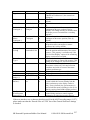
your experiment.
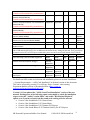
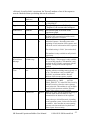
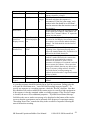
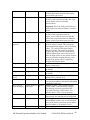
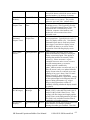
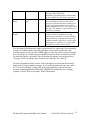
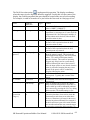
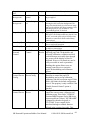
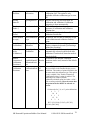
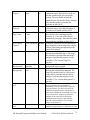
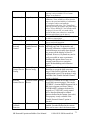
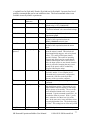
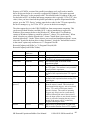
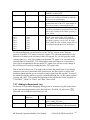
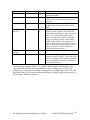
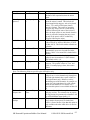
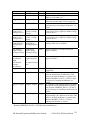
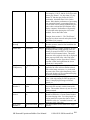
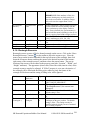
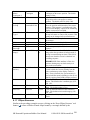
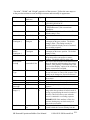
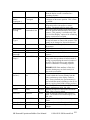
ASIO‐compatible Sound Card 32‐bit 64‐bit Play Windows Windows 7 Supported No Yes Record / Format Voicekey Yes PCI Supported No Yes Yes PCMCIA Creative Labs Sound Blaster Audigy 2 ZS Gamer Supported No Yes Yes PCI Supported No Yes Yes PCI Supported No Yes Yes PCI Creative Labs Sound Blaster Audigy 2 ZS (sound card discontinued by manufacturer)
Creative Labs Sound Blaster Audigy 2 ZS Notebook (sound card discontinued by manufacturer)
(sound card discontinued by manufacturer)
Creative Labs Sound Blaster Audigy 2 ZS Platinum (sound card discontinued by manufacturer)
Creative Labs Sound Blaster Audigy 2 Platinum SR Research Experiment Builder User Manual
©2004-2011 SR Research Ltd.
8
Ex (sound card discontinued by manufacturer)
Creative Labs Sound Blaster X‐Fi XtremeGamer Supported Supported (Models SB0730/SB073A) Yes Yes PCI Yes Yes PCI Yes Yes PCI (sound card discontinued by manufacturer)
Creative Labs Sound Blaster X‐Fi XtremeGamer Supported Supported (Model SB0770) (sound card discontinued by manufacturer)
Creative Labs Sound Blaster X‐Fi XtremeMusic (Model SB0670) Supported Supported (sound card discontinued by manufacturer)
Creative Labs Sound Blaster X‐Fi Titanium PCI‐ Supported supported Yes Yes PCI‐
Express (Model SB0880) Express Creative Labs Sound Blaster X‐Fi Titanium Supported supported Yes Yes PCI‐
Fatal1ty Pro PCI‐Express (Model SB0886) Express Asus Xonar DS Supported supported Yes Yes PCI M‐Audio Fast Track Pro ‐ 4 x 4 Mobile USB Supported supported Yes Yes USB * Audio Interface * It's our understanding that performance of a USB-based sound card can be influenced by the presence of
other USB and wireless devices etc, in addition to the buffer latency settings on the card. So if your display
computer can use PCI or PCI-Express sound cards, please use those sound cards instead of the USB one.
32‐bit Windows Creative Labs Sound Blaster Audigy 4 Partially supported Creative Labs Sound Blaster Audigy SE Partially supported Creative Labs Sound Blaster X‐Fi Xtreme Audio NOT supported Creative Labs Sound Blaster X‐Fi Xtreme Audio NOT PCI Express supported The following cards are NOT supported!
64‐bit Play Windows 7 ? Yes Record/
Format Voicekey No PCI ? Yes No PCI NOT supported NOT supported No No PCI No No PCI‐
Express For details on ASIO sound card selection and installation, please see section “Installation
-> System Requirements -> ASIO Card Installation” in the html version of this document.
This can be accessed by pressing F1 or clicking “Help->Content” when running
Experiment Builder software or downloaded from (https://www.srsupport.com/forums/showthread.php?t=99).
Version 1.6.1 has updated the "ASIO Sound Card Installation" section of the user
manual. Existing users of the following sound cards should re-check the installation
steps to select the "Audio Creation Mode" and enable "Bit-Matched Playback"
option, even if you have already had the sound card working with the software.
• Creative Labs Soundblaster X-Fi XtremeGamer
• Creative Labs Soundblaster X-Fi XtremeMusic
• Creative Labs Soundblaster X-Fi Titanium PCI Express
• Creative Labs Sound Blaster X-Fi Titanium Fatal1ty Pro PCI-Express
SR Research Experiment Builder User Manual
©2004-2011 SR Research Ltd.
9
Figure 3-1. ASIO Control Panel Settings
When you test run a project using the ASIO driver, a "Creative ASIO Control Panel"
dialog box will show up. This latency sets the minimum output latency of the ASIO
driver (delay from buffer switch to first sample output) and the interval (in milliseconds)
between ASIO buffer swaps (i.e., how often new sounds can be output). For better ASIO
playing/recording performance, set the ASIO buffer latency to 10 ms (the default is 50
ms).
Figure 3-2. ASIO buffer latency settings
SR Research Experiment Builder User Manual
©2004-2011 SR Research Ltd. 10
3.1.2 Maximizing the Real-time Performance of the Deployment PC
To maximize the real-time performance of the Deployment PC, the user should do the
following:
• Shut down all other applications (browser windows, chat clients, email programs,
etc) prior to running an EyeLink experiment. These applications are listed in the
taskbar at the bottom of the screen.
• Shut down any programs (Norton Antivirus, volume controller, Windows
Messenger, Google Desktop, etc) running in the notification area of the taskbar
where you usually see the current time displayed (lower-right corner of the
screen).
• Make sure no scheduled tasks (e.g., data backup, virus checking) are active.
• Remove unnecessary devices (e.g., DV converter, flash disk, external hard drive)
connected through the USB or firewire ports.
• Shut down screen-saver management. Click the right mouse button at a blank
space on the Display PC desktop to open a dialog box for display properties
settings. On the "Screen Saver" tab, set the screen saver to “None”.
• Shut down power management. Select the "Screen Saver" tab of the “Display
Properties” dialog box and click on the “Power …” button. In the “Power
Options Properties” dialog box, turn off all features related to power management
(hibernation, advanced power management support, turning off monitors or hard
drives).
• Disable unnecessary services (“Themes” in particular) running at the background.
This can be done by clicking “Start -> Control Panel -> Administrative Tools ->
Services”. In the following services window, select “Themes”. Double click on
item and select “Stop” from the dialog box. Disabling Themes service may make
the appearance of the Windows less attractive but will greatly improve the
performance of the computer.
• For a computer with multiple Ethernet cards installed, use the Windows Control
Panel to temporarily disable all network connections except for the one dedicated
for EyeLink connection. The user should disable the firewall for the EyeLink
Ethernet connection as well.
• In Windows XP, always run your experiments from an account with
administrative privilege (otherwise, a real-time priority application might be run
in a high-priority process instead). In Windows Vista, when running the
application, select the .exe file from the deployed folder, click on the right mouse
button. Select “Run as Administrator”. Click “Allow” in the following “User
Account Control” dialog box.
3.1.3 Host Computer and Display Computer Software Requirements
SR Research Experiment Builder works with EyeLink I, EyeLink II, and EyeLink 1000
eye trackers. EyeLink I users should make sure that version 2.11 of eyelink.exe file is
installed on the Host PC whereas EyeLink II users should use a recent version (2.0 or
later) of eyelink2.exe. If the EyeLink Data Viewer is used for data analysis, the user
should get the most recent version of the software. The DriverLinx parallel port driver
SR Research Experiment Builder User Manual
©2004-2011 SR Research Ltd. 11
(Port95NT.exe) should also be installed if the user is using a TTL action or trigger. This
driver can be found at C:\Program Files\SR Research\Eyelink\bin directory of the display
computer if Windows Display Software Package is installed. All of the above-mentioned
software can be downloaded from the EyeLink Support Site at http://www.srsupport.com.
3.2 Software Installation and Licensing on Windows
The latest version of Experiment Builder installer can be downloaded from
https://www.sr-support.com/forums/showthread.php?t=9. If you have a previous version
of Experiment Builder installed on the computer, please uninstall it with the Experiment
Builder installer or with Windows© Control Panel tool "Add or Remove Programs"
before installing the new version. By default, the Experiment Builder software will be
installed at "{Windows Drive}:\Program Files\SR Research\Experiment Builder". Click
on ExperimentBuilderW.exe to run the software.
3.2.1 For Standard Installation (applicable to most users)
The following installation instruction is applicable to users who use a standalone USB
dongle that supports a single-PC license.
1. Install the Experiment Builder software. Double click on the sreb_1.*.exe
installer, keeping the default settings.
2. Install standalone HASP key driver (if this is the first time that the USB dongle
have been used on the Display PC). Plug the dongle to the Display PC. You may
install the driver by clicking "Start -> All Programs -> SR Research -> Install
HASP Driver" from your computer desktop or double clicking on "hdd32.exe" in
"C:\Program Files\SR Research\Common" folder (see section 3.3.1 “HASP
Driver Installation”).
3. Check license status. Click on the License Manager utility to check for the
licensing status for the Experiment Builder software (see section 3.3.2 “Software
Licensing”).
3.2.2 For Installation using Network Licensing
The following is applicable to the users who have purchased a network license (i.e., a
shared license for several computers on a network that running Experiment Builder at the
same time) for the Experiment Builder software.
1. Install the Experiment Builder software. Double click on the sreb_1.*.exe
installer, keeping the default settings on InstallShield Wizzard screens except for
the following two:
• On the "Setup Type" dialog box, select "Custom".
• On the "Select Feature" screen, make sure that both "HASP4" and "HASPHL"
driver options are selected.
2. Install network HASP key driver. You may install the driver by clicking "Start ->
All Programs -> SR Research -> HASP HL Driver" from your computer desktop
SR Research Experiment Builder User Manual
©2004-2011 SR Research Ltd. 12
or double clicking on "HaspUserSetup.exe" in "C:\Program Files\SR
Research\Common" folder.
3. Install network HASP License Manager. You may install the tool by clicking
"Start -> All Programs -> SR Research -> Networked HASP License Manager"
from your computer desktop or double clicking on "lmsetup.exe" in "C:\Program
Files\SR Research\Common" folder. Failing to install this will report a "NO
HASP Key Found" error in the SR License Manager dialog box.
• When installing the license manager, set the "Installation Type" to Service
(nhsrvice.exe).
• On the "HASP License Manager" dialog box, check either Yes or No to
continue.
4. If this is the server computer, you may install optional Aladin Monitor software
by clicking "Start -> All Programs -> SR Research-> Aladdin Monitor" from your
computer desktop or double clicking on "Aksmon32.exe" in "C:\Program
Files\SR Research\Common" folder.
5. Test license status.
• Please make sure that the server and client computers are running and visible
to each other in the same network group (check this out from "My Network
Places -> View Network computers"). Contact your system administrator if the
computers cannot see each other in the same network group.
• Please make sure that the network license dongle is plugged to server
computer (remove all other HASP dongles) and drivers are already installed.
• Now, click "Start -> All Programs -> SR Research -> License Manager" to
check for the licensing status for each of the client computers in the network.
Note: If you are using Experiment Builder for developing EyeLink experiments,
test running experiments must be done using a secondary network card unless the
EyeLink Host PC also stays on the same network as the other computers.
3.2.3 HASP Driver Installation and Licensing
The user can run the Experiment Builder application in a demo mode immediately. All of
the functionality of the licensed copy of Experiment Builder is available in the demo
mode except that Experiments created with a demo version of the software will not reopen using a fully-licensed version of the software. An "UNLICENSED DEMO
VERSION" text will be drawn on every display screen in an experiment that is created
with the demo version of the software.
To run Experiment Builder in a fully licensed mode, the user needs to purchase a license
code for the software and have a USB dongle connected to the Development PC on
which the Experiment Builder software is installed. The physical USB dongle is the same
one we use to license the EyeLink© Data Viewer. After purchasing the software license,
the user will then need to contact us ([email protected]) with the ID of the USB
Dongle.
SR Research Experiment Builder User Manual
©2004-2011 SR Research Ltd. 13
If this is the first time that the USB dongle have been used on the Display PC, you will
need to install HASP key driver. Click "Start" from the desktop, go to "Programs -> SR
Research -> Install HASP driver" to install the driver. Follow the default settings. If the
driver installation is successful and the USB dongle is attached to the Display PC, the
dongle will glow. Now you can check the dongle licensing status. Please contact us if the
license key is not recognized.
To activate the Experiment Builder license, start "License Manager" program (click
"Start" from the desktop, go to "Programs -> SR Research -> License Manager"). The ID
of that dongle attached to the Display PC will be displayed on the title of the dialog box.
If the Experiment Builder License status is "No" and you have purchased the software
license, please contact [email protected] with that dongle ID; you will be given a
license code for running Experiment Builder with that dongle. Click on the license button
on the License Manager to enter the license code (see Figure 3-3).
Figure 3-3. Getting the ID of USB Dongle Key and Entering Licensing Code
3.3 Software Installation and Licensing on Mac OS X
SR Research Experiment Builder runs on most recent Intel-based Macs (software version
Mac OS X 10.6). The computer recommendations are in a large part dependant on the
experimental paradigm being run; it is always suggested to get the best computer you can
for running your experiments, even if you do not immediately plan on using all the
features of the computer.
3.3.1 Software Installation
The latest version of Experiment Builder installer can be downloaded from
https://www.sr-support.com/forums/showthread.php?t=9. If you have a previous version
SR Research Experiment Builder User Manual
©2004-2011 SR Research Ltd. 14
of Experiment Builder installed on the computer, please uninstall it first by removing the
"/Applications/ExperimentBuilder" folder to Trash. Now click on the
ExperimentBuilder.dmg installer. Select the "ExperimentBuilder" folder in the package,
drag and drop it into the "Applications" folder. The software is now installed at
"/Applications/ExperimentBuilder". Click on "ExperimentBuilder.app" to run the
software. The examples can be found in the "~/Documents/ExperimentBuilder
Examples" folder.
Figure 3-4. Installing Experiment Builder on Mac OS X
SR Research Experiment Builder works with EyeLink I, EyeLink II, and EyeLink 1000
eye trackers.
• EyeLink I users should make sure that version 2.11 of eyelink.exe file
(https://www.sr-support.com/forums/showthread.php?t=45) runs on the Host PC.
• EyeLink II users should use a recent version (2.0 or later) of eyelink2.exe
(https://www.sr-support.com/forums/showthread.php?t=11).
• Any version of EyeLink 1000 host software will be fine, although the latest
version 4.56 is recommended (https://www.srsupport.com/forums/showthread.php?t=179).
• If EyeLink Data Viewer is used for data analysis, you should get the most recent
version (version 1.10 or higher) of the software (https://www.srsupport.com/forums/showthread.php?t=10).
SR Research Experiment Builder User Manual
©2004-2011 SR Research Ltd. 15
3.3.2 HASP Driver Installation and Licensing
The user can run the Experiment Builder application in a demo mode immediately for 30
days from the first installation of the software on the computer. All of the functionality of
the licensed copy of Experiment Builder is available in the demo mode except that
Experiments created with a demo version of the software will not re-open using a fullylicensed version of the software. An "UNLICENSED DEMO VERSION" text will be
drawn on every display screen in an experiment that is created with the demo version of
the software.
To run Experiment Builder in a fully licensed mode, the user needs to purchase a license
code for the software and have a USB dongle connected to the computer on which the
Experiment Builder software is installed. The physical USB dongle is the same one we
use to license the EyeLink Data Viewer. If this is the first time that the USB dongle have
been used on your Mac OS X, you will need to install the driver for the HASP key. The
driver installer can be found in the "Hasp" folder after unpacking the ExperimentBuilder
installer program. Double click on "Sentinel_HASP_RTE_Installer.dmg" file and then
run the "Install HASP SRM Runtime Environment" application with default settings. If
the driver installation is successful and the USB dongle is attached to the Display
computer, the dongle will glow.
If your license key is not licensed for the Experiment Builder software, you will need to
contact [email protected] to purchase a license for the software. If your license key
is already licensed for the Windows version of the software, you may update the license
for the Mac version remotely by following the steps below; please contact [email protected] if you have trouble in updating the key.
• Make sure you have internet connection on your Mac.
• Start the LicenseManager application, which is located at
"/Applications/ExperimentBuilder".
• From the "File" menu at the top-left corner of the desktop, click "Update License".
In the following dialog box, fill up the form (make sure all fields are filled) and
click "OK". If the license update is successful, it will display "Success:
ExperimentBuilder (Mac)" text at the bottom of the dialog box. Click "Cancel" to
quit the application.
SR Research Experiment Builder User Manual
©2004-2011 SR Research Ltd. 16
Figure 3-5. Updating Experiment Builder License on Mac OS X
SR Research Experiment Builder User Manual
©2004-2011 SR Research Ltd. 17
4 Working with Files
The SR Research Experiment Builder is used to create, build/test run, and deploy
experiments on either Windows (2000, XP, Vista, and Windows 7) or Mac OS X. Each
experiment creation session generates a binary file (graph.ebd), which contains the
graphic layout of the experiment, and a set of supporting files and directories for
preference settings, image loading, etc. With these files, the experiment creation session
can be reopened later for review or modification. After the experiment is built, the user
can deploy the experiment to a new directory. This will generate a set of files so that the
experiment can be run on a different computer without relying on the Experiment Builder
application.
4.1 Creating a New Session
To create a new experiment session, from the application menu bar, choose (see Figure 41):
File → New
Tip: A new experiment session can also be created by clicking on the "New Experiment"
button ( ) on the application toolbar, or by pressing shortcut keys Ctrl N on Windows or
Command ⌘ N on Mac OS X.
Figure 4-1. File Menu
This will bring up a “New Project” dialog (see Figure 4-2), prompting for the experiment
project name and a directory under which the experiment project should be saved. Enter
the name for the session in the “Project Name” edit box. Click on the button on the right
end of the "Project Location" to browse to the directory where the experiment files
should be saved; if you are manually entering the "Project Location" field, please make
sure that the intended directory already exists. In both cases, please make sure you have
the writing permission at the selected directory. If your intended project is an EyeLink
experiment, make sure to check the "EyeLink Experiment" box and choose the
appropriate tracker version from the dropdown list.
SR Research Experiment Builder User Manual
©2004-2011 SR Research Ltd. 18
Note: The experiment session name must start with a letter between ‘a’ and ‘z’ or ‘A’ and
‘Z’ and may contain letters, digits, and the underscore character. If there is any space in
the filename, this will be replaced by an underscore. An “Invalid Value” or “invalid label
format” error dialog box will be displayed if the format of session label is invalid.
Figure 4-2. Dialog for Creating a New Project
After the experiment is generated, the following files and folders are created.
Experiment
|--- [datasets]
|--- [library]
|--- [audio]
|--- [customClass]
|--- [images]
|--- [interestAreaSet]
|--- [video]
|--- [myfiles]
|--- [runtime]
|--- [dataviewer]
|--- [images]
|--- graph.ebd
|--- Preferences.properties
•
•
•
•
•
graph.ebd: This file contains the experiment graph. Double clicking on this file
will open the experiment session.
Preferences.properties: This file contains the preference settings for the current
experiment session.
datasets: This is the directory where the data source file is located.
library: This is the folder where the image, audio, interest area set, and video files
are contained.
runtime: This folder contains all of the runtime image and Data Viewer
integration files (image drawing list and interest area set files).
SR Research Experiment Builder User Manual
©2004-2011 SR Research Ltd. 19
•
myfiles: This directory (and all files and subdirectories within it) will not be
deleted or cleaned by the build process and therefore can be used as a place to
store your own files (randomized data sets, test EDF files, etc). Files in this
directory will be included in the packed project and copied to the deployed folder.
Please avoid using non-ASCII characters in the project name or directory path as this
may cause runtime problems.
Note: If you are running Experiment Builder from a non-Administrative account of
Windows XP or 2000, you should create the new projects to the user account directory
(i.e., the project location should be "{Windows Drive}:\Documents and Settings\{User
Account}\My Documents"). In Windows Vista, a new project should be created at a
directory with user read/write permission (e.g., at "C:\Users\{User Name}"). Similarly,
you should deploy your experiments to the user account directory.
Note: The above files and folders are created and maintained by the Experiment Builder.
The user should not attempt to modify these files and folders or store important files
in the experiment project folder except within "myfiles" directory. The Experiment
Builder will overwrite any manual changes made to the experiment project directory
(except "myfiles").
Figure 4-3. Warning Messages after Experiment Creation
4.2 Saving a Session
An experiment session can be saved by choosing from the application menu bar:
File → Save
Tip: The experiment creation session can also be saved by clicking on the Save button
on the application tool bar, or by pressing the shortcut keys CTRL S on Windows or
Command ⌘ S on Mac OS X.
If there is any change to the experiment session, the previous experiment graph is saved
as “graph.ebd.bak” in the experiment directory.
SR Research Experiment Builder User Manual
©2004-2011 SR Research Ltd. 20
4.3 Saving an Existing Session to a Different Directory
To save an experiment session with a different session name and/or in a different
directory,
1) From the application menu bar, choose:
File → Save AS
2) In the Save As dialog box, click on the button to the right of “Project Location” to
browse to the directory where the session should be saved.
3) Enter the new session name in the Project Name edit box.
4) Click OK button.
Tip: The session can also be saved by clicking the “Save As” button
application tool bar.
on the
4.4 Opening a Session
To open an existing experiment session from the Experiment Builder application,
1) From the application menu bar, choose:
File → Open
2) In the “Open” dialog box, browse to the directory of experiment and select the
“graph.ebd” file (see Figure 4-4).
Figure 4-4. Open an Experiment Builder Session
3) Click on the “Open” button.
SR Research Experiment Builder User Manual
©2004-2011 SR Research Ltd. 21
Note: If an experiment is already open in the current session, the “Open” operation will
first bring up a “Save Confirmation” dialog box so that the user can either save the
current session (“YES”), abandon the current session (“NO”), or stay in the current
session (“CANCEL”; see Figure 4-5).
Figure 4-5. Save Confirmation When Opening a New Session
Tip: A saved experiment session can also be opened by clicking on the Open button
on the application toolbar, or pressing the shortcut keys Ctrl O on Windows or Command
⌘ O on Mac OS X.
Note: The user can also open an existing experiment project with Window Explorer by
going to the directory where the experiment project is contained and double clicking on
the graph.ebd file.
4.5 Reopening a Recent Experiment Session
Experiment Builder keeps a history of five recently opened experiment projects. If the
user needs to reopen a recent experiment project, try:
1) from the application menu bar, choose:
File → Reopen
2) from the list of recent experiment projects, choose the project to open (see Figure
4-6).
Figure 4-6. Reopening Recent Experiment Sessions
SR Research Experiment Builder User Manual
©2004-2011 SR Research Ltd. 22
A “File Not Found” error will be displayed if the intended experiment project has been
moved, renamed, or deleted. To clear the list of recent projects, click on the “Clear
History” menu.
4.6 Packaging an Experiment
The user can pack up the current experiment project by clicking
File → Package
from the application File menu.
This will zip up the experiment directory and save the zip file at a location selected by the
user. The created .zip file contains only the files necessary to rebuild and run the
experiment (graph.ebd, Preferences.properties, and library directory). The packed
project can be unpacked by Experiment Builder.
Tip: The experiment can also be packaged up by clicking the “Package” button
the application tool bar or pressing F5 on Windows or Ctrl Shift P on Mac OS X.
on
Experiment packaging is very useful if you want to send another Experiment Builder user
an experiment you have created so they can modify the experiment in the Experiment
Builder.
4.7 Unpacking an Experiment
The packed experiment project can be unpacked by clicking "File -> Unpack" from the
application File menu. In the following dialog, the user should select the packed project
(source) and specify a directory to which the project should be unpacked (Destination).
Tip: A packed project can also be unpacked by pressing F3 on Windows or Ctrl Shift U
on Mac OS X or click the
icon on the application toolbar.
Note: Version 1.3.1 or later also allows you to unpack a project by simply clicking on
the .ebz file.
SR Research Experiment Builder User Manual
©2004-2011 SR Research Ltd. 23
4.8 Building an Experiment
After creating the experiment, the user needs to compile the experiment to make sure that
there is no error in the experiment graph. To do that, from the application menu bar,
choose (see Figure 4-7):
Experiment → Build
Tip: Building an experiment can also be performed by clicking on the “Build” button
on the application tool bar or pressing F9 on Windows or Ctrl Shift B on Mac OS X.
Figure 4-7. Experiment Menu
4.9 Cleaning an Experiment
Sometimes the user may want to clean up the experiment projects. This is especially
important when the user has changed the images or other screen resources used for the
experiment. To do that, from the application menu bar, choose:
Experiment → Clean
Tip: Cleaning an experiment can also be performed by clicking on the “Clean” button
( ) on the application tool bar or by pressing shortcut key F7 on Windows or Ctrl Shift
C on Mac OS X.
4.10 Test-running an Experiment from EB Application
To check whether the experiment works, the user may test-run the experiment from the
Experiment Builder application. To do that, from the application menu bar, choose:
Experiment → Test Run
This will create a “Results” directory, containing data collected from the test run-session.
Note that test run is not intended for real data collection and should be only used when
you are testing your experiment.
Tip: Running an experiment can also be performed by clicking on the “Test Run”
button on the application tool bar or pressing the shortcut key F11 on Windows or Ctrl
Shift R on Mac OS X.
Note: If the experiment is tested under dummy mode, a warning dialog box "You are
running in dummy mode! Some eye tracking functionality will not be available" will be
SR Research Experiment Builder User Manual
©2004-2011 SR Research Ltd. 24
displayed at the beginning of the experiment and a warning dialog "No EDF file is
created for dummy mode session" will be displayed at the end.
4.11 Deploying an Experiment
To deploy a built experiment so that it can be run on a different computer without relying
on the Experiment Builder application, choose from the application menu bar:
Experiment → Deploy
Upon receipt of the deployment command, Experiment Builder asks for a directory to
deploy. If the user selects a directory, a subdirectory with the name of the experiment
session is created within it. This experiment subdirectory contains all of the required
files generated. The user can cancel the deploy process by pressing the “Cancel” button.
Please note that non-ASCII characters are not allowed in a deployment path (e.g.,
deploying a project to a folder that contains Chinese characters will fail).
Tip: Deploying an experiment can also be performed by clicking on the “Deploy” button
on the application tool bar or pressing shortcut key F12 on Windows or Ctrl Shift D
on Mac OS X.
Tip: For the ease of reconstructing the original experiment project, a "source" folder will
also be created in the deployed project. Depending on the Build/Deploy preference
settings, this folder contains either the packed experiment project or the graph.ebd and
Preferences.properties files.
Note: Users may deploy the experiment on one computer and then copy and execute the
project on a different computer. Please make sure the deploy computer and the test
computer have the same operating system installed. For example, an experiment
deployed on a Windows Vista computer will not run on a display computer with
Windows XP or 2000 installed as the dependency files are very different between the
Vista and XP/2000 operating systems. Similarly, experiment deployed on Mac OS X will
not run on the Windows computers and vice versa. Other runtime errors could be if the
two computers have different settings in Cedrus driver, I/O driver, video card driver,
audio device, etc.
4.12 Running an Experiment for Data Collection
To run the experiment for data collection from the deployed folder, simply double click
on the executable file in the deployed directory, or from your computer desktop, click
"Start -> All Programs -> Accessories -> Command Prompt". Go to the deployed
experiment directory by typing "cd {experiment path}" on the command prompt and type
the {experiment}.exe file name to start the experiment. Running the experiment from the
command line prompt also allows the user to pass additional parameters to the program.
Some of the useful command line options are:
SR Research Experiment Builder User Manual
©2004-2011 SR Research Ltd. 25
•
•
•
-session= <your edf or session name >
If the "-session" option is used, the software will not prompt for a session name
via a dialog box at the beginning of the experiment. The session name pass along
the "-session=" option must be within eight characters (consisting of letters or
numbers).
-ui=[GUI|CONSOLE|NONE]
The "-ui" option allows to disable the file transferring dialog box at the end of the
session. If -ui=GUI the graphical progress bar is popped up(default); if ui=CONSOLE progress updates are printed to the console; if -ui=NONE no
progress messages are brought to the user. For example, for an experiment named
"simple_deployed", you can pass the "-ui=NONE" to disable the files transfer
progress bar.
simple_deployed -session=myTest -ui=NONE
The acutal paramters passed along the command line can be retrieved through the
"Command Line Arguments" property of the Experiment node.
Running the deployed version of the experiment doesn't require a license key plugged to
the computer. If the experiment needs to be run on a different machine with similar or
better computer specifications, the user should first copy the entire directory of the
deployed version of the experiment to that computer. To make the experiment transfer
easier (given so many files involved), you may first zip up the {Experiment Name} folder
(keeping the directory structure) and then unzip the file on your target computer.
The user should also pay attention to the following details:
• For accurate display drawing, the dots-per-inch (DPI) resolution of the
deployment PC that is used to run the experiment must match that of the
development PC which is used to create the experiments. To check the DPI
settings, click the right mouse button at a blank space on the Display PC desktop
to open a dialog box for display properties settings. Click on the "Advanced"
Button to get access to the DPI settings.
•
If the deployed experiment shows video clips, please make sure that codec used
to test run the video experiment is also installed on the deployment computer as
well; otherwise, the deployed experiment will not run.
Important: Please check out section 3.1.2 regarding experiment runtime performance and
steps that should be taken to maximize the real-time performance of the deployment
computer.
Finally, when an experiment is in progress, please avoid hitting the Windows logo key on
the keyboard so that the experiment will not be aborted for failing to lock the experiment
graphics window. You may check out the discussion in Keyboard trigger to disable the
Windows Logo Keys.
SR Research Experiment Builder User Manual
©2004-2011 SR Research Ltd. 26
4.13 Conver ting Projects between Windows and Mac OS X
Experiment projects saved on the Windows operating systems can be opened with the
same version or a newer version of the software on Mac OS X, and vice versa. There are
some exceptions on the transferability between the two families of operating systems.
• Voicekey is not supported on Mac OS X. When converting a Windows version of
the EB project using the voicekey feature, all of the voicekey nodes will be
removed from the project and a warning message will be displayed.
• Audio playback and recording is done through OS X driver on Mac OS X. When
converting a project created on Windows with audio playing (either through
DirectX or ASIO driver) or recording (through the ASIO driver), the audio device
will be reset to OS X. On the other hand, the audio device will be reset to ASIO
driver when converting a Mac version of the experiment project with audio
recording or playing.
• Only Xvid video clips are supported through the video resources on Mac OS X
driver; experiment project will not run when other video codecs is used.
Animation video clips are not supported in Camera Setup and Drift Correction
actions on Mac OS X.
• Sending TTL signals or receiving TTL signals is only supported through USB1208HS box on Mac OS X. So the TTL device of a project created on the
Windows version using the parallel port will be reset to USB-1208 HS.
• Some of the fonts may be missing when converting from the other operating
system. Single-line texts or multi-line texts of the same font size will look smaller
(by a factor of about 1.33) on Mac OS X than on Windows due to different
default DPI values used across the two operating systems.
• Calibration control through external device is not supported.
SR Research Experiment Builder User Manual
©2004-2011 SR Research Ltd. 27
5 Experiment Builder Graphical User Interface
The SR Research Experiment Builder uses a desktop framework that contains all
windows of the application. The following figure shows a typical graphical user interface
(GUI) the experiment designer will see in an experiment generation session. Besides the
standard windows application menu bars and tool bars, the experiment builder desktop
can be divided into two major parts: the Project Explorer Window on the left and the
Graph Editor Window on the right. The Project Explorer Window lists all of the
experiment components in a hierarchical fashion and allows the designer to select
components for review or modification. The Graph Editor Window allows the designer to
create the experiment graph by dragging individual building blocks and making
connections between components to form experiment flow.
Figure 5-1. Sample Experiment Builder Interface
5.1 Project Explorer Window
The Project Explorer Window allows the designer to select experiment components to be
viewed, to modify the current property values, and to configure default devices (eye
tracker, display, audio driver, parallel port, and Cedrus© input settings. This window has
four individual panels: Overview, Structure, Property, and Connections panels. Each of
the individual section can either be a docked ( ) panel of the project Explorer window or
a free-floating ( ) window. In addition, each of the panels can be hidden or made visible
from the "View" menu.
SR Research Experiment Builder User Manual
©2004-2011 SR Research Ltd. 28
Figure 5-2. The View Menu.
The Overview panel (on the top) shows the graph layout of all components in the current
level of experiment and highlights the currently selected components. The part of the
graph within a gray background is currently visible in the workspace of the Graph Editor
Window. The designer can choose to work on a different part of the graph by placing the
mouse cursor on top of the gray area, holding down the left mouse button, and move the
gray background to cover the intended region.
SR Research Experiment Builder User Manual
©2004-2011 SR Research Ltd. 29
Figure 5-3. Components of the Project Explorer Window
The Structure panel (in the middle) lists the components used in the experiment. This
panel has three tabs: Experiment, Components, and Devices. The Experiment Tab (left
panel) contains a hierarchical representation of the Experiment -- all component nodes
are listed under the sequence in which they are contained. The Components Tab (middle
panel) lists the nodes by type (triggers, actions, or other components). Similar to the
interface used by Windows Explorer, if a certain type of components is used, the folder
containing those components can be opened ( ) or closed ( ). The Devices Tab (right
panel) allows the designer to configure default settings for the EyeLink© tracker,
experiment display and other devices (see preference settings).
Figure 5-4. Different Tabs of the Structure Panel
The Properties panel (at the bottom) displays attributes associated with the selected item
in the Structure panel. The designer can review the current settings for the attributes and
make modifications if necessary. Please note that if a property field is grayed out, the
value of the property cannot be directly modified but may be referred (e.g., "Time" of the
DISPLAY_SCREEN action) whereas all of the other properties may be modified directly
SR Research Experiment Builder User Manual
©2004-2011 SR Research Ltd. 30
(see section 7.5 "Editing Properties of a Node"). The Note section of a properties panel
allows the user to add comments to the node.
The Connections panel lists all of the nodes that are connected to the current node. The
"Connected From" section lists all of the nodes that target the current node and the
"Connects To" section lists all of the nodes that receive a connection from the current
node.
5.2 Graph Editor Window
The Graph Editor Window provides the interface where the experiment can be created
graphically. This window can be divided into four sections: the Component Toolbox,
Work Space, Editor Selection Tabs, and Navigation Nodes.
The Component Toolbox contains the basic building blocks of the experiment graph and
allows the designer to select a desired component to be added into the experiment. The
experiment components are grouped under three categories: trigger (including timer,
invisible boundary, conditional, EyeLink© button, Cedrus© Input, TTL, keyboard,
mouse, voice key, fixation, saccade, and sample velocity trigger), action (displaying
screen, performing camera setup, performing drift correction, sending EyeLink©
message, logging experiment, sending EyeLink© command, updating variable attribute,
preparing sequence, adding to result file, adding to accumulator, sending TTL signal,
playing/recording sound, controlling sound playing/recording, terminating experiment, or
recycling data line), and other type (variable, result file, and accumulator).
The Work Space provides a venue where the experiment is generated. In an empty
sequence, the Work Space area contains a START node to which actions and triggers can
be connected. The designer needs to drag selected experiment elements from the
Component Toolbox and drop them to the work space and make connections from/to
other components. The designer can further select individual items for property editing.
The Editor Selection Tabs and Navigation Nodes provide convenient shortcuts for
selecting a display screen or an experiment subgraph (sequence) to work on. When an
experiment involves several different layers of subgraphs (for example blocks -> Trials > Trial Recording), the Navigation Nodes at the bottom of the graph editor window
informs the designer of the layer that they are currently at. The designer can switch to
work on a different level by a simple click on the target sequence. In addition, all of the
experiment sequences and display screens created in the experiment, as well as the
project output screen, are listed as individual Editor Selection Tabs above the Component
Toolbox for direct access.
SR Research Experiment Builder User Manual
©2004-2011 SR Research Ltd. 31
Figure 5-5. Components of the Graph Editor Window
5.3 Application Menu Bar and Toolbar
The Experiment Builder application menu bar and toolbar contain a list of common
operations. If you are a menu-oriented person, you may access all of the operations from
the menu bar. Most of the operations can also be performed by keyboard shortcuts or by
using buttons on the application toolbar.
5.3.1 File Menu and Tool Buttons
Commands that affect creating, opening, saving, packaging, or closing the Experiment
Builder sessions are located here (see Chapter 4 for details).
Operation Shortcut
Shortcut
Function
(Windows) (Mac OS
X)
CTRL
+
N
Creates a new experiment project.
⌘N
New
CTRL + O ⌘ O
Opens an existing experiment project.
Open
Reopens a recent Experiment Builder project.
Reopen
CTRL + S ⌘ S
Saves the current experiment project.
Save
Saves the experiment project to a different
Save
directory.
As
Click on the icon locks a currently unlocked
Lock
SR Research Experiment Builder User Manual
©2004-2011 SR Research Ltd. 32
project, or unlocks a currently locked project.
Unlock
Project
F5
Package
F3
Unpack
Exit
Ctrl Shift P
Used to compress the experiment project into
a .zip file for file sharing, etc.
Ctrl Shift U Used to extract the experiment project from a
compressed .zip file.
Closes the Experiment Builder application.
⌘Q
(under
"Experime
ntBuilder"
menu)
5.3.2 Edit Menu and Tool Buttons
This menu contains commands such as copy, paste, cut, delete, and undo. The menu also
contains tools for resource library management, node group organization, and preference
settings (see Chapter 17).
Operation
Shortcut
Shortcut
Function
(Windows) (Mac OS
X)
CTRL
+
Z
Undoes the last action performed.
⌘Z
Undo
CTRL + X ⌘ X
Removes a selection from the project and place
Cut
it into the clipboard.
CTRL
+
C
Puts a copy of a selection to the clipboard.
⌘C
Copy
CTRL + V ⌘ V
Inserts the previously copied item from the
Paste
clipboard to the current position.
CTRL +
Inserts the previously copied item from the
⌘M
Paste
M
clipboard to the current position.
Multiple
Delete
Removes the selection from the current
⌘ Delete
Delete
location.
F4
Shows a list of preference settings for
⌘,
Preferences
Experiment Builder.
CTRL
+
H
Refreshes the Custom Class files (i. e., reparses
Refresh
the contents of the files). This tool is useful to
Custom
users who use an external editor to edit the
Class
content of custom classes.
CTRL
+
L
Used to load in image, audio resources, or
⌘
L
Library
interest area set files.
Manager
CTRL + R ⌘ R
Tabulate the source, property, and value of each
reference used in the experiment graph (see
Reference
section 10.5).
Manager
CTRL + G ⌘ G
Allows the user to rearrange the layout of the
Node
components in the component toolbox and
Groups
structure list.
Select All
CTRL+ A ⌘ A
Selects the entire contents of the active window.
SR Research Experiment Builder User Manual
©2004-2011 SR Research Ltd. 33
5.3.3 View Menu
This menu contains commands that display or hide panels in the project explorer window.
Operation
Shortcut
Shortcut
Function
(Windows) (Mac OS
X)
Overview
If enabled (a tick to the left), displays the
Overview panel.
Structure
Displays the Structure panel.
Properties
Displays the ‘Attributes’ and ‘Note’ section of
the Properties Panel.
Connections
Displays the ‘To Connections’ and ‘From
Connections’ section of the Connections Panel.
Navigator
Displays the Navigation Nodes" in the Graph
Editor Window
5.3.4 Experiment Menu and Tool Buttons
Commands used to compile and run the experiment, clean up the experiment project, and
to create a deployment version of the experiment are located here (see Chapter 4 for
details).
Operation Shortcut
Shortcut
Function
(Windows) (Mac OS X)
Ctrl Shift C Used to clean up the experiment project
Clean F7
Ctrl Shift B Used to compile the experiment
Build F9
F11
Ctrl Shift R Used to test run the experiment from the
Test
Experiment Builder application
Run
Ctrl Shift D Used to generate deploy code for running
Deploy F12
experiment without replying on the Experiment
Builder software.
5.3.5 Help Menu
This menu contains commands that display licensing and product release information
(see Chapter 3 for details).
Shortcut
Function
Operation Shortcut
(Windows) (Mac OS X)
F1
Displays the online help (this document) of the
Experiment
Builder application.
Contents
Displays the Experiment Builder release
About
information.
Displays license information for this copy of
Purchase
Experiment Builder
SR Research Experiment Builder User Manual
©2004-2011 SR Research Ltd. 34
6 Designing an Experiment in Experiment Builder
This chapter introduces the general concepts of experiment design in the Experiment
Builder: hierarchical organization of events in an experiment, flow diagram, and attribute
referencing. It also provides an overview of Experiment Builder components (triggers,
actions, sequences, and other nodes) and linking rules for the experiment graph.
6.1 Hierarchical Organization of Experiments
One of the important concepts in SR Research Experiment Builder is hierarchical
organization of events in an experiment. A typical experiment can be dissected into
several levels along a hierarchy of Experiment -> Blocks -> Trials -> Trial Runtime /
Recording. All of the events within each level of this hierarchy can be conveniently
wrapped in a loop (called sequence or sub-graph in Experiment Builder). This allows the
whole sequence to be connected to other objects as a unit and be repeated several times in
a row.
The following figure illustrates a common high-level EyeLink experiment architecture.
To create an experiment, the designer needs to create several nested sequences, add a list
of actions and triggers to each sequence, and make necessary connections between
components to form experiment flow. In this example, the top-most level of the
experiment (Experiment Sequence) contains a greeting message or instruction screen
followed by a sub-sequence representing blocks of trials (Block Sequence), and then a
goodbye or debriefing message at the end of the experiment. Within each repetition of the
Block Sequence, the user first performs a camera adjustment, calibration and validation,
and then runs several trials (Trial Sequence). Every iteration of the Trial Sequence starts
with pre-recording preparations (e.g., preloading image, audio, video resources, clearing
trigger data, sending some simple drawing graphics to the tracker screen, flushing log
file) and drift correction followed by the trial recording (Recording Sequence), and
finally displaying feedback information if necessary. The Recording Sequence is
responsible for collecting the eye data and is where visual and auditory stimuli are
presented. Response collection from the participant is also performed in the Recording
Sequence.
SR Research Experiment Builder User Manual
©2004-2011 SR Research Ltd. 35
Figure 6-1. Hierarchical Organization of Events in an Experiment
6.2 Experiment Graph: Flow Diagram
Experiment Builder uses an intuitive flow diagram interface for experiment generation -the whole experiment generated can be called a graph. Like a drawing board, the user can
drag and drop experiment components into the workspace of the graph editor window.
These experiment components are usually either triggers or actions that represent
individual events and preconditions in the experiment. An Action tells the computer to do
something, like displaying a screen or playing an audio clip, whereas a Trigger represents
some precondition that must be met for the experiment to continue past that point.
Experiment components are connected to each other using arrowed lines that represent
sequence and dependency relationships (i.e., X must be done before Y can be done). The
connection of experiment components forms the flow of the experiment. The following
figure illustrates a very simple experiment sequence with gaze-contingent manipulation.
SR Research Experiment Builder User Manual
©2004-2011 SR Research Ltd. 36
Figure 6-2. Sample Experiment Sequence
In this example, the experiment sequence starts with a DISPLAY_FIRST_SCREEN
action, which draws graphics to the computer display. Now the sequence constantly
monitors two Triggers until one of the Triggers is satisfied: an
INVISIBLE_BOUNDARY trigger and a TIME_OUT. The INVISIBLE_BOUNDARY is
triggered if the participant’s gaze falls within a pre-specified region of the screen whereas
the TIME_OUT is triggered if a specified amount of time (e.g., 30000 milliseconds) has
passed since DISPLAY_FIRST_SCREEN was drawn.
If TIME_OUT is triggered, the sequence ends since the TIME_OUT Trigger does not
connect to any subsequent experiment components. However if
INVISIBLE_BOUNDARY is triggered, DISPLAY_SECOND_SCREEN action is
performed and draws new graphics to the computer display.
Now the sequence monitors two new Triggers: a TIME_OUT_2 trigger and an
EL_BUTTON trigger. The EL_BUTTON trigger fires if the participant presses a button
on the EyeLink© button box. TIME_OUT_2 is triggered if a pre-specified duration has
elapsed since the second display was drawn. The sequence ends when either of the
triggers (EL_BUTTON and TIME_OUT_2) becomes true.
Important: Note that in the above example, once the DISPLAY_SECOND_SCREEN
Action has been performed the TIME_OUT and INVISIBLE_BOUNDARY Triggers are
no longer monitored; only the Triggers connected to the last processed Action are
monitored.
6.2.1 Adding Components to an Experiment
In the Experiment Builder graphical user interface, the user can add individual
components to the workspace of the Graph Editor Window by dragging them from the
SR Research Experiment Builder User Manual
©2004-2011 SR Research Ltd. 37
component toolbox. To do that, first choose the right node group by clicking on the
Trigger or Action, or Other Tab of the Components Toolbox. Place the mouse cursor on
the icon of the desired component, press the left mouse button, hold it down as you move
the mouse to drag the selected item to the desired location in the work space, and then
release the left mouse button. (To find out the meaning of a component, simply place the
mouse cursor over the icon.)
6.2.2 Linking Experiment Components
The flow of an experiment sequence moves from the default "START" node to one or
several triggers or actions and then to other triggers or actions, and so on. This requires
the designer to connect two experiment components with arrowed line to establish a
directional or dependency relationship between a "Source" component and a "Target"
component.
Figure 6-3. Connecting between Source and Target Components
To make a connection from a Source component to a Target component, place the mouse
cursor on the Source component, hold down the left mouse button (without releasing the
button as this constitutes a mouse click and will select the item instead), move the cursor
to the Target component, and then release the left mouse button. To cancel a connecting
operation in progress, press the "ESC" key. To remove a connection between two
experiment components, click on the connecting line until it is highlighted in yellow, and
then press the "Delete" key on a Windows keyboard (Command ⌘ and Delete together
button on the application tool bar.
on Mac OS X) or select the
6.2.3 Linking Rules
The connection between a Source and Target component is governed by a set of rules:
1) A node cannot be connected to itself.
2) You cannot connect two components in the same direction twice.
3) The START node cannot be a Target (i.e., it cannot receive a connection from
other components). The Source START node can target to an action, trigger, or
sequence.
SR Research Experiment Builder User Manual
©2004-2011 SR Research Ltd. 38
4) A Source node cannot have more than one Target Action; unless it is a
Conditional Trigger in which case each conditional branch cannot Target more
than one Action component.
5) A Source component can target many Trigger nodes.
6) A Source node cannot target a Trigger and an Action component at the same time.
7) A Sequence action cannot target a Trigger node.
8) A Target trigger node cannot receive connections from multiple source trigger
nodes.
9) A Source node cannot target multiple Sequence nodes. That is, the current version
of Experiment Builder does not support parallel processing.
10) A Drift Correct Action or Camera Setup Action cannot target any Trigger.
11) Storage space elements (Accumulator, Variable, and Result File) cannot be
Source or Target Nodes (i.e., never directly connected to other components).
12) Certain node types, such as Fixation, Saccade, Invisible Boundary, and Sample
Velocity Triggers, can only be added to a sequence that has the "Record"
checkbox enabled.
13) Drift Correct and Camera Setup Actions cannot be added to a sequence that has
the "Record" checkbox enabled.
14) A Trigger can not be the target of an action and a trigger at the same time.
6.3 Actions
Action components instruct the computer to do something, like displaying a screen or
playing a sound. One or multiple actions can be added to a sequence, depending on the
complexity of the experiment. For example, a recording sequence showing a static page
of text may just require a single display screen action whereas an experiment studying
change detection necessitates several display screen actions to present alternating screens
at a fixed interval. SR Research Experiment Builder supports the set of actions listed in
the following table.
Display Screen
Camera Setup
Drift Correction
EyeLink©
Command
EyeLink©
Message
Add to Log File
Used to show a set of 2D graphics on the computer screen.
Please follow Chapter 8 “Screen Builder” to modify the
content of the screen.
Displays the EyeLink© camera setup screen for the
experimenter to perform camera setup, calibration, and
validation.
Performs an EyeLink© drift correction by using a fixation
point at a known position to correct for small drifts in the
calculation of gaze position that can build up over time. This
is particularly useful when using the pupil-only mode of
EyeLink.
Sends a text command to the EyeLink© tracker through the
Ethernet link for on-line tracker configuration and control.
Writes a text message to the EyeLink© eye tracker. The text
is msec time stamped and is inserted into the EyeLink EDF
file.
Allows the user to add text to a log file for experiment
SR Research Experiment Builder User Manual
©2004-2011 SR Research Ltd. 39
Prepare Sequence
Add to
Accumulator
Add to Result File
Update Attribute
Send TTL Signal
Reset Node
Terminate
Experiment
Recycle Data Line
Play Sound
debugging.
Performs preparatory works for a sequence (e.g., preloading
image or audio files, drawing feedback graphics on the Host
PC, and re-initializing trigger settings) to ensure real-time
performance and better recording feedback.
Adds a number to an Accumulator object.
Used to output data to a tab delimited data to a Result File.
Updates the value of a Variable or an attribute of an
experiment component.
Sends a TTL signal via the parallel port or other data ports.
Allows the user to pick a node in the experiment and reset its
data.
Used to terminate the experiment project programmatically.
Instruct the experiment sequencer to perform the current
data source line again at a later time.
Plays a .WAV audio file.
Play Sound Control Stop, pause, or unpause a specified playsound action
Record Sound
Records audio to a .WAV file with an ASIO-compatible
sound card.
Record Sound
Stop, pause, unpause, or abort the current ASIO sound being
Control
recorded.
Execute
Execute action is used to execute methods defined in custom
class.
ResponsePixx LED An action used to turn on/off the LEDs on the ResponsePixx
Control
Button box.
6.4 Triggers
A Trigger is some condition that must be met for the sequence to continue past that point.
Triggers are used by the Experiment Builder to control the transition from one Action to
another, or to end a sequence itself. For example, in a simple reaction-time experiment,
following the onset of the stimulus display a speeded response from the keyboard or a
button box can be used as a trigger to end the trial. In a change-detection experiment, the
time delay serves as a trigger to make the transition from one display screen to another
(and therefore controls the exposure duration of a display screen). In a gaze-control
experiment, a trigger for display change can be elicited when the eye is entering or
leaving a pre-specified invisible boundary. SR Research Experiment Builder supports the
following set of Triggers:
Timer
Fires when a pre-specified amount of time elapses. Timers
can be used to add a delay between actions and/or triggers,
and to control the maximum amount of time a sequence can
last.
SR Research Experiment Builder User Manual
©2004-2011 SR Research Ltd. 40
Keyboard
Fires when a pre-specified keyboard key is pressed.
Mouse
Fires when a specified mouse button is pressed or when the
mouse’s position falls within a specified region of the screen.
Checks TTL input to the input ports (e.g., parallel port or
USB 1208HS box) of the display computer. TTL Trigger
fires when a pre-specified TTL signal is received.
Fires when one of the pre-specified buttons on the Cedrus©
response pad is pressed.
Fires when one of the pre-specified buttons on the EyeLink©
button box is pressed.
Fires when one or multiple samples stay inside or outside of
a pre-specified invisible boundary. Boundary trigger’s can
be used to implement display changes based on the locus of
gaze.
Fires when a fixation occurs at a specific region of the
display for a certain amount of time.
Fires following the detection of a saccade to a specific region
of the display.
Implements a “fast” saccade detection algorithm by checking
the velocity and acceleration information on a sample-bysample basis. Sample Velocity Trigger fires when the
sample velocity and acceleration values exceed their
respective thresholds.
Fires when one or two conditional evaluations are met. This
is useful to implement conditional branching in a graph when
several conditions are possible.
Triggers when ASIO input exceeds a pre-specified threshold.
This only works with an ASIO compatible sound card. This
trigger type is not supported on Mac OS X.
TTL
Cedrus© Button
EyeLink© Button
Boundary
Fixation
Saccade
Sample Velocity
Conditional
Voice Key
Trigger
6.5 Other Node Types
SR Research Experiment Builder also supports other components: Variable, Result File,
and Accumulator. These components mainly function as a temporary storage for
experiment data. Note that these objects are never connected to other components in an
experiment in the graph editor. Instead, they are used within the experiment by attribute
referencing (see section 6.7).
Accumulator
Result File
Used to keep numeric values and do statistical analysis on
the accumulated data. The Accumulator is a circular list, so
the last n items added to the list are kept.
Provides a columnar output of selected variables.
Variable
Used to store data during run time.
Custom Class
Instance
Used to create a new instance of a custom class
SR Research Experiment Builder User Manual
©2004-2011 SR Research Ltd. 41
6.6 Sequence/Sub-graph
As the experiment-looping controller, a sequence (i.e., sub-graph) is used to chain
together different actions and triggers and execute them in a loop. Therefore, the
Sequence experiment component can itself be considered a complex action. To
implement the hierarchical organization of events in an experiment, the Experiment
Builders allows one graph containing the triggers and actions to be nested under another
graph to represent a sub-sequence in the event chain. In a typical experiment, the user
needs to add a couple of nested sequences so that the implementation of blocking, trial,
and recording can be done efficiently (see the following figure for an example).
Given the repetitive nature of the sequence component, a data source can be attached to a
sequence object to supply different parameters for each sequence iteration. Like
Microsoft Excel software, each column of a data source contains a variable label and
each row contains a value for the variables. For a typical experiment created by
Experiment Builder, the user needs to create prototypical trials and to supply the actual
parameters for individual trials from a data source attached to the trial sequence. During
experiment runtime, individual lines can be read from the data source, supplying the
actual parameters for each trial - the linkage between the two can be achieved by attribute
referencing.
Sequence/Subgraph
A controller for experiment flow. Used to chain together
different Actions and Triggers and execute them in a loop or to
simply modularize a set of experiment components.
SR Research Experiment Builder User Manual
©2004-2011 SR Research Ltd. 42
Figure 6-4. Nested Sequences in an Experiment.
6.7 References and Equations
The Experiment Builder uses "references" to link or bind an attribute of one experiment
component to be equal to the value of another component attribute. References (see
Chapter 10) are a critical part of the Experiment Builder, providing much of the
flexibility to the application.
As an example, assume a sequence has two components, X and Y, and component X has
attribute Ax and component Y has attribute Ay. If attribute Ax was set to reference Ay,
then the value of Ax would always be equal to the value of Ay. In this example it is said
that Ax is the "referencing" attribute and Ay is the "referenced" attribute. Even if Ay
changes value during the experiment, Ax will always reflect the current value of Ay.
A reference is represented by a string that starts and ends with a @ symbol in the attribute
editor for an experiment component. For example @X.Ax@ is a reference to the Ax
attribute of component X. @Y.Ay@ is a reference to the Ay attribute of component Y. If
the reference is to a component attribute that is not in the same sequence as the
referencing component, the reference will also contain the graph path to the referenced
component.
The user can refer a variable or an attribute of a node to the attribute of another node
(trigger, action, or sequence), a variable, or data source. The users can also use a more
complex form of references - equations, which are a combination of values and/or
references. In most cases the data type of the referring attribute must match that of the
referenced attribute.
As a more concrete example of using references, imagine that the user needs to show a
text on the screen. In the property table of the text resource, the user can enter the text to
be displayed directly in the "Text" property field (see left panel of the figure below). This
static approach will be problematic when the user needs to display different text across
trials. Another, more flexible approach, is to have the "Text" attribute of the text resource
refer to a column (e.g., "Word") of a data source that contains a different text value in
each iteration of the sequence (see the right panel). Obviously, using references is more
advantageous when the user needs to set a value dynamically. In addition, references can
also be used to access the value of attributes of an action or a trigger. In the above
example, the width and height of the text shown on the screen will change dynamically
across trials. To know the exact text dimension in one trial, the user can refer to the
"Width" and "Height" property of the text resource.
SR Research Experiment Builder User Manual
©2004-2011 SR Research Ltd. 43
A
B
Figure 6-5. Using a Reference to Update Text to Be Displayed.
SR Research Experiment Builder User Manual
©2004-2011 SR Research Ltd. 44
7 Experiment Graph and Components
The Component toolbox in the Graph Editor Window contains the basic building blocks
for creating experiments. To create an experiment, the user needs to add necessary
components into different sequences of the experiment and make connections between
those components. Following this, the properties of the individual components should be
reviewed and modified as necessary. The current chapter reviews the usage and
properties of the individual components in the toolbox.
7.1 Graph Editing Operations
The Experiment Builder is an interactive tool, allowing the user to create a new
experiment graph from scratch and to modify an existing graph. With the graph editor
window, the user is able to add/remove new experiment Builder component nodes, to
add/remove the connection between nodes, to modify the attributes of node, and so on.
The following lists common operations used in editing a graph in Experiment Builder.
Most of the operations can be performed by keyboard shortcuts, by using buttons on the
application toolbar, or by entries in the "Edit" menu.
•
Inserting a new node: Click on the "Action"/"Trigger"/"Other" Tab of component
toolbox in the Graph Editor Window. Place the mouse cursor on the icon of the
desired component, press the left mouse button, hold it down as you move the mouse
to drag the selected item to the desired location in the work space, and then release
the left mouse button.
•
Cutting nodes: Select the nodes to be cut, and then press CTRL and X keys together
on a Windows keyboard or Command ⌘ and X keys together on a Mac OS X
keyboard. This can also be done by clicking the right mouse button to bring up a
popup menu, and selecting "cut" to remove a selection from the project and place it
into the clipboard.
•
Deleting nodes: Select the nodes to be removed, press "Delete" key (or Command ⌘
and Delete keys together on Mac OS X) or select "Delete" from the popup menu to
remove the selection from the current location. Note: Delete will not place the
selection into the clipboard. Therefore, if you want to move one node from one
sequence to another, you may first cut the selected nodes and then paste the selection
to the intended location.
•
Copying a selection: Select the nodes to be copied, press CTRL and C keys together
(or Command ⌘ and C keys on Mac OS X) or select "Copy" from the popup menu to
put a copy of a selection to the clipboard.
•
Pasting a selection: Press CTRL and V keys together (or Command ⌘ and V keys
together on Mac OS X) or click the right mouse button to bring up a popup menu and
select "Paste" to insert the previously copied/cut items from the clipboard to the
current position.
SR Research Experiment Builder User Manual
©2004-2011 SR Research Ltd. 45
•
Pasting a selection Multiple times: Press CTRL and M (or Command ⌘ and M
keys together on Mac OS X) or select "Paste Multiple" from the popup menu. This
will bring up a dialog to let you specify the number of copies of the previously copied
item from the clipboard to the current position.
•
Undoing: Pressing CTRL and Z (or Command ⌘ and Z on Mac OS X) undoes the
last action performed.
7.2 Node Connection
The flow of an experiment sequence moves from the default "START" node to one or
several triggers or actions and then to other triggers or actions, and so on. This requires
the designer to connect two experiment components with arrowed line to establish a
directional or dependency relationship between a "Source" component and a "Target"
component.
7.2.1 Connection: Create, Cancel, and Delete
To make a connection from a Source component to a Target component, place the mouse
cursor on the Source component, hold down the left mouse button (without releasing the
button as this constitutes a mouse click and will select the item instead), move the cursor
to the Target component, and then release the left mouse button. To cancel a connecting
operation in progress, press the "ESC" key. To remove a connection between two
experiment components, click on the connecting line until it is highlighted in yellow, and
then select the "Delete" button on the application toolbar, or press the "Delete" key on a
Windows keyboard or Command ⌘ and Delete keys together if using a Mac OS X
version of the software.
SR Research Experiment Builder User Manual
©2004-2011 SR Research Ltd. 46
7.2.2 Connection Order
Figure 7-1. Connectin Order
When several triggers are connected to a common node, a small number is drawn by each
edge in the graph. This number represents the order that triggers will be evaluated from a
source node that has multiple trigger targets. In the above example (Panel A), the
keyboard trigger will be evaluated first, then followed by the EyeLink button trigger, and
then by the timer trigger. To change the connection order, the user can first delete the
connection edges between the source and target nodes and then reconnect the nodes. For
example, if the user deletes the connection between DISPLAY_SCREEN and
KEYBOARD and then re-connects between them, the connection order of the triggers
will be changed (see Panel B).
7.3 Experiment Node Exporting and Importing
The Experiment Builder allows the user to share data between several experiment
creation sessions with newly-added importing/exporting features. You may select the
nodes to be shared, export it to a file. In the target experiment builder session, you can
then import the graph at the intended location. This topic explains in detail how to share
data between Experiment Builder sessions by exporting and importing.
7.3.1 Exporting
1) Select the node/sequence to be exported. Please make sure that only one node or
sequence is selected.
2) Click the right mouse button to bring up a popup menu (see Figure 7-2). Select
"Export Node" (If the "Export Node" option is grayed out, please make sure that you
SR Research Experiment Builder User Manual
©2004-2011 SR Research Ltd. 47
have one and only one node/sequence selected).
Figure 7-2. Exporting Node
3) In the following "Export" dialog box, go to the directory where the node should be
exported, set the intended export file name, and then click on the "OK" button.
• If the node to be exported contains references to other nodes/data source that are
not part of the selection, a "Reference Maintenance" dialog (see the figure below)
will be displayed to enumerate all of the stripped references. You may click on the
"Save" button to save the information to a text file before pressing the "OK" button.
Figure 7-3. Reference Maintanence
SR Research Experiment Builder User Manual
©2004-2011 SR Research Ltd. 48
• A dialog box will be displayed asking you whether you want to export all
necessary library files. Press "Yes" to export all necessary library files. If "No" is
pressed, Experiment Builder will not export library files; it is the user's
responsibility to maintain the files herself/himself. If the "Cancel" button is pressed,
the node-exporting operation will be cancelled.
Figure 7-4. Export Library Files
7.3.2 Importing
1) Click anywhere in the blank area of the workspace in the intended sequence level -please make sure that no node/sequence is selected.
2) Click the right mouse button to bring up a popup menu (see Figure 7-3). Select
"Import Node" (If the "Import Node" option is grayed out, please make sure that you
do not have any node currently selected).
3) In the following "Open" dialog box, go to the directory where the exported node file
is contained, select the ".ebo" file and then click "Open".
SR Research Experiment Builder User Manual
©2004-2011 SR Research Ltd. 49
Figure 7-5. Importing Node
7.4 Layout of Nodes in Work Space
The Work Space in the Graph Editor Window functions like a flow diagram editor in
which components are dragged onto and connected. If a large number of items are added,
the work space may get cluttered. The graphic interface of Experiment Builder allows
for automatic node arrangement, zoom-in or zoom-out operations to create high-quality
drawings of a graph so that it can be understood easily.
To rearrange the layout of items in a hierarchical manner, place the mouse cursor to a
blank area in the Work Space, click the right mouse button to bring up a popup menu,
and choose “Layout …” and then click “OK” (see Figure 7-4). From the menu, the users
can also zoom in or out the current graph, or to make the current graph fit the screen.
The following table lists of the options available from the popup menu.
Operation
Zoom
Selected
Zoom In
Zoom Out
Fit Content
Layout
Option
Arrange
Layout
Function
Make a selection of components in one region and use this operation to
zoom in the selected items for details.
Zoom in towards the center of the work space (so that details of a
selected portion of area can be viewed).
Zoom out the graph so that more items can be displayed in work
Space.
Rearrange the size of the graph so that the whole graph fits the size of
the Work Space
Click to bring up a configuration dialog box so that the layout of
components in a graph can be configured.
Rearrange the layout of components in the graph in a hierarchical
manner.
Note: To perform the operations listed in the table, the user should first click on a blank
area in the work space, click the right mouse button to bring up the menu, and then make
a selection of the operation to be performed.
SR Research Experiment Builder User Manual
©2004-2011 SR Research Ltd. 50
Figure 7-6. Choosing Layout of Components in Work Space
7.5 Editing Properties of a Node
After a component is added into the workspace, some of its default property values can
be modified according to the requirements of the experiment. For example, the maximum
“duration” set in a TIMER trigger is set to 4000 milliseconds by default. This may not be the
desired value in an actual experiment and therefore the experiment designer needs to set a
different value for it. To edit the properties of an item, click on the item until it is
highlighted (i.e., a gray border encircles it). Double clicking on a sequence or a display
screen action will also unfold the content of the sequence or display screen and make the
current selection take up the whole work space for editing.
When one experiment component is selected, its properties and corresponding values are
displayed in the property panel for review and modification. Depending on the nature of
the property field, different operations are required to change the value.
• If a properties field (e.g., “Time” and “Start Time” of various actions) is grayed
out then the value of the property is “read-only” and can only be referred by other
components and cannot be directly modified.
• If the value field of a property contains a check box (e.g., “Record” property of a
sequence), that property can be either enabled or disabled by clicking on the
check box.
• If a dropdown list appears after doubling clicking on the property value field (e.g.,
“Duration Type” property of the Timer trigger), make the selection from the list.
• For some properties (e.g., “Label” of an action), the value can be modified by
double clicking on the value field, entering the desired value, and then pressing
the ENTER key to register the change.
SR Research Experiment Builder User Manual
©2004-2011 SR Research Ltd. 51
•
If a button box appears at the right side of the attribute cell after selecting the field
(see Figure 7-5), the property field may be edited with Attribute Reference Editor
(see Chapter 10) in addition to the above mentioned editing operations.
Figure 7-7. Property Field Editable with Attribute Reference Editor
In the following sections of this chapter, a set of symbols are used to indicate the
properties of each attribute of an experiment component:
#
*
NR
¶
†
Attribute is read-only and is not directly modifiable
Attribute can not reference another attribute (Reference Editor is not available)
The attribute can not be referred to by other component attributes.
Attribute value can be selected from a dropdown list
Attribute is a Boolean value. True if the box is checked; false if unchecked.
The value of all other attributes can be modified either by entering value directly in the
edit field or by attribute reference in an attribute editor dialog box and can be accessed by
users for attribute references.
7.6 Experiment Node
Clicking on the topmost node ( ) of the structure list in the Project Explorer Window
displays the properties of the experiment in the property panel.
Field
Label *
EyeLink© DV
Variables
Attribute
Reference
.label
NR
Type
Content
String
Label of the Experiment
Clicking on the value field of this property will
bring up a dialog box so that the user can select
variables and data source columns to be
recorded in each trial as trial ID. This attribute
is only available in an EyeLink© experiment
SR Research Experiment Builder User Manual
©2004-2011 SR Research Ltd. 52
Time Out
.timeout
Integer
Created Date #
.createdDate
String
Last Modified
Date #
Session Name #
.lastModifiedD
ate
.sessionName
String
License ID #
NR
Save Messages †
.saveMessages
Boolea
n
Read-Only †
NR
Boolea
n
String
(i.e., the “EyeLink© Experiment” setting of the
Experiment Preference is enabled).
The maximum time (in milliseconds) the
experiment should run. If 0, the experiment will
not time out.
Time and Date when the experiment was first
created.
Time and Date when the experiment was last
modified.
Name of the experiment session. This is the
string you input in the "Session Name"
dialogbox when running the experiment.
License ID of the dongle key. “Demo” if the
Experiment Builder software is unlicensed.
Whether the messages associated with any
triggers or action should be logged. This
attribute is available in Non-EyeLink
Experiments only. If enabled, a message
property will be available in most of the triggers
and actions.
Check this box if you do not want to save any
changes made to the experiment project.
SR Research Experiment Builder User Manual
©2004-2011 SR Research Ltd. 53
Figure 7-8. Properties of the Experiment Node
The "EyeLink© DV Variables" property is used to send trial condition messages to the
EDF file so that the user knows exactly under which condition each trial recording is
performed . After clicking on the value field of the property, a dialog box will be
displayed to allow the user to choose variables to be recorded. The list of possible
variables includes columns in the experiment data source (see "Data Source") as well as
new variables created by the user (see "Variable"). If the user wants to have the
experiment time out after certain duration, enter the millisecond time out value in the
"Time Out" field.
7.7 Sequence/Subgraph
A sequence (
) is used to encapsulate different actions and triggers. This allows the
user to perform editing operations (cut, copy, delete, paste) on all of the items contained
within the sequence together. It also allows the user to execute them in a loop and repeat
the execution several times if required. In a typical experiment, the user needs to add a
couple of nested sequences so that blocking-trial-recording hierarchy can be implemented
SR Research Experiment Builder User Manual
©2004-2011 SR Research Ltd. 54
efficiently. In an EyeLink© experiment, the "Record" attribute of one of the sequences
must be checked so that eye-tracking data can be collected.
Field
Label *
Attribute
Reference
.label
Type
Content
String
Label of the Sequence node. The default label
is “SEQUENCE”.
Type #
NR
Node Path #
.absPath
String
Time #
.time
Float
Record †
.record
Boolea
n
The type of Experiment Builder objects
("Sequence") the current node belongs to.
The absolute path of the node in the
experiment graph.
Display computer time (in milliseconds from
the start of the experiment) (in milliseconds)
when the sequence is executed.
Whether EyeLink© recording should be done
within the sequence. Recording starts at the
beginning of each iteration of the sequence and
ends at the end of each iteration of the sequence.
The default setting is “False” (box unchecked).
EyeLink©
Record Status
Message
.eyeLinkRecordS
tatusMessage
String
Recording Pause
Time
.recordingPauseT
ime
Integer
Trial Result
.trialResult
Integer
Is Real Time †
.isRealTime
Boolea
n
This attribute is only available in an EyeLink©
experiment.
This supplies the title at the bottom of the eye
tracker display. This property is only available
for a recording sequence. This attribute is only
available in an EyeLink© experiment with the
“Record” setting of the current sequence
enabled.
Time (in milliseconds) to wait to execute the
sequence after the recording starts (typically set
as 20). This attribute is only available in an
EyeLink© experiment with the “Record”
attribute of the current sequence enabled.
A value used to encode the result of current
recording trial (e.g., "MSG
1067284
TRIAL_RESULT 12" in the EDF file). It is 0 by
default but can be referred to some responses
made in the trial. This attribute is only available
in an EyeLink experiment with the "Record"
setting of the current sequence enabled.
When set to True, sets the application priority to
real-time mode. Real-time mode is only
maintained for the duration of the sequence.
It may take up to 100 milliseconds, depending
on the operation system, for the real-time mode
to stabilize. Also note that on some operating
systems, real-time mode locks keyboard and
mouse inputs from occurring.
SR Research Experiment Builder User Manual
©2004-2011 SR Research Ltd. 55
Iteration #
Iteration Count
.iteration
.iteractionCount
Integer
Integer
The current iteration of the sequence execution.
Total number of times (1 by default) the
sequence should be executed.
Split by
.splitBy
List of
integer
s
Specifies the number of iterations to be
executed each time the sequence is
encountered. If the list is not empty, each
number in the list should be no less than 1
but also not more than the iteration count of
the sequence.
Data Source
NR
Freeze Display
Until First
Display Screen †
.freezeDisplayUn
tilFirstDisplayScr
een
Boolea
n
Prompt for
Dataset File †
.promptForDatas
etFile
Boolea
n
Callback
NR
Result #
Result Data
Type #
NR
NR
Double clicking on this field will bring up a data
Source editor (see Chapter 9 “Data Source” for
details). The "Columns: X/Rows: X” reports the
current size data source.
If checked, the display will not be updated until
the call of the first Display Screen action within
the sequence (to avoid some undesired display
change). The field should be checked in most
experiments.
If checked, a dialog box will show up at the
beginning of the experiment allowing user to
choose the intended dataset file. If unchecked, it
will load in the default dataset file.
For an experiment project with custom class
enabled, a method defined in the custom class
can be run for every poll of the sequence.
Similar to the EXECUTE action, a list of
parameters will displayed if a method is selected
from a custom class instance. Please note that
running this callback function may add an extra
delay to sequence polling and there should be
used with caution (avoiding running any
callback function that takes a significant amount
of time to finish).
Result of the execution method.
Type of the data returned by the execute
method.
A recording sequence should be included in an EyeLink experiment. Failing to do this
will result in a build-time error - "error:2028 No Recording sequence found!!!". To
specify one sequence as a recording sequence, check the "Record" checkbox. Note that
this checkbox will not be available if the current project is a non-EyeLink experiment or
if the sequence is already contained within a recording sequence. If the "Record" button
is checked, the user will see additional properties - "EyeLink Record Status Message"
field allows the user to send a text message to be displayed at the bottom of the tracker
screen so that the experimenter can be informed of the progress of experiment testing;
"Recording Pause Time" controls the delay in the execution of sequence following the
start of the tracker recording.
SR Research Experiment Builder User Manual
©2004-2011 SR Research Ltd. 56
Some nodes can only be used in a recording sequence. For example, all eye-based
triggers such as invisible boundary trigger, fixation trigger, saccade trigger, and sample
velocity trigger should be only used in a recording sequence. However, some other node
types, such as drift correction and camera setup actions, cannot be used in a recording
sequence. To maximize real-time performance in data collection, the user should have the
"Is Real Time" box checked and include a prepare sequence action before executing the
sequence.
The following figure illustrates the use of sequences in one experiment. In this example, a
RECORDING sequence that performs the actual eye-tracker recording is nested within a
TRIAL sequence, which is contained within a BLOCK sequence. The "Record" field is
checked in the RECORDING sequence but not in the BLOCK or TRIAL sequences. The
RECORDING sequence also allows the user to send a message (EyeLink© Record Status
Message) to the tracker screen so that the experimenter can be informed of the progress
of the experiment.
A
SR Research Experiment Builder User Manual
B
©2004-2011 SR Research Ltd. 57
C
D
Figure 7-9. Using Sequence in an Experiment
The iteration count of a sequence specifies the maximum number of repetitions the
sequence should be executed whereas the "Split by" field allows the user to flexibly
configure the number of actual iterations to be executed. By default, the "Split by" field
contains an empty list "[]", which means that all of the iterations should be executed in
one set. A non-empty split-by list specifies the actual number of iterations to be executed
for each call of the sequence. This feature can be conveniently used to design a data
source for experiments in which uneven numbers of trials are tested in different blocks.
In the above example, the iteration count of the BLOCK sequence is 3 and split by list is
empty. This means that the BLOCK sequence will be executed three times in total (i.e., 3
blocks). The total iteration count of the TRIAL sequence is 12 and the split-by field
contains a list of [2, 5, 5]. This means that the TRIAL sequence will be executed two,
five, and five times during the first, second, and last call of the BLOCK sequence. The
iteration count of the RECORDING sequence is 1 and the split-by list is empty. This
means that the recording sequence will be executed once for each call. Therefore, the
above graph indicates that this experiment has three blocks, which contains two, five, and
five trials, respectively. Each trial will perform one eye-tracker recording.
7.8 Start Node
For each sequence in an experiment graph, the flow always begins with the default
"START" node. Each sequence requires at least one connection made from the "START"
SR Research Experiment Builder User Manual
©2004-2011 SR Research Ltd. 58
node to one or several triggers or actions. The START node cannot receive a connection
from other nodes.
Field
Label *
Attribute
Reference
.label
Type
Content
String
Label of the Display Screen action. The default
value is “DISPLAY_SCREEN”.
Type #
NR
Node Path #
.absPath
String
Time #
.time
Float
The type of Experiment Builder objects
("Start") the current node belongs to.
The absolute path of the node in the
experiment graph.
Display computer time (in milliseconds from
the start of the experiment) when the experiment
flow starts.
7.9 Actions
SR Research Experiment Builder supports a list of actions, such as displaying a screen,
performing drift correction, performing camera setup and calibration, sending a message
to an EDF file or to a log file, preparing sequence, sending a command, sending a TTL
signal, updating variable value, adding to result file, adding data to an accumulator,
outputting data to a result file, playing sound, recording sound, data source line recycling,
or terminating the experiment. Actions can be accessed by clicking on the "Action Tab"
of the Component Toolbox. The following sections describe the usage and properties of
each action type in detail.
Figure 7-10. Action Tab of the Component Toolbox
7.9.1 Display Screen
The DISPLAY_SCREEN action (
) is used to show visual stimuli on the display monitor.
Double clicking on the newly created DISPLAY_SCREEN action will show a blank Screen
Builder workspace for editing the screen. Please follow Chapter 8 “Screen Builder” to
modify the content of the screen.
Field
Label *
Attribute
Reference
.label
Type
Content
String
Label of the Display Screen action. The default
value is “DISPLAY_SCREEN”.
Type #
NR
Node Path #
.absPath
String
Message
.message
String
The type of Experiment Builder objects
("DisplayScreen") the current node belongs
to.
The absolute path of the node in the
experiment graph.
Message to be sent to EDF file (in an EyeLink©
experiment.) or messages.txt (in a non-EyeLink
SR Research Experiment Builder User Manual
©2004-2011 SR Research Ltd. 59
Time #
.time
Float
Start Time #
.startTime
Float
Clear Input
Queues †
.clearInputQueue
s
Boolea
n
Prepare Time #
.prepareTime
Float
Width #
.width
Integer
Height #
.height
Integer
Background
Color
Bits Per Pixel #
.backgroundColo
r
.bitsPerPixel
Color
Integer
Auto Generate
Sync Messages †
.autoGenerateSyn
cMessages
Boolea
n
Resource Count
.resourceCount
Integer
Grid Rows *
NR
Integer
Grid Columns *
NR
Integer
experiment with "Save Messages" attribute of
the Experiment node checked) when display
screen action is processed.
Display computer time (in milliseconds from
the start of the experiment) for the start of the
retrace that the screen was actually
drawn/redrawn.
Important: This is the field you should use to
check for the time when the display is actually
shown.
Display computer time (in milliseconds from
the start of the experiment) when the
display_screen action is entered (so that the
screen can be prepared and shown). Note: the
display screen is not shown yet by this time.
If true, all events from input queues are flushed
when the action is started. This includes all
Experiment Builder triggers, such as keyboard,
mouse, TTL, and EyeLink inputs (button,
saccade, fixation). This results in upcoming
Triggers only firing based on events that are
collected following the start of the Action. If
false, the input queues are not cleared when the
action is performed, meaning that any events
already in the queues will be evaluated by
Triggers following the action.
Actual time (in msec) used to prepare for the
display screen action.
The width of the display screen in pixels (1024
by default)
The height of the display screen in pixels (768
by default)
The background color of the screen. The
default color is white (0, 0, 0).
The number of bits (32 by default) used to
represent the luminance and chroma information
contained in each pixel.
Whether or not to a send a default message
(“SYNCTIME”) when the display changes.
This message will not be generated if the
“EyeLink© Message” field is filled. The
default setting is “false” (box unchecked).
Number of resources included in the display
screen action, not including screen background
If the “toggle grid visibility” button in the
Screen Builder toolbar is on, several horizontal
lines will be drawn to divide the screen into the
specified number (2 by default) of rows.
If the “toggle grid visibility” button in the
SR Research Experiment Builder User Manual
©2004-2011 SR Research Ltd. 60
Force Full
Redraw †
.forceFullRedraw
Boolea
n
Estimated
Prepare Time
.estimatedPrepare
Time
Integer
Default
Estimated
Prepare Time #
.defaultEstimated
PrepareTime
Integer
Auto Update
Screen
.autoUpdateScree
n
Boolea
n
Send EyeLink©
DV Messages†
.sendEyeLinkDV
Messages
Boolea
n
Use for Host
Display †
.useForHostDispl
ay
Boolea
n
Screen Builder toolbar is on, several vertical
lines will be drawn to divide the screen into the
specified number (3 by default) of columns.
If checked, this will force a full redraw of the
whole screen at every retrace. The possible
values are ‘true’ and ‘false’ (default value).
Time (in milliseconds) required to prepare for
the display screen. This is typically set to the
value of Default Estimated Prepare Time. The
preparation time is influenced by screen
resolution, computer video hardware, and
whether the screen resources have been
preloaded or not.
Default time (in milliseconds) set for display
screen preparation. Typically this is set to 1.5
times of a display refresh cycle. Note that the
Estimated Prepare time is useful only when a
timer trigger is used before a display screen.
This allows the timer to pre-release for the
preparation of the following display screen
action.
If true (default), the display screen will be
updated automatically without re-entering the
display screen action again. This applies to
anything that modifies the currently visible
screen (e.g., if there are mouse- or gazecontingent resources on the screen, resources
have movement patterns, or resources
visibility/position is modified by
update_Attribute action or custom code, etc). If
false, the screen is only ever updated when the
display Screen action is re-entered (so no auto
updating of any type is done). Note: If a static
display is used (i.e., none of the above
mentioned manipulations is applicable), turning
off this option might be advantageous and will
improve timing performance (e.g., trigger
firing) as the program does not have to
constantly checking whether the display should
be updated.
If checked, writes a message (“!V
DRAW_LIST”) to the data File for the ease of
analysis with EyeLink© Data Viewer. This
message will draw images and simple graphics
in Data Viewer as the background for gaze data.
This field is only available when the action is
contained in a recording sequence.
If checked, the current screen will be transferred
to the Host PC as a bitmap or primitive
drawings for online gaze feedback. This field
SR Research Experiment Builder User Manual
©2004-2011 SR Research Ltd. 61
Interest Area Set
Name
.interestAreaSetN
ame
String
Synchronize
Audio †
.syncAudio
Boolea
n
needs to work together with the “Draw to
EyeLink© Host” field of the
PREPARE_SEQUENCE action. This attribute
is only available in an EyeLink© experiment.
If the user has already had interest area files for
the current display, she/he can first add the
interest area files into the library manager and
set this field to a desired interest area set file.
Returns “MISSING_DATA” if no value is set in
this field. This attribute is only available in an
EyeLink© experiment.
If checked, this will bring up a list of additional
variables so that the parameters of sound
playing can be specified (see PLAY_SOUND
action for details). Note that this field is only
available when the ASIO driver is used to play
sound clips (see “Audio Driver” setting in the
Audio Devices of the structure Panel).
The following figure illustrates a simple experiment trial by displaying a screen and then
waiting for a button response from the participant, or the sequence ends after a prespecified amount of time set in the TIMER trigger. For the ease of data analysis (reaction
time calculation, for example), the user should record an EyeLink© message to the EDF
file when the display is presented. This can be done by entering a text message on the
"Message" field or by having "Auto Generate Sync Message" box checked.
In a trial with multiple display screens, each of the display-screen action should send a
unique Data Viewer integration message. In a recording sequence, the user may enable
the "Use for Host Display" button if this is the primary display of the trial for gaze
accuracy monitoring and add a PREPARE_SEQUENCE action before the recording
sequence, with its "Draw to EyeLink© Host" field enabled.
SR Research Experiment Builder User Manual
©2004-2011 SR Research Ltd. 62
Figure 7-11. Using Display Screen.
7.9.2 Performing Drift Correction
At the start of each trial, a fixation point should be displayed, so that the participant's
gaze is at a known position. The EyeLink ® tracker is able to use this fixation point to
correct for small drifts in the calculation of gaze position that can build up over time.
Even when using the EyeLink II tracker's corneal reflection mode, a fixation target
should be presented, and a drift correction allows the experimenter the opportunity to
recalibrate if needed. Performing a drift correction is optional when running EyeLink
1000.
SR Research Experiment Builder User Manual
©2004-2011 SR Research Ltd. 63
The Drift Correction action ( ) implements this operation. The display coordinates
where the target is to be displayed should be supplied. Usually this is at the center of the
display, but could be anywhere that gaze should be located at the start of trial recording.
For example, it could be located over or just before the first word in a line/page of text.
Field
Type
Content
Label *
Attribute
Reference
.label
String
Message
.message
String
Time #
.time
Float
Start Time #
.startTime
Float
Clear Input
Queues †
.clearInputQueue
s
Boolea
n
X Location
.xLocation
Integer
Y Location
.yLocation
Integer
Allow Setup †
.allowSetup
Boolea
n
Draw Drift
Correction
Target †
.drawDefaultTarg
et
Boolea
n
Label of the Drift correction action. The default
value is “DRIFT_CORRECT”.
Message to be sent to EDF file (in an EyeLink©
experiment.) or messages.txt (in a non-EyeLink
experiment with " Save Messages" attribute of
the Experiment node checked) when the Drift
correction action is done.
Display computer time (in milliseconds from
the start of the experiment) when the drift
correction action is done.
Display computer time (in milliseconds from
the start of the experiment) when the drift
correction state was entered.
If true, all events from input queues are flushed
when the action is started. This includes all
Experiment Builder triggers, such as keyboard,
mouse, TTL, and EyeLink inputs (button,
saccade, fixation). This results in upcoming
Triggers only firing based on events that are
collected following the start of the Action. If
false, the input queues are not cleared when the
action is performed, meaning that any events
already in the queues will be evaluated by
Triggers following the action.
X coordinate of the drift correction target in
screen pixels. Typically this is center of the
screen.
Y coordinate of the drift correction target in
screen pixels.
If this is checked, the EyeLink© II Camera
Setup screen (the Setup menu in EyeLink© I)
can be called up to allow calibration problems
to be corrected by pressing the ‘Esc’ key during
drift correction. The default setting is ‘true’.
By default (the box is checked), the drift
correction procedure clears screen, draws the
fixation target, and clears screen when done.
However, sometimes it is better for the user to
draw the target herself/himself, for example if
the drift correction is part of the initial fixation
in a saccadic task and the user wants the target
to stay on the screen after drift correction. To
SR Research Experiment Builder User Manual
©2004-2011 SR Research Ltd. 64
Clear Target At
Exit †
.clearTargetAtExi Boolea
t
n
Foreground
Color
Background
Color
.foregroundColor
Color
.backgroundColo
r
Color
Custom Target *
.customTarget
String
Target Outer
Size
.outerSize
Integer
Use Animation
Target †
Animation
Target ¶
Animation
Play Count
Use Custom
Target †
do this, the user can pre-draw the drift
correction target (using a DISPLAY_SCREEN
action) and check off this field.
If checked, the screen will be cleared to the
background color after the drift correction
finishes; otherwise, the drift correction target
remains on the screen. This option is valid only
if the "Draw Drift Correction Target" option is
enabled and has no effect if the drift correction
drawing is supplied by the user.
Color in which the drift correction target drawn.
The color to which the entire display is
cleared before calibration. This is also the
background for the camera images. The
background color should match the
average brightness of your experimental
display as closely as possible, as this will
prevent rapid changes in the subject's pupil
size at the start of the trial. This will provide
the best eye-tracking accuracy as well.
Using white or gray backgrounds rather
than black helps reduce pupil size and
increase eye-tracking range, and may reduce
retinal afterimages.
.useAnimationT Boolea If checked, an video clip can be used as the
arget
n
drift correction target. The user should
preload the intended video clip into the
library manager. Note that this option is
presently not available on Mac OS X.
.animationTarge String The name of the video clip used as the drift
t
correction target. Note that this option is
presently not available on Mac OS X.
.animationPlay Integer Total number of times the video clip will be
Count
played before the drift correction is done.
Note that this option is presently not
available on Mac OS X.
.useCustomTarg Boolea If checked, drift correction will use the
et
n
custom target supplied (a small image file,
with the "feature"/interesting part appearing
in the center of the image).
The name of the image file that is used for
drawing the drift correction target. The image
files should be preloaded into the library
manager. Note that this property is only
available if "Use Custom Target" is checked.
Diameter of the outer disk in pixels.
SR Research Experiment Builder User Manual
©2004-2011 SR Research Ltd. 65
Target Inner
Size
Use Custom
Background †
.innerSize
Integer
Diameter of the inner disk in pixels.
.useCustomBack
ground
Boolea
n
If checked, drift correction will use the custom
target supplied.
Custom
Background *
.customBackgrou
nd
String
Target Beep ¶
.targetBeep
String
Error Beep ¶
.errBeep
String
Good Beep ¶
.goodBeep
String
The name of the image file that is used for
drawing the drift correction background. The
image file should ideally be a full-screen image
and be preloaded into the library manager. Note
that this property is only available if "Use
Custom Background" is checked.
Sets sound to play when target moves. If set to
DEFAULT, the default sounds are played; if set
to OFF, no sound will be played for that event;
otherwise a sound file from the audio library
can be played.
Sets sound (DEFAULT, OFF, or sound file) to
play on successful operation.
Sound (DEFAULT, OFF, or sound file) to play
on failure or interruption.
Enable
External
Control
.enableExternal
Control
External
Control Device
Config
External
Control Device
Toggling through different camera views,
Boolea adjusting pupil and CR thresholds, and
n
accepting calibration, validation and drift
correction target are usually done through
key presses on the display or Host PC
keyboard. However, keyboard may not be
easily accessible in some experiments.
Enabling this option allows to use an
external control device to assist the
pupil/CR thresholding and calibration
process.
.externalControl String This specifies a file used to define button
DeviceConfig
functions to control the pupil/CR
thresholding and to accept calibration,
validation, and drift correction target. If this
field is left blank, the default configuration
is used. This property is only available if the
"Enable External Control" option is
checked.
.externalControl String The type of external device that is used to
Device
control the camera setup, calibration and
validation setup. This can be "CEDRUS"
(Lumina fMRI Response Pad or RB Series
response pad from Cedrus), "KEYBOARD"
(computer keyboard or keypad), or
"CUSTOM" (a user control device
interfaced through a callback function
defined in the custom class code). This
SR Research Experiment Builder User Manual
©2004-2011 SR Research Ltd. 66
Key State
Callback
Function
NR
Result #
.result
property is only available if the "Enable
External Control" option is checked.
For an experiment project with custom class
enabled, a method defined in the custom
class can be run to check the button status
of an external control device (the HTML
version of this document provided an usage
example) and thus to control the camera
image thresholding and calibration through
the "External Control Device Config"
setting. This property is only available if the
"External Control Device" option is set to
"CUSTOM".
Integer
0 if successful; 27 if ‘Esc’ key was pressed to
enter Setup menu or abort; “None” if this
attribute is accessed before this action is done.
Please note that the Drift Correction action is only available in EyeLink© experiments
and must be placed outside of a recording sequence (see linking rules). In addition, this
action cannot be connected to another drift correct action, camera setup action or any
trigger. If a prepare sequence action is used, it should be placed before the drift correction
action.
In typical experiments, the user may have "Allow Setup" field checked so that when the
"ESC" key is pressed, the camera setup screen is displayed so that the experimenter can
adjust the camera settings and redo a calibration and validation.
The "Draw Drift Correction Target" box should be checked if the built-in or custom drift
correction target should be displayed when entering the drift correction mode. In some
(e.g., pursuit or saccade) experiments, the user may want to have the drift correction
target to be the same as the pursuit target or other display items. If this is the case, the
user may uncheck this box and insert a display screen action to pre-draw the drift
correction target. Please take a look at the PURSUIT experiment for an example.
Alternatively, the user may have both "Draw Drift Correction Target" and "Use Custom
Target" fields checked and supply an image for the "custom target" property.
The following figure illustrates the use of drift correction action in a typical trial.
SR Research Experiment Builder User Manual
©2004-2011 SR Research Ltd. 67
Figure 7-12. Using Drift Correction Action
7.9.3 Performing Camera Setup and Calibration
The Camera Setup action (
) will bring up a camera setup screen for the experimenter
to perform camera setup, calibration, and validation on EyeLink ® eye trackers.
Scheduling this at the start of each block gives the experimenter a chance to fix any setup
problems. Simply pressing the ESC key immediately can skip calibration. This also
allows the participant an opportunity for a break - the entire setup can be repeated when
the participant is reseated. The user can set up the calibration type and other calibration
configurations through this action.
SR Research Experiment Builder User Manual
©2004-2011 SR Research Ltd. 68
Typical operations for the camera setup and calibration can be performed by using the
display computer keyboard. Using the display computer monitor and peripherals, Camera
Setup and Calibration can also be performed through an external control device for
environments in which the Host PC is located far away from the display (e.g., MEG/MRI
environments).
Field
Label *
Attribute
Reference
.label
Type #
NR
Node Path
.absPath
String
Message
.message
String
Time #
.time
Float
Start Time #
.startTime
Float
Clear Input
Queues †
.clearInputQueue
s
Boolea
n
Calibration Type
.calibrationType
String
¶
Horizontal
Type
Content
String
Label of the Camera setup action. The default
value is “EL_CAMERA_SETUP”.
The type of Experiment Builder objects
("EyeLinkCameraSetup") the current node
belongs to.
The absolute path of the node in the
experiment graph
Message to be sent to EDF file (in an EyeLink©
experiment.) or messages.txt (in a non-EyeLink
experiment with "Save Messages" attribute of
the Experiment node checked) when camera
setup action is done.
Display computer time (in milliseconds from
the start of the experiment) when the camera
setup action is done.
Display computer time (in milliseconds from
the start of the experiment) when camera setup
action started.
If true, all events from input queues are flushed
when the action is started. This includes all
Experiment Builder triggers, such as keyboard,
mouse, TTL, and EyeLink inputs (button,
saccade, fixation). This results in upcoming
Triggers only firing based on events that are
collected following the start of the Action. If
false, the input queues are not cleared when the
action is performed, meaning that any events
already in the queues will be evaluated by
Triggers following the action.
This sets the calibration type. One of these
calibration type can be selected from the
dropdown list:
H3: horizontal 3-point calibration
HV3: 3-point calibration, poor linearization
HV5: 5-point calibration, poor at corners
HV9: 9-point grid calibration,
HV13: 13-point calibration (EyeLink© II
version 2.0 or later).
The default calibration type is HV9.
This sets the Y position of the
SR Research Experiment Builder User Manual
©2004-2011 SR Research Ltd. 69
Target Y
Position:
.horizontalTarg
etLocation
Integer automatically-generated targets for the H3
calibration type. This option is only
available when the calibration type is set to
H3.
Pacing
.pacingInterval Integer Sets the time delay in milliseconds for
Interval:
calibration and validation if calibration
triggering is done automatically.
Randomize
.randomizeOrde Boolea If checked, randomizes the presentation
Order †
r
n
sequence of calibration and validation
fixation dots.
Repeat First
.repeatFirstPoin Boolea If checked, redisplays the first calibration or
Point †
t
n
validation fixation dot.
Force Manual
.forceManualAc Boolea If checked, the user has to manually accept
Accept †
cept
n
each calibration and validation fixation
point.
Lock Eye After .lockEyeAfterC Boolea If checked, locks the recording eye on the
Calibration †
alibration
n
display computer keyboard if performing a
monocular recording.
Select Eye
.selectEyeAfter Boolea Controls whether the best eye is
After
Validation
n
automatically selected as the default after
Validation †
validation. If unchecked, binocular mode is
kept by default.
Enable
If checked, user-defined calibration
Customized
.enableManualC Boolea positions can be used, instead of the default
Calibration
alibrationPositi n
positions.
Positions †
on
A list of X,Y pairs to specify the calibration
Customized
List
target positions in the intended display screen
Calibration
.calibrationPosit of
Positions
ions
points resolution. The number of points included in the
list must match the calibration type. This option
is only available if the "Enable Customized
Calibration Positions" setting is enabled. The
following lists example (default)
calibration/validation point lists under a 1024 *
768 recording resolution. Please be aware that
the points in the list MUST be ordered on
screen.
* Point order for 5, 9, or 13 point calibrations:
6
2
7
10 11
4
1
5
12 13
8
3
9
HV5: [(512,384), (512,65), (512,702),
(61,384), (962,384)]
SR Research Experiment Builder User Manual
©2004-2011 SR Research Ltd. 70
HV9: [(512,384), (512,65), (512,702),
(61,384), (962,384), (61,65), (962,65), (61,702),
(962,702)]
HV13: [(512,384), (512,65), (512,702),
(61,384), (962,384), (61,65), (962,65), (61,702),
(962,702), (286,224), (737,224), (286,543),
(737,543)]
* Point order for H3 calibration type:
2
1
3
H3: [(512,384), (61,384), (962,384)]
* Point order for HV3 calibration type:
1
3
2
HV3: [(512,65), (962,702), (61,702)]
Enable
Customized
Validation
Positions †
Customized
validation
Positions
Foreground
Color
Background
Color
.enableManual
ValidationPositi
on
.validationPositi
ons
If checked, user-defined validation
Boolea positions can be used, instead of the default
n
positions.
List of
points
Color
.foregroundCol
or
.backgroundCol
or
Color
A list of X,Y pairs to specify the validation
target positions in the intended display
screen resolution. These points MUST be
ordered on screen and match the calibration
type selected. This option is only available
if the "Enable Customized Validation
Positions" setting is enabled.
Color used to draw calibration targets, and
for the text on the camera image display. It
should be chosen to supply adequate
contrast to the background color.
The color to which the entire display is
cleared before calibration. This is also the
background for the camera images. The
background color should match the
average brightness of your experimental
display as closely as possible, as this will
prevent rapid changes in the subject's pupil
size at the start of the trial. This will provide
the best eye-tracking accuracy as well.
Using white or gray backgrounds rather
than black helps reduce pupil size and
increase eye-tracking range, and may reduce
retinal afterimages.
SR Research Experiment Builder User Manual
©2004-2011 SR Research Ltd. 71
Use Animation
Target †
Animation
Target ¶
Animation
Play Count
Use Custom
Target †
Custom Target
Use Custom
Background †
Custom
Background
.useAnimationT
arget
Boolea If checked, an video clip can be used as the
n
calibration target - this can be a small .avi
file that contains both video and audio
streams. The user should preload the
intended video clip into the library manager.
Note that this option is presently not
available on Mac OS X.
.animationTarge String The name of the video clip used as the
t
calibration target. Note that this option is
presently not available on Mac OS X.
.animationPlay Integer Total number of times the video clip will be
Count
played before the calibration target is
accepted. If -1, the clip will be played
continuously (looping). Note that this option
is presently not available on Mac OS X.
.useCustomTarg Boolea If checked, calibration will use the custom
et
n
target supplied (a small image file, with the
"feature"/interesting part appearing in the
center of the image).
.customTarget
String The name of the image file that is used for
drawing the calibration target. The image
files should be preloaded into the library
manager. Note that this property is only
available if "Use Custom Target" is
checked.
.useCustomBac Boolea If checked, calibration will use the custom
kground
n
background image supplied.
.customBackgro String The name of the image file that is used for
und
drawing the calibration background. The
image file should ideally be a full-screen
image and be preloaded into the library
manager. Note that this property is only
available if "Use Custom Background" is
checked.
Target Outer
Size
.outerSize
Integer
Target Inner
Size
.innerSize
Integer
The standard calibration and drift correction
target is a filled circle (for peripheral
delectability) with a central "hole" target (for
accurate fixation). The disk is drawn in the
calibration foreground color, and the hole is
drawn in the calibration background color. The
"Target Outer Size" property specifies the
diameter of the outer disk of the default
calibration target in pixels. Note that this
property is only available if "Use Custom
Target" is not checked.
Diameter of the inner disk of the default
calibration target in pixels. ). If holesize is 0, no
SR Research Experiment Builder User Manual
©2004-2011 SR Research Ltd. 72
Target Beep ¶
.targetBeep
String
Error Beep ¶
.errBeep
String
Good Beep ¶
.goodBeep
String
Enable
External
Control
.enableExternal
Control
External
Control Device
Config
External
Control Device
Button State
Callback
Function
central feature will be drawn. Note that this
property is only available if "Use Custom
Target" is not checked.
Experiment Builder plays alerting sounds during
calibration. These sounds have been found to
improve the speed and stability of calibrations
by cueing the subject, and make the
experimenter's task easier. The "Target Beep"
property specifies the sound to play when target
moves. If set to DEFAULT, the default sounds
are played; if set to OFF, no sound will be
played for that event; otherwise a sound file
from the audio library can be played.
Sound (DEFAULT, OFF, or sound file) to play
on failure or interruption.
Sets sound (DEFAULT, OFF, or sound file) to
play on successful operation.
Toggling through different camera views,
Boolea adjusting pupil and CR thresholds, and
n
accepting calibration, validation and drift
correction target are usually done through
key presses on the display or Host PC
keyboard. However, keyboard may not be
easily accessible in some experiments.
Enabling this option allows to use an
external control device to assist the
pupil/CR thresholding and calibration
process.
.externalControl String This specifies a file used to define button
DeviceConfig
functions to accept the drift correction
target. If this field is left blank, the default
configuration is used. This property is only
available if the "Enable External Control"
option is checked.
.externalControl String The type of external device that is used to
Device
accept drift correction target. This can be
"CEDRUS" (Lumina fMRI Response Pad or
RB Series response pad from Cedrus),
"KEYBOARD" (computer keyboard or
keypad), or "CUSTOM" (a user control
device interfaced through a callback
function defined in the custom class code).
This property is only available if the
"Enable External Control" option is
checked.
NR
For an experiment project with custom class
enabled, a method defined in the custom
class can be run to check the button status
SR Research Experiment Builder User Manual
©2004-2011 SR Research Ltd. 73
of an external control device and thus to
control the camera image thresholding and
calibration/drift correction through the
"External Control Device Config" setting.
This property is only available if the
"External Control Device" option is set to
"CUSTOM".
Result #
.result
Integer
Always returns “None”.
Please note that the Camera setup action is only available in EyeLink© experiments and
must be placed outside of a recording sequence. As a linking rule, the camera setup
action cannot be connected to another drift correct action, camera setup action, or any
trigger. Figure 7-11 illustrates the use of camera setup in an experiment.
Figure 7-13. Using Camera Setup Action
SR Research Experiment Builder User Manual
©2004-2011 SR Research Ltd. 74
7.9.4 Sending EyeLink© Message
The SEND_EL_MESSAGE action ( ) writes a text message to the EyeLink© eye
tracker, which timestamps it and writes to the EDF data file. Messages are useful for
recording trial conditions, responses from the participant, or marking time-critical events
for debugging and analysis. The EDF message text can be created with the attribute
editor by double clicking at the right end of the value field, allowing for the use of
numbers and strings in the message text. This action is not available in non-EyeLink©
experiments.
When using the SEND_EL_MESSAGE action, the user should avoid end-of-line
characters (“\n”) in the message text and avoid making reference to strings with quotes
(“”). Message text should be no more than 128 characters in length –the tracker will
truncate text messages longer than 128 characters. Also be careful not to send messages
too quickly: the eye tracker can handle about 2 messages a millisecond. Above this rate,
some messages may be lost and not written to the EDF file.
Field
Label *
Attribute
Reference
.label
Type
Content
String
Label of the SEND_EL_MSG action. The
default value is "SEND_EL_MSG
Type #
NR
Node Path
.absPath
String
Time #
.time
Float
Start Time #
.startTime
Float
Clear Input
Queues †
.clearInputQueue
s
Boolea
n
Message
.message
String
The type of Experiment Builder objects
("SendEyeLinkMessage") the current node
belongs to.
The absolute path of the node in the
experiment graph
Display computer time (in milliseconds from
the start of the experiment) when the message is
sent.
Display computer time (in milliseconds from
the start of the experiment) when this action
starts.
If true, all events from input queues are flushed
when the action is started. This includes all
Experiment Builder triggers, such as keyboard,
mouse, TTL, and EyeLink inputs (button,
saccade, fixation). This results in upcoming
Triggers only firing based on events that are
collected following the start of the Action. If
false, the input queues are not cleared when the
action is performed, meaning that any events
already in the queues will be evaluated by
Triggers following the action.
Text to be sent to the tracker.
The following figure illustrates the use of SEND_EL_MESSAGE action. In the
EyeLink© Message field, the user can enter a string directly (see panel A). In case
runtime data accessing is required, the user may need to use references and equations and
SR Research Experiment Builder User Manual
©2004-2011 SR Research Ltd. 75
create the message text in the attribute editor (see Panel B; see Chapter 10 “References”
for details).
Figure 7-14. Using Sending Message Action.
7.9.5 Sending EyeLink© Command
The EyeLink© tracker accepts text commands sent through the link. The
SEND_COMMAND action (
) is used for on-line tracker configuration and control.
Please refer to the .ini files in the EyeLink© directory of the Host PC (typically
SR Research Experiment Builder User Manual
©2004-2011 SR Research Ltd. 76
c:\eyelink2\exe for EyeLink© II and c:\EyeLink\exe for EyeLink© I system) for a list of
possible commands that can be sent with this action. The send-command action is not
available in non-EyeLink© experiments.
Field
Label *
Attribute
Reference
.label
Type
Content
String
Label of the SEND_COMMAND action. The
default value is “EL_COMMAND”.
The type of Experiment Builder objects
("EyeLinkCommand") the current node belongs
to.
Type #
NR
Node Path
.absPath
String
The absolute path of the node in the
experiment graph
Time #
.time
Float
Start Time #
.startTime
Float
Clear Input
Queues †
.clearInputQueue
s
Boolea
n
Command
.command
String
Text
.text
String
Priority †
.priority
Boolea
n
Log Time †
.logTime
Boolea
Display computer time (in milliseconds from
the start of the experiment) when the
SEND_COMMAND action is done.
Display computer time (in milliseconds from
the start of the experiment) when the action
starts.
If true, all events from input queues are flushed
when the action is started. This includes all
Experiment Builder triggers, such as keyboard,
mouse, TTL, and EyeLink inputs (button,
saccade, fixation). This results in upcoming
Triggers only firing based on events that are
collected following the start of the Action. If
false, the input queues are not cleared when the
action is performed, meaning that any events
already in the queues will be evaluated by
Triggers following the action.
The command used to configure or control the
EyeLink© tracker. For a complete list of
commands and current tracker configuration,
examine the *.INI files in the EyeLink©
directory of the eye-tracker computer.
The parameters to be passed along with the
command.
If enabled, causes the command to be executed
with the highest priority. This priority is even
higher than the output of analog or link sample
data, so please use it carefully. The use of this
prefix should be limited to the “write_ioport”
command. Typical command execution is 1-20
ms after the action is pressed. With ‘!’ prefix,
this is reduced to less than 1 ms 99% of the
time. In the worst case, it may still about 10 ms
but rarely higher than 2 ms. The default setting
is “False”. This setting has no effect on EyeLink
I.
If enabled, logs the command and its delay in
SR Research Experiment Builder User Manual
©2004-2011 SR Research Ltd. 77
n
Wait for Result
†
Result Time Out
.waitForResult
Exit On Fail †
.exitOnFail
Boolen
a
Result #
.result
Integer
Result Message
#
.resultMessage
String
.resultTimeOut
Boolea
n
Integer
execution to the EDF file (and link if message
events are enabled). The default setting is
“False”. The message time is when the
command completed execution. The message
syntax is :
!CMD <execution delay> <text of command>
This setting has no effect on EyeLink © I.
Whether the program should wait for a response
from the tracker.
Sets the maximum amount of time to wait for a
response from the tracker. If no result is
returned, then the error code NO_REPLY is
returned.
Whether the experiment should be terminated if
there is an error in the command. Important:
please leave this field unchecked unless it is
absolutely necessary that you should terminate
the experiment if the EyeLink send command
action fails.
Result code for the command:
0: Command successfully sent;
1: Unknown command;
-1: Unexpected end of line;
-2: Syntax error;
1000: No reply from the tracker.
Returns text associated with last command
response: may have error message (see above).
Figure 7-13 illustrates how to draw a white filled box on the top-left quadrant of the
tracker screen using the EyeLink© Command action. In the “Command” field, type in
“draw_filled_box” (without quotes) and in the “Text” field, enter “0 0 512 384 15”
(without quotes). Please refer to the .ini files in the Host PC for the syntax of EyeLink©
commands.
SR Research Experiment Builder User Manual
©2004-2011 SR Research Ltd. 78
Figure 7-15. Using Sending EyeLink© Command Action.
7.9.6 Sending TTL Signal
This action ( ) sends a TTL signal through the parallel port of a Windows display
computer. Version 1.6.121 or later of this software automatically installs the I/O port
driver for both 32-bit and 64-bit versions of Windows, except for Windows 2000. For the
latter operating system, you will need to run the PORT95NT.exe installer in the "SR
Research/3rdParty" folder.
Using the SET_TTL action requires proper identification of the base address of the
parallel port. This can be done through the Device Manager in Windows (on Windows
XP, click "Start -> Control Panel -> System". In the "System Properties" dialog, select
the "Hardware" tab and click "Device Manager" button). In the Device Manager list, find
the entry for the parallel port device under "Ports (COM & LPT)" - if you use PCI, PCI
SR Research Experiment Builder User Manual
©2004-2011 SR Research Ltd. 79
Express, or PCMCIA version of the parallel port adapter card, you'll need to install a
driver for the port before it is correctly recognized by Windows. Click on the port and
select the "Resources" in the properties table. This should list the I/O address of the card.
For the built-in LPT1 of desktop and laptop computers, this is typically "0378-037F" (hex
value). Once you have found out the parallel port address, open the Experiment Builder
project, go to the "TTL Device" setting, enter the hex value for the TTL port reported by
the device manager (e.g., 0x378 for "0378" you see in the device manager).
The other support device is the USB-1208HS box from measurement computing. This
can be used on both Windows and Mac OS X. A driver installation is required on
Windows (First connect the box to the Windows PC. When asked "Can Windows
connect to Windows Update to search for software?", choose "No, not this time". When
asked "what do you want the Wizard to do", choose "Install from a list or specific
location (Advanced)". On the "Please choose your search and installation options" screen,
select the "Search for the best driver in these locations", check the "Include this location
in the search" option only and browse to "C:\Program Files\SR
Research\3rdparty\usb1208hs" or "C:\Program Files(x86)\SR
Research\3rdparty\usb1208hs" folder).
Field
Type
Content
Label *
Type #
Attribute
Reference
.label
NR
String
Label of the SET_TTL action.
The type of Experiment Builder objects
("SetTTL") the current node belongs to.
Node Path
.absPath
String
The absolute path of the node in the
experiment graph
Message
.message
String
Time #
.time
Float
Start Time #
.startTime
Float
Clear Input
Queues †
.clearInputQueue
s
Boolea
n
Message to be written to EDF file when sending
the TTL signal. This attribute is only available
in an EyeLink© experiment.
Display computer time (in milliseconds from
the start of the experiment) when TTL signal is
sent.
Display computer time (in milliseconds from
the start of the experiment) when sending TTL
signal begins.
If true, all events from input queues are flushed
when the action is started. This includes all
Experiment Builder triggers, such as keyboard,
mouse, TTL, and EyeLink inputs (button,
saccade, fixation). This results in upcoming
Triggers only firing based on events that are
collected following the start of the Action. If
false, the input queues are not cleared when the
action is performed, meaning that any events
already in the queues will be evaluated by
Triggers following the action.
Device
.device
String
Which device (parallel port or USB-1208
HS) is used to send or receive TTL signals.
SR Research Experiment Builder User Manual
©2004-2011 SR Research Ltd. 80
Note that this is always set to "USB1208HS" on Mac OS X.
Register ¶
.register
String
Mode *
.mode
String
Data
.data
Integer
Pin0
Pin1
Pin2
Pin3
Pin4
Pin5
Pin6
Pin7
.pin0
.pin1
.pin2
.pin3
.pin4
.pin5
.pin6
.pin7
String
Usually set as "DATA" register. Note that this
option is only available on Windows when the
device is set to a parallel port.
Either "Word" mode (the decimal or
hexadecimal value of the TTL signal output) or
"Pin" mode (status of each individual pins).
The byte value of the current TTL signal output.
It could be a decimal or hexadecimal value. This
field is only available if the "Mode" property is
set to "Word".
The desired status for the corresponding pins.
The pin value can be either "ON" (high) or
"OFF" (low). These fields are only available if
the "Mode" property is set to "Pin". If using a
USB-1208HS box, the available output pins can
be configued through the device preferences.
For most parallel ports, you will need to use the "DATA" register in the "Register"
property of the SET_TTL action to send out a signal. TTL communication works by the
detection of a change in the pin status in the receiving end. So, you will typically send a
clearing signal (e.g., 0x0) after sending your intended TTL signal. You can send out the
clearing signal (a second SET_TTL action) either at the end of the trial, or some time (>
20 ms gap is recommended) after the initial TTL signal. You will not see any change in
the receiving end if you keep sending the same TTL signal value.
This is rare but it does occur: You might want to ensure the parallel port of your display
computer is not in a bi-directional mode (in this mode, the data register is used to read
incoming signals and thus you are not able to send a signal from this register). To turn off
the bidirectional mode (which is typically controlled through pin 5 of the control register),
you may add a SET_TTL action at the beginning of the experiment. Set the "Register" to
"CONTROL", "Mode" to "Word", and "Data" value to 0x0.
7.9.7 Adding to Experiment Log
For the ease of experiment debugging, messages can be written to a log file so that errors
in the experiment programming can be detected early. The ADD_TO_LOG action (
allows the user to send one log message per call.
Field
Label *
Attribute
Reference
.label
Type #
NR
)
Type
Content
String
Label of the ADD_TO_LOG action. The default
value is “ADD_TO_LOG”.
The type of Experiment Builder objects
("AddToExperimentLog") the current node
SR Research Experiment Builder User Manual
©2004-2011 SR Research Ltd. 81
Node Path #
.absPath
String
Time #
.time
Float
Start Time #
.startTime
Float
Clear Input
Queues †
.clearInputQueue
s
Boolea
n
Log File
Message
Log File *
.logMessage
String
NR
String
belongs to.
The absolute path of the node in the
experiment graph.
Display computer time (in milliseconds from
the start of the experiment) when the action is
processed.
Display computer time (in milliseconds from
the start of the experiment) when the action
starts.
If true, all events from input queues are flushed
when the action is started. This includes all
Experiment Builder triggers, such as keyboard,
mouse, TTL, and EyeLink inputs (button,
saccade, fixation). This results in upcoming
Triggers only firing based on events that are
collected following the start of the Action. If
false, the input queues are not cleared when the
action is performed, meaning that any events
already in the queues will be evaluated by
Triggers following the action.
Message to be written to the log file.
File to which the log message is written. The
default file name is "Logfile". If this field is left
empty, the message will be printed to command
line (or the output tab of Experiment Builder if
test running the project).
In the following example (Figure 7-14), the user adds a sample velocity trigger in the
experiment and wants to check out whether the values of trigger (e.g., left eye gaze
position, eye velocity and acceleration, and trigger time) are right when it fires. The user
may add an ADD_TO_LOG action following the sample_velocity trigger and set the “Log
File Message” field of the action as:
SR Research Experiment Builder User Manual
©2004-2011 SR Research Ltd. 82
A
B
Figure 7-16. Using Add to Experiment Log Action
= "Trigger " + str(@SAMPLE_VELOCITY.triggeredData.EDFTime@)
+ " LOC "+ str(@SAMPLE_VELOCITY.triggeredData.leftGazeX@)
+ " " + str(@SAMPLE_VELOCITY.triggeredData.leftGazeY@)
+ " VEL " + str(@SAMPLE_VELOCITY.triggeredData.leftVelocity@)
+ " AC1000 " +
str(@SAMPLE_VELOCITY.triggeredData.leftAcceleration@)
The following is one sample output from the LogFile.txt file when the sample-velocity
trigger fires:
Trigger 852012 LOC 500.299987793 403.399993896 VEL 196.741027908
AC1000 98370.5273723
7.9.8 Updating Attribute
The UPDATE_ATTRIBUTE action (
) modifies the value of a variable or an attribute of
an experiment component. For example, in a change-detection experiment (see section
7.11.1 “Variable”), the user may want to display two slightly different images for a
certain number of cycles and then stop the presentation after that. To do that, the user
may create a new variable to keep track of the current iteration status (behaving as a
counter) and use the UPDATE_ATTRIBUTE action to update the counters value on each
cycle of the graph.
Field
Label *
Attribute
Reference
.label
Type
Content
String
Label of the UPDATE_ATTRIBUTE action. The
default value is “UPDATE_ATTRIBUTE”.
SR Research Experiment Builder User Manual
©2004-2011 SR Research Ltd. 83
Type #
NR
Node Path #
.absPath
String
Message
.message
String
Time #
.time
Float
Start Time #
.startTime
Float
Clear Input
Queues †
.clearInputQueue
s
Boolea
n
Atttribute,
Attribute 2,
Attribute 3
NR
Value,
Value 2,
Value 3
.value,
.value2,
.value3
The type of Experiment Builder objects
("UpdateAttribute") the current node
belongs to.
The absolute path of the node in the
experiment graph.
Message to be sent to EDF file (in an EyeLink©
experiment.) or messages.txt (in a non-EyeLink
experiment with " Save Messages" attribute of
the Experiment node checked) when the action
is executed.
Display computer time (in milliseconds from
the start of the experiment) when the
UPDATE_ATTRIBUTE action is done.
Display computer time (in milliseconds from
the start of the experiment) when the action
started.
If true, all events from input queues are flushed
when the action is started. This includes all
Experiment Builder triggers, such as keyboard,
mouse, TTL, and EyeLink inputs (button,
saccade, fixation). This results in upcoming
Triggers only firing based on events that are
collected following the start of the Action. If
false, the input queues are not cleared when the
action is performed, meaning that any events
already in the queues will be evaluated by
Triggers following the action.
Used to set up an attribute-value list; the
number of currently established attribute-value
pairs is displayed in the value field of the
property. To add more attribute-value pairs,
click on the value field. The "Attribute" column
of the dialog box specifies the variable or
attribute to which the current action is referring
and the "Value" column specifies the new value
assigned to the corresponding target attribute
The new value assigned to the corresponding
target attribute.
The user can update the value of an attribute by assigning a value directly (e.g., setting
the value of VARIABLE1 to 0), referring to another attribute (e.g., retrieving the time
when the EyeLink button box was pressed and assign this time to VARIABLE2), or
using equation (e.g., incrementing the value of VARIABLE3 by 1).
SR Research Experiment Builder User Manual
©2004-2011 SR Research Ltd. 84
Figure 7-17. Using Update Attribute Action.
7.9.9 Adding to Accumulator
The ADD_ACCUMULATOR action ( ) is used to add data to an accumulator object (see
Section 7.11.3 “Accumulator” for example) so that statistical analysis can be done on the
stored data.
Field
Label *
Attribute
Reference
.label
Type
Content
String
Label of the ADD_ACCUMULATOR action. The
default value is “ADD_ACCUMULATOR”.
Type #
NR
Node Path
.absPath
String
Message
.message
String
Time #
.time
Float
Start Time #
.startTime
Float
Clear Input
Queues †
.clearInputQueue
s
Boolea
n
The type of Experiment Builder objects
("AddAccumulator") the current node
belongs to.
The absolute path of the node in the
experiment graph.
Message to be sent to EDF file (in an EyeLink©
experiment.) or messages.txt (in a non-EyeLink
experiment with "Save Messages" attribute of
the Experiment node checked) when the action
is executed.
Display computer time (in milliseconds from
the start of the experiment) when the action is
done.
Display computer time (in milliseconds from
the start of the experiment) when the action
starts.
If true, all events from input queues are flushed
when the action is started. This includes all
Experiment Builder triggers, such as keyboard,
mouse, TTL, and EyeLink inputs (button,
saccade, fixation). This results in upcoming
Triggers only firing based on events that are
SR Research Experiment Builder User Manual
©2004-2011 SR Research Ltd. 85
Accumulator ¶*
NR
Add Value
.addValue
7.9.10
Numbe
r
collected following the start of the Action. If
false, the input queues are not cleared when the
action is performed, meaning that any events
already in the queues will be evaluated by
Triggers following the action.
The accumulator the current action is referring
to.
This specifies the value (0.0 by default) to be
added to the accumulator.
Adding to Result File
The ADD_RESULT action (
) is used to send data to a result file so that the user will get a
columnar output for some variables. The user should first add a RESULT_FILE object
(see Section 7.11.2 “Result File” for example) into the experiment graph and add
columns of the data source file and/or newly created variables to the result file.
Field
Label *
Attribute
Reference
.label
Type
Content
String
Label of the ADD_TO_RESULT_FILE action. The
default value is “ADD_TO_RESULTS_FILE”.
Type #
NR
Node Path
.absPath
String
Time #
.time
Float
Start Time #
.startTime
Float
Clear Input
Queues †
.clearInputQueue
s
Boolea
n
Results File ¶*
NR
The type of Experiment Builder objects
("AddToResultsFile") the current node
belongs to.
The absolute path of the node in the
experiment graph.
Display computer time (in milliseconds from
the start of the experiment) when the action is
done.
Display computer time (in milliseconds from
the start of the experiment) when the action
starts.
If true, all events from input queues are flushed
when the action is started. This includes all
Experiment Builder triggers, such as keyboard,
mouse, TTL, and EyeLink inputs (button,
saccade, fixation). This results in upcoming
Triggers only firing based on events that are
collected following the start of the Action. If
false, the input queues are not cleared when the
action is performed, meaning that any events
already in the queues will be evaluated by
Triggers following the action.
The Result file the current action is referring to.
SR Research Experiment Builder User Manual
©2004-2011 SR Research Ltd. 86
7.9.11
Preparing Sequence
Before starting the portion of the experiment that contains the important experiment
manipulations and time critical actions (often the sequence that eye data is recorded in as
well), the experiment should be given the opportunity to prepare upcoming actions as
much as possible. The Prepare Sequence Action includes the following operations:
a) Preloading the image or audio files to memory for real-time image drawing or
sound playing;
b) Drawing feedback graphics on the Host PC so that the participants’ gaze accuracy
can be monitored;
c) Re-initializing trigger and action settings.
d) synchronizing the clocks between the display computer and Cedrus button box;
e) Flush the log files.
In a typical experiment, the user should call the prepare-sequence action before entering
the trial recording sequence, preferably before performing a drift correction. In most of
the experiments, the “Reinitialize Triggers” box should be checked so that the data for
each trigger is reset for re-firing.
IMPORTANT: For proper timing, it is critical that the Prepare Sequence Action be
called before the trial run-time for EVERY iteration of the trial run-time sequence.
IMPORTANT: The Prepare Sequence Action Loads the image and audio files based on
the state of display screen and Play Sound actions at the time the Prepare Sequence is
called. This means that if an image name or audio file name is changed after the Prepare
Sequence action is called, the new image or audio resource will not be preloaded and
timing may be affected. If an image or audio file has not been preloaded when it is used
in the Display Screen or Play Sound action that references it, a warning message will be
written to the warnings.log file for the experiment session.
Field
Label *
Attribute
Reference
.label
Type
Content
String
Label of the PREPARE_SEQUENCE action.
The default value is “PREPARE_SEQUENCE”.
Type #
NR
Node Path
.absPath
String
Message
.message
String
Time #
.time
Float
The type of Experiment Builder objects
("PrepareSequence") the current node
belongs to.
The absolute path of the node in the
experiment graph.
Message to be sent to EDF file (in an EyeLink©
experiment.) or messages.txt (in a non-EyeLink
experiment with "Save Messages" attribute of
the Experiment node checked) when the
PREPARE_SEQUENCE action is done.
Display computer time (in milliseconds from
the start of the experiment) when the
SR Research Experiment Builder User Manual
©2004-2011 SR Research Ltd. 87
Start Time #
.startTime
Float
Clear Input
Queues †
.clearInputQueue
s
Boolea
n
Load Screen
Resources *†
.loadImages
Boolea
n
Load Audio *†
.loadAudio
Boolea
n
Draw to
EyeLink© Host
*¶
.drawToEyeLink
Host
Integer
Reinitialize
Triggers *†
Reinitialize
Actions *†
Reinitialize
Video Resources
*†
Flush Log *†
.reinitTriggers
Boolea
n
Boolea
n
Boolea
n
action is processed.
Display computer time (in milliseconds from
the start of the experiment) when the action
starts.
If true, all events from input queues are flushed
when the action is started. This includes all
Experiment Builder triggers, such as keyboard,
mouse, TTL, and EyeLink inputs (button,
saccade, fixation). This results in upcoming
Triggers only firing based on events that are
collected following the start of the Action. If
false, the input queues are not cleared when the
action is performed, meaning that any events
already in the queues will be evaluated by
Triggers following the action.
If enabled (default), all of the possible images
used in the current sequence (and sequences
nested within it) will be preloaded for real-time
performance.
If enabled (default), all of the possible sound
clips used in the current sequence (and
sequences nested within it) will be preloaded for
real-time performance.
If “NO” (0), no feedback graphics is drawn on
the Host PC screen. If “IMAGE” (1), transfers
one of the display screens to the tracker PC as
backdrop for gaze cursors. If “PRIMITIVE” 2,
draws primitive line drawings on the Host PC to
indicate the location of resources used in a
display screen. This attribute is only available
in an EyeLink© experiment.
If checked, performing this action will also clear
trigger data for re-initialization.
If checked, performing this action will also clear
action data for re-initialization.
If checked, the video resource, if used in the
previous trial, will be rewound to the beginning.
Boolea
n
If checked, this will write the messages to the
log file and clear the buffer.
PREPARE_SEQUENCE
.reinitActions
.reinitVideoReso
urces
.flushLogs
The following (Figure 7-16) illustrates the use of PREPARE_SEQUENCE action. In this
example, “Draw to EyeLink© Host” field of the PREPARE_SEQUENCE action is
checked. The “Use for Host Display” field of the DISPLAY_SCREEN is also checked
so that drawing on that screen will be shown on the Host PC (simple rectangular boxes to
mark the location of the resources).
SR Research Experiment Builder User Manual
©2004-2011 SR Research Ltd. 88
A
SR Research Experiment Builder User Manual
B
©2004-2011 SR Research Ltd. 89
Figure 7-18. Using Prepare Sequence Action.
7.9.12
Reset Node
Similar to the PREPARE_SEQUENCE action, RESET_NODE action ( ) can be used
to re-initialize trigger and action data. The RESET_NODE can also be used to clear the
data stored in an accumulator.
Field
Type
Content
String
Label of the RESET_NODE action.
Type #
Attribute
Reference
.label
NR
Node Path
.absPath
String
Message
.message
String
Time #
.time
Float
Start Time #
.startTime
Float
Clear Input
Queues †
.clearInputQueue
s
Boolea
n
Reset Node *¶
NR
Label *
7.9.13
The type of Experiment Builder objects
("ResetNode") the current node belongs to.
The absolute path of the node in the
experiment graph.
Message to be sent to EDF file (in an EyeLink©
experiment.) or messages.txt (in a non-EyeLink
experiment with " Save Messages" attribute of
the Experiment node checked) when the
RESET_NODE action is done.
Display computer time (in milliseconds from
the start of the experiment) when this action is
done.
Display computer time (in milliseconds from
the start of the experiment) when the action
starts.
If true, all events from input queues are flushed
when the action is started. This includes all
Experiment Builder triggers, such as keyboard,
mouse, TTL, and EyeLink inputs (button,
saccade, fixation). This results in upcoming
Triggers only firing based on events that are
collected following the start of the Action. If
false, the input queues are not cleared when the
action is performed, meaning that any events
already in the queues will be evaluated by
Triggers following the action.
The node whose data will be reset.
Playing Sound
SR Research Experiment Builder supports loading of .WAV audio files and playing the
clips with the PLAY_SOUND action ( ). Before using the PLAY_SOUND action, make sure
that target sound files are loaded into the experiment library manager. This can be done
by clicking “Edit → Library Manager” from the application menu bar (see Figure 7-17).
A dialog box will show up to let the user load in image, sound resources, or interest area
set files. Select the “Sound” tab and click “Add” button to load in the target sound files.
Note that multiple audio clips can be selected from the dialog box and imported together
SR Research Experiment Builder User Manual
©2004-2011 SR Research Ltd. 90
on Windows. On Mac OS X, only a single file can be added from each click of the "add"
button. To import multiple audio clips, you may first use Finder to select all of the audio
clips to be imported and then drop them into the Sound tab of the library manager. Please
make sure the audio file name does not contain space or non-ASCII characters.
Please note that the playing of an audio clip is asynchronous (i.e., the action returns
before the sound finishes playing). As a result, if a sound clip is played at the end of a
sequence (e.g., used as a feedback to the participant), the user needs to attach a timer
following the play-sound action to ensure that the whole sound clip will be played.
Figure 7-19. Adding Sound Clips to the Library
When running the experiment project on Windows, the user can play the sound clips with
DirectX driver or with ASIO audio driver (chosen from the “Devices → Audio” settings;
see Figure 7-18). The ASIO driver supports predictable and low latency audio playback
and recording, and therefore, is ideal for experiments that require high audio playing
precision (e.g., audio-visual synchronization or with audio stimulus onset asynchrony
manipulation). If the user chooses to use the ASIO driver, please make sure that a
Creative Audigy sound card that supports the ASIO 2.0 specification is installed on the
development computer (and the deployment computer as well if it is used). In the device
setting for ASIO driver (Figure 7-18, Panel A), “ASIO Audio driver” indicates the name
of the ASIO driver. “Output Interval” returns the interval (in milliseconds) between
SR Research Experiment Builder User Manual
©2004-2011 SR Research Ltd. 91
ASIO buffer swaps, which determines how often new sounds can be output. “Minimum
Output Latency” indicates the minimum output latency of the ASIO driver (delay from
buffer switch to first sample output).
When running the experiment project on Mac OS X, the audio driver is set to "OS X".
Similar to the ASIO driver, it schedules audio events ahead of time to achieve a precise
playing time. All audio clips scheduled with a TIMER trigger with a duration longer than
the “minimum Scheduling Latency” (which is about 40 ms) or played through
“Synchronize Audio” option of a DISPLAY_SCREEN action will be played at the
intended/scheduled time.
A
B
Figure 7-20. Choose Audio driver.
The following table lists the properties of a PLAY_SOUND action.
Field
Label *
Attribute
Reference
.label
Type
Content
String
Label of the PLAY_SOUND Action. The default
value is “PLAY_SOUND”.
Type #
NR
Node Path
.absPath
String
Message
.message
String
Time #
.time
Float
The type of Experiment Builder objects
("PlaySound") the current node belongs to.
The absolute path of the node in the
experiment graph.
Message to be sent to EDF file (in an EyeLink©
experiment.) or messages.txt (in a non-EyeLink
experiment with "Save Messages" attribute of
the Experiment node checked) when the
PLAY_SOUND action is executed.
Display computer time (in milliseconds from
the start of the experiment) when the
SR Research Experiment Builder User Manual
©2004-2011 SR Research Ltd. 92
action is done.
Display computer time (in milliseconds from
the start of the experiment) when the action
starts.
If true, all events from input queues are flushed
when the action is started. This includes all
Experiment Builder triggers, such as keyboard,
mouse, TTL, and EyeLink inputs (button,
saccade, fixation). This results in upcoming
Triggers only firing based on events that are
collected following the start of the Action. If
false, the input queues are not cleared when the
action is performed, meaning that any events
already in the queues will be evaluated by
Triggers following the action.
Indicating the current audio driver setting
(either DirectX or ASIO on Windows, or OS X
on Mac OS X). This field is neither editable nor
referable.
The name of the sound file. This is
automatically set to one of sound files in the
library (“None” if no sound file is loaded in the
library).
Adjusts the volume of audio playing. Volume
ranges from 0.0 (muted) to 1.0 (full volume).
The default value is 1.0.
Whether the sound playing has begun and is in
progress. The possible values are ‘true’ and
‘false’. If sound playing is done, this returns
‘False’.
PLAY_SOUND
Start Time #
.startTime
Float
Clear Input
Queues †
.clearInputQueue
s
Boolea
n
Audio Device #
NR
Sound File
.firstSoundFile
String
Volume
.firstvolume
Float
Playing #
.playing
Boolea
n
Note: The following fields are specific to the ASIO driver only.
Balance
.firstPan
Float
Adjusts the balance of the sound buffer. Balance
ranges from -1.0 (left channel only) through 0.0
(left and right channels have equal volume) to
1.0 (right channel only). Balance works by
attenuating one of the channels: for example, at
a pan of 0.5 the right channel is at full volume
while the left channel is at a volume of 0.5.
Note that this option is not available on Mac OS
X.
Estimated
.estimatedPrepare Float
If the sound is scheduled enough in advance it
Prepare time
Time
will play on time. The estimate time to prepare
for clip playing for guaranteed performance will
be ASIO minimum output latency * 2.
Play Start
.playStartSample Integer The position within the buffer of the start of
Sample
play (samples from start of file loaded into
buffer; 0, start of buffer). Note that this option is
only available when the ASIO driver is used on
Windows.
SR Research Experiment Builder User Manual
©2004-2011 SR Research Ltd. 93
Play End
Sample
.playEndSample
Integer
Play Start Time
#
.playStartTime
Float
Buffer Max
Samples #
Sample Count #
.bufferMaxSampl
es
.sampleCount
Integer
Is Mono #
.ismono
Sample Rate #
sampleRate
Boolea
n
Integer
Current Play
Position #
Current Sample
#
playPosition
Float
.currentSample
Integer
Integer
The position within the buffer for the end of
play (samples from start of file loaded into
buffer; 0, end of buffer). Note that this option is
only available when the ASIO driver is used on
Windows.
Reports the time at which the first sample of a
clip was last played (in Display computer time
(in milliseconds from the start of the
experiment)). This is set to 0 when the clip
playing is scheduled. End of audio play can be
determined by a combination of .playing (when
returns "False") and .playStartTime attributes
(when returns a value greater than 0).
Gets the maximum number of samples the audio
buffer allocated can hold.
Retrieves the actual sample count stored in
buffer.
Determines if buffer contains mono or stereo
data.
Retrieves the sample rate (in samples per
second) of the buffer. All of the audio buffers
have a sample rate of either 48,000 or 24,000
samples per second, chosen to be compatible
with most ASIO drivers. When a .WAV file is
loaded that has a different sample rate, it is
converted to one of these sample rates using
sophisticated digital signal processing
algorithms which do not degrade sound quality.
Gets the current play position (time in
milliseconds from the start of the clip playing).
Gets the current sample being played.
When you run a project using the ASIO driver on Windows, a "Creative ASIO Control
Panel" dialog box will show up. This latency sets the minimum output latency of the
ASIO driver (delay from buffer switch to first sample output) and the interval (in
milliseconds) between ASIO buffer swaps (i.e., how often new sounds can be output).
For better ASIO playing/recording performance, set the ASIO buffer latency to 10 ms
(the default is 50 ms).
SR Research Experiment Builder User Manual
©2004-2011 SR Research Ltd. 94
Figure 7-21. Setting ASIO Buffer Latency
The synchronization of audio and visual presentations is critical in some experiments.
When the DirectX is used for playing an audio clip, the play sound action is done as
quickly as possible; however, no timing certainty should be expected when using this
audio driver. If your experiment requires accurate audio timing, the ASIO driver should
be used. The ASIO driver creates two audio buffers for each input or output channel.
When producing sounds, one buffer is being played by the audio card while the other
buffer is being filled with sound data by the Experiment Builder. When the ASIO driver
finishes playing its buffer, the application and driver buffers are switched. This means
that sounds are actually produced at a short (but highly predictable) delay after the data is
stored in the buffer. Since the Creative Labs sound cards we recommended have a typical
latency setting of 10 milliseconds, this would have a buffer switch interval of 10
milliseconds and an output delay of 10 milliseconds. The time that the clip was actually
played will be accurately reported in the EDF file. When using an ASIO driver:
•
If the start of a sound has been commanded far enough in advance of the time the
sound is to be played (e.g., the PLAY_SOUND action is preceded by a TIMER
trigger with a duration of greater than 20 ms), the Experiment Builder software will
be able to write the sound data in advance to the ASIO buffer and therefore the first
sample of the clip will be emitted from the sound card within 3 milliseconds (plus or
minus) of the scheduled time.
•
If the sound is commanded to happen as quickly as possible (e.g., for example in
response to a subject response, external signal, or eye movement event), or if the
sound play command was not given far enough in advance (e.g., the PLAY_SOUND
action is preceded by a TIMER with a duration shorter than 20 ms), Experiment
Builder is unable to compensate for system delays and the audio will begin after a
short delay. However, the exact moment that the sound will play is predictable and
can be reported precisely for analysis later. This applies to experiments in which the
PLAY_SOUND action is preceded by an action or by a node other than TIMER.
•
Experiment Builder allows to synchronize the playing of the audio clip and displaying
of visual stimuli when the display screen and play sound actions are intervened with a
SR Research Experiment Builder User Manual
©2004-2011 SR Research Ltd. 95
TIMER trigger only. Experiment Builder also allows the users to set the audio clip
information from the DISPLAY_SCREEN action directly by enabling "Audio
Synchronization" check box. The user needs to specify the clip to be played and the
time offset relative to the display onset (a negative offset value means that the audio
clip is played before visual onset whereas a positive offset means that the visual
information is presented earlier). Please note that, in this case, the user does not have
to add a PLAY_SOUND action immediately before or after the DISPLAY_SCREEN
action.
Audio played with ASIO driver will have messages logged in the EDF (EyeLink
experiment) or message file (non-EyeLink experiment with "Save Messages" option
enabled in the project node). The start time of audio playing is logged as "!V
APLAYSTART" message and the end time is marked by "!V APLAYSTOP " message.
Both messages have a negative time offset typically preceding this message.
•
•
Playing Starts: MSG <EDF time> <offset> < !V APLAYSTART> <start frame>
<clip id> <audio file>
Playing Ends: MSG <EDF time> <offset> <!V APLAYSTOP > <stop frame> <clip
id> <audio file>
In the following example, the FIXATION_SCREEN is displayed at time 10400921
[10400919 - (-2) ], and the PLAY_BEEP sound is emitted at time 10401021 [10401007 (-14) ]. So the delay between FIXATION_SCREEN and PLAY_BEEP is 100 ms.
MSG
MSG
MSG
MSG
MSG
10400919
10401000
10401007
10401021
10401903
-2 FIXATION_SCREEN
-2 !V DRAW_LIST ../../runtime/dataviewer/test/graphics/VC_1.vcl
-14 !V APLAYSTART 0 1 library\audio\innertrialbeep.wav
PLAY_BEEP
-14 !V APLAYSTOP 19755 1 library\audio\innertrialbeep.wav
If you need to synchronize the playing of the sound to the presentation of a screen, you
may use the DISPLAY_SCREEN to show the visual stimuli and then enable the
"Synchronize Audio" check box. This will allow you to "attach" an audio clip to that
PLAY_SOUND action for sake of synchronization. If you want the audio clip to be
presented at the same time as the onset of the display, you may set the "Offset" value to 0.
If a positive offset value is used, the audio is played later whereas a negative offset value
means the audio clip plays earlier. This option is only available if you use the ASIO
driver. You may check out one example in the .CHM version of this document (section
“Installation -> System Requirements -> ASIO Sound Card Installation -> - Related ->
Using ASIO Driver”).
The following figure illustrates the use of the PLAY_SOUND action to provide feedback
to participant's performance: if the participant presses the correct button, one sound is
played; if the participant presses the wrong button, another sound is played. For each
PLAY_SOUND action, the user needs to specify the desired sound clip to be played from
the sound library.
SR Research Experiment Builder User Manual
©2004-2011 SR Research Ltd. 96
SR Research Experiment Builder User Manual
©2004-2011 SR Research Ltd. 97
A
B
Figure 7-22. Using Play Sound Action.
7.9.14
Play Sound Control
Play Sound Control action (
) stops, pauses, or plays a specified playsound action.
Please note that the "pause" and "play" (continue playing of a paused audio) actions are
only applicable when DirectX driver is used.
Field
Label *
Attribute
Reference
.label
Type #
NR
Node Path
.absPath
String
Message
.message
String
Time #
.time
Float
Start Time #
.startTime
Float
Clear Input
Queues †
.clearInputQueue
s
Boolea
n
Target Play
Sound Action *
Operation *
NR
.operation
Type
Content
String
Label of the Play Sound Control action. The
default label is "PLAY_SOUND_CONTROL".
String
The type of Experiment Builder objects
("PlaySoundControl") the current node
belongs to.
The absolute path of the node in the
experiment graph.
Message to be sent to EDF file (in an
EyeLink© experiment.) or messages.txt (in
a non-EyeLink experiment with " Save
Messages" attribute of the Experiment node
checked) when the action is done
Display computer time (in milliseconds from
the start of the experiment) when the action is
done.
Display computer time (in milliseconds from
the start of the experiment) when play sound
control action begins.
If true, all events from input queues are flushed
when the action is started. This includes all
Experiment Builder triggers, such as keyboard,
mouse, TTL, and EyeLink inputs (button,
saccade, fixation). This results in upcoming
Triggers only firing based on events that are
collected following the start of the Action. If
false, the input queues are not cleared when the
action is performed, meaning that any events
already in the queues will be evaluated by
Triggers following the action.
The intended play sound action to be controlled
(stop, pause, or play).
Action used to control the current audio
recording: STOP, PAUSE, or PLAY (continue
playing a paused audio). Please note that
"PAUSE" and "PLAY" controls are only valid
with DirectX driver.
SR Research Experiment Builder User Manual
©2004-2011 SR Research Ltd. 98
The following graph illustrates playing a sound clip (PLAY_SOUND_DIRECTX) for 1
second (TIMER_PLAYING), pausing (PAUSE_AUDIO) for 1 second
(TIMER_PAUSING), and then resume playing (UNPAUSE AUDIO) with Direct X
driver.
SR Research Experiment Builder User Manual
©2004-2011 SR Research Ltd. 99
Figure 7-23. Using Play Sound Control Action
7.9.15
Record Sound
For experiments where verbal responses are required, the SR Research Experiment
Builder supports both recording of audio to a WAV file and an integrated voicekey
trigger. The recommended experimental procedure would be to record a .WAV file for
each trial, using some numbering system, and to use the voicekey to detect the response.
Recorded data is always written to an audio buffer first, and can later be copied to a
WAV file. It is possible to record many short recording segments to one large file,
relying on the messages placed in the EDF file to determine the start and end of each
recording. However, this may require a lot of memory and take longer to save the file.
) supports recording of audio to a .WAV file using the
The Record_sound action (
ASIO driver on a PC (and therefore this action is only supported when an ASIO-
SR Research Experiment Builder User Manual
©2004-2011 SR Research Ltd. 100
compatible sound card is installed on the display computer and the Audio Device is set to
"ASIO") or running the experiment on Mac OS X. A message placed in the EDF file will
mark the exact time and position in the WAV file of the first recorded sample for analysis.
The resulting .wav files are saved in "results/{session name}" directory.
The following table lists the properties of a RECORD_SOUND action.
Field
Label *
Attribute
Reference
.label
Type #
NR
Node Path
.absPath
Message
.message
Time #
.time
Start Time #
.startTime
Clear Input
Queues †
.clearInputQueue
s
File Name
Duration
Status
.fileName
.duration
.status
Position
.position
Type
Content
String
Label of the Record Sound action. The
default label is "RECORD_SOUND".
The type of Experiment Builder objects
("RecordSound") the current node belongs
to.
String The absolute path of the node in the
experiment graph.
String
Message to be sent to EDF file (in an
EyeLink© experiment.) or messages.txt (in
a non-EyeLink experiment with "Save
Messages" attribute of the Experiment node
checked) when the action returns.
Float
Display computer time (in milliseconds
from the start of the experiment) when the
action is processed.
Float
Display computer time (in milliseconds
from the start of the experiment) when
record sound control action begins.
Boolea If true, all events from input queues are
n
flushed when the action is started. This
includes all Experiment Builder triggers,
such as keyboard, mouse, TTL, and
EyeLink inputs (button, saccade, fixation).
This results in upcoming Triggers only
firing based on events that are collected
following the start of the Action. If false,
the input queues are not cleared when the
action is performed, meaning that any
events already in the queues will be
evaluated by Triggers following the action.
String Filename (.wav) for the audio clip.
Integer Maximum duration for the sound recording.
Integer Current status of the playsound action. 1
(recording yet to be started), -1 (recording
in progress), -1000 ( recording finished).
Integer Position into recording (in milliseconds
since the recording starts). Returns 0 before
or after recording.
SR Research Experiment Builder User Manual
©2004-2011 SR Research Ltd. 101
Record Start
Time
.recordStartTim
e
Float
Display computer time (in milliseconds
from the start of the experiment) when the
audio recording starts. Returns 0 before or
after recording.
When you run a project using the ASIO driver, a "Creative ASIO Control Panel" dialog
box will show up. This latency sets the minimum output latency of the ASIO driver
(delay from buffer switch to first sample output) and the interval (in milliseconds)
between ASIO buffer swaps (i.e., how often new sounds can be output). For better ASIO
playing/recording performance, set the ASIO buffer latency to 10 ms (the default is 50
ms).
A possible trial recording sequence involving audio recording would be:
1) Add a Record Sound action to open the recording file for the trial.
2) Present visual events with DISPLAY_SCREEN action. Add a Voice key trigger to
the DISPLAY_SCREEN in addition to other trigger types.
3) Wait until timeout or a voicekey trigger event.
4) Blank the display immediately (or after a very short delay) to let the subject know
their utterance has been detected.
5) Add a timer trigger so that recording can be continued for a short period (1000 ms?)
to ensure the entire word has been recorded. If a long response is expected, you may
want to continue checking the voicekey and end only after 1000 ms or so of silence.
6) Close the recording WAV file with the RECORD_SOUND_CONTROL action.
The following graph illustrates the above event sequence.
SR Research Experiment Builder User Manual
©2004-2011 SR Research Ltd. 102
Figure 7-24. Using Record Sound Action.
7.9.16
Record Sound Control
Record Sound control action (
) stops, pauses, records, or aborts the current sound
being recorded. This action is only supported if Mac OS X is used or if an ASIOcompatible sound card is installed on the Windows computer and the Audio Device is set
to "ASIO".
Field
Label *
Attribute
Reference
.label
Type #
NR
Node Path
.absPath
Type
Content
String
Label of the Record Sound Control action. The
default label is
"RECORD_SOUND_CONTROL".
String
The type of Experiment Builder objects
("RecordAudioControl") the current node
belongs to.
The absolute path of the node in the
SR Research Experiment Builder User Manual
©2004-2011 SR Research Ltd. 103
experiment graph.
Message
.message
String
Time #
.time
Float
Start Time #
.startTime
Float
Clear Input
Queues †
.clearInputQueue
s
Boolea
n
Operation *
.operation
String
Message to be sent to EDF file (in an EyeLink©
experiment.) or messages.txt (in a non-EyeLink
experiment with " Save Messages" attribute of
the Experiment node checked) when the action
is done.
Display computer time (in milliseconds from
the start of the experiment) when the action is
done.
Display computer time (in milliseconds from
the start of the experiment) when record sound
control action begins.
If true, all events from input queues are flushed
when the action is started. This includes all
Experiment Builder triggers, such as keyboard,
mouse, TTL, and EyeLink inputs (button,
saccade, fixation). This results in upcoming
Triggers only firing based on events that are
collected following the start of the Action. If
false, the input queues are not cleared when the
action is performed, meaning that any events
already in the queues will be evaluated by
Triggers following the action.
Action (STOP, PAUSE, PLAY, or ABORT)
used to control the current audio recording.
STOP: Stops the current audio recording, writes
out the data stored in the record buffer to
the .wav file; and frees the buffer.
ABORT: Stops the current audio recording
without saving the .wav file.
PAUSE: Pauses the current audio recording.
Recording may be continued by using the
"RECORD" action.
RECORD: Unpauses a paused recording.
The RECORD_SOUND_CONTROL action can only be applied after the
RECORD_SOUND action. For the usage of this action, please take a look at the Record
Sound example.
7.9.17
Terminating an Experiment
The experiment ends when all iterations of sequences have been executed. The user can
choose to terminate an experiment earlier by using the TERMINATE_EXPERIMENT action
(
).
Field
Label *
Attribute
Reference
.label
Type
Content
String
Label of the TERMINATE_EXPERIMENT
action. The default value is
“TERMINATE_EXPERIMENT”.
SR Research Experiment Builder User Manual
©2004-2011 SR Research Ltd. 104
Type #
NR
Node Path
.absPath
String
Message
.message
String
Time #
.time
Float
Start Time #
.startTime
Float
Clear Input
Queues †
.clearInputQueue
s
Boolea
n
The type of Experiment Builder objects
("TerminateExperiment") the current node
belongs to.
The absolute path of the node in the
experiment graph.
Message to be sent to EDF file (in an EyeLink©
experiment.) or messages.txt (in a non-EyeLink
experiment with " Save Messages" attribute of
the Experiment node checked) when the
TERMINATE_EXPERIMENT action is done.
Display computer time (in milliseconds from
the start of the experiment) when the
TERMINATE_EXPERIMENT action is done.
Display computer time (in milliseconds from
the start of the experiment) when the action
starts.
If true, all events from input queues are flushed
when the action is started. This includes all
Experiment Builder triggers, such as keyboard,
mouse, TTL, and EyeLink inputs (button,
saccade, fixation). This results in upcoming
Triggers only firing based on events that are
collected following the start of the Action. If
false, the input queues are not cleared when the
action is performed, meaning that any events
already in the queues will be evaluated by
Triggers following the action.
In the following example (Figure 7-23), an ERROR_COUNT variable is used to store the
number of errors made in the experiment. When a target button is pressed, the
ERROR_COUNT is updated. If the error count exceeds a pre-set number, the
experiment can be terminated earlier by the TERMINATE_EXPERIMENT action.
SR Research Experiment Builder User Manual
©2004-2011 SR Research Ltd. 105
A
B
Figure 7-25. Using Terminate_Experiment Action
7.9.18
Recycle Data Line
Recycle Data Line action ( ) instructs the experiment sequencer to perform the current
data-source line at a later time. Note: If Recycle_DataLine action is used such that
neither the containing sequence nor the parent(s) of the sequence has data source, a buildtime error will be raised.
Field
Label *
Attribute
Reference
.label
Type
Content
String
Label of the Recycle DataLine action. The
default value is "RECY1000E_DATALINE".
Type #
NR
Node Path
.absPath
String
Message
.message
String
The type of Experiment Builder objects
("RecycleDataLine") the current node
belongs to.
The absolute path of the node in the
experiment graph.
Message to be sent to EDF file (in an EyeLink©
experiment.) or messages.txt (in a non-EyeLink
experiment with " Save Messages" attribute of
SR Research Experiment Builder User Manual
©2004-2011 SR Research Ltd. 106
Time #
.time
Float
Start Time #
.startTime
Float
Clear Input
Queues †
.clearInputQueue
s
Boolea
n
Data Source #
NR
.
Recycling Mode
*
.recyclingMode
String
the Experiment node checked) when the action
is done.
Display computer time (in milliseconds from
the start of the experiment) when the action is
done.
Display computer time (in milliseconds from
the start of the experiment) when this action
starts.
If true, all events from input queues are flushed
when the action is started. This includes all
Experiment Builder triggers, such as keyboard,
mouse, TTL, and EyeLink inputs (button,
saccade, fixation). This results in upcoming
Triggers only firing based on events that are
collected following the start of the Action. If
false, the input queues are not cleared when the
action is performed, meaning that any events
already in the queues will be evaluated by
Triggers following the action.
The data source from which the current trial
data line will be repeated.
Method of data-source line recycling. If set to
"IMMEDIATE" (1), the same data-source line
will be repeated in the next trial; if set to
"RANDOM" (0), the data-source line will be
repeated at a random point later; if set to "END"
(2), the data-source line will be repeated at the
end of the experiment.
Recycle Dataline action can be used to recycle a trial and rerun it at a later time. The
following graph illustrates the case of recycling the trial if the subject press button 5.
(Note: A dummy action should be added to the false branch of the conditional trigger.)
SR Research Experiment Builder User Manual
©2004-2011 SR Research Ltd. 107
Figure 7-26. Using Recycle Dataline Action.
7.9.19
Execute Action
Execute action (
Field
) is used to execute methods defined in custom class.
Label *
Attribute
Reference
.label
Type
Content
String
Type #
NR
Node Path #
.absPath
String
Label of the Execute action. The default label is
"EXECUTE".
The type of Experiment Builder objects
("Execute") the current node belongs to.
Path of the node in the experiment graph.
Message
.message
String
Message to be sent to EDF file (in an EyeLink
SR Research Experiment Builder User Manual
©2004-2011 SR Research Ltd. 108
Time #
.time
Float
Start Time #
.startTime
Float
Clear Input
Queues †
.clearInputQueue
s
Boolea
n
Execute Method
NR
Parameter(s)
NR
Result #
Result Data
Type
.result
# NR
7.9.20
experiment.) or messages.txt (in a non-EyeLink
experiment with " Save Messages" attribute of
the Experiment node checked) when the action
is done.
Display computer time (in milliseconds from
the start of the experiment) when the action is
done.
Display computer time (in milliseconds from
the start of the experiment) when record sound
control action begins.
If true, all events from input queues are flushed
when the action is started. This includes all
Experiment Builder triggers, such as keyboard,
mouse, TTL, and EyeLink inputs (button,
saccade, fixation). This results in upcoming
Triggers only firing based on events that are
collected following the start of the Action. If
false, the input queues are not cleared when the
action is performed, meaning that any events
already in the queues will be evaluated by
Triggers following the action.
Method of a class to be executed. Click on right
end of the value field to start the attribute editor
to locate a method in a custom class instance.
If a method in a custom code class is already
linked to this field, double clicking on the
execute action should bring up the custom code
text editor and set the current editing position to
the start of the method that the execute action
was using.
A list of parameters the execute method may
take.
Result of the execution method.
Type of the data returned by the execute
method.
Null Action
The Null action node ( ), as suggested by its name, does not perform any actual
actions. It is primarily used for two reasons:
a) Controlling experiment flow. For example, the current linking rules do not allow
for a direct connection between a sequence and triggers. A null action can be used
as a dummy action in between, instead of using SEND_EL_MESSAGE action or
ADD_TO_LOG action. The null action can also be attached to the unused branch
of conditional trigger so that the experiment flow can continue. It can also be used
between two successive triggers to make the reading of the experiment graph less
ambiguous.
SR Research Experiment Builder User Manual
©2004-2011 SR Research Ltd. 109
b) Clearing cached trigger data.
Field
Label *
Attribute
Reference
.label
Type
Content
String
Label of the NULL_ACTION action. The
default value is "NULL_ACTION".
The type of Experiment Builder objects
("NullAction") the current node belongs to.
Type #
NR
Node Path
.absPath
String
The absolute path of the node in the
experiment graph
Message
.message
String
Time #
.time
Float
Start Time #
.startTime
Float
Clear Input
Queues #
.clearInputQueue
s
Boolea
n
Message to be sent to EDF file (in an EyeLink
experiment.) or messages.txt (in a non-EyeLink
experiment with " Save Messages" attribute of
the Experiment node checked) when the action
is executed.
Display computer time (in milliseconds from
the start of the experiment) when the action is
done.
Display computer time (in milliseconds from
the start of the experiment) when the action
starts.
If true, all events from input queues are flushed
when the action is started. This includes all
Experiment Builder triggers, such as keyboard,
mouse, TTL, and EyeLink inputs button,
saccade, fixation). This results in upcoming
Triggers only firing based on events that are
collected following the start of the Action. If
false, the input queues are not cleared when the
action is performed, meaning that any events
already in the queues will be evaluated by
Triggers following the action.
The following illustrates one common use of the NULL_ACTION node. Suppose that the
subject's response should be recorded without ending the trial (e.g., pressing a key or
button whenever the subject detects a specific event in the video clip). This can be done
by adding a NULL_ACTION node after the DISPLAY_SCREEN and having the input
trigger branch looping back to the NULL_ACTION - use an UPDATE_ATTRIBUTE
action following the input trigger to collect response data. All other triggers initially
attached to the DISPLAY_SCREEN action should be connected from the
NULL_ACTION as well. Please note that if a TIMER trigger is used to end the trial, the
"start time" should be reset to the .time of the DISPLAY_SCREEN so that the start time
of the TIMER trigger is not reset whenever a key is pressed.
SR Research Experiment Builder User Manual
©2004-2011 SR Research Ltd. 110
Figure 7-27. Using a NULL_ACTION node
7.9.21
ResponsePixx LED Control
If a ResponsePixx button box is used as the EyeLink button box, this action (
) allows
to turn on/off the LEDs on the button box. This option will only be available to an
EyeLink experiment.
Field
Label *
Attribute
Reference
.label
Type
Content
String
Label of the
RESPONSEPIXX_LED_CONTROL
action.
The type of Experiment Builder objects
("RESPONSEPixxLEDControl") the
current node belongs to.
The absolute path of the node in the
experiment graph.
Type #
NR
Node Path #
.absPath
String
Message
.message
String
Message to be sent to EDF file (in an EyeLink
experiment.) or messages.txt (in a non-EyeLink
experiment with " Save Messages" attribute of
the Experiment node checked) when the
RESPONSEPixx_LED_Control action is done.
SR Research Experiment Builder User Manual
©2004-2011 SR Research Ltd. 111
Time #
.time
Float
Start Time #
.startTime
Float
Clear Input
Queues †
.clearInputQueue
s
Boolea
n
Button One
.button1
Button Two
.button2
Button Three
.button3
Button Four
.button4
Button Five
.button5
Boolea
n
Boolea
n
Boolea
n
Boolea
n
Boolea
n
Display computer time (in milliseconds
from the start of the experiment) when the
RESPONSEPIXX_LED_CONTROL action
is done.
Display computer time (in milliseconds
from the start of the experiment) when this
action starts.
If true, all events from input queues are flushed
when the action is started. This includes all
Experiment Builder triggers, such as keyboard,
mouse, TTL, and EyeLink inputs (button,
saccade, fixation). This results in upcoming
Triggers only firing based on events that are
collected following the start of the Action. If
false, the input queues are not cleared when the
action is performed, meaning that any events
already in the queues will be evaluated by
Triggers following the action.
Whether the LED for button one should be
turned on or not
Whether the LED for button two should be
turned on or not
Whether the LED for button three should be
turned on or not
Whether the LED for button four should be
turned on or not
Whether the LED for button five should be
turned on or not
The following figure illustrates the use of the ResponsePixx_LED_Control action. All of
the LEDs are turned off at the beginning of the trial. The participant presses either button
2 or 4. Once the button is pressed, the LED for that button is turned on. The experiment
project can be downloaded from the HTML version of this document.
SR Research Experiment Builder User Manual
©2004-2011 SR Research Ltd. 112
Figure 7-28. Using a ResponsePixx LED Control Action
7.10 Triggers
Triggers are used to control the flow of actions within a sequence, such as the transition
from one action to the other, or ending the sequence. SR Research Experiment Builder
supports several kinds of triggers, including timer control, those from a device input
(keyboard, mouse, TTL, Cedrus, voice key, and EyeLink© button box), those involving
online eye data (invisible boundary, fixation, saccade, and sample velocity), and
conditional evaluations. The following sections list the use of each trigger type. Triggers
can be selected from the trigger tab of the component toolbox (Figure 7-29).
Figure 7-29. Triggers Implemented in Experiment Builder
7.10.1
Timer Trigger
Timer Trigger (
) fires when a pre-specified amount of time has elapsed since the
trigger started. It can be used to introduce a delay between actions and/or triggers, and to
control the maximum amount of time a sequence can last. The following table lists the
properties of a timer trigger.
SR Research Experiment Builder User Manual
©2004-2011 SR Research Ltd. 113
Field
Label *
Attribute
Reference
.label
Type
Content
String
Label of the Timer trigger. The default value is
“TIMER”.
Type #
NR
Node Path
.absPath
String
Message
.message
String
Time #
.time
Float
Last Check
Time #
.lastCheckedTim
e
Float
Confidence
Interval #
.confidenceInterv
al
Float
Duration
.duration
Integer
Duration Type ¶
.durationType
String
Start Time
.startTime
Integer
Elapsed Time #
.elapsedTime
Integer
The type of Experiment Builder objects
("Timer") the current node belongs to.
The absolute path of the node in the
experiment graph.
Message to be sent to EDF file (in an EyeLink©
experiment.) or messages.txt (in a non-EyeLink
experiment with "Save Messages" attribute of
the Experiment node checked) when the timer
trigger fires.
Display computer time (in milliseconds from
the start of the experiment) when the trigger
fires.
Experiment Builder checks for the status of the
timer trigger about every 1 msec. This property
can be used to retrieve the Display computer
time (in milliseconds from the start of the
experiment) when the trigger was checked for
the last time.
Time difference between the trigger time and
last check time of the trigger. This indicates a
window of uncertainty.
The maximum duration (4000 msec by default)
of delay set in the trigger.
Unit of timer duration (either “msecs” or
“frames”).
Display computer time (in milliseconds from
the start of the experiment) when the trigger
starts. The default value is 0 – the timer starts
from the previous action or trigger to which the
timer is linked and resets if that action or trigger
re-enters. If a different start time should be
used for the trigger, the user should use the
attribute reference functionality to set the start
time.
Amount of elapsed time (in milliseconds) since
the timer starts.
By default, the start time of the timer trigger is set to "0", which means that the timer
starts from the end time of the previous action. Therefore, if the timer is attached to a
display screen, it doesn't start until the display screen's retrace starts. Similarly, if it is
attached to a EyeLink Message action, the timer will start only after the message is sent.
If the timer is connected from a trigger, the start time of the timer trigger will be the end
of the previous action as well (not the time when the previous trigger fires).
SR Research Experiment Builder User Manual
©2004-2011 SR Research Ltd. 114
The user need to explicitly set the 'start time' value of the TIMER trigger when the
desired start time is the triggered time of the previous trigger, or when the action from
which the timer trigger is connected may be repeated (see FAQ: "Using an EyeLink
button trigger without ending the trial sequence" in the html version of this document).
The TIMER trigger uses a pre-release mechanism when it is connected to a DISPLAY
SCREEN action or a PLAY SOUND action (when set to ASIO driver) to ensure that the
upcoming audio/visual event will be presented on the predicted time. To make this
preleasing mechanism work, please do not insert any intervening trigger/actions between
the TIMER trigger and the intended DISPLAY SCREEN or PLAY SOUND action.
Therefore, a sequence like "DISPLAY A -> TIMER -> DISPLAY B ->
UPDATE_ATTRIBUTE" is recommended for accurate timing while "DISPLAY A ->
TIMER -> UPDATE_ATTRIBUTE -> DISPLAY B" is not.
The following illustrates the use of TIMER triggers to control the duration of display
presentation and how long a sequence should be run. Imagine that the user wants to show
display A for 500 milliseconds, then show display B for 500 milliseconds, and then
display A for 500 milliseconds, and so on, while the whole sequence should end in 4000
milliseconds. The user may design the graph as following:
SR Research Experiment Builder User Manual
©2004-2011 SR Research Ltd. 115
Figure 7-30. Using Timer Trigger
Note that the "Start Time" of TIMER_A and TIMER_B is set to 0, which means that the
timers reset themselves when Display_A and Display_B actions are repeated. The Timer
TIMEOUT controls the maximum duration to stay within the sequence and therefore its
start time shouldn't be reset when either of the two display screen actions is repeated. The
start time of this trigger is set to the start of the subgraph (@START.time@) instead.
7.10.2
Invisible Boundary Trigger
The EyeLink tracker provides two streams of: eye position samples (up to 2000 times per
second for an EyeLink 1000 eye tracker) and events (eye-movement events such as
saccades and fixations, blinks). The invisible boundary trigger fires when one or multiple
eye samples stay inside or outside of a pre-specified invisible boundary. This trigger
type can be used to implement all or part of display change based on the locus of gaze.
For example, a line of text may be changed when the reader proceeds past a critical word
in the sentence. This trigger is only available in an EyeLink experiment. Please note that
the tracker heuristic filter setting influences how quickly the trigger will fire.
Field
Label *
Attribute
Reference
.label
Type
Content
String
Label of the Invisible boundary trigger. The
default value is “INVISIBLE_BOUNDARY”.
SR Research Experiment Builder User Manual
©2004-2011 SR Research Ltd. 116
Type #
NR
Node Path
.absPath
String
Message
.message
String
Time #
.time
Float
Last Check
Time #
.lastCheckTime
Float
Confidence
Interval #
.confidenceInterv
al
Float
Region Type
.regionType
String
Region
Direction
.regionDirection
List of
String
Region Location
.regionLocation
Point
The type of Experiment Builder objects
("Boundary") the current node belongs to.
The absolute path of the node in the
experiment graph.
Message to be sent to EDF file (in an EyeLink©
experiment.) when the invisible boundary
trigger fires.
Display computer time (in milliseconds from
the start of the experiment) when the trigger
fires. Note: To check the time when the
triggering sample occurs, you should use
@*.triggeredData.time@ instead.
This property can be used to retrieve the
Display computer time (in milliseconds from
the start of the experiment) when the trigger was
checked for the last time.
Time difference between the trigger time and
last check time of the trigger. This indicates a
window of uncertainty as the trigger could
actually occur between the last checked time
and the actual firing time.
The type of triggering Region used:
RECTANGLE (0), ELLIPSE (1), or INTEREST
AREA (2). Note that the "INTEREST AREA"
option is only available when interest areas are
defined in one of the display screens in the same
recording sequence.
A range of eye angles from a multiple-selection
list ['0 - 45', '45 - 90', '90 - 135', '135 - 180', '180 - -135', '-135 - -90', '-90 - -45', '-45 - 0']
used to restrict the direction in which the
invisible boundary trigger fires. For each angle
range, the first value is inclusive and the second
value is not inclusive.
Pixel coordinate of the top-left corner of the
SR Research Experiment Builder User Manual
©2004-2011 SR Research Ltd. 117
(Top Left)
Region Width
.regionWidth
Integer
Region Height
.regionHeight
Integer
Interest Area
Screen *
NR .
.
Interest Area
Regions
NR
.
Within †
.within
Boolea
n
Tracking Eye ¶
.trackingEye
Integer
Minimum
Duration
.minimumDuratio Integer
n
Triggered Data #
boundary region in (x, y) tuple. The default
value is (0.00, 0.00). Note that the x, y
coordinate of the region location can be further
referred as .regionLocation.x
and .regionLocation.y respectively. Note that
this property is only available when the "Region
Type" property is set to either RECTANGLE or
ELLIPSE.
Width (0 by default) of the boundary region in
screen pixels. Note that this property is only
available when the "Region Type" property is
set to either RECTANGLE or ELLIPSE.
Height (0 by default) of the boundary region in
screen pixels. Note that this property is only
available when the "Region Type" property is
set to either RECTANGLE or ELLIPSE.
The display screen on which target interest area
regions are located. Note that this property is
only available when the "Region Type" property
is set to INTEREST AREA.
Target interest areas used to define the
triggering region. Note that this property is only
available when the "Region Type" property is
set to INTEREST AREA.
If set to “True” (default), the trigger should fire
when samples are within the boundary region;
otherwise, the trigger fires when samples are
outside of the prespecified region.
Decides which eye’s data is used for online
parsing. The default value is “EITHER” (2). It
can also be LEFT (0) or RIGHT (1).
Duration (in milliseconds) in or out of the
region before the trigger fires. If the default
value 0 is used, the trigger fires immediately
after detecting a sample inside (or outside) of
the boundary.
Changes from version 1.4.202: The "Sample
Count" property has been removed and replaced
with the "Minimum Duration" property.
If the boundary trigger fires, the triggered data
can be further accessed (see the following table)
.triggeredData
If the Invisible Boundary Trigger fires, the user can further check the triggered data. The
sub-attributes of the TriggeredData attribute are listed in the following table. They can
be used for attribute references.
Attribute
Time
Reference
.time
Type
Integer
Content
Display computer time (in milliseconds from
SR Research Experiment Builder User Manual
©2004-2011 SR Research Ltd. 118
the start of the experiment) when the triggering
sample occurs.
EDF time of the triggering sample.
Eyes available in recording (0 for left eye; 1 for
right eye; 2 for both eyes).
EDF Time
Eyes Available
.EDFTime
.eyesAvailable
Integer
Integer
Start Time
.startTime
Float
EDF Start Time
.EDFStartTime
Triggered Eye
.triggeredEye
Integer
PPD X, PPD Y
.PPDX, .PPDY
Float
Left Gaze X,
Right Gaze X,
Average Gaze X
.leftGazeX, .right
GazeX, .average
GazeX ¹
Float
Left Gaze Y,
Right Gaze Y,
Average Gaze Y
Left Pupil Size,
Right Pupil Size,
Average Pupil
Size
Left Velocity,
Right Velocity,
Average Velocity
.leftGazeY, .right Float
GazeY, .average
GazeY ¹
.leftPupilSize, .ri Float
ghtPupilSize,
.averagePupilSize
Left
Acceleration,
Right
Acceleration,
Average
Acceleration
Angle
.leftAcceleration, Float
.rightAcceleratio
n,
.averageAccelerat
ion ¹
Left eye, right eye, or average sample
acceleration (in degrees /second²) ²
.angle
Float
Target Distance
.targetDistance
Integer
Target X, Target
Y
.targetX, .targetY
Integer
The angle of the eye movements when the
trigger fires.
Distance between the target and camera (10
times the measurement in millimeters). This
option is for EyeLink Remote eye tracker only.
Returns "MISSING_DATA" (-32768) if target
is missing or if running a non-Remote eye
tracker.
X, Y position of the target in camera coordinate.
This option is for EyeLink Remote eye tracker
only. Returns "MISSING_DATA" (-32768) if
Display computer time (in milliseconds
from the start of the experiment) when the
first sample appears in the region.
Integer EDF time (time since the EyeLink program
started on the Host PC) when the first
sample occurs in the region.
Eye (0 for left eye; 1 for right eye) whose data
makes the current invisible boundary trigger
fire.
Angular resolution at the current gaze position
(in screen pixels per visual degree) along the x-,
or y-axis
Gaze position of the triggering sample along the
x-axis for the left eye, right eye and an average
between the two.
Gaze position of the triggering sample along the
y-axis for the left eye, right eye and an average
between the two.
Left eye, right eye, or average pupil size (in
arbitrary units, area or diameter as selected in
the EyeLink© device settings)
¹
.leftVelocity,
.rightVelocity,
.averageVelocity
Float
Left eye, right eye, or average sample velocity
(in degrees /second) ²
¹
SR Research Experiment Builder User Manual
©2004-2011 SR Research Ltd. 119
Target Flags
.targetFlags
Integer
target is missing or if running a non-Remote eye
tracker.
Flags used to indicate target tracking status (0 if
target tracking is ok; otherwise error code). This
option is for EyeLink Remote eye tracker only.
Returns "MISSING_DATA" (-32768) if
running a non-Remote eye tracker.
Note:
¹ Returns "MISSING_DATA" (-32768) for the untracked eye.
² For EyeLink I and II, the velocity and acceleration of the 2nd sample before the
triggering sample are reported. For EyeLink 1000, the reported velocity and acceleration
values belong to the nth sample (n = 2, 4 or 8, respectively, if a 5-, 9-, or 17- sample
velocity/acceleration model is used) before the trigging sample.
The Invisible Boundary Trigger can be used to check whether the participant's gaze
position crosses a specified region and therefore is useful for experiments involving the
boundary paradigm. To make this trigger useful, the user needs to specify a triggering
location. For example, if the user wants to change a display immediately after the
participant's left-eye gaze position is in a rectangular region (100, 384, 250, 818), the
recording sequence can be programmed as the following:
SR Research Experiment Builder User Manual
©2004-2011 SR Research Ltd. 120
Figure 7-31. Using an Invisible_boundary trigger
Since the invisible boundary trigger keeps monitoring the online recording data, this
trigger type must be placed within a recording sequence (i.e., the "Record" property of
the sequence is checked). If you see a "This node type cannot be added to this sequence"
build-time warning message, please check whether the sequence to which the trigger
belongs is a recording sequence.
The following discusses some of the common applications of the invisible boundary
trigger:
7.10.2.1 The location type of the invisble boundary trigger
Please note that the location type of all trigger types (invisible boundary trigger, mouse
trigger, fixation trigger, saccade trigger, and sample velocity trigger) is top-left based
whereas the screen resources can be either top-left based or center based (the screen
resource/interest area location type can be set by the Screen Preferences). This means that
SR Research Experiment Builder User Manual
©2004-2011 SR Research Ltd. 121
references should be created differently depending on whether the region location of a
trigger refers to a center-based resource or a top-left based screen resource.
Imagine that an invisible boundary trigger should fire when the eye is within a rectangle
resource (RECTANGLE_RESOURCE). The top-panel of the figure below illustrates
creating the Region Location reference when the RECTANGLE_RESOURCE is top-left
based (@DISPLAY_SCREEN.RECTANGLE_RESOURCE.location@). The bottom
panel of the figure illustrates creating a location equation when the location type is center
based (=EBPoint(@DISPLAY_SCREEN.RECTANGLE_RESOURCE.location.x@ @DISPLAY_SCREEN.RECTANGLE_RESOURCE.width@/2,
@DISPLAY_SCREEN.RECTANGLE_RESOURCE.location.y@ @DISPLAY_SCREEN.RECTANGLE_RESOURCE.height@/2)).
SR Research Experiment Builder User Manual
©2004-2011 SR Research Ltd. 122
Figure 7-32. Using invisible_boundary trigger with top-left and center location types
7.10.2.2 How to show the triggering region on the host PC?
Sometimes it is useful to draw feedback graphics on the Host PC so that the experimenter
can monitor whether the subject's eye position is within the triggering region, or the
programmer can debug the experimemnt code by running the eye tracker in the mouse
simulation mode. This can be done by using an EyeLink_Command action before the
recording sequence (immediately after the PREPARE_SEQUENCE) or as the first node
in the recording sequence so that the drawing is overlaid on top of the existing host
graphics. The drawing command can be either a "draw_box" or "draw_filled_box". The
Text of the command should inform the tracker of the top, left, right, and bottom pixel
position of the triggering region as well as the drawing color. This can be done either
with string concatenation or string formatting. The topleft corner of the triggering region
is (@INVISIBLE_BOUNDARY.regionLocation.x@,
@INVISIBLE_BOUNDARY.regionLocation.y@) and the bottom right corner of the
triggering region is (@INVISIBLE_BOUNDARY.regionLocation.x@ +
@INVISIBLE_BOUNDARY.regionWidth@,
@INVISIBLE_BOUNDARY.regionLocation.y@ +
@INVISIBLE_BOUNDARY.regionHeight@)
String Concatenation:
=str(@INVISIBLE_BOUNDARY.regionLocation.x@) + " "
+ str(@INVISIBLE_BOUNDARY.regionLocation.y@) + " "
+ str(@INVISIBLE_BOUNDARY.regionLocation.x@ + @INVISIBLE_BOUNDARY.regionWidth@) + " "
+ str(@INVISIBLE_BOUNDARY.regionLocation.y@ + @INVISIBLE_BOUNDARY.regionHeight@) + "
3"
String Formatting:
="%d %d %d %d 3" % (@INVISIBLE_BOUNDARY.regionLocation.x@,
@INVISIBLE_BOUNDARY.regionLocation.y@,
@INVISIBLE_BOUNDARY.regionLocation.x@ + @INVISIBLE_BOUNDARY.regionWidth@,
@INVISIBLE_BOUNDARY.regionLocation.y@ + @INVISIBLE_BOUNDARY.regionHeight@)
All of the drawing commands are documented in the "COMMANDS.INI" file under
C:\EYELINK2\EXE or C:\ELCL\EXE directory of the host partition. See the change
template for an example.
7.10.3
Conditional Trigger
Conditional trigger fires (
) when one or two condition evaluations are met. This is
useful to implement conditional branching in a sequence when several conditions are
possible (see the SACCADE example). In each condition evaluation, the user needs to
specify attribute (the variable to be evaluated), comparator (comparison operations such
as equal, less than, greater than, etc), as well as the target value being compared to. Two
condition evaluations, connected with an “and” or “or” logical operator, can be made
within the same trigger.
SR Research Experiment Builder User Manual
©2004-2011 SR Research Ltd. 123
Field
Label *
Attribute
Reference
.label
Type
Content
String
Label of the conditional trigger. The default
value is “CONDITIONAL”.
Type #
NR
Node Path #
.absPath
String
Message
.message
String
Time #
.time
Float
Last Check
Time #
.lastCheckTime
Float
Confidence
Interval #
.confidenceInterv
al
Float
Attribute,
Attribute 2
Comparator, ¶*
Comparator 2
.attribute,
.attribute2
.comparitor,
.comparitor2
String
¶*
Value,
Value 2
.value,
.value2
And Or Select
.andOrSelect
¶*
String
The type of Experiment Builder objects
("Conditional") the current node belongs to.
The absolute path of the node in the
experiment graph.
Message to be sent to EDF file (in an EyeLink©
experiment.) or messages.txt (in a non-EyeLink
experiment with "Save Messages" attribute of
the Experiment node checked) when the
conditional trigger fires.
Display computer time (in milliseconds from
the start of the experiment) when the trigger
fires
This property can be used to retrieve the
Display computer time (in milliseconds from
the start of the experiment) when the trigger was
checked for the last time.
Time difference between the trigger time and
last check time of the trigger. This indicates a
window of uncertainty.
The attribute whose value needs to be evaluated.
Dropdown list used to select possible
comparison between the variable and value.
Possible values: “EQUALS” (default value),
“GREATER THAN”, “LESS THAN OR
EQUALS”, “CONTAINS”, “NOT EQUALS”,
“LESS THAN”, or “GREATER THAN OR
EQUAL”
The value used to evaluate one attribute. The
data type of this field depends on the attribute
used.
Connection between multiple conditional
evaluations. Possible values are: “AND”,
“OR”, “AND NOT”, or “OR NOT”.
In the previous example (section 7.5.2), the user may want to further check whether the
velocity and acceleration of the triggering sample in the invisible boundary trigger
exceeds a set of target values. The following figure illustrates the use of conditional
trigger to check out these parsing criteria. The “Attribute” field of the trigger is set as
“@INVISIBLE_BOUNDARY.triggeredData.leftVelocity@” and the “Attribute 2” field
of the trigger is set as “@INVISIBLE_BOUNDARY.triggeredData.leftAcceleration@”.
SR Research Experiment Builder User Manual
©2004-2011 SR Research Ltd. 124
A
B
Figure 7-33. Using Conditional Trigger
When performing a conditional evaluation, the user must make sure that the data type of
the “value” field must match that of the “attribute” field (ditto for “Value 2” and
“Attribute 2”). The data types supported in current implementation of conditional
triggers are string, integer, double, and Boolean.
• When comparing strings, please make sure that the strings are case-sensitive (without
quotes, see the “Saccade” template for the implementation of conditional evaluations
with strings).
• In case of evaluating a Boolean comparison (for example checking whether the
“Force Full Redraw” field of a DISPLAY_SCREEN action is checked or not), the
user needs to set the “Attribute” field of the conditional trigger by referring to the
target attribute (e.g., @DISPLAY_A.forceFullRedraw@), choose either “EQUALS”
or “NOT EQUALS” as the comparator, and type in “true” or “false” (lower case
without quotes) in the value field of the conditional trigger.
• Sometimes, the user may attempt to evaluate attributes against missing values. For
example, the user may want to check whether a trigger has fired or whether a valid
data has been retrieved from one attribute (e.g., the start time of an action). If the
target attribute is a string type, set the “value” field of the conditional trigger to
“MISSING_DATA”. If the target attribute is an integer or a float data, set the
comparison value to “-32768”.
SR Research Experiment Builder User Manual
©2004-2011 SR Research Ltd. 125
•
To clear a non-string value (eg. 3) set in the "value" or "value2" attributes of a
conditional trigger, you may first set the value to some string (e.g., "hello") and then
clear it.
Please note that the conditional triggers can connect to a maximum of two actions or
triggers (forming two branches). To make the conditional trigger valid, the user should
attach triggers or actions to at least one of branches. If the firing of the conditional trigger
exits the current sequence, the user may attach some other node (e.g., a NULL_ACTION
node, blank display screen action or a timer trigger, etc.) following this trigger. As an
exception to the general linking rules (#8, Section 6.2.3 “Linking Rules”), the user is
allowed to connect from a conditional trigger to an action and a trigger at the same time.
It is possible to use multiple chained conditional triggers to do a series of evaluations.
The following picture illustrates giving out a different instruction at the beginning of each
block in a multi-block experiment.
Figure 7-34. Displaying different instruction screens at the beginning of each block
Important: If a conditional trigger does not have a connection from its TRUE or FALSE
port, then the port that does not have a connection is NOT evaluated. For example, if a
Conditional trigger has a connection from its TRUE port and no connection from its
FALSE port, then the trigger will only fire if the conditional evaluates to TRUE and
nothing will be done if the conditional evaluates to FALSE. So the user needs to use
other types of trigger in parallel to the conditional trigger in the experiment graph if there
is a chance that the conditional evaluation will not be true.
SR Research Experiment Builder User Manual
©2004-2011 SR Research Ltd. 126
7.10.4
EyeLink Button Trigger
The EyeLink button trigger (
) button trigger, available only in an EyeLink
experiment, fires when one of buttons on the pre-specified EyeLink button box is
pressed or released.
Note that the EyeLink button box should be attached to the host computer (not to the
display computer!). The button box will not work if you are running your project from
the dummy mode.
Field
Label *
Attribute
Reference
.label
Type
Content
String
Label of the EyeLink© button trigger. The
default value is “EL_BUTTON”.
The type of Experiment Builder objects
("EyeLinkButton") the current node belongs to.
The absolute path of the node in the experiment
graph.
Message to be sent to EDF file (in an EyeLink©
experiment.) when the EyeLink button trigger
fires.
Display computer time (in milliseconds from
the start of the experiment) when the trigger
fires. Note: To check the time when the button
was pressed/released, you should use
@*.triggeredData.time@ instead.
This property can be used to retrieve the
Display computer time (in milliseconds from
the start of the experiment) when the trigger was
checked for the last time.
Time difference between the trigger time and
last check time of the trigger. This indicates a
window of uncertainty as the true trigger time
could be between the last check time
(.lastCheckTime) and the reported the trigger
time (.time)
EyeLink button trigger maintains an event
queueso that multiple button events can be
accessed over time. The current option checks
whether the button event(s) cached in the event
queue should be cleared when the trigger fires
(NO: no event clearing; Event: removes the
current triggering event from the button event
queue; LIST: all button events from event queue
will be removed).
Type #
NR
Node Path #
.absPath
String
Message
.message
String
Time #
.time
Float
Last Check
Time #
.lastCheckTime
Float
Confidence
Interval #
.confidenceInterv
al
Float
Clear Input
Queue
.clearInputQueue
Boolea
n
Type #
.type
String
This identifies the type of EyeLink button
box plugged to the host computer (specified
through the EyeLink Button Box device).
Buttons
.buttons
List of
List of buttons that may be pressed/released to
SR Research Experiment Builder User Manual
©2004-2011 SR Research Ltd. 127
integer
s
Press Events †
.pressEvents
Boolea
n
Release Events †
.releaseEvents
Boolea
n
Triggered Data #
.triggeredData
fire the trigger. Default value is [1, 2, 3, 4, 5,
6,7]. Multiple button selection can be made by
holding down the CTRL key on Windows or the
command ⌘ key on Mac OS X. Note: To check
which button is actually pressed or released, use
@*.triggeredData.button@ (i.e., the .button subattribute of the .triggeredData attribute) instead.
Whether the trigger should fire when a button
press event occurs. This is set to "True" (box
checked) by default.
Whether the trigger should fire when a button
release event occurs. This is set to "False" (box
unchecked) by default.
Data of the triggered button event (see the
following table)
To specify a list of button(s) used for response, click on the value field of the "Buttons"
property and select the desired buttons. Multiple buttons can be selected or unselected by
holding down the "CTRL" key on Windows or the Command key ⌘ on Mac OS X. The
buttons can also be set via attribute reference by double clicking on the right end of the
"Buttons" value field.
When the button trigger fires, the triggered data can be further accessed. The subattributes of the TriggeredData field are listed in the following table.
Attribute
Time
Reference
.time
Type
Integer
EDF Time
State
.EDFTime
.state
Button
.button
Integer
Boolea
n
Integer
Content
Display computer time (in milliseconds from
the start of the experiment) when the button is
pressed
EDF time when the button is pressed
Whether button is pressed (True) or released
(False) when the trigger fires.
The ID of the pressed button that fires the
trigger
For example, if the user wants to end the trial by pressing button 1 and 4, the properties
of the button trigger can be set as those in the following figure.
SR Research Experiment Builder User Manual
©2004-2011 SR Research Ltd. 128
Figure 7-35. Using EyeLink button trigger
The following discusses some of the common applications of the EyeLink button trigger:
7.10.4.1 Calculating response time of a button press
EyeLink button responses can be retrieved by using the UPDATE_ATTRIBUTE action.
Typically, you may use a couple of variables to record the button pressed, the time/RT of
the button press, and the accuracy of the button press. Specifically, the button press
should be retrieved as "@EL_BUTTON.triggeredData.button@", the time of button press
should be retrieved as "@EL_BUTTON.triggeredData.time@" (see the following figure).
With that, you can calculate the response time (@BUTTON_PRESS_TIME.value@ @DISPLAY_ON_TIME.value@). In case the trial can end without having the subject to
press a button, an UPDATE_ATTRIBUTE action shall be used to reset the default values
for the variables at the beginning of the trial so that the response data from the previous
trial will not be carried over to the current trial. Don't forget to add the variables to the
EyeLink DV Variable list or to the RESULT_FILE!
SR Research Experiment Builder User Manual
©2004-2011 SR Research Ltd. 129
Figure 7-36. Collecting EyeLink button response data
To evaluate the accuracy of the button press, you will need to know what's the expected
button press for the trial. This can be encoded in the datasource with a number column.
Use a CONDITIONAL trigger to check whether the pressed button matches the expected
button and then use an UPDATE_ATTRIBUTE action at each branch of the trigger to
update the accuracy variable accordingly (check out the HTML version of this document
for the complete example project).
Figure 7-37. Checking EyeLink button response accuracy
7.10.4.2 Collecting inputs from the EyeLink button box without
ending the trial
Sometimes the subject's button response should be recorded without ending the trial (e.g.,
pressing a button whenever the subject detects a specific event in the video clip). This can
SR Research Experiment Builder User Manual
©2004-2011 SR Research Ltd. 130
be done by adding a NULL_ACTION node after the DISPLAY_SCREEN and having the
EyeLink Button trigger branch looping back to the NULL_ACTION - use an
UPDATE_ATTRIBUTE action following the button trigger to collect response data. All
other triggers initially attached to the DISPLAY_SCREEN action should be connected
from the NULL_ACTION as well. If a TIMER trigger is used to end the trial, the "start
time" should be reset to the .time of the DISPLAY_SCREEN so that the start time of the
TIMER trigger is not reset whenever a button is pressed.
Figure 7-38. Using EyeLink button trigger without ending a trial
7.10.4.3 Knowing the ID of a specific button on the EyeLink button
box
The supported EyeLink button box should be used on the host computer. It can be the one
attached to a USB port (Microsoft SiderWinder Plug and Play Gamepad) or the one
attached to the parallel port on the motherboard, or to the designated PCI-express parallel
port adapter card on the host computer (SR Research Gamepad or ResponsePixx button
box). The use of the parallel port-based button box on the designated PCI-express adapter
card (LF811) requires running version 2.30 or later of EyeLink II host software or 4.50 or
later of the EyeLink 1000 host software. You will also need to go to EyeLink Button Box
Device to specify the particular button box used for your study so that Experiment
Builder can automatically configure the button mappings for you.
• Microsoft SideWinder Plug and Play gamepad: 'Y' -> 1; 'X' -> 2; 'B' -> 3; 'A' -> 4;
Big D-pad on the left -> 5; left back trigger -> 6; right back trigger -> 7.
SR Research Experiment Builder User Manual
©2004-2011 SR Research Ltd. 131
•
•
SR Research Gamepad: blue -> 1; green -> 2; yellow -> 3; red -> 4; big (purple) > 5. The other two side trigger buttons are non-functional.
ResponsePixx Button Box (5-button handheld and 5-button desktop models):
Yellow -> 1; red -2; blue -> 3; green -> 4; white -> 5.
7.10.5
Cedrus Button Trigger
The Cedrus input trigger (
) fires when one of the pre-specified buttons on a Cedrus
RB Series response pad (http://www.cedrus.com/responsepads/rb_series.htm) or a
Lumina fMRI Response Pad (http://www.cedrus.com/lumina/) is pressed or released. To
use the Cedrus RB Series response pad, please follow the installation instruction provided
by Cedrus (http://www.cedrus.com/support/rb_series) to install the USB driver to the
Display computer (please note that, for the 64-bit Windows 7 or Vista, please use the
driver from
http://www.cedrus.com/support/rb_series/rbx30_win64_drivers_01282008.exe; the 64-bit
edition of Windows XP is not supported according to the manufacturer of the button
box). In addition, the user should also check the setting of the DIP switches, which are
located on the back of the response pad, to the left of where the USB cable plugs into the
pad. Experiment Builder requires all the switches be in the down (On) position. The
Lumina Response Pads for fMRI doesn't require a driver installation.
The Cedrus input trigger can also be used to detect Cedrus SV-1 Voice Key responses.
The onset of a Voice Key trigger is represented as a button 1 down event; the offset of the
voice key event is represented as a button 1 up event. Please follow https://www.srsupport.com/forums/showthread.php?t=56 for setup and example. Please note that only
ONE Cedrus device can be connected to the experiment computer at a time.
A "warning:2003 The IO node CEDRUS_INPUT is used in realtime Sequence
RECORDING *** ->CEDRUS_INPUT" message may be seen if the Cedrus input trigger
is used in a sequence with the "Is Real Time" option checked. This warning means that
the Cedrus trigger may not work when your sequence is running under the realtime mode;
this is especially the case if you are using an old display computer. For most recent
computers, the Cedrus input (along with mouse and keyboard) will still run in the
realtime mode - so this message can be ignored. Check the BIOS setting of your Display
PC and make sure that the multi-core or hyper-threading setting is enabled for the proper
functioning of the keyboard, mouse, or Cedrus triggers in a real time sequence.
Note: Make sure you use the PREPARE_SEQUENCE action before each iteration of the
sequence in which the Cedrus input trigger is used - the PREPARE_SEQUENCE action
is used to re-establish the clock synchronization between the display computer and the
built-in timer on the Cedrus response box. Failing to do so might result in a significant
drift in the trigger time returned by the Cedrus box.
Field
Label *
Attribute
Reference
.label
Type
Content
String
Label of the Cedrus button trigger. The default
SR Research Experiment Builder User Manual
©2004-2011 SR Research Ltd. 132
value is "CEDRUS_INPUT".
Type #
NR
Node Path #
.absPath
Strin
Message
.message
String
Time #
.time
Float
Last Check
Time #
.lastCheckTime
Float
Confidence
Interval #
.confidenceInterv
al
Float
Clear Input
Queue
.clearInputQueu
e
Boolea Cedrus Input trigger maintains an event
n
queue so that mutliple Cedrus input events
can be accessed over time. The current
option checks whether the Cedrus event(s)
cached in the event queue should be cleared
when the trigger fires (NO: no event
clearing; Event: removes the current
triggering event from the Cedrus event
queue; LIST: all Cedrus events from event
queue will be removed).
Triggered Data #
.triggeredData
Press Events †
.pressEvents
Boolea
n
Release Events †
.releaseEvents
Boolea
n
Buttons
.buttons
List of
integer
s
The type of Experiment Builder objects
("CedrusInput") the current node belongs to.
The absolute path of the node in the
experiment graph.
Message to be sent to EDF file (in an EyeLink©
experiment.) or messages.txt (in a non-EyeLink
experiment with "Save Messages" attribute of
the Experiment node checked) when the cedrus
input trigger fires.
Display computer time (in milliseconds from
the start of the experiment) when the trigger
fires. Note: To check the time when the Cedrus
input was received, you should use
@*.triggeredData.time@ instead.
This property can be used to retrieve the
Display computer time (in milliseconds from
the start of the experiment) when the trigger was
checked for the last time.
Time difference between the trigger time and
last check time of the trigger. This indicates a
window of uncertainty as the true trigger time
could be between the last check time
(.lastCheckTime) and the reported the trigger
time (.time)
Data of the triggered button event (see the
following table)
Whether the trigger should fire when a button
press event occurs. This is set to “True” (box
checked) by default.
Whether the trigger should fire when a button
release event occurs. This is set to “True” by
default.
List of buttons that may be pressed/released to
fire the trigger. Default value is [1, 2, 3, 4, 5, 6,
7, 8]. Multiple button selection can be made by
holding down the CTRL key on Windows or the
command key ⌘ on Mac OS X. Note: To
check which button is actually pressed or
SR Research Experiment Builder User Manual
©2004-2011 SR Research Ltd. 133
released, use @*.triggeredData.button@ (i.e.,
the .button sub-attribute of the .triggeredData
attribute) instead.
To set the button(s) used for response, click on the value field of the “Buttons” property
and select the desired buttons. Multiple buttons can be selected or unselected by holding
down the "CTRL" key on Windows or the Command key ⌘ on Mac OS X. The buttons
can also be set via attribute reference by double clicking on the right end of the “Buttons”
value field.
When the Cedrus input trigger fires, the triggered data can be further accessed. The
attributes of the TriggeredData attribute are listed in the following table.
Attribute
Time
Reference
.time
Type
Integer
EDF Time
Button
.EDFTime
.button
Integer
Integer
Pressed
.pressed
Integer
Content
Display computer time (in milliseconds from
the start of the experiment) when the button is
pressed
EDF time when the button is pressed
The ID of the pressed button that fires the
trigger
Whether the triggering button is pressed (1) or
released (0)
For example, if the user wants to end the trial by pressing Cedrus button 1 and 4, the
properties of the button trigger can be set as:
SR Research Experiment Builder User Manual
©2004-2011 SR Research Ltd. 134
Figure 7-39. Using Cedrus Button trigger
The following discusses some of the common applications of the Cedrus Input trigger:
7.10.5.1 Calculating response time of a button press
Cedrus button responses can be retrieved by using the UPDATE_ATTRIBUTE action.
Typically, you may use a couple of variables to record the button pressed, the time/RT of
the button press, and the accuracy of the button press. Specifically, the button press
should be retrieved as "@CEDRUS_INPUT.triggeredData.button@", the time of button
press should be retrieved as "@CEDRUS_INPUT.triggeredData.time@" (see the
following figure). With that, you can calculate the response time
(@BUTTON_PRESS_TIME.value@ - @DISPLAY_ON_TIME.value@). In case the
trial can end without having the subject to press a button, you may use the
UPDATE_ATTRIBUTE to reset the default values for the variables at the beginning of
the trial so that the response data from the previous trial will not be carried over to the
following trial. Don't forget to add the variables to the EyeLink DV Variable list or to the
RESULT_FILE!
SR Research Experiment Builder User Manual
©2004-2011 SR Research Ltd. 135
Figure 7-40. Collecting Cedrus button response data
To evaluate the accuracy of the button press, you will need to know what's the expected
button press for the trial. This can be encoded in the datasource with a number column.
Use a CONDITIONAL trigger to check whether the pressed button matches the expected
button and then use an UPDATE_ATTRIBUTE action at each branch of the trigger to
update the accuracy variable accordingly (cherck the HTML version of this document for
the complete example project).
Figure 7-41. Checking Cedrus button response accuracy
SR Research Experiment Builder User Manual
©2004-2011 SR Research Ltd. 136
7.10.5.2 Collecting inputs from the Cedrus button box without
ending the trial
Sometimes the subject's button response should be recorded without ending the trial (e.g.,
pressing a button whenever the subject detects a specific event in the video clip). This can
be done by adding a NULL_ACTION node after the DISPLAY_SCREEN and having the
Cedrus Input trigger branch looping back to the NULL_ACTION - use an
UPDATE_ATTRIBUTE action following the button trigger to collect response data. All
other triggers initially attached to the DISPLAY_SCREEN action should be connected
from the NULL_ACTION as well. If a TIMER trigger is used to end the trial, the "start
time" should be reset to the .time of the DISPLAY_SCREEN so that the start time of the
TIMER trigger is not reset whenever a button is pressed.
Figure 7-42. Using Cedrus button trigger without ending a trial
7.10.6
Keyboard Trigger
The Keyboard trigger (
) responds to an input from the keyboard device attached to
the display computer (collecting keyboard response to the host PC keyboard may also be
possible). The user needs to specify a list of possible key presses on the keyboard so that
the trigger will fire. To set the key(s) used for response, click on the value field of the
"Keys" property and select the desired keys. Multiple keys can be selected or unselected
by holding down the "CTRL" key on Windows or the Command key ⌘ on Mac OS X.
Important: Please note users should not use the keyboard trigger to collect timing-critical
responses as the delays introduced by Windows are highly variable. A "warning:2003
SR Research Experiment Builder User Manual
©2004-2011 SR Research Ltd. 137
The IO node KEYBOARD is used in realtime Sequence RECORDING ***>KEYBOARD" message may be seen if the keyboard trigger is used in a sequence with
the "Is Real Time" option checked. This warning means that the keyboard may not work
when your sequence is running under the realtime mode; this is especially the case if you
are using an old Display PC. For most recent computers, the keyboard trigger (along with
mouse and Cedrus Input triggers) will still run in the realtime mode - so this message can
be ignored. Check the BIOS setting of your Display PC and make sure that the multi-core
or hyper-threading setting is enabled for the proper functioning of the keyboard, mouse,
or Cedrus triggers in a real-time sequence.
Field
Label *
Attribute
Reference
.label
Type
Content
String
Label of the keyboard trigger. The default label
is “KEYBOARD”.
Type #
NR
Node Path #
.absPath
Strin
Message
.message
String
Time #
.time
Float
Last Check
Time #
.lastCheckTime
Float
Confidence
Interval #
.confidenceInterv
al
Float
Clear Input
Queue
.clearInputQueue
Boolea
n
Keys # ‡
.keys
List of
Strings
The type of Experiment Builder objects
("Keyboard") the current node belongs to.
The absolute path of the node in the
experiment graph.
Message to be sent to EDF file (in an EyeLink©
experiment.) or messages.txt (in a non-EyeLink
experiment with "Save Messages" attribute of
the Experiment node checked) when the
keyboard trigger fires.
Display computer time (in milliseconds from
the start of the experiment) when the trigger
fires. Note: To check the time when the key was
pressed, you should use
@*.triggeredData.time@ instead.
This property can be used to retrieve the
Display computer time (in milliseconds from
the start of the experiment) when the trigger was
checked for the last time.
Time difference between the trigger time and
last check time of the trigger. This indicates a
window of uncertainty as the true trigger time
could be between the last check time
(.lastCheckTime) and the reported the trigger
time (.time)
Keyboard trigger maintains an event queue so
that multiple key press events can be accessed
over time. The current option checks whether
the keyboard event(s) cached in the event queue
should be cleared when the trigger fires (NO: no
event clearing; Event: removes the current
triggering event from the keyboard event queue;
LIST: all key press events from event queue
will be removed).
Keys allowed for the trigger firing. Use the drop
down list to select target keys. In the attribute
SR Research Experiment Builder User Manual
©2004-2011 SR Research Ltd. 138
Use Keyboard *
.useKeyboard
Triggered Data #
.triggeredData
String
editor, the user should specify a list of keycode
(the internal numeric identifier for a key on a
keyboard).
Specifies the keyboard (Display PC, Tracker
PC, or Either) used for response. If "Enable
Multiple Input" option is enabled, the keyboard
option would be Any, Tracker PC,
KEYBOARD_1, KEYBOARD_2, ...
If the keyboard trigger fires, the triggered data
can be further accessed (see the following
table).
‡ The supported named keys in attribute editor are:
Any, Backspace, Tab, Clear, Enter, Pause, Escape, Space, Exclaim, Quotedbl,
Hash, Dollar, Ampersand, Quote, Leftparen, Rightparen, Asterisk, Plus, Comma,
Minus, Period, Slash, 0, 1, 2, 3, 4, 5, 6, 7, 8, 9, Colon, Semicolon, Less, Equals,
Greater, Question, At, Leftbracket, Backslash, Rightbracket, Caret, Underscore,
Backquote, a, b, c, d, e, f, g, h, i, j, k, l, m, n, o, p, q, r, s, t, u, v, w, x, y, z, Delete,
NumPad-0, NumPad-1, NumPad-2, NumPad-3, NumPad-4, NumPad-5, NumPad6, NumPad-7, NumPad-8, NumPad-9, NumPad-Period, NumPad-Divide,
NumPad-Multiply, NumPad-Minux, NumPad-Plus, NumPad-Enter, NumPadEquals, Up, Down, Right, Left, Insert, Home, End, Pageup, Pagedown, F1, F2, F3,
F4, F5, F6, F7, F8, F9, F10, F11, F12, F13, F14, F15, Numlock, Capslock,
Scrollock, Rshift, Lshift, Rctrl, Lctrl, Ralt, Lalt, Rmeta, Lmeta, Lsuper, Rsuper,
Mode, Compose, Help, Print, Sysreq, Break, Menu, Power, Euro, Undo.
When a keyboard trigger fires, the user can further access the triggered data. The subattributes of the TriggeredData for a keyboard trigger are listed in the following table.
Attribute
Keyboard
Reference
.keyboard
Type
String
Key
Key Code
Unicode Key
.key
.keycode
.unicodeKey
String
Integer
Integer
Modifier
.modifier
Integer
Is Shift Pressed
.isShiftPressed
Is CTRL Pressed
.isCtrlPressed
Is ALT Pressed
.isAltPressed
Boolea
n
Boolea
n
Boolea
Content
Keyboard on which the triggering key is
pressed. If "Enable Multiple Input" option is
enabled, this returns Tracker PC,
KEYBOARD_1, KEYBOARD_2, ...;
otherwise, this returns Display PC, or Tracker
PC.
The key pressed that fired the trigger.
The numeric code for the key pressed
Returns the Unicode key for the key(s) pressed.
A MISSING_DATA will be returned if the
system cannot translate the key sequence to a
character
A bit field enumeration for one or multiple
modifier keys (Shift, CTRL, and ALT) pressed.
Whether one of the SHIFT keys is pressed.
Whether one of the CTRL keys is pressed.
Whether one of the ALT keys is pressed.
SR Research Experiment Builder User Manual
©2004-2011 SR Research Ltd. 139
EDF Time
Time
.EDFTime
.time
n
Integer
Integer
EDF time of the triggering key press
Display computer time (in milliseconds from
the start of the experiment) when the triggering
key is pressed
It is pretty easy to use a keyboard trigger. For example, if the user wants to press the
"ENTER" or "SPACEBAR" of the display computer to end a trial, the properties of the
keyboard trigger can be set as shown in the following figure.
Figure 7-43. Using Keyboard Trigger
To set the key(s) used for response, click on the value field of the "Keys" property and
select the desired keys. By holding down the "CTRL" key on Windows or the command
key ⌘ on Mac OS X, the user can select or de-select multiple target keys from the
dropdown list.
The following discusses some of the common applications of the keyboard trigger:
SR Research Experiment Builder User Manual
©2004-2011 SR Research Ltd. 140
7.10.6.1 Calculating response time from an keyboard input
Keyboard responses can be retrieved by using the UPDATE_ATTRIBUTE action.
Typically, you may use a couple of variables to store the key pressed, the time/RT of the
key press, and the accuracy of the key press. Specifically, the key pressed should be
retrieved as "@KEYBOARD.triggeredData.key@", the time of key press should be
retrieved as "@KEYBOARD.triggeredData.time@" (see the following figure). With that,
you can calculate the response time (@KEY_PRESS_TIME.value@ @DISPLAY_ON_TIME.value@). In case the trial can end without having the subject to
press a key, you may use the UPDATE_ATTRIBUTE to reset the default values for the
variables at the beginning of the trial so that the response data from the previous trial will
not be carried over to the current trial. Don't forget to add the variables to the EyeLink
DV Variable list or to the RESULT_FILE!
Figure 7-44. Collecting keyboard response data
To evaluate the accuracy of the key press, you will need to know what's the expected key
press for the trial. This can be encoded in the datasource with a string column. Use a
CONDITIONAL trigger to check whether the pressed key matches the expected key and
then use an UPDATE_ATTRIBUTE action at each branch of the trigger to update the
accuracy variable accordingly (please check out the HTML version of this document for
the complete example project).
SR Research Experiment Builder User Manual
©2004-2011 SR Research Ltd. 141
Figure 7-45. Checking keyboard response accuracy.
If you are evaluating the keypress on some non-ASCII characters (e.g., press on the
spacebar), you may use the returned "key code" for the trigger against a numeric value of
key (e.g., 32 for the spacebar key). In the "Attribute" field of the conditional trigger, use a
reference to the triggeredData.keyCode of the KEYBOARD trigger. In the "Value" field,
enter the expected keycode for the character (e.g., 32 for the spacebar).
7.10.6.2 Collecting inputs from the keyboard without ending the
trial
Sometimes the subject's key response should be recorded without ending the trial (e.g.,
pressing a key whenever the subject detects a specific event in the video clip). This can
be done by adding a NULL_ACTION node after the DISPLAY_SCREEN and having the
keyboard trigger branch looping back to the NULL_ACTION - use an
UPDATE_ATTRIBUTE action following the keyboard trigger to collect response data.
All other triggers initially attached to the DISPLAY_SCREEN action should be
connected from the NULL_ACTION as well. If a TIMER trigger is used to end the trial,
the "start time" should be reset to the .time of the DISPLAY_SCREEN so that the start
time of the TIMER trigger is not reset whenever a key is pressed.
SR Research Experiment Builder User Manual
©2004-2011 SR Research Ltd. 142
Figure 7-46. Using keyboard without ending a trial
7.10.6.3 Enabling multiple keyboards
If multiple keyboards or mice attached to the display computer, responses from all of the
keyboards and mice are treated the same (as if the response is made to a single keyboard
or mouse). In some applications, the user may want to differentiate the responses from
different keyboards or mice. This can be done by enabling the mulitple keyboard support.
1. First plug in all of the intended keyboards and mice to the display computer and
reboot the computer.
2. Install the keyboard and mouse driver that supports multiple keyboard/mouse
inputs. From your computer desktop, click "Start -> All Programs -> SR Research
-> Experiment Builder -> Install Experiment Builder Drivers". In the following
"Install/Uninstall Experiment Builder Driver" dialog box, a list of keyboards and
mice detected will be listed. Select the intended devices (or click on the "Select
All" boxes) to install the driver. It may takes some time for the drivers to be
installed.
SR Research Experiment Builder User Manual
©2004-2011 SR Research Ltd. 143
Figure 7-47. Installing SREB keyboard driver
Click on "Continue Anyway" button if you see the warning dialog "The software
you are installing for this hardware: SREB Keyboard Filter has not passed
Windows Logo testing to verify its compatibuility with Windows XP". A green
check mark will be drawn if the driver is successfully installed. You may be
prompted to reboot the computer if the driver for a PS/2 keyboard/mouse is
updated.
SR Research Experiment Builder User Manual
©2004-2011 SR Research Ltd. 144
Figure 7-48. Click Continue Anyway on logo testing warning
3. Open the experiment project, click "Edit -> Preference -> Experiment" to open
the Experiment preference settings and tick the "Enable Multiple Input" option.
4. If multiple keyboards are used, go to the "Keyboard Device" preferences, set the
intended number of keyboards for the experiment project and assign a distinct
label for the keyboards if you need to. If multiple mice are used, go to the "Mouse
Device" preferences, set the intended number of mice for the experiment project
and assign a distinct label for the mice if you need to.
5. Now for all of the keyboard triggers, the possible keyboards to be used are listed
in the "Use Keyboard" property of the trigger.
6. When you run your experiment with multiple keyboards, you will now be asked
to press the ENTER key on the intended keyboards in sequence so that
Experiment Builder can can map the keyboards labelled in the "Keyboard Device"
to the physical keyboard devices. The experiment shall start after the keyboards
and mice are identified.
7.10.6.4 Disabling / Re-enabling the Windows Logo Keys
It has been reported in the past that the Experiment Builder failed to lock the drawing
surface because the participants accidentally pressed the Windows logo key when using
the keyboard trigger. To prevent this from happening, users may disable the Windows
logo keys (http://support.microsoft.com/kb/181348). Download the windowskey.zip file
and unzip the files from the HTML version of this document.
• To disable the Windows logo keys, select the disable_both_windows_keys.reg
file, click on the right mouse button, and select the "Merge" option. Reboot the
computer.
SR Research Experiment Builder User Manual
©2004-2011 SR Research Ltd. 145
•
To re-enable the Windows logo keys, select the enable_back_windows_key.reg
file, click on the right mouse button, and select the "Merge" option. Reboot the
computer.
7.10.7
Mouse Trigger
A mouse trigger (
) fires by pressing or releasing a pre-specified mouse button. As in
the invisible boundary trigger, the user may specify a particular region for mouse trigger
to fire. The mouse trigger can also be used to detect the location of touches within the
display area of a touchscreen. Using mouse as a response device is not recommended for
timing critical experiments because the temporal resolution of the mouse response is
unknown (the delays introduced by Windows are highly variable) and the timing
performance may vary across different types of mouse (USB vs. serial).
If the mouse trigger is used in a sequence with the "Is Real Time" option checked, a
"WARNING: 2003 The IO node MOUSE is used in realtime Sequence ***->MOUSE"
message will be reported. This warning message means that the mouse trigger may not
work when your sequence is running under the realtime mode; this is especially the case
if you are using an old Display PC. For most recent computers, the mouse trigger (along
with keyboard and Cedrus Input triggers) will still run in the realtime mode - so this
message can be ignored. Check the BIOS setting of your Display PC and make sure that
the multi-core or hyper-threading setting is enabled for the proper functioning of the
keyboard, mouse, or Cedrus triggers in a real time sequence.
Field
Label *
Attribute
Reference
.label
Type
Content
String
Label of the mouse trigger. The default value is
“MOUSE”.
Type #
NR
Node Path #
.absPath
Strin
Message
.message
String
Time #
.time
Float
Last Check
Time #
.lastCheckTime
Float
The type of Experiment Builder objects
("Mouse") the current node belongs to.
The absolute path of the node in the
experiment graph.
Message to be sent to EDF file (in an EyeLink©
experiment.) or messages.txt (in a non-EyeLink
experiment with "Save Messages" attribute of
the Experiment node checked) when the mouse
trigger fires.
Display computer time (in milliseconds from
the start of the experiment) when the mouse
trigger returns. Note: To check the time when
the mouse button is pressed/released or the
mouse position falls within the triggering
region, you should use @*.triggeredData.time@
(i.e., the .time sub-attribute of the .triggeredData
attribute) instead.
This property can be used to retrieve the
Display computer time (in milliseconds from
SR Research Experiment Builder User Manual
©2004-2011 SR Research Ltd. 146
Confidence
Interval #
.confidenceInterv
al
Float
Clear Input
Queue
.clearInputQueue
Boolea
n
Buttons
.buttons
Use Mouse *
.useMouse
List of
Integer
s
String
Press Events †
.pressEvents
Boolea
n
Release Events †
.releaseEvents
Boolea
n
Position
Triggered †
.positionTriggere
d
Boolea
n
Region
Direction
.regionDirection
List of
String
the start of the experiment) when the trigger was
checked for the last time.
Time difference between the trigger time and
last check time of the trigger. This indicates a
window of uncertainty as the true trigger time
could be between the last check time
(.lastCheckTime) and the reported the trigger
time (.time)
Mouse trigger maintains event queues so that
multiple mouse press/release events can be
accessed over time. The current option checks
whether the mouse event(s) cached in the event
queue should be cleared when the trigger fires
(NO: no event clearing; Event: removes the
current triggering event from the mouse
press/release event queue; LIST: all mouse
events from event queue will be removed).
List of Integers ([1, 2, 3] by default) indicating
the buttons may be pressed for trigger firing.
Specifies the Mouse (Any, MOUSE_1,
MOUSE_2, ...) used for response. This option
will only be available if "Enable Multiple Input"
option is enabled.
Whether the trigger should fire when a button
press event occurs. This is set to “True” (box
checked) by default.
Whether the trigger should fire when a button
release event occurs. This is set to “True” by
default.
This provides the specific region in which the
mouse must be in before a press or release event
is registered as a response. If this field is not
checked, then the mouse trigger will fire with a
click event on any part of the screen. If this
field is checked while neither the "Press Events"
nor "Release Events" field is checked, the
mouse trigger will fire when the mouse is
placed over the specified region without a press
or release event (i.e., a mouseover event).
A range of eye angles from a multiple-selection
list ['0 - 45', '45 - 90', '90 - 135', '135 - 180', '180 - -135', '-135 - -90', '-90 - -45', '-45 - 0']
used to restrict the direction in which the mouse
trigger fires. For each angle range, the first
value is inclusive and the second value is not
inclusive.
SR Research Experiment Builder User Manual
©2004-2011 SR Research Ltd. 147
Region Type
.regionType
String
Region Location
(Top Left)
.regionLocation
Point
Region Width
.regionWidth
Integer
Region Height
.regionHeight
Integer
Interest Area
Screen *
NR .
.
Interest Area
Regions
NR
.
Within
.within
Boolea
n
Triggered Data #
.triggeredData
The type of triggering Region used:
RECTANGLE (0), ELLIPSE (1), or INTEREST
AREA (2). Note that the "INTEREST AREA"
option is only available when interest areas are
defined in one of the display screens in the same
recording sequence.
Pixel coordinate of the top-left corner of the
trigger region in (x, y) tuple. The default value
is (0.00, 0.00). Note that the x, y coordinate of
the region location can be further referred
as .regionLocation.x and .regionLocation.y
respectively. Note that this property is only
available when the "Region Type" property is
set to either RECTANGLE or ELLIPSE.
Width (0 by default) of the boundary region in
screen pixels. Note that this property is only
available when the "Region Type" property is
set to either RECTANGLE or ELLIPSE.
Height (0 by default) of the boundary region in
screen pixels. Note that this property is only
available when the "Region Type" property is
set to either RECTANGLE or ELLIPSE.
The display screen on which target interest area
regions are located. Note that this property is
only available when the "Region Type" property
is set to INTEREST AREA.
Target interest areas used to define the
triggering region. Note that this property is only
available when the "Region Type" property is
set to INTEREST AREA.
If set to "True" (default), the trigger should fire
when the mouse is within the above-mentioned
trigger region; otherwise, the trigger fires when
the mouse is outside of the region.
Data of the triggered mouse button event (see
SR Research Experiment Builder User Manual
©2004-2011 SR Research Ltd. 148
the following table for further attributes of the
mouse triggered data)
When a mouse trigger fires, the user may further access the triggered Data. The subattributes of the TriggeredData attribute are listed in the following table.
Attribute
Time
Reference
.time
Type
Integer
DEF Time
Pressed
.EDFTime
.pressed
Integer
Integer
Button
.button
Integer
X
.x
Float
Y
.y
Float
Offset
.offset
Point
Angle
.angle
Float
Mouse
.mouse
String
Content
Display computer time (in milliseconds from
the start of the experiment) when the mouse
button pressed/released
EDF time of the mouse button press/release
Whether the mouse button is pressed (1) or
released (0)
Specific button pressed/released for trigger
firing
Pixel coordinate of the mouse cursor along xaxis when the trigger fired.
Pixel coordinate of the mouse cursor along yaxis when the trigger fired.
The triggered mouse position relative to the topleft corner of the triggering region.
The angle of the mouse movements when the
trigger fires.
For a project with multiple input support, this
reports the mouse device from which the
response is collected
The following discusses some of the common applications of the Mouse trigger:
7.10.7.1 Mouse press, mouse release, and mouse over
The mouse trigger can be used to collect the participant's response to end a trial. For
example, if the user wants to press any button to end the sequence, the properties of the
mouse trigger can be set as shown in the figure below. Please note that the "Position
Triggered" check box should be unchecked so that clicking one of the mouse buttons
anywhere on the screen fires the mouse trigger. If the "Position Triggered" check box is
enabled, the user needs to set the width and height of the triggering region to the width
and height of the display area respectively, while keeping the default top-left location of
the trigger region to (0,0).
SR Research Experiment Builder User Manual
©2004-2011 SR Research Ltd. 149
Figure 7-49. Using themouse trigger
Some paradigms require the mouse trigger to fire at a specific region. For example, the
user can click on a link in a webpage to move onto the next page. If this is the case,
please make sure that the "Position Triggered" attribute is checked and that a target
region is specified (see Panel A of the following figure). In addition, the user may add a
small image on the display screen and make its position mouse contingent (behaving as if
a mouse cursor) so that the user knows the current mouse position (see Panel B). See
"FAQ: Will mouse trigger fire when I use the 'Position Triggered' Option and do not
check the Press/Release Event boxes?" in the HTML version of this document.
SR Research Experiment Builder User Manual
©2004-2011 SR Research Ltd. 150
Figure 7-50. Setting the mouse triggering region
7.10.7.2 Center location type vs. top-left location type.
Please note that the location type of all trigger types (invisible boundary trigger, mouse
trigger, fixation trigger, saccade trigger, and sample velocity trigger) is top-left based
whereas the screen resources can be either top-left based or center based (the screen
resource/interest area location type can be set by the Screen Preferences). This means that
references should be created differently depending on whether the region location of a
trigger refers to a center-based resource or a top-left based screen resource.
Imagine that a mouse trigger should fire when the cursor is within a rectangle resource
(RECTANGLE_RESOURCE). The top-panel of the figure below illustrates creating the
Region Location reference when the RECTANGLE_RESOURCE is top-left based
(@DISPLAY_SCREEN.RECTANGLE_RESOURCE.location@). The bottom panel of
the figure illustrates creating a location equation when the location type is center based
SR Research Experiment Builder User Manual
©2004-2011 SR Research Ltd. 151
(=EBPoint(@DISPLAY_SCREEN.RECTANGLE_RESOURCE.location.x@ @DISPLAY_SCREEN.RECTANGLE_RESOURCE.width@/2,
@DISPLAY_SCREEN.RECTANGLE_RESOURCE.location.y@ @DISPLAY_SCREEN.RECTANGLE_RESOURCE.height@/2)).
Figure 7-51. Using mouse trigger with top-left and center location types
SR Research Experiment Builder User Manual
©2004-2011 SR Research Ltd. 152
7.10.7.3 Calculating response time of a mouse click
Responses on the mouse device can be retrieved by using the UPDATE_ATTRIBUTE
action. Typically, you may use a couple of variables to record which mouse button is
pressed, the time/RT of the button press, and the accuracy of the button press.
Specifically, the button press should be retrieved as "@MOUSE.triggeredData.button@",
the time of button press should be retrieved as "@MOUSE.triggeredData.time@" (see the
figure below). With that, you can calculate the response time
(@BUTTON_PRESS_TIME.value@ - @DISPLAY_ON_TIME.value@). In case the
trial can end without having the subject to press a button, you may use the
UPDATE_ATTRIBUTE at the beginning of the trial to reset the default values for the
variables so that the response data from the previous trial will not be carried over to the
current trial. Don't forget to add the variables to the EyeLink DV Variable list or to the
RESULT_FILE!
Figure 7-52. Collecting mouse response data
To evaluate the accuracy of the button press, you will need to know what's the expected
button press for the trial. This can be encoded in the datasource with a number column.
Use a CONDITIONAL trigger to check whether the pressed button matches the expected
button and then use an UPDATE_ATTRIBUTE action at each branch of the trigger to
update the accuracy variable accordingly (check HTML version of this document for the
complete example project).
SR Research Experiment Builder User Manual
©2004-2011 SR Research Ltd. 153
Figure 7-53. Checking mouse response accuracy
7.10.7.4 Collecting inputs from the mouse without ending the trial
Sometimes the subject's button response should be recorded without ending the trial (e.g.,
pressing a button whenever the subject detects a specific event in the video clip). This can
be done by adding a NULL_ACTION node after the DISPLAY_SCREEN and having the
Cedrus Input trigger branch looping back to the NULL_ACTION - use an
UPDATE_ATTRIBUTE action following the button trigger to collect response data. All
other triggers initially attached to the DISPLAY_SCREEN action should be connected
from the NULL_ACTION as well. If a TIMER trigger is used to end the trial, the "start
time" should be reset to the .time of the DISPLAY_SCREEN so that the start time of the
TIMER trigger is not reset whenever a button is pressed.
SR Research Experiment Builder User Manual
©2004-2011 SR Research Ltd. 154
Figure 7-54. Using mouse trigger without ending a trial
7.10.7.5 Resetting the initial position of the mouse device
The initial position of a mouse-contingent resource can be reset by updating the "X
Position" and "Y Position" of the mouse device to intended values. See "FAQ: What
should I do to reset the mouse position to a default position at the beginning of each
trial?" in the HTML version of this document.
7.10.7.6 Enabling multiple Mice
If multiple keyboards or mice attached to the display computer, responses from all of the
keyboards and mice are treated the same (as if the response is made to a single keyboard
or mouse). In some applications, the user may want to differentiate the responses from
different keyboards or mice. This can be done by enabling the mulitple keyboard support.
1. First plug in all of the intended keyboards and mice to the display computer and
reboot the computer.
2. Install the keyboard and mouse driver that supports multiple keyboard/mouse
inputs. From your computer desktop, click "Start -> All Programs -> SR Research
-> Experiment Builder -> Install Experiment Builder Drivers". In the following
"Install/Uninstall Experiment Builder Driver" dialog box, a list of keyboards and
mice detected will be listed. Select the intended devices (or click on the "Select
All" boxes) and click on the "Install/Update Driver(s)" button to install the driver.
It may takes some time for the drivers to be installed.
SR Research Experiment Builder User Manual
©2004-2011 SR Research Ltd. 155
Figure 7-55. Installing SREB mouse driver
3. Click on "Continue Anyway" button if you see the warning dialog "The software
you are installing for this hardware: SREB Mouse Filter has not passed Windows
Logo testing to verify its compatibuility with Windows XP". A green check mark
will be drawn if the driver is successfully installed. You may be prompted to
reboot the computer if the driver for a PS/2 keyboard/mouse is updated.
SR Research Experiment Builder User Manual
©2004-2011 SR Research Ltd. 156
Figure 7-56. Click Continue Anyway on logo testing warning
4. Open the experiment project, click "Edit -> Preference -> Experiment" to open
the Experiment preference settings and tick the "Enable Multiple Input" option.
5. If multiple keyboards are used, go to the "Keyboard Device" preferences, set the
intended number of keyboards for the experiment project and assign a distinct
label for the keyboards if you need to. If multiple mice are used, go to the "Mouse
Device" preferences, set the intended number of mice for the experiment project
and assign a distinct label for the mice if you need to.
6. Now for all of the mouse triggers, the possible mice to be used are listed in the
"Use Mouse" property of the trigger.
7. When you run your experiment with multiple mouse devices, you will now be
asked to click on the left button of the intended mice so that Experiment Builder
can map the mice labelled in the "Mouse Device" to the physical mice. The
experiment shall start after the keyboards and mice are identified.
7.10.7.7 Recording mouse traces in a data file
To save the mouse coordinates into an EDF file or to a results file (when doing noneyetracking experiments), one quick solution would be filling out the message field of the
DISPLAY_SCREEN and use this to output the coordinate of the mouse. For nonEyeLink experiment, make sure the "Save Messages" option of the topmost experiment
node is checked for message logging. For example, you will get outputs like the
folllowing in the "results\{session name}" folder with the following DISPLAY_SCREEN
message:
="TRIAL\t" + str(@parent.parent.iteration@) + "\tMOUSE\tX\t" +
str(@CUSTOM_CLASS_INSTANCE.mouseX@) + "\tY\t" +
str(@CUSTOM_CLASS_INSTANCE.mouseY@)
13645.141
13661.688
13678.538
13695.127
13711.654
13728.289
13745.155
13761.735
13778.291
13795.179
-16 TRIAL
-16 TRIAL
-16 TRIAL
-16 TRIAL
-16 TRIAL
-16 TRIAL
-16 TRIAL
-16 TRIAL
-16 TRIAL
-16 TRIAL
2
2
2
2
2
2
2
2
2
2
MOUSE
MOUSE
MOUSE
MOUSE
MOUSE
MOUSE
MOUSE
MOUSE
MOUSE
MOUSE
X
X
X
X
X
X
X
X
X
X
512
512
512
512
512
512
512
512
512
512
Y
Y
Y
Y
Y
Y
Y
Y
Y
Y
378
370
360
348
336
327
315
305
289
284
The actual mouse/resource position shown on screen will be the difference between the
first two columns (i.e., 13661.141 for "13645.141 -16"). One drawback with the above
approach is that the messages are only sent out when the mouse position changes (and
thus the screen updates based on the resource position change). If you need to get a
SR Research Experiment Builder User Manual
©2004-2011 SR Research Ltd. 157
continuous output, you'll need to fill in the positions yourself for the period of time when
the mouse is not moving.
If you are recording the mouse position in an EDF file, an "!V TARGET_POS TARG1"
message can be used so that the target position traces can be obtained in the sample report
and displayed in the temporal graph view (the positions of the mouse are interpolated
across samples). You may check the HTML version of this document for an example
project.
Figure 7-57. Viewing mouse traces in the Data Viewer temporal graph view
7.10.8
TTL Trigger
The TTL trigger (
) is used to check for TTL input to the parallel port (or other data
port) of the display computer. It fires when a pre-specified TTL data is received. Version
1.6.121 or later of this software automatically installs the I/O port driver for both 32-bit
and 64-bit versions of Windows, except for Windows 2000. For the latter operating
system, you will need to run the PORT95NT.exe installer in the "SR Research\3rdParty"
folder.
Using the TTL trigger requires properly identifying the base address of the parallel port.
This can be done through the Device Manager in Windows (on Windows XP, click "Start
-> Control Panel -> System". In the "System Properties" dialog, select the "Hardware"
SR Research Experiment Builder User Manual
©2004-2011 SR Research Ltd. 158
tab and click "Device Manager" button). In the Device Manager list, find the entry for the
parallel port device under "Ports (COM & LPT)" - if you use PCI, PCI Express, or
PCMCIA version of the parallel port adapter card, you'll need to install a driver for the
port before it is correctly recognized by Windows. Click on the port and select the
"Resources" in the properties table. This should list the I/O address of the card. For the
built-in LPT1 of desktop and laptop computers, this is typically "0378-037F" (hex value).
Once you have found out the parallel port address, open the Experiment Builder project,
go to the "TTL Device" setting, enter the hex value for the TTL port reported by the
device manager (e.g., 0x378 for "0378" you see in the device manager).
The other support device is the USB-1208HS box. This can be used on both Windows
and Mac OS X. A driver installation is required on Windows (First connect the box to the
Windows PC. When asked "Can Windows connect to Windows Update to search for
software?", choose "No, not this time". When asked "what do you want the Wizard to
do", choose "Install from a list or specific location (Advanced)". On the "Please choose
your search and installation options" screen, select the "Search for the best driver in these
locations", check the "Include this location in the search" option only and browse to
"C:\Program Files\SR Research\3rdparty\usb1208hs" or "C:\Program Files(x86)\SR
Research\3rdparty\usb1208hs" folder).
Field
Label *
Attribute
Reference
.label
Type
Content
String
Label of the TTL trigger. The default value is
“TTL”.
Type #
NR
Node Path #
.absPath
Strin
Message
.message
String
Time #
.time
Float
Last Checked
Time #
.lastCheckedTim
e
Float
Confidence
Interval #
.confidenceInterv
al
Float
The type of Experiment Builder objects
("TTL") the current node belongs to.
The absolute path of the node in the
experiment graph.
Message to be sent to EDF file (in an EyeLink©
experiment.) or messages.txt (in a non-EyeLink
experiment with "Save Messages" attribute of
the Experiment node checked) when the TTL
trigger fires.
Display computer time (in milliseconds from
the start of the experiment) when the trigger
fires. Note: To check the time when the
triggering TTL pulse was received, you should
use @*.triggeredData.time@ (i.e., the .time
sub-attribute of the .triggeredData attribute)
instead.
Display computer time (in milliseconds from
the start of the experiment) of previous check on
the trigger.
Time difference between the trigger time and
last check time of the trigger. This indicates a
window of uncertainty as the true trigger time
could be between the last check time
(.lastCheckTime) and the reported the trigger
SR Research Experiment Builder User Manual
©2004-2011 SR Research Ltd. 159
time (.time)
TTL trigger maintains event queues so that
multiple TTL events can be accessed over time.
The current option checks whether the TTL
event(s) cached in the event queues should be
cleared when the trigger fires (NO: no event
clearing; Event: removes the current triggering
event from the TTL event queue; LIST: all TTL
events from event queue will be removed).
Clear Input
Queue
.clearInputQueue
Boolea
n
Device
.device
String
Which device (parallel port or USB-1208
HS) is used to send or receive TTL signals.
Note that this is always set to "USB1208HS" on Mac OS X.
Register
.register
String
Mode *
.mode
String
Data
.data
Integer
Pin0
Pin1
Pin2
Pin3
Pin4
Pin5
Pin6
Pin7
.pin0
.pin1
.pin2
.pin3
.pin4
.pin5
.pin6
.pin7
String
This is usually set to "STATUS" register (but
please see the following discussion "TTL
trigger and the type of cable used"). Note that
this option is only available on Windows when
the device is set to a parallel port.
Either "Word" mode (the decimal or
hexadecimal value of the TTL input value) or
"Pin" mode (status of each individual pins).
The byte value of the current input TTL signal.
This could be a decimal or hexadecimal
number. This field is only available if the
"Mode" property is set to "Word".
The desired status for the corresponding pins.
The pin value can be either "ON" (high), "OFF"
(low), or "EITHER" (the status of that pin is
ignored). This field is only available if the
"Mode" property is set to "Pin". If using a USB1208HS box, the available output pins can be
configued through the device preferences.
Triggered Data #
.triggeredData
.
If the TTL trigger fires, the triggered data can
be further accessed (see the following table).
When the TTL trigger fires, the triggered data can be further accessed. The sub-attributes
of the TriggeredData field are listed in the following table.
Attribute
Time
Reference
.time
Type
Float
EDF Time
Pin Data
.EDFTime
.pinData
Integer
integer
Content
Display computer time (in milliseconds
from the start of the experiment) when the
voicekey trigger fires.
EDF time when the voicekey trigger fires.
The byte value (a decimal number) of the
current input TTL signal.
The following discusses some of the common applications of the TTL trigger:
SR Research Experiment Builder User Manual
©2004-2011 SR Research Ltd. 160
7.10.8.1 Setting the pin values
The TTL trigger fires when a pre-specified TTL data is received. If however you don't
know the specific trigger values, you may use the "Pin Mode" and set all of the pin values
to "EITHER" to poll the incoming trigger events. The trigger will fire as long as the
incoming TTL signal changes the pins value of the parallel port device on the display
computer. If you know the specific pin the trigger expects, set that pin value and leave all
other pin values to "EITHER". If you know the exact trigger value, then specify it either
in the PIN or WORD mode. For example, if the user wants to end the trial when the
parallel port received a specific input (data 0x58), the properties of the TTL trigger can
be set as the following:
• If the Mode set to 'PIN', the user should make sure that pin #3, 4, and 6 set to
"ON", while the rest pins set to "OFF" (see panel A).
• If the Mode set to 'WORD', the user should enter either '0x58' (hexadecimal) or
'88' (decimal) in the Data field. If a decimal number is entered, this will be
automatically converted to a hexadecimal number (see panel B).
SR Research Experiment Builder User Manual
©2004-2011 SR Research Ltd. 161
Figure 7-58. Using TTL trigger
7.10.8.2 TTL trigger and the type of cable used
The complication for receiving a TTL signal here is that you will need to determine the
type of cable you are using.
• If you are using a straight-through data cable (pin 1 to pin 1 etc.), you need to
read the data from the data register of the parallel port and enable the bidirectional
mode for the port.
o Reboot the computer to go into the BIOS settings. Select the settings for
"Parallel Port Mode" and set the mode to either "PS/2", "EPP" or
"Bidirectional Mode" if it is not currently set so.
o Next, you will need to enable the bidirectional mode for the parallel port. If
you use Experiment Builder, this can be done by use a SET_TTL action at the
very beginning of the experiment, set the "Register" to "CONTROL" and set
the value to "0x20" (basically, this toggles on pin 5, the bidirectional pin on
the control register).
o Now you are using the bidirecitonal mode, so the incoming TTL signal shall
be checked with the data register. Set the "Register" of the TTL trigger to
"DATA". If you want to detect the arrival of signal, you may simple choose
the "Pin" mode and set all of the pin values to EITHER. Remember to fill out
the "Message" property of TTL trigger to mark the event time.
• If you are using a crossed parallel cable that reads the data through the status
register of the parallel port,
o The parallel port can be set to any modes.
o The bidirectional mode must be turned off so that you can do the normal data
sending through the data register and data receving through the status register.
You can disable the birectional mode by toggling off the pin 5 of the control
register. This can be done by sending a value of 0 to the control register with a
SET_TTL action.
o You are reading the input from the status register (the base port address + 1).
7.10.9
Fixation Trigger
The fixation trigger (
) fires when a fixation occurs at a specific region of the display
for a certain amount of time. Depending on the settings in the event type property, this
trigger can fire when the fixation starts (STARTFIXATION) or ends (ENDFIXATION)
or after a pre-specified amount of time into a fixation (UPDATEFIXATION). This
trigger is only available in an EyeLink® experiment. Please note that when reading realtime data through the link, the start of the fixation event data will be delayed by about 35
milliseconds from the corresponding sample. This is caused by the velocity detector and
event validation processing in the EyeLink tracker. The timestamps you got from the
event data however reflect the true (sample) time for the start or end of the event.
Field
Attribute
Type
Content
SR Research Experiment Builder User Manual
©2004-2011 SR Research Ltd. 162
Label *
Reference
.label
Type #
NR
Node Path
String
Label of the fixation trigger. The default value
is “FIXATION”.
The type of Experiment Builder objects
("Fixation") the current node belongs to.
.absPath
String
The absolute path of the node in the
experiment graph
Message
.message
String
Time #
.time
Float
Last Check
Time #
.lastCheckTime
Float
Confidence
Interval #
.confidenceInterv
al
Float
Clear Input
Queue
.clearInputQueue
Boolea
n
Region Type
.regionType
String
Region Location
(Top Left)
.regionLocation
Point
Message to be sent to EDF file (in an EyeLink©
experiment.) when the fixation trigger fires.
Display computer time (in milliseconds from
the start of the experiment) when the trigger
fires. Note: To check the start and end time of
the triggering fixation, you should use
@*.triggeredData.startTime@ and
@*.triggeredData.endTime@ (i.e.,
the .startTime and .endTime sub-attributes of
the .triggeredData attribute).
This property can be used to retrieve the
Display computer time (in milliseconds from
the start of the experiment) when the trigger was
checked for the last time.
Time difference between the trigger time and
last check time of the trigger. This indicates a
window of uncertainty as the true trigger time
could be between the last check time
(.lastCheckTime) and the reported the trigger
time (.time)
Fixation trigger maintains an event queue so
that multiple fixation events (start of a fixation,
fixation updates, and end of a fixation) can be
accessed over time. The current option checks
whether the fixation event(s) cached in the event
queue should be cleared when the trigger fires
(NO: no event clearing; Event: removes the
current triggering event from the fixation event
queue; LIST: all fixation events from event
queue will be removed).
The type of triggering Region used:
RECTANGLE (0), ELLIPSE (1), or INTEREST
AREA (2). Note that the "INTEREST AREA"
option is only available when interest areas are
defined in one of the display screens in the same
recording sequence.
Pixel coordinate of the top-left corner of the
boundary region in (x, y) tuple. The default
value is (0.00, 0.00). Note that the x, y
coordinate of the region location can be further
referred as .regionLocation.x
and .regionLocation.y respectively. Note that
this property is only available when the "Region
SR Research Experiment Builder User Manual
©2004-2011 SR Research Ltd. 163
Region Width
.regionWidth
Integer
Region Height
.regionHeight
Integer
Interest Area
Screen *
NR .
.
Interest Area
Regions
NR
.
Within †
.within
Tracking Eye ¶
.trackingEye
Boolea
n
String
Minimum
Duration
.minimumDuratio Integer
n
Event Type ¶
.eventType
String
Type" property is set to either RECTANGLE or
ELLIPSE.
Width (0 by default) of the boundary region in
screen pixels. Note that this property is only
available when the "Region Type" property is
set to either RECTANGLE or ELLIPSE.
Height (0 by default) of the boundary region in
screen pixels. Note that this property is only
available when the "Region Type" property is
set to either RECTANGLE or ELLIPSE.
The display screen on which target interest area
regions are located. Note that this property is
only available when the "Region Type" property
is set to INTEREST AREA.
Target interest areas used to define the
triggering region. Note that this property is only
available when the "Region Type" property is
set to INTEREST AREA.
If set to “True”, the trigger should fire when the
fixation are within the target region.
Decides which eye’s data is used for online
parsing. The default value is “EITHER”. It can
also be LEFT or RIGHT.
Duration (0 by default) of fixation in or out of
the region before the trigger fires. This property
is available only if the Event Type is set as
“UPDATEFIXATION” or
“ENDFIXATION”.
Fixation Event used for parsing. This trigger
fires when the start of a fixation is detected
when set to “STARTFIXATION”, or the
end of a fixation if set to
“ENDFIXATION”. If set to
“UPDATEFIXATION”, Experiment
Builder checks for fixation update event
(i.e., summary data of the fixation) sent
from the tracker at a constant interval (50
ms or so). It will fire after a pre-specified
amount of time into a fixation. If the
“Minimum Duration” of the
“UPDATEFIXATION” is set to 0 (or any
value within one fixation update interval),
the trigger will fire after receiving one
fixation update event.
Triggered Data #
.triggeredData
Data about the fixation trigger, if fired (see the
following table).
SR Research Experiment Builder User Manual
©2004-2011 SR Research Ltd. 164
When a fixation trigger fires, the user can further get access to the triggered data. The
sub-attributes of the TriggeredData attribute are listed in the following table.
Attribute
Start Time
Reference
.startTime
Type
Integer
End Time
.endTime *
Integer
EDF Star Time
.EDFStartTime
Integer
EDF End Time
.EDFEndTime *
Integer
Eyes Available
.eyesAvailable
Integer
Triggered Eye
triggeredEye
Integer
Duration
.duration *
Integer
Average Gaze X,
Average Gaze Y
Average Pupil
Size
Start Gaze X,
Start Gaze Y
Start Pupil Size
.averageGazeX*
.averageGazeY *
.averagePupilSize
*
.startGazeX
.startGazeY
.startPupilSize
Float
End Gaze X, End
Gaze Y
End Pupil Size
.endGazeX *
.endGazeY *
.endPupilSize *
Float
Start PPD X,
Start PPD Y
.startPPDX
.startPPDY
Float
End PPD X, End
PPD Y
.endPPDX *
.endPPDY *
Float
Float
Float
Float
Float
Content
Display computer time (in milliseconds from
the start of the experiment) when the triggering
fixation or fixation update event starts.
Display computer time (in milliseconds from
the start of the experiment) when the triggering
fixation or fixation update event ends (-32768 if
eye event is set to “STARTFIXATION”).
EDF time (time since the EyeLink© program
started on the Host PC) when the triggering
fixation starts
EDF time when the triggering fixation or
fixation update event ends.
This attribute is depreciated; it will always
return the same value as the "Triggered Eye"
property. To find out the eye(s) used in the
recording, check the "Eye Used" property
(.eyeUsed) of the EyeLink Device.
Eye (0 for left eye; 1 for right eye) whose data
makes the current fixation trigger fire.
Duration of the triggering fixation or fixation
update event.
Average x/y gaze position of the triggering
fixation or fixation update event.
Average pupil size of the triggering fixation or
fixation update event.
X/Y gaze position when the triggering fixation
or fixation update event started
Pupil size when the triggering fixation or
fixation update event started.
X/Y gaze position when the triggering fixation
or fixation update event ended
Pupil size when the triggering fixation or
fixation update event ended.
Angular x/y resolution when triggering fixation
or fixation update event starts (in screen pixels
per visual degree, PPD).
Angular x/y resolution when triggering fixation
or fixation update event ends (in screen pixels
per visual degree, PPD).
Note: * -32768 if the eye event is set to “STARTFIXATION”.
The fixation trigger can be used to monitor the subject's fixation behavior online. For
example, the user wants to end a display after the participant looks at the target region for
a couple hundred of milliseconds; the "Event Type" may be configured as
"UPDATEFIXATION".
SR Research Experiment Builder User Manual
©2004-2011 SR Research Ltd. 165
Figure 7-59. Using fixation trigger
If the fixation trigger should fire regardless where the participant is fixating at, the user
may set the trigger region as the whole screen (i.e., Region Location as (0,0), Region
Width as 1024, and Region Height as 768 for a 1024 × 768 screen resolution).
Alternatively, the user may keep the default region settings and uncheck the "Within"
button. Since the fixation trigger keeps monitoring the online eye data, it must be placed
within a recording sequence (i.e., the "Record" property of the sequence is checked). If
you see a "This node type cannot be added to this sequence" error message, please check
whether the sequence to which the trigger belongs is a recording sequence.
The following discusses some of the common applications of the fixation trigger:
7.10.9.1 Optimal triggering duration
If the UPDATEFIXATION event is used, the fixation trigger doesn't work well if the
duration is set to 0 or a very short value as mis-triggering can occur during the start and
SR Research Experiment Builder User Manual
©2004-2011 SR Research Ltd. 166
end of a fixation. A duration around 250-350 ms will generally work much better with
non-patient group. If the required duration is longer than 1000 ms, try using the
INIVISIBLE_BOUDARY trigger instead with identical triggering region and duration
settings.
7.10.9.2 Top-left vs. center triggering location type
Please note that the location type of all trigger types (invisible boundary trigger, mouse
trigger, fixation trigger, saccade trigger, and sample velocity trigger) is top-left based
whereas the screen resources can be either top-left based or center based (the screen
resource/interest area location type can be set by the Screen Preferences). This means that
references should be created differently depending on whether the region location of a
trigger refers to a center-based resource or a top-left based screen resource.
Imagine that a fixation trigger should fire when the eye is within a rectangle resource
(RECTANGLE_RESOURCE). The top-panel of the figure below illustrates creating the
Region Location reference when the RECTANGLE_RESOURCE is top-left based
(@DISPLAY_SCREEN.RECTANGLE_RESOURCE.location@). The bottom panel of
the figure illustrates creating a location equation when the location type is center based
(=EBPoint(@DISPLAY_SCREEN.RECTANGLE_RESOURCE.location.x@ @DISPLAY_SCREEN.RECTANGLE_RESOURCE.width@/2,
@DISPLAY_SCREEN.RECTANGLE_RESOURCE.location.y@ @DISPLAY_SCREEN.RECTANGLE_RESOURCE.height@/2)).
SR Research Experiment Builder User Manual
©2004-2011 SR Research Ltd. 167
Figure 7-60. Using fixation trigger with top-left and center location types
7.10.9.3 How to show the triggering region on the host PC?
Sometimes it is useful to draw feedback graphics on the Host PC so that the experimenter
can monitor whether the subject's eye position is within the triggering region, or the
programmer can debug the experimemnt code by running the eye tracker in the mouse
simulation mode. This can be done by using an EyeLink_Command action before the
recording sequence (immediately after the PREPARE_SEQUENCE) or as the first node
in the recording sequence so that the drawing is overlaid on top of the existing host
graphics. The drawing command can be either a "draw_box" or "draw_filled_box". The
Text of the command should inform the tracker of the top, left, right, and bottom pixel
position of the triggering region as well as the drawing color. This can be done either
with string concatenation or string formatting. The topleft corner of the triggering region
is (@FIXATION.regionLocation.x@, @FIXATION.regionLocation.y@) and the bottom
right corner of the triggering region is (@FIXATION.regionLocation.x@ +
@FIXATION.regionWidth@, @FIXATION.regionLocation.y@ +
@FIXATION.regionHeight@)
String Concatenation:
=str(@FIXATION.regionLocation.x@) + " "
+ str(@FIXATION.regionLocation.y@) + " "
+ str(@FIXATION.regionLocation.x@ + @FIXATION.regionWidth@) + " "
+ str(@FIXATION.regionLocation.y@ + @FIXATION.regionHeight@) + " 3"
String Formatting:
="%d %d %d %d 3" % (@FIXATION.regionLocation.x@, @FIXATION.regionLocation.y@,
@FIXATION.regionLocation.x@ + @FIXATION.regionWidth@,
@FIXATION.regionLocation.y@ + @FIXATION.regionHeight@)
SR Research Experiment Builder User Manual
©2004-2011 SR Research Ltd. 168
All of the drawing commands are documented in the "COMMANDS.INI" file under
C:\EYELINK2\EXE or C:\ELCL\EXE directory of the host partition. See the change
template for an example.
7.10.10
Saccade Trigger
The saccade trigger (
), available only in an EyeLink® experiment, fires following the
detection of a saccade into a pre-specified region on the display. This trigger waits for a
"ENDSACC" online parser signal from the tracker. If the timing of saccade detection is critical,
the user may use the sample velocity trigger instead. Since the saccade trigger keeps monitoring
the online eye data, this trigger type must be placed within a recording sequence (i.e., the
"Record" property of the sequence is checked). If you see a "This node type cannot be added to
this sequence" warning message, check whether the sequence to which the current trigger belongs
is a recording sequence.
Field
Label *
Attribute
Reference
.label
Type
Content
String
Label of the saccade trigger. The default value
is “SACCADE”.
The type of Experiment Builder objects
("Saccade") the current node belongs to.
Type #
NR
Node Path
.absPath
String
The absolute path of the node in the
experiment graph
Message
.message
String
Time #
.time
Float
Last Check
Time #
.lastCheckTime
Float
Confidence
Interval #
.confidenceInterv
al
Float
Clear Input
Queue
.clearInputQueue
Boolea
n
Message to be written to EDF file when the
saccade trigger fires.
Display computer time (in milliseconds from
the start of the experiment) when the trigger
fires. Note: To check the start and end time of
the triggering saccade, you should use
@*.triggeredData.startTime@ and
@*.triggeredData.endTime@ (i.e.,
the .startTime and .endTime sub-attributes of
the .triggeredData attribute).
This property can be used to retrieve the
Display computer time (in milliseconds from
the start of the experiment) when the trigger was
checked for the last time.
Time difference between the trigger time and
last check time of the trigger. This indicates a
window of uncertainty as the true trigger time
could be between the last check time
(.lastCheckTime) and the reported the trigger
time (.time)
EyeLink saccade trigger maintains an event
queue so that multiple saccade events can be
accessed over time. The current option checks
whether the saccade event(s) cached in the event
queue should be cleared when the trigger fires
SR Research Experiment Builder User Manual
©2004-2011 SR Research Ltd. 169
Region Type
.regionType
String
Region
Direction
.regionDirection
List
Region Location
(Top Left)
.regionLocation
Point
Region Width
.regionWidth
Integer
Region Height
.regionHeight
Integer
Interest Area
Screen *
NR .
.
Interest Area
Regions
NR
.
Within †
.within
Tracking Eye ¶
.trackingEye
Boolea
n
String
Minimum
Amplitude
Triggered Data #
.minimumAmplit
ude
.triggeredData
Integer
(NO: no event clearing; Event: removes the
current triggering event from the saccade event
queue; LIST: all saccade events from event
queue will be removed).
The type of triggering Region used:
RECTANGLE (0), ELLIPSE (1), or INTEREST
AREA (2). Note that the "INTEREST AREA"
option is only available when interest areas are
defined in one of the display screens in the same
recording sequence.
A range of eye angles from a multiple-selection
list ['0 - 45', '45 - 90', '90 - 135', '135 - 180', '180 - -135', '-135 - -90', '-90 - -45', '-45 - 0']
used to restrict the direction in which the
saccade trigger fires.
Pixel coordinate of the top-left corner of the
boundary region in (x, y) tuple. The default
value is (0.00, 0.00). Note that the x, y
coordinate of the region location can be further
referred as .regionLocation.x
and .regionLocation.y respectively. Note that
this property is only available when the "Region
Type" property is set to either RECTANGLE or
ELLIPSE.
Width (0 by default) of the boundary region in
screen pixels. Note that this property is only
available when the "Region Type" property is
set to either RECTANGLE or ELLIPSE.
Height (0 by default) of the boundary region in
screen pixels. Note that this property is only
available when the "Region Type" property is
set to either RECTANGLE or ELLIPSE.
The display screen on which target interest area
regions are located. Note that this property is
only available when the "Region Type" property
is set to INTEREST AREA.
Target interest areas used to define the
triggering region. Note that this property is only
available when the "Region Type" property is
set to INTEREST AREA.
If checked, the trigger fires when the saccade
lands within the target region.
Decides which eye’s data is used for online
parsing. The default value is “EITHER”. It can
also be LEFT or RIGHT.
Minimum amplitude (0 by default) of the
triggering saccade.
Data about the saccade trigger if fired (see the
following table)
SR Research Experiment Builder User Manual
©2004-2011 SR Research Ltd. 170
The user can further get access to the triggered data if a saccade trigger fires. The subattributes of the TriggeredData field are listed in the following table.
Reference
Start Time
Attribute
.startTime
Type
Integer
End Time
.endTime
Integer
EDF Start Time
.EDFStartTime
Integer
EDF End Time
Eyes Available
.EDFEndTime
.eyesAvailable
Integer
Integer
Triggered Eye
.triggeredEye
Integer
Duration
Start Gaze X
.duration
.startGazeX
Integer
Float
Start Gaze Y
.startGazeY
Float
End Gaze X
.endGazeX
Float
End Gaze Y
.endGazeY
Float
Start PPD X
.startPPDX
Float
Start PPD Y
.startPPDY
Float
End PPD X
.endPPDX
Float
End PPD Y
.endPPDY
Float
Average
Velocity
Peak Velocity
.averageVelocit
y
.peakVelocity
Float
Amaplitude
.amplitude
Float
Angle
.angle
Float
Float
Content
Display computer time (in milliseconds from
the start of the experiment) when the triggering
saccade starts
Display computer time (in milliseconds from
the start of the experiment) when the triggering
saccade ends
EDF time (time since the EyeLink© program
started on the Host PC) when the triggering
saccade starts
EDF time when the triggering saccade ends
This attribute is depreciated; it will always
return the same value as the "Triggered Eye"
property. To find out the eye(s) used in the
recording, please check the "Eye Used" property
(.eyeUsed) of the EyeLink Device
Eye (0 for left eye; 1 for right eye) whose data
makes the current saccade trigger fire.
Duration of the triggering saccade.
X gaze position when the triggering saccade
started
Y gaze position when the triggering saccade
started.
X gaze position when the triggering saccade
ended
Y gaze position when the triggering saccade
ended.
Angular x resolution at the start of saccade (in
screen pixels per visual degree, PPD).
Angular y resolution at the start of saccade (in
screen pixels per visual degree, PPD).
Angular x resolution at the end of saccade (in
screen pixels per visual degree, PPD).
Angular y resolution at the end of saccade (in
screen pixels per visual degree, PPD).
Average velocity (in degrees/second) of the
current saccade.
Peak value of gaze velocity (in
degrees/second) of the current saccade.
Amplitude of the current saccade in degrees
of visual angle.
The angle of the saccade movement when
the trigger fires.
SR Research Experiment Builder User Manual
©2004-2011 SR Research Ltd. 171
For example, if the user wants to end a sequence after the participant makes a saccade
towards the target region (212, 334, 312, 434). The user may use a saccade trigger, set the
"Region Location" as (212, 334), "Region Width" as 100 and "Region Height" as 100.
The user may further configure the minimum saccade amplitude and the triggering eye.
Figure 7-61. Using the saccade trigger
If the saccade trigger should fire regardless where the saccade is directed to, the user may
set the triggering region as the whole screen (i.e., Region Location as (0,0), the Region
Width as 1024 and Region Height as 768 for a 1024 × 768 screen resolution).
Alternatively, the user may keep the default region settings and uncheck the "Within"
button.
The following discusses some of the common applications of the saccade trigger:
SR Research Experiment Builder User Manual
©2004-2011 SR Research Ltd. 172
7.10.10.1 Top-left vs. center triggering location type
Please note that the location type of all trigger types (invisible boundary trigger, mouse
trigger, fixation trigger, saccade trigger, and sample velocity trigger) is top-left based
whereas the screen resources can be either top-left based or center based (the screen
resource/interest area location type can be set by the Screen Preferences). This means that
references should be created differently depending on whether the region location of a
trigger refers to a center-based resource or a top-left based screen resource.
Imagine that a saccade trigger should fire when the saccade ends within a rectangle
resource (RECTANGLE_RESOURCE). The top-panel of the figure below illustrates
creating the Region Location reference when the RECTANGLE_RESOURCE is top-left
based (@DISPLAY_SCREEN.RECTANGLE_RESOURCE.location@). The bottom
panel of the figure illustrates creating a location equation when the location type is center
based (=EBPoint(@DISPLAY_SCREEN.RECTANGLE_RESOURCE.location.x@ @DISPLAY_SCREEN.RECTANGLE_RESOURCE.width@/2,
@DISPLAY_SCREEN.RECTANGLE_RESOURCE.location.y@ @DISPLAY_SCREEN.RECTANGLE_RESOURCE.height@/2)).
SR Research Experiment Builder User Manual
©2004-2011 SR Research Ltd. 173
Figure 7-62. Using saccade trigger with top-left and center location types
7.10.10.2
Online RT calculation
See “Frequently Asked Questions: How can I calculate Saccade RT?” of the HTML
version of this document.
7.10.10.3 How to show the triggering region on the host PC?
Sometimes it is useful to draw feedback graphics on the Host PC so that the experimenter
can monitor whether the subject's eye position is within the triggering region, or the
programmer can debug the experimemnt code by running the eye tracker in the mouse
simulation mode. This can be done by using an EyeLink_Command action before the
recording sequence (immediately after the PREPARE_SEQUENCE) or as the first node
in the recording sequence so that the drawing is overlaid on top of the existing host
graphics. The drawing command can be either a "draw_box" or "draw_filled_box". The
Text of the command should inform the tracker of the top, left, right, and bottom pixel
position of the triggering region as well as the drawing color. This can be done either
with string concatenation or string formatting. The topleft corner of the triggering region
is (@SACCADE.regionLocation.x@, @SACCADE.regionLocation.y@) and the bottom
right corner of the triggering region is (@SACCADE.regionLocation.x@ +
@SACCADE.regionWidth@, @SACCADE.regionLocation.y@ +
@SACCADE.regionHeight@)
String Concatenation:
=str(@SACCADE.regionLocation.x@) + " "
+ str(@SACCADE.regionLocation.y@) + " "
+ str(@SACCADE.regionLocation.x@ + @SACCADE.regionWidth@) + " "
SR Research Experiment Builder User Manual
©2004-2011 SR Research Ltd. 174
+ str(@SACCADE.regionLocation.y@ + @SACCADE.regionHeight@) + " 3"
String Formatting:
="%d %d %d %d 3" % (@SACCADE.regionLocation.x@, @SACCADE.regionLocation.y@,
@SACCADE.regionLocation.x@ + @SACCADE.regionWidth@,
@SACCADE.regionLocation.y@ + @SACCADE.regionHeight@)
All of the drawing commands are documented in the "COMMANDS.INI" file under
C:\EYELINK2\EXE or C:\ELCL\EXE directory of the host partition. See the change
template for an example.
7.10.11
Sample Velocity Trigger
The sample velocity trigger (
), available only in an EyeLink® experiment,
implements a "fast" saccade or fixation detection algorithm by checking the velocity and
acceleration information on a sample-by-sample basis. The Sample velocity trigger fires
when both the sample velocity and acceleration values exceed their respective criteria.
This trigger will fire much quicker than the Saccade trigger, so the Sample Velocity
Trigger should be used for saccade contingent paradigms. Occasionally, there will be
"misses" and "false alarms" in saccade detection compared to the "slower" saccade
trigger.
The sample velocity trigger is location-based and fires only when the eyes are within or
outside of a specified region. To make the trigger fire regardless of current eye position,
the user can keep the default location settings but uncheck the "within" check box.
Alternatively, the user may set the triggering region as the whole display area. As all
other eye-based trigger types, a sample velocity trigger must be used in a recording
sequence..
Field
Label *
Attribute
Reference
.label
Type
Content
String
Label of the sample velocity trigger. The default
label is “SAMPLE_VELOCITY”.
The type of Experiment Builder objects
("SampleVelocity") the current node belongs to.
Type #
NR
Node Path
.absPath
String
The absolute path of the node in the
experiment graph
Message
.message
String
Time #
.time
Float
Last Check
Time #
.lastCheckTime
Float
Message to be sent to EDF file (in an EyeLink©
experiment.) when the sample velocity trigger
fires.
Display computer time (in milliseconds from
the start of the experiment) when the trigger
fires. Note: To check the time when the
triggering sample occurs, you should use
@*.triggeredData.time@ instead.
This property can be used to retrieve the
Display computer time (in milliseconds from
SR Research Experiment Builder User Manual
©2004-2011 SR Research Ltd. 175
Confidence
Interval #
.confidenceInterv
al
Float
Region Type
.regionType
String
Region
Direction
.regionDirection
List of
String
Region Location
(Top Left)
.regionLocation
Point
Region Width
.regionWidth
Integer
Region Height
.regionHeight
Integer
the start of the experiment) when the trigger was
checked for the last time.
Time difference between the trigger time and
last check time of the trigger. This indicates a
window of uncertainty as the true trigger time
could be between the last check time
(.lastCheckTime) and the reported the trigger
time (.time)
The type of triggering Region used:
RECTANGLE (0), ELLIPSE (1), or INTEREST
AREA (2). Note that the "INTEREST AREA"
option is only available when interest areas are
defined in one of the display screens in the same
recording sequence.
A range of eye angles from a multiple-selection
list ['0 - 45', '45 - 90', '90 - 135', '135 - 180', '180 - -135', '-135 - -90', '-90 - -45', '-45 - 0']
used to restrict the direction in which the sample
velocity trigger fires. For each angle range, the
first value is inclusive and the second value is
not inclusive.
Pixel coordinate of the top-left corner of the
boundary region in (x, y) tuple. The default
value is (0.00, 0.00). Note that the x, y
coordinate of the region location can be further
referred as .regionLocation.x
and .regionLocation.y respectively. Note that
this property is only available when the "Region
Type" property is set to either RECTANGLE or
ELLIPSE.
Width (0 by default) of the boundary region in
screen pixels. Note that this property is only
available when the "Region Type" property is
set to either RECTANGLE or ELLIPSE.
Height (0 by default) of the boundary region in
screen pixels. Note that this property is only
SR Research Experiment Builder User Manual
©2004-2011 SR Research Ltd. 176
Interest Area
Screen *
NR .
.
Interest Area
Regions
NR
.
Within †
.within
Tracking Eye ¶
.trackingEye
Boolea
n
String
Trigger Above
Threshold †
.triggerAboveThr
eshold
Integer
Velocity
Threshold
.velocityThreshol
d
Integer
Use
Acceleration
.useAcceleration
Boolea
n
Acceleration
Threshold
.accelerationThre
shold
Integer
Triggered Data #
.triggeredData
available when the "Region Type" property is
set to either RECTANGLE or ELLIPSE.
The display screen on which target interest area
regions are located. Note that this property is
only available when the "Region Type" property
is set to INTEREST AREA.
Target interest areas used to define the
triggering region. Note that this property is only
available when the "Region Type" property is
set to INTEREST AREA.
If checked, the trigger fired when the samples
are in the target region.
Decides which eye’s data is used for online
parsing. The default value is “EITHER”. It can
also be LEFT or RIGHT.
Decide whether the trigger should fire if the
current velocity and acceleration values exceed
the threshold values.
Sets velocity threshold of saccade detector:
usually 30 (°/sec) for cognitive research, 22
(°/sec) for pursuit and neurological work. The
default is 30-degrees. This will override the
“saccade sensitivity” settings in Preferences →
Experiment → Devices → EyeLink©.
Whether the acceleration value should be
considered. Given the dynamics of
acceleration/deceleration during a saccade, this
field may be checked whether determining a
saccade with no region location constrain (e.g.,
when the location is set to full-screen). If the
trigger should fire when entering or leaving a
particular region, the user may leave this box
unchecked (i.e., ignore the acceleration data).
Sets acceleration threshold of saccade detector:
usually 8000 (°/sec/sec) for cognitive research,
3800 (°/sec/sec) for pursuit and neurological
work. The default value is 8000. This will
override the “saccade sensitivity” settings in
Preferences → Experiment → Devices →
EyeLink©.
Data about the saccade trigger, if fired (see the
following table)
If the Sample Velocity trigger fires, the user can access to the triggered data. The
attributes of the TriggeredData field are listed in the following table.
Reference
Time
Attribute
.time
Type
Integer
Content
Display computer time (in milliseconds from
the start of the experiment) when the trigger
SR Research Experiment Builder User Manual
©2004-2011 SR Research Ltd. 177
fires.
EDF time of the triggering sample.
Eyes available in recording (0 for left eye; 1 for
right eye; 2 for either eye).
Eye (0 for left eye; 1 for right eye) whose data
makes the current sample velocity trigger fire.
Angular resolution at current gaze position in
screen pixels per visual degree along the x-, or
y-axis
Gaze position of the triggering sample along the
x-axis for the left eye, right eye and the average
between the two.
Gaze position of the triggering sample along the
y-axis for the left eye, right eye and the average
between the two.
Left eye, right eye, or average pupil size (in
arbitrary units, area or diameter)
EDF Time
Eyes Available
.EDFTime
.eyesAvailable
Integer
Integer
Triggered Eye
.triggered Eye
Integer
PPD X, PPD Y
.PPDX, .PPDY
Float
Left Gaze X,
Right Gaze X,
Average Gaze X
Left Gaze X,
Right Gaze X,
Average Gaze Y
Left Pupil Size,
Right Pupil Size,
Average Pupil
Size
Left Velocity,
Right Velocity,
Average Velocity
.leftGazeX, .right Float
GazeX, .average
GazeX ¹
.leftGazeY, .right Float
GazeY, .average
GazeY ¹
.leftPupilSize, .ri Float
ghtPupilSize,
.averagePupilSize
Left
Acceleration,
Right
Acceleration,
Average
Acceleration
Angle
.leftAcceleration, Float
.rightAcceleratio
n,
.averageAccelerat
ion ¹
Left eye, right eye, or average acceleration (in
degrees /second²)
.angle
Float
Target Distance
.targetDistance
Integer
Target X, Target
Y
.targetX, .targetY
Integer
Target Flags
.targetFlags
Integer
The angle of the eye movements when the
trigger fires.
Distance between the target and camera (10
times the measurement in millimeters). This
option is for EyeLink Remote eye tracker only.
Returns "MISSING_DATA" (-32768) if target
is missing or if running a non-Remote eye
tracker.
X, Y position of the target in camera coordinate.
This option is for EyeLink Remote eye tracker
only. Returns "MISSING_DATA" (-32768) if
target is missing or if running a non-Remote eye
tracker.
Flags used to indicate target tracking status (0 if
target tracking is ok; otherwise error code). This
option is for EyeLink Remote eye tracker only.
Returns "MISSING_DATA" (-32768) if
running a non-Remote eye tracker.
¹
.leftVelocity,
.rightVelocity,
.averageVelocity
Float
Left eye, right eye, or average velocity (in
degrees /second)
¹
Note:
¹ Returns "MISSING_DATA" (-32768) for the untracked eye.
SR Research Experiment Builder User Manual
©2004-2011 SR Research Ltd. 178
The sample velocity trigger can be used when a saccade needs to be detected as quickly
as possible so that a display change can be implemented. Please note that how quickly the
trigger will fire is influenced by the tracker heuristic filter setting and the
velocity/acceleration model used for calculation (applicable to EyeLink 1000 only). To
detect a saccade, instantaneous velocity and acceleration values are calculated for each
sample and compared to the threshold values. For cognitive experiments, the velocity
threshold is typically set to 30 degrees/sec and the acceleration threshold is set to (8000
degrees/sec²) to detect saccades of 0.5 degrees of visual angle or greater. For
psychophysical studies, the threshold values are much lower to make the parser more
sensitive.
Figure 7-63. Using sample velocity trigger
The following discusses some of the common applications of the sample velocity trigger:
7.10.11.1 Top-left vs. center triggering location type
Please note that the location type of all trigger types (invisible boundary triggers, mouse
trigger, fixation trigger, saccade trigger, and sample velocity trigger) is top-left based
SR Research Experiment Builder User Manual
©2004-2011 SR Research Ltd. 179
whereas the screen resources can be either top-left based or center based (the screen
resource/interest area location type can be set by the Screen Preferences). This means that
references should be created differently depending on whether the region location of a
trigger refers to a center-based resource or a top-left based screen resource.
Imagine that a fixation trigger should fire when the eye is within a rectangle resource
(RECTANGLE_RESOURCE). The top-panel of the figure below illustrates creating the
Region Location reference when the RECTANGLE_RESOURCE is top-left based
(@DISPLAY_SCREEN.RECTANGLE_RESOURCE.location@). The bottom panel of
the figure illustrates creating a location equation when the location type is center based
(=EBPoint(@DISPLAY_SCREEN.RECTANGLE_RESOURCE.location.x@ @DISPLAY_SCREEN.RECTANGLE_RESOURCE.width@/2,
@DISPLAY_SCREEN.RECTANGLE_RESOURCE.location.y@ @DISPLAY_SCREEN.RECTANGLE_RESOURCE.height@/2)).
SR Research Experiment Builder User Manual
©2004-2011 SR Research Ltd. 180
Figure 7-64. Using sample velocity trigger with top-left and center location types
7.10.11.2
How to show the triggering region on the host PC?
Sometimes it is useful to draw feedback graphics on the Host PC so that the experimenter
can monitor whether the subject's eye position is within the triggering region, or the
programmer can debug the experimemnt code by running the eye tracker in the mouse
simulation mode. This can be done by using an EyeLink_Command action before the
recording sequence (immediately after the PREPARE_SEQUENCE) or as the first node
in the recording sequence so that the drawing is overlaid on top of the existing host
graphics. The drawing command can be either a "draw_box" or "draw_filled_box". The
Text of the command should inform the tracker of the top, left, right, and bottom pixel
position of the triggering region as well as the drawing color. This can be done either
with string concatenation or string formatting. The topleft corner of the triggering region
is (@SAMPLE_VELOCITY.regionLocation.x@,
@SAMPLE_VELOCITY.regionLocation.y@) and the bottom right corner of the
triggering region is (@SAMPLE_VELOCITY.regionLocation.x@ +
@SAMPLE_VELOCITY.regionWidth@, @SAMPLE_VELOCITY.regionLocation.y@
+ @SAMPLE_VELOCITY.regionHeight@)
String Concatenation:
=str(@SAMPLE_VELOCITY.regionLocation.x@) + " "
+ str(@SAMPLE_VELOCITY.regionLocation.y@) + " "
+ str(@SAMPLE_VELOCITY.regionLocation.x@ + @SAMPLE_VELOCITY.regionWidth@) + " "
+ str(@SAMPLE_VELOCITY.regionLocation.y@ + @SAMPLE_VELOCITY.regionHeight@) + " 3"
String Formatting:
="%d %d %d %d 3" % (@SAMPLE_VELOCITY.regionLocation.x@,
@SAMPLE_VELOCITY.regionLocation.y@,
SR Research Experiment Builder User Manual
©2004-2011 SR Research Ltd. 181
@SAMPLE_VELOCITY.regionLocation.x@ + @SAMPLE_VELOCITY.regionWidth@,
@SAMPLE_VELOCITY.regionLocation.y@ + @SAMPLE_VELOCITY.regionHeight@)
All of the drawing commands are documented in the "COMMANDS.INI" file under
C:\EYELINK2\EXE or C:\ELCL\EXE directory of the host partition. See the change
template for an example.
7.10.12
ASIO Voicekey Trigger
Note this section is only applicable to the Windows version with a recommended ASIO
sound card. Voicekey trigger is not supported on Mac OS X.
Voicekey trigger (
) fires when the ASIO input exceeds a pre-specified threshold. Note
that this trigger type only works in experiments with ASIO-compatible sound card and
the Audio devices set to the "ASIO" driver. It must be realized that a voice key will
typically respond to the "voiced" parts of vowels and some consonants, and therefore will
not accurately measure the onset time of words. For this purpose, the user may use some
other audio editing tools to analyze the recorded audio. The voice key is most useful in
detecting that a subject has made a response, for the purpose of ending trials.
Field
Label *
Attribute
Reference
.label
Type
Content
String
Label of the voice key trigger. The default value
is "VOICE_KEY".
The type of Experiment Builder objects
("VoiceKey") the current node belongs to.
Type #
NR
Node Path
.absPath
String
The absolute path of the node in the
experiment graph
Message
.message
String
Time #
.time
Float
Last Check
Time #
.lastCheckTime
Float
Confidence
Interval #
.confidenceInterv
al
Float
Message to be sent to EDF file (in an EyeLink©
experiment.) or messages.txt (in a non-EyeLink
experiment with " Save Messages" attribute of
the Experiment node checked) when the trigger
fires.
Time when the trigger fires. Note: To check the
time when the input voice level exceeds the
threshold, you should use
@*.triggeredData.time@ (i.e., the .time subattribute of the .triggeredData attribute) instead.
Experiment Builder checks for the status of the
trigger about every 1 msec. This property can be
used to retrieve the Display computer time (in
milliseconds from the start of the experiment)
when the trigger was checked for the last time.
Time difference between the trigger time and
last check time of the trigger. This indicates a
window of uncertainty as the true trigger time
could be between the last check time
(.lastCheckTime) and the reported the trigger
time (.time)
SR Research Experiment Builder User Manual
©2004-2011 SR Research Ltd. 182
Clear Input
Queue
.clearInputQueue
Boolea
n
Threshold
.threshold
Float
Below
Threshold
.belowThreshold
Boolea
n
Triggered Data #
.triggeredData
.
ASIO Voicekey trigger maintains an event
queue so that multiple voicekey events can be
accessed over time. The current option checks
whether the voicekey event(s) cached in event
queue should be cleared when the trigger fires
(NO: no event clearing; Event: removes the
current triggering event from the voicekey event
queue; LIST: all voicekey events from event
queue will be removed).
Value from 0.0 to 1.0 to set voicekey trigger
level, with 1.0 being the maximum audio level.
The threshold should be set high enough to
reject noise and prevent false triggering, but low
enough to trigger quickly on speech. A
threshold of 0.05 to 0.10 is typical.
Whether the voice key should trigger is the
audio level is below the specified threshold
level.
If the voice key trigger fires, the triggered data
can be further accessed (see the following
table).
When the voicekey trigger fires, the triggered data can be further accessed. The subattributes of the TriggeredData field are listed in the following table.
Reference
Time
Attribute
.time
Type
Integer
EDF Time
Level
.EDFTime
.level
Integer
Float
Content
Display computer time (in milliseconds
from the start of the experiment) when the
voicekey trigger fires.
EDF time when the voicekey trigger fires.
Returns the voicekey audio level (in the
same units as the voicekey threshold) when
the voicekey trigger fires, with 0.0 being
silence and 1.0 being the maximum audio
level.
The following discusses some of the common applications of the voice key trigger. You
may check out the HTML version of this document for the complete example project.
7.10.12.1 How to calculate the voice key RT online
Voicekey responses can be calculated online by using the UPDATE_ATTRIBUTE
action. You'll typically need to use a couple of variables to store the time of the voicekey
trigger and time of the display event. Specifically, the time of voicekey response should
be retrieved as "@VOICE_KEY.triggeredData.time@" (see the following figure). With
that, you can calculate the response time (@voicekey_time.value@ @display_onset_time.value@). In case the trial can end without having the subject to
SR Research Experiment Builder User Manual
©2004-2011 SR Research Ltd. 183
make a response (or the voice key fails to trigger), you may use the
UPDATE_ATTRIBUTE to reset the default values for the variables at the beginning of
the trial so that the response data from the previous trial will not be carried over to the
current trial. Don't forget to add the variables to the EyeLink DV Variable list or to the
RESULT_FILE!
Figure 7-65. Collecting voicekey response data
7.10.12.2 How to align the recordings in the audio file and eye tracker
event time
For post recording verification of the accuracy of the vocal responzse, it is recommended
that you record a sound file for the entire trial. It is advisable to add a short TIMER
trigger towards the end of the trial so that the entire vocal response can be captured.
In an experiment in which both eye movements and speech/voice key are recorded
simultaneously, it is important that the user is able to examine the temporal relationship
between the two domains (ideally compare the two streams of data in the same time
scale). In Experiment Builder/Data Viewer, the time stamps for the eye movment data
and messages (i.e., EDF file time) are based on a different clock than the time fields for
the actions and triggers (i.e., EB run time). The EDF file time runs on the host PC clock,
with the 0-ms being the time when the EyeLink host program started. The EB run time is
based on the display computer clock, with 0-ms being the time when the experiment
SR Research Experiment Builder User Manual
©2004-2011 SR Research Ltd. 184
project starts. To align up the eye movement data and the recorded speech data, you will
need to add extra variables to the xperiment project.
• currentEyeTrackerTime - used to retrieve the current time on the eye tracker clock
• currentDisplayPCTime - used to retrieve the current time on the display computer
clock when the currentEyeTrackerTime value is updated.
• AudioRecordingStartTime - used to retrieve the time when the audio recording
starts.
Use an UPDATE_ATTRIBUTE action to update these three variables while the audio
recording is still ongoing.
• @currentEyeTrackerTime.value@ <= the "Current Time" field of the EyeLink
device
• @currentDisplayPCTime.value@ <= the "Current Time" field of the Display
Device
• @AudioRecordingStartTime.value@ <= the "Record Start Time" attribute of
the Record Sound action.
Figure 7-66. Aligning audio recording times
Please remember to send these new variables to the Trial condition variable list (the
"EyeLink DV Variable" list of the topmost experiment node).
Once you have collected the data, open the EDF file. Please note that all of the eye
movement measures are reported relative to the start of the trial (if no interest period is
defined or a non-RT period is defined) or to the start of the reaction-time period (if an RT
definition is applied). The 0-point for the eye recording in a trial will be
TRIAL_START_TIME. So the EDF file (eye tracker) time for the start of a fixation will
be (CURRENT_FIX_START + TRIAL_START_TIME). The onset the audio recording
SR Research Experiment Builder User Manual
©2004-2011 SR Research Ltd. 185
(i.e. 0-point) in the EDF file (eye tracker) time frame will be (currentEyeTrackerTime +
AudioRecordingStartTime - currentDisplayPCTime).
7.11 Other Building Components
This section lists other components for experiment building: variable, result file, and
accumulator (see Figure 7-39).
Figure 7-67. Other Components Implemented in Experiment Builder
7.11.1
Variable
The user can create a variable ( ) during run time to keep track of some important
information (e.g., the iteration status in a loop). To create a new variable, simply drag it
from the component toolbox to the Work Space. Note that the variable object should be
used without connecting to other items in a graph. The user can update the value of the
variable by assigning a value directly, referring to the attribute of another item, or by
equation.
Field
Label *
Attribute
Reference
.label
Type #
Type
Content
String
Label of the variable. The default value is
“VARIABLE”.
The type of Experiment Builder objects
("Variable") the current node belongs to.
NR
Node Path
.absPath
Data Type
NR
Value
.value
String
The absolute path of the node in the
experiment graph
The data type of the variable (could be “String”,
“Integer”, “Float”, “Point”, “Color”, and
“List”).
The value of the variable.
Image one experiment in which the display screen alternates between displays A and B
and the trial ends after a certain number of alternations. The user may want to create a
counter to keep track of the number of loops. The user may first add a Variable object to
the graph (see Figure 7-40) and set its initial value to 0 (see Panel A of Figure 7-41).
Following this, an update-attribute action can be added in the loop to increase the value
of the variable by 1 for each loop (set the “Attribute” property of the action as
“@VARIABLE.value@” and set its “value” field as “[email protected]@ + 1”; see
Panel B of Figure 7-41). Finally, a conditional trigger should be added so that the loop
can be ended after 5 repetitions (see Panel C of Figure 7-41).
SR Research Experiment Builder User Manual
©2004-2011 SR Research Ltd. 186
Figure 7-68. Using a Variable
SR Research Experiment Builder User Manual
©2004-2011 SR Research Ltd. 187
Figure 7-69. Property Settings for Variables
Variable can be conveniently used as temporary data storage. For example, to output
some trigger data to a result file or to record it to a Trial ID message, the user may first
create a variable and refer it to the target triggered data. Please note that a variable in
Experiment Builder has no intrinsic data type. As a result, the user can flexibly change
the type of the variable by setting an initial value to the “Value” field – the default data
type for a new variable is “String”. For example (see Figure 7-42), if the user enters “0”
in the Value field, the Type is automatically reset to “Integer”. If “0.0” is entered instead,
the Type is set to “Double”. When referring the variable to an attribute of a node in the
SR Research Experiment Builder User Manual
©2004-2011 SR Research Ltd. 188
graph, the user should make sure that the type of the variable matches the data type of the
intended attribute.
Figure 7-70. Dynamic Data Type Casting
In addition, the user should set the initial value of a variable to a plausible value to avoid
build-time error. For example:
• If the user wants to use a variable to store the temporary value of the image file
name, the initial value of the variable should be set to the name of one image
resource in the image library, instead to an arbitrary string like “abc”.
• Default value needs to be a valid value for equation use. For example, if a
variable is used as the divisor in a division operation, make sure that the initial
value of the divisor is non-zero.
To clear a non-string value (eg. 3) set in the "value" attribute of a variable, the user may
first set the value to some string (e.g., "hello") and then clear it.
7.11.2
Result File
In addition to the EyeLink© EDF file, the user can also create her/his own output file.
This is especially the case for non-EyeLink© experiments. Result file ( ), working
together with the ADD_RESULT action, is used to record experiment data. It provides a
columnar output of selected variables. Each row of the file represents a call of the
ADD_RESULT action. Similar to the above mentioned Variable object, a Result File object
should be used without connecting to any other item in a graph.
Field
Label *
Attribute
Reference
.label
Type
Content
String
Label of the RESULT FILE object. The default
SR Research Experiment Builder User Manual
©2004-2011 SR Research Ltd. 189
Type #
NR
Node Path
.absPath
String
Columns
NR
Use Period for
Missing Values
†*
Field Width *
.usePeriodForMis
singValues
Boolea
n
.fieldWidth
Integer
Precision *
.precision
Integer
value is “RESULTS_FILE”.
The type of Experiment Builder objects
("ResultsFile") the current node belongs to.
The absolute path of the node in the
experiment graph
The list of variables to be recorded in the result
file.
If true, a “.” will be written out to the result file
instead of missing values (i.e., -32768 for
numbers and “MISSING_VALUE” for strings)
An integer specifying the minimum output field
width. This will be exceeded if necessary.
Specifies the number of digits to appear after
the decimal point.
Result file is useful for recording data in non-EyeLink© experiments. The following
graph (see Figure 7-43) illustrates part of a simple reaction-time experiment.
Figure 7-71. Using Result File
To record the keyboard response and response time to the result file, the user needs to
create two new variables: “VARIABLE_KEY” referring to the keyboard response
(@KEYBOARD.triggeredData.key@) and “VARIABLE_TIME” referring to the elapse
time of the timer trigger (@TIMER.elapsedTime@). The user also needs to add a
“RESULT_FILE” object to the experiment and click on the “Columns” property to add
both variables for output (see Panel A of Figure 7-44). An ADD_RESULT action is added
following the timer and keyboard triggers to record responses and reaction time for the
SR Research Experiment Builder User Manual
©2004-2011 SR Research Ltd. 190
sequence. The “Results File” property of the ADD_RESULT action is set to
“RESULT_FILE”.
A
B
Figure 7-72. Setting Properties of the Result File Node
When the experiment is executed, a result file is generated in the experiment directory,
with one column for each of the output variables. The result file is tab-delimited and can
be easily imported by most statistical software.
VARIABLE_TIME
686.0
603.0
530.0
532.0
7.11.3
VARIABLE_BUTTON
b
n
n
b
Accumulator
The accumulator is used to keep numeric values and do statistical analysis on the
accumulated data.
Field
Type
Content
Label *
Maximum Size
Attribute
Reference
.label
.maximumSize
String
Integer
Elements #
Size #
Sum #
Maximum #
.elements
.size
.sum
.maximum
Integer
Integer
Number
Number
Label of the accumulator
Maximum number of data points can be added
into the accumulator. If the number added
exceeds the limit, the initial few data points
will be overwritten.
Data points added in the accumulator.
Actual number of elements in the accumulator
Sum of all values
Maximum value on all added values
SR Research Experiment Builder User Manual
©2004-2011 SR Research Ltd. 191
Minimum #
Mean #
Median #
Standard
Deviation #
Standard Error #
.minimum
.mean
.median
.stddev
Number
Number
Number
Number
Minimum value on all added values
Mean value across all added values
Median value across all added values
Standard Deviation for all added values
.stderr
Number
Standard error value for all added values
The accumulator can be used as a handy tool for presenting a summary of participant’s
performance (RT calculation) at the end of the experiment. Suppose that we have a
saccade trigger. Whenever the saccade trigger is fired, the triggered data is collected and
the duration of each saccade can be added to the accumulator. At the end of the trial or at
the end of the experiment, we can easily calculate the max, min, mean, etc. of the
duration of all saccades. The following figure illustrates the experiment.
Figure 7-73. Using Accumulator
The user needs first to add one accumulator object into a graph and set the maximum data
size for the accumulator (see Panel A of Figure 7-46). At the beginning of the sequence
execution, the user may need to clear the data in the accumulator if it has been used
previously. This is done by adding an “UPDATE_ATTRIBUTE” action and resetting the
maximum data size for the accumulator (see Panel B of Figure 7-46). Note that the user
can also reset the data points in an accumulator with the “RESET_NODE” action.
SR Research Experiment Builder User Manual
©2004-2011 SR Research Ltd. 192
A
B
Figure 7-74. Setting the Properties of Accumulator
An Add-to-Accumulator action is added to the sequence to store saccade duration data.
The user needs to specify the accumulator in which the data is stored and the data to be
stored (see Panel A of Figure 7-47). Finally, at the end of the trial or experiment, the data
can be retrieved. For example, if the user wants to know the number of saccades in the
sequence and some basic statistics of saccade duration, a “SEND_EL_MSG” action can
be used.
= "saccade data "+ str(@ACCUMULATOR.size@) + "max " + str(@ACCUMULATOR.maximum@)
+ " min " + str(@ACCUMULATOR.minimum@) + " mean " + str(@ACCUMULATOR.mean@)
SR Research Experiment Builder User Manual
©2004-2011 SR Research Ltd. 193
A
B
Figure 7-75. Adding Data to and Retrieving Data from the Accumulator
This will record a message similar to “MSG 3153136 saccade data 8 max 60.0 min 48.0
mean 55.0” in the EDF file.
7.11.4
Custom Class Instance
The custom class instance creates a new instance of a class. The user can select a class
(defined in the Experiment Builder library) to which the current instance should belong
from the dropdown list associated with the "custom class" property.
Once such a link is established, double clicking on the custom class instance in the
experiment graph will automatically start a custom class editor for viewing and editing
the source code of the custom class.
Field
Attribute
Reference
Type
Content
Label *
.label
String
Type #
NR
Node Path #
.absPath
Label of the custom class instance. By
default, the label is
"CUSTOM_1000ASS_INSTANCE".
The type of Experiment Builder objects
("CustomClassInstance") the current node
belongs to.
The absolute path of the node in the
experiment graph.
Custom Class * NR . Select a class
String
SR Research Experiment Builder User Manual
©2004-2011 SR Research Ltd. 194
(defined in the Experiment Builder
library) to which the current instance
belongs.
Note: The property table will also list all of the methods and attributes defined in the
custom class in alphabetical order.
SR Research Experiment Builder User Manual
©2004-2011 SR Research Ltd. 195
8 Screen Builder
The Screen Builder provides a convenient tool for creating visual displays. After adding
a Display Screen action in the workspace, the user can start the Screen Builder by double
clicking it.
Screen Builder is a what-you-see-is-what-you-get (“WYSIWYG”) type of application,
which allows the user to see how the display will actually look like during the runtime of
the experiment. It behaves like a drawing board onto which various types of the graphic
resources (images, text, or simple line drawings) can be added (see Figure 8-1). Once
added, the exact properties of the resources can be further edited from the property panel.
For example, for text presentation, the user can specify the position, font (name, size, or
style), color, and alignment style of the text. For a dynamic display with moving object
on the screen, the user can further specify the movement pattern of the graphic resources.
Finally, auxiliary utilities (e.g., interest area, drawing grid) are provided for the ease of
editing and data analysis.
Figure 8-1. Sample View of the Screen Builder Interface
SR Research Experiment Builder User Manual
©2004-2011 SR Research Ltd. 196
8.1 Resources
Resources are the individual graphic drawings (e.g., image, text, line, etc) to be displayed
on the screen. Currently, the following list of resources can be added to a display screen:
images, texts (single line or multiple lines), and simple drawings like rectangles, ellipses,
lines, triangles, and polygons (see Figure 8-2).
Figure 8-2. Resources Implemented in Screen Builder
As for triggers and actions discussed in the previous chapter, the layout and properties of
a selected resource can be easily modified by using the Property panel. In addition to the
physical appearance of the resource (position, size, style, etc.), the user needs to keep in
mind the following issues when reviewing the properties of a graphic resource:
• Visibility: After a resource is added to a screen, it can be either visible or invisible
when the display is shown. This property is especially useful for those
experiments in which similar displays are used except that one or several items
are present or absent.
• Position is Gaze or Mouse Contingent: This is useful for those experiments in
which the resource position is changed according to the current gaze or mouse
position (see the GCWINDOW and TRACK examples) during recording. For an
image resource, the clipping area can also be made gaze contingent (see the
GCWINDOW example).
• Movement Pattern: The Experiment Builder supports both static and dynamic
resource presentations. In the latter case, users can specify a movement pattern
(sinusoidal or custom) for a resource (see the PURSUIT example). Note, if a
movement pattern has been assigned to a resource, the position of the resource
cannot be gaze- or mouse-contingent at the same time.
• Interest Area: For static resources, creating interest areas may make data analysis
in the future easier. Interest areas can be generated either manually or with the
auto segmentation feature of the Screen Builder.
• Last but not least, two location types can be used in the Screen Builder: top-left or
center. In the top-left location type, the “Location” attribute of the resource refers
to the top-left corner of the resource whereas in the center location type, the
“Location” attribute of the resource refers to the center of the resource. The
screen location type can be set from “Preferences → Screen → Location Type”.
The following sections describe the usage and properties of each resource type in detail.
8.1.1 Image Resource
In order to add an image resource onto a display screen, the user should first make sure
that images are loaded into the Experiment Builder library. To add images into the image
library, click on "Edit -> Library Manager" from the application menu bar. This will
bring up a "Library Manager" dialog box. Select the "Image" tab and click on the "Add"
button to load in the desired images. Note that multiple images can be selected from the
dialog box and imported together on Windows. On Mac OS X, only a single image file
SR Research Experiment Builder User Manual
©2004-2011 SR Research Ltd. 197
can be added from each click of the "add" button. To import multiple images, you may
first use Finder to select all of the images to be imported and then drop them into the
image tab of the library manager. Please make sure the image file name does not contain
space or non-ASCII characters.
Figure 8-3. Loading Images into Image Library
The following image file formats is supported by the current version of Experiment
Builder: .PNG, .TIF, .GIF, .JPG, .BMP, and .PCX. Please note that the current version of
Experiment Builder doesn't support transparency manipulations through alpha channel.
So when you save some of the image formats (e.g., .png, .tif file format), please make
sure it doesn't contain the alpha channel bits. For example, when saving images in Adobe
Photoshop, make sure the "Alpha channel" option is unchecked. Similarly, .BMP files
with 32 bit depth will not be displayed properly.
To add an image resource onto a display screen, click on the “Insert Image Resource”
button ( ) on the Screen Builder toolbar, and then click anywhere in the screen
workspace. When a “Select Image” dialog shows up, choose the desired image file. The
image will now be displayed on the screen.
To adjust the position of the image resource, select the image by clicking left mouse
button and keep holding down the mouse button while dragging the resource to the
desired location. Release the mouse button when the image resource is at the desired
location. The resource position can also be set from the value field of the “Location”
property in the property panel.
SR Research Experiment Builder User Manual
©2004-2011 SR Research Ltd. 198
Tip: The x, y coordinate of the current mouse cursor position will be displayed below the
cursor if the mouse is left static for a couple of seconds in the Screen Builder workspace.
Field
Label *
Attribute
Reference
.label
Type #
Type
Content
String
Label of the resource. The default label is
“IMAGE_RESOURCE”.
The type of screen resource ("ImageResource")
the current item belongs to.
Whether the resource should be visible. The
default setting is True (box checked).
Index of the resource in screen resource list ( 0 n).
Whether the position of the resource is
contingent on the gaze position. The default
setting is False. This setting can only be
modified when the display screen is contained
in a recording sequence.
Whether the position of the resource is
contingent on the mouse position. The default
setting is False.
Adjustment of the resource position relative to
the intended resource location, or the position of
the current gaze or mouse, movement pattern.
The default value is (0.00, 0.00) for a perfect
alignment of the resource position with the
current gaze or mouse position. For example, if
the location field is set to (512, 384) and the
offset is (100, 100). The actual resource
position will be (412, 284).
The color of the box drawn on the host screen to
show the position and dimension of the current
resource. This property is available only if the
“Use for Host Display” option of the containing
display screen action is enabled and the “Draw
to EyeLink Host”of the prepare sequence action
is set to “Primitive”.
Whether the location specified below refers to
the top-left corner or center of the resource. This
setting can be changed at “Screen Preferences”.
The coordinate of the top-left corner or center of
the resource. If the Offset is non-zero, the
actual screen position where the resource is
displayed will be the coordinate set in
the .location field minus the offset
NR
Visible †
.visible
Screen Index
.screenIndex
Boolea
n
NR
Position is Gaze
Contingent †
.positionAtGazeC
ontingent
Boolea
n
Position is
Mouse
Contingent †
Offset
.positionAtMouse Boolea
Contingent
n
.offset
Point
Host Outline
Color ¶
. hostOutlineColo
Color
Screen Location
Type
NR
Location
.location
Point
Width
Height
Movement
Pattern ¶ *
.width
.height
NR
Float
Float
adjustment.
Intended width of the resource in screen pixels.
Intended height of the resource in screen pixels.
Movement pattern (sinusoidal or custom) of the
resource.
SR Research Experiment Builder User Manual
©2004-2011 SR Research Ltd. 199
Prebuild to
Image # †
.prebuildToImage Boolea
n
Use Software
Surface †
.useSoftwareSurf
ace
Boolea
n
Clipping
Location
Clipping Width
.clippingLocation
Point
.clippingWidth
Float
Clipping Height
.clippingHeight
Float
Clipping Area is
Position
Contingent †
Source File
Name ¶
.clippingAreaAtG Boolea
azeContingent
n
Use Original
Size †
.sourceFileName
String
.useOriginalSize
Boolea
n
Whether the resource should be built into an
image when the experiment is built (instead of
having it created during runtime). Uncheck this
option only if you will need to come up with the
image file name during runtime (e.g., by using a
variable or an equation, instead of referring to a
datasource column or using a static image file
name).
If false (unchecked), memory on the video card
is used to hold the resource (blitting from the
video card memory to the display surface is
fast). If true (checked), the system memory is
used to hold the resource (blitting is slow as it is
done by copying from RAM to display surface).
The coordinate of the top-left corner of the
clipping region.
Intended width (in pixels) of the clipping region
of the resource. Only part of the image within
clipping region will be shown.
Intended height (in pixels) of the clipping region
of the resource.
Whether the clipping region should be
contingent on the mouse or gaze position. The
default setting is False.
The name of the image file. Make sure that the
file name does not contain space or non-ASCII
characters. Note that the images must be first
loaded into the resource library.
If set to true, this will display the image in
original size; otherwise, the image may be
stretched to the dimension set by “Width” and
“Height” fields.
8.1.1.1 Image Displaying Modes
The image resource is flexible enough to accommodate various modes of displaying (e.g.,
original image size vs. stretched, top-left aligned or centered). The following discusses
the option of displaying images in original size or stretching it to a specific dimension.
1) To display the image in original size, after the image is added to the display, the
user should have “Use Original Size” field of the image checked. Please note that,
enabling that field will also make several attributes read-only (“Width”, “Height”,
“Clipping Location”, “Clipping Width”, “Clipping Height”, and “Clipping Area is
Gaze Contingent”).
2) To stretch all images to a fixed width and height (1024 × 768 for example), after
the image is added to the display, the user should first make sure that the “Use
Original Size” field is unchecked. Check the values of “Width” and “Height”
fields of sample image added and adjust them if necessary. In addition, the user
may need to check the values of “Clipping Location”, “Clipping Width” and
“Clipping Height” attributes, which are used to control the part of the image to be
shown. By default, the clipping width and height are the same as the image width
SR Research Experiment Builder User Manual
©2004-2011 SR Research Ltd. 200
and height. Please note that the clipping location is always top-left based and the
location is relative to the top-left corner of the image.
3) If images are stretched to different dimensions, the user should add two columns
in the experiment data source to specify the desired image width and height.
After the sample image is added to the display, the user should refer the width,
height, clip width, and clip height of the image to the two columns created in the
data source. See the “PICTURE” template for an example.
The user can also flexibly specify the alignment style of images. The read-only “Screen
Location Type” attribute of the image resource indicates the current location coordinate
type.
1) The easiest way of displaying an image in the center of the screen is to first set the
“Location Type” of Screen preferences to “Center Position”. After the image is
added to the display, the user can then click on horizontal center alignment and
vertical center alignment ( ) buttons on the Screen Editor toolbar. If the image
is center aligned to a different position, enter the desired coordinate value in the
Location field of the image.
2) If the top-left corner of all images is aligned to a specific location (x, y), the user
should first set the screen location type preference to “TopLeft Position”. After
the image is added to the screen, the user can then set the desired value in the
Location field of the image.
Please note that the user should determine the screen type before working on any
resources as changing the “Location Type” preference setting in the middle of the
experiment generation may cause some undesired behaviors.
8.1.1.2 Gaze-Contingent Window Manipulations
To create a screen with gaze-contingent window manipulation, the user needs to add two
full-screen images to the display screen, one as the “foreground” (the part of the image to
be displayed in the window) and the other one as “background” (the part of the image to
be displayed out side of the window). For the foreground image, the user should also
make sure that the “Position is Gaze Contingent” and “Clipping Area is Gaze
Contingent” boxes are checked. Please note that these two attributes will only be valid
when the display screen is contained in a recording sequence; otherwise, they will be
grayed out. The user should also set the “Clipping Width” and “Clipping Height”
properties (in pixels) of the foreground image to specify the size of the central window.
See the GCWindow template for an example.
It is easier to create a gaze-contingent display with “Center Position” screen location type.
After adding each image to the screen, click the horizontal center alignment and vertical
center alignment buttons to put the image in the center of the screen (see left panel of
Figure 8-4). However, if the user wants to create such a display in a top-left screen
coordinate, she/he should also set the “Offset” attribute of the foreground image to be
half of the clipping area width and height (see right panel of Figure 8-4).
SR Research Experiment Builder User Manual
©2004-2011 SR Research Ltd. 201
A
B
Figure 8-4. Setting Different Location Types for Images Used in a Gaze-Contingent
Window Application.
Finally, the order of the foreground and background images added to the display screen
matters. The user must ensure that the foreground image is listed after the background
image in the structure list so that the foreground image is drawn in front of the
background image (see Section 8.4.5 on setting the order of resources).
8.1.2 Video Resource
The SR Research Experiment Builder supports video clip presentation by using video
resources ( ) on a display screen. The Experiment Builder uses a custom developed
video display engine for video clip playback. The video display engine was specifically
designed to allow access to the msec time that each frame of the video is displayed (the
start of the first retrace that contained the frame data on the display). The video display
engine also functions in Windows real-time mode. These features provide a timing
advantage to researchers using video stimuli because the common timing pitfalls of
display packages that use Windows DirectShow© for video presentation have been
bypassed.
For optimal video playing performance, the recommended display computer
configuration is a Pentium 4 processor with 2.0 Ghz or faster CPU, 512 MB or more
RAM, 8× AGP or PCIx video card, and Windows XP (32-bit version) Service Pack 2
installed. On Windows, Experiment Builder supports video files that are compatible with
the VFW (video for windows) specification or have been XVID encoded; our internal
tests have shown that XVID encoded files perform much better than VFW files. Only
the .xvd video files are presently supported on Mac OS X.
SR Research Experiment Builder User Manual
©2004-2011 SR Research Ltd. 202
To play video clips in Experiment Builder, the user should first convert the original .avi
files into XVID or VFW files with the "Split Avi" application (which is presently only
available on Windows) that comes with the Experiment Builder software. Following this,
the converted XVID or VFW files can be added into the library manager and the target
clips can be added into a display screen (Please do not attempt to load the original
unconverted .avi files into the video library as this may not work). To add video clips into
the resource library, click on "Edit -> Library Manager" from the application menu bar.
This will bring up a "Library Manager" dialog box. Select the "Video" tab and click on
the "Add" button to load in the desired video clips. Note that multiple video clips can be
selected from the dialog box and imported together on Windows. On Mac OS X, only a
single video file can be added from each click of the "add" button. To import multiple
video clips, you may first use Finder to select all of the video clips to be imported and
then drop them into the video tab of the library manager. Please make sure the video file
name does not contain space or non-ASCII characters.
SR Research Experiment Builder User Manual
©2004-2011 SR Research Ltd. 203
Figure 8-5. Loading Video Clips into Video Library
To add a video resource onto a display screen, click on the "Insert Video Resource"
button ( ) on the Screen Builder toolbar, and then click anywhere in the screen
workspace. When a "Select Video" dialog shows up, choose the desired video file. The
first frame of the video will now be displayed on the screen. Please make sure that the
video file name does not contain space or non-ASCII characters.
Field
Label *
Attribute
Reference
.label
Type
Content
String
Label of the video resource. The default label is
“VIDEO_RESOURCE”.
The type of screen resource ("VideoResource")
the current item belongs to.
Whether the resource should be visible. The
default setting is True (box checked).
Index of the resource in screen resource list ( 0 n).
Whether the position of the resource is
contingent on the gaze position. The default
setting is False. This setting is only available
when the display screen is contained in a
recording sequence.
Whether the position of the resource is
contingent on the mouse position. The default
Type #
NR
Visible †
.visible
Screen Index #
.screenIndex
Boolea
n
Integer
Position is Gaze
Contingent †
.positionAtGazeC
ontingent
Boolea
n
Position is
Mouse
.positionAtMouse Boolea
Contingent
n
SR Research Experiment Builder User Manual
©2004-2011 SR Research Ltd. 204
Contingent †
Offset
.offset
Point
Host Outline
Color ¶
. hostOutlineColo
Color
Screen Location
Type #
NR
Location
.location
Point
Width #
Height #
Movement
Pattern ¶ *
Use Software
Surface #
Clipping
Location
Clipping Width
.width
.height
NR
Float
Float
.useSoftwareSurf
ace
.clippingLocation
Boolea
n
Point
.clippingWidth
Float
Clipping Height
.clippingHeight
Float
Clipping Area is
Gaze Contingent
†
Play Count
.clippingAreaAtG Boolea
azeContingent
n
.playCount
Integer
Frame List
.frameList
List
setting is False.
Adjustment of the resource position relative to
the position of the current gaze or mouse
position. The default value is (0.00, 0.00) for a
perfect alignment of the resource position with
the current gaze or mouse position.
The color of the box drawn on the host screen to
show the position and dimension of the current
resource. This property is available only if the
“Use for Host Display” option of the containing
display screen action is enabled and “Draw to
EyeLink Host” of the prepare sequence action is
set to “PRIMITIVE”.
Whether the location specified below refers to
the top-left corner or center of the resource. This
setting can be changed at “Screen Preferences”.
The coordinate of the top-left corner or center of
the resource. If the Offset is non-zero, the actual
screen position where the resource is displayed
will be the coordinate set in the .location field
minus the .offset adjustment.
Width of the video stream (in pixels).
Height of the video stream (in pixels).
Movement pattern (sinusoidal or custom) of the
resource.
Always true for the video resources
The coordinate of the top-left corner of the
clipping region.
Intended width (in pixels) of the clipping region
of the resource. Only part of the video image
within clipping region will be shown.
Intended height (in pixels) of the clipping region
of the resource.
Whether the clipping region should be
contingent on the mouse or gaze position. The
default setting is False.
Total number of times the video clip will be
played when the display screen is shown. If 0,
the clip will be played continuously (looping).
XVID video clips: The intended frames of the
video clip to be played. If set to [1--1] (i.e.,
from the first frame 1 to the last frame -1), the
whole clip will be played. Since XVID does not
support frame seeking, the first value must be 1
whereas the end frame can be configured.
VFW video clips: Specifies the frame list
(frame number and/or ranges of frames) that
should be played for the video. Ranges of
SR Research Experiment Builder User Manual
©2004-2011 SR Research Ltd. 205
frames and frame indexes can be in any order.
For example, [1-50,52-100,99-50,50,50] would
start to play frames 1 -50, skip frame 51, play
frames 52-100, then play frames 99-50 (i.e.
backwards), then hold frame 50 for 2 more
frames. Note that the performance of presenting
non-sequential frames or presenting frames in
reverse order will be strongly influenced by the
video codec used and the specifications of the
display computer. Performance will generally
be worse than when playing the video in the
standard, first-to-last frame order.
Source File
Name ¶
.sourceFileName
String
Frame Rate
.frameRate
Integer
Apply
Transparency
.applyTransparen
cy
Boolea
n
Is Playing #
.isPlaying
Boolea
n
Current Frame
Number #
.currentFrameNu
mber
Integer
Current Frame
Index #
.currentFrameInd
ex
Integer
Next Frame
Number #
.nextFrameNumb
er
Integer
Changes from version 1.1: The "End Frame"
property have been removed and replaced with
the "Frame List" property.
The name of the video resource file. Note that
the video resource must be first loaded into the
resource library.
Intended number of frames (default is 30.0) to
be displayed each second (typically set to 30
frames per second for NTSC or 25 frames per
second for PAL formatted video). The actual
frame rate of the original video clip is displayed
in the property fields of the video clip in the
library manager (see the figure above). Please
note that a frame rate higher than the screen
refresh rate is not possible.
If checked, transparency manipulation will be
applied to the video resource similar to that is
done on the image resources (i.e., pixels with
the same color value as the transparency color
will not be displayed). We recommend keeping
the default setting (unchecked).
Whether the video clip is playing. Returns
‘True’ if the clip playing is still in progress or
‘False’ if the playing has stopped or hasn’t
started yet.
The currently processed frame number. This
may not be the currently visible frame on the
screen. This number increases by one for every
frame presented.
The currently processed frame number. This
should be identical to “Current Frame Number”
for a non-looping video. For video played in a
looping mode, this reports the relative frame
position in a clip (i.e., a number between 1 and
last frame of the video clip).
The index number of next frame to be flipped
(shown).
SR Research Experiment Builder User Manual
©2004-2011 SR Research Ltd. 206
Last Frame
Number #
Last Frame
Time #
Next Frame
Desired Time #
Displayed Frame
Count #
Dropped Frame
Count #
FPS #
.lasttFrameNumb
er
.lastFrameTime
Integer
.nextFrameDesire
dTime
.displayedFRame
Count
.droppedFrameC
ount
.FPS
Float
Float
Duration #
.FPS
Float
Float
Integer
Integer
The last frame that has been flipped (actually
shown on the screen).
The time of the last frame that has been flipped
(actually shown).
Predicted time when the next frame is shown on
the screen.
Reports the number of frames displayed (nondropped frames).
Reports the number of dropped frames.
Frames per second calculated as (displayed
frames/(duration played in msec/1000))
Duration into clip playing. When the play ends,
the duration may report as
“.displayedFRameCount-1”/@self.frameRate@
8.1.2.1 Reading Frame Time
Experiment Builder can record the time of each frame in the EDF file. For example, if the
user adds the following message to the message field of the display screen:
= "Display " + str(@self.VIDEO_RESOURCE.lastFrameNumber@) + "*CRT*" +
str(@self.VIDEO_RESOURCE.currentFrameNumber@)
The EDF will contain output like: MSG 8046616 -8 Display 30*CRT*31.
This shows that at the message time (8046616), the visible frame should be 30 (last frame
number). Frame 31 appears at 8046616 + 8 = 8046624 - this flip event also updates frame
count and index number and associated frame time. After that flip, Experiment Builder
processes frame number 32, and next frame to be flipped is frame 32, with the last flipped
frame now set to 31.
8.1.2.2 Video Frame Timing
Experiment Builder decodes each frame of the video and attempts to present the frame at
a desired time. The desired display time for a frame is calculated as:
desired_frame_time = video_start_time + (frameNumber * 1000.0 / frameRate)
where video_start_time is the millisecond time that the first frame of the video was
presented, frameNumber is the number of the frame to be presented, and frameRate is the
number of frames to display per second. For example, assume the first frame of a video
was presented at time T and the frame rate of the video is 30 frames per second. The
desired display time for frame 100 would therefore be T + 3333.33 msec.
However, the video frame will likely not be able to be presented at the exact time that is
desired, and will instead have an actual display time that is slightly different than the
SR Research Experiment Builder User Manual
©2004-2011 SR Research Ltd. 207
desired frame time. Two main factors can influence the offset between the desired and
actual display time for a video frame:
Interaction between the display's retrace rate and the video's frame rate. Video frames can
only be presented at intervals that are a multiple of the monitors retrace rate. If the
display retrace rate and video frame rate are not evenly divisible, then the desired and
actual frame display times can be offset by up to one display retrace rate.
Duration of decoding and displaying the video frame. If the computer hardware that you
are running the video presentation on is not able to decode and display frames fast
enough, there may be delays in the frame presentation. If the delay is greater than a
frames duration (for example 33.33 msec for a 30 fps video), then a video frame can
actually be dropped, increasing the drop frame count for the video resource.
8.1.2.3 Video Frame Rate and Display Retrace Rate
It is important to know how the nominal frame rate of the video file interacts with the
monitor video refresh rate to determine the actual time point at which a frame is
displayed. As described above a video frame's desired display time is equal to:
desired_frame_time = video_start_time + (frameNumber*1000.0/frameRate)
The video frame's actual display time, assuming the display computer hardware is
capable of presenting the video without dropping frames, can be conceptualized as:
actual_frame_time = nearestRetraceTo(desired_frame_time)
where nearestRetraceTo calculates the display retrace start time that is closest to the
desired_frame_time provided to the function.
Take the following figure for an example. If a video resource file has a nominal frame
rate of 30 fps (one frame every 33.33 ms, blue bars) but the hardware video refresh rate is
85 hz (one refresh every 11.765 ms, green bars) then the two different update intervals
are not multiples of each other. Assuming a video start time of 0, the second frame would
have a desired display time of 33.33 ms, but the nearest retrace to the desired time is at
time 35.29 msec (retrace rate * 3), which would be the actual time that the frame is
displayed.
This implies that the best case is one in which the vertical refresh rate is an integer
multiple of the frame rate. For practical purposes, that would mean a refresh rate of either
SR Research Experiment Builder User Manual
©2004-2011 SR Research Ltd. 208
60 hz (see the red bars), 90hz, 120 hz, or 150 hz for a video clip playing at 30 frames per
second. Moreover, it implies that refresh rates intermediate between integer multiples of
the frame rate (75hz, for example) will cause increased variability in the offset between
actual and desired video frame display times.
In reality, the retrace rate of a 60 hz or 120 hz monitor may be slightly off, for example it
could be 60.01 hz. This means that even when you use a retrace rate that is a multiple of
the frame rate, some small drift between actual and desired frame display times can occur
during the course of the video presentation. This is handled by the video display engine
by displaying a video frame for a duration less than the full frame duration whenever this
small drift between the actual and desired frame display times approaches one display
retrace in duration, correcting or resetting the drift.
8.1.2.4 Dropping Frames
The term "dropping frames" refers to the situation where a frame, or a set of frames, were
not displayed on the screen. There are several detailed possibilities as to why a frames
may be dropped, however they all converge on the higher level reason of the display
computer hardware not being able to keep up with the requested frame rate for the video
resource in question. If a display computer is used that meets the specifications we
suggest for video presentation, dropped frames should not occur for normal video
playback scenarios.
The Experiment Builder decides to drop a frame if the actual frame display time for that
frame is estimated to be equal to or greater than the desired display time of the next
upcoming frame. If the video playback performance is very poor, this may result in
several frames being dropped in a row.
If a frame is dropped, the "Dropped Frame Count" is increased in the video resource
object. Furthermore, a warning message is printed to the console and to the warnings.log
file indicating a frame was dropped and what the index of that frame was. You can also
detect dropped frames by looking at the display screen messages that are saved as a video
is being played. If a frame is dropped, no frame display message will be written to the
data file, so a discontinuity will be present in the message stream.
8.1.2.5 Frame Caching
To help ensure smooth video presentation, Experiment Builder caches a certain number
of video frames in memory. By decoding n frames in advance, the application does not
have to wait for the decoding of the next frame before it can be displayed on screen. By
decoding frames ahead of time dropping frames becomes less likely.
The maximum number of frames that are cached for each video resource can be changed;
go the Display Device to set the desired value of the "Video Frame Cache Size". This
should be a value between 5 and 60. Unless there is a specific reason to change the
default frame cache size, we suggest that you do not change the frame cache value.
SR Research Experiment Builder User Manual
©2004-2011 SR Research Ltd. 209
A large frame cache size results in a larger amount of system memory use. This can cause
a longer initial preparation time for the video resources, increasing the PrepareSequence
actions duration. A larger frame cache size and increased system memory usage can also
cause the overall system performance to degrade if there is not enough physical RAM to
hold the frame caches.
8.1.2.6 Video Codec
Experiment Builder supports playing video files that are compatible with VFW (video for
windows) and XVID encoded files. In each experiment, the user can load either VFM or
XVID video files into the library manager, but not both.
It is important to note that the video quality and playback performance will vary
depending on the codec used to compress the video files. Our internal tests have shown
that XVID video files perform much better than VFW avi files as the XVID loader runs
faster than the VFW loaders.
To play XVID encoded files, the user should convert the original video files with the
accompanying Split AVI tool with the video compressor set to "Xvid MPEG-4 codec"
(see "Video Experiments" in the html version of this document).
Please note that the "Xvid MPEG-4 codec" is not installed by default. To install the
XVID codec, run the "Xvid-Install.exe" driver contained in the "Program Files\SR
Research\3rdparty" folder on a 32-bit Windows or "Program Files (x86)\SR
Research\3rdparty" folder on a 64-bit Windows. (For EB versions prior to 1.6.1, you may
do the following to install the driver on a 32-bit version of Windows: Go to the directory
where the Experiment Builder software is installed, e.g., "C:\Program Files\SR
Research\Experiment Builder"; select the xvid.inf file in the "\VideoHandlers" folder and
click the right mouse button to bring up a popup menu. Select "Install" option. Click
"Yes" button in the following "Digital Signature Not Found" dialog box to continue the
installation. This only needs to be done once on a given display computer.)
To play VFW video clips, choose other video codecs from the Split AVI compressor list it is a known issue that the not all VFW files are recognized and loadable into the library.
In addition, the performance of video files converted by different video codecs varies.
Users may try the Divx (http://www.divx.com/divx/play/download/) or MCMP/Mjpeg
codecs (http://www.leadcodecs.com/Codecs/LEAD-MCMP-MJPEG.htm) for VFW
codecs with good performance.
If the user deploys the experiment project and runs it on a different deployment computer,
please make sure that codec used to test run the video experiment is also installed on the
deployment computer as well; otherwise, the deployed experiment will not run. Please
also note that it is a known issue that the AVI converter may drop the last frame during
conversion when using the XVID encoder. Therefore, the user may add one extra frame
to each clip when authorizing video clips. The user can then set the "Frame List" attribute
of the video resource to the intended frame number, regardless whether the last frame is
dropped or not.
SR Research Experiment Builder User Manual
©2004-2011 SR Research Ltd. 210
Right now, only the XVID codec is supported in the animation playback view of the
EyeLink Data Viewer software. Make sure the converted video clips have the .xvd file
extension.
8.1.2.7 Playing Video Clips with Audio
For those video clips with sound, the "Split Avi" program splits the video stream from the
audio stream in the original video file and saves each stream in a separate file. Now the
user has two files, one for sound and one for video. To put the sound back into the video
so that the video will have sound during the experiment, the user needs to use a
DISPLAY_SCREEN action to show the video stream and a PLAY_SOUND action to
play back the audio stream.
To synchronize the playing of the video and audio streams, we recommend the user to
use the ASIO driver (click the "Devices" Tab of the structure panel and select the "Audio
Device") to play the audio file. To use the ASIO driver, please follow the instructions on
installing and configuring the ASIO card and driver available. Once the ASIO driver has
been selected, double click on the Display Screen action which is used to show the video
and enable the "Synchronize Audio" Option. This will let you select a .wav file from the
library manager to play with the video and set the "Sound Offset" to 0 for well
synchronized audio and video playback.
If exact audio/video synchronization is not critical to your experiment, or you do not have
an ASIO sound card on your display computer, you can also always use a separate
Play_Sound action right before the Display_Screen action that displays the video, and
have the PlaySound action play the associated .wav file for the video clip. This method
will work with any audio card when the Audio device is in DirectX driver mode, but will
not give you exact synchronization between the audio and video..
8.1.3 Text Resource
To add a text resource onto a display screen, click on the “Insert Text Resource” button
( ) on the Screen Builder toolbar and click at the desired position in the workspace
where the text resource will be placed.
To edit the text, double click on the resource. A text-editing caret will appear and the
user can type in text from there. Text editing can also be done from the value field of the
“Text” property in the property panel. Users can either enter the text in the text editor or
click the button on the right end of the value field to bring up an attribute editor dialog
box. Various aspects of text appearance can be modified, including color, font name,
style, and size.
Field
Label *
Attribute
Reference
.label
Type #
NR
Type
Content
String
Label of the resource (“TEXT_RESOURCE” by
default).
The type of screen resource ("TextResource")
SR Research Experiment Builder User Manual
©2004-2011 SR Research Ltd. 211
Visible †
.visible
Screen Index #
.screenIndex
Boolea
n
Integer
Position is Gaze
Contingent †
.positionAtGazeC
ontingent
Boolea
n
Position is
Mouse
Contingent †
Offset
.positionAtMouse Boolea
Contingent
n
.offset
Point
Host Outline
Color ¶
. hostOutlineColo
Color
Screen Location
Type #
NR
Location
.location
Point
Width #
Height #
Movement
Pattern ¶ *
Prebuild to
Image †
.width
.height
NR
Float
Float
.prebuildToImage Boolea
n
Use Software
Surface †
.useSoftwareSurf
ace
Boolea
n
Font Color
.fontColor
Color
Font Name ¶
.fontName
String
the current item belongs to.
Whether the resource should be visible (True by
default).
Index of the resource in screen resource list (0 n).
Whether the position of the resource is
contingent on the gaze position (False by
default). This setting can only be modified when
the display screen is contained in a recording
sequence.
Whether the position of the resource is
contingent on the mouse position (False by
default).
Adjustment of the resource position relative to
the position of the current gaze or mouse
position (0.00, 0.00 by default).
The color of the box drawn on the host screen to
show the position and dimension of the current
resource. This property is available only if the
“Use for Host Display” option of the containing
display screen action is enabled.
Whether the location specified below refers to
the top-left corner or center of the resource. This
setting can be changed at “Screen Preferences”.
The coordinate of the top-left corner or center of
the resource.
Intended width of the resource (in pixels).
Intended height of the resource (in pixels).
Movement pattern (sinusoidal or custom) of the
resource
Whether the resource should be built into an
image when the experiment is built (instead of
having it created during the actual execution of
the trial). This field is always true when the
screen is contained in a recording sequence.
IMPORTANT: If this attribute is False, the
run-time drawing may not look exactly as it
does in the screen editor.
If false (unchecked), memory on the video card
is used to hold the resource (blitting from the
video card memory to the display surface is
fast). If true (checked), the system memory is
used to hold the resource (blitting is slow as it is
done by copying from RAM to display surface).
Color in which the text is drawn. The default
color is Black (0, 0, 0).
String that specifies the typeface name of the
font. Font Name can be selected from a
dropdown list. The default font is "Times New
SR Research Experiment Builder User Manual
©2004-2011 SR Research Ltd. 212
Font Style ¶
.fontStyle
String
Font Size
.fontSize
Integer
Underline †
.underline
Text
Use Runtime
Word Segment
Interest Area * †
.text
.useRuntimeIAS
Boolea
n
String
Boolea
n
Roman". When transferring project from one
computer to another, please ensure the target
computer has this font available.
Sets whether the text is to be rendered using a
normal, italic, or bold face.
Sets the desired font size (20 by default). Please
note that texts of the same font size will look
smaller (by a factor of about 1.33) on Mac OS X
than on Windows due to different default DPI
values used across the two operating systems.
Specifies an underlined font if set to True.
Text to appear in screen.
If enabled, an Interest Area set file will be
created during runtime to contain segment
information for individual words in the text.
8.1.3.1 Non-ASCII characters
If the user intends to use a character that does not fit in the ASCII encoding range (1-127),
please make sure that the “Encode Files as UTF8” box of the Build/Deploy Preference
settings is checked (see Figure 8-6). In another word, that field should be enabled if the
user is using characters that are non-English (eg. à,è,ù,ç) or even special curved quotes,
and obviously any non-European language characters (e.g., Chinese characters). In
addition, please make sure that the right font for the text is chosen before entering any
text.
Figure 8-6. Setting UTF-8 Encoding.
8.1.3.2 Anti-aliasing and Transparency
Anti-aliasing is one of the most important techniques in making graphics and text easy to
read and pleasing to the eye on-screen. Take the texts in Figure 8-7 for example. Panel
A shows an aliased letter, in which all of the curves and line drawing appear coarse
SR Research Experiment Builder User Manual
©2004-2011 SR Research Ltd. 213
whereas Panel C shows an anti-aliased letter, which looks smooth. Anti-aliasing is done
by substituting shades of grey (Panel D) around the lines which would otherwise be
broken across a pixel (Panel B).
Figure 8-7. Aliased and Anti-aliased Texts
To apply anti-aliasing, the user should first check for the Experiment Builder preference
settings. Click Edit -> Preferences. Click on “Screen” node and make sure that the
“Anti-aliasing Drawing” box is checked (see Figure 8-8).
Figure 8-8. Antialiasing Drawing Preference Setting.
In addition, anti-aliasing works well in a uniform background. The user should set the
Transparency color of the Experiment close to (but not identical to the background color)
in the display. For example (see Figure 8-9), to show black (0, 0, 0) text over white (255,
255, 255) background, the user may set the transparency color to something close to
white, for example, (251, 250, 251). Important! Never set the transparency color the
same as the display background color – this will cause the display drawn improperly.
SR Research Experiment Builder User Manual
©2004-2011 SR Research Ltd. 214
Figure 8-9. Setting the Transparency Color for the Experiment
Generally speaking, anti-aliasing should be applied when using text, multi-line text
resources, line, ellipse, and freeform screen resources. The following sample
experiments use the anti-aliasing in the resource drawing: Simple, Stroop, TextPage,
TextLine, Saccade, and Pursuit.
8.1.4 Multiline Text Resource
The above mentioned text resource allows the user to add one line of text on the screen.
To show a full page of text, the user may use the multiline text resource by clicking on
the “Insert Multi Line Text Resource” button ( ) on the Screen Builder toolbar and
clicking anywhere in the workspace. Only one multiline text resource can be added to
each display screen.
SR Research Experiment Builder User Manual
©2004-2011 SR Research Ltd. 215
Figure 8-10. Multiline Text Editor.
After a multi-line resource is added to the screen, double-clicking at any empty place
(where there is no other resource) on the work space will bring up the multi-line resource
editor. The user can type in text in the editor, or paste text from text files using shortcut
keys CTRL + V on Windows or Command ⌘ V on Mac OS X. Buttons on the toolbar of
the text editor allow the user to modify the appearance of text entered. This includes text
font, font size, text style (bold, underline, italic), color, line space, alignment style,
margin of the text. Note that the user may first set the right text appearance (especially
the font) before entering text. If the text has already been entered, the user may select all
(by pressing shortcut keys CTRL A on Windows or Command ⌘ A on Mac OS X) or
part of the text entered before using the toolbar to change text appearance. To change the
font size of the selected text, please make sure that you have pressed the ENTER key to
register the change. Please note that texts of the same font size will look smaller (by a
factor of about 1.33) on Mac OS X than on Windows due to different default DPI values
used across the two operating systems.
The following table lists the properties of a multiline text resource.
Field
Label *
Attribute
Reference
.label
Type
Content
String
Label of the resource
(“MULTILINE_TEXT_RESOURCE” by
SR Research Experiment Builder User Manual
©2004-2011 SR Research Ltd. 216
Type #
NR
Visible †
.visible
Screen Index
.screenIndex
Boolea
n
Integer
Position is Gaze
Contingent †
.positionAtGazeC
ontingent
Boolea
n
Position is
Mouse
Contingent †
Offset
.positionAtMouse Boolea
Contingent
n
.offset
Point
Host Outline
Color ¶
.
hostOutlineColor
Color
Screen Location
Type #
NR
Location #
.location
Width #
Height #
Prebuild to
Image # †
Use Software
Surface †
.width
Float
.height
Float
.prebuildToImage Boolea
n
.useSoftwareSurf Boolea
ace
n
Use Runtime
Word Segment
InterestArea * †
.useRuntimeIAS
Point
Boolea
n
default).
The type of screen resource
("MultiLineTextResource") the current item
belongs to.
Whether the resource should be visible (True by
default).
Index of the resource in screen resource list ( 0 n).
Whether the position of the resource is
contingent on the gaze position (False by
default). This setting can only be modified when
the display screen is contained in a recording
sequence.
Whether the position of the resource is
contingent on the mouse position (False by
default).
Adjustment of the resource position relative to
the position of the current gaze or mouse
position (0.00, 0.00 by default).
The color of the box drawn on the host screen to
show the position and dimension of the current
resource. This property is available only if the
“Use for Host Display” option of the containing
display screen action is enabled.
Whether the location specified below refers to
the top-left corner or center of the resource. This
setting can be changed at “Screen Preferences”.
The coordinate of the top-left corner or center of
the resource. Always (0, 0) for top-left screen
coordinate and center of screen in the centerposition coordinate type.
Width of the resource (screen width).
Height of the resource (screen height).
Always True
If false (unchecked), memory on the video card
is used to hold the resource (blitting from the
video card memory to the display surface is
fast). If true (checked), the system memory is
used to hold the resource (blitting is slow as it is
done by copying from RAM to display surface).
If enabled, an Interest Area set file will be
created during runtime to contain segment
information for individual words in the text.
If the user intends to use a character that does not fit in the ASCII encoding range (1-127),
please make sure that the “Encode Files as UTF8” box of the General Preference settings
is checked.
SR Research Experiment Builder User Manual
©2004-2011 SR Research Ltd. 217
8.1.5 Line Resource
Line resource creates a line drawing on the screen. Click on the “Draw Line Resource”
button ( ) on the toolbar to select the line resource type. Place the mouse cursor at the
desired line start location in the work space, click down the left mouse button, keep
dragging the mouse cursor until it reaches the desired end location, and then release the
mouse button. The precise location of the line resource can be edited in the property
panel. Select the “Start Point” and “End Point” attributes and enter the desired positions
in tuples (i.e., two float numbers separated by a comma). The appearance (color and
width) of the line resource can also be modified.
Field
Label *
Attribute
Reference
.label
Type
Content
String
Label of the resource (“LINE_RESOURCE” by
default).
The type of screen resource ("LineResource")
the current item belongs to.
Whether the resource should be visible. The
default setting is True.
Whether the position of the resource is
contingent on the gaze position. The default
setting is False. This setting can only be
modified when the display screen is contained
in a recording sequence.
Whether the position of the resource is
contingent on the mouse position. The default
setting is False.
Adjustment of the resource position relative to
the position of the current gaze or mouse
position. The default value is (0.00, 0.00) for a
perfect alignment of the resource position with
the current gaze or mouse position.
The color of the box drawn on the host screen to
show the position and dimension of the current
resource. This property is available only if the
“Use for Host Display” option of the containing
display screen action is enabled.
Whether the location specified below refers to
the top-left corner or center of the resource. This
setting can be changed at “Screen Preferences”
The coordinate of the top-left corner or center of
the resource.
Intended width (in pixels) of the resource.
Intended height (in pixels) of the resource.
Movement pattern (sinusoidal or custom) of the
resource
Whether the resource should be built into an
image when the experiment is built (instead of
having it created during runtime). This field is
always true when the screen is contained in a
Type #
NR
Visible †
.visible
Boolean
Position is Gaze
Contingent †
.positionAtGaz
eContingent
Boolean
Position is
Mouse
Contingent †
Offset
.positionAtMou
seContingent
Boolean
.offset
Point
Host Outline
Color ¶
.
hostOutlineCol
or
Color
Screen Location
Type
NR
Location
.location
Point
Width #
Height #
Movement
Pattern ¶ *
Prebuild to
Image †
.width
.height
NR
Float
Float
.prebuildToIma
ge
Boolean
SR Research Experiment Builder User Manual
©2004-2011 SR Research Ltd. 218
recording sequence.
Use Software
Surface †
.useSoftwareSu
rface
Boolean
Color
.color
Color
Stroke Width
.strokeWidth
Integer
Start Point
End Point
.startPoint
.endPoint
Point
Point
IMPORTANT: If this attribute is False, the
run-time drawing may not look exactly as it
does in the screen editor. In addition, images
will not be saved to support Data Viewer
overlay.
If false (unchecked), memory on the video card
is used to hold the resource (blitting from the
video card memory to the display surface is
fast). If true (checked), the system memory is
used to hold the resource (blitting is slow as it is
done by copying from RAM to display surface).
Color in which the line is drawn. The default
color is medium gray (128, 128, 128).
Specifies the width (1 pixel by default) of the
pen.
(x, y) coordinate of the starting point of the line.
(x, y) coordinate of the ending point of the line.
8.1.6 Rectangle Resource
Rectangle resource creates a filled or framed rectangle on the screen. Click on the “Draw
Rectangle Resource” button ( ) on the toolbar to select the resource type. Place the
mouse cursor on the location intended for the top-left corner of the rectangle, then click
down the left mouse button, and drag the mouse to the desired location for the bottomright corner of the rectangle resource, and then release the mouse button. The precise
location of the resource can be edited in the property panel (the “Location”, “Width”, and
“Height” attributes). The appearance (frame color, frame line width, interior color) of the
rectangle resource can also be adjusted. If “Filled” property is set to true, the interior of
the rectangle will be filled with the filling color; otherwise, only the frames of the
rectangle will be drawn and the setting of filling color will be ignored.
Field
Label *
Attribute
Reference
.label
Type
Content
String
Label of the resource. The default value is
“RECTANGLE_RESOURCE”.
Type
NR
Visible †
.visible
Screen Index #
.screenIndex
Boolea
n
Integer
Position is Gaze
Contingent †
.positionAtGazeC
ontingent
Boolea
n
The type of screen resource
("RectangleResource") the current item
belongs to.
Whether the resource should be visible. The
default setting is True.
Index of the resource in screen resource list ( 0 n).
Whether the position of the resource is
contingent on the gaze position. The default
setting is False. This setting can only be
modified when the display screen is contained
in a recording sequence.
SR Research Experiment Builder User Manual
©2004-2011 SR Research Ltd. 219
Position is
Mouse
Contingent †
Offset
.positionAtMouse Boolea
Contingent
n
.offset
Point
Host Outline
Color ¶
.
hostOutlineColor
Color
Screen Location
Type #
NR
Location
.location
Point
Width
Height
Movement
Pattern ¶ *
Prebuild to
Image †
.width
.height
NR
Float
Float
.prebuildToImage Boolea
n
Use Software
Surface †
.useSoftwareSurf
ace
Boolea
n
Color
.color
Color
Filled †
.filled
Fill Color
.fillColor
Boolea
n
Color
Stroke Width
.strokeWidth
Integer
Whether the position of the resource is
contingent on the mouse position. The default
setting is False.
Adjustment of the resource position relative to
the position of the current gaze or mouse
position. The default offset is (0.00, 0.00).
The color of the box drawn on the host screen to
show the position and dimension of the current
resource. This property is available only if the
“Use for Host Display” option of the containing
display screen action is enabled.
Whether the location specified below refers to
the top-left corner or center of the resource. This
setting can be changed at Screen Preferences
The coordinate of the top-left corner or center of
the resource.
Width of the resource (in pixels).
Height of the resource (in pixels).
Movement pattern (sinusoidal or custom) of the
resource.
Whether the resource should be built into an
image when the experiment is built (instead of
having it created during run time). This field is
always true when the screen is contained in a
recording sequence.
IMPORTANT: If this attribute is False, the
run-time drawing may not look exactly as it
does in the screen editor.
If false (unchecked), memory on the video card
is used to hold the resource (blitting from the
video card memory to the display surface is
fast). If true (checked), the system memory is
used to hold the resource (blitting is slow as it is
done by copying from RAM to display surface).
Color in which the outline of the resource is
drawn. The default color is medium gray (128,
128, 128).
Whether the interior of the resource should be
filled. The default setting is True.
Color in which the interior of the resource is
filled. The default color is medium gray (128,
128, 128).
Specifies the width (1 by default) of the pen in
pixels.
8.1.7 Ellipse Resource
Similar to the preceding rectangle resource, clicking on the ‘Draw Ellipse Resource’ tool
button ( ) creates a filled or framed ellipse bound by a rectangle defined by the
SR Research Experiment Builder User Manual
©2004-2011 SR Research Ltd. 220
“Location”, “Width”, and “Height” properties of the resource. Follow the same steps as
in the previous section to create an ellipse resource and to modify its appearance.
Field
Label *
Attribute
Reference
.label
Type
NR
Visible †
.visible
Screen Index
.ScreenIndex
Boolea
n
Integer
Position is Gaze
Contingent †
.positionAtGazeC
ontingent
Boolea
n
Position is
Mouse
Contingent †
Offset
.positionAtMouse Boolea
Contingent
n
.offset
Point
Host Outline
Color ¶
.
hostOutlineColor
Color
Screen Location
Type
NR
Location
.location
Point
Width
Height
Movement
Pattern ¶ *
Prebuild to
Image # †
.width
.height
NR
Float
Float
Use Software
Type
Content
String
Label of the resource. The default value is
“ELLIPSE_RESOURCE”.
The type of screen resource
("EllipseResource") the current item
belongs to.
.prebuildToImage Boolea
n
.useSoftwareSurf
ace
Boolea
n
Whether the resource should be visible. The
default setting is True.
Index of the resource in screen resource list ( 0 n).
Whether the position of the resource is
contingent on the gaze position. The default
setting is False. This setting can only be
modified when the display screen is contained
in a recording sequence.
Whether the position of the resource is
contingent on the mouse position. The default
setting is False.
Adjustment of the resource position relative to
the position of the current gaze or mouse
position. The default offset is (0.00, 0.00).
The color of the box drawn on the host screen to
show the position and dimension of the current
resource. This property is available only if the
“Use for Host Display” option of the containing
display screen action is enabled.
Whether the location specified below refers to
the top-left corner or center of the resource. This
setting can be changed at “Screen Preferences”.
The coordinate of the top-left corner or center of
the resource.
Width of the resource in screen pixels.
Height of the resource in screen pixels.
Movement pattern (sinusoidal or custom) of the
resource.
Whether the resource should be built into an
image when the experiment is built (instead of
having it created during the actual execution of
the trial). This field is always true when the
screen is contained in a recording sequence.
IMPORTANT: If this attribute is False, the
run-time drawing may not look exactly as it
does in the screen editor.
If false (unchecked), memory on the video card
is used to hold the resource (blitting from the
SR Research Experiment Builder User Manual
©2004-2011 SR Research Ltd. 221
Surface †
Color
.color
Color
Filled †
.filled
Boolea
n
Fill Color
.fillColor
Color
Stroke Width
.strokeWidth
Integer
video card memory to the display surface is
fast). If true (checked), the system memory is
used to hold the resource (blitting is slow as it is
done by copying from RAM to display surface).
Color in which the outline is drawn. The default
color is medium gray (128, 128, 128).
Whether the interior of the resource should be
filled. If not, this just draws a framed ellipse.
This is True by default.
Color in which the interior of the ellipse is
filled. The default color is medium gray (128,
128, 128).
Specifies the width (1 by default) of the pen in
pixels.
8.1.8 Triangle Resource
The triangle resource can be used to create an isosceles triangle (to create other types of
triangle, use the freeform resource instead). To create a triangle resource on the screen,
click on the “Draw Triangle Resource” button ( ) on the toolbar. Place the mouse
cursor in the screen builder workspace, click down the left mouse button and drag the
mouse cursor to the desired location for the bottom-right corner of the triangle resource,
and then release the mouse button.
To adjust the location of the triangle resource, select the resource by clicking on it, hold
down the left mouse button, and drag the resource until it is placed at the desired location.
The exact location of the resource can also be set from the value field of the “Location”
property. To adjust the height and width of the triangle, select the resource and move the
cursor to one of the three vertices until the shape of the mouse cursor changes to one of
the resizing cursors (e.g., ). Hold down the left mouse button and drag the vertex until
it is placed at the desired location. The appearance (frame color, frame line width,
interior color) of the triangle resource can also be adjusted. If “Filled” property is set to
true, the interior of the triangle will be filled with the filling color; otherwise, only the
frames of the triangle will be drawn while the filling color will be ignored.
Field
Label *
Attribute
Reference
.label
Type
Content
String
Label of the resource. The default label is
“TRIANGLE_RESOURCE”.
Type
NR
Visible †
.visible
Screen Index #
.screenIndex
Boolea
n
Integer
Position is Gaze
Contingent †
.positionAtGazeC
ontingent
Boolea
n
The type of screen resource
("TriangleResource") the current item
belongs to.
Whether the resource should be visible. This is
True by default.
Index of the resource in screen resource list (0 n).
Whether the position of the resource is
contingent on the gaze position. This is False
SR Research Experiment Builder User Manual
©2004-2011 SR Research Ltd. 222
Position is
Mouse
Contingent †
Offset
.positionAtMouse Boolea
Contingent
n
.offset
Point
Host Outline
Color ¶
.
hostOutlineColor
Color
Screen Location
Type #
NR
Location
.location
Point
Width #
Height #
Movement
Pattern ¶ *
Prebuild to
Image #
.width
.height
NR
Float
Float
.prebuildToImage Boolea
n
Use Software
Surface †
.useSoftwareSurf
ace
Boolea
n
Color
.color
Color
Filled †
.filled
Fill Color
.fillColor
Boolea
n
Color
Stroke Width
.strokeWidth
Integer
Point One #
Point Two #
.pointOne
.pointTwo
Point
Point
by default. This setting can only be modified
when the display screen is contained in a
recording sequence.
Whether the position of the resource is
contingent on the mouse position. This is False
by default.
Adjustment of the resource position relative to
the position of the current gaze or mouse
position. The default offset is (0.00, 0.00).
The color of the box drawn on the host screen to
show the position and dimension of the current
resource. This property is available only if the
“Use for Host Display” option of the containing
display screen action is enabled.
Whether the location specified below refers to
the top-left corner or center of the resource. This
setting can be changed at “Screen Preferences”.
The coordinate of the top-left corner or center of
the resource.
Width of the resource in pixels.
Height of the resource in pixels.
Movement pattern (sinusoidal or custom) of the
resource.
Whether the resource should be built into an
image when the experiment is built (instead of
having it created during the actual execution of
the trial). This field is always true when the
screen is contained in a recording sequence.
IMPORTANT: If this attribute is False, the
run-time drawing may not look exactly as it
does in the screen editor.
If false (unchecked), memory on the video card
is used to hold the resource (blitting from the
video card memory to the display surface is
fast). If true (checked), the system memory is
used to hold the resource (blitting is slow as it is
done by copying from RAM to display surface).
Color in which the outline is drawn. The default
color is medium gray (128, 128, 128).
Whether the interior of the resource should be
filled. This is True by default.
Color in which the interior of the resource is
filled. The default color is medium gray (128,
128, 128).
Specifies the width (1 by default) of the pen in
pixels.
(x, y) coordinate of the first point of the triangle
(x, y) coordinate of the second point of the
triangle
SR Research Experiment Builder User Manual
©2004-2011 SR Research Ltd. 223
Point Three #
.pointThree
Point
(x, y) coordinate of the third point of the
triangle
8.1.9 Freeform Resource
The freeform resource can be used to draw a polygon consisting of two or more vertices
connected by straight lines. To create a freeform resource on the screen, first write down
on a piece of paper the list of x, y coordinates for all of the intended vertices in order.
Click on the “Draw Freeform Resource” button ( ) on the toolbar, and place the mouse
cursor at the intended position for the first vertex in the Screen Builder workspace and
click the left mouse button. Next, click on the position for the second vertex and do the
same for the rest. To end drawing, simply press the “Enter” key so that the last vertex
can be connected back to the first one. To create a curved polygon, the user can simply
drag the mouse cursor along the intended shape until the shape is closed.
To move a freeform resource on the screen, as described in the previous sections, the user
should simply select the resource and drag it to a desired location. To adjust the position
of individual vertices, select the resource and place the mouse cursor on top of the
intended vertex until the shape of the mouse cursor changes to one of the resizing cursors
(e.g., ). Then hold down the left mouse button and drag the vertex until it is placed at
the desired location.
The appearance (frame color, interior color) of the freeform resource can also be adjusted.
If the “Filled” attribute is set to true, the interior of the freeform resource will be filled
with the filling color; otherwise, only the frames of the resource will be drawn while the
filling color will be ignored.
Field
Label *
Attribute
Reference
.label
Type
NR
Visible †
.visible
Screen Index
.screenIndex
Boolea
n
Integer
Position is Gaze
Contingent †
.positionAtGazeC
ontingent
Boolea
n
Position is
Mouse
Contingent †
Offset
.positionAtMouse Boolea
Contingent
n
.offset
Type
Content
String
Label of the resource. The default label is
“FREEFORM_RESOURCE”.
The type of screen resource
("FreehandResource") the current item
belongs to.
Point
Whether the resource should be visible. It is
True by default.
Index of the resource in screen resource list ( 0 n).
Whether the position of the resource is
contingent on the gaze position. The default
setting is False. This setting can only be
modified when the display screen is contained
in a recording sequence.
Whether the position of the resource is
contingent on the mouse position. The default
setting is False.
Adjustment of the resource position relative to
SR Research Experiment Builder User Manual
©2004-2011 SR Research Ltd. 224
Host Outline
Color ¶
.
hostOutlineColor
Color
Location
.location
Point
Width #
Height #
Movement
Pattern ¶ *
Prebuild to
Image †
.width
.height
NR
Float
Float
.prebuildToImage Boolea
n
Use Software
Surface †
.useSoftwareSurf
ace
Boolea
n
Color
.color
Color
Screen Location
Type
NR
Filled †
.filled
Fill Color
.fillColor
Boolea
n
Color
Stroke Width #
.strokeWidth
Integer
Points #
.points
List of
points
the position of the current gaze or mouse
position. The default offset is (0.00, 0.00).
The color of the box drawn on the host screen to
show the position and dimension of the current
resource. This property is available only if the
“Use for Host Display” option of the containing
display screen action is enabled.
The coordinate of the top-left corner or center of
the resource.
Width of the resource in pixels.
Height of the resource in pixels.
Movement pattern (sinusoidal or custom) of the
resource
Whether the resource should be saved in an
image file when the experiment is built (instead
of having it created during run time). This field
is always true when the screen is contained in a
recording sequence.
IMPORTANT: If this attribute is False, the
run-time drawing may not look exactly as it
does in the screen editor. In addition, images
will not be saved to support Data Viewer
overlay.
If false (unchecked), memory on the video card
is used to hold the resource (blitting from the
video card memory to the display surface is
fast). If true (checked), the system memory is
used to hold the resource (blitting is slow as it is
done by copying from RAM to display surface).
Color in which the outline is drawn. The
default color is medium gray (128, 128, 128).
Whether the location specified below refers to
the top-left corner or center of the resource. This
setting can be changed at “Screen Preferences”
Whether the interior of the freeform should be
filled. The default setting is True.
Color in which the interior of the freeform is
filled. The default color is medium gray (128,
128, 128).
Specifies the width (1 by default) of the pen in
pixels.
(x, y) coordinate of the points of the freeform.
8.2 Movement Patterns
A screen resource does not need to be static when shown on the screen. Instead, it may
move at a constant speed, oscillate sinusoidally, or jump discontinuously. SR Research
SR Research Experiment Builder User Manual
©2004-2011 SR Research Ltd. 225
Experiment Builder supports the generation of various resource movement patterns. This
will be convenient for creating experiments showing moving targets on the screen (e.g.,
pursuit).
Two types of movement patterns can be created: sinusoidal or custom. To create a
movement pattern, click on the “Insert Sine MovementPattern” button ( ) or “Insert
Custom MovementPattern” button ( ) on the Screen Builder toolbar (see Figure 8-11).
Following this, the user can assign the created movement pattern to a resource by setting
the “Movement Pattern” attribute of the resource.
Figure 8-11. Creating a Movement Pattern
To have Data Viewer automatically integrate the target position information, users may
write out a "!V TARGET_POS" message to the DISPLAY_SCREEN action which is
used to present the moving screen resource (see EyeLink Data Viewer User Manual,
section "Protocol for EyeLink Data to Viewer Integration -> Target Position Commands"
or the "Pursuit example"). Target position can be derived from the TARGET_X and
TARGET_Y variables of a Sample Report.
8.2.1 Sinusoidal Movement Pattern
Smooth sinusoidal movement pattern is a widely used diagnostic test due to its wide
range of velocities and lack of abrupt changes in speed and direction. To review its
properties, click on the movement pattern node in the structure panel of the project
explorer window. The defining parameters of a sinusoidal movement are the frequency
(cycles per second), amplitude of the movement, start phase, and the center X and Y
coordinates (see the following table for details of each property). The target will move
(in a full cycle) from (Xcenter - Xamplitude, Ycenter - Yamplitude) to (Xcenter +
Xamplitude, Ycenter + Yamplitude), and the movement will be centered at (Xcenter,
Ycenter).
Field
Type
Content
Label *
Attribute
Reference
.label
String
Label of the sinusoidal movement pattern
(“SINE_PATTERN” by default).
Type
NR
\
Screen
Location Type
#
NR
Start Time
.startTime
Float
Amplitude X
.amplitude_x
Float
The type of Experiment Builder object
("SinePattern") the current item belongs to.
Whether the locations specified refer to the topleft corner or center of the resource. This setting
can be changed at “Screen Preferences”.
Start Time of the movement. Typically set to 0
so that the movement pattern is aligned to the
display screen action.
The amplitude of horizontal movement in pixels
(341.0 by default).
SR Research Experiment Builder User Manual
©2004-2011 SR Research Ltd. 226
Amplitude Y
.amplitude_y
Float
Center X
.plot_x
Float
Center Y
Frequency X
.plot_y
.frequency_x
Float
Float
Frequency Y
Start Phase X
.frequency_y
.start_phase_x
Float
Float
Start Phase Y
.start_phase_y
Float
The amplitude of vertical movement in pixels
(256.0 by default).
The horizontal center of the movement in
pixels. Typically this is the center of the
screen.
The vertical center of the movement in pixels.
The speed of horizontal movement (in number
of cycles per second; Hz).
The speed of vertical movement.
The start phase position of horizontal
movement. This number should be between 0
and 360.
The start phase position of vertical movement.
Note: Amplitude X should be set to 0 for a vertical sine movement and Amplitude Y
should be 0 for a horizontal movement. X and Y amplitudes must be the same for a
circular movement; otherwise this will result into an elliptic movement.
The start point of the movement is specified by the Start Phase X and Start Phase Y. The
following table lists the most important landmark positions in a sinusoidal movement.
Dimension
Phase
Position
Direction
Horizontal (x) 0°
Center
Moving right
Horizontal (x) 90°
Right
Stationary
Horizontal (x) 180°
Center
Moving left
Horizontal (x) 270°
Left
Stationary
Vertical (y)
0°
Center
Moving down
Vertical (y)
90°
Bottom
Stationary
Vertical (y)
180°
Center
Moving up
Vertical (y)
270°
Top
Stationary
For a horizontal movement, Start Phase Y should be set to 0°. A Start Phase X of 0°
creates a movement which starts at the center of the movement and moves right; a Start
Phase X of 90° creates a movement which starts at the right end of the movement and
moves left; a Start Phase X of 180° creates a movement which starts at the center of the
movement and moves left; and a Start Phase X of 270° creates a movement which starts
at the left end of the movement and moves right.
SR Research Experiment Builder User Manual
©2004-2011 SR Research Ltd. 227
For a vertical movement, Start Phase X should be set to 0°. A Start Phase Y of 0° creates
a movement which starts at the center of the movement and moves down; a Start Phase Y
of 90° creates a movement which starts at the lower end of the movement and moves up;
a Start Phase Y of 180° creates a movement which starts at the center of the movement
and moves up; and a Start Phase Y of 270° creates a movement which starts at the upper
end of the movement and moves down.
The sinusoidal movement can be two-dimensional if both Start Phase X and Start Phase
Y are non-zero. To create a circular or elliptic movement pattern, make sure that Start
Phase X - Start Phase Y = 90° for a clockwise movement and Start Phase Y - Start Phase
X = 90° for a counterclockwise movement. The circular or elliptic movement will be
reduced to a movement along an oblique axis if Start Phase Y = Start Phase X. All other
phase value combinations will result into a complex Lissajou figure.
8.2.2 Custom Movement Pattern
The Experiment Builder also allows the user to create a linear movement at a constant
velocity or a set of such linear smooth movements. The underlying mechanism of the
custom movement pattern is to process a list of resource positions, which specify the
destination movement position and the time in millisecond (since the start of the current
trial) when the resource reaches the position. A message can also be sent when the target
position is reached.
SR Research Experiment Builder User Manual
©2004-2011 SR Research Ltd. 228
Figure 8-12. Adding Resource Positions to a Custom Movement Pattern
To make the custom movement patterns really useful, the user needs to either add one or
more resource positions and define their x, y coordinates and time values or to specify a
movement pattern file. Following this, the user can select a screen resource on the same
DISPLAY_SCREEN action and set its "Movement Pattern" property to the custom
movement pattern defined.
•
For the first option, the user can add one or more resource positions to the movement
pattern. To add a resource position, select the desired custom pattern in the Structure
panel and make sure that the "Use Points From File" box is unchecked. Following
this, click the button "Insert Resource Position in the selected Custom
MovementPattern" ( ) on the Screen Builder toolbar.
When a custom movement pattern is created with this option, a default resource
position is automatically generated. This position cannot be deleted unless the custom
movement pattern is removed. The time field of this resource position object is set to
0 and is not editable so that this can be viewed as the start position of the movement
pattern. The x and y coordinates are initially set to the center of the screen. When the
movement pattern is assigned to a resource, the x and y coordinates are then reset to
the current position of the resource.
Consider the following custom movement pattern: the first (default) resource position
has a time field of 0 and a destination position of (512, 384), the second point has a
time of 1000 and a destination position of (100, 384), and the third point has a time of
6000 and an end position of (800, 384). This translates into two segments of
movement. The first segment moves from (512, 384) to (100, 384) when the sequence
starts; the movement ends in 1000 milliseconds. The second movement starts from
time 1000 (since the sequence starts) and ends on time 6000, moving smoothly from
position (100, 384) to (800, 384).
SR Research Experiment Builder User Manual
©2004-2011 SR Research Ltd. 229
Figure 8-13. Creating a Custom Movement Pattern
•
Alternatively, the user can create a movement pattern file (a tab-delimited text file;
see the following example) to specift the landmark points in a movement; this is
particularly useful when a large number of movement points have to be specified. The
movement pattern file should contain time (integer), x (integer), and y (integer) fields,
followed by an optional message field (string). Neighboring fields should be
separated by a tab.
0
512
1000 100
6000 800
384
384
384
"Start of Movement"
"Left End"
"Right End"
Add this file to the "Movement Pattern" tab of the library manager. Select the desired
custom pattern in the Structure panel and check the "Use Points From File" box.
Select the movement pattern file from dropdown list or specify the file with the
attribute editor.
SR Research Experiment Builder User Manual
©2004-2011 SR Research Ltd. 230
Figure 8-14. Creating a File-based Custom Movement Pattern
The following is a list of properties for a custom movement pattern.
Field
Label *
Attribute
Reference
.label
Type
NR
Screen Location
Type
NR
Start Time
.startTime
Use Points
.usePositionsFr
Type
Content
String
Label of the custom movement pattern. The
default label is “CUSTOM_PATTERN”.
The type of Experiment Builder objects
("CustomPattern") the current item belongs
to.
Whether the locations specified refer to the
top-left corner or center of the resource.
This setting can be changed at Screen
Preferences.
Float
Start Time of the movement. Typically set
to 0 so that the movement pattern is aligned
to the display screen action.
Boolea Whether the movement pattern point list is
SR Research Experiment Builder User Manual
©2004-2011 SR Research Ltd. 231
From File
omFile
n
File Name
.fileName
String
specified in a text file. If enabled, a text file
must be added into the "Movement Pattern"
tab of the library manager and selected
either from dropdown list or from the
attribute editor. If this box is unchecked, the
user must added a list of resource positions
to the movement pattern (see the following
table).
Name of a text file that is used to specify
the custom movement pattern.
Each of the individual resource position in the custom movement pattern has the
following properties.
Field
Label *
Attribute
Reference
.label
Type
Content
String
Label of the resource position in the custom
movement pattern. The default label is
“Resource_Position”.
Type
NR
Screen Location
Type
NR
Time
.time
Integer
X
.x
Float
Y
.y
Float
Message
.message
String
The type of Experiment Builder object
("ResourcePosition") the current item
belongs to.
Whether the locations specified refer to the
top-left corner or center of the resource.
This setting can be changed at “Screen
Preferences".
Time (since the start of the sequence) when
the resource reaches the destination
position.
X coordinate of the resource when this segment
of movement finishes.
Y coordinate of the resource when this segment
of movement finishes.
Message text to be sent when the resource is
reached to the specified position.
8.3 Interest Areas
Interest areas can be drawn on the Screen Builder workspace and recorded in EDF file for
the ease of analysis with EyeLink© Data Viewer. The interest areas created in the Screen
Builder will not be visible to the participants during recording. To show interest areas on
the workspace, the “Toggle Interest Area Visibility” button should be clicked on the
Screen Builder toolbar (see Figure 8-15). In the Structure panel, interest areas are listed
under the “Interest_Areas” folder.
SR Research Experiment Builder User Manual
©2004-2011 SR Research Ltd. 232
Figure 8-15. Toggling Interest Area Visibility
8.3.1 Manually Creating an Interest Area
SR Research Experiment Builder supports three types of interest areas (rectangular,
elliptic, or freeform). The following sections illustrate the use of each type of interest
areas.
Figure 8-16 Creating an Interest Area
To create a rectangular interest area, click on the “Insert Rectangle Interest Area Region”
button ( ). Place the mouse cursor in the workspace at the location intended for the
top-left corner of the interest area, press the left mouse button, drag the mouse cursor to
the desired location intended for the bottom-right corner of the interest area, and then
release the mouse button. The precise location of the rectangular interest area can be
edited in the property panel. An elliptic interest area ( ) can be created in a similar
fashion. A freeform interest area ( ) can be created in the same way as a freeform
resource is created (see Section 8.1.9).
8.3.1.1 Rectangular/Elliptic Interest Area
The following table lists the properties of a rectangular or elliptic interest area. Please
note that the precise location of an interest area can be edited with the “Location”,
“Width”, and “Height” attributes in property table.
Field
Type
Type
Attribute
Reference
NR
Label *
.label
String
ID *
Data Viewer
Name
Color *
.ID
.DVName
String
String
NR
Color
Screen Location
Type
NR
Content
The type of Experiment Builder object
("RectangleInterestArea") the current item
belongs to.
Label of the Rectangle or Ellipse interest area.
The default label is
“REACTANGE_INTERESTAREA” or
“ELLIPSE_INTERESTAREA”.
Ordinal ID of the interest area.
Text associated with the interest area in Data
Viewer.
Color used to draw the interest area in the
screen editor.
Whether the locations specified refer to the topleft corner or center of the interest area. This
global setting can be changed “Screen
SR Research Experiment Builder User Manual
©2004-2011 SR Research Ltd. 233
Screen Location
Type
NR
Location
.location
Point
Width
Height
.width
.height
Float
Float
Preferences”.
Whether the locations specified refer to the topleft corner or center of the interest area. This
global setting can be changed at Screen
Preferences
The top-left or center of the interest area,
depending on the preference setting of screen
location type.
The width of the interest area in pixels.
The height of the interest area in pixels.
8.3.1.2 Freeform Interest Area
The shape of a freeform interest area can be adjusted by moving the vertices individually.
To adjust the position of a vertex, select the interest area, place the mouse cursor on top
of the intended vertex until the shape of the cursor changes to one of the resizing cursors
(e.g., ). Hold down the left mouse button and drag the mouse until it is placed at a
desired location. The properties of a freeform interest area are listed in the following
table.
Field
Label *
Attribute
Reference
.label
Type
Content
String
Label of the Freeform interest area. The default
label is “FREEFORM_INTERESTAREA”.
Type
NR
ID *
Data Viewer
Name
Color *
.ID
.DVName
String
String
NR
Color
Screen Location
Type
NR
Location
.location
Point
Points #
.points
List of
Points
The type of Experiment Builder object
("FreehandInterestArea") the current item
belongs to.
Ordinal ID of the interest area.
Text associated with the interest area in Data
Viewer.
Color used to draw the interest area in the
screen editor.
Whether the locations specified refer to the topleft corner or center of the interest area. This
global setting can be changed at “Screen
Preferences”.
The top-left or center of the interest area,
depending on the preference setting of screen
location type.
List of points (2-tuple of x, y coordinates) for
the vertices of the interest area.
8.3.2 Automatic Segmentation
Interest areas can be automatically created for some screen resources. Click the right
mouse button in the workspace to bring up a popup menu. Select "Create Interest Area
Set -> Grid Segment". This will create a set of rectangular interest areas, partitioning the
SR Research Experiment Builder User Manual
©2004-2011 SR Research Ltd. 234
whole workspace into grids. The number of columns and rows created is set in "Rows"
and "Columns" of the "GRID_SEGMENT" preference settings (from Edit -> Preferences
menu, select Preferences -> Screen -> Built-in Interest Area Preference ->
GRID_SEGMENT).
The "Auto Segment" option will create a rectangular or elliptic interest area to contain
each of the individual resources created on the screen. The margins and shape of the
interest areas can be set in the AUTO_SEGMENT" preference settings. An interest area
created by "Auto Segment" option will be associated with the resource and its location,
width and height cannot be modified (but referable). These properties will be changed
when resource's properties are changed.
For text resources, you may apply "Word Segment" option from the popup menu. This
will create segments for individual words. However, the interest areas created will be
static in the sense that the same segments will be carried over to following trials, even if
the text materials have changed. To create dynamic interest areas for text and multi-line
text resources, you should check "Use Runtime Word Segment Interest Area" option
from the resource property table (see the figure below). Note: Interest areas created in
this method will not be listed under the "Interest_Areas" folder of the Display Screen
action nor will be displayed in the Screen Editor.
By default, the automatic word segmentation is based on the space between words. The
users may choose other delimiter options. For example, to see whether the subject detects
semantic anomaly in the sentence "The authorities were trying to decide where to bury
the survivors", you may group "bury the survivors" into one interest area instead of
creating three separate interest areas. To do that, you may set the original sentence as
"*The*authorities*were*trying*to*decide*where*to*bury the survivors.*" (replace space
with a '*'). In the Word Segmentation preference settings (see the figure below), check
the "Enable Interest Area Delimiter" option. Set the "Delimiter Character" as *. Check
the "Enable Interest Area Delimiter Replacement" option and set the "Delimiter
Replacement Character" as a single space.
SR Research Experiment Builder User Manual
©2004-2011 SR Research Ltd. 235
Figure 8-17. Creating Interest Area with Grid Segmentation
8.3.3 Using Interest Area File
For some experiments, it is difficult to define interest areas within Experiment Builder.
For example, if the experiment presents different images across trials, it is hard to
manually create built-in interest areas, or to create runtime interest areas automatically. If
this is the case, you may consider the interest area file option. In this approach, you will
need to create one interest area file for each of the images to be displayed. Add the
interest area files into the library manager. Select the display screen to which the interest
areas are associated and set "Interest Area File Name" field to a desired interest area set
file. Please make sure the name of the interest area file does not contain space or nonASCII characters.
In an interest area file, each line represents one interest area. The interest areas shall be
coded in the following formats:
* Rectangular Interest Area:
RECTANGLE
id
left
top
right
bottom
[label]
The "id", "left", "top", "right", and "bottom" fields must be an integer number. For
example,
RECTANGLE
1
118
63
RECTANGLE_INTERESTAREA
332
208
* Elliptic Interest Area:
SR Research Experiment Builder User Manual
©2004-2011 SR Research Ltd. 236
ELLIPSE id
left
top
right
bottom
[label]
The "id", "left", "top", "right", and "bottom" fields must be an integer number. For
example,
ELLIPSE 2
191
168
438
350
ELLIPSE_INTERESTAREA
* Freehand Interest Area:
FREEHAND id
x1,y1
x2,y2 ...
xn,yn [label]
The "id" field and each item in the pairs of "xi,yi" must be an integer number. The x
and y coordinates in each pair are delimited by a comma (,). For example,
FREEHAND
3
481,54 484,57 678,190 602,358 483,330 483,327 493,187
468,127
FREEFORM_INTERESTAREA
For all three types of interest areas, please make sure the individual fields are tabdelimited.
Note: Interest areas contained in an interest area file will not be listed under the
"Interest_Areas" folder of the Display Screen action nor will be displayed in the Screen
Builder editor.
8.4 Resource Operations
The current section lists miscellaneous operations for adjusting the appearance of display
screen and the layout of resource components.
8.4.1 Resource Editing
Similar to triggers and actions, the following operations can be applied to screen
resources, interest areas and movement patterns: cut ( ), copy ( ), paste ( ) and
delete ( ) using either application menubar, toolbar, or popup menu.
8.4.2 Resource Alignments
The position of resources and interest areas can be adjusted with alignment buttons on the
Screen Builder toolbar (see Figure 8-18). The user needs to select the target resource or
interest area and then click on one of the alignment tool buttons. Horizontal alignment
buttons determine the relative position of a resource or interest area on the horizontal
dimension: left aligned, right aligned, or centered. For example, if a resource is left
aligned, the x coordinate of the left edge will be set as 0. The vertical alignment buttons
can be used to adjust the resource or interest area position relative to the top and bottom
margins: top-aligned, bottom-aligned, or centered. The resource and interest area
SR Research Experiment Builder User Manual
©2004-2011 SR Research Ltd. 237
alignment can also be done from the popup menu invoked by a click on the right mouse
button.
Figure 8-18. Resource Alignment (Left) and Toggling Grid Visibility
A special type of alignment styles is called “Snap to Grid” and is only available to
resources (see Figure 8-19). When creating the screen, grids can be visible for alignment
reference. To enable grid visibility, click on “Toggle Grid Visibility” button (see Figure
8-18). This will create a set of grids, partitioning the whole workspace into small areas
(the actual number of grids to be created is specified by the “Grid Columns” and “Grid
Rows” attributes in the Display Screen preference settings). Select the resource to be
aligned and then click on the right mouse button. Choose “Snap to Grid” in the popup
menu. This will align the top-left corner of the resource with the top-left edge of the grid
if the location type is set as “TopLeft Position” or align the center of the resource to the
center of the grid if the location type is set as “Center Position” (see the preference
settings for Screen).
Figure 8-19. Snap to Grid
Please note that position alignments should be re-applied if the properties of the resource
have been changed. For example, in a top-left screen coordinate system, changing the
font size of the text resource after applying the center alignment will not display the text
in the center of the screen.
8.4.3 Resource Locking
SR Research Experiment Builder User Manual
©2004-2011 SR Research Ltd. 238
When building the screen, the user may want to lock a resource just in case it is moved or
resized by accident. To do that, place the mouse cursor over the resource, click the right
mouse button and select “Lock Selection”. To unlock the resource, select the “Unlock
Selection”.
Figure 8-20. Error When Trying to Modified a Locked Resource
When a resource is locked, any attempts to change the resource from the workspace will
prompt an error (see Figure 8-20). If the resource appearance should be adjusted, the
user can make the modification from the property panel of the resource. Alternatively,
the user can first unlock the resource, do the adjustments, and then re-lock the resource.
8.4.4 Resource Grouping
Resource grouping offers a handy tool so that the same operations can be applied to
individual component resources together. For example, after a schematic face is created
on the screen with several components resources, the user may want to adjust the position
of the whole drawing. It will be much easier if all of the components resources are
grouped and moved together than the individual resource components are moved one by
one. To group several resources together, select the resources and click the right mouse
button. In the popup menu, select “Grouping → Group”. To ungroup resources, select
“Grouping → Ungroup”. Alternatively, tool buttons on the Screen Builder toolbar (see
Figure 8-21) can be used.
Figure 8-21. Resource Grouping
Please note that after several resources are grouped together, a
“COMPOSITE_RESOURCE” object is created while the individual component resources
are removed from the Structure panel (see Figure 8-22). The content of the property
panel is also updated to reflect this change.
SR Research Experiment Builder User Manual
©2004-2011 SR Research Ltd. 239
Figure 8-22. Creating a Composite Resource
8.4.5 Resource Order
If several resources are created close to each other spatially, it is possible that some
resources created earlier may be partially or entirely occluded by some resources created
later (see Figure 8-23; panel A). Therefore, the surface layout of individual resources
may be rearranged.
Figure 8-23. Two Resources with Different Resource Order
SR Research Experiment Builder User Manual
©2004-2011 SR Research Ltd. 240
Figure 8-24. Changing the Order of Resources
The order of resources can be changed by clicking the right mouse button and choose
different options under the “Order” menu from the popup menu (see Figure 8-24): “Bring
to Front” makes the selected resource to appear on the topmost layer (as if the resource
was the last item added to the screen), “Send to Back” moves the selected resource to the
bottommost layer (and therefore it is most likely to be blocked other resources), “Bring
Forward” moves the resource one layer closer to the surface and “Send Back” moves the
resource one layer away from the surface. Please note that changing the resource order
on the workspace also modified the order of the resource listed in the structure panel.
8.4.6 Composite Resource
A "COMPOSITE_RESOURCE" object can be created by grouping several individual
resources together. The individual component resources are removed from the structure
panel.
Field
Label *
Attribute
Reference
.label
Type
Content
String
Label of the resource
("COMPOSITE_RESOURCE" by default).
The type of screen resource
("CompositeResource") the current item
belongs to.
Type #
NR
Node Path
.absPath
String
The absolute path of the node in the
experiment graph
Visible
.visible
Screen Index #
.screenIndex
Boolea
n
Integer
Position is Gaze
.positionAtGazeC Boolea
Whether the resource should be visible. The
default setting is True (box checked).
Index of the resource in screen resource list (0 n).
Whether the position of the resource is
SR Research Experiment Builder User Manual
©2004-2011 SR Research Ltd. 241
Contingent
ontingent
Position is
Mouse
Contingent
Offset
.positionAtMouse Boolea
Contingent
n
Screen Location
Type
NR
Location
.location
Point
Width
Height
Movement
Pattern
Prebuild to
Image
.width
.height
.
Integer
Integer
NR
Use Software
Surface
.useSoftwareSurf
ace
.offset
n
Point
.prebuildToImage Boolea
n
Boolea
n
contingent on the gaze position (False by
default). This setting can only be modified when
the display screen is contained in a recording
sequence
Whether the position of the resource is
contingent on the mouse position. The default
setting is False.
Adjustment of the resource position relative to
the position of the current gaze or mouse
position. The default value is (0.00, 0.00) for a
perfect alignment of the resource position with
the current gaze or mouse position.
Whether the location specified below refers to
the top-left corner or center of the resource. This
setting can be changed at Screen Preferences.
The coordinate of the top-left corner or center of
the resource.
Width of the resource in pixels.
Height of the resource in pixels.
Movement pattern (sinusoidal or custom) of the
resource.
Whether the resource should be built into an
image when the experiment is built (instead of
having it created during runtime). This field is
always true when the screen is contained in a
recording sequence. Important: If this attribute
is False, the run-time drawing may not look
exactly as it does in the screen editor. In
addition, images will not be saved to support
Data Viewer overlay.
If false (unchecked), memory on the video card
is used to hold the resource (blitting from the
video card memory to the display surface is
fast). If true (checked), the system memory is
used to hold the resource (blitting is slow as it is
done by copying from RAM to display surface).
8.4.7 Others
The screen builder also allows the users to adjust the canvas size of the workspace. If
“Fit to Screen” option is enabled (see Figure 8-25), the workspace area is scaled to size of
the screen to be displayed; otherwise, the workspace area is set to actual size (i.e., one
pixel of workspace area corresponds to one pixel of computer desktop).
Figure 8-25. Choosing "Fit to Screen" Option
SR Research Experiment Builder User Manual
©2004-2011 SR Research Ltd. 242
Finally, the user can save the graphics of the workspace with the “Saving Screen as
image” option (see Figure 8-26).
Figure 8-26. Save Screen as Image
SR Research Experiment Builder User Manual
©2004-2011 SR Research Ltd. 243
9 Data Source
An important issue for most experiments is to specify the actual parameters of the
individual trials. For example, which experiment condition should each trial be in?
Which display should be presented? To do that, the user may hard code the content of
each trial in the experiment. Obviously, this will be extremely time-consuming and
error-prone if there are several hundreds of trials involved (unfortunately this is the
typical case for a perception or cognition experiment).
The Experiment Builder handles this issue by allowing the user to create prototypical
trials for the experiment and to supply the actual parameters for individual trials from a
data source (see Figure 9-1). A data source can be created within the Experiment Builder
or by loading a text file. The column headings in that file could be variable names and
each row contains values for the variables in each trial. During the execution of a script
file, lines in the data source can be read, supplying the actual parameters for each trial –
the linkage between the two is achieved by attribute reference, which is discussed in next
Chapter.
Figure 9-1. Using Data Source in Experiment Builder
SR Research Experiment Builder User Manual
©2004-2011 SR Research Ltd. 244
9.1 Creating Data Source
A data source is attached to a sequence object given its repetitive nature. To create a data
source, select the sequence object and click on the value field of the “Data Source”
property (by default, it shows “Columns; 0 / Rows: 0”). This will bring up the Data
Source Editor.
9.2 Editing Data Source
To create a new data source or to add new columns to an existing data source, click on
the “Add Column” button at the bottom of the project window. This brings up a dialog
asking for the column label (see Figure 9-2).
Figure 9-2. Change the Type of Variables
In this dialog, fill in the "Column Name" field. The column name must be a string
starting with a letter between 'a' and 'z' or 'A' and 'Z' and consisting of alphanumerical
characters ('A' - 'Z', 'a' - 'z', '0' - '9', or '_'); any space entered is converted to an underscore.
The new datasource column name shouldn't duplicate the name of any existing
datasource columns, variable labels, or any of these reserved words: "EYELINK",
"DISPLAY", "AUDIO", "TTL", and "CEDRUS". In the dropdown list of "Column
Type", choose the appropriate data type to be used. Select the location where the column
should be created (at the end of the data source editor, to the left of the currently selected
column, or to the right of the currently selected column) and then click "OK" to finish.
This will create a new column heading with specified data type listed underneath.
Following this, click on the “Add Row” button to create lines of empty cells for data
input. By default, the empty data source lines will be created at the end of the table. The
user can also choose to insert the new row(s) above or below the currently selected data
source row(s). To modify the value for a particular cell, double click on the cell, type in
the new value (DO NOT include quotes for text strings), and press the ENTER key to
register the change.
SR Research Experiment Builder User Manual
©2004-2011 SR Research Ltd. 245
Figure 9-3. Data Types Used in Experiment Builder
Currently, the Experiment Builder supports six data types: number, string, point, color,
list, and Boolean. For the number data type, the user can enter one integer (1, 2, 3, ...), or
float number (0.1, 2.0, 3.14159, ...) in each cell. The user can enter any text in a cell of
string type. If the text contains or is flanked by a pair of quotes, the quotes are shown as
well. For the point type, the user needs to enter two numbers separated by a comma - a
pair of brackets will be added automatically. For the color type, the user needs to enter
three integer numbers between 0 and 255, separated by a comma. For the list type, the
user needs to enter a list of numbers, string, colors, points, or lists, each separated by a
comma. A pair of square brackets will be added automatically. To create a data column
of Boolean, the user needs to enter "true" or "false" in the data cell. The above figure
illustrates the use of these data types.
To delete one column of data line, click on the column heading of the intended column,
click the right mouse button and select "Cut" or "Delete" from the popup menu. To copy
one column of data, press "Copy" and then press "Paste". This will append the new
column to the end of the data source. Similar operation can be performed on the rows of
data source by clicking on the row label of the target lines and choose the desired
operations.
Figure 9-4. Editing Operations for Data Source Columns and Rows
The user can copy, paste, or cut/delete data cells in a similar fashion by selecting the
target cells. In addition, the user can copy the current selection to external program such
as Microsoft Excel. If you have copied some data from external programs, you may also
paste the selection into the current data source editor. Selections can also be copied and
pasted between two ongoing Experiment Builder sessions. A "Data type mismatch" error
will be given if the data types of the source and target do not match (e.g., copying a
column of string data to a column of color type). Please make sure that there are no
SR Research Experiment Builder User Manual
©2004-2011 SR Research Ltd. 246
empty lines/cells in the datasource editor when you start to test run or deploy your
project.
Figure 9-5. Editing Datasource Cells.
[Changes from version 1.3: "External Copy" and "External Paste" options have been
removed in version 1.4. These operations can now be done through "Copy" and "Paste".]
9.3 Importing Existing Files as Data Source
For greater flexibility, the user can also generate data source with external text editor
software like Wordpad, Notepad, etc and then load the plain-text file into Experiment
Builder. In that file, use the first row for column variable labels. Use space or tab to
separate neighboring columns. Click on the “Import Data” Button on the data source
editor screen. In “Open” dialog, choose the target file. Please note that if your external
data source file is encoded with ASCII format, you may leave the “Encoding” field as
“default”. If the target file was encoded with UTF-8 format, choose the right encoding
type before pressing the “OK” button.
If the user has already a data set created, a dialog box will be displayed to allow the user
to choose to append the new data after the existing data lines or to overwrite the old data
lines (see Figure 9-6).
SR Research Experiment Builder User Manual
©2004-2011 SR Research Ltd. 247
Figure 9-6. Append or Overwrite Confirmation
By default, all of the data columns are imported as string. To change data type for a
column, click on that column heading, and then click the right mouse button to bring up a
popup menu. Select “Update Column” menu option, and choose the desired data type.
9.4 Using Data Source File
The "Prompt for Dataset file" box of the sequence to which the data source is attached is
unchecked by default. When running the experiment from either the testrun mode or the
deployed version, a file chooser dialog box will be displayed, prompting for a datasource
file for the session. Click on the "datasets" folder and choose the default .dat file prepared
by the program. If the "Prompt for Dataset file" option is unchecked, the file chooser will
not be displayed during experiment runtime and the default datasource file will be chosen.
Figure 9-7. Append or Overwrite Confirmation
SR Research Experiment Builder User Manual
©2004-2011 SR Research Ltd. 248
It's possible to prepare your own version of the datasource file. When preparing such files,
please make sure:
* make all of the variable labels appearing on the first row of the file in lower case,
regardless of the case used in the datasource editor.
* add a $ before the label of a string column (e.g., $word); a $ sign shouldn't be used
for the labels of all other data types.
* use a tab to separate between neighboring fields
* wrap the position and color values within (), string values with a pair of "", and list
values with [].
* make sure all of the values in each column of the data file appear in the original
column of the datasource editor.
9.5 Datasource Splitby
A data source may contain several hundred of trials. However, under some circumstances,
the user may want to run a small portion of the trials. For example, the user may want to
run the first ten trials of a data source containing two hundred trials for debugging
purpose. In this case, the user may modify the "Split by" property of the sequence node to
which the data source is attached. This specifies the actual number of iterations to be
executed within each block. This feature can be used to design data source for
experiments in which unequal number of trials are tested at different blocks. For example,
the user may plan to run 80 trials in total but want to run 32 trials in the first block and 48
trials in the second block. The user may enter [32, 48] in the "Split by" field of the
sequence.
Figure 9-8. Using "Split by" Option to Customize the Number of Iterations to Run in a
Sequence
9.6 Datasource Randomization
In most experiments, the user may need to randomize trial order so that the experiment
materials are not presented in the same sequence across participants. The user can
perform data source randomization either internally (during runtime of the experiment) or
externally (before running the experiment). These two randomization methods are almost
SR Research Experiment Builder User Manual
©2004-2011 SR Research Ltd. 249
identical except that the external randomizer allows for further counterbalancing
manipulations across subjects. You may experiment both methods out to see which one
fits your needs better.
9.6.1 Internal Randomization
To perform an internal randomization, simply check "Enable Run-Time Randomization"
check-box on in the data source editor (see the Stroop example). This will enable the
'Randomization Setting' button. By clicking that button will bring up a Randomization
Setting dialog box.
Figure 9-9. Using Internal Randomization.
9.6.1.1 Randomization Seed
If set to "Current Time", the current Display computer time (in milliseconds from the
start of the experiment) is used as the randomization seed. If set to "Session Label", the
string you input in the "Session Name" dialog box when running the experiment is used
as the randomization seed. Any two runs of randomization with the same seed will
generate identical randomization outputs.
SR Research Experiment Builder User Manual
©2004-2011 SR Research Ltd. 250
9.6.1.2 Blocking
The randomizer supports blocking by up to two variables. You may leave "Block Level
1" and "Block Level 2" fields empty if a blocking manipulation is not required in your
experiment design. If blocking is used, all trials with the same value of the blocking
variable will appear in a group. The order of the blocking groups (i.e., different values of
the blocking variable) to appear in the randomization output can be controlled with one of
the two following methods (no randomization, complete randomization).
•
None If the randomization type of the blocking variable is set to "None", the order
of the blocking groups will be the same as in the original data file. For example, the
four levels of the $var_abcd variable appear in the order of ABCD in the original
file. The $var_abcd variable in the randomization output also appear in the order of
ABCD.
•
Random If this is the case, levels of the blocking variable will appear in a random
order. For example, blocking by variable "$var_abcd" with randomization type set
to "Random" will create one of the 24 possible orders (ABCD, ABDC, ACBD,
ACDB, ADCB, ADBC, BACD, BADC, BCAD, BCDA, BDAC, BDCA, CABD,
CADB, CBAD, CBDA, CDAB, CDBA, DABC, DACB, DBAC, DBCA, DCAB, or
DCBA).
9.6.1.3 Trial randomization and run length control
If "Enable Trial Randomization" box is checked, the trial order will be randomized. In
addition, the run length of trials belonging to the same condition within the data file (or
within a block of trials if blocking is involved) can also be controlled. To do that, choose
the 'Run Length Control' variable in the dropdown list (currently, only one control
variable is supported). Enter the maximum run length in the edit box and press enter to
register the change. Note that controlling run length may not be possible for some data
files.
SR Research Experiment Builder User Manual
©2004-2011 SR Research Ltd. 251
9.6.1.4 Randomize on Roll-Over
If checked, a different randomization sequence will be created for the datasource when it
is re-used.
9.6.1.5 Splitting Column
Sometimes the user may want to have randomization done over a subset of the trials in
the original data file. This can be achieved by using a splitting variable, with one output
for each level of the grouping variable.
9.6.1.6 Running Experiment with Internal Randomizer.
After the experiment is fully tested, you can now create a deployed version of the
experiment (Experiment -> Deploy). Click on the {experiment name}.exe in the deployed
directory to run your experiment. If you use the randomized versions of the same data
source file across subjects, you may uncheck the "Prompt for Dataset file" box of the
sequence to which the data source is attached before deploying so that you do not have to
choose the data source file at the beginning of the experiment. In addition, if you have
specified a variable for splitting the data source, a dialog box will be displayed at the
beginning of the experiment, prompting to choose the level of the splitting variable.
At the end of the experiment, an actually-executed version of the data source will be
saved in the results directory.
9.6.2 External Randomization
For experiments created with Experiment Builder, you may rely on the Experiment
Builder GUI to "Build" and "Test Run" the experiment to make sure everything is fine.
Don't use "Experiment -> Test Run" to collect experiment data. Once you are happy with
the experiment, you can now "Deploy" the experiment to a new directory by clicking
"Experiment -> Deploy". This will create a new {experiment name}.exe file in the
intended deploy directory. There, you will also find a "datasets" directory. Do
randomization on the data source file and put the randomized copies in that directory.
SR Research Experiment Builder User Manual
©2004-2011 SR Research Ltd. 252
(Important: Please note that when a project is rebuilt by clicking Experiment -> Build or
Experiment -> Test Run ..., all of the files in the "datasets" directory will be deleted. So
please make sure that you have backed up those files in a different folder, for example in
"myfiles" directory before rebuilding the project.) On Windows, the external randomizer
(RandomizerW.exe) is located at {Windows Drive:}/Program Files/SR
Research/Experiment Builder/Randomizer. There is also an accompanying document
(Randomizer.chm) on how to perform randomization.On Mac OS X, the randomizer.app
is located at "/Applications/ExperimentBuilder" folder.
The user may also create the trial randomization files manually by using programs like
Microsoft Excel to create the data source and save it in a tab-delimited file. Please make
sure that each and every possible trial instance in the randomization file should be seen in
the default data source used when building the experiment. Failing to do so may cause the
experiment to crash during run time.
Once the randomization is done, click on the {experiment name}.exe to run your
experiment. When you are asked to load a data source file, choose one of the randomized
copies from the "datasets" directory. In your experiment project, please make sure that
you have checked the "Prompt for Dataset file" box of the sequence to which the data
source is attached.
SR Research Experiment Builder User Manual
©2004-2011 SR Research Ltd. 253
Figure 9-10. Using External Randomization.
SR Research Experiment Builder User Manual
©2004-2011 SR Research Ltd. 254
10 References
The Experiment Builder uses “references” to link or bind an attribute of one experiment
component to be equal to the value of another component attribute. References are a
critical part of the Experiment Builder, providing much of the flexibility to the
application.
As an example, assume a sequence has two components, X and Y, and component X has
attribute Ax and component Y has attribute Ay. If attribute Ax was set to reference Ay,
then the value of Ax would always be equal to the value of Ay. In this example it is said
that Ax is the ‘referencing’ attribute and Ay is the ‘referenced’ attribute. Even if Ay
changes value during the experiment, Ax will always reflect the current value of Ay.
10.1 Using References
References have this syntax: “@object_name.attribute_name@”. That is, a reference
starts and ends with a ‘@’ sign. A reference can be manually entered in the property
value field or more preferably from an attribute editor. To bring up the attribute value
editor, place the mouse cursor at the very far right end of the property value field that
should be edited (see Figure 10-1). If the field supports attribute referencing, a button
with three dots on it will be displayed on the right hand side of the attributes value cell.
Double clicking on that button will bring up an “Edit Attribute” dialog with editable area
on the top and a node selection tree on the bottom left. In the editable area, the user may
enter in a value, a reference, or an equation.
SR Research Experiment Builder User Manual
©2004-2011 SR Research Ltd. 255
Figure 10-1. Using Attribute References
10.2 Entering in Values
If you want to enter in static values in the attribute editor, just type the value (Do not
supply any prefix to the value). Any preceding or trailing white spaces are removed. The
following table lists some commonly used data types that can be entered in the attribute
editor.
Entered value
Translated value
Usage
Hello
Translated
type
String
Hello
Label, Message, Text
properties
“Hello”
String
_Hello_
String
1
Number
“Hello” (Quotes are
preserved).
Hello (The under scores
are representing white
spaces, which are trimmed)
1.0
Width, Height, Time
1.0
Number
1.0
Width, Height, Time
True
Boolean
True
Check Boxes (Possible
values are “True” or
SR Research Experiment Builder User Manual
©2004-2011 SR Research Ltd. 256
False
Boolean
False
(100,100)
[5, 2, 6]
Screen Point (100.0,100.0)
List
[5.0, 2.0, 6.0]
(15, 223, 58)
Color
(15, 223, 58)
“False”)
Check Boxes (Possible
values are “True” or
“False”)
Location
Buttons, keys, Split-by
List
Color
Please note that all of the non-string data entries are automatically translated into the
appropriate data types, unless the type of the field is already specified as a string.
10.3 Entering in References
The easiest way to enter in a reference is by traversing down the object tree and selecting
the node and then double clicking on the target node attribute or sub-attribute (see Figure
10-1). However, the user may always enter in the reference manually without using the
object tree. The path of the entered reference is always relative.
References have the following constraints.
1. The referred value should match the assigning field’s value type. Suppose you
have an object X with attribute p and object Y with attribute q. If the type of
attribute X.p is number and if the value of Y.q is string “5”, X.p cannot be directly
referred to Y.q or vice versa. An “Invalid Value” error dialog box will be
displayed if wrong type of data is entered in the attribute editor.
2. One attribute cannot refer to itself. In the above example, Y.q cannot have
reference to Y.q. A “Recursive/Invalid reference” error message will be reported
during build time.
3. Type conversion is only partially supported. Integer can be assigned to a number
(floats or non floats) and vise versa. However, assigning numbers directly to a
string is not supported and vice versa.
10.4 Entering in Equations
Equations are a combination of values and/or references. Equations can be used to
calculate data at runtime based on static or dynamic values, or both. All equations start
with a ‘=’ sign followed by references and/or values that are concatenated with operators
(+, -, *, /, %). While all of these operators support numerical operations, the only
operator that supports string concatenation is the ‘+’ sign. Functions like “str”, “int”, and
“float” can be used to do data type conversion.
Note: Actually, any valid Python equation is a valid equation in the Experiment Builder.
For details on Python, the run-time programming environment used by the Experiment
Builder, visit http://www.python.org/.
Although equations will be evaluated during build time to check for obvious problems,
the user should always check for the completeness and validity of the equations
herself/himself. In particular, the user should make sure that the type of the equation
SR Research Experiment Builder User Manual
©2004-2011 SR Research Ltd. 257
created matches the data type required in the attribute field. In the following Example 1
(see Figure 10-2), the “EyeLink© Record Status Message” field of a recording sequence
expects a string value. Therefore, the equation created in the Example 1 is also a string
type (please note that the “str” function is used in the equation to do data type casting).
In Example 2, the equation created is “Point” data type, which matches the data type
expected by the “Location” attribute of a screen resource.
Figure 10-2. Creating Equations in Attribute Editor.
•
Example 1: During recording, a text message can be displayed at the bottom of
the tracker screen (e.g., like “Trial 1/12 One”) so that the experimenter knows the
progress of experiment. To do that, the user should click on the “Recording”
sequence node in the structure list to start. Double click on the right end of the
value field of the “EyeLink© Record Status Message” property of the sequence to
bring up the attribute editor. Enter a reference equation as
="Trial " + str(@TRIAL_DataSource.Trial@) + "/12
+@TRIAL_DataSource.Word@
•
"
Example 2: To draw a text resource to the center of the display screen, the
location of the text resource can be referred as:
=(@parent.width@/2,@parent.height@/2)
SR Research Experiment Builder User Manual
©2004-2011 SR Research Ltd. 258
•
Example 3: If to write the position of the text resource (TEXT_RESOURCE) in
the data file using an SEND_EL_MSG action which is in the same sequence as the
display screen (DISPLAY_SCREEN) that contains the text resource, the message
property of the Send Message action can be referred as:
= "Text Location " + "x = " +
str(@parent.DISPLAY_SCREEN.TEXT_RESOURCE.location.x@) + " y= " +
str(@parent.DISPLAY_SCREEN.TEXT_RESOURCE.location.y@)
This will record a message similar to “MSG
384” in the EDF file.
•
11545029 Text Location x = 512 y=
Example 4: This illustrates how to record in a data file the reaction time
calculation for a button press (EL_BUTTON) following the onset of the display
screen (DISPLAY_SCREEN), assuming that all actions and triggers are contained
in the same sequence. The user can enter the following equation in the attribute
editor:
="Button pressed time " +
str(@EL_BUTTON.triggeredData.time@-@DISPLAY_SCREEN.time@)
This will record a message as “MSG
the EDF file.
12818953 Button pressed time 1228.0”
in
10.5 Reference Manager
All of the references used in the experiment graph can be reviewed and modified in a
reference manager. The reference manager, accessed by clicking "Edit -> Reference
Manager" from the application menu bar, tabulates the source, parent of source, property
and value for each reference. The value of the reference can be modified with the help of
attribute editor.
The Reference Manager can be used to search for/replace any reference entries that
contain one particular string. To search for a string, enter the text (e.g., case sensitive) in
the "Text to Find" edit box and press the ENTER key. Items that meet the search criterion
will be displayed in the list. The user can adjust the search scope by selecting the
appropriate sequences from the dropdown list. To replace a string, enter the text to be
replaced in the "Text to Find" edit box and the text to replace in the "Replace With" edit
box. Place the text insertion caret (the blinking vertical bar) in the "Replace With" edit
box and press ENTER key to perform replacement. Press "Undo Replacement" button
( ) to revert to the old references.
SR Research Experiment Builder User Manual
©2004-2011 SR Research Ltd. 259
Figure 10-3. Using the Reference Manager.
SR Research Experiment Builder User Manual
©2004-2011 SR Research Ltd. 260
11 EyeLink© Data Viewer Integration
It’s always a good idea to think about data analysis while the experiment is still being
designed. The designer may take advantage of the messaging functionality of the tracker
and Experiment Builder (e.g., using the send message or log experiment action or using
the “Message” property of the triggers and actions) to write out messages for critical
events in a display for reaction time calculation, to send a Trial ID message, and so on.
For some experiments, the designer may also try to create interest areas. Spending a
couple of minutes on these small details may save hours in data analysis later. It’s
always a good idea to test at least one participant after creating the experiment and collect
the recording data to examine timing accuracy and to check whether any critical
information is missing.
Figure 11-1. Sending the Recording Status Message to the Tracker
In a similar vein, the user may also try to send a message to the tracker screen (see Figure
11-1). This can be used to show the progress of the experiment so that the experimenter
can arrange a break in the middle of the experiment, for example. This message may also
contain trial condition information so that the experimenter knows immediately which
condition is being tested and therefore may be able to evaluate the performance of the
participant. For some experiments, especially those involving a location trigger
SR Research Experiment Builder User Manual
©2004-2011 SR Research Ltd. 261
(invisible boundary, fixation, saccade, or fast velocity), it might be helpful to draw some
simple graphics on the tracker screen for feedback information (with EL_COMMAND
action). In a saccade experiment, for example, the user may draw a box on the tracker
screen to show the target location.
EyeLink© recording data (.EDF files) can be conveniently analyzed with the Data
Viewer application. A set of messages can be written to the data file so that the Viewer
can automate configurations for individual trials. Examples of such messages include
defining images and simple drawings to be used as background for overlay display,
specifying trial variables, creating interest areas, trial grouping, and so on.
11.1 TRIALID Message
For the convenience of data analysis, a trial ID message should be written to each trial so
that the actual experiment condition under which the trial was conducted can be easily
identified. Although the user may send such a message via the SEND_MESSAGE action,
sending trial ID messages can be automated if the user utilizes the “EyeLink© DV
Variables” property of the experiment node. When the user clicks on the experiment node,
an “EyeLink© Trial ID” dialog box will be shown (see Figure 11-2). The “Available
Variables” panel on the left lists all possible column labels in the data source and all
newly created variables. The user can use the “Add” button ( ) and “Remove” button
( ) to select variables to be written to the trial ID message. The “Move Up” ( ) and
“Move Down” ( ) buttons can be used to configure the order of the variables to be
output. If the “Selected Variables” panel is not empty, a “!V TRIAL_VAR” message
will be written to EDF data file for each of the condition variables and its corresponding
value for each trial.
Figure 11-2. Editing Trial ID Message
11.2 Recording Status
During recording, a text message can be displayed at the bottom of the tracker screen so
that the experimenter is informed of the progress of the experiment. To send such a
SR Research Experiment Builder User Manual
©2004-2011 SR Research Ltd. 262
message, click on the recording sequence. Make sure that the “Record” property of the
sequence is checked. Click on the right end of the value field of the “EyeLink© Record
Status Message” Property. In the following attribute editor dialog, enter the message
string (see Figure 11-3). Make sure that the message string is shorter than 40 characters
for an EyeLink I eye tracker and 80 characters for an EyeLink II or 1000 eye tracker.
Since the EyeLink host software runs on a DOS operating system, please make sure that
non-ASCII characters are not included in the message string as they will not be displayed
properly.
For example, if the user has a data source with the variable list being “Trial Word” and
the first line being “1 One”, the record status message can be:
="Trial " + str(@TRIAL_SEQ_DataSource.Trial@) + "/4 "
+@TRIAL_SEQ_DataSource.Word@
This will display a text like “Trial 1/4 One” on the tracker screen for the first trial.
Figure 11-3. Creating Recording Status Message
11.3 Image and Interest Areas
If the "Send EyeLink© DV Messages" checkbox of a DISPLAY_SCREEN action is
checked, a "!V DRAW_LIST" message will be recorded in the EDF file, specifying the
images and simple drawings to be used as the background for the spatial overlay view of
the trial within a viewing session.
MSG 12808461 -9 !V DRAW_LIST runtime/dataviewer/graphics/1116546752.vcl
Important: Please make sure that the "Prebuild to Image" box of each screen resource is
checked. This will build the screen resource into an image and save it in an image file in
the "\runtime\images" directory when the experiment is built. This ensures a better
runtime performance as well having images available for Data Viewer analysis.
SR Research Experiment Builder User Manual
©2004-2011 SR Research Ltd. 263
Important: Please note that your data analysis does not have to be limited on the original
PC where the data collection was done. You may copy the whole {Experiment Name}
folder to your data analysis computer. To make the data transfer easier (given so many
files involved), you may first zip up the {Experiment Name} folder (keeping the
directory structure) and then unzip the file on your data analysis computer.
If the user adds a blank screen at the end of the trial to clear display screen, please make
sure that the "Send EyeLink© DV Messages" checkbox of that action is unchecked.
For some experiments, the user should also create interest areas so that future analyses
can be done with ease. If a display screen contains interest areas, an interest area message
will be written to the EDF data file to inform the viewer to re-create those interest areas
during analysis.
MSG 63036 -13 !V IAREA FILE runtime/dataviewer/test/aoi/ias_1021582019659.ias
SR Research Experiment Builder User Manual
©2004-2011 SR Research Ltd. 264
12 Custom Class
In addition to programming through the Graphical User Interface, Experiment Builder
also allows the users to do custom scripting using the Python programming language.
The current section explains how to create a new custom class, how to define class
attributes and methods, how to instantiate a custom class object, and how to use the
custom class object in the Experiment Builder GUI.
12.1 Enabling Custom Class Option
To create a custom class in an Experiment Builder project, please first check the project
preference settings. Click "Edit -> Preferences", select "Experiment Preferences", and
check the "Enable Custom Class" box. This will activate several node types for use in the
experiment project: "Custom Class Instance", "Execute Action", and "Custom Class Tab
of the Library Manager" (see below).
12.2 Creating a New Custom Class
To create a new custom class, click "Edit -> Library Manager". Select the "Custom
Class" tab and click on the "New" button. In the following "File Name" dialog box, enter
the intended custom class file name *. You may also create a new custom class by
loading a python file (.py). This can be done by clicking the "Add" button.
Figure 12-1. Creating a New Custom Class
SR Research Experiment Builder User Manual
©2004-2011 SR Research Ltd. 265
* There are some restrictions in the file naming.
1) The file name cannot use any of the following reserved words (name of a package
that already exists in the python library path): ctypes, numarray, py2exe, pyasio,
pygame, pylink, pypsy, pythonwin, serial, sreb, win32, and wxPython.
2) The file name cannot have spaces or non-ANSI characters.
3) The file name cannot contain . other than for the use of extension .py.
12.3 Syntax of Custom Class
Custom Classes are written using the Python programming language. As such, an
understanding of the Python programming language is necessary before creating a
Custom Class in Experiment Builder. Please refer to the Python documentation if you are
not familiar with Python.
While a custom class is written in Python, a set of rules is used by the Experiment
Builder GUI to parse the custom class and display the properties of the class in the
Experiment Builder GUI. It is critical that these rules, described later in this section, are
understood as you define your custom class so that access to class attributes and methods
is possible from within the rest of the experiment. The following explains the basics of
creating a custom class in Experiment Builder with an example.
12.3.1
Line 001:
Line 002:
Line 003:
Line 004:
Line 005:
Line 006:
Line 007:
Line 008:
Line 009:
Line 010:
Line 011:
Line 012:
Line 013:
Line 014:
Line 015:
Line 016:
Line 017:
Example
import sreb
class CustomClassTemplate(sreb.EBObject):
def __init__(self):
sreb.EBObject.__init__(self)
self.property1=1
#property of Integer type. This is also a read,write property. see the getter and setter
self.property2=(1,2)
#read only point property. Note the setter missing for this property.
self.property3=(1,2,3)
#read only color property. Note the setter missing for this property.
self.property4=1.0
#read and write property of double type, also will not accept references or equation.
self.property5=sreb.EBPoint(100,200)
#read, write point property.
#Note this property is similar to proprty2 except the writeableness.
self.property6=sreb.EBColor(200,100,100)
#read, write color property.
#Note this property is similar to proprty3 except the writeableness.
self.property7=[1,'abc',self.property6]
#read,write eblist property.
self.property8='hello'
#read,write string property.
self._myInternalAttribute="My Internal Attribute"
#string property, however this is hidden from the interface.
#
#Property: property1
SR Research Experiment Builder User Manual
©2004-2011 SR Research Ltd. 266
Line 018:
Line 019:
Line 020:
Line 021:
Line 022:
Line 023:
Line 024:
Line 025:
Line 026:
Line 027:
Line 028:
Line 029:
Line 030:
Line 031:
Line 032:
Line 033:
Line 034:
Line 035:
Line 036:
Line 037:
Line 038:
Line 039:
Line 040:
Line 041:
Line 042:
Line 043:
Line 044:
Line 045:
Line 046:
Line 047:
Line 048:
Line 049:
Line 050:
Line 051:
Line 052:
Line 053:
Line 054:
Line 055:
Line 056:
Line 057:
Line 058:
Line 059:
Line 060:
Line 061:
Line 062:
Line 063:
Line 064:
Line 065:
Line 066:
Line 067:
Line 068:
Line 069:
Line 070:
#A read and write integer type property
def setProperty1(self,c):
self.property1=c
def getProperty1(self):
return self.property1
#
#Property: property2
#A read only property. The type will be treated as a point(EBPoint)
def getProperty2(self):
return self.property2
def getProperty3(self):
return self.property3
#
#Callable method using Execute action.
#Note the default arguments and the doc string
#to let eb know what is the expected return type.
def myMethod(self,parm1,parm2=[100,1,1,1], param3=(100,100,50),
param4=(50,75),param5="hi"):
"""RETURN:[1000,2000,3000]""" #The first line of the doc of method
is used to get the return type of the method. return [1000,2000,3000]
#internal method
def _myInternalMethod(self):
pass
#
#Property: property4
#A read and write float type property
def setProperty4(self,c=5.7):
self.property4=c
def getProperty4(self):
return self.property4
#
#Property: property5
#A read and write EBPoint type property
def setProperty5(self,c):
self.property5=c
def getProperty5(self):
return self.property5
#
#Property: property6
#A read and write EBColor type property
def setProperty6(self,c):
self.property6=c
def getProperty6(self):
return self.property6
SR Research Experiment Builder User Manual
©2004-2011 SR Research Ltd. 267
Line 071:
Line 072:
Line 073:
Line 074:
Line 075:
Line 076:
Line 077:
Line 078:
Line 079:
Line 080:
Line 081:
Line 082:
Line 083:
Line 084:
Line 085:
Line 086:
Line 087:
Line 088:
Line 089:
Line 090:
12.3.2
#
#Property: property7
#A read and write list type property
def setProperty7(self,c):
self.property7=c
def getProperty7(self):
return self.property7
#
#Property: property8
#A read and write string type property
def setProperty8(self,c):
self.property8=c
def getProperty8(self):
return self.property8
Class Definition
A Python class starts with the reserved word "class", followed by the class name. Each
word in a class name is usually capitalized; but this is only a convention, not a
requirement. Python functions have no explicit begin or end, and no curly braces to mark
where the function code starts and stops. The only delimiter is a colon (:) and the
indentation of the code itself. Everything in a class is indented.
class ClassName(BaseClasses):
statement(s)
The class name of the above example is CustomClassTemplate (Line 003). In Python, the
ancestor of a class is simply listed in parentheses immediately after the class name. All
custom classes in Experiment Builder must inherit sreb.EBObject class (Line 003) and
import sreb module (Line 001). If a class starts with _ then it is considered internal and
will not be treated as a custom class.
12.3.3
Class Initialization
The body of the class is where you normally specify the attributes and methods of the
class. An Experiment Builder custom class always starts with a __init__(self) method
(Line 004). This method is used to initialize the CustomClassTemplate class. The first
argument of every class method, including __init__, is always a reference to the current
instance of the class. By convention, this argument is always named self. The custom
class __init__ method will only use the default constructor (i.e., a constructor with only
self parameter or any other parameter with default arguments. If any default arguments
passed in, only the default arguments will be used.).
SR Research Experiment Builder User Manual
©2004-2011 SR Research Ltd. 268
def __init__(self):
sreb.EBObject.__init__(self)
#list of attributes
self.identifier = value
12.3.4
Class Attributes
Within the __init__ method, the constructor must call sreb.EBObject's constructor (Line
005). Following this, all of the possible attributes and methods used in the class should be
listed. Attributes of the class are specified by binding a value (1 for Line 006) to an
identifier (self.property1 for Line 006). All of the attributes used in the class must start
with "self.". The attribute identifier must be an alphanumeric string and start with a
lowercase letter; if the property starts with an _(underscore) or an upper-case letter, then
the property is treated as internal. For example, "self.thisIsAnExmaple" and
"self.example2" are valid custom class attributes whereas "self.2Example", and
"self.badString$" are not valid.
The data type of the class attribute is determined by the initial value assigned to the
attribute. Known supported data types are int, float, str, EBPoint, EBColor, tuple, and list.
For example (Line 006), self.property1 attribute has an initial value of 1. As a result, this
class attribute is an integer. The following table lists typical data types used in a custom
class.
Attribute Value
Data Type
Usage
'Hello'
"Hello"
String
String
1
1.0
True
False
(100,100)
Number (Integer)
Number (Float)
Boolean
Boolean
Point
sreb.EBPoint(100,200)
(1,2,3)
Point
Color
Example: Line 013
self.myString = "This is another
string"
Example: Line 006
Example: Line 009
self.property=True
self.property= False
Example: Line 007
If an attribute's default value is of
tuple type and only has two items, the
property will be treated as an EBPoint.
The parameter of the setX method and
the return type of the getX method is
expected to be the same as the
attribute type.
Example: Line 010
Example: Line 008
If an attribute's default value is a tuple
of 3 items, the property will be treated
SR Research Experiment Builder User Manual
©2004-2011 SR Research Ltd. 269
sreb.EBColor(200,100,100) Color
[1,'abc',self.property6]
List
list()
List
None
Unknown Type
12.3.5
as an EBColor. The parameter of the
setX method and the output type of the
getX method is expected to be the
same as the type of the attribute.
Example: Line 011
Example: Line 012
self.myList = list()
This creates an empty list.
self.unknowType = None
Class Methods
Methods in a class are defined by a def statement. The def statement is a single clause
statement with the following syntax:
def function-name(self, [parameter list]):
statement(s)
All of the code within the function is indented. Unlike other python functions, a method
defined in a class body always has a mandatory first parameter self. In addition to the
first mandatory parameter self, the user can pass a variable comma-separated list of
parameters to the functions. Zero or more mandatory parameters may be followed zero or
more optional parameters, whereas each optional parameter has the following syntax:
identifier = expression
The code segment below illustrates a function named doMyCalculations, which takes
three parameters, x, y, and items. The last parameter items is optional as it has a default
value.
def doMyCalculations(self, x, y, items = 2):
"""RETURN: 1 """
if items == 2:
return x
else:
return y
By default, the return type of a method is string unless a doc string with the following
constraint is available.
•
The doc string is a multi-line string flanked by a triple quotes. Everything
between the start and end quotes is part of a single string, which documents what
the function does. A doc string, if it exists, must be the first thing defined in a
function (that is, the first thing after the colon). You don't technically need to give
your function a doc string, but you always should.
SR Research Experiment Builder User Manual
©2004-2011 SR Research Ltd. 270
•
•
The doc string should start with a "RETURN:" text (case sensitive).
Following the "RETURN:" text, provide a default value of the type or the
__repr__ value of the class (e.g., str for string).
12.3.6
'setX' and 'getX' Methods
Method name starting with 'set' and 'get' are assumed to operate on the class attributes
and are handled differently from regular custom class methods.
def __init__(self):
sreb.EBObject.__init__(self)
self.myProperty=1
#Property: myProperty
#A read and write integer type property
def setMyProperty(self,c):
self.MyProperty=c
def getMyProperty(self):
return self.myProperty
To allow the getX and setX methods to operate directly on a class attribute x, the
following syntax rules must be followed:
• The class attribute identifier must be an alphanumeric string and start with a
lowercase letter (e.g, use self.myProperty instead of self.MyProperty).
• The getX and setX method name should be composed of 'set' and 'get' string and
the attribute identifier, with the first letter of the identifier capitalized (e.g.,
getMyProperty instead of getmyProperty). The getX and setX methods that do not
follow this rule will be treated as regular class methods.
• The getX method shouldn't take extra parameter except for the mandatory
parameter self.
• The setX method expects an extra parameter. To support attribute referencing of
that property in Experiment Builder, do not give a default value for the parameter.
For example,
def setEBAttrib(self,value):
That is, the attribute EBAttrib should be able to be set to a reference. If a default
value is assigned to the setX method, this would tell the Experiment Builder that
the attribute nonEBAttrib should not be able to be set to a reference. For example,
def setNonEBAttrib(self,value=0):
SR Research Experiment Builder User Manual
©2004-2011 SR Research Ltd. 271
A class attribute that has a corresponding getX method is a readable attribute. A class
attribute that has a corresponding setX method is a writeable attribute. An attribute is a
readable and writeable property if it has corresponding getX and setX methods.
12.4 Instantiating Custom Class
Once a custom class is defined, users can instantiate the class by creating a concrete
instance of that class. To do that, click on the other tab of the component tool box and
add a Custom Class Instance node to the experiment graph.
Select the newly added custom class instance node. Click on the value field of the
"Custom Class" property. Select the custom class from a dropdown list. Once the class is
loaded, attributes and methods are listed in alphabetical order in the property table. The
"Attribute" section lists all of the class attributes that has a corresponding getX method.
• Those attributes having a getX method only but without a corresponding setX
method will be read-only and is not directly modifiable (see attributes property2
and property3 in 3.1 example).
• Those attributes that have both a getX method and a setX method without a
default value for the parameter are both readable and writeable. These attributes
should be able to be set to a reference (see attributes property1, property5,
property6, property7, and property8 in 12.3.1 example).
• Those attributes that have both a getX method and a setX method with a default
value are readable and writeable. However, these attributes cannot be set to a
reference (see attributes property4 in 12.3.1 example). Those attributes having a
setX method but not a getX method will not be displayed in the attribute section.
The setX method will be displayed as a regular methods.
The "Methods" section lists all methods available for the class (see myMethod of the
12.3.1 example) except for the __init__, getX, and setX methods mentioned above.
SR Research Experiment Builder User Manual
©2004-2011 SR Research Ltd. 272
Figure 12-2. Attributes and Properties of a Custom Class Instance
12.5 Using Custom Class
The interaction between the custom class and the Experiment Builder graph is done
through attribute reference, and the Execute, Sequence, and Update_Attribute actions.
With these options, the user can set values for the class attributes and pass parameters to
the class methods. Conversely, the user can also retrieve the current value of a class
attribute and access the return value of a class method.
The bi-directional direct exchange of data between the custom class attributes and
experiment builder GUI is supported by the getX and setX methods. For class attributes
with a corresponding setX method (without a default value as the function parameter), the
user can set a value, an equation, or a reference for the class attribute directly in the
custom class instance. Of course, the user can also use an Update Attribute action to set a
value/reference for a class attribute. Similarly, if a class attribute has a corresponding
getX method, its current value can be retrieved and used directly much like any other EB
components (e.g., a variable).
SR Research Experiment Builder User Manual
©2004-2011 SR Research Ltd. 273
Figure 12-3. Assigning Attribute Values through Custom Class Instance
The user can call a class method through the Execute action or the "Callback" property of
a Sequence. Values can be passed from the Experiment Builder GUI to the custom class
through the argument list of a class method (see the figure below).
Figure 12-4. Data Exchange through Execute Action
SR Research Experiment Builder User Manual
©2004-2011 SR Research Ltd. 274
In addition, a value can be returned from the custom class to the Experiment GUI through
the return value of a class method. Please note that the return type of a method is string
by default unless a doc string is used to specify the data type of the return value.
12.6 Using Custom Class Editor
To edit the content of a custom class, users may use the simple text editor in the custom
class tab of the library manager. Alternatively, users can edit the custom class code
directly by double clicking on a custom class instance and opening a custom class editor
tab. The custom class editor provides much more functionality than the simple text editor
in the library manager. The following table summarizes the tools available for code
editing using the built in custom class editor.
Figure 12-5. Custom Class Code Editor
Custom Class Editor Toolbar
Operation
Shortcut
(Windows)
Shortcut
(Mac OS
SR Research Experiment Builder User Manual
Function
©2004-2011 SR Research Ltd. 275
CTRL S
CTRL Z
X)
⌘S
⌘Z
Cut
CTRL X
⌘ X
Copy
CTRL C
⌘ C
Paste
CTRL V
⌘ V
Save Code
Undo
Redo
Increase Indent
Reduce Indent
Comment
Go to Line
Find/Replace
SR Research Experiment Builder User Manual
Save the custom class code.
Undo the last change made to the
custom class editor.
Redo the last change made to the
custom class editor.
Removes a selection from the project
and place it into the clipboard.
Puts a copy of a selection to the
clipboard.
Inserts the previously copied item from
the clipboard to the current position.
Inserts a tab space before the current
code.
Removes a tab space before the current
code.
Creates comment. This will add a
comment symbol "#" in front of the
current line of code.
Go to a specified line.
Search or replace a specified text string
in the custom class code.
©2004-2011 SR Research Ltd. 276
13 Creating Experiments: Overview
The easiest way to start developing EyeLink experiments is to study the supplied
templates included with the Experiment Builder software (installed at "C:/Users/{User
Name}/Documents/ExperimentBuilder Examples" for Windows Vista or Windows 7,
"C:/Documents and Settings/{User Name}/My Documents/ExperimentBuilder
Examples" directory for Windows 2000 or XP with user read/write permission, or
"Documents\ExperimentBuilder Examples" on Mac OS X). Each of these experiment
templates illustrates a typical experimental paradigm. The following table provides a
brief description of the experiments. A detailed analysis of each template's operations is
documented in the following sections. More examples can be found in the Experiment
Builder usage discussion forum (https://www.srsupport.com/forums/forumdisplay.php?f=7).
Experiment
Simple
Stroop
Picture
TextLine
TextPage
GCWindow
Track
Change
Saccade
Pursuit
Purpose
The basic experiment template, displaying a single word in the center
of the screen in each trial. This example is used to introduce how to
create an experiment with SR Research Experiment Builder step by
step.
The basic template for creating non-EyeLink experiments. This
template illustrates the use of result file, RT calculation, and audio
feedback, etc.
Illustrates various parameter settings for showing an image on the
screen (in original size versus stretched, centered versus not centered).
Experiment to show a single line of text, illustrating the use of runtime
interest area.
Experiment to show a full screen of text using a multi-line text
resource.
Demonstrates how to use real-time gaze position to display a gazecontingent window.
Displays the user’s current gaze position during recording and
illustrates how to set the resource position contingent on the current
gaze position.
Displays several almost identical screens rapidly. It also illustrates the
use the of the fixation trigger.
Illustrates the creation of a simple experiment for saccade/anti-saccade
research.
Illustrates several kinds of sinusoidal movement in a pursuit task.
The discussion of the “simple” template must be read before working with any of other
templates, as it illustrates most of the shared operations for all experiments. You may go
over the “Stroop” example for creating non-eye tracking experiments. In general, you
should read through all of the templates before programming your own experiment.
When creating your experiment, you may also refer to the check list in Chapter 16.
SR Research Experiment Builder User Manual
©2004-2011 SR Research Ltd. 277
14 Creating EyeLink Experiments: The First Example
To create an Experiment with SR Research Experiment Builder, the user needs to take
the following three steps:
• Create an Experiment
• Build and test run the Experiment
• Deploy the Experiment
Following these, a set of files are generated so that the experiment can be run for data
collection without relying on the Experiment Builder application. To illustrate the use of
Experiment Builder, we are going to create a very simple eye-tracking experiment which
runs three blocks of four trials. In each trial, a single word is displayed in the center of
the screen (see the “SIMPLE” template of the EyeLink© C programming API).
14.1 Creating the Experiment
The current section provides a step-by-step tutorial to walk you through the basics of
creating an experiment with SR Research Experiment Builder.
14.1.1
Creating a New Experiment Session
Click on the Experiment Builder to start a new session. When the application starts:
Figure 14-1. Creating a New Experiment Builder Session
SR Research Experiment Builder User Manual
©2004-2011 SR Research Ltd. 278
1) Click on “File → New” on the application menu bar.
2) In the following “New Project” dialog box, enter “Simple” in the “Project Name”
edit box.
3) Click on the button on the right end of the “Project Location” to browse to the
directory where the experiment project should be saved. If you are manually
entering the “Project Location” field, please make sure that the intended directory
already exists.
4) Make sure that “EyeLink Experiment” box is checked for an EyeLink experiment.
Please note that the user shouldn’t manually add or remove files in the experiment
directory. To maintain file integrity for the experiment projects created, any changes
made to the experiment directory will be overridden by Experiment Builder.
14.1.2
Configuring Experiment Preference Settings
After a new experiment session is created, the user needs to check whether the default
display and screen preference settings are fine for the experiment to be created.
SR Research Experiment Builder User Manual
©2004-2011 SR Research Ltd. 279
Figure 14-2. Configuring Preference Settings
1) Select “Edit → Preferences” from the application menu bar or press shortcut key
“F4” on Windows. On Mac OS X, click “ExperimentBuilder -> Preferences”
from the application menu bar or press Command ⌘ ,.
2) Click on “Preferences → Experiment → Devices → Display” to check display
settings. Make sure that the settings (Width, Height, Bits per Pixel, and Refresh
Rate) used in the current example are supported by your video card and monitor.
3) Click on “Preferences → Screen” to check Screen Builder settings. Set the
Location Type as “Center Position”.
4) To make the text looks better, the user may enable the anti-aliasing function (see
Section 8.1.3.2“Anti-aliasing and Transparency”). If this is the case, please click
on “Preferences → Screen” to enable “Antialising Drawing”. In addition, click
on “Preferences → Experiment → Devices → Display” to set the transparency
color value to something similar, but not identical, to the background used in the
display screen. In the current example, the user may set the RGB value of the
transparency color to (251, 250, 251). Anti-aliasing may be enabled in
experiments using Text or primitive drawings shown on a uniform background.
5) If any of the above settings have been changed and if you want to keep the new
settings as defaults for all of your future experiments, click on the button “save
properties as default”.
EyeLink I and 1000 users: The default tracker version is set to EyeLink II.
EyeLink I and 1000 users should also make sure that the "Tracker Version" setting in
the "Preferences -> Experiment -> Devices -> EyeLink" preferences is set to EyeLink
I or EyeLink 1000.
SR Research Experiment Builder User Manual
©2004-2011 SR Research Ltd. 280
Figure 14-3. Setting the Tracker Version for the Experiment
In addition, the user needs to check whether the intended experiment contains any nonASCII characters. If this is the case, the “Encode Files as UTF8” setting in “Preferences
→ Build/Deploy” should also be enabled. Failing to do so will result in the following
build/run time warning:
WARNING: warning:2001 You are using characters that ascii encoding cannot
handle! Please change your encoding!
Chinese, Japanese and Korean Users: Please make sure that the "Encode Files as
UTF8" setting in "Preferences -> Build/Deploy" setting is always enabled; otherwise you
may see the following error:
ERROR: error:2070 Internal Error. Could not create script. Please contact SR
Research! Sorry: MemoryError: ().
This may have caused by an invalid encoding. Try using UTF8 encoding.
14.1.3
Creating Experiment Block Sequence
In this example, we are going to run three blocks of four trials. The first step is to add a
block sequence for repeating blocks (see Figure 14-4).
SR Research Experiment Builder User Manual
©2004-2011 SR Research Ltd. 281
Figure 14-4. Creating Experiment Block Sequence
1) Click on the Experiment Tab in the Project Explorer Window to start.
2) Click on the “Action” Tab of component toolbox.
3) Select the “Sequence” node, hold down the left mouse button and drag it into the
work area.
4) Place the mouse cursor on top of the “START” node, hold down the left mouse
button while moving the mouse cursor on top of the “SEQUENCE” node. This
makes the connection from the “START” node to “SEQUENCE” node. (Note:
don’t make a single or double click on the “START” node as this will select the
node instead. If you have done so, place the mouse cursor on a blank area in the
work space and make a single click there. Redo the current step again.)
5) Click on any blank area in the work window. Click the right mouse button and
select "Arrange Layout" in the popup menu. This will re-arrange the nodes in a
hierarchical fashion
6) Click on the SEQUENCE node in the structure list to continue.
14.1.4
Editing Block Sequence
Next, we will need to edit the properties of the Block Sequence. This involves changing
the “Label” of the sequence to make it more meaningful and changing the “iteration
count” to the actual number of blocks to be tested (see Figure 14-5). (Please note here,
we do not edit the “Split by” field.)
SR Research Experiment Builder User Manual
©2004-2011 SR Research Ltd. 282
Figure 14-5. Editing Block Sequence
1) Click on the value field of the “Label” property of the Sequence created. Write
“BLOCK” in the text editor and press the ENTER key to finish.
2) Click on the “Iteration Count” value field and enter “3” as the total number of
sequence loops.
3) In the experiment Work Space, double click on the Sequence object to continue.
In each block, we will first give an instruction, perform a camera setup, calibration, and
then run four trials (see Figure 14-6).
1) Click on the “Action” Tab of the component toolbox, select the “Display screen”
action, hold down the left mouse button and drag the action into the work area.
2) Click on the “Trigger” Tab of the component toolbox, select the “Keyboard”
trigger, hold down the left mouse button and drag the action into the work area.
3) Add an “EyeLink© Button” trigger to the work space.
4) Add a “Timer” trigger to the work space.
5) Click on the Timer trigger and set the duration to 20000 msec.
6) Click on the “Action” Tab of the component toolbox and add a “Camera Setup”
action to the work space. Click on the action and set the “Background Color” to
white (255, 255, 255).
7) Click on the “Action” Tab of toolbox and add a “Sequence” node to the work
space. This will be our trial sequence.
SR Research Experiment Builder User Manual
©2004-2011 SR Research Ltd. 283
8) Place the mouse cursor on top of the “START” node. Hold down the left mouse
button while moving the mouse on top of the DISPLAY_SCREEN node. This
makes the connection from the “start” node to the “DISPLAY_SCREEN” node.
9) Similarly, connect from “DISPLAY_SCREEN” to KEYBOARD, EL_BUTTON,
TIMER triggers. Note that a number is added to these connections, indicating the
evaluation order among the three trigger types.
10) Make the connection from the latter three triggers to the
“EL_CAMERA_SETUP” node and from “EL_CAMERA_SETUP” to the
SEQUENCE node.
Figure 14-6. Adding Instruction to Block Sequence
11) Click at any blank area in the work window. Click the right mouse button and
select "Arrange Layout" in the popup menu. This will re-arrange the nodes in an
orderly fashion.
12) Double click on the "DISPLAY_SCREEN" object in the work space (not from the
structure list) until the Screen Builder interfaceis displayed in the Graph Editor
Window.
14.1.5
Creating Instruction Screen
The user may want to provide instruction to the participants at the beginning of the
experiment. This can be done by creating an image file containing the experiment
instructions and then using DISPLAY_SCREEN action to show the image. The
SR Research Experiment Builder User Manual
©2004-2011 SR Research Ltd. 284
instruction text can also be created with the multiline text resource. In the current
example, we illustrate the use of multiline text resource.
Figure 14-7. Adding Multiline Text Resource onto a Display Screen
1) Click on the multiline text resource ( ) button on the screen builder toolbar to
select the type of resource to be added.
2) Click anywhere on the screen.
SR Research Experiment Builder User Manual
©2004-2011 SR Research Ltd. 285
Figure 14-8. Create Instruction Screen
In the following Multiline Text Resource Editor,
1) Enter the instruction text.
2) Press CTRL A on Windows (Command ⌘ A on Mac OS X) to select all text
entered.
3) Click the “Margins” button box to set the text margins. Enter 100 in all fields.
Click the "OK" button on the dialog box.
4) Make sure that the text is still selected. Now click the buttons on the toolbar to
set the desired text appearance (font name, font size, font style, alignment style,
line spacing, and text color).
5) Click on the “Close” button ( ) at the top right corner of the dialog to finish.
Please note that, instead of using multi-line text resource, the user can also create the
instruction screen by using an image resource (see Section 8.1.1).
14.1.6
Editing Trial Sequence: Data Source
Next, we will work on the sequence, which will contain all necessary triggers and actions
in each trial. We will also need to create a data source to be used for setting parameters
in individual trials (see Figure 14-9).
SR Research Experiment Builder User Manual
©2004-2011 SR Research Ltd. 286
Figure 14-9. Creating Data Set
1)
2)
3)
4)
5)
6)
7)
8)
Click on the last “SEQUENCE” node on the structure list to start.
In the property table, click on the value field of “LABEL”. Set it to “TRIAL”.
Click on the “Data Source” property to bring up Data Source Editor.
Click on the "Add Column" button. In the following dialog box, type "Trial"
(without quotation marks) in the Column Name editor box and set Column type as
"Number". Click "OK" button to finish. Click on the "Add Column" button again.
Set the Column Name as "Word" and Column type as "String". Click "OK"
button to finish.
Click on the “Add Row” button. Enter 12 in the “Number of Rows” edit box to
generate 12 rows of empty cells.
Click on the empty cells of the table just generated. Set the values of the “Trial”
column as 1, 2, 3, 4, 5, 6, 7, 8, 9, 10, 11, and 12. For the “word” column, enter
the following strings: “One”, “Two”, “Three”, “Four”, … and “Twelve”.
Click on the “Split by” value field. Enter a value [4]. This makes sure that only 4
trials are run in each block.
Double click on the “TRIAL” sequence node in the structure list. Click on Start
node under it to continue.
14.1.7
Editing Trial Sequence: Preparing Sequence and Drift
Correction
Each recording trial should begin with a prepare sequence action, followed by a drift
correction action, and then by the actual trial recording (see Figure 14-10). The prepare
SR Research Experiment Builder User Manual
©2004-2011 SR Research Ltd. 287
sequence action allows the user to preload the image files or audio clips for real-time
image drawing or sound playing, to draw feedback graphics on the Host PC to evaluate
participants’ performance, and to reinitialize trigger settings. The user should typically
call this action before performing a drift correction.
Figure 14-10. Editing Trial Sequence
1) Click on the “Action” Tab of the component toolbox, select the “Prepare
Sequence” action, hold down the left mouse button and drag the action into the
work space.
2) Click on the added PREPARE SEQUENCE action and review the settings in the
property table. Make sure to check "Draw To EyeLink Host" field is set to
"IMAGE" or "PRIMITIVE". This will draw image or simple graphics on the
host screen for the purpose of evaluating gaze accuracy.
3) Add a "Drift Correction" action from the action tab of the component toolbox.
4) Click on the “Action” Tab of toolbox, select the “Sequence” node, hold down the
left mouse button and drag it into the work space.
5) Make a connection from the “START” node to “PREPARE_SEQUENCE”, from
“PREPARE_SEQUENCE” to “DRIFT_CORRECTION”, and from
“DRIFT_CORRECT” to the “SEQUENCE” node.
6) Click on any blank area in the Work Space. Click the right mouse button and
select "Arrange Layout" in the popup menu to re-arrange the nodes in an orderly
fashion.
SR Research Experiment Builder User Manual
©2004-2011 SR Research Ltd. 288
7) Double click on the newly created sequence to fill in the actual events in the
recording.
14.1.8
Editing Recording Sequence
In the current step, the properties of the trial recording sequence should be modified (see
Figure 14-11). The actual display presentation should also be worked out. In this simple
recording sequence, we will display a screen and then wait for a button press response
from the participant. The trial times out automatically if no response is made within 10
seconds. The display screen is then cleared.
Figure 14-11. Editing Recording Sequence
1) Select the newly added “Sequence” node. Rename the label as “RECORDING”.
2) Make sure that the “Record” and “Is Real time” checkboxes are checked. Double
click on the “RECORDING” node in the structure list until seeing a “START”
node under it. As we double click on the “START” node, the content of the work
area window is also updated.
3) Click on the “Action” Tab of the component toolbox, select the “display screen”
action, hold down the left mouse button and drag the action into the work area.
4) Click on the “Triggers” Tab of toolbox, select the “TIMER” node, hold down the
left mouse button and drag the trigger into the work space. Double click on the
Timer object. Enter “Time out” (without quote) in the “Message” value field and
10000 in the “duration” field.
SR Research Experiment Builder User Manual
©2004-2011 SR Research Ltd. 289
5) Add an “EyeLink© Button” trigger.
6) Add another “display screen” action. Double click on the action and modify its
label as “DISPLAY_BLANK”. Also uncheck the “Send EyeLink DV Message”
box.
7) Make a connection from the “START” node to “DISPLAY_SCREEN”, from
“DISPLAY_SCREEN” to “TIMER”, from “DISPLAY_SCREEN” to
“EL_BUTTON”, from “TIMER” to “DISPLAY_BLANK” and from
“EL_BUTTON” to “DISPLAY_BLANK”.
8) Click at any blank area in the work space, then click the right mouse button and
select “Layout …” in the popup menu. Click ok in the following dialog box.
This will re-arrange the nodes in an orderly fashion.
9) Click on
button in the properties window to make it a free-floating window.
14.1.9
Modifying Properties of Display Screen
We will first need to check the property settings of the display screen actions (see Figure
14-12). For better Data Viewer integration and for reaction time calculation, a message
should be written to the EDF file to indicate the time when the stimulus was visible to the
participants. In addition, we may need to draw simple graphics onto the host screen so
that the participants’ gaze accuracy during recording can be evaluated.
Figure 14-12. Modifying the Properties of DISPLAY_SCREEN Action
SR Research Experiment Builder User Manual
©2004-2011 SR Research Ltd. 290
1) Click on the DISPLAY_SCREEN node. In the property window of the action,
double click on the value field of “Message” property. Type in “SYNCTIME”
and then press ENTER key to register the change.
2) Make sure that the “Send EyeLink© DV Messages” and “Use for Host Display”
properties are checked.
3) Select the “DISPLAY_BLANK” action. Double click on the value field of
“Message” property. Type in “blank_screen” and then press ENTER key to
register the change.
4) Make sure that both “Send EyeLink© DV Messages” and “Use for Host Display”
checkboxes for the “DISPLAY_BLANK” action is unchecked.
14.1.10
Creating Display Screen
We will add a text resource to the display screen and modify the properties of the text
resource, such as font name, size, text to be displayed, and alignment style. We will also
create an interest area for the text (see Figure 14-13). To do this, first double click on
the “DISPLAY_SCREEN” object in the work space (not in the structure list), until the
screen builder interface is displayed in the Graph Editor Window.
Figure 14-13. Adding Text to Display Screen
1) Click on the “Insert Text Resource” button (
and click at any position in the work area.
SR Research Experiment Builder User Manual
) on the Screen Builder tool bar,
©2004-2011 SR Research Ltd. 291
2) Double click on the current value of Font Name (“New Times Roman”). This
will bring up a dropdown list. Set the new font name as “Arial”.
3) Double click on the current value of Font Size (20). Enter the desired text size
(40) in the text editor.
4) Double click on the far right end of the value field of the “Text” property. This
will bring up an attribute editor dialog (see Figure 14-14).
a. Click on DataSource node under “TRIAL” sequence on the node selection
list.
b. Double click on the “word” node in the node attributes window. This will
update the contents of “Attribute” editor dialog as
“@parent.parent.parent.TRIAL_DataSource.Word@”.
c. Click on the “OK” button to finish.
Figure 14-14. Referring Text to Be Shown to Data Source
5) Check the “Use Runtime Word Segment” box. This will create interest area
automatically for the text used.
6) Select the newly added text resource, click on both “Horizontal Center
Alignment” and “Vertical Center Alignment” ( ) buttons to place the text in the
center of the screen.
7) Select the text resource on the work area, click the right mouse button, and select
the “Lock Selection” option so that the resource will not be moved accidentally.
SR Research Experiment Builder User Manual
©2004-2011 SR Research Ltd. 292
14.1.11
Writing Trial ID to EDF file
A “TRIALID” message should be written to the EDF file so that the actual experiment
condition under which the trial was conducted can be identified during analysis (see
Figure 14-15).
Figure 14-15. Creating Trial ID Message
1) Click on the Experiment (the topmost) node in the structure list to start.
2) In the property table, click on the value field of the “EyeLink© DV Variables”
property.
3) In the following dialog box, for each of the variables to be added to the trial ID
message, select the variable and click the “ADD” button. The order of the
selected variables can be modified with the “Move up” and “Move down” buttons.
4) Click on “OK” to finish.
14.1.12
Showing Experiment Progress Message on Tracker
Screen
During trial recording, a text message can be displayed at the bottom of the tracker screen
so that the experimenter can be informed of the experiment progress (see Figure 14-16).
For example, in this experiment, we wanted to show a text message like “Trial 1/12 One”
on the tracker screen.
1) Click on the “Recording” sequence node in the structure list to start.
SR Research Experiment Builder User Manual
©2004-2011 SR Research Ltd. 293
2) In the property panel, click on the far right end of the value field of the
“EyeLink© Record Status Message” property.
3) In the attribute editor, enter an equation as:
="Trial " + str(@TRIAL_DataSource.Trial@) + "/12
+str(@TRIAL_DataSource.Word@)
"
4) Click on the “OK” button to finish.
Figure 14-16. Creating Trial Recording Status Message
14.2 Building the Experiment
Now your first experiment is created. If you haven’t saved your experiment project yet,
click on the save ( ) button on the application tool bar. Click on “Experiment → Build”
menu to build the experiment. The Editor Selection Tab in the Graph Editor Window
will be set to the “Output” tab and build information will be displayed. Watch out for
error (displayed in red) and warning (in brown) messages during building.
The following is a list of common errors during experiment building:
• Image file not found
• No positions are added to the custom pattern
• Use of runtime value with prebuild to image option on
• No value is set at row ... for the column ...
SR Research Experiment Builder User Manual
©2004-2011 SR Research Ltd. 294
•
•
•
•
•
•
The node could not be used in the sequence
Reference to .. not found in the graph.
No link from node.
Infinite loop found
Invalid Reference.
No recording sequence found in an EyeLink© experiment.
The following is a list of common warnings during experiment building:
• The keyboard trigger and mouse trigger is used in a real-time sequence. If this is
the case, check whether these two triggers are indispensable for the experiment
design. If so, uncheck the “Is Real-time” box in the recording sequence.
• Default value use in attribute ...
The user may also test the experiment by clicking on “Experiment → Run” from the
application menubar. This will try to connect to the tracker PC and execute the
experiment code. Please note that this should only be used for the purpose of testing and
debugging experiment code. To collect experiment data, the user should use the
deployed version of the experiment (see next section) as it does not have to rely on the
Experiment Builder application and can be run on a different computer.
14.3 Deploying the Experiment
After the experiment is built, the user must “deploy” the experiment to a new directory
(see Section 4.11). This will generate a set of files so that the experiment can be run on a
different computer without replying on the Experiment Builder application. If a data
source is used, this will create a “datasets” subdirectory with a copy of data set file in it.
The user may create several copies of data set files with the randomizer application (see
Section 9.5.2).
14.4 Running the Experiment
To run the experiment, open the directory where the experiment is deployed to and click
on “simple.exe”. If the EyeLink© host application is already running on the Host PC and
the Ethernet connection and settings between the host and display computer are ok, the
experiment should now start. This will first popup a dialog box asking for the data
source file. Go to the “datasets” directory and select the target data source file.
Following this, enter the desired EDF file name (must be in DOS 8.3 format) and click on
the “OK” button to continue. Following the initial welcome message, the participant
will be shown the camera setup and calibration screen and the recording can be started
following calibration, validation, and drift correction. After running three blocks of four
trials (blocks are separated by a camera setup procedure), an EDF file will be transferred
to the display computer. It may take some time to complete the file transfer, so please be
patient.
The following sections list the common errors while running an experiment.
SR Research Experiment Builder User Manual
©2004-2011 SR Research Ltd. 295
14.4.1
Error in Initializing Graphics
When you start the experiment and see an “Error Initializing Graphics” error, please
check whether the display settings (screen resolution, color bits, and refresh rate)
specified for the experiment are supported by your video card (see Figure 14-17). If not,
please change the “Preferences → Experiment → Devices → Display” settings.
Figure 14-17. Error in Initializing Graphics
14.4.2
Error in Tracker Version
SR Research Experiment Builder works well with both EyeLink and EyeLink II eye
trackers. The default tracker version is set to EyeLink II (see “Preferences → Experiment
→ Devices → EyeLink”). Therefore, EyeLink I users may see such an error message
with the default tracker setting (see Figure 14-18). If this is the case, please set the
tracker-version in the device settings to “EyeLink I” (see Figure 14-3).
Figure 14-18. Error in Tracker Version
SR Research Experiment Builder User Manual
©2004-2011 SR Research Ltd. 296
15 Creating Non-EyeLink Experiments: Stroop Effect
The current chapter illustrates the use of SR Research Experiment Builder in creating a
non-eye-tracking experiment. This sample experiment demonstrates the Stroop Effect
with keyboard response: the subject is asked to respond to the colors of the words as fast
and as accurately as possible. For example, for the word BLUE, the subject should
respond as "RED" instead of “BLUE”.
15.1 Creating a New Experiment Session
Click on the Experiment Builder to start a new session. When the application starts:
Figure 15-1. Creating a New Experiment Builder Session
1) Click on “File → New” on the application menu bar.
2) In the following “New Project” dialog box, enter “Stroop” in the “Project Name”
edit box.
3) Click on the button on the right end of the “Project Location” to browse to the
directory where the experiment project should be saved. If you are manually
entering the “Project Location” field, please make sure that the intended directory
already exists.
SR Research Experiment Builder User Manual
©2004-2011 SR Research Ltd. 297
4) Make sure that “EyeLink Experiment” box is unchecked for a non-EyeLink
experiment.
15.2 Configuring Experiment Preference Settings
After a new experiment session is created, the user needs to check whether the default
display and screen preference settings are fine for the experiment to be created.
Figure 15-2. Editing Project Preferences.
1) Select "Edit -> Preferences" from the application menu bar or press shortcut key
"F4" on Windows. On Mac OS X, click “ExperimentBuilder -> Preferences”
from the application menu bar or press Command ⌘,.
2) Click on "Preferences -> Experiment -> Devices -> Display" to check display
settings. Make sure that the settings (Width, Height, Bits per Pixel, and Refresh
Rate) used in the current example are supported by your video card and monitor.
To make the text presentation look better, the user may enable the anti-aliasing
function (see "Anti-aliasing and Transparency"). Set the transparency color value
of the Display Device to something similar, but not identical, to the background
used in the display screen. In the current example, the user may set the RGB
value of the transparency color to (251, 250, 251).
3) Click on "Preferences -> Screen" to enable the "Antialising Drawing" setting. To
complete preference settings, press the close button on the dialog box.
SR Research Experiment Builder User Manual
©2004-2011 SR Research Ltd. 298
4) Select the topmost experiment node ("Stroop"). In the property table, enable the
"Save Messages" box so that a message can be written to the "messages.txt" file at
the "results\{Session Name}" folder when an action is performed or a trigger fires.
Chinese, Japanese and Korean Users: Please make sure that the "Encode Files as
UTF8" setting in "Preferences -> Build/Deploy" settingis always enabled; otherwise you
may see the following error:
ERROR: error:2070 Internal Error. Could not create script. Please contact SR
Research! Sorry: MemoryError: ().
This may have caused by an invalid encoding. Try using UTF8 encoding.
15.3 Creating Experiment Block Sequence
In this example, we are going to run two blocks of nine trials. The first step is to add a
block sequence for repeating blocks (see Figure 15-3). In addition, we add a result file to
contain data outputs.
Figure 15-3. Creating Experiment Block Sequence
1) Click on the Experiment Tab in the Project Explorer Window to start.
2) Click on the “Action” Tab of component toolbox.
3) Select the “Sequence” node, hold down the left mouse button and drag it into the
work area.
SR Research Experiment Builder User Manual
©2004-2011 SR Research Ltd. 299
4) Place the mouse cursor on top of the “START” node, hold down the left mouse
button while moving the mouse cursor on top of the “SEQUENCE” node. This
makes the connection from the “START” node to “SEQUENCE” node. (Note:
don’t make a single or double click on the “START” node as this will select the
node instead. If you have done so, place the mouse cursor on a blank area in the
work space and make a single click there. Redo the current step again.)
5) Click on the “Other” Tab of the component toolbox and add a “RESULT_FILE”
node to the graph.
6) Click at any blank area in the work window. Click the right mouse button and
select "Arrange Layout" in the popup menu. This will re-arrange the nodes in a
hierarchical fashion.
7) Click on the SEQUENCE node in the structure list.
15.4 Editing Block Sequence
Next, we will need to edit the properties of the Block Sequence. This involves changing
the “Label” of the sequence to make it more meaningful and changing the “iteration
count” to the actual number of blocks to be tested (see Figure 15-4). Please note here, we
do not edit the “Split by” field.
Figure 15-4. Editing Block Sequence
1) Click on the value field of the “Label” property of the Sequence created. Write
“BLOCK” in the text editor and press the ENTER key to finish.
SR Research Experiment Builder User Manual
©2004-2011 SR Research Ltd. 300
2) Click on the “Iteration Count” value field and enter “2” as the total number of
sequence loops.
3) In the experiment Work Space, double click on the Sequence object to continue.
In each block, we will first give an instruction and then run nine trials (see Figure 15-5).
1) Click on the “Action” Tab of the component toolbox, select the “Display screen”
action, hold down the left mouse button and drag the action into the work area.
2) Click on the “Trigger” Tab of the component toolbox, select the “Timer” trigger,
hold down the left mouse button and drag the action into the work area.
3) Click on the Timer trigger and set the duration to 120000 msec.
4) Add a “Keyboard” trigger to the work space.
5) Click on the “Action” Tab of toolbox and add a “Sequence” node to the work
space. This will be our trial sequence.
6) Place the mouse cursor on top of the “START” node. Hold down the left mouse
button while moving the mouse on top of the DISPLAY_SCREEN node. This
makes the connection from the “start” node to the “DISPLAY_SCREEN” node.
7) Similarly, connect from “DISPLAY_SCREEN” to KEYBOARD and TIMER
triggers. Note that a number is added to these connections, indicating the
evaluation order among the two trigger types.
8) Make a connection from the two triggers to the SEQUENCE node.
Figure 15-5. Adding Instruction to Block Sequence
SR Research Experiment Builder User Manual
©2004-2011 SR Research Ltd. 301
9) Click at any blank area in the work window. Click the right mouse button and
select "Arrange Layout" in the popup menu. This will re-arrange the nodes in an
orderly fashion.
10) Double click on the “DISPLAY_SCREEN” object in the work space (not from
the structure list) until the Screen Builder interface is displayed in the Graph
Editor Window (see Figure 15-6).
15.5 Creating Instruction Screen
The user may want to provide instruction to the participants at the beginning of the
experiment.
1) Click on the multiline text resource ( ) button on the screen builder toolbar to
select the type of resource to be added.
2) Click anywhere on the screen.
Figure 15-6. Adding Multiline Text Resource onto a Display Screen
In the following Multiline Text Resource Editor,
1) Click the "Margins" button box to set the text margins. Enter 100 in all fields.
Click the "OK" button on the dialog box.
2) Enter the instruction text.
SR Research Experiment Builder User Manual
©2004-2011 SR Research Ltd. 302
3) Press CTRL + A on Windows (Command ⌘ A on Mac OS X) to select all text
entered.
4) Make sure that the text is still selected. Click the buttons on the toolbar to set the
desired text appearance (font name, font size, font style, alignment style, line
spacing, and text color).
5) Select the target word “Green” and set its color to blue and text size to 50.
6) Click on the “Close” button ( ) at the top right corner of the dialog to finish.
Please note that, instead of using multi-line text resource, the user can also create the
instruction screen by using an image resource (see Section 8.1.1).
Figure 15-7. Create Instruction Screen
15.6 Editing Trial Sequence: Data Source
Next, we will work on the sequence, which will contain all of the necessary triggers and
actions in each trial. We will also need to create a data source to be used for setting
parameters in individual trials (see Figure 15-8).
1) Click on the last “SEQUENCE” node on the structure list to start.
2) In the property table, click on the value field of “LABEL”. Set it to “TRIAL”.
3) Click on the “Data Source” property to bring up Data Source Editor.
4) Click on the "Add Column" button. In the following dialog box, type "COLOR"
(without quotation marks) in the Column Name editor box. In the Column Type
dropdown list, select "Color" and click "OK" button to finish. Click on the "Add
SR Research Experiment Builder User Manual
©2004-2011 SR Research Ltd. 303
Column" button again. Create three more new columns. Set the Column Names
as "WORD", "EXPECTED", and "COMPATIBLE" and set the Column Types as
"String". Important: Your experiment may not run if inappropriate column
types are used for the datasource.
5) Click on the “Add Row” button. Enter 18 in the “Number of Rows” edit box to
generate 18 rows of empty cells.
6) Click on the empty cells of the table just generated. Add the values to the table as
following.
Color
WORD
EXPECTED
COMPATIBLE
data type Color
String
String
String
1
(0, 0, 255) Blue
b
Yes
2
(0, 255, 0) Red
g
No
3
(255, 0, 0) Red
r
Yes
4
(0, 0, 255) Green
b
No
5
(255, 0, 0) Blue
r
No
6
(0, 255, 0) Blue
g
No
7
(0, 0, 255) Red
b
No
8
(0, 255, 0) Green
g
Yes
9
(255, 0, 0) Green
r
No
10
(255, 0, 0) Red
r
Yes
11
(0, 0, 255) Green
b
No
12
(255, 0, 0) Blue
r
No
13
(0, 255, 0) Green
g
Yes
14
(255, 0, 0) Green
r
No
15
(0, 0, 255) Blue
b
Yes
16
(0, 255, 0) Red
g
No
17
(0, 255, 0) Blue
g
No
18
(0, 0, 255) Red
b
No
7) Check the "Enable Run time Randomization" box so that internal randomization
can be performed.
8) Click the "Randomization Setting" button to configure randomization settings. In
the following dialog box, set randomization seed value to "Session Label" so that
the same trial sequence will be presented when the same recording session label is
used. Check the "Enable Trial Randomization" box, set Run Length Control
Column to "WORD" and Maximum Run Length to 2 (please press ENTER key to
register the value). This ensures that the trial presentation order is completely
randomized with a restriction that the same "WORD" value will not be shown on
three trials in a row. Press the OK button to finish.
SR Research Experiment Builder User Manual
©2004-2011 SR Research Ltd. 304
Figure 15-8. Datasource Randomization.
9) Uncheck the "Prompt for Dataset File" box so that you will not be asked to select
datasource file at the beginning of the experiment.
10) Click on the "Split by" value field. Enter a value [9]. This makes sure that only 9
trials are run in each block.
11) Double click on the "TRIAL" sequence node in the structure list. Click on Start
node under it to continue.
SR Research Experiment Builder User Manual
©2004-2011 SR Research Ltd. 305
Figure 15-9. Creating Data Set
15.7 Editing Trial Sequence: Setting Initial Values and Preparing
Sequence
Each trial should begin with a prepare sequence action, followed by the actual trial
recording (see Figure 15-10). The prepare sequence action allows the user to preload the
image files or audio clips for real-time image drawing or sound playing, to draw feedback
graphics on the Host PC to evaluate participants’ performance, and to reinitialize trigger
settings. In addition, we will add a couple of variables to store data, such as RT, key
press, trial response accuracy, for each trial.
SR Research Experiment Builder User Manual
©2004-2011 SR Research Ltd. 306
Figure 15-10. Editing Trial Sequence
1) Click on the “Other” Tab of the component toolbox, select the “Variable” node,
hold down the left mouse button and drag the action into the work space. Click
on the VARIABLE node, set its label as “TRIAL_INDEX” and set the initial
value as “0”. This variable is used to keep track of the current trial index. Please
note that the data type is automatically changed to “Integer”.
2) Add another variable in the graph. Set its label as “KEYPRESS” and initial value
as “.”. This variable is used to keep a record of key press for the trial.
3) Add a third variable. Set the label as “RESPONSE” and initial value as “.”. This
variable is used to check whether the response recorded is correct or not.
4) Add in a fourth variable. Set its label as "RT" and its initial value as 0.0. This
variable is used to store reaction time for the trial.
5) Click on the "Action" Tab of the component toolbox, select the
"UPDATE_ATTRIBUTE" action, hold down the left mouse button and drag the
action into the work space. Click on the action (Step A1 of the figure below) and
set the initial values of the following four variables, TRIAL_INDEX, RT,
RESPONSE, and KEYPRESS.
a. Click on the far right end of the value field of the "Attribute-Value List"
property (Step A2 of the figure below). This will bring up an "AttributeValue List" dialog box.
b. Click on the right end of the first cell under the "Attribute" column (Step
A3 of the figure below). This will bring up an attribute editor dialog. In
the left "Node Selection" treeview, click on the TRIAL_INDEX node
SR Research Experiment Builder User Manual
©2004-2011 SR Research Ltd. 307
under the "TRIAL" sequence (Step A4 ). In the middle "Node Attributes"
panel, double click on the "Value" node (Step A5). This will update the
contents of the top "Attribute" editor dialog as
"@TRIAL_INDEX.value@". Click on the "OK" button to finish (Step
A6). This will fill in the first cell of the attribute-value list dialog.
Figure 15-11. Updating Trial Index.
c. Now, click on the right end of the first cell under the "Value" column (See
B1 of the figure below). In the left "Node Selection" treeview of the
following attribute editor dialog, click on the "TRIAL" sequence (see B2).
In the middle "Node Attributes" panel, double click on the "Iteration"
node (B3). This will update the contents of the top "Attribute" editor
dialog as "@parent.iteration@". Click on the "OK" button to finish (B4).
SR Research Experiment Builder User Manual
©2004-2011 SR Research Ltd. 308
Figure 15-12. Update Trial Iteration.
d. Similarly, set the second cell of the "Attribute" column to @RT.value@.
Click the left end of the second cell under the "Value" column , type 32768 and press Enter to register the change.
e. Set the Attribute 3 to "@KEYPRESS.value@" and value 3 to ".".
f. Set the Attribute 4 to "@RESPONSE.value@" and value 4 to ".".
Figure 15-13. Updating the Attribute of RT
6) Add a “Prepare Sequence” action into the work space. Click on the added action
and review the settings in the property table. Make sure to check the “Flush
SR Research Experiment Builder User Manual
©2004-2011 SR Research Ltd. 309
Log” box so that the data output for the previous trial is done before starting a
new trial.
7) Click on the “Action” Tab of toolbox, select the “Sequence” node, hold down the
left mouse button and drag it into the work space.
8) Make a connection from the “START” node to “UPDATE_ATTRIBUTE”, from
“UPDATE_ATTRIBUTE” to “PREPARE_SEQUENCE”, from
“PREPARE_SEQUENCE” to the “SEQUENCE” node. Please note that the four
variables RT, KEYPRESS, RESPONSE, and TRIAL_INDEX should not be
connected to other nodes.
9) Click at any blank area in the Work Space. Click the right mouse button and
select “Arrange Layout” in the popup menu. Click ok in the following dialog box
to re-arrange the nodes in an orderly fashion.
10) Double click on the newly created sequence to fill in the actual events in the
recording.
15.8 Editing Trial Event Sequence – Part 1
The next step is to work out the actual display presentation in a trial. In this example, we
first show a fixation mark in the center of the screen for one second, followed by the
presentation of the Stroop word. Wait for a keyboard response by the subject or the trial
times out in eight seconds, and the display is cleared.
Figure 15-14. Editing Recording Sequence
SR Research Experiment Builder User Manual
©2004-2011 SR Research Ltd. 310
1) Select the newly added “Sequence” node. Rename the label as
“TRIAL_EVENT”. Make sure that the “Is Real Time” box is not checked as
this will make the keyboard dysfunctional.
2) Click on the “Action” Tab of the component toolbox, select the “display screen”
action, hold down the left mouse button and drag the action into the work area.
Select the action and rename it as “FIXATION_SCREEN”. We will add a
fixation cross in this screen (see Section 15.8.1).
3) Click on the “Triggers” Tab of toolbox, select the “TIMER” node, hold down the
left mouse button and drag the trigger into the work space. Click on the Timer
object. Enter 1000 in the “duration” field.
4) Add another “display screen” action. This will be the screen showing the Stroop
word (see Section 15.8.2).
5) Add a Keyboard Trigger. Select the trigger and edit the label as
“KEYBOARD_INPUT”. Double click on the left part of the value field for the
“Keys” attribute. This will bring up a keyboard for choosing the possible
response keys. Press the CTRL key on Windows or Command key ⌘ on Mac
OS X while selecting multiple desired keys. In this experiment, choose the
following keys: b (for blue color), r (for red color), and g (for green color). Click
on the “Close” button ( ) at the top right corner of the dialog to finish.
Figure 15-15. Setting Response Keys.
6) Add another Timer trigger. Rename it as “TIME_OUT” and set the duration as
8000 msec.
7) Add another “DISPLAY_SCREEN” action. Click on the action and modify its
label as “DISPLAY_BLANK”. This will be the blank screen to clear the Stroop
word.
8) Make a connection from the “START” node to “FIXATION_SCREEN”, from
“FIXATION_SCREEN” to “TIMER”, from “TIMER” to “DISPLAY_SCREEN”,
from “DISPLAY_SCREEN” to “KEYBOARD_INPUT” and “TIME_OUT”,
from the last two triggers to “DISPLAY_BLANK”.
9) Click at any blank area in the work space, then click the right mouse button and
select "Arrange Layout" in the popup menu to re-arrange the nodes in an orderly
fashion.
SR Research Experiment Builder User Manual
©2004-2011 SR Research Ltd. 311
15.8.1
Creating the Fixation Screen.
This section illustrates the creation of the fixation screen. Images must be loaded into the
image resource library before they can be used. Follow the steps below to add images to
the resource library (see Figure 15-16), assuming that you have already created the image
“Fixation.bmp”.
1) From the Experiment application menu bar, select “Edit → Library Manager”.
2) In the following library manager dialog box, select the “Image” Tab.
3) Click on the Add button to load in images. The properties and a preview of the
image (size, type of the file, and color bits information) will be displayed in the
bottom.
4) Click the button to finish.
5) Double click on the FIXATION_SCREEN action in the work space of the Graph
Editor Window.
6) Click on the image ( ) button on the screen builder tool to select the type of
resource to be added and then click anywhere on the screen. In the following
“Select Image” Dialog, select “Fixation.BMP” and then click on the “OK” button.
7) Select the image resource. Click on both “Horizontal Center Alignment” and
“Vertical Center Alignment” ( ) buttons to place it in the center of the screen.
Select the resource again and click the right mouse button. Select “Lock
Resource” in the following popup menu to prevent the image being accidentally
moved in the Screen Editor.
Figure 15-16. Loading Resources to Image Library
SR Research Experiment Builder User Manual
©2004-2011 SR Research Ltd. 312
15.8.2
Creating the Stroop Display Screen.
Next, we will create a screen containing the Stroop color word. A text resource should be
added to the display screen. The properties of the text resource, such as font name, size,
text to be displayed, and alignment style, should be modified (see Figure 15-17). To do
this, first double click on the “DISPLAY_SCREEN” object in the work space (not in the
structure list), until the screen builder interface is displayed in the Graph Editor Window.
Figure 15-17. Adding Text to Display Screen
1) Click on the “Insert Text Resource” button ( ) on the Screen Builder tool bar,
and click at any position in the work area.
2) Set the reference of the Font Color to the “COLOR” column of the Data Source.
Double click on the far right end of the value field of the “Font Color” property.
This will bring up an attribute editor dialog (see Figure 15-18).
a. Click on DataSource node under “TRIAL” sequence on the node selection
list.
b. Double click on the “COLOR” node in the node attributes window. This
will update the contents of “Attribute” editor dialog as
@parent.parent.parent.TRIAL_DataSource.COLOR@”.
c. Click on the “OK” button to finish.
SR Research Experiment Builder User Manual
©2004-2011 SR Research Ltd. 313
Figure 15-18. Referring Text to Be Shown to Data Source
3) Set the appearance of the Text by choosing the desired font name, font style and
font size.
4) Similar to Step 2, set the reference of the Text to the “WORD” column of the
Data Source.
5) Select the newly added text resource, click on both “Horizontal Center
Alignment” and “Vertical Center Alignment” ( ) buttons to place the text in the
center of the screen.
6) Select the text resource on the work area, click the right mouse button, and select
the “Lock Selection” option so that the resource will not be moved accidentally.
15.9 Editing Trial Event Sequence – Part 2
Following the presentation of the Stroop word, participant’s response should be checked
and reaction time for he trial be calculated. The following nodes (see Figure 15-19) are
added for checking for response and giving feedback on participant’s performance.
SR Research Experiment Builder User Manual
©2004-2011 SR Research Ltd. 314
Figure 15-19. Editing Recording Sequence
1) Click on the “TRIAL_EVENT” sequence.
2) Add two new variables and rename them as “DISPLAY_ON_TIME” and
“KEY_RESPONSE_TIME” in the work space. Set the initial values of both
variables to 0.0.
3) Add an Update Attribute action to get the time for target display onset, and time
and response key from the keyboard. Click on the action and modify the
following attributes (see Figure 15-20).
Attribute
Value
Attribute 2
Value 2
Attribute 3
Value 3
Attribute 4
Value 4
@KEY_RESPONSE_TIME.value@
@KEYBOARD_INPUT.triggeredData.time@
@DISPLAY_ON_TIME.value@
@DISPLAY_SCREEN.time@
@parent.parent.RT.value@
= @DISPLAY_ON_TIME.value@ @KEY_RESPONSE_TIME.value@
@parent.parent.KEYPRESS.value@
@KEYBOARD_INPUT.triggeredData.key@
Please note that the actual time when the Stroop display is presented is the
@DISPLAY_SCREEN.time@ but not @DISPLAY_SCREEN.startTime@. The
former is the time when the display is actually shown whereas the latter is time
SR Research Experiment Builder User Manual
©2004-2011 SR Research Ltd. 315
when the DISPLAY_SCREEN action starts (i.e., screen is prepared before it can
be flipped). The time when the keyboard response is made should be the
@KEYBOARD_INPUT.triggeredData.time@ instead of @KEYBOARD_INPUT.
time@. Again, the former is the time when the response key is pressed whereas
the latter is the time when the KEYBOARD_INPUT trigger fires. Please note
that an "=" sign is added before "@DISPLAY_ON_TIME.value@ @KEY_RESPONSE_TIME.value@" so that an equation can be created in the
cell.
Figure 15-20. Accessing the Subattribute of the TriggeredData Attrbiute.
4) Add a conditional trigger to determine whether a correct response has been made
by checking whether the key pressed is the desired keyboard response. Select the
conditional trigger, set:
a. attribute to “@parent.parent.KEYPRESS.value@”.
b. comparator to “EQUALS”
c. value to “@parent.parent.TRIAL_DataSource.EXPECTED@”.
The conditional trigger yields true result when the key pressed is the same as the
expected key response set in the Data source. The user needs to set value for the
SR Research Experiment Builder User Manual
©2004-2011 SR Research Ltd. 316
RESPONSE variable and provide audio feedback for each branch of the
conditional trigger separately.
5) Before working on each branch of the conditional trigger, the user should load
feedback audio clips into the resource library. Click Edit -> Library Manager
from the Experiment Builder menu bar. In the library manager dialog box (see
Figure 15-21):
Figure 15-21. Loading Feedback Audio Clips.
a. Select the “Sound” Tab
b. Click on the “Add” button and load in the desired audio clips (correct.wav
and incorrect.wav).
c. Click on the “close” button at the top-right corner of the dialog box.
6) Add an UPDATE_ATTRIBUTE action and a PLAY_SOUND action.
a. Click on the UPDATE_ATTRIBUTE action and rename it as
“CORRECT_RESPONSE”. Set the Attribute field to
“@parent.parent.RESPONSE.value@” and Value Field to “Correct”.
b. Click on the PLAY_SOUND action and rename it as
“CORRECT_SOUND”. Select “Correct.wav” from the dropdown list of
the “Sound File” property.
7) Add another pair of UPDATE_ATTRIBUTE and PLAY_SOUND actions.
SR Research Experiment Builder User Manual
©2004-2011 SR Research Ltd. 317
a. Click on the UPDATE_ATTRIBUTE action and rename it as
“INCORRECT_RESPONSE”. Set the Attribute field to
“@parent.parent.RESPONSE.value@” and Value Field to “Incorrect”.
b. Click on the PLAY_SOUND action and rename it as
“INCORRECT_SOUND”. Select “Inorrect.wav” from the dropdown list
of the “Sound File” property.
8) Add a timer and rename its label as "TIMER_SOUND". Set the timer duration as
500 msec so that the feedback sound can be played complete before the trial ends.
9) From the "Action" tab of the component toolbox, add an
ADD_TO_RESULTS_FILE action. Set the "Result File" to RESULT_FILE.
Figure 15-22. Send Results to a Result File.
Make the following connections to the experiment graph:
a. from the DISPLAY_BLANK to UPDATE_ATTRIBUTE action;
b. from the UPDATE_ATTRIBUTE to the CONDITIONAL trigger;
SR Research Experiment Builder User Manual
©2004-2011 SR Research Ltd. 318
c. from the left branch of the CONDITIONAL trigger to
INCORRECT_RESPONSE;
d. from INCORRECT_RESPONSE to INCORRECT_SOUND;
e. from INCORRECT_SOUND to TIMER_SOUND;
f. from the right branch of the CONDITIONAL trigger to
CORRECT_RESPONSE;
g. from CORRECT_RESPONSE to CORRECT_SOUND;
h. from CORRECT_SOUND to TIMER_SOUND;
i. from TIMER_SOUND to ADD_TO_RESULTS_FILE.
10) Click at any blank area in the work space, then click the right mouse button.
Select "Arrange Layout" in the popup menu to re-arrange the nodes in an orderly
fashion.
15.10 Outputting Data to the Result File
Finally, variables should be added to the result file (see Figure 15-23).
Figure 15-23. Adding Variables to Results File
1) From the Structure Window, click on the first "START" node (just underneath the
topmost "Stroop" node).
2) In the work space, select the RESULTS_FILE node
3) Click on the value field of the “Columns” property of the node
SR Research Experiment Builder User Manual
©2004-2011 SR Research Ltd. 319
4) Select the desired variables, click “Add” button to add the variables to the results
file. Click OK to finish.
5) In the properties window of the Results node, set “Field Width” to 8 and
“Precision” to 2. If you want to record the missing values as “.” in the result file,
make sure the “Use Period for Missing Values” box is checked.
15.11 Running the Experiment
Click on “Experiment → Build” menu to build the experiment. The Editor Selection Tab
in the Graph Editor Window will be set to the “Output” tab and build information will be
displayed. Watch out for error (displayed in red) and warning (in brown) messages
during building. If no errors are found in the Experiment graph, click on “Experiment ->
Test Run” to check out whether the experiment runs as designed. Note that test run is not
intended for real data collection and should be only used when you are testing your
experiment.
To run the experiment for data collection, the user should first deploy the experiment to a
different directory and run the experiment without relying on the Experiment Builder
GUI and for better timing performance. Simply double click on the executable file
Stroop.exe in the deployed directory and then follow the instructions on the screen. The
experiment result file should be saved in the “results/{session name}” subdirectory of the
experiment directory.
SR Research Experiment Builder User Manual
©2004-2011 SR Research Ltd. 320
16 Experiment Builder Project Check List (version 1.10.1)
The following checklist was created to summarize some common problems in creating
and running an Experiment Builder project. See the .html version of this document for a
list of frequently asked questions.
If this is an EyeLink experiment,
1) Is there a recording sequence in the project?
[FAQ: How to convert a non-EyeLink experiment to an EyeLink experiment?]
2) Does the project use the "hierarchical organization" concept of experiment
design? Is the data source attached to the trial sequence, instead of the recording
sequence? If the datasource is attached the recording sequence, you will not be
able to do image drawing to the Host PC, perform a pre-recording drift correction,
as well as reset triggers, actions, and resources.
3) Have the experiment trial variables been added to the "EyeLink DV Variables" of
the Experiment node?
[FAQ: The automatic TRIALID creator doesn't work?]
4) Has the 'Message' field of the triggers and actions been filled? Messages will be
sent to EDF file to mark important events. For example, you may write a
"SYNCTIME" message for the DISPLAY_SCREEN action that shows the target
screen.
5) Has "Prebuild to Image" button of the screen resources been enabled? This
ensures image files will be created in the "runtime/images" directory for Data
Viewer overlay.
[FAQ: How to show the images in Data Viewer?]
[FAQ: No image is overlaid under the fixations in Data Viewer.]
6) Has the target screen been transferred to the Host PC as feedback graphics?
[FAQ: How can we see the text on the Host PC?]
[FAQ: Warning:2015 No display screen is selected for PrepareSequence TRIAL>PREPARE_SEQUENCE. ]
[FAQ: Tracker screen flashes many times very quickly prior to each trial on the
Host PC.]
7) Has a Recording Status Message been written to the tracker screen to report
progress of experiment testing?
8) Has a PREPARE_SEQUENCE action been added before a trial-recording
SEQUENCE? Is this action called before the trial run-time for EVERY iteration
of the trial recording SEQUENCE?
9) Have you prepared interest areas for each of the trials?
SR Research Experiment Builder User Manual
©2004-2011 SR Research Ltd. 321
[FAQ: How can I create individual interest areas for every single image in the
EB?]
10) Has an optimal screen refresh rate been used? Has a proper video card/monitor
driver been installed?
[FAQ: The stimuli screen was really flickering during the experiment.]
[FAQ: Could not initialize display.]
11) Is the trial-recording sequence running under real-time mode? You should have
the "Is Real Time" box of that sequence checked if it does not contain a keyboard,
mouse, or Cedrus input trigger.
[Discussion Forum Post: Real time mode, EL_Button box]
[FAQ: Warning:2003 The IO node KEYBOARD is used in realtime Sequence.]
12) Does the "background color" property of the calibration and drift correction
screens match that of the display screens used in the experiment? Try matching
the background color of the screen during calibration and validation to that of the
test displays because changes in pupil size caused by large brightness differences
can degrade the system accuracy.
13) Is the transparency color of the display device correctly set? The transparency
color of the project should be set to close to (but not identical to) the background
color of the display screen and click "Experiment -> Clean" before you re-run
your experiment. For example, if you use a white background color for your
experiment, try setting the transparency color to something like (254, 254, 254).
Similarly, if you use a black display background, try setting the transparency
color to something like (0, 1, 0). Some of the resource drawing, especially text
resources, may look fuzzy if the transparency color is very different from the
background color.
[FAQ: Images shown in Display Screen are surrounded by white dots.]
[Text Resource: Anti-aliasing and Transparency]
14) Are you running the deployed version of the experiment?
[FAQ: 'Results file' had disappeared when we cleaned the experiment project.]
[FAQ: File disappears from the folder where it was stored when we got ready to
run it.]
15) Do you randomize the datasource file for each subject? Typically, the datasource
is attached to a TRIAL sequence (not to a recording sequence).
[FAQ: How to modify the data source file to create different trial ordering?]
[FAQ: What do I do with the randomized data source files?]
[Data Source: Common Experiment Designs and Datasource Manipulations]
16) Have you taken measures to maximize real-time performance of the Display PC
when running the experiment?
SR Research Experiment Builder User Manual
©2004-2011 SR Research Ltd. 322
17) Are you viewing your EDF files at the original file locations (i.e.,
"Results/{Session Name}" directories)? If you need to analyze data on a different
computer, you may copy the entire {Experiment Name} folder to your data
analysis computer. To make the data transfer easier (given so many files
involved), you may first zip up the {Experiment Name} folder (keeping the
directory structure) and then unzip the file on your analysis computer.
[FAQ: No image is overlaid under the fixations in Data Viewer.]
If this is a non-EyeLink Experiment,
1) Please consider the above issues # 2, 5, 8, 10, 11, 12, 13, 14, 15, 16 and the
following two extra issues.
2) Are you using a result file? If so, have variables and datasource columns been
added to the "Columns" field of the result file node? Have you used an
ADD_TO_RESULT_FILE action to record data to the result file?
3) Are you planning to write out debugging messages for the experiment? If so,
check the “Save Messages” attribute of the Experiment node and fill the
“Message” field of the triggers and actions.
If this is a reading experiment,
1) If using a text or image resource, has the "Prebuild to Image" box of the resource
been enabled?
[FAQ: How to show the images in Data Viewer?]
2) If using a text or multi-line text resource, have you enabled anti-aliasing drawing?
3) Is the drift correction target displayed at the intended location?
[FAQ: How can I draw my own fixation cross and keep it stable at one point
during drift correction and stimulus presentation?]
4) Are you using non-ASCII characters?
[FAQ: Warning 2001: You are using characters that ascii encoding cannot handle!]
[FAQ: How can I import data file containing "Umlauten" characters?]
5) Have you chosen the appropriate font, style, and size for the text or multi-line text
resource? You may need to use special fonts to display non-ASCII characters.
6) Have you enabled the "Use Runtime Word Segment Interest Area" setting of the
text or multi-line text resource? If the above word-based interest areas are not
satisfactory or you plan to use an image resources to show the text, you may
instead assign a text file to the "Interest Area Set Name" field of the
DISPLAY_SCREEN action that contains the screen resource. Leave the rest
interest area related work to EyeLink Data Viewer©.
SR Research Experiment Builder User Manual
©2004-2011 SR Research Ltd. 323
[FAQ: How can I create individual interest areas for every single image in the
EB?]
If this is an experiment with eye-based triggers,
1) Have you checked out the location type used in the screen editor? Please note that
screen resources can be either top-left based or center based whereas the location
type of all trigger types (e.g., invisible boundary trigger, mouse trigger, fixation
trigger, saccade trigger, and sample velocity trigger) is top-left based.
2) If you are running a saccade experiment, which saccade trigger type (saccade
trigger vs. sample velocity trigger) should be used?
3) If you are using an invisible boundary trigger or sample velocity trigger, is
heuristic filter set to a desired setting?
If this is an experiment involving audio playback or recording,
1) Do you plan to use ASIO or DirectX driver?
[FAQ: Example for synchronized audio-video presentation.]
2) If you are using ASIO driver, have you followed the instructions for Experiment
Builder ASIO Installation?
[FAQ: Empty .WAV files created with the RECORD_AUDIO action.]
SR Research Experiment Builder User Manual
©2004-2011 SR Research Ltd. 324
17 Preference Settings
Many aspects of the SR Research Experiment Builder can be configured in the
application preference settings, which can be accessed by clicking on “Edit →
Preferences” from the application menu bar (see Figure 17-1). These include the
EyeLink© tracker settings, display setup, screen coordinate type, default values for the
experiment components (triggers, actions, and screen resources), graph layout, etc. All of
the changes can be saved by pressing the “Save Properties as Default” button, allowing
them to be used in the future experiment sessions. If the changes are valid only for the
current experiment creation session, simply press the close ( ) button on the dialog box.
Figure 17-1. Accessing the Experiment Builder Preference Settings.
17.1 Experiment
This section lists preference settings that are related to the Experiment Builder devices
and nodes (actions, triggers, etc.).
SR Research Experiment Builder User Manual
©2004-2011 SR Research Ltd. 325
EyeLink© Experiment: If checked, the experiment projects can be run together with an
EyeLink© tracker. All eye-movement related triggers (saccade, fixation, velocity, and
boundary triggers) and actions (sending EyeLink© message, sending EyeLink©
command, camera setup, and drift-correction actions) will be available for experiment
generation. If this field is unchecked, all of the abovementioned actions and triggers will
be hidden.
Append Session Name: If checked, Experiment Builder will concatenate the current
session name with the output files (warning.log, messages.txt, etc.) in the
"results\{session name}" directory.
Enable Custom Class: If this box is checked, additional features (Custom-class instance,
Execute method, Custom-class library, Callback attribute for Sequences, etc.) will be
available for programming an experiment using custom class. Please note that customclass related features belong to adavanced Experiment Builder functionality that requires
knowledge of the Python programming language. If you wish to use this feature, please
contact SR Research ([email protected]) for support.
Enable Multiple Inputs: If checked, multiple display keyboards and mice can be used
in the same experiment; responses on the different input devices can be handled
differently. The number of distinct keyboards and mice can be set in the keyboard and
mouse device. If unchecked, responses from all of the keyboards and mice attached to the
computer are treated the same (as if the response is made to a single keyboard or mouse).
SR Research Experiment Builder User Manual
©2004-2011 SR Research Ltd. 326
17.1.1
EyeLink©
Tracker Address (.trackerAddress): The IP address of the Host PC. This must be the
same as the "host_address" setting in the eyenet.ini file on the Host PC (typically under
c:\eyelink2\exe directory for an EyeLink© II tracker, c:\EyeLink\exe directory for an
EyeLink© I tracker, and c:\elcl\exe directory for an EyeLink 1000 eye tracker).
Tracker Version (.trackerVersion): The version of EyeLink eye tracker: EyeLink I ,
EyeLink II, or EyeLink 1000 (previously EyeLink CL).
Camera Mount (.mount): The mount type (Tower, Desktop, or Arm) of the EyeLink
1000 eyetracker.
Desktop Version (.desktopVersion): The version of EyeLink 1000 desktop mount
(Illuminator on Left vs. Illuminator on Right). This option is only available if the
"Camera Mount" type is set to Desktop. This option requires version 4.20 or later of
EyeLink 1000 host software running.
SR Research Experiment Builder User Manual
©2004-2011 SR Research Ltd. 327
Mount Usage (.mountUsage): This option is only available when the "Camera Mount" is
set to "Desktop" or "Arm". If Desktop Mount is used, possible options are "Monocular Stabilized Head", "Binoc / Monoc - Stabilized Head", or "Monocular - Remote". If Arm
Mount is used, the user can choose "Monocular - Stabilized Head" or "Monocular Remote" option.
Dummy Mode (.dummyMode): If checked, the experiment can be run without
attempting to connect to the EyeLink© tracker. This can be used to simulate EyeLink©
link connection for early development work, or when the EyeLink© tracker is not
available.
Data Processing
Link Filter Level (.linkFilterLevel): Each increase in filter level reduces noise by a
factor of 2 to 3 but introduces a 1-sample delay to the link sample feed. This setting is
only available for EyeLink II and EyeLink 1000 eye trackers.
File Filter Level (.fileFilterLevel): Selects the file sample filter for data in the EDF file.
Each increase in filter level reduces noise by a factor of 2 to 3. Note: By changing the file
sample filter from high to another value this will affect EyeLink© Data Viewer and other
analysis tool calculations. SR Research Ltd recommends leaving this value set to High.
This setting is only available for EyeLink II and EyeLink 1000 eye trackers.
Heuristic Filter (.heuristicFilter): Used to set level of filtering on the link and analog
output, and on file data. This setting is only available for EyeLink I tracker.
Eye Event Data (.eyeEventData): Sets how velocity information for saccade detection is
to be computed. This setting is almost always left to GAZE.
Saccade Sensitivity (.saccadeSensitivity): Defines the sensitivity of the EyeLink© II or
EyeLink 1000 parser for saccade event generation. Normal is intended for cognitive tasks
like reading; while High is intended for psychophysical tasks where small saccades must
be detected.
Eye Tracking
Eye-tracking Mode (.eyeTrackingMode): Select the tracking mode for recording.
EyeLink© II runs either under a pupil-CR (corneal reflection) mode or a pupil-only mode.
EyeLink© I only runs under a pupil-only mode.
Eye-tracking High Speed (.eyeTrackingHighSpeed): Sets sampling rate in combination
with the Eye-tracking mode setting for EyeLink II trackers. If set to true, it will be 500
Hz in a pupil-only recording and 250 Hz in a pupil-CR mode. This setting is only
available for EyeLink II tracker.
SR Research Experiment Builder User Manual
©2004-2011 SR Research Ltd. 328
Pupil Detection (.pupilDetection): Algorithm used to detect the pupil center position
(centroid algorithm vs. ellipse fitting algorithm). This option is only applicable to
EyeLink 1000 trackers.
Eye-tracking Sampling Rate (.eyeTrackingSamplingRate): Sets sampling rate for
EyeLink 1000. The avaible options are: 1000 (default), 500, and 250.
Eyes To Track (.eyesToTrack): Select the eye(s) to track during recording. For a
binocular eye tracker (EyeLink I and II), the default is "BINOCULAR". For monocular
EyeLink 1000 tracker, the default is "EITHER".
Pupil Size (.pupilSize): Record the participants' eye area or diameter in arbitrary unit.
Fixation Update Interval (.fixationUpdateInterval): During fixation, send updates every
(m) msec, integrated over (n) msec (max=m, min = 4 msec). These can be used for gazecontrolled software or for pursuit tracking. Intervals of 50 or 100 msec are suggested.
Interval of 0 disables.
Fixation Update Accumulate (.fixationUpdateAccumulate): During fixation, send
updates every (m) msec, integrated over (n) msec (max=m, min = 4 msec). Normally set
to 0 to disable fixation update events. Set to 50 or 100 msec. to produce updates for gazecontrolled interface applications. Set to 4 to collect single sample rather than average
position.
Auto Calibration Message (.autoCalibrationMessage): Should the calibration messages
be printed in the EDF file?
Velocity/Acceleration Model (.velocityAccelerationModel): EyeLink 1000 only. This
allows to choose the model (5-sample, 9-sample, and 17-sample) used to calculate
velocity and acceleration data.
Current Time # (.currentTime): Returns the current tracker time in milliseconds. The
tracker clock starts with 0 when the EyeLink host program was started.
Sample Rate # (.sampleRate): Returns the actual sampling rate running in the
experiment. This may differ from the value set at the "Eye-tracking Sampling Rate"
property.
CR Mode # (.CRMode): Returns the actual mode ("PUPIL_CR" or "PUPIL_ONLY"
string) running on the Host PC. This may differ from the value set at the above "Eyetracking Mode" property.
File Filter # (.fileFilter): Returns the actual file filter level ("OFF", "NORMAL", or
"HIGH") used in the experiment. This may differ from the value set at the above "File
Filter Level" property.
SR Research Experiment Builder User Manual
©2004-2011 SR Research Ltd. 329
Link Filter # (.linkFilter): Returns the actual link filter level ("OFF", "NORMAL", or
"HIGH") used in the experiment. This may differ from the value set at the above "Link
Filter Level" property.
Eye Used # (.eyeUsed): Returns the actual eye(s) used ("LEFT", "RIGHT", or "BOTH")
in the experiment. This may differ from the value set at the above "Eyes To Track"
property.
Pupil Detection Model # (.pupilDetectionModel): Returns the actual algorithm used to
detect the pupil center position (centroid algorithm vs. ellipse fitting algorithm). This
option is only applicable to EyeLink 1000 trackers.
Last Sample #: Possible data that can be retrieved from the last eye sample (see the table
below for details).
Data File Contents
Important: SR Research Ltd. does not recommend changing the following default
settings as this may have negative impacts on the data file integrity and your data analysis.
Samples: If checked, samples will be recorded in the EDF file.
Fixations: If checked, fixations will be recorded in the EDF file.
Saccades: If checked, saccades will be recorded in the EDF file.
Blinks: If checked, blinks will be recorded in the EDF file.
Buttons: If checked, press or release of the EyeLink button box will be recorded in the
EDF file.
Inputs: If checked, input data will be recorded in the EDF file.
Remote Warnings
Note: The following option is only available for EyeLink Remote eye tracker. Giving out
warning may not work on some computers running under the real-time mode. If possible,
please check the BIOS setting of the Display PC so that hyperthreading or multithreading
is enabled.
Enable Remote Warning (.enableRemoteWarning): Whether a warning beep should be
given when the eye or target is missing.
Minimum Eye Missing Duration (.eyeMissingThreshold): Minimum amount of time (in
milliseconds) the eye data is missing before a warning beep will be given.
SR Research Experiment Builder User Manual
©2004-2011 SR Research Ltd. 330
Eye Missing Beep (.eyeMissingBeep): The audio clip to be played when the eye is
missing. A different audio clip may be used if that clip has already been loaded into the
library manager ("Edit -> Library Manager", select the "Sound" tab). Messages
("REMOTE_WARNING_AUDIO_ON" and "REMOTE_WARNING_AUDIO_OFF")
are recorded to the EDF file to mark the time of the onset and offset of the audio.
Minimum Target Missing Duration (.targetMissingThreshold): Minimum amount of
time (in milliseconds) the target is missing before a warning beep will be given.
Target Missing Beep (.targetMissingBeep): The audio clip to be played when the target
is missing. A different audio clip may be used if that clip has already been loaded into the
library manager ("Edit -> Library Manager", select the "Sound" tab).
Event Queue Size:
Experiment Builder maintains separate event queues for the eye-based triggers. The
following sets the size of the event queue and reports the current event count in each
queue.
Fixation Queue Size (.fixationQueueSize): Sets the maximum number of fixation events
(FIXUPDATE, STARTFIX, or ENDFIX) that can be cached in the fixation event queue.
Saccade Queue Size (.saccadeQueueSize): Sets the maximum number of saccade events
that can be cached in the saccade event queue.
Button Queue Size (.buttonQueueSiz): Sets the maximum number of button events that
can be cached in the button event queue.
Sample Queue Size (.sampleQueueSize): Sets the maximum number of samples that can
be cached in the link sample queue.
Fixation Event Count # (.fixationEventCount): The number of fixation events
(FIXUPDATE, STARTFIX, or ENDFIX) cached in the fixation event queue.
Saccade Event Count # (.saccadeEventCount): The number of saccade events cached in
the saccade event queue.
Button Event Count # (.buttonEventCount): The number of button press/released events
cached in the button event queue.
Use Keyboard (.useKeyboard): In a project with multiple-input support, this specifies
the display keyboard(s) that can be used to control the camera setup, calibration, and drift
correction process.
SR Research Experiment Builder User Manual
©2004-2011 SR Research Ltd. 331
Use Mouse (.useMouse): In a project with multiple-input support, this specifies the
display mouse/mice that can be used in the camera setup process.
The following table lists possible data that can be retrieved from the last eye sample:
Reference
Time
Attribute
.time
Type
Integer
EDF Time
Eyes Available
.EDFTime
.eyesAvailable
Integer
Integer
Triggered Eye
.triggeredEye
Integer
PPD X, PPD Y
.PPDX, .PPDY
Float
Left Gaze X,
Right Gaze X,
Average Gaze X
.leftGazeX, .right
GazeX, .average
GazeX ¹
Float
Left Gaze Y,
Right Gaze Y,
Average Gaze Y
Left Pupil Size,
Right Pupil Size,
Average Pupil
Size
Left Velocity,
Right Velocity,
Average Velocity
.leftGazeY, .right Float
GazeY, .average
GazeY ¹
.leftPupilSize, .ri Float
ghtPupilSize,
.averagePupilSize
Content
Display computer time (in milliseconds from
the start of the experiment) when the triggering
sample occurs.
EDF time of the triggering sample.
Eyes available in recording (0 for left eye; 1 for
right eye; 2 for both eyes).
Eye (0 for left eye; 1 for right eye) whose data
makes the current invisible boundary trigger
fire.
Angular resolution at the current gaze position
(in screen pixels per visual degree) along the x-,
or y-axis
Gaze position of the triggering sample along the
x-axis for the left eye, right eye and an average
between the two.
Gaze position of the triggering sample along the
y-axis for the left eye, right eye and an average
between the two.
Left eye, right eye, or average pupil size (in
arbitrary units, area or diameter as selected in
the EyeLink© device settings)
¹
.leftVelocity,
.rightVelocity,
.averageVelocity
Float
Left eye, right eye, or average sample velocity
(in degrees /second) ²
¹
Left
Acceleration,
Right
Acceleration,
Average
Acceleration
Angle
.leftAcceleration, Float
.rightAcceleratio
n,
.averageAccelerat
ion ¹
Left eye, right eye, or average sample
acceleration (in degrees /second²) ²
.angle
Float
The angle of the eye movements when the
trigger fires.
Target Distance
.targetDistance
Target X,
Target Y
.targetX,
.targetY
Integer Distance between the target and camera (10
times the measurement in millimeters). This
option is for EyeLink Remote eye tracker
only. Returns "MISSING_DATA" (-32768)
if target is missing or if running a nonRemote eye tracker.
Integer X, Y position of the target in camera
coordinate. This option is for EyeLink
Remote eye tracker only. Returns
SR Research Experiment Builder User Manual
©2004-2011 SR Research Ltd. 332
Target Flags
.targetFlags
"MISSING_DATA" (-32768) if target is
missing or if running a non-Remote eye
tracker.
Integer Flags used to indicate target tracking status
(0 if target tracking is ok; otherwise error
code). This option is for EyeLink Remote
eye tracker only. Returns
"MISSING_DATA" (-32768) if running a
non-Remote eye tracker.
Note:
¹ Returns "MISSING_DATA" (-32768) for the untracked eye.
17.1.2
Display
Width (.width): The width of the display screen in pixels.
Height (.height): The height of the display screen in pixels.
Bits Per Pixel (.bitsPerPixel): The number of bits used to represent the luminance and
chroma information contained in each pixel.
Refresh Rate (.refreshRate): Sets the refresh rate (Hz) of the monitor.
Transparency Color (.transparencyColor): The setting of transparency color for the
display. When you move or copy a selection from an item, any pixels in the selection
that match the current background color are, by default, transparent.
Startup Background Color (.startupBackgroundColor): The background color used
when experiment starts up.
SR Research Experiment Builder User Manual
©2004-2011 SR Research Ltd. 333
Minimum msec To Next Retrace (.flipRemainThreshold): The minimum amount of
time (in milliseconds) remaining in a retrace before the next flip can be scheduled. In
runtime, if the remaining time in a retrace to perform a flip is less than the specified
amount of time, the flip will be scheduled to the retrace after to ensure that the flip is
done properly.
Video Frame Cache Size (.cacheFrameThreshold): Video frame buffer size. Min should
be 5, max should be 60.
Use Video Decoding Thread (.useVideoDecodingThread): Video decoding thread
drives the video decoder. Decoding thread continually fills this buffer while video
playing thread consumes them.
Current Time # (.currentTime): Reads the millisecond clock running on the display
computer; the clock starts with 0 when the EyeLink library is initialized.
Software To Hardware Blit time (.softwareToHardwareBlitTime): Time required to
perform a software-based copying of resource from system memory to the display surface.
Hardware To Hardware Blit time # (.hardwareToHardwareBlitTime): Time required to
blit resource from the video card memory to the display surface.
Video Memory Size# (.hardwareMemorySize): The total amount of memory found in a
video card.
Video Memory Available # (.hardwareMemoryAvailable): The amount of memory in a
video card available for graphics operation (e.g., stores images as before they are sent to
the display monitor).
Retrace Interval # (.retraceInterval): The duration of one refresh cycle of the monitor,
calculated as 1000/refresh rate.
SR Research Experiment Builder User Manual
©2004-2011 SR Research Ltd. 334
17.1.3
Audio
Audio Driver (.driver): The driver used to play audio clips. On Windows (2000, XP,
Vista, and Windows 7), two audio drivers are available: DirectX or ASIO (supported
only on 32-bit Windows). If using the ASIO, the user must have ASIO driver and an
ASIO-compatible sound card installed. On Mac OS X, this is always set to "OS X".
Properties applicable to ASIO Driver:
• Output Interval # (.outputInterval): The interval (in milliseconds)
between ASIO buffer swaps, which determines how often new sounds can
be output.
•
ASIO Audio driver # (.driverName): The name of the ASIO driver.
•
Minimum Output Latency # (.minimumOutputLatency): The minimum
output latency of the ASIO driver (delay from buffer switch to first sample
output).
•
Voicekey Queue size (.voicekeyQueueSize): Sets the maximum number
of voicekey events that can be cached in the voicekey event queue.
•
Voicekey Event Count # (.voicekeyEventCount): Returns total number of
voicekey events cached in the event queue.
•
Voicekey Threshold (.voicekeyThreshold): Value from 0.0 to 1.0 to set
voicekey trigger level, with 1.0 being the maximum audio level. The
threshold should be set high enough to reject noise and prevent false
triggering, but low enough to trigger quickly on speech. A threshold of
0.05 to 0.10 is typical.
SR Research Experiment Builder User Manual
©2004-2011 SR Research Ltd. 335
Properties applicable to ASIO Driver
• Minimum Scheduling Latency # (.minimumSchedulingLatency): The
minimum amount of delay (in milliseconds) is required for the audio to be
played at the intended/scheduled time.
17.1.4
Cedrus
Debounce Time: Sets the Cedrus button debounce time in milliseconds. Button responds
immediately to the first change. Any change in button status following this is ignored for
the amount of time set in this field.
17.1.5
Keyboard
SR Research Experiment Builder User Manual
©2004-2011 SR Research Ltd. 336
Number of Keyboard (.numberOfKeyboards): This sets how many distinct keyboards
used in the experiment. This option is only available if "Enable Multiple Input" option is
enabled.
Keyboard One Label (.keyboardOneLabel): This supplies a label for the first keyboard
device detected by the experiment. This option is only available if "Enable Multiple
Input" option is enabled.
Key Down Input Queue Size (.keyDownInputQueueSize): Sets the maximum number
of press events that can be cached in the press event queue for the keyboard device (or
the first keyboard device if multiple inputs are supported).
Key Up Input Queue Size (.keyUpInputQueueSize): Sets the maximum number of
release events that can be cached in the release event queue for the keyboard device (or
the first keyboard device if multiple inputs are supported).
Key Down Event Count # (.keyDownEventCount): Total number of press events
cached in the press event queue for the keyboard device (or the first keyboard device if
multiple inputs are supported).
Key Up Event Count # (.keyUpEventCount): Total number of release events cached in
the release event queue for the keyboard device (or the first keyboard device if multiple
inputs are supported).
Enable Key Repeat (NR): If this is enabled, supports repeated key inputs when you
hold down a key. This option is only available if "Enable Multiple Input" option is NOT
enabled.
Repeat Delay (.repeatDelay): Adjust the amount of time that elapses before characters
repeat when you hold down a key.
Repeat Interval (.repeatInterval): Adjust how quickly characters repeat when you hold
down a key.
Keyboard Two Label, Keyboard Three Label, ... (.keyboardTwoLabel,
.keyboardThreeLabel, ...): This supplies a label for the second, third, ... keyboard device
detected by the experiment. This option is only available if "Enable Multiple Input"
option is enabled.
Keyboard Two Key Down Input Queue Size, Keyboard Three Key Down Input
Queue Size, ... (.keyboardTwoKeyDownInputQueueSize,
.keyboardThreeKeyDownInputQueueSize, ...): Sets the maximum number of press
events that can be cached in the press event queue for the second, third, ... keyboard
device.
SR Research Experiment Builder User Manual
©2004-2011 SR Research Ltd. 337
Keyboard Two Key Up Input Queue Size, Keyboard Three Key Up Input Queue
Size, ... (.keyboardTwoKeyUpInputQueueSize, .keyboardThreeKeyUpInputQueueSize,
...): Sets the maximum number of release events that can be cached in the release event
queue for the second, third, ... keyboard device.
Keyboard Two Key Down Event Count #, Keyboard Three Key Down Event Count
#, ... (.keyboardTwoKeyDownEventCount, .keyboardThreeKeyDownEventCount, ...):
Total number of press events cached in the press event queue for the second, third, ...
keyboard device.
Keyboard Two Key Up Event Count #, Keyboard Three Key Up Event Count #, ...
(.keyboardTwoKeyUpEventCount, .keyboardThreeKeyUpEventCount, ...): Total
number of release events cached in the release event queue for the second, third, ...
keyboard device.
17.1.6
Mouse
Number of Mice (.numberOfMouses): This sets how many distinct mice used in the
experiment. This option is only available if "Enable Multiple Input" option is enabled.
Mouse One Label (.mouseOneLabel): This supplies a label for the first mouse device
detected by the experiment. This option is only available if "Enable Multiple Input"
option is enabled.
X Position (.xPosition): Default X position of the mouse device (or the first mouse
device if multiple inputs are supported).
Y Position (.yPosition): Default Y position of the mouse device (or the first mouse
device if multiple inputs are supported).
SR Research Experiment Builder User Manual
©2004-2011 SR Research Ltd. 338
Mouse Down Input Queue size (.mouseDownInputQueueSize): Sets the maximum
number of press events that can be cached in the press event queue for the mouse device
(or the first mouse device if multiple inputs are supported).
Mouse Up Input Queue Size (.mouseUpInputQueueSize): Sets the maximum number
of release events that can be cached in the release event queue for the mouse device (or
the first mouse device if multiple inputs are supported).
Mouse Down Event Count # (.mouseDownEventCount): Total number of press events
cached in the press event queue for the mouse device (or the first mouse device if
multiple inputs are supported).
Mouse Up Event Count # (.mouseUpEventCount): Total number of release events
cached in the release event queue for the mouse device (or the first mouse device if
multiple inputs are supported).
Mouse Two Label, Mouse Three Label, ... (.mouseTwoLabel, .mouseThreeLabel, ...):
This supplies a label for the second, third, ..., mouse device detected by the experiment.
This option is only available if "Enable Multiple Input" option is enabled.
Mouse Two X Position, Mouse Three X Position, ...
(.mouseTwoXPosition, .mouseThreeXPosition, ...): Default X position of the second,
third, ... mouse device.
Mouse Two Y Position, Mouse Three Y Position, ...
(.mouseTwoYPosition, .mouseThreeYPosition, ...): Default Y position of the second,
third, ... mouse device.
Mouse Two Button Down Input Queue size, Mouse Three Button Down Input
Queue size, ...
(.mouseTwoDownInputQueueSize, .mouseThreeDownInputQueueSize, ...): Sets the
maximum number of press events that can be cached in the press event queue for the
second, third, ... mouse device.
Mouse Two Button Up Input Queue Size, Mouse Three Button Up Input Queue
Size, ... (.mouseTwoUpInputQueueSize, .mouseThreeUpInputQueueSize, ...): Sets the
maximum number of release events that can be cached in the release event queue for the
second, third, ... mouse device.
Mouse Two Button Down Event Count #, Mouse Three Button Down Event Count
#, ... (.mouseTwoDownEventCount, .mouseThreeDownEventCount, ...): Total number of
press events cached in the press event queue for the second, third, ... mouse device.
Mouse Two Button Up Event Count #, Mouse Three Button Up Event Count #, ...
(.mouseTwoUpEventCount, .mouseThreeUpEventCount, ...): Total number of release
events cached in the release event queue for the seond, third, ... mouse device.
SR Research Experiment Builder User Manual
©2004-2011 SR Research Ltd. 339
17.1.7
EyeLink Button Box Device
Type (.type): This identifies the type of button box plugged to the host computer. This
can be the "Microsoft SideWinder Plug and Play gamepad" (plugged to a USB port), "SR
Research Gamepad" (plugged to a parallel port), and "ResponsePixx Button Box"
(plugged to a parallel port). Button presses on the response box will be processed by the
EyeLink button trigger.
Debounce Time (.debounceTime): Sets the button debounce time in milliseconds.
Typically, button responds immediately to first change; any change following this is
ignored for the amount of time set in the debounce time.
Parallel Port (.parallelPort): The parallel port to which the gamepad is plugged if the
"SR Research Gamepad" or "ResponsePixx Button Box" is chosen. This can be the
parallel port on the motherboard, or the PCI-express adapter card (LF811) installed on the
host computer. The "Card" option is only supported with version 4.50 or later of the
EyeLink 1000 host software or 2.30 or later of the EyeLink II host software. A "Parallel
port expansion cars not supported in this version of host software" error will be reported
if an earlier version of software is running on the host computer. If this property is set to
"Card" while the physical card (LF811) is not installed on the host computer, a "No
parallel port card detected by the tracker" error message will be displayed.
Model (.model): Different models (5-button handheld, 4-button dual-handheld, and 5button desktop) can be set if a "ResponsePixx Button Box" is used.
17.1.8
Parallel Port
SR Research Experiment Builder User Manual
©2004-2011 SR Research Ltd. 340
Number of Parallel Ports (.numberOfParallelPorts): This sets how many distinct
parallel ports used in the experiment.
Parallel Port One Label, Parallel Port Two Label, ... (.portOneLabel, .portTwoLabel,
...): This supplies a lanel for the first, second, ... parallel port device used in the
experiment.
Parellel Port One Base Address, Parellel Port Two Base Address, ...
(.portOnebaseAddress, .portTwobaseAddress, ...): The address of data port or data
register for outputting data on the first, second, ... parallel port's data lines. LPT1 is
normally assigned base address 0x378, while LPT2 is assigned 0x278. Note this field
expects a hexadecimal number (so the user should put in 0x378 instead of 378).
Parellel Port One Base Input Queue Size, Parellel Port Two Base Input Queue Size,
... (.portOneBaseInputQueueSize, .portTwoBaseInputQueueSize, ... ): Sets the maximum
number of input events at the base register of the first, second, ... parallel port that can be
cached in the event queue.
Parellel Port One Status Input Queue Size, Parellel Port Two Status Input Queue
Size, ... (.portOneStatusInputQueueSize, .portTwoStatusInputQueueSize, ...): Sets the
maximum number of input events at the status register of the first, second, ... parallel port
that can be cached in the event queue.
Parellel Port One Control Input Queue Size, Parellel Port Two Control Input Queue
Size, ... (.portOneControlInputQueueSize, .portTwoControlInputQueueSize, ...): Sets the
SR Research Experiment Builder User Manual
©2004-2011 SR Research Ltd. 341
maximum number of input events at the control register of the first, second, ... parallel
port that can be cached in the event queue.
Parellel Port One Base Event Count, Parellel Port Two Base Event Count, ... #
(.portOneBaseEventCount, .portTwoBaseEventCount, ...): Total number of input events
at the base register of the first, second, ... parallel port cached in the event queue.
Parellel Port One Status Event Count, Parellel Port Two Status Event Count, ... #
(.portOneStatusEventCount, .portTwoStatusEventCount, ...): Total number of input
events at the status register of the first, second, ... parallel port cached in the event queue.
Parellel Port One Control Event Count, Parellel Port Two Control Event Count, ... #
(.portOneControlEventCount, .portTwoControlEventCount, ...): Total number of input
events at the control register of the first, second, ... parallel port cached in the event
queue.
Parellel Port One Current Value, Parellel Port Two Current Value, ... #
(.portOneCurrentValue, .portTwoCurrentValue, ...): Current value of the first, second, ...
parallel port in the format of (data register value, status register value, control register
value).
17.1.9
USB-1208HS Box
SR Research Experiment Builder User Manual
©2004-2011 SR Research Ltd. 342
Pins (.pins): This sets the digital pins used for sending or receiving signals through the
USB-1208HS box. Click on the "Value" field will bring up a USB-1208HS configuration
dialog box (see the figure below). The arrows indicate the directions of the data flow that
each pin is configured for: if the arrow points towards the box, that pin is used to receive
signals; if the arrow points away from the box, that pin is used to send signals. The
following figure configures pins 0 to 7 for sending signals and pins 8 to 15 for receiving
signals.
Digital Input Queue Size (.digitalInputQueueSize): Sets the maximum number of TTL
input events from the USB-1208 HS box that can be cached in the event queue.
Digital Event Count # (.digitalEventCount): Total number of TTL input events from the
USB-1208 HS box that are cached in the event queue.
Current Value # (.currentValue): The current TTL value across all 16 pins.
SR Research Experiment Builder User Manual
©2004-2011 SR Research Ltd. 343
17.1.10
Timer
See section 7.10.1 “Timer Trigger”.
17.1.11
Invisible Boundary
See section 7.10.2 “Invisible Boundary Trigger”.
17.1.12
Conditional
See section 7.10.3 “Conditional Trigger”.
17.1.13
EyeLink© Button
See section 7.10.4 “EyeLink© Button Trigger”.
17.1.14
Cedrus Input
See section 7.10.5 “Cedrus© Button Trigger”.
17.1.15
Keyboard
See section 7.10.6 “Keyboard Trigger”
17.1.16
Mouse
See section 7.10.7 “Mouse Trigger”.
17.1.17
TTL Trigger
See section 7.10.8 “TTL Trigger”
17.1.18
Fixation
See section 7.10.9 “Fixation Trigger”.
17.1.19
Saccade
See section 7.10.10 “Saccade Trigger”.
17.1.20
Sample Velocity
See section 7.10.11 “Sample Velocity Trigger”.
17.1.21
Voice Key
See section 7.10.12 “ASIO Voicekey Trigger”
17.1.22
Display Screen
See section 7.9.1 “Display Screen”.
17.1.23
Drift Correct
See section 7.9.2 “Performing Drift Correction”.
17.1.24
Camera Setup
See section 7.9.3 “Performing Camera Setup and Calibration”.
SR Research Experiment Builder User Manual
©2004-2011 SR Research Ltd. 344
17.1.25
Send EyeLink© Message
See section 7.9.4 “Sending EyeLink© Message”.
17.1.26
Send Command
See section 7.9.5 “Sending EyeLink© Command”.
17.1.27
Set TTL
See section 7.9.6 “Sending TTL Signal”.
17.1.28
Add to Experiment Log
See section 7.9.7 “Adding to Experiment Log”.
17.1.29
Update Attribute
See section 7.9.8 “Update Attribute”.
17.1.30
Add to Accumulator
See section 7.9.9 “Adding to Accumulator”.
17.1.31
Add to Result File
See section 7.9.10 “Add to Result File”
17.1.32
Prepare Sequence
See section 7.9.11 “Preparing Sequence”.
17.1.33
Sequence
See section 7.7 “Sequence/Subgraph”
17.1.34
Reset Node
See section 7.9.12 “Reset Bode”
17.1.35
Play Sound
See section 7.9.13 “Playing Sound”.
17.1.36
Play Sound Control
See section 7.9.14 ‘Play Sound Control”
17.1.37
Record Sound
See section 7.9.15 “Record Sound”
17.1.38
Record Sound Control
See section 7.9.16 “Record Sound Control”
17.1.39
Terminate Experiment
See section 7.9.17 “Terminating an Experiment”
SR Research Experiment Builder User Manual
©2004-2011 SR Research Ltd. 345
17.1.40
Recycle Data Line
See section 7.9.18 “Recycle Data Line”
17.1.41
Execute
See section 7.9.19 “Execute Action”.
17.1.42
Null Action
See section 7.9.20 “Null action”
17.1.43
ResponsePixx LED Control
See section 7.9.21 “ResponsePixx LED Control”.
17.1.44
Accumulator
See section 7.11.3 “Accumulator”.
17.1.45
Result File
See section 7.11.2 “Result File”.
17.2 Screen
17.2.1
Screen
SR Research Experiment Builder User Manual
©2004-2011 SR Research Ltd. 346
Location Type: For all resources on the screen builder, whether the default location in
the settings refers to the top-left corner or center of a resource.
Interest Area Color: Color used to draw the border of interest areas.
Anti-aliasing Drawing: Anti-aliasing is the process of blurring sharp edges in text or
line drawings to get rid of the jagged edges on lines. If this preference is set to true, antialiasing is applied to resources to make screen drawings appear smoother. To achieve
best anti-aliasing result, make sure that the transparency color (Preferences ->
Experiment -> Devices -> Display -> “Transparency Color”) is set to close but not
identical to the background color of the display (Preferences -> Experiment -> Nodes ->
Action -> Display Screen -> “Background Color”).
17.2.2
Image Resource
See section 8.1.1 “Image Resource”.
17.2.3
Video Resource
See section 8.1.2 “Video Resource”.
17.2.4
Text Resource
See section 8.1.3 “Text Resource”.
17.2.5
Multiline Text Resource
See section 8.1.4 “Multiline Text Resource”.
17.2.6
Line Resource
See section 8.1.5 “Line Resource”.
17.2.7
Rectangle Resource
See section 8.1.6 “Rectangle Resource”.
17.2.8
Ellipse Resource
See section 8.1.7 “Ellipse Resource”.
17.2.9
Triangle Resource
See section 8.1.8 “Triangle Resource”.
17.2.10
Freeform Resource
See section 8.1.9 “Freeform Resource”.
17.2.11
Sine Pattern
See section 8.2.1 “Sinusoidal Movement Pattern”.
SR Research Experiment Builder User Manual
©2004-2011 SR Research Ltd. 347
17.2.12
Grid Segmentation
Grid segmentation will divide the whole screen into evenly spaced [Rows] × [Columns]
interest areas.
Rows: Number of rows used to create grid segment.
Columns: Number of columns used to create grid segment.
17.2.13
Auto Segmentation
Auto segmentation will create a rectangular or elliptic interest area to contain each of the
individual resources created on the display screen.
SR Research Experiment Builder User Manual
©2004-2011 SR Research Ltd. 348
Left Margin, Right Margin, Top Margin, and Bottom Margin: Number of pixels
added to the left, top, right, and bottom of the interest area that bounds the resource.
Shape Type: The type of interest area to be created (either rectangular or elliptic type).
17.2.14
Word Segmentation
Word segmentation will create a rectangular interest area to contain each of the word in a
text or multiline text resource.
Segmentation Spacing Threshold: Number of consecutive pixels below threshold
before segment end is identified.
Left Margin, Right Margin, Top Margin, and Bottom Margin: Number of pixels
added to the left, top, right, and bottom of the interest area. Note that the Top Margin and
Bottom Margin fields will not have an effect if Fill Gaps Between is checked.
Left Margin: Number of pixels added to the left of the interest area.
Right Margin: Number of pixels added to the right of the interest area.
Top Margin: Number of pixels added to the top of the interest area. Note that this field
will not have an effect if Fill Gaps Between is checked.
Bottom Margin: Number of pixels added to the bottom of the interest area. Note that this
field will not have an effect if Fill Gaps Between is checked.
Fill Gaps Between: If checked, gaps between consecutive Interest Areas will be filled by
expanding the size of each Interest Area.
SR Research Experiment Builder User Manual
©2004-2011 SR Research Ltd. 349
Enable Interest Area Delimiter: Whether a special delimiter character (instead of the
commonly used space) should be used to mark the boundary between segments.
Delimiter Character: Specify the delimiter character (one single character only) used to
separate segments.
Enable Interest Area Delimiter Replacement: Whether the delimiter character should
be replaced by another character. Please note that the delimiter characters are used to
separate string tokens and will not be displayed in the text or multiline text resource.
Therefore, if you use space as the delimiter character, you will need to enable the
delimiter replacement option and set space as the replacement character.
Delimiter Replacement Character: One single character that is used to replace the
delimiter character.
Segmentation Direction: Direction ("Left to Right, Top to Bottom", "Left to Right,
Bottom to Top", "Right to Left, Top to Bottom", and "Right to Left, Bottom to Top") in
which the text is segmented. Interest areas are numbered consecutively based on the
order they are created.
17.3 Build/Deploy
This section lists preference settings that are related to the building and deploying
processes.
Encode Files as UTF-8: If enabled, the generated experiment code and dataset files are
written using UTF-8 encoded (http://en.wikipedia.org/wiki/UTF-8) files. This is a must if
the user is using a character that does not fit in the ASCII encoding range (1-127). In
simple terms, this should be enabled if anyone is using characters that are non-English
SR Research Experiment Builder User Manual
©2004-2011 SR Research Ltd. 350
(e.g., à, è, ù, ç) or even special curved quotes, and obviously any non-European language
characters.
Disable warning to default: If unchecked, this will raise a warning whenever a default
value is used and if particular property calls for warning. If checked, such warnings are
not brought up. For example, in the Timer trigger, the duration calls for a warning
whenever a default value is used. The raised warning can be disabled by having this box
checked.
Disable Equation Check: A warning message will be given if the value and attribute of
an equation are of different data type. Checking this option will hide the type mismatch
warning.
External Libraries: Put directory paths here if you will need to use other Python
packages in custom code.
Test Run Command Line Arguments: If the deployed experiment runs from the
command prompt, additional parameters can be passed to the program. The parameter
can be retrieved as ".cmdargs" of the topmost experiment node. Use this preference to set
parameters for test run purpose.
Include Packed Project in Deploy Directory: If checked, a copy of the packed
experiment project will be included in the "source" folder of the deployed directory;
otherwise, only the graph.ebd and preferences.properties files will be included for
reconstructing the original project if necessary.
Verbose: If checked, a detailed printout will be shown in the EB output tab when
deploying a project.
17.4 GUI
SR Research Experiment Builder User Manual
©2004-2011 SR Research Ltd. 351
Property is Code Text: Sets the format of labels in the property table. If disabled, the
label of the properties will be formatted and/or translated (for internationalization) so that
it is understood easily. If enabled, an internal label will be displayed (for ease of
references) and no internationalization or formatting will be done.
Show Tooltip: If enabled, a description text will appear beside the item on which the
mouse cursor is placed.
17.4.1
Graph_Layout
Grid Visible: Whether the grids should be visible in the workspace in the non-screen
builder graphs.
Snap to Grid: If checked, this will align the items of the graph to the closest intersection
of grids.
Grid Type: The grid can be formed by lines, cross, or points.
Grid Resolution: This draws a grid every 100 pixels.
Numbering Edges: If checked, adds a number to each of the connection between a node
and multiple triggers that connect from the node to indicate evaluation priority among the
triggers.
Remember Zoom Level: If checked, the current zoom level will be saved and
remembered when the project is re-opened later.
SR Research Experiment Builder User Manual
©2004-2011 SR Research Ltd. 352
17.4.2
CustomClass_Editor
Font Name: Name of the font the custom class editor used to show custom class code.
Font Size: Size of the font the custom class editor used to show code.
Highlight Color Enable: If enabled, the current editing line will be highlighted.
Highlight Color: Color used to highlight the current editing line.
SR Research Experiment Builder User Manual
©2004-2011 SR Research Ltd. 353
18 Revision History
Version 1.10.165
• Bug fix for automatic interest area creation for multiline text resources.
• Bug fix for performing internal randomization with data sources attached to
multiple sequences;
• Bug fix for ResponsePixx LED Control action;
• Bug fix for TTL_INPUT trigger not firing properly;
• Bug fix for improper reporting of composite resources in Data Viewer;
• Bug fix for file transfer issues (aborted file transfers, corrupted EDF files, or false
alarms).
Version 1.10.1
• This is a full release of Experiment Builder that runs on 32-bit and 64-bit
Windows (2000, XP, Vista, and 7). This is also a beta release of Experiment
Builder that also supports running on Mac OS X (Intel CPU, OS v10.6 or later).
Experiment projects saved on the Windows operating systems can be opened with
the same version or a newer version of the software on Mac OS X and vice versa,
with some exceptions on the transferability. Known limitations when
designing/running the experiment on Mac OS X with this release:
o Voicekey is not supported.
o Only Xvid video clips are supported through the video resources;
animation video clips are not supported in Camera Setup and Drift
Correction actions.
o Sending or receiving TTL signals is only supported through USB-1208HS
box.
o Calibration control through external device is not supported.
• Adds support for ASIO driver for sound playing, sound recording, and voice key
on 64-bit Windows 7.
• Adds support for USB-1208HS box through SET_TTL action and TTL_INPUT
trigger.
• Adds "Ignore if Missing" option to the EyeLink Button Box device so that the
project can still be run if button box is missing from EyeLink II and 1000. Also
fixes EyeLink I button box issue.
• Adds a "Lock Project/Unlock Project" icon to the application toolbar and file
menu.
• Adds support for using multiple parallel port devices and for reading the current
data/status/control register values of the parallel port device.
• fix for automatic interest area creation for the multi-line text resource when
delimiter characters are used.
• Bug fix for "Error: 2031: Equation parse error..." when running projects with
non-ASCII characters in the multi-line text resource.
SR Research Experiment Builder User Manual
©2004-2011 SR Research Ltd. 354
•
Bug fix for collecting response from button 8 of Cedrus RB-830 and RB-834
response pads.
Version 1.6.121
•
•
•
•
•
•
•
•
•
•
•
•
•
This release supports using multiple display keyboards and mice in the same
experiment; responses on the different input devices can be handled differently.
Supports the keyboard trigger to detect a release event.
Adds options for different types of EyeLink button boxes (Microsoft SideWinder
Plug & Play Gamepad as well as button boxes plugged to the parallel port).
Adds RESPONSEPixx_LED_CONTROL action to allow set the LED lighting on
a ResponsePixx button box.
Allows to cancel the "Clean", "Build", "Test", and "Deploy" processes before
they start.
This release provides an I/O port driver for both 32-bit and 64-bit Windows. You
will need to manually install the I/O driver if you are running Windows 2000.
Cedrus input trigger now works on 32-bit Windows XP, Vista, Windows 7, and
64-bit versions of Windows Vista and Windows 7.
SplitAvi and Xvid codec runs fine with both 32-bit and 64-bit versions of
Windows.
Bug fix for the custom movement pattern when the first resource point doesn't
start from time 0.
Bug fix for the mouse movement range in screen resolutions higher than 1024 ×
768.
Bug fix for uncleared EyeLink Button trigger used in the non-recording sequence.
Bug fix for gaze-contingent moving window manipulations with a variable size
across trials.
Bug fix for size error when the location of a triangle resource is modified by a
reference.
Version 1.6.1
•
•
This release runs fully on 32-bit versions of Windows 2000, XP, Vista, and
Windows 7. Known limitations on 64-bit of Windows 7:
o TTL driver is not supported
o Cedrus Input Trigger is not supported
o ASIO audio driver is not supported.
o Cannot install xvid driver; Split Avi tool will not be able to convert the files
to .xvd file format.
Updated the "ASIO Sound Card Installation" section of this document. Existing
users of the following sound cards should re-check the installation steps to select
the "Audio Creation Mode" and enable "Bit-Matched Playback" option, even if
you have already had the sound card working with the software.
o Creative Labs Soundblaster X-Fi XtremeGamer
o Creative Labs Soundblaster X-Fi XtremeMusic
SR Research Experiment Builder User Manual
©2004-2011 SR Research Ltd. 355
o Creative Labs Soundblaster X-Fi Titanium PCI Express
•
•
•
•
•
•
Bug fix for resource drawing when the offset value is not (0,0).
Added more options for line spacing in multiline text resource.
Bug fix for displaying non-ASCII (Chinese, Hebrew, Thai, etc.) characters in
English versions of Windows.
Splitavi converter now supports multiple input files.
Added "Clear Target At Exit" option for drift correction action.
Touch screens are now supported (as a variant of the mouse trigger) in 32-bit
Windows 2000, XP, Vista, and Windows 7.
Version 1.5.201
•
•
•
•
For MEG/MRI applications, adds supports for camera setup,
calibration/validation, drift correction through an external control device (e.g., a
Cedrus Lumina fMRI Response Pad). These can be done through the Camera
Setup action and Drift Correction action.
Several improvements have been introduced to the calibration procedure thorough
the Camera Setup action.
o For horizontal only (H3) calibration type, now the user can specify the
intended vertical position using the "Horizontal Target Y Position" option.
o Now support using a customized calibration background image.
o Users can now specify customized calibration/validation point list.
o Some calibration related EyeLink device settings are now moved to the
Camera Setup screen.
o Bug fix for using non-English keyboards while in the calibration mode.
Bug fix for the duration calculation of the fixation trigger and saccade trigger.
The packed project now includes files contained in the "myfiles" folder of the
project.
Version 1.5.58
•
Bug fix for the default directory of the "ExperimentBuilder Examples".
Version 1.5.1
•
•
This release runs on 32-bit versions of Windows 2000, XP, and Vista. Known
issues with Windows Vista:
o Touch screens are not supported;
o Driver for the Cedrus button box needs to be installed twice before the device
is fully functional;
Bug fix for the "Prepare Next Display Screen Action" of the Display Screen
action.
SR Research Experiment Builder User Manual
©2004-2011 SR Research Ltd. 356
Version 1.4.624
•
•
Bug fix for automatic interest area creation for multiline text resources.
Bug fix for resetting the position of mouse cursor.
Version 1.4.562
•
•
Touch screens are now supported (as a variant of the mouse trigger).
More options ("Camera Mount", "Desktop Version" and "Mount Usage") are
added to the EyeLink Device.
Version 1.4.402
•
•
•
EyeLink Remote: EyeLink Device can now be set to use EyeLink Remote system
Invisible Boundary Trigger Updated: Trigger now supports specification of a
minimum duration that the eye needs to be in the boundary before the trigger will
fire. Also added "EDF Start Time" and "Start Time" to the TriggeredData.
Animation Target: Now supports calibration and drift correction with an
animation target.
SR Research Experiment Builder User Manual
©2004-2011 SR Research Ltd. 357