1
GB
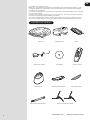
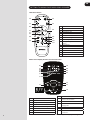
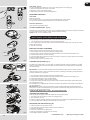
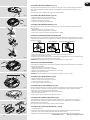
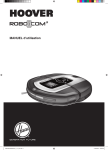
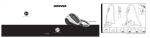
GETTING TO KNOW YOUR Robo.com³ CLEANER
46
54
39
45
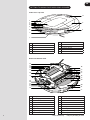
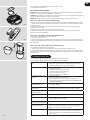
Remote Control**
40
46
41
55
42
47
46
54
39
45
43
51
42
48
40
46
42
49
42
50
42
47
47*
52
42
48
55
41
51
43
44
53*
49
42
42
50
52
47*
DEMO
Power On/Off Button
47
Arrow Button Up
49
Ok Confirmation Button
50
Arrow Button Back
51
Arrow Button Right
52
Scheduling Button
53
Timing Setting Button & Wi-Fi Switch
Button*
54
Home Button
55
Spot Button
56
Turbo Button
57
Full & Go Button
58
Demo Button*
59
Voice Button*
49*
56
46
Auto Button
45
57
48*
58*
48
Arrow Button Left
38*
59*
DEMO
56
49*
57
45
53*
44
45
58*
48*
38*
59*
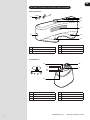
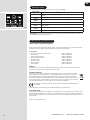
Robo.com³ Display Screen And Control Panel
60
60
70
70*
61
62
64
63*
66
64
65
69
69*
68
67
70*
70
66
61
62
63*
64
64
66
65
69*
69
68
67
72
71
66
73
74
74*
**
72
71
73
68
**
6
74*
7469
60
Battery Status
61
Home Mode
62
Timing & Information Display
63
Demo Mode*
64
Days Indicators (Scheduling Function)
65
Auto Mode
66
Full & Go Mode
67
Turbo Mode
Spot Mode
Voice Volume Indicator*/
Remote control Indicator*
70
Wi-Fi Status *
71
Home Button: Automatic Return to
Charging base
72
Auto Button
73
Spot Button
74
Remote control Button* & Indicator*/
Wi-Fi Button*
* Certain Models Only
** May vary according to model