1
Contents
Chapter 1 Overview............................................. 2
1.1 Introduction ........................................................... 2
1.1.1 High-Speed Transmissions ....................... 2
1.1.2 Dual Power Inputs ..................................... 2
1.1.3 Flexible Mounting ...................................... 2
1.1.4 Wide Operating Temperature .................... 2
1.1.5 Easy Troubleshooting................................ 2
1.2 Features ................................................................ 3
1.3 Specifications ........................................................ 4
1.4 Packing List........................................................... 6
1.5 Safety Precaution.................................................. 6
Chapter 2 Installation ......................................... 8
2.1 LED Indicators....................................................... 8
Table 2.1: EKI-7554MI/SI LED Definition..................................8
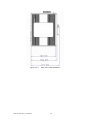
2.2 Dimensions (units: mm) ........................................ 9
Figure 2.2-1
Figure 2.2-2
Figure 2.2-3
Figure 2.2-4
Front View of EKI-7554MI/SI .............................9
Side View of EKI-7554MI/SI.............................10
Rear View of EKI-7554MI/SI ............................11
Top View of EKI-7554MI/SI..............................12
2.3 Mounting ............................................................. 13
2.3.1 Wall mounting.......................................... 13
Figure 2.3-1
Combine the Metal Mounting Kit.......................13
2.3.2 DIN-rail Mounting..................................... 14
Figure 2.3-2
Figure 2.3-3
Installation to DIN-rail Step 1.............................14
Installation to DIN-rail Step................................15
2.4 Network Connection............................................ 16
2.5 Power Connection............................................... 17
Figure 2.5-1
Pinouts of the Power Connector .........................17
2.6 X-Ring Application............................................... 18
2.7 Coupling Ring Application ................................... 19
2.8 Dual Homing Application..................................... 20
Chapter 3 Configuration ................................... 22
3.1 RS-232 Console.................................................. 22
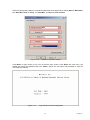
Figure 3.1-1
Figure 3.1-2
Figure 3.1-3
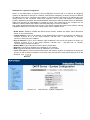
Figure 3.1-4
Figure 3.1-5
Open Hyper Terminal .........................................22
Launching Hyper Terminal.................................22
COM Port Properties Setting ..............................23
Login Screen: RS-232 Configuration .................23
Command Line Interface ....................................24
3.2 Commands Set ................................................... 25
3.2.1 Commands Level..................................... 25
Table 3.1: Command Level.........................................................25
3.2.2 Commands Set List ................................. 25
Table 3.2: Commands Set List....................................................25
vii
Contents