1
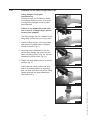
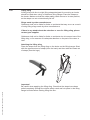
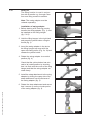
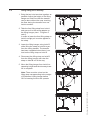
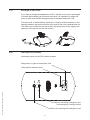
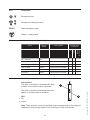
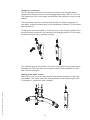
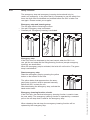
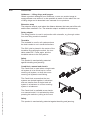
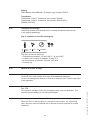
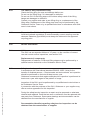
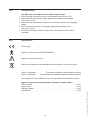
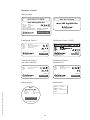
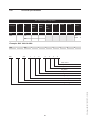
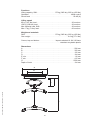
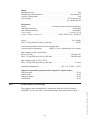
GB/US ........ GH1 Ceiling Hoist Vers. 3.00 1 GH1 Ceiling Hoist Item no. 552xxx 1.00 . . . . . . . . . Purpose and use . . . . . . . . . . . . . . . . . . . . . . . . . . . . . . . . . . . . . . . . . . . . . . 3 1.01 . . . . . . . . . Manufacturer . . . . . . . . . . . . . . . . . . . . . . . . . . . . . . . . . . . . . . . . . . . . . . . . . . 3 1.02 . . . . . . . . . Purpose . . . . . . . . . . . . . . . . . . . . . . . . . . . . . . . . . . . . . . . . . . . . . . . . . . . . . . 3 1.03 . . . . . . . . . Important/Precautions . . . . . . . . . . . . . . . . . . . . . . . . . . . . . . . . . . . . . . . . . . . 3 1.04 . . . . . . . . . Load limits on GH1 system . . . . . . . . . . . . . . . . . . . . . . . . . . . . . . . . . . . . . . . 4 1.05 . . . . . . . . . Unpacking and Preparation . . . . . . . . . . . . . . . . . . . . . . . . . . . . . . . . . . . . . . . 4 1.06 . . . . . . . . . Placing a new GH1 hoist in an existing rail system. . . . . . . . . . . . . . . . . . . . . 5 1.07 . . . . . . . . . Power supply . . . . . . . . . . . . . . . . . . . . . . . . . . . . . . . . . . . . . . . . . . . . . . . . . . 5 1.08 . . . . . . . . . Installation of the lifting hanger before use . . . . . . . . . . . . . . . . . . . . . . . . . . . 6 1.09 . . . . . . . . . Lifting sling . . . . . . . . . . . . . . . . . . . . . . . . . . . . . . . . . . . . . . . . . . . . . . . . . . . . 7 1.10 . . . . . . . . . Swing kit. . . . . . . . . . . . . . . . . . . . . . . . . . . . . . . . . . . . . . . . . . . . . . . . . . . . . . 9 1.11 . . . . . . . . . Using swing kit in doorway . . . . . . . . . . . . . . . . . . . . . . . . . . . . . . . . . . . . . . 10 1.12 . . . . . . . . . Exchange of side cover . . . . . . . . . . . . . . . . . . . . . . . . . . . . . . . . . . . . . . . . . 11 2.00 . . . . . . . . . Description of functions . . . . . . . . . . . . . . . . . . . . . . . . . . . . . . . . . . . . . . . 11 2.01 . . . . . . . . . Pictograms . . . . . . . . . . . . . . . . . . . . . . . . . . . . . . . . . . . . . . . . . . . . . . . . . . . 12 2.02 . . . . . . . . . Indicator lamps and audio signals . . . . . . . . . . . . . . . . . . . . . . . . . . . . . . . . . 12 2.03 . . . . . . . . . Operation . . . . . . . . . . . . . . . . . . . . . . . . . . . . . . . . . . . . . . . . . . . . . . . . . . . . 12 2.04 . . . . . . . . . Safety functions . . . . . . . . . . . . . . . . . . . . . . . . . . . . . . . . . . . . . . . . . . . . . . . 14 2.05 . . . . . . . . . Accessories . . . . . . . . . . . . . . . . . . . . . . . . . . . . . . . . . . . . . . . . . . . . . . . . . . 15 3.00 . . . . . . . . . Transport and storage . . . . . . . . . . . . . . . . . . . . . . . . . . . . . . . . . . . . . . . . . 16 4.00 . . . . . . . . . Maintenance and storage . . . . . . . . . . . . . . . . . . . . . . . . . . . . . . . . . . . . . . 16 4.01 . . . . . . . . Cleaning . . . . . . . . . . . . . . . . . . . . . . . . . . . . . . . . . . . . . . . . . . . . . . . . . . . . . 16 4.02 . . . . . . . . . Storage . . . . . . . . . . . . . . . . . . . . . . . . . . . . . . . . . . . . . . . . . . . . . . . . . . . . . 16 4.03 . . . . . . . . . How to prevent/avoid corrosion? . . . . . . . . . . . . . . . . . . . . . . . . . . . . . . . . . . 16 4.04 . . . . . . . . . The owner’s daily maintenance duty . . . . . . . . . . . . . . . . . . . . . . . . . . . . . . . 17 4.05 . . . . . . . . . Disposal of the GH1 including battery . . . . . . . . . . . . . . . . . . . . . . . . . . . . . . 17 6.00 . . . . . . . . . Classification . . . . . . . . . . . . . . . . . . . . . . . . . . . . . . . . . . . . . . . . . . . . . . . . 18 7.00 . . . . . . . . . Technical specifications . . . . . . . . . . . . . . . . . . . . . . . . . . . . . . . . . . . . . . 20 8.00 . . . . . . . . . EC-Declaration of conformity . . . . . . . . . . . . . . . . . . . . . . . . . . . . . . . . . . . 22 . . . . . . . . . . . . . USA and countries outside the EU . . . . . . . . . . . . . . . . . . . . . . . . . . . . . . 23 A. . . . . . . . . . . . Users guide . . . . . . . . . . . . . . . . . . . . . . . . . . . . . . . . . . . . . . . . . . . . . . . . . . 23 B. . . . . . . . . . . Warranties . . . . . . . . . . . . . . . . . . . . . . . . . . . . . . . . . . . . . . . . . . . . . . . . . . . 23 2 © Guldmann GB/US-1706/03/2011 • # 550865 5.00 . . . . . . . . . Service and lifetime . . . . . . . . . . . . . . . . . . . . . . . . . . . . . . . . . . . . . . . . . . . 17 5.01 . . . . . . . . Lifetime . . . . . . . . . . . . . . . . . . . . . . . . . . . . . . . . . . . . . . . . . . . . . . . . . . . . . 17 5.02 . . . . . . . . . Safety/service inspections . . . . . . . . . . . . . . . . . . . . . . . . . . . . . . . . . . . . . . . 17 5.03 . . . . . . . . . Troubleshooting . . . . . . . . . . . . . . . . . . . . . . . . . . . . . . . . . . . . . . . . . . . . . . . 18 1.00 Purpose and use 1.01 Manufacturer V. Guldmann A/S Graham Bells Vej 21-23A DK-8200 Aarhus N Tlf. + 45 8741 3100 Fax + 45 8741 3131 www.guldmann.com 1.02 Purpose GH1 is a ceiling-mounted hoist which covers the need for lifting or moving a person with disabilities in the home care sector, nursing homes, rehabilitation centres, riding schools and swimming pools. • • • • • • • • 1.03 • © Guldmann GB/US-1706/03/2011 • # 550865 • • • • • • • Conditions for use The use of the GH1 is subject to the following: The GH1 should only be used by trained personnel. The maximum nominal load, 175 kg (385 lbs), 205 kg (450 lbs), respectively, must not be exceeded (section 1.04). The instruction offered by Guldmann to all customer groups in connection with the purchase of a ceiling-mounted hoist has been received. The helper pays attention to the well-being of the user when using the hoist. The hoist is used in rail systems which are installed, tested and approved according to DS/EN 10535 and Guldmann’s stipulations. Only technicians who have been certified by Guldmann may install and test the rail systems. The hoist is used with a Guldmann lifting hanger (section 1.08). The hoist is used with a Guldmann lifting sling or with other suitable slings (section 1.09). Important/Precautions Read the instructions carefully before using the GH1 and in connection with cleaning and service of the hoist. The GH1’s maximum load must never be exceeded. The GH1 may only be used to lift a person. The red strap for the emergency stop and the emergency lowering must be adjusted to the helper’s reach, and must not be removed. If the GH1 fails while in use, stop using the hoist and contact the Guldmann Service Team for repair. The GH1 is controlled by a microprocessor PCB, which can be damaged by static electricity if touched without the necessary precautions, (see point 1.07) The electronics may only be serviced by Guldmann approved service technicians. For safety reasons the side cover may only be dismantled when the emergency stop is activated (see point 2.04). 3 Re: EMC If electromagnetic or other influences occur between this product and other products, these products must not be used together. 1.04 Load limits on GH1 system Read the label which indicates the maximum load limits for each component. The component, e.g. lifting hanger, lifting sling, etc. labelled with the lowest load limit determines the maximum load limit for the entire system. This maximum load limit must not be exceeded. Please note that the max load may change when different components are used, such as lifting hangers, lifting slings, etc. 1.05 Unpacking and Preparation Visual check of the GH1 If the GH1 is thought to be damaged upon reception, the GH1 must not be used before it has been checked and approved by a qualified person or the Guldmann Service Team. 6. 7. 3 5 4 2 Button for reset of emergency stop GH1 is delivered with the emergency stop activated in order to ensure that the battery is not being discharged during long-term storage. Reset the emergency stop by pressing the “RESET” button on the bottom of the hoist (see point 2.04). Mounting of side cover GH1 is standard delivered with side cover in 4 different designs. Before starting to mount the side cover it is important, for safety reasons, to make sure that the emergency stop is activated (see point 2.04). The chosen side covers are fitted on the side of GH1 by bending the cover slightly and placing it in the groove at the side of GH1. 4 © Guldmann GB/US-1706/03/2011 • # 550865 1. 2. 3. 4. 5. Contents of the box GH1 hoist Hand control Transformer Charging station Side covers (2 sets with 4 designs) Manual Label for rail system 1 1.06 Placing a new GH1 hoist in an existing rail system Please notice, when placing a new GH1 hoist in an existing rail system it must be ensured that: 1.07 • The rated max load of the rail system, must be equal or higher than the max load of the new hoist. – If there is no max load mentioned on the rail system, the rail system must then be checked according to the guideline in the installation manual (distance between bracket according to max load). – If the brackets are not visible, then a load test with 1,5 x max load of the hoist must be performed minimum 20 min. During the test the deflection of the rails must not be higher than 1/200 of the length of the rail. – If it is not possible to do any of the above mentioned, please contact Guldmann or their representative. • If the rail system can not be rated to the same max load as the hoist, then extra brackets must be installed according to the installation manual (distance between bracket according to max load). Power supply GH1 is equipped with a battery that requires regular recharging. The power supply for the transformer and the charging station must be connected by Guldmann Service Team or by a qualified engineer. The transformer supplied must always be used. © Guldmann GB/US-1706/03/2011 • # 550865 Safety concerning static electricity (ESD) Service technicians and installers must use an ESD-safety package consisting of a mat, a ground wire, and a bracelet. The technician/installer connects the mat to a grounding point, for instance a radiator or a water pipe. The technician/installer must then put on the bracelet and connect it to the mat. If it is not possible to find a grounding point, the mat and the bracelet must be used as a minimum. Only then is it allowed to work with the PC Board or components where it is possible to come into contact with the PC Board. Class I equipment Fixed rail systems are class I equipment and must be installed by a qualified technician or by Guldmann Service Team. Equipment is disconnected from Supply Mains by breaking the mains breaker switch. Class II equipment Mobile equipment is class II epuipment (marked with double-encassed symbol) and can be connected to the mains direct by the user. Equipment is disconnected from Supply Mains by detaching the mains plug from the wall outlet. 5 Installation of the lifting hanger before use Lifting hangers from other manufacturers Guldmann shall not be liable for faults or accidents that may occur as a result of using lifting hangers made by other manufacturers. Fig. 1 If there is any doubt about the selection or use of a lifting hanger, please contact your supplier. The lifting hanger can be installed to the lifting strap without the use of any tools. 1. Hold the lifting hanger in the right hand and press the yellow button using the thumb as shown (Fig. 1). Fig. 2a 2. Insert the strap attachment in the slot on the lifting hanger top cover with the open side facing down (Fig. 2a, 2b) and release the yellow button (fig. 2c). 3. Rotate the strap attachment to a vertical position (fig. 3). Fig. 2b Check that the yellow button has returned to its locked position by checking that it is flush with the cover of the lifting hanger and that the strap attachment can rotate freely. Fig. 2c Fig. 3 6 © Guldmann GB/US-1706/03/2011 • # 550865 1.08 1.09 Lifting sling A lifting sling with four to eight lifting straps designed for mounting on hooks should be used when using a Guldmann lifting hanger. Place the straps on the hooks. Make sure that the rubber safety catch returns to its start position, so the straps can not unintentionally fall off. Slings made by other manufacturers Guldmann shall not be liable for faults or accidents that may occur as a result of using lifting slings made by other manufacturers. If there is any doubt about the selection or use of a lifting sling, please contact your supplier. Guldmann shall not be liable for faults or accidents due to incorrect use of the lifting sling, or for reasons of inadequate attention on the part of the carer or user. Attaching the lifting sling Place the straps from the lifting sling on the hooks on the lifting hanger. Start with the uppermost set of straps (from the back) and then take the lowest set of straps (from the legs). © Guldmann GB/US-1706/03/2011 • # 550865 Important! Be careful when applying the lifting sling. Check that the straps have been pulled completely through the rubber safety catch and into place in the lifting hanger’s hooks before starting lifting the user. 7 Lifting to and from a seated position When lifting a user from e.g. a wheelchair, move the GH1 towards the person to be lifted. The lifting hanger should be at the same height as the user’s chest and should not be moved further in over the user than to approximately mid-thigh position. Place the lifting hanger parallel to the user’s shoulders. Place the lifting sling behind the user’s back between the back of the chair and the user’s back. The center marks of the lifting sling should follow the user’s spine. Lead the leg straps along the outer sides of the user’s shins and beneath the thighs between the hollow of the knees and the hip joints. Cross the leg straps in front of the user. All four lifting straps are now ready to be attached. The lifting sling can now be mounted on the lifting hanger. Lifting to and from lying position in bed Bring the lifting hanger over the centre of the person to be lifted. Place the lifting hanger parallel to the user’s shoulders. Turn the user onto his or her side. The Basic High sling should be placed so that its top is at the same height as the top of the user’s head. Now position the sling over the user so that the center marks follow the user’s spine. Turn the user onto his or her back and pull out the remaining part of the lifting sling. Place the leg straps beneath the user’s thighs and cross them. All four lifting straps are now ready to be attached and the lifting sling can now be mounted on the lifting hanger. It is an advantage to elevate the head of the bed so that the user is sitting up. For further information, please refer to the user manual for the lifting sling in question. Important! Only persons who have received competent instruction regarding the use of lifting equipment and fitting of slings should use the hoist. The GH1 lifts quickly and powerfully. Before lifting, check that the user is completely free of his/her surroundings. The user’s head, arms, hands and feet must not be in danger of becoming trapped. Be careful with any tubes and wires that are attached to the user. Check that the hand control and hand control cable is free of hanger, user and other object before the hoist is activated up or down moved. If the hoist is used correctly, the user should only be lifted to the extent that she/he is clear of the surface and should be moved at this height. 8 © Guldmann GB/US-1706/03/2011 • # 550865 Plan the move. Avoid leaving the user in the lifting sling unattended. 1.10 Swing kit The swing function is used in conjunction with a transfer e.g. through a door from one lifting module to another. Note: The swing adapter must be ordered separately. Installation of swing adapter 1. Before starting a lift involving a swing transfer the swing adapter (Fig. 1) must be installed on the lifting hanger. (fig. 2 til 5). Fig. 1 Fig. 2 2. Hold the lifting hanger in the right hand and press the yellow button using the thumb (fig. 2). 3. Insert the swing adapter in the slot on the lifting hanger top cover with the open side facing down (Fig. 3a, 3b) and release the yellow button. Fig. 3a 4. Rotate the swing adapter to a vertical position (fig. 4). Check that the yellow button has returned to its locked position by checking that it is flush with the cover of the lifting hanger and that the swing adapter can rotate freely. 5. Install the strap attachment to the swing adapter by sliding the open side of the strap attachment over the flat area of the swing adapter (fig. 5). © Guldmann GB/US-1706/03/2011 • # 550865 6. Rotate the strap attachment and ensure that it moves up on the circular portion of the swing adapter (fig. 6). Fig. 3b Fig. 4 Fig. 5 Fig. 6 9 Using swing kit in doorway 1. Bring the two hoist as close together as possible. Adjust the height of the lifting hanger on hoist B so that the transfer can be done without the user touching the floor during the transfer from one hoist to another. 2. Take the free lifting strap from hoist A and secure it to the swing adapter on the lifting hanger (see 1.10 figures 5 and 6). In order to lower the free lifting strap on hoist A a slight pull must be applied to the strap. 3. Lower the lifting hanger using hoist B while lifting the strap on hoist A to perform the swing transfer. The transfer has been completed when there is no load on the lifting strap on hoist B. A B A B A B A B A B 4. Disconnect the lifting strap on hoist B from the lifting hanger and raise the strap on hoist B out of the way. 5. Move the lifting hanger from hoist A to operating height and the doorway transfer is complete. Note: There must be a load on the lifting strap corresponding to the weight of Guldmann’s lifting hanger before GH1’s lowering function will operate. 10 © Guldmann GB/US-1706/03/2011 • # 550865 1.11 1.12 Exchange of side cover If you want to change the appearance of GH1, the side cover can be exchanged or turned. Before starting to mount the side cover it is important, for safety reasons, to make sure that the emergency stop is activated (see point 2.04). The side cover is dismantled by inserting for instance a flat screwdriver in the opening between the groove and the cover and tilt the cover upwards and out. The side cover is fitted on the side of GH1 by bending the cover slightly and placing it in the groove on the side of GH1. 2.00 Description of functions Information panel on the GH1 bottom surface. Designation of type and maximum load © Guldmann GB/US-1706/03/2011 • # 550865 Green/yellow indicator lamp Strap for activating emergency stop and emergency lowering device Button for resetting the emergency stop 11 2.01 Pictograms Emergency stop Emergency lowering function RESET Reset emergency stop Danger - rotating parts Indicator lamps and audio signals Status Audio signals Possible GH1 Functions Up Down Emergency lowering 2.03 Indicator lamps Off – stand by Off All OK Green Low battery Yellow Fault on hoist Yellow Beeps at button activation Battery critical low Yellow Beeps at button activation Over load Yellow Beeps at button activation Operation Hand control The GH1 is switched on automatically when a button on the hand control is pressed. 1 The GH1 is switched off automatically after approx. 8 minutes without activation. 2 GH1 1. Lift 2. Lower Note: There must be a load on the lifting strap corresponding to the weight of Guldmann’s lifting hanger before GH1’s lowering function will operate. 12 © Guldmann GB/US-1706/03/2011 • # 550865 2.02 Charging / connection GH1 is recharged when the hand control is placed in the charging station. Always leave the hand control in the charging station when GH1 is not in use. This guarantees GH1 functionality and maintains the battery to ensure a long lifetime. The transformer must be connected and switched on before charging can take place. A green indicator lamp on the transformer indicates it is connected and switched on. Tilt the hand control and place it on the two pins on the charging station.Then push the rubber handle into the opening of the charging station. A click indicates that the hand control is placed correctly. The indicator lamp on the bottom of the hoist turns yellow if the charge status becomes low. The GH1 then has a limited number of lifts available at a time and must be recharged. © Guldmann GB/US-1706/03/2011 • # 550865 Placing of the hand control When GH1 is not in use the hand control must always be placed in the charging station. The hand control can also be placed on the lifting hanger if this is necessary in connection with a transfer. 13 2.04 Safety functions The emergency stop and emergency lowering device should only be used in an emergency. In the event that it is necessary to use the safety functions, the fault must be identified and rectified before the GH1 is taken into use again. Please contact your supplier. Emergency stop If the GH1 does not stop/react to the hand control when the GH1 is in use, pull the red strap and the lifting/lowering functions (except emergency lowering) are deactivated. When the emergency stop is activated, the hoist will not function. The green lamp is switched off. Reset emergency stop Reset the emergency stop by pressing the yellow button on the bottom of the hoist. The yellow button that appears when the emergency stop is pulled, must be pressed manually before the GH1 is ready for use. After deactivating the emergency stop, activate the hand control twice. Emergency lowering function, electric If the GH1 fails, the electrical emergency lowering function is used to lower the user safely. The emergency lowering function is operated by a constant pull on the red strap that is used for the emergency stop. When releasing the red strap, the emergency lowering function will be replaced by the emergency stop. 14 © Guldmann GB/US-1706/03/2011 • # 550865 • • Emergency stop and lowering strap The red strap has the following functions: One pull: Emergency stop is activated. Constant pull: Emergency lowering is activated. 2.05 Accessories Guldmann – Lifting slings and hangers Obtain a product catalogue from Guldmann, or see our product range at www.guldmann.com where it is also possible to watch a video about the use of lifting slings and to download user manuals for our products. Extension strap The extension strap is used where the distance between the lower part of the rails and the floor exceeds 3.5 m. The extension strap is available as an accessory. Swing adapter The swing function is used in conjunction with a transfer, e.g. through a door from one lifting module to another. Turntable The turntable is used in rail systems where the hoist needs to run in several directions. The GH1 hoist is placed in the center of the turntable. By pressing the switch, the turntable rotates 90°. Press again, and the turntable returns to the first position. Safety This product is mechanically protected against derailing and jamming. Combi-lock, manual and electric The Combi-lock is used when a single track rail system is to be linked up to a roomcovering rail system, or when two roomcovering rail systems need linking. © Guldmann GB/US-1706/03/2011 • # 550865 The Combi-lock ensures that the two systems are locked together in situations such as transfer from a single track rail system in a bedroom to a room-covering system in a bathroom. The Combi-lock is available as an electric or a manual model. It is activated by either pressing the switch or pulling on the cord. Safety This product is mechanically protected against derailing and jamming. 15 Battery NiMH Battery 24V/2800mAh, Guldmann type number 550574. Transformer Transformer, Class 1, Guldmann item number 550200 Transformer, Class 2, Guldmann item number 550269 (EU), 550268 (US/CAN) 3.00 Transport and storage Guldmann recommends that the GH1 is always transported and stored in the original packaging. Key to symbols on the GH1 packaging: -10 14 40°C 104°F 30 70% 700 1060hPa 4.00 Maintenance and storage 4.01 Cleaning Clean the GH1 with a damp cloth and mild handwash detergent. Do not use strong acids, bases or alcohol to clean the GH1. Never clean GH1 in an autoclave. 4.02 Storage See 3.00 For long-term storage of GH1 the emergency stop must be activated. This ensures that the battery is not being discharged. 4.03 How to prevent/avoid corrosion? When the GH1 is mainly used in a corrosive environment, e.g. swimming pool, the hoist must be ordered with a special corrosion-preventive surface treatment. 16 © Guldmann GB/US-1706/03/2011 • # 550865 The GH1 should be stored at: – Temperatures between -10 and +40°C / 14 and 104°F – A relative air humidity of between 30 and 70 % – An air pressure of between 700 and 1060 hPa – This side up 4.04 The owner’s daily maintenance duty Check the lifting sling for wear and damage before use. Do not use the lifting sling if it is damaged or defective. Do not use GH1 if the lifting strap or the rubber safety catch of the lifting hanger are damaged or defective. Contact your supplier and order a new lifting sling or a replacement of the lifting strap. Replacement of the lifting strap must only be performed by the Guldmann Service Team or by a qualified technician in accordance with Guldmann’s instructions. 4.05 Disposal of the GH1 including battery Local and national regulations on environmentally correct recycling must be observed. Batteries (type NiMH) must always be delivered to an approved recycling point. 5.00 Service and lifetime 5.01 Lifetime The GH1 has an expected lifetime of 15 years, on the condition of correct use and correct service inspections, see section 5.02. Replacement of components Replacement of batteries, PCBs and lifting straps must be performed by a qualified service technician or the Guldmann Service Team. 5.02 Safety/service inspections In accordance with international standard EN/ISO 10535 “Hoist for the transfer of disabled persons – Requirements and test methods” an inspection should be performed on the hoist at least once a year. Guldmann recommends that regular safety/service inspection is performed at least once a year with regard to the pattern of usage. © Guldmann GB/US-1706/03/2011 • # 550865 Inspection of the GH1 must be performed by a qualified service technician or the Guldmann Service Team. In connection with the purchase of the GH1, Guldmann or your supplier may offer a service agreement for this inspection. During the safety/service inspection a report must be prepared on what was checked and replaced. Parts that are worn or defective must be replaced with new parts from Guldmann. Spare parts drawings and documentation can be obtained from the manufacturer or supplier. Documentation/checklist regarding safety/service inspection can be obtained from the manufacturer or supplier. 17 5.03 Troubleshooting The GH1 does not respond to the hand control’s keys 1. Check that the emergency stop is not activated (see section 2.04). 2. Check that GH1 has power supply and that the battery is recharged (see section 2.02). 3. Check that the transformer is switched on and connected to the charging station. 4. Place the hand control in the charging station and recharge GH1 (see section 2.03). 5. Contact the Guldmann Service Team if the fault cannot be found and corrected. Classification CE-marking Type B in accordance with IEC/EN 60601-1 Read the manual before use Must not be disposed of as standard household waste, must be recycled. Class 1 equipment . . . . . . . . . . . Permanent installation with protective ground Class 2 equipment . . . . . Non-permanent installation without protective ground The equipment is not suitable for use in the presence of flammable mixtures. Degree of protection against harmful ingress of liquids (water) Lifting module. . . . . . . . . . . . . . . . . . . . . . . . . . . . . . . . . . . . . . . . . . . . . . . IP 44 Hand control. . . . . . . . . . . . . . . . . . . . . . . . . . . . . . . . . . . . . . . . . . . . . . . . IP 44 Charging station . . . . . . . . . . . . . . . . . . . . . . . . . . . . . . . . . . . . . . . . . . . . . IP 20 Transformer . . . . . . . . . . . . . . . . . . . . . . . . . . . . . . . . . . . . . . . . . . . . . . . . IP 20 18 © Guldmann GB/US-1706/03/2011 • # 550865 6.00 Transformer 100 - 115V Kl. 1 PSE Examples of labels Lifting module GH1 200 110 0000 GH1 200 110 0000 max 205 kg / 450 lbs max 205 kg / 450 lbs Part no. xxxxxx Prod. date yyyy-mm-dd 1 Serial no. xxxxx 33V AC, 2.5 A, IP44 CONTINUOUS OPERATION WITH SHORT-TIME LOADING アビリティーズ・ケアネット株式会社 INTERNALLY POWERED EQUIPMENT 24V DC Barcode 128C Type Input Output IP20 Batch No. www.guldmann.com year/week www.guldmann.com Transformer Class 1 UL-US www.guldmann.com DK-14100 100 - 115V AC 50-60 Hz, 1A 33V AC 2,5A Transformer Class 1 (PSE) Typography Type Input Input Output IP20 DK-13991Arial Unicode MS, Roman, 7 pkt 100 - 115V AC 50-60 Hz, 1A 230V AC Swis721 50-60 Hz,Roman 0,5A 7 pkt 33V AC 2,5A Batch No. year/week www.guldmann.com Transformer Class 2 Use within US/CAN Type Input Output IP20 Transformer Class 2 Use within EU DK-14001 100-115V AC 50-60 Hz, 1A 33V AC 2,5A Type Input Output IP20 DK-13992 230V AC 50-60 Hz, 0,5A 33V AC 2,5A Batch No. year/week www.guldmann.com Material Norris Print-Tech A/S Transparant polyester THERMLfilm PM 200 CLEAR TC-387 L-23. Lifting hanger © Guldmann GB/US-1706/03/2011 • # 550865 max Item No. 944406 xxx kg/xxx lbs Part no. Edition Prod. date Serial no. Thermo transfor ribbon xxxxxx NPT RZXXXUL xx x Black. yyyy-mm-dd xx xx x Batch No. www.guldmann.com Hand control Part no. xxxxxx Edition xxx Date xxxx-xx-xx IP44 Approvals acc. To UL Standard 969 Barcode 128C UL file: MH 27707 V. Guldmann A/S www.guldmann.com (CCN: PGJI2) 19 year/week Size 70 x 35 mm Font Swis721 Roman Arial Unicode MS Roman 18.01.2 7.00 Technical specifications GH1 Lifting modules, configurations Guldmann Product hoist type line GH1 GH1 (x) Load in Number Number kg of lifting of lifting straps motors xxx x x 175 1 1 205 1 1 Number of Scale horizontal module drive CLM module Service module User x x x interface motors x x Hand control : 0 Example: GH1 200 110 0000 GH1 200 200 1 1 1 1 0 0 0 0 0 0 0 0 0 0 Hand control Only GH3+ Only GH3+ Only GH3+ Only GH3+ 1 lifting motor 1 lifting strap Safe Working Load SWL: 205 kg – Ceiling hoist, type GH1 20 © Guldmann GB/US-1706/03/2011 • # 550865 GH1 Functions Lifting capacity, SWL . . . . . . . . . . . . . . . . . . 175 kg (385 lbs), 205 kg (450 lbs) Operation . . . . . . . . . . . . . . . . . . . . . . . . . . . . . . . . . . . . . . . . . . . . Hand control Sound level . . . . . . . . . . . . . . . . . . . . . . . . . . . . . . . . . . . . . . . . . . . . .52 dB (A) Lifting speed 85 kg (187 lbs) load . . . . . . . . . . . . . . . . . . . . . . . . . . . . . . . . . . . . . 30 150 kg (330 lbs) load . . . . . . . . . . . . . . . . . . . . . . . . . . . . . . . . . . . . 30 Max capacity load, SWL . . . . . . . . . . . . . . . . . . . . . . . . . . . . . . . . . 30 Max. 5 kg (11 lbs) load . . . . . . . . . . . . . . . . . . . . . . . . . . . . . . . . . . 60 mm/sec. mm/sec. mm/sec. mm/sec. Weight and materials SWL . . . . . . . . . . . . . . . . . . . . . . . . . . . . . . . 175 kg (385 lbs), 205 kg (450 lbs) Own weight . . . . . . . . . . . . . . . . . . . . . . . . . . . . . . . . . . . . . . . 8.0 kg (17.6 lbs) Covers, top and bottom . . . . . . . . . . . . . . . . . Impact-resistant UL 94 V-0 flame . . . . . . . . . . . . . . . . . . . . . . . . . . . . . . . . . . . . . . . . . retardant recyclable plastic Dimensions A . . . . . . . . . . . . . . . . . . . . . . . . . . . . . . . . . . . . . . . . . . . . . . . . . . . . . .580 B . . . . . . . . . . . . . . . . . . . . . . . . . . . . . . . . . . . . . . . . . . . . . . . . . . . . . .350 C . . . . . . . . . . . . . . . . . . . . . . . . . . . . . . . . . . . . . . . . . . . . . . . . . . . . . .156 D . . . . . . . . . . . . . . . . . . . . . . . . . . . . . . . . . . . . . . . . . . . . . . . . . . . . . .184 E, min . . . . . . . . . . . . . . . . . . . . . . . . . . . . . . . . . . . . . . . . . . . . . . . . . . . .82 F, min . . . . . . . . . . . . . . . . . . . . . . . . . . . . . . . . . . . . . . . . . . . . . . . . . . .415 G . . . . . . . . . . . . . . . . . . . . . . . . . . . . . . . . . . . . . . . . . . . . . . . . . . . . .2500 Depth of hoist . . . . . . . . . . . . . . . . . . . . . . . . . . . . . . . . . . . . . . . . . . . .194 A B E © Guldmann GB/US-1706/03/2011 • # 550865 C D F G 21 mm mm mm mm mm mm mm mm Safety Emergency stop . . . . . . . . . . . . . . . . . . . . . . . . . . . . . . . . . . . . . . . . . . . . . . Yes Emergency lowering device . . . . . . . . . . . . . . . . . . . . . . . . . . . . . Yes, electrical Control of lifting strap . . . . . . . . . . . . . . . . . . . . . . . . . . . . . . . . . . . . . . . . . . Yes Cut-off angle . . . . . . . . . . . . . . . . . . . . . . . . . . . . . . . . . . . . . .45° along the rail . . . . . . . . . . . . . . . . . . . . . . . . . . . . . . . . . . . . . . . . . . . . . .10° across the rail Electronics On/off . . . . . . . . . . . . . . . . . . . . . . . . . . . Automatic when used. Soft start/stop Overload protection . . . . . . . . . . . . . . . . . . . . . . . . . . . . . . . . . . . . . . Automatic Low battery protection . . . . . . . . . . . . . . . . . . . . . . . . . . . . . . . . . . . . Automatic Power supply . . . . . . . . . . . . . . . . . . . . . . . . . . . . . . . . . . . . . . . 33 V AC, 2.5 A Supply voltage, transformer . . . . . . . . . . . . . . . . . 100-115/230 V AC, 50-60 Hz Battery . . . . . . . . . . . . . . . . . . . . . . . . . . . . . . . . . . . . . . . . . . . . . . . 24 V NiMH SWL: 175 kg (385 lbs), 205 kg (450 lbs) . . . . . . . . . . . . . . . . . . . . . . . . . 2.8 Ah Continuous operation with short time loading with 3 hours without recharging . . . . . . . 10/90 % (2 min. operation/18 min. pause) Max number of lifts in series with: 85 kg (187 lbs) . . . . . . . . . . . . . . . . . . . . . . . . . . . . . . . . . . . . . . . . 55/1000 mm SWL: 175 kg (385 lbs), 205 kg (450 lbs) . . . . . . . . . . . . . . . . . . . . 28/1000 mm Max charging time at 25ºC (77ºF): SWL: 175 kg (385 lbs), 205 kg (450 lbs) . . . . . . . . . . . . . . . . . . . . . . . . 3 hours Operating temperature . . . . . . . . . . . . . . . . . . . . . . . 10°C - 35°C (50°F - 95°F) Degree of protection against harmful ingress of liquids (water) Lifting module. . . . . . . . . . . . . . . . . . . . . . . . . . . . . . . . . . . . . . . . . . . . . . . IP 44 Hand control. . . . . . . . . . . . . . . . . . . . . . . . . . . . . . . . . . . . . . . . . . . . . . . . IP 44 Charging station . . . . . . . . . . . . . . . . . . . . . . . . . . . . . . . . . . . . . . . . . . . . . IP 20 Transformer . . . . . . . . . . . . . . . . . . . . . . . . . . . . . . . . . . . . . . . . . . . . . . . . IP 20 EC-Declaration of conformity The products are manufactured in compliance with the Council Directive 93/42/EEC of 14 June 1993 – with amendments, as medical device class 1. 22 © Guldmann GB/US-1706/03/2011 • # 550865 8.00 USA and countries outside the EU A. Users guide Before using the product, read the entire operation manual including all warranties. B. Warranties The Guldmann lifting equipment is designed to be used for the lifting, transferring, and transporting of a person with a physical handicap who are not able to physically self transfer or who are temporarily incapacitated by illness, anesthesia or other causes. This lifting equipment is designed to relieve the users, their caregivers, and nursing personnel in the task of lifting elderly or disabled people, thereby minimizing the risk of back injury during such lifting and transfer operations. If the product is used irresponsibly or for any use other than that described above or in the enclosed written instructions, the manufacturer’s warranty will be nullified and rendered void. There are no warranties which extend beyond the description in the enclosed written instructions. Guldmann warrants that its lifting equipment is free from defects in materials and workmanship under normal use. Guldmann warrants that the lifting equipment itself will perform substantially in accordance with the specifications set forth in the documentation provided with the equipment. The above express warranties are made for a period of 365 days from the date the lifting equipment is delivered to you as the first user. The distributor will replace any lifting equipment which proves defective in materials or workmanship, without additional charge, on an exchange basis. © Guldmann GB/US-1706/03/2011 • # 550865 The distributor will either replace or repair without additional charge any Guldmann lifting equipment that does not perform in substantial accordance with the specifications of the document. Guldmann does not warrant that the functions contained in the lifting devices will meet your requirements or that the operation of the services will be uninterrupted or error-free. The warranty does not cover any of the part of the lifting equipment which has been subject to damage or abuse by you. The warranty does not cover any part of the lifting equipment which has been altered or changed in any way by you or others. Guldmann is not responsible for problems caused by changes in the operating characteristics of the operating system which are made after the delivery of the lifting equipment. Any implied warranties including any warranties of merchant ability or fitness for a particular purpose are limited to the term of the express warranties. 23 Guldmann shall not in any case be liable for special, incidental, consequential, indirect or other similar damages arising from any breach of these warranties even if Guldmann or its agent has been advised of the possibility of such damages. You must call Guldmann or your distributor for an authorization to return any defective item during the warranty period. If your distributor is unable to correct your problem by telephone, you will be provided with a return authorization number and address for returning the defective item for warranty service or replacement. You must insure any defective item being returned because Guldmann does not assume the risk of loss or damage while in transit. Do not return items or warranty service to Guldmann. 24 © Guldmann GB/US-1706/03/2011 • # 550865 The warranties set forth are in lieu of all other express and implied warranties, whether oral, written or implied, and the remedies set forth above are your sole and exclusive remedies. Only an authorized officer of Guldmann may take modifications to this warranty, or additional warranties binding on Guldmann. Accordingly, additional statements such as advertising or presentations, whether oral or written, do not constitute warranties by Guldmann and should not be relied upon as such. The warranty gives you specific legal rights, and you may also have the other rights which vary from state/country. © Guldmann GB/US-1706/03/2011 • # 550865 V. Guldmann A/S Corporate Office: Graham Bells Vej 21-23A DK-8200 Århus N Tel. +45 8741 3100 Fax +45 8741 3131 [email protected] www.guldmann.com Guldmann Inc. 5525 Johns Road Suite 905 Tampa, FL 33634 Tel. 800 664 8834 Tel. 813 880 0619 Fax 813 880 9558 [email protected] www.guldmann.net 28