1
8
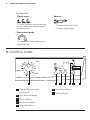
Control Panel
You must select this option after
you have set the program and
before you press the Start/Pause
button.
If you wish to add laundry in the
machine during the delay time
press Start/Pause button to put the
machine in pause mode. Add
laundry, close the door and press
Start/Pause button again.
You can cancel the delay time at
any moment, by pressing ‘Delay
Start’ button repeatedly till the LED
light disappear, then press the
Start/Pause button.
3.6 Start/Pause Button
To start the selected program,
press the ‘Start/Pause’.
To interrupt a program which is
running, press the ‘Start/Pause’ to
pause the machine.
To restart the program from the
point at which it was interrupted,
press the ‘Start/Pause’ again.
If you have chosen a delayed start,
after pressing ‘Start/Pause’ the
machine will begin the countdown.
3.7 Working Status
After pressing the Start/Pause
button, the “Washing” pilot light
comes on.
When the pilot light “Washing”
comes on this means that the
machine is performing the washing
cycle.
The “Door Lock” pilot light indicates
if the door can be opened:
light on: the door cannot be
opened. The appliance is
running.
light off: the door can be opened.
The washing program is finished.
When the program has finished,
the “End Cycle” pilot light comes
on.