1
Operating Instructions
Operating Instructions
(continued)
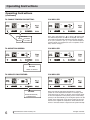
TO OPERATE ON FAN ONLY:
DO THIS:
PRESS
MODE BUTTON
CHOOSE
FAN ONLY
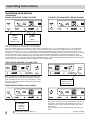
TO USE THE ENERGY SAVER (ECON) FEATURE:
DO THIS:
PRESS
MODE BUTTON
CHOOSE ECON
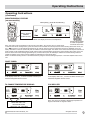
SLEEP FEATURE:
YOU WILL SEE:
Note: Use this function only when cooling is not desired,
such as for room air circulation or to exhaust stale air on
some models. (Remember to open the vent during this
function, but keep it closed during cooling for maximum
cooling efficiency.) You can choose any fan speed you
prefer. (Except “Auto Fan”).
During this function, the display will show the actual room
temperature, not the set temperature as in the cooling
mode.
YOU WILL SEE:
Note: In this mode, the fan will continue to run for 1 minute after the compressor shuts off. The fan then cycles on
for 20 seconds at 10 minute intervals until the room temperature is above the set temperature, at which time the compressor turns back on.
YOU WILL SEE:
DO THIS:
PRESS
SLEEP BUTTON
2009 Electrolux Home Products, Inc.
Note: In this mode the selected temperature will increase
by 2 °F 30 minutes after the mode is selected. The temperature will then increase by another 2 °F after an additional
30 minutes. This new temperature will be maintained for 7
hours before it returns to the originally selected temperature. This ends the "Sleep" mode and the unit will continue
to operate as originally programmed. The "Sleep" mode
program can be cancelled at any time during operation by
again pressing the "Sleep" button.
All rights reserved.
7