1
Connecting the 6808HDxl
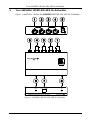
Table 1: 6808HDxl HD/SD-SDI AES De-Embedder Features
1
#
Feature
HD/SD-SDI IN BNC Connector
Function
Connects to the SDI source
2
HD/SD-SDI OUT BNC Connector
Connects to the SDI acceptor
3
AES OUTPUT A
Connects to AES acceptor 1 (channel 1)
4
AES OUTPUT B
Connects to AES acceptor 2 (channel 2)
5
5V DC
+5V DC connector for powering the unit
6
LOCK LED
Illuminates green when an SD signal is detected or blue
when an HD signal is detected
7
GROUP SELECT DIP-switches
Selects the audio group to de-embed (from 1 to 4)
8
ON LED
Illuminates green when the power is connected
5
Connecting the 6808HDxl
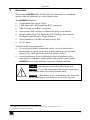
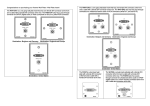
To connect the 6808HDxl HD/SD-SDI AES De-Embedder, as illustrated in
the example in Figure 3, do the following1:
1. Connect an SD/HD/3G HD-SDI source (such as an HD/SD digital video
player) to the HD/SD-SDI IN BNC connector.
2. Connect the HD/SD-SDI OUT BNC connector to an SDI acceptor (such as
an SDI display).
3. Connect the AES OUTPUT A BNC connector (for channel 1) to AES
digital audio acceptor 1 (such as DAT-Recorder 1).
4. Connect the AES OUTPUT B BNC connector (for channel 2) to AES
digital audio acceptor 2 (such as DAT-Recorder 2).
5. Set the GROUP SELECT DIP-switch ON for the group to de-embed (from
1 to 4). Figure 2 shows group 1 selected.
Note: Set one switch ON only. Set all other switches OFF.
6. Connect the 5V DC power adapter to the power socket and connect the
adapter to the mains electricity (not shown in Figure 3).
Figure 2: Group Select DIP-Switches
1 Switch OFF the power on each device before connecting it to your 6808HDxl. After connecting the devices, connect the
power to the 6808HDxl, then switch on the power on each device. The unit recalls its settings after powering down
5