1
GES – Users Manual
7.3.2.
1
5
1
4
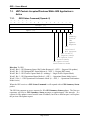
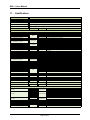
GES Summary Status (Opcode 1)
1
3
1
2
1
1
1
0
9
Spare (0)
GES Firmware Level
8
7
6
Length (4)
Opcode (1)
5
4
3
2
1
0
0
1
2
Overall
GES
Mngmnt
Processor
Status
Overall Phy
Status
Overall TDR
Status
Baseline Mode of
Operation
Updated Mode of
Operation
Traffic Monitor Function
Active
Operational Status Function
Active
Operational Performance Function
Active
GES Status Command Message Received
GES Software Level
3
Direction: From GES
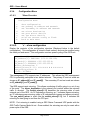
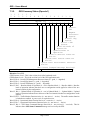
GES Firmware Level – This is the revision level of the bootloader code.
GES Software Level – This is the revision level of the GES application code.
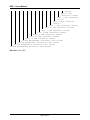
Word 2, Bit 0 – Overall GES Management Processor Status (0 – good, 1 – degraded)
Word 2, Bit 1 – Overall Phy Status (0 – good, 1 – degraded)
Word 2, Bit 2 – Overall TDR Status (0 – good, 1 – degraded)
Word 2, Bit 3 – Baseline Mode of Operation (0 – not in Baseline Mode, 1 – Baseline Mode). Baseline
mode of operation indicates that there are no configuration words applied to either of the two
internal switches by the configuration.
Word 2, Bit 4 – Updated Mode of Operation (0 – not in Updated Mode, 1 – Updated Mode). Updated
mode of operation indicates that at least one of the two internal switches has configuration words
applied.
Word 2, Bit 5 – Traffic Monitor Function Active (0 – not Active, 1 – Active). The traffic monitor function
is latched once enabled. A power cycle is required to reset.
Word 2, Bit 6 – Operational Status Function Active (0 – not Active, 1 – Active)
Word 2, Bit 7 – Operational Performance Function Active (0 – not Active, 1 – Active)
Word 2, Bit 8 – GES Status Command Message Received (0 – not received, 1 – received). This bit
indicates that a GES Status Command message was received by the GES.
Page 17 of 33