1
User manual
Gebrauchsanweisung
Manuel d'utilisation
Gebruiksaanwijzing
Руководство пользователь
Manuel de usuario
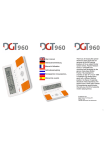
Thank you for buying this special
electronic chessclock that can
generate all the 960 starting
positions of the so called Fischer
random Chess. Fischer Random
Chess or Chess960 was
conceived and developed by the
genius chessplayer Bobby
Fischer. He presented his
invention on the 19th of June 1996
in Argentina. By starting every
game with a different starting
position, the theory of openings
should be of less importance, the
players have to think again instead
of remembering openingbooks.
We wish you a lot of fun using this
modern playing device.
© 2008 DGT B.V.
Digital Game Technology B.V.
PO Box 1295
7500 BG Enschede The Netherlands
1
Other popular DGT products:
Contents
English:
Manual for the DGT960
Deutsch:
Gebrauchsanweisung DGT960
Français :
Mode d’emploi pour la DGT960
Nederlands:
Handleiding DGT960
Русский:
Руководство пользователя DGT960
Español:
Manual para el reloj DGT960
Warranty card / Garantiekarte / Carte
de garantie / Garantiekaart /
Гарантийный талон / Carta de
garantía
3
3
9
9
16
16
22
22
28
28
35
35
DGT electronic chessboard
41
DGT complete chess set with clock
and CD with games of Vladimir
Kramnik
2
English:
Manual for the DGT960
1.
2.
3.
4.
5.
6.
7.
8.
9.
10.
11.
12.
13.
Make your clock ready for use
Switching on/off
Time measuring with the DGT960
Temporarily pause the clock
Starting a new game
Sound signal
Setting of the time measuring modes and
time-controls
The time measuring modes of the DGT960
Changing of the settings during the game
Chess960 position functions
Adjusting the contrast
Technical specifications
Warranty conditions
3
3
4
4
4
4
4
5
6
7
7
7
8
We wish to congratulate you on your decision to buy the
DGT960.
The DGT960 was developed in the Netherlands by
Digital Game Technology BV, the designers of the official
match clock of the World Chess Federation FIDE.
All information as regards the various digital game clocks
by DGT can be found on our
website:
www.dgtprojects.com.
We wish you a lot of playing pleasure with your DGT960.
1.
Make your clock ready for use
Pull the insulating sheet, marked with the words PULL
out of the battery compartment on the bottom of the
DGT960. Open the timer to switch it on. The DGT960 is
powered by a CR2032-3V button cell battery. When the
voltage of this cell is too low, the low power symbol
will show in the display. You should place a new
battery of the same type by sliding the battery cover open
in the direction of the arrow, then put in the battery with
the + sign visible.
2.
Switching on/off
The DGT960 will automatically switch on when the timer
is opened. It will switch off automatically when you close
it. You can also switch the DGT960 off by pressing the
On/Off button
for at least 1 second. You can switch it
on again by pushing the On/Off button
briefly.
3
3.
Time measuring with the
DGT960
On first use the DGT960 is set to the time measuring
method "Game Timer" with 5 minutes thinking time for
both players (see 7 and 8). The sound is on (see 6). The
triangular signs blink to indicate that the clock is in the
setup mode.
To start playing, you should briefly push the central
start/stop button
. The triangular markings will stop
blinking to indicate that the timer of one of the players
should be started. When you push one of the red player
buttons, the opponent's timer will start the count down.
After finishing his move, the player will push his red
player button and the countdown of the other player will
start or continue.
4.
Temporarily pause the clock
Count down of the clock can be temporarily be
interrupted by pressing the central Start/Stop button
.
Press this button once more to restart the clock. During
the pause the way the clock was set can be adapted (see
9).
5.
Starting a new game
Press half a second on the On/Off button
and the
DGT960 is ready for a new game. The settings of the
clock will be identical to the previous game.
6.
Sound signal
You may switch the sound signal on or off at any time
during the game by pressing the sound button . When
sound is switched on, you will hear warning beep signals
during the last five seconds prior to falling of your flag.
7.
Setting of the time measuring
modes and time-controls
After the DGT960 has been activated, you will notice the
time-control and settings used during the last game. The
time available to both players are surrounded by two
blinking triangles. By pressing on the Start/Stop button
, you could start the game, but you may also change
the settings first.
4
Change the time available to both players
simultaneously
Press on the
and/or the
button until the
desired time appears in both displays. When you
keep pressing the
and/or the
button, the time
will change at an increased speed. The maximum
timelimit is 9 hours and 59 minutes.
Please note: When timecontrol exceeds 20
minutes, you will see hours and minutes in the
display. When there are less than 20 minutes left,
you will see seconds as well.
Change time available to only one of the players
Move with the
and/or the
button through the
display until the area of only the player whose
timelimit you wish to change is blinking. Press on
the
and/or the
button until the desired time
appears in the display.
Change the time measuring mode
and/or the
button through the
Move with the
display until the area around the time measuring
modes is blinking. Press on the
and/or the
button until the desired time measuring mode
appears in the display.
Change the delaytime or the bonustime per move
Move with the
and/or the
button through the
display until the area around the extra time is
blinking. Press on the
and/or the
button until
the desired time appears in the display.
8.
The time measuring modes of
the DGT960
The DGT960 gives you the option of timing your game in
various ways.
Move timer
Each player has a certain amount of time available
for each separate move. When a player has
completed his move, he gets the allotted time
available for his next move. When a player has
used up his time for a move, the flag will appear in
the display.
Game timer
Each player has a certain amount of reflection time
for the entire game; the player decides for himself
how he divides the time available for the game.
When a player has used up his time, the flag will
5
appear in the display. The clock will continue in the
‘count up’ mode. A
sign will appear in the
display.
Game timer count-up option
If you set the reflection time for both players on
0:00, then both times will at once switch to the
‘count up’ mode. After the clock is started, the time
used by each player is recorded. A
sign will
appear in the display. Then no flag is shown in the
display.
Game timer + delay
This mode is the same as the ‘ Game Timer’ mode.
But each time the clock is pressed, the count down
of the player to move is only activated after the
delaytime has been used up.
Please note: When a player has used up all his
time, the flag appears. The clock does not switch to
the ‘count up’ mode.
Game timer + bonus
This mode is the same as the ‘Game Timer’ mode.
But each time the clock is pressed, the remaining
reflection time of the player is increased with the
bonus time.
Please note: When a player has used up all his
time, the flag appears. The clock does not switch to
the ‘count up’ mode.
9.
Changing of the settings
during the game
You may change the settings of the DGT960 during a
game. Interrupt the operation of the timecontrols by
pressing the central Start/ Stop button
. Move with the
and/or the
button through the display until the
triangles around the setting you wish to change are
blinking. Press on the
and/or the
button until the
desired time or the desired timecontrol mode appears in
the display. Please note: When you change the reflection
time in which the hours and minutes are shown, the
seconds digits of this time-mode will automatically switch
to zero, without you being able to notice.
Restart now the proceedings of the game by pressing the
central Start/ Stop button
.
6
10. Chess960 position functions
With the 960 button you can hide or display the
chess960 part of the display any moment
960
When you push the
button while the clock is not
running, the dice-symbol will start to blink. Now you can:
-
-
-
Let the timer choose a random start position by
pushing the
button. The number of the
or
start position will be displayed as well as the
position of the chess pieces for this number.
Choose with the and/or the
button a digit of
the position number to make it blink. With the
or
button you can change that digit and in this
way you can set a specific position number with all
three digits. The corresponding position of the
chess pieces will be shown immediately.
You can select one of the chess pieces with the
and/or the
button. You can choose a different
or
piece by pushing the
button, all the
pieces on the right side of the changed piece will
be deleted. Choose the next piece with the
button and choose one with the
or
button.
When all positions are filled in, the corresponding
chess960 number will be displayed.
960
When you push the
button again, the chess960
part of the display will be hidden and you can go on with
the timer functions. However if you push Start/Stop
button
the chess960 functions will remain visible and
you can set the timer functions then.
11. Adjusting the contrast
When the time is not running, you can adjust the contrast
of the display. Press and hold the sound button
and
simultaneously push one or more times the
or
button to increase or to decrease the display contrast.
This setting will be kept after switching off the clock until
you remove the battery.
12. Technical specifications
Batteries:
Service life:
Button cell battery CR2032 (3V).
Turned on with an average use of
the sound signal: 4 years.
Switched off 6 years.
7
Accuracy:
Cleaning:
Housing:
Better than one second per hour.
Use a soft, almost dry cloth. Do not
use abrasive cleaning agents.
ABS synthetic material.
The DGT960 complies with the regulations for
electro magnetic compatibility 2004/108/EG.
13. Warranty conditions
DGT guarantees that your digital chess clock complies
with the highest quality standards. If your DGT960 –
despite our care in choosing components and material,
production and transport – nevertheless may show a
defect during the first year after purchase, you should
contact the agent who sold the appliance to you.
In order to qualify for this warranty on your new DGT960,
you should present the warranty card (page 41) together
with proof of purchase.
This condition of warranty is only validated if the DGT960
has been used in a prudential manner. Our obligations of
warranty do not apply if attempts to repair the clock have
been carried out without our explicit permission in writing.
8