1
The Alltel SnapTM
A L L
D I G I T A L
T r i - M o d e
P H O N E
User Guide
Please read this manual before operating your
phone, and keep it for future reference.
Intellectual Property
All Intellectual Property, as defined below, owned by or which is otherwise the
property of Samsung or its respective suppliers relating to the SAMSUNG Phone,
including but not limited to, accessories, parts, or software relating there to (the
“Phone System”), is proprietary to Samsung and protected under federal laws, state
laws, and international treaty provisions. Intellectual Property includes, but is not
limited to, inventions (patentable or unpatentable), patents, trade secrets,
copyrights, software, computer programs, and related documentation and other
works of authorship. You may not infringe or otherwise violate the rights secured by
the Intellectual Property. Moreover, you agree that you will not (and will not attempt
to) modify, prepare derivative works of, reverse engineer, decompile, disassemble,
or otherwise attempt to create source code from the software. No title to or
ownership in the Intellectual Property is transferred to you. All applicable rights of
the Intellectual Property shall remain with SAMSUNG and its suppliers.
Samsung Telecommunications America (STA), LLC
Headquarters:
Customer Care Center:
1301 E. Lookout Drive
1000 Klein Street
Richardson, TX 75082
Plano, TX 75074
Toll Free Tel: 1.888.987.HELP (4357)
Internet Address: http://www.samsungusa.com
©2007 Samsung Telecommunications America, L.L.C. Samsung is a registered
trademark of Samsung Electronics Co., Ltd. and its related entities.
Licensed by Qualcomm Incorporated under one or more of the following patents:
U.S. Patent No. 4, 901, 307; 5, 056, 109; 5, 099, 204; 5, 101, 501; 5, 103, 459; 5,
107, 225; 5, 109, 390.
GH68-13024A
Openwave® is a registered Trademark of Openwave, Inc.
RSA® is a registered Trademark of RSA Security, Inc.
The Alltel SnapTM is a Trademark of Alltel Communications, Inc.
Disclaimer of Warranties; Exclusion of Liability
EXCEPT AS SET FORTH IN THE EXPRESS WARRANTY CONTAINED ON THE
WARRANTY PAGE ENCLOSED WITH THE PRODUCT, THE PURCHASER TAKES THE
PRODUCT “AS IS”, AND SAMSUNG MAKES NO EXPRESS OR IMPLIED WARRANTY OF
ANY KIND WHATSOEVER WITH RESPECT TO THE PRODUCT, INCLUDING BUT NOT
LIMITED TO THE MERCHANTABILITY OF THE PRODUCT OR ITS FITNESS FOR ANY
PARTICULAR PURPOSE OR USE; THE DESIGN, CONDITION OR QUALITY OF THE
PRODUCT; THE PERFORMANCE OF THE PRODUCT; THE WORKMANSHIP OF THE
PRODUCT OR THE COMPONENTS CONTAINED THEREIN; OR COMPLIANCE OF THE
PRODUCT WITH THE REQUIREMENTS OF ANY LAW, RULE, SPECIFICATION OR
CONTRACT PERTAINING THERETO. NOTHING CONTAINED IN THE INSTRUCTION
MANUAL SHALL BE CONSTRUED TO CREATE AN EXPRESS OR IMPLIED WARRANTY
OF ANY KIND WHATSOEVER WITH RESPECT TO THE PRODUCT. IN ADDITION,
SAMSUNG SHALL NOT BE LIABLE FOR ANY DAMAGES OF ANY KIND RESULTING
FROM THE PURCHASE OR USE OF THE PRODUCT OR ARISING FROM THE BREACH OF
THE EXPRESS WARRANTY, INCLUDING INCIDENTAL, SPECIAL OR CONSEQUENTIAL
DAMAGES, OR LOSS OF ANTICIPATED PROFITS OR BENEFITS.
u340_AB21_cb_041007_F6
Table of Contents
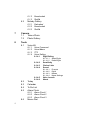
Intellectual Property ..................................................................................................2
Samsung Telecommunications America (STA), LLC ...................................................2
Disclaimer of Warranties; Exclusion of Liability .........................................................3
Getting Started .............................................................................................7
Understanding this User Manual ...............................................................................8
Activating Your Phone ...............................................................................................8
Charging the Battery ...............................................................................................10
Setting Up Your Voice Mail ......................................................................................11
Understanding Your Phone ........................................................................12
Features of Your Phone ...........................................................................................12
Closed View of Your Phone .....................................................................................13
Open View of Your Phone ........................................................................................14
Command Keys ......................................................................................................15
Understanding the Display Screen ..........................................................................17
Your Phone’s Modes ...............................................................................................20
Call Functions ............................................................................................23
Making a Call — Number Entry Dialing ...................................................................24
Making a Call — Speed Dialing ..............................................................................25
Making a Call — Voice Dialing ................................................................................26
Answering a Call .....................................................................................................28
Rejecting a Call .......................................................................................................29
Adjusting the Call Volume .......................................................................................29
Calls Log ................................................................................................................29
Phone Modes ..........................................................................................................33
Roaming .................................................................................................................36
Menu Navigation ........................................................................................37
Menu Navigation .....................................................................................................38
In Use Menu Outline ................................................................................................39
Menus and sub-menus ...........................................................................................40
Entering Text ..............................................................................................46
Text Entry Modes ....................................................................................................47
Changing the Text Entry Mode ................................................................................47
Entering Text in Alpha (ABC) Mode ..........................................................................48
Entering Text in T9 Word Mode ...............................................................................48
Entering Upper and Lower Case Letters ..................................................................49
Entering Symbols ....................................................................................................49
Entering Numbers ...................................................................................................50
Understanding Your Contacts ...................................................................51
Your Contacts List ...................................................................................................52
Adding a New Contacts Entry ..................................................................................52
4
Finding a Contacts Entry .........................................................................................56
Editing an Existing Contact Entry .............................................................................59
Renaming a Contacts Group ....................................................................................62
Deleting a Contact Entry ..........................................................................................63
Memory ..................................................................................................................63
Messaging ................................................................................................. 64
Creating and Sending New Messages .....................................................................65
Message Send Options ...........................................................................................69
Retrieving New Messages .......................................................................................69
Voicemail ................................................................................................................70
Message Folders .....................................................................................................70
Message Settings ...................................................................................................74
Deleting Messages .................................................................................................75
Axcess Shop .............................................................................................. 76
Axcess Shop Options ..............................................................................................77
Axcess Shop Settings ..............................................................................................77
Axcess Shop Help ...................................................................................................78
Camera ...................................................................................................... 81
Taking Pictures .......................................................................................................82
The Photo Gallery ....................................................................................................90
Axcess Web ............................................................................................... 92
Axcess Web Operations ..........................................................................................93
Launch Axcess Web ................................................................................................93
Exit Axcess Web ......................................................................................................93
Navigate the Web ....................................................................................................93
Axcess Web Soft Keys .............................................................................................94
Using Links .............................................................................................................94
How Axcess Web Keys Work ...................................................................................94
Gallery ....................................................................................................... 96
Gallery ....................................................................................................................97
Using Image Gallery ................................................................................................97
Using Melody Gallery ..............................................................................................99
Tools ........................................................................................................ 101
Tools Menu ...........................................................................................................102
Voice Kit ...............................................................................................................102
Today ...................................................................................................................110
Calendar ...............................................................................................................111
To Do List .............................................................................................................112
Alarm Clock ..........................................................................................................113
Memo Pad ............................................................................................................114
World Time ...........................................................................................................115
Calculator .............................................................................................................116
Count Down ..........................................................................................................117
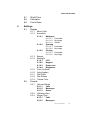
Table of Contents
5
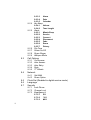
Changing Your Settings ...........................................................................119
Display Settings ....................................................................................................120
Sounds Settings ....................................................................................................125
Call Options ..........................................................................................................129
Network Settings ..................................................................................................132
Clock Set ..............................................................................................................132
Language .............................................................................................................133
Security Settings ..................................................................................................133
Location Setting ....................................................................................................137
Airplane Mode ......................................................................................................137
Phone Info ............................................................................................................137
Health and Safety Information ................................................................139
Health and Safety Information ...............................................................................140
UL Certified Travel Adaptor ...................................................................................141
Consumer Information on Wireless Phones ...........................................................141
Road Safety ..........................................................................................................147
Operating Environment .........................................................................................149
Using Your Phone Near Other Electronic Devices ...................................................149
Potentially Explosive Environments .......................................................................151
Emergency Calls ...................................................................................................151
FCC Notice and Cautions .......................................................................................152
Other Important Safety Information .......................................................................152
Product Performance ............................................................................................ 153
Availability of Various Features/Ring Tones ...........................................................154
Battery Standby and Talk Time .............................................................................154
Battery Precautions ..............................................................................................154
Samsung Mobile Products and Recycling ..............................................................155
Care and Maintenance ..........................................................................................155
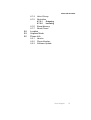
Warranty Information ..............................................................................157
Standard Limited Warranty ...................................................................................158
Index .........................................................................................................162
6
Section 1: Getting Started
Topics Covered
• Understanding this User Manual
• Activating Your Phone
• Charging the Battery
• Setting Up Your Voice Mail
This section explains how to start using your phone by activating your service, setting
up your voice mail, or getting an understanding of how this manual is put together.
Getting Started
7
Understanding this User Manual
The chapters of this guide generally follow the same order as the menus and submenus in your phone. A robust index for quick reference to most features begins on
page 162.
Also included is important safety information that you should know before using your
phone. Most of this information is near the back of the guide, beginning on page
139.
Notes and tips
Throughout this guide are icons and text that are set apart from the rest. These are
intended to point out important information, quick methods for activating features, to
define terms, and more. The definitions for these methods are as follows:
• Notes: Explain alternative options within the current feature, menu, or sub menu.
• Tips: Provide quick or innovative methods for performing functions related to the
subject at hand.
• Important: Points out important information about the current feature that could
affect performance, or even damage your phone.
Activating Your Phone
Contact your Wireless Carrier and follow their instructions for obtaining service, if
necessary. We suggest that you read this guide to fully understand the services your
phone supports.
Install the Battery
Note: Your phone comes packaged with a partially charged rechargeable standard Li-Ion battery and travel
adapter.
Important!: You must fully charge the battery the first time you use your phone, otherwise you could
damage the battery.
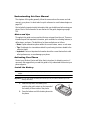
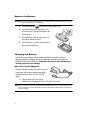
1. Insert the top end of the battery first,
matching the gold contacts on the top end of
the battery to those inside of the phone.
2. Press the bottom end of the battery down into
the phone.
8
Activating Your Phone
3. Place the battery cover over the battery and slide
the cover upward into place.
Turn Your Phone On
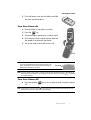
1. Open the folder on your phone, as shown.
2. Press the
END
key.
3. The phone begins searching for a network signal.
4. Once the phone finds a signal, the time, date and
day appear in the bottom of the display.
5. You’re now ready to place and receive calls.
Press
Tip: Your phone has an internal antenna. Do not touch the phone
case over the antenna while using your phone as this can
affect call quality and can cause the phone to operate at a
higher power level than is necessary.
Antenna
Note: If you are outside of your carrier’s coverage or roaming area, the No Service icon (
) appears at
the top of the phone’s display. If you cannot place or receive calls, try later when service is available,
or at another location.
Turn Your Phone Off
䡲
Press and hold the
off.
END
key for two or more seconds. Your phone powers
Note: If your phone is on and you press
for less than one second, the phone will not power off. This
prevents your phone from being turned off accidentally.
END
Getting Started
9
Remove the Battery
Important!: You must unplug the Travel Adapter (if it is connected) before removing the battery from the
phone during charging to avoid damage.
1. Press and hold the
END
key to turn off the phone (if on).
2. Press the battery cover at point (1) and
slide the cover (2) toward the bottom end
of the phone.
3. Lift the battery cover up and away from
the phone, bottom end first.
4. Lift the battery (3) up and away from the
3
phone, bottom end first.
Charging the Battery
Your phone is powered by a rechargeable standard Li-Ion battery. Only use
Samsung-approved charging devices and batteries. Samsung accessories are
designed to maximize battery life. Using other accessories may invalidate your
warranty and may cause damage.
Use the Travel Adapter
The travel adapter included with your phone is a
convenient, light-weight charger that rapidly
charges your phone from any 120/220 VAC
outlet.
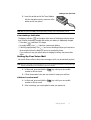
1. Plug the large end of the Travel
Adapter into a standard 120 VAC or 220 VAC wall outlet.
Note: For connection to an electrical supply not located in North America, you must use an adaptor of the
proper configuration for the power outlet. Use of the wrong adapter could damage your phone and
void your warranty.
10
Setting Up Your Voice Mail
2. Insert the smaller end of the Travel Adapter
into the charger/accessory connector at the
bottom end of your phone.
Note: With the phone turned OFF, a discharged battery recharges fully in approximately 4 hours.
Low battery indicator
The battery indicator (
) in the upper-right corner of the display indicates power
level. Monitor the battery strength and ensure your battery is adequately charged.
• Three bars (
) indicate a full charge.
• An empty battery icon (
) indicates a near empty battery.
• A blinking empty battery icon (
) and a tone sounding indicate you have two to
three minutes before the battery is too low to operate the phone.
If you continue to use your phone without charging its battery, the phone shuts
down.
Setting Up Your Voice Mail
Voice mail allows callers to leave voice messages, which can be retrieved any time.
Note: Once your voice mail account has been set up, you can use the Voice Mail folder (under the Message
menu) to view details of voice messages in your voice mail box.
1. In idle mode, press and hold the
@
key or dial your own mobile
number to dial voice mail.
2. Follow the prompts in the new user tutorial to setup your mail box.
Listen to voice mail
1. In idle mode, press and hold the
@
key or dial your own mobile
number to dial voice mail.
2. After connecting, you are prompted to enter your password.
Getting Started
11
Section 2: Understanding Your Phone
Topics Covered
• Features of Your Phone
• Closed View of Your Phone
• Open View of Your Phone
• Command Keys
• Understanding the Display Screen
• Your Phone’s Modes
This section outlines some key features of your phone. This section also explains the
screen and the icons that are displayed when the phone is in use.
Features of Your Phone
• High speed data (CDMA 2000 1X Technology)
• Global Positioning Technology (GPS)
• Personal Information Management (PIM) functions (Scheduler, To Do List, and so
on)
• Text Messaging
• Picture Messaging (including Handwritten and Postcard messaging)
• E-mail Messaging
• VGA (300K Pixel) Camera
• Advance Speech Recognition
• Speakerphone
• Phone Memory Storage
12
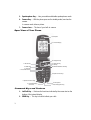
Closed View of Your Phone
Closed View of Your Phone
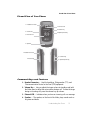
1. Headset Connector
7. Camera Lens
6. Camera Key
2. Volume Key
5. Speakerphone Key
3. External LCD
4. Speaker
1. Headset Connector
6. Camera Key
2. Volume Key
5. Speakerphone Key
Command Keys and Features
1. Headset Connector — Used for handsfree, Teletypewriter (TTY), and
Telecommunication Device for the Deaf (TDD) equipment.
2. Volume Key — Lets you adjust the ringer volume in standby mode (with
the folder open) or adjust the voice volume during a call. To mute the ringer
during an incoming call, press the volume key up or down.
3. External LCD — Indicates when you have an incoming call or a message.
4. Speaker — The speaker, on the front of the folder, plays sounds such as
ring tones and alerts.
Understanding Your Phone
13
5. Speakerphone Key — Lets you enable and disable speakerphone mode.
6. Camera Key — With the phone open and in standby mode, launches the
camera.
In camera mode, takes a picture.
7. Camera Lens — The lens of your built-in camera.
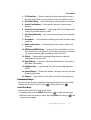
Open View of Your Phone
15. Earpiece
14. Internal Display
13. Navigation Key
1. Left Soft Key
2. SEND Key
12. Right Soft Key
11. OK Key
10. END/Power/Menu Exit Key
3. Clear Key
4. Voice Mail Hot Key
9. Alpha-numeric Keys
5. Special Function Keys
6. Power/Accessory
Connector
8. Microphone
7. Voice Recognition Key
Command Keys and Features
1. Left Soft Key — Performs the functions indicated by the screen text on the
bottom of the internal display.
2. SEND Key — This key is used to initiate your calls.
14
Command Keys
3. CLR (clear) Key — Deletes characters from the display when you are in
text entry mode. When in a menu, press to return to the previous menu.
4. Voice Mail Hot Key — Press and hold to automatically dial your voicemail.
5. Special Function Keys — Enter special characters. Perform various
functions.
6. Power/Accessory Connector — Used to plug in the Travel Charger and to
connect any available accessory cable.
7. Voice Recognition Key — Lets you access your phone’s voice recognition
features.
8. Microphone — The microphone used during phone calls and voice memo
recordings.
9. Alpha-numeric Keys — Use these keys to enter numbers, letters, and
characters.
10. END/Power/MENU Exit Key — Ends a call. Press and hold this key for a
few seconds to turn your phone On or Off. When you receive an incoming
call, press to mute the ringer and send the call to Voice Mail.
11. OK Key — Pressing when navigating through a menu accepts the
highlighted choice in the menu.
12. Right Soft Key — Performs the functions indicated by the screen text on
the bottom of the display.
13. Navigation Key — In menu mode, lets you browse and highlight menu
options.
14. Internal Display — Displays the numbers, messages, and icons you need
to operate your phone.
15. Earpiece — Plays sounds such as caller voices and call progress tones.
Command Keys
Functions for the soft keys are defined by what appears above each in the display.
There are two soft keys, the left soft key
and the right soft key
.
Left Soft Key
Some functions of the left soft key are as follows.
• In standby mode, press the MENU (left) soft key (
) to open the main menu.
• When the left soft key function is Option, press the Option (left) soft key (
) and
a pop-up menu appears.
Understanding Your Phone
15
• When the left soft key function is Edit, press the Edit (left) soft key (
) to edit a
Contact.
Right Soft Key
Some functions of the right soft key are as follows.
• In standby mode, press the MESSAGE (right) soft key (
) to open the Messages
menu.
• When the right soft key function is Back, press the Back (right) soft key (
) to
back up one menu level.
OK Key
• In a menu, press the OK key (
OK
) to accept the highlighted selection.
OK ) to edit a Draft
• When the OK key function is Edit, press the Edit (OK) key (
message.
Clear Key
The CLR key (
) is used to erase or clear numbers, text, or symbols from the
display. You can also use the
key to return to a previous menu or to return to
standby mode from any menu.
BACK
BACK
1. If you enter an incorrect character, briefly press
BACK
to backspace (and
delete) the character.
2. To erase the entire sentence, press and hold
3. To back up one menu level, briefly press
4. To return to standby mode, press and hold
BACK
BACK
.
.
BACK
until you return to
standby mode.
End Key
1. Press and hold the End key
2. Briefly press
3. Press
END
END
END
to turn your phone on or off.
once to disconnect a call.
to return to standby mode from any menu, or to cancel the last
input.
Send Key
The Send key
is used to answer calls, dial calls, and to recall the last
number(s) dialed, received, or missed.
SEN
1. Press
D
SEN
D
once to answer calls.
2. Enter a number and briefly press
16
SEN
D
to make a call.
Understanding the Display Screen
3. Briefly press
SEN
D
in standby mode to display a list of recent calls to and
from your phone.
4. Press
SEN
5. Press
SEN
D
twice in standby mode to call the most recent number.
to pick up a waiting call. Press
the other call.
D
SEN
D
again to switch back to
Navigation Key
OK
Use the directional keys on the navigation key
to browse menus, sub menus,
and lists. Each key also acts as a shortcut to launch applications.
Speakerphone Key
Use the speakerphone key (
) — located on the right side of your phone — to
switch from using the earpiece to the speakerphone before or during a call. Use the
volume keys (
) — located on the left side of your phone — to adjust the
volume. Press and hold the speakerphone key to enable and disable the
speakerphone option.
Understanding the Display Screen
The top line of your phone’s display contains icons
that indicate network status, battery power, signal
strength, connection type, and more. The following
list contains icons that may appear in your display.
Display screen icons
Signal strength — Always appears when your phone is on and
indicates the current signal strength. More lines indicate higher
signal strength.
Service indicator — Indicates a call in progress. When dialing
a number, this icon flashes until the call connects.
No service indicator — Indicates your phone cannot find a
signal because you’re outside a service area. You cannot make
or receive calls. Wait for a signal or move into an open area to
try and find a signal. The no service indicator always appears
when you turn on your phone and disappears once service is
located.
Understanding Your Phone
17
Analog mode indicator — Indicates your phone is operating
in an analog service area or that digital service has been
interrupted. Also indicates that some network features are not
available. Also, you may need to recharge your phone’s battery
more often while in an analog service area.
Roam — Extended roaming indicator. Roaming occurs when
you use your phone outside your home area. While roaming, a
wireless provider other than yours handles your call, so the
service rate for the call may be higher than for calls made
within your home area. Please refer to information from your
Wireless Provider on roaming rates.
New Message — Indicates that you’ve received a new text,
page, or web alert message. You’re also notified by a visual and
audible alert.
Voicemail — Indicates that you’ve received a new voicemail.
1X Protocol — Indicates your phone is using the 1X protocol.
Battery strength — Indicates the battery charge level. The
more black bars, the greater the charge. When the battery
becomes very low, a flashing empty battery icon displays and
the phone sounds an audible alert, which indicates your phone
is about to shut down.
Alarm clock — The alarm clock is set.
GPS (911 only) — This icon represents Global Positioning
Service (GPS) for 911.
GPS — Indicates GPS is on for location.
Vibrate plus Ring — Your phone is in vibrate plus ring mode.
When you receive a call, the phone vibrates and rings.
18
Understanding the Display Screen
Ring — Your phone is in ring mode. When you receive a call,
the phone rings.
1 Beep — Your phone is in 1 Beep mode. When you receive a
call, the phone rings a single beep.
Vibrate mode — Your phone is in vibrate mode. When you
receive a call, the phone vibrates instead of ringing.
Ringer off — The ringer is in Ringer off mode. When you
receive a call, it is only indicated in the displays.
Silent mode — Indicates your phone is in silent mode. Ringer
is silenced for all alerts, incoming calls, and incoming
messages. The phone alerts you of incoming calls, alerts, and
messages by vibration and a message in the displays.
TTY mode — Indicates your phone is in TTY mode (For more
information see “TTY Mode” on page 131).
Dialogue Boxes
Dialogue boxes prompt for action, inform you of status, or warn of situations such as
low memory. Dialogue boxes and their definitions are outlined below.
• Choice
• Example: “Save to draft?”
• Reconfirm
• Example: “Erase all inbox msgs?”
• Performing
• Example: “Sending...” “Connecting...”
• Completed
• Example: “Message Saved”
• Information
• Example: “New Message”
• Error
• Example: “System Error!”
Understanding Your Phone
19
• Warning
• Example: “Battery Low,” “Memory Full!”
Backlights
Backlights illuminate the internal and external displays and the keypad. When you
press any key or open the phone, the backlights come on. They go off when no keys
are pressed within a period of time set in the Backlight menu.
Note: During a phone call, the display backlights dim and turn off after one minute to conserve battery
power, regardless of the Backlight setting.
See “Backlight” on page 122 for more information.
External Display
Your phone has an external display on the outside of the folder. When you close the
phone, the external display shows a digital clock.
Icons that appear in the external display indicate the following:
• Signal strength
• Service protocol 1x
• Digital roaming service
• Incoming calls and messages
• Alarms and alerts
• Ringer/sound mode
• Battery charge level
Your Phone’s Modes
Call Answer Mode
You can select how you wish to answer a call.
1. In standby mode, press the MENU (left) soft key (
), then press
(for Settings),
(for Call Options), and
for Call Answer. The
following call answer options appear in the display:
• Send Key — Only pressing
answers a call.
• Folder Open — Opening the phone’s folder or pressing
answers a call.
• Any Key — Pressing any key except the
key or
key answers a
call.
2. Use the navigation keys to highlight an option.
def
wxyz
@
SEN
D
SEN
D
END
3. Press the
20
OK
key to select the method for answering calls.
Your Phone’s Modes
Input mode
Input mode determines how you enter text, numbers and symbols. While at any text
entry screen, press the Option (left) soft key (
), then choose the input mode
from the pop-up menu using the navigation keys. Optional input modes are T9
Word, Alpha, Symbol, Number, and Quick Text. (See “Entering Text” on page 46
for more information.)
Tip: You can also cycle between T9 Word, Alpha, and Number by repeatedly pressing and holding
.
Lock Mode
When the phone is in Lock Mode, restrictions are placed on phone use. You can
receive calls and messages, but cannot place outgoing calls (except for emergency
numbers) until you unlock the phone.
Lock Mode also restricts access to menus and the volume key. Unlock your phone by
entering the lock code when prompted. (See “Lock Phone” on page 133 for more
information.)
Standby Mode
Standby mode is the state of the phone once it has found service and is idle. The
phone goes into standby mode:
• After you power the phone on.
• When you press
after a call or from within a menu.
END
In standby mode, you will see the time, day, and date as well as all phone status
icons.
1. While in standby mode, enter a phone number, and press
SEN
D
to place a
call.
2. Press
END
to return to standby mode.
Receive Messages in Standby Mode
You can receive messages in standby mode. An alert tone sounds and a notification
message appears in the display when a new message arrives.
• Press the View (right) soft key ( ) to view now.
• Press the Ignore (left) soft key ( ) to view later.
Understanding Your Phone
21
Talk Mode
You can place and receive calls only when your phone is on. While in a call your
phone is in talk mode. Press the MENU (left) soft key (
) to display a list of menu
options. See “In Use Menu Outline” on page 39 for more information.
Enter/Exit Silent Mode
Silence the tones your keypad makes when you press a key.
• In standby mode, press and hold
. Entering Silent Mode briefly appears in
the display and your phone does not play ring tones for incoming calls or sound
alert tones.
• While in Silent mode and standby mode, press and hold
. Exit Silent Mode
briefly appears in the display and your phone returns to standby mode.
Vibrate Mode
䊳
In standby mode, repeatedly press the volume key (
) down until
Vibrate appears in the display. Your phone will now vibrate when you
receive a call, but will play tones for alerts.
The volume key is on the left side of phone, near the Send key (
).
SEN
D
Adjust the Ringer
1. In standby mode, press the volume key (
phone up or down. Options are:
• Ringer off
•
• Vibrate
•
• 1 Beep
•
• Level 1
•
• Level 2
) on the left side of the
Level 3
Level 4
Level 5
Vib+Ring
2. When you are satisfied with the setting, press the
OK
key. Your phone
returns to standby mode.
Tip: You can also enter the Calls option by pressing the MENU (left) soft key (
), then pressing the
,
,
, and
keys. Use the Volume key on the left side of your phone to adjust the ringer
setting.
wxyz
abc
@
@
Note: The Vibrate icon ( ) appears in the display when the phone is in Vibrate mode. The Vibrate plus
Ring icon (
) appears in the display when the phone is in or Vib+Ring mode.
22
Section 3: Call Functions
Topics Covered
• Making a Call — Number Entry Dialing
• Making a Call — Speed Dialing
• Making a Call — Voice Dialing
• Answering a Call
• Rejecting a Call
• Adjusting the Call Volume
• Calls Log
• Phone Modes
• Roaming
This section explains how to make or answer a call. This section also includes the
features and functionality associated with making or answering a call.
Call Functions
23
Making a Call — Number Entry Dialing
1. With the phone on, enter the number you wish to call using the keypad.
2. Press the
SEN
D
key to place the call.
Dialing Emergency Numbers
You can dial any of the numbers 911, *911, or #911 to place an emergency call.
If you dial 911, *911, or #911 and press the
emergency number 911, automatically.
SEN
D
key, your phone dials the
Important!: Emergency number 911 is hard-coded into your phone. You can dial this number almost any
time, even when the phone is locked or restricted.
If you call 911 an audible tone is heard and an Emergency prompt appears in the display for
the duration of the call.
Important!: Because of various transmission methods, network parameters, and user settings necessary
to complete a call from your wireless phone, a connection cannot always be guaranteed.
Therefore, emergency calling may not be available on all wireless networks at all times.
Important!: DO NOT depend on this phone as a primary method of calling 911 or for any other essential or
emergency communications.
Dialing International Numbers
Call another country from the U.S.
1. In standby mode, enter the three-digit exit code (011) for the United States.
2. Enter the country code for the country that you are calling.
3. Enter the number that you wish to call, then press the
SEN
D
key.
Note: Puerto Rico and Canada are on the North American dialing plan. When making calls to Puerto Rico
and Canada it is similar to making calls within the United States, no unique country codes are
necessary.
Placing calls when outside the U.S. — Mexico
• Calling locally within Mexico: Dial the seven or eight-digit number.
• Calling long distance within Mexico: Dial 01, plus the ten-digit number (includes
area code).
• Calling to the U.S. or Canada from Mexico: Dial 001, plus the ten-digit number
(includes area code).
24
Making a Call — Speed Dialing
• Calling Voicemail from Mexico: Dial 001, plus your ten-digit wireless number.
Once you hear the recorded prompt, press
and enter your passcode.
Manual Pause Calling
When you call automated systems (like banking services), you are often required to
enter a password or account number. Instead of manually entering the numbers
each time, you can store the numbers in your Contacts along with special characters
called pauses.
• P pause — A hard pause stops the calling sequence until you press the
key.
• T pause — A two-second pause stops the calling sequence for two seconds and
then automatically sends the remaining digits.
SEN
D
To manually call a number with pause(s) without storing it to your Contacts:
1. Enter the number you wish to call.
2. Press the Option (left) soft key (
). A pop-up menu containing the
following options appears in the display:
• P pause — a hard pause (awaits input from you).
• T pause — a two-second pause.
3. Use the navigation keys to highlight the desired pause option.
4. Press
OK
5. Press
SEN
D
to enter the highlighted pause into your number sequence.
to call the number.
Making a Call — Speed Dialing
You can store phone numbers and contact names in your phone’s Contacts list.
Speed Dialing lets you quickly and easily dial any contact in your Contacts list by
using that contact’s location number in the list. You can assign and change location
(speed dial) numbers for your contacts. (See “Assigning Speed Dial Numbers” on
page 60 for more information.)
One-Touch Dialing
Memory locations 002 through 009 are special One-Touch dialing locations. You can
call the phone numbers stored in your phone’s Contacts list from 002 through 009 by
pressing and holding a single key.
Example: For location number 003, press and hold the
display and the number is dialed.
def
key until the name and number appear in the
Call Functions
25
Two-Touch Dialing
Memory locations 010 through 099 are special Two-Touch dialing locations.
Example: For location number 013, briefly press the
key, then press and hold the
name and number appear in the display and the number is dialed.
@
def
key until the
Three-Touch Dialing
Memory locations 100 through 495 are special Three-Touch dialing locations.
Example: For location number 113, briefly press the
key, briefly press the
key again, then press
and hold the
key until the name and number appear in the display and the number is
dialed.
@
@
def
Pause Dialing From a Contacts Entry
• If you speed dial a contact that contains (two-second) T pause(s) simply wait for
the pauses to pass and the dialing to complete.
• If you speed dial a contact that contains (hard) P pause(s), wait for the appropriate
prompt(s) from the number you are calling (credit card number, bank account
number, and so on) and enter the appropriate response(s).
Making a Call — Voice Dialing
The Alltel Snap mobile phone includes state-of-the-art voice recognition software
that lets you dial numbers using your voice.
Using Voice Dial
Use the Voice Dial command to dial any number stored in your Contacts list by
saying the name of the contact (Name Dialing). You can also use Voice Dial to dial
any valid telephone number, even numbers not stored in your contact list, by
speaking the individual digits in the number (Digit Dialing).
Voice Dialing Tips:
• Wait for the beep before speaking.
• Speak clearly at a normal volume, as if you were talking to someone on the phone.
• When saying a name, say the first name then the last name.
Dialing a Name
To dial a name, do the following:
1. In standby mode, press and hold the
key.
“Say a Command” appears in the display and is pronounced through the
earpiece.
26
Making a Call — Voice Dialing
2. Say, “Voice Dial”.
You are prompted to “Say the name or number”.
3. Speak clearly and say the name of a person in your Contacts list, first name
followed by last name.
If the name is recognized, Voice Dial repeats the name and dials the
number.
If Voice Dial is not sure which name you said, it displays a choice list of up
to three names and prompts you with “Did you say?” followed by the first
name on the list.
4. Say “Yes” to confirm the name or “No” to hear the next name, or use the
keypad to select the correct name from the list. (See see "Choice Lists
Settings" on page 108, for more information.)
• Press the Repeat (right) soft key (
) to say the name again.
• Press the Settings (left) soft key (
) and press the Cancel right soft key
(
) to exit Voice Dial without dialing.
If the recognized name has multiple numbers stored for it (that is, Mobile,
Office, Home, and so on), Voice Dial displays the possible choices and
prompts you with “Which number?”
5. Say one of the following number types:
• Home
• Work
• Mobile
• My Circle
• Fax
Voice Dial dials the specified number.
Dialing a Number
To dial a number using Voice Dial, do the following:
1. In standby mode, press and hold the
key.
“Say a Command” appears in the display and is pronounced through the
speaker.
2. Say “Voice Dial”.
VoiceSignal prompts you to “Say the name or number.”
Call Functions
27
3. Speak clearly and say the telephone number of the person you want to call.
For example, say “7 8 1 9 7 0 5 2 0 0."
If it recognizes the number, Voice Dial repeats it and dials the number. If
Voice Dial is not sure it has recognized the number, it displays a choice list
of up to three numbers and prompts you with “Did you say?” followed by
the first number on the list.
4. Say “Yes” to confirm the number or “No” to hear the next one, or use the
keypad to select the correct number from the list. (See see "Choice Lists
Settings" on page 108, for more information.)
• Press the Repeat (right) soft key (
) to say the name again.
• Press the Settings (left) soft key (
) and press the Cancel right soft key
(
) to exit Voice Dial without dialing.
Pause Dialing From a Contacts Entry
• If you voice dial a contact that contains (two-second) T pause(s) simply wait for the
pauses to pass and the dialing to complete.
• If you voice dial a contact that contains (hard) P pause(s), wait for the appropriate
prompt(s) from the number you are calling (credit card number, bank account
number, and so on) and enter the appropriate response(s).
Answering a Call
Your phone notifies you of a call in the following ways:
• A ring tone sounds and/or your phone vibrates (Your phone provides: nine ring
volume settings including 1- beep, Vibrate, Ringer Off, or Vibrate+Ring, and/or
different ring types to distinguish callers.)
• A phone number (unless blocked by the caller) and a name appear in the display (If
the caller’s number and name are stored in your Contacts list).
• If the caller can’t be identified, Call from unavailable#, Call from restricted
number, or no number appears in the display.
Your phone continues to notify you of the call until one of the following events
occurs:
• You answer the call.
• You ignore the call.
• The calling party ends the call.
• The call is sent to voicemail.
28
Rejecting a Call
Answering an Incoming Call
䊳
Press the
key. The ring tone and/or vibration stop and the caller’s
voice can be heard in the earpiece.
SEN
D
Tip: You can set your phone to answer calls when you open the folder, when you press any key but the
key, or automatically. (See see "Call Options" on page 129 for more information.
END
Rejecting a Call
When you reject an incoming call, the call is immediately forwarded to your voice
mail.
䊳
During an incoming call, press the Reject (right) soft key (
caller is immediately forwarded to your voice mail.
). The
Tip: You can mute the ringer to ignore an incoming call by closing the folder or by pressing the volume key.
Adjusting the Call Volume
In standby mode, repeatedly press the Volume key (
) down until the desired
Call Volume Level appears in the display. The Volume key is on the left side of phone.
Calls Log
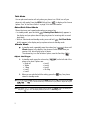
The Calls log retains information about Outgoing, Incoming, and Missed calls. You
can also view times for your last call and the time totals for all calls.
Review the Calls Log
1. In standby mode, press the MENU (left) soft key (
). The Main Menu
appears in the display.
2. Press the
jkl
key (for Calls).
3. Press the number key associated with the Calls log that you wish to review
or the function you wish to access:
•
•
•
•
•
•
Press
Press
Press
Press
Press
Press
@
abc
def
ghi
jkl
mno
for Outgoing calls.
for Incoming calls.
for Missed calls.
for Erase Logs.
for Call Timer.
for Data Counter.
Note: In cases where there is a Contacts match for a Calls log entry, the name associated with the number
appears in the display instead of the number.
Call Functions
29
Outgoing Calls
Your phone retains information about the last 20 outgoing calls and stores them in
the Outgoing calls log. You can review the Outgoing calls log for the time and date of
a call, as well as other information.
Note: To quickly view your most recent calls, briefly press
in standby mode. Up to 20 of your most
recent outgoing, incoming, and missed calls appear in the display.
SEND
1. In standby mode, press the MENU (left) soft key (
(for Calls) and
the display.
@
) then press
for Outgoing. A list of your outgoing calls appears in
2. Use the navigation keys to highlight a call, then press
jkl
OK
to view further
information about the call.
3. Press the Option (left) soft key (
). A pop-up menu containing the
following options appears in the display:
•
•
•
•
Talk — Call the selected number.
Save — Save the number to your Contacts.
Prepend — Add a prefix to the number.
Erase — Erase the selected call from your Outgoing call log. (If this is a recent
call, it will no longer appear in the Recent Calls list.)
4. Use the navigation keys to highlight an option.
5. Press the
OK
key to perform the highlighted option’s function.
Incoming Calls
Your phone retains information about the last 20 Incoming calls and stores them in
the Incoming call log. You can review the Incoming call log for the time and date of
the call, as well as other information.
1. In standby mode, press the MENU (left) soft key (
(for Calls) and
the display.
abc
) then press
for Incoming. A list of your Incoming calls appears in
2. Use the navigation keys to highlight a call, then press the
jkl
OK
key to view
further information about the call.
3. Press the Option (left) soft key (
). A pop-up menu containing the
following options appears in the display:
• Talk — Call the selected number.
• Save — Save the number to your Contacts.
• Prepend — Add a prefix to the number.
30
Calls Log
• Erase — Erase the selected call from your Incoming call list. (If this is a recent
call, it will no longer appear in the Recent Calls list.)
4. Use the navigation keys to highlight an option.
5. Press the
key to perform the highlighted option’s function.
OK
Missed Calls
Your phone retains information about the last 20 missed calls (calls that were never
answered) and stores them in the Missed call log. You can review the Missed call
log for the time and date of the call, as well as other information.
1. In standby mode, press the MENU (left) soft key (
(for Calls) and
display.
def
) then press
for Missed. A list of your missed calls appears in the
2. Use the navigation keys to highlight a call, then press the
jkl
OK
key to view
further information about the call.
3. Press the Option (left) soft key (
). A pop-up menu containing the
following options appears in the display:
•
•
•
•
Talk — Call the selected number.
Save — Save the number to your Contacts.
Prepend — Add a prefix to the number.
Erase — Erase the selected call from your Missed call list. (If this is a recent
call, it will no longer appear in the Recent Calls list.)
4. Use the navigation keys to highlight an option.
5. Press the
OK
key to perform the highlighted option’s function.
Erase Logs
You can erase all calls from the Outgoing, Incoming, and Missed calls logs
individually or you can erase All Calls from these calls logs at the same time.
Erase All Calls
1. In standby mode, press the MENU (left) soft key (
(for Calls),
ghi
(for Erase Logs), and
ghi
) then press
for All Calls.
jkl
“Erase All Calls?” appears in the display as well as the following options:
• Yes — Erases all calls in the Calls log.
• No — Cancels erasing calls.
2. Use the navigation keys to highlight the desired option, then press the OK
key.
Call Functions
31
Call Timer
View the duration of your last call, total calls, and calls made during the life cycle of
you phone using the Call Timer feature.
Note: Call Timer is not for billing purposes.
1. In standby mode, press the MENU (left) soft key (
) then press
(for Calls) and
for Call Timer. The following options appear in the
display:
• Last Call — View the duration of your last call.
• Total — View the duration of the total call, incoming and outgoing, made on
your phone since the last erasure.
• LifeTime — View the duration of all calls on your phone since activation
(LifeTime timers cannot be erased).
• Erase Total — Erases the counters for the Total call timer.
Press the number of the option you wish enter, or use the navigation keys
to highlight the option and press the OK key.
jkl
jkl
2. Press the
END
key if you wish to exit the menu.
Note: Although Total call timers can be erased, LifeTime call timers can never be erased.
Data Counter
Use Data Counter to view the amount of data that has been sent or received (or a
total of both) using the data services that your phone supports, such as Axcess
Shop. The Data Counter can be a helpful tool for monitoring data usage, especially if
your service agreement has specified limits.
1. In standby mode, press the MENU (left) soft key (
) then press
(for Calls) and
for Data Counter. The following options appear in the
display:
• Transmit — View the amount of data (in kilobytes) that your phone has
transmitted since last being reset.
• Received — View the amount of data (in kilobytes) that your phone has
received since last being reset.
• Total — View the amount of data (in kilobytes) that your phone has transmitted
and received since last being reset.
• Erase Total — Erase (reset) the Transmit, Received, and Total data
counters.
mno
32
jkl
Phone Modes
Phone Modes
Standby Mode
Standby mode is the state of your phone once it is powered on and has found a
wireless service. Your phone goes into standby mode:
• After you power the phone on.
• When you press the
key after a call or from within a menu or phone function
screen.
END
When in standby mode, you will see the time, day, and date in the display as well as
all currently active icons.
When in standby mode, you can:
• Make calls.
• Receive calls and messages.
• Access your phone’s menus.
• Change your phone’s mode.
• Activate Voice Command.
• Adjust calls ringer volume.
Receive Messages in Standby Mode
You can receive messages while in standby mode. An alert tone sounds and a
notification message appears in the display when a new message arrives.
• Press the View (right) soft key (
) to view the message now.
• Press the Ignore (left) soft key (
) to view the message later.
Talk Mode
While in a call your phone is in talk mode. Press the left soft key (
) to display a
list of In-Use menu options. (See see "In Use Menu Outline" on page 39 for more
information).
Lock Mode
When you lock your phone using the Lock Mode menu option (see see "Lock
Phone" on page 133 for more information), the following restrictions are placed on
use of your phone:
• You can receive messages and calls.
• You cannot make outgoing calls (except for emergency numbers).
• You cannot access your phone’s menus.
• The volume key is disabled.
Call Functions
33
Unlock your phone by following the prompts and entering the lock code.
Silent Mode
With a single press of the key you can silence the call ringer and tones that your
keypad makes whenever you press a key.
When you receive a call, the phone vibrates instead of ringing.
Enter Silent Mode
䡲
In standby mode, press and hold the
key.
“Entering Silent Mode” briefly appears in the display and your phone
returns to standby mode.
The Silent Mode icon (
) appears in the top line of the display.
Exit Silent Mode
䡲
In standby mode, press and hold the
key.
“Exit Silent Mode” briefly appears in the display and your phone returns
to standby mode.
Vibrate Mode
You can set your phone to vibrate whenever you receive an incoming call using
either of the following methods:
䡲
In standby mode, repeatedly press the Down volume key (
) on the
left side of the phone until Vibrate appears in the display, or do the following:
1. In standby mode, press the MENU (left) soft key (
), then press
(for Settings),
(for Sounds),
(for Volume/Vibrate), and
for
Calls.
wxyz
abc
@
@
2. Press the Left navigation key until “Vibrate” appears in the display, then
press the
OK
key.
Text Input Modes
You use your phone’s text input modes (Alpha, Symbol, Number, or T9 WORD) to
enter text, numbers, or symbols into messages, events, and other functions. The
current text input mode is indicated in the lower right part of the display.
Note: See “Entering Text” on page 46 for more information about text input modes.
34
Phone Modes
Alpha Mode
Enter characters while in Alpha mode by pressing the key with the desired
characters (such as
for “a”).
• Press the key repeatedly until the desired character (letter, number, or symbol)
appears in the display.
• Pause briefly and the displayed character is accepted and inserted into your
message.
• Press
to enter a space.
abc
Tip: To enter large numbers of symbols or numbers quickly, use Symbol mode or Number mode as
described in the following sections.
Symbol Mode
Symbol mode lets you use keypad number keys to enter symbols such as @ or %
into a text message, event, or e-mail address without going through repeated key
presses as with Alpha mode.
You press the key that corresponds with the symbol that you wish to enter. For
example, press
for an exclamation point (!).
ghi
Number Mode
Number mode lets you use keypad number keys to enter numbers into a text
message, event, or e-mail address without going through repeated key presses as
with Alpha mode.
T9 Word Text Entry Mode
T9 Word recognizes a commonly used word that is represented by a sequence of
number key presses and inserts that word into your message. (For example, entering
‘8378’ would insert ‘test’ into your message.) Using T9 Word is much faster than the
more traditional text input method (Alpha mode) and requires only one press of a key
per letter of the word that you’re entering. [For example, in Alpha mode, you would
have to enter ‘83377778’ for ‘test’ instead of entering ‘8378’ for ‘test’ as in T9 Word
mode.]
Note: See “Entering Text in T9 Word Mode” on page 48 for more information about using the T9 Word text
input mode.
Call Functions
35
Roaming
What is Roaming?
Roaming lets you use your Alltel Snap phone when you travel outside of your
Wireless Provider’s coverage area. The Roaming icon (
) appears in the top line of
the display when Roaming is active, and extra charges may apply when making or
receiving calls.
Note: Some features may be unavailable while roaming. Roaming also consumes additional power from the
battery requiring more frequent recharging. Contact your Wireless Provider for more information
about Roaming.
How Roaming Works
Roam Option lets you set roaming preferences if you move in and out of your home
network. The following roaming options are available:
• Home only — Your phone is available for normal operation only in the designated
coverage area.
• Automatic-A — Your Wireless Provider’s Preferred Roaming List (PRL) of
networks is used to acquire service. If no preferred networks are found, any digital
“A” system is acquired.
• Automatic-B — Your Wireless Provider’s PRL is used to acquire service. If no
preferred networks are found, any digital “B” system is acquired.
36
Section 4: Menu Navigation
Topics Covered
• Menu Navigation
• In Use Menu Outline
• Menus and sub-menus
This section explains the menu navigation for your phone. It also includes an outline
of all the available menus associated with your phone.
Menu Navigation
37
Menu Navigation
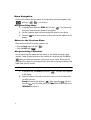
You access the menus and sub-menus in your phone by using the navigation keys
( OK ), soft keys (
), or a shortcut.
Navigate Using Keys
1. In standby mode, press the MENU (left) soft key (
). The Main menu
(the first of several menus) appears in the display.
2. Use the navigation keys to browse through the menus in your phone.
3. Press the
OK
key to select a menu or sub-menu that then appears in the
display.
Return to the Previous Menu
There are two methods for exiting a menu or list.
• Press the Back (right) soft key (
).
• Press the BACK key (
).
BACK
Navigate Using a Shortcut
You can also access the menus and sub-menus in your phone using menu item
numbers. Using the menu and sub-menu numbers in conjunction with the OK key
( OK ) takes you directly to the menu or sub-menu of your choice. Before you can
navigate using a shortcut, you’ll need to know the menu or sub-menu number of the
feature that you wish access.
Note: Use the list of menus and sub-menus, which begins on page 40, to navigate using shortcuts.
1. In standby mode, the MENU (left) soft key (
). The Main menu appears
in the display.
2. Press the number of the menu, sub-menu, and so on for the feature that
you wish to access.
Example: Press the left soft key (
), then press the
key, and
then the
key. This takes you to the Tools (MENU 8), and then to the
To Do List (sub-menu 4).
tuv
ghi
38
In Use Menu Outline
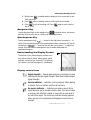
Navigation key shortcuts
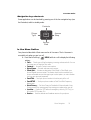
Some applications can be launched by pressing one of the four navigation keys (see
the illustration) while in standby mode.
Contacts
Ringer
Type
OK
Axcess
Shop
Axcess
Web
In Use Menu Outline
Your phone includes both a Main menu and an In-Use menu. The In-Use menu is
accessible only when you are in a call.
1. Press the left soft key (
) MENU, while in a call to display the following
options:
• Calls — Checks your call log for outgoing, incoming, and missed calls. You can
also erase your call logs from this menu.
• Contacts — Accesses Contacts menu options.
• Voice Memo — Records and saves voice memos.
• Silent/Quit — Activates or deactivates Silent Mode. In Silent Mode, your
phones keypad tones are muted. This feature should not be used when you
access automated services that require you to select options, or enter numbers
(such as your voice mail password).
• Send Tel# — Send your phone number to the other party of the call.
• Send DTMF — Send your phone number as Dual-Tone Multi-Frequency
dialing tones.
• Voice Privacy — Set Voice Privacy to Standard or Enhanced mode. Voice
Privacy prevents the receiving party from seeing your number when you call.
• Location — Enable the GPS feature for emergency calls only (911 Only), or
fully enable GPS (Location On).
• Version — View the software and hardware versions for your phone.
Menu Navigation
39
2. Use the navigation keys to highlight an option. Press the
OK
key to select
the In-Use menu option of your choice.
You can also press the MUTE/Unmute (left) soft key (
cannot hear you) or unmute the current call.
3. Press the MSG (right) soft key (
) to mute (caller
) to access the Messages menu to
receive, review, and send messages during the current call.
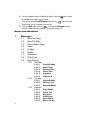
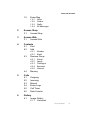
Menus and sub-menus
1
Messages
1.1
1.2
1.3
1.4
1.5
1.6
1.7
1.8
1.9
New Text Msg
New Pic Msg
New Handwr. Msg
Inbox
Outbox
Drafts
Voicemail
Wap Push
Msg Setting
1.9.1
Text Msg
1.9.1.1
1.9.1.2
1.9.1.3
1.9.1.4
1.9.1.5
1.9.1.6
1.9.2
Pic Msg
1.9.2.1
1.9.2.2
1.9.2.3
1.9.3
SaveInOutbox
Delivery Ack
Retrieval Mode
General
1.9.3.1
1.9.3.2
1.9.3.3
1.9.3.4
1.9.3.5
1.9.3.6
40
SaveInOutbox
Insert Sign.
Delivery Ack
Direct View
Signature
Callback #
Entry Mode
Quick Text
Msg Alert
Auto Erase
Voice Mail #
Block Sender
Menus and sub-menus
1.0
Erase Msg
1.0.1
1.0.2
1.0.3
1.0.4
2
Axcess Shop
2.1
3
Axcess Shop
Axcess Web
3.1
4
Axcess Web
Contacts
4.1
4.2
Find
Add
4.2.1
4.2.2
4.3
4.4
Friend
Family
Colleague
Business
General
Memory
Calls
5.1
5.2
5.3
5.4
5.5
5.6
6
Number
Email
Rename Group
4.3.1
4.3.2
4.3.3
4.3.4
4.3.5
5
Inbox
Outbox
Drafts
All Messages
Outgoing
Incoming
Missed
Erase Logs
Call Timer
Data Counter
Gallery
6.1
Image Gallery
6.1.1
Preloaded
Menu Navigation
41
6.1.2
6.1.3
6.2
Melody Gallery
6.2.1
6.2.2
6.2.3
7
Preloaded
Downloaded
Shuffle
Camera
7.1
7.2
8
Downloaded
Shuffle
Take a Photo
Photo Gallery
Tools
8.1
Voice Kit
8.1.1
8.1.2
8.1.3
8.1.4
Voice Command
Voice Memo
TTS
Voice Setting
8.1.4.1
Digit Dialing
8.1.4.1.1
8.1.4.1.2
8.1.4.2
8.1.4.3
8.1.4.4
Sensitivity
Choice Lists
Sound
8.1.4.4.1
8.1.4.4.2
8.1.4.4.3
8.1.4.4.4
8.1.4.5
8.1.4.6
8.2
8.3
8.4
8.5
8.6
42
Alarm Clock 1
Alarm Clock 2
Alarm Clock 3
Memo Pad
Prompts
Digits
Names
Name Settings
Voice Launch
About
Today
Calendar
To Do List
Alarm Clock
8.5.1
8.5.2
8.5.3
Adapt Digits
Reset Digits
Menus and sub-menus
8.7
8.8
8.9
9
World Time
Calculator
Count Down
Settings
9.1
Display
9.1.1
9.1.2
Menu Style
Animation
9.1.2.1
Wallpaper
9.1.2.1.1
9.1.2.1.2
9.1.2.1.3
9.1.2.2
Opening
9.1.2.2.1
9.1.2.2.2
9.1.2.3
9.2
Preloaded
My Image
Banner
Backlight
9.1.4.1
9.1.4.2
9.1.4.3
9.1.4.4
9.1.5
9.1.6
9.1.7
9.1.8
9.1.9
Preloaded
My Image
Closing
9.1.2.3.1
9.1.2.3.2
9.1.3
9.1.4
Preloaded
My Image
Shuffle
LCD
Keypad
Power save
Brightness
Front Contrast
Auto-Hyphen
Dial Digits
Dial Screen
Theme Color
Sounds
9.2.1
Volume/Vibrate
9.2.1.1
9.2.1.2
9.2.1.3
9.2.2
9.2.3
Calls
Messages
Alarm
Vibrating Alert
Ringer Type
9.2.3.1
9.2.3.2
Calls
Messages
Menu Navigation
43
9.2.3.3
9.2.3.4
9.2.3.5
9.2.4
Key Beep
9.2.4.1
9.2.4.2
9.2.5
9.3
Flip Tone
Power On/Off
Roam Ringer
Whisper Mode
Call Answer
Auto Answer
Auto Retry
Data
TTY Mode
Network
9.4.1
9.4.2
9.5
9.6
9.7
Set NAM
Roam Option
Clock Set (Disabled in digital service mode.)
Language
Security
9.7.1
9.7.2
9.7.3
Lock Phone
Change Lock
Emergency #
9.7.3.1
9.7.3.2
9.7.3.3
44
Minute Beep
Service
Connect
Disconnect
Fade
Roam
Privacy
Call Options
9.3.1
9.3.2
9.3.3
9.3.4
9.3.5
9.4
Volume
Tone Length
Alerts
9.2.5.1
9.2.5.2
9.2.5.3
9.2.5.4
9.2.5.5
9.2.5.6
9.2.5.7
9.2.6
9.2.7
9.2.8
9.2.9
Alarm
Data
Calendar
911
*911
#911
Menus and sub-menus
9.7.4
9.7.5
Voice Privacy
Restriction
9.7.5.1
9.7.5.2
9.7.6
9.7.7
9.8
9.9
9.0
Outgoing
Incoming
Erase Memory
Reset Phone
Location
Airplane Mode
Phone Info
9.0.1
9.0.2
9.0.3
Version
Phone Number
Software Update
Menu Navigation
45
Section 5: Entering Text
Topics Covered
• Text Entry Modes
• Changing the Text Entry Mode
• Entering Text in Alpha (ABC) Mode
• Entering Text in T9 Word Mode
• Entering Upper and Lower Case Letters
• Entering Symbols
• Entering Numbers
This section outlines how to select the desired text input mode when entering
characters into your phone. This section also describes how to use the T9 predictive
text entry system to reduce the number of key strokes associated with entering text.
46
Text Entry Modes
Text Entry Modes
You can compose text messages using alphabetical characters, symbols, and
numbers. Each method of character entry (symbol, number, and so on) is called a
text entry mode. There are four text entry modes, as indicated:
• Alpha — Alphabetical text entry mode. Options are:
• ABC — All upper case
• Abc — Initial capital
• abc — All lower case
• Symbol — Symbol entry mode. Enter symbols into your message by pressing the
corresponding number that appears above it in the display.
• Number — Number entry. Enter numbers by pressing the corresponding key on
the keypad.
• T9 Word — Predictive text mode. Press each key only once to enter the letter of
the word that you’re spelling.
Your current mode of text entry (Abc, Symbol, 123, or T9 Word) is indicated in the
lower left part of the display when composing a text message.
Note: Each of the text entry modes are explained in greater detail in “Messaging” on page 64.
Changing the Text Entry Mode
1. While composing a text message, press the Option (left) soft key (
). A
pop-up menu containing the following options appears in the display:
• Alpha / Symbol / Number / T9 Word
• Text Format
• Add Media
• Quick Text
Alpha is highlighted. Use the Left and Right navigation keys to show any
of the other three text entry modes.
2. Press the
OK
key to select the highlighted text mode.
Tip: You can also change the text entry mode to abc, 123, or T9 word by by repeatedly pressing and
holding the
key until the desired mode appears in the lower left side of the screen.
Entering Text
47
Entering Text in Alpha (ABC) Mode
Note: See “Changing the Text Entry Mode” on page 47 for instructions on changing text entry modes.
1. Enter characters while in ABC (Alpha) mode by pressing the key with the
desired characters (such as, pressing
ghi
once for “G”).
2. Press the key repeatedly until the desired character appears in the display
(such as, pressing
ghi
two times for “H”).
3. Pause briefly and the displayed character is accepted and inserted into
your message.
4. Press the
key to enter a space.
Entering Text in T9 Word Mode
T9 Word recognizes commonly used words for a sequence of keypresses and
inserts the word into your message. Using T9 mode is much faster than the more
traditional method Alpha mode, since T9 requires only one key press per letter of the
word that you are spelling.
Note: See “Changing the Text Entry Mode” on page 47 for instructions on changing text entry modes.
1. While in T9 Word mode, press each key that corresponds to a desired
letter, in sequence, one time.
For example, if you press the key sequence
word “bad” appears on the screen.
abc
def
abc
, and the
2. When you have completed pressing all the keys for the desired word,
review the word displayed in your text.
3. If the word is not the one you meant to enter, press the
key to show
the next word that matches the sequence of keys that you pressed.
For example, when you press the key sequence
, the
word “and” appears on the screen. Suppose the word you want is “cod”.
Just press the
key until “cod” appears in the display.
mno
abc
def
Now, for practice, enter the work ‘Samsung’ into your message by
pressing each of the following keys only once:
pqrs
S
48
abc
A
mno
M
pqrs
S
tuv
U
mno
N
ghi
G
Entering Upper and Lower Case Letters
T9 Word recognizes that the most commonly used word for the numeric
sequence you just entered is “Samsung.”
Entering Upper and Lower Case Letters
In Abc and T9 Word modes, you can select to enter only upper case letters (ABC/T9
WORD), only lower case letters (abc/T9 word), or a mix of the two (Abc/T9 Word).
1. While in T9 Word or Abc mode, use the
capitalization setting. Simply press the
desired capitalization mode appears.
key to change the
key repeatedly until the
The text entry mode indicator in the lower left corner of the screen
changes to indicate the current capitalization setting.
For example, if the left soft key label is ABC, and you want to enter the
word “ball”, press the
key until the left soft key label changes to
abc, then enter the word “ball”.
Tip: To enter a capital letter within a word, such as “SimTam”, change the capitalization setting to Abc at
the beginning of the word and before entering the “T”. The capitalization setting will automatically
change to abc after you enter each upper case letter.
Entering Symbols
Symbol mode enables you to enter symbols such as @ or % in a text message.
1. While composing a text message, press the Option (left) soft key (
). A
pop-up menu containing the following options appears in the display:
• Alpha / Symbol / Number / T9 Word
• Text Format
• Add Media
• Quick Text
Alpha is highlighted. Use the Left and Right navigation keys to display
Symbol, then press the OK key. The first of four screens of symbols
appear in the display.
2. Use the Left and Right navigation keys to page through the other symbols,
if necessary.
3. Enter the key that corresponds with the symbol that you wish to enter. For
example, on the first page, press
ghi
for an exclamation point (!).
4. Repeat steps 2 and 3 to insert as many symbols into your message as
desired.
Entering Text
49
Entering Numbers
Enter numbers into a text message while in number mode (123).
Note: See “Changing the Text Entry Mode” on page 47 for instructions on changing text entry modes.
䊳
50
While in 123 mode, press the key containing the corresponding number
that you wish to insert into your message.
Section 6: Understanding Your Contacts
Topics Covered
• Your Contacts List
• Adding a New Contacts Entry
• Finding a Contacts Entry
• Editing an Existing Contact Entry
• Renaming a Contacts Group
• Deleting a Contact Entry
• Memory
This section explains how to manage your daily contacts by storing their name and
number in your Contacts. Contacts entries can be sorted by name, entry, or group.
Understanding Your Contacts
51
Your Contacts List
Your Contacts list can store up to 500 numbers, with each contact having up to five
associated phone numbers, an e-mail address, and a picture ID.
Each phone number can be up to 32 digits in length, including hard pauses. Contact
names can be up to 22 characters in length. You can also specify a memory location
for each entry, and you can restrict access to the Contacts list to prevent
unauthorized use.
Tip: One-Touch, Two-Touch, and Three-Touch Dialing allow you to call numbers stored in your Contacts
list faster. (See page 25.)
Open Your Contacts List
1. In standby mode, press the MENU (left) soft key (
), then press
for Contacts. The following Contacts sub-menus and options appear in the
display:
• Find — Find a phone number By Name, By Entry, or By Group.
• Add — Add a number or e-mail to your Contacts.
• Rename Group — Rename one of your five groups.
• Memory — View available memory for dial entries.
2. Use the navigation keys to highlight the Contacts sub-menu or option of
your choice, and press the OK key.
ghi
Tip: You can also access a sub-menu or menu option by pressing the number key corresponds to the menu
item number. For example, press
for Add.
abc
Adding a New Contacts Entry
You can add an entirely new entry to your Contacts list or add information to an
existing entry.
Using the Contacts Add Option
1. In standby mode, press the MENU (left) soft key (
), then press
(for Contacts) and
for Add. The following options appear in the
display:
• Number — Lets you enter a number to be dialed when calling the new contact.
• Email — Lets you enter an e-mail address for the new contact.
2. Use the navigation keys to highlight the desired option and press the OK
key.
abc
52
ghi
Adding a New Contacts Entry
3. Enter the phone number or e-mail address for the new Contacts entry, then
press the OK key. The following options appear in the display:
• New Entry — Lets you create a new Contacts entry.
• Find — Lets you add the number or e-mail address you just entered to an
existing Contacts entry.
4. Use the navigation keys to highlight New Entry, then press the OK key.
The following (number type) icons appear in the display:
Home
Work
My Circle
Fax
Mobile
5. Use the navigation keys to highlight the number type that matches your
new entry and press the OK key. The Contacts information screen
appears in the display with the Name field highlighted.
6. Enter a name or phrase to associate with the type using the keypad. (See
“Entering Text” on page 46 for more information.)
7. Press the
OK
key to save the entry.
Adding Pauses to Contacts Numbers
When you call automated systems (like banking services), you are often required to
enter a password or account number. Instead of manually entering the numbers
each time, you can store the numbers in your Contacts along with special characters
called pauses.
• P pause — A hard pause stops the calling sequence until further input from you.
• T pause — A two-second pause stops the calling sequence for two seconds and
then automatically sends the remaining digits.
Tip: You can enter multiple two-second pauses to extend the length of a pause. For example, two
consecutive two-second pauses cause a total pause time of four seconds.
Note: Keep in mind that pauses count as digits towards the 32-digit maximum.
Store Pauses in a Contacts Entry
1. In standby mode, enter the number you wish to store (such as your bank’s
teleservice number).
Understanding Your Contacts
53
2. Press the Option (left) soft key (
). The following pause menu options
appear in the display:
• P pause — a hard pause (awaits input from you).
• T pause — a two-second pause.
3. Use the navigation keys to highlight the pause option of your choice.
4. Press the
OK
key to enter the highlighted pause into your number
sequence.
5. When you’re finished entering the number and pauses, press the Save
(right) soft key (
) to store the number in your Contacts.
Saving a Number from a Call
Once you’ve finished a call, you can save the number of the caller to your Contacts
list.
Note: If the call was incoming and Caller ID information was unavailable, then the Save option is also
unavailable.
1. After you press the
key to end your call, the call time, length of call,
phone number, and name of the other party (if available) appear in the
display.
END
2. Press the Save (right) soft key (
). The following options appear in the
display:
• New Entry — Lets you create a new Contacts entry.
• Find — Lets you add the number or e-mail address you just entered to an
existing Contacts entry.
Tip: You can also store a phone number by entering the number, and pressing the Save (right) soft key
( ).
3. Use the navigation keys to highlight New Entry, then press the
OK
key.
The following (number type) icons appear in the display:
Home
Work
My Circle
Fax
Mobile
4. Use the navigation keys to highlight the number type that matches your
new entry and press the OK key. The Contacts information screen
appears in the display with the Name field highlighted.
54
Adding a New Contacts Entry
5. Enter a name or phrase to associate with the type using the keypad. (See
“Entering Text” on page 46 for more information.)
6. Press the
OK
key to save the entry.
Storing Number from a Calls Log
You can store numbers from the Calls logs to your Contacts.
1. In standby mode, press the MENU (left) soft key (
), then press
jkl
for Calls.
2. Press the corresponding number on the keypad to view the following Calls
logs:
• Press
for Outgoing
• Press
for Incoming
• Press
for Missed
A list of your calls appears in the display.
@
abc
def
3. Use the navigation keys to highlight the number you wish to store in
Contacts, then press the
OK
key.
4. Press the Option (left) soft key (
). The following options appear in the
display:
• Talk — Calls the selected number.
• Save — Saves the selected number to your Contacts list.
• Prepend — Lets you add or change digits to the beginning of the selected
number (such as adding a “1” to a long distance number).
• Erase — Deletes the selected number from the selected Calls log.
5. Use the navigation keys to highlight Save, then press the OK key. The
following options appear in the display:
• New Entry — Lets you create a new Contacts entry.
• Find — Lets you add the number or e-mail address you just entered to an
existing Contacts entry.
6. Use the navigation keys to highlight New Entry, then press the OK key.
The following (number type) icons appear in the display:
Home
Work
My Circle
Fax
Mobile
7. Use the navigation keys to highlight the number type that matches your
new entry and press the OK key. The Contacts information screen
appears in the display with the Name field highlighted.
Understanding Your Contacts
55
8. Enter a name or phrase to associate with the type using the keypad. (See
“Entering Text” on page 46 for more information.)
9. Press the
OK
key to save the entry.
Finding a Contacts Entry
Voice Method
Use the VoiceSignal Contacts command to view contact information for any named
contact stored in your Contacts list by saying the name.
Note: The Contacts command shows the requested contact information in the display but does not dial any
phone numbers for the contact.
To look up information for a specific contact:
1. In standby mode, press and hold the
key to launch VoiceSignal.
“Say a Command” appears in the display and is pronounced through the
speaker.
2. Say “Contacts”.
VoiceSignal prompts you to “Say the name.”
3. Speak clearly and say the full name of the person you want to call, exactly
as it is entered in your contact list.
• If VoiceSignal recognizes the name you said, the contact information for that
name appears in the display.
• If VoiceSignal does not recognize the name you said, a choice list of up to three
names appears in the display, and VoiceSignal prompts you with “Did you
say?” followed by the first name on the list.
4. Say “Yes” to confirm the name or “No” to hear the next name, or use the
keypad to select the correct name from the list. (See see "Choice Lists
Settings" on page 108, for more information.)
• To say the name again, press the Repeat (right) soft (
) key.
• To exit VoiceSignal without dialing, press the Settings (left) soft (
) key and
press the Cancel (right) soft (
).
5. The contact information for the name you selected appears in the display.
Keypad Methods
If you’ve stored a named contact in your Contacts list, Find lets you locate the entry
quickly.
1. In standby mode, do one of the following:
• Press the Up navigation key (Contacts Find shortcut).
56
Finding a Contacts Entry
• Press the MENU (left) soft key (
), then press
(for Contacts) and
for Find.
The Find screen appears in the display with By Name showing.
ghi
@
2. Use the navigation keys to select the method you wish to use to find the
entry. The available Find methods are:
• By Name — Search the Contacts alphabetically by name.
• By Entry — Search the Contacts by entry number.
• By Group — Search the Contacts by selecting from one of the five available
groups.
• By Number — Search the Contacts by phone number.
Find by Name
This option lets you find a Contacts list entry by its contact name.
1. In the Find screen, use the navigation keys to show By Name in the
display.
2. Enter the name of the contact as it appears in your Contacts list.
Example: If you saved a contact name as “Amy Smith”, begin your search for that contact by pressing
for “A”.
abc
Note: As you enter letter, the entry number and names of the closest matches (thus far) appear in the
display.
3. When the desired Contacts entry is listed in the display, highlight the
contact using the navigation keys (if necessary). Then:
Press the
SEN
D
key to dial the number associated with the named contact.
— Or —
Press the
OK
key to view information about the contact.
— Or —
Press the Option (left) soft key (
). The following options appear in the
display:
• Edit — Lets you edit details of the highlighted contact.
• Erase — Erases the selected contact.
• Add New — Lets you add a new number to your Contacts list or to the selected
contact.
• Send Text Msg — Lets you send a text message to the selected contact.
• Send Pic Msg — Lets you send a picture message to the selected contact.
Understanding Your Contacts
57
4. Use the navigation keys to highlight an option, then press the
OK
key to
enter that option’s sub-menu.
Find by Entry
This option lets you find a Contacts list entry by its Location number.
1. In the Find screen, use the navigation keys to show By Entry in the
display.
2. When the desired Contacts entry is listed in the display, highlight the
contact using the navigation keys (if necessary). Then do one of the
following:
• Press the
key to dial the number associated with the named contact.
• Press the OK key to view information about the contact.
• Press the Option (left) soft key ( ). The following options appear in the
display:
• Edit — Lets you edit details of the highlighted contact.
• Erase — Erases the selected contact.
• Add New — Lets you add a new number to your Contacts list or to the selected
contact.
• Send Text Msg — Lets you send a text message to the selected contact.
• Send Pic Msg — Lets you send a picture message to the selected contact.
3. Use the navigation keys to highlight an option, then press the OK key to
enter that option’s sub-menu.
SEND
Find by Group
This option lets you find a Contacts list entry with a specific Group name.
1. In the Find screen, use the navigation keys to show By Group in the
display.
2. Use the navigation keys to highlight the Group field.
3. Use the navigation keys to show the name of the group you wish to search.
As each group name appears in the display, entries that are assigned that
group name are listed in the display beneath it.
4. When the desired Contacts entry is listed in the display, highlight the
contact using the navigation keys (if necessary). Then, do one of the
following:
• Press the
key to dial the number associated with the named contact.
• Press the OK key to view information about the contact.
• Press the Option (left) soft key ( ). The following options appear in the
display:
SEND
58
Editing an Existing Contact Entry
• Edit — Lets you edit details of the highlighted contact.
• Erase — Erases the selected contact.
• Add New — Lets you add a new number to your Contacts list or to the selected
contact.
• Send Text Msg — Lets you send a text message to the selected contact.
• Send Pic Msg — Lets you send a picture message to the selected contact.
5. Use the navigation keys to highlight an option, then press the OK key to
enter that option’s sub-menu.
Editing an Existing Contact Entry
Once stored in the Contacts, an entry can be changed quite easily.
1. In standby mode, press the Up navigation key (Contacts Find shortcut).
The Find screen appears in the display with By Name showing.
2. Use the navigation keys to display the search method that you wish to use
(By Name, By Group, By Entry, or By Number).
3. Enter information to find the Contacts list entry, or use the navigation keys
to highlight the entry containing the number that you wish to edit.
4. Press the Option (left) soft key (
). The following options appear in the
display:
• Edit — Lets you edit details of the highlighted contact.
• Erase — Erases the selected contact.
• Add New — Lets you add a new number to your Contacts list or to the selected
contact.
• Send Text Msg — Lets you send a text message to the selected contact.
• Send Pic Msg — Lets you send a picture message to the selected contact.
5. The Edit option is highlighted.
6. Press the
OK key. The Contacts information screen appears in the display
with the contact name highlighted.
7. Use the navigation keys to highlight a number stored in this contact entry.
8. Press
BACK
to backspace and delete numbers.
9. Press and hold
BACK
to clear all numbers in the highlighted field.
10. When you’re finished editing the number, press the
OK key. Your changes
are saved and a confirmation message appears in the display.
Understanding Your Contacts
59
Assigning Speed Dial Numbers
When you add an entry to the Contacts list, you have the option of letting the phone
assign a Location (Speed Dial) number or of selecting or entering a Location number.
You can also change a contact’s Location number.
1. In standby mode, press the Up navigation key (Contacts Find shortcut).
The Find screen appears in the display with By Name showing.
2. Use the navigation keys to display the search method that you wish to use
(By Name, By Group, By Entry, or By Number).
3. Enter information to find the Contacts list entry, or use the navigation keys
to highlight the entry containing the Location number that you wish to
change.
4. Once the entry is highlighted, press the
OK
key.
5. Use the navigation keys to highlight Location.
6. Press the Edit (left) soft key (
).
7. Enter, or use the navigation keys to select, the new SpeedDial Location
number.
8. Press the
OK
key to save your changes.
Selecting the Number to be Speed Dialed
If a contact has more than one stored number (such as Home and Office), you can
select which of these numbers your phone will dial when you speed dial that contact.
1. In standby mode, press the Up navigation key (Contacts Find shortcut).
The Find screen appears in the display with By Name showing.
2. Use the navigation keys to display the search method that you wish to use
(By Name, By Group, By Entry, or By Number).
3. Enter information to find the Contacts list entry, or use the navigation keys
to highlight the entry containing the Location number that you wish to
change.
4. Once the entry is highlighted, press the
OK
key.
5. Use the navigation keys to highlight SpeedDial.
6. Press the Edit (left) soft key (
).
7. Use the Left and Right navigation keys to select the Number Type icon for
the number you want the phone to dial when you speed dial this contact.
8. Press the
60
OK
key to save your changes.
Editing an Existing Contact Entry
Add a Number or E-mail Address to an Existing Entry
1. In standby mode, press the MENU (left) soft key (
), then press
(for Contacts) and
for Add. The following options appear in the
display:
• Number — Lets you enter a number to be dialed when calling the new contact.
• Email — Lets you enter an e-mail address for the new contact.
2. Use the navigation keys to highlight the desired option and press the OK
key.
ghi
abc
3. Enter the phone number or e-mail address for the new Contacts entry, then
press the OK key. The following options appear in the display:
• New Entry — Lets you create a new Contacts entry.
• Find — Lets you add the number or e-mail address you just entered to an
existing Contacts entry.
4. Use the navigation keys to highlight Find, then press the OK key.
5. Use the navigation keys to show the search method that you wish to use
(By Name, By Group, By Entry, or By Number).
6. Enter information to find the entry and/or use the navigation keys to
highlight the desired entry and press the
appears in the display.
OK
key. The Select Type screen
The following number types appear in the display:
Home
Work
My Circle
Fax
Mobile
— Or —
The following address types appear in the display:
Alias
E-mail
7. Use the navigation keys to highlight the number type or address type that
matches the number or e-mail address you are adding, then press the
key.
8. Press the
OK
OK key again at the Contacts menu. The number is added to
the existing entry.
Understanding Your Contacts
61
Edit an Existing E-mail Address
1. In standby mode, press the Up navigation key (Contacts Find shortcut).
The Find screen appears in the display with By Name showing.
2. Use the navigation keys to select the search method that you wish to use
(By Name, By Group, By Entry, or By Number).
3. Enter information to fine the entry, or use the navigation keys to highlight
the entry that you wish to edit.
4. Once the entry is highlighted, press the Option (left) soft key (
). A
pop-up menu appears in the display with Edit highlighted.
5. Press the
OK
key.
6. Use the navigation keys to highlight the E-mail field (labeled with the @
symbol).
7. Use the keypad to edit the E-mail address. (See “Entering Text” on page
46 for more information.)
To insert the @ symbol, press the Option (left) soft key (
menu appears in the display with Alpha highlighted.
8. Use the navigation keys to select Symbol, then press the
9. Press
). A pop-up
OK
key.
(@ symbol), and enter the remainder of the e-mail address
using the keypad. (See “Entering Text” on page 46 for more information.)
abc
10. Press the Option (left) soft key (
).
11. Use the navigation keys to highlight .com, then use the navigation keys to
show the desired domain type (.com, .edu, .net), then press the
12. Press the
OK
OK
key.
key to save your changes.
Renaming a Contacts Group
Use this option to rename a group in your Contacts list.
1. In standby mode, press the MENU (left) soft key (
), then press
(for Contacts) and
for Rename Group. The following default group
names (or any changed group names) appear in the display:
• Friend
• Family
• Colleague
• Business
• General
def
62
ghi
Deleting a Contact Entry
2. Use the navigation keys to highlight the group that you wish to rename,
then press the OK key. The current name of the group appears in the
display with a flashing cursor at the end of the name.
3. Enter a new group name using the keypad, then press the
OK
key. (See
“Entering Text” on page 46 for more information.)
Deleting a Contact Entry
1. In standby mode, press the Up navigation key (Contacts Find shortcut).
The Find screen appears in the display with By Name showing.
2. Use the navigation keys to display the search method that you wish to use
(By Name, By Group, By Entry, or By Number).
3. Enter information to find the entry, or use the navigation keys to highlight
the entry that you wish to erase.
4. Press the Option (left) soft key (
). A pop-up menu containing the
following options appears in the display:
• Edit — Lets you edit details of the highlighted contact.
• Erase — Erases the selected contact.
• Add New — Lets you add a new number to your Contacts list or to the selected
contact.
• Send Text Msg — Lets you send a text message to the selected contact.
• Send Pic Msg — Lets you send a picture message to the selected contact.
5. Use the navigation keys to highlight Erase.
6. Press the
OK
key. The phone prompts you to confirm the erasure.
7. Use the navigation keys to highlight Yes or No, then press the
OK
key.
Memory
Use the Memory sub-menu to view the amount of Contacts entries you have stored,
as well as the remaining memory.
䡲
In standby mode, press the MENU (left) soft key (
), then press
(for Contacts) and
for Memory. The amounts of memory used and
remaining for Contacts entries appear in the display.
ghi
ghi
Understanding Your Contacts
63
Section 7: Messaging
Topics Covered
• Creating and Sending New Messages
• Message Send Options
• Retrieving New Messages
• Voicemail
• Message Folders
• Message Settings
• Deleting Messages
This section explains how to create, send, receive, and view different types of
messages. This section also includes the features and functionality associated with
messaging.
64
Creating and Sending New Messages
Creating and Sending New Messages
This section guides you through the procedure to create and send various types of
messages.
Creating and Sending a Text (TXT) Message
1. In standby mode, do one of the following:
• Press the MESSAGE (right) soft key (
).
• Press the MENU (left) soft key (
), then press
2. Press
for New Text Msg.
@
(for Messages).
@
3. Enter the phone number of the recipient, then press the
OK
key.
4. Enter the text for your message using the keypad. (See “Entering Text” on
page 46 for more information.)
5. At any point while composing a message, press the Option (left) soft key
(
). The following options appear in the display:
• Alpha — The entry mode for your message. Other modes, which are hidden,
are Symbol, Number, and T9 Word. Use the navigation keys to show each of
the text entry modes.
• Text Format — Choose the size, alignment, bold, italic, and other options for
formatting your text.
• Add Media — Add a picture, animation, or melody to your message.
• Quick Text — Insert a pre-composed message into the body of your current
message.
6. Once you’re finished entering your message, press the OK key. The
following New Message options appear in the display:
• Edit Send To — Edit the recipient’s Send To number.
• Edit Text — Edit the content of your message.
• Send Options — Choose the Priority, Validity, whether you wish to have a
Delivery Acknowledgement, Insert a Signature, and whether you wish to Defer
Delivery of the message. (See “Message Send Options” on page 69 for more
information.)
• Save in Draft — Save the message to your Draft folder.
• Save Text — Save the text in your message as a Quick Text message. Quick
Text messages are pre-composed messages that can be inserted into any
message you choose.
7. To send your message, press the SEND (left) soft key (
).
Creating and Sending a Media Message
1. In standby mode, press the MESSAGE (right) soft key (
@
), then press
for New Text Msg.
Messaging
65
2. Enter the phone number of the recipient, then press the
OK
key.
3. Enter the text for your message using the keypad. See “Entering Text” on
page 46 for more information.)
4. At any point while composing a message, press the Option (left) soft key
(
). The following options appear in the display:
• Alpha — The entry mode for your message. Other modes, which are hidden,
are Symbol, Number, and T9 Word. Use the navigation keys to display each of
the text entry modes.
• Text Format — Choose the size, alignment, bold, italic, and other options for
formatting your text.
• Add Media — Add a picture, animation, or melody to your message.
• Quick Text — Insert a pre-composed message into the body of your current
message.
5. Press
(for Add Media). The following options appear in the display:
• Add Picture — Lets you add a preloaded or downloaded photo.
• Add Animation — Lets you add a preloaded or downloaded animation.
• Add Melody — Lets you add a preloaded or downloaded melody.
6. Once you’re finished entering your message text and/or adding media,
press the OK key. The following New Message options appear in the
display:
• Edit Send To — Edit the recipient’s Send To number.
• Edit Text — Edit the content of your message.
• Send Options — Choose the Priority, Validity, whether you wish to have
Delivery Acknowledged, and whether you wish to Defer Delivery of the message.
See “Message Send Options” on page 69 for more information on these
settings.
• Save in Draft — Save the message to your Draft folder.
• Save Text — Save the text in your message as a Quick Text message. Quick
Text messages are pre-composed messages that can be inserted into any
message you choose.
7. To send your message, press the Send (left) soft key (
).
def
Creating and Sending a Picture Message
1. In standby mode, press the MESSAGE (right) soft key (
), then press
for New Pic Msg. The New Pic Message screen appears in the
display with the Send To field highlighted.
abc
2. Enter the phone number or e-mail address of the recipient, then press the
Down navigation key.
66
Creating and Sending New Messages
Press the Option (left) soft key (
). The following options appear in the
display:
• Contacts — Find and select a recipient from your Contacts list.
• Number — The entry mode for your message. Other modes, which are hidden,
are T9 Word, Alpha, Symbol, and Number. Use the navigation keys to display
each of the text entry modes.
• .com — The domain name for the recipient e-mail address. Other domains,
which are hidden, are .edu and .net. Use the navigation keys to display each of
the domain names.
• OnlineAlbum — Sets your Online Album as the recipient of your picture.
(Contact your Wirless Carrier for more information.)
• Save Address — Add the recipient’s number or e-mail address to your
Contacts list.
• Recent Calls — Find and select a recipient from your Recent Calls log.
3. Enter the text for the Subject of your message using the keypad, then press
the Down navigation key. (See “Entering Text” on page 46 for more
information.)
Press the Option (left) soft key (
). The following options appear in the
display:
• T9 Word
• Alpha
• Symbol
• Number
4. Select a picture to include with your message, then press the Down
navigation key.
Press the Option (left) soft key (
). The following options appear in the
display:
• Photo Gallery — Lets you add a photo from the gallery or take a new photo.
• Image Gallery — Lets you add a downloaded image.
• Erase — Lets you remove a photo from your message.
5. Enter the text for your message using the keypad, then press the Down
navigation key. (See “Entering Text” on page 46 for more information.)
Press the Option (left) soft key (
). The following options appear in the
display:
• Alpha — The entry mode for your message. Other modes, which are hidden,
are Symbol, Number, and T9 Word. Use the navigation keys to display each of
the text entry modes.
Messaging
67
• Quick Text — Insert a pre-composed message into the body of your current
message.
6. Select a sound file to include with your message, then press the Down
navigation key.
Press the Option (left) soft key (
). The following options appear in the
display:
• Sounds — Lets you add a preloaded melody or a recorded sound file to your
message.
• Erase — Lets you remove a melody or sound file from your message.
7. Once you’re finished composing your message, press the Next (right) soft
key (
). The following SEND NEW options appear in the display:
• Preview — View and play the message as the recipient will see and hear it.
• Send Options — Choose the Priority, Validity, whether you wish to have
Delivery Acknowledged, and whether you wish to Defer Delivery of the message.
See “Message Send Options” on page 69 for more information on these
settings.
• Save in Draft — Save the message to your Drafts folder.
8. To send your message, press the SEND (left) soft key (
).
Creating and Sending a Handwritten Message
New Handwr. Msg lets you quickly send handwritten messages as pictures, rather
than using the keypad to enter your message.
1. In standby mode, press the MESSAGE (right) soft key (
), then press
for New Handwr. Msg. The camera viewfinder screen appears in the
display in Sketch mode (that is, high contrast).
def
2. Position your handset so that the complete text of the message appears
within the image corners. See “Simple Snap Shot” on page 82 for more
information.
Tip: For best results, write your message on white or light-colored, unruled paper (that is, no lines).
3. Use the Left and Right navigation keys to increase magnification of (“zoom
in on”) the message, as needed.
4. Press the
OK key. “Digitizing...” appears in the display, followed by a
high-contrast picture of your message.
5. If you are satisfied with the picture of your message, press the
OK key to
save the picture and begin delivery process. The New Pic Message
screen then appears in the display with the Send To field highlighted.
68
Message Send Options
6. Complete and send your new Handwritten Pic message. See “Creating and
Sending a Picture Message” on page 66 for more information.
Message Send Options
You can set priority, validity, and other options before you send a message.
1. After you’ve composed a message and pressed the
OK key (for text
messages) or the Next (right) soft key (
) (for picture and handwritten
messages), you’re returned to the New Message/SEND NEW menu.
2. Use the navigation keys to highlight Send Options, then press the
OK key.
The following Send Options appear in the display:
• Priority — Assign a priority to your message.
• Validity — Select the period of time that you wish the message to be available
to the recipient. After the set period of time, your message is recalled.
• Delivery Ack — Lets you activate or deactivate the report function. When this
function is activated, the network informs you whether or not this message has
been delivered.
• CB# — Text messages only — Insert a number into your message for the
recipient to call you back.
• Def. Delivery — Choose when you wish your message to be sent.
3. Use the navigation keys to display the various Send Options for each menu
item.
4. When the desired Send Option appears in the display, press the
OK
key to
confirm the selection or to enter the send option’s sub-menu.
Retrieving New Messages
When you receive a message in standby mode, the ringer sounds (unless turned off)
and New Message appears in the display along with the closed envelope icon (
).
The date and time of the message also appear in the display.
• Press the Ignore (left) soft key (
) to return your phone to standby mode. The
message is saved to your Inbox where you can view it later.
• Press the View (right) soft key (
) to open the message, where you have the
option to Reply, Lock/Unlock, Erase, Forward, Save Contact, or Save Media.
Retrieve Messages While in a Call
When you receive a message while in a call, New Message appears in the display
along with the closed envelope icon (
). To view the message without
disconnecting the call:
• Press the Ignore (left) soft key (
) to ignore the message and save it to your
inbox where you can view it later.
Messaging
69
• Press the View (right) soft key (
) to open the message, your call remains
connected.
Voicemail
Voicemail allows callers to leave voice messages in your voice mailbox, and lets you
review, play, and delete your voice messages any time you are in a network
coverage area.
Voicemail Setup
Before callers can leave voice mail messages, you must first set up your account.
See “Setting Up Your Voice Mail” on page 11 for more information.
Check your Voicemail
1. In standby mode, press and hold the
key until you’re connected to
the Voicemail system. A recorded message prompts you for a password.
@
2. Enter your password. Follow the recorded prompts, to listen to your voice
message, change administrative options, and so on.
Tip: You can also check your Voicemail by using entries in the Voicemail folder. See “Voicemail” on page 73
for more information.
Message Folders
Inbox
Received messages of all types (except Voice Mail) are stored in the Inbox.
1. In standby mode, press the MESSAGE (right) soft key (
ghi
), then press
(for Inbox) to open the Inbox folder.
Tip: While in a call, press the MSG (right) soft key (
) to open the Messages menu.
2. Use the navigation keys to highlight an incoming message that you wish to
view.
3. Press the
OK
key to view the highlighted message.
4. While viewing your message, press the Options (left) soft key (
), The
following options appear in the display:
• Reply — Lets you reply to a message.
• Lock/Unlock — Block or permit erasure of the message.
• Erase — Erases the selected message.
• Forward — Lets you forward the message to other Email addresses or phone
numbers.
70
Message Folders
• Save Contact — Save the sender’s number to your Contacts.
• Save Media — Save any audio and/or image files.
5. Use the navigation keys to highlight an option. Press the OK key to
perform the function for the highlighted option.
Outbox
Your phone stores outgoing messages in the Outbox, regardless of whether the
message was successfully transmitted to, or received by, the addressee.
Tip: Verify whether and when a message or e-mail was successfully received by enabling the Delivery Ack
feature.
1. In standby mode, press the MESSAGE (right) soft key (
jkl
), then press
(for Outbox) A list of your outgoing messages appears in the display.
2. Use the navigation keys to highlight a message that you wish to review,
then press the
OK
key.
3. Press the Option (left) soft key (
). The following options appear in the
display:
• Forward — Send a copy of the message to other Email addresses or phone
numbers.
• Lock/Unlock — Block or permit erasure of the message.
• Erase — Erase the message.
• Message Info — Displays information related to the selected message.
4. Use the navigation keys to highlight the desired option.
5. Press the
OK
key to perform the function for the highlighted option.
Drafts
Messages in the Drafts folder are those that have been composed but never sent.
You can return to the Drafts folder at any time to view, edit, or send a draft message.
Text Message
1. In standby mode, press the MESSAGE (right) soft key (
mno
), then press
(for Drafts). A list of your draft messages appears in the display.
2. Use the navigation keys to highlight the draft text message that you wish to
review, then press the
appears in the display.
OK
key. The message text composition screen
3. Add/change text using the keypad. (For more information, see “Entering
Text” on page 46.)
Messaging
71
4. Press the left soft key (
) Options, to display the options listed.
• T9 Word / Alpha / Symbol / Number — Set the text entry mode.
• Text Format — Change the size, alignment, and appearance of the message
text.
• Add Media — Add a picture, an image, and/or a sound file to the message.
• Quick Text — Add precomposed text to the message.
5. Use the navigation keys to highlight the desired option.
6. Press the
OK
key to perform the function for the highlighted option.
7. When the message text is complete, press the
OK
key. The New
Message menu appears in the display.
8. To change or add recipient(s) to the message, press
@
for Edit Send
To.
9. Press the Option (left) soft key. The following options appear in the display:
• Contacts — Find and select a recipient from your Contacts list.
• Number — The entry mode for your message. Other modes, which are hidden,
are T9 Word, Alpha, Symbol, and Number. Use the navigation keys to display
each of the text entry modes.
• .com — The domain name for the recipient e-mail address. Other domains,
which are hidden, are .edu and .net. Use the navigation keys to display each of
the domain names.
• Save Address — Add the recipient’s number or e-mail address to your
Contacts list.
• Recent Calls — Find and select a recipient from your Recent Calls log.
10. When you have finished adding/changing message recipient(s), press the
OK key to return to the New Message menu.
11. Set any needed Message Send Options. (For more information, see
“Message Send Options” on page 69.)
12. Press
ghi
for Save in Draft to save this message as a new draft text
message.
13. Press the SEND key (
OK
) to send the message.
Picture Message
1. In standby mode, press the MESSAGE (right) soft key (
mno
), then press
(for Drafts). A list of your draft messages appears in the display.
2. Use the navigation keys to highlight the draft text message that you wish to
review, then press the
the display.
72
OK
key. The New Pic Message screen appears in
Message Folders
3. Change, compose, and send the picture message. (For more information,
see “Creating and Sending a Picture Message” on page 66.)
Voicemail
New voice messages in your voice mailbox are logged in the Voicemail folder of the
Messages menu. Open the Voice Mail folder to view the Callback # (if available),
Urgency, and other details of new voice mail messages.
1. In standby mode, press the MESSAGE (right) soft key (
), then press
(for Voicemail). A Voicemail status screen indicating the number of
new messages in your voice mailbox, their urgency, and any callback
numbers appears in the display.
pqrs
2. Press the
SEN
D
key to call your voice mailbox and listen to the message.
Note: You can also press and hold the
@
key to dial your voice mailbox.
WAP Push
Occasionally, your Wireless Provider may send notifications to your phone in the
form of WAP Push alerts. These alerts may contain information on new services or
updates. When you receive an alert, you’ll also receive a text notification and hear a
tone.
Note: Contact your Wireless Provider for availability.
1. In standby mode, press the MESSAGE (right) soft key (
tuv
), then press
(for Wap Push).
An Alert Inbox status screen indicating the number of new alert messages
in your WAP mailbox appears in the display.
2. Use the navigation keys to highlight the desired WAP alert.
3. Press the
OK
key to view the selected WAP alert.
Messages and Lock Mode
Your phone can still receive messages while in Lock Mode. The time and date of the
message appear in the display, but you cannot access the message until you enter
the lock code. (For more information, refer to “Lock Phone” on page 133.)
Messaging
73
Message Settings
The Msg Settings folder lets you define numerous message settings such as ringer
types and save options.
1. In standby mode, press the MESSAGE (right) soft key (
), then press
(for Msg Setting). The following Msg Setting sub-menus appear in
the display:
• Text Msg — Settings that apply to text messages.
• Pic Msg — Settings that apply to picture messages.
• General — Settings that apply to all messages.
2. Use the navigation keys to highlight the desired sub-menu. Press the OK
key to enter the sub-menu. The following options appear in the display:
• Text Msg
- SaveInOutbox — Elect to not save, prompt to save, or automatically save
copies of sent text messages in your Outbox folder.
- Insert Sign. — Elect to not insert or insert a pre-composed text signature at the
end of sent text messages.
- Delivery Ack — Enable or disable delivery acknowledgement of your sent text
messages from your Wireless Carrier’s server.
- Direct View — Enable or disable automatic presentation of newly received text
messages.
- Signature — Compose or change the text signature to be inserted at the end of
sent text messages, depending on the Insert Sign. setting.
- Callback # — Enter or change the number text message recipients can call in
response to your sent text messages.
• Pic Msg
- SaveInOutbox — Elect to not save, prompt to save, or automatically save
copies of sent picture messages in your Outbox folder.
- Delivery Ack — Enable or disable delivery acknowledgement of your sent
picture messages from your Wireless Carrier’s server.
- Retrieval Mode — Elect to automatically retrieve newly received picture
messages or to be prompted for retrieval.
• General
- Entry Mode — Lets you specify T9 Word, Alphabet, or Number as the default
message text entry mode.
- Quick Text — Add or change pre-composed message text for insertion into
messages.
- Msg Alert — Set Reminder and Alert On Call.
- Auto Erase — Automatically erase first message received after memory is full.
- Voice Mail # — Lets you enter the access phone number to your Voicemail
account.
wxyz
74
Deleting Messages
- Block Sender — Block or Unblock messages from a specified web address or
phone number, and View the List of Blocked senders.
3. Use the navigation keys to highlight the desired option. Press the
OK
key
to adjust the selected message setting.
Deleting Messages
You can erase all of the messages in each/all of your message folders from one
convenient location.
Note: This function erases all messages in a selected message folder or in all message folders. To delete a
single message, from the Messages menu, open the message folder where the message to be
deleted is stored, then select and delete the message from the Option menu while viewing the
message content.
1. In standby mode, press the MESSAGE (right) soft key (
), then press
for Erase Msg. The following options appear in the display:
• Inbox — Lets you delete all unlocked messages from your Inbox.
• Outbox — Lets you delete all unlocked messages from your Outbox.
• Draft — Lets you delete all unlocked draft messages from the Draft folder.
• All Messages — Lets you delete all unlocked messages from all message
folders.
2. Use the navigation keys to highlight the folder containing the messages
that you wish to delete.
3. Press the
OK key to open the highlighted folder. You are prompted to
confirm the erasure of all messages in the folder.
4. Use the navigation keys to highlight Yes or No, then press the
Messaging
OK
75
key.
Section 8: Axcess Shop
Topics Covered
• Axcess Shop Options
• Axcess Shop Settings
• Axcess Shop Help
This section explains the Axcess Shop features where users can download multimedia,
applications, games, and check news and sports.
76
Axcess Shop Options
Axcess Shop Options
With Axcess Shop, you can download full featured applications over the air including
games, personalized ring tones, pictures, and more. Send and receive instant
messages and email, or browse the web to catch up on all the latest news.
1. In standby mode, press the Right navigation key to launch Axcess Shop.
The Axcess Shop menu appears in the display with the Axcess Shop icon
( ), highlighted.
2. Press
OK . "Browsing online and downloading apps uses airtime."
appears in the display.
3. Press
OK . "Select "Remove" if you don't want to see the airtime
warning again." appears in the display along with the following options:
• Yes — Closes the warning message pop-up for this session.
• Remove — Blocks the airtime warning message from appearing in future
sessions.
4. Use the Left and Right navigation keys to highlight the option you want,
then press OK . The following options listed appear in the display:
• Tone Shop — Select from a broad category of rintones that you can play on
your phone.
• Best Sellers — Select from the most popular games, information services, and
so on.
• New Arrivals — Provides updates on the latest games, information services,
and so on.
• Games — Select from a broad category of games that you can play on your
phone. Also select from several fun and interesting applications.
• Wallpapers & Photos — View, share your own pictures and even save them
as your phone’s wallpaper or screensaver.
• Search — Enter a keyword and search the Axcess Shop catalogue.
5. Use the navigation keys to highlight the category of your choice, then press
OK .
6. Select the application you wish to download and follow the online
directions.
Axcess Shop Settings
Use the Settings sub-menu within Axcess Shop to manage, move, order applications
and much more.
1. In standby mode, press the Right navigation key to launch Axcess Shop.
The Axcess Shop menu appears in the display with the Axcess icon (
highlighted.
Axcess Shop
77
),
2. At the Axcess Shop menu, press the Right navigation key once to highlight
the Settings icon ( ), then press OK . The following options appear in
the display:
• Order Apps — Download applications over the network.
• Move Apps — Move previously downloaded applications between available
folders.
• Manage Apps — Allow you to manage previously downloaded applications.
• Main Menu View — Select whether you wish to view the main Axcess Shop
menu in a list or icon format.
• Screen Savers — View downloaded screensavers.
• Airtime Warnings — Enable or disable airtime warning messages.
• View Log — View the Axcess Shop log, which displays information about
recent activity using Axcess Shop.
3. Use the navigation keys to highlight an option.
4. Press
OK
to enter the option’s sub-menu and view or change settings.
Axcess Shop Help
The Help sub-menu within Axcess Shop is a short tutorial on several Axcess Shop
features. View information about charges, cancelling subscriptions, buying apps,
disabling apps, and more.
1. In standby mode, press the Right navigation key to launch Axcess Shop.
The Axcess Shop menu appears in the display with the Axcess icon (
highlighted.
),
? ), then press OK .
The Help subjects listed in the following subsections appear in the display.
2. Use the navigation keys to highlight the Help icon (
Buying New Apps
To buy new and exciting apps, visit the Axcess Shop. It provides you with a variety of
apps you can choose from.
What do I pay?
When you buy an app you will be charged for the purchase cost of the app and the
network connections to download it. Charges will also apply when you use apps that
require network connections, such as downloading information and sending text
messages.
78
Axcess Shop Help
Charges
Charges will apply for network connections. A network connection is used when you
are browsing the Axcess Shop, downloading and restoring apps, or cancelling
subscription apps. Charges will also apply when you use apps that require network
connections, such as downloading information and sending text messages.
Cancelling Subscription
To cancel a subscription to an app:
1. In standby mode, press the Right navigation key to launch Axcess Shop.
The Axcess Shop menu appears in the display with the Axcess icon (
highlighted.
2. Use the navigation keys to highlight the Settings icon (
OK
),
), then press
.
3. Highlight Manage apps, then press
OK
.
4. Select the app subscription you want to cancel.
Demo Apps
A Demo app is free and is designed to demonstrate the app’s main features. It
usually expires after a certain period of time or a number of uses and often has
limited functions. When you run a demo app, you will be presented with a purchase
option so you won’t have to look for the app in the Axcess Shop.
Removing Apps
You may remove apps that are no longer needed. When you remove an app, you
cannot use the application unless you purchase it again.
To remove an app:
1. In standby mode, press the Right navigation key to launch Axcess Shop.
The Axcess Shop menu appears in the display with the Axcess icon (
highlighted.
2. Use the navigation keys to highlight the Settings icon (
OK
), then press
.
3. Highlight Manage apps, then press
OK
.
4. Select the app you want to remove.
Axcess Shop
79
),
Disabled Apps
You can install new apps even if the memory of your phone is full by partially
removing (disabling) apps you haven’t used recently. When you need to use a
disabled app, you can restore it at no additional purchase cost.
Restoring Apps
Disabled apps can be quickly restored at no additional purchase cost. To restore an
app, run the application you want to restore from the Main Menu. You will be guided
through the restoration process.
Expired Apps
Apps that were purchased based on the number of uses or time expire. You can
purchase additional uses from the Axcess Shop.
80
Section 9: Camera
Topics Covered
• Taking Pictures
• The Photo Gallery
Use your Alltel Snap phone to take full color digital pictures, display them on your
phone’s vivid color display, and instantly share them with family and friends. It’s fun,
and as easy to use as a traditional point-and-click camera. Depending on the resolution
you choose, you can save dozens of pictures in your phone’s memory.
This section explains how you can do the following:
• Take pictures with your phone’s built-in digital camera.
• Send and receive pictures taken with your phone’s camera.
• Set the several options associated with the camera that help you take crisp, clear
pictures.
Camera
81
Taking Pictures
Taking pictures with the built-in camera is as simple as choosing a subject, pointing
the lens [located on the outside of the folder (above the external display)], and
pressing a button.
Simple Snap Shot
To take a single picture using the current camera settings, do the following:
1. In standby mode, press and hold the Camera key (
) on the right side of
the phone.
The message “Camera Starting...” followed by a camera viewfinder
screen appears in the display. (See “Camera Screen” on page 83 for more
information.) Your phone is now in camera mode.
2. Point the camera at your subject.
3. Using the display as a viewfinder, press the
OK
key when the image that
you wish to capture appears in the display.
4. Press the Save (left) soft key (
5. Press the SEND key (
OK
) to save the picture to memory.
) to include the picture in a new picture message.
6. Press the Erase (right) soft key (
) to erase the photo.
Tip: You can change a number of the camera’s options to suit particular uses for your pictures. See
“Camera Options” on page 85 for more information.
Point, Click, and Send a Picture
Take a picture and send it to anyone with a compatible device in a few easy steps.
Tip: You can send a Picture message to up to ten recipients. Separate each recipient’s address or phone
number with a comma in the Send to field of the Picture message composer.
1. In standby mode, press and hold the Camera key (
) to activate the
camera.
2. Using the display as a viewfinder, take the desired picture by pressing the
Camera key (
3. Press the
OK
) or the
OK
key.
key to display the New Pic Message composer.
4. Select (from your Contacts list) or enter the recipient’s phone number or e-
mail address using the keypad.
5. Enter Subject and Message text and/or add a Sound file. (For additional
information, see “Creating and Sending a Picture Message” on page 66.)
82
Taking Pictures
6. Press the
OK
key to send the Picture message to the intended recipient(s).
Camera Screen
When you activate your phone’s camera, the first
and second lines of the display are reserved for
the current camera setting and option icons. The
center of the display shows a viewfinder image of
the subject at which the camera is pointed. The
soft key labels on the bottom line of the display
change to the following:
• Option — Pressing the left soft key (
)
opens a pop-up menu of camera options.
• OK — Pressing the OK key takes a picture of
the image currently appearing on the display.
• Gallery — Pressing the right soft key (
)
opens the Photo Gallery so you can view or manage your stored pictures.
Camera Screen Icons
Camera — Indicates that pressing the
OK
key takes a
picture of the image currently appearing on the display.
Resolution — Indicates the camera’s resolution setting
(High, Med, or Low). (You can change the default camera
resolution setting. See “Camera Options” on page 85 for
more information.)
Zoom — Indicates that you can use the Left and Right
navigation keys to zoom in or out on the current picture and
indicates the current zoom setting [blank (no zoom
available), 01, 02, 03]. The range of available zoom settings
is determined by the Resolution setting (High = no zoom,
Med = 01 – 03, Low = 01 – 05).
Brightness — Indicates that you can use the Up and Down
navigation keys to increase or decrease brightness of the
current picture and indicates the current brightness setting
(4 – -4).
Camera
83
Counter — Indicates the remaining number of pictures you
can take (up to 200).
Multi Shot — Indicates the Multi Shot option is active and
that you will take and save multiple pictures of the current
subject in quick succession when you press the Camera key
(
) or the
OK
key. The number of pictures taken depends
upon the Resolution setting (High = 3 shots, Med = 5 shots,
Low = 7 shots).
Self Timer in use — Indicates that you have set the
camera shutter to delay for 5 seconds or 10 seconds after
you press the Camera key (
) or the
OK
key.
Zoom in on a Subject
Your camera has digital zoom capabilities of up to x5 in Low resolution mode (x3 in
Medium resolution mode). Pictures may appear somewhat grainy as you zoom in;
this is a normal result of digital enhancement.
1. Press and hold the Camera key (
) on the right hand side of your
camera. The camera viewfinder screen appears in the display indicating
your phone is in camera mode.
2. Press the Left and Right navigation keys to zoom in and out on your
subject.
3. Press the
OK
key or the Camera key (
) to take the picture.
Note: The Zoom setting is affected by the Resolution setting (camera mode). When Resolution is set to High
no zoom is available. When Resolution is set to Medium, X1, X2, and X3 are available. When
Resolution is set to Low, X1, X2, X3, X4, and X5 zoom settings are available.
Brighten/Darken Your Picture
The Brightness option lets you temporarily change the brightness of your pictures.
The available brightness value range from 4 through -4.
1. Press and hold the Camera key (
) on the right hand side of your
camera. The camera viewfinder screen appears in the display indicating
your phone is in camera mode.
84
Taking Pictures
2. Use the Up and Down navigation keys to change the Brightness setting and
to brighten or darken the image.
3. When the image is at the desired brightness, press the
Camera key (
OK
key or the
) to take the picture.
Camera Options
The Camera Options let you temporarily override your default camera settings. Any
settings you change using the Camera Options only apply to the current picture, to
the current camera session, or until you make another change using the Camera
Options. When you exit camera mode, all Camera Options settings return to default
values.
To access the Camera Options, do the following:
1. Press and hold the Camera key (
) on the right hand side of your
camera. The camera viewfinder screen appears in the display indicating
your phone is in camera mode.
2. Press the Option (left) soft key (
). The following options appear in the
display:
• Resolution
• Self Timer
• Multi Shot
• Fun Frame
• Color Tones
• White Balance
• Quality
• Shutter Sound
3. Press the number key corresponding to the desired option, or use the
navigation keys or the volume keys (on the left hand side of your phone) to
highlight the desired option and press the OK key to select it.
Resolution
The Resolution setting lets you change the default size (in pixels) of your pictures.
The following resolutions are available:
• High (VGA 640 X 480 pixels)
• Medium (QVGA 320 X 240 pixels)
• Low (QQVGA 128 X 112 pixels)
Camera
85
1. In camera mode, press the Option (left) soft key (
), then press
for Resolution. The following options appear in the display:
• High
• Medium
• Low
2. Use the Up and Down navigation keys to highlight the desired resolution.
@
3. Press the
OK key to save the selected setting. You’re returned to the
Settings menu.
Note: The Zoom setting is affected by the Resolution setting (camera mode). When Resolution is set to High
no zoom is available. When Resolution is set to Medium, X1, X2, and X3 are available. When
Resolution is set to Low, X1, X2, X3, X4, and X5 zoom settings are available.
Delay Pictures with the Self Timer
The Self Timer option lets you temporarily delay the camera shutter taking picture
long enough so you or the person taking the picture can join others in the picture.
1. In camera mode, press the Option (left) soft key (
), then press
for Self Timer (or use the navigation keys to highlight Self Timer and
press the OK key). The following options appear in the display:
• Off
• 5 sec
• 10 sec
2. Use the navigation keys to highlight the desired delay, then press the OK
key. The camera viewfinder screen appears in the display.
abc
The next time you press the Camera key (
) or the OK key, a
countdown timer appears on the last line of the display that indicates the
seconds remaining before the camera takes the picture.
Multi Shot
The Multi Shot option lets you temporarily take multiple pictures in succession at the
touch of a button. The number of pictures you can take depends on the Resolution
setting, as indicated in the following list:
• High resolution — 3 pictures
• Medium resolution — 5 pictures
• Low resolution — 7 pictures
See “Resolution” on page 85 for more information.
1. In camera mode, press the Option (left) soft key (
), then press
for Multi Shot (or use the navigation keys to highlight Multi Shot and
86
def
Taking Pictures
press the
OK
key). Off and On options appear in the display.
2. Use the navigation keys to highlight On, then press the
OK
key. The
camera viewfinder screen appears in the display.
Note: When Multi Shot is set to On, the multi shot progress bar appears in the display in camera mode.
The next time you press the Camera key (
takes several pictures in rapid succession.
) or the
OK
key, the camera
Fun Frame
The Fun Frame option lets you temporarily apply one of the preloaded picture frames
in your phone to characterize or enhance one or more pictures.
1. In camera mode, press the Option (left) soft key (
), then press
for Fun Frame (or use the navigation keys to highlight Fun Frame, then
press the OK key). The name of the current frame appears in the top line
of the display.
ghi
Note: The Normal frame is a blank frame.
2. Use the Left and Right navigation keys to show the various Fun Frames.
3. When you decide on the frame you wish to use, press the Select (left) soft
key (
) or the OK key. The camera screen appears in the display with
your selected Fun Frame in place.
The next time you press the Camera key (
) or the
includes the selected Fun Frame in your picture.
OK
key, the camera
Color Tones
The Color Tones option lets you temporarily apply one of the following color-based
special affects to one or more pictures:
• Normal — No special affect.
• Sepia — Replaces all colors with shades of sepia.
• Monochrome — Replaces all colors with shades of grey.
• Negative — Reverses light and dark shades of grey.
• Emboss — Creates a three-dimensional affect in the Monochrome picture.
• Sketch — Reduces the picture to outlines.
Note: The Normal Color Tone leaves the picture unchanged.
Camera
87
1. In camera mode, press the Option (left) soft key (
), then press
for Color Tones (or use the navigation keys to highlight Color Tones, then
press the OK key). The name of the current Color Tone appears in the top
line of the display.
jkl
2. Use the Left and Right navigation keys to show the various Color Tones and
the effects they have on a picture.
3. When you decide on the Color Tone you wish to use, press the Select (left)
soft key (
) or the OK key. The camera screen appears in the display
with your selected Color Tone applied.
The next time you press the Camera key (
) or the
applies the selected Color Tone to your picture.
OK
key, the camera
White Balance
The White Balance option allows you to temporarily adjust picture quality according
to the following available light values:
• Auto — The camera automatically adjusts picture quality to available light.
• Sunny — Use this setting when taking pictures in full sun.
• Cloudy — Use this setting when taking pictures in cloudy conditions.
• Tungsten — Use this setting when taking pictures under incandescent lights.
• Fluorescent — Use this setting when taking pictures under fluorescent lights.
1. In camera mode, press the Option (left) soft key (
), then press
for White Balance (or use the navigation keys to highlight White Balance,
then press the OK key). The name of the current White Balance option
appears in the top line of the display.
mno
2. Use the navigation keys to show the various white balances and the effects
they have on a picture.
3. When you decide on the White Balance you wish to use, press the Select
(left) soft key (
) or the OK key. The camera screen appears in the
display with your selected White Balance applied.
The next time you press the Camera key (
) or the
applies the selected White Balance to your picture.
OK
key, the camera
Quality
The Quality setting lets you select how much your pictures are compressed, thereby
reducing their overall size (not to be confused with Resolution).
1. In camera mode, press the Option (left) soft key (
), then press
for Quality. The following options appear in the display:
88
pqrs
Taking Pictures
• Fine
• Normal
• Economy
2. Use the navigation keys to highlight the desired quality setting.
3. Press the
OK
key. You’re returned to the Settings menu.
Shutter Sound
The Shutter Sound setting lets you choose the sound our phone plays whenever you
take a picture. Aside from being a cool sound effect, Shutter Sound acts as an
audible reminder that your camera has taken a picture.
1. In camera mode, press the Option (left) soft key (
), then press
for Shutter Sound. The following options appear in the display:
• Sound 1
• Sound 2
• Sound 3
• Sound 4
• Sound 5
• No Sound
2. Use the navigation keys to highlight shutter sounds. Each sound plays as it
is highlighted.
3. Once your choice is highlighted, press the
OK
tuv
key. You’re returned to the
Settings menu.
After you’ve taken a picture, you can do any of the following:
• Save the picture by pressing the Save (left) soft key (
).
The picture is stored in the Photo Gallery, a part of the phone’s memory devoted
to storing, browsing, and viewing saved pictures.
• Send the picture to someone else by pressing the OK key.
For a detailed procedure, see “Creating and Sending a Picture Message” on page
66.
• Discard the picture by pressing the Erase (right) soft key (
).
Camera
89
The Photo Gallery
Saved pictures are stored in the Photo Gallery. You can browse the Photo Gallery one
picture at a time (expanded mode), or view several pictures at once in thumbnail
format.
1. In standby mode, briefly press the Camera key (
). The following
options appear in the display:
• Take a Photo — Activates your phone’s camera and lets you take individual
photos and multiple photos (multi shots).
• Photo Gallery — Lets you view and manage your saved photos.
2. Use the navigation keys to highlight Photo Gallery, then press the OK key.
Any pictures that you’ve saved appear in the display.
3. Use the navigation keys to browse pictures in the gallery.
4. Press the Option (left) soft key (
) while viewing pictures in the Picture
Gallery. The following options appear in the display:
• Pic Msg — Send the currently displayed or highlighted picture as a Picture
message.
• W-Postcard — Take a picture of handwritten text and digitize the writing and
add it to an image. Once placed in the image, you can modify the text colors,
placement, and various other features.
• Assign — Assign the currently displayed or highlighted picture to Wallpaper, as
an opening and closing (power on and power off) graphic, or as a photo ID for
someone in your Contacts list.
• Online Album — Sends a copy of the currently displayed or highlighted picture
to your Online Album on your Wireless Carrier’s server.
• Rename — Rename the currently displayed or highlighted picture.
• Lock/Unlock — Lock the currently displayed or highlighted picture so that it
cannot be deleted, or unlock the picture so that it can be deleted.
• Erase — Erase the currently displayed or highlighted picture, provided it is
unlocked.
• Erase All — Erase all of the unlocked pictures in the Picture Gallery. Locked
pictures must be unlocked before you can erase them.
• Photo Info — View the Title, time and date created, size, and quality of the
currently highlighted or displayed picture.
5. Use the navigation keys to highlight the desired option. Press the OK key
to perform the function for the option or enter its sub menu.
90
The Photo Gallery
Switch From Expanded to Thumbnail Mode
1. Once you’ve found a picture that you wish to view full size, press the
Expand (right) soft key (
).
2. While viewing pictures in the picture gallery, press the Thumb. (right) soft
key (
) to view several smaller pictures at a time.
Camera
91
Section 10: Axcess Web
Topics Covered
• Axcess Web Operations
• Launch Axcess Web
• Exit Axcess Web
• Navigate the Web
• Axcess Web Soft Keys
• Using Links
• How Axcess Web Keys Work
Your phone is equipped with a WAP (Wireless Application Protocol) browser which
allows you to access Internet specified for mobile phones. This section explains how
to access the Axcess Web services of your Wireless Provider and navigate the WAP
browser.
92
Axcess Web Operations
Axcess Web Operations
• Each time you launch Axcess Web, your phone connects to the Internet and the
service indicator icon (
) appears in the display.
• Axcess Web ends your Internet connection after a certain period of inactivity;
however, some information from your session remains stored in the phone (while
your phone turned on). You can access this information without reconnecting to
the Internet, but when you view stored information and select a link that was not
accessed in the last session, the phone automatically re-connects to the Internet.
Launch Axcess Web
Note: The first time you use Axcess Web, you are prompted to go through a setup process that takes
approximately three to five minutes.
1. In idle mode, press the Down navigation key (
OK
).
If this is the initial launch of Axcess Web, you’re prompted to enable
security before proceeding.
A list of categories appears in the display.
2. Use the navigation keys to browse the categories.
3. Once the desired category is highlighted, press the
(
(left) soft key
) to enter the category list.
Exit Axcess Web
䊳
To exit Axcess Web, press the
END
key.
Navigate the Web
When you use Axcess Web, some of the keys operate differently than during a
normal phone call. Axcess Web presents on-screen items in any of the following
ways:
• Text or numeric input
• Links (embedded in content)
• Numbered options (some may not be numbered)
• Simple text
You can act upon options or links by using the soft keys.
Axcess Web
93
Axcess Web Soft Keys
At the bottom of the Axcess Web display is a bar that contains browser commands.
The left (
) and right (
) soft keys on the keypad are used to execute the
commands that appear above them in the display. These are called “soft keys”
because their function changes depending on the application.
Using Links
Links have several purposes, such as jumping to a different page, to a different site,
or even initiating a phone call. Links are shown inside of brackets ([...]). You can
normally use the left soft key (
) to select a link when it is highlighted.
How Axcess Web Keys Work
The following table lists Axcess Web keys and their functions.
Key
Name
Function
Navigation Keys Use to browse lists and options.
OK
CLR Key
BACK
A browser back-up key.
Press once to back up one page. Press and hold
to display your home page.
Press to clear the last number, letter, or symbol
entered. Press and hold to completely clear the
display.
Asterisk/Shift Key Press before entering text to enable upper case
characters (in Abc mode).
0/Next Key
Press to enter a zero (0), or to display another
word in the dictionary when in T9 Word entry
mode.
Pound/Space Key Press to insert a space when entering text.
@
wxyz
94
Numbers 1
through 9
Use the number keys to select items in a menu
if they are numbered.
How Axcess Web Keys Work
Key
Name
End Key
Press to exit the Axcess Web and return the
phone to idle mode.
Left Soft Key
Press to activate the command that appears
above it in the display.
Right Soft Key
Press to activate the command that appears
above it in the display.
Send Key
Press to dial a highlighted number.
END
SEN
Function
D
Axcess Web
95
Section 11: Gallery
Topics Covered
• Gallery
• Using Image Gallery
• Using Melody Gallery
This section outlines Gallery and key features associated with Gallery.
96
Gallery
Gallery
1. In standby mode, press the MENU (left) soft key (
), then press
for Gallery. The following Gallery sub-menus appear in the display:
• Image Gallery — Lets you choose the multi-media or pictures that appear in
your phone’s display.
• Melody Gallery — Lets you assign melody tones for calls, alarms, and other
alerts.
2. Use the navigation keys to highlight a sub-menu.
mno
3. Press
OK to enter the highlighted sub-menu. The following sections
describe the above listed display sub-menus in greater detail.
Using Image Gallery
Image Gallery allow you to choose the multi-media or pictures that appear in your
phone’s display when you turn it on, turn it off, while in standby mode (wallpaper)
and images to contacts.
1. In standby mode, press the MENU (left) soft key (
(for Gallery) and
@
), then press
mno
for Image Gallery.
2. Use the navigation keys to select Preloaded, Downloaded (if you have
downloaded images), or Shuffle, then press the
OK
key.
3. Use the navigation keys to browse available images and animations.
4. Press the Option (left) soft key (
). A popup menu appears in the
display.
When using a preloaded image, the following options appear (see
“Preloaded Image Options” on page 98 for more information):
• Assign
• Shuffle Image
• Image Info
When using a downloaded image the following additional options appear
in the display (see “Downloaded Image Options” on page 98 for more
information):
• Assign
• Shuffle Image
• Rename
• Lock / Unlock
• Erase
• Erase All
• Image Info
Gallery
97
5. Use the navigation keys to highlight Assign and press the
OK
key.
The following options appear in the display:
• Wallpaper — Choose the graphic or animation that appears in your display
when the phone is in standby mode.
• Opening — Choose the animation that appears in your display when you turn
on your phone.
• Closing — Choose the animation that appears in you display when you turn off
your phone.
• Contacts — Choose the graphic or animation that appears in the display when
selected contacts calls.
6. Use the navigation keys to highlight option and press the OK key.
7. Press the Back (right) soft key (
END
), to return to previous menu or press
to return to standby mode.
Image Gallery Options
Preloaded Image Options
• Assign — use to assign selected images to Wallpaper, Opening, Closing, or
Contacts (as Photo IDs).
• Shuffle Image — use to copy images to Shuffle folder and melodies to be shown
and played in random order.
• Image Info — displays information about the image, such as the title (name), and
the data size.
Downloaded Image Options
• Assign — use to assign selected images to Wallpaper, Opening, Closing, or
Contacts (as Photo IDs).
• Shuffle Image — use to copy images and melodies to Shuffle folder to be shown
and played in random order.
• Rename — change the name of the selected downloaded image file.
• Lock / Unlock — block/allow erasure of this downloaded image.
• Erase — delete the selected downloaded image.
• Erase all — delete all downloaded images.
• Image Info — displays information about the image, such as the title (name), and
the data size.
Shuffle Folder Options
• Assign — use to assign selected shuffled images to Wallpaper, Opening,
Closing, or Contacts (as Photo IDs) to be shown or played in random order.
• Remove — use to delete the selected image.
98
Using Melody Gallery
Using Melody Gallery
Melody Gallery lets you assign ringer types and melody tones for calls, alarms, and
other alerts.
Note: In analog mode, the phone plays the Bell 2 ringtone in place of any assigned MP3 or QCP type
ringtones; including the Preloaded ringtone, Bell 1.
1. In standby mode, press the MENU (left) soft key (
(for Gallery) and
abc
), then press
mno
for Melody Gallery.
2. Use the navigation keys to select Preloaded, Downloaded (if you have
downloaded melodies), or Shuffle (melody files that play in random order);
then press the OK key.
3. A list of bells and melodies appears in the display.
4. Press the Option (left) soft key (
). A popup menu containing the
following option appears in the display:
• When using a preloaded bell or melody, the following options appear:
- Assign
- Shuffle Melody
• When using a downloaded melody the following options appear in the display:
- Assign
- Shuffle Melody
- Rename
- Lock / Unlock
- Erase
- Erase All
- Melody Info
- Shuffle
5. Use the navigation keys to highlight Assign and press the OK key.
The following options appear in the display.
• Calls — Lets you assign a melody tone for incoming calls.
• Messages — Lets you assign a melody tone for Voice Mail, Text, Pictures or
Wap Push messages.
• Alarm — Lets you assign a melody tone for alarms.
• Data — Lets you assign a melody tone for incoming data calls.
• Calendar — Lets you assign a melody tone as a calendar reminder.
Gallery
99
If Alarm is selected additional options appear in the display. Proceed to
Step 6.
• Alarm 1
• Alarm 2
• Alarm 3
6. Use the navigation keys to highlight an option and press the OK key.
7. Press the Back (right) soft key (
the
END
) to return to previous menu or press
key to return to standby mode.
Melody Gallery Options
Note: In analog mode, the phone plays the Bell 2 ringtone in place of any assigned MP3 or QCP type
ringtones; including the Preloaded ringtone, Bell 1.
Preloaded Bell Option
• Assign — use to assign a selected bell melody.
• Shuffle Melody — use to assign multiple melodies as call ringers. These melodies
are played in random order for succeeding calls.
Preloaded Melody Option
• Assign — use to assign a selected melody, and animelody.
• Shuffle Melody — use to assign multiple melodies as call ringers. These melodies
are played in random order for succeeding calls.
Downloaded Melody Options
• Assign — use to assign selected bell, or melody.
• Shuffle Melody — use to assign multiple melodies as call ringers. These melodies
are played in random order for succeeding calls.
• Rename — use to change the name of the image.
• Lock / Unlock — block/allow erasure of this downloaded melody.
• Erase — erases a selected file.
• Erase All — erases all files.
• Melody Info — displays information about the melody, such as the file name,
creation time and date, and the data size.
• Shuffle Folder — use to assign
100
Section 12: Tools
Topics Covered
• Tools Menu
• Voice Kit
• Today
• Calendar
• To Do List
• Alarm Clock
• Memo Pad
• World Time
• Calculator
• Count Down
This section explains how to use your phone’s digital assistant functionality to schedule
events, set reminders, create a “to do” list, perform calculations, and more.
Tools
101
Tools Menu
Tools is a suite of Personal Digital Assistant (PDA) applications such as a Calendar, To
Do List, and Memo Pad that run on your phone. You can use your phone to schedule
events, set reminders, create a to do list, perform calculations, and more with the
functions provided by this useful feature.
Opening Tools Menu
1. In standby mode, press the MENU (left) soft key (
), then press
for Tools. The following sub-menus appear in the display:
• Voice Kit — Lets you access voice recognition functions, record voice memos,
and enable/disable spoken menus.
• Today — Lets you review and schedule events that will occur today.
• Calendar — Lets you view the current, past, or future month in a monthly
calendar layout.
• To Do List — Lets you create and maintain a task list.
• Alarm Clock — Lets you set an alarm to go off once, or daily, at a specified
time.
• Memo Pad — Lets you store and review useful information.
• World Time — Lets you view the current time of day or night in another part of
the world.
• Calculator — Lets you perform calculations, including addition, subtraction,
multiplication, and division.
• Count Down — Lets you view the amount of time between the current date
and any event that you want to schedule.
2. Use the navigation keys to highlight an application, then press the OK key.
tuv
The following sections provide detailed descriptions of the applications
and how to use their functions.
Voice Kit
VoiceSignal is state-of-the-art voice recognition software for your mobile phone that
lets you dial numbers, lookup contact information, and open applications using your
voice.
To access your phone’s voice settings, do the following:
1. In standby mode, press the MENU (left) soft key (
), then press
(for Tools), and
for Voice Kit. The following options appear in the
display:
• Voice Command — Lets you place calls, access your Contacts List, review
your appointments, and more by speaking commands into your phone.
@
102
tuv
Voice Kit
Also see “Making a Call — Voice Dialing” on page 26 and “Voice Method” on page
56 for more information.
• Voice Memo — Lets you record, review, and erase voice memos.
• TTS — Text To Speech — Lets you enable or disable spoken main menu
options.
• Voice Setting — Lets you tailor VoiceSignal to better respond to your voice and
your phone use preferences.
2. Use the navigation keys to highlight the desired sub-menu, then press
OK .
VoiceSignal Commands
To start VoiceSignal, do one of the following:
• In standby mode, press the
key.
“Say a Command” appears in the display and is pronounced through the
earpiece, followed by a list of available commands.
• In standby mode, press the MENU (left) soft key (
), then press
(for
Tools),
(for Voice Kit), and
for Voice Command.
tuv
@
@
Note: You can also set your phone to start VoiceSignal when you open the phone. See “Voice Launch” on
page 109 for more information.
VoiceSignal includes the following commands:
• Voice Dial — Lets you dial the phone by saying any name stored in your contact
list, without ever having to record, or “train” that name. VoiceSignal automatically
voice-activates all your contacts, even if you have hundreds of them stored on
your phone. You can also dial any telephone number, even if it is not stored in your
contact list, by saying the digits in the number. (See “Making a Call — Voice
Dialing” on page 26 for more information.)
• Voice Memo — Lets you access the voice memo feature of your phone. (See
“Voice Memo” on page 104 for more information.)
• Today — Lets you access the Today feature of your phone. (See “Today” on page
110 for more information.)
• Calendar — Lets you access the Calendar feature of your phone. (See “Calendar”
on page 111 for more information.)
• Contacts — Lets you look up and display contact information for any name stored
in your Contacts list by saying the name. (See “Finding a Contacts Entry” on page
56 for more information.)
• Status — Lets you say a single command (“Status”) to check your phone's
network coverage, signal strength, and battery.
Tools
103
Note: Speaking clearly, say the command that you want to use. If, after a few seconds, the device has not
recognized a command, it prompts you to repeat the command. If, after a few more seconds, it still
has not recognized a command, it tells you “Sorry, no match found,” and cancels voice recognition.
Voice Command Tips:
• Make sure you wait for the beep before speaking.
• Speak clearly at a normal volume, as if you were talking on the phone.
Voice-Activating Your Contacts List
When you first start VoiceSignal, it reads your Contacts list and voice-activates all
the names stored there. When you have add or change contacts, VoiceSignal
automatically reloads and voice-activates the entire list.
Ending Calls Before Restarting the VoiceSignal Software
When you use VoiceSignal to make a call, you must end that call before you can use
VoiceSignal again.
Voice Memo
You can use your phone to record voice memos for later playback. You can also
record the caller on the other end of the line during a phone conversation.
Note: There is limited space for the number and length of recordings.
• The maximum number of voice memos is 10.
• The maximum length for a single voice memo is 60 seconds.
Record a Voice Memo
1. In standby mode, press the MENU (left) soft key (
), then press
(for Tools),
(for Voice Kit),
(for Voice Memo), and
for
Record. The phone prompts, “Please record after the beep.”
@
abc
Tip: To launch Voice Memo using a voice command — In standby mode, press the
phone prompts, “Say a command.” Say “Voice Memo” into the microphone.
tuv
@
key. When the
2. Wait for the beep, then start speaking. As it is recording the phone displays
a countdown timer that shows the seconds remaining for the recording.
• To pause the memo, press the Pause (left) soft key (
). When a memo is
paused, select Resume to resume recording.
3. Press the Stop (right) soft key (
) once you’re finished recording. The
Memo Review list appears in the display with the newest memo
highlighted.
104
Voice Kit
4. Press the Play (right) soft key (
) to review the newest memo.
5. For other options, press the Option (left) soft key (
). The following
options appear in the display:
• Erase — Erase a selected voice memo.
• Erase All — Erase all voice memos.
• Edit Caption — Change the name assigned to a selected voice memo.
• Info — Shows the Memo Title, Length and Size, and date and time Recorded
for a selected voice memo.
6. Use the navigation keys to highlight an option. Press the OK key to
perform the function for that option.
Review and Erase Voice Memos
If you’ve saved any voice memos, you can review them anytime.
1. In standby mode, press the MENU (left) soft key (
), then press
(for Tools),
(for Voice Kit),
(for Voice Memo), and
for
Review. A list of saved voice memos appears in the display.
@
tuv
abc
abc
2. Use the navigation keys to highlight the voice memo you wish to review
then press the Play (right) soft key (
3. Press the Option (left) soft key (
) to play the voice memo.
) to Erase, Erase All, Edit Caption,
or show Info about voice memos.
Erase All Voice Memos at One Time
1. In standby mode, press the MENU (left) soft key (
), then press
(for Tools),
(for Voice Kit),
(for Voice Memo), and
for
Erase All. “Erase all Voice Memos?” appears in the display.
@
tuv
def
abc
2. Use the navigation keys to highlight Yes (to erase all memos) or No (to
return to the previous menu).
3. Press the
OK
key to confirm your selection.
Text To Speech (TTS)
With TTS on, your phone “reads” main menu items through the earpiece when you
highlight each one. To enable TTS, do the following:
1. In standby mode, press the MENU (left) soft key (
), then press
(for Tools),
(for Voice Kit), and
for TTS. The following options
appear in the display:
• TTS On — Enables Text-To-Speech.
• TTS Off — Disables Text-To-Speech.
The current setting is highlighted. The default setting is TTS Off.
@
tuv
def
Tools
105
2. Use the navigation keys to highlight TTS On, then press the
OK
key to
save and exit.
Voice Setting
Voice Setting lets you tailor VoiceSignal to better respond to your voice and your
phone use preferences.
To access your phone’s voice settings, do the following:
1. In standby mode, press the MENU (left) soft key (
), then press
(for Tools),
(for Voice Kit), and
for Voice Setting. The
following options appear in the display:
• Digit Dialing — Lets you tailor VoiceSignal to better respond to your voice.
• Sensitivity — Lets you adjust how sensitive VoiceSignal is to spoken
commands and names.
• Choice Lists — Lets you enable or disable lists of choices Voice Signal displays
when unable to identify spoken names, numbers, or contacts.
• Sound — Lets you enable or disable playback of Prompts, Digits, or Names
and lets you set the speed and volume of Names playback.
• Voice Launch — Lets you set what action(s) launch Voice Signal.
• About — Shows Version and Build information about the VoiceSignal
application in your phone. Useful information when contacting Customer
Support.
2. Use the navigation keys to highlight the desired sub-menu, then press
OK .
@
tuv
ghi
Adapting Digits
If you regularly have trouble with VoiceSignal not recognize the numbers you say, try
adapting digit dialing to your voice. Adapting can improve the accuracy of digit
recognition, especially for people with strong regional accents.
Note: After you adapt Digit Dial, your phone is customized to your voice, and your voice only. Others will not
be able to use it unless they reset the phone to factory defaults.
Adaptation involves recording several sequences of four digits each. The recording
process takes about a minute.
106
Voice Kit
Tips for Adapting Digit Dialing
• Use Adapt Digits in a quiet place.
• Make sure you wait for the beep before starting to speak.
• Speak clearly, and say each digit distinctly.
• If you make a mistake while recording a sequence of digits, or if there is an
unexpected noise that spoils the recording, re-record that sequence.
• Only adapt digits if you are regularly having problems with digit dialing. Once you
adapt, digit dialing will not work as well for other people using your phone. (You
can always reset digit adaptation to its original state, as described below.)
Adapt Digits
To adapt digit dialing, do the following:
1. In standby mode, press the MENU (left) soft key (
), then press
(for Tools),
(for Voice Kit),
(for Voice Setting), and
for
Digit Dialing. The following options appear in the display:
• Adapt Digits
• Reset Digits
2. Use the navigation keys to highlight Adapt Digits, then press the OK key.
Adapt Digits process description appears in the display.
@
tuv
ghi
@
) or press the OK key. Your phone displays
the first digit sequence and “Please say” plays through the speaker
followed by the four digits appearing in the display.
3. Press OK (left) soft key (
4. Wait for the beep and say the digits using your normal tone of voice. After a
moment, the phone plays back the recording and prompts “Did the
recording sound ok?”
• If the recording was good, say “Yes.”
• If you need to re-record, say “No.”
If you say “No,” the phone prompts you to pronounce the digits again. Wait
for the beep and then say the digits.
Repeat this step until you’re satisfied with the recording.
5. After confirming that the recording sounds “ok”, continue the recording
process with the next set of digits.
6. After six sets of digits, “Adaptation complete” plays through the speaker
and you are returned to the Digit Dialing menu.
Tools
107
Reset Digits
To reset digit dialing to factory default settings, do the following:
1. In standby mode, press the MENU (left) soft key (
), then press
(for Tools),
(for Voice Kit),
(for Voice Setting), and
for
Digit Dialing. The following options appear in the display:
• Adapt Digits
• Reset Digits
2. Use the navigation keys to highlight Reset Digits, then press the OK key.
The phone prompts you to confirm digit reset.
@
ghi
tuv
@
3. Press the OK (left) soft key (
) or the OK key to reset your digit
adaptation, or press the Back (right) soft key (
) to cancel.
Sensitivity
1. In standby mode, press the MENU (left) soft key (
), then press
(for Tools),
(for Voice Kit),
(for Voice Setting), and
for
Sensitivity. The following options appear in the display:
• Commands — Lets you control your phone’s sensitivity to spoken voice
commands.
• Names — Lets you control your phone’s sensitivity to spoken names from your
Contact list.
2. Use the navigation keys to highlight an option, then press the OK key to
select the highlighted option. The selected Sensitivity screen appears in
the display.
@
3.
ghi
tuv
abc
Use the navigation keys to adjust the selected Sensitivity setting to Reject
More spoken commands or names or to Reject Less spoken commands
or names. Recommended is the setting that works best for most voices
and is the factory default setting.
4. Press the
OK
key or the OK (left) soft key (
) to accept the new
setting.
Choice Lists Settings
VoiceSignal displays choice lists based on your preferences: never if you do not want
them, automatically when it needs help recognizing a spoken name or number, or
always when you specify that it must. When displayed, a choice list contains up to
three possible choices and prompt for you to confirm the correct one.
108
Voice Kit
To change the way VoiceSignal uses choice lists:
1. In standby mode, press the MENU (left) soft key (
(for Tools),
Choice Lists.
@
(for Voice Kit),
ghi
), then press
(for Voice Setting), and
for
tuv
def
2. Use the navigation keys to highlight Name Dialing, Digit Dialing, or
Contacts, then press the
OK
key.
3. Use the navigation keys to highlight the Choice List behavior you prefer:
• Automatic — VoiceSignal displays a choice list only when it is not sure if it has
correctly recognized the name or number.
• Always On — VoiceSignal always displays a choice list, even when there is
only one choice.
• Always Off — VoiceSignal never displays a choice list.
4. Press the OK key or the OK (left) soft key (
) to accept the new
setting.
Sound
Sound lets you specify what (if any) text prompts you want your phone to read to you
through the earpiece.
1. In standby mode, press the MENU (left) soft key (
), then press
(for Tools),
(for Voice Kit),
(for Voice Setting), and
for
Sound. The following options appear in the display:
• Prompts — Enables or disables audio prompts.
• Digits — Enables or disables audio digit playback.
• Names — Enables or disables audio name playback.
• Name Settings — Lets you adjust the speed and volume of your phone’s audio
name playback.
2. Use the navigation keys to highlight the desired setting.
@
3. Press the
OK
tuv
ghi
key or the OK (left) soft key (
ghi
) to accept the new
setting.
Voice Launch
To set the key or action that launches VoiceSignal, do the following:
1. In standby mode, press the MENU (left) soft key (
), then press
(for Tools),
(for Voice Kit),
(for Voice Setting), and
for
Voice Launch. The following options appear in the display:
• Voice Key — Press the
key to activate VoiceSignal for one call.
@
tuv
jkl
ghi
Tools
109
• Voice Key or Flip Open — Press the
key to activate VoiceSignal for
repeated calls. Open and close folder to make and end calls using Voice Kit.
Press
to release VoiceSignal.
• Voice Key or EarMic — Attach a headset to your phone. Press the
key
to activate VoiceSignal. Now, you can make and end calls using VoiceSignal by
pushing the button on the headset.
2. Use the navigation keys to highlight the option you want, then press the
OK key to save and exit.
END
About VoiceSignal
This option causes the About VoiceSignal screen to appear in the display, showing
version and build information about the VoiceSignal software included on your
phone.
1. In standby mode, press the MENU (left) soft key (
(for Tools),
About.
@
(for Voice Kit),
ghi
), then press
(for Voice Setting), and
for
tuv
mno
The About VoiceSignal screen appears in the display showing the version
level of the VoiceSignal software currently installed on your phone.
Today
Today lets you schedule up to nine events for the current day by indicating each
event’s start time and advance notification time. You can set alarms for these events
so that you can be alerted before each event takes place.
Events, previously created for the present day using your phone’s Calendar,
automatically appear in your Today events list. (See “Calendar” on page 111 for
more information.)
Add a New Event
1. In standby mode, press the MENU (left) soft key (
(for Tools) and
abc
), then press
tuv
for Today.
Tip: To launch Today using a voice command — In standby mode, press the
prompts, “Say a command.” Say “Today” into the microphone.
key. When the phone
You’re prompted to enter a New Event.
2. Enter details of the event using the keypad. (See “Entering Text” on page
46 for more information.)
110
Calendar
3. Press the Option (left) soft key (
). A pop-up menu containing the
following text entry mode options appears in the display:
• T9 Word
• Alpha
• Symbol
• Number
Note: The current mode of text entry is indicated in the lower right of the display. See “Text Entry Modes”
on page 47 for more information on text entry modes.
4. Use the navigation keys to highlight the entry mode that you wish to use
and press the
OK
key, or press the
BACK
key to exit the pop-up menu.
5. When you’re finished entering details for the event, press the
OK
key.
You’re prompted to enter the time and date for the event.
6. Use the Left and Right navigation keys to change between am or pm.
7. Enter the time and date for the event using the keypad.
8. When you’re finished entering the time and date, use the navigation keys
to highlight Alarm Option field.
9. Use the navigation keys to highlight the amount of time before the event
occurs that you wish to be notified by an alert.
10. Press the
OK key to store the event in your calendar. An alert will notify
you prior to the event, if you set a notification alert.
Calendar
Calendar lets you view the current, past, or future month in a monthly calendar
layout. While viewing the calendar, the current date is highlighted and days with
scheduled events are surrounded by a box.
View an event
1. In standby mode, press the MENU (left) soft key (
(for Tools) and
def
), then press
tuv
for Calendar.
Tip: To launch Calendar using a voice command — In standby mode, press the
prompts, “Say a command.” Say “Calendar” into the microphone.
key. When the phone
A calendar appears in the display with the current date highlighted. The
month and year also appear.
Tools
111
2. Use the navigation keys to move around within the calendar.
•
•
•
•
Press the OK key to open the highlighted date.
Press the volume up key ( ) to view previous months.
Press the volume down key ( ) to view future months.
Press the Option (left) soft key (
) while viewing the calendar to display the
following options.
- View — View events for any date surrounded by a box.
- Add new — Add a new event for the date.
- Jump To Date — Lets you jump to any date you specify.
To Do List
The To Do List lets you create a task list. You can store, prioritize and manage up to
twenty To Do List tasks.
1. In standby mode, press the MENU (left) soft key (
(for Tools) and
display.
ghi
), then press
for To Do List. The Add To Do screen appears in the
tuv
2. Enter details of the task using the keypad. (See “Entering Text” on page 46
for more information.)
3. Press the Option (left) soft key (
). A pop-up menu containing the
following text entry mode options appears in the display:
• T9 Word
• Alpha
• Symbol
• Number
4. Use the navigation keys to highlight the entry mode that you wish to use
and press the OK key, or press the
key to exit the pop-up menu.
BACK
5. When you’re finished entering details for the task, press the
OK
key.
You’re prompted to enter the priority for the task.
6. Use the navigation keys to select High or Low.
7. Use the navigation keys to highlight the Time field.
Use the navigation keys to select pm or am.
8. Enter a time and date for the task using the keypad.
9. Press the
OK
key to store the task.
Add, Edit, and Erase To Do List Tasks
1. In standby mode, press the MENU (left) soft key (
(for Tools) and
112
ghi
for To Do List.
), then press
tuv
Alarm Clock
2. Use the navigation keys to browse tasks in your To Do List. Events are
presented in order of priority.
3. Press the Option (left) soft key (
) while viewing your To Do List. A
pop-up menu containing the following options appears in the display:
• Add new — Add new task to the To Do List.
• Edit — Edit the task currently appearing in the display.
• Erase — Erase the task currently appearing in the display.
• Erase All — Erase all tasks from your To Do List.
4. Use the navigation keys to highlight an option.
5. Press the
OK
key to perform the function for the highlighted option.
Alarm Clock
Your phone has an alarm clock that can be set to go off once, or daily at a specified
time. Once set, the alarm clock is easy to change or turn off completely.
Note: The alarm doesn’t function when the phone is turned off. If the time for an alarm that was set for
Once has elapsed and the phone is off, the alarm occurs at the same time on the following day.
1. In standby mode, press the MENU (left) soft key (
), then press
(for Tools) and
for Alarm Clock. The following options appear in the
display:
• Alarm Clock 1
• Alarm Clock 2
• Alarm Clock 3
2. Use the navigation keys to highlight an Alarm selection, then press the OK
key. A Set Alarm screen appears in the display containing the following
options:
tuv
jkl
• Alarm — Turns the alarm Off or On.
• Time — Select am or pm and enter the time for the alarm.
• Alarm Interval — Select whether the alarm sounds Once, Daily, Mon–Fri,
Mon–Sat, Every Sun, Every Sat, or Every Weekend.
Use the navigation keys to highlight options and to select values for the
options.
Use the keypad to enter the time for the alarm.
3. Press the
OK key when you’re finished entering the time for the alarm.
The alarm is set and the alarm icon ( ) appears in the top of the display.
Tools
113
When an Alarm Sounds
An animated alarm clock appears in the display and an alert sounds when the
specified time for the alarm arrives.
䊳
Press any key to silence the alarm.
• If the alarm was set as Once, the alarm icon disappears from the top of the
display.
• If the alarm was set as Daily, the alarm icon remains in the top of the display.
• If the alarm was set as Mon-Fri, the alarm icon remains in the top of the display.
• If the alarm was set as Mon-Sat, the alarm icon remains in the top of the
display.
• If the alarm was set as Every Sun, the alarm icon remains in the top of the
display.
• If the alarm was set as Every Sat, the alarm icon remains in the top of the
display.
• If the alarm was set as Every Weekend, the alarm icon remains in the top of the
display.
Turn Off the Alarm
1. In standby mode, press the MENU (left) soft key (
), then press
(for Tools) and
for Alarm Clock. The following options appear in the
display:
• Alarm Clock 1
• Alarm Clock 2
• Alarm Clock 3
2. Use the navigation keys to highlight Alarm selection, then press the OK
key.
tuv
jkl
3. Alarm is highlighted, use the navigation keys to select Off, then press the
OK
key. Select alarm is turned off.
Memo Pad
You can create a notes and store them in Memo Pad. You can’t prioritize or set an
alert for stored notes. Return to Memo Pad anytime you wish to review and edit your
notes.
1. In standby mode, press the MENU (left) soft key (
(for Tools) and
mno
), then press
tuv
for Memo Pad.
2. If you have any stored memos, they appear as a list in the display. If this is
your first time in Memo Pad, you’re prompted to add a new memo.
114
World Time
3. Enter a memo using the keypad. (See “Entering Text” on page 46 for more
information.)
4. Press the Option (left) soft key (
). A pop-up menu containing the
following text entry mode options appears in the display:
• T9 Word
• Alpha
• Symbol
• Number
5. Use the navigation keys to highlight the entry mode that you wish to use
and press the OK key, or press the
key to exit the pop-up menu.
BACK
6. When you’re finished entering details for the memo, press the
OK
key.
The memo is stored.
Review, Add, Edit, and Erase Memos
1. In standby mode, press the MENU (left) soft key (
(for Tools) and
the display.
mno
), then press
for Memo Pad. Your list of stored memos appears in
2. Use the navigation keys to browse memos. Press the
tuv
OK
key to open a
highlighted memo.
3. Press the Option (left) soft key (
) while viewing your memos. A popup menu with the options listed in the following table appears in the
display:
• Add new — Add a new memo to Memo Pad.
• Edit — Edit the memo currently highlighted or appearing in the display.
• Erase — Erase the memo currently highlighted or appearing in the display.
• Erase All — Erase all memos from Memo Pad.
4. Use the navigation keys to highlight an option.
5. Press the
OK
key to perform the function for the highlighted option.
World Time
World Time lets you view the time of day or night in another part of the world. World
Time displays time in the 24 different time zones around the world.
1. In standby mode, press the MENU (left) soft key (
(for Tools) and
pqrs
), then press
for World Time. A world map appears in the display.
tuv
Tools
115
2. Use the navigation keys to display the city and time that you wish to view.
The following cities/time zones are supported:
• New York
• Caracas
• Brasilia
• Mid Atlantic
• Cape Verde
• London
• Paris/Berlin
• Athens/Helsinki
• Moscow
• Abu Dhabi
• Tashkent
• Alma-ata
• Bangkok/
• Hongkong/Beijing
• Seoul/Tokyo
• Guam/Sydney
• Okhotsk
• Wellington
• Samoa/Midway
• Honolulu, Hawaii
• Alaska
• San Francisco
• Denver/Arizona
• Chicago/Mexico
Jakarta
3. To change the (Daylight Savings Time) DST Setting, press the Option (left)
soft key (
). Use the navigation keys to highlight Off or On, then press
the OK key.
Calculator
You can perform calculations, including addition, subtraction, multiplication, and
division using your phone.
1. In standby mode, press the MENU (left) soft key (
(for Tools) and
display.
tuv
), then press
for Calculator. The Calculator appears in the
tuv
2. Enter the first number in your equation using the keypad (numbers can be
up to nine digits long).
Press
to enter a decimal point.
Note: The Calculator tool lets you enter only two decimal places. For example, 1.23.
Press
to change the sign for a number to a negative.
3. Use the navigation keys to set the type of calculation that you wish to
perform. Your choices are as follows:
• [+] Addition
• [-] Subtraction
• [x] Multiplication
• [÷] Division
4. Use the keypad to enter the second number into your equation.
116
Count Down
5. Press the
OK
key to perform the calculation and view the result.
Count Down
Count Down lets you view the amount of time between the current date and any
event that you wish to schedule. You can create up to twenty Count Down events.
1. In standby mode press the MENU (left) soft key (
(for Tools) and
wxyz
), then press
tuv
for Count Down.
Note: If you have multiple Count Down timers, the event that is scheduled closest to the current date
appears in the display. Use the navigation keys to browse the other Count Down timers.
2. Enter details for the Count Down event using the keypad. (See “Entering
Text” on page 46 for more information.)
3. Press the left soft key (
) Option to display a pop-up menu containing
the following text entry mode options.
• T9 Word
• Alpha
• Symbol
• Number
4. Use the navigation key to highlight the entry mode that you wish to use and
press the OK key, or press the
key to exit the pop-up menu.
BACK
5. Once you’ve finished entering details for the Count Down event, press
OK
.
You’re prompted to enter a time and date for the scheduled event.
6. Use the Left or Right navigation keys for am or pm, respectively.
Enter the time and date using the keypad.
7. Press
OK
to store the event.
Review, Add, Edit, and Erase Count Down Events
Review scheduled Count Down event to determine how much time remains between
the current time/date and any event that you’ve scheduled. You can also add another
event, or edit and erase previously scheduled events.
1. In standby mode press the MENU (left) soft key (
(for Tools) and
wxyz
), then press
tuv
for Count Down.
2. Any stored Count Down events appear in the display. The event scheduled
closest to the current date appears first in the display.
Tools
117
Event details, including the days, hours and minutes left until the
occurrence of the scheduled event appear in the display. The day, date,
and time of the scheduled event appear in the bottom of the display.
3. Press the Option (left) soft key (
), while viewing your memos. A popup menu displays with the options listed.
• Add new — Add anew event to Count Down.
• Edit — Edit the event currently appearing in the display.
• Erase — Erase the event currently appearing in the display.
• Erase All — Erase all scheduled event from Count Down.
4. Use the navigation keys to highlight an option.
5. Press
118
OK
to perform the function for the highlighted option.
Section 13: Changing Your Settings
Topics Covered
• Display Settings
• Sounds Settings
• Call Options
• Network Settings
• Clock Set
• Language
• Security Settings
• Location Setting
• Airplane Mode
• Phone Info
This section explains how to customize your phone to suit your needs and preferences.
Changing Your Settings
119
Display Settings
Using the Display menu, you can set the menu style, set the standby mode
animation, customize the backlight settings, and more.
1. In standby mode, press the MENU (left) soft key (
), then press
(for Settings) and
for Display. The following options appear in the
display:
• Menu Style — Lets you choose the main menu style.
• Animation — Lets you choose the media that displays on your phone when
you turn it on, turn it off, and while in standby mode.
• Banner — Lets you create your own personalized greeting that appears in the
display when your phone is in standby mode.
• Backlight — Lets you set backlight options for the LCD, Keypad, Power save,
and Brightness.
• Front Contrast — Lets you set display contrast.
• Auto-Hyphen — With Auto-Hyphen enabled, your phone automatically
hyphenates phone numbers as they are entered.
• Dial Digits — Lets you choose how the number will display on the display
screen.
• Dial Screen — Adjust the color used to display dialed digits.
• Theme Color — Lets you choose menu color scheme.
2. Use the navigation keys to highlight a sub-menu.
wxyz
@
3. Press the
OK key to enter the highlighted sub-menu. The following
sections describe the above listed display sub-menus in greater detail.
Menu Style
Menu Style allows you to choose how main menus appear in your display.
1. In idle mode, press the MENU (left) soft key (
), then press
(for
Settings) and
(for Display), and
for Menu Style. The following
options appear in the display:
• Icon — Display main menus as icons.
• Text — Display main menus in a list format.
2. Use the navigation keys to highlight the option you want.
@
3. Press the
120
OK
@
key to select the highlighted option.
wxyz
Display Settings
Animation
Animation lets you choose the multi-media or pictures that appear in your phone’s
display when you turn it on, turn it off, and while in standby mode (wallpaper).
1. In standby mode, press the MENU (left) soft key (
), then press
(for Settings) and
(for Display), and
for Animation. The
following options appear in the display.
• Wallpaper — Choose the graphic or animation that appears in your display
when the phone is in standby mode.
• Opening — Choose the animation that appears in your display when you turn
on your phone.
• Closing — Choose the animation that appears in you display when you turn off
your phone.
2. Use the navigation keys to highlight the sub-menu that you wish to enter,
then press the OK key. The following options appear in the display:
• Wallpaper
- Preloaded — Lets you select an image that is included with your phone.
- My Image — Lets you select an image that you have downloaded to your
phone.
- Shuffle — Lets you select multiple images. These images are shown in
random order.
• Opening
- Preloaded — Lets you select an image that is included with your phone.
- My Image — Lets you select an image that you have downloaded to your
phone.
• Closing
- Preloaded — Lets you select an image that is included with your phone.
- My Image — Lets you select an image that you have downloaded to your
phone.
3. Use the navigation keys to select Preloaded, My Image, or Shuffle
images, then press the OK key.
@
wxyz
abc
4. Use the navigation keys to browse available images and animations for the
selected sub-menu.
5. Press the
OK
key to select the image or animation appearing in the
display.
Banner
Create your own personalized greeting that appears in the display while your phone
is in standby mode.
Changing Your Settings
121
1. In standby mode, press the MENU (left) soft key (
(for Settings) and
Note: Press and hold
@
(for Display), and
def
), then press
for Banner.
wxyz
to erase an existing banner, if necessary.
BACK
2. Enter a word or short phrase to appear in your phone’s display while in
standby mode (Up to 12 characters).
3. Press the
OK
key to save the new banner.
Backlight
You can set the backlight for your display or keypad to remain on for a specified
period of time or remain on as long as the folder is open.
Note: Prolonged backlight use drains your battery faster.
1. In standby mode, press the MENU (left) soft key (
), then press
(for Settings) and
(for Display), and
for Backlight. The
following sub-menus appear in the display:
• LCD — Sets the amount of time the backlight for the LCD remains on after a
period of inactivity. Optional settings are 5, 10, and 15 seconds as well as Folder
Open.
• Keypad — Sets the amount of time the backlight for the keypad remains on
after a period inactivity. Optional settings are 5, 10, and 15 seconds as well as
Folder Open.
• Power save — Unless the backlight setting for the LCD has been changed, the
backlight dims after 5 seconds of inactivity, and then turns off after another 5
seconds. With Power save enabled, the backlight for the LCD is always dim and
then turns off after 5 seconds of inactivity.
• Brightness — Sets the brightness of the backlight for the Main LCD and the
Front LCD.
2. Use the navigation keys to highlight a sub-menu.
@
wxyz
ghi
3. Press the
OK key to enter the highlighted option’s sub-menu and change
settings as desired.
Front Contrast
Set the contrast for the front display to your preference.
1. In standby mode, press the MENU (left) soft key (
), then press
(for Settings) and
(for Display), and
for Front Contrast. The
current Front Contrast setting appears in the display.
@
122
jkl
wxyz
Display Settings
2. Use the Left and Right navigation keys to adjust the contrast for the front
display (0 – 50), then press the
OK
key to save your setting.
Changing Your Settings
123
Auto Hyphen
Auto Hyphen automatically hyphenates phone numbers as they are entered.
Example: If you enter “5804370000”, “580-437-0000” appears in the display.
1. In standby mode, press the MENU (left) soft key (
), then press
(for Settings) and
(for Display), and
for Auto-Hyphen. The
following options appear in the display:
• Off
• On
2. Use the navigation keys to highlight the desired setting.
wxyz
mno
@
3. Press the
OK
key to save the setting.
Dial Digits
Dial Digits adjust the color of numbers as they are entered into the display when
making a call.
1. In standby mode, press the MENU (left) soft key (
), then press
for Dial Digits. The
(for Settings) and
(for Display), and
following options appear in the display:
• Basic — All Dial Digits are black.
• Rainbow — Each number color is different.
• Monochrome — All Dial Digits are the same selected color.
• Hyphenate — Number colors divided by hyphens are the same.
2. Use the navigation keys to highlight the desired setting, then press the
key to save the setting.
@
pqrs
wxyz
OK
Dial Screen
Dial Screen adjust the color of display.
1. In standby mode, press the MENU (left) soft key (
), then press
(for Settings) and
(for Display), and
for Dial Screen. The
following options appear in the display:
• Color Setting — Sets color of display.
• Off — Deactivates Dial Screen.
2. Use the navigation keys to highlight the desired setting.
@
3. Press the
124
OK
key to confirm the setting.
tuv
wxyz
Sounds Settings
Theme Color
Theme Color lets you select the color your phone uses to highlight menu items and
scroll bar positions.
1. In standby mode, press the MENU (left) soft key (
), then press
(for Settings) and
(for Display), and
for Theme Color. The
following options appear in the display:
• Pattern 1
• Pattern 2
• Pattern 3
2. Use the navigation keys to highlight the desired setting, then press the OK
key to save the setting.
wxyz
wxyz
@
Sounds Settings
The Sounds menu provides a variety of options to customize audio properties for
such things as ringers, keypad tones alerts, and more.
Volume/Vibrate
Use the Volume/Vibrate sub-menu to set the default volume for incoming calls and
alarms, or set the phone to vibrate.
1. In standby mode, press the MENU (left) soft key (
), then press
for Volume/Vibrate. The
wxyz
(for Settings),
(for Sounds), and
following options appear in the display:
• Calls — Lets you set the volume and/or vibration for the incoming calls ringer.
• Messages — Lets you set the volume and/or vibration for the new messages
ringer.
• Alarm — Lets you set the volume and/or vibration for the alarm ringer.
2. Use the navigation keys to highlight an option, then press the OK key.
abc
@
3. Use the Up and Down volume keys or the left/right navigation keys to
select the volume level (or vibrate mode) for the selected setting.
4. Press the
OK
key to save the setting.
Vibrating Alert
You can set your phone to vibrate to indicate alerts.
1. In standby mode, press the MENU (left) soft key (
(for Settings),
abc
(for Sounds), and
abc
), then press
for Vibrating Alert.
2. Use the navigation key to highlight Off or On.
3. Press
OK
to confirm your selection.
Changing Your Settings
125
wxyz
Ringer Type
You can assign ringer types and melody tones for calls, alarms, and other alerts, in
the Ringer Type sub-menu.
Note: In analog mode, the phone plays the Bell 2 ringtone in place of any assigned MP3 or QCP type
ringtones; including the Preloaded ringtone, Bell 1.
Assigning Calls and Alarm Ringer Types
1. In standby mode, press the MENU (left) soft key (
), then press
(for Settings),
(for Sounds), and
for Ringer Type. The
following ringer types appear in the display:
• Calls
• Messages
• Alarm
• Data
• Calendar
If assigning ringer types for Calls, use the navigation keys to highlight
Calls, then press the OK key. The following options appear in the display:
• Preloaded — Lets you select a melody that is included with your phone.
• My Melody — Lets you select a melody that was downloaded.
• Shuffle — Lets you select multiple melodies. These melodies are played in
random order.
If assigning the Alarm ringer type, use the navigation keys to highlight
Alarm, then press the OK key. The following Alarm options appear in the
display:
• Alarm 1
• Alarm 2
• Alarm 3
2. Use the navigation keys to highlight Calls, Alarm 1, Alarm 2, or Alarm 3,
then press the OK key.
wxyz
def
abc
3. Use the navigation keys to select Preloaded or My Melody (if you have
downloaded melodies), then press the
OK
key.
4. Use the navigation keys to browse through available ring tones. Each tone
plays through the speaker as it is highlighted.
5. When the desired ringer type plays, press the
126
OK
key to save the setting.
Sounds Settings
Assigning Messages, Data, and Calendar Ringer Types
Note: In analog mode, the phone plays the Bell 2 ringtone in place of any assigned MP3 or QCP type
ringtones; including the Preloaded ringtone, Bell 1.
1. In standby mode, press the MENU (left) soft key (
), then press
(for Settings),
(for Sounds), and
for Ringer Type. The
following ringer types appear in the display:
• Calls
• Messages
• Alarm
• Data
• Calendar
If customizing the Messages ringer types the following options appear in
the display:
• Voice Mail
• Text
• Pic
• Wap Push
2. Use the navigation keys to highlight a ringer type, then press the OK key.
The following Melody Gallery options appear in the display:
• Preloaded
• My Melody
3. Use the navigation keys to highlight Preloaded or My Melody, then press
the OK key. A list of bells and ringers (melodies) appears in the display.
wxyz
def
abc
4. Use the navigation keys to browse through available ring tones. Each tone
plays through the speaker as it is highlighted.
5. When the desired ringer type plays, press the
OK
key to save the setting.
Key Beep
Use the Key Beep menu to adjust the volume level and length of tone that the keypad
generates each time you press a key.
Key Beep Volume
1. In standby mode, press the MENU (left) soft key (
(for Settings),
highlighted.
2. Press the
OK
abc
(for Sounds), and
ghi
), then press
for Key Beep. Volume is
wxyz
key.
Changing Your Settings
127
3. Use the volume keys or the navigation keys to set the volume level for
keypad tones. A tone sounds as you increase or decrease the volume
setting.
4. Press the
OK key when the desired key beep volume setting is reached.
You’re returned to the Key Beep sub-menu.
Key Beep Tone Length
1. While in the Key Beep menu, use the navigation keys to highlight Tone
Length, then press the
OK
key.
2. Use the navigation keys to highlight Long or Normal.
3. Press the
OK
key to save your settings.
Alerts
You can set your phone to sound an alert whenever you enter or leave your service
area, connect or disconnect a call, as well as other options.
1. In standby mode, press the MENU (left) soft key (
), then press
(for Settings),
(for Sounds), and
for Alerts. The following
Alerts sub-menus appear in the display:
• Minute Beep — Sound an alert ten seconds before each elapsed minute of a
call.
• Service — Sound an alert when you go into and out of coverage areas.
• Connect — Sound an alert when you connect a call.
• Disconnect — Sound an alert when you disconnect a call.
• Fade — Sound an alert when a dropped call occurs during a conversation.
• Roam — Sound an alert when you leave your home service area while on a call.
• Privacy — Emit a tone whenever you are in enhanced privacy mode.
2. Use the navigation keys to highlight a sub-menu, then press OK .
wxyz
jkl
abc
3. Use the navigation keys to highlight Off or On.
4. Press
OK
to confirm your selection.
Flip Tone
Set your phone to play a sound whenever you open or close the flip.
1. In standby mode, press the MENU (left) soft key (
(for Settings),
abc
(for Sounds), and
mno
), then press
for Flip Tone.
2. Use the navigation keys to highlight Off or On, then press
Power On/Off
Set your phone to play a sound whenever you turn it on or off.
128
OK
.
wxyz
Call Options
1. In standby mode, press the MENU (left) soft key (
(for Settings),
abc
(for Sounds), and
pqrs
), then press
for Power On/Off.
2. Use the navigation keys to highlight Off or On, then press
OK
wxyz
.
Roam Ringer
Set your phone to sound a unique tone when a call is received outside your home
service area. This feature is set to Off by default.
1. In standby mode, press the MENU (left) soft key (
(for Settings),
abc
(for Sounds), and
tuv
), then press
for Roam Ringer.
2. Use the navigation keys to highlight Off or On, then press
OK
wxyz
.
Whisper Mode
This feature lets you talk in a low volume during a phone conversation and still be
heard by the other party.
1. In standby mode, press the MENU (left) soft key (
(for Settings),
abc
(for Sounds), and
wxyz
), then press
for Whisper Mode.
2. Use the navigation keys to highlight Off or On, then press
OK
wxyz
.
Call Options
Call Answer
You can select a specific answer mode when you receive an incoming call. Your
phone can be preset to answer when you do any of the following:
• Send key
• Folder open
• Any key
1. In standby mode, press the MENU (left) soft key (
), then press
(for Settings),
(for Call Options), and
for Call Answer. The
Call Answer sub-menu with the following options appears in the display:
• Send Key — Press
to answer an incoming call.
• Folder Open — Open the folder to answer an incoming call.
• Any Key — Press any key except
,
, or key to answer an
incoming call.
2. Use the navigation keys to highlight the method you wish to use for
answering calls, then press OK .
def
wxyz
@
SEND
END
Changing Your Settings
129
Auto Answer
Auto Answer enables your phone to automatically answer calls after a period of time
that you specify.
1. In standby mode, press the MENU (left) soft key (
), then press
(for Settings),
(for Call Options), and
for Auto Answer. The
Auto Answer sub-menu with the following options appears in the display:
• Off
• After 5 sec
• After 3 sec
• After 1 sec
2. Use the navigation keys to highlight the desired setting, then press OK .
def
wxyz
abc
Auto Retry
Auto Retry automatically re-dials a number if the connection fails. Depending upon
your location, the number of times your phone automatically dials the number may
vary.
1. In standby mode, press the MENU (left) soft key (
), then press
(for Settings),
(for Call Options), and
for Auto Retry. The Auto
Retry sub-menu with the following options appears in the display:
• Off
• Every 10 sec
• Every 30 sec
• Every 60 sec
2. Use the navigation keys to highlight the desired setting, then press OK .
def
wxyz
def
Data
Use the Data menu to configure data connection speed and automatic detection
settings.
Auto Detect
Select phone options for receiving data or voice, or set data reception to off.
1. In standby mode, press the MENU (left) soft key (
(for Settings),
def
(for Call Options), and
ghi
), then press
for Data.
The following Data menu items appear in the display:
• Auto Detect
• Baud Rate
130
wxyz
Call Options
2. Use the navigation keys to highlight Auto Detect, then press the
OK key.
The following options appear in the display:
• Data off — No incoming data calls accepted.
• Data for next call — Wait for data call for the next 10 minutes.
• Data until powered off — Data calls only, no voice calls accepted, until you
power the phone off and on again.
3. Use the navigation keys to highlight the Auto Detect option you want, then
press the OK key.
The Data menu appears in the display.
Baud Rate
Set the data connection rate.
1. In standby mode, press the MENU (left) key (
Settings),
def
(for Call Options), and
ghi
), then press
for Data.
wxyz
(for
The following Data menu items appear in the display:
• Auto Detect
• Baud Rate
2. Use the navigation keys to highlight Baud Rate, then press the OK key.
The following Baud Rate options appear in the display:
• Auto
• 19200
• 38400
• 57600
• 115200
• 230400
3. Use the navigation keys to highlight the desired Data Baud Rate option,
then press the OK key.
The Data menu appears in the display.
TTY Mode
Your phone is fully TTY/TDD compatible. TTY/TDD equipment is connected to your
phone through the headset connector on the left side of the phone. TTY/TDD must be
enabled before you can use your phone with a TTY/TDD device.
1. In standby mode, press the MENU (left) soft key (
), then press
(for Settings),
(for Call Options), and
for TTY Mode. A pop-up
containing the message “Enabling TTY will disable headset audio.
Continue?” and the following options appears in the display:
• Yes — Sends you to the TTY Mode menu.
def
wxyz
jkl
Changing Your Settings
131
• No — Returns you to the Call Options menu.
The No option is highlighted.
2. To change the TTY mode setting, use the navigation keys to highlight the
Yes option, then press the OK key. The following options appear in the
display:
• TTY Full — Enables TTY mode and disables microphone and earpiece.
• TTY + TALK — Enables TTY mode and microphone.
• TTY + HEAR — Enables TTY mode and earpiece.
• TTY OFF — Disables TTY mode.
The current TTY Mode setting is highlighted.
3. Use the navigation keys to highlight your selection and press the
OK
key.
You’re returned to the Call Options menu.
Note: The TTY icon (
) appears in the top of the display when the phone is in standby mode.
Network Settings
The Network settings let you select Number Assignment Module (NAM) settings, and
Roam Options.
1. In standby mode, press the MENU (left) soft key (
), then press
for Network. The following sub-menus appear in
wxyz
(for Settings) and
the display:
• Set NAM — If your service contract includes two phone numbers, set the NAM
option to NAM 2 to use both numbers. Otherwise, set the NAM option to NAM 1.
• Roam Option — Set your phone’s roaming options to Home Only, AutomaticA, or Automatic-B.
2. Use the navigation keys to highlight the desired sub-menu, then press
OK .
ghi
3. Use the navigation keys and press
OK
to highlight and select from
available options.
Clock Set
Use the Clock Set sub-menu to set the time and date, which can be selected as
Wallpaper in the Display menu.
1. In standby mode, press the MENU (left) soft key (
(for Settings),
display.
jkl
), then press
for Clock Set.The Clock Set screen appears in the
2. Use the left/right navigation keys to select am or pm.
132
wxyz
Language
3. Use the up/down navigation keys to highlight the Time setting.
4. Enter the time using the keypad and navigation keys.
5. Use the up/down navigation keys to highlight the Date setting.
6. Enter the date using the keypad and navigation keys.
7. Press
OK
to save your settings.
Note: In digital service mode, the Clock Set feature is disabled. The network adjusts time and date
automatically.
Language
The language option on your phone can change the language of voice prompts,
menus, and key-input.
1. In standby mode, press the MENU (left) soft key (
), then press
(for Settings),
for Language. The Language sub-menu with the
following options appears in the display:
• English
• Español
2. Use the navigation keys to highlight your language preference, then press
OK .
wxyz
mno
Security Settings
Use the Security menu to lock your phone, set up emergency numbers, enable or
disable voice privacy, set restrictions, as well as other security options.
Lock Phone
Locking the phone limits all outgoing calls except calls to 911 emergency and the
three user-programmable emergency numbers. You can lock the phone manually
during use, or set the phone to lock automatically when it is turned on. With the
phone in lock mode, you can answer incoming calls, but you must unlock the phone
to place outgoing calls (except to emergency and secret numbers).
1. In standby mode, press the MENU (left) soft key (
(for Settings) and
code.
pqrs
), then press
for Security. You’re prompted to enter the lock
wxyz
Note: The default lock code is the last four digits of your telephone number.
2. Press
for Lock Phone. The following options appear in the display:
• Never — The phone remains unlocked.
@
Changing Your Settings
133
• On power up — The phone locks automatically the next time your phone is
powered ON and stays locked until you enter the lock code.
• Now — The phone locks immediately and stays locked until you enter the
locked code.
3. Use the navigation keys to highlight the Lock Phone option of your choice.
4. Press the
OK
key to perform the function for the highlighted option.
Change Lock
The default lock code for your phone is generally the last four digits of your phone
number. It is advisable to change the default lock code to a secret code for security
purposes.
1. In standby mode, press the MENU (left) soft key (
(for Settings) and
code.
pqrs
), then press
for Security. You’re prompted to enter the lock
wxyz
Note: The default lock code is the last four digits of your telephone number.
2. Press
abc
for Change Lock. You’re prompted to enter the new lock
code.
3. Enter the new lock code. You’re prompted to re-enter the new lock code for
verification.
4. Enter the new lock code again. Your changes are stored.
Note: Your phone does not allow you to view the lock code for obvious security reasons. If you change the
lock code, be sure to write down or memorize the new code.
Emergency #
Your phone provides the option of storing three emergency numbers. Each number
can be up to 32 digits in length. All emergency numbers can be manually called at
any time, even when your phone is locked or restricted. This can be a useful feature
for controlling outgoing calls from your phone.
Note: Emergency number911 is hard-coded into your phone. You can dial this number any time, even when
the phone is locked or restricted. If you call 911 an audible tone is heard and an Emergency prompt
appears in the display for the duration of the call.
Important!: Because of various transmission methods, network parameters, and user settings necessary
to complete a call from your wireless phone, a connection cannot always be guaranteed.
Therefore, emergency calling may not be available on all wireless networks at all times.
134
Security Settings
Important!: DO NOT depend on this phone as a primary method of calling 911 or for any other essential or
emergency communications.
Remember to always turn your phone on and check for adequate signal strength
before placing a call.
Store Emergency Numbers
1. In standby mode, press the MENU (left) soft key (
(for Settings) and
code.
pqrs
), then press
for Security. You’re prompted to enter the lock
wxyz
Tip: The default lock code is the last four digits of your telephone number.
2. Enter the lock code, then press
3. Press
@
,
abc
, or
def
def
for Emergency #.
to select from the three entry openings.
4. Enter the emergency number (up to 32 digits in length).
5. Press
OK
to save the number that you entered.
Call Emergency Numbers in Lock Mode
1. In standby mode, enter the emergency number via the keypad.
2. Press
SEN
D
to place the call.
Voice Privacy
Voice privacy lets you prevent those you call from seeing your number in their
display when receiving your call. Voice privacy options are Standard and Enhanced.
1. In standby mode, press the MENU (left) soft key (
(for Settings) and
code.
pqrs
), then press
for Security. You’re prompted to enter the lock
wxyz
Note: The default lock code is the last four digits of your telephone number.
2. Enter the lock code, the press
for Voice Privacy. The following
options listed appear in the display:
• Standard — Voice privacy is disabled.
• Enhanced — Voice privacy is enabled.
3. Use the navigation keys to highlight the Voice Privacy option of your
choice, then press OK .
ghi
Changing Your Settings
135
Restriction
Restriction lets you restrict the use of your phone for outgoing and incoming calls.
You can allow all calls, allow no calls, or allow only calls to or from your Contacts.
1. In standby mode, press the MENU (left) soft key (
(for Settings) and
code.
pqrs
), then press
for Security. You’re prompted to enter the lock
wxyz
Note: The default lock code is the last four digits of your telephone number.
2. Enter the lock code, then press
jkl
for Restriction.
3. Use the navigation keys to select Outgoing or Incoming.
4. Press
OK
.
5. Use the navigation keys to highlight Allow All, Allow None or, Allow
Contacts, then press
OK
.
Erase Memory
Erase memory erases your Contacts, Photo Gallery, and Voice Dial recordings. This
feature is useful if you want to give your phone to a friend or family member.
1. In standby mode, press the MENU (left) soft key (
(for Settings) and
code.
pqrs
), then press
for Security. You’re prompted to enter the lock
wxyz
Note: The default lock code is the last four digits of your telephone number.
2. Enter the lock code, then press
mno
for Erase Memory. A confirmation
prompt appears in the display.
3. Use the navigation keys to highlight Yes or No, then press
OK . A
confirmation message appears in the display while your messages are
being erased. Your phone then returns to the Security menu.
Resetting Your Phone
Reset Phone returns all setup options to their factory default.
1. In standby mode, press the MENU (left) soft key (
(for Settings) and
code.
pqrs
), then press
for Security. You’re prompted to enter the lock
Note: The default lock code is the last four digits of your telephone number.
136
wxyz
Location Setting
2. Enter the lock code, the press
for Reset Phone. A prompt appears in
the display asking if you wish to restore default settings (except for the
Contacts and Voice Dial).
pqrs
3. Use the navigation keys to highlight Yes or No, then press
OK
.
Location Setting
This function identifies your location to the network via the Global Positioning System
(GPS). You can set this function for continuous operation or to operate only in the
event that you dial 911.
Note: Contact your Wireless Provider to determine whether, when, or where location-based services are
available.
1. In standby mode, press the MENU (left) soft key (
(for Settings) and
tuv
), then press
wxyz
for Location.
The following options appear in the display:
• Location On — GPS location setting is on wherever the feature is available.
• 911 Only — GPS location setting is on only when you dial 911.
2. Use the navigation keys to highlight the option you want.
3. Press the
OK key to select the desired Location setting. You’re returned to
the Settings menu.
Airplane Mode
When set to On, Airplane Mode disables all radio functions of your phone. This
prevents you from making or receiving calls, but allows you to use other features
(such as the Tools) safely in sensitive environments, such as on board an aircraft.
1. In standby mode, press the MENU (left) soft key (
), then press
(for Settings) and
for Airplane Mode.The following options appear
in the display:
• Off — Enables the radio transmitter and receiver in your phone.
• On — Disables the radio transmitter and receiver in your phone.
2. Use the navigation keys to highlight the desired option, then press the OK
key to save your setting.
wxyz
wxyz
Phone Info
Phone Info lets you identify the hardware and software versions of your phone and to
identify the phone number assigned to your phone.
Changing Your Settings
137
Version
You can view both the software and hardware version of your phone using this
feature. This feature is helpful if you need to contact Customer Service.
1. In standby mode, press the MENU (left) soft key (
(for Settings),
(for Phone Info), and
@
), then press
for Version.
wxyz
Your phone’s hardware and software information appears in the display.
2. Press
OK
to return to the Phone Info menu.
Phone Number
My Phone# displays the ten-digit number assigned to your phone by your Wireless
Provider.
1. In idle mode, press the MENU (left) soft key (
), then press
(for
Settings),
(for Phone Info), and
for Phone Number. The
phone number assigned by Alltel appears in the display.
wxyz
abc
2. Press
OK
to return to the Phone Info menu.
Software Update
Software Update lets you update your phone’s software by downloading and
installing improved software elements from your wireless provider’s network.
1. In standby mode, press the Menu (left) soft key (
), then press
(for Settings),
(for Phone Info), and
for Software Update. The
following option appears in the display:
• Check For Update — Checks your Wireless Provider’s server for software
updates for your phone.
2. Press the OK key. You are prompted to confirm the software update
check.
wxyz
def
3. Press the Yes (right) soft key (
) to proceed with the software update
check. “Session in Progress..” appears in the display.
4. Press the No (left) soft key (
) to cancel the software update check.
When the software update check is complete and there are no updates
found, your phone returns to standby mode.
138
Section 14: Health and Safety Information
Topics Covered
• Health and Safety Information
Health and Safety Information
139
Health and Safety Information
Exposure to Radio Frequency (RF) Signals
Certification Information (SAR)
Your wireless phone is a radio transmitter and receiver. It is designed and
manufactured not to exceed the exposure limits for radio frequency (RF) energy set
by the Federal Communications Commission (FCC) of the U.S. government. These
FCC exposure limits are derived from the recommendations of two expert
organizations, the National Counsel on Radiation Protection and Measurement
(NCRP) and the Institute of Electrical and Electronics Engineers (IEEE). In both cases,
the recommendations were developed by scientific and engineering experts drawn
from industry, government, and academia after extensive reviews of the scientific
literature related to the biological effects of RF energy.
The exposure limit set by the FCC for wireless mobile phones employs a unit of
measurement known as the Specific Absorption Rate (SAR). The SAR is a measure of
the rate of absorption of RF energy by the human body expressed in units of watts
per kilogram (W/kg). The FCC requires wireless phones to comply with a safety limit
of 1.6 watts per kilogram (1.6 W/kg). The FCC exposure limit incorporates a
substantial margin of safety to give additional protection to the public and to account
for any variations in measurements.
SAR tests are conducted using standard operating positions accepted by the FCC
with the phone transmitting at its highest certified power level in all tested frequency
bands. Although the SAR is determined at the highest certified power level, the
actual SAR level of the phone while operating can be well below the maximum value.
This is because the phone is designed to operate at multiple power levels so as to
use only the power required to reach the network. In general, the closer you are to a
wireless base station antenna, the lower the power output.
Before a new model phone is available for sale to the public, it must be tested and
certified to the FCC that it does not exceed the exposure limit established by the
FCC. Tests for each model phone are performed in positions and locations (e.g. at
the ear and worn on the body) as required by the FCC. Body-worn operations are
restricted to Samsung-supplied, approved, or non-Samsung designated accessories
that have no metal and must provide at least 1.5 cm separation between the device,
including its antenna (whether extended or retracted) and the user's body. Noncompliance with the above restrictions may result in violation of FCC RF exposure
guidelines.
140
UL Certified Travel Adaptor
The FCC has granted an Equipment Authorization for this mobile phone with all
reported SAR levels evaluated as in compliance with the FCC RF exposure
guidelines. The maximum SAR values for this model phone as reported to the FCC
are:
• Head: 1.39 W/kg
• Body-worn: 0.522 W/kg
SAR information on this and other model phones can be viewed on-line at
www.fcc.gov/oet/ea/. To find information that pertains to a particular model phone,
this site uses the phone FCC ID number which is usually printed somewhere on the
case of the phone. Sometimes it may be necessary to remove the battery pack to
find the number. Once you have the FCC ID number for a particular phone, follow the
instructions on the website and it should provide values for typical or maximum SAR
for a particular phone. Additional product specific SAR information can also be
obtained at www.fcc.gov/cgb/sar.
UL Certified Travel Adaptor
The Travel Adaptor for this phone has met UL 1310 safety requirements. Please
adhere to the following safety instructions per UL guidelines.
FAILURE TO FOLLOW THE INSTRUCTIONS OUTLINED MAY LEAD TO SERIOUS
PERSONAL INJURY AND POSSIBLE PROPERTY DAMAGE
IMPORTANT SAFETY INSTRUCTIONS - SAVE THESE INSTRUCTIONS.
DANGER - TO REDUCE THE RISK OF FIRE OR ELECTRIC SHOCK, CAREFULLY FOLLOW
THESE INSTRUCTIONS.
FOR CONNECTION TO A SUPPLY NOT IN NORTH AMERICA, USE AN ATTACHMENT
PLUG ADAPTOR OF THE PROPER CONFIGURATION FOR THE POWER OUTLET.
THIS POWER UNIT IS INTENDED TO BE CORRECTLY ORIENTATED IN A VERTICAL OR
HORIZONTAL OR FLOOR MOUNT POSITION.
Consumer Information on Wireless Phones
The U.S. Food and Drug Administration (FDA) has published a series of Questions
and Answers for consumers relating to radio frequency (RF) exposure from wireless
phones. The FDA publication includes the following information:
What kinds of phones are the subject of this update?
The term wireless phone refers here to hand-held wireless phones with built-in
antennas, often called “cell,” “mobile,” or “PCS” phones. These types of wireless
phones can expose the user to measurable radio frequency energy (RF) because of
Health and Safety Information
141
the short distance between the phone and the user's head. These RF exposures are
limited by Federal Communications Commission safety guidelines that were
developed with the advice of FDA and other federal health and safety agencies.
When the phone is located at greater distances from the user, the exposure to RF is
drastically lower because a person's RF exposure decreases rapidly with increasing
distance from the source. The so-called “cordless phones,” which have a base unit
connected to the telephone wiring in a house, typically operate at far lower power
levels, and thus produce RF exposures well within the FCC's compliance limits.
Do wireless phones pose a health hazard?
The available scientific evidence does not show that any health problems are
associated with using wireless phones. There is no proof, however, that wireless
phones are absolutely safe. Wireless phones emit low levels of radio frequency
energy (RF) in the microwave range while being used. They also emit very low levels
of RF when in the stand-by mode. Whereas high levels of RF can produce health
effects (by heating tissue), exposure to low level RF that does not produce heating
effects causes no known adverse health effects. Many studies of low level RF
exposures have not found any biological effects. Some studies have suggested that
some biological effects may occur, but such findings have not been confirmed by
additional research. In some cases, other researchers have had difficulty in
reproducing those studies, or in determining the reasons for inconsistent results.
What is FDA's role concerning the safety of wireless
phones?
Under the law, FDA does not review the safety of radiation-emitting consumer
products such as wireless phones before they can be sold, as it does with new drugs
or medical devices. However, the agency has authority to take action if wireless
phones are shown to emit radio frequency energy (RF) at a level that is hazardous to
the user. In such a case, FDA could require the manufacturers of wireless phones to
notify users of the health hazard and to repair, replace or recall the phones so that
the hazard no longer exists.
Although the existing scientific data do not justify FDA regulatory actions, FDA has
urged the wireless phone industry to take a number of steps, including the following:
• “Support needed research into possible biological effects of RF of the type emitted
by wireless phones;
• “Design wireless phones in a way that minimizes any RF exposure to the user that
is not necessary for device function; and
142
Consumer Information on Wireless Phones
• “Cooperate in providing users of wireless phones with the best possible
information on possible effects of wireless phone use on human health.
FDA belongs to an interagency working group of the federal agencies that have
responsibility for different aspects of RF safety to ensure coordinated efforts at the
federal level. The following agencies belong to this working group:
• “National Institute for Occupational Safety and Health
• “Environmental Protection Agency
• “Federal Communications Commission
• “Occupational Safety and Health Administration
• “National Telecommunications and Information Administration
The National Institutes of Health participates in some interagency working group
activities, as well.
FDA shares regulatory responsibilities for wireless phones with the Federal
Communications Commission (FCC). All phones that are sold in the United States
must comply with FCC safety guidelines that limit RF exposure. FCC relies on FDA
and other health agencies for safety questions about wireless phones.
FCC also regulates the base stations that the wireless phone networks rely upon.
While these base stations operate at higher power than do the wireless phones
themselves, the RF exposures that people get from these base stations are typically
thousands of times lower than those they can get from wireless phones. Base
stations are thus not the primary subject of the safety questions discussed in this
document.
What are the results of the research done already?
The research done thus far has produced conflicting results, and many studies have
suffered from flaws in their research methods. Animal experiments investigating the
effects of radio frequency energy (RF) exposures characteristic of wireless phones
have yielded conflicting results that often cannot be repeated in other laboratories. A
few animal studies, however, have suggested that low levels of RF could accelerate
the development of cancer in laboratory animals. However, many of the studies that
showed increased tumor development used animals that had been genetically
engineered or treated with cancer-causing chemicals so as to be pre-disposed to
develop cancer in absence of RF exposure. Other studies exposed the animals to RF
for up to 22 hours per day. These conditions are not similar to the conditions under
which people use wireless phones, so we don't know with certainty what the results
of such studies mean for human health.
Health and Safety Information
143
Three large epidemiology studies have been published since December 2000.
Between them, the studies investigated any possible association between the use of
wireless phones and primary brain cancer, glioma, meningioma, or acoustic
neuroma, tumors of the brain or salivary gland, leukemia, or other cancers. None of
the studies demonstrated the existence of any harmful health effects from wireless
phones RF exposures. However, none of the studies can answer questions about
long-term exposures, since the average period of phone use in these studies was
around three years.
What research is needed to decide whether RF exposure
from wireless phones poses a health risk?
A combination of laboratory studies and epidemiological studies of people actually
using wireless phones would provide some of the data that are needed. Lifetime
animal exposure studies could be completed in a few years. However, very large
numbers of animals would be needed to provide reliable proof of a cancer promoting
effect if one exists. Epidemiological studies can provide data that is directly
applicable to human populations, but ten or more years' follow-up may be needed to
provide answers about some health effects, such as cancer. This is because the
interval between the time of exposure to a cancer-causing agent and the time
tumors develop - if they do - may be many, many years. The interpretation of
epidemiological studies is hampered by difficulties in measuring actual RF exposure
during day-to-day use of wireless phones. Many factors affect this measurement,
such as the angle at which the phone is held, or which model of phone is used.
What is FDA doing to find out more about the possible
health effects of wireless phone RF?
FDA is working with the U.S. National Toxicology Program and with groups of
investigators around the world to ensure that high priority animal studies are
conducted to address important questions about the effects of exposure to radio
frequency energy (RF).
FDA has been a leading participant in the World Health Organization international
Electromagnetic Fields (EMF) Project since its inception in 1996. An influential result
of this work has been the development of a detailed agenda of research needs that
has driven the establishment of new research programs around the world. The
Project has also helped develop a series of public information documents on EMF
issues.
FDA and Cellular Telecommunications & Internet Association (CTIA) have a formal
Cooperative Research and Development Agreement (CRADA) to do research on
144
Consumer Information on Wireless Phones
wireless phone safety. FDA provides the scientific oversight, obtaining input from
experts in government, industry, and academic organizations. CTIA-funded research
is conducted through contracts to independent investigators. The initial research will
include both laboratory studies and studies of wireless phone users. The CRADA will
also include a broad assessment of additional research needs in the context of the
latest research developments around the world.
What steps can I take to reduce my exposure to radio
frequency energy from my wireless phone?
If there is a risk from these products - and at this point we do not know that there is
- it is probably very small. But if you are concerned about avoiding even potential
risks, you can take a few simple steps to minimize your exposure to radio frequency
energy (RF). Since time is a key factor in how much exposure a person receives,
reducing the amount of time spent using a wireless phone will reduce RF exposure.
• “If you must conduct extended conversations by wireless phone every day, you
could place more distance between your body and the source of the RF, since the
exposure level drops off dramatically with distance. For example, you could use a
headset and carry the wireless phone away from your body or use a wireless
phone connected to a remote antenna.
Again, the scientific data do not demonstrate that wireless phones are harmful. But if
you are concerned about the RF exposure from these products, you can use
measures like those described above to reduce your RF exposure from wireless
phone use.
What about children using wireless phones?
The scientific evidence does not show a danger to users of wireless phones,
including children and teenagers. If you want to take steps to lower exposure to
radio frequency energy (RF), the measures described above would apply to children
and teenagers using wireless phones. Reducing the time of wireless phone use and
increasing the distance between the user and the RF source will reduce RF
exposure.
Some groups sponsored by other national governments have advised that children
be discouraged from using wireless phones at all. For example, the government in
the United Kingdom distributed leaflets containing such a recommendation in
December 2000. They noted that no evidence exists that using a wireless phone
causes brain tumors or other ill effects. Their recommendation to limit wireless
phone use by children was strictly precautionary; it was not based on scientific
evidence that any health hazard exists.
Health and Safety Information
145
Do hands-free kits for wireless phones reduce
risks from exposure to RF emissions?
Since there are no known risks from exposure to RF emissions from wireless
phones, there is no reason to believe that hands-free kits reduce risks. Hands-free
kits can be used with wireless phones for convenience and comfort. These systems
reduce the absorption of RF energy in the head because the phone, which is the
source of the RF emissions, will not be placed against the head. On the other hand, if
the phone is mounted against the waist or other part of the body during use, then
that part of the body will absorb more RF energy. Wireless phones marketed in the
U.S. are required to meet safety requirements regardless of whether they are used
against the head or against the body. Either configuration should result in
compliance with the safety limit.
Do wireless phone accessories that claim to shield
the head from RF radiation work?
Since there are no known risks from exposure to RF emissions from wireless
phones, there is no reason to believe that accessories that claim to shield the head
from those emissions reduce risks. Some products that claim to shield the user from
RF absorption use special phone cases, while others involve nothing more than a
metallic accessory attached to the phone. Studies have shown that these products
generally do not work as advertised. Unlike “hands-free” kits, these so-called
“shields” may interfere with proper operation of the phone. The phone may be
forced to boost its power to compensate, leading to an increase in RF absorption. In
February 2002, the Federal trade Commission (FTC) charged two companies that
sold devices that claimed to protect wireless phone users from radiation with
making false and unsubstantiated claims. According to FTC, these defendants
lacked a reasonable basis to substantiate their claim.
What about wireless phone interference with
medical equipment?
Radio frequency energy (RF) from wireless phones can interact with some electronic
devices. For this reason, FDA helped develop a detailed test method to measure
electromagnetic interference (EMI) of implanted cardiac pacemakers and
defibrillators from wireless telephones. This test method is now part of a standard
sponsored by the Association for the Advancement of Medical instrumentation
(AAMI). The final draft, a joint effort by FDA, medical device manufacturers, and
many other groups, was completed in late 2000. This standard will allow
manufacturers to ensure that cardiac pacemakers and defibrillators are safe from
146
Road Safety
wireless phone EMI. FDA has tested wireless phones and helped develop a voluntary
standard sponsored by the Institute of Electrical and Electronic Engineers (IEEE). This
standard specifies test methods and performance requirements for hearing aids and
wireless phones so that no interference occurs when a person uses a compatible
phone and a compatible hearing aid at the same time. This standard was approved
by the IEEE in 2000.
FDA continues to monitor the use of wireless phones for possible interactions with
other medical devices. Should harmful interference be found to occur, FDA will
conduct testing to assess the interference and work to resolve the problem.
Additional information on the safety of RF exposures from various sources can be
obtained from the following organizations:
• FCC RF Safety Program:
http://www.fcc.gov/oet/rfsafety/
• Environmental Protection Agency (EPA):
http://www.epa.gov/radiation/
• Occupational Safety and Health Administration's (OSHA):
http://www.osha.slc.gov/SLTC/radiofrequencyradiation/
• National institute for Occupational Safety and Health (NIOSH):
http://www.cdc.gov/niosh/topics/emf/
• World health Organization (WHO):
http://www.who.int/peh-emf/
• International Commission on Non-Ionizing Radiation Protection:
http://www.icnirp.de
• Radiation Protection Division of Health Protection Agency (UK):
http://www.hpa.org.uk/radiation/
• Updated 4/3/2002: US food and Drug Administration
http://www.fda.gov/cellphones
Road Safety
Your wireless phone gives you the powerful ability to communicate by voice, almost
anywhere, anytime. But an important responsibility accompanies the benefits of
wireless phones, one that every user must uphold.
When driving a car, driving is your first responsibility. When using your wireless
phone behind the wheel of a car, practice good common sense and remember the
following tips:
1. Get to know your wireless phone and its features, such as speed dial and
Health and Safety Information
147
redial. If available, these features help you to place your call without taking
your attention off the road.
2. When available, use a hands-free device. If possible, add an additional
layer of convenience and safety to your wireless phone with one of the
many hands free accessories available today.
3. Position your wireless phone within easy reach. Be able to access your
wireless phone without removing your eyes from the road. If you get an
incoming call at an inconvenient time, let your voice mail answer it for you.
4. Let the person you are speaking with know you are driving; if necessary,
suspend the call in heavy traffic or hazardous weather conditions. Rain,
sleet, snow, ice and even heavy traffic can be hazardous.
5. Do not take notes or look up phone numbers while driving. Jotting down a
“to do” list or flipping through your address book takes attention away
from your primary responsibility, driving safely.
6. Dial sensibly and assess the traffic; if possible, place calls when you are
not moving or before pulling into traffic. Try to plan calls when your car will
be stationary. If you need to make a call while moving, dial only a few
numbers, check the road and your mirrors, then continue.
7. Do not engage in stressful or emotional conversations that may be
distracting. Make people you are talking with aware you are driving and
suspend conversations that have the potential to divert your attention from
the road.
8. Use your wireless phone to call for help. Dial 9-1-1 or other local
emergency number in the case of fire, traffic accident or medical
emergencies. Remember, it is a free call on your wireless phone!
9. Use your wireless phone to help others in emergencies. If you see an auto
accident, crime in progress or other serious emergency where lives are in
danger, call 9-1-1 or other local emergency number, as you would want
others to do for you.
10. Call roadside assistance or a special non-emergency wireless assistance
number when necessary. If you see a broken-down vehicle posing no
serious hazard, a broken traffic signal, a minor traffic accident where no
one appears injured, or a vehicle you know to be stolen, call roadside
assistance or other special non-emergency number.
“The wireless industry reminds you to use your phone safely when driving.”
148
Operating Environment
For more information, please call 1-888-901-SAFE, or visit our web-site http://
www.ctia.org/
Provided by the Cellular Telecommunications & Internet Association
Operating Environment
Remember to follow any special regulations in force in any area
and always switch your phone off whenever it is forbidden to use it, or when it may
cause interference or danger. When connecting the phone or any accessory to
another device, read its user's guide for detailed safety instructions. Do not connect
incompatible products.
As with other mobile radio transmitting equipment, users are advised that for the
satisfactory operation of the equipment and
for the safety of personnel, it is recommended that the equipment should only be
used in the normal operating position (held to your ear with the antenna pointing
over your shoulder).
Using Your Phone Near Other Electronic Devices
Most modern electronic equipment is shielded from radio frequency (RF) signals.
However, certain electronic equipment may not be shielded against the RF signals
from your wireless phone. Consult the manufacturer to discuss alternatives.
Pacemakers
Pacemaker manufacturers recommend that a minimum distance of 15 cm (6 inches)
be maintained between a wireless phone and a pacemaker to avoid potential
interference with the pacemaker.
These recommendations are consistent with the independent research and
recommendations of Wireless Technology Research.
Persons with pacemakers:
• should always keep the phone more than 15 cm (6 inches) from their pacemaker
when the phone is switched on.
• should not carry the phone in a breast pocket.
• should use the ear opposite the pacemaker to minimize potential interference.
If you have any reason to suspect that interference is taking place, switch your
phone off immediately.
Health and Safety Information
149
Hearing Aid Compatibility with Mobile Phones
When some mobile phones are used near some hearing devices (hearing aids and
cochlear implants), users may detect a buzzing, humming, or whining noise. Some
hearing devices are more immune than others to this interference noise, and phones
also vary in the amount of interference they generate.
The wireless telephone industry has developed ratings for some of their mobile
phones, to assist hearing device users in finding phones that may be compatible
with their hearing devices. Not all phones have been rated. Phones that are rated
have the rating on their box or a label on the box.
The ratings are not guarantees. Results will vary depending on the user’s hearing
device and hearing loss. If your hearing device happens to be vulnerable to
interference, you may not be able to use a rated phone successfully. Trying out the
phone with your hearing device is the best way to evaluate it for your personal
needs.
M-Ratings: Phones rated M3 or M4 meet FCC requirements and are likely to
generate less interference to hearing devices than phones that are not labeled. M4 is
the better/higher of the two ratings.
T-Ratings: Phones rated T3 or T4 meet FCC requirements and are likely to be more
usable with a hearing device’s telecoil (“T Switch” or “Telephone Switch”) than
unrated phones. T4 is the better/higher of the two ratings. (Note that not all hearing
devices have telecoils in them.)
Hearing devices may also be measured for immunity to this type of interference.
Your hearing device manufacturer or hearing health professional may help you find
results for your hearing device. The more immune your hearing aid is, the less likely
you are to experience interference noise from mobile phones.
Other Medical Devices
If you use any other personal medical devices, consult the manufacturer of your
device to determine if it is adequately shielded from external RF energy. Your
physician may be able to assist you in obtaining this information. Switch your phone
off in health care facilities when any regulations posted in these areas instruct you to
do so. Hospitals or health care facilities may be using equipment that could be
sensitive to external RF energy.
Vehicles
RF signals may affect improperly installed or inadequately shielded electronic
systems in motor vehicles. Check with the manufacturer or its representative
150
Potentially Explosive Environments
regarding your vehicle. You should also consult the manufacturer of any equipment
that has been added to your vehicle.
Posted Facilities
Switch your phone off in any facility where posted notices require you to do so.
Potentially Explosive Environments
Switch your phone off when in any area with a potentially explosive atmosphere and
obey all signs and instructions. Sparks in such areas could cause an explosion or fire
resulting in bodily injury or even death.
Users are advised to switch the phone off while at a refueling point (service station).
Users are reminded of the need to observe restrictions on the use of radio equipment
in fuel depots
(fuel storage and distribution areas), chemical plants or where blasting operations
are in progress.
Areas with a potentially explosive atmosphere are often but not always clearly
marked. They include below deck on boats, chemical transfer or storage facilities,
vehicles using liquefied petroleum gas (such as propane or butane), areas where the
air contains chemicals or particles, such as grain, dust or metal powders, and any
other area where you would normally be advised to turn off your vehicle engine.
Emergency Calls
This phone, like any wireless phone, operates using radio signals, wireless and land
line networks as well as user-programmed functions, which cannot guarantee
connection in all conditions. Therefore, you should never rely solely on any wireless
phone for essential communications (medical emergencies, for example).
Remember, to make or receive any calls the phone must be switched on and in a
service area with adequate signal strength. Emergency calls may not be possible on
all wireless phone networks or when certain network services and/or phone features
are in use. Check with local Wireless Providers.
To make an emergency call:
1. If the phone is not on, switch it on.
2. Key in the emergency number for your present location (for example, 911
or other official emergency number). Emergency numbers vary by location.
3. Press the
SEN
D
key.
If certain features are in use (call barring, for example), you may
Health and Safety Information
151
first need to deactivate those features before you can make an emergency call.
Consult this document and your local Wireless Provider.
When making an emergency call, remember to give all the necessary information as
accurately as possible. Remember that your phone may be the only means of
communication at the scene of an accident; do not cut off the call until given
permission to do so.
Restricting Children's access to your Phone
Your phone is not a toy. Children should not be allowed to play
with it because they could hurt themselves and others, damage the phone or make
calls that increase your phone bill.
FCC Notice and Cautions
FCC Notice
The phone may cause TV or radio interference if used in close proximity to receiving
equipment. The FCC can require you to stop using the phone if such interference
cannot be eliminated.
Vehicles using liquefied petroleum gas (such as propane or butane) must comply
with the National Fire Protection Standard (NFPA-58). For a copy of this standard,
contact the National Fire Protection Association, One Batterymarch Park, Quincy, MA
02269, Attn: Publication Sales Division.
Cautions
Any changes or modifications to your phone not expressly approved in this
document could void your warranty for this equipment, and void your authority to
operate this equipment. Only use approved batteries, antennas and chargers. The
use of any unauthorized accessories may be dangerous and void the phone warranty
if said accessories cause damage or a defect to the phone.
Although your phone is quite sturdy, it is a complex piece of equipment and can be
broken. Avoid dropping, hitting, bending or sitting on it.
Other Important Safety Information
• Only qualified personnel should service the phone or install the phone in a vehicle.
Faulty installation or service may be dangerous and may invalidate any warranty
applicable to the device.
• Check regularly that all wireless phone equipment in your vehicle is mounted and
operating properly.
152
Product Performance
• Do not store or carry flammable liquids, gases or explosive materials in the same
compartment as the phone, its parts or accessories.
• For vehicles equipped with an air bag, remember that an air bag inflates with great
force. Do not place objects, including both installed or portable wireless equipment
in the area over the air bag or in the air bag deployment area. If wireless
equipment is improperly installed and the air bag inflates, serious injury could
result.
• Switch your phone off before boarding an aircraft. The use of wireless phone in
aircraft is illegal and may be dangerous to the aircraft's operation.
• Failure to observe these instructions may lead to the suspension or denial of
telephone services to the offender, or legal action, or both.
Product Performance
Getting the Most Out of Your Signal Reception
The quality of each call you make or receive depends on the signal strength in your
area. Your phone informs you of the current signal strength by displaying a number
of bars next to the signal strength icon. The more bars displayed, the stronger the
signal.
If you're inside a building, being near a window may give you better reception.
Understanding the Power Save Feature
If your phone is unable to find a signal after 15 minutes of searching, a Power Save
feature is automatically activated. If your phone is active, it periodically rechecks
service availability or you can check it yourself by pressing any key.
Anytime the Power Save feature is activated, a message displays on the screen.
When a signal is found, your phone returns to standby mode.
Understanding How Your Phone Operates
Your phone is basically a radio transmitter and receiver. When it's turned on, it
receives and transmits radio frequency (RF) signals. When you use your phone, the
system handling your call controls the power level. This power can range from 0.006
watts to 0.2 watts in digital mode.
Maintaining Your Phone's Peak Performance
For the best care of your phone, only authorized personnel should service your
phone and accessories. Faulty service may void the warranty.
There are several simple guidelines to operating your phone properly and
maintaining safe, satisfactory service.
Health and Safety Information
153
• Hold the phone with the antenna raised, fully-extended and over your shoulder.
• Try not to hold, bend or twist the phone's antenna.
• Don't use the phone if the antenna is damaged.
• Speak directly into the phone's receiver.
• Avoid exposing your phone and accessories to rain or liquid spills. If your phone
does get wet, immediately turn the power off and remove the battery. If it is
inoperable, call Customer Care for service.
Availability of Various Features/Ring Tones
Many services and features are network dependent and may require additional
subscription and/or usage charges. Not all features are available for purchase or use
in all areas. Downloadable Ring Tones may be available at an additional cost. Other
conditions and restrictions may apply. See your Wireless Provider for additional
information.
Battery Standby and Talk Time
Standby and talk times will vary depending on phone usage patterns and conditions.
Battery power consumption depends on factors such as network configuration,
signal strength, operating temperature, features selected, frequency of calls, and
voice, data, and other application usage patterns.
Battery Precautions
• Never use any charger or battery that is damaged in any way.
• Use the battery only for its intended purpose.
• If you use the phone near the network's base station, it uses less power; talk and
standby time are greatly affected by the signal strength on the cellular network
and the parameters set by the network operator.
• Battery charging time depends on the remaining battery charge and the type of
battery and charger used. The battery can be charged and discharged hundreds of
times, but it will gradually wear out. When the operation time (talk time and
standby time) is noticeably shorter than normal, it is time to buy a new battery.
• If left unused, a fully charged battery will discharge itself over time.
• Use only Samsung-approved batteries and recharge your battery only with
Samsung-approved chargers. When a charger is not in use, disconnect it from the
power source. Do not leave the battery connected to a charger for more than a
week, since overcharging may shorten its life.
• Extreme temperatures will affect the charging capacity of your battery: it may
require cooling or warming first.
154
Samsung Mobile Products and Recycling
• Do not leave the battery in hot or cold places, such as in a car in summer or winter
conditions, as you will reduce the capacity and lifetime of the battery. Always try to
keep the battery at room temperature. A phone with a hot or cold battery may
temporarily not work, even when the battery is fully charged. Li-ion batteries are
particularly affected by temperatures below 0 °C (32 °F).
• Do not short-circuit the battery. Accidental short- circuiting can occur when a
metallic object (coin, clip or pen) causes a direct connection between the + and terminals of the battery (metal strips on the battery), for example when you carry a
spare battery in a pocket or bag. Short-circuiting the terminals may damage the
battery or the object causing the short-circuiting.
• Dispose of used batteries in accordance with local regulations. In some areas, the
disposal of batteries in household or business trash may be prohibited. For safe
disposal options for Li-Ion batteries, contact your nearest Samsung authorized
service center. Always recycle. Do not dispose of batteries in a fire.
Samsung Mobile Products and Recycling
Samsung cares for the environment and encourages its customers to recycle
Samsung mobile phones and genuine Samsung accessories.
Go to:
http://www.samsungwireless.com/recycling.htm
for more information.
Care and Maintenance
Your phone is a product of superior design and craftsmanship and should be treated
with care. The suggestions below will help you fulfill any warranty obligations and
allow you to enjoy this product for many years
• Keep the phone and all its parts and accessories out of the reach of small
children's.
• Keep the phone dry. Precipitation, humidity and liquids contain minerals that will
corrode electronic circuits.
• Do not use the phone with a wet hand. Doing so may cause an electric shock to
you or damage to the phone.
• Do not use or store the phone in dusty, dirty areas, as its moving parts may be
damaged.
• Do not store the phone in hot areas. High temperatures can shorten the life of
electronic devices, damage batteries, and warp or melt certain plastics.
Health and Safety Information
155
• Do not store the phone in cold areas. When the phone warms up to its normal
operating temperature, moisture can form inside the phone, which may damage
the phone's electronic circuit boards.
• Do not drop, knock or shake the phone. Rough handling can break internal circuit
boards.
• Do not use harsh chemicals, cleaning solvents or strong detergents to clean the
phone. Wipe it with a soft cloth slightly dampened in a mild soap-and-water
solution.
• Do not paint the phone. Paint can clog the device's moving parts and prevent
proper operation.
• Do not put the phone in or on heating devices, such as a microwave oven, a stove
or a radiator. The phone may explode when overheated.
• Use only the supplied or an approved replacement antenna. Unauthorized
antennas or modified accessories may damage the phone and violate regulations
governing radio devices.
• If the phone, battery, charger or any accessory is not working properly, take it to
your nearest qualified service facility. The personnel there will assist you, and if
necessary, arrange for service.
156
Section 15: Warranty Information
Topics Covered
• Standard Limited Warranty
Warranty Information
157
Standard Limited Warranty
What is Covered and For How Long? SAMSUNG
TELECOMMUNICATIONS AMERICA, LLC (“SAMSUNG”) warrants to the original
purchaser (“Purchaser”) that SAMSUNG's Phones and accessories (“Products”) are
free from defects in material and workmanship under normal use and service for the
period commencing upon the date of purchase and continuing for the following
specified period of time after that date:
Phone
Batteries
Leather Case/ Pouch
Holster
Other Phone Accessories
1 Year
1 Year
90 Days
90 Days
1 Year
What is Not Covered? This Limited Warranty is conditioned upon proper use of
Product by Purchaser. This Limited Warranty does not cover: (a) defects or damage
resulting from accident, misuse, abuse, neglect, unusual physical, electrical or
electromechanical stress, or modification of any part of Product, including antenna,
or cosmetic damage; (b) equipment that has the serial number removed or made
illegible; (c) any plastic surfaces or other externally exposed parts that are scratched
or damaged due to normal use; (d) malfunctions resulting from the use of Product in
conjunction with accessories, products, or ancillary/peripheral equipment not
furnished or approved by SAMSUNG; (e) defects or damage from improper testing,
operation, maintenance, installation, or adjustment; (f) installation, maintenance,
and service of Product, or (g) Product used or purchased outside the United States or
Canada. This Limited Warranty covers batteries only if battery capacity falls below
80% of rated capacity or the battery leaks, and this Limited Warranty does not cover
any battery if (i) the battery has been charged by a battery charger not specified or
approved by SAMSUNG for charging the battery, (ii) any of the seals on the battery
are broken or show evidence of tampering, or (iii) the battery has been used in
equipment other than the SAMSUNG phone for which it is specified.
What are SAMSUNG's Obligations? During the applicable warranty period,
SAMSUNG will repair or replace, at SAMSUNG's sole option, without charge to
Purchaser, any defective component part of Product. To obtain service under this
Limited Warranty, Purchaser must return Product to an authorized phone service
facility in an adequate container for shipping, accompanied by Purchaser's sales
158
Standard Limited Warranty
receipt or comparable substitute proof of sale showing the date of purchase, the
serial number of Product and the sellers' name and address. To obtain assistance on
where to deliver the Product, call Samsung Customer Care at 1-888-987-4357.
Upon receipt, SAMSUNG will promptly repair or replace the defective Product.
SAMSUNG may, at SAMSUNG's sole option, use rebuilt, reconditioned, or new parts
or components when repairing any Product or replace Product with a rebuilt,
reconditioned or new Product. Repaired/replaced leather cases, pouches and
holsters will be warranted for a period of ninety (90) days. All other repaired/replaced
Product will be warranted for a period equal to the remainder of the original Limited
Warranty on the original Product or for 90 days, whichever is longer. All replaced
parts, components, boards and equipment shall become the property of SAMSUNG.
If SAMSUNG determines that any Product is not covered by this Limited Warranty,
Purchaser must pay all parts, shipping, and labor charges for the repair or return of
such Product.
WHAT ARE THE LIMITS ON SAMSUNG'S WARRANTY/LIABILITY? EXCEPT AS SET
FORTH IN THE EXPRESS WARRANTY CONTAINED HEREIN, PURCHASER TAKES THE
PRODUCT “AS IS,” AND SAMSUNG MAKES NO WARRANTY OR REPRESENTATION
AND THERE ARE NO CONDITIONS, EXPRESS OR IMPLIED, STATUTORY OR
OTHERWISE, OF ANY KIND WHATSOEVER WITH RESPECT TO THE PRODUCT,
INCLUDING BUT NOT LIMITED TO:
• “THE MERCHANTABILITY OF THE PRODUCT OR ITS FITNESS FOR ANY PARTICULAR
PURPOSE OR USE;
• “WARRANTIES OF TITLE OR NON-INFRINGEMENT;
• “DESIGN, CONDITION, QUALITY, OR PERFORMANCE OF THE PRODUCT;
• “THE WORKMANSHIP OF THE PRODUCT OR THE COMPONENTS CONTAINED
THEREIN; OR
• “COMPLIANCE OF THE PRODUCT WITH THE REQUIREMENTS OF ANY LAW, RULE,
SPECIFICATION OR CONTRACT PERTAINING THERETO.
NOTHING CONTAINED IN THE INSTRUCTION MANUAL SHALL BE CONSTRUED TO
CREATE AN EXPRESS WARRANTY OF ANY KIND WHATSOEVER WITH RESPECT TO
THE PRODUCT. ALL IMPLIED WARRANTIES AND CONDITIONS THAT MAY ARISE BY
OPERATION OF LAW, INCLUDING IF APPLICABLE THE IMPLIED WARRANTIES OF
MERCHANTABILITY AND FITNESS FOR A PARTICULAR PURPOSE, ARE HEREBY
LIMITED TO THE SAME DURATION OF TIME AS THE EXPRESS WRITTEN WARRANTY
STATED HEREIN. SOME STATES/PROVINCES DO NOT ALLOW LIMITATIONS ON HOW
LONG AN IMPLIED WARRANTY LASTS, SO THE ABOVE LIMITATION MAY NOT APPLY
TO YOU. IN ADDITION, SAMSUNG SHALL NOT BE LIABLE FOR ANY DAMAGES OF ANY
Warranty Information
159
KIND RESULTING FROM THE PURCHASE, USE, OR MISUSE OF, OR INABILITY TO USE
THE PRODUCT OR ARISING DIRECTLY OR INDIRECTLY FROM THE USE OR LOSS OF
USE OF THE PRODUCT OR FROM THE BREACH OF THE EXPRESS WARRANTY,
INCLUDING INCIDENTAL, SPECIAL, CONSEQUENTIAL OR SIMILAR DAMAGES, OR
LOSS OF ANTICIPATED PROFITS OR BENEFITS, OR FOR DAMAGES ARISING FROM
ANY TORT (INCLUDING NEGLIGENCE OR GROSS NEGLIGENCE) OR FAULT COMMITTED
BY SAMSUNG, ITS AGENTS OR EMPLOYEES, OR FOR ANY BREACH OF CONTRACT OR
FOR ANY CLAIM BROUGHT AGAINST PURCHASER BY ANY OTHER PARTY. SOME
STATES/PROVINCES DO NOT ALLOW THE EXCLUSION OR LIMITATION OF INCIDENTAL
OR CONSEQUENTIAL DAMAGES, SO THE ABOVE LIMITATION OR EXCLUSION MAY
NOT APPLY TO YOU. THIS WARRANTY GIVES YOU SPECIFIC LEGAL RIGHTS, AND YOU
MAY ALSO HAVE OTHER RIGHTS, WHICH VARY FROM STATE TO STATE/PROVINCE TO
PROVINCE. THIS LIMITED WARRANTY SHALL NOT EXTEND TO ANYONE OTHER THAN
THE ORIGINAL PURCHASER OF THIS PRODUCT AND STATES PURCHASER'S
EXCLUSIVE REMEDY. IF ANY PORTION OF THIS LIMITED WARRANTY IS HELD ILLEGAL
OR UNENFORCEABLE BY REASON OF ANY LAW, SUCH PARTIAL ILLEGALITY OR
UNENFORCEABILITY SHALL NOT AFFECT THE ENFORCEABILITY FOR THE
REMAINDER OF THIS LIMITED WARRANTY WHICH PURCHASER ACKNOWLEDGES IS
AND WILL ALWAYS BE CONSTRUED TO BE LIMITED BY ITS TERMS OR AS LIMITED AS
THE LAW PERMITS. THE PARTIES UNDERSTAND THAT THE PURCHASER MAY USE
THIRD-PARTY SOFTWARE OR EQUIPMENT IN CONJUNCTION WITH THE PRODUCT.
SAMSUNG MAKES NO WARRANTIES OR REPRESENTATIONS AND THERE ARE NO
CONDITIONS, EXPRESS OR IMPLIED, STATUTORY OR OTHERWISE, AS TO THE
QUALITY, CAPABILITIES, OPERATIONS, PERFORMANCE OR SUITABILITY OF ANY
THIRDPARTY SOFTWARE OR EQUIPMENT, WHETHER SUCH THIRD-PARTY SOFTWARE
OR EQUIPMENT IS INCLUDED WITH THE PRODUCT DISTRIBUTED BY SAMSUNG OR
OTHERWISE, INCLUDING THE ABILITY TO INTEGRATE ANY SUCH SOFTWARE OR
EQUIPMENT WITH THE PRODUCT. THE QUALITY, CAPABILITIES, OPERATIONS,
PERFORMANCE AND SUITABILITY OF ANY SUCH THIRD-PARTY SOFTWARE OR
EQUIPMENT LIE SOLELY WITH THE PURCHASER AND THE DIRECT VENDOR, OWNER
OR SUPPLIER OF SUCH THIRD-PARTY SOFTWARE OR EQUIPMENT, AS THE CASE MAY
BE.
This Limited Warranty allocates risk of Product failure between Purchaser and
SAMSUNG, and SAMSUNG's Product pricing reflects this allocation of risk and the
limitations of liability contained in this Limited Warranty. The agents, employees,
distributors, and dealers of SAMSUNG are not authorized to make modifications to
this Limited Warranty, or make additional warranties binding on SAMSUNG.
Accordingly, additional statements such as dealer advertising or presentation,
160
Standard Limited Warranty
whether oral or written, do not constitute warranties by SAMSUNG and should not be
relied upon.
Samsung Telecommunications America, LLC
1000 Klein Street
Plano, Texas 75074
Phone: 1-800-SAMSUNG
Phone: 1-888-987-HELP (4357)
©2007 Samsung Telecommunications America, L.L.C. Samsung is a registered
trademark of Samsung Electronics Co., Ltd. and its related entities.
No reproduction in whole or in part allowed without prior written approval.
Specifications and availability subject to change without notice.
Printed in China
Warranty Information
161
Index
A
Adjust
ringer setting 22
Apps
Buying New 78
Demo Apps 79
Disabled Apps 80
Expired Apps 80
Removing Apps 79
Restoring Apps 80
Axcess Shop 76
Help 78
Options 77
Settings 77
Axcess Web
Exit 93
Launch Axcess Web 93
Navigate 93
Operations 93
Soft Keys 94
Using Links 94
B
Battery 8
charging 10
Low battery indicator 11
removal 10
Travel adapter 10
C
Call Answer mode 20
Call Functions 23
Adjusting the Call Volume 29
Answering a Call 28
Call Log 29
162
Making a Call — Number
Entry Dialing 24
Making a Call — Speed
Dialing 25 26
Call Options 129
Auto Answer 130
Auto Retry 130
Call Answer 129
Data 130
TTY/TDD 131
Camera 81
Color Tones 87
Fun Frame 87
Multi Shot 86
Options 85
Photo Gallery 90
Screen 83
Screen Icons 83
Self Timer 86
Taking Pictures 82
Camera Screen 83
Camera Settings
Quality 88
Resolution 85
Shutter Sound 89
Clear key 16
Clock Set 132
Contacts List 52
open 52
Creating and Sending New
Messages 65
,
D
Delay pictures 86
Display screen icons 17
Display Settings 120
Animation 121
Auto Hyphen 124
Backlight 122
Banner 121
Contrast 122
Dial Digits 124
Dial Screen 124
Menu Style 120
E
Emergency Calls 24
End key 16
Entering Text 46
Alpha (Abc) Mode 48
Entering Numbers 50
Entering Symbols 49
Entering Upper and Lower
Case Letters 49
Text Entry Modes 47
Erase memos 105
G
Gallery 96
Image 97
Melody 99
Gallery, Photo 90
Getting Started 7
Activating Your Phone 8
Understanding this User
Manual 8
Voicemail 11
H
Health and Safety Information 139
I
In Use Menu Outline 39
Input mode 21
International Calls 24
L
Language 133
Left soft key 15
Lock mode 21
M
Memo Pad
Review, add, edit, and erase
memos 115
Menu Navigation 37
Message Folders 70
Drafts 71
Inbox 70
Messages and Lock Mode 73
Outbox 71
Voicemail 73
Message Send Options 69
Message Settings 74
Messaging 64
Creating and Sending New
Messages 65
Deleting Messages 75
Message Folders 70
Message Send Options 69
Message Settings 74
Retrieving New Messages 69
Voicemail 70
Mode
call answer 20
input 21
lock 21
silent 22
standby 21
talk 22
vibrate 22
Multi shot 86
N
Navigation key 17
Network Services
Network Selection 132
Notes and tips 8
163
Notes, description 8
Number Entry Dialing 24
O
OK key 16
Open View of Your Phone 14
P
Personal Organizer
Alarm Clock 113
Calculator 116
Calendar 111
Count Down 117
Memo Pad 114
Today 110
To-Do List 112
Voice Memo 104
World Time 115
Phone Info 137
Phone Number 138
Version 138
Phone Modes 33
Phone Number 138
Photo Gallery 90
Pictures
sending 82
zooming in 84
R
Record memos 104
Resolution, notes about 84 86
Retrieving New Messages 69
Right soft key 16
Roaming 36
,
S
Safe Use of your phone 141
Security Settings 133
Change Lock 134
164
Emergency # 134
Erase Memory 136
Lock Phone 133
Resetting Your Phone 136
Restriction 136
Voice Privacy 135
Self timer 86
Send key 16
Send pix messages 82
Settings 119
Call 129
Display 120
Security 133
Sound 125
Setup
Airplane Mode 137
Location 137
Silent mode
entering 22
exiting 22
Sound Settings 125
Alerts 128
Key Beep 127
Power On/Off 128
Ringer Type 126
Roam Ringer 129
Volume/Vibrate 125
Whisper Mode 129
Speakerphone Key 17
Speed Dialing 25
One-Touch Dialing 25
Three Touch Dialing 26
Two-Touch Dialing 26
Standard Limited Warranty
Standard Limited
Warranty 158
Standby mode 21
Voicemail 70
VoiceSignal
About VoiceSignal 110
Voice Memos 104
T
Take pictures
with flip open 82
Taking pictures 82
Talk mode 22
Timer, camera 86
Tip, description 8
Tools 101
Tools Menu 102
W
Warranty Information 157
Web 92
Z
Zooming, pictures 84
U
Understanding Your Contacts 51
Adding a New Contact Entry
52
Deleting a Contact Entry 63
Editing an Existing Contact
Entry 59
Finding a Contact Entry 56
Memory 63
Pauses 53
Understanding Your Phone 12
Closed View of Your Phone 13
Command Keys 14 15
Display Screen 17
Features of Your Phone 12
,
V
Version 138
Vibrate mode 22
Voice Dialing 26
Voice Kit
erase all memos 105
record memos 104
review and erase memos 105
Voice Launch 109
Voice mail
listening to 11
Voice Memo 104
Voice Settings 106
165
166