1
EN
PROFI GC
Installation and Operation Instructions
Controls
4
Controls
4.1
2
Controls
1
3
60s
Short
90s
Standard
6
5
120s Intensive
4
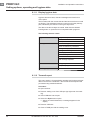
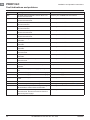
c
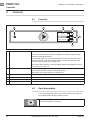
ON/OFF button
Pushing this button switches the machine on.
As soon as the machine is ready for operation, the wash program can be
started by pushing this button.
Pushing and holding (3 seconds) this button activates the automatic drain
and self-cleaning cycle and switches off the machine automatically. After
switch off, the machine is not voltage free!
The button also shows the current operating state through different colours
(see sections 4.2 and 4.3).
d
STOP button
In case of operating error or faults, the machine can be switched off immediately without the drain cycle by pushing this button.
After switch off, the machine is not voltage free!
e
Display
Selection menu / fault and information displays
f
Display navigation button
Scroll / set / select
g
Display navigation button
&KDQJHPHQXOHYHOFRQ¿UPEDFNDFNQRZOHGJHIDXOW
h
Display navigation button
Scroll / set / select
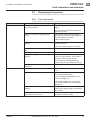
4.2
Operating states
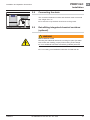
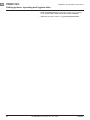
In the operating panel display, the ON/OFF switch shows the current operating state through different colours.
Machine is Off
The ON/OFF button is colourless.
12
IO-0000000121-001-EN / 26. Jun. 2013
HOBART