1
Management Of A Machine Set Up
With Department Codes
Set up and enable department codes as explained earlier in this guide.
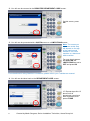
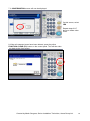
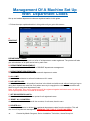
1. Follow the steps explained earlier in this guide until you get to this screen:
A.
B.
C.
F.
G.
H.
D.
E.
A.
PRINTOUT
DEPARTMENT CODES:
Allows the administrator to print out a list of all department codes registered. The printout will also
give a breakdown of all jobs carried out by each user.
B. DEPARTMENT MANAGEMENT:
Allows the administrator to ENABLE or DISABLE department management.
C. DEPARTMENT REGISTRATION:
Allows the administrator to add, delete and edit department codes.
D. ALL LIMIT:
Allows the administrator to enforce limitations on ALL users.
E. NO LIMIT BLACK:
Allows ALL users to use all machine functions in the black and white mode without having to log-on
using their department code first. Only when users try to copy/print in colour will the machine ask
them to log-on using their department code.
Note: In this mode, only colour copies/prints will be registered against individual users. All black &
white copies/prints will be recorded as undefined.
F. SET REGISTERED QUOTA:
Allows the administrator to enforce quotas for all registered users.
G. RESET ALL COUNTERS:
Allows the administrator to reset all the counters, for all users, back to zero.
H. DELETE ALL:
Allows the administrator to delete ALL registered department codes from the machine. This will
also turn off department management. WARNING: USE THIS AT YOUR OWN PERIL!
16
Created by Martin Sturgess, Senior Installation Technician, Arena Group Ltd.