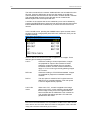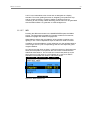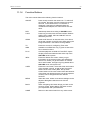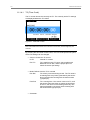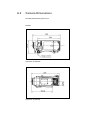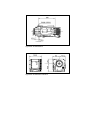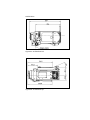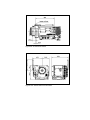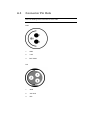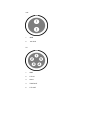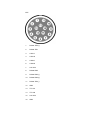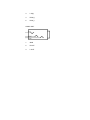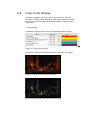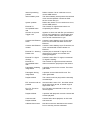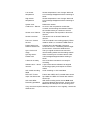
1
User Manual ARRI ALEXA For ALEXA Software Update Packet 4.0.1 Printed on 24 August, 2011 All rights reserved. This document is provided under a license agreement containing restrictions on use and disclosure and is also protected by copyright law. Due to continued product development this information may change without notice. The information and intellectual property contained herein is confidential between ARRI and the client and remains the exclusive property of ARRI. If you find any problems in the documentation, please report them to us in writing. ARRI does not warrant that this document is error-free. Arnold & Richter Cine Technik Tuerkenstr. 89 D-80799 Munich Germany mailto: [email protected] http://www.arri.com Contents 1 Disclaimer 7 2 Scope 9 3 ALEXA Images 10 4 Introduction to ALEXA 12 4.1 5 6 7 8 About This Manual ................................................................... 14 Safety Instructions 15 5.1 Explanation of Warning Signs and Indications ........................ 15 5.2 General Safety Instructions...................................................... 15 5.3 Specific Safety Instructions...................................................... 16 General Precautions 18 6.1 Storage and Transport ............................................................. 18 6.2 Electromagnetic Interference ................................................... 18 6.3 Condensation ........................................................................... 18 Power Supply 20 7.1 Power Management ................................................................. 20 7.2 BAT Connector......................................................................... 21 7.3 Mains Unit NG 12/26 R ............................................................ 21 7.4 Cine-Style Batteries ................................................................. 21 7.5 Onboard Batteries .................................................................... 22 7.6 V-Lock Batteries....................................................................... 22 7.7 Gold Mount Batteries ............................................................... 24 7.8 Power Outputs ......................................................................... 25 7.8.1 12 V Accessories ..................................................................... 25 7.8.2 24 V Accessories ..................................................................... 25 Installation of The Camera 26 8.1 Minimum Equipment Recommended For Operation ............... 26 8.2 Tripod and Remote Heads ....................................................... 26 8.3 Electronic Viewfinder EVF-1 .................................................... 27 8.3.1 Viewfinder Cables .................................................................... 28 8.3.2 Viewfinder Mounting Bracket ................................................... 29 IV Contents 9 8.4 Center Camera Handle CCH-1 ................................................ 31 8.5 Side Camera Handle SCH-1.................................................... 32 8.6 Bridge Plate BP-12................................................................... 33 8.7 Bridge Plate adapter BPA-1..................................................... 34 8.8 Wedge Adapter WA-1 + Quick-Release Plate ......................... 35 8.9 Leveling Block LB-1 ................................................................. 35 8.10 Shoulder Pad SP-3 .................................................................. 36 Connectors 37 9.1 BAT .......................................................................................... 39 9.2 REC OUT 1&2.......................................................................... 39 9.3 RET/SYNC IN .......................................................................... 39 9.4 MON OUT ................................................................................ 39 9.5 EXT .......................................................................................... 39 9.6 ETHERNET.............................................................................. 40 9.7 EVF .......................................................................................... 40 9.8 AUDIO IN ................................................................................. 40 9.9 RS ............................................................................................ 40 9.10 12 V .......................................................................................... 40 9.11 TC............................................................................................. 41 9.12 AUDIO OUT ............................................................................. 41 9.13 SD Card ................................................................................... 41 9.14 SxS Slots.................................................................................. 42 10 Optics 44 10.1 Lens Adapter PL Mount LA-PL-1 (no LDS).............................. 44 10.2 Lens Support............................................................................ 45 11 Camera Controls 47 11.1 Main Controls ........................................................................... 47 11.1.1 Display...................................................................................... 48 11.1.2 Screen Buttons......................................................................... 48 11.1.3 HOMESCREEN ....................................................................... 48 11.1.3.1 Lists and User Lists.................................................................. 51 11.1.3.2 FPS .......................................................................................... 53 11.1.3.3 AUDIO ...................................................................................... 55 11.1.3.4 SHUTTER ................................................................................ 58 11.1.3.5 EI .............................................................................................. 58 11.1.3.6 COLOR .................................................................................... 61 11.1.3.7 WB............................................................................................ 63 11.1.4 Function Buttons ...................................................................... 65 11.1.4.1 TC (Time Code) ....................................................................... 66 11.1.4.2 INFO......................................................................................... 68 11.1.4.3 USER ....................................................................................... 71 11.1.4.4 PLAY ........................................................................................ 73 11.1.5 Menu ........................................................................................ 76 11.1.5.1 Recording................................................................................. 76 11.1.5.2 Monitoring ................................................................................ 80 11.1.5.3 Project ...................................................................................... 85 11.1.5.4 System ..................................................................................... 87 11.1.5.5 Frame grabs............................................................................. 93 11.1.5.6 User Setups ............................................................................. 94 11.2 Operator controls ..................................................................... 95 11.3 EVF Controls............................................................................ 96 11.3.1 Viewfinder EVF menu .............................................................. 96 11.3.2 Viewfinder CAM menu ............................................................. 97 12 Operation of The Camera 98 12.1 Recording................................................................................. 98 12.1.1 Internal recording ..................................................................... 98 12.1.2 External recording .................................................................. 104 12.1.3 Parallel recording ................................................................... 106 12.2 Monitoring .............................................................................. 106 12.2.1 Framelines ............................................................................. 106 12.3 Using Time Code ................................................................... 109 12.4 Syncing the Sensors of Two Cameras................................... 110 12.5 Syncing the Settings of Two Cameras................................... 111 13 ALEXA Plus 114 13.1 General Description ............................................................... 114 13.2 Optics ..................................................................................... 115 13.2.1 Lens Adapter PL-Mount LA-PL-2 (with LDS) ......................... 116 13.3 Radio System......................................................................... 117 13.4 Wireless Remote System....................................................... 118 13.4.1 Lens Motors ........................................................................... 118 13.4.2 Hand Units ............................................................................. 120 VI Contents 13.5 Lens Data Display LDD-FP .................................................... 121 13.6 Plus Camera Controls ............................................................ 122 14 RCU-4 128 Appendix 129 A.1 Appendix ................................................................................ 130 A.2 Camera Dimensions............................................................... 133 A.3 Connector Pin Outs................................................................ 137 A.4 False Color Display ................................................................ 142 A.5 Infos and Warnings ................................................................ 143 15 Index 149 7 About This Manual 1 Disclaimer Before using the products described in this manual be sure to read and understand all respective instruction. The ARRI ALEXA is only available to commercial customers. The customer grants by utilization that the ARRI ALEXA or other components of the system are deployed for commercial use. Otherwise the customer has the obligation to contact ARRI preceding the utilization. While ARRI endeavors to enhance the quality, reliability and safety of their products, customers agree and acknowledge that the possibility of defects thereof cannot be eliminated entirely. To minimize risk of damage to property or injury (including death) to persons arising from defects in the products, customers must incorporate sufficient safety measures in their work with the system and have to heed the stated canonic use. ARRI or its subsidiaries do not assume any responsibility for incurred losses due to improper handling or configuration of the camera or other system components, due to sensor contamination, occurence of dead or defective pixels, defective signal connections or incompatibilities with third party recording devices. ARRI assumes no responsibility for any errors that may appear in this document. The information is subject to change without notice. For product specification changes since this manual was published, refer to the latest publications of ARRI data sheets or data books, etc., for the most up-to-date specifications. Not all products and/or types are available in every country. Please check with an ARRI sales representative for availability and additional information. Neither ARRI nor its subsidiaries assume any liability for infringement of patents, copyrights or other intellectual property rights of third parties by or arising from the use of ARRI products or any other liability arising from the use of such products. No license, express, implied or otherwise, is granted under any patents, copyrights or other intellectual property right of ARRI or others. ARRI or its subsidiaries expressly exclude any liability, warranty, demand or other obligation for any claim, representation, or cause, or action, or whatsoever, express or implied, whether in contract or tort, including negligence, or incorporated in terms and conditions, whether by statue, law or otherwise. In no event shall ARRI or its subsidiaries be liable for or have a remedy for recovery of any special, direct, indirect, incidental, or consequential damages, including, but not limited to lost profits, lost savings, lost revenues or economic loss of any kind or for any claim by third party, downtime, good-will, damage to or replacement of equipment or property, any cost or recovering of any material or goods associated with the assembly or use of our products, or any other damages or injury of the persons and so on or under any other legal theory. In the case one or all of the foregoing clauses are not allowed by applicable law, the fullest extent permissible clauses by applicable law are validated. ARRI is a registered trademark of Arnold & Richter Cine Technik GmbH & Co Betriebs KG. Note: This product and the accessories recommended by the manufacturer fulfill the specifications of the European Directive 2004/108/EC (15th December 2004). 8 Disclaimer The ALEXA viewfinder EVF-1 contains proprietary technology owned by Fourth Dimension Displays Limited and licensed by ARRI. This product contains licensed technology from Linotype. Quicktime and Quicktime logo are trademarks or registered trademarks of Apple Computer, Inc., used under license therefrom. Apple ProRes 422 (Proxy), Apple ProRes 422 (Lt), Apple ProRes 422, Apple ProRes 422(Hq), Apple ProRes 4444 and the ProRes logo are trademarks or registered trademarks of Apple Computer, Inc., used under license therefrom. SxS and are trademarks of SONY corporation. This product meets CE regulations. 9 About This Manual 2 Scope This instruction manual applies to the following hardware, software and firmware versions: ARRI ALEXA camera with ARRI EVF-1 electronic viewfinder Camera software update packet (SUP): 4.0.1 EVF-1 software packet: 1.27 Document revision history SUP ID drawing release/ date revision 2.1 K5.72550.0 2031-00-00-00-99 FG5445 29th Nov 2010 3.0 K5.72550.0 2031-00-00-00-99 K7741 11th Feb 2011 3.1 K5.72550.0 2031-00-00-00-99-B K7776 04th Apr 2011 3.1 K5.72550.0 2031-00-00-00-99-C K7781 07th Apr 2011 4.0 K5.72550.0 2031-00-00-00-99-D K7817 05th Jul 2011 4.0.1 K5.72550.0 2031-00-00-00-99-E K7845 25th Aug 2011 10 ALEXA Images 3 ALEXA Images Figure 1: Camera right side Figure 2: Camera left side Figure 3: Camera top 11 About This Manual Figure 4: Camera bottom Figure 5: Camera front Figure 6: Camera back 12 Introduction to ALEXA 4 Introduction to ALEXA ALEXA is a 35 format film-style digital camera made by ARRI, the world leader in professional cinematographic imaging. It combines leading edge digital technology with film camera features that have been refined over more than 90 years of ARRIs history. The result is a camera that allows cinematographers with a film background to shoot digitally without the need for a extensive training. People who are used to shoot digitally will experience a camera like they never did before, providing more powerful features than in any other camera available today. Handling The camera is a true ARRI. It has a high-precision integrated housing with an ergonomic design. It is rugged, reliable, flexible and sealed to make it splash-proof. It also has mounting points for accessories, as ALEXA integrates well with existing ARRI accessories. In addition, a new range of accessories specifically designed for ALEXA is available. Operation ALEXA features a unique user interface, designed to make camera operation easier than ever, while giving easy access to a large number of controls. There are three different control interfaces: The main user interface on the right side gives access to every camera parameter through a graphical display and a button panel. The operator user interface on the left side for basic control, adjustable to the operator's individual needs by supplying assignable buttons in addition to function buttons. The viewfinder user interface for adjusting the most important image parameters with buttons on the viewfinder and the interface graphics overlayed to the viewfinder image. Power management The camera accepts any input voltage from 10.5-34 V DC. Different power sources can be connected to the camera simultaneously. The camera's power management ensures that the power source with the highest voltage level is used. Power sources are hot-swappable to minimize the risk of sudden power loss. ALEV III sensor The ALEV III sensor has a horizontal pixel count of 3.5K resulting in true 2K resolution. It covers the full Super-35 format and it provides a latitude of 14 stops and a base sensitivity of 800 ASA. 13 About This Manual The sensor temperature is kept stable by a Peltier element to ensure optimum image quality under all operating conditions. AIT - ARRI Imaging Technology ARRI imaging technology ensures the most organic, film-like image quality of any digital camera with natural color rendition and pleasing skin tones. Thermal concept The camera electronics are fully sealed to protect them from dirt and moisture. Camera heat is transported via heat pipes to a radiator which is cooled by a fan. The fan itself is very silent, so the camera noise level is below 20 dB (A)* - this is the same as with ARRI sync-sound film cameras. If the fan noise level starts to increase due to fan aging, the fan can be swapped in a matter of minutes by a trained technician. *at 24 fps and ambient temperature < 25°C EVF-1 electronic viewfinder ARRI is redefining electronic viewfinders with LED lighting, high resolution and a viewing experience that comes as close to an optical viewfinder as possible. Internal recording ALEXA can internally record Quicktime movie clips with Apple ProRes codecs to Sony SxS-PRO cards. The cards deliver high data rates and are very robust. ProRes can be natively edited in FinalCutPro, eliminating the need to transcode. ProRes 422 (HQ) and ProRes 4444 deliver visually lossless compressed images with a color depth of 10 bit for ProRes 422 and 12 bit for ProRes 4444. Quicktime movie clips can be played back in the camera with output on REC OUT, MON OUT and the electronic viewfinder. Audio recording Analog 2-channel audio can be recorded as 24 bit 48 kHz PCM in the Quicktimes, as well as embedded to the HD-SDI signals. 14 Introduction to ALEXA 4.1 About This Manual It is recommended that all users of the ALEXA camera read the manual front to back prior to the first usage. The manual's structure also provides quick access for reference to experienced users. All directions are given from an operator's point of view. Images: give a quick overview of the camera. Safety instructions / general precautions: very important - do not skip this part. Power supply: overview how the camera is supplied with power. Installation of the camera: information on camera mechanics. Connectors: what goes into the camera and what comes out. Optics: how to get a good image into the camera. Camera controls: how to set up the camera. Operation of the camera: gives examples and recommendations on camera operation. Explanation of Warning Signs and Indications 5 Safety Instructions Any violation of these safety instructions or non-observance of personal care could cause serious injuries (including death) to users and affiliates and damage to the equipment or other objects. 5.1 Explanation of Warning Signs and Indications Indicates a possible risk of injury or damage to the equipment Indicates the risk of electric shock or fire danger that could result in injury or damage to the equipment. Note: Indicates further information or information from other instruction manuals 5.2 General Safety Instructions Always follow these instructions to ensure against injury to yourself or others and damage to the system or other objects. This safety information is in addition to the product specific operating instructions in general and must be strictly observed for safety reasons. Read and understand all safety and operating instructions before you operate or install the system! Retain all safety and operating instructions for future reference. Heed all warnings on the system and in the safety and operating instructions before you operate or install the system. Follow all installation and operating instructions. Do not use accessories or attachments that are not recommended by ARRI, as they may cause hazards and invalidate the warranty! Do not attempt to repair any part of the system! Repairs must only be carried out by authorized ARRI Service Centers. 15 16 Safety Instructions 5.3 Specific Safety Instructions Do not remove any safety measures from the system! Do not operate the system in areas with humidity above operating levels or expose it to water or moisture! Do not cover the fan openings at the camera back top and bottom! Do not subject the system to severe shocks! Do not place the system on an unstable trolley/hand truck, stand, tripod, bracket, table or any other unstable support device! The system may fall, causing serious personal injury and damage to the system or other objects. Operate the system using only the type of power source indicated in the manual! Unplug the power cable by gripping the power plug, not the cable! Never insert objects of any kind into any part of the system if not clearly qualified for the task in the manual, as objects may touch dangerous voltage points or short out parts! This could cause fire or electrical shock. Unplug the system from the power outlet before opening any part of the system or before making any changes to the system, especially the attaching or removing of cables! Do not use solvents to clean! Do not remove any stickers or paint marked screws! Always place a lens or a protective cap in the lens mount receptacle! Changing camera lenses should be done in a dry and dust-free environment. If this is not possible, take extra care that no dust enters the camera while the lens is off! When no lens is attached to the camera, immediately place the protective on the lens mount to avoid contamination of the sensor cover glass! After changing lenses, always perform a dust check to make sure no dust has settled on the sensor cover glass! Clean optical lens surfaces only with a lens brush or a clean lens cloth. in cases of solid dirt or grease, moisten a lens cloth with pure alcohol. Discard contaminated lens cloth after use! Never attempt to clean a lens brush with your fingers! NEVER USE CANS WITH COMPRESSED AIR OR GAS TO BLOW OFF THE DUST! This can severely damage optical elements. If the sensor cover glass has been contaminated by solid dirt or grease, special optical cleaning kits should be used for dirt removal under very high care! If the contamination cannot be removed, the camera should be taken to an ARRI service center for cleaning. THE USE OF METHANOL TO CLEAN OPTICAL SURFACES IS NOT RECOMMENDED! Specific Safety Instructions NEVER USE ACETONE TO CLEAN OPTICAL SURFACES! NEVER TRY TO REMOVE THE SENSOR COVER GLASS! DO NOT POINT THE CAMERA INTO DIRECT SUNLIGHT, VERY BRIGHT LIGHT SOURCES, OR HIGH-ENERGY LIGHT SOURCES (e.g. laser beams)! This may cause permanent damage to the camera image sensor. DO NOT POINT THE VIEWFINDER INTO DIRECT SUNLIGHT, VERY BRIGHT LIGHT SOURCES, OR HIGH-ENERGY LIGHT SOURCES (e.g. laser beams)! This may cause permanent damage to the viewfinder display and optical elements. 17 18 General Precautions 6 General Precautions 6.1 Storage and Transport To prevent damage to the optical filters and the sensor, a protective cap must be on the lens mount receptacle while no lens is attached. All cables have to be unplugged from the camera when it is transported or stored inside a camera case. Do not store the camera in places where it is subject to extreme temperatures, direct sunlight, high humidity, severe vibration, or near strong magnetic fields. 6.2 Electromagnetic Interference ALEXA meets EC regulations by fulfilling the specifications of the European Directive 2004/108/EC (15th December 2004). This equipment has been tested and found to comply with the limits for a Class A digital device, pursuant to part 15 of the FCC Rules. These limits are designed to provide reasonable protection against harmful interference when the equipment is operated in a commercial environment. This equipment generates, uses, and can radiate radio frequency energy and, if not installed and used in accordance with the instruction manual, may cause harmful interference to radio communications. Operation of this equipment in a residential area is likely to cause harmful interference in which case the user will be required to correct the interference at his own expense. Changes or modifications not expressly approved by the party responsible for compliance could void the user's authority to operate the equipment. Complies with the canadian ICES-003 Class A specifications. Cet appareil numérique de la Classe A est conformé à la norme NMB-003 du Canada. This device complies with RSS 210 of Industry Canada. This Class A device meets all the requirements of the Canadian interference-causing equipment regulation. Cet appareil numérique de la Class A respecte toutes les exigences du Réglement sur le matérial brouilleur du Canada. 6.3 Condensation 19 Condensation When moving the camera from a cool to a warm location or when the camera is used in a damp environment, condensation may form inside the lens compartment, on the sensor cover glass, between sensor and its cover glass, and on internal or external electrical connections. Operating the camera in these conditions may result in personal injury or damage to the equipment! Condensation on the optical components may have a visible effect on the output images. To reduce the risk of condensation: Find a warmer storage location. Attach the ARRI air-drying cartridge (silica bottle) to the PL-Mount of the camera during storage (NOT during transport!) If camera needs to be stored in a place that is considerably cooler than the location where it will be used, consider keeping the camera powered from a mains unit in addition to using the air-drying cartridge. In ambient temperatures above 30°C/86°F and/or humidity above 60%, always attach the air-drying cartridge to the PL-Mount of the camera when not in use. This not only applies to storage, but also to shooting breaks and situations when the camera remains without an attached lens for an extended time. MAKE SURE THE SILICA BOTTLE IS SECURELY FASTENED. UNDER NO CIRCUMSTANCES SPILL SILICA INTO THE LENS COMPARTMENT! 20 Power Supply 7 Power Supply Only use recommended power supply solutions. Manipulation of power supplies can result in severe damage to the equipment and humans, including death. ALEXA accepts an input voltage range from 10.5 to 34 V DC. The camera can be powered through the BAT connector or can be quipped with battery adapters accepting V-Lock or Gold Mount batteries. The power supply should deliver an output of more than 90 W to power the camera sufficiently. The power draw of the camera in basic configuration is about 85 W. A 12-15 V battery should have at least 6 A maximum output current. Note: when powering accessories through the camera, the power draw of the camera is increased by the amount of power drawn by the accessories. 7.1 Power Management When using the BAT connector and one or more onboard battery adapters simultaneously, the camera power management ensures that the power source with the highest voltage level is used. When the voltage level of one power source drops below the level of the other, or a power source is disconnected from the camera, the power management automatically switches to the other power source, avoiding shutdown of the system. So as an example, one could use a 12 V onboard battery as backup for the main 24 V battery, or power the camera from the 24 V battery while on a tripod and use the 12 V battery for fast switching to handheld mode by just unplugging the power cable. When using two onboard battery adapters with batteries in parallel (one on top and one on the back), they are treated as one source by the camera. This allows combining small batteries with less load per item into one strong power source. 21 BAT Connector 7.2 BAT Connector The BAT connector of ALEXA is a Fischer 2-pin socket located on the bottom back of the camera right side. The socket accepts power cables KC-20S and KC-29S. The cables can either be connected to the mains unit NG 12/26R or to 24V Cine-style batteries with three-pin XLR outputs. Figure 7: BAT connector 7.3 Mains Unit NG 12/26 R Use of the mains unit is recommended for shooting in the studio and when using electronic accessories with high power consumption. First check that the correct mains voltage is set on the mains unit (fuse on back of unit). Connect the mains unit to AC mains power. Ensure that the camera power is turned off. Set the voltage switch on the mains unit to 26 V. Plug the battery cable KC-20S or KC-29S (spiral cable) into the power supply socket on the camera and into the 26 V socket on the mains unit. Note: The NG 12/24 R was the original design that provided 12 & 24 volts output – it was superseded by the NG 12/26 R, which outputs 12 & 26 volts. The NG 12/24 R can easily be upgraded to NG 12/26 R specification at an ARRI service center. 7.4 Cine-Style Batteries Any Cine-style battery with level of 24 V and a three-pin XLR out can be used to power the camera through a KC-20S or a KC-29S. Available from ARRI is the battery CINE VCLX/2 battery (280 Wh) with charger. 22 Power Supply To connect the battery to the camera: Ensure that the main switch on the camera is off. Plug the battery cable KC-20S or KC-29S (spiral cable) into the power supply socket on the camera and the battery 28 V output socket. Note: When the battery voltage drops below the warning level, the BAT1 level in the camera display will start flashing. A white "i" will appear, signaling more information is available on the INFO screen. Note: For more information on setting the low battery warning level, see Menu>System>Power (on page 88). Charging the battery Connect the charger to AC mains power. Plug the charger cable into the charge input socket of the battery. Once charged, batteries may be kept on the charger until required. Note: For more information on CINE VCLX/2 battery and charger, please check the corresponding manual. 7.5 Onboard Batteries The camera can be equipped with adapters for either V-Lock or Gold Mount video-style batteries. Four different adapters are available: BAB-G: Back-mount adapter Gold Mount batteries BAB-V: Back-mount adapter V-Lock batteries BAT-G: Top-mount adapter Gold Mount batteries BAT-V: Top-mount adapter V-Lock batteries Note: Adapters must be installed by a trained technician! 7.6 V-Lock Batteries V-Lock batteries are available from a number of manufacturers. Some of these batteries are able to transmit information on their remaining capacity to the camera. ALEXA displays the remaining capacity in percent on the Homescreen of the camera display. For these batteries, the user does not need to set the battery warning level due to the communication of camera and battery. Currently, batteries by ID-X, Bebop or any battery using the TIprotocol for battery communication will have their capacity displayed as percentage in the camera. 23 V-Lock Batteries Attaching the battery to the adapter Place the battery with the V-shaped wedge into the adapter so that the wedge sits right above its counterpart of the mount. Move the battery downwards until you hear a snap. Make sure it is connected correctly and sits tight. Releasing the battery When facing the battery, press the button located on the mount on the left side. Some batteries have an additional top-release mechanism. Move the battery upwards and remove it. Figure 8: ALEXA with BAB-V and V-Mount battery Note: Not all V-Lock batteries deliver enough power to supply the camera. We recommend to not use any batteries with a capacity of less than 90 Wh to prevent damage to the battery and unpredictable camera behavior. Any camera-battery combination should be tested prior to use, especially when accessories are powered through the camera. 24 Power Supply 7.7 Gold Mount Batteries Gold Mount is the battery mounting system of Anton Bauer batteries. The batteries transmit information on their remaining capacity to the camera. ALEXA displays the remaining capacity in percent on the Homescreen of the camera display. For Gold Mount batteries, the user does not need to set the battery warning level due to the communication of camera and battery. Attaching the battery to the adapter Place the battery with the three pins into the adapter so that the pins sit in the corresponding holes of the mount. Move the battery to the right until you hear a snap. Make sure it is connected correctly and sits tight. Releasing the battery When facing the battery, move the lever located on the left side of the mount down. Move the battery left, then pull it towards you and remove it. Figure 9: Camera with BAB-G and a Gold Mount battery Note: Not all Gold Mount batteries deliver enough power to supply the camera. We recommend to not use any batteries with a capacity of less than 90 Wh to prevent 25 Power Outputs damage to the battery and unpredictable camera behavior. Any camera-battery combination should be tested prior to use, especially when accessories are powered through the camera. 7.8 Power Outputs The camera has three power outputs for accessories, 2x 24 V and 1x 12 V. Figure 10: 24 V outputs (RS) and 12 V output 7.8.1 12 V Accessories The 12 V output is located on the right side of the camera and has a 2-pin LEMO connector. It is limited to 12 V and can supply a device with a current of up to 2.2 A, depending on the camera power supply. 7.8.2 24 V Accessories Two RS outputs are located on the right side of the camera. They have a 3pin Fischer connector. They can supply two devices with a combined load of up to 2.2 A (shared with the EXT connector power out), depending on the camera power supply. When the camera is powered from a source with a voltage below 24 V, they output 24 V. If the camera's power source is supplying more than 24 V, this voltage level is also present on the RS outputs. Besides powering accessories, these sockets can also be used to send a remote start+stop signal to the camera. 26 Installation of The Camera 8 Installation of The Camera 8.1 Minimum Equipment Recommended For Operation ARRI ALEXA camera body including SxS module and Lens Adapter PL mount without LDS (LA-PL-1) EVF-1 Electronic Viewfinder VMB-1 Viewfinder Mounting Bracket KC 150-S Viewfinder Cable short 0.35m/1.2ft CCH-1 Center Camera Handle BP-12 Bridge Plate with base plate, or BPA-1 with BP-5/BP-8 Bridge Plate and base plate, or WA-1 Wedge Adapter and Quick Release HD Baseplate SD card Compatible power supply Sony SxS-PRO card for recording 8.2 Tripod and Remote Heads Tripod and remote heads used with ALEXA have to provide enough load capacity to support the camera and attached accessories. The table to the right shows the camera weight for different components. Note: Check for the payload of remote heads and cranes. In applications where the camera mount is subject to high forces (e.g. car or helicopter mounts) the camera must be additionally secured with retaining cords. All fastening screws must be tightened firmly with an appropriate screwdriver (not with the commonly used coin!). Camera weight lbs kg ARRI ALEXA incl. SxS module, EVF-1, VMB-1, CCH-1, KC-150S 16.85 7.65 ALEXA camera body including SxS module 13.79 6.26 Electronic Viewfinder EVF-1 1.65 0.75 Viewfinder Mounting Bracket VMB-1 0.55 0.25 27 Electronic Viewfinder EVF-1 8.3 Viewfinder Cable short KC-150S 0.26 0.12 Center Camera Handle CCH-1 0.60 0.27 Electronic Viewfinder EVF-1 The EVF-1 employs an LCOS imaging device together with a temperature stabilized LED light source to provide an accurate and bright view of the sensor image under all operating conditions. The viewfinder is calibrated to match the image of the camera's HD outputs. The image area of the EVF-1 has a size of 1280x720 pixels. 32 additional pixels each above and below the image provide two status bars for displaying camera information. The EVF-1 can display the 10% surround view area of the sensor to help the operator track unwanted elements before they enter the recorded image area. Focus can be checked by temporarily zooming into the image center with a magnification of 2.25x. The low-latency interface of the EVF-1 has a delay of less than 1 frame. 28 Installation of The Camera The viewfinder is connected to the camera with the mounting bracket VMB1. Figure 11: Camera with EVF-1 Note: Do not point the viewfinder eyepiece at direct sunlight or bright light sources, as this could damage the LCOS imaging device. If possible, cover the eyepiece when not in use to prevent any damage. 8.3.1 Viewfinder Cables The viewfinder cables are unidirectional with a male plug to connect to the camera and a female plug to connect to the viewfinder. Cables are available in the following lengths: Model Length Purpose (m / ft) KC-150-S 0.35 / 1.2 For use of EVF-1 on camera left side in handheld mode KC-151-S 0.65 / 2.1 For use of EVF-1 on camera right side or when using Viewfinder Extension Bracket VEB-1 KC-152-S 2.00 / 6.6 Longest possible length for use with specialty rigs Electronic Viewfinder EVF-1 Figure 12: EVF cables: KC-150S (center), KC-151S (middle), KC-152S (outer) 8.3.2 Viewfinder Mounting Bracket The viewfinder mounting bracket VMB-1 is attached to the camera with two 3mm Allen screws at the very front of the camera top. The viewfinder is attached to the mounting bracket by sliding the dove tail into the receptacle of the mounting bracket and then closing the lever on the viewfinder. The position of the viewfinder can be adjusted by loosening the levers of the mounting bracket, adjusting the position as desired and closing the levers. It can be flipped over by first unscrewing the cap at the end of the side adjusting rod, then removing the rod itself and inserting it into its mount from the other side. Then reattach the cap. Note: Camera right operation is not possible with the standard EVF cable KC-150-S. Instead, the longer cable KC-151-S is needed. Figure 13: VMB-1 on camera 29 30 Installation of The Camera The viewfinder extension bracket VEB-1 extends the mounting point of the EVF further back. It can be attached to a tripod head for use with geared heads or greater comfort when using fluid heads. The VEB-1 has a standard attachment point for the ARRI eyepiece leveler EL-3. When using the VEB-1 with an eyepiece leveler, loosening the friction where the VEB-1 and the VMB-1 are joined is critical as tiliting can the damage the friction setting. Figure 14: EVF extension bracket Figure 15: Camera with EVF-1 on extension and cable KC-151S Center Camera Handle CCH-1 8.4 Center Camera Handle CCH-1 The Center Camera Handle CCH-1 is attached to the camera top with 3 screws, two at the front and one at the back. Make sure the screws are well tightened with a 3mm Allen key. Figure 16: Camera with CCH-1, side view 31 32 Installation of The Camera The handle extension block HEB-2 mounts to the front end of the CCH-1 and adds one more focus hook to the camera in a high position, so the tape measure clears the matte box. 8.5 Side Camera Handle SCH-1 The SCH-1 is used in conjunction with a BAT-V or BAT-G battery top mounting adapter, or with third-party onboard recorders. It is attached to the camera with 3 screws, two at the front and one at the back. Make sure the screws are tightened firmly with a 3 mm Allen key. If a tall battery or a tall third-party onboard recorder is used, the adjustable center grip of the SCH-1 can be replaced by the taller Adjustable Center Grip Tall (ACG-2). 33 Bridge Plate BP-12 Figure 17: SCH-1 Figure 18: Camera with SCH-1, side view 8.6 Bridge Plate BP-12 The bridge plate BP-12 has been newly developed for ALEXA. It mounts directly to the camera housing with two screws and ensures that iris rods, matte boxes and follow focus units are positioned properly in regards to the optical center of the camera, just like all other ARRI cameras. 34 Installation of The Camera 8.7 Bridge Plate adapter BPA-1 The bridge plate adapter BPA-1 can be used to attach a BP-3/BP-5/BP8/BP-9 to ALEXA. First attach the BPA-1 to the camera with the two screws. Then attach the bridge plate to the adaptor with its two screws. Make sure the screws are tightened firmly with a screwdriver. Wedge Adapter WA-1 + Quick-Release Plate 8.8 Wedge Adapter WA-1 + Quick-Release Plate The WA-1 can be mounted at the same position as a bridge plate. It has a dove tail that slides into the counter part of a quick-release plate, like the ARRI QR-HD-1. The quick-release plate has a pin at its back, which fits into the pin receptacle at the back of the camera base. Figure 19: ARRI QR-HD-1 8.9 Leveling Block LB-1 The leveling block LB-1 attaches to the bottom of the ALEXA back foot. It prevents the camera from resting on a back mounted battery when a bridge plate is attached and the camera is placed on a flat surface. It is mounted by inserting its top lid into the pin receptacle on the end of the shoulder arc in the camera base. Twist the knob clockwise to tighten. Figure 20: Leveling Block LB-1 35 36 Installation of The Camera 8.10 Shoulder Pad SP-3 The camera base has an integrated arch to fit to the operator's shoulder. For extended handheld shoots, the newly designed shoulder pad SP-3 can be attached to the base of the camera with velcro. Note: The SP-3 can only be used with a BP-12 and 19 mm rods or with 15 mm rods and a WA-1+quick-release base plate. When using the BPA-1 with a BP-5/BP-8, the bridge plate has to be removed prior to attaching the SP-3. Figure 21: SP-3 shoulder pad Figure 22: SP-3 below camera 37 Shoulder Pad SP-3 9 Connectors Camera back Figure 23: Connectors at back From top to bottom: MON OUT, RET/SYNC IN, EXT, REC OUT 1&2, BAT, ETHERNET Camera right Figure 24: Connectors on right side From left to right, top to bottom: 2x RS (24 V) out, AUDIO OUT, TC, 12V out, AUDIO IN, SD CARD (camera bottom) 38 Connectors Camera left Figure 25: Camera left: SxS slots Top to bottom: SxS slot 1, SxS slot 2 Camera front Figure 26: Camera front connector EVF connector BAT 39 9.1 BAT The BAT connector can be used to power the camera from an external power source with cables KC-20S and KC-29S. It is located on the camera back lower right. 9.2 REC OUT 1&2 The REC OUT consists of two BNC plugs capable of carrying 1920x1080 1.5G or 3G HD-SDI signals with frame rates from 23.976 to 60 fps according to SMPTE standards 274M, 292M, 372M and 425M. The signal format can be changed in the camera menu. The connectors are located on the camera back mid right. 9.3 RET/SYNC IN Via the RET connector a return signal from another image source can be fed into the camera for displaying on EVF and/or MON OUT. The signal must be a 1920x1080 422 1.5G single link according to SMPTE 274M and 292M. It is located on the camera back mid right. 9.4 MON OUT The MON OUT is a single BNC connector capable of carrying a 1920x1080 422 YCbCr 1.5G HD-SDI signal with frame rates of 23.976, 24, 25, 29.97 or 30 fps according to SMPTE standards 274M and 292M. The signal format can be changed in the camera menu. It is located on the camera back upper right. 9.5 EXT The EXT connector is a multi-pin accessory connector. It carries signals for communication with various accessories and 24V power. The maximum power output is 2.2A, shared with the RS outputs. Cables are currently available for: Connecting a UMC-3 remote motor controller (model UMC Connection Cable (0.80m/2.6ft) K-UMC3-ALEXA) Connecting two ALEXA cameras for synchronized operation (model EXT to EXT Cable (2.00m/6.6ft) KC 155-S) 40 Connectors The connector is located on the camera back mid right. 9.6 ETHERNET Regular ethernet connectors neither deliver power nor the durability and reliability required by ARRI, so ALEXA uses a 10-pin LEMO connector. A special cable, available from ARRI (model KC-153-S), is required to connect the Ethernet socket to a standard RJ-45 Ethernet socket. The ethernet port can be used to operate two ALEXA cameras with synced settings by connecting the cameras with cable KC 156-S, or to connect and RCU-4 to the camera. The ethernet connector can output 24 V with 1.2 A power. It is located on the camera back lower right. 9.7 EVF The EVF connector connects the camera to an EVF-1 electronic viewfinder. The signals on this connector are proprietary and can only be used to drive an EVF-1. This proprietary signal assures very low latency for the viewfinder image. It is located on the camera front lower left. 9.8 AUDIO IN 2-channel analog line level audio can be fed to the camera via the 5-pin XLR connector located on the front right side of the camera. The audio signal is A/D-converted to 24 bit 48 kHz PCM. 9.9 RS The two RS connectors supply external accessories with at least 24 V power and combined load of up to 2.2 A (shared with the EXT connector power out). The sockets also accept an ARRI remote start/stop trigger button. They are located on the camera right lower front. 9.10 12 V The 12 V connector supplies an external accessory with 12 V power and up to 2.2 A current. It is located on the camera right lower front. TC 41 9.11 TC The TC connector is a 5pin LEMO socket. It accepts and distributes LTC (Longitudinal Time Code) signals. It can be used to Jam sync the camera time code to a Clockit, TC Slate or another camera Transmit the camera's time code to a Clockit, TC Slate or another camera Tune the camera crystal oscillator's frequency with an Ambient ACC Clockit Controller It is located on the camera right lower front. 9.12 AUDIO OUT The AUDIO OUT is a 3.5mm TRS connector (headphone jack), which outputs the audio fed to the 5-pin XLR connector with a maximum power of 2.5 dBm. It is located on the camera right lower front. Note: Do not connect a headphone to the camera during recording. Connecting a headphone to the camera can cause a short audio signal interruption due to static electricity. 9.13 SD Card The SD card slot is located at the bottom on the camera right side middle. Most SD or SDHC card with a capacity of up to 4 GB can be used. The card must be pre-formatted with a FAT or FAT32 file system. The slot is protected from dirt and rain by a slider door. Insert the SD card according to the drawing on the camera housing. Note: Always keep the slider door closed during operation to prevent dirt and moisture from entering the camera. 42 Connectors On the SD card, the folder structure presented in the following example should be created by the user prior to first use of the card. Figure 27: Folder structure required for SD card The correct folder structure can be created by the camera. Go to MENU>System>SD card>Prepare SD card. The camera will create all missing folders. Firmware update files are recognized by the camera anywhere within the structure, but are still recommended to be placed in the Firmware folder. 9.14 SxS Slots On the camera's left side are two SxS-PRO card slots. They are behind a door that can be opened by pulling the top lid backwards. The door opens towards the camera housing for permanent accessability even in tight spaces or on special rigs. Make sure the door is always closed to prevent moisture and dirt from entering the camera! The cards are inserted with the card contacts first and the SxS labeled side outwards. They have to be pushed inwards against a spring until they lock in place. Make sure the cards are locked before closing the door, or the cards could be damaged. Note: Do not force the cards into the slots in the wrong direction. This could cause damage to both card and camera! To release a card, push it inwards until it is unlatched. The spring will push the card outwards. Be careful that the card does not drop out of the slot! Cards do not have to be mounted or unmounted. They can be ejected whenever the camera is not writing to the cards. Even if cards are ejected during record, they maintain their functionality with the last take intact, except that the last second of the take is lost. 43 SxS Slots Note: If a writing process is interrupted by power loss or card eject, remove the card from the camera, copy all data from the card and format the card before using it again. A card select button is located between the card slots. By pushing it, the currently active card can be toggled. Each card has an LED that signals the card state to the user. LED state Card state Off No card present Card is unreadable (e.g. wrong file system) Card is inactive Solid green Card is selected and ready Solid red Card is accessed (read/write) !DO NOT REMOVE CARD! Only Sony SxS-PRO cards can be used with ALEXA. Sony SxS-One cards are not supported. 44 Optics 10 Optics ALEXA is equipped with an exchangeable lens mount. Note: Lenses must cover an image circle of at least 30 mm diameter to eliminate the risk of vignetting. 10.1 Lens Adapter PL Mount LA-PL-1 (no LDS) The lens adapter LA-PL-1 is the standard lens mount delivered with ALEXA. It can be used to attach any modern PL-mount lens to the camera. Attaching a lens to the camera Twist the bayonet ring anti-clockwise as far as it will go. Remove the protective lens cap. Insert the lens into the lens mount receptacle without catching it at the edges. One of the four slots on the lens mount must fit over the index pin in the lens mount receptacle. Choose a lens position that gives good readability of lens markings. Press the lens flat onto the lens mount receptacle. Twist the bayonet ring clockwise until the lens is attached. Make sure the lens is properly mounted. Note: When no lens is attached to the camera, use the protective cap to avoid dust entering the lens cavity. Note: The sophisticated design principle of the camera’s optical module delivers outstanding images with a cinematic look and feel, but also makes the imager sensitive to contamination. Dust particles that have settled on the sensor cover glass during a lens change may become visible as dark spots in the output image, similar to lint leaving marks on exposed film. The degree of this effect depends on the aperture of the lens. 45 Lens Support Figure 28: PL mount LA-PL-1 with index pin 10.2 Lens Support Heavy lenses may require additional lens support. This guarantees that the flange focal depth is not influenced by the lens weight and reduces stress on the lens mount. To support a lens use 15mm studio or 19mm studio rods and a fitting lens bridge. 15mm studio rods require a bridge-plate with 15mm studio rod support (BP-3/BP-9 + BPA-1), while 19mm studio rods require a bridge-plate with 19mm studio rod support (BP-12 or BP-5/BP-8 + BPA-1). The lens bridge LS-10 for 15 mm studio rods is mounted to the rods by pushing it on the rods from the front, while the lens bridge LS-9 for 19 mm studio rods is mounted to the rods by pushing it on them from the top. 46 Optics When the bridge is in the right position on the rods, it is fixed with the screw or lever on its side. It is attached to the lens support ring with its center screw. The lever on the back of the lens bridge fixes the height of the center screw. Figure 29: Camera with BP-12, 19mm studio rods and lens bridge 47 Main Controls 11 Camera Controls The camera can be controlled through three different interfaces: 11.1 1 Main controls Located on the camera right side. Consist of a 3" LCD-screen with screen buttons changing their behavior depending on the screen content, a jogwheel to navigate through menus and adjust parameters and a range of function buttons with dedicated behavior. 2 Operator controls Located on the camera left side. Consist of three assignable function buttons plus three function buttons for quick-andeasy operator interaction. 3 EVF controls Located on the electronic viewfinder. Allow adjustment of viewfinder parameters and the most important image related parameters. Main Controls The main controls can be used to set all camera parameters. Figure 30: Main user interface 48 Camera Controls 11.1.1 Display The LCD display on the right side has a size of 3" and a resolution of 400x240 pixels. The display is back illuminated and transflective which results in exceptional contrast even in bright sunlight. The brightness of the display can quickly be adjusted by simply turning the jogwheel when the Homescreen is displayed. A removable plastic shield protects the display from scratches and can simply be removed by pulling it off the four pins on its corners that hold it in place. 11.1.2 Screen Buttons Six screen buttons are located above and below the display. They change their behavior depending on the screen content. The function related to each button in a screen is shown by a black label in the screen located below or above the button. Buttons without a black label have no function in that screen. Operations that cannot be reversed and can result in the loss of data require the simultaneous pressing of two buttons to prevent accidental use. 11.1.3 HOMESCREEN Figure 31: Homescreen The HOMESCREEN is the default screen of the camera. It shows the most important camera parameters and gives quick access to changing them through the screen buttons. Screen content Screen Buttons FPS Currently set frame rate of sensor, adjustable from 0.750-60.000 fps. 49 Main Controls AUDIO Shows current level of audio. If Audio is set to Off, the audio input is switched off, no audio is embedded to HD-SDI outputs, and no audio tracks are recorded on the SxS-PRO cards. The same applies if audio is disabled, which is the case if the sensor frame rate is not equal to the project fps setting (=over- or undercranking). SHUTTER Currently set shutter angle of sensor, adjustable from 5.0-358.0°. Shutter Angle and sensor fps determine exposure time of the sensor in seconds by the following equation: Angle/(360*Fps). EI Currently set exposure index rated in ASA. ALEXA has a base sensitivity of 800 ASA, the camera rating can be adjusted from 160-3200 ASA. Note: ASA rating is identical to ISO rating. Note: Exposure Index is not applied to ARRIRAW signals. COLOR Opens color screen, where gamma and look settings for SxS , REC OUT, MON OUT and EVF can be changed . WB Camera white balance. This is the color temperature of the light source the camera is currently adjusted for. Can be adjusted from 2000-11000 Kelvin in steps of 100K. In addition to the red/blue correction of the white balance, ALEXA can also compensate for a green/magenta tint. This value, called CC (after color compensation), is shown as an exponent of the WB value. Positive values are marked with a "+" and negative values with a "-". The camera can also perfom an automatic white balance upon a button press. Center Info Bar TC Displays current time code including source (INT=internal or EXT=external source). Frames are not displayed, instead the timebase of the time code is shown in small digits. camera is set to Ext sync: MASTER camera is set to Ext sync: SLAVE Settings sync is active BAT 1 Voltage level power source present at BAT connector, or percentage of remaining capacity of attached battery if it transmits this information. BAT 2 Voltage level of battery attached to onboard battery adapter, or percentage of remaining capacity of attached battery if it transmits this information. REEL Identifies current reel. Consists of camera index and reel counter. CLIP Identifies current clip. Consists of Clip index and clip 50 Camera Controls counter. DUR Duration of current clip during recording or length of last recorded clip during standby. Shown as h:mm:ss. CARD section Displays capacity information of SxS-PRO cards. Capacity of currently active card in minutes. Calculated for currently set framerate and codec.* Green capacity bar showing remaining capacity in percentage. Grey if card slot is empty. Red if card cannot be recorded. In this case, see INFO screen for more details. < Marks the active card. The camera is in standby and ready to record. The camera is recording. An error occured. Recording is not possible. Press the INFO button for more info. If nothing is shown, the camera works properly, but no SxS-PRO card is present for recording. * Note: The value that is shown is the minimum available recording time for the currently set senor fps. Apple ProRes, the codec family used for image encoding in ALEXA, is a variable bit rate codec, so the available recording time depends on the image content. It can well be that the available recording time exceeds the value displayed here. Icons Name Icon Description General Warning Important information waiting on the INFO screen. General Error An error occured. Check the INFO screen for more info. Temperature Warning Small sensor temperature offset. Image quality might be affected slightly. Temperature Error Large sensor temperature offset. Image quality might be affected seriously. 51 Main Controls Lock Camera is locked. SD Card SD card present. Turns orange when card is accessed. Grab Still frame is currently grabbed to the SD card. Tropical mode Sensor is in tropical mode (=40° C sensor temperature). Radio WRS radio is active (ALEXA Plus only) Note: A sensor temperature warning or error after bootup is normal until the sensor has reached its preset temperature. 11.1.3.1 Lists and User Lists The HOMESCREEN screen buttons FPS, SHUTTER, WB (White Balance) and EI (Exposure Index) open screens with lists that contain preconfigured values for the respective setting. Except for EI, all lists are user lists where the user can store a selection of his preferred settings for quick access. 52 Camera Controls Select a list value Figure 32: Sensor fps list To select a list value, turn the jogwheel until the selection bar is on the desired value and press the jogwheel. Add a list value If the list lacks the required setting, press the ADD screen button. This opens a screen where the desired value can be set. Either use the jogwheel for changing the value, or use the screen buttons for bigger adjustment steps. When the desired value is set, press the jogwheel to add the value to the list. Note: A maximum of 16 entries are supported by the list. After reaching this number of entries, it is no longer possible to add entries without deleting others first. Delete a list value List values no longer required can be deleted by pressing the DELETE screen button. This opens a screen where the values desired for deletion can be selected with the jogwheel. To delete the selected value, press the two lower outer screen buttons simultaneously. Note: Every list contains standard values that cannot be deleted. These values are grayed out in the DELETE screen. Note: The EI list is static and cannot be changed by the user. It contains ASA values from 160-3200 ASA in steps of 1/3 stop. 53 Main Controls 11.1.3.2 FPS Pressing the FPS screen button opens the FPS list screen. It contains the default frame rates 23.976, 24.000, 25.000, 29.970, 30.000, 48.000, 50.000, 59.940 and 60.000 fps. Figure 33: Sensor fps list Note: Access to this screen is disabled during record. The maximum fps value that can be set is determined by the maximum frame rate recordable by the SxS-PRO card in use. This value is influenced by the codec set for recording, as well as the write speed of the card. While the write speed is a constant factor, the codec and its data rate can change the maximum frame rate the card can record at. If the desired frame rate cannot be set because it is greyed out, changing the SxS codec to one with a lower data rate can re-enable the high frame rates. The lower screen buttons provide shortcuts to the screens of SxS CARDS (MENU>Recording>SxS CARDS) and SxS INFO (INFO>SxS CARDS) and SDI FPS. In the SDI FPS screen, both MON OUT and REC OUT frame rates can be adjusted within the limits of their current format settings. Setting sensor fps through REC OUT fps If the sensor fps is linked to the REC OUT frame rate, a message appears instead of the list. While this setting is active, sensor fps can only be changed by changing the REC OUT frame rate. 54 Camera Controls To change this setting, access the REC OUT menu screen (MENU>Recording>REC OUT) and set "REC OUT fps sets sensor fps" to "Off". Figure 34: Fps screen with linked sensor fps Setting correct frame rates for recording with external devices It is very important to pay good attention to setting frame rates when recording with external devices. Mistakes can result in dropped frames and ruin the shot. The sensor fps setting determines the amount of frames per second generated by the sensor. This can be anywhere in the range between 0.750 and 60.000 frames per second. The images are then processed by the camera electronics for the different output paths. The REC OUT is the recording output path, whcih transmits images to an external recorder that stores the images. Its frame rate can only be set to standard speeds. Ideally the REC OUT frame rate matches the sensor frame rate! If the REC OUT frame rate is lower than the sensor frame rate, the images cannot be output as fast as they are created by the sensor, resulting in dropped frames which are irretrievably lost! If the REC OUT frame rate is higher than the sensor frame rate, duplicate frames are output on the REC OUT. For example, if the sensor is running at 10 fps and the REC OUT is set to 30 fps, every image is output 3 times, resulting in two duplicate frames following every active frame. A standard recorder would record these duplicate frames, which have to be removed in post. To prevent this, the camera can mark the duplicate frames with a Variflag. If the recorder supports Variflag recording, it will discard the duplicate frames and only record the active frames. This saves valuable storage space and worktime. To activate the Variflag in the camera, go to Menu>Recording>REC OUT>Variflag. 55 Main Controls The MON OUT should match the sensor and the REC OUT frame rate. If the sensor frame rate exceeds the available MON OUT frame rates, set the MON OUT to half the sensor frame rate if possible. This minimizes to risk of jittering image movements. How to correctly set frame rates for recording with external devices: Decide which frame rate you want to set Go to MENU>Recording>REC OUT Set the REC OUT frame rate to the desired value. The HD-SDI format should match the recorder's setting If the desired sensor frame rate is a standard speed, set "REC OUT fps sets sensor fps" to "On". This way, the sensor always follows the REC OUT frame rate, avoiding dropped or duplicate frames. When the REC OUT settings are done, press HOME. Go to MENU>MON OUT and set the frame rate to the same value as REC OUT. If this is not possible because the REC OUT frame rate exceeds the range of MON OUT frame rates, use half the frame rate of the REC OUT. When the MON OUT settings are done, press HOME. If sensor is not set by REC OUT, press FPS and choose the desired sensor fps value from the list. Then press the jogwheel. If the desired value is not available, press the ADD screen button to set the desired value and add it to the list by pressing the jogwheel. All frame rate settings should be correct now. 11.1.3.3 AUDIO Pressing the AUDIO screen button in the Home screen opens the Audio screen. This screen shows the level on the two audio channels in the camera. The audio levels are displayed from -45 dB FS to 0 dB FS. Note: When audio is switched off or disabled, no meters are displayed, but a message shows OFF or DISABLED. Audio is disabled by the camera when sensor fps does not match project fps. 56 Camera Controls Light blue markers show reference levels of -20, -18 and -9 dB FS. Red markers at levels -1 and 0 dB FS warn of clipping. With a properly levelled audio signal, the red markers should almost never be visible. Figure 35: Audio screen Gain can be applied to the audio channels by either turning the jogwheel to set both channels, or with the associated screen buttons (CH 1/2/ +/-) individually. The amount of gain applied by the camera is visible next to the levels in light gray. Pressing the OPTIONS screen button opens the audio options screen. It contains a list of audio parameters to set. Figure 36: Audio options screen Record: Sets audio recording On or Off. If audio recording is switched off, no audio is recorded in the QuickTime clips, the HD-SDI contains no audio, and the Audio out is muted, too. Channel 1 level: Manual allows the user to manually apply gain to the input signal on channel 1 to reach a correct level. Unity matches a 4 dBu input signal to -20 dB FS. This setting leaves enough headroom for recording and avoids audio clipping. With unity, audio levels can not be adjusted by the user. Channel 2 level: Manual allows the user to manually apply gain to the input signal on channel 2 to reach a correct level. Unity matches a 4 dBu input signal to -20 dB FS. This setting leaves enough headroom for recording and avoids audio clipping. With unity, audio levels can not be adjusted by the user. Channel 1 source: Choose whether left or right input signal shall be routed to channel 1. 57 Main Controls Channel 2 source: Choose whether left or right input signal shall be routed to channel 2. Soundroll (=Tape): Enter the name of the soundroll (also known as Tape in the menus of some recorders) of an external audio recorder, for easier sound alignment in post. The name is written to the FCP XML file on the SxS-PRO cards. Figure 37: Audio out screen The AUDIO OUT opens a screen where the global volume for both Audio out channels can be adjusted. The OPTIONS button in this screen loads a list of Audio out options. Figure 38: Audio out options Left out: Sets which channel is routed to the left output. Right out: Sets which channel is routed to the right output. Note: This setting does not influence audio embedding in HD-SDI or recording in QuickTime clips. It only affects the AUDIO OUT connector! Audio out level: Choose to determine the level of the audio out channels manually, or set it fix to the maximum output. Note: ALEXA automatically determines the internal signal run time and matches audio and images so they are always in sync. When changing sensor fps or project fps, it may take up to 2 seconds for the camera to resync image and audio signals. 58 Camera Controls 11.1.3.4 SHUTTER Pressing the SHUTTER screen button in the HOMESCREEN opens the SHUTTER list screen. The list contains default shutter angles 11.2°, 22.5°, 45.0°, 90.0°, 172.8°, 180.0°, 270.0° and 358.0°. Note: Access to this screen is disabled during record. Below the list, the actual exposure time at the currently set frame rate is shown. Note: Be aware that combination of long exposure times (small sensor frame rate with large shutter angle) and high exposure indexes can lead to image artifacts! Figure 39: Shutter list The shutter angle can be set in a range from 5.0° to 358.0°. 11.1.3.5 EI The Exposure Index is the applied sensitivity of the camera. Note: The Exposure Index list has a fixed content, meaning that it cannot be changed by the user. Figure 40: Exposure Index screen 59 Main Controls ALEXA has a basic sensitivity of 800 ASA. This means that the dynamic range is almost evenly distributed above and below neutral grey with very low noise in the dark parts of the image and a very clean and smooth clipping behavior in the bright parts. Due to its high dynamic range, the sensitivity can be set in a range from 1603200 ASA in steps of 1/3 stops while keeping a high image quality. Applying the extreme ASA ratings will nonetheless have an influence on the images. At low ASA ratings like 160 ASA, the dynamic range below neutral grey increases, which will reduce noise even further. At the same time, the dynamic range above neutral grey is slightly reduced. The clipping itself is not influenced by this, but the shoulder of the gamma curve will get slightly steeper, which will reduce the smoothness of the clipping. At high ASA ratings like 1600 ASA, the images behave the opposite way. Noise is increased, which makes it important to judge the dark parts of the image, while the clipping behavior will be even smoother. Figure 41: Exposure Indexes and latitude aboive and below neutral grey 60 Camera Controls Figure 42: Graphical comparison of latitude at different exposure indexes 61 Main Controls 11.1.3.6 COLOR By pressing the COLOR button all settings related to color management can be accessed. The first screen gives an overview of the color settings of all image paths of the camera. It shows the currently active gamma on EVF, MON OUT, REC OUT and SxS. In addition, it shows whether a look is active on any of these image paths, and which look is selected in the camera. Figure 43: Color screen Look files are a way for the user to influence the color appearance of the camera. A look file alters the way the sensor image is converted to video color space. Image paths that are set to LOG C cannot have a look applied and are always recorded clean. The currently selected look file can be applied to any of the image path by pressing the correspnding screen button. If no look is selected, or if a path is set to LOG C, it cannot have a look applied. To select a look file, press the SET LOOK screen button and select a look from the list. Confirm the selection by pressing the wheel. Figure 44: List of look files on camera 62 Camera Controls The looks are stored in the camera. Additional looks can be loaded from the SD card. Press the ADD button to see look files stored on the SD card. These look files must be stored on the SD card in a folder named 'LookFiles'. The required folder structure on the SD card can be created under MENU>System>SD card>Prepare SD card. Look files on the camera that are not needed any more can be deleted by pressing the DELETE button. Select the look and press the two lower screen buttons labeled DELETE simultaneously to remove the look file from the camera. In the COLOR screen, pressing the GAMMA button opens a screen where the Gamma of all 4 image paths (SxS, REC OUT, MON OUT, EVF) can be adjusted centrally. Gamma defines the contrast curve that is applied to the images. Three different gamma settings are possible: LOG C Gamma according to Cineon specification. Images are prepared for output to film material or DI-like treatment. Images will appear flat on a standard broadcast monitors, the use of external devices to apply a LUT is a must to get visually pleasing images on a monitor. REC 709 Gamma according to ITU.R-BT709 standard. Images are prepared for playback on standard broadcast monitors. DCI P3 The new option is suited for DCI P3 (also known as SMPTE 431-2) compliant displays. This color space is used for digital cinema purposes. LOG C film matrix When set to "On", a matrix is applied to the image paths set to LOG C, which makes the image appear like an image coming from a film negative that has been scanned with an ARRISCAN. This is meant for a DI workflow that utilizes preview LUTs that were generated for film scans. Note: Due to technical limitations, it is not possible to set REC OUT to REC 709 and SxS to DCI P3, and vice versa. When one of them is changed, the value of the other image path is matched automatically by the camera. 63 Main Controls LOG C is an intermediate color format and not designed as a display standard. Thus color grading becomes an obligatory post production step and for proper previewing, creation of dailies or editing proxies it is necessary to use Look Up Tables. Matching preview LUTs can be generated with the ARRI ALEXA LUT generator on www.arridigital.com. 11.1.3.7 WB Pressing the WB screen button in the HOMESCREEN opens the WBlist screen. The list presets are 3200K for Tungsten, 4300K for Fluorescent, 5600K for Daylight and 7000K for Daylight cool. White Balance adjusts the color balance of the camera according to the lighting in use. It can be adjusted in steps of 100K from 2000 to 11000K. In addition to the white balance, which influences only the red-blue balance of the image, the CC (color compensating) shift can also adjust the greenmagenta balance. Any light source that does not have a continuous spectrum, like fluorescent tubes, will have peaks in its spectrum that can not be corrected with the traditional white balance. The CC shift can correct these peaks up to the same amount of a full green or a full magenta gel. 1 step of CC SHIFT translates to 035 Kodak CC values or 1/8 Rosco values. Figure 45: White balance list 64 Camera Controls White balance and color compensation should be adjusted only with the help of appropriate equipment. This can either be a color meter or a vectorscope together with a calibrated grey card. The camera can also perform an automatic white balance. To do this, press the AUTO WB screen button once. The EVF and MON OUT image show a mask with a center cut-out. Place a well-lit grey card in the are of the mask cut-out, and press the AUTO WB screen button again. The camera will calculate a WB and CC value based on the color values in the image center. If these values are out of range, or the image center is strongly under- or over-exposed, the camera cannot calculate a WB value and will show an error message. The AUTO WB value is always stored as the first entry of the WB list. This entry is overwritten every time an automatic white balance is performed. To save an AUTO WB value, press ADD after the successfull calulation, and press the wheel twice. The AUTO WB result will be saved as a user value in the WB list. User entries of the WB list can be assigned a new name to match either the type of lighting used, or to match to a certain type of setup (e.g. INDOOR DAY). In the WB screen, press RENAME, then adjust the string as desired, and confirm the changes by pressing DONE. The action can be aborted by pressing BACK. Figure 46: WB rename screen Note: Default values cannot be renamed. 65 Main Controls 11.1.4 Function Buttons The main controls feature the following function buttons: ON/OFF Press shortly to switch the camera on. To switch off the camera, the button must be pressed for several seconds. In the Homescreen, a countdown is displayed. If the button is released before the countdown has elapsed, the camera does not shut down. REC Starts/stops internal recording to SxS-PRO cards. LOCK Press long to lock/unlock the user interface. Buttons USER, REC, HOME, INFO and ON/OFF are not affected by the lock. GRAB Grabs a still frame to an internal cache, from where the image is written to the SD card. When storing the image is finished, a new frame can be grabbed. TC Enters the screen for configuring Time code. WRS Available on ALEXA Plus only, it gives access to the Plus camera functions. PLAY Activates playback on MON OUT and EVF. Opens the play screen and loads the last active clip of the SxS-PRO cards in pause. INFO Enters the Status Info screen, where you get information on the system's state. Also available is version info, where you get information on camera hard- and firmware, storage info giving details about SxS-PRO cards, and system info. USER Enters the user screen, where the three user buttons of the operator controls, as well as the five screen buttons of the user screen (Note: the top three screen buttons of the user screen reflect the behavior of the three user buttons that are part of the operator controls) can be assigned with user defined functions. MENU Starts the menu, where most camera settings can be adjusted. Navigate inside the menu with the jogwheel. BACK When navigating, this button brings you back to the previous screen. When editing, this button reverts your adjustment and quits edit mode. HOME Returns to the Homescreen from any other screen. 66 Camera Controls 11.1.4.1 TC (Time Code) The TC screen shows the currently set TC. The currently active TC settings are displayed below the TC values. Figure 47: Timecode screen Note: Individual frame values are not shown in the screen, even though they are counted. By pressing the OPTIONS screen button, the Time Code options list opens, where TC settings can be changed. Source: Choose the TC source Int TC Internal TC counter Ext LTC TC is read from the LTC input. Only possible with Mode set to Free Run, and the project fps must match the sensor fps setting! Mode: Defines how the TC is counted Rec Run TC will only increment during record. The TC value is increasing with every frame generated by the sensor during record while counting with the set time base (=project fps). Free Run TC is running free. If the source is set to Int TC, and the sensor frame rate does not match the time base of the TC, the value is incrementing with every new frame generated by the sensor while counting with the set time base (=project fps). Generator: 67 Main Controls Regen Rec Run TC is regenerated from the last valid TC value. With Ext LTC, it means that the camera is continuously reading the TC signal at the LTC socket as long as it is present. Only upon disconnection or loss of signal, the camera continues counting on its own. When the external signal reappears, the camera uses the values of the external signal again. With Int TC, the value is increased with each new image generated by the sensor. Jam sync Only Ext LTC can be jam synced. This means that the external TC source is connected to the camera, then the camera reads the external TC count and continues counting on its own. Due to a highly precise crystal oscillator in ALEXA, the internal counter will count accurately for 8 hours. After that period, the camera has to be resynced to avoid any TC offset. The camera can be synced to TC signals whose time base differs from the camera's project fps, as long as both are integer (24, 25 and 30 fps) or non-integer (23.976 and 29.97 fps) signals. It is not possible to mix signals of these two groups. Note: It is recommended to sync after every shooting break to avoid the risk of having to resync during the shoot. Note: The camera will keep its TC for about 10 minutes after disconnection from the power source. If a power source is connected, the camera will remember its TC for as long as the power source is connected, even if it is switched off. Userbit source: shows the source of the user bits. Internal User bits are set manually in the User Bit screen. LTC in UB When using Ext LTC as TC source, the user bits are sampled from the external signal. Press the SET TC screen button to adjust the TC counter (only with Int TC as source). Reset it or match it to the system clock with the upper screen buttons that appear during edit mode. Note: The camera will force Time code to "Internal Rec Run Regenerate" if the sensor fps does no match the project fps! The PROJECT button is a quick link into the PROJECT menu screen, where project fps can be adjusted. Project fps sets the time base of the time code. Note: Non-integer TC time base settings 23.976 and 29.97 are currently always counted as non-dropframe time code! 68 Camera Controls USER BITS Press the USER BITS screen button to access the USER BITS screen. The content of the User binary group in the time code. Can contain 8 letters of Hex values (0-9, A-F). Press the SET UB screen button to adjust the User Bits values. Figure 48: User bits screen Note: If Vari flag in the REC OUT menu screen is set to "On", the last two digits cannot be set, as they contain the Vari flag. 11.1.4.2 INFO STATUS Info The first INFO screen contains information on the current state of the camera system. If the camera behaves normally, the message "System state: Good" is displayed. Other messages can either contain a warning or an error message. When an SD card is present, a system log can be stored to the SD card by pressing the lower mid screen button labeled SAVE TO SD. Patience is required as it can take about a minute until the log is written to the SD card. Note: Saving a system log is only necessary if the camera is showing unnormal behavior. It can then be sent to the ARRI camera service for analysis. The log is not human-readable and can only be analyzed by the ARRI camera service. 69 Main Controls VERSION Info Cam serial no. The serial number of the camera. Cam ID Translation of the camera serial number to Base36, with an additional prefix for 3D applications. Firmware Version number of the currently installed camera SUP (Software Update Packet). EVF serial number The serial number of the viewfinder that is attached to the camera. EVF firmware Version number of the viewfinder's firmware. Figure 49: VERSION info screen SxS CARDS Info Codec Currently set codec for internal recording. Status Current status of SxS-PRO cards in slot 1 and 2. Free capacity Free storage space of SxS-PRO cards in percent. Write speed Maximum write speed of the SxS-PRO cards. Determined by camera during format. Max. fps current Maximum frame rate of the SxS-PRO cards with currently set codec. 70 Camera Controls Card size Total available storage space on SxS-PRO card Figure 50: SxS CARDS info screen SYSTEM Info Date Currently set date. Can be set in MENU>SYSTEM>DATE/TIME. Time Currently set time. Can be set in MENU>SYSTEM>DATE/TIME. Fan speed Speed of camera cooling fan in rotations per minute. Sensor temperature Current temperature of image sensor. Target is 35°C in standard mode, 40°C in tropical mode. IP address IP address of the camera's Ethernet port. Operating time Shows the total operating time of the camera in hours (since first installation of SUP 4.0) Figure 51: SYSTEM info screen FPS Info Gives an overview of all frame rates in the camera. Sensor fps Frames per second generated by the sensor. Project fps Frames per second the Timecode is counting and frame rate used for playback of QuickTime clips. 71 Main Controls REC OUT frame rate The rate at which frames are output on the REC OUT HD-SDI. MON OUT frame rate The rate at which frames are output on the MON OUT HD-SDI. SxS CARD 1 max. fps Maximum frames per second the SxS-PRO card in card slot 1 can record with currently set SxS codec. SxS CARD 2 max. fps Maximum frames per second the SxS-PRO card in card slot 2 can record with currently set SxS codec. Figure 52: FPS Info screen 11.1.4.3 USER By pressing the USER button the USER screen is loaded where the screen buttons can be assigned with user defined functions. The upper three screen buttons of the USER screen mirror the behavior of the three assignable buttons on the camera left side (labeled 1, 2, 3). The two outer lower screen buttons function as additional assignable buttons with extended functionality. By pressing the lower right EDIT screen button, the functions can be assigned to the buttons. Figure 53: User screen 72 Camera Controls Assign functions to the buttons by using the jogwheel. Figure 54: Edit User Button assignment For user buttons 1-3, which are also available on the camera left side, the following functions can be assigned: Name description None button has no function MON OUT surround toggles surround view of the MON OUT image on/off MON OUT gamma toggles gamma of the MON OUT between REC 709 and log C (only with recording gamma set to log C) MON OUT frame lines toggles frame lines of the MON OUT image on/off MON OUT status info toggles status info of the MON OUT image on/off Mon out false color toggles false color display on MON OUT on/off MON OUT peaking toggles peaking on MON OUT on/off Frame lines color toggles color of frame lines image on/off EVF surround toggles surround view of the EVF image on/off EVF gamma toggles gamma of the EVF image between REC 709 and log C (only with recording gamma set to log C) EVF frame lines toggles frame lines of the EVF image on/off EVF status info toggles status info of the EVF image on/off EVF zoom toggles the zoom function of the EVF EVF false color toggles false color display on EVF on/off EVF peaking toggles peaking on EVF on/off Grab still frame grabs a still frame to the SD card Return in active toggles RET IN signal active ond EVF and MON OUT according to user settings Toggle SxS toggles the currently active SxS card 73 Main Controls Check last clip play last 5 seconds of last clip, then return to live image Circle clip set a clip to Circle clip during recording User buttons 4 and 5 have partially different functions 11.1.4.4 Name description None button has no function MON OUT surround toggles surround view of the MON OUT image on/off MON OUT gamma toggles gamma of the MON OUT between REC 709 and log C (only with recording gamma set to log C) MON OUT frame lines toggles frame lines of the MON OUT image on/off MON OUT status info toggles status info of the MON OUT image on/off MON OUT false color toggles false color display on MON OUT on/off MON OUT peaking toggles peaking on MON OUT on/off Return in active toggles RET IN signal active ond EVF and MON OUT according to user settings Frame lines color toggles color of frame lines image on/off Toggle SxS toggles the currently active SxS card Format Card 1 quick link to the menu screen where SxS card 1 can be formatted Format Card 2 quick link to the menu screen where SxS card 2 can be formatted PLAY Clips that have been recorded to the SxS cards can be played back by the camera on EVF, MON OUT and REC OUT. Note: The REC OUT signal cannot be used for playback when it is set to ARRIRAW. 74 Camera Controls Pressing the PLAY button opens the play screen and loads the last clip in pause. Pressing the wheel plays the clip back. pressing the wheel again brings the clip back into pause. Figure 55: Play screen In the play screen the playback actions can be controlled. STEPSIZE Toggles the scrub stepsize between 1 frame and 1 second. CIRCLE CLIP Mark the clip as circle clip. This will set the <GOOD> tag in the FCP XML to YES. Press again to unmark it. LIVE Switches to the live sensor image as long a the button is pressed. Note: When surround view is active, the image angle changes slightly when switching between live and playback image because the playback image does not contain the surround view. The jogwheel can be used to scrub through the paused clip. The scrub stepsize is shown in the lower mid of the screen. Additionally, important clip information is visible. The clip name is shown in the top line of the blue center bar. Below it is a progress bar showing the current position in the clip. The current duration is shown below the progress bar at the left, and the total duration at the right. The center shows the playback Time code. Note: Do not eject a card during playback. 75 Main Controls To stop playback and return to the live image, press HOME or BACK. If you press REC, playback is stopped, recording is started and the Home screen is loaded. OPTIONS The OPTIONS screen button opens a list of general playback options. Figure 56: Play options screen Clip end action: Determines what happens when the end of a clip is reached. Options are Pause and Loop. Show frame lines: Sets frame lines to On or Off during playback. Center mark is always switched off during playback. Status info on MON OUT: Sets status info overlays on MON OUT on or off during playback. CLIPLIST The CLIPLIST screen button loads a list of all clips on the SxS card, where a different clip can be selected for playback. Additional clip info is shown at the bottom of the screen. Figure 57: Cliplist screen 76 Camera Controls 11.1.5 Menu The menu contains parameters for the basic camera setup. It has a tree structure and the current path in the menu is displayed in the top section of every screen. To access a new menu level, select the group with the jogwheel and press the jogwheel. This will open the next level. To go one level back up, press BACK. A parameter has its value displayed at the right part of the screen. Select it with the jogwheel and press the jogwheel to edit it. Cancel an edit action by pressing BACK, confirm the setting by clicking the jogwheel. Figure 58: MENU 11.1.5.1 Recording Provides access to SxS CARDS and REC OUT parameters. Figure 59: MENU>RECORDING 77 Main Controls SxS CARDS ALEXA can internally record to Sony SxS-PRO cards. The card slots are located on the camera's left side. SxS recording Switches SxS recording on or off. With SxS recording off, power consumption is reduced by 15 W. Switching SxS recording on takes approximately 15 seconds to reboot the hardware. Codec Set the codec to be used for internal recording to SxS cards. Choose from the full range of Apple ProResTM codecs. Dual recording Record parallely to two SxS-Pro cards. Both cards must be of the same size and must not differ in structure or content. Quick format SxS CARD 1/2 Opens a screen where the SxS-PRO card can be formatted. This action is fast, as it only erases the file allocation table. Erase SxS CARD 1/2 Opens a screen where the SxS-PRO card can be erased. This action takes longer than the quick format, but ensures that all data of the card is erased, and can also result in higher card write speeds. Note: Formatting and erasing is only enabled if the write protection of the card is switched off. The write protection cannot be switched off while the card is mounted in the camera! Note: Formatting or erasing an SxS-PRO card removes all data irreversibly from the card. Be careful not to format any SxS-PRO cards with data before they have been backed up! When cards without a valid file system are inserted into the camera, a screen will appear that asks for card formatting. It is recommended to directly format the card and not to postpone this action. 78 Camera Controls Apple ProResTM codecs The following table gives an overview of the range of ProRes codecs. All these codecs are supported by ALEXA. Name Color coding Data rate @ 30 fps Recording time on 32 GB SxS-Pro @ 30 fps*** max. frame rate** ProRes 422 (Proxy) YCbCr 45 Mb/s 1 h 23 min 60 fps ProRes 422 (LT) YCbCr 102 Mb/s 37 min 60 fps ProRes 422 YCbCr 147 Mb/s 25 min 60 fps ProRes 422 (HQ) YCbCr 220 Mb/s 17 min 60 fps ProRes 4444* RGB* 330 Mb/s* 11 min 40 fps *Without alpha channel (444 only) **The maximum frame rate is also limited my the write speed of the SxSPRO card in use, which might reduce the maximum frame rate below the values given in the table. ***Apple ProResTM is a VBR (variable bit rate) codec. This means that the actually available recording time depends on the image content. The number given in the table is the MINUMUM available recording time for a 32 GB card. When image content is easily compressable without loss of image quality, the available recording time can exceed the number given in the table. Also note that the available recording time is given for a 32 GB SxS-PRO card at 30 fps. A lower sensor fps will increase the available recording time, while a higher sensor fps will decrease it. REC OUT Figure 60: MENU>REC OUT 79 Main Controls The camera has two HD-SDI outputs that carry the camera image to be recorded with external recording devices. Note: Only use double shielded HD-SDI cables for recording to ensure error free data transmission! Frame rate Select the rate at which images are transmitted per second. HD-SDI format Select the format that is used to transmit images. See following table for format details. Scan format Defines how images are transmitted. p: Progessive. Images are transmitted line by line from left to right, starting at the topleft pixel. psf : Progressive segmented. Images are first split into fields, which are then transmitted line by line from left to right. Note: Frame rates over 30 fps are only available in progressive scan. This complies with SMPTE standards. Output range Defines which bit range of the full 10 bit (01023) is used to transmit image data. Legal: Uses values 64-940 for RGB and Y signals, and values 64-960 for CbCr signals. This complies with the SMPTE 274M 8.7. Extended: uses values 5-1019, which results in about 10% more steps. Complies with SMPTE 274M 8.12 (called undershoot/overshoot). Note: Check which mode your recorder supports. If you set the camera to extended, but your recorder only supports legal, you will end up with clipped images! REC OUT fps sets sensor fps If set to "On", the sensor will always follow the REC OUT frame rate setting. This ensures no frames are dropped on the output. SDI remote When set to "On", the REC OUT and MON OUT will carry a flag in their data stream to signal an external recorder if the camera is currently recording internally. When SxS recording is switched off, the REC button will only trigger the sending of this flag. Vari flag When set to "On", the Vari flag marks duplicate images in the HD-SDI stream. A recorder that supports the Vari flag can detect these frames and discard them. This makes sure that no duplicate frames are recorded if the HD-SDI is set to a higher frame rate than the sensor. 80 Camera Controls HD-SDI formats and corresponding frame rates Format Links Used Image Raster Sampling Structure Color Mode Possible Frame Rates (fps) 422 1.5G SL 1 1920x108 0 4:2:2 YCbCr 23.976, 24, 25, 29.97, 30 422 1.5G DL 2 1920x108 0 4:2:2 YCbCr 48, 50, 59.94, 60 422 3G SL 1 1920x108 0 4:2:2 YCbCr 48, 50, 59.94, 60 444 1.5G DL 2 1920x108 0 4:4:4 RGB 23.976, 24, 25, 29.97, 30 ARRIRA W 1.5G DL** 2 2880x162 0 Bayer Bayer 23.976, 24, 25, 29.97, 30 **Note: The RAW sensor image is transmitted wrapped as 1920x1080 RGBA. This signal can only be recorded with Arriraw T-Link certified recorders. High-speed recording with ALEXA over HD-SDI Unlike the ARRIFLEX D-21, which used a proprietary mode for high-speed recording, ALEXA complies with SMPTE standard 372M in terms of image transmission. This means that images are split into fields, and every field is transmitted over one link. The second field of every image is transmitted over the other link, so that every link carries an interlaced signal in field integration mode. The recorder realigns the images correctly into a progressive sequence. 11.1.5.2 Monitoring The Monitoring section defines setup of EVF-1 electronic viewfinder and MON OUT. These outputs are meant for monitoring, not for recording of images. The frame lines setup applies to both MON OUT and EVF-1. Frame lines can of course be switched on or off individually for MON OUT and EVF-1. 81 Main Controls Figure 61: MENU>MONITORING RET IN path sets on which of the monitoring image paths the signal present at the RET IN connector is visible when return in is activated via user button. Electronic level sensitivity is only available on ALEXA Plus and allows the change the response of the Electronic level overlay for both EVF and MON OUT. Electronic Viewfinder Brightness Select the brightness of the EVF. Rotate image When mounting the EVF to the right side of the camera, the image can be flipped so it appears correctly in the viewfinder. Affects only the EVF image, MON OUT and recording images are not rotated! Smooth mode With smooth mode set, the EVF image shutters less when panning. Note that smooth mode is only possible with shutter angles of 180.0 or less. Surround view The ALEV III sensor has 10% additional pixels outside the recorded image for a better monitoring experience. The user can decide whether he wants to see these 10% in the viewfinder or not. By switching surround view on, objects that are not wanted in the image, such as microphone booms, can be seen by the operator before they enter the image. Frame lines & status info Links to a screen where frame lines, surround mask, center mark and status info overlays can be switched on or off in the EVF. Peaking Opens a screen where peaking in the EVF can be switched on or off, and the strength of peaking can be set. 82 Camera Controls Anamorphic desqueeze Only shown if a license for anamorphic desqueeze is active in the camera. The desqueeze can correct the image for 1.3x and 2.0x lenses. With 2.0x lenses, the user can choose from seeing the full sensor image (2.0x), or only the relevant image area (2.0xmag) while left and right image parts outside the 2.39 aspect area are cropped. Zoom position The part of the image which is magnified when pressing the ZOOM button on the viewfinder can be set to the center of the sensor image, or a vertically upwards shifted area (Eye level). The Eye level setting allows focus check on a person's eyes. Figure 62: MENU>MONITORING>EVF Frame lines & status info screen Frame lines Frame lines are a reference for framing that typically consist of an image frame, a center mark and an aspect ratio reference. See the appendix for more information on the ALEXA frame line format. Surround mask If surround view is set to "On", it must be separated from the recorded image area to allow proper framing. Users can choose from different mask levels, or a black or colored line for separation. Center mark A center mark, either a cross or a dot can be added to the image to help the framing. Status info At the upper and lower edge of the EVF, right outside the active image area, additional status info can be displayed. The upper area contains camera image parameters, the lower area contains camera status infos. Electronic level Overlay showing the horizontal levelling of the camera. Only available on ALEXA Plus. LDS info Overlay showing LDS lens info. Available only on ALEXA Plus. 83 Main Controls MON OUT The MON OUT is a 422 1.5G single link HD-SDI output. The output range is fixed to legal range. Frame rate The MON OUT frame rate can be set to 23.976, 24, 25, 29.97 or 30 fps. The frame rate should, if possible, match the sensor frame rate to avoid frame drops or duplicate frames on the output, which would result in jittering images when image content is moving. Scan format Defines how images are transmitted. p: Progessive. Images are transmitted line by line from left to right, starting at the top-left pixel. psf: Progressive segmented. Images are first split into fields, which are then transmitted line by line from left to right. Surround view The ALEV III sensor has 10% additional pixels outside the recorded image for a better monitoring experience. The user can decide whether he wants to see these 10% in the MON OUT or not. By switching surround view on, objects that are not wanted in the image, such as microphone booms, can be seen by the operator before they enter the image. Frame lines & status info Links to a screen where frame lines, surround mask, center mark and status info overlays can be switched on or off in the MON OUT. Peaking Opens a screen where peaking in the MON OUT can be switched on or off, and the strength of peaking can be set. False color Activates the false color display on the MON OUT. The false color display is a visual exposure help that uses color coding to emphasize significant luminance values. Anamorphic desqueeze Only shown if a license for anamorphic desqueeze is active in the camera. The desqueeze can correct the image for 1.3x and 2.0x lenses. With 2.0x lenses, the user can choose from seeing the full sensor image (2.0x), or only the relevant image area (2.0xmag) while left and right image parts outside the 2.39 aspect area are cropped. Figure 63: MENU>MONITORING>MON OUT 84 Camera Controls Note: Only use double shielded HD-SDI cables for monitoring to ensure error free data transmission! Frame lines & status info screen Frame lines Frame lines are a reference for framing that typically consist of an image frame, a center mark and an aspect ratio reference. See the appendix for more information on the ALEXA frame line format. Surround mask If surround view is set to "On", it must be separated from the recorded image area to allow proper framing. Users can choose from different mask levels, or a black or colored line for separation. Center mark A center mark, either a cross or a dot can be added to the image to help the framing. Status info At the upper and lower edge of the EVF, right outside the active image area, additional status info can be displayed. The upper area contains camera image parameters, the lower area contains camera status infos. Electronic level Overlay showing the horizontal levelling of the camera. Only available on ALEXA Plus. LDS info Overlay showing LDS lens info. Available only on ALEXA Plus. Frame Lines Figure 64: MENU>MONITORING>FRAMELINES Frame lines are an image overlay that can be applied to either the EVF image, the MON OUT image, or both. ALEXA frame lines are stored as XML files containing definitions what the frame lines look like. 85 Main Controls The camera contains default frame lines for 1.33:1, 1.66;1 1.78:1, 1.85:1, 2.39:1, 2.39 1.3x anamorphic and 2.39 2.0x anamorphic aspect ratios. Additional frame lines can be loaded from the SD card. To load more frame lines, press the ADD screen button in the Frame lines data base screen. This opens a list of all frame line files located on the SD card, which can then be copied to the camera. The camera supports up to 16 frame line templates. Frame line 1 Select the main frame line template. Frame line 2 Choose a second frame line, if desired. User rectangles Opens a screen where two user rectangle overlays can be adjusted. Color In the frame lines definition file, lines can either be given a fixed color, or they can have the color specified as "User". If "User" is chosen for a line, the setting chosen in this menu section is applied to the line. Intensity Sets the intensity of the frame lines. The higher the number, the brighter the frame lines appear. User rectangles screen User rectangles Display up to two additional rectangles that can be adjusted manually. Set rect 1 Set the shape of rectangle 1. Activate it through User rectangles. Set rect 2 Set the shape of rectangle 2. Activate it through User rectangles. Note: Default frame lines have "User" specified as color for all content. 11.1.5.3 Project Project fps Sets the timebase of the time code, which determines how many frames the time code counts per second. Also sets the frame rate of Quicktime clips recorded to SxS-PRO cards during playback. Camera index Identifies camera unit in clips. Influences clip names on SxS-PRO cards. Next reel count Counter assigned to the next new card used for recording. Automatically increased by the camera. Influences clip names on SxS cards. Production info Redirects to a screen where the user can enter info metadata regarding the production. 86 Camera Controls Note: The user should set the value of reel counter to 001 before a shoot begins. Figure 65: MENU>PROJECT Production Info The production info screen contains fields to enter info metadata regarding the production. The user can enter the names of the director, cinematographer, location and production. Furthermore, two fields allow entering undefined data the user would like to add. Director Enter the name of the director Cinematographer Enter the name of the cinematographer Location Enter the name of the location Production Enter the name of the production User Info 1 Enter other info User Info 2 Enter other info 87 Main Controls Figure 66: Production info screen Figure 67: Production info edit screen 11.1.5.4 System Contains groups of system settings. Figure 68: MENU>SYSTEM Sensor Sensor temperature When shooting in tropical conditions with high temperature and humidity, the sensor temperature can be changed to "Tropical". This will avoid condensation on the sensor coverglass. 88 Camera Controls Power BAT1 (Plug) warning The level at which a power warning is exhibited for the power source connected to the BAT plug. Can be adjusted to match the used battery type. Default value is 21.0 V. BAT2 (Onboard) warning The level at which a power warning is exhibited for the onboard battery. Can be adjusted to match the used battery type. Default value is 12.0 V. Note: At a level 10% below the set warning level, a battery error is emitted. This means that the power source is treated as insufficient to power the camera and recording is prohibited. Figure 69: MENU>SYSTEM>POWER Smart batteries that transmit their remaining load to the camera emit a warning at 10% remaining capacity and an error at 5% remaining capacity. Currently batteries by ID-X, Bebop, Anton Bauer and any battery using the TI-protocol support this feature. Display + Beeper 89 Main Controls Display brightness Set the brightness of the camera right side LCD display. The brightness can also be adjusted when the Homescreen is active by turning the jogwheel. Button brightness Set the brightness of the button illumination. Run beeper mode Set whether the run beeper shall beep at start or stop of recording, at both or not at all. Figure 70: MENU>SYSTEM>DISPLAY Time + Date Time Shows the currently set time (read-only) Date Shows the currently set date (read-only) Set time + date Opens a screen whre time and date can be set Time zone Set time zone to match your current location DST Set daylight savings time Set time + date Figure 71: MENU>SYSTEM>CLOCK/DATE 90 Camera Controls Use the lower screen buttons to navigate between the elements in the screen and to finish your setting. Figure 72: Set time + date screen External Sync Eye index The first letter of the Camera ID can be changed between L and R for stereoscopic productions to identify left and right eye camera. Influences naming of clips on SxS cards. Sensor sync The sensors of 2 ALEXA cameras can be synced. See Sensor sync (on page 110) for more info. Off: The camera is in non-synced mode for regular use. EXT master: The camera sends signals to an EXT SLAVE camera via the EXT connector containing sync clock and TC signals. EXT slave: The camera listens on the EXT connector to signals from an EXT MASTER camera containing sync clock and TC signals. HD out phase The phase of the HD out can be adjusted in the range of -30 to +30 HD clocks (1 HD clock = 13.4 ns). This can be necessary for 3D applications with external recorders that require the slave signal to arrive after the master signal. Shift the phase backwards (+) on a slave camera or frontwards (-) on a master camera to achieve this behavior. Send HD sync trigger When using two cameras in sensor sync mode without settings sync, the EXT MASTER camera must send a trigger to the EXT SLAVE camera to ensure the HD outputs of the cameras are synced. Press the jogwheel to send the trigger. Settings sync ALEXA cameras can be operated in synced settings mode, where two cameras sync their settings via Ethernet. See Settings sync (on page 111) for more info. 91 Main Controls Figure 73: MENU>SYSTEM>EXT SYNC Fan Fan mode Set the fan mode to Regular for locations with ambient temperatures up to 30°C (86°F). If the ambient temperature gets higher, set it to Rec low. Licensed Features Shows currently installed licenses for licensed features. New licenses located on the SD card can be installed. Figure 74: List of installed licenses Note: Only licenses for the camera in use will appear in the SD card license list. Licenses no longer needed can be deleted from the camera to prevent the use of the feature. The license can be reinstalled at a later point in time. Firmware The camera firmware can be updated to enable new camera features. To update the camera firmware, store a SUP (Software Update Packet) file on the SD card and follow the instructions given with the SUP. 92 Camera Controls Select update file If an SD card containing update files is inserted in the camera, you can select an update file from the list and perform an update. Start the update procedure by pressing the two lower outer screen buttons simultaneously. Current version Release code of currently installed firmware Note: DO NOT INTERRUPT THE UPDATE ONCE IT HAS STARTED. MAKE SURE THE CAMERA POWER SUPPLY WILL REMAIN SUFFICIENT FOR THE DURATION OF THE UPDATE (APP. 15 MINUTES). Note: On rare occasions, the update process can fail. If the update procedure fails, try it again until you succeed. Note: If SxS recording is switched off, switch it back on again before performing a firmware update. Figure 75: MENU>SYSTEM>FIRMWARE 93 Main Controls 11.1.5.5 Frame grabs By pressing the GRAB button, or by assigning the function "Grab still frame" to one of the user buttons 1-3, a still image from the sensor can be stored on the SD card. The images inherit the setting of the REC OUT. If it is set to ARRIRAW, frame grabs are currently not posible. For all other formats, users can choose from .jpg, .tif or .dpx file formats in this screen. Grabbing an image can take up to 45 seconds, depending on the chosen file format. During this time, no further images can be grabbed. Compare Grab 2 Live image An image grabbed with the camera to the SD card can be reloaded to the camera and displayed on the EVF and MON OUT. Note: Currently only JPEG images can be used for the compare function. Load a grab by pressing the LOAD GRAB screen button. A list of all grabs on the SD card will appear. Select a grab and load it. When loading the image has finished, press the COMPARE screen button to activate the image on the selected image paths. Figure 76: Compare screen The OPTIONS button gives access to additional settings. 94 Camera Controls Compare mode Interleave creates an interlaced image from the live image and the loaded image. Toggle only displays the laoded image. Active on EVF Sets the compare function on the EVF on or off. Active on MON Sets the compare function on the MON OUT on or off. Note: The image quality on the MON OUT in interleave mode depends strongly on the connected display device. Displays with a resolution different from full HD (1920x1080) may show flickering images or other artifacts. This is not caused by the camera, but the display's electronics. 11.1.5.6 User Setups In this section the user can store the current setup to the SD card or load previously stored setups from the SD card. An SD card must be present in the camera to perform these operations. Only complete camera setups can be stored or loaded! Save current setup A setup containing the current camera settings is stored to the SD card. File is named with time and date stamp. Load setup Loads a list with all setups located on the SD card. Select a setup and load it. Check that the project settings of this setup realy match those of your current project. Factory reset Resets the camera to factory defaults. Confirm factory reset by pushing the two lower outer screen buttons simultaneously when the request appears. Figure 77: MENU>SETUPS Note: Before loading or saving a setup, make sure an SD card is present. When saving a setup, the write protection of the SD card must be switched off. 95 Operator controls Note: User setups cannot be used across firmware updates. Always create new setup files after a firmware update, and discard the old ones. 11.2 Operator controls The operator controls are located on the camera left side and consist of three function buttons plus three assignable buttons. 1 User button 1. Can be assigned with functions through the USER button on the main UI. 2 User button 2. Can be assigned with functions through the USER button on the main UI. 3 User button 3. Can be assigned with functions through the USER button on the main UI. REC Starts and stops internal recording. LED tally goes red during record. PLAY Short press loads last clip. Short press again to toggle between play and pause. Press for 2 seconds to stop playback. LOCK Long pressing of the button locks the main and the operator controls. LED indicates if lock is active. Long pressing again deactivates the locking. Figure 78: Operator UI 96 Camera Controls 11.3 EVF Controls The EVF controls are located on the electronic viewfinder. They consist of a number of function buttons and a jogwheel. CAM Opens the viewfinder CAM menu EVF Opens the viewfinder EVF menu. ZOOM Zooms into the image with a 2.25x magnification for focus checking. This results in matching one sensor pixel to one viewfinder pixel. Zoom button toggles zoom on and off. Active zoom is indicated by an orange frame around the image. EXP Toggles false color display on and off. The EVF buttons are locked whith the camera UI by pressing the LOCK button on the camera left or right side until the lock timer has elapsed. On the right side the timer is shown as a countdown on the display. The locked controls are visualized by a lock icon. On the left side the locked controls are visualized by a blue LED next to the LOCK button. 11.3.1 Viewfinder EVF menu Pushing the EVF button opens a menu in the viewfinder display to set the viewfinder parameters. Select the setting to be changed with the jogwheel, press the wheel and set it to the desired value. Press again to confirm. To quit the menu, press the EVF button. Brightness Select the brightness of the EVF. A level of 5 is recommended for normal circumstances. Rotate image When mounting the EVF on the camera right side, the image can be flipped so it appears upright in the viewfinder. Affects only the EVF image, MON OUT and REC OUT are not affected! Smooth mode With smooth mode set, the EVF image shutters less when panning. Note that smooth mode is only possible with shutter angles of 180.0 or less. 97 EVF Controls 11.3.2 Surround view The ALEV III sensor has 10% additional pixels outside the recorded image for a better monitoring experience. The user can decide whether he wants to see these 10% in the viewfinder or not. By switching surround view on, objects that are not wanted in the image, such as microphone booms, can be seen by the operator before they enter the image. Surround mask If surround view is set to "On", it must be separated from the recorded image area to allow proper framing. Users can choose from different mask levels, or a black oir colored line for separation. Status info At the upper and lower edge of the EVF, right outside the active image area, additional status info can be displayed. The upper area contains camera image parameters, the lower area contains camera status infos. Framelines Frame lines are a reference for framing that typically consist of an image frame, a center cross and an aspect ratio reference. See the appendix for more information on the ALEXA frame line format. Select framelines 1 Choose the main frame lines template from those stored in the camera. Select framelines 2 Choose the secondary frame lines template from those stored in the camera. Center mark A center mark, either a cross or a dot can be added to the image to help the framing. User rectangles Display up to two additional recangles that can be set in the EVF. Edit user rectangles Adjust the user rectangles visually. Framelines color Change the color of the frame lines. Framelines intensity Change the brightness of the frame lines. Viewfinder CAM menu Pressing the CAM button on the viewfinder opens the cam menu in the viewfinder display. The settings displayed in the top bar section of the viewfinder can be adjusted. FPS Sensor fps. Settings of the FPS list can be loaded. SHUTTER Shutter angle. Settings of the Shutter list can be loaded. EI Exposure index. Settings from EI 160 to EI 3200 can be loaded, in steps of 1/3 stop. WB White Balance. Settings from WB list can be loaded. 98 Operation of The Camera The values that can be chosen mirror the content of the respective lists in the main UI. Select the setting to be changed with the jogwheel, press the jogwheel to open the list. Select a list value and press the jogwheel again. To quit the menu, press the CAM button. 12 Operation of The Camera This chapter describes what has to be done overall to perform a certain task. It contains the necessary hardware setup and camera configuration to perform the task. 12.1 Recording 12.1.1 Internal recording This chapter contains in formation and recommendations for recording with SxS-PRO cards. The user is of course free to modify the recommended worksteps to his needs. Note: ARRI cannot be held responsible for the loss of any data in conjunction with internal recording! ALEXA can internally record on Sony SXS-PRO cards. These cards have an ExpressCard34 form factor and are currently available with 8, 16 or 32 GB storage space. Card file format SxS cards have to be formatted in the camera before they can be used for recording. ALEXA uses an UDF file system. This file system is read-only for computers, which means data can be copied from the card to another device, but the data cannot be manipulated on the card itself. Card preparation The typical usage cycle of a card is: Format - Record - Copy - Backup Verification - Format Format Before recording, cards have to be formatted in the camera. The camera always performs a blank format, which means that the cards contain no meta data and are not assigned a reel number prior to recording the first clip. The camera auto-detects cards with a wrong file system and asks the user to format the card. ALEXA uses an UDF file system. This file system is read-only for computer systems, which minimizes the risk of data corruption. 99 Recording Record When pressing the REC button, the camera starts to write a clip to the card. With the first clip, the card is a assigned a reel number. More information on file naming later in this chapter. Copy After recording to the card is finished, either because it is full, or for any other reason, the data should be copied to another device to minimize the risk of data loss. Also, the data should be verified after copying through checksums to ensure that no error has occured during the copy process. Backup The data should actually be copied to two physically separate destinations, with the first copy being the "working copy", and the second copy being the "Backup". These two copy processes can be done in parallel, as long as the result are two independent devices containing the verified data. Format Only when the data has been copied and verified to two independent devices, the card should be formatted to remove all data from it. It is also recommended that the card is formatted by the person that has verified the copy and backup, so that the camera crew only receives empty cards. This fuctions as a security check, so that the crew is alerted if they receive a card with valid data on it, which might not have been copied and backed up. The card can be formatted with any file system, as it has to be reformatted by the camera anyway. Codec The Apple ProRes codec family consists of 5 different codecs: Name Color coding Data rate @ 30 fps Recording time on 32 GB SxS-Pro @ 30 fps*** max. frame rate** ProRes 422 (Proxy) YCbCr 45 Mb/s 1 h 23 min 60 fps ProRes 422 (LT) YCbCr 102 Mb/s 37 min 60 fps ProRes 422 YCbCr 147 Mb/s 25 min 60 fps ProRes 422 (HQ) YCbCr 220 Mb/s 17 min 60 fps ProRes 4444* RGB* 330 Mb/s* 11 min 40 fps *Without alpha channel (444 only) 100 Operation of The Camera **The maximum frame rate is also limited my the write speed of the SxSPRO card in use, which might reduce the maximum frame rate below the values given in the table. ***Apple ProResTM is a VBR (variable bit rate) codec. This means that the actually available recording time depends on the image content. The number given in the table is the MINUMUM available recording time for a 32 GB SxS-PRO card. When image content is easily compressable without loss of image quality, the available recording time can exceed the number given in the table. Also note that the available recording time is given for a 32 GB SxS-PRO card at 30 fps. A lower sensor fps will increase the available recording time, while a higher sensor fps will decrease it. Selecting the codec that fits best for the shoot is a crucial task. Choosing a codec with a high data rate, such as ProRes 4444, delivers the highest image quality, but at the same time lowers the available recording time on an SxS card. ProRes 422 (Proxy) On-set monitoring and proxy editing while the master is captured with an external device. ProRes 422 (LT) Same as above when higher image quality is desired. ProRes 422 Basic television application, if images do not require adjustments in post production. ProRes 422 (HQ) High quality TV applications requiring color correction. ProRes 4444 Cinema applications requiring color correction and pulling mattes. If possible, the full workflow pipeline with the preferred codec should be tested before a shoot. 101 Recording Card file format SxS cards have to be formatted in the camera before they can be used for recording. ALEXA uses an UDF file system. This file system is read-only for computers, which means data can be copied from the card to another device, but the data cannot be manipulated on the card itself. CARD file structure SxS cards are named ARRI UDF after they are formatted in the camera until the first clip is record. Clips are stored in a folder named exactly like the card. In addition to the clips, an XML file named like the card and the folder extended by _FCP (example: A001R1JL_FCP.xml) is created by the camera. The XML file is according to the FinalCutPro XML specification. If the XML file is opened in FinalCutPro directly from the card, all clips are imported as one bin into FCP. If the clips are copied from the card to another destination, the file paths in the XML file have to be adjusted to match the new file location. Figure 79: Screenshot of ALEXA SxS card under Mac OS X File naming scheme ALEXA automatically names files as they are created on the SxS card. While it is possible to change the file names later on a computer, it is not recommended, as the ALEXA naming scheme has been developed to minimize the risk of duplicate file names. The file name consists of 6 parts: Camera Index: One character, A-Z. User assignable, should match the camera unit. 102 Operation of The Camera Reel Counter: 3 characters, 001-999. Auto-assigned to each card, increased by one for each new card. The user can change the counter to be given to the next card. This should only be done on special occasions, like after changing the camera body in the middle of a shoot. Clip Index: One character, fixed to C. Main use is to separate the reel counter from the clip counter. If more than 999 clips are recorded to one card (not likely to happen), it changes to D. Date: Current date, in order YYYYMMDD, as set in Menu>System/Time/Date Camera ID: Consists of a 1 letter prefix, user adustable between R and L, and the camera serial number encoded in 3 letters Base36 (09, A-Z). The date is separated by underscores at the start and the end. The reel counter shall be set to 001 at the start of a shoot. The camera will then automatically increase the reel counter whenever a card is recorded for the first time after formatting. If a previously recorded card is used again (comparable to a short end of a film roll), this card will keep its reel count and the camera will remember how far it has counted. If the reel counter has to be changed by the user, it can be done via Menu>Project>Next reel count. Note that this is only recommended for special occasions. Example A typical file name could look like this: A004C010_20100610_R1JL.mov What it tells the user is that this clip was the tenth clip recorded on the fourth card used. It was recorded on the 10th of June 2010, and the camera had the Base 36 serial number 1JL, which translates into the decimal serial number 2001 (Plenty of Base 36 to decimal converters can be found on the Internet, for example here: http://www.translatorscafe.com/cafe/unitsconverter/numbers/calculator/decimal-to-base-36/ http://www.translatorscafe.com/cafe/unitsconverter/numbers/calculator/decimal-to-base-36/). Additional recommendations To ensure correct card handling and reduce the risk of data loss, ARRI recommends the following procedure for card and data handling: Pre-format cards. Format all available cards in the camera before the shoot starts. This reduces downtime during production caused by the need to format. Cards do not receive a reel counter before the first clip is recorded to them, so there is no need to record the cards in a certain order. Formatting a 32 GB card usually takes less than 10 seconds. 103 Recording Limit card recording time. Codecs with lower data rates like ProRes 422 (Proxy) can be recorded for quite a duration onto SxS cards with high capacities. Users should consider limiting the recording time per card to a maximum of 30 minutes of material as it is easier to handle and reduces the impact on the production in case of a problem. Immediately copy the data after a card change. The data should be in a single instance for the shortest time possible. Switch on write protection when a card has been recorded and is sent to the copy instance. Switch off write protection when data has been copied and backed up, then format the card. Metadata Metadata is stored in the index.xml file as well as the quicktime file header. Most important for the post production workflow is the tape name, as it will be one of the main image identifiers in an EDL. Even though tape name is not quite a good name for nonlinear media, it is used due to post production naming conventions. Alternatively, reel name is used sometimes. The tape name of ALEXA files is limited to 8 letters to match the CMX 3600 EDL standard. It consists of the Camera Index, reel counter and the Camera ID. The tape name of the clip from the previous example would then be: A004R1JL. Even if the user forgets to assign different camera indices to two cameras on one shoot, the Camera ID guarantees unique tape names. Currently one time code track is recorded in the Quicktime file. Dual recording Dual recording allows to record in parallel to two SxS-Pro cards to create an instant backup at the time of recording. To enable dual recording, go to MENU>Recording>SxS CARDS and set "Dual recording" to "On". Take care of the following points to ensure successfull dual recording: SxS-Pro cards must be of identical size For a new reel, both cards must be formatted Cards must have an identical file structure The best way to ensure this is to follow the rules for regular recording, but with sets of two cards. After recording, one card can be used for the backup process, and the other card for the copy process. 104 Operation of The Camera 12.1.2 External recording Uncompressed HD and unprocessed ARRIRAW data is available via the REC OUT for recording with external devices. The preferred output format also depends on the application. As a rule of thumb, the following guideline can be used: 422 1.5G: Television applications that only require color correction, high-speed capture above 30 fps 444 1.5G: High-quality television applications that require color correction and pulling mattes, cinema applications ARRIRAW: High-quality cinema applications for multi-format distribution 422 1.5G YCbCr 422 is a color sub-sampled format, meaning that the camera-native RGB image is transformed to YCbCr color space. Y represenst luminance, while Cb and Cr are color difference signals. These are sampled with only half the horizontal resolution, as the human eye is less sensitive to color resolution than to luminance resolution. As a result, bandwidth is saved in transmission while receiving good visual results. For frame rates up to 30 fps, 422 1.5G is transmitted over 1 HD-SDI cable. REC OUT "A" and "B" carry the identical signal independently. Frame rates higher than 30 fps require 2 cables, and the image signal is carried by REC OUT "A" and "B" combined. 422 3G YCbCr 3G is an improved HD-SDI format that can transmit signals over 1 cable which previously required two cables. It transports the same signal as 422 1.5G YCbCr dual link, but over one cable with a higher clock rate. REC OUT "A" and "B" carry the identical signal independently. 444 1.5G RGB 444 is still in the RGB color space, and each color has its full reolution. This is important when pulling chroma keys, as these rely on color resolution. 444 1.5G is transmitted over 2 HD-SDI cables, where each of both links carries a part of the image data. It is important to connect REC OUT "A" of the camera with REC IN "A" and REC OUT "B" of the camera with REC IN "B" of the recorder use cables of equivalent lengths for link A and B 105 Recording ARRIRAW 1.5G DL ARRIRAW is the name of raw data from ARRI cameras. Raw data is the sensor image data before it is converted to RGB images. As ALEXA has a single sensor with a Bayer pattern color filter array, this means that every pixel only has information of one color channel. With normal HD images, the missing color channel information is calculated from the adjacent pixels in the camera. For raw data, this calculation is delayed until after the recording to save bandwidth and creative options, as many decisions on how to convert the images can be made in post. ALEXA ARRIRAW specs: Bayer pattern color coding 12 bit log luminance coding No white balance applied No exposure index applied Full sensor resolution (2880x1620) ARRIRAW is transmitted to the recorder via the ARRIRAW T-Link by using a standard HD-SDI dual link connection with a proprietary coding. An ARRIRAW T-Link certified recorder must be used for recording. These are available from a number of manufacturers like Codex, Keisuko Giken or S.Two. For more information, go to www.arri.de/arriraw Note: Only use double shielded HD-SDI cables on all HD-SDI outputs to ensure error free data transmission! Triggering record on an external recorder When "SxS recording" is set to Off, the REC button triggers only the SDI rec flag. If the recorder understands this flag, it will automatically start to record. Note: With the SDI rec flag, sucessfull recording cannot be guaranteed, as there is no feedback from the recorder to the camera. 106 Operation of The Camera 12.1.3 Parallel recording Recording to both SxS-PRO cards and external devics at the same time requires additional attention from the user. First, it has to be determined what function the two sets of data have. For example, the internal recording could be used for on-set review and proxy editing, while the external device captures the master data. Or the internal recording is used for TV utilization and the external recorder captures ARRIRAW for cinematic use. Remote controlling the external recorder By activating the "SDI remote" in the REC OUT menu screen, it is possible to control external recorders if they support this feature. When SxS recording is set to On, this is only possible while recording to an SxS-PRO card. Note: There is no feedback channel providing information to the camera if the external recording is active - make sure to check the external recorder directly! Timecode on external recorders To guarantee the same Timecode for images that are parallely record internally and exterally, set the external recorder so that it uses the TC embedded in the HD-SDI stream coming from the camera. 12.2 Monitoring The electronic viewfinder and the MON OUT can be used for monitoring purposes. They can both display the surround view area, an extra 10% of image outside the recorded area to track any unwanted objects before they enter the image. To help the framing, both EVF-1 and MON OUT can overlay frame lines to the image. These frame lines are an electronic version of the ground glass of analog cameras. 12.2.1 Framelines Frame lines are stored as XML files. A standard set of frame lines is stored in each camera. In addition, the user can create personal frame lines matching his preferences. Once the idea behind the frame lines system is understood, personal frame lines can be created with little effort. Description The different sections in the file are: camera: describes the camera that the frame lines file is made for. As the ALEXA camera system will consist of several cameras in the future, this is necessary to differentiate between the camera types. 107 Monitoring line: all frame lines and the center cross in the active image area consist of single lines. The line orientation is defined by three attributes (left and right and bottom or top for horizontal lines, top and bottom and left or right for vertical lines), where two attributes define the start and end point, and the third defines the distance from the parallel image edge. Distances for start, end and position are relative to the width or the height of the image and have a precision of 5. To create a centered frame line with a center cross as in the example, a total of 6 lines is necessary. To calculate the position of a line for a given aspect ratio, use the following formulas: − horizontal lines for aspect ratios >1.78 (e.g. 1.85): [1(1.78/Aspect)]/2=distance from bottom or top − vertical lines for aspect ratios <1.78 (e.g. 1.33): [1(Aspect/1.78)]/2=distance from left or right 108 Operation of The Camera XML example The best way to understand the frame lines system is by looking at an example. The following example describes a frame lines file for a 2.35 centered aspect ratio inside the cameras 1.78 recorded image. <?xml version="1.0" encoding="UTF-8"?> <!-- NOTES: All widths are in pixels. All colors can be one of: black, white, or user. If you select user, the color can be changed through the user interface. You can add as many lines as you like. Lines are defined by giving 3 distances from the border. So if you specify top, left and right it will be a horizontal line with the given distance from left, right and from the top. The values are in the range [0, 1], where: 0 is at the edge 1 is on the opposite edge So specifing 0.4 from left is the same as 0.6 from right. --> <framelines> <!-- The description of the camera, this will only be used for selecting the correct files. So the user can only select glasses for his camera/current setup. --> <camera> <type>Alexa EV</type> <sensor>3K</sensor> <aspect>1.78</aspect> <hres>2880</hres> <vres>1620</vres> </camera> <!--user color line at top and bottom of 2.35 aspect--> <line> <left>0</left> <top>0.12174</top> <right>0</right> <width>4</width> <color>user</color> </line> <line> <left>0</left> <bottom>0.12174</bottom> <right>0</right> <width>4</width> <color>user</color> </line> <!-- Center cross horizontal lines, user color --> <line> <left>0.46355</left> <top>0.5</top> <right>0.50868</right> <width>4</width> <color>user</color> </line> <line> <left>0.50868</left> <top>0.5</top> <right>0.46335</right> <width>4</width> <color>user</color> </line> <!-- Center cross vertical lines, user color --> <line> <left>0.5</left> Using Time Code 109 <top>0.43519</top> <bottom>0.51543</bottom> <width>4</width> <color>user</color> </line> <line> <left>0.5</left> <top>0.51543</top> <bottom>0.43519</bottom> <width>4</width> <color>user</color> </line> </framelines> 12.3 Using Time Code The purpose of Time code is to ensure that each image stored on one medium has a unique value through which it can be identified. By doing this in combination with correct reel naming, which is toi ensure that each storage medium used in a production has a unique name, each image acquired in a production can be identified uniquely. There are many different ways how Timecode can be used in a production. The 2 most common ways are presented as examples. External TC, Time of day Use: This format is often used on multi-camera productions with syncsound. The cameras are running on a sync-sound speed, which is also the project frame rate. if done correctly, sound and image time code should match and allow an easy alignment in post. Setup: The sound department acts as the Time code master, and generates a Timecode which uses the Time of day as a value, and the time base is the project frame rate. 24 hours of time will translate into 24 hours of Time code. This Time code is fed to the camera via the LTC in. The camera must be set to Ext LTC Free Run, and the project fps setting must match both the sensor frame rate and the time base of the external TC signal. Then the camera can either use Jam sync mode, in which it samples the TC value once and then continues counting based on its own highprecision crystal clock, and the TC signal can be disconnected from the camera after jamming. This mode ensures stable time code with an offset of less than 1 frame for 8 hours, after which the camera has to be re-jammed. Or the camera can be set to Regenerate mode, where the camera uses the TC value of the external TC signal. This ensures correct CT for an infinite duration, but the TC signal must remain connected to the camera. Variations: If the shooting starts close to midnight, the TC might be started with an offset to prevent a rollover at midnight. 110 Operation of The Camera Restrictions: Only possible if the camera is running at sync-sound speed. If the camera is over- or under-cranking, the TC frame rate will no longer match the sensor frame rate, so that TC values would either be duplicate or dropped. Due to this reason, the camera will automatically switch to Int TC Regen, when the sensor frame rate is changed. Internal TC, Rec Run Use: Single camera productions, either MOS or where a classical slate is used for alignment of image and sound. Guarantees continuous time code for each storage medium. Works alos with overand under-cranking. Setup: The camera is set to Int TC Rec Run Regen. TC is only increased during record by 1 frame for each image generated by the sensor. The TC counts with the project fps set on the camera as time base. Normally, the TC hour value is increased by 1 hour for each new reel, usiong only hours 01-20 for reel 1-20, and then restarting at hour 01 for reel 21. Variations: Might be used on a production normally using external TC for high-speed scenes, then returning to Ext TC for regular scenes later. Restrictions: None. 12.4 Syncing the Sensors of Two Cameras For 3D applications or shoots where it is necessary to synchronize the sensors of two cameras so that images are exposed at the exact same time, it its possible to sync two ALEXAs through their EXT connectors via cable. Note: Syncing two sensors is possible in an fps range from 1.000 to 60.000 fps Syncing the Settings of Two Cameras First, the cameras have to be connected with an EXT cable (type: KC 155S). After this, the sensor sync mode has to be activated. This is done in MENU>SYSTEM>EXT SYNC>Sensor sync. One camera has to be set as EXT master, and the other camera as EXT slave. The master triggers the slave camera so that images are created at the same moment of time with an accuracy of 10s. After connecting both cameras and activating the correct sensor sync modes, this takes about five seconds. If any error occurs, the camera issues a warning. Image integration between master and slave camera has a locked offset of less than 10s. This means that in the worst case, exposure differs by 4.3% (@ 60fps frame rate and 5.0° shutter angle). With a regular exposure time (24fps, 172.8°), the maximum difference is 0.05%. Synchronizing Image Output The output of images both on the REC OUT and the MON OUT can be synchronized, too. To achieve this, the user must send a trigger from the master camera to the slave camera after sensor sync is established. This is done by selecting "Send HD sync trigger" in the EXT SYNC menu screen. When pressing the jogwheel, the trigger is sent. The slave camera will then no longer display the warning "HD outs not synced. Trigger now!". If the two camera's settings are synced over Ethernet, the trigger is automatically sent. When the outputs are synced, jitter between the two camera's HD outputs is less than 500ns. The HD output of a camera can be pre- or delayed by 30 HD clocks (1 HD clock= 13.46ns), allowing for a total shift of 60 HD clocks (808ns total) between cameras, if desired. Timecode Timecode is also transmitted from the master to the slave via the EXT cable. When a camera has been set to slave, it automatically uses the TC values transmitted via the EXT cable. The TC screen will show "EXT TC from master camera" as TC source, and all options are disabled. 12.5 Syncing the Settings of Two Cameras It is possible to operate two ALEXAs with synchronized settings. Camera connection Connect two ALEXAs with the ALEXA Ethernet/Ethernet Cable KC 156-S, or with the ALEXA Ethernet/RJ-45 Cable KC 153-S over an Ethernet hub. Camera setup Go to MENU>SYSTEM>EXT SYNC, and set "Settings sync" to "ETH master" on one camera. Set the other camera to "ETH slave". 111 112 Operation of The Camera The cameras will automatically negotiate IP addresses. After about 5 seconds, connections are established. The master camera will initially distribute its settings to the slave camera. Once this is done, settings can also be changed on the slave camera, and the change will take effect on both cameras. This is useful if the master camera's controls are not accessible. If a camera is set to ETH master or ETH slave, but is not connected to another camera, a warning is emitted on the STATUS Info screen. Synced settings This is a list of all settings that are affected by the sync: WB>White Balance + CC Tint EI> Exposure Index FPS> Sensor FPS SHUTTER> Shutter Angle COLOR>Gamma>SxS COLOR>Gamma>REC OUT COLOR>Gamma>MON OUT COLOR>Gamma>REC OUT COLOR>Gamma>EVF COLOR>Gamma>LOG C film matrix MENU>Recording>SxS>SxS Recording MENU>Recording>SxS>SxS Codec MENU>Recording>SxS>Dual recording MENU>Recording>REC OUT>Frame rate MENU>Recording>REC OUT>HD-SDI format MENU>Recording>REC OUT>Scan format MENU>Recording>REC OUT>Output range MENU>Recording>REC OUT>REC OUT fps sets sensor fps MENU>Recording>REC OUT>SDI remote MENU>Recording>REC OUT>Vari flag MENU>Monitoring>EVF>Status info MENU>Monitoring>EVF>Surround view Syncing the Settings of Two Cameras MENU>Monitoring>EVF>Surround mask MENU>Monitoring>EVF>Framelines MENU>Monitoring>EVF>Anamorphic desqueeze* MENU>Monitoring>MON OUT>Frame rate MENU>Monitoring>MON OUT>Scan format MENU>Monitoring>MON OUT>Status info MENU>Monitoring>MON OUT>Surround view MENU>Monitoring>MON OUT>Surround mask MENU>Monitoring>MON OUT>Framelines MENU>Monitoring>MON OUT>Anamorphic desqueeze* MENU>Project>Project fps In addition, the slave camera takes over the Camera ID of the master camera, so file names are identical except for the Camera ID prefix. It is important to give the master and the slave camera different Camera ID prefixes to prevent duplicate file names. *Note: Valid license for anamorphic desqueeze must be installed on both cameras. 113 114 ALEXA Plus 13 ALEXA Plus The ALEXA Plus has an additional set of features compared to the regular ALEXA. Level sensor The level sensor determines the camera's tilt and roll CLM ports Three ports for connecting controlled lens motors. Currently supported motor types are CLM-2 and CLM-3. Radio module Connects wirelessly to hand units for controlling CLMs. LDS ARRI's Lens Data System is supported for reading lens data and calculating depth of field. Additional connectors An additional MON OUT supplies a second monitor with a monitoring signal. Two LCS ports for connecting a WCU-3, a WHA-3 or a ZMU-3 Any ALEXA can be upgraded to an ALEXA Plus by installing the Plusmodule. Note: The Plus module must be installed by an authorized ARRI service center. 13.1 General Description The ALEXA Plus has an extended electronic side cover that offers the following additional functions over the standard ALEXA: Built-in radio modem for wireless remote control of lens and camera. Motor drivers for up to three CLM-2 or CLM-3 motors. Two LCS bus interfaces for connecting WCU-3, WHA-3 and ZMU-3 hand units LDD (Lens Data Display) interface (currently not supported) Lens Adapter PL Mount LA-PL-2 with LDS support Control of LDS, radio, and lens motors through the camera user interface. A third RS socket. A second MON OUT connector. Optics 115 An additional function button labeled WRS. It gives access to the WRS screen, from where all camera setting related to the Plus camera features can be handled. Figure 80: CLM sockets Figure 81: ALEXA Plus connectors 13.2 Optics 116 ALEXA Plus 13.2.1 Lens Adapter PL-Mount LA-PL-2 (with LDS) The lens mount of the ALEXA Plus supports the ARRI Lens Data System. The LDS lens must be mounted in the 12 o'clock or 3 o'clock position to enable the LDS functions. Take great care not to harm any elements of the LDS contacts on either lens or camera when attaching or deattaching a lens or lens port cover. Besides the LDS feature, the same rules as with the LA-PL-1 LA-PL-1 apply. Figure 82: Lens adapter PL-Mount LA-PL-2 (with LDS) Radio System 13.3 117 Radio System A radio unit is incorporated into the ALEXA Plus module. This enables wireless communication of lens control and lens data information as well as remote control of basic camera functions. Yellow radio The ALEXA Plus can be equipped with yellow radio. This radio system has also been in use with ARRI film cameras, so it is an interesting option for rentals that already own equipment with yellow radio. Yellow radio can be identified by a yellow ring at the antenna mount pont. Note: Only a limited supply of yellow radio units is still available. Yellow radio is no longer produced and approaches will no longer be available once all existing units are sold. Channel Frequency 1,3,5,6 2.406 - 2.435 GHz (Low band) 0,2,4,6,8 2.444 - 2.472 GHz (High band) Note: only odd numbered channels are legally permitted in France! 118 ALEXA Plus White radio White radio is the standard radio system for the ALEXA Plus. It has 8 available channels. White radio can be identified by a white ring at the antenna mount point. Channel Frequency 0 2.410 GHZ 1 2.415 GHZ 2 2.430 GHZ 3 2.435 GHZ 4 2.450 GHZ 5 2.455 GHZ 6 2.470 GHZ 7 2.475 GHZ Within one radio network of camera and hand units white radio and yellow radio cannot be mixed. In general, it is possible to use both systems in different radio networks in parallel. Up to three hand units can be connected to one camera in parallel to form a radio network. Note: When a camera is set to "Sensor sync: EXT slave", its radio module automatically switches itself off, and the camera receives CLM control commands from the Master camera via the EXT cable. 13.4 Wireless Remote System 13.4.1 Lens Motors CLM-2 and CLM-3 motors can be used with the ALEXA PLUS. CLM-1 motors are not supported. CLM-2 and CLM-3 motors can be used in a mixed setup. Note: Use only one lens motor per lens axis. Lens motors should be connected, according to their position on the lens, to the IRIS, FOCUS and ZOOM sockets on the camera's right side. Wireless Remote System Motor calibration After connecting a lens motor to the camera and the lens axis, it must be calibrated. Every time a lens motor has been deattached from the lens, it must be recalibrated after reattachment. When CLM-2 or CLM-3 motors are used, the camera will ask the user to calibrate the lens motors after booting the camera. As a lens change or a change of the motor position during power down would invalidate the calibration, the high motor torque of the CLM-3 could damage the lens when driving with high force against the limit of a lens axis. If the user is sure that no changes where made to the lens and motor setup, he can skip this step. Motor direction The direction of the CLM-2 and CLM-3 motors can be changed in the camera settings. Motor torque For CLM-3 motors, the motor torque can be adjusted in the camera settings. Note: Make sure the motor torque level matches the current lens to avoid lens damage. 3D lens sync When two ALEXA Plus cameras are set Sensor sync EXT master and EXT slave, the slave camera will switch off its radio module and receive motor control commands from the master camera via the EXT connection. Note: The matching of the master and slave cameras lens ring positions depends on the mechanical accuracy and matching of the lenses. make sure the lenses in use are matched as good as possible. 119 120 ALEXA Plus 13.4.2 Hand Units For detailed unformation of the hand units, please refer to the device's own manuals. Wireless Compact Unit WCU-3 The WCU-3 is a compact hand unit featuring a radio system to connect to the camera wirelessly. It has two LCS ports for connecting the device to the camera via cable and to attach a ZMU-3. A wheel and a slider can be used to control focus and iris axes. Zoom axis can be controlled by attaching a ZMU-3 at an LCS port. The WCU-3 also has a display where it shows current fps, shutter angle, exposure index and white balance of the camera. Wireless Main Unit WMU-3 The WMU-3 is a radio system for wireless connection to the camera. Both WFU-3 and WZU-3 can be attached to the WMU-3. Wireless Focus Unit WFU-3 The WFU-3 has a knob and a slider that can be used to control focus and iris axes. It connects to the camera through a WMU-3 or a WHA-3. Wireless Zoom Unit WZU-3 The WZU-3 controls the zoom axis. It connects to the camera through a WMU-3 or a WHA-3. Wired Hand Adapter WHA-3 The WHA-3 allows both WFU-3 and WZU-3 to connect to the camera via cable. Lens Data Display LDD-FP Zoom Main Unit ZMU-3 The ZMU-3 controls the the zoom axis. It can be connected to the camera via cable to an LCS port, or via cable through an LCS port of an WCU-3, or wirelessly by using a WZE-3. Wireless Zoom Extension WZE-3 The WZE-3 is a radio system that enables direct wireless connection of a ZMU-3 and a camera. Hand Unit Priorization Different priority levels are assigned to the hand unit devices to ensure only one device has control over a motor at a time. A device's knob that is assigned to an axis has a higher priority than a device's slider assigned to the same axis. When steering items of the same type are assigned to the same axis, the one connected via WRS has highest priority, second highest priority has a device cable on the upper LCS port, the lower LCS port has the lowest priority. Of two radio devices with the same steering items assigned to the same axis, the one that connects to the camera first gains control. Cabled devices can gain control of an axis at the time of connection. Wireless devices must be rebooted if an axis has become idle before they can gain control. An exception to the rule are devices on the zoom axis. Here the cabled devices have the highest priority, with LCS port 1 having priority over LCS port 2. 13.5 Lens Data Display LDD-FP The Lens Data Display for Focus Pullers LDD-FP is currently not supported. 121 122 ALEXA Plus 13.6 Plus Camera Controls The ALEXA PLUS has an additional function button labeled WRS. It gives access to the WRS screen, from where all camera settings related to the Plus camera features can be handled. The WRS screen gives an overview of radio status, camera level, LDS status, and CLM status. The screen buttons lead to screens containing more detailed info on these topics and where settings can be changed. Figure 83: WRS screen RADIO Shows the currently set radio channel, the number of connected hand units and the staus of the radio system. Pressing the screen button opens a screen where radio can be set on or off and the channel number can be set. When radio is switched on, a small icon appears in the camera homescreen. Figure 84: WRS radio screen CAM LEVEL Shows the tilt and roll of the camera in degrees as measured by the camera's position sensor. This sensor can be reset if it appears to have an offset. Press the CAM LEVEL screen button to access the reset screen. By pressing the two lower outer screen buttons simultaneously, the sensor is reset. Note: The sensor can only be reset while both axis are within a threshold of +/-10 Plus Camera Controls degrees around 0. Figure 85: Motion sensor reset screen LENS DATA Shows the type of LDS lens connected and the LDS status. The LENS DATA screen button leads to the LDS screen, where lens info like lens type, current focal length, iris, focus distance and close and far point of depth of field are shown. The OPTIONS screen button opens the LDS options screen, where the LDS unit can be switched between imperial and metric, and the circle of confusion for correct calculation of depth of field can be set. Note: After connecting a new LDS lens, turn all lens rings slowly until all lens axes have transmitted their current positions. Figure 86: LDS info screen LDA When a non-LDS lens is connected, the user can achieve LDS functionality by using the Lens Data Archive. In the LDS screen, a button labelled LDA appears except when a LDS lens is connected. 123 124 ALEXA Plus The LDA consists of a user list and a main archive list. The user list should only contain the lenses currently used to achieve quick access to the desired lens tables. The main archive contains a set of lens tables for ARRI/Zeiss Highspeed, Master Primes and Ultra Primes and can be extended with additional lens tables for any PL-Mount lens. Figure 87: User LDA Note: Custom lens tables may have to be created manually beforehand. Pressing the LDA button opens the User LDA. Select a lens table and press the wheel. After calibrating the lens motors, the LDS functionality can be used. To add a lens table from the main archive, access the User LDA screen and press the ADD button. This opens the Main LDA list. From the main archive, first select a lens type, the a lens model and then a lens class. The lens class can be found on the lens barrell below the infinity symbol of the focus scale. Then select to add the lens table to the user list (Press ADD), use it without adding (USE), or both (ADD+USE). Figure 88: Main LDA screen To delete a lens table from the user archive, access the user list and press the DELETE button. Select the lens table to delete and press the two buttons labelled DELETE simultaneously. Repeat this procedure to delete further lens tables. Plus Camera Controls Custom lens tables can be added to the main archive via the SD card. Place the lens table on the SD card in a folder named "LDA". Insert the SD card into the camera. Go to the main archive list and press ADD. Select the desired lens table and press the wheel. The lens table will be located in the main archive as lens type "Custom". To delete a custom lens table from the camera, go the the main archive list and press DELETE. Select the lens table and press the two buttons labelled DELETE simultaneously. Repeat this procedure to delete further custom lens tables. Lenses can also be equipped with the lens data mount LDM. The mount contains a chip with the lens table stored inside, so the lens transmits its data to the camera as soon as it is connected. For information on current ring positions, these lenses must be used in combination with controlled lens motors. CLM screens The screens for IRIS, FOCUS and ZOOM controlled lens motors all have the same layout. They show the motor type, motor direction and motor torque. Note: For CLM-2 motors the torque value is greyed out as torque is only active for CLM-3 motors. It can nonetheless be changed in case a CLM-3 motor might be used but is currently not at hand. In addition, a lens motor calibration can be triggered, either for all lens motors, or only for the one featured in the particular screen. Note: When starting a motor calibration, make sure each motor's cog wheel is connected properly to the lens. Pay extra attention that no one is close to the motors or holding them. Catching a finger, cloth or anything else on the motor's cog wheel can cause sever body harm as well as damage to the system. IRIS CLM Figure 89: Iris CLM screen 125 126 ALEXA Plus Shows status, direction and torque of the CLM connected to the IRIS socket. Press the IRIS CLM screen button to access the iris CLM screen. This screen shows the type of motor connected to the IRIS socket, its direction and torque. Direction and torque can be changed by the screen buttons below and above the value. The upper left screen button calibrates only the iris motor. Pressing the lower left screen button starts calibration of all connected lens motors. ZOOM CLM Figure 90: Zoom CLM screen Shows status, direction and torque of the CLM connected to the ZOOM socket. Press the ZOOM CLM screen button to access the zoom CLM screen. This screen shows the type of motor connected to the ZOOM socket, its direction and torque. Direction and torque can be changed by the screen buttons below and above the value. The upper left screen button calibrates only the zoom motor. Pressing the lower left screen button starts calibration of all connected lens motors. FOCUS CLM Figure 91: Focus CLM screen Plus Camera Controls Shows status, direction and torque of the CLM connected to the FOCUS socket. Press the FOCUS CLM screen button to access the focus CLM screen. This screen shows the type of motor connected to the FOCUS socket, its direction and torque. Direction and torque can be changed by the screen buttons below and above the value. The upper left screen button calibrates only the focus motor. Pressing the lower left screen button starts calibration of all connected lens motors. 3D Lens Sync When two cameras are connected and their sensors are synced with via the EXT connectors, the slave camera will receive its motor commands from the master camera. Its radio module switches automatically off. Calibration of lens motors must happen individually for each camera. 127 128 RCU-4 14 RCU-4 Figure 92: RCU-4 remote control unit The camera can be remote controlled with an RCU-4. This device mirrors the controls on the camera's right side. It is connected to the camera's Ethernet port. Power is supplied via the Ethernet cable. To power the RCU-4, press the power button after connecting the device to a camera. During boot-up, the RCU-4 compares its firmware version with the camera firmware version. If it detects a difference, it will update itself to match the camera's firmware version. When the update is completed, the RCU-4 will shut down automatically. The power button of the RCU-4 only affects the RCU-4. It is not possible to power or to shut down the camera with the RCU-4. When the camera is powered down, the RCU-4 shuts down automatically as it loses its power supply. The LOCK button of the RCU-4 locks only the RCU-4. It does not affect the camera lock. For more info, please refer to the RCU-4 user manual. Appendix In this appendix Appendix 130 Camera Dimensions 133 Connector Pin Outs 137 False Color Display 142 Infos and Warnings 143 A.1 Appendix Image Sensor Type ALEV III CMOS sensor Sensor frame rates 0.750 - 60.000 fps Shutter angle 5.0° - 358.0° Total active pixels (incl. surround view) 3112 x 1782 Pixels of recorded image 2880 x 1620 Aperture of recorded image 23.76 x 13.365 mm Image aperture (incl. surround view) 25.674 x 14.701 mm Pixel pitch 8.25 m Aspect ratio 1.78:1 (16:9) Filters optical low pass, UV, IR Color filters RGB primary colors Lens Lens mount Exchangeable lens mount, with PL mount LAPL-1 installed Flange focal depth 52.00 mm nominal Image processing White balance 2000 - 11000 Kelvin CC Shift -8 to +8 (translates to full magenta/ full green gel correction) EI rating 160-3200 ASA Recorded image resolution 1920 x 1080 pixels (downscaled from 2880 x 1620) Viewfinder Type ARRI EVF-1 Technology LCOS imaging device Resolution 1280 x 784 pixels Power Power supply DC 11-34V Power management Active ORing between BAT connector and onboard battery adapters Power consumption ca. 85W w/o accessories Power outputs 2 x RS (24V), 1x 12V Recording Recording media Sony SxS-PRO cards Recording compression codec Apple ProRes 422/4444 codec family Frame rates 0.75-60 fps Image Outputs Recording output 2x REC OUT configurable as: 2x 422 1.5G SL YCbCr @ frame rates: 23.976, 24, 25, 29.97 and 30 fps or 1x 444 1.5G DL RGB @ frame rates: 23.976, 24, 25, 29.97 and 30 fps or 1x 422 1.5G DL YCbCr @ frame rates: 48, 50, 59.94 and 60 fps or 2x 422 3G SL YCbCr @ frame rates: 48, 50, 59.94 and 60 fps or 1x ARRIRAW 1.5G DL @ frame rates: 23.976, 24, 25, 29.97 and 30 fps Monitoring outputs EVF out: proprietary signal for EVF-1 with delay <1 frame 1x MON OUT: 1x 422 1.5G @ frame rates: 23.976, 24, 25, 29.97 and 30 fps Timecode Type TC clock generator with crystal oscillator TC input LTC in TC outputs LTC out HD-SDI LTC/VITC out Dimensions and weight Length x Width x Height (body) 332 x 153 x 158 mm 12.95" x 6.02" x 6.22" Camera body weight 6.26 kg / 13.79 lb Camera setup weight (incl. EVF-1, VMB-1, CCH-1) 7.65 kg / 16.85 lb Others SD card most SD cards with FAT/FAT32 up to 4 GB Sound level under 20 dB(A) @ 24 fps and ambient temperature < 25° C / 77° F Environmental -20° C to +45° C @ 95% relative humidity max, non condensing ALEXA Plus Length x Width x Height (body) 332 x 175 x 158 mm 12.95" x 6.89" x 6.22" Camera body weight 7.0 kg / 15.4 lb Camera setup weight (incl. EVF-1, VMB-1, CCH-1) 8.4 kg / 18.5 lb Lens mount Exchangeable lens mount, with PL mount LAPL-2 installed A.2 Camera Dimensions All measurements are given in mm. ALEXA Figure 93: ALEXA left Figure 94: ALEXA top Figure 95: ALEXA bottom Figure 96: ALEXA front and back ALEXA Plus Figure 97: ALEXA Plus left Figure 98: ALEXA Plus top Figure 99: ALEXA Plus bottom Figure 100: ALEXA Plus front and back A.3 Connector Pin Outs Note: The drawings of the connectors are not to scale. BAT 1 GND 2 +24V 3 BAT-COM RS 1 GND 2 24V-AUX 3 R/S 12V 1 GND 2 12V-AUX TC 1 GND 2 LTC IN 3 ASCII 4 TUNE OUT 5 LTC OUT EXT 1 RS422-TXD(+) 2 RS232-TXD 3 CAN1-L 4 CAN1-H 5 CAN2-L 6 CAN2-H 7 24V-AUX 8 RS232-RXD 9 RS422-RXD(-) 10 RS422-RXD(+) 11 RS422-TXD(-) 12 GND 13 TTL-IN1 14 TTL-IN2 15 24V-AUX 16 GND ETHERNET 1 MX-1P 2 MX-1N 3 MX-2P 4 MX-2N 5 MX-3P 6 MX-3N 7 MX-4P 8 MX-4N 9 GND 10 24V-ETH AUDIO IN 1 AGND 2 L-IN(+) 3 L-IN(-) 4 R-IN(+) 5 R-IN(-) AUDIO OUT 1 GND 2 R-OUT 3 L-OUT A.4 False Color Display The false color display is a tool to check correct exposure. It can be activated in the EVF and the MON OUT image. When active, the image is turned into a greyscale image with important luminance ranges shown in signal colors. Color Encoding Six different colors are used to show the important luminance ranges. Figure 101: False Color Encoding The following example illustrates the behavior of the false color display. Figure 102: Night scene captured with ALEXA Figure 103: ALEXA night shot with false color active A.5 Infos and Warnings If anything unwanted occurs in the camera, it will give a message to the user. These states, that require attention from the user, are indicated by icons in the main display, the viewfinder and the MON OUT. Warnings are message that inform the user that a state has changed or that an error might occur soon. Anyway, recording is still possible. If the camera goes into error state, recording is no longer possible, as it cannot be guaranteed that images are acquired as the user intended, or recording is simply not possible. The messages give a compact info what has happened. if more information is required, please refer to the following tables. Special warnings and errors: Sensor temperature ALEXA has a Peltier element that keeps the image sensor at a stable temperature. This is important to achieve constant image quality. Under some occasions, the camera might not be able to keep this temperature, or it might take some time to reach the correct level. This can be the case right after booting, or with very hot or cold ambient temperatures. A red temperatrue icon indicates that the sensor temperature is too far off to guarantee a high image quality, while a white temperature icon indicates that image quality is still in the (very high set) quality limits required by ARRI. The related messages in the INFO screen are shown in the following tables. ALEXA status message System state: Good Camera works properly. ALEXA warning messages and meanings Warning message Meaning Main Bat: Power warning The battery attached to the BAT connector has reached its warning level. Battery power is about to end, and a replacement battery should be prepared. Onboard Bat: Power warning The battery attached to the onboard battery adapter has reached its warning level. Battery power is about to end, and a replacement battery should be prepared. Card 1: Low capacity The SxS-PRO card in slot 1 has less than 3 minutes recording time left. Prepare a new card for recording. Card 2: Low capacity The SxS-PRO card in slot 2 has less than 3 minutes recording time left. Prepare a new card for recording. Card 1: Rec protected The SxS-PRO card in slot 1 is Rec protected. Remove the card from the camera, slide the switch located on the camera back end to the Rec enable position and re-insert the card. Card 2: Rec protected The SxS-PRO card in slot 2 is Rec protected. Remove the card from the camera, slide the switch located on the camera back end to the Rec enable position and re-insert the card. Card 1: Full SxS-PRO card in slot 1 is selected, but the SxS-PRO card is full. Use a new card. Card in other slot can still record. Card 2: Full SxS-PRO card in slot 2 is selected, but the SxS-PRO card is full. Use a new card. Card in other slot can still record. Card 1: Wrong file system The SxS-PRO card in slot 1 is not formatted in the file system required by the camera. Format the card. Card 2: Wrong file system The SxS-PRO card in slot 2 is not formatted in the file system required by the camera. Format the card. Card 1: Card is too slow The write speed of SxS-PRO card in slot 1 is insufficient for the sensor fps set on the camera. Use a card with a higher write speed. Card 2: Card is too slow The write speed of SxS-PRO card in slot 2 is insufficient for the sensor fps set on the camera. Use a card with a higher write speed. Camera overheating The camera system's temperature is reaching a critical level. this can either be due to a blocked camera fan or ambient temperature exceeding the system's limits. Apply additional cooling or switch of the camera to prevent hardware damage. Low sensor temperature The sensor temperature is lower than it should be. High image quality is still guaranteed. High sensor temperature The sensor temperature is higher than it should be. High image quality is still guaranteed. External TC: Different frame rate The external TC signal's time base differs from the project fps of the camera. Syncing is still possible. Re-jam Timecode soon Accuracy of jammed Timecode can soon expire. Re-jam camera with external Timecode soon. Re-jam Timecode now Accuracy of jammed Timecode has expired. Re-jam camera with external Timecode. TC source forced to internal Sensor fps does not match Project fps. External Free Run TC cannot be used, camera has switched to Int Rec Run TC. Interface bit error Reboot camera. If error continues to occur, contact ARRI service. Internal processing problem Reboot camera. If error continues to occur, contact ARRI service. Internal battery error The internal battery which powers the real-time clock must be replaced. Contact an ARRI service center near you. System problem Reboot the camera. If error continues to occur, contact ARRI service. External TC: Incompatible frame rate The external TC signal's time base is not accepted by the camera. HD outs not synced. Trigger now! Appears on slave cam with Ext sync activated, but not using settings sync. Send trigger from Ext sync master camera to ensure the REC OUTs of both cameras are in sync. Connect with Ethernet slave! Camera is set to Settings sync: Enet master, but is not connected with slave camera via Ethernet Connect with Ethernet master! Camera is set to Settings sync: Enet slave, but is not connected with master camera via Ethernet External TC: Jamming. Please wait! Camera jams to external TC signal. Do not disconnect TC source from camera until warning disappears. External TC: Signal missing! Camera is set to Ext LTC regen, but external TC signal is missing. External TC: Incompatible frame rate! The external TC signal has a time base that does not match the project fps of the camera. Framegrab: Grabbing image failed A problem occured in the camera. The frame grab failed. Framegrab: Storing image failed A problem occured with the SD card. The frame grab failed. Playback failed The camera could not play back the internally recorded clips. EVF smooth mode not possible Smooth mode is set to "On", but either sensor fps is higher then 30.000, or shutter angle is higher than 180.0 Ext LTC: Forced to JAM sync! Ext LTC had to be switched to Jam sync by camera system. Playback failed! A problem with playback occured. Camera had to abort playback. Card removed! Playback failed! Camera had to abort playback, as SxS card was removed. Calibrate lens motors New lens motors are attached to the camera. Prior to use they must be calibrated. Temperature at limit. Fan RPM raised. With camera fan is in "Rec low" mode, fan noise might exceed silent level because camera is becoming too hot. Master/slave: Focus unit mismatch With ALEXA Plus and 3D lens sync, both cameras must have same focus unit activated, which is not the case here. Slave: No lens table active. With ALEXA Plus and 3D lens sync, select lens table on slave when using LDA. REC OUT: Switch on Vari flag! When SxS recording is off and sensor fps does not match REC OUT fps, switch on Vari flag to prohibit duplicate frames. ALEXA error messages and meanings Main Bat: Low power The battery attached to the BAT connector has reached its low level (10% below warning level). Battery must be replaced. Onboard Bat: Low power The onboard battery has reached its low level (10% below warning level). Battery must be replaced. All Bats: Low power Batteries on both BAT connector and onboard battery(s) have to be replaced. Card 1: End of lifetime The SxS-PRO card in slot 1 has reached the end of its life cycle and has become read-only. Use a new card. Card 2: End of lifetime The SxS-PRO card in slot 2 has reached the end of its life cycle and has become read-only. Use a new card. Card 1: Write speed error The current write speed could not be handled by the SxS-PRO card in slot 1 Card 2: Write speed error The current write speed could not be handled by the SxS-PRO card in slot 2 Cards 1&2: Full Both SxS-PRO cards are full. Use fresh cards. Cards 1&2: End of lifetime Both SxS-PRO cards have reached the end of their life cycle and has become read-only. Use fresh cards. Cards 1&2: Wrong file system Both SxS-PRO cards are not formatted in the file system required by the camera. Format the cards. Cards 1&2: Rec protected Both SxS-PRO cards are rec-protected. Eject the cards, switch off the protection and reinsert the cards. Camera overheating The camera is getting too warm. Apply additional cooling or shut down to prevent hardware damage. Low sensor temperature Sensor temperature is out of range. Wait until error message disappears before continuing to shoot. High sensor temperature Sensor temperature is out of range. Wait until error message disappears before continuing to shoot. System error Reboot the camera. Codec error - Reboot! An error in the compression module has occured, and recording was aborted. Reboot the camera before you continue to record! Sensor error. Reboot! The image sensor has a problem. reboot the camera. Sensor boot error! The sensor has not booted. Reboot the camera. Fan error. Contact service! The fan module is not working properly. Either install an SFM-1, or contact the ARRI service. Fatal system error! Reboot camera now! Camera has to be rebooted. If this error continues to occur, a hardware problem might be the reason. Contact the ARRI service. Sync clock out of range The sync signal clock does not match the camera setting. Make sure the settings match! Syncing sensor. Please wait! Slave camera syncs to master camera. Wait until message disappears before starting to shoot! A slave is not ready One of the slave cameras is not ready for recording. Software error - reboot camera! A part of the camera software has stopped functioning properly and requires a camera reboot. SxS: Audio recording failed Audio recording on SxS card failed REC OUT: Frame drops. Set frame rate! Frame rate of REC OUT is smaller than sensor fps. Make sure REC OUT frame rate matches sensor fps. SxS cards differ. Recording prohibited! With dual recording active, the two SxS cards must have identical file structure. Use two fresh SxS cards and analyze the not matching ones. If any error that requires rebooting continues to occur regularly, contact the ARRI service. 15 12 V ...................................................................... 44 12 V Accessories .................................................. 29 Electromagnetic Interference................................ 22 Electronic Viewfinder ............................................ 85 Electronic Viewfinder EVF-1 ................................. 31 ETHERNET .......................................................... 44 EVF....................................................................... 44 EVF Controls ...................................................... 100 Explanation of Warning Signs and Indications...... 19 EXT....................................................................... 43 External recording............................................... 108 External Sync ....................................................... 94 2 F 24 V Accessories .................................................. 29 False Color Display............................................. 146 Fan ....................................................................... 95 Firmware............................................................... 95 FPS....................................................................... 57 Frame grabs ......................................................... 97 Frame Lines.......................................................... 88 Framelines.......................................................... 110 Function Buttons................................................... 69 Index 1 A About This Manual ................................................ 18 ALEXA Images...................................................... 14 ALEXA Plus ........................................................ 118 Appendix ..................................................... 133, 134 AUDIO .................................................................. 59 AUDIO IN .............................................................. 44 AUDIO OUT .......................................................... 45 G B General Description ............................................ 118 General Precautions ............................................. 22 General Safety Instructions .................................. 19 Gold Mount Batteries ............................................ 28 BAT....................................................................... 43 BAT Connector ..................................................... 25 Bridge Plate adapter BPA-1 .................................. 38 Bridge Plate BP-12 ............................................... 37 H Hand Units.......................................................... 124 HOMESCREEN .................................................... 52 C Camera Controls................................................... 51 Camera Dimensions ........................................... 137 Center Camera Handle CCH-1 ............................. 35 Cine-Style Batteries .............................................. 25 COLOR ................................................................. 65 Condensation........................................................ 22 Connector Pin Outs............................................. 141 Connectors............................................................ 41 D Disclaimer ............................................................. 11 Display .................................................................. 52 Display + Beeper .................................................. 92 E EI .......................................................................... 62 I INFO ..................................................................... 72 Infos and Warnings............................................. 147 Installation of The Camera.................................... 30 Internal recording................................................ 102 Introduction to ALEXA .......................................... 16 L Lens Adapter PL Mount LA-PL-1 (no LDS)........... 48 Lens Adapter PL-Mount LA-PL-2 (with LDS) ...... 120 Lens Data Display LDD-FP................................. 125 Lens Motors ........................................................ 122 Lens Support ........................................................ 49 Leveling Block LB-1 .............................................. 39 Licensed Features ................................................ 95 Lists and User Lists .............................................. 55 M T Main Controls........................................................ 51 Mains Unit NG 12/26 R ......................................... 25 Menu..................................................................... 80 Minimum Equipment Recommended For Operation .............................................................................. 30 MON OUT ....................................................... 43, 87 Monitoring ..................................................... 84, 110 TC......................................................................... 45 TC (Time Code) .................................................... 70 Time + Date .......................................................... 93 Tripod and Remote Heads.................................... 30 U O Onboard Batteries................................................. 26 Operation of The Camera ................................... 102 Operator controls .................................................. 99 Optics............................................................ 48, 119 USER.................................................................... 75 USER BITS........................................................... 72 User Setups .......................................................... 98 Using Time Code ................................................ 113 V P Parallel recording ................................................ 110 PLAY..................................................................... 77 Plus Camera Controls ......................................... 126 Power.............................................................. 26, 92 Power Management.............................................. 24 Power Outputs ...................................................... 29 Power Supply........................................................ 24 Production Info...................................................... 90 Project................................................................... 89 R Radio System...................................................... 121 RCU-4 ................................................................. 132 REC OUT.............................................................. 82 REC OUT 1&2 ...................................................... 43 Recording ..................................................... 80, 102 RET/SYNC IN ....................................................... 43 RS......................................................................... 44 S Safety Instructions ................................................ 19 Scope.................................................................... 13 Screen Buttons ..................................................... 52 SD Card ................................................................ 45 Sensor .................................................................. 91 Shoulder Pad SP-3 ............................................... 40 SHUTTER ............................................................. 62 Side Camera Handle SCH-1 ................................. 36 Specific Safety Instructions ................................... 20 Storage and Transport .......................................... 22 SxS CARDS.......................................................... 81 SxS Slots .............................................................. 46 Syncing the Sensors of Two Cameras.......... 94, 114 Syncing the Settings of Two Cameras .......... 94, 115 System .................................................................. 91 Viewfinder Cables................................................. 32 Viewfinder CAM menu ........................................ 101 Viewfinder EVF menu ......................................... 100 Viewfinder Mounting Bracket ................................ 33 V-Lock Batteries ................................................... 26 W WB........................................................................ 67 Wedge Adapter WA-1 + Quick-Release Plate ...... 39 Wireless Remote System ................................... 122