1
1.0 INTRODUCTION
1.1 Component Identification
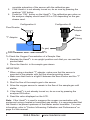
LCD Display: A 3-digit display provides a direct readout of oxygen concentration
in the range of 0 - 100%. The display is blank when the Handi®+ enters its Sleep
(power off) mode. The Handi®+ will automatically enter the Sleep mode after
approximately 1.3 minutes from the last time the ON button was pressed.
ON/OFF Button: Use this button to turn the Handi®+ on and off. When the
Handi®+ is in the Sleep (power off) mode, the LCD display is blank. The analyzer
turns off after 1.3 minutes if no buttons are pressed.
Calibration Button: Press the calibration (CAL) button to adjust the calibration
value to reflect the known oxygen concentration. To simplify operation, the
Handi®+ Analyzer automatically determines the calibration gas being used as room
air (20.9%) or high grade (100%).
Flow Diverter: The flow diverter is designed to fit industry standard 15 mm I.D. "T"
adapters.
Over Range Indicator: The appearance of a decimal point after the first digit
means that the Handi®+ is reading in excess of 99.9%.
Example: . . . . . . . . . . . . . . . . . . . . . . . . . . . . . . . . . . . . . . . . . . . . . 0.0.0 = 100%
. . . . . . . . . . . . . . . . . . . . . . . . . . . . . . . . . . . . . . . . . . . . . . . . . . . . . 0.0.1 = 101%
. . . . . . . . . . . . . . . . . . . . . . . . . . . . . . . . . . . . . . . . . . . . . . . . . . . . . 0.0.2 = 102%
. . . . . . . . . . . (If the display reads > 0.0.3 the Handi®+ should be re-calibrated.)
866.4.Maxtec
www.maxtecinc.com
1