1
3Mega-Pixel Vandal Proof Fish-Eye IP Camera
ICA-8350
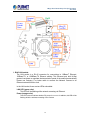
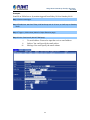
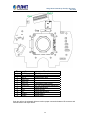
This LED is used to indicate whether DC power is on or not.
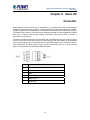
2. RS-485: Connect to a local keyboard controller.
DI/ DO: Connect to sensor in and alarm out devices
Cable for I/O connectors:
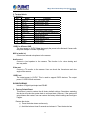
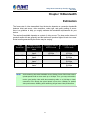
Name Number
Function
12VDC
1
DC 12V (50mA maximum)
DI
2
Digital signal input
GND
3
GND
DO
4
Digital signal output
485+
5
RS485 data +
4856
RS485 data 3.
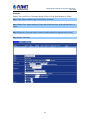
Factory Default Reset
This button is used to restore the all factory default settings. Sometimes restarting
the device will make the system back to a normal state. However, if the system still
got problems after restart, user can restore the factory default settings and install it
again.
Restore the device:
1. While the Camera is ready and then press the button down continuously.
2. Hold the button at least 5 seconds and release it. Then the device has been
restored to default settings and reboot again.
NOTE:
Restoring the factory default setting will lose the all previous settings included IP
address forever. User needs to run the IPWizard II program to search the device
and configure it to let the device work properly again.
4. DC-in Jack
The input power is 12VDC.
NOTE:
ONLY use package power adapter supplied with the Internet. Otherwise, the
product may be damaged.
5. MIC in (audio in)
Connect a microphone to the network camera.
6. Line out (audio out)
Connect a loud speaker to the network camera. This function is for voice alerting
and two-way audio.
7. Video out (BNC connector)
The Network Camera also provides composite video output. The video output
14