1
Getting started
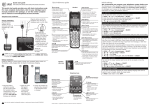
Quick reference guide - handset
Handset
side view
EQUALIZER
During an outside call, intercom call, message
or announcement playback, press to change the
quality of the audio to best suit your hearing.
Main menu
Main menu
The > symbol highlights
a menu item.
>Play messages
Answering sys
•
•
•
•
•
•
•
•
•
Play messages
Answering sys
Directory
Caller ID log
Intercom
Ringers
Set date/time
Settings
Web address
Using menus:
• Press MENU/SELECT to show the menu.
• Press qCID or pDIR to scroll through menu items.
• Press MENU/SELECT to confirm or save changes to a highlighted
menu item.
• Press OFF/CANCEL to cancel an operation, back up to the
previous menu, or exit the menu display.
For complete instructions, refer to the user’s manual provided
with your CRL32102/CRL32202/CRL32302/CRL32352/CRL32452
telephone system.
If you are unable to find your user’s manual, go to
www.telephones.att.com/manuals to read and/or
download the manual.