1
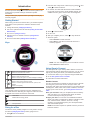
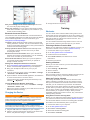
Plan your training: You can choose a fitness goal and load one of the day-by-day training plans. Share your activities: You can connect with friends to follow each other's activities or post links to your activities on your favorite social networking sites. Bluetooth Connected Features The Forerunner has several Bluetooth connected features for your compatible smartphone or mobile device using the Garmin Connect Mobile application. For more information, go to www.garmin.com/intosports/apps. LiveTrack: Allows friends and family to follow your races and training activities in real time. You can invite followers using email or social media, allowing them to view your live data on a Garmin Connect tracking page. Activity uploads to Garmin Connect: Automatically sends your activity to Garmin Connect as soon as you finish recording the activity. Workout and course downloads: Allows you to browse for workouts and courses in the application. You can wirelessly send one or more files to your Forerunner. Social media interactions: Allows you to post an update to your favorite social media website when you upload an activity to Garmin Connect. Pairing Your Smartphone with Your Forerunner 1 Go to www.garmin.com/intosports/apps, and download the Garmin Connect Mobile application to your smartphone. 2 Bring your smartphone within 33 ft. (10 m) of your Forerunner. 3 From the Forerunner home screen, select Menu > Settings > Bluetooth > Pair Mobile Device. 4 Open the Garmin Connect Mobile application, and follow the on-screen instructions to connect a device. The instructions are provided during the initial setup or by selecting > My Device. Turning Off Bluetooth Wireless Technology • From the Forerunner home screen, select Menu > Settings > Bluetooth > Status > Off. • Refer to the owner's manual for your mobile device to turn off Bluetooth wireless technology. Charging the Device WARNING This device contains a lithium-ion battery. See the Important Safety and Product Information guide in the product box for product warnings and other important information. NOTICE To prevent corrosion, thoroughly dry the contacts and the surrounding area before charging or connecting to a computer. 1 Plug the USB cable into a USB port on your computer. 2 Align the charger posts with the contacts on the back of the device, and press the charger À until it clicks. 2 3 Charge the device completely. Training Workouts You can create custom workouts that include goals for each workout step and for varied distances, times, and calories. You can create workouts using Garmin Connect or select a training plan that has built-in workouts from Garmin Connect, and transfer them to your device. You can schedule workouts using Garmin Connect. You can plan workouts in advance and store them on your device. Following a Workout From the Web Before you can download a workout from Garmin Connect, you must have a Garmin Connect account (Garmin Connect). 1 Connect the device to your computer. 2 Go to www.garminconnect.com/workouts. 3 Create and save a new workout. 4 Select Send to Device, and follow the on-screen instructions. 5 Disconnect the device. Starting a Workout Before you can start a workout, you must download a workout from Garmin Connect. 1 Select Training > My Workouts. 2 Select a workout. 3 Select Do Workout. After you begin a workout, the device displays each step of the workout, the target (if any), and current workout data. About the Training Calendar The training calendar on your device is an extension of the training calendar or schedule you set up in Garmin Connect. After you have added a few workouts to the Garmin Connect calendar, you can send them to your device. All scheduled workouts sent to the device appear in the training calendar list by date. When you select a day in the training calendar, you can view or do the workout. The scheduled workout stays on your device whether you complete it or skip it. When you send scheduled workouts from Garmin Connect, they overwrite the existing training calendar. Using Garmin Connect Training Plans Before you can download a training plan from Garmin Connect, you must have a Garmin Connect account (Garmin Connect). You can browse Garmin Connect for a training plan, schedule the workouts, and download the plan to your device. 1 Connect the device to your computer. 2 Go to www.garminconnect.com. 3 Select Plan > Training Plans. 4 Select and schedule a training plan. 5 Select Plan > Calendar. Training