1
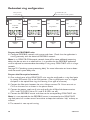
Multidrop configuration
RX2
TX2
TX1
RX2
TX1
RX2
TX1
RX2
RX1
TX2
RX1
TX2
RX1
TX2
End Unit
S2: 2 ON
PROFIBUS
Master
(PLC)
TX1
RX1
End Unit
S2: 2 ON
PROFIBUS
Slave
PROFIBUS
Slave
PROFIBUS
Slave
Prepare the PROFIBUS units
… Configure PROFIBUS network, with master and slaves. Check that the application is
running correctly with the electrical PROFIBUS network.
Note: In an ODW-710-F2 fibre optic network there will be some additional processing
delays that do not exist in an electrical bus. It is possible that the PROFIBUS application
must be adjusted to accommodate these delays if using many ODW-710-F2 units in a large
network.
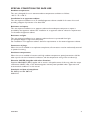
See page 22 “Calculating system processing delay” for more information on how to
determine the overall system delay time.
Prepare the fibre optical network
… The first and last ODW-710-F2 units must be configured as Multidrop end units by
setting DIP-switch S2:2 to the ON position. (End units only have one fibre pair each
and must know that this is a fact)
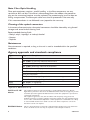
… Connect the fibre pairs between the units. Always connect CH 1 from one unit to
CH 2 on the next unit as shown in the picture above.
… Connect the power supply to all units and verify that all fibre links become active.
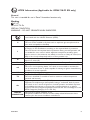
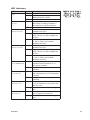
(CH 1 and CH 2 LED’s are on, FL L and FL R LED’s are off).
… Connect the PROFIBUS master and slaves to the corresponding ODW-710-F2 unit.
… The network is now up and running.
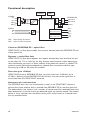
Data from the PROFIBUS master is received at the ODW-710-F2 electrical port
(as indicated by the DPR LED). The data rate is automatically detected (as indicated by
the BA LED) and data bits are retimed according to the determined rate and sent out on
the optical fibre at CH 1.
The first ODW-710-F2 slave unit receives data at optical fibre CH 2 (as indicated by the
FR LED). The data rate is automatically detected (as indicated by the BA LED) and data
is sent out on the electrical port. The slave unit also repeats incoming data on CH 2 to
the next slave unit.
Responses from the PROFIBUS slaves are processed in the same fashion and sent back
to the PROFIBUS master in the opposite direction.
18
6651-2211