Transcript
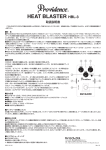
HEAT BLASTER HBL-3
OWNER’S MANUAL
Thank you for choosing Providence. In order to take full advantage of the product’s features and performance, please read this
manual thoroughly and keep it in a safe place for future reference.
■HEAT BLASTER Features
●The Providence HEAT BLASTER HBL-3 pedal is designed to deliver a modern distortion sound that is rich in harmonics and has a
fast attack - high-gain tube distortion in a compact pedal. This is a sound that won’t get buried in any band. What’s more, the HEATBLASTER does not produce the excessive compression that can be a problem with many distortion pedals, for exceptionally natural
response. The Heat Blaster is ideal for use with the clean channel of a multi-channel amplifier.
●In a normal True-Bypass circuit, in bypass mode the audio signal passes through two switch contacts. But in the HEAT BLASTER, in
bypass mode the audio passes through a single contact, thanks to a single contact true-bypass circuit. The result is much higher
sound quality and reliability than that provided by previously existing products.
●Due to the adoption of the new double-contact grounding circuit (D.C.G. Circuit), by inserting a monaural plug into the output jack,
the shield (sleeve) of the plug provides two points of contact to the pedal’s ground circuit. By increasing the area of the point of contact, it becomes more difficult for a loose connection to occur, and provides the additional advantage of improved sound quality.
●In addition to indicating the pedal’s on/off status, the HEAT BLASTER LED provides effective visual battery power monitoring. When
the battery voltage drops below 7 volts the LED will become dimmer and begin to go out. The effect will still operate at this voltage, but
to ensure optimum performance the battery should be replaced as soon as possible.
■Controls & Functions
①DRIVE:Adjusts the overdrive depth. Rotate clockwise for deeper overdrive.
②TONE:Adjusts tone. Rotate counterclockwise to cut the high frequencies, or clockwise
to boost the high frequencies.
③LEVEL:Adjusts the output level when the effect is on. Rotate clockwise to increase the
output level when the effect is on.
④BASS BOOST Switch:Boosts the low frequencies. Press the switch in to engage the
BASS BOOST function.
⑤LED Indicator:Lights blue when the effect is ON. The LED will begin to go out if the battery voltage drops to less than about 7V.
⑥INPUT Jack:INPUT Jack:This is the input to the HBL-3. The output from a guitar or
other source device (electronic musical instrument or effect unit) should be connected here.
⑦OUTPUT Jack:This is the output from the HBL-3. The OUTPUT jack should be connected to an amplifier, or a subsequent effect device.
⑧ON/OFF Footswitch:This footswitch turns the effect ON or OFF.
⑨DC9V INPUT:The DC output cable from the regulated 9V AC adaptor connects here.
■Main Specification
●Controls: LEVEL, TONE, DRIVE, BASS BOOST
●Connectors: 1/4-inch phone jack x 2 (INPUT and OUTPUT), DC 9V input jack (AC adaptor jack)
●Power Supply: 9V battery or AC adaptor
●Power Consumption: DC 9V, 8 mA approx.
●Dimensions: 115 (D) x 72 (H) x 50 (H) mm
●Weight: 250 g approx. (Not including battery)
■Battery Replacement
To replace the battery, remove the bottom panel by unscrewing the four screws that hold it in place. Use a 9-volt 006P type battery. Be careful not to apply excessive force to the wiring when changing the battery to avoid broken connections and other damage.
■Precautions
• Inserting or removing a plug from the input jack while the unit's output is connected to an amplifier/speakers can cause noise that can damage the speakers.
• If the unit malfunctions or behaves abnormally, cease operation immediately and refer the problem to the supplier.
• If the unit will not be used for an extended period of time, remove the battery to prevent damage due to chemical leakage from the battery.
• Use only an AC adaptor with internal voltage regulation.
• When the battery voltage drops too low for proper operation the effect sound may become weak, the output level may drop, or no output
will be produced at all. Be sure to replace the battery as soon as possible if such symptoms occur.
■Troubleshooting
If the indicator LED does not light: Replace the battery with a new one or
connect an appropriate AC adaptor.
* Specifications and appearance are subject to change without notice.
PPD1102-01
Rev 1.0