1
DV-7_HDRH-44-2U User’s Manual
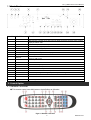
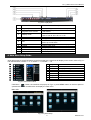
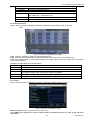
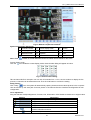
1.2 Back Panel
Item #
Label Name
Function
1
Video out
2
Spot
3
Audio out
BNC Connect to monitor
BNC Connect to monitor as an AUX output to display channel by channel. Video would be
displayed without OSD.
RCA Audio output, connect to Speaker
4
SD Video in
BNC CVBS video signal input, Recommend use Gold Center Plan
5
HD SDI Video in
BNC HD SDI video signal input
6
Audio in
RCA 4 CH Audio input
7
HDMI port
HDMI Connect to high-definition display device
8
VGA port
9
USB port
10
LAN
VGA output, connect to monitor
To connect external USB devices like USB flash, USB HDD or USB mouse. Recommend
using for USB mouse
Network port
11
ALARM IN
Screw in connect to external sensor1-8
12
ALARM OUT
Screw in 4ch relay output. Connect to external alarm.
13
P/Z
Screw in Connect to Speed Dome, Y is TX+, Z is TX-
14
K/B Controller
Screw in Connect to Keyboard Controller, A is TX+, B is TX-
15
E-SATA
Connect to External HDD for backup
16
LOOP OUT
DB 15 for outputting 1-4ch image independently to 4 BNC Pigtail
17
POWER INPUT
AC 110V-220V
18
POWER SWITCH
Switch on/off
19
FAN
For cooling the device
2. Control Option
2
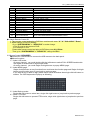
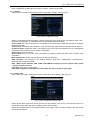
2.1 Remote Controller
◆ This remote control uses AAA battery, the definition as following:
Fig 2.11 Remote Controller
5
R201304-V10