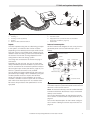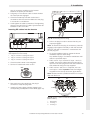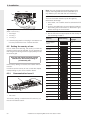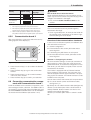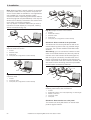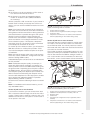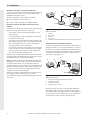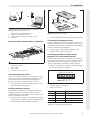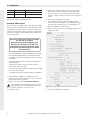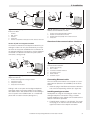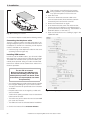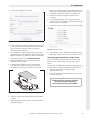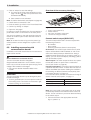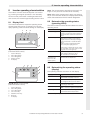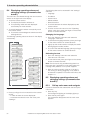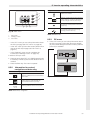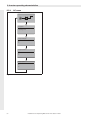
1
Installation and Operating Manual EN Smart connections. Installation and Operating Manual PIKO-Inverter 3.0 | 3.6 | 4.2 | 5.5 | 7.0 | 8.3 | 10.1 LEGAL NOTICE KOSTAL Solar Electric GmbH Hanferstrasse 6 79108 Freiburg i. Br. Germany Tel. +49 761 477 44 - 100 Fax +49 761 477 44 - 111 www.kostal-solar-electric.com Exclusion of liability All names of usage, trade names, product names or other designations given in this manual may also be legally protected even without special labelling (e.g. as a trademark). KOSTAL Solar Electric GmbH accepts no liability and gives no assurance that they can be freely used. The illustrations and texts have been compiled with great care. However, the possibility of errors cannot be ruled out. The compilation is made without any guarantee. Software version above FW: 4.00 General note on non-sexist language KOSTAL Solar Electric GmbHis aware of the importance of language with regard to the equality of women and men and always makes an effort to reflect this in the documentation. Nevertheless, for the sake of readability we are unable to use nongender-specific terms throughout and have used the masculine form as a rule. © 2012 KOSTAL Solar Electric GmbH All rights reserved by KOSTAL Solar Electric GmbH, including those of reproduction by photocopy and storage in electronic media. Commercial use or distribution of the texts, displayed models, diagrams and photographs appearing in this product is not permitted. The manual may not be reproduced, stored, transmitted or translated in any form or by means of any medium – in whole or in part – without prior written permission. Contents Contents 1 Notes on this manual . . . . . . . . . . . . . . . . . . . . . . . . . . . . . . . . . . . . . . . . . . . . . . . . . . . . . . . . . . 5 2 Proper use . . . . . . . . . . . . . . . . . . . . . . . . . . . . . . . . . . . . . . . . . . . . . . . . . . . . . . . . . . . . . . . . . . 5 3 EU Declaration of Conformity . . . . . . . . . . . . . . . . . . . . . . . . . . . . . . . . . . . . . . . . . . . . . . . . . . . . 7 4 Safety instructions. . . . . . . . . . . . . . . . . . . . . . . . . . . . . . . . . . . . . . . . . . . . . . . . . . . . . . . . . . . . . 8 5 Unit and system description . . . . . . . . . . . . . . . . . . . . . . . . . . . . . . . . . . . . . . . . . . . . . . . . . . . . . 9 6 Installation . . . . . . . . . . . . . . . . . . . . . . . . . . . . . . . . . . . . . . . . . . . . . . . . . . . . . . . . . . . . . . . . . . 6.1 Installation . . . . . . . . . . . . . . . . . . . . . . . . . . . . . . . . . . . . . . . . . . . . . . . . . . . . . . . . . . . . . 6.2 Electrical connection . . . . . . . . . . . . . . . . . . . . . . . . . . . . . . . . . . . . . . . . . . . . . . . . . . . . . . 6.3 Connecting the AC side . . . . . . . . . . . . . . . . . . . . . . . . . . . . . . . . . . . . . . . . . . . . . . . . . . . 6.4 Connecting the DC side . . . . . . . . . . . . . . . . . . . . . . . . . . . . . . . . . . . . . . . . . . . . . . . . . . . 6.5 Setting the country of use . . . . . . . . . . . . . . . . . . . . . . . . . . . . . . . . . . . . . . . . . . . . . . . . . . 6.6 Connecting communication components with communication board I . . . . . . . . . . . . . . . . 6.7 Connecting communication components with communication board II . . . . . . . . . . . . . . . . 6.8 Installing accessories with communication board I . . . . . . . . . . . . . . . . . . . . . . . . . . . . . . . 6.9 Installing accessories with communication board II . . . . . . . . . . . . . . . . . . . . . . . . . . . . . . . 6.10 Closing the housing . . . . . . . . . . . . . . . . . . . . . . . . . . . . . . . . . . . . . . . . . . . . . . . . . . . . . . 14 15 16 16 18 20 21 28 34 38 40 7 Commissioning and de-commissioning . . . . . . . . . . . . . . . . . . . . . . . . . . . . . . . . . . . . . . . . . . . 7.1 Switching on the inverter . . . . . . . . . . . . . . . . . . . . . . . . . . . . . . . . . . . . . . . . . . . . . . . . . . 7.2 Setting up communication and accessories . . . . . . . . . . . . . . . . . . . . . . . . . . . . . . . . . . . . 7.3 Handover to the operator . . . . . . . . . . . . . . . . . . . . . . . . . . . . . . . . . . . . . . . . . . . . . . . . . . 7.4 Switching the inverter off/decommissioning . . . . . . . . . . . . . . . . . . . . . . . . . . . . . . . . . . . . 7.5 Servicing/maintenance . . . . . . . . . . . . . . . . . . . . . . . . . . . . . . . . . . . . . . . . . . . . . . . . . . . . 7.6 Disassembly and disposal . . . . . . . . . . . . . . . . . . . . . . . . . . . . . . . . . . . . . . . . . . . . . . . . . 41 41 41 49 49 49 50 8 Inverter operating characteristics . . . . . . . . . . . . . . . . . . . . . . . . . . . . . . . . . . . . . . . . . . . . . . . 8.1 Display field . . . . . . . . . . . . . . . . . . . . . . . . . . . . . . . . . . . . . . . . . . . . . . . . . . . . . . . . . . . . 8.2 Determine the operating status (operating LEDs) . . . . . . . . . . . . . . . . . . . . . . . . . . . . . . . . 8.3 Determining the operating status (display) . . . . . . . . . . . . . . . . . . . . . . . . . . . . . . . . . . . . . . 8.4 Displaying operating values and changing settings (communication board I) . . . . . . . . . . . . 8.5 Displaying operating values and changing settings (communication board II) . . . . . . . . . . . 8.6 Faults . . . . . . . . . . . . . . . . . . . . . . . . . . . . . . . . . . . . . . . . . . . . . . . . . . . . . . . . . . . . . . . . . 51 51 51 51 52 52 56 9 System monitoring . . . . . . . . . . . . . . . . . . . . . . . . . . . . . . . . . . . . . . . . . . . . . . . . . . . . . . . . . . . 9.1 Displays and settings via web server . . . . . . . . . . . . . . . . . . . . . . . . . . . . . . . . . . . . . . . . . . 9.2 Logging into the web server . . . . . . . . . . . . . . . . . . . . . . . . . . . . . . . . . . . . . . . . . . . . . . . . 9.3 Downloading log data . . . . . . . . . . . . . . . . . . . . . . . . . . . . . . . . . . . . . . . . . . . . . . . . . . . . . 9.4 Displaying log data . . . . . . . . . . . . . . . . . . . . . . . . . . . . . . . . . . . . . . . . . . . . . . . . . . . . . . . 9.5 End data transfer to a solar portal . . . . . . . . . . . . . . . . . . . . . . . . . . . . . . . . . . . . . . . . . . . . 59 59 59 60 61 62 10 Appendix . . . . . . . . . . . . . . . . . . . . . . . . . . . . . . . . . . . . . . . . . . . . . . . . . . . . . . . . . . . . . . . . . . . 10.1 Technical data . . . . . . . . . . . . . . . . . . . . . . . . . . . . . . . . . . . . . . . . . . . . . . . . . . . . . . . . . . 10.2 Block diagram . . . . . . . . . . . . . . . . . . . . . . . . . . . . . . . . . . . . . . . . . . . . . . . . . . . . . . . . . . 10.3 Type plate . . . . . . . . . . . . . . . . . . . . . . . . . . . . . . . . . . . . . . . . . . . . . . . . . . . . . . . . . . . . . 10.4 Warranty and service information . . . . . . . . . . . . . . . . . . . . . . . . . . . . . . . . . . . . . . . . . . . . 63 63 65 66 66 Index . . . . . . . . . . . . . . . . . . . . . . . . . . . . . . . . . . . . . . . . . . . . . . . . . . . . . . . . . . . . . . . . . . . . . . . . . . . 67 Installation and Operating Manual for PIKO Solar Inverter 3 1 Notes on this manual Thank you for choosing a solar inverter PIKO from KOSTAL Solar Electric GmbH! ATTENTION We hope you enjoy consistently high energy yields with the PIKO inverter and your photovoltaic system. Non-observance of safety warnings, which are identified by the signal word ATTENTION, can cause damage to property. If you have any technical questions, please call our service hotline: +49 (0)761 477 44 - 222 2 1 Notes on this manual Read this manual carefully in its entirety. It contains important information on the installation and operation of the inverter. Pay particular attention to the instructions regarding safe usage. KOSTAL Solar Electric GmbH assumes no liability for damages arising from the non-observance of this manual. This manual is an integral part of the product. It only applies to solar inverters PIKO from KOSTAL Solar Electric GmbH. Keep this manual and give it to the new owner should you pass it onto a new operator. The installer as well as the user must always have access to this manual and must be familiar with its contents, particularly the safety instructions. Target groups This manual, especially chapters 6 (‹Installation›) and 7 (‹Commissioning and de-commissioning›), are intended for specialist tradespersons. Information relevant for the operator can be found in chapters 8 (‹Inverter operating characteristics›) and 9 (‹System monitoring›). The inverters described in this manual differ from one another in terms of particular technical details. Information and instructions that only apply to certain device types are indicated accordingly, for example “PIKO 4.2/5.5”. Information concerning your safety or that of the unit is highlighted especially. DANGER Non-observance of safety warnings, which are identified by the signal word DANGER, can cause fatal injuries. WARNING Proper use The inverter PIKO converts DC current into symmetric, single-phase (PIKO 3.0/3.6) or 3-phase (PIKO 4.2/5.5/7.0/8.3/10.1) AC current and feeds this into the public mains grid. The unit may only be used in gridconnected photovoltaic systems within the permissible power range and under the permissible environmental conditions. The unit is not intended for mobile use. Inappropriate use can be hazardous and lead to injury or even death of the user or third parties. Material damage to the unit and other equipment can also occur. The inverter may therefore only be used for its intended purpose. Exclusion of liability Any use that differs from or goes beyond the stated intended purpose is considered inappropriate. The manufacturer accepts no liability for any damage resulting from this. Modifications to the inverter are prohibited. The inverter may only be used if safe to operate and in technically perfect condition. Any instance of misuse will cause the termination of the warranty, guarantee and general liability of the manufacturer. Only a qualified electrician may open the unit. The inverter must be installed by an electrician who is responsible for observing the applicable norms and regulations. Work that could affect the electrical power system of the respective utility company at the site of the solar energy feed-in may only be carried out by qualified electricians expressly authorised (licensed) by the utility company. This includes changes to the factory preset parameters. The installer must always observe the regulations of the utility company. The utility company's specifications must always be observed when setting the parameters, since otherwise the ENS (grid monitoring) will no longer function correctly. Non-observance of safety warnings, which are identified by the signal word WARNING, can cause serious and/or permanent injuries. CAUTION Non-observance of safety warnings, which are identified by the signal word CAUTION, can cause minor and/or reversible injuries. Installation and Operating Manual for PIKO Solar Inverter 5 2 Proper use Transport and storage The function if the inverter has been tested and it has been carefully packed prior to delivery. Upon delivery, check that the delivery is complete and check for any possible transport damage. Complaints and damage claims are to be directly addressed to the shipping company. ATTENTION Risk of damage when the inverter is placed on its underside. • Always place the inverter on its rear side (cooling elements) after unpacking. If stored for a longer period before installation, all components of the inverter must be kept dry and dust-free in the original packaging. 6 Installation and Operating Manual for PIKO Solar Inverter 3 EU Declaration of Conformity 3 EU Declaration of Conformity EU Declaration of Conformity The company KOSTAL Solar Electric GmbH Hanferstraße 6 79108 Freiburg i. Br., Deutschland hereby declares that the inverters Type PIKO 3.0 DCS PIKO 3.6 DCS PIKO 4.2 DCS PIKO 5.5 DCS PIKO 7.0 DCS PIKO 7.0 AD PIKO 8.3 DCS PIKO 8.3 AD PIKO 10.1 DCS PIKO 10.1 AD, basic 4567 5x0313 5x0313 5x0313 5x0313 5x0000 5x0000 5x0316 5x0000 5x0316 5x0000 8567 04.00 04.00 04.00 04.00 04.00 04.00 04.00 04.00 04.00 04.00 to which this declaration refers, conform to the following guidelines and standards. EMC Directive 2004/108/EEC DIN EN 61000-3-2:2006 + A1:2009 + A2:2009 (Harmonic currents) DIN EN 61000-3-3:2008 (Flicker) DIN EN 61000-6-2:2005 + AC:2005 (Interference resistance for industrial environments) DIN EN 61000-6-3:2007 + A1:2011 (Interference emission for domestic environments) 2006/95/EEC Low Voltage Directive DIN EN 50178:1998 (Electronic devices in high voltage systems) This declaration applies to all identical copies of this product. This declaration loses its validity if [\]^_]`ab]^ac^de_af]_^eg^ahbegg]b[ij^behh]b[]_k KOSTAL Solar Electric GmbH – 2012-04-25 Werner Palm (Managing Director) Dr. Armin von Preetzmann (Development Manager) o\ac^_]bipgp[aeh^b]g[af]c^[\]^bedqiaphb]^ra[\^[\]^d]h[aeh]_^g]stip[aehc^ut[^_e]c^he[^]hctg]^[\]^qgeq]g[a]ck^o\]^cpv][j^ instructions in the product documentation provided must be observed! Fig. 1: EU Declaration of Conformity Installation and Operating Manual for PIKO Solar Inverter 7 4 Safety instructions 4 Safety instructions Improper handling during installation and while operating inverters can cause potentially fatal situations due to electrical shock. Furthermore, non-observance of this manual could cause burns or even fires due to the potentially high surface temperature of the cooling elements. Therefore always observe all safety instructions in this manual. Safety markings The labels and markings attached to the housing by the manufacturer may not be changed or removed. Proper installation The installer must be familiar with and observe all local installation regulations valid in their respective country. The installer must be familiar with this manual and follow all instructions. Electromagnetic fields Danger due to electromagnetic fields! People with pacemakers, metallic implants or hearing aids may experience complications. Such people should consult their doctor before entering a site with inverters. Opening the unit Only a qualified electrician may open and perform work on the unit. There are deadly voltages in the inverter during operation. • Switch off the unit completely (DC side and AC side) before all work. • Wait at least five minutes after switching off until the capacitors have discharged. 8 Disconnecting cables Burns from arcs! Cables must never be removed from the device during operation as dangerous arcs may form. First de-energise the DC side, then remove plug-in connectors! Disconnecting the DC side on units with a DC-load break switch The DC load break switch is not an isolation switch for complete disconnection. The inverter is isolated from the PV generator only when the plug-in connectors are disconnected. It is possible to plug in and disconnect the plug-in connectors under voltage – but not while under electrical load. Touching the inverter during operation Individual housing sections, especially the cooling elements, can reach temperatures of over 80 °C during operation. • Do not touch hot components. • Allow the device to cool down before maintenance work. Avoiding risk of fire Individual housing sections, especially the cooling elements, can reach temperatures of over 80 °C during operation. • Comply with regulations when choosing the installation site. • Always keep the ventilation openings clear. • Do not obstruct the unit. • Do not store combustible and flammable materials near the inverter. Installation and Operating Manual for PIKO Solar Inverter 5 Unit and system description 5 Unit and system description Function 1 2 Through three-phase technology, PIKO 4.2/5.5/7.0/8.3/10.1 combine the stability and durability of large central inverters with the flexibility and high efficiency of transformer-less string inverters. 3 The single-phase inverters PIKO 3.0/3.6 use the modern and fail-safe phase-shifting procedure to monitor the grid. To improve efficiency, PIKO 4.2/5.5/7.0/8.3/10.1 use only one or two phases with a limited power input (less than 10 percent of the rated power) for feeding current into the grid. The device selects the phase on a random basis each time. 4 5 6 7 8 Fig. 2: Inverter PIKO 1 2 3 4 5 6 7 8 Screws Cover Display Housing Plug-in connector or cable openings to connect the solar modules DC load break switch Cable openings for optional communication Opening for the mains cable PIKO solar inverters are powerful and transformer-less string inverters. The inverters convert DC current generated by the photovoltaic modules into symmetric, single-phase (PIKO 3.0/3.6) or 3-phase (PIKO 4.2/5.5/7.0/8.3/10.1) AC current and feeds this into the public mains grid. Power generation independent of the public grid (“island operation”) is not possible. Fig. 3: Display PIKO 3.0/3.6/4.2/5.5 (with communication board I) The PIKO inverters are fitted with an integrated DC load break switch. No external break switch is therefore required, unless specified by local country laws (example France). The solar modules are connected to the inverter via plug-in connectors. The PIKO inverters are available in various output sizes (see table 22, page 63) and offer you maximum flexibility in configuring your solar energy system. This is achieved through a broad DC input voltage range, independent MPP regulators for each input, which enable the connection of solar modules in various combinations (alignment, inclination, quantity, type). In order to conveniently display the yields and production data of your photovoltaic system, the inverter has an integrated web server, see chapter 7.2.1. Note: The inverter is available in two series: small series: PIKO 3.0/3.6/4.2/5.5 large series: PIKO 7.0/8.3/10.1 The small series is equipped with the communication board I and the large series with the communication board II. The series have different displays (see Fig. 3 and Fig. 4). Fig. 4: Display PIKO 7.0/8.3/10.1 (with communication board II) Installation and Operating Manual for PIKO Solar Inverter 9 5 Unit and system description Arc recognition Arcs can occur in a PV system. These arcs can cause damage. The inverters PIKO 7.0 AD/8.3 AD/10.1 AD are equipped with arc recognition Arc types IMPORTANT: Under certain circumstances (e. g. with feed cables > 60m), arcs cannot be registered. This is why regular maintenance of the PV system is essential. Regular inspection of the installation must be carried out despite arc recognition! There are two kinds of arcs: — Serial arcs — Parallel arcs Serial arcs occur on damaged DC lines or at loose contact points. These arcs occur more often in PV systems than parallel arcs. Parallel arcs can occur between the plus and minus pole of the system or at individual sub-generators. Arcs are dangerous. For one thing they destroy the components upon which they occur and high temperatures can also trigger a fire in the PV system. The arc recognition monitors the PV system for arcs. It determines the string in which an arc is occurring. The arc recognition differentiates between serial or parallel arcs. In the event of a serial arc, the inverter shuts off the relevant string. This extinguishes the arc. A parallel arc is issued as an error message. Malfunction “Arc” When an arc occurs, the message “Malfunction arc” appears in the display. The red LED is permanently lit, the yellow LED blinks in a 5-second rhythm and a signal tone is heard. The inverter switches off the relevant string. After 30 seconds, the inverter attempts to switch on the relevant string again. When the inverter recognises an arc four times within a period of 30 minutes, it shuts off the defective string entirely. The arc recognition can be deactivated with the communication board II menu (default “On”). The occurring malfunctions are recorded in the inverter. Acknowledge malfunction The DC break switch must be switched off and on again in order to acknowledge the error message. The inverter then starts normally. When an arc occurs again, the inverter behaves as previously described. Because it is not technically possible for an inverter to delete a parallel arc, this is only shown as a message in the display. The signal tone also sounds and the red LED lights up. The message disappears in the display once the error message is acknowledged. Note: The entire installation of the PV system should be checked for damage after each “Arc” malfunction. Inform your installer where appropriate. Note: In rare individual cases, false alarms can occur that can be extinguished outside of the PV system. Causes for such false alarms can include, for example, transformer stations or large energy consumers. 10 Installation and Operating Manual for PIKO Solar Inverter 5 Unit and system description 3 1 6 7 5 4 2 Fig. 5: System illustration of a grid-connected photovoltaic system 1 2 3 4 PV string 1 PV string 2 and 3 (optional) Inverter Electronic DC load break switch 5 6 7 AC mains cable Single-phase or 3-phase AC line circuit breaker (for layout, see table 2, page 18) Feed meter Inputs Internal consumption The PIKO operates using the so-called string principle: In this system, a limited number of solar modules (depending on the desired power output while considering the maximum permissible input voltage) are connected in series as a string, which is then connected to the inverter. The number of strings depends on the configuration of the solar energy system. All PIKO inverters are designed in such a way that the generated power can be used internally in part or entirely. The strings are connected to the inverter via plug-in connectors. Depending on the unit type, one, two or three separately controllable inputs are available. Inputs one and two can sometimes be connected in parallel in order to allow a higher input current (see table 3, page 18). For PIKO 5.5, parallel connection is not possible. You can obtain the highest yields through the maximum permissible input voltage. This is achieved by using the smallest possible number of inputs with identical power. An example: For the installation of 48 solar modules, it is better to use two inputs with 24 modules each rather than three inputs with 16 modules each. Be sure to always observe the specifications on the type plate! Photovoltaic module Inverter Production meter Feed meter Consumption meter Grid Control signal Jumper switch External load relay Consumer devices Fig. 6: Possible configuration for internal consumption The switch output is a potential-free NO switch and can deal with a max. load of 100 mA. Note: An external load relay must be installed between inverters and devices. No devices may be connected directly to the inverter! You can find the description for the electrical connection in section “Connect switch output (S0/Al OUT)” on page 34. You can find the description for the inverter configuration in section “Setting the switch output function” on page 43. Installation and Operating Manual for PIKO Solar Inverter 11 5 Unit and system description Active power and reactive power control The terms There are three types of electrical power in the mains grid: Apparent power Apparent power is the total power, consisting of real and reactive power. The calculation of electrical power takes place through the geometrical addition with the angular functions (cos!, sin! and tan!). — Active power (W) — Reactive power (Var) Displacement factor cos! — Apparent power (VA) The size of the real, reactive and apparent power can be determined with the displacement factor cos!. The smaller the cos! factor is, the less the active power and therefore the greater the reactive power. Active power Active power is that electrical power that is converted by an ohmic device. Ohmic devices are devices with no coil and capacitors (e.g. heat radiators, electric stoves, light bulbs). The active power is registered by the usual electricity meters. This means that only the active power is calculated or paid for. The active power current is “in phase”. That means that power and voltage are synchronous. Both reach the zero point and the peak value at the same time. Reactive power Reactive power is that electrical power that is converted by inductive and capacitive devices. Inductive devices are coils. Capacitive devices are capacitors. These devices require electrical energy in order to build up the magnetic or electrical field. This power is referred to as reactive power. Devices with motors and capacitors (e.g. washing machine) draw reactive power from the grid. The reactive power is not registered by the usual electricity meters. However, like the active power, it does draw from the power grid. The reactive power current is “out-of-phase”. That means that power and voltage reach the zero point and the peak value at different times. The phase shift caused by inductive and capacitive devices reduces the stability of the power grid and must be compensated. The compensation of reactive power requires electrical power. This required energy must be provided by the electricity producers at no charge. Note: (The cos! displacement factors are set with the parameterisation software PARAKO and the size of the reactive power is defined in this way. You can acquire the software from the support. VDE application rule (VDE-AR-N 4105) and Renewable Energies Act (EEG) 2012 New application rules for PV systems have applied in Germany since 1 January 2012. The VDE application rules (VDE-AR-N 4105) and the Renewable Energies Act (EEG) are compulsory. The PIKO inverters satisfy the currently required standards and guidelines. Note: Should the PV system not fulfil the Renewable Energies Act (EEG) 2012, the grid operator can reduce the feed-in tariff or dispense with it entirely. The following points are relevant when implementing the new application rules: — Frequency-dependent active power control — Active power control with a ripple control signal receiver — Fixed limitation of the feed-in power to 70% of the PV output — Provision of reactive power — Regulating of unbalanced loads Frequency-dependent active power control To date inverters are to be immediately disconnected from the grid when they exceed the upper frequency limit of 50.2 Hz. Grid stability can be negatively impacted by the abrupt switching off of large generation systems. Hence the need for an active power reduction solution in the event of overfrequency. This means that inverters need not be disconnected from the grid when exceeding 50.2 Hz, but instead that the active power must be reduced. This active power is then reduced by 40% per Hz. When the frequency reaches 51.5 Hz, the inverter must be immediately separated from the grid. 12 Installation and Operating Manual for PIKO Solar Inverter 5 Unit and system description Active power control with a ripple control signal receiver The active power of the PIKO inverter can be controlled directly by the energy supply company via a ripple control signal receiver. With this technology, the generated power can be regulated at four levels (see Fig.7). EVU Regulating of unbalanced loads: In order that the power grid remains stable, it must be evenly loaded. Single-phase feed-in results in an uneven load (unbalanced load) in the grid. The maximum permitted unbalanced load measured between the phases is 4.6 kVA. Note: This rule only needs to be observed when using the single-phase PIKO inverter. Only one PIKO 3.0 or only PIKO 3.6 may be connected to a phase. You can get further information on this from our service hotline (+49 (0)761 477 44 - 222). 100 % 60 % 30 % 0% Fig. 7: Active power control with a ripple control signal receiver Note: For all PIKO inverters, the ripple control signal receiver can be directly connected without an additional device (see section “Connecting a ripple control receiver for active power control” on page 39). The regulating function is activated in the web server of the inverter (option “Function of analogue inputs: active power control”). Fixed limitation of the feed-in power to 70% of the PV output Should the active power control not be realisable with a ripple control signal receiver, the feed-in power is then generally to be reduced to 70% of the PV output according to the Renewable Energies Act 2012 (EEG 2012). The reduction is carried out with the parameterisation software PARAKO. Provision of reactive power As of a system apparent power of 3.68 kVA, the energy provider must release a part of the generated power as reactive power. The reactive power can be prescribed as follows with the parameterisation software PARAKO: cos ! A value for cos ! is prescribed cos ! (P) An active power curve is prescribed Table 1: Reactive power control with PARAKO In addition, the displacement factor cos ! can be remote-controlled through a ripple control signal receiver. Installation and Operating Manual for PIKO Solar Inverter 13 6 Installation 6 Scope of delivery Installation The packaging contains: DANGER — 1 inverter (1) — 1 wall mount (not for replacement devices) (2) — 1 GD containing operating instructions (3) — 1 poly bag with: – 2 sealing caps (3-pole, 5-pole) for sealing the AC terminal with lead (mandatory in Italy) (4) – Installation accessories: 4 Screws DIN 571 A2 6×45, 4 screw anchors with a diameter of 8 mm and length of 40 mm, 1 tapping screw DIN 7516 form A galvanised M4×10) (5) – 2 wire jumpers for parallel connection (not possible on all units) (6) – Plug seals for the screw connection for the network cable (7) – 2 insulating caps (8) — Poly bag each with (number of poly bags corresponding to string inputs): – 2 counterparts for plug-in connectors (9) (1 × plug, 1 × socket) 1 Risk of death due to electrical shock! When performing any work on the inverter and feed cables: • Switch off the voltage on the AC and DC sides of the unit. • Secure the voltage supply from being unintentionally switched back on. • Wait at least five minutes until the capacitors of the inverter have discharged. • Check the device and cables to make certain that they are voltage-free. • Prior to installation, check whether the local mains grid and the power output of the photovoltaic modules are compatible with the technical data of the inverter. Observe the type plate. • Observe the specified sequence of installation tasks: Install the inverter first, then connect it to the electricity supply. • Observe the VDE safety regulations, all national regulations in the country of use as well as the connection and safety regulations of the local energy supplier. • Pay attention to careful and correct installation: No dirt, no foreign bodies and no moisture may enter the inverter. 9 2 8 7 6 3 5 4x 1x 4 L1 N PE L1 L2 L3 N PE Fig. 8: Scope of delivery 14 Installation and Operating Manual for PIKO Solar Inverter 6 Installation 6.1 Installation Install inverters so that they are not accessible to children. DANGER Risk of death due to improperly performed installation! Improper installation can lead to life-threatening situations. The inverter and the components connected to it can also be damaged, increasing the risk of fire. Maintain minimum distances from other inverters and required free space (see Short manual, page 20 and Fig. 9, page 16). Selecting the installation site Note: Observe the following instructions when selecting the installation location. Guarantee claims may be restricted or become entirely null and void in the event of failure to observe. Protect inverter from rain and splash water. Inverter must be easily accessible and the display clearly visible. Inverter can cause noise when in operation. Install inverter in such a way that people are not disturbed by operation noises. Protect inverter against exposure to direct sunlight. Mount inverter on a non-flammable installation surface. Mount inverter on a stable installation surface that can securely bear the weight of the inverter. Plasterboard walls and wood planking are not permitted. A sufficient safety distance from flammable materials and explosion hazard areas in the vicinity are to be ensured. Mount inverters on vertical installation surfaces. 90° °C/°F % The ambient temperature must lie between -20 °C and +60 °C. The air humidity must lie between 0 % and 95 % (non-condensing). NH3 Protect inverter against dust, contamination and ammonia gases. Installation and Operating Manual for PIKO Solar Inverter 15 6 Installation Installing the wall mount and hanging the inverter • Mark the positions of the drill holes at the installation site by using the wall mount as a drilling template. 1 2 100 1. 42 6.2 Electrical connection DANGER Risk of death due to electrical shock! If exposed, voltage-carrying cables make contact, an electrical arc can occur, posing a life-threatening hazard. • Only remove as much of the cable insulation as is necessary. The insulation must reach up to the terminal. 200 DANGER 15 Risk of death due to electrical shock! Metal slivers can fall into the inverter when removing the insulation. Contact with voltage-carrying components during operation can cause an electrical arc to occur, posing a life-threatening hazard. • Never remove the cable insulation above the inverter! max.10° 42 100 104 200 2. Opening the housing 3. • Release the four screws of the cover and carefully remove the cover. 1 2 100 1. • Unscrew the cable screw connection for the mains cable (1 in figure 10). 200 45 6.3 Connecting the AC side 20 max.10° 45 100 74 200 2. 1 3. Fig. 9: Installing the inverter (top: PIKO 3.0/3.6/4.2/5.5, below: PIKO 7.0/8.3/10.1) 1 2 Required space for cooling Outer dimensions of the inverter • Drill holes and insert wall anchors if necessary. • Screw the wall mount to the intended surface. Use the supplied screws. Fig. 10: Connections on the housing 1 Cable screw connection for mains cable • Press the blind plug and the sealing ring out of the screw connection from the inside towards the outside using a screwdriver or similar implement. Detach the sealing ring from the blind plug. • Hang the inverter on the wall mount. • Fasten the inverter on the underside using the supplied screw. 16 Installation and Operating Manual for PIKO Solar Inverter 6 Installation 1 L1 L2 L3 N PE 2 Fig. 13: Sealing cap for AC terminal Fig. 11: Pressing the blind plug out of the sealing ring 1 2 Note: To connect the AC and DC cables, the inverter is equipped with spring-loaded terminal strips (figure 14). Blind plug Sealing ring 1. We recommend a mains cable of type NYM-J 5×2.5 (for single-phase connection NYM-J 3×2.5). The outer diameter of the cable can be 9…17 mm, the crosssection of the individual conductors can be a max. of 4 mm² for flexible cables and a max. of 6 mm² for rigid cables. The three-phase feed-in to the mains means that the currents are lower than single-phase feed-in, allowing the cable cross-section to be smaller. For flexible cables, we recommend using core end sleeves. 2. • Remove the sheath and the insulation of the mains cable as much as needed. • First thread the unscrewed union nut (4 in illustration 12) and then the sealing ring (3 in illustration 12) over the cable. • Guide the mains cable through the cable duct into the interior of the inverter. • Thread the sealing cap (illustration 13) over the mains cable. The sealing cap is mandatory in Italy. Fig. 14: Spring-loaded terminal strip: Fastening the cable (left), detaching the cable (right) • Connect the conductors of the mains cable to the AC terminal in accordance with the labelling (figure 15). L1 L2 L3 N PE L1 L2 L3 N PE 1 L1 L2 L3 N 1 2 PE 2 3 3 Fig. 15: Mains cable connected (left without sealing cap, right with sealing cap (illustration shows PIKO 7.0/8.3/10.1) 4 Fig. 12: Laying the mains cable 1 2 3 4 AC terminal (5-pole; for PIKO 3.0/3.6: 3-pole) Mains cable Sealing ring Union nut 1 2 3 Sealing cap Sealing wire Mains cable • Place the sealing cap on the terminal block and attach the seal. The sealing cap is mandatory in Italy. • Screw the union nut with inner sealing ring and plug tightly onto the cable screw connection. Note: The cable connection seals the housing against moisture and also relieves tension on the cable to ensure it is not pulled out of the terminals by its own weight. Installation and Operating Manual for PIKO Solar Inverter 17 6 Installation • Check whether all lines are securely connected and cannot become loose. • Switch off the current distributor and secure the voltage supply from being unintentionally switched back on. Ensure that the current distributor is deenergised. • Lay the mains cable from the inverter to the current distributor. 5.5 7.0 8.3 10.1 2 3 2 2 3 Nominal DC current per input [A] 8 8 8 8 11,5 11,5 11,5 Max. DC input current per input [A] 9 9 9 9 12,5 12,5 12,5 Is parallel connection of inputs 1 & 2 possible? No Yes Yes No Yes Yes Yes DC nominal current for parallel connection 1+2 [A] — 12 12 — 20 20 23 Max. DC input current for parallel connection input 1 & 2 [A] — 13 13 — 25 25 25 Single-pole Three-pole B 25 A 16 A 25 A Table 2: Recommended AC line circuit breaker • Do not switch on the voltage yet. 6.4 Connecting the DC side The number of strings to be connected depends on the configuration of the photovoltaic system. First connect string 1, then strings 2 and 3 (if present). The cross-section of the DC cables should be as large as possible, a maximum of 4 mm² for flexible cables and 6 mm² for rigid cables. The cross-section of the DC cables must be 4–6 mm². We recommend using tin-plated cables. If non-tinplated cables are used, the copper strands may oxidise as a result of which the transition resistance of the crimp connections will be too high. If the rated current of a string is higher than the permitted input value of the inverter, you can, on certain unit types, connect the DC inputs 1 and 2 in parallel (see table 3). Two bridges have been added to the units for this purpose (figure 16). 3.0 3.6 2 10.1 Number of DC inputs 1 PIKO Tripping characteristic Rated current PIKO 4.2 Type Fig. 16: DC bridges 4.2 5.5 7.0 8.3 3.0 3.6 • WARNING! Risk of fire due to overcurrent and heating of the mains cable. Install a line circuit breaker into the mains cable between the inverter and the feed meter (see table 2) to secure it against overcurrent. Table 3: Connecting inputs in parallel When supplied, the inverter is equipped with plug-in connectors from Multi-Contact (type MC4). During assembly, always observe the latest specifications from the manufacturer of the plug-in connectors, e.g. regarding required special tools, permissible tightening torques etc. Further information is available, for example online at www.multi-contact.com. Installing the plugs onto the DC cables • Ensure that the DC load break switch is set to O (OFF). The plug-in connectors may be plugged in and disconnected in this position only. • Eliminate any existing earth faults or short circuits in the strings. • Remove 6–7.5 mm of insulation from the DC cable. Be careful not to cut any individual conductors. • Crimp the DC cables according to the recommendations of the plug-in connector manufacturer. • Lead the crimped contacts from behind into the plug or socket insulation until they engage. Make sure to use the correct counterparts for the 18 Installation and Operating Manual for PIKO Solar Inverter 6 Installation plug-in connector couplings on the inverter. Observe the polarity of the cables. • Pull gently on the cable in order to check whether the metal part has engaged. • Check that assembly has been carried out in accordance with the recommendations of the plugin connectors' manufacturer. • Hand-tighten the cable connections. The tightening torque must match the DC cable. Typical values are between 2.5 Nm and 3 Nm. Inserting DC cables into the inverter Fig. 19: Connecting the PV string • Pull on the plugs in order to ensure that they are properly engaged. 1 2 3 Fig. 17: DC inputs (the number of inputs which can be used depends on the model) 1 2 3 Plug-in connector couplings DC input 1 Plug-in connector couplings DC input 2 Plug-in connector couplings DC input 3 • Check that the inverter is de-energised. • Set the DC load break switch to OFF. Note: To disconnect the plug-in connectors, press the engaging clips together manually or with the tool available from the plug-in connectors' manufacturer and pull the plug out. • To connect additional strings, repeat the above installation steps for each string. Any additional plug-in connectors needed are available from specialist shops. • PIKO 3.6/4.2: If you connect DC input 1 and 2 in parallel, remove the cable ends of the second DC input from the clamping block DC2 and insulate the free cable ends using the caps supplied. • PIKO 3.6/4.2/7.0/8.3/10.1: If required, now connect inputs 1 and 2 in parallel. Insert the bridges supplied into the clamps as shown (figure 20/21). OFF Note: Please note that a parallel connection is not possible with PIKO 5.5 DC1 Fig. 18: DC load break switch OFF DC2 1 • Remove the two plug seals from the plug-in connectors. Keep the plug seals. • Insert the PV string plugs until they engage in the corresponding counterparts on the inverter (figure 19). 2 3 Fig. 20: Inputs 1 and 2 connected in parallel (PIKO 3.6/4.2) 1 2 3 DC bridges PV string 1 PV string 2 Installation and Operating Manual for PIKO Solar Inverter 19 6 Installation DC1 Note: You can change the preset language of the display and integrated web server (see Table 4) to any selection you wish after the commissioning. DC2 1 ATTENTION 2 3 Fig. 21: Inputs 1 and 2 connected in parallel (PIKO 7.0/8.3/10.1) 1 2 3 The communication board may be damaged by electrostatic discharge. • Use a blunt, non-metallic utensil to activate the DIP switch. • Touch a grounded point, for example the holder for the housing screw connection on the bottom right, before touching the circuit board. • Set the DIP switch as appropriate for the country of use according to table 4. DC bridges PV string 1 PV string 2 Country • Leave the plug seals on the plug-in connectors not in use to protect them from moisture and dirt. Switch setting Default language Delivery condition (inverter deactivated) none 6.5 Setting the country of use DE1 de Prior to initial commissioning, the country in which the inverter is used must be specified. This is necessary so that the grid monitoring functions appropriately for the local mains grid. DE NSR2 de DE MSR de ES es FR fr PT pt IT it GR (mainland) CY (EU) en Once the AC voltage has been initially switched on, the country setting is permanently set! If the country setting is incorrect, the inverter will not function. In order to set the country of use, consult the chapter corresponding to your communication board. 6.5.1 Communication board I GR (islands) en NL nl BE fr LU fr CH fr CZ cs AT de UK/MT < 16A3 en UK/MT > 16A3 en SI en DK en 1 Fig. 22: DIP switch 1 DIP switch The country setting is made via the DIP switch (1) on the communication board I. 20 Table 4: DIP switch settings Installation and Operating Manual for PIKO Solar Inverter 6 Installation Country Switch setting Default language SE en PL en BA/BG/EE/HR/ LV/LT/ME/RO/ RS/SK/TR en DANGER Risk of death due to electrical shock! Single-insulated cables from communication components may come into contact with parts carrying mains voltage if the insulation is damaged. • Only connect double-insulated cables to the inverter. Table 4: DIP switch settings (Forts.) 1 with frequency-dependent active power reduction ATTENTION 2 with frequency dependent active power reduction and reactive power control according to VDE-AR-N 4105 The communication board may be damaged by electrostatic discharge. • Touch a grounded point, for example the holder for the housing screw connection on the bottom right, before touching the circuit board. 3 Feed-in current per phase, in relation to the entire system. Only valid for inverters with AC apparent power up to 5500 VA. 6.5.2 Communication board II After commissioning, a prompt to select the country setting appears in the display (4). 1 Overview of the communications interfaces In terms of communication options, four different situations are taken into account. 1. Inverter configuration. 2 2. Direct retrieval of the current yield value and/or saved log data. 3 3. Transferring the yield data to an solar portal. 4 4. Remote retrieval of the current yield value and/or saved log data. Situation 1: Configuring the inverter Fig. 23: Display on the inverter • Press the arrow keys (1 or 2) to select the desired country. • Press the Enter key (3) to go to the confirmation window. • Press the arrow keys (1 or 2) to switch between “NO” and “YES” choices. • Press the Enter key (3) to confirm your selection. All communication settings, for example, activation of data transfer to a solar portal, are made via the integrated web server. To access the configuration on the web server, you will need a computer, which must be connected to the inverter. The inverter is equipped with an Ethernet interface (RJ45 socket) for this purpose. The computer must also be equipped with this type of interface. The operating system is irrelevant. An Internet browser must be installed on the computer. You can then connect the inverter and computer either 6.6 Connecting communication components with communication board I a) via a local network (switch and Ethernet cable, see figure 24), or Install the available communication components, such as an analogue modem, cable etc. The GSM modem is an exception, since the PIN code of the SIM card must be entered before the GSM modem can be installed in the inverter with the SIM card (see section 7.2.2). b) directly via a so-called crossover cable (see figure 25). Version a) is the best option when a local network is already available. Several inverters can also be connected in the network (figure 26). Version b) is the best option when no switch is available. Installation and Operating Manual for PIKO Solar Inverter 21 6 Installation Note: Ethernet cables (“network cables”) are standard connection cables commonly used for computer networks. These cables are suitable for most applications and available from computer specialty traders. A crossover cable is a special type of Ethernet cable for which the plugs are occupied differently. In this way two devices can be directly connected to one another without a switch or hub being necessary. You only require a crossover cable when you wish to connect the inverter directly to a computer, meaning without a switch/hub (Fig. 25). 1 2 3 4 5 Fig. 26: Multiple inverters in the network 1 2 3 4 5 1 2 Inverter Additional inverters Ethernet cable Switch/hub Computer (for configuration or data retrieval) Situation 2: Direct retrieval of the yield data 3 4 Fig. 24: Connecting inverter and computer with Ethernet cables and switch 1 2 3 4 Inverter Ethernet cable Switch/hub Computer (for configuration or data retrieval) The retrieval of the current yield data as well as the stored inverter log data is also only possible using a computer. The units are cabled as described under situation 1. Alternatively, you can connect the inverters to each other via the RS485 interface and then only need to connect one of the inverters via Ethernet (figure 27). With this type of connection, the web server of the inverter connected via the Ethernet also displays the current output data of the other inverters. However, the web server and the stored log data are only available for the inverter connected via Ethernet. 1 2 3 1 Fig. 25: Connecting inverter and computer with crossover cable 2 3 1 2 3 Inverter Crossover cable Computer (for configuration or data retrieval) 4 5 Fig. 27: Connecting inverters via the RS485 and retrieving performance data via Ethernet 1 2 3 4 5 Inverter Additional inverters, max. 200 depending on cable length RS485 connection Crossover cable Computer Situation 3: Data transfer to a solar portal The inverter can send yield data to an Internet solar portal at regular intervals. 22 Installation and Operating Manual for PIKO Solar Inverter 6 Installation To do so, a) the inverter must be connected to a DSL router or to a network with Internet access or b) the inverter must have an integrated analogue modem or wireless modem (GSM, available as an accessory). Version a) requires a DSL connection. If your inverter is located close to where you already have a DSL connection, you can use the available connection for transmission. Note: If the inverters are connected to the Internet by DSL router in the local network, both direct retrieval of the log data as well as transmission of the log data of all connected inverters is possible through a solar portal. Version b) with an analogue modem requires the inverter to be connected to a separate analogue telephone connection or an analogue extension of a telecommunications system. This requires a telephone connection close by. The inverter must be connected to the telephone connection at all times. For version b) with a wireless modem, you will require a SIM data card from a mobile phone provider. There must also be adequate wireless reception at the point of installation. Make sure that the access point name is set correctly. To do this, use the “GSM-Link” configuration tool (see section Installing GSM modem). A detailed description can be found on our website and the CD provided. WWW 2 1 1 2 3 4 Inverter (without modem) Inverter with an integrated modem (analogue or GSM) Crossover cable Telephone connection box or mobile communications antenna (depending on the modem being used) Version b) with two or more inverters To transfer data from several inverters to a solar portal via modem, first connect the inverter to a switch/hub via an Ethernet cable. You will only need one modem: the inverter with the modem then assumes the function of a router for the other inverters. The number of network connectable inverters is in principle only limited by the available IP addresses. In practice, for data transfers via GSM or analogue modem, a max. of 30 inverters can be networked, for data transfers via DSL, a max. of 300 inverters can be networked. 1 2 3 4 If you have two inverters, you can connect them both with a crossover cable and equip one of the two with a modem. There is then no need for a switch or hub. The additional connection to a computer or a DSL router is not an option in this case. 5 WWW Ensure that the antenna cable length does not exceed 8 m! Version b) with one or two inverters 4 Fig. 28: Connecting two inverters with a crossover cable, transferring data via modem Note: Inadequate reception quality, for example, in areas with weak network coverage, can lead to connection problems and to the GSM modem dialling into the grid too often. Depending upon the price model of the GSM contract, this can result in increased costs. The reception quality also depends upon weather conditions. We recommend testing the reception with a normal mobile telephone for a few days prior to installation to ensure that adequate reception is possible despite differing weather conditions. Note: For installations with several inverters, you will only need one modem. 3 6 Fig. 29: Connecting several inverters through the Ethernet and transferring data via modem 1 2 3 4 5 6 Inverter with an integrated modem (analogue or GSM) Additional inverters (without a modem), max. 29 Ethernet cable Switch/hub Computer (for configuration and, if applicable, direct retrieval) Telephone connection box or mobile communications antenna (depending on the modem being used) Installation and Operating Manual for PIKO Solar Inverter 23 6 Installation Situation 4: Remote retrieval of yield data 1 You can also connect to the inverter remotely instead of through a local network. This may possibly involve additional connection costs. 5 3 WWW Similar to situation 3, the inverter must either a) be connected to a DSL router or b) have a modem (analogue or GSM) installed. 2 Version a) Inverter with DSL connection to the Internet To ensure the inverter can actually be accessed via the Internet, several requirements must be met. — The inverter must have a fixed IP address in the local network. — Port forwarding must be configured to the inverter IP address in the router. — The router must be assigned a fixed IP address by the Internet provider or you must register the router with a DynDNS service to connect the dynamic router IP address with a fixed name. The inverter can then be accessed over the Internet under the domain name provided by the DynDNS service, and you can connect to the inverter with any Internet browser (see figure 30). Setting up a port forwarding and a DynDNS service can not be illustrated in detail here due to the vast number of different devices and services available. Note: DynDNS services can also be found under the designation “Dynamic DNS” and “DNS-Host-Service”. In order that the router can be reached under the selected domain name, it informs the DynDNS service of each IP address change. Many of the available routers offer such a function, but a router generally only supports certain DynDNS services. With some router manufacturers the function for port forwarding is called “Virtual Server” or similar. For further information see the operating instructions of the router. 4 Fig. 30: Retrieving log data: Inverter connected to the Internet via DSL 1 2 3 4 5 Inverter DSL router Internet Computer Internet-compatible mobile phone with browser function Version b) with an integrated modem An inverter connected to the telephone network by an analogue modem can only be contacted by a computer when the computer establishes the connection via an analogue telephone connection or via the analogue connection of a telecommunications system (dial-in connection, see figure 31). 3 1 2 2 4 Fig. 31: Retrieving log data: Inverter connected to a telephone network 1 2 3 4 Inverter with integrated analogue modem Telephone socket Telephone network Computer with modem Dialling in with a computer and analogue telephone connection does not function reliably for an inverter with GSM modem. We therefore recommend dialling in via a computer with a GSM modem or a mobile telephone with a modem function (see figure 32). 24 Installation and Operating Manual for PIKO Solar Inverter 6 Installation 2 1 3 4 Fig. 32: Retrieving log data: Inverter connected to a mobile communications network 1 2 3 4 Fig. 34: Installing the modem Inverter with integrated GSM modem Mobile communications antenna Mobile telephone (GSM) with modem function Computer • Connect the telephone cable (see the following section). Connecting the telephone cable Overview of the communications interfaces 1 The RJ11 socket is used to connect the inverter to an analogue telephone jack or to an ISDN line with a terminal adapter. To use the RJ11 interface, you will require a modem, available as an accessory. • Insert the plug of the telephone cable into the corresponding socket (2 figure 33). Connecting an Ethernet cable and/or telephone line to the cable terminal 4 2 3 Fig. 33: Communication interfaces 1 2 3 4 Instead of the RJ45 and RJ11 sockets, you can use the six-pole screw terminal to connect the Ethernet cable and telephone cable (4 in figure 33). This type of connection is intended for installation in large systems. • Connect the lines to the cable terminal according to the terminal assignment (table 5). Modem (accessory) RJ11 socket RJ45 socket Terminal for RJ45 and RJ11 1 2 • Insert the plug of the Ethernet cable into the corresponding socket (3 figure 33). Installing analogue modem Prerequisite for usage of the analogue modem is an analogue telephone connection. Using a modem involves additional costs. Details can be obtained from telecommunications providers. • Carefully attach modem to circuit board. The uppermost plug pin on the left must be inserted into the uppermost hole in the multipoint connector. Tx+ Tx - Rx+ Modem Rx - b You can connect the inverter to a computer or a computer network (Ethernet 10BaseT, 10 MBit/s) via the RJ45 socket. Use crossover cables of category 5 (Cat 5e, FTP) with a maximum length of 100 m. a Connecting Ethernet cable Fig. 35: Cable terminal 1 2 Analogue telephone connection Ethernet connection Terminal Designation Description 1 Tx+ Transmission pair + 2 Tx– Transmission pair – 3 Rx+ Reception pair + 4 Rx– Reception pair – Table 5: Cable terminal connection assignment for twisted pair cables and telephone line Installation and Operating Manual for PIKO Solar Inverter 25 6 Installation Terminal Designation Description 5 Modem a Telephone line a 6 Modem b Telephone line b Table 5: Cable terminal connection assignment for twisted pair cables and telephone line Installing GSM modem In order to use the GSM modem, you will need a SIM data card with a contract with a mobile phone provider. The GSM-Link software leaves you free to select your mobile phone provider. Using a modem involves additional costs. Details can be obtained from telecommunications providers. • Connect an Ethernet cable to the communication board (RJ45 interface (network connection)) and connect to the PC. If connecting directly (inverter with PC - without switch), you must use a crossover cable. • Switch the inverter back on again. • In the Internet browser, enter the serial number, inverter name or IP address in the address line to go to the inverter's web server (e.g. s081230001 or s90342IE100001 or 192.168.1.1). • Enter the PIN number on the “Settings” page in the “GSM PIN” field. Not every mobile phone tariff is suitable for use with an inverter! Before purchasing the SIM data card, discuss the following points with your mobile phone provider and obtain all the access data you require (APN, user name and password). — You should select a provider whose network supplies the strongest GSM signal at your chosen location. — The tariff must allow for packet data communication via GPRS. — Prepaid cards which are charged by mobile calls are not suitable. — Tariffs which specify particular times for data downloads cannot be used. — The tariff must permit a data volume of at least 5MB per month and inverter. — The SIM card must be activated before installation. • Download the “GSM-Link” software from our website www.kostal-solar-electric.com “Download” area or use the CD supplied. • Switch the inverter off for at least 5 minutes. Fatal voltages are produced in the inverter during operation. Only a qualified electrician may open and perform work on the unit. • Open the cover. 26 Fig. 36: Settings page (Communications board I) • Launch the “GSM-Link” software. Installation and Operating Manual for PIKO Solar Inverter 6 Installation • Switch the inverter on again and wait at least 2 minutes. • In the Internet browser, enter the serial number, inverter name or IP address in the address line to go to the inverter's web server. • Check the current modem status on the “Info page” Fig. 37: GSM-Link • Enter the serial number or IP address of the inverter in the “Host/IP address” field (note: enter the letter S and the inverter's serial number, for example http://S12345FD323456.) • In the GSM area, enter the data (APN, user name and password) of the SIM card in the corresponding fields and confirm by selecting “Write new settings”. • Switch the inverter off for at least 5 minutes. • Slide the SIM card into the card holder on the underside of the modem. • Carefully attach GSM modem to circuit board. The uppermost plug pin on the left must be inserted into the uppermost hole in the multipoint connector. Fig. 39: Modem status • If the “Modem status: GSM signal strength” field is displaying at least two bars, the connection is OK. Activating data transfer to a solar portal The factory default setting does not include a solar portal. To use a solar portal, you will need a portal code. Only the name of one solar portal will be displayed. It is not possible to use several portals at the same time. • Open the web server's “Settings” page (see illustration 36). • Enter the code for the intended solar portal in the “Portal-Code” field. The portal code for the PIKO Solar Portal (www.piko-solar-portal.de) is P3421. The portal code for safer‘Sun (www.meteocontrol.com) is P202L. • Click on “adopt” to save the settings. ➜ The name of the solar portal will appear on the page. The box ( ) next to the portal name was activated automatically. ➜ Data transfer is now activated. Fig. 38: Installing the modem • Insert the plug of the radio antenna into the GSM modem. • Install the radio antenna where it will have the best possible reception. Note: The reception quality will be displayed on the web server info page after starting up (see section ‹Checking sensors and modem› in chapter 7.2). Note: To end the data transfer, see chapter 9.5 (page 62). • Check that the connection is OK. • Enter the words “go online” in the “Portal-Code” field. • Confirm by clicking on “adopt”. • Open the “Info page”. If a value in minutes is stated in the “last connection to portal” field, there is a connection to the solar portal. Installation and Operating Manual for PIKO Solar Inverter 27 6 Installation You can then register on the solar portal and use the inverter to create a system and/or add the inverter to this system. Note: An inverter first has to log onto the portal “go online” before it can be assigned to a system in the portal. 6.7 Connecting communication components with communication board II You can then connect the inverter and computer either a) directly via an Ethernet cable (see illustration 41) or b) via a local network (switch and Ethernet cable, see figure 42). Version a) is the best option when no switch is available. Version b) is the best option when a local network is already available. Several inverters can also be connected in the network (figure 40). Now install the available communication components, such as an analogue modem, cable etc. The GSM modem is an exception, since the PIN code of the SIM card must be entered before the GSM modem can be installed in the inverter with the SIM card (see section 7.2.2). 1 2 3 DANGER Risk of death due to electrical shock! Single-insulated cables from communication components may come into contact with parts carrying mains voltage if the insulation is damaged. • Only connect double-insulated cables to the inverter. 4 Fig. 40: Multiple inverters in the network 1 2 3 4 Inverter Additional inverters Ethernet cable Computer (for configuration or data retrieval) ATTENTION The communication board may be damaged by electrostatic discharge. • Touch a grounded point, for example the holder for the housing screw connection on the bottom right, before touching the circuit board. 1 2 Overview of the communications interfaces In terms of communication options, four different situations are taken into account. 1. Inverter configuration. 2. Direct retrieval of the current yield value and/or saved log data. Fig. 41: Connecting inverter and computer with Ethernet cable 1 2 3 Inverter Ethernet/crossover cable Computer (for configuration or data retrieval) 3. Transferring the yield data to an Internet solar portal. 4. Remote retrieval of the current yield value and/or saved log data. Situation 1: Configuring the inverter All communication settings, for example, activation of data transfer to a solar portal, are made via the integrated web server. To access the configuration on the web server, you will need a computer, which must be connected to the inverter. The inverter is equipped with two Ethernet interfaces (RJ45 sockets) for this purpose. The computer must also be equipped with this type of interface. The operating system is irrelevant. An Internet browser must be installed on the computer. 28 3 Installation and Operating Manual for PIKO Solar Inverter 6 Installation b) the inverter must have an integrated analogue modem or wireless modem (GSM, available as an accessory). Version a) requires a DSL connection. If your inverter is located close to where you already have a DSL connection, you can use the available connection for transmission. 1 2 3 4 Fig. 42: Connecting inverter and computer with Ethernet cables and switch 1 2 3 4 Inverter Ethernet/crossover cable Switch/hub Computer (for configuration or data retrieval) Situation 2: Direct retrieval of the yield data The retrieval of the current yield data as well as the stored inverter log data is also only possible using a computer. The units are cabled as described under situation 1. Alternatively, you can connect the inverters to each other via the RS485 interface and then only need to connect one of the inverters via Ethernet (figure 43). With this type of connection, the web server of the inverter connected via the Ethernet also displays the current output data of the other inverters. However, the web server and the stored log data are only available for the inverter connected via Ethernet. 1 2 Version b) with an analogue modem requires the inverter to be connected to a separate analogue telephone connection or an analogue extension of a telecommunications system. This requires a telephone connection close by. The inverter must be connected to the telephone connection at all times. For version b) with a wireless modem, you will require a SIM data card from a mobile phone provider. There must also be adequate wireless reception at the point of installation. Make sure that the access point name is set correctly. To do this, use the “Settings” page (see section Installing GSM modem) via the “GSM-Link” configuration tool. You will find a detailed description on our website. Note: Inadequate reception quality, for example, in areas with weak network coverage, can lead to connection problems and to the GSM modem dialling into the grid too often. Depending upon the price model of the GSM contract, this can result in increased costs. The reception quality also depends upon weather conditions. We recommend testing the reception with a normal mobile telephone for a few days prior to installation to ensure that adequate reception is possible despite differing weather conditions. Note that the antenna position depends on the maximum cable length of the GSM antenna of 8 m! 3 4 5 Fig. 43: Connecting inverters via the RS485 and retrieving performance data via Ethernet 1 2 3 4 5 Note: If the inverters are connected to the Internet by DSL router in the local network, both direct retrieval of the log data as well as transmission of the log data of all connected inverters is possible through a solar portal. Inverter Additional inverters, max. 200 depending on cable length RS485 connection Ethernet/crossover cable Computer Situation 3: Data transfer to a solar portal The inverter can send yield data to an Internet solar portal at regular intervals. Note: For installations with several (max. 30) inverters, you will only need one modem. Version b) To transfer the data of several inverters to a solar portal with a modem, first connect the inverter with the Ethernet-crossover cable. You will only need one modem: the inverter with the modem then assumes the function of a router for the other inverters. The number of network connectable inverters is in principle only limited by the available IP addresses. In practice, for data transfers via GSM or analogue modem, a max. of 30 inverters can be networked, for data transfers via DSL, a max. of 300 inverters can be networked. To do so, a) the inverter must be connected to a DSL router or to a network with Internet access or Installation and Operating Manual for PIKO Solar Inverter 29 6 Installation Situation 4: Remote retrieval of yield data You can also connect to the inverter remotely instead of through a local network. This may possibly involve additional connection costs. 1 Similar to situation 3, the inverter must either 2 a) be connected to a DSL router or b) have a modem (analogue or GSM) installed. 3 4 To ensure the inverter can actually be accessed via the Internet, several requirements must be met. WWW — The inverter must have a fixed IP address in the local network. 5 Fig. 44: Connecting several inverters through the Ethernet and transferring data via modem 1 2 3 4 5 Version a) Inverter with DSL connection to the Internet Inverter with an integrated modem (analogue or GSM) Additional inverters (without a modem), max. 29 Ethernet/crossover cable Computer (for configuration and, if applicable, direct retrieval) Telephone connection box or mobile communications antenna (depending on the modem being used) — Port forwarding must be configured to the inverter IP address in the router. — The router must be assigned a fixed IP address by the Internet provider or you must register the router with a DynDNS service to connect the dynamic router IP address with a fixed name. The inverter can then be accessed over the Internet under the domain name provided by the DynDNS service, and you can connect to the inverter with any Internet browser (see figure 45). Setting up a port forwarding and a DynDNS service can not be illustrated in detail here due to the vast number of different devices and services available. Note: DynDNS services can also be found under the designation “Dynamic DNS” and “DNS-Host-Service”. In order that the router can be reached under the selected domain name, it informs the DynDNS service of each IP address change. Many of the available routers offer such a function, but a router generally only supports certain DynDNS services. With some router manufacturers the function for port forwarding is called “Virtual Server” or similar. For further information see the operating instructions of the router. 30 Installation and Operating Manual for PIKO Solar Inverter 6 Installation 1 5 3 2 1 WWW 3 4 4 2 Fig. 45: Retrieving log data: Inverter connected to the Internet via DSL Fig. 47: Retrieving log data: Inverter connected to a mobile communications network 1 2 3 4 5 1 2 3 4 Inverter DSL router Internet Computer Internet-compatible mobile phone with browser function Inverter with integrated GSM modem Mobile communications antenna Mobile telephone (GSM) with modem function Computer Overview of the communications interfaces Version b) with an integrated modem 1 An inverter connected to the telephone network by an analogue modem can only be contacted by a computer when the computer establishes the connection via an analogue telephone connection or via the analogue connection of a telecommunications system (dial-in connection, see figure 46). 1382S AB 1008 PC / XX 2 4 3 1 2 6 5 Fig. 48: Communications interface Communication board II 2 4 Fig. 46: Retrieving log data: Inverter connected to a telephone network 1 2 3 4 3 Inverter with integrated analogue modem Telephone socket Telephone network Computer with modem Dialling in with a computer and analogue telephone connection does not function reliably for an inverter with GSM modem. We therefore recommend dialling in via a computer with a GSM modem or a mobile telephone with a modem function (see figure 47). 1 2 3 4 5 6 Modem (accessory) RJ11 socket Terminal for RS485 interface S0 voltage output RJ45 sockets S0 alarm output Connecting Ethernet cable You can connect the inverter to a computer or a computer network (Ethernet 10/100 MBit/s) via the RJ45 socket. • Insert the plug of the Ethernet/crossover cable into one of the corresponding sockets (5 in figure 48). Installing analogue modem Prerequisite for usage of the analogue modem is an analogue telephone connection. Using a modem involves additional costs. Details can be obtained from telecommunications providers. • Carefully attach modem to circuit board. The uppermost plug pin on the left must be inserted into the uppermost hole in the multipoint connector. Installation and Operating Manual for PIKO Solar Inverter 31 6 Installation Fatal voltages are produced in the inverter during operation. Only a qualified electrician may open and perform work on the unit. • Open the cover. • Connect an Ethernet/crossover cable to the communication board (RJ45 interface (network connection)) and connect this to the PC. • Switch the inverter back on again. • In the Internet browser, enter the serial number, inverter name or IP address in the address line to go to the inverter's web server (e.g. s081230001 or s90342IE100001 or 192.168.1.1). • Enter the PIN number on the “Settings” page in the “GSM PIN” field. Fig. 49: Installing the modem • Connect the telephone cable (see the following section). Connecting the telephone cable The RJ11 socket is used to connect the inverter to an analogue telephone jack or to an ISDN line with a terminal adapter. To use the RJ11 interface, you will require a modem, available as an accessory. • Insert the plug of the telephone cable into the corresponding socket (2 figure 48). Installing GSM modem In order to use the GSM modem, you will need a SIM data card with a contract with a mobile phone provider. The GSM-Link software leaves you free to select your mobile phone provider. Using a modem involves additional costs. Details can be obtained from telecommunications providers. Not every mobile phone tariff is suitable for use with an inverter! Before purchasing the SIM data card, discuss the following points with your mobile phone provider and obtain all the access data you require (APN, user name and password). — You should select a provider whose network supplies the strongest GSM signal at your chosen location. — The tariff must allow for packet data communication via GPRS. — Prepaid cards which are charged by mobile calls are not suitable. Fig. 50: Settings page (Communicationsboard II) — Tariffs which specify particular times for data downloads cannot be used. — The tariff must permit a data volume of at least 5MB per month and inverter. — The SIM card must be activated before installation. • Switch the inverter off for at least 5 minutes. 32 Installation and Operating Manual for PIKO Solar Inverter 6 Installation • Launch the “GSM-Link” software. Note: The reception quality will be displayed on the web server info page after starting up (see section ‹Checking sensors and modem› in chapter 7.2). • Switch the inverter on again and wait at least 2 minutes. • In the Internet browser, enter the serial number, inverter name or IP address in the address line to go to the inverter's web server. • Check the current modem status on the “Info page” Fig. 51: GSM-Link • Enter the serial number or IP address of the inverter in the “Host/IP address” field (note: enter the letter S and the inverter's serial number, for example http://S12345FD323456.) Fig. 53: Modem status • In the GSM area, enter the data (APN, user name and password) of the SIM card in the corresponding fields and confirm by selecting “Write new settings”. • If the “Modem status: GSM signal strength” field is displaying at least two bars, the connection is OK. • Switch the inverter off for at least 5 minutes. Activating data transfer to a solar portal • Slide the SIM card into the card holder on the underside of the modem. The factory default setting does not include a solar portal. To use a solar portal, you will need a portal code. • Carefully attach GSM modem to circuit board. The uppermost plug pin must be inserted into the uppermost hole in the multipoint connector. Only the name of one solar portal will be displayed. It is not possible to use several portals at the same time. • Open the web server's “Settings” page (see illustration 50). • Enter the code for the intended solar portal in the “Portal-Code” field. The portal code for the PIKO Solar Portal (www.piko-solar-portal.de) is P3421. The portal code for safer‘Sun (www.meteocontrol.com) is P202L. Fig. 52: Installing the modem • Insert the plug of the radio antenna into the GSM modem. • Install the radio antenna where it will have the best possible reception. Installation and Operating Manual for PIKO Solar Inverter 33 6 Installation • Click on “adopt” to save the settings. ➜ The name of the solar portal will appear on the page. The box ( ) next to the portal name was activated automatically. ➜ Data transfer is now activated. Overview of the accessory interfaces Note: To end the data transfer, see chapter 9.5 (page 62). • Check that the connection is OK. 4 • Enter the words “go online” in the “Portal-Code” field. • Confirm by clicking on “adopt”. • Open the “Info page”. If a value in minutes is stated in the “last connection to portal” field, there is a connection to the solar portal. You can then register on the solar portal and use the inverter to create a system and/or add the inverter to this system. Note: An inverter first has to log onto the portal (“go online”) before it can be assigned to a system in the portal. 6.8 Installing accessories with communication board I If available, now install accessories such as sensors or ripple control receiver. DANGER Risk of death due to electrical shock! The communication board is energised! Single-insulated cables from communication components may come into contact with parts carrying mains voltage if the insulation is damaged. • Only connect double-insulated cables in the inverter. ATTENTION The communication board may be damaged by electrostatic discharge. • Touch a grounded point, for example the holder for the housing screw connection on the bottom right, before touching the circuit board. 3 2 1 Fig. 54: Communication board I connections 1 2 3 4 Switch output (S0/Al OUT) RS485 interface DIP switch for RS485 configuration Terminal for analogue interfaces Connect switch output (S0/Al OUT) The switch output S0/AI-OUT can be occupied with the following functions: — S0 interface — Alarm output — Switching of devices (internal consumption) S0 interface: The switch output functions as a pulse output as described in DIN EN 62053-31 with a constant rate of 2000 pulses per kilowatt hour. Using a suitable receiver device such as an energy meter or a display, you can record and display the energy yield of your photovoltaic system. Alarm output: The switch output functions as a potential-free NC contact. It opens when a malfunction occurs (see ‹Faults› on page 56). Internal consumption: The switch output functions as a potential-free NO contact. It closes when the set conditions are fulfilled (see section ‹Setting the conditions for switching on devices (internal consumption) (Communications board II)› on page 44). For more information, refer also to the text and image in section ‹Internal consumption›, on page 11. Max. load 100 mA Max. voltage 250 V (AC or DC) Connections Neutral polarity Table 6: Switch output technical data Note: You must install a component such as an external load relay between the inverter and the consumer device. Do not connect any consumer devices directly to the switch output. • Connect all wires to the appropriate terminals (fig. 54, position 1). 34 Installation and Operating Manual for PIKO Solar Inverter 6 Installation Connecting the S0 input (energy pulse meter) S0-In AGND • Connect the lines to the terminal (4 in figure 54) according to the terminal assignment (table 7). A B 4 GND S0-In AIn1 3 AIn2 AIn3 AIn4 AGND When using the S0 input, the analogue inputs Aln3 and Aln4 are inactive. The web server of the inverter shows the pulses counted on the info page. +5V Note: While the second inverter will not be displayed in the solar portal, its energy yield is included in the first inverter's data (in total). RS485 Fig. 56: Cable terminal 1 2 3 4 Voltage output Analogue inputs S0 input (energy pulse meter) RS485 2 1 Fig. 55: Example of the connection of an external energy meter at the S0 In input 1 2 2 1 The S0 input allows you to record the pulses of an energy meter or a second inverter. S0 In input External energy meter Terminal Designation Description 1 RS485 A RS485 A 2 RS485 B RS485 B 3 GND Ground for RS485 4 S0 In S0 input (energy pulse meter) 5 AIn1 6 AIn2 Inputs for analogue sensors (0...10 V) or for ripple control receivers 7 AIn3 8 AIn4 9 AGND Ground for analogue inputs and S0 input 10 +5V 5 V output for external sensors (not potential-free; max. 10 mA) or for ripple control receivers Connecting analogue sensors The inverter features four analogue inputs to which you can connect, for example, temperature and irradiation sensors or wind sensors. The additional measured data enable a more precise monitoring of the photovoltaic system. Table 7: Cable terminal connection assignment The sensors must have an output voltage of 0...10 V (factory setting). An additional voltage supply may be required, depending on the sensor. Connecting a ripple control receiver for active power control Note: When using the S0 input, the analogue inputs Aln3 and Aln4 are inactive. Note: The information in this section applies only to systems in Germany. Note: If the inverter is intended for connecting a ripple control receiver, you cannot connect sensors. The inputs for analogue sensors can be used to connect a ripple control receiver for active power control (in accordance with the Renewable Energy Law, as applicable in Germany). This function must be activated via the inverter web server (see section ‹Setting the analogue input functions› in chapter 7.2.2). • Connect the lines to the terminal according to the terminal assignment (figure 56 and table 7). The inverter must then be linked via Ethernet (figure 57) or RS485 (figure 58) so that the inverter connected to the ripple control receiver can forward the information received to the other inverters. Installation and Operating Manual for PIKO Solar Inverter 35 A B GND S0-In AIn1 AIn2 AIn3 AIn4 AGND +5V 6 Installation RS485 1 2 3 4 1 5 0% 6 30% 7 60% Fig. 57: Connecting the ripple control receiver for inverters with Ethernet connections 1 2 3 4 5 6 7 Master inverter Additional inverters Ethernet cable Switch/hub 5-conductor connection at analogue-in Ripple control receiver Grid 100% Fig. 59: Connecting the ripple control receiver to the inverter 1 Connecting RS485 Connections for the serial RS485 interface are found on the terminal for analogue interfaces (figure 56). Using RS485, up to 200 inverters - depending on the inverters used - can be connected, see Table 8. Additional components can be connected to RS485. An additional level converter may be required in some cases. Use a twisted-pair cable for connection, such as LiYCY 2 × 2 × 0.25. 1 2 3 4 5 6 To do so, the DIP switch for the RS485 configuration (1 in figure 60) must be set accordingly on the communication boards of all inverters. Fig. 58: Connecting the ripple control receiver for inverters with RS485 connections 1 2 3 4 5 6 1 Master inverter Additional inverters RS485 connection (3-conductor) 5-conductor connection at analogue-in Ripple control receiver Grid • Connect the ripple control receiver lines in accordance with the terminal assignment (figure 59 and table 7). 36 Ripple control receiver Fig. 60: DIP switch for RS485 configuration 1 DIP switch for RS485 configuration Installation and Operating Manual for PIKO Solar Inverter 6 Installation It is possible to mix inverters with and without DIP switch for the RS485 configuration. The potential connection scope and the DIP switch setting required are illustrated in Table 8. If all inverters for connection are equipped with DIP switches, cable lengths of up to 500 m are possible. Note: If other RS485 units are connected in a RS485 network in addition to the inverters (e. g. a display), the number of inverters which can be connected and the maximum cable lengths may be limited. ATTENTION The communication board may be damaged by electrostatic discharge. • Use a blunt, non-metallic utensil to activate the DIP switch. • Touch a grounded point, for example the holder for the housing screw connection on the bottom right, before touching the circuit board. • If necessary, switch the termination on using DIP switch 1 and switch the bus supply voltage on using the DIP switches 2 and 3. Inverter Connection scope 1 2 3 n max. 20 inverters without DIP switch without DIP switch without DIP switch without DIP switch max. 20 inverters without DIP switch without DIP switch without DIP switch On 1234 max. 20 inverters when the inverter is at a distance of n On On On without DIP switch 1234 1234 1234 On On On On 1234 1234 1234 1234 max. 200 inverters Table 8: DIP switch for RS485 configuration Note: If you have the necessary expertise, you can connect the inverter to a serial interface (RS232 or USB) of your computer via a signal level converter. For this type of connection, however, only the current performance data can be accessed. The integrated web server and the stored log data are not available. • Connect the lines to the terminal (4 in figure 56) according to the terminal assignment (table 7). Installation and Operating Manual for PIKO Solar Inverter 37 6 Installation 6.9 Installing accessories with communication board II If available, now install accessories such as sensors or ripple control receiver. DANGER Risk of death due to electrical shock! Single-insulated cables from communication components may come into contact with parts carrying mains voltage if the insulation is damaged. • Only connect double-insulated cables in the inverter. ATTENTION The communication board may be damaged by electrostatic discharge. • Touch a grounded point, for example the holder for the housing screw connection on the bottom right, before touching the circuit board. Internal consumption: The switch output functions as a potential-free NO contact. It closes when the set conditions are fulfilled (see section ‹Setting the conditions for switching on devices (internal consumption) (Communications board II)› on page 44). For more information, refer also to the text and image in section ‹Internal consumption›, on page 11. Max. load 100 mA Max. voltage 250 V (AC or DC) Connections Neutral polarity Table 9: Switch output technical data Note: You must install a component such as an external load relay between the inverter and the consumer device. Do not connect any consumer devices directly to the switch output. • Connect all wires to the appropriate terminals (fig. 61, position 1). Connecting the S0 input (energy pulse meter) Overview of the accessory interfaces The S0 input allows you to record the pulses of an energy meter or a second inverter. Note: While the second inverter will not be displayed in the solar portal, its energy yield is included in the first inverter's data (in total). 1382S AB 1008 PC / When using the S0 input, the analogue inputs Aln3 and Aln4 are inactive. The web server of the inverter shows the pulses counted on the info page. XX 2 3 • Connect the lines to the terminal (4 in figure 61) according to the terminal assignment (table 10). 1 2 3 AGND Fig. 61: Communication board II connections S0-In 1 Switch output (S0/Al OUT) Terminal for analogue interfaces RS485 interface 1 Connect switch output (S0/Al OUT) The switch output S0/AI-OUT can be occupied with the following functions: — S0 interface — Alarm output — Switching of devices (internal consumption) S0 interface: The switch output functions as a pulse output as described in DIN EN 62053-31 with a constant rate of 2000 pulses per kilowatt hour. Using a suitable receiver device such as an energy meter or a display, you can record and display the energy yield of your photovoltaic system. Fig. 62: Example of the connection of an external energy meter at the S0 In input 1 2 S0 In input External energy meter Alarm output: The switch output functions as a potential-free NC contact. It opens when a malfunction occurs (see ‹Faults› on page 56). 38 Installation and Operating Manual for PIKO Solar Inverter 2 6 Installation Connecting analogue sensors The inverter features four analogue inputs to which you can connect, for example, temperature and irradiation sensors or wind sensors. The additional measured data enable a more precise monitoring of the photovoltaic system. The sensors must have an output voltage of 0...10 V. An additional voltage supply may be required, depending on the sensor. Note: When using the S0 input, the analogue inputs Aln3 and Aln4 are inactive. Note: If the inverter is intended for connecting a ripple control receiver, you cannot connect sensors. • Connect the lines to the terminal according to the terminal assignment (figure 63 and table 10). 2 1 3 Connecting a ripple control receiver for active power control Note: The information in this section applies only to systems in Germany. The inputs for analogue sensors can be used to connect a ripple control receiver for active power control (in accordance with the Renewable Energy Law, as applicable in Germany). This function must be activated via the inverter web server (see section ‹Setting the analogue input functions› in chapter 7.2.2). The inverter must then be linked via Ethernet or RS485 (figure 64) so that the inverter connected to the ripple control receiver can forward the information received to the other inverters. 4 1 2 4 A B GND S0-In AIn1 AIn2 AIn3 AIn4 AGND +12V 3 5 RS485 6 Fig. 63: Cable terminal Fig. 64: Connecting the ripple control receiver for inverters with Ethernet or RS485 connections 1 2 3 4 1 2 3 Voltage output Analogue inputs S0 input (energy pulse meter) RS485 Terminal Designation Description 1 RS485 A RS485 A 2 RS485 B RS485 B 3 GND Ground for RS485 4 S0 In S0 input (energy pulse meter) 5 AIn1 6 AIn2 Inputs for analogue sensors (0...10 V) or for ripple control receivers 7 AIn3 8 AIn4 9 AGND Ground for analogue inputs and S0 input 10 +12V 12 V output for external sensors (not potential-free; max. 100 mA) or for ripple control receivers 4 5 6 Master inverter Additional inverters Ethernet cable, alternatively RS485 connection (3-conductor) 5-conductor connection at analogue-in Ripple control receiver Grid • Connect the ripple control receiver lines in accordance with the terminal assignment (figure 65 and table 10). Table 10: Cable terminal connection assignment Installation and Operating Manual for PIKO Solar Inverter 39 Note: If you have the necessary expertise, you can connect the inverter to a serial interface (RS232 or USB) of your computer via a signal level converter. For this type of connection, however, only the current performance data can be accessed. The integrated web server and the stored log data are not available. A B GND AIn1 S0-In AIn2 AIn3 AIn4 AGND +12V 6 Installation RS485 • Connect the lines to the terminal (4 in figure 63) according to the terminal assignment (table 7). 1 0% 30% 60% 6.10 Closing the housing • Fasten all cables with a cable tie to the recesses in the protective plate. Make sure that all cables run directly over the protective plate and do not project laterally over the protective plate. 100% Fig. 65: Connecting the ripple control receiver to the inverter 1 Ripple control receiver Connecting RS485 Connections for the serial RS485 interface are found on the terminal for analogue interfaces (figure 63). Using RS485, up to 200 inverters - depending on the inverters used - can be connected. Additional components can be connected to RS485. An additional level converter may be required in some cases. Use a twisted-pair cable for connection, such as LiYCY 2 × 2 × 0.25. To do this, you must set the bus prestress and bus termination menu items in the user menu to ON (fig. 88). If using an inverter with communication board II, all other inverters must also be fitted with communication board II. Cable lengths of up to 500 m are possible. Note: If other RS485 units are connected in a RS485 network in addition to the inverters (e. g. a display), the number of inverters which can be connected and the maximum cable lengths may be limited. • For the connection, activate the bus prestress in the user menu of the first inverter and the bus termination in the user menu of the first and last inverters. 40 Fig. 66: Fastening cable to protective plate • Screw all union nuts together with sealing ring tightly onto the cable screw connection. Recommended tightening torques: 1,5 Nm (M12) and 8 Nm (M25). • Check whether all lines are securely connected and cannot become loose. • Remove any foreign objects from the inverter (tools, wire cuttings, etc.). • Fit the cover and bolt it tight. Installation and Operating Manual for PIKO Solar Inverter 7 Commissioning and de-commissioning 7 Commissioning and de-commissioning 7.1 Switching on the inverter For the initial commissioning, sufficient solar irradiation must exist so that a DC input voltage of at least 180 V is available for the inverter. • Turn the DC load break switch to ON or switch on the DC strings one after another via the external DC isolator. ON If the green LED does not light up, the input voltage or the power may be too low or a fault has occurred (see the chapter “Fault correction”). Note: With a limited input power, PIKO 4.2/5.5/7.0/8.3/10.1 use only one or two phases for feeding current into the grid. The device selects the phase on a random basis each time. Setting the language • If desired, set the display to a different language (see chapter 8.4). 7.2 Setting up communication and accessories Fig. 67: DC load break switch ON Perform the remaining setup using the web server of the inverter. • Switch on the grid voltage via the line circuit breaker. Note: You can change all settings which you make at any time and as often as you like with the exception of the country of use. If the following message appears on the display, the country of use is not set. 7.2.1 Connecting to the web server of the inverter • Connect the inverter with a computer, as described in chapter 6.6 or 6.7. Fig. 68: Display message if the country of use is not set (communication board I) If using communication board I, switch off the device voltage on the AC and DC sides and set the country of use as described in chapter 6.5. select country Germany Fig. 69: Display message if the country of use is not set (communication board II) The inverter is now in operation: the display lights up and successively shows the device type, the country setting, the hardware and software versions and the name of the inverter. • Set the Ethernet interface (TCP/IP protocol) of the computer so that the IP address automatically obtains the DNS server address. To alter this setting, administrator access rights may be required. • Start your Internet browser and enter the letter S and the serial number of the inverter in the address bar, for example http://S12345FD323456 ➜ The log-in window for the web server opens. • Enter user name and password. The factory defaults for user name and password are set as follows: User name: pvserver Password: pvwr • Confirm the entries by clicking on “OK”. ➜ The main screen of the inverter is displayed. The yellow LED lights up and the device automatically carries out the required tests according to DIN VDE 0126. If the yellow LED does not light up, the input voltage may be too low. When the tests have been successfully completed, the green LED lights up and the inverter begins feeding in current to the grid. Installation and Operating Manual for PIKO Solar Inverter 41 7 Commissioning and de-commissioning 7.2.2 Configuring settings • Click on the “Settings” link. ➜ The “Settings” page is displayed. Fig. 70: Main page of the web server (the number of inputs- and outputs displayed may vary depending on unit type). Fig. 71: Settings page (Communications board I) Setting Explanation S-no. Inverter serial number Item number Item number of the inverter Language Selection of the language for the web display Name Allocation of a name to the inverter RS485 inverter bus address Unit address for the RS485 interface Data acquisition Choose between a saving interval of 15 or 60 minutes Switch output function Three settings possibilities: – S0 pulse – Alarm output – Internal consumption Function of ana- Two setting possibilities: logue inputs – Sensors – Active power control (connection of a ripple control signal receiver) Network Configuration of the inverter network interface (Ethernet) Table 11: Web server settings 42 Installation and Operating Manual for PIKO Solar Inverter 7 Commissioning and de-commissioning Setting Explanation Changing the data capture (saving interval) Public line Only required when using an analogue modem (optional accessory) and an analogue telephone system GSM PIN PIN for the GSM modem SIM card. For further information on configuration and installation of the GSM modem, see chapter 6.7. When selecting the saving interval, you have the option of a 15-minute or 60-minute period between the saving procedures. The internal memory can store the data for approximately 100 days if the 15-minute period is selected and for about 400 days with the 60-minute period. New log-in-pass- Change of password word Portal code Entry field for the portal code for changing the solar portal displayed under 'data export' Data export Activation of data transfer to the solar portal displayed ( ) or deactivation ( ) Table 11: Web server settings (Forts.) The inverter data are only saved in the unit for a limited time. When the internal memory is full, the oldest data will be overwritten. To save the data on a long-term basis, you can either transfer the data to a solar portal or download them to a computer. • Select the desired saving interval. • Click on “Accept” to save the settings. Changing the language You can select a different language for the web server from the drop-down list. • Select the intended language. • Click on “Accept” to save the settings. Changing the name You can assign a name of your own choosing to the inverter. When connecting the browser to the web server you can then use the name instead of the serial number. Access with the serial number remains possible. Setting the switch output function • Select from the following options: – S0 pulse – Alarm output – Internal consumption, see section “Setting the conditions for switching on devices (internal consumption) (Communications board II)” on page 44 • Click on “Accept” to save the settings. • Type in the name you have chosen. The letters a–z, A–Z and numbers 0–9 are all permitted. Diacritics, spaces or special characters are not permitted. • Click on “Accept” to save the settings. Note: Make a note of the new name for the inverter. The name is also shown in the display of the inverter in the submenu “Settings”. Configuring the RS485 address If you have linked two or more inverters via RS485, you must set the RS485 addresses of the inverter so that each address is unique. • Enter the desired address in the field “Inverter bus (RS485) address”. • Click on “Accept” to save the settings. Installation and Operating Manual for PIKO Solar Inverter 43 7 Commissioning and de-commissioning Setting the conditions for switching on devices (internal consumption) (Communications board I) Setting the conditions for switching on devices (internal consumption) (Communications board II) Abbildung 1: Setting conditions for internal consumption (Communications board I) Power limit This is the minimum power (in watts) that must be produced before the device is switched on. You can enter any value from 1 watt to 999,000 watts. Stable exceeding This is the period (in minutes) during which of the limit the inverter must produce at least the power set in the “power limit” field before the device is switched on. You can enter any value from 1 minute to 720 minutes (= 12 hours). Run time Fig. 72: Setting conditions for internal consumption (Communications board II) • Choose between functions 1 or 2 and enter values. – function 1 Power limit This is the minimum power (in watts) that must be produced before the device is switched on. You can enter any value from 1 watt to 999,000 watts. The connected device is switched on for this period (in minutes) when both the above conditions have been met. You can enter any value from 1 minute to 1440 minutes (= 24 hours). Stable exceeding This is the period (in minutes) during which of the limit the inverter must produce at least the power set in the “power limit” field before the device is switched on. You can enter any value from 1 minute to 720 minutes (= 12 hours). When the inverter turns off, the term ends. Run time The run time is ended and not continued again if the inverter has not produced any current for three hours. Table 12: Internal consumption function 1 The connected device is switched on for this period (in minutes) when both the above conditions have been met. You can enter any value from 1 minute to 1440 minutes (= 24 hours). When the inverter turns off, the term ends. The run time is ended and not continued again if the inverter has not produced any current for three hours. Activation The number indicates how often internal consumption is activated each day. Table 13: Internal consumption function 1 – function 2 Activation limit This is the minimum power (in watts) that must be produced before the device is switched on. You can enter any value from 1 watt to 999,000 watts. Deactivation limit The device is switched off when the power generated falls below this value. Table 14: Internal consumption function 2 – Delay during fault / drop in output Short term interruptions or drops in output can occur during operation. In order that these events do not result in the disconnection of the device, a delay time 44 Installation and Operating Manual for PIKO Solar Inverter 7 Commissioning and de-commissioning can be set. Following the set period, the inverter shuts the device off in the vent of en enduring fault or drop in output. 1 2 3 • Click on “Accept” to save the settings. Setting the analogue input functions • Select whether the analogue inputs should be used for connecting sensors or a ripple control receiver for active power control. 4 • Click on “Accept” to save the settings. 6 Configuring the network www Sample images are provided for both communication boards I and II. As the standard default setting, the option “Auto IP / DHCP” is activated. This means that the inverter obtains its IP address automatically from a DHCP server, such as from a DSL router for example. (A DHCP server is a program which assigns a network address to its subscribers). If no DHCP server is available, the inverter assigns an IP address to itself. • The option “Auto IP/DHCP” is suitable for most applications (figure 73 or 74). 1 2 7 5 3 Fig. 74: Communication board II: Network settings with automatic network configuration for an external DSL router ( Auto IP/DHCP, external router) 1 2 3 4 5 6 7 Inverter 1 – Auto-IP / DHCP Inverter 2 – Auto-IP / DHCP Inverter 3 – Auto-IP / DHCP Ethernet cable DSL router – with DHCP server Switch/hub Computer with network setting “Obtain IP address automatically” Network with a fixed IP addresses Sample images are provided for both communication boards I and II. A fixed IP address assignment (“manual network configuration” setting) is only required in a few cases: 4 6 7 5 www Fig. 73: Communication board I: Network settings with automatic network configuration for an external DSL router ( Auto IP/DHCP, external router) 1 2 3 4 5 6 7 — You have a local network (Ethernet) with fixed IP addresses and wish to integrate the inverter into the network (figure 75 or 76). — Or you operate the inverter through a DSL connection with router and wish to connect to the inverter remotely via the router (figure 77 or 78). Inverter 1 – Auto-IP / DHCP Inverter 2 – Auto-IP / DHCP Inverter 3 – Auto-IP / DHCP Ethernet cable DSL router – with DHCP server Switch/hub Computer with network setting “Obtain IP address automatically” Installation and Operating Manual for PIKO Solar Inverter 45 7 Commissioning and de-commissioning 1 2 3 1 2 3 4 4 5 6 WWW 7 5 www 6 Fig. 75: Communication board I: Network settings with manual network configuration for analog- oder GSM-communication, subnetzmask 255.255.255.0 external router) Fig. 77: Communication board I: Network settings with manual network configuration for external DSL router, subnet mask: 255.255.255.0, external router 1 1 2 3 4 5 6 7 Inverter with an integrated modem (analogue or GSM) – Inverter 1 – IP address 192.168.1.2 Optional additional inverters (without modem) – Inverter 2 – IP address 192.168.1.3 Ethernet/crossover cable Switch/hub Computer – IP address 192.168.1.250 Telephone connection or mobile communications antenna 2 3 4 5 6 Inverter 1 – IP address 192.168.1.2 Inverter 2 – IP address 192.168.1.3 Inverter 3 – IP address 192.168.1.4, etc. Ethernet/crossover cable DSL router – IP address 192.168.1.1 Switch/hub Computer – IP address 192.168.1.250 1 1 2 3 2 4 3 6 7 5 4 www WWW 5 Fig. 76: Communication board II: Network settings with manual network configuration for analog- oder GSM-communication, subnetzmask 255.255.255.0 external router) 1 2 3 4 5 46 Inverter with an integrated modem (analogue or GSM) – Inverter 1 – IP address 192.168.1.2 Optional additional inverters (without modem) – Inverter 2 – IP address 192.168.1.3 Ethernet cable Computer – IP address 192.168.1.250 Telephone connection or mobile communications antenna Fig. 78: Communication board II: Network settings with manual network configuration for external DSL router, subnet mask: 255.255.255.0, external router 1 2 3 4 5 6 7 Inverter 1 – IP address 192.168.1.2 Inverter 2 – IP address 192.168.1.3 Inverter 3 – IP address 192.168.1.4, etc. Ethernet cable DSL router – IP address 192.168.1.1 Switch/hub Computer – IP address 192.168.1.250 Installation and Operating Manual for PIKO Solar Inverter 7 Commissioning and de-commissioning Note: The factory default setting of the DNS server address is 145.253.2.203, and it provides the alternative name resolution in the Internet. Do not change this setting, as the export of log data to a solar portal may otherwise not function anymore. Note: Your old password becomes invalid immediately after the password change. You should therefore note the password as a precaution. Forgotten the password? Our customer service is on hand to assist. • Activate the setting “manual network configuration” if you wish to assign a fixed IP address. Enter the IP address and subnet mask. Note: The user name cannot be changed. Note: The changed settings take effect immediately upon clicking “Accept”. Your inputs may have the consequence that the inverter is no longer accessible through the current connection. 7.2.3 Checking sensors and modem • On the main page of the web server, click on the link “Info page”. ➜ The “Info page” window then opens. • Click on “Accept” to save the settings. • If the inverter is to use an external router to send data to a solar portal, activate the option “external router” and enter the IP-address of the router. • Click on “Accept” to save the settings. Entering the public line number (for analogue modems only) • If applicable, enter the public line number. • Click on “Accept” to save the settings. Entering the PIN code (for GSM modems only) You must enter the PIN code that you received from your mobile phone provider in the configuration of the inverter before you install the GSM modem with the SIM card. • Enter the PIN code of the GSM card. • Click on “Accept” to save the settings. Note: If you subsequently change your mobile phone provider, first enter the new GSM PIN in the web server of the inverter and then replace the SIM card in the GSM modem. Changing the password You can change the preset log-in password on the integrated web server. • Type in the intended password. The letters a–z, A–Z and numbers 0–9 are all permitted. Diacritics, spaces or special characters are not permitted. Fig. 79: Info page Entry Explanation x- analogue input Shows the voltage which is currently available on the analogue input x Modem status Shows the modem status: – When the analogue modem is connected correctly, “Analogue modem detected” is displayed. – When the GSM modem is connected correctly, the GSM signal strength is displayed. – When the modem is connected incorrectly or not available, “Modem not available” is displayed. Last portal connection Displays how many minutes ago the inverter last transferred data to the solar portal (when the function is active) No. of energy Displays the number of energy pulses per time pulses unit occurring at the S0 interface Table 15: Info page • Type the password into the “Repeat” field again. • Click on “Accept” to save the settings. Installation and Operating Manual for PIKO Solar Inverter 47 7 Commissioning and de-commissioning • Check whether the modem has been detected (analogue modem) or whether adequate reception quality (at least two bars) is displayed (GSM modem). • Enter the code for the intended solar portal in the “Portal-Code” field. The portal code for the Piko Solar Portal (www.piko-solar-portal.de) is P3421. The portal code for safer‘Sun (www.meteocontrol.com) is P202L. Fig. 80: Modem status • When the reception quality is too low, try another location for the GSM antenna. Please note that the reception quality also depends upon weather conditions. Note: Reception quality which is inadequate can lead to connection problems and to the GSM modem dialling into the net too often. Depending on the price model of the GSM contract, this can result in increased costs. • Click on “adopt” to save the settings. ➜ The name of the solar portal will appear on the page. The box ( ) next to the portal name was activated automatically. ➜ Data transfer is now activated. • Click on “Back to home page” to display the home page again. 7.2.4 Activating data transfer to a solar portal The factory default setting does not include a solar portal. To use a solar portal, you will need a portal code. Only the name of one solar portal will be displayed. It is not possible to use several portals at the same time. • Open the web server's “Settings” page (see illustration 50). 48 Installation and Operating Manual for PIKO Solar Inverter 7 Commissioning and de-commissioning 7.2.5 Disconnecting • Close the browser window to disconnect from the web server of the inverter. 7.3 Handover to the operator After successful installation and commissioning, give the inverter and this manual to the user. Advise the operator about the following points: • The position and function of the DC load break switch or the external DC isolator and the AC line circuit breaker. • Safety when handling the device. • Appropriate procedure when checking and servicing the unit. • Meaning of the LEDs and the display messages. • Contact person in the event of a fault. 7.4 Switching the inverter off/decommissioning For maintenance work and repairs, the inverter must be switched off. It is not necessary to switch the converter off during normal operation. • Turn the DC load break switch to OFF (figure 81) or switch off the solar generator via the external DC isolator. ➜ No more DC input current is fed to the inverter and it ends the feed-in operation. Note: The plug-in connectors are designed for only a limited number of application (see the manufacturer's specifications). For this reason, avoid plugging them in and unplugging them unnecessarily. • Use the line circuit breaker to disconnect the inverter from the mains. • Secure the voltage supply from being switched back on. • Allow the unit to cool down. Wait five minutes until the capacitors of the inverter have discharged. • Ensure that all connections are de-energised. 7.5 Servicing/maintenance DANGER Risk of death due to improperly performed work! Work performed improperly can cause life-threatening situations. Only qualified electricians or appropriately trained persons may perform work on the inverter. Once correctly installed, the inverter operates nearly maintenance-free. • Check the cable connections and plugs at least once a year. If there are loose connections, damaged cables, etc., switch off the inverter immediately. Damage may only be repaired by qualified electricians. Fan cleaning For cooling during operation, inverters are equipped with one or two fans. To ensure that the fans function properly, you should regularly perform a test of the fans. If the fans are dirty, the inverter may not be adequately cooled and the efficiency of the unit decreases. OFF 1 2 Fig. 81: DC load break switch OFF 3 In the event that you wish to perform work on the inverter or cables, you must completely de-energise the inverter: 4 • Disconnect the plug-in connectors by pushing the engaging clips together and pulling out the plug. Fig. 82: Removing the fan (PIKO 3.0/3.6/4.2/5.5) 1 2 3 4 Fan cable Fan Fan grille Screws Installation and Operating Manual for PIKO Solar Inverter 49 7 Commissioning and de-commissioning ON Fig. 84: DC load break switch ON • Switch on the grid voltage via the line circuit breaker. 1 2 7.6 Disassembly and disposal 3 To disassemble the inverter, proceed as follows: Fig. 83: Dismantle fan (PIKO7.0/8.3/10.1) 1 2 3 DANGER Fan cable Fan plate with fan and grille Screws The fan test can only be performed during feed-in mode (green LED lit). For information on starting the fan test, refer to chapter 8.4. Risk of death due to electrical shock! There are deadly voltages in the inverter during operation. • Switch off the unit completely (DC side and AC side) before all work. • Wait at least five minutes after switching off until the capacitors have discharged. If the fan does not run properly, it should be cleaned. To do so, you must switch off the inverter: • Switch off the inverter as described in chapter 7.4. DANGER Risk of death due to electrical shock! There are deadly voltages in the inverter during operation. • Switch off the unit completely (DC side and AC side) before all work. • Wait at least five minutes after switching off until the capacitors have discharged. • Open the cover of the inverter. Loosen the terminals and cable screw connections and remove all DC and AC-cables. • Close the cover of the inverter. Loosen the screw on the underside of the inverter and lift the inverter off the wall mount. • Disassemble the wall mount. Disposal • Switch off the inverter as described in chapter 7.4. You can now clean the fan: Dispose of the inverter properly and in accordance with the applicable regulations. • PIKO 3.0/3.6/4.2/5.5: Loosen the screws (4 in fig. 82) and carefully remove the fan grille and the fan. PIKO 7.0/8.3/10.1: Loosen the screws (3 in fig. 83) and carefully remove the fan plate. The box of the inverter is made of cardboard and can be recycled as paper. Plastic parts and the packaging sack can be sorted to plastic recycling. • Disconnect the fan cable plug connection. • Clean the fan with a soft brush. • PIKO 3.0/3.6/4.2/5.5: Reinsert the fan cable, place the fan back into the housing and screw the fan and the fan grille on. PIKO 7.0/8.3/10.1: Reconnect the fan cable and screw the fan plate back onto the housing. You can now switch the inverter back on: • Turn the DC load break switch to ON or switch on the DC strings one after another via the external DC isolator. 50 Installation and Operating Manual for PIKO Solar Inverter 8 Inverter operating characteristics 8 Inverter operating characteristics The inverter will work automatically after commissioning, meaning that regular operation is not necessary. As soon as the photovoltaic module generates sufficient current, the inverter begins feeding into the mains. 8.1 Display field The inverter indicates the respective operating status through three LEDs and an LC display. You can also query operating values and enter settings on the display. 1 2 3 4 Note: The contact sensor responds to the touch of a finger. Do not press the contact sensor forcefully. Note: When a few minutes pass in which you press no key on communication board II, the display automatically shows the screensaver with the inverter designation. 8.2 Determine the operating status (operating LEDs) The LEDs on the front of the device indicate the current operating status. LED Explanation “AC” LED lit green The green LED signals that the inverter is in feed-in mode if the output voltage of the photovoltaic module is more than 180 V. “DC” LED lit yellow The yellow LED signalises the active status of the inverter control system. It lights as soon as the output voltage of the photovoltaic modules exceeds 100 V. When the output voltage falls below 100 V, the yellow light goes out. 5 Once energy is being fed into the mains grid, the yellow “DC” LED goes out and the green “AC” LED lights up. Fig. 85: Display on the inverter (Communication board I) No LED is lit 1 2 3 4 5 “Fault” LED lights up A fault has occurred. Remedial measures or flashes red can be found in chapter 8.6. OR: “DC” LED flashes yellow “Fault” LED (red) “DC” LED (yellow) “AC” LED (green) Contact sensor LC display The device is operationally ready but the input voltage is less than 100 V. OR: The device is switched off. Table 16: LED indicators in operation 1 2 3 4 5 7 6 Fig. 86: Display on the inverter (Communication board II) 1 2 3 4 5 6 7 “Fault” LED (red) “DC” LED (yellow) “AC” LED (green) “UP” arrow key “DOWN” arrow key Enter key LC display 8.3 Determining the operating status (display) The operating statuses are shown on the display. Display Explanation Off Input voltage on the DC side (photovoltaic modules) is too low Idle Electronics are ready for operation, DC voltage is still too low for feed-in Start Internal control measurements according to VDE 0126 Feed-in (MPP) Measurement successful, MPP control (MPP = maximum power point) active Feed-in regulated Feed-in power has been regulated due to excessive device temperature Table 17: Operating statuses Installation and Operating Manual for PIKO Solar Inverter 51 8 Inverter operating characteristics 8.4 Displaying operating values and changing settings (communication board I) The following data can be accessed in the “settings” submenu: The user menu is activated through the round contact sensor on the right next to the display. — IP address • Touch the contact sensor. — RS485 address — Language — Inverter name ➜ The display illumination switches on. — Software version ➜ The operating values are each displayed successively for three seconds. • To switch between the values displayed, tap the contact sensor. • To switch between the values more quickly, touch the contact sensor. ➜ The inverter acknowledges the switchover with a brief signal tone. The following operating values are shown in the display successively: • To return to the main menu from the “Operating values” menu item, place your finger on the contact sensor for several seconds. Changing the language • Go to the “Settings” submenu and select the “Language” menu item. • To activate the language selection, place your finger on the contact sensor for several seconds. 2551W • Lightly tap the contact sensor to display the available languages one after another. daily energy 1.23kWh • To confirm the selected language, place your finger on the contact sensor for several seconds. total energy 16251kWh Activating fan test total oper. time 126h • Go to the “Settings” submenu and select the “Start fan test” menu item. AC power language U-DC 600 1 2 3 500 I-DC 2,90 1 2 3 [A] 1,78 0,00 U-AC 230 1 2 3 231 [V] 229 operating mode supply settings English [V] 0 Auto IP / DCHP 189.254.47.11 name no name fan test start RS485 inverter address 128 version 00801.16 1.10 • To start the fan test, place your finger on the contact sensor for several seconds. Note: The fan test is only possible during feed-in to the mains grid. If grid feed-in is not taking place, the message “Not possible, no DC power” appears. • Note the running sounds of the fan. If the fan is not running or running sluggishly, it may need to be cleaned or repaired. For further information, see chapter 7.5. 8.5 Displaying operating values and changing settings (communication board II) operating data 8.5.1 Fig. 87: User menu and “settings” submenu • Place your finger for a few seconds on the contact sensor ... in order to fixate the current display or ... to activate the submenu from the menu point “Settings”. 52 Call up main menu and navigate In order to deactivate the screensaver and call up the main menu: • Press any key. The background lighting of the display lights up. • Press the key once again. The screensaver disappears and the main menu appears. Installation and Operating Manual for PIKO Solar Inverter 8 Inverter operating characteristics Entry of text and numbers Select with the arrow keys: letters and numbers 4 5 Letter or number with black background means: letter or number is selected and can be changed with the arrow keys. 6 = Letters and numbers are deleted with this function (corresponds to the backspace key). 1 2 3 When the name inverter is set, the input is confirmed and saved with a long pressing of the “Enter” key. Fig. 88: Main menu 1 2 3 Table 19: Data entry “DC” menu “Settings” menu “AC” menu 8.5.3 — In the “DC” menu you can call up information about the DC input page (see “DC menu” on page 53). — In the “AC” menu you can view current performance data of the AC output page (see “AC menu” on page 54). DC menu • In the “DC” menu you can call up information about the DC input page. Information about the voltage (U), the current strength for direct current (I) and the power (P) is available: — In the “Settings” menu you can configure the inverter (see ““Settings” menu” on page 55). = In order to call up a menu: • Press the arrow keys “UP” or “DOWN” several times if necessary until the symbol for the desired menu is marked. • Press the Enter key. The menu is opened. DC total input 8.5.2 U I P Information for control, navigation and data entry V A kW(W) Control and navigation Object with the dashed line means: object is selected and can be executed with “Enter”. Fig. 89: “DC” menu Object point with black background means: object is selected and can be executed with the input keys. The next higher menu level is shown following selection of this menu point. Table 18: Control, navigation Installation and Operating Manual for PIKO Solar Inverter 53 8 Inverter operating characteristics 8.5.4 AC menu = Total yield Yield Operating time Output voltages 1... 2... 3... Output current 1... 2... 3... Output power 1... 2... 3... Fig. 90: “AC” menu 54 Installation and Operating Manual for PIKO Solar Inverter 8 Inverter operating characteristics 8.5.5 “Settings” menu = Basic settings Communication Language Device information SW / HW version1) Choose language SW / HW version Serial number FW HW UI PAR Inverter name Serial number Input Serial number Arc recognition2) Function test Switch on/off Fan test Network settings 1 Service menu Fan test Service code Auto IP Network settings 2 Factory setting4) IP address Subnet mask Router settings Ext. router Router IP RS485 settings Bus termination Bus prestress RS485 address Event messages3) Immediate transmission Fig. 91: “AC” menu Installation and Operating Manual for PIKO Solar Inverter 55 8 Inverter operating characteristics 1 SW/HW version Pure display (like type plate) FW: Firmware version HW: Hardware version UI: Software version of the communication board PAR: Version of the parameter file 2 Arc recognition This menu is only displayed for devices with arc recognition and serves to activate and deactivate the function. 3 Event messages Event messages can be faults or other events. The option “Immediate at the end of the data collection period transmission” sends the event message immediately to an Internet portal. Note: When a data flat rate is not present, the data transfer with a GSM or analog modem can result in higher costs. 4 Factory settings In this menu the inverter can be reset to the factory setting. Attention: All user settings are lost during this reset. 8.6 Faults The inverter interrupts the feed-in and switches off in the event of a fault. • Check if the DC load break switch or the external DC isolator was opened. • Check if the fault is due to a mains power failure or if the fuse between the feed meter and the inverter has tripped. DANGER Risk of death due to electrical shock! Deadly voltages are present in the inverter. Only a qualified electrician may open and perform work on the unit. If the fuse has tripped, notify the installer; if there is a power failure, simply wait until the mains operator has corrected the problem. If the fault lasts only a short time (mains fault, excess temperature, overload, etc.), then the inverter will automatically resume operation as soon as the fault has been resolved. If the fault persists, notify your installer or the manufacturer's customer service department (for contact information, see back page). Provide the following information: — Device type and serial number. You will find this information on the type plate on the exterior of the housing. — Description of fault (LED indicator and display message). 56 Installation and Operating Manual for PIKO Solar Inverter 8 Inverter operating characteristics Event list There is no need to take action when a fault occurs occasionally or only briefly and the device resumes operation. When a fault occurs over long periods or recurrs often, the cause must be determined and corrected. The following table should be helpful in the process. Code Display in the display Description Measures Clean fans where necessary Check plugs, connection cables and fans for damage Fan fault 1 Warning Fan blockage le Blockage of left fan 2 Warning Fan blockage ri Blockage of right fan 3 Warning Fan speed le Left fan too slow 4 Warning Fan speed ri Right fan too slow Contact the hotline when the cause cannot be determined Attention: Fan test only possible in feed-in operation mode! Mains fault [red LED lights] 106 Fault, Neutral conductor not connected Neutral conductor correctly Check neutral conductor 150 Fault, Mains fault Grid frequency error Check grid frequency where possible 151 - 164 Fault, Mains voltage Grid error during feed-in Check grid (especially when switching) ALL phases and N against PE 165 - 178 Fault, Frequency Frequency error Check frequency of the grid (operation with emergency power unit not possible) 240 Fault, Mains fault Overcurrent on AC side Contact technical support in the event of enduring or constant occurrence Mains voltage too high or too low Check mains voltage 241 250 251 - 278 Fault, Mains voltage Mains voltage error 279 - 292 Fault, Phase error Phase error Check phase angle where possible Table 20: Events Installation and Operating Manual for PIKO Solar Inverter 57 8 Inverter operating characteristics Code Display in the display Description Measures Residual current [red LED blinks] 300 - 399 System Residual current Switch-off due to residual current Check the electrical installation for insulation errors, the DC side (PV modules) as well as the AC side (mains). Causes of faults could be, for example: frayed cable insulation, incorrectly connected plug-in connectors or moisture. Check insulation resistance (1kOhm / V, min 500 kOhm) Insulation error [red and yellow LEDs light up] 400 - 401 System Insulation error The insulation resistance is too low Check system at the module side for damaged insulation, false plug connections, dampness and damage in the module insulation Check insulation resistance (1kOhm / V, min 500 kOhm) Arc fault [red LED lights, yellow LED blinks and a signal tone is heard] 501 System Arc Parallel arc on string 1 502 System Arc Parallel arc on string 2 503 System Arc Parallel arc on string 3 504 System Arc Serial arc on string 1 505 System Arc Serial arc on string 2 506 System Arc Serial arc on string 3 After each arc error, be absolutely sure to inspect the entire installation of the PV system for damage that could indicate an arc. Inform your installer where appropriate. Excess temperature [green LED flashes] 601 - 615 Fault Excess temperature Unit has become too hot. The inverter has derated or temporarily switched off the power. Wait until the device has cooled down. The installation site is possibly not perfect and the inverter is not receiving enough cooling air. The inverter should not be exposed to direct sunlight where possible. Check fans for dirt and clean, if necessary. System fault [red and yellow LEDs flash] 800 - 999 Fault System fault Internal system fault Sporadic, brief occurrence: No measures necessary Frequent, brief occurrence: Contact technical support Enduring occurrence: De-energise the inverter completely. Recommence operation after 5 minutes In the event of continuing problems, contact technical support Table 20: Events 58 Installation and Operating Manual for PIKO Solar Inverter 9 System monitoring 9 System monitoring Also observe the descriptions about communication and accessories in chapter 7.2 from page 41 on. — Data retrieval by remote access The inverter regularly records performance data, for example, the voltage generated by the photovoltaic modules or the quantity of current fed into the public grid. These log data are stored in the unit for about 100 days or 400 days, depending on the set saving interval (15 min. or 60 min.). Depending on which communications interfaces are configured, you can access your inverter or several inverters with your computer directly by cable, through a network or through a web portal. The basic settings and accessing options on the integrated web server are identical in all cases. Note: Some of the data will also be shown on the inverter display during operation (see chapter 8.4). Note: The inverter data are stored in the device only for a limited time, approximately 100 or 400 days, depending on the setting. To save the data on a long-term basis and be able to compare it, you should register at a solar portal or save the data on your own computer. There are two ways of retrieving, displaying and permanently saving all log data: — Transfer the log data to a solar portal. — Download the log data onto a computer. You can, of course, make use of both options together. Transfer the log data to a solar portal. The inverter can transfer its log data automatically and at regular intervals to a solar portal in the Internet. The data transfer may involve potential additional costs. As a rule, you must register the inverter with the solar portal operator. You can find further information at our service hotline. See also chapter 7.2.2. The solar portal displays the data on an Internet page and archives them. This enables you to view the status of your photovoltaic system at any time and from anywhere. All you need is access to the Internet (computer, Internet hotspot, mobile phone, etc.) Downloading the log data onto a computer. Retrieve the performance data of your photovoltaic system directly from the inverter. To do so, establish a connection to your inverter with a computer. The integrated web server displays the current performance data clearly on HTML pages so that you can access the data with any conventional Internet browser. No special software is needed. In addition, you can download all saved log data and display it using the free visualisation software PIKO MasterControl (see chapter 9.4). Alternatively, you can use a spreadsheet application. 9.1 Displays and settings via web server To quickly and easily retrieve the log data of your photovoltaic system, you have, in addition to direct data retrieval on the built-in display, the option of the following further communication channels: — Data retrieval through a solar portal in the Internet 9.2 Logging into the web server • Switch on your computer. • Only for dialling in via analogue or GSM modem: Establish a dialling connection to the modem in the inverter. • Open your Internet browser program. Note: Ensure that the proxy server for LAN connections has been deactivated. You can find further instructions concerning network settings in the operating system manual for your computer. • If your computer is connected to the inverter via an Ethernet network or via crossover cable, enter an “S” into the address line of the browser, followed by the serial number of the inverter (see type plate), for example http://S12345FD323456 ➜ The log-in window for the web server opens. • If your computer is connected to the modem in the inverter via dial-up connection, enter the letters “wr.S” in the browser's address line followed by the serial number of the inverter (see type plate), for example http://wr.S12345FD323456. ➜ The log-in window for the web server opens. Note: Instead of the serial number, you can also use the name of the inverter or the IP address, for example http://name or for a dial-in connection http://wr.name or http://192.168.1.51 (if the inverter has this IP address). You can find out how to allocate a name to the inverter or to change the name in section ‹Changing the name› in chapter 7.2. — Data retrieval by computer/cable connection Installation and Operating Manual for PIKO Solar Inverter 59 9 System monitoring • Enter user name and password. The factory defaults for user name and password are set as follows: User name: pvserver Password: pvwr — Option “Save”: the data are saved on your hard drive. After saving, these data can be displayed and further processed. Note: Regularly create backup copies of your saved log data. You can change the password in the settings of the web server at any time (see section ‹Changing the password› in chapter 7.2). The user name cannot be changed. • Click on “OK” to confirm you entry. ➜ The main screen of the web server will be displayed. Fig. 92: Main page of the web server (the number of inputs- and outputs displayed may vary depending on unit type). By clicking on the button “Display/update”, you can update the data or, when operating several inverters that are linked via an RS485 network, select a different inverter via its RS485 address and access its current performance data. 9.3 Downloading log data With the log data it is possible to display the yield data of the PV system. Malfunctions can also be determined with the log data. The log data of the inverter can be downloaded as a DAT or a txt file. (The log data are explained in table 21 on page 61. Procedure: • On the main page of the web server, click on the link “history”. ➜ A window with the options “Open” or “Save” opens. — Option “Open”: the data can be opened and processed with a table calculation program. 60 Installation and Operating Manual for PIKO Solar Inverter 9 System monitoring 9.4 Displaying log data Entry Explanation The log data includes information on your photovoltaic system. AC1 I AC2 I AC3 I AC current: output current of the respective phase* (1, 2 and 3) in mA AC1 P AC2 P AC3 P AC power: output power of the respective phase* (1, 2 and 3) in W AC1 T AC2 T AC3 T AC temperature: details for service AC F AC frequency: grid frequency in Hz AC S AC status: Value Meaning 0 Inverter off 1 Inverter idling 2 Inverter starting up 28 Feed* FC I Residual current: measured residual current in mA AIn1 AIn2 AIn3 AIn4 Analogue input voltage: display of the analogue inputs 1 to 4 of the communication board. The measured voltage value in V can be calculated with the value from the table (digits) and the following formula: input voltage [V] = (10/1024) * digits If the S0 input is used to count the energy pulses, both table columns Aln3 and Aln4 give the sum of the energy pulses per log interval. This total value is calculated as follows: Etotal = AIn3 * 216 + AIn4 In order to comfortably display the log data, we recommend using the visualisation software PIKO Master Control V2 (PMC V2). With this software you can directly access the inverter, download and display the data. You can download this free of charge from the download area of our website www.kostal-solar-electric.com Note: The software PIKO Master Control V2 (PMC V2) cannot import DAT or Txt files. Fig. 93: Visualisation software PIKO Master Control V2 ERR General malfunctions ENS S Status of the ENS (device for grid monitoring with assigned switching elements): Status of grid monitoring Value Meaning 0 Grid monitoring deactivated 1 Initialisation phase 2 Pending (start-up of inverter) 3 Running (current feed-in to the grid) 15 Error ENS Err Malfunction of the ENS (device for grid monitoring with assigned switching elements) KB S Internal status of the communication: internal communication status when switching to AC grid. If you are not using visualisation software, you can display the log data with any conventional spreadsheet application. The following table 21 lists which measurement values are contained in the log data. Entry Explanation Time Details in seconds of the time since putting the inverter went into operation DC1 U DC2 U DC3 U DC voltage: input voltage of the respective string (1, 2 and 3) in V Total E Total energy: total fed-in energy in kWh when switching to AC grid. DC1 I DC2 I DC3 I DC current: input current of the respective string (1, 2 and 3) in mA Iso R Insulation resistance: insulation resistance in kOhm when switching to AC grid. DC1 P DC2 P DC3 P DC power: input power of the respective string (1, 2 and 3) in W Event POR event, “power on reset”: renewed start-up of communication after a loss of AC voltage. DC1 T DC2 T DC3 T DC temperature: details for service DC1 S DC2 S DC3 S DC status: details for service AC1 U AC2 U AC3 U AC voltage: output voltage of the respective phase* (1, 2 and 3) in V Table 21: Log data Table 21: Log data (Forts.) * With a limited input power, PIKO 4.2/5.5/7.0/8.3/10.1, use only one or two phases for feeding current into the grid. The device selects the phase on a random basis each time. For the single-phase feed-in inverters PIKO 3.0/3.6 the value 0 (zero) is automatically entered for phases 2 and 3. Installation and Operating Manual for PIKO Solar Inverter 61 9 System monitoring Abbreviations — AC: alternating current, designation for alternating current — DC: direct current, designation for direct current — U: voltage in volts [V] — I: current strength in milliamps [mA] — P: power in watts [W] — E: energy in kilowatt hours [kWh] — F: frequency in Hertz [Hz] — R: resistance in kiloohms [kOhm] — T: counting unit in points [digits] — AIn: counting unit in points [digits] — Time: details in seconds [sec] since the inverter was put into operation 9.5 End data transfer to a solar portal You can end an activated data transfer to a solar portal at any time. • Open the setting page of the web server. • Click the box next to the name of the portal to deactivate the data export to the solar portal ( ). • Click “Accept” to apply and save the settings. Note: To activate the data transfer, see chapter 7.2.4 (page 48). 62 Installation and Operating Manual for PIKO Solar Inverter 10 Appendix 10 Appendix 10.1 Technical data PIKO 3.0 (DCS) 3.6 (DCS) 4.2 (DCS) 5.5 (DCS) 7.0 (DCS, AD)3 8.3 (DCS, AD)3 10.1 (DCS, AD, basic)3 1/1 2/2 2/2 3/3 2/2 2/2 3/3 Input side (DC) Number of DC inputs/ Number of MPP trackers Recommended DC power 5 to 10% above AC rated output1 Max. DC input voltage (idling voltage) 950 V Min. DC input voltage 180 V DC start input voltage 180 V DC nominal voltage 680 V Max. MPP voltage 850 V Min. MPP voltage in singletracker operation 380 V 440 V 500 V 660 V Min. MPP voltage in dualtracker or parallel operation – 340 V 360 V 360 V Max. DC input current Max. DC input current with parallel connection Not recommended 400 V 400 V 9A 9 A / 13 A2 9A 12.5 A / 25 A2 – 13 A – 25 A 420 V Output side (AC) Number of feed-in phases AC mains voltage Max. AC output current 1 3 1/N/PE, AC, 230 V 3/N/PE, AC, 230/400 V 13,1 A AC rated output (cos! = 1) 3,000 W AC apparent power (cos!, adj) 3,000 VA Power factor cos!ACr 15,7 6,1 A 8A 10,2 A 7.000 W 5,500 W 4,200 W 3,600 W (IC: 3300 W, (UK: 4000 W, (IC: 5000 W, (DK: 6000 W) PT: 3300 W) PT1: 3680 W PT: 5000 W) PT2: 3450 W) 3,600 VA 4,200 VA 0.95 capacitive ... 1 ... 0.95 inductive 5,500 VA 7,000 VA 12 A 14,5 A 8,300 W 10,000 W 8,300 VA 10,000 VA 0.9 capacitive ... 1 ... 0.9 inductive Max. efficiency "max 95,7% 95,8% 96,5% 96,2% 96,0% 97,0% 97,0% European efficiency "EU 95,0% 95,1% 95,4% 95,7% 95,3% 96,3% 96,4% Rated frequency 50 Hz Table 22: Technical data 1 dependent upon ambient temperature and solar irradiation 2 with parallel connection of two MPP trackers 3 This inverter is available in two versions: with or without arc recognition Installation and Operating Manual for PIKO Solar Inverter 63 10 Appendix PIKO 3.0 (DCS) 3.6 (DCS) Power requirements for night operation 4.2 (DCS) 5.5 (DCS) 7.0 (DCS, AD)3 I Topology Transformer-less Type of grid monitoring according to national certificate Reverse polarity protection Short circuit diodes on DC side Operator protection AFI and ground monitoring Conditions of usage, protection type according to IEC 60529 inside + outside, IP 55 Ambient temperature –20…+60 °C Air humidity 0…95% Cooling principle regulated fans Communication interfaces Ethernet (RJ45) (2x for communication board 2, incl. integrated switch), RS485, S0, 4x analogue inputs Max. noise < 33 dB(A) Fan 25% - 33 dB(A) Fan 50% - 41 dB(A) Fan 75...100% - 46 dB(A) Connection technology at input side MC 4 Connection technology at output side Spring-loaded terminal strip Dimensions (W × D × H) 420 × 211 × 350 mm 19.8 kg Disconnection device 20 kg 20.5 kg 520 × 230 × 450 mm 21.1 kg 33 kg electronic isolation switch, integrated Table 22: Technical data (Forts.) 64 10.1 (DCS, AD, basic)3 Inverter < 1 W, communication board < 1.7 W Protection class Weight (approx.) 8.3 (DCS, AD)3 Installation and Operating Manual for PIKO Solar Inverter 33 kg 34 kg 10 Appendix 10.2 Block diagram 2 1 0 3 1 9 8 + 4 - – L1 + - + - L2 – L3 – 5 N + PE – 7 6 Fig. 94: Block diagram (illustration shows PIKO 10.1) 1 2 3 4 5 6 7 8 9 DC regulator (1 to 3, depending on model) System control with MPP trackers Display and communication Grid monitoring and shutdown Three-phase AC output (for PIKO 3.0/3.6 single-phase: L / N / PE) Power supply unit Inverter bridge PV string (1 to 3, depending on model) Electronic DC load break switch Installation and Operating Manual for PIKO Solar Inverter 65 10 Appendix 10.3 Type plate 10.4 Warranty and service information The type plate is located on the right side of the inverter. You will find the device type and the most important technical data listed on the type plate. Information on the warranty can be found in the warranty conditions, which are included separately. For service information and a possible shipment of parts, we require your device type and the serial number. You will find this information on the type plate on the exterior of the housing. 1 2 3 4 5 6 7 8 Hanferstraße 6 – D-79108 Freiburg +49 (0) !"#$477 44-100 www.kostal-solar-electric.com XXXXXXXX DC input: UMPP = XXX…XXX V, UMAX = XXX V, IMAX = XX.X A AC output:XXXXXXXXXXXX, XXXX VA, (cos ϕ=1, adj.) max. XX.X A (XX: YYYYW (cos ϕ=1)) Do you have any technical questions regarding your inverter? Our hotline +49 (0)761 477 44 - 222 is on hand to assist. If parts are required, use only genuine replacement parts. 9 10 11 12 IP 55, -20°C…60°C Überspg. Kat. DC: II / AC: III Grid monitoring in compliance with: DIN V VDE V 0126-1-1:2006-02 Art.-Nr.: NNNNNNNN Ser.-Nr.: XXXXXABCXXXXX HW: XXXX Par / PIB: XX.XX FW: XX.XX UI: XX.XX Serviceupdate: XXXXXXXX XXXXXXX XXXXXABCXXXX 13 14 15 16 Fig. 95: Type plate (example) 1 2 3 4 5 6 7 8 9 10 11 12 13 14 15 16 66 Name and address of manufacturer Device type MPP control range Number of feed-in phases Maximum AC power Deviating power with national setting 3.6: ES, PT: 3.300W 4.2: UK: 4.000W, PT1: 3.680W, PT2: 3.450W 5.5: ES, PT: 5.000W 7.0: DK: 6.000W Protection type and ambient temperature range Requirements conforming to those of the built-in grid monitoring Maximum input voltage DC Maximum DC input current Output voltage (nominal) Maximum output current AC Item number Serial number Version number of hardware, firmware, parameter set and user interface of the device Removable guarantee label Installation and Operating Manual for PIKO Solar Inverter Index Index Network settings . . . . . . . . . . . . . . . . . . . . . . . . . . 42 A AC cable cross-section . . . . . . . . . . . . . . . . . . . . . .17 Active power control . . . . . . . . . . . . . . .12, 35, 39, 45 Alarm output . . . . . . . . . . . . . . . . . . . . . . . .34, 38, 43 Auto IP . . . . . . . . . . . . . . . . . . . . . . . . . . . . . . . . . .45 C Cable . . . . . . . . . . . . . . . . . . . . . . . . . . . . .17, 22, 25 Connecting strings . . . . . . . . . . . . . . . . . . . . . . . . .18 Contact sensor . . . . . . . . . . . . . . . . . . . . . . . . . . . .51 Cooling . . . . . . . . . . . . . . . . . . . . . . . . . . . . . . . . . .49 Country of use . . . . . . . . . . . . . . . . . . . . . . . . . . . .20 D Data retrieval . . . . . . . . . . . . . . . . . . . . . . . . . . . . . .59 Data saving . . . . . . . . . . . . . . . . . . . . . . . . . . . . . . .59 DC cable cross-section . . . . . . . . . . . . . . . . . . . . . .18 DHCP server . . . . . . . . . . . . . . . . . . . . . . . . . . . . . .45 Dimensions . . . . . . . . . . . . . . . . . . . . . . . . . . . . . . .64 Display . . . . . . . . . . . . . . . . . . . . . . . . . . . . . . . . . .41 Disposal . . . . . . . . . . . . . . . . . . . . . . . . . . . . . . . . .50 DynDNS service . . . . . . . . . . . . . . . . . . . . . . . .24, 30 E Ethernet . . . . . . . . . . . . . . . . . . . . . . . . . . . . . .21, 28 Ethernet cable . . . . . . . . . . . . . . . . . . . . . . . . . . . . .22 Event list . . . . . . . . . . . . . . . . . . . . . . . . . . . . . . . . .57 F Fan . . . . . . . . . . . . . . . . . . . . . . . . . . . . . . . . . . . . .50 Fan test . . . . . . . . . . . . . . . . . . . . . . . . . . . . . . . . . .52 Function of the inverter . . . . . . . . . . . . . . . . . . . . .5, 9 G Grid monitoring (ENS) . . . . . . . . . . . . . . . . . . . . . . .20 GSM PIN . . . . . . . . . . . . . . . . . . . . . . . . . . . . . .43, 47 H History . . . . . . . . . . . . . . . . . . . . . . . . . . . . . . . . . .60 Hotline . . . . . . . . . . . . . . . . . . . . . . . . . . . . . . . .5, 66 I Inputs . . . . . . . . . . . . . . . . . . . . . . . . . . . . . . . . . . .11 Installing accessories . . . . . . . . . . . . . . . . . . . .34, 38 Interfaces . . . . . . . . . . . . . . . . .25, 31, 34, 35, 38, 64 Internal consumption . . . . . . . . . . . . . . .11, 34, 38, 43 IP address . . . . . . . . . . . . . . . . . . . . . . . . . . . . . . . .45 L Language . . . . . . . . . . . . . . . . . . . . . . . . . .20, 43, 52 LC display . . . . . . . . . . . . . . . . . . . . . . . . . . . . . . . .51 LED indicator lights . . . . . . . . . . . . . . . . . . . . . . . . .51 Line circuit breaker . . . . . . . . . . . . . . . . . . . . . . . . .18 Log data . . . . . . . . . . . . . . . . . . . . . . . . . . . . . . . . .61 Log-in . . . . . . . . . . . . . . . . . . . . . . . . . . . . . . . .41, 59 O Opening the housing . . . . . . . . . . . . . . . . . . . . . . . 16 Operating statuses . . . . . . . . . . . . . . . . . . . . . . . . . 51 P Parallel connection . . . . . . . . . . . . . . . . . . . . . . . . . 18 Password . . . . . . . . . . . . . . . . . . . . . . . . . . 41, 47, 60 Proper use . . . . . . . . . . . . . . . . . . . . . . . . . . . . . . . . 5 Proxy server . . . . . . . . . . . . . . . . . . . . . . . . . . . . . . 59 Putting into operation . . . . . . . . . . . . . . . . . . . . . . . 41 R Reactive power control . . . . . . . . . . . . . . . . . . . . . . 12 Ripple control receiver . . . . . . . . . . . . . . . . . . . . . . 45 RJ11 socket . . . . . . . . . . . . . . . . . . . . . . . . . . . 25, 32 RJ45 socket . . . . . . . . . . . . . . . . . . . . . . . . . . . 25, 31 Router, external . . . . . . . . . . . . . . . . . . . . . . . . . . . 46 RS485 . . . . . . . . . . . . . . . . . . . . . . . . . . . . 36, 40, 43 S S0 interface . . . . . . . . . . . . . . . . . . . . . . . . 34, 38, 43 Safety instructions . . . . . . . . . . . . . . . . . . . . . . . . . . 8 Saving interval . . . . . . . . . . . . . . . . . . . . . . . . . . . . 43 Scope of delivery . . . . . . . . . . . . . . . . . . . . . . . . . . 14 Sealing cap . . . . . . . . . . . . . . . . . . . . . . . . . . . . . . 17 Sensors . . . . . . . . . . . . . . . . . . . . . . . . . . . . . . 35, 39 Settings . . . . . . . . . . . . . . . . . . . . . . . . . . . . . . 51, 52 Solar portal . . . . . . . . . . . . . . . . . . . 27, 33, 48, 59, 62 Spring-loaded terminal strips . . . . . . . . . . . . . . . . . 17 Storage . . . . . . . . . . . . . . . . . . . . . . . . . . . . . . . . . . 6 Switch output . . . . . . . . . . . . . . . . . . . . . . . 34, 38, 43 Switching off . . . . . . . . . . . . . . . . . . . . . . . . . . . . . 49 T Technical data . . . . . . . . . . . . . . . . . . . . . . . . . . . . 63 Telephone cable . . . . . . . . . . . . . . . . . . . . . . . . 25, 32 Type plate . . . . . . . . . . . . . . . . . . . . . . . . . . . . . . . 66 U User menu . . . . . . . . . . . . . . . . . . . . . . . . . . . . . . . 52 User name . . . . . . . . . . . . . . . . . . . . . . . . . . . . 41, 60 V Visualisation software . . . . . . . . . . . . . . . . . . . . 59, 61 W Wall mount . . . . . . . . . . . . . . . . . . . . . . . . . . . . . . . 16 Warranty . . . . . . . . . . . . . . . . . . . . . . . . . . . . . . . . 66 Web server . . . . . . . . . . . . . . . . . . . . . . . . . . . . . . . 59 Weight . . . . . . . . . . . . . . . . . . . . . . . . . . . . . . . . . . 64 M Modem (analogue, GSM) . . . . . . . . . . . . . . . . . . . .47 N Network cable . . . . . . . . . . . . . . . . . . . . . . .21, 22, 28 Installation and Operating Manual for PIKO Solar Inverter 67 KOSTAL Solar Electric GmbH Hanferstr. 6 79108 Freiburg i. Br. Deutschland Telefon: +49 761 477 44 - 100 Fax: +49 761 477 44 - 111 KOSTAL Solar Electric Ibérica S.L. Edifcio abm Ronda Narciso Monturiol y Estarriol, 3 Torre B, despachos 2 y 3 Parque Tecnológico de Valencia 46980 Valencia España Teléfono : +34 961 824 - 930 Fax: +34 961 824 - 931 KOSTAL Solar Electric France SARL 11, rue Jacques Cartier 78280 Guyancourt France Téléphone: +33 1 61 38 - 4117 Fax: +33 1 61 38 - 3940 KOSTAL Solar Electric Italia Srl Via Genova, 57 10098 Rivoli (TO) Italia Telefono: +39 011 97 82 - 420 Fax: +39 011 97 82 - 432 www.kostal-solar-electric.com SEM 01-12 KOSTAL Solar Electric Hellas ... 47 Steliou Kazantzidi st., P.O. Box: 60080 1st building 2nd entrance 55535, Pilea, Thessaloniki Greece / elephone: +30 2310 477 - 550 Fax: +30 2310 477 - 551