1
User Manual of eZRun-150A Brushless ESC
Doc Ver: HW-13-150-PRO-110214
Page
-2-
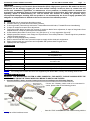
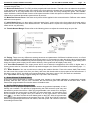
The #A, #B, #C wires of the ESC can be connected with the motor wires freely (without any order). If the motor runs
in the opposite direction, please swap any two wire connections.
Note: You can also set the throttle channel of your transmitter to the “Reverse” direction, and then the
motor will run oppositely. Please calibrate the throttle range again after changing the direction of throttle
channel.
2. Throttle Range Setting (Throttle Range Calibration)
In order to make the ESC fit the throttle range, you must calibrate it when you begin to use a new ESC, or a new
transmitter, or change the settings of neutral position of the throttle stick, ATV or EPA parameters, etc. Otherwise the
ESC cannot work properly.
There are 3 points need to be set, they are the top point of “forward”,” backward” and the neutral point.
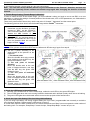
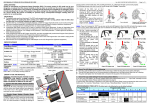
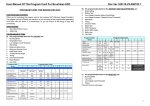
The following pictures show how to set the throttle range with a FutabaTM transmitter.
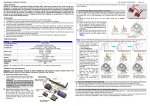
A) Switch off the ESC, turn on the
transmitter, set the direction of throttle
channel to ”REV”, set the “EPA/ATV”
value of throttle channel to “100%”, and
disable the ABS function of your
transmitter.
B) Hold the “SET” key and then switch on
the ESC, and release the “SET” key as
soon as possible when the red LED
begins to flash. (Note 4)
Note4: If you don’t release the “SET” key after the red LED begins to flash, the ESC will enter the program mode, in
such a case, please switch off the ESC and re-calibrate the throttle range again from step A.
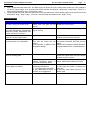
C) Set the 3 points according to the
steps shown as the pictures on the
right side.
1) The neutral point
Move the throttle stick at the neutral
point, and then click the SET key, the
green LED flashes 1 time.
2) The end point of forward
direction
Move the throttle stick at the end
point of forward direction, and then
click the SET key, the green LED
flashes 2 times.
3) The end point of backward
direction
Move the throttle stick at the end
point of backward direction, and then
click the SET key, the green LED
flashes 3 times.
D) Throttle range is calibrated; motor
can be started after 3 seconds.
3. Check the LED Status in Normal Running
1) Normally, if the throttle stick is in the neutral range, neither the red LED nor the green LED lights.
2) The red LED lights when the car is running forward or backward and it will flash quickly when the car is braking.
3) The green LED lights when the throttle stick is moved to the top point of the forward zone.
4. Check the Lipo Cells Setting if You Are Using Lithium Battery
If you are using Lipo battery, we strong suggest setting the “Lipo Cells” programmable item manually to avoid the
over-discharge problem. Please read the instructions on page 6.
In normal case, when the ESC is switched on, the motor will emit several “Beep” tones to express the cells number of
the battery pack. For example, “Beep-Beep-” means 2s Lipo, “Beep-Beep-Beep-” means 3s Lipo, etc.