1
www.elationlighting.com
FIXTURE MENU
ON-BOARD SYSTEM MENU
The SIXBAR 500™ comes with an easy to navigate system menu.
The next section
will detail the functions of each command in the system menu.
LCD MENU CONTROL PANEL
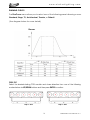
The control panel (see image below) located on the top of the fixture allows you to
access the main menu and make all necessary adjustments to the SIXBAR 500™.
During normal operation, pressing MODE button once will access the fixture’s main
menu. Once in the main menu you can navigate through the different functions
and access the sub-menus with the UP, and DOWN buttons. Once you reach a field
that requires adjusting, press the ENTER button to activate that field and use the UP
and DOWN buttons to adjust the field. Pressing the ENTER button once more will
confirm your setting. You may exit the main menu at any time without making any
adjustments by pressing the MODE button.
NOTE: the LCD Menu Control Display will shut OFF and lockout after 30 seconds of no
use. Press and hold the MODE button for 10 seconds to unlock the LCD display.
INFORMATION DISPLAYED DURING INITIAL POWER ON
When the fixture is initially powered ON, the display shows the following information:
Update
Wait...
ELATION
Six Bar
500
V1.06
Fixture Software Version
(Greater than or equal to)
16
SIXBAR 500™ User Manual ver 1