1
BIOS SETUP
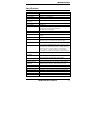
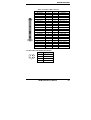
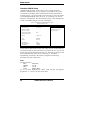
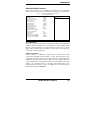
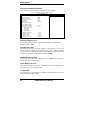
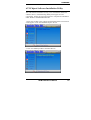
PC Health Status
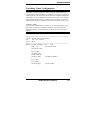
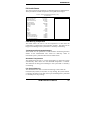
This section shows the parameters in determining the PC Health Status.
These parameters include temperatures, fan speeds and voltages.
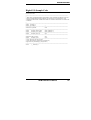
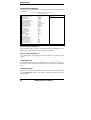
Phoenix - Award WorkstationBIOS CMOS Setup Utility
PC Health Status
CPU Warning Temperature
Current System Temp.
Current CPU Temp.
Current Chassis Temp.
CPU FAN Speed
System FAN Speed
Chassis FAN Speed
Vcore (V)
VCC3(V)
+5(V)
+12(V)
-12(V)
VBAT(V)
5VSB(V)
Shutdown Temperature
CPU Fan Failure Warning
Sys. Fan Failure Warning
Aux. Fan Failure Warning
75°C/167°F
39°C/102°F
32°C/89°F
32°C/89°F
0 RPM
4166 RPM
0 RPM
1.63V
3.37V
5.05V
12.09V
(-)12.03V
3.21V
5.05V
Disabled
Disabled
Disabled
Disabled
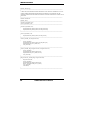
ITEM HELP
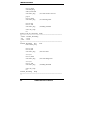
CPU Warning Temperature
This field allows the user to set the temperature so that when the
temperature is reached, the system sounds a warning. This function can
help prevent damage to the system that is caused by overheating.
Temperatures/Fan Speeds/Voltages
These fields are the parameters of the hardware monitoring function
feature of the motherboard. The values are read-only values as
monitored by the system and show the PC health status.
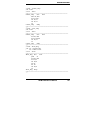
Shutdown Temperature
This field allows the user to set the temperature by which the system
automatically shuts down once the threshold temperature is reached.
This function can help prevent damage to the system that is caused by
overheating.
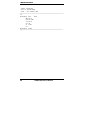
Fan Failure Warning
This field allows the user to set the Fan warning so that when the
CPU(Fan3)/Sys.(Fan1)/Aux.(Fan2) is stop running, the system sounds
a warning, this function can help user to prevent damage the system that
is caused by Fan stop running.
AR-B1794 User’s Manual
47