Transcript
Quick Reference Guide
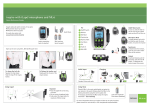
A pupils radio aid system consists of
two parts:
• Transmitter (worn by teacher) and
• Receivers (worn by pupil)
For audio shoe advice visit
www.phonak.com/eschooldesk
Wearing & Adjustment
Microphone Directionality
!
EasyLink+ transmitter
Audio Shoes
MLxi receiver
Integrated
receiver
6 inches
Easylink+
works with
“Zoom”
directionality
as standard.
On/Off Button
Key
3
1 Twin Microphone Ports
4
2 On/Off Button
Hold the on/off
button down for
2 seconds to turn
off and on.
3 Toggle Button
EasyLink+ interface should
be attached to charge the
EasyLink+ or attach
external devices.
5 Clip
6 LCD Display
5
1
LCD Display
7 Channel Select
Channel Number
IF
➔
8 EasyLink+ Interface Port
Charging
Battery Status
2
6
Synchronising
To synchronise a receiver, turn the
EasyLink+ on within a 50cm range
of the receiver. The receiver should
beep through the hearing aid to
confirm this action.
7
8
EasyLink+ Interface
A
B
C
A
Audio in
B
Mic in
C
Charging Port
Standard 3.5mm audio cable
Change Channel
EasyLink+ Compatability
Push button down
with pen to scroll
channels.
Release to stop
and synchronise
any receivers
within range.
Easylink+ is fully compatible with
ALL of Phonak’s FM receivers, past
and present (examples shown).
Simply turn on the transmitter...
and start teaching!
✓
For more information about your EasyLink+ and how to use other functions please
consult the user manual, or visit www.phonak.com/eschooldesk
OR
✓
Order Ref: EasyLink+ Quick Ref Guide - Phonak UK
Audio Input
4 Lavaliere Cord / Antenna