1
XEMIO-244 / 254 USER MANUAL
Special Features
•
•
•
Elegant appearance and easy to use.
Multi-Code Player - Supporting MP3, WMA, formats.
Driver Free U Disk - You may manage your files directly through “Portable Device” in
“My Computer” on Windows 2000 Operating System or above without driver.
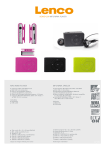
Brief View of Player
A.
About player’s battery
Player has an internal, non–user-replaceable rechargeable lithium battery. For
best results, the first time you use the player, let it charging for about 1 - 2 hours or until
the charging LED lights go Off before you use it.
Note: Player may continue use battery power after it’s been turned off. For maintain the
battery life and performance, if unit isn’t used for a while, the battery need to be
recharged, recharging the battery at least once per month.
Charging the Battery:
You can charge the Player’s battery in two ways:
1.
Connect player to your computer. Or,
2.
Use the USB power charger. (not included)
B.
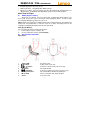
Key function of buttons
Appearance
1.
2.
3.
4.
5.
6.
7.
8.
Status LED:
button:
/
button:
button:
/
button:
Memory Card Slot:
Micro USB:
Reset:
For charge / play
To Play / Pause, On / Off.
To increase volume level or the next song.
For Shuffle On/Off
To decrease volume level or the previous song.
For external Micro SD Memory Card Input
For PC connection and charge function
To reset the unit.
3