1
Electronic auto-sense dryer
13
Your Electronic auto-sense dryer takes the guess work out of choosing drying times by sensing
the dryness of the load. When your dryer senses that the clothes have dried to the dryness level
you have selected, the dryer will automatically turn itself off.
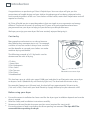
Using your dryer
1
2
3
4
5
6
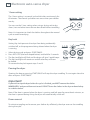
Clean the lint filter before every load.
Load the clothes into the dryer.
Press POWER.
Select the dryness level.
Select the temperature setting and other drying options.
Press START/PAUSE.
The dryer will beep 5 times at the end of the cycle.
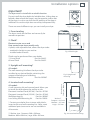
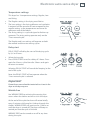
Fig. 15 Control panel – Electronic auto-sense dryer
Dryness levels
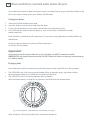
The Electronic auto-sense dryer has
5 dryness levels from Light Dry through
to Extra Dry. Choose the dryness level to
suit your load using the guide opposite.
If you find the load is not dry enough,
select the next dryness level up. The
higher the level, the longer the drying
time and the drier your clothes will be.
Two lights are sometimes used to show
the dryness level. For example the LightMedium Dry and Medium-Extra Dry
settings.
Light to Medium Settings
Delicate fabrics, eg synthetics
Fabrics prone to shrinking, eg sweatshirts
Or if you want the clothes slightly damp for ironing
Medium to Extra Dry Settings
Heavier fabrics, eg towels
Durable fabrics, eg denim
Airing / Cool down
When the dryer has sensed that the load is dry it will automatically go into a 10 minute airing or
cool down cycle. During airing the drum tumbles and cool air is blown through the clothes. This
reduces creasing if the clothes are left in the dryer.