1
2. Setup
Setup Troubleshooting
Please confirm followings when this product does not work.
Symptoms and Actions
The chassis won’t be turned on.
a.
Make sure that the power cable has been connected correctly.
b.
Make sure that the power supplies of the PC and this product is on.
c.
Make sure that you have followed the procedure in Chapter 2.
d.
When there is no problem in all of a ~ c, check whether it is turned on with no board installed. If the
chassis is turned on with no board installed, check the total current consumption by the installed
boards. The total current consumption must not exceed the power capacity of this product.
No PCI board on this product is detected.
e.
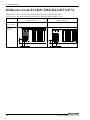
Make sure that the expansion adapter board has been installed correctly.
f.
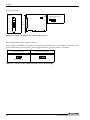
Make sure that the JP1 of expansion adapter board has been installed correctly.
g.
Make sure that the connection cable has been installed correctly. When connecting the connection
cable to the main chassis, insert the connector until it clicks into place.
h.
Make sure that the POWER LED on this product is turned on.
i.
When there is no problem in all of e ~ h, turn ON the power supply of a PC after setting to "not link"
and turning ON the power supply of this product first, refer to “Chapter2 Step1 - Power interlocking
of the expansion chassis”.
a
f
g
g
e
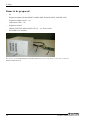
The photo is of the EAD(LPCI)BE + ECH-PCI-BE2-H4A but the check points are the same as with the
ECH-PCI-BE2-H7A/F7A.
If your problem cannot be resolved
Contact your retailer.
ECH-PCI-BE2-H4A/H7A/F7A
19