1
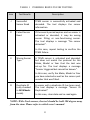
TABLE 1 POSSIBLE RESULTS FOR TESTING
Icon
Test Results
Description
√
Successful
Sensor Read
TPMS sensor is successfully activated and
decoded. The tool displays the sensor
information.
X
Failed Sensor
Read
If the search period expires and no sensor is
activated or decoded, it may be wrong
sensor fitting or non-functioning sensor.
The tool displays a message “No sensor
detected.”.
In this case, repeat testing to confirm the
TPMS failure.
X
Wrong Sensor
Type
A TPMS sensor is activated and decoded,
but does not match the protocol for the
Make, Model or Year that the tool was
set-up for. The tool displays a message
“Sensor triggered but cannot be known.”.
In this case, verify the Make, Model or Year
you have selected as well as the sensor part
number that was fitted.
D
Duplicate ID
(only checked
in All Wheels
mode)
A sensor with a duplicate ID has been read.
The tool displays a message “Sensor ID
Duplicated.”.
In this case, clear data and re-read again.
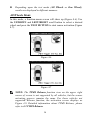
NOTE: With Ford sensors, the tool should be held 180 degree away
from the stem. Please refer to vehicle user’s manual.
23