1
Quickstarts
Forcing I/O
Appendix C
Forcing is only possible with I/O and does not apply to user defined variables and
non-I/O variables.
Inputs are logically forced, so LED status indicators do not show forced values,
but the inputs in the user program are forced.
Unlike inputs, outputs are physically forced, so LED status indicators do show
forced values. The user program does not use forced values.
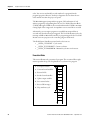
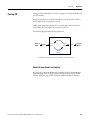
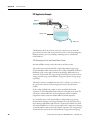
The following diagram illustrates forcing behaviour.
User Program
Physical
Inputs
Force
Logical
Inputs
Logical
Outputs
Force
Physical
Outputs
Normal
Variables
• Normal, non-physical internal variables cannot be forced
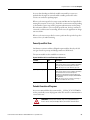
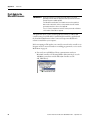
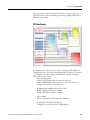
Check if Forces (locks) are Enabled
If Connected Components Workbench is available, check the Variable Monitor
while debugging online. Forcing is performed by first Locking an I/O variable
and then setting the Logical Value for Inputs and Physical Value for Outputs.
Rockwell Automation Publication 2080-UM001D-EN-E - September 2012
101