1
Troubleshooting
the N2 Bus and
Networked VAV
Controller
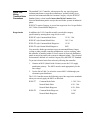
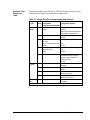
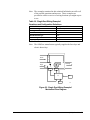
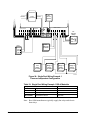
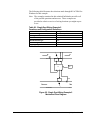
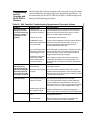
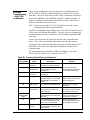
You need to troubleshoot the N2 Bus if the Metasys system is not
properly communicating with the VAVs. This section first presents a
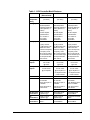
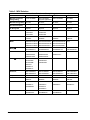
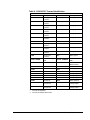
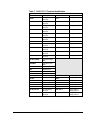
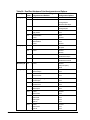
troubleshooting table. Table 35 covers VAV or N2 communication
problems and suggests which actions to take.
Second, specific troubleshooting tests are given. Before trying one of these
tests, you may be able to determine the cause of the problem by asking
yourself the following questions:
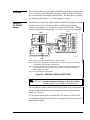
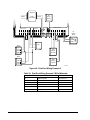
Are the N2 Bus wires securely terminated to each VAV?
Is the N2 polarity correct?
Is the VAV powered and ready to respond?
Are the end-of-line device settings correct?
Have you cycled power on a VAV after changing its N2 address?
Is the W3 loop back jumper on the Companion Panel/LTD fully pushed
down on Pins 1 and 2?
Are the VAVs configured properly with the correct number of points?
!
CAUTION: Electrical Shock Hazard. To avoid electrical shocks
when troubleshooting, always measure the REF to
earth ground voltage with the DMM. If line voltage is
measured, have a qualified electrician locate the fault.
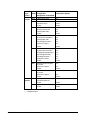
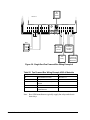
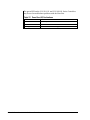
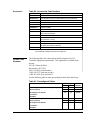
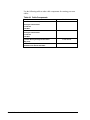
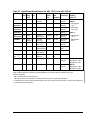
Table 35: N2 Bus Troubleshooting Symptoms and
Corrective Action
Symptom
Possible Cause
Action
N2 Bus is
offline.
EOL jumpers and/or W3 jumper on
MM-CVT101 or Companion Panel/LTD
are not installed.
Install EOL jumpers and W3
jumper properly.
MM-CVT101 is not plugged into PC or
9 VDC source.
Plug MM-CVT101 into PC or
plug it into a 9 VDC source.
N2 Bus polarity is incorrect.
Rewire N2 Bus wires for
proper polarity.
A read-only point is defined in the
Companion data base as a read/write
point (AO or BO).
Delete the AO or BO point and
read it as an AI or BI point to
the Companion data base.
A Companion process is using an
unconfigured point (i.e., not listed in
HVACPRO.SYM file).
Delete the use of the
unconfigured point in the
Companion process.
Two or more VAVs have the same
address.
Change each duplicate VAV
address to a unique number.
The address of the VAV was changed
without its power being cycled afterward.
Cycle power on the VAV.
The ten second delay after downloading
the VAV has not yet expired
(HVAC PRO Revision 1.0 or earlier).
Wait until the delay expires or
cycle power on the VAV.
VAV cycles
online and
offline.
VAV does not
come online.
82 VAV Controller—Variable Air Volume Controller