1
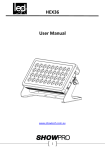
LED Flood EX36
User Manual
LEDWSH360
LED Flood EX36
www.showtech.com.au
1
LED Flood EX36
Table of Contents
1. Safety instructions…………………………………………………………3
1.1 Overhead rigging …………………………………………………….4
1.2 Power Connection …………………………………………………..6
1.3 Cleaning and Maintenance ……………………………………..6
2. Menu Navigation ............................................................7
3. DMX Allocation ...............................................................9
4. Photometric Data ………...................................................11
5. Technical Specifications ………………………………………………..12
2
LED Flood EX36
1. Safety Instructions
FOR SAFE AND EFFICIENT OPERATION
Be careful with heat and extreme temperature.
Avoid exposing it to direct rays of sun near a heating appliance.
Do not put it in a temperature below 41°F/5°C, or exceeding 95°F/35°C.
Keep away from humidity, water and dust.
Do not place the set in a location with a high humidity or lots of dust.
Containers with water should not be placed on the set.
Keep away from sources of hum and noise
Such as transformer motor, tuner, TV set and amplifier.
To avoid placing on un-stable location
Select a level and stable location to avoid vibration.
Do not use chemicals or volatile liquids for cleaning
Use a dry cloth to wipe off the dust, or a wet soft cloth for stubborn dirt.
NO USER SERVICABLE PARTS INSIDE.
If unit is out of service please contact your point of purchase.
If any trouble arises, remove the power plug and contact your Pro Shop
representative for repair. Do not open the cabinet by yourself, it might result a
danger of electric shock.
3
LED Flood EX36
Take care with the power cable. Never pull the power cable to remove the plug from
the receptacle, be sure to hold the plug.
When not using the unit for an extended period of time be sure to disconnect the
plug form the receptacle.
1.1 . Overhead Rigging
This item must be built in a way that it can hold 10 times more of its weight for 1
hour without causing any damages. The installation must be secured with a
secondary safety attachment. The Safety attachment has to be constructed in a way
that no part of the installation can fall down. When rigging, de-rigging or servicing
the fixture staying in the area below the installation place, on bridges, under high
working places and other endangered areas is forbidden. Before taking the device in
operation, the installation must be approved by an expert. The operator has to make
sure that safety-relating and machine-technical installations are approved by a skilled
person once a year.
IMPORTANT! OVERHEAD RIGGING REQUIRES EXTENSIVE EXPERIENCE.
Including (but not limited to) calculating working load limits, installation material
being used, and periodic safety inspection of all installation material and the
projector. If you lack these qualifications, do not attempt the installations yourself,
but instead use a professional structural rigger. Improper installation can result in
bodily injury and/or damage to property.
Use only professional trussing system if the item shall be lowered from the ceiling or
high joists. Never let the device swing freely in a room.
CAUTION: Overhead Items may cause serious injuries!! If there is concern about the
safety then DO NOT INSTALL the device.
4
LED Flood EX36
DANGER OF FIRE!
When installing the device, make sure there is no highly-flammable material
(decoration articles, etc.) within a distance of min. 0.5m.
Mount the projector with the mounting bracket to your trussing system using an
appropriate clamp.
For overhead use, always install a safety-rope that can hold at least 10 times the
weight of the fixture. You must only use safety –ropes with quick links with screw
cap.
Pull the safety-rope through the hole in the mounting bracket and over the trussing
system or a safe fixation spot. Insert the end in the quick link and tighten the safety
screw. The maximum drop distance must never exceed 20cm
A safety rope which already held the strain of a crash or which is defective must not
be used again.
DANGER TO LIFE!
Before taking into operation for the first time, the installation has to be approved by
an expert.
5
LED Flood EX36
1.2. Power Connection
!! CAUTION!!
Never leave this device running unattended!! Every person that is involved with this
item has to be qualified!!
Connect item with main plug. The voltage and frequency must exactly be the same as
stated on the device. The power plug must always be inserted without force.
1.3. Cleaning and Maintenance
Please make sure that safety-relating and machine-technical installations are
inspected by a skilled person once a year.
1.
2.
3.
Make sure before installing that all screws are tightly connected and not corroded.
There must be no deformations on the housings, fixations and installations spots
No damages must be showed on the power supply cables, material fatigue and
sediments
If the exterior of the unit is going to be cleaned, please use moist, lint free cloths.
Never use alcohol or solvents.
The Cooling fan must be cleaned monthly and check to ensure it is free of
obstructions.
To clean the interior of the device please use a vacuum cleaner or an air jet, however
we recommend cleaning the lenses weekly to ensure the best output from your unit.
6
LED Flood EX36
2.0 Menu Navigation
No.
Menu level 1
4
-
C
H
1
d
d
6
-
C
H
2
0
C
3
H
C
-
5
1
Default:10CH, d 1
2
1
5
1
d
d
Remark
1
d
d
1
2
Master-slave mode, the slave can select “d
1~~d512”
1
5
1
2
-
Static color
4
Menu level 2
R
C
1
G
C
2
C
3
C
4
C
5
R
C
6
R
G
C
7
R
G
C
8
R
C
9
B
W
G
B
B
B
W
G
C
1
0
C
1
1
R
C
1
2
R
C
1
3
C
1
4
C
1
5
W
B
R
7
G
W
W
B
W
G
B
W
G
B
W
LED Flood EX36
P
-
-
Auto program
5
S
6
U
-
P
1
P1:15-color program (fading) low-high-low;
(Default:P1)
P
2
P2:15-color program (fading) low-high
P
3
P3:15-color program (fading) high-low
P
4
P4:mixing color switching
P
5
P5:running P1-P4
-
S
-
-
1
Speed
S
1
0
0
-
r
-
Custom color
2
5
g
7
5
b
5
W
t
9
e
(Default:255)
5
5
0
5
5
O
F
F
(Default:OFF)
d
I
M
1
dIM around:0.8S
d
I
M
2
dIM around:1.6S
d
I
M
3
dIM around:2.4S
O
n
O
F
P
Temperature
P
10
M
5
2
M
8
Range:000-255
0
2
I
0
0
2
d
(Default:S100)
A
S
Password
S
F
To unlocking, please press” UP-DOWN-UPDOWN-ENTER” step by step; If the password
input is wrong, please press ”ENTER” to input
again.
8
LED Flood EX36
3.0 DMX Allocation
4CH
1
Function
Value
Red
000-255
0~100%
2
Green
000-255
0~100%
3
Blue
000-255
0~100%
4
White
000-255
0~100%
6CH
Function
Value
1
Dimmer
000-255
0~100%
2
Red
000-255
0~100%
3
Green
000-255
0~100%
4
Blue
000-255
0~100%
5
White
000-255
0~100%
6
Strobe
000-010
No Function
011-255
0~30Hz
10CH
Function
Value
1
Dimmer
000-255
0~100%
2
Red
000-255
0~100%
3
Green
000-255
0~100%
4
Blue
000-255
0~100%
5
White
000-255
0~100%
Percent/Setting
Remark
Percent/Setting
Remark
Dimmer
available to all
Channel
Percent/Setting
Remark
Dimmer
available to all
Channel
9
LED Flood EX36
6
000-010
No Function
011-255
0~30Hz
Color
Macro+
000-010
No Function
White
011-030
R 100% G 0~100% B 0
Balance
031-050
R 100%~0 G 100% B 0
051-070
R0
G 100% B 0~100%
071-090
R0
G 100%~0 B 100%
091-110
R 0~100% G 0
B 100%
111-130
R 100% G 0
B 100%~0
131-150
R 100% G 0~100% B 0~100%
151-170
R 100%~0 G 100%~0 B 100%
171-200
R 100% G 100% B 100% W:100%
201-205
White 1
206-210
White 2
211-215
White 3
216-220
White 4
221-225
White 5
226-230
White 6
231-235
White 7
236-240
White 8
241-245
White 9
246-250
White 10
251-255
White 11
000-051
No Function
052-101
Auto Program 1
Strobe
7
8
Auto
programs
10
LED Flood EX36
102-152
Auto Program 2
153-203
Auto Program 3
204-254
Auto Program 4
255
Auto Program 5
Auto
speed
000-255
Only when CH.8 has Auto 01-05 activated
When CH8 is
052-255
Dimmer
000-051
Preset dimmer speed from display menu
DIM Setting
Speed
052-101
Linear dimmer
DMX Off
102-150
Nonlinear dimming curve1(fastest)
DIM1
153-203
Nonlinear dimming curve2
DIM2
204-255
Nonlinear dimming curve1(slowest)
DIM3
9
10
4.0 Photometric Data
Color
R
G
B
W
RGBW
1m
LUX
7920
14000
2420
12700
35130
3m
LUX
5m
1160
2083
350
1966
5300
LUX
422
746
129
677
1873
7m
LUX
215
380
65
345
956
10m
LUX
105
186
32
169
468
Photometric data is supplied by the manufacturer and is subject to change at any time.
11
LED Flood EX36
5.0 Technical Specifications
Power supply: 100 -240 V AC, 50/60 Hz
Power consumption: 350 W
DMX control channels: 4 / 6 / 10
DMX512 connection: 5-pin XLR
Number of LEDs: 36
Type of LEDs: 8W RGBW Quad Chip
Beam angle: approx. 25°
Dimensions (LxWxH): 212 x 587 x 303 mm
Weight: 11 kg
Maximum ambient temperature Ta: 45°
Maximum housing temperature TC (steady state): 50° C
Fuse: N/A
Please note: Information is subject to change without prior notice ©
12