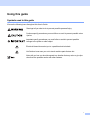
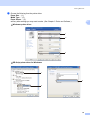
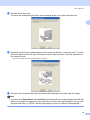
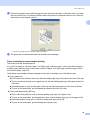
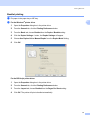
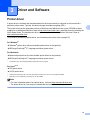
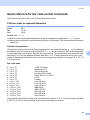
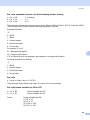
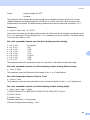
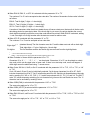
1
Brother Laser Printer USER’S GUIDE HL-5340D HL-5350DN HL-5370DW For visually-impaired users You can read this manual with Screen Reader 'text-to-speech' software. You must set up the hardware and install the driver before you can use the printer. Please use the Quick Setup Guide to set up the printer. You can find a printed copy in the box. Please read this User's Guide thoroughly before you use the printer. Keep the CD-ROM in a convenient place so you can use it quickly if you need to. You can also read the User's Guide in HTML format by visiting our web site at http://solutions.brother.com/ or accessing it from the CD-ROM directly. Please visit us at http://solutions.brother.com/ where you can get product support, the latest driver updates and utilities, and answers to frequently asked questions (FAQs) and technical questions. Version B ASA Using this guide Symbols used in this guide We use the following icons throughout this User’s Guide: Warnings tell you what to do to prevent possible personal injury. Cautions specify procedures you must follow or avoid to prevent possible minor injuries. Important specify procedures you must follow or avoid to prevent possible damage to the printer or other object. Electrical Hazard icons alert you to a possible electrical shock. Hot Surface icons warn you not to touch machine parts that are hot. Notes tell you how you should respond to a situation that may arise or give tips about how the operation works with other features. i Safety precautions To use the printer safely If you DO NOT follow these safety instructions, there is a possibility of a fire, electrical shock, burn or suffocation. Please keep these instructions for later reference and read them before attempting any maintenance. WARNING There are high voltage electrodes inside the printer. Before you clean the inside of the printer, make sure that you have turned off the power switch and unplugged the printer from the AC power outlet. DO NOT handle the plug with wet hands. Doing this might cause an electrical shock. Always make sure the plug is fully inserted. This product must be installed near an AC power outlet that is easily accessible. In case of an emergency, you must disconnect the power cord from the AC power outlet to shut off the power completely. Lightning and power surges can damage this product! We recommend that you use a quality surge protection device on the AC power line, or unplug the cords during a lightning storm. Avoid using this product during an electrical storm. There may be a remote risk of electric shock from lightning. ii DO NOT use this product to report a gas leak in the vicinity of the leak. Use only the power cord provided with the machine. Plastic bags are used in the packaging of your machine. To avoid danger of suffocation, keep these bags away from babies and children. DO NOT use flammable substances, any type of spray or an organic solvent/liquid containing alcohol or ammonia to clean the inside or outside of the machine. Doing this may cause a fire or electrical shock. See Cleaning on page 107 for how to clean the machine. DO NOT use a vacuum cleaner to clean up scattered toner. Doing this might cause the toner dust to ignite inside the vacuum cleaner, potentially starting a fire. Carefully clean the toner dust with a dry, lint-free cloth and dispose of it according to local regulations. Cleaning the outside of the printer: Make sure that you have unplugged the printer from the AC power outlet. Use neutral detergents. Cleaning with volatile liquids such as thinner or benzine will damage the outside surface of the printer. DO NOT use cleaning materials that contain ammonia. iii CAUTION After you have just used the printer, some internal parts of the printer will be extremely hot. To prevent injury, when you open the front cover or back cover (back output tray) of the printer, DO NOT touch the shaded parts shown in the illustration. If you do this, you may get burned. Inside the printer (Front View) Open the back cover (Back View) Avoid placing your machine in a high-traffic area. DO NOT place the machine near heaters, air conditioners, refrigerators, water, chemicals or devices that contain magnets or generate magnetic fields. DO NOT expose the machine to direct sunlight, excessive heat, open flames, salty or corrosive gasses, moisture, or dust. DO NOT connect your machine to an AC power outlet controlled by wall switches or automatic timers. DO NOT connect your machine to an AC power outlet on the same circuit as large appliances or other equipment that might disrupt the power supply. DO NOT put objects on top of the machine. DO NOT use this product near water, for example, near a bath tub, wash bowl, kitchen sink, washing machine, or in a wet basement or near a swimming pool. iv Note DO NOT remove or damage the caution label located on or around the fuser. v Trademarks The Brother logo is a registered trademark of Brother Industries, Ltd. Microsoft, Windows, Windows Server and Internet Explorer are registered trademarks of Microsoft Corporation in the United States and/or other countries. Windows Vista is either a registered trademark or a trademark of Microsoft Corporation in the United States and/or other countries. Apple, Macintosh, Safari and TrueType are trademarks of Apple Inc., registered in the United States and other countries. Linux is the registered trademark of Linus Torvalds in the U.S. and other countries. Intel, Intel Core and Pentium are trademarks of Intel Corporation in the U.S. and other countries. AMD is a trademark of Advanced Micro Devices, Inc. PostScript and PostScript3 are either registered trademarks or trademarks of Adobe Systems Incorporated in the United States and/or other countries. IBM is either a registered trademark or a trademark of International Business Machines Corporation in the United States and/or other countries. Each company whose software title is mentioned in this manual has a Software License Agreement specific to its proprietary programs. All other trademarks are the property of their respective owners. Compilation and Publication Notice Under the supervision of Brother Industries Ltd., this manual has been compiled and published, covering the latest product’s descriptions and specifications. The contents of this manual and the specifications of this product are subject to change without notice. Brother reserves the right to make changes without notice in the specifications and materials contained herein and shall not be responsible for any damages (including consequential) caused by reliance on the materials presented, including but not limited to typographical and other errors relating to the publication. © 2008 Brother Industries Ltd. Shipment of the Printer If for any reason you must ship your printer, carefully package the printer to avoid any damage during transit. We recommend that you save and use the original packaging. The printer should also be adequately insured with the carrier. vi Table of Contents 1 About this Printer 1 Carton components ...................................................................................................................................1 Interface cable .....................................................................................................................................1 Front view ............................................................................................................................................3 Back view ............................................................................................................................................4 Positioning the printer ................................................................................................................................5 Power supply .......................................................................................................................................5 Environment ........................................................................................................................................5 2 Printing Methods 6 About paper ...............................................................................................................................................6 Type and size of paper ........................................................................................................................6 Recommended paper ..........................................................................................................................8 Unprintable area ................................................................................................................................10 Printing methods......................................................................................................................................11 Printing on plain paper, bond paper and transparencies...................................................................11 Printing on thick paper, labels and envelopes ...................................................................................20 Duplex printing.........................................................................................................................................25 Guidelines for printing on both sides of the paper .............................................................................25 Manual duplex printing ......................................................................................................................25 Automatic duplex printing ..................................................................................................................29 Booklet printing..................................................................................................................................31 3 Driver and Software 32 Printer driver ............................................................................................................................................32 Features in the printer driver (for Windows®) ....................................................................................35 Using the BR-Script3 printer driver (PostScript® 3™ language emulation for Windows®).................48 Features in the printer driver (for Macintosh) ....................................................................................54 Using the BR-Script3 printer driver (Post Script® 3™ language emulation for Macintosh) .....................64 Installing the BR-Script3 printer driver...............................................................................................64 Uninstalling the printer driver ...................................................................................................................70 Printer driver for Windows® and Windows Vista® and Windows Server® 2003/2008 .......................70 Printer driver for Macintosh ...............................................................................................................70 Software ..................................................................................................................................................72 Software for networks (For HL-5350DN and HL-5370DW) ...............................................................72 About emulation modes.....................................................................................................................73 Automatic emulation selection...........................................................................................................74 Automatic interface selection.............................................................................................................74 Remote Printer Console ....................................................................................................................75 vii 4 Control Panel 76 LEDs (Light Emitting Diodes)...................................................................................................................76 Service call indications ............................................................................................................................82 Control panel buttons...............................................................................................................................84 Print a test page ................................................................................................................................85 Print the Printer Settings page...........................................................................................................86 Print Fonts .........................................................................................................................................87 Default settings..................................................................................................................................88 5 Options 89 Lower tray (LT-5300) ...............................................................................................................................89 SO-DIMM (memory module)....................................................................................................................90 SO-DIMM types .................................................................................................................................90 Installing extra memory .....................................................................................................................91 6 Routine Maintenance 93 Replacing the consumable items.............................................................................................................93 Consumables.....................................................................................................................................93 Toner cartridge ..................................................................................................................................94 Drum unit .........................................................................................................................................101 Cleaning ................................................................................................................................................107 Cleaning the outside of the printer...................................................................................................107 Cleaning the inside of the printer.....................................................................................................109 Cleaning the paper pick-up roller.....................................................................................................112 Cleaning the corona wires .....................................................................................................................114 Cleaning the corona wire.................................................................................................................114 7 Troubleshooting 116 Identifying your problem ........................................................................................................................116 Error messages in the Status Monitor ...................................................................................................117 Error message printout ..........................................................................................................................119 Paper handling ......................................................................................................................................120 Paper jams and how to clear them ........................................................................................................121 Jam MP tray / Tray1 / Tray2 / Tray3 / Inside ...................................................................................121 Jam Rear / Duplex...........................................................................................................................126 Improving the print quality......................................................................................................................130 Solving print problems ...........................................................................................................................137 Network problems (For HL-5350DN and HL-5370DW) .........................................................................138 Other problems ......................................................................................................................................138 For Macintosh with USB ..................................................................................................................138 BR-Script 3 ......................................................................................................................................139 viii A Appendix 140 Printer specifications..............................................................................................................................140 Engine .............................................................................................................................................140 Controller .........................................................................................................................................141 Software ..........................................................................................................................................142 Control panel ...................................................................................................................................142 Paper handling ................................................................................................................................142 Media specifications ........................................................................................................................143 Supplies...........................................................................................................................................143 Dimensions / weights.......................................................................................................................144 Other................................................................................................................................................144 Computer requirements...................................................................................................................145 Important information for choosing your paper................................................................................146 Symbol and character sets ....................................................................................................................149 How to use the Web Based Management (web browser) ...............................................................149 Symbol and character sets list.........................................................................................................150 Quick reference for bar code control commands...................................................................................151 Print bar codes or expanded characters..........................................................................................151 B Appendix (for Europe and Other Countries) 159 Brother numbers ....................................................................................................................................159 C Appendix (for USA and Canada) 160 Brother numbers ....................................................................................................................................160 D Index 162 ix About this Printer1 1 About this Printer 1 1 Carton components 1 When you unpack the printer, make sure that you have all of the following parts. Printer Quick Setup Guide CD-ROM AC Power Cord Drum Unit and Toner Cartridge Assembly Interface cable 1 The interface cable is not a standard accessory. Purchase the appropriate cable for the interface you are using. USB cable Please make sure you use a USB 2.0 interface cable that is no longer than 6 feet (2.0 meters). DO NOT connect the interface cable at this time. Connecting the interface cable is done during the printer driver installation process. Make sure that you connect it to the USB port of your computer and not to a USB port on a keyboard or non-powered USB hub. 1 About this Printer Third party USB ports are not supported by Macintosh. 1 Parallel cable DO NOT use a parallel interface cable that is longer than 6 feet (2.0 meters). Use a shielded interface cable that is IEEE 1284-compliant. Network cable (For HL-5350DN and 5370DW only) Use a straight-through Category5 (or greater) twisted-pair cable for 10BASE-T or 100BASE-TX Fast Ethernet Network. 2 About this Printer Front view 1 1 7 1 2 9 3 6 4 5 8 1 Front Cover Release Button 2 Control Panel 3 Face-down Output Tray Support Flap 1 (Support Flap 1) 4 Front Cover 5 Paper Tray 6 Power Switch 7 Face-down Output Tray 8 Multi-purpose Tray (MP Tray) 9 Face-down Output Tray Support Flap 2 (Support Flap 2) 3 About this Printer Back view 1 1 10 1 9 8 2 7 3 6 4 5 1 Back Cover (Back Output Tray) 2 Duplex Tray 3 AC Power Connector 4 10BASE-T / 100BASE-TX (Ethernet) Port (HL-5350DN and HL-5370DW only) 5 Network Activity LEDs (Light Emitting Diodes) (For HL-5350DN and HL-5370DW only) 6 HL-5370DW: Wireless Activity LED 7 HL-5370DW: Wireless Setup Button 8 USB Interface Connector 9 SO-DIMM (memory) Cover 10 Parallel Interface Connector Note The printer illustration is based on HL-5370DW. 4 About this Printer Positioning the printer 1 1 Read the following before you use the printer. Power supply 1 Use the printer within the recommended power range. Power source: USA and Canada: AC 110 to 120 V, 50/60 Hz Europe and Australia: AC 220 to 240 V, 50/60 Hz The power cord, including extensions, should be no longer than 5 meters (16.5 feet). Do not share the same power circuit with other high-powered appliances, such as an air conditioner, copier, shredder and so on. If you cannot avoid using the printer with these appliances, we recommend that you use a voltage transformer or a high-frequency noise filter. Use a voltage regulator if the power source is not stable. Environment 1 Put your printer on a flat, stable surface such as a desk that is free of vibration and shocks. Put the printer near an AC power outlet, so that it can be easily unplugged from the AC power outlet if there is an emergency. Only use the printer within the following ranges of temperature and humidity: Temperature: 10 °C to 32.5 °C (50 °F to 90.5 °F) Humidity: 20% to 80% (without condensation) Use the printer in a well-ventilated room. DO NOT put the printer where the ventilation hole of the printer is blocked. Keep a gap of roughly 100 mm (4 in.) between the ventilation hole and the wall. DO NOT expose the printer to direct sunlight, excessive heat, moisture, or dust. DO NOT put the printer near devices that contain magnets or produce magnetic fields. DO NOT expose the printer to open/naked flames or salty or corrosive gasses. DO NOT put objects on top of the printer. DO NOT put the printer near heaters, air conditioners, water, chemicals or refrigerators. Keep the printer horizontal when you carry it. 5 Printing Methods2 2 Printing Methods 2 About paper 2 2 Type and size of paper 2 The printer loads paper from the installed paper tray or the multi-purpose tray. The names for the paper trays in the printer driver and this guide are as follows: Paper tray Tray 1 Multi-purpose tray MP Tray Optional lower tray unit Tray 2 / Tray 3 Duplex unit for automatic duplex printing DX When looking at this page on the CD-ROM, you can jump to the page for each printing method by clicking p in the table. Media type Tray 1 Tray 2/ Tray 3 MP Tray DX Plain paper Plain Paper 75 g/m2 to 105 g/m2 (20 to 28 lb) p p p p Recycled paper p p p p Bond paper p p 60 g/m2 to 105 g/m2 (16 to 28 lb) 60 g/m2 to 105 g/m2 (16 to 28 lb) Rough paper– 60 g/m2 to 163 g/m2 (16 to 43 lb) 60 g/m2 to 163 g/m2 (16 to 43 lb) Thin Paper p p p Thick paper 105 g/m2 to 163 g/m2 (28 to 43 lb) Transparency p A4 or Letter p Thick Paper or Thicker Paper Transparencies p Up to 10 sheets Labels Recycled Paper Bond Paper p Thin paper 60 g/m2 to 75 g/m2 (16 to 20 lb) Choose the media type from the printer driver p Up to 10 sheets A4 or Letter p Thicker Paper A4 or Letter 6 Printing Methods Media type Tray 1 Tray 2/ Tray 3 Envelopes MP Tray DX Envelopes p Env. Thin Up to 3 sheets Paper size Number of sheets (80 g/m2 / 20 lb) 1 Tray 1 Tray 2/ Tray3 A4, Letter, Legal 1, B5 (ISO), Executive, A5, A6, B6 (ISO), Folio 1, A5(Long Edge) A4, Letter, Legal 1, B5 (ISO), Executive, A5, B6 (ISO), Folio 1 250 sheets 250 sheets / 250 sheets Choose the media type from the printer driver 2 Env. Thick MP Tray Width: 69.8 to 216 mm (2.75 to 8.5 in.) DX A4, Letter, Legal 1, Folio 1 Length: 116 to 406.4 mm (4.57 to 16 in.) 50 sheets Legal or Folio size paper is not available in some regions outside the USA and Canada. 7 Printing Methods Recommended paper 2 To get the best print quality, we suggest using paper that meets the conditions mentioned below. Paper that is made for plain-paper copying Paper that is 75 to 90g/m2 2 (20 to 24lb) Neutral paper. Do not use acidic or alkaline paper Long-grain paper Use paper with a moisture content of approximately 5%. Recycled paper that meets DIN 19309 specifications We recommend using “3M Transparency Film” when you print on transparencies. IMPORTANT DO NOT use ink jet paper because it may cause a paper jam or damage your printer. If you use paper that is not recommended, a paper jam or misfeed may occur in the printer. DO NOT put different types of paper in the paper tray at the same time because it may cause paper jams or misfeeds. Especially when paper that satisties the conditions mentioned above is not available in your country, we recommend testing various papers before purchasing large quantities. To help you choose which paper to use with this printer, see Important information for choosing your paper on page 146. Should you need further information on recommended paper, please contact local Brother office in your country. 8 Printing Methods Types of envelopes 2 Most envelopes will be suitable for your printer. However, some envelopes may have feed and print quality problems due to the way they have been made. A suitable envelope should have edges with straight, wellcreased folds and the leading edge should not be thicker than two pieces of paper. The envelope should lie flat and not be of baggy or flimsy construction. You should buy quality envelopes from a supplier who understands that you will be using the envelopes in a laser printer. Before you print a lot of envelopes, test one to make sure that the print results are what you want. Brother does not recommend a particular envelope because envelope manufacturers may change the envelope specifications. You are responsible for the quality and performance of the envelopes you use. DO NOT use damaged, curled, wrinkled, irregularly shaped, extremely shiny or textured envelopes. DO NOT use envelopes with clasps, snaps, tie strings, self-adhesive components, windows, holes, cutouts or perforations. DO NOT use envelopes that are of a baggy construction, not sharply creased, embossed (have raised writing on them) or pre-printed on the inside. DO NOT use envelopes that were previously printed by a laser printer. DO NOT use envelopes that cannot be arranged when put in a pile. DO NOT use envelopes that are made of paper that weighs more than the paper weight specifications for the printer. DO NOT use envelopes that have been badly made, with edges that are not straight or consistently square. If you use any of the types of envelopes listed above, they may damage your printer. This damage is not covered under any Brother warranty or service agreement. Note • DO NOT print envelopes using duplex printing. • You must choose the same paper size from your application as the paper in the tray. 9 2 Printing Methods Unprintable area 2 The area of the paper that cannot be printed on is shown in the table below: 2 Note When using BR-Script emulation, the edges of the paper that cannot be printed on are 4.32 mm (0.17 in). Portrait 2 A4 Letter Legal B5 (ISO) Executive A5 A6 B6 (ISO) 1 4.23 mm (0.16 in.) 4.23 mm (0.16 in.) 4.23 mm (0.16 in.) 4.23 mm (0.16 in.) 4.23 mm (0.16 in.) 4.23 mm (0.16 in.) 4.23 mm (0.16 in.) 4.23 mm (0.16 in.) 2 6.01 mm (0.24 in.) 6.35 mm (0.25 in.) 6.35 mm (0.25 in.) 6.01 mm (0.24 in.) 6.35 mm (0.25 in.) 6.01 mm (0.24 in.) 6.01 mm (0.24 in.) 6.01 mm (0.24 in.) 3 4.23 mm (0.16 in.) 4.23 mm (0.16 in.) 4.23 mm (0.16 in.) 4.23 mm (0.16 in.) 4.23 mm (0.16 in.) 4.23 mm (0.16 in.) 4.23 mm (0.16 in.) 4.23 mm (0.16 in.) 4 6.01 mm (0.24 in.) 6.35 mm (0.25 in.) 6.35 mm (0.25 in.) 6.01 mm (0.24 in.) 6.35 mm (0.25 in.) 6.01 mm (0.24 in.) 6.01 mm (0.24 in.) 6.01 mm (0.24 in.) Landscape A4 2 Letter Legal B5 (ISO) Executive A5 A6 B6 (ISO) 1 4.23 mm (0.16 in.) 4.23 mm (0.16 in.) 4.23 mm (0.16 in.) 4.23 mm (0.16 in.) 4.23 mm (0.16 in.) 4.23 mm (0.16 in.) 4.23 mm (0.16 in.) 4.23 mm (0.16 in.) 2 5.0 mm (0.19 in.) 5.08 mm (0.2 in.) 5.08 mm (0.2 in.) 5.0 mm (0.19 in.) 5.08 mm (0.2 in.) 5.0 mm (0.19 in.) 5.0 mm (0.19 in.) 5.0 mm (0.19 in.) 3 4.23 mm (0.16 in.) 4.23 mm (0.16 in.) 4.23 mm (0.16 in.) 4.23 mm (0.16 in.) 4.23 mm (0.16 in.) 4.23 mm (0.16 in.) 4.23 mm (0.16 in.) 4.23 mm (0.16 in.) 4 5.0 mm (0.19 in.) 5.08 mm (0.2 in.) 5.08 mm (0.2 in.) 5.0 mm (0.19 in.) 5.08 mm (0.2 in.) 5.0 mm (0.19 in.) 5.0 mm (0.19 in.) 5.0 mm (0.19 in.) 10 Printing Methods Printing methods 2 Printing on plain paper, bond paper and transparencies 2 Printing on plain paper, bond paper or transparencies from Tray 1, 2 or 3 2 Note Transparencies are only for Tray1. (For the recommended paper to use, see About paper on page 6.) a Pull the paper tray completely out of the printer. b While pressing the blue paper-guide release lever (1), slide the paper guides to fit the paper size. Make sure that the guides are firmly in the slots. 1 11 2 Printing Methods Note For Legal or Folio size paper, press the release button (1) in the bottom of the paper tray and then pull out the back of the paper tray. (Legal or Folio size paper are not available in some regions.) 2 1 c Put paper in the tray, and make sure that the paper is below the maximum paper mark (bbb). The side to be printed on must be face down. IMPORTANT Make sure the paper guides touch the sides of the paper so it will feed properly. d Put the paper tray firmly back in the printer. Make sure that it is completely inserted into the printer. 12 Printing Methods e Lift up the support flap to prevent paper from sliding off the face-down output tray, or remove each page as soon as it comes out of the printer. 2 1 13 Printing Methods f Choose the following from the printer driver: Paper Size......(1) Media Type......(2) Paper Source......(3) and any other settings you may want to make. (See Chapter 3: Driver and Software.) 2 Windows® printer driver 1 2 3 BR-Script printer driver for Windows® 1 3 2 Note To use the BR-Script printer driver for Windows® you must install the driver using the Custom Install from the CD-ROM. 14 Printing Methods Macintosh printer driver 2 1 3 g Send the print data to the printer. IMPORTANT When printing on transparencies, remove each transparency at once after printing. Stacking the printed transparencies may cause a paper jam or the transparency to curl. 15 Printing Methods Printing on plain paper, bond paper or transparencies from the MP tray 2 (For the recommended paper to use, see About paper on page 6.) a Open the MP tray and lower it gently. b Pull out the MP tray support flap (1). 2 1 c Lift up the support flap to prevent paper from sliding off the face-down output tray, or remove each page as soon as it comes out of the printer. 1 16 Printing Methods d Put paper in the MP tray. Make sure that the paper stays under the maximum paper mark (b) on both sides of the tray. The side to be printed on must be face up with the leading edge (top of the paper) in first. 2 e While pressing the paper-guide release lever (1), slide the paper guide to fit the paper size. 1 17 Printing Methods f Choose the following from the printer driver: Paper Size......(1) Media Type......(2) Paper Source......(3) and any other settings you may want to make. (See Chapter 3: Driver and Software.) 2 Windows® printer driver 1 2 3 BR-Script printer driver for Windows® 1 3 2 Note To use the BR-Script printer driver for Windows® you must install the driver using the Custom Install from the CD-ROM. 18 Printing Methods Macintosh printer driver 2 1 3 g Send the print data to the printer. IMPORTANT When printing on transparencies, remove each transparency at once after printing. Stacking the printed transparencies may cause a paper jam or the transparency to curl. 19 Printing Methods Printing on thick paper, labels and envelopes 2 When the back output tray is pulled down, the printer has a straight paper path from the MP tray through to the back of the printer. Use this paper feed and output method when you want to print on thick paper, labels or envelopes. (For the recommended paper to use, see About paper on page 6 and Types of envelopes on page 9.) a Open the back cover (back output tray). b <For printing envelopes only> Pull down the two gray levers, one on the left-hand side and one on the right-hand side, toward you as shown in the illustration below. c Open the MP tray and lower it gently. 20 2 Printing Methods d Pull out the MP tray support flap (1). 2 1 e Put paper in the MP tray. Make sure that the paper stays under the maximum paper mark (b). Note • • • • f DO NOT put more than 3 envelopes in the MP tray. Envelope joints that are sealed by the manufacturer should be secure. The side to be printed on must be face up. All sides of the envelope should be properly folded without wrinkles or creases. While pressing the paper-guide release lever (1), slide the paper guide to fit the paper size. 1 21 Printing Methods g Choose the following from the printer driver: Paper Size......(1) Media Type......(2) Paper Source......(3) and any other settings you may want to make. (See Chapter 3: Driver and Software.) 2 Windows® printer driver 1 2 3 BR-Script printer driver for Windows® 1 3 2 22 Printing Methods Note • To use the BR-Script printer driver you must install the driver using the Custom Install from the CD-ROM. • When you use Envelope #10, choose Com-10 for the Paper Size. • For other envelopes which are not listed in the printer driver, such as Envelope #9 or Envelope C6, choose User Defined... (For more information on envelope sizes, see Paper size on page 147.) Macintosh printer driver 1 3 Note For other envelopes which are not listed in the printer driver, such as Envelope #9 or Envelope C6, choose Custom Page Sizes. (For more information on envelope sizes, see Paper size on page 147.) h Send the print data to the printer. 23 2 Printing Methods i <For printing envelopes only> When you have finished printing, reset the two gray levers which are pulled down at step b back to the original position. Note 2 • Remove each sheet or envelope at once after printing. Stacking the sheets or envelopes may cause the paper to jam or curl. • If envelopes get smudged during printing set the Media Type to Thick Paper or Thicker Paper to increase the fixing temperature. • If envelopes are creased after they are printed, see Improving the print quality on page 130. • (For Windows® users) If DL size double flap envelopes are creased after printing, choose DL Long Edge in Paper Size, from the Basic tab. Put a new DL size double-flap envelope in the MP tray with the longest edge of the envelope in first, then print again. • When you put paper in the MP tray, remember the following: • Put the leading edge (top of the paper) in first and push it gently into the tray. • Make sure that the paper is straight and in the proper position in the MP tray. If it is not, the paper may not be fed properly, resulting in a skewed printout or a paper jam. 24 Printing Methods Duplex printing 2 The supplied printer drivers for Windows® 2000 or greater and Mac OS X 10.3.9 or greater all enable duplex printing. For more information about how to choose the settings, see the Help text in the printer driver. Guidelines for printing on both sides of the paper 2 2 If the paper is thin, it may wrinkle. If paper is curled, straighten it and then put it back in the paper tray or the MP tray. If the paper is not feeding properly, it may be curled. Remove the paper and straighten it. When you use the manual duplex function, it is possible that there may be paper jams or poor print quality. (If there is a paper jam, see Paper jams and how to clear them on page 121. If you have a print quality problem, see Improving the print quality on page 130.) Note • The screens in this section are based on Windows® XP. The screens on your computer may vary depending on your operating system. • Use A4, Letter, Legal or Folio size paper when you use the automatic duplex printing function. • Make sure that the back cover is closed. • Make sure that the paper tray is completely inserted into the printer. • If paper is curled, straighten it and then put it back in the paper tray. • You should use plain paper, recycled paper or thin paper. DO NOT use bond paper. Manual duplex printing 2 The BR-Script printer driver (PostScript® 3™ emulation) does not support manual duplex printing. If you are using the Macintosh Printer Driver, see Duplex Printing on page 62. Manual duplex printing from the paper tray a In the printer driver choose the Basic tab, and choose the Duplex printing mode from the Duplex / Booklet setting, and then from the Basic tab choose the Paper Source to be Tray1. b c Click the Duplex Settings... button, the Duplex Settings will appear. 2 Choose Manual Duplex from Duplex Mode settings, and click OK on the computer screen. 25 Printing Methods d Send the data to the printer. The printer will automatically print all the even-numbered pages on one side of the paper first. 2 e Remove the printed even-numbered pages from the output tray and then , in the same order 1, put them back in the paper tray with the side to be printed on (blank side) face down. Follow the instructions on the computer screen. 1 f Put papers in opposite order when the Back output tray is opened. The printer will now automatically print all the odd-numbered pages on the other side of the paper. Note • If you choose the Paper Source to be Auto Select, put the printed even-numbered pages in the MP tray. • When you put paper in the paper tray, first empty the tray. Next, put the printed pages in the tray, with the printed side face up. (DO NOT add the printed pages to the top of a stack of unprinted paper.) 26 Printing Methods Manual duplex printing from the MP tray 2 Note Before putting the sheets back in the MP tray, you will have to straighten them, or you may get paper jams. a In the printer driver choose the Basic tab, and choose the Duplex printing mode from the Duplex / Booklet setting, and then from the Basic tab choose the Paper Source to be MP Tray. b c d Click the Duplex Settings... button, the Duplex Settings will appear. Choose Manual Duplex from Duplex Mode settings, and click OK on the computer screen. Put the paper in the MP tray with the side to be printed on first facing up. Send the data to the printer. The printer will automatically print all the even-numbered pages on one side of the paper first. 27 2 Printing Methods e Remove the printed even-numbered pages from the output tray and then, in the same order 1, put them back into the MP tray. Put the paper with the side to be printed on (the blank side) face up. Follow the instructions on the computer screen. 2 1 f Put papers in opposite order when the Back output tray is opened. The printer will now automatically print all the odd-numbered pages. Paper orientation for manual duplex printing 2 The printer prints the second page first. If you print 10 pages on 5 sheets of paper, it will print page 2 and then page 1 on the first sheet of paper. It will print page 4 and then page 3 on the second sheet of paper. It will print page 6 and then page 5 on the third sheet of paper, and so on. When doing manual duplex printing, the paper must be put in the paper tray in the following way: For the paper tray: Put the side to be printed on face down with the leading edge (top) of the paper at the front of the tray. To print on the second side, put the paper face up, with the leading edge (top) of the paper at the front of the tray. If letterhead paper is used, put the paper in the tray with the heading face up at the front of the tray. To print on the second side, put the heading face down at the front of the tray. For the multi-purpose tray (MP tray): Put the side to be printed on face up with the leading edge (top) of the paper in first. To print on the second side, put the paper face down, with the leading edge (top) of the paper in first. If letterhead paper is used, put it in with the heading face down and in first. To print on the second side, put the heading face up and in first. 28 Printing Methods Automatic duplex printing 2 If you are using the Macintosh Printer Driver, see Duplex Printing on page 62. a b Put paper in the paper tray or MP tray. 2 For the Windows® printer driver 1 Open the Properties dialog box in the printer driver. 2 From the General tab, click the Printing Preferences button. 3 From the Basic tab, choose Duplex from the Duplex / Booklet setting. 4 Click the Duplex Settings... button, the Duplex Settings will appear. 5 Choose Use Duplex Unit from the Duplex Mode setting. 6 Click OK. The printer will print on both sides of the paper automatically. 29 Printing Methods For the BR-Script printer driver 1 Open the Properties dialog box in the printer driver. 2 From the General tab, click the Printing Preferences button. 3 From the Layout tab, choose Orientation, Print on Both Sides and Page Order. 4 Click OK. The printer will print on both sides of the paper automatically. 2 30 Printing Methods Booklet printing a b 2 Put paper in the paper tray or MP tray. 2 For the Windows® printer driver 1 Open the Properties dialog box in the printer driver. 2 From the General tab, click the Printing Preferences button. 3 From the Basic tab, choose Booklet from the Duplex / Booklet setting. 4 Click the Duplex Settings... button, the Duplex Settings will appear. 5 Choose Use Duplex Unit or Manual Duplex from the Duplex Mode Setting. 6 Click OK. For the BR-Script printer driver 1 Open the Properties dialog box in the printer driver. 2 From the General tab, click the Printing Preferences button. 3 From the Layout tab, choose Booklet from the Pages Per Sheet setting. 4 Click OK. The printer will print a booklet automatically. 31 Driver and Software3 3 Driver and Software 3 Printer driver 3 A printer driver is software that translates data from the format used by a computer to the format that a particular printer needs. Typically, this format is page description language (PDL). 3 The printer drivers for the supported versions of Windows® and Macintosh are on the CD-ROM we have supplied or on the Brother Solutions Center at http://solutions.brother.com/. Install the drivers by following the Quick Setup Guide. The latest printer driver can be downloaded from the Brother Solutions Center at http://solutions.brother.com/. (If you want to uninstall the printer driver, see Uninstalling the printer driver on page 70.) For Windows® 3 Windows® printer driver (the most suitable printer driver for this product) BR-Script (PostScript® 3™ language emulation) printer driver For Macintosh 3 Macintosh printer driver (the most suitable printer driver for this product) BR-Script (PostScript® 3™ language emulation) printer driver 1 1 To install the driver, see Installing the BR-Script3 printer driver on page 64. For Linux® 1 2 3 LPR printer driver CUPS printer driver 1 Download the printer driver for Linux from http://solutions.brother.com/ or a link on the supplied CD-ROM. 2 Depending on Linux distributions, the driver may not be available. Note • For more information about Linux printer driver, visit us at http://solutions.brother.com/. • The printer driver for Linux may be released after the initial release of this product. 32 Driver and Software Windows® printer driver BR-Script printer driver Windows® 2000 Professional p p Windows® XP Home Edition p p Windows® XP Professional p p Windows Vista® p p Windows Server® 2003 p p Windows Server® 2008 p p Windows® XP Professional x64 Edition p p Windows Server® 2003 x64 Edition p p Mac OS X 10.3.9 or greater ®1 Linux 1 p Macintosh Printer Driver LPR / CUPS printer driver 1 3 p p For the information on supported Linux distribution and to download the printer driver, visit us at http://solutions.brother.com/. You can also download the printer driver from a link on the supplied CD-ROM. If you download from a link on CD-ROM, click Install Other Drivers or Utilities, then click For Linux users on the screen menu. Access to internet is required. 33 Driver and Software You can change the following printer settings when you print from your computer. Paper Size Orientation Copies Media Type 3 Resolution Print Settings Multiple Page Duplex / Booklet 3 Paper Source Scaling Reverse Print Use Watermark 1 3 Header-Footer Print 3 Toner Save Mode Administrator 3 Use Reprint 1 3 Sleep Time Macro 1 3 Page Protection 1 3 Density Adjustment 2 Error Message Printout 1 3 Improve Print Output 1 These settings are not available with the BR-script printer driver for Windows®. 2 These settings are not available with the Macintosh printer driver. 3 These settings are not available with the Macintosh printer driver and the BR-Script printer driver for Macintosh. 34 Driver and Software Features in the printer driver (for Windows®) 3 (For more information, see the Help text in the printer driver.) Note • The screens in this section are on based Windows® XP. The screens on your computer will vary depending on your operating system. • You can access the Printing Preferences dialog box by clicking Printing Preferences... in the General tab of the Printer Properties dialog box. Basic tab 3 3 You can also change settings by clicking the illustration on the left side of the Basic tab. 1 6 2 3 5 4 a b c d Choose the Paper Size, Orientation, Copies, Media Type , Resolution and Print Settings(1). Choose the Multiple Page and Duplex / Booklet setting (2). Choose the Paper Source(3). Click OK(4) to apply your chosen settings. To return to the default settings, click Default(5), then OK.(4) Note This area (6) shows the current settings. 35 Driver and Software Paper Size 3 From the drop-down list choose the Paper Size you are using. Orientation 3 Orientation selects the position of how your document will be printed (Portrait or Landscape). Portrait 3 Landscape 1 1 Copies 3 The copies selection sets the number of copies that will be printed. Collate With the Collate check box selected, one complete copy of your document will be printed and then repeated for the number of copies you selected. If the Collate check box is not selected, then each page will be printed for all the copies selected before the next page of the document is printed. Collate checked 1 2 Collate non-checked 1 2 1 1 2 2 Media Type 3 You can use the following types of media in your printer. For the best print quality, select the type of media that you wish to use. Plain Paper Env. Thick Thin Paper Env. Thin Thick Paper Recycled Paper Thicker Paper Envelopes Bond Paper Transparencies Note • When using ordinary plain paper (20 to 28 lb) choose Plain Paper. When using heavier weight paper or rough paper choose Thick Paper or Thicker Paper. For bond paper, choose Bond Paper. • When you use envelopes, choose Envelopes. If the toner is not fixed to the envelope correctly when Envelopes has been selected, choose Env. Thick. If the envelope is crumpled when Envelopes has been selected, choose Env. Thin. 36 Driver and Software Resolution 3 You can choose the resolution as follows. 300 dpi 600 dpi HQ 1200 3 1200 dpi Note If you use the high quality 1200 dpi setting (1200 x 1200 dpi) the print speed will be slower. Print Setting 3 You can manually change the print setting. General This is a printing mode for general printing of documents. Graphics This is the best mode for printing documents that contain graphics. Office Document This is the best mode for printing office documents. Text This is the best mode for printing text documents. Manual You can change the settings manually by choosing Manual and clicking the Manual Settings... button. You can set brightness, contrast and other settings. Multiple Page 3 The Multiple Page selection can reduce the image size of a page allowing multiple pages to be printed on one sheet of paper or enlarging the image size for printing one page on multiple sheets of paper. Page Order When N in 1 option is selected, the page order can be selected from the drop-down list. Border Line When printing multiple pages on one sheet with the Multiple Page feature you can choose to have a solid border, dash border or no border around each page on the sheet. 37 Driver and Software Duplex / Booklet 3 When you want to print a booklet or do duplex printing, use this function, and then from the Basic tab, choose a Duplex / Booklet (See Duplex printing on page 25). None Disable duplex printing. 3 Duplex When you want to do duplex printing, use this function. If you choose Duplex and click Duplex Settings... button. You can set the following settings. • Duplex Mode • Use Duplex Unit In this mode, the printer prints on both sides of the paper automatically. • Manual Duplex In this mode, the printer prints all the even numbered page first. Then the printer driver will stop and show the instructions required to re-install the paper. When you click OK the odd numbered pages will be printed. • Duplex Type There are six types of duplex binding directions available for each orientation. • Binding Offset If you check the Binding Offset option, you can also specify the offset for binding in inches or millimeters. Booklet When you want to print a booklet, use this function. To make the Booklet, fold the printed pages down the middle. If you choose Booklet and click Duplex Settings... button. You can set the following settings. • Duplex Mode • Use Duplex Unit In this mode, the printer prints on both sides of the paper automatically. • Manual Duplex In this mode, the printer prints all the even numbered page first. Then the printer driver will stop and show the instructions required to re-install the paper. When you click OK the odd numbered pages will be printed. • Duplex Type There are two types of duplex binding directions available for each orientation. • Binding Offset If you check the Binding Offset option, you can also specify the offset for binding in inches or millimeters. 38 Driver and Software Paper Source 3 You can choose Auto Select, Tray1, Tray2 1, Tray3 1, MP Tray or Manual and specify separate trays for printing the first page and for printing from the second page onwards. 1 Tray2 and Tray3 are options. You must add Tray2 or Tray3 in the Accessories tab to select Tray2 or Tray3 from the driver. (See Accessories tab on page 44.) Advanced tab 3 1 2 3 4 5 6 7 You can set the following in Printer Function: Scaling (1) Reverse Print (2) Use Watermark (3) Header-Footer Print (4) Toner Save Mode (5) Administrator (6) Other Print Options (7) Scaling 3 You can change the print image scaling. Reverse Print 3 Check Reverse Print to reverse the data from up to down. 39 3 Driver and Software Use Watermark 3 You can put a logo or text into your documents as a watermark. You can choose one of the preset watermarks, or you can use a bitmap file or text that you have created. When you use a bitmap file as a watermark, you can change the size of the watermark and put it anywhere you like on the page. 3 When you use text as a watermark, you can change the Text, Font, Style, Size and Darkness settings. Header-Footer Print 3 When this feature is enabled, it will print the date and time on your document from your computer’s system clock and the PC login user name or the text you entered. By clicking Settings... you can customize the information. ID Print If you select Login User Name, your PC login user name will print. If you select Custom and enter the text in the Custom edit box, the text you entered will print. Toner Save Mode 3 You can save running costs by turning on the Toner Save Mode, which cuts the print density. Note • We do not recommend Toner Save for printing Photo or Greyscale images. • Toner Save Mode is not available for 1200 dpi or HQ 1200 resolution. Administrator 3 Administrators have the authority to limit the number of copies, scaling setting and watermark setting functions. Password Enter the password into this box. Set Password... Click here to change the password. Set Click here current password. Then you can change the settings. Copies Lock Lock the copy pages selection to prevent multiple copy printing. Multiple Page & Scaling Lock Lock the current settings of the Multiple Page and Scaling options to prevent changes being made. Watermark Lock Lock the current settings of the Watermark option to prevent changes being made. 40 Driver and Software Header-Footer Print Lock Lock the current settings of the Header-Footer Print option to prevent changes being made. Other Print Options... 3 You can set the following in Printer Function: Use Reprint 3 Sleep Time Macro Page Protection Density Adjustment Error Message Printout Improve Print Output Use Reprint 3 The printer keeps the last print job sent to it in memory. To reprint the last document, press Go and hold it down for about 4 seconds until all the LEDs light up, and then release Go. Within 2 seconds press Go the number of times you want to reprint. If you don’t press Go within 2 seconds, a single copy will be printed. Note If you want to prevent other people from printing your data using the reprint function, uncheck the Use Reprint check box in the Other Print Options.... 41 Driver and Software Sleep Time 3 When the printer does not receive data for a certain period of time, it enters sleep mode. In sleep mode, the printer acts as though it were turned off. When you choose Printer Default the timeout setting will be 1 minute. Intelligent Sleep Mode automatically adjusts to the most suitable timeout setting depending on the frequency of your printer use. While the printer is in sleep mode, all the LEDs are off, the Status LED lights up slightly, but the printer can still receive data. Receiving a print file or document or pressing Go will automatically wake up the printer to start printing. 3 For more information about Sleep Time setting change, please visit the product page at http://solutions.brother.com/ and see "Information". Macro 3 You can save a page of a document as a macro to printer memory. You can also execute the saved macro (you can use the saved macro as an overlay on any documents). This will save time and increase printing speed for often used information such as forms, company logos, letterhead formats or invoices. Page Protection 3 Page Protection refers to a setting that reserves extra memory for the creation of full-page images. Selections are Auto, Off and Printer Default. The page protection feature allows the printer to create the full-page image to be printed in memory before physically moving the paper through the printer. Use this function when the image is complicated and the printer has to wait to process the image before printing. 42 Driver and Software Density Adjustment 3 Increase or decrease the print density. Note The Density Adjustment is not available when you set the Resolution to HQ 1200. 3 Error Message Printout 3 You can choose whether the printer reports problems by printing an error page. For details, see Error message printout on page 119. Selections are Printer Default, On and Off. Improve Print Output 3 This feature allows you to improve a print quality problem. Reduce Paper Curl If you choose this setting, the paper curl may be reduced. If you are printing only a few pages, you do not need to choose this setting. We recommend that you change the printer driver setting in Media Type to a Thin Paper setting. Improve Toner Fixing If you choose this setting, the toner fixing on paper may be improved. If this selection does not provide enough improvement, select Thicker Paper in Media Type settings. 43 Driver and Software Accessories tab 3 Note From the Start menu, select Control Panel and then Printers and Faxes 1. Right-click the Brother HL5340D/HL-5350DN/HL-5370DW series icon and select Properties to access the Accessories tab. 1 Printers for Windows® 2000 users. 3 When you install the optional accessories, you can add and choose their settings in the Accessories tab as follows. 1 3 2 4 Available Options (1) You can manually add and remove the options that are installed on the printer. Tray settings will match the installed options. Paper Source Setting (2) This feature identifies the paper size defined for each paper tray. • Paper Size This setting allows you to define which paper size is used for each tray. Highlight the tray you want to define and then choose the paper size from the pull-down menu. Click Update to apply the setting to the tray. When using more than one paper size you must define the paper size for each tray so the paper is pulled from the correct tray. • Default Source This setting allows you to choose the default paper source that your document will be printed from. Choose the Default Source from the pull-down menu and click Update to save your setting. The Auto Select setting will automatically pull paper from any tray that has a defined paper size that matches your document. 44 Driver and Software Serial No. (3) By clicking Auto Detect, the printer driver will probe the printer and display its serial number. If it fails to receive the information, the screen will display "---------". Auto Detect (4) The Auto Detect function finds the currently installed optional devices and shows the available settings in the printer driver. When you click Auto Detect, options that are installed on the printer will be listed in Installed Options(1). You can manually add or remove the options by choosing an optional device you want to add or remove, and then clicking Add or Remove. Note The Auto Detect function is not available under the following printer conditions: • The printer power switch is off. • The printer is in an error state. • The printer is in a network shared environment. • The cable is not connected to the printer correctly. 45 3 Driver and Software Support 3 Note You can access the Support dialog box by clicking Support... in the Printing Preferences dialog box. 3 1 2 3 4 5 6 Brother Solutions Center (1) The Brother Solutions Center (http://solutions.brother.com/) is a website offering information about your Brother product including FAQs (Frequently Asked Questions), User’s Guides, driver updates and tips for using your printer. Genuine Supplies Website...(2) You can visit our website for original/genuine Brother supplies by clicking this button. Print Settings (3) This will print the pages that show how the internal settings of the printer have been configured. Print Fonts (4) This will print the pages that show all the internal fonts of the printer. Check Setting...(5) You can check the current driver settings. About...(6) This will show the list of the printer driver files and version information. 46 Driver and Software Status Monitor 3 This reports the printer status (any errors that may happen with the printer) when printing. If you would like to turn the status monitor on, follow these steps: Click the Start button, All Programs 1, Brother, your printer (e.g. Brother HL-5370DW), and then Status Monitor. 1 3 Programs for Windows® 2000 users 47 Driver and Software Using the BR-Script3 printer driver (PostScript® 3™ language emulation for Windows®) 3 (For more information, see the Help text in the printer driver.) Note • To use the BR-Script3 printer driver you must install the driver using the Custom Install from the CDROM. 3 • The screens in this section are based on HL-5350DN with Windows® XP. • The screens on your computer may vary depending on your operating system. Device Settings tab 3 Note From the Start menu, select Control Panel and then Printers and Faxes 1. Right-click the Brother HL5340D/HL-5350DN/HL-5370DW BR-Script3 icon and select Properties to access the Device Settings tab. 1 Printers for Windows® 2000 users. Choose the options you have installed. 48 Driver and Software Printing Preferences 3 Note You can access the Printing Preferences dialog box by clicking Printing Preferences... in the General tab of the Brother HL-5340D/HL-5350DN/HL-5370DW BR-Script3 Properties dialog box. Layout tab 3 You can change the layout setting by choosing the settings for Orientation, Print on Both Sides (Duplex), Page Order and Page Per Sheet. Orientation Orientation selects the position of how your document will be printed. (Portrait, Landscape or Rotated Landscape) Print on Both Sides If you want to do duplex printing, choose Flip on short Edge or Flip on Long Edge. Page Order Specifies the order in which the pages of your document will be printed. Front to Back prints the document so that page 1 is on top of the stack. Back to Front prints the document so that page 1 is on the bottom of the stack. Pages Per Sheet Choose how many pages will appear on each side of the paper, or Booklet. 49 Driver and Software Paper/Quality tab Choose the Paper Source. 3 Paper Source You can choose Automatically Select, Auto Select, Tray1, Tray2 1, Tray3 1, MP Tray or Manual Feed. 1 Tray2 and Tray3 are options. 50 Driver and Software Advanced options 3 1 3 2 a Choose the Paper Size and Copy Count(1). Paper Size From the drop-down box choose the Paper Size you are using. Copy Count The copy selection sets the number of copies that will be printed. b Set the Scaling and True Type Font settings (2). Scaling Specifies whether to reduce or enlarge documents, and by what percentage. True Type Font Specifies the TrueType font options. Click Substitute with Device Font (the default) to use equivalent printer fonts for printing documents that contain TrueType fonts. This will permit faster printing; however, you might lose special characters not supported by the printer font. Click Download as Softfont to download TrueType fonts for printing instead of using printer fonts. 51 Driver and Software c You can change settings by choosing a setting in the Printer Features list (3): 3 3 Print Quality You can choose the following print quality settings. 1200 dpi HQ 1200 600 dpi 300 dpi Media Type You can use the following types of media in your printer. For the best print quality, select the type of media that you wish to use. Plain Paper Env. Thick Thin Paper Env. Thin Thick Paper Recycled Paper Thicker Paper Envelopes Bond Paper Transparencies Toner Save You can conserve toner use with this feature. When you set Toner Save mode to On, print appears lighter. The default setting is Off. Note • We do not recommend Toner Save for printing Photo or Greyscale images. • Toner Save mode is not available for 1200 dpi or HQ 1200 resolution. 52 Driver and Software Sleep Time When the printer does not receive data for a certain period of time, it enters sleep mode. In sleep mode, the printer acts as though it were turned off. When you choose Printer Default the timeout setting will be 1 minute. While the printer is in sleep mode, all the LEDs are off, the Status LED lights up slightly, but the printer can still receive data. Receiving a print file or document or pressing Go will automatically wake up the printer to start printing. For more information about Sleep Time setting change, please visit the product page at http://solutions.brother.com/ and see "Information". Halftone Screen Lock Stops other applications from modifying the Halftone settings. The default setting is On. High Quality Image Printing You can get high quality image printing. If you set High Quality Image Printing to On, the printing speed will be slower. Reduce Paper Curl If you choose this setting, the paper curl may be reduced. If you are printing only a few pages, you do not need to choose this setting. We recommend that you change the printer driver setting in Media Type to a thin setting. Improve Toner Fixing If you choose this setting, the toner fixing on paper may be improved. If this selection does not provide enough improvement, select Thicker Paper in Media Type settings. Density Adjustment Increase or decrease the print density. 53 3 Driver and Software Features in the printer driver (for Macintosh) 3 This printer supports Mac OS X 10.3.9 or greater. Note The screens in this section are based on Mac OS X 10.5. The screens on your Macintosh will vary depending on your operating system. 3 Choosing page setup options 3 You can set the Paper Size, Orientation and Scale. a From an application such as Apple TextEdit, click File, then Page Setup. Make sure HL-XXXX (where XXXX is your model name.) is chosen in the Format for pop-up menu. You can change the settings for Paper Size, Orientation and Scale, then click OK. b From an application such as Apple TextEdit, click File, then Print to start printing. For Mac OS X 10.3 and 10.4. 54 Driver and Software For Mac OS X 10.5 For more page setup options, click the disclosure triangle beside the Printer pop-up menu. 3 Choosing printing options 3 To control special printing features, choose the options in the Print dialog box. 55 Driver and Software Cover Page 3 You can make the following cover page settings: 3 Print Cover Page If you want to add a cover page to your document, use this function. Cover Page Type Choose a template for the cover page. Billing Info If you want to add the billing information to the cover page, enter text in the Billing Info box. Paper Feed 3 You can choose Auto Select, Tray1, Tray2 1, Tray3 1, MP Tray 2 or Manual, and specify separate trays for printing the first page and for printing from the second page onwards. 1 Tray2 and Tray3 are options. 2 The printer automatically turns on the Manual Feed mode when you put paper in the Multi-purpose Tray. 56 Driver and Software Layout 3 3 Pages per Sheet Choose how many pages will appear on each side of the paper. Layout Direction When you specify the pages per sheet, you can also specify the direction of the layout. Border If you want to add a border, use this function. Two-sided See Duplex Printing on page 62. Reverse Page Orientation (For Mac OS X 10.5) Check Reverse Page Orientation to reverse the data from up to down. 57 Driver and Software Print Settings 3 You can change settings by choosing a setting in the Print Settings list: Basic tab 3 Media Type You can change the media type to one of the following: Plain Paper Thin Paper Thick Paper Thicker Paper Bond Paper Transparencies Envelopes Env. Thick Env. Thin Recycled Paper Resolution You can choose the resolution as follows: 300 dpi 600 dpi HQ 1200 1200 dpi 58 Driver and Software Toner Save Mode You can conserve toner use with this feature. When you set Toner Save Mode to On, print appears lighter. The default setting is Off. Note • We do not recommend Toner Save for printing Photo or Greyscale images. • Toner Save Mode is not available for 1200 dpi or HQ 1200 resolution. 3 Reverse Print (For Mac OS X 10.3 and 10.4) Check Reverse Print to reverse the data from up to down. Advanced tab Graphics Quality You can change the print quality as follows: Photo This is a photograph mode (gradation priority). Choose this setting for printing photographs that have continuous gradation. You can represent soft contrasts between various shades of grey. Graphics This is a graphics mode (contrast priority). Choose this setting for printing text and figures, such as business and presentation documents. You can represent sharp contrasts between shaded areas. Chart/Graph This is the best dither pattern for business documents such as presentations, that include words, graphs or charts. It is particularly suitable for solid colors. Text This is the best mode for printing text documents. 59 Driver and Software Improve Print Output... This feature allows you to improve a print quality problem. Reduce Paper Curl If you choose this setting, the paper curl may be reduced. If you are printing only a few pages, you do not need to choose this setting. We recommend that you change the printer driver setting in Media Type to a thin setting. Improve Toner Fixing If you choose this setting, the toner fixing on paper may be improved. If this selection does not provide enough improvement, select Thicker Paper in Media Type settings. Sleep Time When the printer does not receive data for a certain period of time, it enters sleep mode. In sleep mode, the printer acts as though it were turned off. The default setting for timeout is 1 minute. If you want to change the sleep time, choose Manual and then enter the time in the text box on the driver. While the printer is in sleep mode, all the LEDs are off, the Status LED lights up slightly, but the printer can still receive data. Receiving a print file or document or pressing Go will automatically wake up the printer to start printing. For more information about Sleep Time setting change, please visit the product page at http://solutions.brother.com/ and see "Information". 60 3 Driver and Software Support 3 Brother Solutions Center The Brother Solutions Center (http://solutions.brother.com/) is a website offering information about your Brother product including FAQs (Frequently Asked Questions), User’s Guides, driver updates and tips for using your printer. Visit the Genuine Supplies website You can visit our website for original/genuine Brother supplies by clicking this button. 61 Driver and Software Duplex Printing 3 Use duplex unit. Select Layout. Choose Long-edge binding or Short-edge binding in Two-Sided. 3 Manual duplex Select Paper Handling. For Mac OS X 10.3 and 10.4 Choose Odd numbered pages and print. Turn the paper over and reload it in the tray, and then choose Even numbered pages and print. 62 Driver and Software For Mac OS X 10.5 Choose Odd Only and print. Turn the paper over and reload it in the tray, and then choose Even Only and print. 3 Status Monitor 3 This reports the printer status (any errors that may happen with the printer) when printing. If you would like to turn the status monitor on, follow these steps: For Mac OS X 10.3 and 10.4 a Run the Printer Setup Utility (from the Go menu, choose Applications, Utilities), then choose the printer. b Click the Utility, then Status Monitor will start up. For Mac OS X 10.5 a b Run the System Preferences, select Print & Fax, then choose the printer. Click the Open Print Queue..., then click the Utility. The Status Monitor will start up. 63 Driver and Software Using the BR-Script3 printer driver (Post Script® 3™ language emulation for Macintosh) 3 Note • To use the BR-Script3 printer driver on a Network, see the Network User’s Guide on the CD-ROM. • To use the BR-Script3 printer driver, you need to set the emulation to BR-Script3 using the Remote Printer Console or Web Based Management (web browser).(See Remote Printer Console on page 75.) Installing the BR-Script3 printer driver 3 You need to install the BR-Script3 printer driver using the following instructions. Note If you use a USB cable, only one printer driver per printer can be registered in the Printer Setup Utility (For Mac OS X 10.3 and 10.4) or Print & Fax (For Mac OS X 10.5). Before installing the BR-Script3 printer driver, delete from the Printer list any other Brother drivers that are for the same printer. For Mac OS X 10.3 and 10.4 a From the Go menu, choose Applications. 64 3 Driver and Software b Open the Utilities folder. 3 c Double-click the Printer Setup Utility icon. d Click Add. For Mac OS X 10.3 users, go to e. For Mac OS X 10.4 or greater users, go to f. 65 Driver and Software e Choose USB. 3 f Choose the model name and make sure that Brother is in Printer Model (Print Using), then select the model name that shows BR-Script in the Model Name (Model), and then click Add. For Mac OS X 10.3 users: 66 Driver and Software For Mac OS X 10.4 or greater users: 3 g From the Printer Setup Utility menu, choose Quit Printer Setup Utility. 67 Driver and Software For Mac OS X 10.5 a From the Apple menu choose System Preferences. 3 b Select Print & Fax. 68 Driver and Software c Click +. 3 d Choose the Printer Name and choose Select a driver to use... in Print Using, and then choose the Printer Name that shows BR-Script in Model Name, and click Add. e Quit System Preferences. 69 Driver and Software Uninstalling the printer driver 3 You can uninstall the printer driver that you have installed with the following steps. Note • This is not available if you installed the printer driver from the Windows® Add a printer function. • After uninstalling, we recommend that you restart your computer to remove files that were in use during the uninstall. Printer driver for Windows® and Windows Vista® and Windows Server® 2003/2008 a b c 1 3 3 Click the Start button, point to All Programs 1, Brother and then to your printer name. Click UnInstall. Follow the on-screen instructions. Programs for windows® 2000 users Printer driver for Macintosh For Mac OS X 10.3 and 10.4 a b c d Disconnect the USB cable between the Macintosh and your printer. e Drag the folder (from the Macintosh HD (Startup Disk), choose Library, Printers, Brother) into the Trash and then empty the Trash. f Restart the Macintosh. 3 Restart the Macintosh. Log in as an ‘Administrator’. Run the Printer Setup Utility (from the Go menu, choose Applications, Utilities), then choose the printer you want to remove and remove it by clicking the Delete button. For Mac OS X 10.5 a b c d 3 3 Disconnect the USB cable between the Macintosh and your printer. Restart the Macintosh. Log in as an ‘Administrator’. Run the System Preferences. Select Print & Fax, then choose the printer you want to remove and remove it by clicking the - button. 70 Driver and Software e Drag the folder (from the Macintosh HD (Startup Disk), choose Library, Printers, Brother) into the Trash and then empty the Trash. f Restart the Macintosh. 3 71 Driver and Software Software 3 Software for networks (For HL-5350DN and HL-5370DW) 3 BRAdmin Light 3 3 BRAdmin Light is a utility for initial setup of Brother network connected devices. This utility can search for Brother products on your network, view the status and configure basic network settings, such as IP address. The BRAdmin Light utility is available for Windows® 2000/XP, Windows Vista® and Windows Server® 2003/2008 and Mac OS X 10.3.9 (or greater) computers. For installing BRAdmin Light on Windows®, please see the Quick Setup Guide we provided with the machine. For Macintosh users, BRAdmin Light will be installed automatically when you install the printer driver. If you have already installed the printer driver, you do not have to install it again. For more information on BRAdmin Light, visit us at http://solutions.brother.com/. BRAdmin Professional 3 (for Windows®) 3 BRAdmin Professional 3 is a utility for more advanced management of network connected Brother devices. This utility can search for Brother products on your network and view the device status from an easy to read explorer style window that changes colour identifying the status of each device. You can configure network and device settings along with the ability to update device firmware from a Windows® computer on your LAN. BRAdmin Professional 3 can also log activity of brother devices on your network and export the log data in an HTML, CSV, TXT or SQL format. For users who want to monitor locally connected printers, install the BRPrint Auditor software on the client PC. This utility allows you to monitor printers that are connected to a client PC via USB or parallel from BRAdmin Professional 3. For more information and downloading, visit us at http://solutions.brother.com/. Web BRAdmin (for Windows®) 3 Web BRAdmin is a utility for managing network connected Brother devices on your LAN and WAN. This utility can search for Brother products on your network, view the status and configure the network settings. Unlike BRAdmin Professional 3, which is designed for Windows® only, Web BRAdmin is a server based utility that can be accessed from any client PC with a web browser that supports JRE (Java Runtime Environment). By installing the Web BRAdmin server utility on a computer running IIS 1, connect to the Web BRAdmin server, which then communicates with the device itself. For more information and downloading, visit us at http://solutions.brother.com/. 1 Internet Information Server 4.0 or Internet Information Services 5.0/5.1/6.0/7.0 72 Driver and Software BRPrint Auditor (for Windows®) 3 The BRPrint Auditor software brings the monitoring power of Brother network management tools to locally connected machines. This utility allows a client computer to collect usage and status information from a machine connected via the parallel or USB interface. The BRPrint Auditor can then pass this information to another computer on the network running BRAdmin Professional 3 or Web BRAdmin 1.45 or greater. This allows the administrator to check items such as page counts, toner and drum status and the firmware version. In addition to reporting to Brother network management applications this utility can E-mail the usage and status information directly to a predefined E-mail address in a CSV or XML file format (SMTP Mail support required). The BRPrint Auditor utility also supports E-mail notification for reporting warning and error conditions. Web Based Management (web browser) 3 3 Web Based Management (web browser) is a utility for managing network connected Brother devices, using the HTTP (Hyper Text Transfer Protocol). This utility can view the status of Brother products on your network and configure the machine or network settings using a standard web browser that is installed on your computer. For more information, see Chapter 10 of the Network User’s Guide on the CD-ROM we have supplied. For increased security Web Based Management also support HTTPS. For more information see Chapter 14 of the Network User’s Guide on the CD-ROM we have supplied. Driver Deployment Wizard (for Windows®) 3 Driver Deployment Wizard is a utility for installation. It can be used to ease or even automate the installation of a locally connected or network connected printer. The Driver Deployment Wizard can also be used to create self running executable files which when run on a remote PC, completely automates the installation of a printer driver. The remote PC does not have to be connected to a network. About emulation modes 3 This printer has the following emulation modes. You can change the setting by using the control panel or Web Based Management (web browser). HP LaserJet Mode The HP LaserJet mode (or HP mode) is the emulation mode in which this printer supports the PCL6 language of the Hewlett-Packard LaserJet laser printer. Many applications support this type of laser printer. Using this mode will allow your printer to run at its best with those applications. BR-Script 3 Mode BR-Script is an original Brother page description language and a PostScript® language emulation interpreter. This printer supports level 3. The BR-Script interpreter of this printer allows you to control text and graphics on pages. For technical information about PostScript® commands, see the following manuals: 73 Driver and Software Adobe Systems Incorporated. PostScript® Language Reference, 3rd edition. Addison-Wesley Professional, 1999. ISBN: 0-201-37922-8 Adobe Systems Incorporated. PostScript® Language Program Design. Addison-Wesley Professional, 1988. ISBN: 0-201-14396-8 Adobe Systems Incorporated. PostScript® Language Tutorial and Cookbook. Addison-Wesley Professional, 1985. ISBN: 0-201-10179-3 3 ® EPSON FX-850 and IBM ProPrinter XL Mode The EPSON FX-850 and IBM ProPrinter XL modes are the emulation modes that this printer supports to meet the industry-standard for dot matrix printers. Some applications support these dot matrix printer emulations. Use these emulation modes so your printer will work well when printing from those types of applications. Automatic emulation selection 3 This printer has an automatic emulation selection feature that is turned on by default. This lets it automatically change the emulation mode to suit the type of data it receives. You can change the setting by using the Remote Printer Console or Web Based Management (web browser). The printer can choose from the following combinations: Setting 1(default) Setting 2 HP LaserJet HP LaserJet BR-Script 3 BR-Script 3 EPSON FX-850 IBM ProPrinter XL Automatic interface selection 3 This printer has an automatic interface selection feature that is turned on by default. This lets it automatically change the interface to IEEE 1284 parallel, USB, or Ethernet depending on which interface is connected and receiving data. When you use the parallel interface, you can turn the high-speed and bi-directional parallel communications on or off by using Remote Printer Console. (See Remote Printer Console on page 75.) Note This function takes a few seconds to work. If you want to speed up printing, choose the required interface manually by using Remote Printer Console. (See Remote Printer Console on page 75.) If you typically use only one interface, we recommend that you choose that interface using Remote Printer Console. (See Remote Printer Console on page 75.) If only one interface is chosen, the printer will allocate the entire input buffer to that interface to speed up printing. 74 Driver and Software Remote Printer Console 3 Remote Printer Console is software to change many of the printer settings independently of your application. For example, you can change the settings for printer margin, sleep mode, character set and so on. These settings are then remembered and used by the printer. How to use and install the Remote Printer Console software 3 To use the Remote Printer Console software, follow the steps below. For Windows® a b c d e Put the CD-ROM into your CD-ROM drive and close the opening screen when it appears. Open Windows® Explorer and choose the CD-ROM drive. Double-click the Tool folder. Double-click the RPC folder. Refer to the RPC_User’s_Guide.pdf for how to install and use the Remote Printer Console. For Macintosh a b c d 3 3 Put the CD-ROM into your CD-ROM drive. Double-click the HL5300 icon on the desktop. Double-click the Utilities folder. Double-click the RPC folder. Refer to the RPC_User’s_Guide.pdf for how to install and use the Remote Printer Console. 75 3 Control Panel4 4 Control Panel 4 LEDs (Light Emitting Diodes) 4 This section refers to five LEDs Back Cover, Toner, Drum, Paper, Status and two buttons Job Cancel and Go on the control panel. 1) Back Cover LED The Back Cover LED indicates when errors occur in the back of the printer. 2) Toner LED The Toner LED indicates when the Toner is low or at the end of its life. 3) Drum LED The Drum LED indicates when the Drum is nearing the end of its life. 4) Paper LED The Paper LED indicates when the printer is in one of the following states: No paper / Paper jam / Cover open 5) Status LED The Status LED will flash depending on the printer status. 6) Job Cancel button 1 Job Cancel / ALL Job Cancel 7) Go button Wake-up / Error recovery / Form feed / Reprint The LED indications shown in the table below are used in the illustrations in this chapter. LED is off. The LED is dimmed. or or LED is on. or or LED is blinking. 76 4 Control Panel LED Printer status Sleep mode The printer is in sleep mode. Pressing Go wakes up the printer from sleep mode to ready mode. 4 Ready to print The printer is ready to print. Warming up The printer is warming up. The Status LED will turn on for 1 second and off for 1 second. 77 Control Panel LED Printer status Receiving data The printer is either receiving data from the computer, processing data in memory or printing the data. The Status LED will turn on for 0.5 seconds and off for 0.5 seconds. Cooling down The printer is cooling down. Wait for a few seconds until inside of the printer has cooled down. 4 The Status LED will turn on for 1 second and off for 1 second. Data remaining in memory There is remaining print data in the printer memory. If the yellow Status LED is on for a long time and nothing has printed, press Go to print the remaining data in memory. Toner low Indicates that the toner cartridge is near the end of its life. Buy a new toner cartridge and have it ready for when Replace Toner is indicated. The Toner LED will turn on for 2 seconds and off for 3 seconds. Replace toner Replace the toner cartridge with a new one. See Replacing the toner cartridge on page 95. Cartridge error The drum unit assembly is not installed correctly. Take the drum unit out of the machine and put it back in. No toner Open the front cover, install the toner cartridge. See Toner cartridge on page 94. 78 Control Panel LED Printer status Drum life will end soon The drum unit is near the end of its life. We recommend that you get a new drum unit to replace the current one. See Replacing the drum unit on page 103. The Drum LED will turn on for 2 seconds and off for 3 seconds. 4 Replace drum Replace the drum with a new one. See Replacing the drum unit on page 103. No paper Put paper in the tray. Then press Go. See Printing on plain paper, bond paper and transparencies on page 11, Printing on thick paper, labels and envelopes on page 20 or Cleaning the paper pick-up roller on page 112. 79 Control Panel LED Printer status No tray The paper tray was not detected, install it, or ensure it is inserted correctly. Paper jam Clear the paper jam. See Paper jams and how to clear them on page 121. If the printer does not start printing, press Go. The Paper LED will turn on for 0.5 seconds and off for 0.5 seconds. Incorrect paper size for auto DX Press Go or Job Cancel. Set the correct paper that you want to use, or load the same size paper that you selected in the current driver setting. The paper size you can use for automatic duplex printing is A4, Letter, Legal or Folio. The Paper LED will turn on for 0.5 seconds and off for 0.5 seconds. Size mismatch Put the same size paper in the paper tray or MP tray that is selected in the printer driver, and then press Go. Paper jam (back cover or duplex tray) Clear the paper jam. See Paper jams and how to clear them on page 121. If the printer does not start printing, press Go. The Back Cover LED will turn on for 0.5 seconds and off for 0.5 seconds. Duplex disabled Close the back cover of the printer and put the duplex tray back in. Fuser cover is open Close the fuser cover which can be found behind the back cover of the printer. The Back Cover LED will turn on for 0.5 seconds and off for 0.5 seconds. 80 4 Control Panel LED Printer status Front cover is open Close the front cover of the printer. Too many trays Maximum number of optional trays is two. Remove additional trays. Buffer error Check the cable connection between the PC and printer. 4 Memory full The printer memory is full and the printer cannot print full pages of a document. See Solving print problems on page 137. Print overrun A print overrun occurred and the printer cannot print full pages of a document. See Solving print problems on page 137. Download full The download buffer of the printer is full. Add more memory to the printer. See Installing extra memory on page 91. Font full The font memory area is full. Delete fonts or add more memory to the printer. See Installing extra memory on page 91. Drum error The corona wire needs to be cleaned. See Cleaning the corona wire on page 114. If your LED's still shows the same error indication after you have cleaned the corona wire, replace the drum unit with a new one. See Replacing the drum unit on page 103. 81 Control Panel Service call indications 4 If there is an error that cannot be cleared by the user, the printer will show that a service call is needed by lighting up all the LEDs as shown below. 4 If you see the service call indication shown above, turn off the power switch, and then turn it back on and try to print again. If the error is not cleared after turning the power switch off and then back on, press Go and Job Cancel together, the LEDs will light up as shown in the table below to identify the error. LED error indication LEDs Fuser unit failure 1 4 Main PCB failure Laser unit failure Main motor failure High voltage failure DIMM error FAN Failure Back Cover Toner Drum Paper Status 1 If this error occurs, turn off the printer power switch, wait a few seconds, and then turn it on again. Leave the printer for 15 minutes with the power on. If the error occurs again, call your dealer or Brother Customer Service. 82 Control Panel For example, the LED indication below shows a fuser unit failure. 4 Make a note of the indication, referring to the table on page 82, and report the error status to your dealer or Brother Customer Service. Note Make sure that the front cover is completely closed before you report a service call. 83 Control Panel Control panel buttons 4 The control panel buttons have the following functions: Cancel printing Cancel only the printing job: If you press Job Cancel while printing, the printer will immediately stop printing and will then eject the paper. Cancel all the received jobs: To delete all jobs, press and hold Job Cancel for about 4 seconds. The Status LED will flash green, red and yellow until all jobs are canceled. Wake-up If the printer is in sleep mode, press Go or Job Cancel to wake the printer up and go to the Ready state. Error recovery If there is an error, the printer will recover automatically from some errors. If an error is not automatically cleared, press Go to clear the error, and then continue to use the printer. Form feed If the yellow Status LED is on for a long time, press Go. The printer will print any remaining data in the printer memory. Reprint To reprint the last document, press Go for about 4 seconds until all the LEDs light up and then release it. Within 2 seconds press Go the number of times you want to reprint. If you do not press Go within 2 seconds, a single copy will be printed. If you want to use the reprint function open the driver's Properties dialog box and go to the Advanced tab, select the Other Print Options... icon and click Use Reprint and then check the Use Reprint check box. See Other Print Options... on page 41. 84 4 Control Panel Print a test page 4 You can use the Go button or the printer driver to print a test page. Using the Go button a b c d 4 Turn off the printer. Make sure that the front cover is closed and the power cord is plugged in. 4 Hold down Go as you turn on the power switch. Keep Go pressed down until the Back Cover, Toner, Drum and Paper LEDs light up. Release Go. Make sure that the Back Cover, Toner, Drum and Paper LEDs are off. Press Go again. The printer will print a test page. Using the printer driver 4 If you are using the Windows® printer driver, click the Print Test Page button in the General tab of the printer driver. 85 Control Panel Print the Printer Settings page 4 You can print the current settings using the control panel button or printer driver. Using the Go button a b c 4 Make sure that the front cover is closed and the power cord is plugged in. Turn on the printer and wait until the printer is in the Ready state. 4 Press Go three times within 2 seconds. The printer will print the current printer settings page. Using the printer driver 4 If you are using the Windows® printer driver, you can print the current printer settings page by clicking the Print Settings button in the Support dialog. 86 Control Panel Print Fonts 4 You can print a list of the internal fonts using the control panel button or printer driver. Using the Go button a b c d 4 Turn off the printer. Make sure that the front cover is closed and the power cord is plugged in. 4 Hold down Go as you turn on the power switch. Keep Go pressed down until the Back Cover, Toner, Drum and Paper LEDs light up. Release Go. Make sure that the Back Cover, Toner, Drum and Paper LEDs are off. Press Go twice. The printer will print a list of the internal fonts. Using the printer driver 4 If you are using the Brother’s Windows® printer driver, you can print a list of the internal fonts by clicking the Print Fonts button in the Support dialog. 87 Control Panel Default settings 4 If you want to reset the print server back to its factory default settings (resetting all information such as the password and IP address information), follow these steps: Network default settings (HL-5350DN / HL-5370DW only) a b c Turn off the printer. d e Release Go. Make sure that all the LEDs are off. 4 Make sure that the front cover is closed and the power cord is plugged in. 4 Hold down Go as you turn on the power switch. Keep Go pressed down until all the LEDs light up and then Status LED turns off. Press Go six times. Make sure that all the LEDs light up to indicate the print server has been reset to its factory default settings. The printer will restart. Factory Reset 4 You can partially reset the machine back to its default printer settings. The settings that will not be reset the Network settings: a b c Turn off the printer. d e Release Go. Make sure that all the LEDs are off. Make sure that the front cover is closed and the power cord is plugged in. Hold down Go as you turn on the power switch. Keep Go pressed down until all the LEDs light up and then Status LED turns off. Press Go eight times. Make sure that all the LEDs light up to indicate the print server has been reset to its factory default settings. The printer will restart. Settings Reset 4 This operation will reset all the machine settings back to the settings that were set at the factory: a b c Turn off the printer. d e Release Go. Make sure that all the LEDs are off. Make sure that the front cover is closed and the power cord is plugged in. Hold down Go as you turn on the power switch. Keep Go pressed down until all the LEDs light up and then Status LED turns off. Press Go ten times. The printer will automatically restart. 88 Options5 5 Options 5 This printer has the following optional accessories. You can increase the capabilities of the printer with these items. Lower tray SO-DIMM memory LT-5300 5 See Lower tray (LT-5300) on page 89. See SO-DIMM (memory module) on page 90. Lower tray (LT-5300) 5 Two optional lower trays (Tray 2 and Tray 3) can be installed; each lower tray can hold up to 250 sheets of 80 g/m2 (21 lb) paper. When both optional trays are installed, the printer can hold up to 800 sheets of plain paper. If you want to buy an optional lower tray unit, call the dealer you bought the printer from. For setup, see the User's Guide that we have supplied with the lower tray unit. 89 Options SO-DIMM (memory module) 5 For HL-5340D The HL-5340D printer has 16 MB of standard memory and one slot for optional memory expansion. You can expand the memory up to 528 MB by installing dual in-line memory modules (SO-DIMMs). For HL-5350DN / HL-5370DW The printers have 32 MB of standard memory and one slot for optional memory expansion. You can expand the memory up to 544 MB by installing dual in-line memory modules (SO-DIMMs). SO-DIMM types 5 In general, the machine uses industry-standard SO-DIMM with the following specifications: Type: 144 pin and 64 bit output CAS latency: 2 Clock frequency: 100 MHz or more Capacity: 64, 128, 256 or 512 MB Height: 31.75 mm (1.25 in.) Dram Type: SDRAM 2 Bank SDRAM can be used. Note • There might be some SO-DIMMs that will not work with the printer. • For more information, call the dealer you bought the printer from or Brother Customer Service. 90 5 Options Installing extra memory a 5 Turn off the printer power switch, and then unplug the printer. Disconnect the interface cable from the printer. IMPORTANT Be sure to turn off the printer power switch before you install or remove the DIMM. b Remove the DIMM cover. 5 c Unpack the DIMM and hold it by its edges. CAUTION To prevent damage to the printer from static electricity, DO NOT touch the memory chips or the board surface. d Hold the DIMM by the edges and align the notches in the DIMM with the protrusions in the slot. Insert the DIMM diagonally (1), then tilt it toward the interface board until it clicks into place (2). 1 2 91 Options e Put the DIMM cover back on. f Reconnect the interface cable to your printer. Plug the printer back in, and then turn on the power switch. 5 Note To make sure that you have installed the DIMM properly, you can print the printer settings page that shows the current memory size. See Print the Printer Settings page on page 86. 92 Routine Maintenance6 6 Routine Maintenance 6 You will need to replace certain parts and clean the printer regularly. Replacing the consumable items 6 You will need to replace the consumable items when the machine indicates that the life of the consumable is over. CAUTION When you replace certain parts or clean the inside of the printer, remember the following: If your clothes are smeared with toner, wipe off the toner with a dry cloth and immediately wash the clothes in cold water to avoid stains. 6 Be careful not to inhale toner. After you have just used the printer, some internal parts of the printer will be extremely hot. To prevent injury, when you open the front cover or back cover (back output tray) of the printer, DO NOT touch the shaded parts shown in the illustration. If you do this, you may get burned. Consumables 6 Toner Cartridge See Toner cartridge on page 94. Drum Unit See Drum unit on page 101. 93 Routine Maintenance Toner cartridge 6 The life of the original toner cartridge that came with the printer may be either a standard 1 or high yield toner cartridge 2, and depends on the model and country you bought the printer in. 1 Standard toner cartridges print approximately 3,000 A4 or Letter-size single-sided pages. Approx. cartridge yield is declared in accordance with ISO/IEC 19752. 2 High yield toner cartridges print approximately 8,000 A4 or Letter-size single-sided pages. Approx. cartridge yield is declared in accordance with ISO/IEC 19752. Note • The amount of toner used varies according to what is printed on the page and the print density setting. • If you change the print density setting for lighter or darker printing, the amount of toner used will change. • Wait to unpack the toner cartridge until immediately before you put it into the printer. 6 Toner Low message 6 The Toner LED will turn on for 2 seconds and off for 3 seconds and repeats this pattern. If the LED shows this message, the toner cartridge is near the end of its life. Buy a new toner cartridge and have it ready before you get a Replace Toner message. To replace the toner cartridge, see Replacing the toner cartridge on page 95. Note The Toner LED will blink continuously if the toner cartridge is near the end of its life. 94 Routine Maintenance Replace Toner message 6 The printer will stop printing until you replace the toner cartridge with a new one. 6 Replacing the toner cartridge 6 Note • To ensure high quality printing, we recommend that you use only genuine Brother toner cartridges. When you want to buy toner cartridges, call your dealer. • We recommend that you clean the printer when you replace the toner cartridge. See Cleaning on page 107. a Make sure that the printer is turned on. Open the front cover. 95 Routine Maintenance b Take out the drum unit and toner cartridge assembly. IMPORTANT We recommend that you put the drum unit and toner cartridge assembly on a piece of disposable paper or cloth in case you accidentally spill or scatter toner. To prevent damage to the printer caused by static electricity, DO NOT touch the electrodes shown in the illustration. c Push down the blue lock lever and take the toner cartridge out of the drum unit. 96 6 Routine Maintenance WARNING DO NOT put a toner cartridge into a fire. It could explode, resulting in injuries. Use neutral detergents when cleaning the printer. DO NOT use cleaning materials that contain ammonia, alcohol, any type of spray, or any type of flammable substance to clean the outside or inside of the machine. Doing this may cause a fire or electrical shock. Be careful not to inhale toner. IMPORTANT Handle the toner cartridge carefully. If toner scatters on your hands or clothes, wipe or wash it off with cold water at once. To avoid print quality problems, DO NOT touch the shaded parts shown in the illustrations. Note • Be sure to seal up the toner cartridge tightly in a bag so that toner powder does not spill out of the cartridge. • Discard the used toner cartridge according to local regulations, keeping it separate from domestic waste. If you have questions, call your local waste disposal office. 97 6 Routine Maintenance d Unpack the new toner cartridge. Gently shake it from side to side several times to distribute the toner evenly inside the cartridge. IMPORTANT Wait to unpack the toner cartridge until immediately before you put it in the printer. If toner cartridges are left unpacked for a long time the toner life will be shortened. If an unpacked drum unit is put in direct sunlight or room light, the unit may be damaged. CAUTION Put the toner cartridge in the drum unit immediately after you have removed the protective cover. To prevent any degradation to the print quality, DO NOT touch the shaded parts shown in the illustrations. 98 6 Routine Maintenance IMPORTANT For USA and Canada Brother strongly recommends that you do not refill the toner cartridge provided with your printer. We also strongly recommend that you continue to use only genuine Brother brand replacement toner cartridges. Use or attempted use of potentially incompatible toner and/or cartridges in the Brother machine may cause damage to the machine and/or may result in unsatisfactory print quality. Our warranty coverage does not apply to any problem that is caused by the use of unauthorized third party toner and/or cartridges. To protect your investment and obtain premium performance from the Brother machine, we strongly recommend the use of genuine Brother supplies. 6 IMPORTANT For UK and other countries Brother machines are designed to work with toner of a particular specification and will work to a level of optimum performance when used with genuine Brother branded toner cartridges. Brother cannot guarantee this optimum performance if toner or toner cartridges of other specifications are used. Brother does not therefore recommend the use of cartridges other than genuine Brother branded cartridges with this machine. If damage is caused to the drum unit or other part of this machine as a result of using other manufacturer's products with this machine, any repairs required as a result may not be covered by the warranty. e Pull off the protective cover. 99 Routine Maintenance f Put the new toner cartridge firmly into the drum unit until you hear it lock into place. If you put it in properly, the lock lever will lift automatically. Note 6 Make sure that you put in the toner cartridge properly or it may separate from the drum unit. g Clean the primary corona wire inside the drum unit by gently sliding the blue tab from right to left and left to right several times. 1 Note Be sure to return the tab to the home position (a) (1). If you do not, printed pages may have a vertical stripe. h Put the drum unit and toner cartridge assembly back in the printer. Close the front cover. Note DO NOT turn off the printer power switch or open the front cover until the Status LED lights up. 100 Routine Maintenance Drum unit 6 A new drum unit can print approximately 25,000 1 A4 or Letter size single-sided pages at 1 per/ job. Note • There are many factors that determine the actual drum life, such as the temperature, humidity, type of paper, type of toner used and so on. Under ideal conditions, the average drum life is estimated at approximately 25,000 1 pages. The actual number of pages that your drum will print may be significantly less than this estimate. Because we have no control over the many factors that determine the actual drum life, we cannot guarantee a minimum number of pages that will be printed by your drum. • For best performance, use only genuine Brother toner. The printer should be used only in a clean, dustfree environment with adequate ventilation. • Printing with a third-party drum unit may reduce not only the print quality but also the quality and life of the printer itself. Warranty coverage therefore cannot apply to problems caused by the use of a thirdparty drum unit. 1 12,000 for India Drum End Soon message 6 If Drum LED blinks, it means the drum unit is near the end of its life. We recommend that you replace the drum unit with a new one before there is a noticeable deterioration in the print quality. 101 6 Routine Maintenance Replace Drum message 6 If Drum LED lights, it means the drum unit should be replaced. Please replace it to a drum unit. 6 102 Routine Maintenance Replacing the drum unit 6 IMPORTANT While removing the drum unit, handle it carefully because it may contain toner. Every time you replace the drum unit, clean the inside of the printer.See Cleaning on page 107. When you replace the drum unit with a new one, you need to reset the drum counter by completing the following steps: a Press the front cover release button and then open the front cover. 6 b Take out the drum unit and toner cartridge assembly. 103 Routine Maintenance IMPORTANT We recommend that you put the drum unit and toner cartridge assembly on a piece of disposable paper or cloth in case you accidentally spill or scatter toner. To prevent damage to the printer caused by static electricity, DO NOT touch the electrodes shown in the illustration. 6 c Push down the blue lock lever and take the toner cartridge out of the drum unit. WARNING DO NOT put a toner cartridge into a fire. It could explode, resulting in injuries. Use neutral detergents when cleaning the printer. DO NOT use cleaning materials that contain ammonia, alcohol, any type of spray, or any type of flammable substance to clean the outside or inside of the machine. Doing this may cause a fire or electrical shock. Be careful not to inhale toner. 104 Routine Maintenance IMPORTANT Handle the toner cartridges carefully. If toner scatters on your hands or clothes, wipe or wash it off with cold water at once. To avoid print quality problems, DO NOT touch the shaded parts shown in the illustrations. d 6 Unpack the new drum unit. IMPORTANT Wait to unpack a drum unit until immediately before you put it in the printer. Exposure to direct sunlight or room light may damage the drum unit. e Put the toner cartridge firmly into the new drum unit until you hear it lock into place. If you put the cartridge in properly, the blue lock lever will lift automatically. Note Make sure that you put in the toner cartridge properly, or it may separate from the drum unit. 105 Routine Maintenance f Put the drum unit and toner cartridge assembly back in the printer. g Press and hold down the Go for about 4 seconds until all the LEDs light up. Once all four LEDs are lit, release Go. 6 IMPORTANT Do not reset the drum counter when you only replace the toner cartridge. h i Close the front cover. Make sure that the Drum LED is now off. 106 Routine Maintenance Cleaning 6 Clean the outside and inside of the printer regularly with a dry, lint-free cloth. When you replace the toner cartridge or the drum unit, make sure that you clean the inside of the printer. If printed pages are stained with toner, clean the inside of the printer with a dry, lint-free cloth. Cleaning the outside of the printer 6 WARNING Use neutral detergents. Cleaning with volatile liquids such as thinner or benzine will damage the surface of the printer. 6 DO NOT use cleaning materials that contain ammonia. DO NOT use cleaning materials that contain ammonia, alcohol, any type of spray, or any type of flammable substance to clean the outside or inside of the machine. Doing this may cause a fire or electrical shock. a Turn off the printer power switch and then unplug the printer. b Pull the paper tray completely out of the printer. 107 Routine Maintenance c Wipe the outside of the printer with a dry, lint-free cloth to remove dust. d e Remove anything that is stuck inside the paper tray. f g Put the paper tray back in the printer. Wipe the inside of the paper tray with a dry, lint-free cloth to remove dust. 6 Plug the printer back in, and then turn on the power switch. 108 Routine Maintenance Cleaning the inside of the printer a Turn off the printer power switch and then unplug the printer. b Press the front cover release button and then open the front cover. 6 6 109 Routine Maintenance c Take out the drum unit and toner cartridge assembly. CAUTION After you have just used the printer, some internal parts of the printer will be extremely hot. Wait for the printer to cool down before you touch the internal parts of the printer. IMPORTANT We recommend that you put the drum unit and toner cartridge assembly on a piece of disposable paper or cloth in case you accidentally spill or scatter toner. Handle the toner cartridge carefully. If toner scatters on your hands or clothes, wipe or wash it off with cold water at once. To prevent damage to the printer caused by static electricity, DO NOT touch the electrodes shown in the illustration. 110 6 Routine Maintenance d Wipe the scanner window with a dry, lint-free cloth. 6 e f g Put the drum unit and toner cartridge assembly back in the printer. Close the front cover. Plug the printer back in, and then turn on the power switch. 111 Routine Maintenance Cleaning the paper pick-up roller 6 If the paper pick-up roller is stained, the printer may not feed paper. In that case, clean the paper pick-up roller as follows: a Turn off the power switch and unplug the printer. 6 b c Unplug the power cord and interface cable from the printer. d Dampen a soft cloth with lukewarm water and wipe the separator pad (1) in the paper tray with it. Pull the paper tray out of the printer. 1 112 Routine Maintenance e Wipe the two paper pick-up rollers (1) inside the printer. 1 f Put the paper tray back in the printer. 6 g Make sure that you have turned off the power switch, and then connect the power cord and interface cable to the printer. h Plug in the power cord and turn on the power switch of the printer. 113 Routine Maintenance Cleaning the corona wires Cleaning the corona wire 6 6 If you have print quality problems, clean the corona wire as follows: a Press the front cover release button and then open the front cover. 6 b Take out the drum unit and toner cartridge assembly. 114 Routine Maintenance IMPORTANT We recommend that you put the drum unit and toner cartridge assembly on a piece of disposable paper or cloth in case you accidentally spill or scatter toner. To prevent damage to the printer caused by static electricity, DO NOT touch the electrodes shown in the illustration. 6 c Clean the primary corona wire inside the drum unit by gently sliding the blue tab from right to left and left to right several times. 1 Note Be sure to return the tab to the home position (a) (1). If you do not, printed pages may have a vertical stripe. d Put the drum unit and toner cartridge assembly back in the printer. Close the front cover. 115 Troubleshooting7 7 Troubleshooting 7 You can correct most problems by yourself. If you need additional help, the Brother Solutions Center offers the latest FAQs and troubleshooting tips. Visit us at http://solutions.brother.com/. Identifying your problem First, check the following: 7 7 The AC power cord is connected properly and the printer is turned on. All of the protective parts have been removed. The toner cartridge and drum unit are installed properly. The front and back covers are fully closed. Paper is inserted properly in the paper tray. The interface cable is securely connected to the printer and the computer. 7 The correct driver for the printer has been chosen and is installed. The computer is set up to connect to the correct printer port. Printer does not print: 7 If you did not solve your problem with the above checks, identify your problem and then go to the page suggested below. Printer LED is blinking See LEDs (Light Emitting Diodes) on page 76. Status Monitor Error Message appears See Error messages in the Status Monitor on page 117. Paper handling See Paper handling on page 120 and Paper jams and how to clear them on page 121. Other problems See Other problems on page 138. Pages are printed, but there are problems with: 7 Print quality See Improving the print quality on page 130. Printout is incorrect See Solving print problems on page 137. 116 Troubleshooting Error messages in the Status Monitor 7 The Status Monitor will report problems with the printer. Take the necessary action by referring to the following table. If you want to turn the status monitor on, see Status Monitor on page 47 (For Windows® user) or Status Monitor on page 63(For Macintosh users). Error message Action Cartridge Position Error Put the drum unit assembly back in. Drum End Soon The drum unit is near the end of its life. Buy a new drum unit to replace the current one. See Replacing the drum unit on page 103. Replace Drum See Replacing the drum unit on page 103 Duplex Disabled Close the back cover of the printer and put the duplex tray back in. Drum Error See Cleaning the corona wire on page 114. Front Cover is Open Close the front cover of the printer. Fuser Cover is Open Close the fuser cover located behind the back cover of the printer. Incorrect paper size for auto DX Press Go or Job Cancel. Set the correct paper that you want to use, or load the same size paper that you selected in the current driver setting. The paper size you can use for automatic duplex printing is A4, Letter, Legal or Folio. Jam MP Tray Clear the jammed paper from the indicated area. See Paper jams and how to clear them on page 121. Jam Tray 1 7 Jam Tray 2 Jam Tray 3 Jam Inside Jam Rear Jam Duplex Memory Full Press Go to print the remaining data in the printer memory. Cancel the print job if you want to delete the remaining data in the printer memory. See Control panel buttons on page 84. Reduce the complexity of your document or cut the print resolution. Add more memory. See Installing extra memory on page 91. No Toner Open the front cover, then install the toner cartridge. 117 Troubleshooting Error message No Paper No Paper for Manual Feed No Paper MP or Size Mismatch No Paper in Tray 1 or Size Mismatch No Paper in Tray 2 or Size Mismatch No Paper in Tray 3 or Size Mismatch Print Overrun Action The paper tray may be out of paper or not properly installed. If it is empty, put a new stack of paper in the paper tray and then press Go. If the problem is still unsolved, the paper pick-up roller may be stained. Clean the paper pick-up roller. See Cleaning the paper pick-up roller on page 112. If there is paper in the paper tray, make sure it is straight. If the paper is curled, straighten it before printing. Sometimes it is helpful to remove the paper, turn the stack over and put it back in the paper tray. Cut the amount of paper in the paper tray, and then try again. Make sure you use paper that meets Brother’s recommended paper specifications. See About paper on page 6. Load the same size paper that you selected in the current driver setting. Press Go to print the remaining data in the printer memory. Cancel the print job if you want to delete the remaining data in the printer memory. See Control panel buttons on page 84. If this does not clear the error, reduce the complexity of your document or cut the print resolution. Add more memory. See Installing extra memory on page 91. Change the following settings in the supplied Windows® driver and try again. The best combination of these settings will vary depending on your document: Graphics mode TrueType mode Use Printer TrueType® Fonts 1 Service call error Choose the Advanced tab, click the Print Quality icon, and then choose Manual in Print Settings and click the Setting... button. Check the LED indication to identify the error. See Service call indications on page 82. Storage Full The RAMDISK size is set to 0 MB. Increase the RAMDISK size. Or there is no space to store jobs. Delete unnecessary macros or fonts. Replace PF KitMP Call your dealer or Brother Customer Service for a replacement paper feeding kit (paper pick up roller and separation plate) for the MP tray. Replace PF Kit1 Call your dealer or Brother Customer Service for a replacement paper feeding kit (paper pick up roller and separation plate) for Tray 1. Replace PF Kit2 Call your dealer or Brother Customer Service for a replacement paper feeding kit (paper pick up roller and separation plate) for Tray 2. Replace PF Kit3 Call your dealer or Brother Customer Service for a replacement paper feeding kit (paper pick up roller and separation plate) for Tray 3. Replace Fuser Unit Call your dealer or Brother Customer Service for a replacement fuser unit. Replace Laser Unit Call your dealer or Brother Customer Service for a replacement laser unit. Replace Toner See Replacing the toner cartridge on page 95. Toner Low Buy a new toner cartridge and have it ready for when the Replace Toner status is indicated. 118 7 Troubleshooting Error message printout 7 The printer can also report problems by printing an error message. Use the table below to identify and clear the error message. The default setting for the error message printout is off. If you want to turn the error message printout on, from the Advanced tab of the Windows® printer driver click the Other Print Options..., and then choose Error Message Printout. Error message Memory Full Action Press Go to print the remaining data in the printer memory. Cancel the print job if you want to delete the remaining data in the printer memory. See Control panel buttons on page 84. Reduce the complexity of your document or cut the print resolution. Add more memory. See Installing extra memory on page 91. Print Overrun Press Go to print the remaining data in the printer memory. Cancel the print job if you want to delete the remaining data in the printer memory. See Control panel buttons on page 84. If this does not clear the error, reduce the complexity of your document or cut the print resolution. Add more memory. See Installing extra memory on page 91. Set page protection to Auto by using the supplied Windows® driver or the control panel. Change the following settings in the supplied Windows® driver and try again. The best combination of these settings will vary depending on your document: Graphics 1 TrueType Mode 1 Use Printer TrueType® Fonts 1 Resolution Adapted Choose the Basic tab, choose Manual in Print Settings, and then click Manual Settings.... Reduce the complexity of your document before you print to prevent automatic reduction in the resolution. 119 7 Troubleshooting Paper handling 7 First, make sure that you are using paper that meets Brother recommended paper specifications. (See About paper on page 6.) Problem The printer does not feed paper. Recommendation If there is paper in the paper tray, make sure it is straight. If the paper is curled, straighten itbefore printing. Sometimes it is helpful to remove the paper. Turn the stack over and put it back in the paper tray. Reduce the amount of paper in the paper tray, and then try again. Make sure that manual feed mode is not chosen in the printer driver. Clean the paper pick-up roller. See Cleaning the paper pick-up roller on page 112. The printer does not feed paper from the MP tray. Fan the paper well and put it back in firmly. The printer does not feed envelopes. The printer can feed envelopes from the multi-purpose tray. You must set up your application to print on the size of envelopes you are using. This is usually done in the page setup or document setup menu of your software. (See your application manual.) A paper jam has occurred. Clear the jammed paper. (See Paper jams and how to clear them on page 121.) The printer does not print. Make sure that the cable is connected to the printer. Make sure that you have chosen the MP Tray in the Paper Source of the printer driver. Make sure the printer is powered on and that no error LEDs are lit on the printer control panel. Make sure that you have chosen the correct printer driver. When printing on normal paper, it creases. Change the printer driver setting in Media Type to a thin setting. The paper slides off the top output tray. Pull out and lift up the output tray support flap. 1 120 7 Troubleshooting Paper jams and how to clear them 7 Jam MP tray / Tray1 / Tray2 / Tray3 / Inside 7 If a paper jam occurs inside the MP tray or paper tray, the printer will flash the Paper LED as shown below. 7 CAUTION After you have just used the printer, some internal parts of the printer will be extremely hot. To prevent injury, when you open the front cover or back cover (back output tray) of the printer, DO NOT touch the shaded parts shown in the illustration. If you do this, you may get burned. Clear the jammed paper as follows. If the jammed paper is removed completely by following the steps below, you can install the paper tray, and then close the front cover. The printer will resume printing automatically. If the printer does not start printing automatically, press Go. If the printer still does not start printing, check that all the remaining jammed paper has been removed from the printer. Then try printing again. 121 Troubleshooting Note • Always remove all paper from the paper tray and straighten the stack when you add new paper. This helps prevent multiple sheets of paper from feeding through the printer at one time and prevents paper jams. • Please confirm that you have installed both a toner cartridge and a drum unit in the machine. If you have not installed a drum unit or have installed the drum unit improperly, then this may cause a paper jam in your Brother machine. a Open the front cover. 7 b Slowly take out the drum unit and toner cartridge assembly. The jammed paper will be pulled out with the drum unit and toner cartridge assembly. 122 Troubleshooting IMPORTANT We recommend that you put the drum unit and toner cartridge assembly on a piece of disposable paper or cloth in case you accidentally spill or scatter toner. To prevent damage to the printer caused by static electricity, DO NOT touch the electrodes shown in the illustration. c 7 Close the front cover. Note Do not put the drum unit and toner cartridge assembly back in at this point. d Pull the paper tray completely out of the printer. 123 Troubleshooting e Pull the jammed paper down and out of the printer. f Push down the blue lock lever and take the toner cartridge out of the drum unit. Clear the jammed paper if there is any inside the drum unit. 7 IMPORTANT Handle the toner cartridge carefully. If toner scatters on your hands or clothes, wipe or wash it off with cold water at once. To avoid print quality problems, DO NOT touch the shaded parts shown in the illustrations. 124 Troubleshooting g Put the toner cartridge back into the drum unit until you hear it lock into place. If you put the cartridge in properly, the blue lock lever will lift automatically. h Open the front cover. Put the drum unit and toner cartridge assembly back in the printer. 7 i j k Put the paper tray firmly back in the printer. Close the front cover. Make sure that the Paper LED is off and then, the Status LED lights green. 125 Troubleshooting Jam Rear / Duplex 7 If a paper jam occurs behind the back cover (back output tray) or inside the duplex tray, the printer will flash the Back Cover and Paper LED as shown below. CAUTION 7 After you have just used the printer, some internal parts of the printer will be extremely hot. To prevent injury, when you open the front cover or back cover (back output tray) of the printer, DO NOT touch the shaded parts shown in the illustration. If you do this, you may get burned. 126 Troubleshooting Clear the jammed paper as follows. a Press the cover release button and then open the front cover. 7 b Slowly take out the drum unit and toner cartridge assembly. The jammed paper will be pulled out with the drum unit and toner cartridge assembly. IMPORTANT We recommend that you put the drum unit and toner cartridge assembly on a piece of disposable paper or cloth in case you accidentally spill or scatter toner. To prevent damage to the printer caused by static electricity, DO NOT touch the electrodes shown in the illustration. 127 Troubleshooting c Open the back cover. d Pull the tabs at the left and right hand sides toward you to open the fuser cover (1). 7 1 e Using both hands, gently pull the jammed paper out of the fuser unit. CAUTION After you have just used the printer, some internal parts of the printer will be extremely hot. Wait for the printer to cool down before you touch the internal parts of the printer. 128 Troubleshooting f g h Put the drum unit and toner cartridge assembly back in the printer (press firmly). i Pull the jammed paper out of the printer or the duplex tray. j k Put the duplex tray back in the printer. Fully close the front and back covers. Pull the duplex tray completely out of the printer. 7 Make sure that the Back Cover and Paper LED are off and then, the Status LED lights green. 129 Troubleshooting Improving the print quality 7 If you have a print quality problem, print a test page first (see Print a test page on page 85). If the printout looks good, the problem is probably not the printer. Check the interface cable or try the printer on another computer. This section gives information on the following topics. Examples of poor print quality Recommendation Check the printer’s environment. Conditions such as humidity, high temperatures, and so on, may cause this print fault. See Positioning the printer on page 5. If the whole page is too light, Toner Save Mode may be on. Turn off Toner Save Mode in the printer Properties tab of the driver. Put in a new toner cartridge. See Replacing the toner cartridge on page 95. Faint Put in a new drum unit. See Replacing the drum unit on page 103. You may clear the problem by wiping the scanner window with a soft cloth. See Cleaning the inside of the printer on page 109. Make sure that you use paper that meets our specifications. See About paper on page 6. Check the printer’s environment. Conditions such as high temperatures and high humidity can increase the amount of background shading. See Positioning the printer on page 5. Put in a new toner cartridge. See Replacing the toner cartridge on page 95. Gray background Put in a new drum unit. See Replacing the drum unit on page 103. Make sure that you use paper that meets our specifications. Rough-surfaced paper or thick print media may cause this problem. See About paper on page 6. Make sure that the media type setting in the driver matches the type of paper you are using. See About paper on page 6. Put in a new drum unit. See Replacing the drum unit on page 103. The fuser unit may be contaminated. Call Brother Customer Service. Ghost Make sure that you use paper that meets our specifications. Rough-surfaced paper may cause the problem. See About paper on page 6. The drum unit may be damaged. Put in a new drum unit. See Replacing the drum unit on page 103. The fuser unit may be contaminated. Call Brother Customer Service. Toner specks 130 7 Troubleshooting Examples of poor print quality Recommendation Make sure that you use paper that meets our specifications. See About paper on page 6. Choose Thick Paper mode in the printer driver, or use thinner paper than what you are now using. Check the printer’s environment. Conditions such as high humidity can cause hollow print. See Positioning the printer on page 5. Hollow print The drum unit may be damaged. Put in a new drum unit. See Replacing the drum unit on page 103. Clean the primary corona wire inside the drum unit by sliding the blue tab. Be sure to return the blue tab to the home position (a). See Cleaning the corona wire on page 114. The drum unit may be damaged. Put in a new drum unit. See Replacing the drum unit on page 103. The fuser unit may be contaminated. Call Brother Customer Service. 7 All black Make sure that you use paper that meets our specifications. A rough surfaced paper or thick print media can cause problems. Make sure that you choose the proper media type in the printer driver. The problem may disappear by itself. Print multiple pages to clear this problem, especially if the printer has not been used for a long time. White lines across the page The drum unit may be damaged. Put in a new drum unit. See Replacing the drum unit on page 103. Clean the inside of the printer and the primary corona wire in the drum unit. See Cleaning the inside of the printer on page 109 and Cleaning the corona wires on page 114. The drum unit may be damaged. Put in a new drum unit. See Replacing the drum unit on page 103. Lines across the page Check the printer's environment. Conditions such as high humidity and high temperatures may cause this print quality problem. (See Positioning the printer on page 5.) If the problem is not solved after printing a few pages, put in a new drum unit. (See Replacing the drum unit on page 103.) White lines, bands or ribbing across the page 131 Troubleshooting Examples of poor print quality Recommendation If the problem is not solved after printing a few pages, the drum unit may have glue from a label stuck on the OPC drum surface. Clean the drum unit as follows: 7 1) Put the print sample in front of the drum unit, and find the exact position of the poor print. White Spots on black text and graphics at 94 mm (3.7 in.) intervals 2) Turn the drum unit gear by hand while looking at the surface of the OPC drum (1). Black Spots at 94 mm (3.7 in.) intervals 7 1 3) When you have found the mark on the drum that matches the print sample, wipe the surface of the OPC drum with a dry cotton swab until the dust or glue on the surface comes off. IMPORTANT DO NOT clean the surface of the photosensitive drum with a sharp object. The drum unit may be damaged. Put in a new drum unit. See Replacing the drum unit on page 103. 132 Troubleshooting Examples of poor print quality Recommendation The drum unit may be damaged. Put in a new drum unit. See Replacing the drum unit on page 103. The toner cartridge may be damaged. Put in a new toner cartridge. See Replacing the toner cartridge on page 95. Make sure that you use paper that meets our specifications. See About paper on page 6. Black toner marks across the page If you use label sheets for laser printers, the glue from the sheets may sometimes stick to the OPC drum surface. Clean the drum unit. See Clean the drum unit as follows: on page 132. Do not use paper that has clips or staples because they will scratch the surface of the drum. If the unpacked drum unit is in direct sunlight or room light, the unit may be damaged. Clean the primary corona wire inside the drum unit by sliding the blue tab. See Cleaning the corona wire on page 114. Make sure the primary corona wire cleaner is at the home position (a). The drum unit may be damaged. Put in a new drum unit. See Replacing the drum unit on page 103. Black lines down the page Printed pages have toner stains down the page. The toner cartridge may be damaged. Put in a new toner cartridge. See Replacing the toner cartridge on page 95. The fuser unit may be smudged. Call your dealer or Brother Customer Service. Make sure that a torn piece of paper is not inside the printer covering the scanner window. Wipe the scanner window with a soft cloth. See Cleaning the inside of the printer on page 109. The toner cartridge may be damaged. Put in a new toner cartridge. See Replacing the toner cartridge on page 95. White lines down the page The drum unit may be damaged. Put in a new drum unit. See Replacing the drum unit on page 103. Make sure that the paper or other print media is loaded properly in the paper tray and that the guides are not too tight or too loose against the paper stack. Set the paper guides correctly. See Printing on plain paper, bond paper or transparencies from Tray 1, 2 or 3 on page 11. If you are using the multi-purpose tray, see Printing on plain paper, bond paper or transparencies from the MP tray on page 16. Page skewed The paper tray may be too full. See Printing on plain paper, bond paper or transparencies from Tray 1, 2 or 3 on page 11. Check the paper type and quality. See About paper on page 6. 133 7 Troubleshooting Examples of poor print quality Recommendation Check the paper type and quality. High temperatures and high humidity will cause paper to curl. See About paper on page 6. If you do not use the printer often, the paper may have been in the paper tray too long. Turn over the stack of paper in the paper tray. Also, fan the paper stack and then rotate the paper 180° in the paper tray. Curled or wavy Make sure that the paper is loaded properly. See Printing on plain paper, bond paper or transparencies from Tray 1, 2 or 3 on page 11. Check the paper type and quality. See About paper on page 6. Turn over the stack of paper in the tray or try rotating the paper 180° in the input tray. 7 Wrinkles or creases Make sure that the envelope levers inside the back cover is pulled down when you print the envelope. Envelope Creases Note When you have finished printing, open the back cover and reset the two blue levers back to their original position. 134 Troubleshooting Examples of poor print quality Recommendation Open the back cover and make sure that the two blue levers on the left and right hand sides are in the up position. Poor Fixing 7 Choose Improve Toner Fixing mode in the printer driver. See Improve Print Output in Advanced tab on page 39 (For Windows® printer driver), Advanced options on page 51 (For BR-Script printer driver for Windows®) or Print Settings on page 58 (For Macintosh). If this selection does not provide enough improvement, select Thicker Paper in Media Type settings. 135 Troubleshooting Examples of poor print quality Recommendation Lift up the Face-down Output Tray Support Flap 2 (Support Flap 2) (1). 1 Curled Choose Reduce Paper Curl mode in the printer driver. See Improve Print Output in Advanced tab on page 39 (For Windows® printer driver), Advanced options on page 51 (For BR-Script printer driver for Windows®) or Print Settings on page 58 (For Macintosh). Turn the paper over in the paper tray, and print again (excluding Letterhead paper). If the problem remains, slide the Anti-Curl Switch as follows: 1) Open the back cover. 2) With one hand, use the tab (1) to lift the roller assembly, then use your other hand to slide the Anti-Curl Switch (2) in the direction of the arrow. 2 1 3) Close the back cover. 136 7 Troubleshooting Solving print problems 7 Problem Recommendation The printer prints unexpectedly or it prints garbage data. Make sure that the printer cable is not too long. We recommend that you use a parallel or USB cable that is no longer than 2 meters (6.5 feet). Make sure that the printer cable is not damaged or broken. If you are using an interface-switching device, remove it. Connect your computer directly to your printer, and then try again. Make sure that you have chosen the correct printer driver with ‘Set as Default Printer’. Make sure that the printer is not connected to the same port that is also connected to a storage device or scanner. Take away all other devices and connect the port only to the printer. Turn off the Status Monitor. The printer cannot print full pages of a document. An error message MEMORY FULL appears. Press Go to print the remaining data in the printer memory. Cancel the print job if you want to delete the remaining data in the printer memory. (See Control panel buttons on page 84.) Reduce the complexity of your document or cut the print resolution. Add more memory. (See Installing extra memory on page 91.) The printer cannot print full pages of a document. An error message PRINT OVERRUN appears. Press Go to print the remaining data in the printer memory. Cancel the print job if you want to delete the remaining data in the printer memory. See Control panel buttons on page 84. Reduce the complexity of your document or cut the print resolution. Add more memory. See Installing extra memory on page 91. Set page protection to Auto by using the supplied Windows® driver. Change the following settings in the supplied Windows® driver and try again. The best combination of these settings will vary depending on your document: Graphics 1 TrueType Mode 1 Use Printer TrueType® Fonts 1 The headers or footers appear when the document displays on the screen but they do not show up when it is printed. Choose the Basic tab, choose Manual in Print Settings, and then click Manual Settings.... Adjust the top and bottom margins of your document. 137 7 Troubleshooting Network problems (For HL-5350DN and HL-5370DW) 7 For problems concerning using your printer on a Network, see the Network User’s Guide on the CD-ROM we have supplied. Click Documentation on the menu screen. The Network User’s Guide in HTML format will be installed automatically when you install the driver. Click the Start button, All Programs 1, your printer, and then User’s Guide. You can also view the manuals in PDF format by accessing the Brother Solutions Center (http://solutions.brother.com/). 1 Programs for Windows® 2000 users Other problems 7 Problem The printer cannot print. The ‘There was an error writing to LPT1: (or BRUSB) for the printer’ error message is displayed on your computer. Recommendation Make sure that the printer cable is not damaged or broken. If you have an interface-switching device, make sure that you chose the correct printer. For Macintosh with USB Problem The printer does not appear in Printer Setup Utility (Mac OS X 10.3 and 10.4) or Print & Fax in System Preferences (Mac OS X10.5). Unable to print from the application. 7 Make sure the printer is turned on and that no error LEDs are lit on the printer. 7 Recommendation Make sure that the printer is turned on. Make sure that the USB interface cable is connected directly to the Macintosh. Make sure the printer driver is installed correctly. Make sure that the supplied Macintosh printer driver is installed and that it is chosen with Printer Setup Utility (Mac OS X 10.3 and 10.4) or Print & Fax in System Preferences. 138 Troubleshooting BR-Script 3 Problem 7 Recommendation The print speed slows down. Add optional memory. (See Installing extra memory on page 91.) The printer cannot print EPS data that includes binary. You need the following settings to print EPS data: 1) For Windows Vista®: Click Start button, Control Panel, Hardware and Sound, and then Printers. For Windows® XP and Windows Server® 2003/2008: Click Start button, and select Printers and Faxes windows. For Windows® 2000: Click Start button, and select Settings and then Printers. 2) Right-click the Brother HL-XXXX BR_Script3 series icon and select Properties. 3) From the Device Settings tab, choose TBCP (Tagged binary communication protocol) in Output Protocol. 139 7 AppendixA A Appendix A Printer specifications 0 Engine 0 Model Technology Print speed 1 2 (A4 size/ Letter size) HL-5350DN HL-5370DW Electrophotographic Standard (A4/Letter) Up to 30 ppm (A4 size) 3, Up to 32 ppm (Letter size) 3 Auto Duplex (A4/Letter) Up to 13 sides per minute (6.5 sheets per minute) (A4 size) Up to 14 sides per minute (7 sheets per minute) (Letter size) First print time Resolution HL-5340D Less than 8.5 sec Windows® 2000/XP/ XP Professional x64 Edition, Windows Vista®, Windows Server® 2003/ Windows Server® 2003 x64 Edition/ Windows Server® 2008 1200 dpi 4 HQ1200 600 dpi A 300 dpi DOS 600 dpi Mac OS X 10.3.9 or greater 1200 dpi 4 HQ1200 600 dpi 300 dpi Linux 1200 dpi 4 HQ1200 600 dpi 300 dpi 1 The printing speed may change depending on the type of document you print. 2 Print speed may be slower when the printer is connected by wireless LAN. 3 From standard paper tray. 4 If you use the high quality 1200 dpi setting (1200 x 1200 dpi) the print speed will be slower. 140 Appendix Controller 0 Model Processor Memory HL-5340D HL-5350DN HL-5370DW 300MHz Standard 16 MB 32 MB Option 1 SO-DIMM (144pin) slot (64, 128, 256, 512MB); expandable up to 528 MB 1 SO-DIMM (144pin) slot (64, 128, 256, 512MB); expandable up to 544 MB Interface 1 Standard IEEE 1284 Parallel, HiSpeed USB2.0 IEEE 1284 Parallel, HiIEEE 1284 Parallel, HiSpeed USB2.0, Speed USB2.0, 10/100BASE-TX Ethernet 10/100BASE-TX Ethernet, Wireless LAN IEEE 802.11b/g Network Connectivity Protocols N/A TCP/IP (Standard 10/100BASE-TX Ethernet) 2 Management tool N/A BRAdmin Light 3 BRAdmin Professional 3 4 A Web BRAdmin 5 Web Based Management 6 Emulation Resident fonts PCL6, BR-Script3 7, IBM ProPrinter XL, EPSON FX-850 PCL 66 scalable fonts, 12 bitmap fonts, 13 bar codes 8 PostScript® 3™ 66 fonts 1 Wireless and wired network cannot be used at the same time. 2 See the Network User's Guide locator on the CD-ROM for details on the supported network protocols. 3 Brother original Windows® and Macintosh utility for printer and print server management. Install from the supplied CD-ROM. 4 Brother original Windows® utility for printer and print server management. Download from http://solutions.brother.com/. 5 Server based management utility. Download from http://solutions.brother.com/. 6 Printer and print server management through Web Based Management (web browser). 7 PostScript® 3™ language emulation. 8 Code39, Interleaved 2 of 5, FIM (US-PostNet), Post Net (US-PostNet), EAN-8, EAN-13, UPC-A, UPC-E, Codabar, ISBN (EAN), ISBN (UPC-E), Code128 (set A, set B, set C), EAN-128 (set A, set B, set C) 141 Appendix Software 0 Model Printer driver HL-5340D HL-5350DN HL-5370DW Windows® 1 PCL driver for Windows® 2000 Professional, Windows® XP Home Edition, Windows® XP Professional Edition, Windows® XP professional x64 Edition, Windows Server® 2003, Windows Server® 2003 x64 Edition, Windows Vista®, Windows Server® 2008 BR-Script 3 (PPD file for Windows® 2000 Professional, Windows® XP Home Edition, Windows® XP Professional Edition, Windows® XP professional x64 Edition, Windows Server® 2003, Windows Server® 2003 x64 Edition, Windows Vista®, Windows Server® 2008) Macintosh 1 Macintosh Printer Driver for Mac OS X 10.3.9 or greater BR-Script 3 (PPD file) for Mac OS X 10.3.9 or greater Linux driver for CUPS printing system (x86, x64 environment) Linux 2 3 Linux driver for LPD/LPRng printing system (x86, x64 environment) Utilities N/A Driver Deployment Wizard 4 1 For the latest driver updates, visit http://solutions.brother.com/. 2 Download the printer driver for Linux from http://solutions.brother.com/. 3 Depending on Linux distributions, the driver may not be available. 4 The Driver Deployment Wizard automates the installation of printers in a peer-to-peer network (Windows® only). A Control panel Model 0 HL-5340D HL-5350DN LED 5 LEDs: Back Cover, Toner, Drum, Paper and Status Button 2 buttons: Job Cancel and Go HL-5370DW Paper handling 0 Model Paper Input 1 1 HL-5340D Multi-purpose tray 50 sheets Paper tray (Standard) 250 sheets Lower tray (Option) 250 sheets Paper Output 1 Face-down 150 sheets Face-up 1 sheet Duplex Manual Duplex Yes Automatic Duplex Yes HL-5350DN HL-5370DW Calculated with 80 g/m2 (20 lb) paper 142 Appendix Media specifications Model Media types Media weights Media sizes 0 HL-5340D HL-5350DN HL-5370DW Multi-purpose tray Plain paper, Bond paper, Recycled paper, Envelopes 1, Labels, Transparencies 2, Thick paper, Thin paper Paper tray Plain paper, Bond paper, Recycled paper, Transparencies 2, Thin paper Lower tray unit (Option) Plain paper, Recycled paper, Bond paper, Thin paper Automatic duplex printing Plain paper, Recycled paper, Thin paper Multi-purpose tray 60 to 163 g/m2 (16 to 43 lb) Paper tray 60 to 105 g/m2 (16 to 28 lb) Lower tray unit (Option) (LT-5300) 60 to 105 g/m2 (16 to 28 lb) Automatic duplex printing 60 to 105 g/m2 (16 to 28 lb) Multi-purpose tray Width: 69.8 to 216 mm (2.75 to 8.5 in.) Length: 116 to 406.4 mm (4.57 to 16 in.) Paper tray (Standard) A4, Letter, Legal 3, B5 (ISO), Executive, A5, A5 (Long Edge), A6, B6 (ISO), Folio 3 Lower tray unit (Option) (LT-5300) A4, Letter, Legal 3, B5 (ISO), Executive, A5, B6 (ISO), Folio 3 Automatic duplex printing A4, Letter, Legal 3 and Folio 3 1 Up to 3 envelopes 2 Up to 10 sheets 3 Legal or Folio size paper is not available in some regions outside the USA and Canada. A Supplies 0 Model Toner Cartridge Drum Unit 1 HL-5340D HL-5350DN HL-5370DW Order No. Standard cartridge Approx. 3,000 pages A4/Letter pages 1 TN-3250 High yield cartridge Approx. 8,000 pages A4/Letter pages 1 TN-3290 Approx. 25,000 pages A4/Letter pages DR-3215 Approx. 12,000 pages A4/Letter pages DR-3217 (For India) Approx. cartridge yield is declared in accordance with ISO/IEC 19752. 143 Appendix Dimensions / weights Model 0 HL-5340D HL-5350DN Dimensions (W × D × H) 371 × 384 × 246 mm (14.6 × 15.1 × 9.7 in.) Weights Approx. 9.5 kg (20.9 lb) HL-5370DW Other 0 Model Power consumption Noise level Sound Pressure Sound power HL-5340D HL-5350DN HL-5370DW Printing Average 675 W at 25 °C (77 °F) Average 675 W at 25 °C (77 °F) Average 675 W at 25 °C (77 °F) Standby Average 75 W at 25 °C (77 °F) Average 75 W at 25 °C (77 °F) Average 75 W at 25 °C (77 °F) Sleep Average 6 W Average 6 W Average 6 W Printing LpAm = 52.6 dB (A) Standby LpAm = 21.4 dB (A) Printing LWAd = 6.8 Bell (A) A Office equipment with LWAd>6.3 Bell (A) is not suitable for use in rooms where people do primarily intellectual work. Such equipment should be placed in separate rooms because of the noise emission. Standby Ecology 1 LWAd = 3.7 Bell (A) Power save Yes Toner save 1 Yes We do not recommend Toner Save for printing Photo or Grey Scale images. 144 Appendix Computer requirements Computer Platform & Operating System Version Windows® Operating System 1 Windows® 2000 Professional 0 Processor Minimum Speed Minimum Recomm Hard Disk RAM ended Space to RAM install Intel® Pentium® II or equivalent 64 MB 256 MB 50 MB 128 MB Windows® XP Home Edition Supported PC Interface 2 USB, 10/100BASETX(Ethernet), IEEE802.11b/g, IEEE1284 Parallel Windows® XP Professional Windows® XP Professional x64 Edition 64-bit (Intel® 64 or AMD64) supported CPU 256 MB 512 MB Windows Vista® Intel® Pentium® 4 or equivalent 64-bit (Intel® 64 or AMD64) supported CPU 512 MB 1 GB 256 MB 512 MB Windows Server 2003 Macintosh Operating System ® ® ® Intel Pentium III or equivalent A Windows Server® 2003 x64 Edition 64-bit (Intel® 64 or AMD64) supported CPU Windows Server® 2008 Intel® Pentium® 4 or equivalent 64-bit (Intel®64 or AMD64) supported CPU 512 MB 2 GB Mac OS X 10.3.9 10.4.3 PowerPC G4/G5, PowerPC G3 350MHz 128 MB 256 MB Mac OS X 10.4.4 or greater PowerPC G4/G5, Intel® Core™ Processor 512 MB 1 GB 1 Microsoft® Internet Explorer® 5.5 or greater 2 Third party USB/Parallel ports are not supported. 80 MB USB, 10/100BASETX(Ethernet), IEEE802.11b/g For the latest driver updates, visit http://solutions.brother.com/. 145 Appendix Important information for choosing your paper 0 This section gives information to help you choose paper to use with this printer. Note If you use paper that is not recommended, a paper jam or misfeed may occur in the printer. (See Recommended paper on page 8.) Before you buy a large quantity of paper 0 Make sure that the paper is suitable for the printer. Paper for plain paper copies 0 Paper is divided by usage, such as paper for printing and paper for copying. The usage is usually written on the paper’s package. Check the package to see whether it is suitable for laser printers. Use paper that is suitable for laser printers. Basis weight 0 The basis weight of the paper in general use varies in different countries. We recommend that you use paper that weighs 75 to 90 g/m2 (20 to 24 lb), although this printer is able to print on thinner or thicker paper than these weights. Unit g/m2 Europe 80 to 90 lb A USA 75 to 90 20 to 24 Long grain and short grain 0 The pulp fiber of the paper is aligned during paper manufacturing. And paper can be classified into two types, long grain and short grain. Long grain paper fibers run in the same direction as the long edge of the paper. Short grain paper fibers run perpendicular to the long edge of the paper. Though most plain paper for copying is long grain, some is short grain. We recommend that you use long grain paper for this printer. Short grain paper is too weak for the paper transport of the printer. Acid paper and neutralized paper 0 Paper can be classified as either acid paper or neutralized paper. Though modern paper manufacture methods started with acid paper, neutralized paper is recently taking the place of acid paper because of environmental issues. However, many forms of acid paper can be found in recycled paper. We recommend that you use neutralized paper for this printer. You can use an acid paper check pen to distinguish acid paper from neutral paper. 146 Appendix Print surface 0 The characteristics of the face side and reverse side of a sheet of paper may vary a little. Usually, the opening side of the paper ream package is the print side. Follow the indications on the paper package. Typically, the print side is indicated by an arrow. Moisture content 0 Moisture content is the amount of water left in the paper after manufacture. It is one of the important characteristics of the paper. This can change greatly depending on the storage environment, although usually paper contains about 5% water by weight. Because paper often absorbs water, the amount of water can sometimes be about 10% in a high humidity environment. When the amount of water increases, the characteristics of the paper changes greatly. The fixing of the toner may become worse. For storage of the paper and during use, we recommend that the humidity of the surrounding environment be between 50% and 60%. Rough estimate of basis weight 0 lb g/m2 Bond Index 60 16 64 17 75 20 90 24 105 28 120 32 135 36 163 43 90 200 53 110 Paper size A 0 Paper size mm in. Letter 8.5 × 11 in. Legal 8.5 × 14 in. Executive 7.25 × 10.5 in. A4 210 × 297 mm A5 148 × 210 mm A5 (Long Edge) 210 × 148 mm A6 105 × 148 mm Envelope Monarch 3.875 × 7.5 in. Envelope Com-10 4.12 × 9.5 in. Envelope DL 110 × 220 mm 147 Appendix Paper size mm Envelope C5 162 × 229 mm B5 (JIS) 182 × 257 mm B5 (ISO) 176 × 250 mm B6 (ISO) 125 × 176 mm Folio 8.5 × 13 in. A4 Long 210 × 405 mm Envelope DL-L 220 × 110 mm 3×5 in. 3 × 5 in. A 148 Appendix Symbol and character sets 0 For the HP LaserJet emulation modes, you can choose the symbol and character sets using a Web Based Management (web browser) or the Remote Printer Console software. How to use the Web Based Management (web browser) 0 To use the Web Based Management (web browser), follow the steps below. Note We recommend Microsoft® Internet Explorer® 6.0 (or greater) or Firefox 1.0 (or greater) for Windows® and Safari 1.3 (or greater) for Macintosh. Please also make sure that JavaScript and cookies are always enabled in whichever browser you use. To use a web browser, you will need to know the IP address of the print server. a b Start your web browser. Type http://printer_ip_address/ into your browser. (Where printer_ip_address is the IP address or the node name) For example: http://192.168.1.2/ (if the printer’s IP address is 192.168.1.2.) Note • If you have edited the hosts file on your computer or are using a Domain Name System, you can also enter the DNS name of the print server. As the print server supports TCP/IP and NetBIOS, you can also enter the NetBIOS name of the print server. The NetBIOS name can be seen on the printer settings page. The NetBIOS name assigned is the first 15 characters of the node name and by default it will appear as “BRNxxxxxxxxxxxx” for a wired network or “BRWxxxxxxxxxxxx” for a wireless network. • For Macintosh users, you can also have easy access to Web Based Management by clicking the machine icon on Status Monitor screen. • The current printer IP Address is found on the Print Settings. For that instructions, See Print the Printer Settings page on page 86. c d Click Printer Settings. Enter a user name and a password. Note The login name for the Administrator is “admin” (case sensitive) and the default password is “access”. e f Click OK. Choose the HP LaserJet tab and click Font Setup. Choose a symbol set you want to use from the Symbol Set list box. 149 A Appendix Symbol and character sets list 0 OCR symbol sets 0 When you choose the OCR-A or OCR-B font, the matching symbol set is always used. OCR A (0O) OCR B (1O) HP LaserJet mode ABICOMP Brazil / Portugal (13P) Desktop (7J) HP German (0G) ISO Latin1 (0N) ISO Latin5 (5N) ISO2 IRV (2U) ISO5 ASCII (0U) ISO11 Swedish (0S) ISO15 Italian (0I) ISO17 Spanish (2S) ISO25 French (0F) ISO60 Norwegian1 (0D) ISO69 French (1F) ISO85 Spanish (6S) ISO8859 / 15 Latin (9N) Legal (1U) MC Text (12J) PC8 (10U) PC8 D/N (11U) PC8 Latin / Greek (12G) PC8 Turkish (9T) PC850 Multilingual (12U) PC852 East Europe (17U) PC855 Cyrillic (10R) PC858 Multilingual Euro (13U) PC861 Iceland (21U) PC865 Nordic (25U) PC869 Greece (11G) Pi Font (15U) PS Text (10J) Roman9 (4U) Russian-GOST (12R) 0 ABICOMP International (14P) Greek8 (8G) HP Spanish (1S) ISO Latin2 (2N) ISO Latin6 (6N) ISO4 UK (1E) ISO10 Swedish (3S) ISO14 JIS ASCII (0K) ISO16 Portuguese (4S) ISO21 German (1G) ISO57 Chinese (2K) ISO61 Norwegian2 (1D) ISO84 Portuguese (5S) ISO8859 / 7 Latin / Greek (12N) ISO8859 / 15 Latin / Cyrillic (10N) Math-8 (8M) MS Publishing (6J) PC8 Bulgarian (13R) PC8 Greek Alternate (437G) (14G) PC8 PC Nova (27Q) PC775 (26U) PC851 Greece (10G) PC853 Latin3 (Turkish) (18U) PC857 Latin5 (Turkish) (16U) PC860 Portugal (20U) PC863 Canadian French (23U) PC866 Cyrillic (3R) PC1004 (9J) PS Math (5M) Roman8 (8U) Roman Extension (0E) Symbol (19M) A 150 Appendix Quick reference for bar code control commands 0 The printer can print bar codes in the HP LaserJet emulation modes. Print bar codes or expanded characters Code Dec Hex 0 ESC i 27 105 1B 69 Format: ESC i n ... n \ Creates bar codes or expanded characters according to the segment of parameters ‘n ... n’. For more information about parameters, see the following Definition of Parameters. This command must end with the ‘ \ ’ code (5CH). Definition of parameters 0 This bar code command can have the following parameters in the parameter segment (n ... n). As parameters are effective within the single command syntax ESC i n ... n \, they do not apply in the bar code commands. If certain parameters are not given, they take the preset settings. The last parameter must be the bar code data start (‘b’ or ‘B’) or the expanded character data start (‘l’ or ‘L’). Other parameters can be given in any sequence. Each parameter can start with a lower-case or upper-case character, for example, ‘t0’ or ‘T0’, ‘s3’ or ‘S3’ and so one. Bar code mode n = ‘t0’ or ‘T0’ n = ‘t1’ or ‘T1’ n = ‘t3’ or ‘T3’ n = ‘t4’ or ‘T4’ n = ‘t5’ or ‘T5’ n = ‘t6’ or ‘T6’ n = ‘t9’ or ‘T9’ n = ‘t12’ or ‘T12’ n = ‘t13’ or ‘T13’ n = ‘t14’ or ‘T14’ n = ‘t130’ or ‘T130’ n = ‘t131’ or ‘T131’ n = ‘t132’ or ‘T132’ n = ‘t133’ or ‘T133’ n = ‘t134’ or ‘T134’ A 0 CODE 39 (default) Interleaved 2 of 5 FIM (US-Post Net) Post Net (US-Post Net) EAN 8, EAN 13, or UPC A UPC E Codabar Code 128 set A Code 128 set B Code 128 set C ISBN (EAN) ISBN (UPC-E) EAN 128 set A EAN 128 set B EAN 128 set C This parameter selects the bar code mode as shown above. When n is ‘t5’ or ‘T5’ the bar code mode (EAN 8, EAN 13, or UPC A) varies according to the number of characters in the data. 151 Appendix Bar code, expanded character, line block drawing and box drawing n = ‘s0’ or ‘S0’ n = ‘s1’ or ‘S1’ n = ‘s3’ or ‘S3’ 0 3: 1 (default) 2: 1 2.5: 1 This parameter chooses the bar code style as above. When the EAN 8, EAN 13, UPC-A, Code 128 or EAN 128 bar code mode is chosen, this bar code style parameter is ignored. Expanded Character ‘S’ 0 = White 1 = Black 2 = Vertical stripes 3 = Horizontal stripes 4 = Cross hatch For example ‘S’ n1 n2 n1 = Background fill pattern A n2 = Foreground fill pattern If ‘S’ is followed by only one parameter, the parameter is a foreground fill pattern. Line block drawing & box drawing ‘S’ 1 = Black 2 = Vertical stripes 3 = Horizontal stripes 4 = Cross hatch Bar code 0 n = ‘mnnn’ or ‘Mnnn’ (nnn = 0 ~ 32767) This parameter shows the bar code width. The unit of ‘nnn’ is a percentage. Bar code human readable line ON or OFF n = ‘r0’ or ‘R0 n = ‘r1’ or ‘R1 Preset: 0 Human readable line OFF Human readable line ON Human readable line ON (1) ‘T5’ or ‘t5’ (2) ‘T6’ or ‘t6’ (3) ‘T130’ or ‘t130’ (4) ‘T131’ or ‘t131’ 152 Appendix Preset: Human readable line OFF All others This parameter shows whether the printer prints the human readable line below the bar code. Human readable characters are always printed with OCR-B font of 10 pitch and all the current character style enhancements are masked. The default setting is determined by the bar code mode selected by ‘t’ or ‘T’. Quiet zone 0 n = ‘onnn’ or ‘Onnn’ (nnn = 0 ~ 32767) Quiet zone is the space on both sides of the bar codes. Its width can be shown using the units that are set by the ‘u’ or ‘U’ parameter. (For the description of ‘u' or ‘U' parameter, see the next section.) The default setting of the quiet-zone width is 1 inch. Bar code, expanded character unit, line block drawing and box drawing n = ‘u0’ or ‘U0’ n = ‘u1’ or ‘U1’ n = ‘u2’ or ‘U2’ n = ‘u3’ or ‘U3’ n = ‘u4’ or ‘U4’ n = ‘u5’ or ‘U5’ n = ‘u6’ or ‘U6’ n = ‘u7’ or ‘U7’ 0 mm (preset) 1/10 1/100 1/12 1/120 1/10 mm 1/300 1/720 A This parameter shows the measurement units of X-axis offset, Y-axis offset, and bar code height. Bar code, expanded character, line block drawing and box drawing offset in X-axis 0 n = ‘xnnn’ or ‘Xnnn’ This parameter shows the offset from the left margin in the ‘u’- or ‘U’-specified unit. Bar code & expanded character offset in Y-axis 0 n = ‘ynnn’ or ‘Ynnn’ This parameter shows the downward offset from the current print position in the ‘u’- or ‘U’-specified unit. Bar code, expanded character, line block drawing and box drawing height 0 n = ‘hnnn’, ‘Hnnn’, ‘dnnn’, or ‘Dnnn’ 1) EAN13, EAN8, UPC-A, ISBN (EAN13, EAN8, UPC-A), ISBN (UPC-E): 22 mm 2) UPC-E: 18 mm 3) Others: 12 mm Expanded characters i 2.2 mm (preset) Line block drawing and box drawing i 1 dot 153 Appendix This parameter shows the height of bar codes or expanded characters as shown above. It can start with ‘h’, ‘H’, ‘d’, or ‘D’. The height of bar codes is shown in the ‘u’- or ‘U’-specified unit. The default setting of the bar code height (12 mm, 18 mm or 22 mm) is determined by the bar code mode selected by ‘t’ or ‘T’. Expanded character width, line block drawing and box drawing 0 n = ‘wnnn’ or ‘Wnnn’ Expanded character i 1.2 mm Line block drawing and box drawing i 1 dot This parameter shows the width of expanded characters as shown above. Expanded character rotation n = ‘a0’ or ‘A0’ n = ‘a1’ or ‘A1’ n = ‘a2’ or ‘A2’ n = ‘a3’ or ‘A3’ 0 ‘Upright (preset) ‘Rotated 90 degrees ‘Upside down, rotated 180 degrees ‘Rotated 270 degrees Bar code data start 0 n = ‘b’ or ‘B’ Data that follows ‘b’ or ‘B’ is read in as bar code data. Bar code data must end with the ‘ \ ’ code (5CH), which also ends this command. The acceptable bar code data is determined by the bar code mode selected by ‘t’ or ‘T’. When CODE 39 is chosen with the parameter ‘t0’ or ‘T0’ Forty three characters ‘0’ to ‘9’, ‘A’ to ‘Z’, ‘-’, ‘ . ’, ‘ (space)’, ‘$’, ‘ / ’, ‘+’, and ‘%’ can be accepted as bar code data. Other characters will cause a data error. The number of characters for bar codes is not limited. The bar code data automatically starts and ends with an asterisk ‘ * ’ (start character and stop character). If the received data has an asterisk ‘ * ’ at the beginning or end, the asterisk is regarded as a start character or stop character. When Interleaved 2 of 5 is selected with the parameter ‘t1’ or ‘T1’: Ten numerical characters ‘0’ to ‘9’ can be accepted as bar code data. Other characters cause a data error. The number of characters for bar codes is not limited. This mode of bar codes needs even characters. If the bar code data has odd characters, ‘0’ is automatically added to the end of the bar code data. When FIM (US-Post Net) is selected with the parameter ‘t3’ or ‘T3’ Characters ‘A’ to ‘D’ are valid and one digit of data can be printed. Upper-case and lower-case alphabet characters can be accepted. When Post Net (US-Post Net) is selected with the parameter ‘t4’ or ‘T4’ Numbers ‘0’ to ‘9' can be data and it must end with a check digit. ‘?’ can be used instead of the check digit. 154 A Appendix When EAN 8, EAN 13, or UPC A is selected with the parameter ‘t5’ or ‘T5’ Ten numbers ‘0’ to ‘9’ can be accepted as bar code data. The number of characters for bar codes is limited as follows: EAN 8: Total 8 digits (7 digits + 1 check digit) EAN 13: Total 13 digits (12 digits + 1 check digit) UPC A: Total 12 digits (11 digits + 1 check digit) A number of characters other than those stated above will cause a data error that results in the bar code data being printed as normal print data. If the check digit is not correct, the printer decides the correct check digit automatically so that the correct bar code data will be printed. When EAN13 is selected, adding ‘+’ and a two-digit or five-digit number after the data can create an add-on code. When UPC-E is selected with the parameter ‘t6’ or ‘T6’: The numbers ‘0’ to ‘9’ can be accepted as bar code data. Eight digits 1 2 Six digits 2 (standard format) The first character must be ‘0’ and the data must end with a check digit. Total eight digits = ‘0’ plus 6 digits plus 1 check digit. The first character and the last check digit are removed from the eight digit data. 1 ‘?’ can be used instead of a check digit. 2 Adding ‘+’ and two-digit or five-digit number after the data creates an add-on code. A When Codebar is chosen with the parameter ‘t9’ or ‘T9’ Characters ‘0’ to ‘9’, ‘-’, ‘ . ’, ‘$’, ‘/’, ‘+’, ‘ : ’ can be printed. Characters ‘A’ to ‘D’ can be printed as a startstop code, which can be upper case or lower case. If there is no start-stop code, errors will happen. A check digit cannot be added and using ‘?’ causes errors. When Code 128 Set A, Set B, or Set C is selected with the parameter ‘t12’ or ‘T12’, ‘t13’ or ‘T13’, or ‘t14’ or ‘T14’ Code 128 sets A, B and C can be individually selected. Set A shows characters Hex 00 to 5F. Set B includes characters Hex 20 to 7F. Set C includes the pairs 00 to 99. Switching is allowed between the code sets by sending %A, %B, or %C. FNC 1, 2, 3, and 4 are produced with %1, %2, %3, and %4. The SHIFT code, %S, allows temporary switching (for one character only) from set A to set B and vice versa. The ‘%’ character can be encoded by sending it twice. When ISBN (EAN) is selected with the parameter ‘t130’ or ‘T130’ The same rules apply as for ‘t5’ or ‘T5’. When ISBN (UPC-E) is selected with the parameter ‘t131’ or ‘T131’: The same rules apply as for ‘t6’ or ‘T6’. When EAN 128 set A, set B or set C is selected with the parameter ‘t132’ or ‘T132’, ‘t133’ or ‘T133’ or ‘t134’ or ‘T134’ The same rules apply as for ‘t12’ or ‘T12’, ‘t13’ or ‘T13’, or ‘t14’ or ‘T14’. 155 Appendix Box drawing 0 ESC i ... E (or e) ‘E’ or ‘e’ is a terminator. Line block drawing 0 ESC i ... V (or v) ‘V’ or ‘v’ is a terminator. Expanded character data start 0 n = ‘l’ or ‘L’ Data that follows ‘l’ or ‘L’ is read as expanded character data (or labeling data). Expanded character data must end with the ‘ \ ’ code (5CH), which also ends this command. A 156 Appendix Table of Code (EAN) 128 set C 0 Code(EAN) 128 set C describes an original command. The correspondence table is as follows. No. Code 128 Set C Input command 0 00 NUL 1 01 SOH 2 02 STX 3 03 ETX 4 04 EOT 5 05 ENQ ACK 6 06 7 07 BEL 8 08 BS 9 09 HT 10 10 LF 11 11 VT 12 12 NP 13 13 CR 14 14 SO 15 15 SI 16 16 DLE 17 17 DC1 18 18 DC2 19 19 DC3 20 20 DC4 21 21 NAK 22 22 SYN 23 23 ETB 24 24 CAN 25 25 EM 26 26 SUB 27 27 ESC 28 28 FS 29 29 GS 30 30 RS 31 31 US 32 32 SP 33 33 ! 34 34 " 35 35 # 36 36 $ 37 37 % 38 38 & 39 39 ' ( 40 40 ) 41 41 42 42 * 43 43 + 44 44 , 45 45 46 46 . 47 47 / 48 48 0 49 49 1 50 50 2 51 51 3 Hex 0x00 0x01 0x02 0x03 0x04 0x05 0x06 0x07 0x08 0x09 0x0a 0x0b 0x0c 0x0d 0x0e 0x0f 0x10 0x11 0x12 0x13 0x14 0x15 0x16 0x17 0x18 0x19 0x1a 0x1b 0x1c 0x1d 0x1e 0x1f 0x20 0x21 0x22 0x23 0x24 0x25 0x26 0x27 0x28 0x29 0x2a 0x2b 0x2c 0x2d 0x2e 0x2f 0x30 0x31 0x32 0x33 No. Code 128 Set C Input command 52 52 4 53 53 5 54 54 6 55 55 7 56 56 8 57 57 9 58 58 : 59 59 ; 60 60 < 61 61 = 62 62 > 63 63 ? @ 64 64 A 65 65 66 66 B 67 67 C 68 68 D 69 69 E 70 70 F 71 71 G 72 72 H 73 73 I 74 74 J 75 75 K 76 76 L 77 77 M 78 78 N 79 79 O 80 80 P 81 81 Q 82 82 R 83 83 S T 84 84 85 85 U 86 86 V 87 87 W X 88 88 Y 89 89 90 90 Z 91 91 [ 92 92 \\ 93 93 ] 94 94 ^ _ 95 95 96 96 ` 97 97 a 98 98 b 99 99 c 100 Set B d e 101 Set A 102 FNC 1 f Hex 0x34 0x35 0x36 0x37 0x38 0x39 0x3a 0x3b 0x3c 0x3d 0x3e 0x3f 0x40 0x41 0x42 0x43 0x44 0x45 0x46 0x47 0x48 0x49 0x4a 0x4b 0x4c 0x4d 0x4e 0x4f 0x50 0x51 0x52 0x53 0x54 0x55 0x56 0x57 0x58 0x59 0x5a 0x5b 0x5c5c 0x5d 0x5e 0x5f 0x60 0x61 0x62 0x63 0x64 0x65 0x66 A 157 Appendix Example Program Listings 0 WIDTH "LPT1:",255 'CODE 39 LPRINT CHR$(27);"it0r1s0o0x00y00bCODE39?\"; 'Interleaved 2 of 5 LPRINT CHR$(27);"it1r1s0o0x00y20b123456?\"; 'FIM LPRINT CHR$(27);"it3r1o0x00y40bA\"; 'Post Net LPRINT CHR$(27);"it4r1o0x00y60b1234567890?\"; 'EAN-8 LPRINT CHR$(27);"it5r1o0x00y70b1234567?\"; 'UPC-A LPRINT CHR$(27);"it5r1o0x50y70b12345678901?\"; 'EAN-13 A LPRINT CHR$(27);"it5r1o0x100y70b123456789012?\"; 'UPC-E LPRINT CHR$(27);"it6r1o0x150y70b0123456?\"; 'Codabar LPRINT CHR$(27);"it9r1s0o0x00y100bA123456A\"; 'Code 128 set A LPRINT CHR$(27);"it12r1o0x00y120bCODE128A12345?\"; 'Code 128 set B LPRINT CHR$(27);"it13r1o0x00y140bCODE128B12345?\"; 'Code 128 set C LPRINT CHR$(27);"it14r1o0x00y160b";CHR$(1);CHR$(2);"?\"; 'ISBN(EAN) LPRINTCHR$(27);"it130r1o0x00y180b123456789012?+12345\"; 'EAN 128 set A LPRINT CHR$(27);"it132r1o0x00y210b1234567890?\"; LPRINT CHR$(12) END 158 Appendix (for Europe and Other Countries)B B Appendix (for Europe and Other Countries) B Brother numbers 0 IMPORTANT For technical and operational help, you must call the country where you bought the printer. Calls must be made from within that country. Register your product 0 By registering your Brother product, you will be recorded as the original owner of the product. Your registration with Brother: may serve as a confirmation of the purchase date of your product should you lose your receipt; may support an insurance claim by you in the event of product loss covered by insurance; and, will help us to notify you of enhancements to your product and special offers. Please complete the Brother Warranty Registration or, for your convenience and most efficient way to register your new product, register on-line at B http://www.brother.com/registration/ Frequently asked questions (FAQs) 0 The Brother Solutions Center is our one-stop resource for all your printer needs. You can download the latest drivers, software and utilities, read FAQs and troubleshooting tips to learn how to get the most from your Brother product. http://solutions.brother.com/ You can check here for Brother driver updates. Customer Service 0 Visit http://www.brother.com/ for contact information on your local Brother office. Service center locations 0 For service centres in Europe, contact your local Brother Office. Address and telephone contact information for European offices can be found at http://www.brother.com/ by selecting your country. Internet Addresses Brother Global Web Site: http://www.brother.com/ For Frequently Asked Questions (FAQs), Product Support and Technical Questions, and Driver Updates and Utilities: http://solutions.brother.com/ 159 Appendix (for USA and Canada)C C Appendix (for USA and Canada) C Brother numbers 0 IMPORTANT For technical and operational help, you must call the country where you bought the printer. Calls must be made from within that country. Register your product 0 By registering your product with Brother International Corporation, you will be recorded as the original owner of the product. Your registration with Brother: may serve as a confirmation of the purchase date of your product should you lose your receipt; may support an insurance claim by you in the event of product loss covered by insurance; and, will help us notify you of enhancements to your product and special offers. Please complete the Brother Warranty Registration or, for your convenience and most efficient way to register your new product, register on-line at http://www.brother.com/registration/ C FAQs (frequently asked questions) 0 The Brother Solutions Center is our one-stop resource for all your printer needs. You can download the latest software and utilities and read FAQs and troubleshooting tips to learn how to get the most from your Brother product. http://solutions.brother.com/ You can check here for Brother driver updates. Customer Service In USA: In Canada: 0 1-877-BROTHER (1-877-276-8437) 1-877-BROTHER If you have comments or suggestions, please write us at: In USA: Printer Customer Support Brother International Corporation 7905 North Brother Boulevard Bartlett, TN 38133 160 Appendix (for USA and Canada) In Canada: Brother International Corporation (Canada), Ltd. - Marketing Dept. 1, rue Hotel de Ville Dollard-des-Ormeaux, PQ, Canada H9B 3H6 Service center locator (USA only) 0 For the location of a Brother authorized service center, call 1-877-BROTHER (1-877-276-8437). Service center locations (Canada only) 0 For the location of a Brother authorized service center, call 1-877-BROTHER. Internet Addresses Brother Global Web Site: http://www.brother.com/ For Frequently Asked Questions (FAQs), Product Support and Technical Questions, and Driver Updates and Utilities: http://solutions.brother.com/ For Brother Accessories & Supplies: In USA : http://www.brothermall.com/ In Canada : http://www.brother.ca/ Ordering supplies 0 For best quality results use only genuine Brother supplies, which are available at most Brother retailers. If you cannot find the supplies you need and you have a Visa, MasterCard, Discover, or American Express credit card, you can order supplies directly from Brother. (You can visit us online for a complete selection of the Brother accessories and supplies that are available for purchase.) In USA: In Canada: 1-877-552-MALL (1-877-552-6255) 1-800-947-1445 (fax) http://www.brothermall.com/ 1-877-BROTHER http://www.brother.ca/ Description Toner Cartridge Item TN-620 (Standard, prints approx. 3,000 pages) 1 TN-650 (High Yield, prints approx. 8,000 pages) 1 1 Drum Unit DR-620 Lower Tray LT-5300 Approx. cartridge yield is declared in accordance with ISO/IEC 19752. 161 C D Index A F Accessories tab ......................................................... 44 Automatic duplex printing .......................................... 29 Automatic Emulation Selection ................................. 74 Automatic Interface Selection ................................... 74 Font full ..................................................................... 81 Fonts .................................................................87, 141 B Go button .................................................................. 84 Bar code control ...................................................... 151 Booklet printing ......................................................... 31 BRAdmin Light .......................................................... 72 BRAdmin Professional 3 ........................................... 72 Brother Numbers (USA/Canada) ............................ 160 BRPrint Auditor ......................................................... 73 BR-Script 3 mode ...................................................... 73 BR-Script3 .................................................. 48, 64, 139 Buffer error ................................................................ 81 H C Cancel ....................................................................... 84 Cartridge error ........................................................... 78 Character sets ......................................................... 149 Computer requirements .......................................... 145 Consumable items .................................................... 93 Control panel .....................................................76, 142 Corona wire ............................................ 100, 114, 115 Cover open .........................................................80, 81 D Default settings ......................................................... 88 Dimensions ............................................................. 144 Download full ............................................................ 81 Driver Deployment Wizard ........................................ 73 Drum end soon ......................................................... 79 Drum error ................................................................. 81 Drum unit ................................................................ 101 Duplex disabled ........................................................ 80 Duplex printing .......................................................... 25 G HP LaserJet mode .................................................... 73 I Incorrect paper size for auto DX ............................... 80 Interface .................................................................. 141 L LEDs ......................................................................... 76 Linux ......................................................................... 32 Lower tray ................................................................. 89 M Macintosh ..........................................................54, 138 Manual duplex printing .............................................. 25 Media specifications ................................................ 143 Media type .................................................................. 6 Memory .............................................................90, 141 Memory full ............................................................... 81 Multi-purpose tray ...............................................16, 27 N Network ..................................................................... 72 Network connectivity ............................................... 141 Network default settings ............................................ 88 No paper ................................................................... 79 No tray ...................................................................... 80 E O Emulation ................................................................ 141 Emulation modes ...................................................... 73 Envelopes .............................................................9, 20 EPSON FX-850 mode ............................................... 74 Error Messages ....................................................... 117 Error messages ....................................................... 119 OPC drum ............................................................... 132 P Paper ..................................................................6, 146 Paper handling ........................................................ 142 Paper jams ................................................................ 80 162 D Index Paper pick-up roller ................................................. 112 Parallel interface ....................................................... 74 PCL printer driver ...................................................... 35 Power supply .............................................................. 5 Print a test page ........................................................ 85 Print overrun ............................................................. 81 Printer driver .............................................. 35, 70, 142 Printer Settings ......................................................... 86 Processor ................................................................ 141 ProPrinter XL Mode .................................................. 74 R Register your product ......................................159, 160 Replace toner ............................................................ 78 Reprint ...................................................................... 84 Resolution ................................................................. 37 S Scanner window ...................................................... 111 Service call ................................................................ 82 Service centers (USA/Canada) ............................... 161 Service centres (Europe and other countries) ........ 159 Size mismatch ........................................................... 80 Sleep time .................................................... 42, 53, 60 SO-DIMM .................................................................. 90 Software .................................................................... 72 Specifications .......................................................... 140 Status Monitor ......................................................... 117 Symbol .................................................................... 149 D T Toner cartridge .......................................................... 94 Toner low .................................................................. 78 Too many trays ......................................................... 81 Trademarks .................................................................vi Troubleshooting ...................................................... 116 U Unprintable area ....................................................... 10 USB interface ............................................................ 74 Utilities .................................................................... 142 W Web Based Management ......................................... 73 Web BRAdmin .......................................................... 72 Weights ................................................................... 144 Windows® ................................................................. 35 163