1
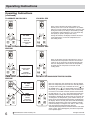
Operating Instructions
Operating Instructions
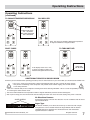
(continued)
TO CHANGE TEMPERATURE DISPLAY:
YOU WILL SEE:
DO THIS:
PRESS AND HOLD
THE UP/DOWN
BUTTONS TOGETHER
FOR 3 SECONDS
Note: The control is capable of displaying temperature
in degrees Fahrenheit or degrees Celsius.
FAULT CODES
TO TURN UNlT OFF:
DO THIS:
If the display reads "AS" or "ES",
a sensor has failed. Contact your
Authorized Frigidaire Service Center.
PRESS ON/
OFF BUTTON
ADDITIONAL THINGS YOU SHOULD KNOW
Now that you have mastered the operating procedure, here are more features in your control that you should become familiar with.
The "Cool" circuit has an automatic 3 minute time delayed start if the unit is turned off and on quickly.
This prevents overheating of the compressor and possible circuit breaker tripping. The fan will continue
to run during this time.
There is a 2-Second delay for the compressor shutting down when selecting FAN ONLY. This is to cover the possibility of having
to roll through to select another mode.
The control will maintain the set temperature within 2 degrees Fahrenheit, between 60F and 90F degrees.
After a power outage, the unit will memorize the last setting and return the unit to the same setting once power is restored.
Air Directional Louvers
AUGER WHEELS
Air directional louvers control air flow direction. Your air conditioner has the louver
type described below.
Auger Type
(8-WAY)
2009 Electrolux Home Products, Inc.
The louvers will allow you to direct the air flow Up or Down and Left or Right
throughout the room as needed. Rotate the Auger Wheels until the desired
Left/Right direction is obtained. Pivot horizontal louvers until the desired
Up/Down direction is obtained.
All rights reserved.
7