1
Chapter 3
Basic Operation Guide
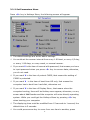
3-1 Definition of terms
n
Protected Mode: General operators such as students are
recommended to use this mode. All useful data, files or programs are
set to be protected and will be protected under this mode. All
modification of the protected data will be recovered after Restore
Data operation is executed.
n
Administrator Mode: The data on hard disk is not protected under
this mode, the operator can really install, uninstall, upgrade, etc.
even if the drive is set to be protected.
n
Save Data: If useful data are created under protected mode and
need to be saved, you can perform this operation to update the
changes you made during last session.
n
Recover Data: No matter how do you set the parameter, you could
recover data by press this hotkey <9> key.
n
Manual with password: If you select this item, you have to input
password after press <9> key, otherwise, you don’t need password
to recover data.
3-2 Operation Guide
3-2-1 Hotkeys Menu
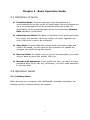
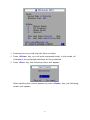
When booting your computer with HddGuarder installed completely, the
following screen (Hotkeys Menu) will appear:
9