1
Basic Operation
Chapter 4
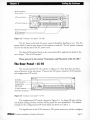
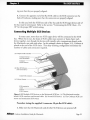
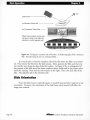
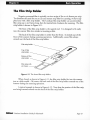
sure that the top of the image enters the film slot facing the left side of the scanner.
This is shown in Figure 4.10.
(a) Image on film
is in a landscape
orientation - - - - - - - - - - - - - -
Coolscan front
panel film slot -----l--o---ItAIllI(b) Film inserted narrow side
~F5~~§l
first when the image on the
film is in a landscape orientation - - - (c) Resulting image on
monitor is oriented
correctly - - - - - - - - - - - - - - - - - 1
Figure 4.10 Inserting film inro Coolscan mat is in a landscape orienration.
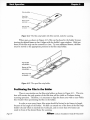
If the top of the image is inserted facing the right side of the scanner, the resulting
scan will be upside-down. Again, this can be corrected in the scanning software before
the final scan by performing a vertical flip.
Eiecling Slides
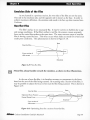
There are three ways in which you can eject film from Coolscan:
o
You can eject the slide through a software command.
o
You can use the Eject Coolscan Film application.
o The film is also ejected when power is first applied to the scanner. There is no
method for removing the film if electrical power is not available.
All of these methods are explained in the Software Reference for Scanners.
Do not use any tool other then your fingers to remove a slide. If a slide cannot be
removed easily you should contact Nikon's Service Department at 516-547-4351
for advice. Using tweezers or similar tools can damage the scanner, void your
warranty and cause possible electric shock.
Page 42
Nikon
Coolscan Imtallation Guide for Macintosh