1
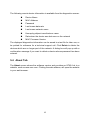
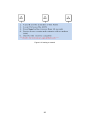
to the host Identify versions of all Driver DLLs and Libraries used (NDIS) and optionally HomePlug chipset manufacturer name MAC Firmware Version MAC addresses of all devices connected locally to the host Version of the Configuration Utility Vendor name Figure 5-5: Diagnostics screen The Lower panel displays the history of all devices that appeared on the computer over a certain period of time. All the devices and the parameters of the devices on the powerline network are listed. Devices that are active on the current logical network show a transfer rate in the rate column. Devices on other networks, or devices that no longer exist are shown with a “?” in the rate column. 15